ECO mode AUDI TT ROADSTER 2008 Owner's Manual
[x] Cancel search | Manufacturer: AUDI, Model Year: 2008, Model line: TT ROADSTER, Model: AUDI TT ROADSTER 2008Pages: 316, PDF Size: 70.1 MB
Page 109 of 316
___________________________________________________ O _n_ t_h _ e_ r_ o _ a_ d __ ,n
Starting and stopping the engine
Starting the engine
The engine can only be started with on original Audi key
and the clutch pedal* depressed.
- Set the parking brake.
Move the selector lever to the neutral position (automatic
transmission: selector lever in P or N)
~ & .
- On vehicles with manual transmission, fully depress the
clutch pedal.
- Turn the ignition key to position
G) ~ page 106, fig. 101
- do not depress the gas pedal when starting the engine!
- Let go of the key as soon as the engine starts.
A cold engine may at first be loud after it has been started. This is
due to the hydraulic valves building up the oil pressure . This normal
and no need for concern.
If the engine does not star t immediately, stop trying after 10
seconds and then try to restart the engine about 30 seconds later.
& WARNING
Never start or let the engine run in a confined or enclosed area.
Exhaust fumes from the engine contain carbon monoxide, a color
less and odorless gas. Carbon monoxide can be fatal if inhaled .
• Never leave the engine idling unattended. An unattended
vehicle with a running engine poses a danger of personal injury or
theft.
Controls and equip
ment
0 Note
• Avoid high engine speeds, fast acceleration or heavy engine
loads while the engine is still cold. This could damage the engine.
• The engine cannot be started by pushing o r towing the vehicle.
~ For the sake of the environment
To avoid unnecessary engine wear and to reduce exhaust emis
sions, do not let your vehicle stand and warm up. Be ready to drive
off immediately after starting your vehicle. Maintain moderate
speed until the engine is completely warm. Remember, the engine
performs best at operating temperature. •
Stopping the engine
-Turn the ignition key to position G) ~ page 106 , fig. 101.
& WARNING
• Never turn off the engine until the vehicle has come to a
complete stop.
• The brake booster and servotronic only work when the engine
is running . With the ignition turned off, you have to apply more
force when steering or braking. Since you cannot steer and stop
normally, this can lead to accidents and serious injuries.
• The radiator fan can continue to run for up to 10 minutes even
after you have turned off the engine and removed the ignition key.
The radiator fan can also turn on again if the engine coolant heats
up because of intense sunlight or heat build-up in the engine
compartment. .,
I • •
Page 121 of 316
_______________________________________________________ T_ r _a_ n_s_ m __ is_ s_ io_ n _ __.1111111
Downshifting
- Tap the selector lever backward (in the tiptronic setting)
o.
Switching to manual can be carried out with the vehicle stationary
as well as moving .
When accelerating, the transmission shifts into the next gear in
gears 1, 2, 3, 4 and 5 shortly before the maximum permissible
engine speed is reached.
If you have selected a lower gear than the current one, the transmis
sion wil l only shift down when the engine cannot be overspeeded.
If kick -down is actuated, the transmission shifts into a lower gear
independently of speed and engine rpm.•
Applies to vehicles: with S tron ic® and with T iptronic controls on the s tee ring wheel
Steering wheel with Tiptronic ® controls
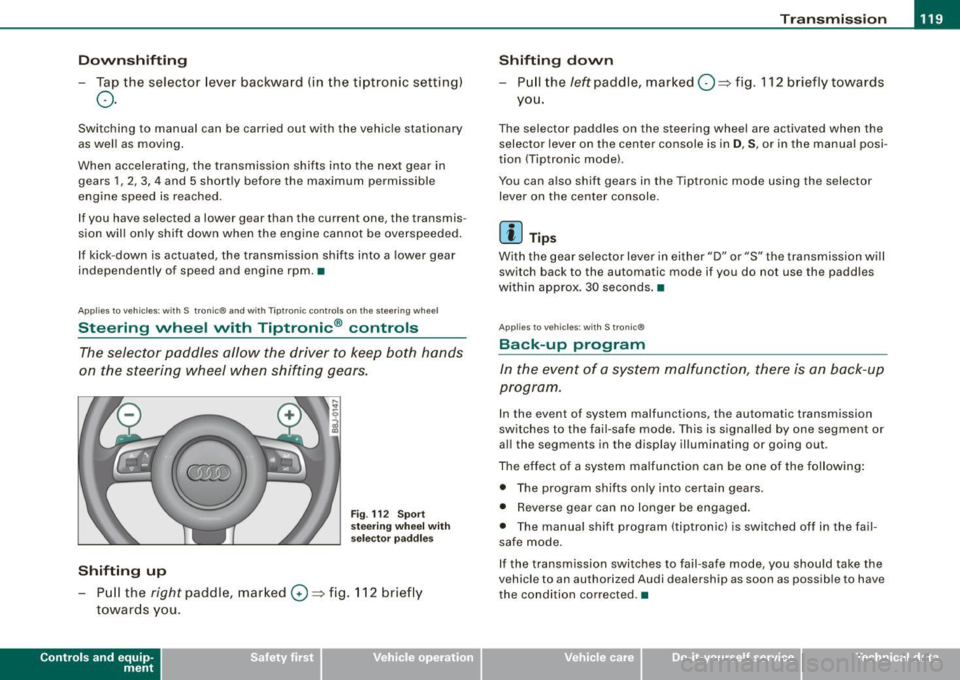
The selector paddles allow the driver to keep both hands
on the steering wheel when shifting gears.
Shifting up
F ig . 112 S port
stee ring w he el wi th
se lector paddl es
- Pu ll the right paddle, marked 0 => fig . 112 briefly
towards you .
Contro ls and eq uip
ment
Shifting d own
Pull the left paddle, marked O ::::> fig. 112 brief ly towards
you .
The selector paddles on the steering wheel are activated when the
selector lever on the center console is in
D, S, or in the manual posi
tion (Tiptronic model.
You can also shift gears in the Tiptronic mode using the selector
lever on the center console .
[ i ] Tips
With the gear se lector lever in either "D" or "S" the transmission wi ll
switch back to the automatic mode if you do not use the paddles
within approx . 30 seconds .•
App lies to vehic les: w ith S tronic®
Back -up program
In the event of a sys tem malfunction, there is an back-up
program .
In the event of system malfunctions, the automatic transmission
switches to the fai l-safe mode . This is signa lled by one segment or
al l the segments in the display illuminating or going out.
The effect of a system ma lfunction can be one of the fo llowing :
• The program shifts only into certain gears.
• Reverse gear can no longer be engaged .
• The manua l shift program (tiptronicl is switched off in the fail
safe mode.
If the transmission switches to fail-safe mode, you should take the
vehicle to an authorized Audi dea lership as soon as possible to have
the condition corrected .•
Vehicle care I I irechnical data
Page 123 of 316
HomeLink® -_______________ ___.
Homelink®
Universal remote control
Applies to veh icles: wit h Home link® unive rsa l rem ote cont rol
General information
The Homelink® feature can learn up to three radio
frequency codes for most current transmitters used for
operating garage doors, estate gates, home or outdoor
lighting systems, and other devices.
You must first program the Homelink® transmitter before you can
use the system~
page 121, "Programming the Homelink® trans
mitter" .
In order to program the Homelink® transmitte r for devices utili zing
rolling cod e, a second person on a ladder who can safely reach the
garage door opener motor is recommended. It is also necessary to
locate the "learn" button on your garage door opener motor . Refer
to the operating instructions for the opener, as the location and
color of this button may vary by manufacturer .
You can still use the original remote control for the device at any
time .
& WARNING
• Never use the Homelink"" transmitter with any garage door
opener that does have not the safety stop and reverse feature as
required by federal safety standards. This includes any garage
door opener model manufactured before April 1, 1982.
• A garage door opener which cannot detect an object, signaling
the door to stop and reverse does not meet current federal safety standards. Using a garage door opener without these features
increases risk of serious injury or death .
Con tro ls and eq uip
ment
& WARNING (continued)
• For safety reasons never release the parking brake or start the
engine while anyone is standing in front of the vehicle.
• A garage door or an estate gate may sometimes be set in
motion when the Homelink® remote control is being
programmed .
If the device is repeatedly activated, this can over
strain motor and damage its electrical components -an over
heated motor is a fire hazard!
• To avoid possible injuries or property damage, please always
make absolutely certain that no persons or objects are located in
the range of motion of any equipment being operated. •
Applies to vehi cles : wit h Home link ® un iv ers al re mote co ntrol
Programming the Homelink ® transmitter
The transmitter is programmed in two phases. For rolling
code transmitters, a third phase is also necessary.
0
Vehicle care I I
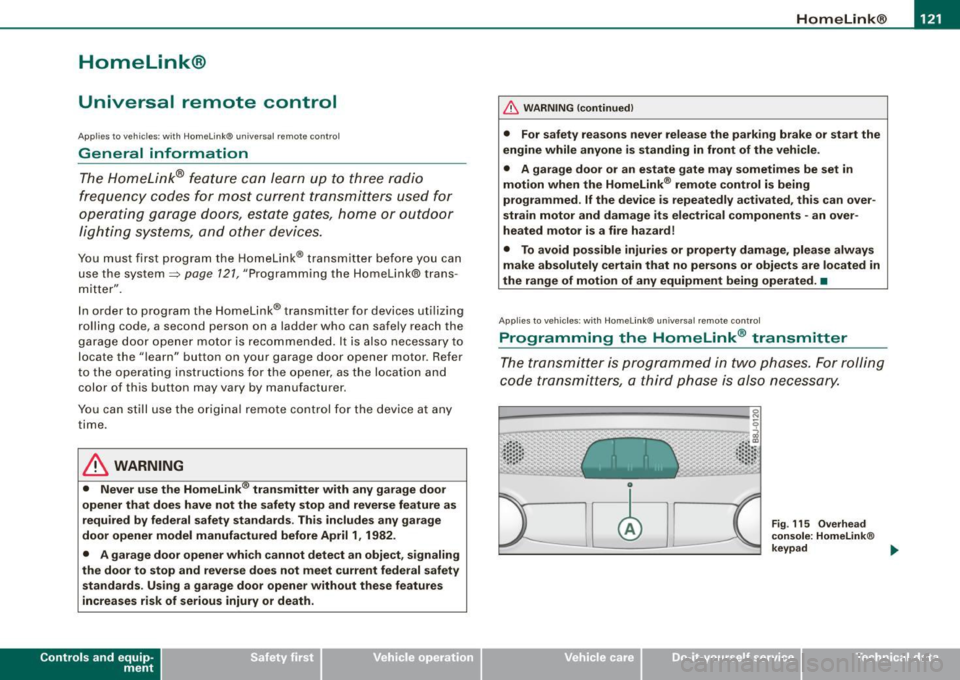
Fig. 115 Overhead
console: Homelink®
keypad ...
irechnical data
Page 124 of 316
-L_!H~o~m~ e~L:!!in~ k~®~------------------------------------------------
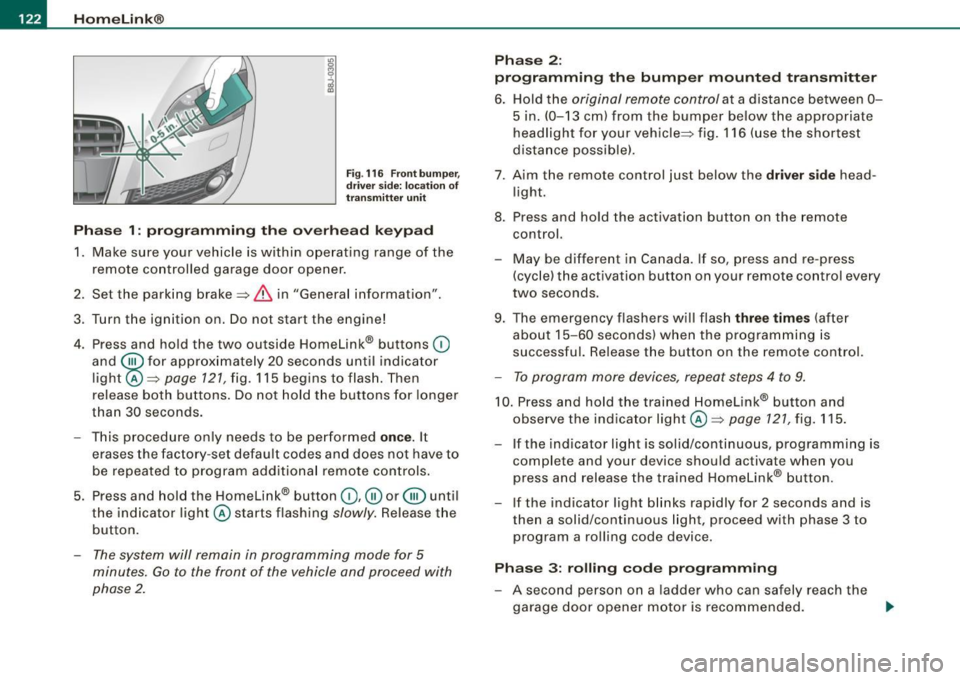
Fig . 116 Front bumper ,
driver side: location of
transmitter unit
Phase 1: programming the overhead keypad
1. Make sure your vehicle is within operating range of the
remote controlled garage door opener.
2. Set the parking brake::::,
& in "Genera l information".
3. Turn the ignition on. Do not start the engine!
4. Press and hold the two outside Homelink® buttons
(D
and @f or approxim~tely 20 sec_onds until indicator
light@::::,
page 121, fig. 115 begins to flash. Then
release both buttons. Do not hold the buttons for longer
than
30 seconds.
- This procedure only needs to be performed
once. It
erases the factory-set default codes and does not have to
be repeated to program additional remote controls.
5. Press and hold the Homelink® button
(D , ® or @ until
the indicator light@starts flashing
slowly. Release the
button.
- The system will remain in programming mode for 5
minutes.
Go to the front of the vehicle and proceed with
phase 2.
Phase 2:
programming the bumper mounted transmitter
6. Hold the original remote control at a distance between 0-
5 in. (0-13 cm) from the bumper below the appropriate
headlight for your vehicle::::, fig.
116 (use the shortest
distance possible).
7 . Aim the remote control just below the driver side head
light.
8. Press and hold the activation button on the remote control.
- May be different in Canada. If so, press and re-press
(cycle) the activation button on your remote control every
two seconds.
9. The emergency flashers will flash three times (after
about
15-60 seconds) when the programming is
successful. Release the button on the remote control.
- To program more devices, repeat steps 4 to 9.
10. Press and hold the trained Homelink® button and
observe the indicator light @::::,
page 121, fig. 115.
If the indicator light is solid/continuous, programming is
complete and your device should activate when you
press and release the trained Homelink® button.
- If the indicator light blinks rapidly for 2 seconds and is
then a solid/continuous light, proceed with phase 3 to
program a rolling code device.
Phase 3: rolling code programming
- A second person on a ladder who can safely reach the
garage door opener motor is recommended.
~
Page 126 of 316
• .___H_ o_ m _ e _L_i _ n _k _® ____________________________________________________ _
Pr og ra mming th e bump er m ount ed tr ansmitt er
1. Hold the original remote control at a distance between 0-
5 in. (0 -13 cm ) from the bumper below the appropriate
headlight for your vehicle (use the shortest distance
poss ible).
2. Aim the remote control just below the
dr iver s ide head
l ight.
3. Press and hold the activation button on the remote control.
4. The emergency flashers will flash
three tim es (after
about
15-60 seconds) when the programming is
successful. Now release the button on the remote
co ntrol.
- If the dev ice utilizes a rol ling code, please f ollow phase 3
of ~
page 121, "Programming the Home Link® trans
m itter" for rolling code programming .
This pr oce dure w ill ca use the existing pr ogra mm ing on th e
H om eli nk® button to be eras ed ! •
A pplies to vehicl es: w ith H om eli nk® univ er sal re mot e con tro l
Erasing the programming of the HomeLink ®
transmitter
When you erase the programming, the programming on
all three of the transmitter channels with be lost!
- Perform steps 1 to 4 as described on~ page 122 , "Phase
1 : programming the overhead keypad".
When comp let ed, the Hom elink ® system will be in the program
ming mode and is then ready to learn the codes for remote
controlled devices.
[ i ] T ip s
• Programmed buttons cannot be erased ind ividua lly.
• For security reasons you are adv ised to erase the programming
of the Homelink ® system befo re you sell your vehic le. •
Applies to vehicle s: with Home link® univ er sa l re m ote con tro l
Information and accessories
If you wou ld like more information on Homelink ®, where to
pu rchase the Homelink ® compatib le products , or would li ke to
purchase the Homelink ® Home Lighting Package, please call tol l
free: 1 -800 -355 -3515.
[ i ] T ip s
• The Homelink ® universal transmitter complies with part 15 of
the FCC rules and RSS -2 10 of IC part 15. Operation is subject to th e
following conditions :
- this device may not cause harmful interference, and
- this device must accept any interference that may be received
including in terference that may cause undesired operation .
• Changes or modifications not express ly approved by the party
respons ible for compliance could void th e user 's authority to
operate the device (DOC : ISTC 1763 102 264 Pr ince MODEL/FCC ID :
CB2 V94800l. •
Page 143 of 316
& WARNING !continue d)
• Torn or fr ayed safety b elt s can tear and damaged b elt hard
ware can bre ak in an ac cident. Inspect belt s regularly . If webb ing ,
bind ings , buckles , or retra ctors are d am aged , have belts repla ced
by an authori zed Audi dealer or qualified work shop.
• Safety belt s th at have been worn and lo aded in an accident
mu st be repl aced with the correc t replacement saf ety belt by an
autho riz ed Audi de aler o r qualified work shop . Repla cement may
be nece ssary even if d amage cannot b e clea rly seen. Anchorage s
that wer e loaded must also be inspe cted .
• Never rem ove, modif y, dis ass em ble , or tr y to r epa ir the safety
belts your self .
• Alway s keep the belt s cle an. Dirty belt s may not work properly
and can impair the fun ction of the inertia reel=>
page 212 , "Safety
belts ".•
Safety belts
Fastening safety belts
Seat first -everybody buckle up!
Safety first
Fig . 126 Belt bu ckle
a nd ton gue on th e
driv er's s eat
Safety b elts
To provid e ma ximum protec tion, sa fety belts m ust always
be pos itioned c orrect ly on the wear er's bod y.
- Adjust the front seat and head restraint properly
=> page 87, "General recommend atio ns".
- Hold the belt by the tongue and pull it evenly across the
c h es t and pelvis=> &.
- Inse rt the tongue into the correct buckle of your seat
unti l you hea r it latch securely => fig. 126 .
- Pull on t he b elt t o mak e sur e tha t it is se curely l atc hed in
t h e buckle .
Automatic safety belt retra cto rs
Every safety belt is equipped with an automatic be lt retractor on the
shoulder belt . This feature locks the belt when the belt is pulled out
f ast, during hard braking and in an accident. The be lt may a lso lock
when you drive up or down a steep hill or through a sharp curve.
During norma l d riving the belt lets you move free ly .
Safety be lt pretensioners
The safety belts are equipped with a be lt pretensioner that helps to
tighten the safety belt and remove slack when the pretensioner is
activated. T he funct io n of the pretensioner is mon itored by a
warning light =>
page 19, "Airbag system
t!! (USA models)/!,~ · (Canada models)".
Swit chable locking featur e
Every safety belt except the one on the driver seat is equipped with
a switchable locking feature that
must be used when the safety be lt
is used to attach a chi ld seat. Be sure to read the important info rma-
tion about this feature =>
page 177. ._
Vehicle care I I Technical data
Page 162 of 316
___ A_ ir_ b_ a-g _ s_y _s_ t_ e_ m _________________________________________________ _
Repair, care and disposal of the airbags
Parts of the airbag system are installed at many different places on
your Audi. Ins tal li n g, r em ovin g, s erv ic ing o r re pairi ng a part in an
area of the veh icle can damage a part of an a irbag system and
prev ent th at system from working pr oper ly in a c ollisio n.
There are some important things you have to know to make sure
that the effect ive ness of the system will not be impai red and that
discarded co mpone nts do not cause inju ry or po llute t he env iro n
ment .
& WARNING
Improper care , servicing and repair procedures can increase the
r isk of personal injury and death by preventing an airbag from
deploying when needed or deploying an airbag unexpectedly:
• Never cover , obstruct , or change the steering wheel horn pad
or airbag cover or the instrument panel or modify them in any way.
• Never attach any objects such as cup holders or telephone
mountings to the surfaces covering the airbag units.
• For cle aning the horn pad or instrument panel , use only a soft ,
dry cloth or one moi stened with plain water. Solvents or cleaners
could damage the airbag cover or change the stiffness or strength
of the material so that the airbag cannot deploy and protect prop
erly .
• Never repair , adjust , or change any parts of the airbag system.
• All work on the steering wheel , instrument panel, front seats or
electrical system (including the installation of audio equipment ,
cellular telephones and CB radios, etc .} must be performed by a
qualified technician who has the training and spec ial equipment
ne cessary .
• For any work on the airbag system , we strongly recommend
that you see your authorized Audi dealer or qualified workshop .
• Never modify the front bumper or parts of the vehicle body.
& WARNING (continued)
• Always make sure that the side airbag can inflate without inter
ference :
- Never install seat covers or replacement upholstery over the
front seatbacks that have not been specifically approved by
Audi .
- Never use addit ional seat cushions that cover the areas
where the side airbags inflate.
- Damage to the original seat covers or to the seam in the area
of the side airbag module must always be repaired immedi
ately by an authorized Audi dealer .
• The airbag system can be activated only once . After an airbag
has inflated, it must be replaced by an authorized Audi dealer or
qualified technician who has the technical information , training
and special equipment necessary.
• The airbag sy stem can be deployed only once . After an airbag
has been deployed , it must be replaced with new replacement
parts designed and approved especially for your Audi model
version. Replacement of complete airbag systems or airbag
components must be performed by qualified workshops only .
Make sure th at any airbag service action is entered in your Audi
Maintenance
& Warranty booklet under AIRBAG REPLACEMENT
RECORD .•
Other things that can affect Advanced Airbag
performance
Changing the vehic le 's suspension system can change the way that
th e A dva nced Ai rbag Sys te m p erform s in a c ras h. F or example,
using tire -rim combinations not approved by Audi, lowering the
ve hicle, c hanging the stiff ness of th e sus pensi on, in clud ing the
springs, suspens ion struts, shock absorbers etc . can chang e the
forces that a re measured by the airbag sensor s and sent to the e lec -
tronic control unit. Some suspension changes ca n, for example, .,_
Page 172 of 316
___ C_ h_ il_ d _S_ a_fe _ ty ______________________________________________ _
the safety belt as compared to the tension on the belt when it is
used to attach a child restraint to the seat. The sensor below the latch for the safety belt for the front seat passenger measures the
tension on the belt. The input from this sensor is then used with the
weight to "decide", whether there is a child restraint with a typical 1
year-old child on the front passenger seat and whether or not the
airbag must be turned off. •
Child restraints and Advanced Airbags
Regardless of the child restraint that you use, make sure that it has
been certified to meet United States Federal Motor Vehicle Safety
Standards and has been certified by its manufacturer for use with
an airbag. If in exceptional circumstances you must use it on the
front passenger seat, carefully read all of the information on child
safety and Advanced Airbags and heed all of the applicable WARN
INGS. Make certain that the child restraint is correctly recognized by
the weight-sensing mat inside the front passenger seat, that the
front passenger airbag is turned off and that the airbag status is
always correctly signaled by the
PASSENGER AIR BAG OFF light.
Many types and models of child restraints have been available over
the years, new models are introduced regularly incorporating new
and improved designs and older models are taken out of produc
tion. Child restraints are not standardized. Child restraints of the same type typically have different weights and sizes and different
'footprints,' the size and shape of the bottom of the child restraint
that sits on the seat, when they are installed on a vehicle seat. These
differences make it virtually impossible to certify compliance with
the requirements for advanced airbags with each and every child restraint that has ever been sold in the past or will be sold over the
course of the useful life of your vehicle.
For this reason, the United States National Highway Traffic Safety
Administration has published a list of specific type, makes and
models of child restraints that must be used to certify compliance
of the Advanced Airbag System in your vehicle with the suppression requirements of Federal Motor Vehicle Safety Standard 208.
These
child restraints are:
A. Car beds, manufactured on or after September 1,
2004:
• Cosco Dream Ride 02 -719
B. Rear facing child restraint systems, manufactured
on or after September 1, 2004:
(When the restraint system comes equipped with a removable base,
compliance has to be certified with or without the base).
• Britax Handle with Care 191
• Century Assura 4553
• Century Smart Fit 4543
• Cosco Arriva 02727
• Evenflo Discovery Adjust Right 212
• Evenflo First Choice 204
• Graco Infant 8457
C. Forward-facing convertible child restraint systems,
manufactured on or after September 1, 2004:
• Britax Roundabout 161
• Britax Expressway
• Century Encore 4612
• Century STE 1000 4416
• Cosco Olympian 02803
• Cosco Touriva 02519
• Evenflo Horizon V 425
• Evenflo Medallion 254
• Safety First Comfort Ride 22-400
Page 187 of 316
the vehicle begins to skid, ESP brakes the appropriate wheel automatical ly .
The vehicle is stabilized again by the forces acting on the wheel during braking. With an oversteering vehicle (tendency for the rear
end to skid out of the curve), the brake application is mainly at the
front wheel on the outside of the curve, with an understeering
vehicle (tendency to run wide in the curve) at the rear wheel on the
inside of the curve or additionally at the other wheels as needed .
This brake application is accompanied by noises.
ESP works in conjunction with ABS=:>
page 189. If there is ma lfunc
tion in the ABS, ESP is also inoperative .
Activa ting
The ESP is automatica lly activated when the engine is started, and
it performs a self-test. As soon as the test is completed, the system
is in normal operating mode . With ASR deactivated, or with ESP/ASR
deactivated, pressing the button=>
page 184, fig. 142 returns the
system to normal operation.
D eac tiva ting
ESP should norma lly be activated at all times because this ensures
optimum vehicle stability . Only in certain exceptional cases it does
make sense to deactivate Anti -Slip Regulation (ASR) or the Elec
tronic Stability Program !ESP) by pressing the button =:>
page 184,
fig. 142. Both deactivation stages can only be activated from normal
mode.
Dea cti vat ing ASR
Tap the switch . Deactivation is indicated by s low flashing of the ESP
lamp in the instrument c luster. In certain situations (e.g. driving
with snow chains, in deep snow or on loose ground, or when rocking the car free), it may be necessary to deactivate ASR. Deacti
vation is effective only up to a speed of about 45 mph (70 km/h). At higher speeds, ASR is switched on again automatical ly in front
whee l drive vehicles, deactivation is possible only up to about 30
mph (50 km/h). With a ll -whee l drive vehicles, ASR is active above
Controls and equip
ment Safety first Vehicle operation
In
te llig ent tec hn olo gy
about 45 mph (70 km/h) and deactivated automatical ly below this
speed.
D eac tiva tin g ES P/ASR
Press the button for more than 3 seconds . Deactivation is indicated
by the ESP lamp in the instrument c luster staying on permanently .
This deactivates the E lectronic Stabi lity Program (ESP) in addition to
ASR . No Electronic Stability System operation and no Anti-Slip
Regu lation is availab le across the entire speed range; ASR and ESP
are activated only when the brakes are used for the duration of the
braking action and remain active until a stab le vehicle condition has
been reached. There is no driving situation which requires ESP to be
deactivated, so this should only be done if the driver's skill and the
traff ic situation permit .
& WARNING
• The limi ts of ph ysics ca nnot be suspe nd ed by E SP. E ven in vehi
cles w ith ESP, you should always adapt your dr iving to road and
tr affi c co ndition s. Thi s is part icul ar ly tr ue on a s lippe ry and wet
road . Do not be te mpt ed b y th e incre as ed safet y prov ided t o ta ke
ri sks - dang er of an accident !
• Plea se note that when ASR or ESP /ASR i s deactivated , the drive
w heel s can spin on icy and slipper y ro ad s and the vehi cle can
break away - da nger of skiddin g!
Ii ] Tip s
In the event of a defect in the rear spoiler system or in Audi
magnetic ride, it can happen that ASR and ASR/ESP cannot be deac
tivated, or they are activated automatica lly in the deactivated
state. •
Vehicle care Do-it-yourself service Technical data
Page 189 of 316
Activating
The ESP is automatically activated when the engine is started and it
performs a self-test. You can activate a deactivated ASR if required
by pressing the=>
page 184, fig. 142 button. When it is activated,
the message
ESP/ASR on appears briefly in the display. Vehicles
with front -wheel drive a deactivated ASR automatically re -activates
itself at a speed of 40 mph (70 km/h).
Deactivating
You can deactivate the ASR if required by pressing the button (for
less than 3 seconds)=>
page 184, fig. 142. With the ASR deactivated,
the ESP check light comes on, see=>
page 18. The message ASR off
appears in the display as well. On vehicles with front -wheel drive:
deactivation is possible only up to 30 mph (50 km/h) for safety
reasons. Vehicles with all -wheel drive : the ASR can be deactivated
at any speed.
The ASR should normally be activated all the time. Only in certain exceptional situations when some slip is desirable does it make
sense to deactivate the ASR. Examples:
• when driving with tire chains
• when driving in deep snow or on loose ground and
• when rocking the vehicle loose after it has become stuck.
When the abnormal situation is over, you should activate the ASR
again.
& WARNING
The increased safety afforded by ASR does not mean that you can
take safety risks. Always adapt your driving style to the road
conditions and traffic situation.
[ i J Tips
To ensure that the ASR works properly, all four wheels must be fitted
with identical tires. Any differences in rolling radius of the tires can
Intelligent technology
cause the system to reduce engine power when this is not desired.
See also ::::>
page 249, "New tires and replacing tires and wheels".
Rear spoiler
The rear spoiler improves vehicle handling and enhances
driver control.
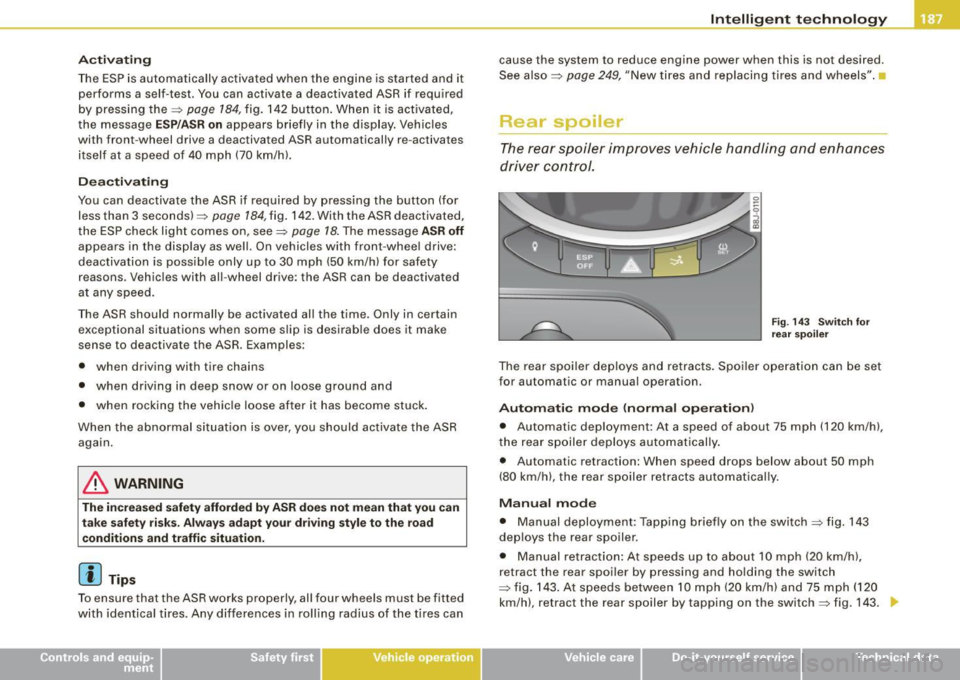
Fig. 143 Switch for
rear spoiler
The rear spoiler deploys and retracts. Spoiler operation can be set
for automatic or manual operation .
Automatic mode (normal operation)
• Automatic deployment : At a speed of about 75 mph (120 km/h),
the rear spoiler deploys automatically.
• Automatic retraction: When speed drops below about 50 mph
(80 km/h), the rear spoiler retracts automatically.
Manual mode
• Manual deployment: Tapping briefly on the switch ::::> fig. 143
deploys the rear spoiler .
• Manual retraction: At speeds up to about 10 mph (20 km/h),
retract the rear spoiler by pressing and holding the switch
::::> fig. 143. At speeds between 10 mph (20 km/h) and 75 mph (120
km/h), retract the rear spoiler by tapping on the switch=> fig. 143 .
Vehicle care I I irechnical data