ECO mode AUDI TT ROADSTER 2008 User Guide
[x] Cancel search | Manufacturer: AUDI, Model Year: 2008, Model line: TT ROADSTER, Model: AUDI TT ROADSTER 2008Pages: 316, PDF Size: 70.1 MB
Page 40 of 316
Driver inf ormation sy ste m
[ i J Tip s
Even though your vehicle is equ ipped with a speed warning system ,
you should still watch the speedometer to make sure you are not
driving faste r than the speed limit. •
Speed warning 1 : setting a speed limit
Warning threshold 1 is set by the button.
Storing the ma ximum speed
Drive at the desired maximum speed.
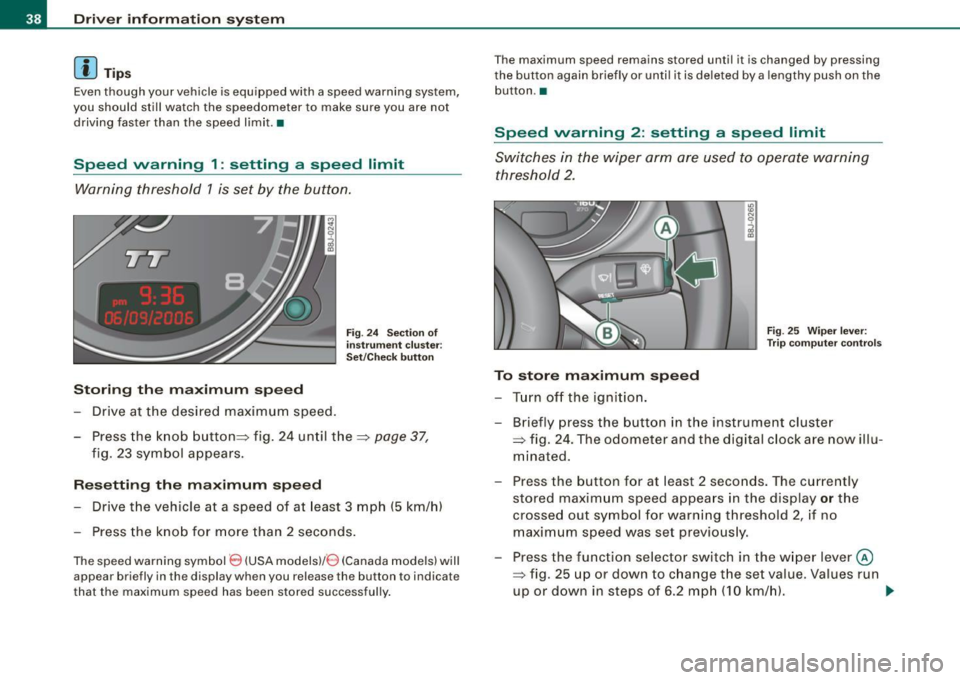
Fig . 2 4 Sec tio n of
in strum en t cl ust er:
Set/C hec k butto n
- Press the knob button~ fig. 24 until the ~ page 37,
fig. 23 symbol appears .
Resetting the max imum spe ed
- Drive the vehicle at a speed of at least 3 mph (5 km/h)
- Press the knob for more than 2 seconds .
The speed warning sy mbol 8 (USA models)/ 8 (Canada models) will
appear briefly in the d isplay when you release the button to indica te
that the maximum speed has been stored successfully . T
he maximum speed remains stored until it is changed by pressing
t he button again briefly or unti l it is dele ted by a lengthy push on the
but ton .•
Speed warning 2 : setting a speed limit
Switches in the wiper arm are used to operate warning
threshold 2.
To stor e maximum spee d
-Turn off the ignition.
Fig . 25 Wiper leve r:
T rip computer con tro ls
- Briefly press the button in the instrument cluster
=> fig. 24 . The odometer and the digital clock are now illu
mina ted .
- Press the button for at least 2 seconds. The currently stored maximum speed appears in the display
or the
crossed out symbol for warning threshold 2, if no
maximum speed was set previous ly.
- Press the function selector switch in the w iper lever @
=> fig. 25 up or down to c hange the set value . Va lues run
up or down in steps of 6 .2 mph (10 km/h). .,_
Page 42 of 316
Driver inf ormation sy ste m
To ta l-tr ip mem ory ( Trip compu te r 2)
Unlike the single -trip memory, the total -tr ip memory is not reset
automatically . This permits you to evaluate your driving data for the
entire period between manua l resets.
Fu el r an ge
The estimated cruising range in miles (km) appears in the display.
This tells you how far your vehicle will be able to travel on the
current tank of fuel and with the same driving sty le . The display
changes in increments of 6 miles (10 km).
The cruising range is calculated based on the fuel consumption for
t he last 18 miles (30 km). If you drive conservatively, the cruising
range will increase .
Average fuel m ile ag e
The average fuel economy in MPG (1/100 km) since you last cleared
the memory appears in this display. You can use this display to
adjust your driving technique to achieve a desired mileage.
C ur rent fuel mil eage
The instantaneous fuel consumption in mi les per gallon (1/100 km)
is shown in th is d isplay. You can use this display to adjust your
driving technique to achieve a desired mileage.
Fue l consumption is recalcu la ted at intervals of 33 yards (30
meters). When the vehicle is stationary, the most recent fuel
consumption is d isplayed .
Average speed
The average speed in mph (km/h) s ince the last time the display was
reset appears in the display .
Elap se d time
The length of time that you have been driving since you last reset
the memory appears in this display.
Di stance
The elapsed distance since the last time the memory was cleared
appears in the display. The maximum distance that can be recorded
is 9,999 .9 miles (9,999 .9 kilometers).
[ i ] Tips
• Fuel consumptions (average and current), range and speed are
displayed in metric units on Canadian models.
• All stored values will be lost if the vehicle battery is
disconnected .•
Operation
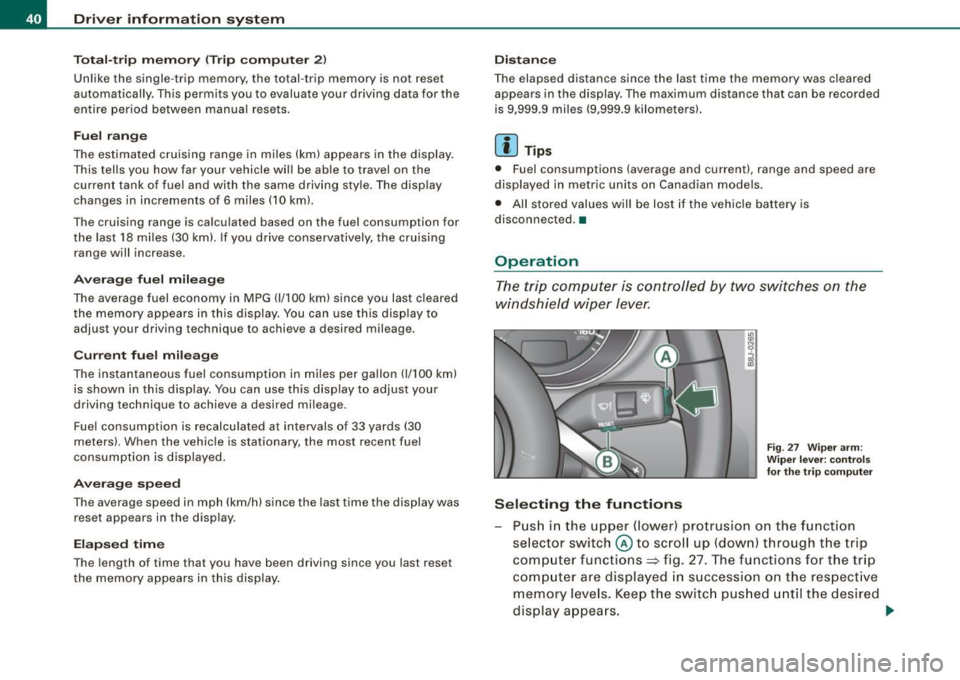
The trip computer is controlled by two switches on the
windshield wiper lever.
S ele cting th e fun ctions
Fig. 27 Wiper ar m:
W iper l ever: co ntrols
fo r th e tr ip com pute r
P u sh in the upper (lower) pro trusion o n the function
se lector switch @to scroll up (dow n) through the trip
computer functions~ fig. 27. The functions for the trip
comp uter are displayed in succession on the respect ive
memory leve ls. Keep the switc h pus hed until the desired
display appears . .-,,
Page 51 of 316
Master key battery replacement
Each master key contains a battery housed under the
cover.
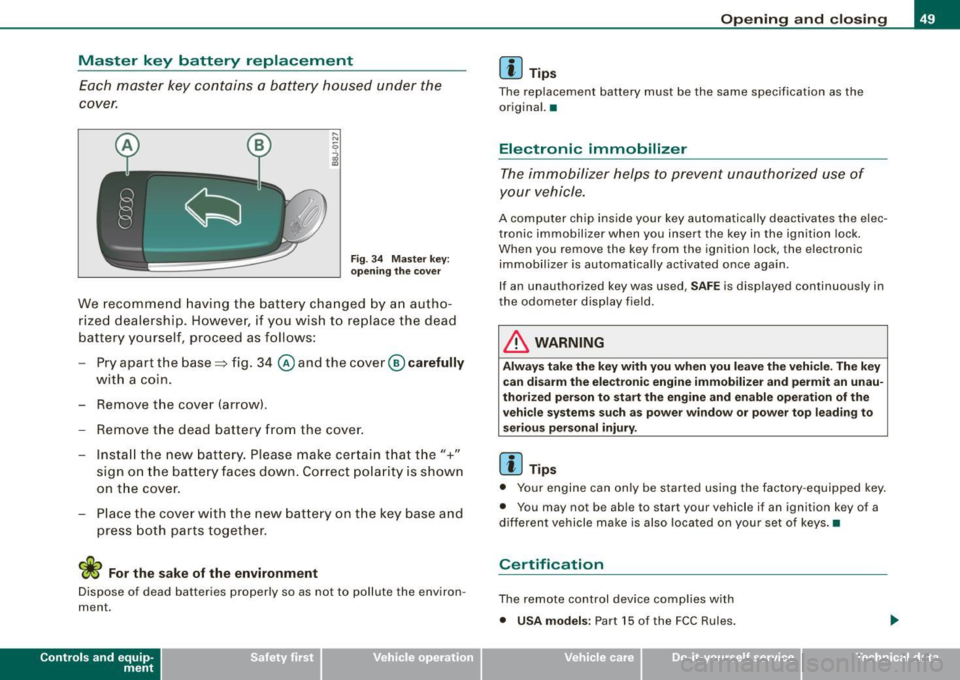
Fig . 3 4 Master key:
o peni ng the cover
We recommend having the battery cha nged by a n autho
rized dealership. However, if y ou wish to replace the dead
battery y ourself, proceed as follows :
- Pry apart the base => fig. 34
@ and the cover@ carefully
with a coin.
- Remove the cove r (arrow).
- Remove the dead battery from the cover.
- I nsta ll the new battery . Pl eas e make ce rtain t hat t he" +"
sign on the batte ry faces down . Correct po la rity is shown
on t he cover .
- Place the cover w ith the new bat tery on t he key base and
press both parts together .
For the sake of the environment
Dispose of dead batteries proper ly so as not to pol lute the environ
ment.
Con tro ls and eq uip
ment
Op ening and clo sing
[ i ] Tip s
The replacement battery must be the same specification as the
origina l.•
Electronic immobilizer
The immobilizer helps to prevent unauthorized use of
your vehicle.
A computer chip inside your key automatically deactivates the elec
tronic immobilizer when you insert the key in the ignition lock.
When you remove the key from the ignition lock, the e lectronic
immobil izer is automatically activated once again.
If an unauthorized key was used, SA FE is displayed continuously in
the odometer display field .
& WARNING
Always ta ke the key with y ou when you le ave the vehi cle. The key
ca n dis arm the el ectroni c eng ine immob ilizer and permit an un au
thori zed p erson to start the engine and enabl e ope ration of the
v ehi cle s ystems su ch a s po wer window or power t op leading to
s eri ous pe rso nal injury .
[ i ] Tip s
• Your engine can only be started using the fac tory -equipped key .
• You may not be ab le to start your vehicle if an ignition key of a
different vehicle make is a lso loca ted on your set of keys .•
Certification
The remote control device comp lies with
• USA models : Part 15 of the FCC Rules.
Vehicle care
I I irechnical data
Page 77 of 316
Ignition ON , light swit ch at @ .
With the ignition switched ON, the g low of instrument needles can
be adjusted to appear brighter or dimmer.
Ignition ON , ligh t switch at :oo ; or io.
With the lights switched on , the brightness of instrument cluster
(i .e. needles, gauges and displays) and center conso le i llu m in ation
can be adjusted .
0 Note
The instrument c luster and center console illumination (gauges and
needles) comes on when you switch on the igni tion and the
vehicle
headlights are off .
Be aware of the followin g difference be tween
models built to US o r Canadian specifications :
• USA models : illumination of the in strument cluster (gauges and
needles), dash and center console around the gearshift lever is
controlled by a light sensor located in the instrument panel. The
instrument panel illum ination will automatically become dimmer
as the daylight fades away and eventually will go out completely
when outside light is very low . This is to remind you , the d river , to
s witch on the headlight s before it gets too dark.
• Canada models : instrument panel illum ination will stay br ight
regardle ss of the inten sity of ambient light . Always be aware of
c hanges in outside light conditions while you are driving . Respond
in time to fading dayli ght by turning the light switch to position
iD
(or "AUTO" if your car is equipped with this feature) to turn on your
headlights. •
Bi-Xenon headlights*
Afte r starting the engi ne, the b i- xeno n headlights are au tomatical ly
adjusted to the load and angle of the vehic le (for example, during
acce lera tion and braking). This prevents oncoming traffi c from
experiencing unnecessary headlight g lare from your bi -xenon head
lig hts .
Con tro ls and eq uip
ment
Clear vision
I f the system is not operating properly, a warning symbo l in the
Au to-Check C ontr ol is displayed
=> page 35 . •
Emergency flasher tfft,,.
T he e mergency flasher m akes other motor ists aware that
y o u or yo ur vehicle are i n an e merge ncy si tuation.
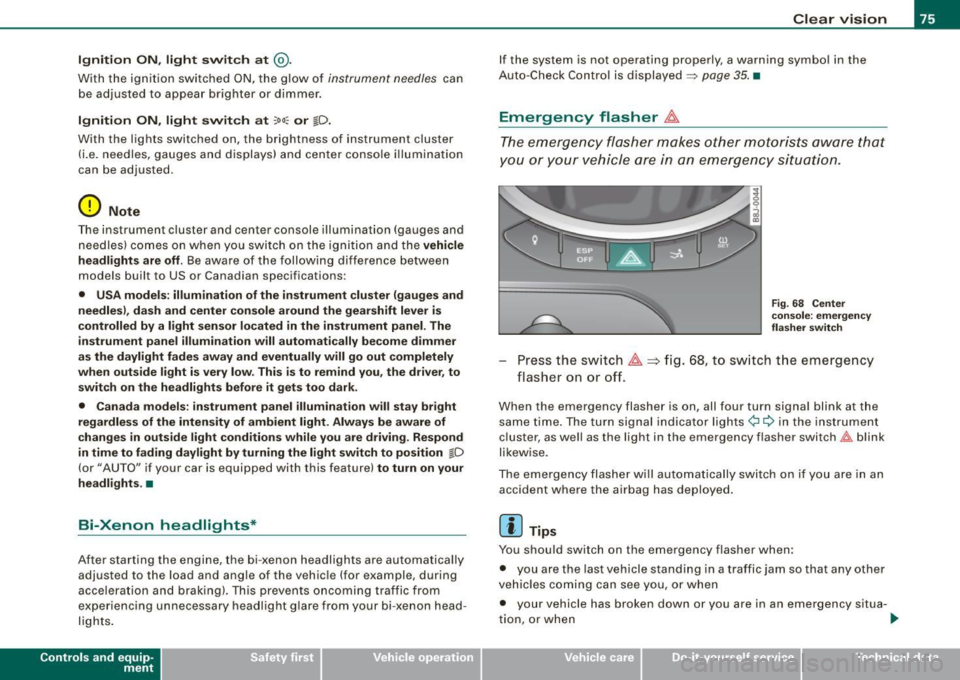
Fig . 68 Center
co nsole : emergency
fla sher sw itch
Press the sw itch ~=:,fig. 68, to s witch t he emergency
flasher on or off.
When the emergency flasher is on, all four turn signal blink at the
same time . The tu rn signal indi cato r lights
¢i Q in the instrument
c luster, as well as the light in the emergency flasher switch
J:&. b link
likewise.
The eme rgency flashe r will automat ically switch on i f you are in an
accident where the airbag has deployed .
[ i ] Tips
You should switch on the emergency flasher when:
• you are the last vehicle standing in a traffic jam so that any other
vehicles coming can see you, or when
• your vehicle has broken down or you are in an emergency s itua -
tion, o r when _,,,
Vehicle care I I irechnical data
Page 80 of 316
Clear vision
Wiper and washer system
Windshield wiper ~
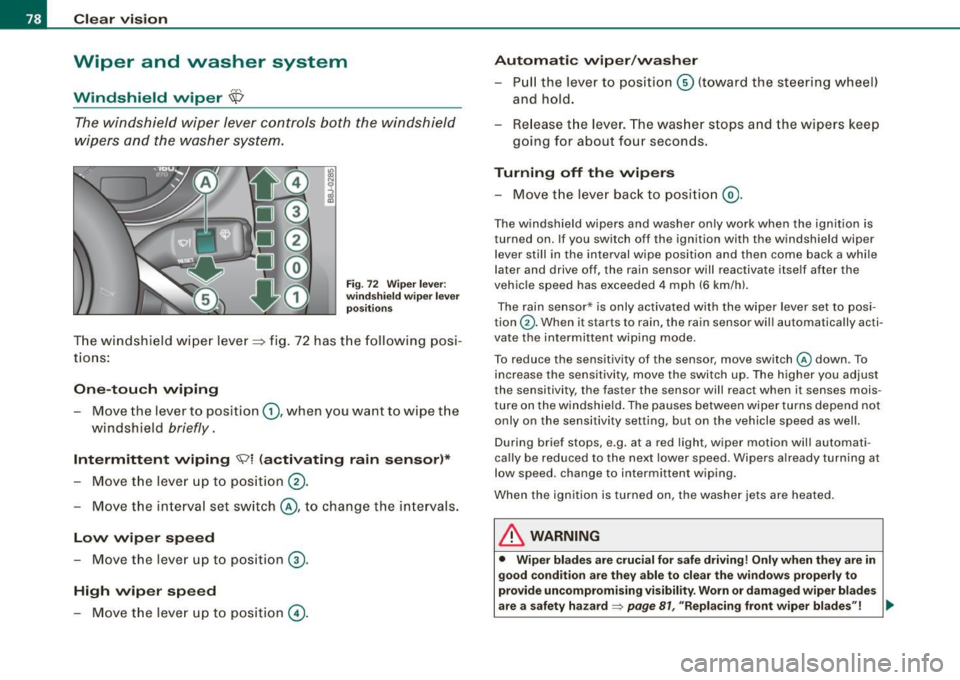
The windshield wiper lever controls both the windshield
wipers and the washer system.
Fig. 72 Wiper lever:
windshield wiper lever
positions
T he windshield wiper lever :::::> fig. 72 has the following posi
tions:
One -touch wiping
Move the lever to position G), when you want to wipe the
windshield
briefly.
Intermittent wiping ~ l (activating rain sensor)*
Move the lever up to position 0-
- Move the interval set switch@, to change the inter vals .
Low wiper speed
-Move the lever up to position ©-
High wiper speed
- Move the lever up to position @.
Automatic wiper/washer
- Pull the lever to position© (toward the steering wheel)
and hold.
- Re lease the lever . The washer stops and the wipers keep
going for about four seconds .
Turning off the wipers
-Move the lever back to position @.
The windshield wipers and washer only work when the ignition is
turned on. If you switch off the ignition with th e windshield wiper
lever still in the interval wipe position and then come back a while
later and drive off, the rain sensor will reactivate itse lf after the
vehic le speed has exceeded 4 mph (6 km/h).
The rain sensor* is only activated with the wiper lever set to posi
tion
G) . When it starts to rain, the rain sensor will automatically acti
vate the intermittent wiping mode.
To reduce the sensitivity of the sensor , move switch
@ down . To
increase the sensitivity , move the switch up. The higher you adjust
the sensi tivity, the faster the sensor will react when it senses mois
ture on the windshield. The pauses between wiper turns depend not
only on the sensitivity setting , but on the vehicle speed as well.
During brief stops , e.g. at a r ed light, wiper mot ion wil l automati
cally be reduced to the next lower speed. Wipers a lready turning at
low speed . change to intermittent wip ing.
When the igni tion is turned on, the washer jets are heated.
& WARNING
• Wiper blades are crucial for safe driving! Only when they are in
good condition are they able to clear the windows properly to
provide uncompromising visibility. Worn or damaged wiper blades
are a safety hazard~
page 81 , "Replacing front wiper blades"! ..,_
Page 87 of 316
Digital compass
Applies to vehicles: with di gital co mpass
Activating or deactivating the compass
The direction is displayed on the interior rear view mirror.
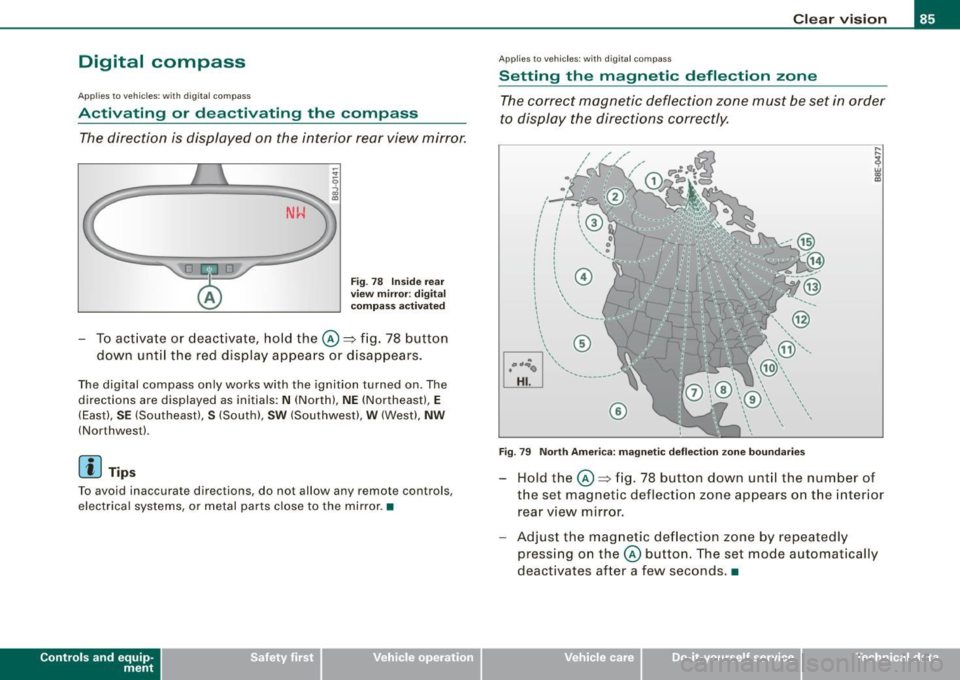
Fig . 78 Inside rear
view mirror : digital
compass activated
To activate or deactivate, hold the @~fig. 78 button
down until the red display appears or disappears.
The digital compass only works with the ignition turned on. The
directions are displayed as initials :
N (North), NE (Northeast), E
(East), SE (Southeast), S (South), SW (Southwest), W (West), NW
(Northwest).
[ i) Tips
To avoid inaccura te directions , do not allow any remote controls,
electrical systems, or metal parts close to the mirror. •
Contro ls and eq uip
ment
Clear vision
Ap plies to vehi cles: wit h dig ital compass
Setting the magnetic deflection zone
The correct magnetic deflection zone must be set in order
to display the directions correctly.
.
• ,_,;a;..~>, I I
I I
I I
I ' I I
I I
' I I I
I @ I
l '
l
I ' I ,, l ----
'
'
'
®
\, ,, ...... _______ ,.,.
©
@
Fig. 79 North America: magnetic deflection zone boundaries
Hold the@~ fig. 78 button down until the number of
the set magnetic deflection zone appears on the interior
rear view mirror.
Adjust the magnetic deflection zone by repeatedly
pressing on the@ button. The set mode automatically
deactivates after a few seconds . •
Vehicle care I I Technical data
Page 90 of 316
Seats and storage
-Position the head restraint according to the occupant's
height=>
page 92. For maximum protection, the top of
the head restraint should be at least at eye level, prefer
ably higher and ideally level with the top of the head
=>
page 132, fig. 120.
& WARNING
Never place any objects in the driver's footwell. An object could
get into the pedal area and interfere with pedal function. In case
of sudden braking or an accident, you would not be able to brake
or accelerate! •
Front passenger's seat
Always move the front passenger seat into the rearmost position.
To avoid contact with the airbag while it is deploying, do not
sit any closer to the instrument panel than necessary and
always wear the three-point safety belt provided adjusted
correctly. We recommend that you adjust the passenger's
seat in the following manner:
- Move the front passenger seat into the rearmost position
of the fore and aft adjustment range=>
& in "Why is
your seat adjustment so important?" on
page 87.
- Bring the backrest up to an (almost) upright position. Do
not ride with the seat reclined.
- The ideal position for the head restraint is with the upper
edge of the restraint level with the top of your head
=> page 92. You should not lower the top of the restraint
below the level of your eyes. -
Place your feet on the floor in front of the passenger's
seat. •
Adjusting front seats manually
Applie s to vehicles: with manua l seat ad justment
Adjustment controls
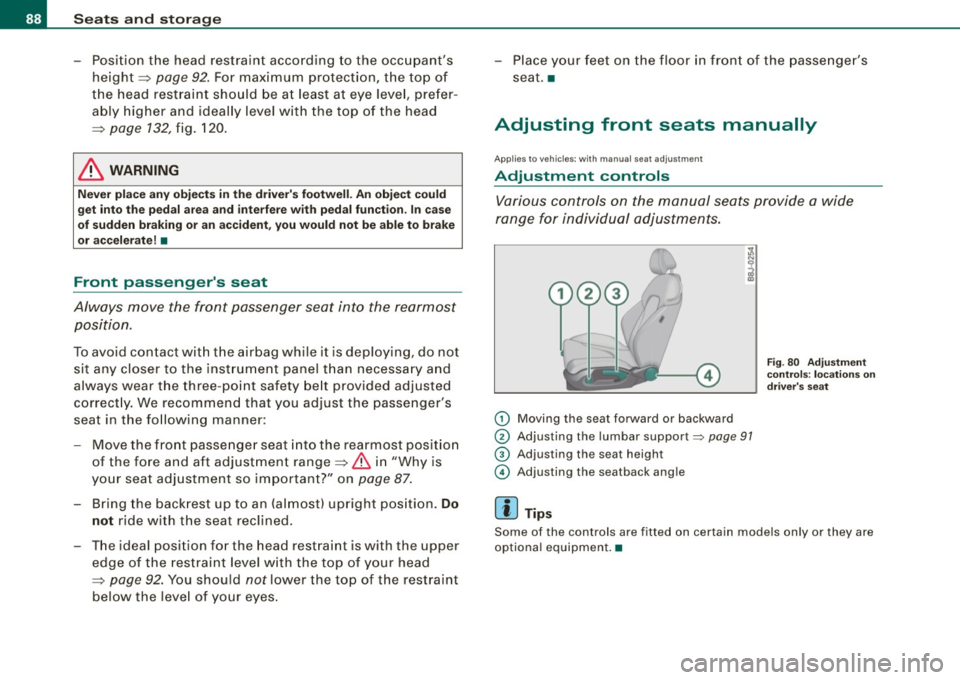
Various controls on the manual seats provide a wide
range for individual adjustments.
(D Moving the seat forward or backward
® Adjusting the lumbar support~ page 91
G) Adjusting the seat height
© Adjusting the seatback angle
[ i] Tips
Fig . 80 Adjustment
controls: locations on
driver's seat
Some of the controls are fitted on certain models only or they are
optional equipment. •
Page 100 of 316
Warm and cold
Warm and cold
Climate controls
Controls
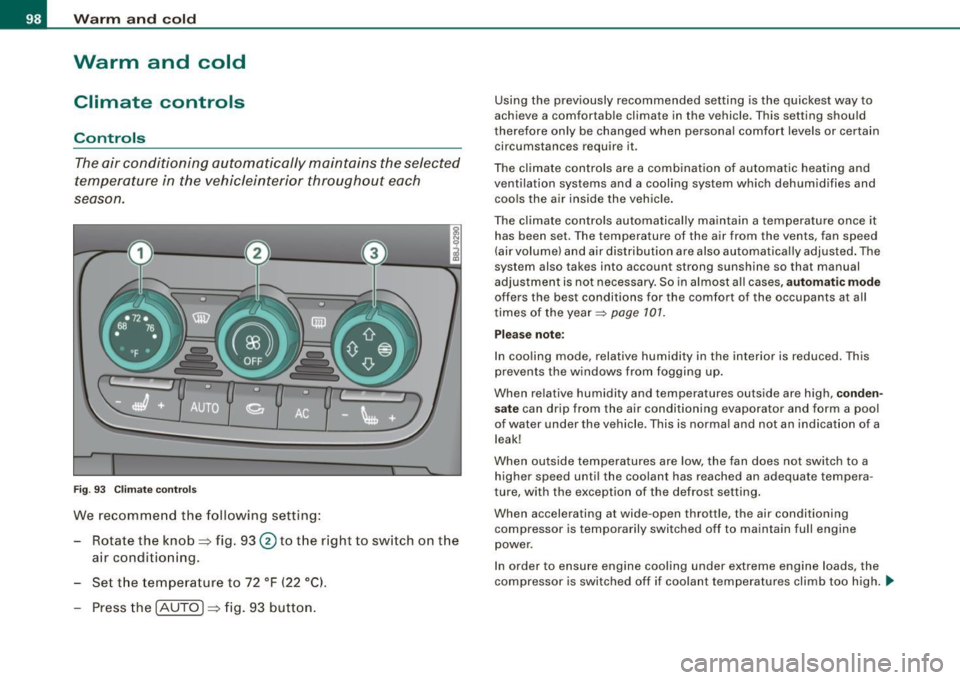
The air conditioning automatically maintains the selected
temperature in the vehicleinterior throughout each
se aso n.
Fig . 93 C limate co ntro ls
We recomme nd the following setting:
Rotate the knob=> fig. 93 @to th e right to switch on the
air conditioning.
Set t he temperature to 72 °F ( 22 °Cl.
Press th e !AUTO ]=> fig . 93 button.
Using the previously recommended setting is the quickest way to
achieve a comfortable climate in the vehicle . T his setting should
therefore on ly be changed when persona l comfort levels or certain
circumstances require it .
The climate contr ols are a combination of automatic heating and
ventilation systems and a cooling system which dehumidifies and coo ls the a ir inside the veh ic le .
The climate controls automa tically ma intain a temperature once it
has been set . T he temperature of the air from the vents, fan speed
(air volume) and air dis tribution are also automa tica lly adjusted . The
system also takes into account strong sunshine so that manual
adjustment is no t necessary. So in al most a ll cases,
automatic mode
offers the best conditions for the comfort of the occupants at all
times of the year~
page 101.
Please note :
In cooling mode, relative humidity in the interior is reduced. This
prevents the w indows from fogging up.
When relative humidity and temperatures outside are high,
conden
sate
can drip from the air conditioning evaporator and form a poo l
of water under the vehicle . This is normal and not an indication of a
leak!
When outside temperatures are low, the fan does not switch to a
higher speed until the coolant has reached an adequate tempera
ture, with the exception of the defrost setting .
When accelerating at wide -open throttle, the air conditioning
compressor is temporarily switched off to maintain full engine
power .
I n order to ensure eng ine cooling under extreme engine loads, the
compressor is switched off if coolant temperatures climb too high. _,,,
Page 104 of 316
![AUDI TT ROADSTER 2008 User Guide • ..__w_ a_ r_m _ a_ n_d_ c_ o_ ld __________________________________________________ _
Manual air recirculation mode[~]
The recirculation mode prevents polluted outside air from
enteri](/img/6/57671/w960_57671-103.png "AUDI TT ROADSTER 2008 User Guide • ..__w_ a_ r_m _ a_ n_d_ c_ o_ ld __________________________________________________ _
Manual air recirculation mode[~]
The recirculation mode prevents polluted outside air from
enteri")
• ..__w_ a_ r_m _ a_ n_d_ c_ o_ ld __________________________________________________ _
Manual air recirculation mode[~]
The recirculation mode prevents polluted outside air from
entering the vehicle interior.
Switching on air recir culation
- Press the button [19.] ~ page 98, fig . 93 ~ & .
Swit ching off air recir culation
Press the butt on [19.] ag ain, o r
Press the
[AUTO I button, or
- Press the[@] button.
In recircu lation mode, air is drawn from the vehic le interior, filtered,
and recircu lated. We recommend that you se lect recircu lat ion mode
briefly ~ & under the fo llowing conditions:
When driving through a tunnel or i n a traffic jam so that exhaust
fumes and odors cannot enter the vehic le interior .
& WARNING
You should not u se the re circulat ion mode for an e xtended period
s ince no fre sh air i s drawn in , and with the air conditioning
s wit ched off the windows can fog up -this in crea se s the ris k of an
accident !•
A /C operation [AC)
Switching on A /C
- Press th e [AC] button~ page 98, fig. 93 .
Switching A /C off
- Press the [AC] button again.
The cooling system is switched on during A/C operation - the
heating and ven tilation system is controlled automatica lly.
I i ] Tips
If the LED in the switch stays on after A/C operation has been
switched off( = switching the A/C offl, there is a fau lt in an air condi
t ioning component. Please consult an authorized Audi dealer when
there is an operating prob lem .•
Air vents
Air d istribution determines the air flow fro m the indi
vi dual vents.
Fig . 97 Instrumen t pan el: Loc ation o f air vent s
Vents @and 0
- To open and close the outlets, t urn the adjusting ring.
Page 105 of 316
___________________________________________________ W_ a_ r_m _ a_ n_d_ c_ o_ ld _ __.11111
- To adjust the direction o f the airflow from the o utlet,
move the tab in the cen ter of the o utlet in the desired
direction . The direction of the air delivered from the
vents can be adjusted hor izontally and vertically .
G) Air flows to the windshield and the driver and front passenger
side windows
@ Air flows to the driver/fron t passeng er or to the driver and front
passenger side windows
© Air flows to the driver/front passenger
© Air flows to the footwe ll
Using the rotary knob, you can adjust air distribution=>
page 101 so
that air flows from specific vents=>
page 102, fig. 97.
Heated or unheated fresh air, or cooled air flows from the vents.
[ i ] Tip s
If climate control is running in cooling mode, air should flow mainly
from vents @ and
G). To achieve adequate coo ling, you should
never c lose the outlets completely .•
Using the climate controls economically
Economical use of the climate controls helps to save fuel.
When climate co ntrol is w orking in c ooling mode, engine
performa nce is reduced and fuel consum ption is affected .
To keep the t ime the air cond itioning is on as s hort as
poss ible, you s hould do the following :
- If yo u would like to save fue l, sw itch the air con ditioning
off .
- If you open t he windows while driving, switch the air
conditio ning off .
Contro ls and eq uip
ment
- If the ve hicle is extremely hot due to the heat of the sun,
br ie fl y open doors and windows .
c£> For the sake of the environment
When you save fuel, you reduce emissions from the vehicle .•
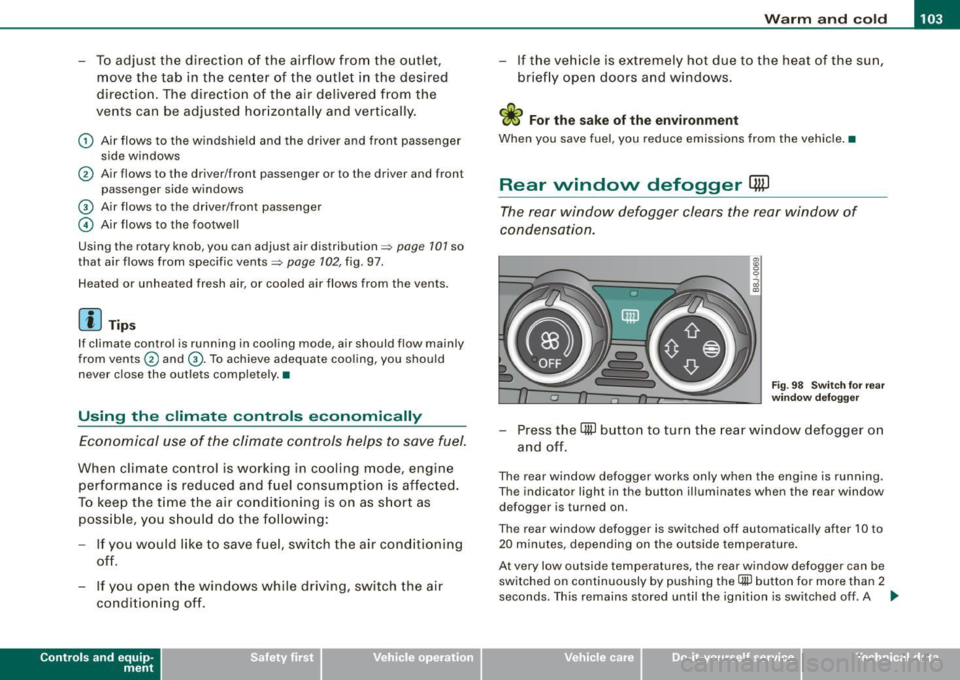
Rear window defogger [ffiJ
The rear window defogger clears the rear window of
condensation.
F ig . 9 8 Switc h for rear
w ind ow defo gg er
- Press the [ml button to turn t he rear window defogger on
and off.
The rear window defogger works only when the engine is running .
The indicator light in the button illuminates when the rear window
defogger is turned on .
The rear window defogger is switched off automatica lly after 10 to
20 m inutes, depending on the outside temperature .
At very low outside temperatures, the rear window defogger can be switched on continuously by pushing the
Qii) button for more than 2
seconds. This remains stored until the ignition is switched off . A ..,
Vehicle care I I Technical data