airbag AUDI TT ROADSTER 2008 Owners Manual
[x] Cancel search | Manufacturer: AUDI, Model Year: 2008, Model line: TT ROADSTER, Model: AUDI TT ROADSTER 2008Pages: 316, PDF Size: 70.1 MB
Page 4 of 316
Table of contents
Table of contents
Vehicle literature ........ .
About this Owner's Manual .............. ...... . .
Controls and
equipment .. .. ... . .. ... ... . .
Cockpi t ... .......... ...... ..... .
Genera l ill ustration ............. .
Instruments and
warning/indica tor lig hts ....... .
Instruments .............. ..... .
Warning/indicator lights ........ .
Driver informa tion system ..... .
Introduction ............... .... .
On-Board Diagnostic system (080)
Menu display ...... ............ .
Au to-Check Control ... ... .... .. .
Speed warn ing system . ... ..... .
Trip computer ................. .
T ire pressure monitoring system ..
Opening and closing .......... .
Keys .......................... .
Powe r lock ing system ..... ..... .
Rear lid /tr unk lid .............. . . 5 Ant
i-theft a larm system ........ .
Power w indows ... ... .... .... .
Folding top ................ ... .
Folding top ... .. ..... ...... ... .
6 W ind Deflector ........... ... .. .
E merge ncy Ope rat ion of the Fold ing
Top ........... ............ .. . .
Clear vision . ... ............ ... .
56 Cruise control . . . . . . . . . . . . . . . . . . 11 O
57 Audi magnetic ride . . . . . . . . . . . . . 112
60
Transm1ss1on . . . . . . . . . . . . . . . . . . . 113
60 Manua l transmiss ion . . . . . . . . . . . . 1 13
64 S tron ic tra nsmission . . . . . . . . . . . 1 13
64
69
Home link® . ...... .. ... ... ... .. .
Universa l remote control ....... .
121
121
Lights . . . . . . . . . . . . . . . . . . . . . . . . . 69
In ter io r lights ....... ..... ... .. .
V is ion ..................... ... .
W iper and washer system ...... .
Mirrors ..... ............... ... .
Digital compass ............... .
9 Seats and storage ......... ... .
11
1 1
1 2
12
1 6
22
22
26
27
29
37
39
41
47
47
50 55 Genera
l recommendat ions ..... .
Ad justing front seats manua lly ..
Powe r seats ..... ....... .... .. .
Lumbar support .. ............. .
Head restraints ............•...
Luggage compartment ........ .
Cup holder ... ...... ... ..... .. .
As htray ................... ... .
Cigarette lighter /socket ..... ... .
Storage ............ ....... ... .
Warm and cold ............... .
Climate controls ....... ... .• .. .
Rear window defogger
Qlil ..••.••
Heated sea ts .. ..... ..... ..... .
On the road . ... .. .......... ... .
Steering ...................... .
Ign it ion lock an d ignition sw itch .
Starting and stopping the engine
Park ing brake ................. .
Acoustic pa rking system .... ... .
77
77
78
82
85
87
87
88
89
91
92
93
94
94
95
95
98
98
103
104
105
105
106
107
108
109
Safety first ............... . .
Driving Safely . ...... ... ...... . .
General notes .. .... ....... ... . .
Prope r occupan t seating pos it ions
D river and passenger side footwe ll
Peda l a rea .. .. .... .... ... ..... .
Stow ing luggage .............. .
Report ing s afety defects ...... . .
Safety belts ................... .
General notes ................. .
Why safe ty be lts? .............. .
Safety belts ................... .
Safety belt tensioners .......... .
Airbag system ... ... ...... .... . .
Important things to know ...... .
F . b ron t air ags ........ ....... .. .
Monito ring the Advanced Airbag
System ....................... . 127
128
128
130
13
4
13 4
135
136
137
137
138
141
14 4
146
146
150
157
Page 5 of 316
Knee airbags . . . . . . . . . . . . . . . . . . 161
Side airbags . . . . . . . • . . . . . . . . . . . 164
Child Safe ty . . . . . . . . . . . . . . . . . . . . 168
Important things to know . . . . . . . 168
Important safety instruct ions for
using child safety seats ........ .
Child safety seats .. ...... ..... .
Insta lling a ch ild safety seat .... .
Add it ional Information .... ... .. .
Vehicle operation ....... .
Intelligent technology ......... .
Notice about da ta recorded by
veh icle contro l modules ....... .
Electronic Stab ilizat ion Program
(ESP) ... ... ... ... .... .... .. ... .
Rear spoiler .................. .
Braking .................... .. .
El ectro -mechanical power assist .
Driving with your quattro® ..... .
Driving and environment .... . .
171
173
177
180
183
184
184
184
187
188
190
191
192
The first 1,000 miles (1,500 km) and
afterwards . . . . . . . . . . . . . . . . . . . . 192
Cata lytic converter . . . . . . . . . . . . . 193
Avoid damaging the vehicle . . . . . 194
Operate your vehicle economically
and minimize pollution ... .. ... . 194
Trailer towing . . . . . . . . . . . . . . . . . . 196
Vehicle care ..... ... ... ... .
C leaning and protection ...... .
General information
Care of exterior ............ .... .
Care of interior .. .. .. .... ... .. . .
Fue l supply and filling your fuel
tank .. ... ... ... ... ...... .... .. . .
Gasoline .... ...... ........•. ...
Fuel tank ..................... .
Checking and filling ...... ... .. .
Eng ine hood ... ........ ....... .
Engine compartment .......... .
Engine oil ........ ... ...... .... .
E ngine cooling system ......... .
Brake fluid ..... .. ... ... ...•. ...
Battery . ...... .. .. .......... .. .
W indshield/headlight washer
conta iner .. .... ... ... .. ... .. .. .
Tires and whee ls ...... ..... ... .
T ires . ............ ...... · ·, · · · ·
Run -flat tires ......... ... .... .. . 199
200
200
200
208
214
2 14
2 15
2 19
219
221
222
227
230
231
236
238
238
257
Table of contents
Do-it-yourself service .. . 261
What do I do now? . . . . . . . . . . . . . 262
Trunk escape handle . . . . . . . . . . . . 262
Veh icle tool kit . . . . . . . . . . . . . . . . . . 262
T ire repair . . . . . . . . . . . . . . . . . . . . . . 263
What should I be aware of when
changing a tire? . . . . . . . . . . . . . . . . 267
Fuses and bulbs ................ 273
Fuses . . . . . . . . . . . . . . . . . . . . . . . . . . 273
Bu lbs ......... .. ... .... ... ..... 277
Emergency situations . . . . . . . . . . 278
Genera l . . . . . . . . . . . . . . . . . . . . . . . . 278
Starting by pushing or towing . . . . 278
Starting with jumper cables . . . . . . 278
Use of jumper cables . . . . . . . . . . . . 279
Emergency towing with commercial
tow truck . . . . . . . . . . . . . . . . . . . . . . 281
Lif ting vehicle . . . . . . . . . . . . . . . . . . 283
Technical data
General information
287
288
Explanation of technical data 288
Vehic le identif ication . . . . . . . . . . . . 288
Vehicle care I I irechnical data
Page 13 of 316
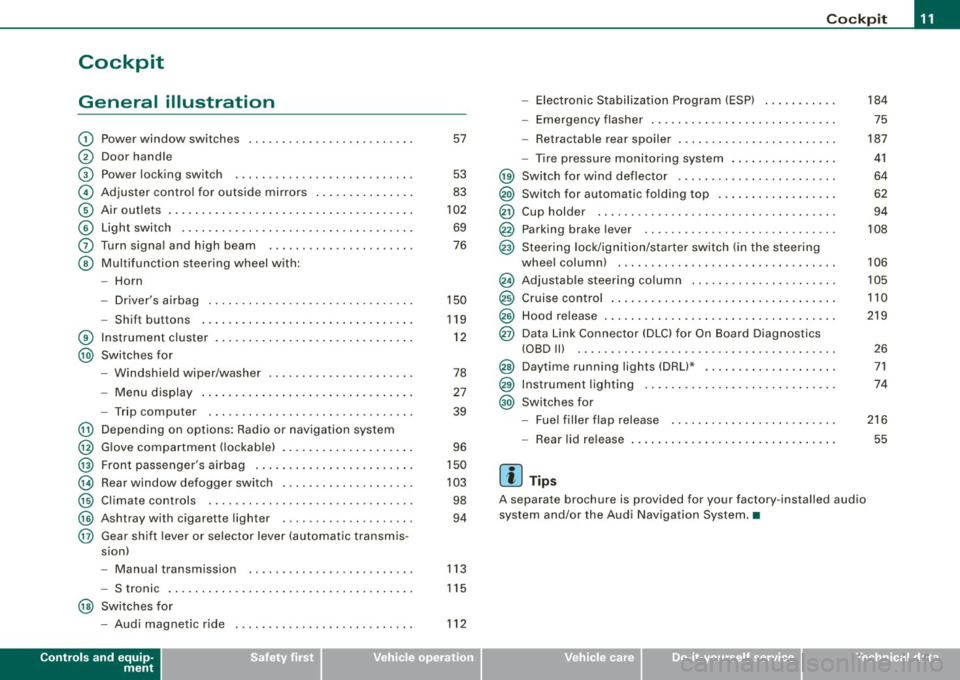
Cockpit
General illustration
G)
0
©
©
©
©
0
©
®
@
@
@
@
@
@
@
@
Power window switches
Door handle
Pow er lo cking switc h
Adjus te r contro l fo r ou tsid e mirro rs ...... .... ... . .
Air outlets ..... .. . ..... .... .... .. . .... .. . ..... .
Light switch .. ...... .... ... .... .... .... .... ... .
Turn signa l and high beam
Multifunc tion steering wheel with:
- Horn
- Driver's a irbag .... .... ... .... .... .... .... ... .
- Shift b uttons ... .. .... ... .... .... .... .... ... .
Instr um en t cluster . ...... ... .... .. ...... .. .. ... .
Switches for
- Windshield wipe r/wash er ... .... .. ....... .. ... .
- Menu d isplay ...... ... .. .. .... .... .... ... ... .
- Trip computer ..... .. .... .... ...... ....... .. .
Depending on options : Radio or navigation sys tem
G love compa rtmen t (loc kab le) ... .. .. .. ... .... ... .
Front passenger 's airbag .. ...... .. . .... .. .. .... .
Rear window defogger switch .... ..... .. .... .... .
Climate controls ..... .. .... .... ..... .. ... ... .. .
Ashtray wi th cigare tte lighter ....... ............ .
Gear sh ift l ever or s elector lever (automatic transmis -
sion) 57
53
83
102
69
76
150
119
1 2
78
27
39
96
150
10 3
98
94
- Manual transm ission . . . . . . . . . . . . . . . . . . . . . . . . . 113
- S tronic . . . . . . . . . . . . . . . . . . . . . . . . . . . . . . . . . . . . . 115
@ Switches for
- Aud i magnetic r ide
Controls and equip
ment
112
Co ckpit
- Electronic Stabilization Program (ESP) . .... .. ... .
- Emerge ncy flasher ... .. .. .. .... .... .... .. . ... .
- Retractab le r ear spoiler .... ...... .... .... .... . .
- Tire pressure mon itor ing system ..... .... .. . ... .
@ Sw itc h f or wind deflector .... .. ..... .. .... ... ... .
@) Switch for automatic folding top ..... .. .... ... ... .
@ Cup hold er ....... .. .. .. .... .... ....... ....... .
@ Parking brak e le ver ... .... ..... .. .... .... ..... . .
@ S teeri ng lock/igniti on/sta rter sw itch (in t he s teer ing
whee l column) ... .... ... ... ... .. .... .... ...... .
@ Adjus tab le steering co lu m n .. ...... ..... ... ... .. .
@ Cruise contro l .... ... .... .... .... .... .... ... ... .
@ Hood release ... .. .. .. ..... .. .... .... .... ...... .
@ Data Link Connect or (DLC) for On Boa rd Diag nostics
(OBD Ill .... ... .. ...... .... ... .... ... .. ... .... .
@ Daytim e running l ights (DRU* .... .... .... .... ... .
@ Instrumen t lighting ...... .... .... .... ... .... ... .
@ Switc hes f or
- Fue l filler flap release .... .. .... .... .... ... ... .
- Rea r lid r elease
[ i ] Tip s
A separate brochure is provided for your factory -insta lled audio
system and/or the Aud i Nav igation System .•
I • •
184
75
187
41
64
62
94
108
106
105
110
219
2 6
71
74
216
55
Page 18 of 316
Inst rum ent s a nd warning /indi cato r li ghts
Warning /indicator lights
Ov erview
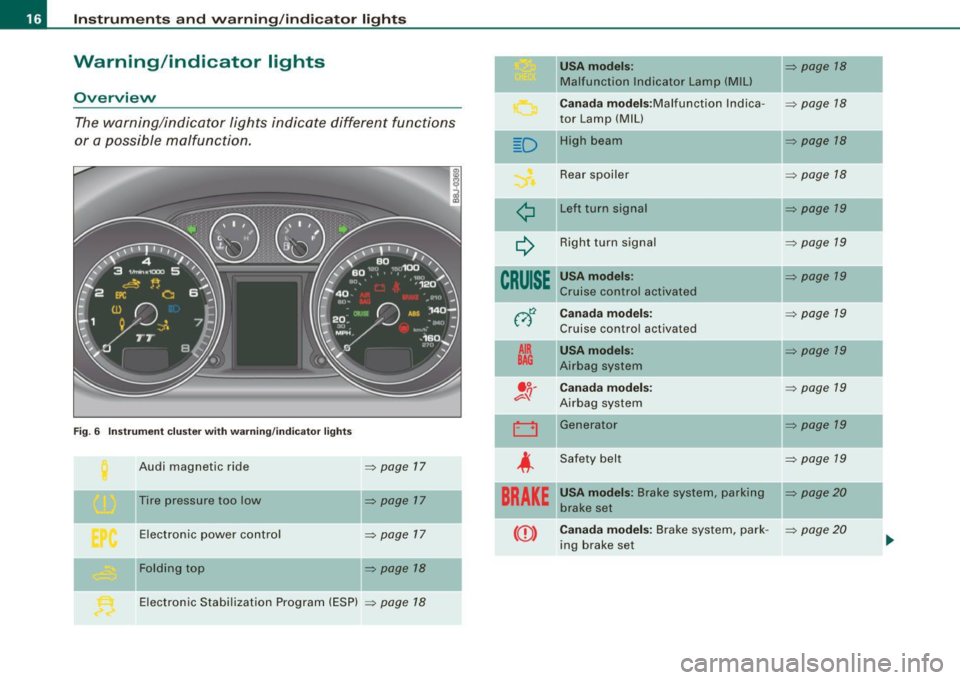
The warning/indicator lights indicate different functions
or a possible malfunction.
F ig. 6 Inst rum ent cluste r w ith warning/ indicator lig hts
Audi magnetic ride => page 17
Tire pressure too low => page 17
Electronic power control => page 17
-Fol ding top => page 18
II
Electronic Stabi lization Program (ESP) => page 18
D
¢
~
CRUISE
012
A IR
BAG
. o.
e::=- -!J
LJ
-
4
BRAKE
USA model s: => page 18
Malfunction Indicator Lamp (M IU
-
C an ada m od els :Malfunction lndica -=> page 18
tor Lamp (MIU
High bea m
=> page 18
Rear spoiler => page 18
Left turn signa l => page 19
Right turn signal => page 19
USA models: => page 19
Cruise control activated
Cana da mod els: => page 19
Cruis e control activated
USA mod els: => page 19
Airbag system
Ca nada mod els : => page 19
Airbag system
Generator
=> page 19
-
Safety belt => page 19
USA model s: Brake system, parking II=> page 20
brake set
Ca nad a model s: Brake system, park -
=> page 20
ing brake set
Page 21 of 316
Additional information about the electrically retractable rear spoiler
=:> page 187 . •
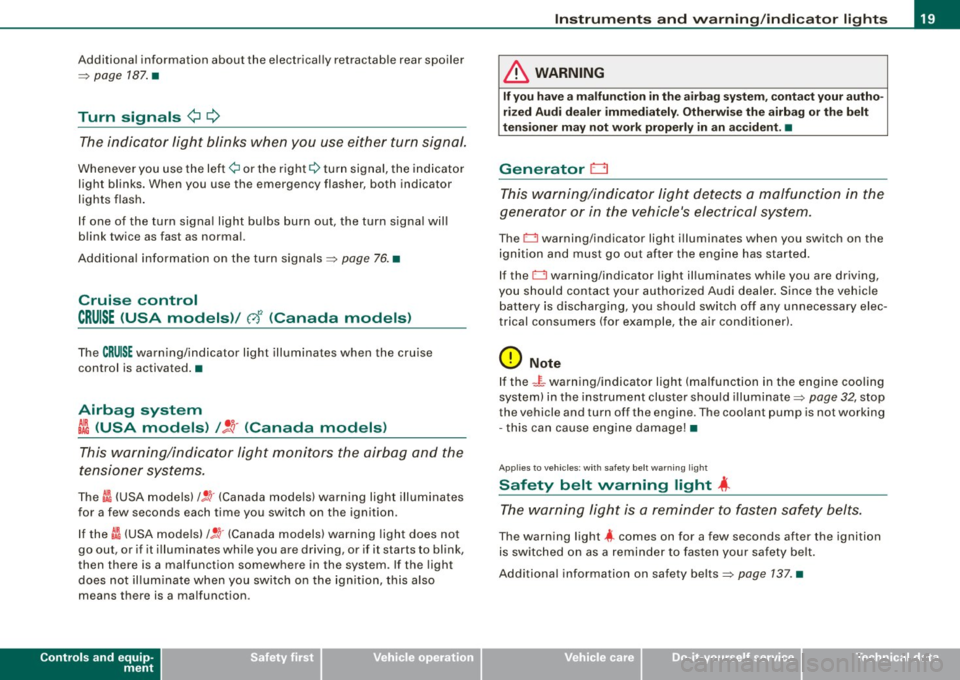
Turn signals ¢ Q
The indicator light blinks when you use either turn signal.
Whenever you use the left¢ or the right c::::> turn signal, the indicator
light blinks. When you use the emergency flasher, both indicator
lights flash .
If one of the turn signa l light bu lbs burn out, the turn signal will
blink twice as fast as normal.
Additiona l information on the turn signals :::::>
page 76. •
Cruise control
CRUISE (USA models )/ (')<> (Canada models)
The CRUISE warning/indicator light illuminates when the cruise
control is activated. •
Airbag system
~~ (USA models) / !_~· (Canada models)
This warning/indicator light monitors the airbag and the
tensioner systems .
The ti (USA models) !! 'tr (Canada models) warning light illuminates
for a few seconds each time you switch on the ignition .
If the m (USA mode ls)
/ J q· (Canada models) warning light does not
go out, or if it i lluminates whi le you are driving, or if it starts to blink,
then there is a malfunction somewhere in the system. If the light
does not illuminate when you switch on the ignition, this also
means there is a malfunction.
Controls and equip
ment
Instruments and warning /indi cator lights
& WARNING
If you have a malfunction in the airbag system, contact your autho
rized Audi dealer immediately. Otherwise the airbag or the belt
tensioner may not work properly in an accident. •
Generator 0
This warning/indicator light detects a malfunction in the
generator or in the vehicle's electrical system.
The D warning/indicator light illuminates when you switch on the
ignition and must go out after the engine has started.
If the D warning/indicator light illuminates while you are driving,
you should contact your authorized Audi deale r. Since the vehicle
battery is discharging, you should switch off any unnecessary elec
trical consumers (for example, the air conditioner).
0 Note
If the -~- warning/indicator light (malfunction in the engine cooling
system) in the instrument cluster shou ld illuminate :::::>
page 32, stop
the vehicle and turn off the engine . The coolant pump is not working
- this can cause engine damage!•
Applies to veh ic les : w ith safety belt warning l ight
Safety belt warning light 4
The warning light is a reminder to fasten safety belts.
The warning light 4 comes on for a few seconds after the ignition
is switched on as a reminder to fasten your safety belt.
Additional information on safety belts:::::>
page 137. •
I • •
Page 53 of 316
& WARNING
• When you lock your vehicle from outside, nobody -especially
children · should remain inside the vehicle. Remember, when you
lock the vehicle from the outside the windows cannot be opened
from the inside.
• When you leave the vehicle, always remove the ignition key and
take it with you. This will prevent passengers (children, for example) from accidentally being locked in the vehicle should they
accidentally press the power locking switch.
• Do not leave children inside the vehicle unsupervised. In an
emergency it would be impossible to open the doors from the
outside without the key.
[ i J Tips
• In the event of a crash with airbag deployment all locked doors
will be automatically unlocked to give access to the vehicle occu
pants from the outside .
• If the power locking system should malfunction, you can lock
each door individually using the vehicle key.
• If the power locking system should fail, you can still open the
fuel tank flap in an emergency=>
page 218.
• You are well advised not to keep valuables inside an unattended
vehicle, visible or not . Even a properly locked vehicle cannot provide
the security of a safe! •
Contro ls and eq uip
ment
Opening and closing
Unlocking and locking the vehicle with the
remote control
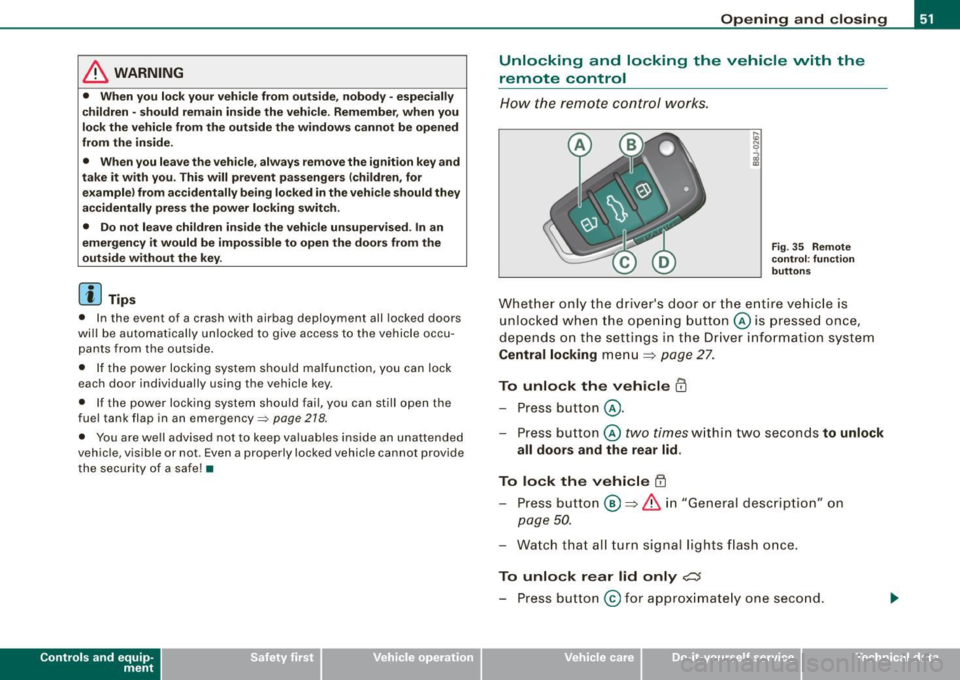
How the remote control works.
Fig. 35 Remote
control : function
buttons
Whether only the driver's door or the entire vehicle is
unlocked when the opening button@ is pressed once,
depends on the settings in the Driver information system
Central locking menu => page 27.
To unlock the vehicle m
-Press button @.
- Press button ©
two times within two seconds to unlock
all doors and the rear lid .
To lock the vehicle 63
-Press button @ => & in "General description" on
page 50.
-Watch that all turn signal lights flash once.
To unlock rear lid only e::5
-Press button @for approximately one second.
Vehicle care I I irechnical data
Page 56 of 316
Opening and closing
• If the driver 's door is opened (after you have locked the vehicle
from the inside using the power locking switch), the door will
remain unlocked to prevent you from locking yourself out of your
vehicle. After you close the door, you have to lock the driver 's door
again.
• If you have a crash and the airbag is activated, the doors auto
matically unlock .
& WARNING
• If you use the power locking switch with the doors closed,
remember that all the vehicle doors will lock.
• Locking doors from the inside can help prevent inadvertent
door opening during an accident and can also prevent unwanted
entry from the outside . Locked doors can, however, delay assis
tance to vehicle occupants and hold up rescue efforts from the outside in an accident or other emergency. •
Emergency locking
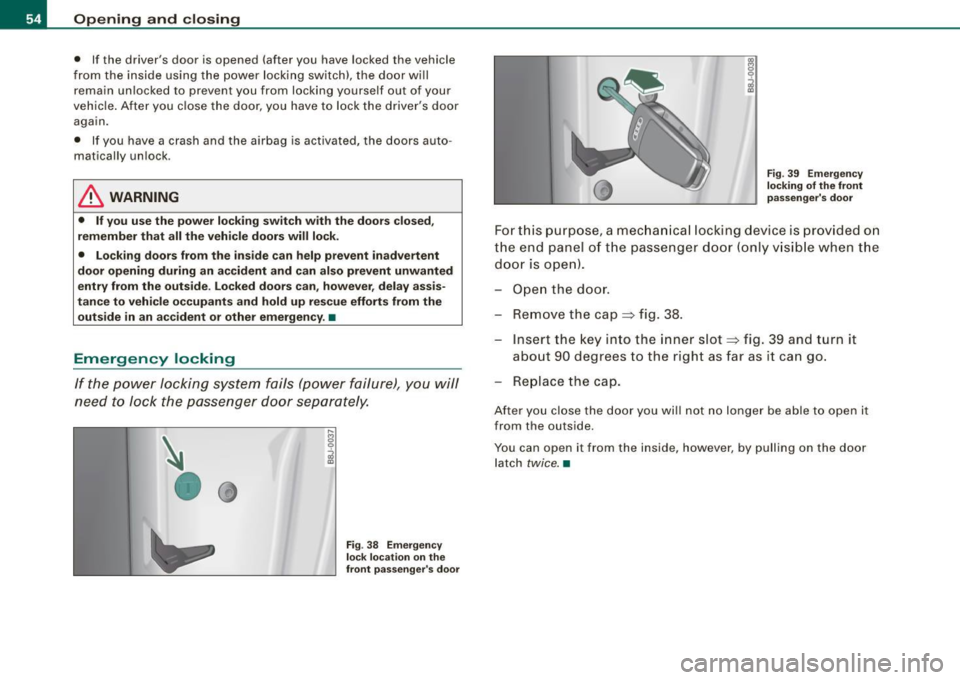
If the power locking system fails (power failure), you will
need to lock the passenger door separately.
Fig . 38 Emergency
lock location on the
front passenger's door Fig
. 39 Emergency
locking of the front
passenger's door
For this purpose, a mechanical locking device is provided on
the end panel of the passenger door (only visible when the
door is open).
Open the door.
- Remove the cap
=> fig. 38.
Insert the key into t he inner slot => fig. 39 and turn it
about 90 degrees to the right as far as it can go.
Replace the cap.
After you close the door you will not no longer be able to open it
from the outside.
You can open it from the inside, however, by pulling on the door latch
twice. •
Page 77 of 316
Ignition ON , light swit ch at @ .
With the ignition switched ON, the g low of instrument needles can
be adjusted to appear brighter or dimmer.
Ignition ON , ligh t switch at :oo ; or io.
With the lights switched on , the brightness of instrument cluster
(i .e. needles, gauges and displays) and center conso le i llu m in ation
can be adjusted .
0 Note
The instrument c luster and center console illumination (gauges and
needles) comes on when you switch on the igni tion and the
vehicle
headlights are off .
Be aware of the followin g difference be tween
models built to US o r Canadian specifications :
• USA models : illumination of the in strument cluster (gauges and
needles), dash and center console around the gearshift lever is
controlled by a light sensor located in the instrument panel. The
instrument panel illum ination will automatically become dimmer
as the daylight fades away and eventually will go out completely
when outside light is very low . This is to remind you , the d river , to
s witch on the headlight s before it gets too dark.
• Canada models : instrument panel illum ination will stay br ight
regardle ss of the inten sity of ambient light . Always be aware of
c hanges in outside light conditions while you are driving . Respond
in time to fading dayli ght by turning the light switch to position
iD
(or "AUTO" if your car is equipped with this feature) to turn on your
headlights. •
Bi-Xenon headlights*
Afte r starting the engi ne, the b i- xeno n headlights are au tomatical ly
adjusted to the load and angle of the vehic le (for example, during
acce lera tion and braking). This prevents oncoming traffi c from
experiencing unnecessary headlight g lare from your bi -xenon head
lig hts .
Con tro ls and eq uip
ment
Clear vision
I f the system is not operating properly, a warning symbo l in the
Au to-Check C ontr ol is displayed
=> page 35 . •
Emergency flasher tfft,,.
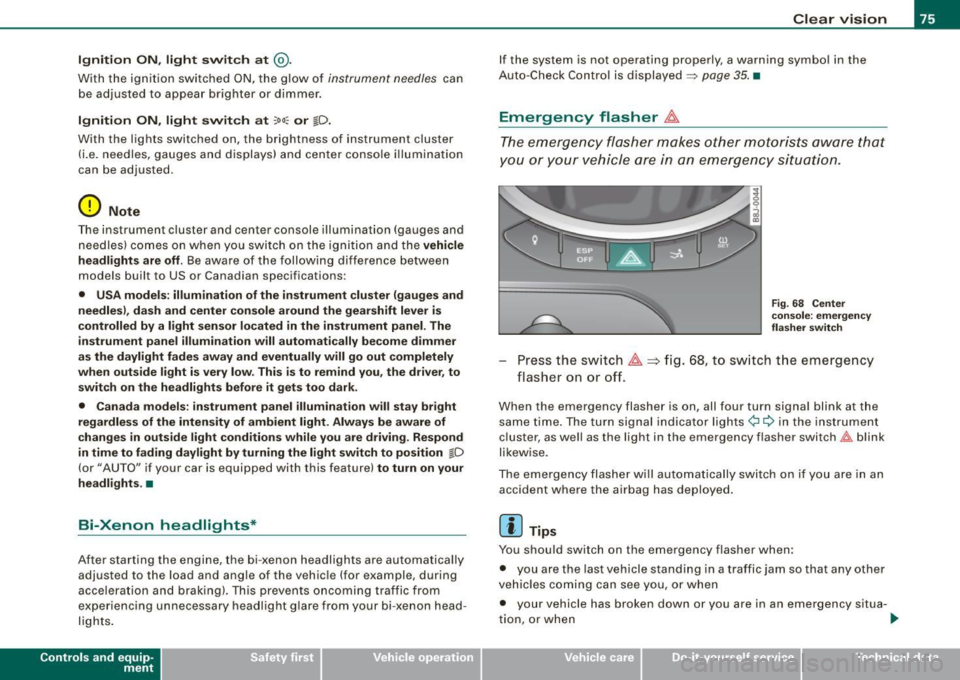
T he e mergency flasher m akes other motor ists aware that
y o u or yo ur vehicle are i n an e merge ncy si tuation.
Fig . 68 Center
co nsole : emergency
fla sher sw itch
Press the sw itch ~=:,fig. 68, to s witch t he emergency
flasher on or off.
When the emergency flasher is on, all four turn signal blink at the
same time . The tu rn signal indi cato r lights
¢i Q in the instrument
c luster, as well as the light in the emergency flasher switch
J:&. b link
likewise.
The eme rgency flashe r will automat ically switch on i f you are in an
accident where the airbag has deployed .
[ i ] Tips
You should switch on the emergency flasher when:
• you are the last vehicle standing in a traffic jam so that any other
vehicles coming can see you, or when
• your vehicle has broken down or you are in an emergency s itua -
tion, o r when _,,,
Vehicle care I I irechnical data
Page 89 of 316
Seats and storage
General recommendations
Why is your seat adjustment so important?
The safety belts and the airbag system can only provide
maximum protection if the front seats are correctly
adjusted.
There are various ways of adjusting the front seats to provide safe
and comfortable support for the driver and the front passenger.
Adjust your seat properly so that:
• you can easily and quickly reach all the switches and controls in
the instrument panel
• your body is properly supported thus reducing physical stress
and fatigue
• the safety belts and airbag system can offer maximum protec
tion
~ page 146.
In the following sections, you will see exactly how you can best
adjust your seats.
There are special regulations and instructions for installing a child safety seat on the front passenger's seat. Always heed the informa
tion regarding child safety provided in~
page 168, "Child Safety".
& WARNING
Incorrect seating position of the driver and all other passengers
can result in serious personal injury.
• Always keep your feet on the floor when the vehicle is in motion
- never put your feet on top of the instrument panel, out of the
window or on top of the seat cushion! This applies especially to
the passengers. If your seating position is incorrect you increase
the risk of injury in the case of sudden braking or an accident. If
Controls and equip
ment
Seats and storage
& WARNING (continued)
the airbag inflates and the seating position is incorrect this could
result in personal injury or even death.
• It is important for both the driver and front passenger to keep
a distance of at least 10 inches (25 cml between themselves and
the steering wheel and/or instrument panel. If you're sitting any closer than this, the airbag system cannot protect you properly. In
addition to this, the front seats and head restraints must be
adjusted to your body height so that they can give you maximum
protection.
• Always try to keep as much distance as possible between your
self and the steering wheel or instrument panel.
• Do not adjust the driver's or front passenger's seat while the
vehicle is moving. Your seat may move unexpectedly, causing
sudden loss of vehicle control and personal injury. If you adjust
your seat while the vehicle is moving, you are out of position. •
Driver's seat
The correct seat position is important for safe and relaxed
driving.
We recommend that you adjust the driver's seat in the
following manner:
- Adjust the seat in fore and aft direction so that you can
easily push the pedals to the floor while keeping your
knee slightly bent:::>
& in "Why is your seat adjustment
so important?".
Adjust the seatback so that when you sit with your back against the seatback, you can still grasp the top of the
steering wheel. _..
I • •
Page 90 of 316
Seats and storage
-Position the head restraint according to the occupant's
height=>
page 92. For maximum protection, the top of
the head restraint should be at least at eye level, prefer
ably higher and ideally level with the top of the head
=>
page 132, fig. 120.
& WARNING
Never place any objects in the driver's footwell. An object could
get into the pedal area and interfere with pedal function. In case
of sudden braking or an accident, you would not be able to brake
or accelerate! •
Front passenger's seat
Always move the front passenger seat into the rearmost position.
To avoid contact with the airbag while it is deploying, do not
sit any closer to the instrument panel than necessary and
always wear the three-point safety belt provided adjusted
correctly. We recommend that you adjust the passenger's
seat in the following manner:
- Move the front passenger seat into the rearmost position
of the fore and aft adjustment range=>
& in "Why is
your seat adjustment so important?" on
page 87.
- Bring the backrest up to an (almost) upright position. Do
not ride with the seat reclined.
- The ideal position for the head restraint is with the upper
edge of the restraint level with the top of your head
=> page 92. You should not lower the top of the restraint
below the level of your eyes. -
Place your feet on the floor in front of the passenger's
seat. •
Adjusting front seats manually
Applie s to vehicles: with manua l seat ad justment
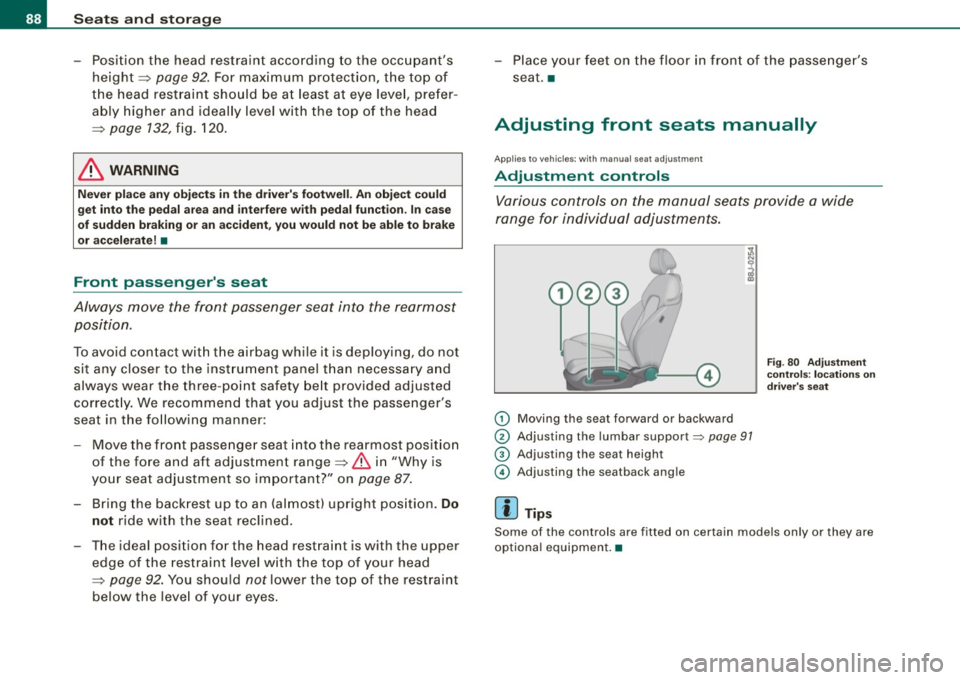
Adjustment controls
Various controls on the manual seats provide a wide
range for individual adjustments.
(D Moving the seat forward or backward
® Adjusting the lumbar support~ page 91
G) Adjusting the seat height
© Adjusting the seatback angle
[ i] Tips
Fig . 80 Adjustment
controls: locations on
driver's seat
Some of the controls are fitted on certain models only or they are
optional equipment. •