stop start AUDI TT ROADSTER 2011 User Guide
[x] Cancel search | Manufacturer: AUDI, Model Year: 2011, Model line: TT ROADSTER, Model: AUDI TT ROADSTER 2011Pages: 260, PDF Size: 64.11 MB
Page 85 of 260
(D Note
Only after the vehi cle has come to com
plete stop, should you f irm ly set the park
ing brake and either move the selector lev
er into "P".
Parking
To prevent a parked vehicle from rolling
away, there are a few things you should do.
When you park your vehicle, do the following:
.,. Stop the vehicle using the brake pedal.
... Set the parking b ra ke firmly .
... Switch
off the engine.
... Move the selector lever into the P position
¢ A .
... Remove the ign it ion key from the ignit ion
lock.
What else you should do when pa rking
your vehicle on an incline or decline
Turn the steering wheel so that if the vehicle
should start to roll, it will roll into the curb.
If you are parking on a decl ine (the front of
your vehicle facing downhill), turn the front
wheels to the right so that they point
toward
the curb.
If you are parking on an incline (the font of
your vehicle facing uph ill), turn the front
wheels to the left so that they po int
away
from the curb.
A WARNING
Th is is how you can reduce the risk of in
jury when leaving your veh icle.
- Never park the vehicle where it can come
in contact with d ry grass, sp illed fuel or
any othe r flammable mater ials .
- Never allow anyone -especially small
children -to remain in the vehicle whe n
it is locked . Locked doors ma ke it more
difficult for rescuers to access the pas
senge r compartmen t in the event of an
eme rgency. Danger to life!
- Never leave c hildren unsupervised in the
vehicle. Children co uld re lease the par k-
-
On th e ro ad 83
ing brake or move the gearsh ift leve r out
of gear. The vehicle could start to ro ll
away and cause an acc ident.
- No matter what the season is, the tem
perature in a parked ve hicle can reach
dangerous leve ls.
Acoustic parking
system
' Rear acoustic park assist
Applies to vehicles: with 4-channel acoust ic park assist
Acoustic park assist gives a warning about
obstacles behind the vehicle .
Description
The rea r acoustic pa rk ass ist (4-channel
a coustic park ass ist) de termines the dista nce
of the vehicle from an obstacle using ult ra
son ic sensors. The sensors are in the rear
bumper. The volume and the pitch of the
c hi mes can be adjusted throug h the men u dis
play¢
page 21.
T he range at wh ich the sensors start to meas
u re is
about :
To the side
Activation
2 feet (0.60 m)
5 feet (1.60 m)
T he park ing ass ist is activated when
rever se
g ear
is engaged. A br ief tone confirms th at
the sys tem is activated .
Backing up
Distance warning whe n backing up sta rts
whe n an obstacle is detected in the range of
t he pa rk ass ist system. As the distance de
c reases, the t ime inte rva l between the audible
tones becomes shorte r.
When the distance is less than 1 foot (0.30
m), the tone becomes continuous. At this
po in t you sho uld s top bac king up .
Please note that low objects already signalled
by a war ning ca n disappear from the system's
de te ction range and will not continue to be
s ignalled . .,._
Page 86 of 260
84 On the road
Potenti al malfunction s
If a warn ing buzzer sounds for a few seconds
when the ignition is switched on, there is a
system malf unction with the acoustic park as
sist. If the malfunction persists until the igni
tion is switched off, there will be no acoustic
warning at the next attempt to activate the
system. Have the problem corrected.
There is no confirmation tone when reverse
gear is engaged if there is a system malfunc
tion.
For the parking assist to operate, the sensors
must be kept clean and free of ice .
A WARNING
-Sensors have blind spots in which objects
cannot be detected. Pay special attention
to sma ll children and animals. They can
not always be detected by the sensors -
danger of an accident!
- The parking assist cannot replace the dr iver's attention. The d river alone is re
sponsible for parking and s imilar driving
maneuvers. A lways watc h where you a re
dr iv ing.
(D Note
Low obstacles al ready signalled by a warn
ing can disappear from the system's det ec
t ion range as they are approached and will
no t continue to be sign alled. Objects such
as barrier cha ins, trailer draw ba rs, thin
pa inted vertical poles, or fences may not
be detected by the system -risk of dam
age .
For the parking ass ist to operate, the sen
sors must be kept clea n and free of snow
and ice.
Cruise control
Switching the system on
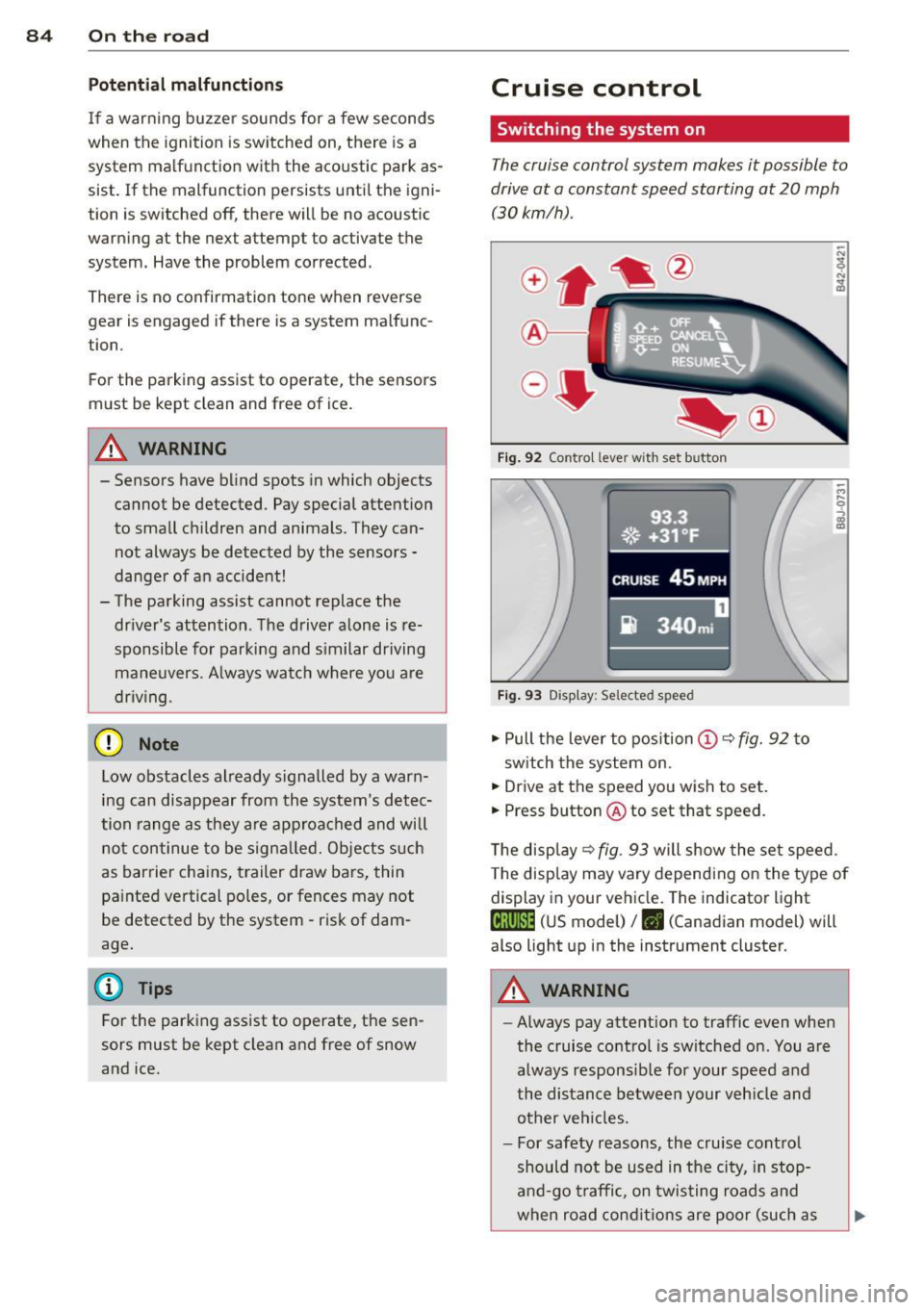
The cruise control system makes it possible to
drive at a constant speed starting at 20 mph
(30kmlh).
®-
Fig . 9 2 Contro l lever wit h set button
93.3
. ®' ~.+31, ~F; ,
II .~~ .. . • , -,.::.._-.--~.I-~-
CRUISE 45 MPH
iR 340m i
Fig. 9 3 Display: Selected speed
.,. Pull the lever to position (D c::> fig. 92 to
sw itch the system on.
.,. Drive at the speed you wish to set.
.,. Press button @ to set that speed.
T he disp lay
c::> fig . 93 will show the se t speed.
T he disp lay may vary depend ing on the type of
display in your ve hicle. The indicator light
te;(Q~i~ (US model) /. (Canadian model) will
also light up in the instrument cluster.
A WARNING
--Always pay attention to traffic even whe n
the cruise contro l is switched on. You are
always respons ib le for your speed and
the distance between your veh icle and
other ve hicles.
- For safety reasons, the cru ise cont ro l
should not be used in the city, in stop
an d-go t raffic, on twis ting road s and
when road cond itio ns are poor (such as
Page 91 of 260
Driving Notes
The forward gears are shifted up or down au
tomatically.
--
-
-
-
-
-
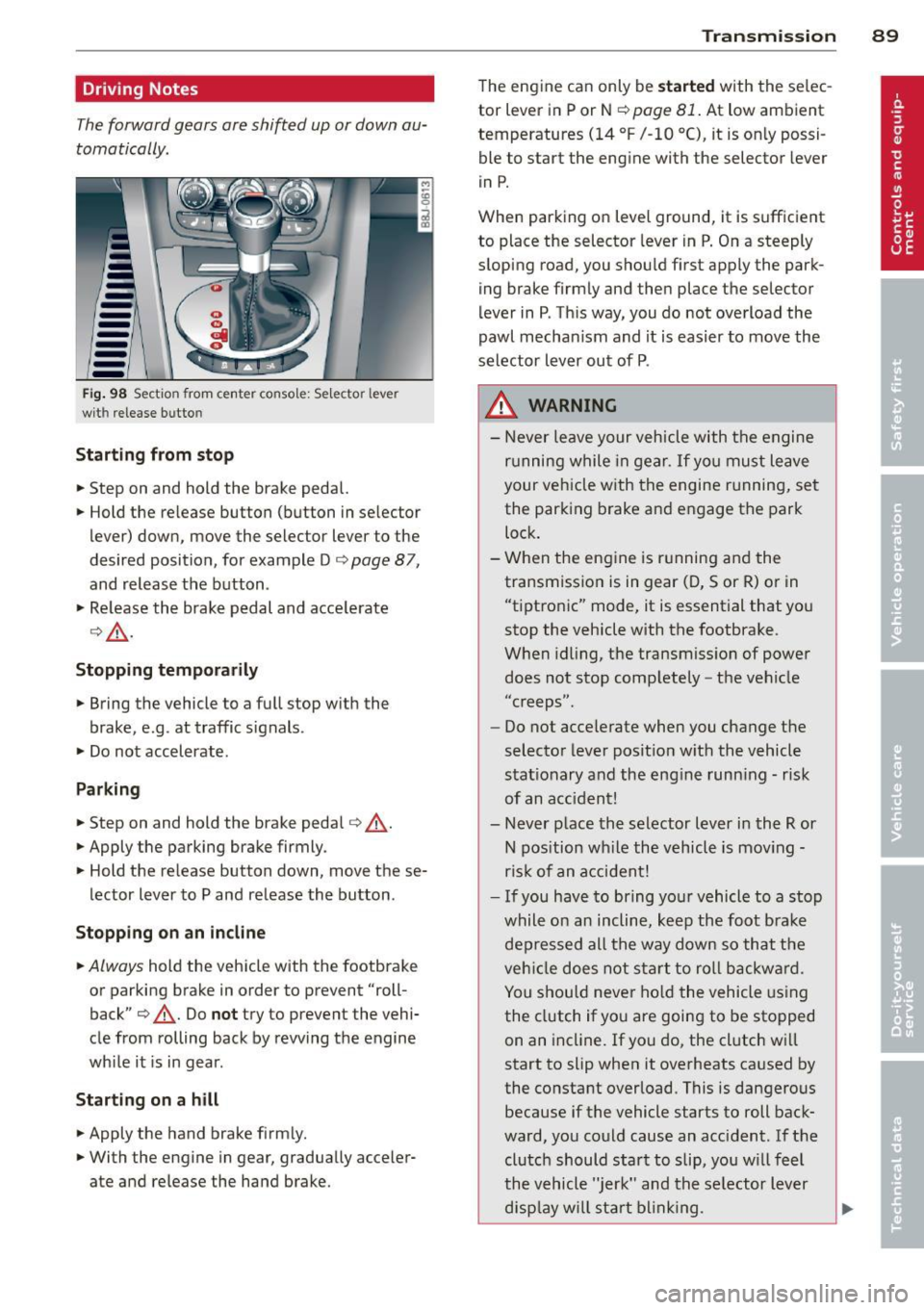
--Fig. 98 Section from cente r console: Selector lever
wit h rele ase butto n
Starting from stop
.. Step on and hold the brake pedal.
.. Hold the release button (button in selector
lever) down, move the selector lever to the
desired position, for example Do
page 87,
and release the button .
.,. Release the brake pedal and accelerate
o,& .
Stopping temporarily
.. Bring the vehicle to a full stop with the
brake, e.g . at traffic signals.
.. Do not accelerate.
Parking
.. Step on and hold the brake pedal o _&.
.. Apply the parking brake firmly.
.. Hold the release button down, move these
lector lever to P and release the button .
Stopping on an incline
.. Always hold the vehicle with the footbrake
or parking brake in order to prevent "roll
back" o
_&. Do not try to prevent the vehi
cle from rolling back by rewing the engine
while it is in gear.
Starting on a hill
.. Apply the hand brake firmly.
.. With the engine in gear, gradually acceler
ate and release the hand brake.
Transmission 89
The engine can only be started with the selec
tor lever in P or N
opage 81. At low ambient
temperatures
(14 °F /-10 °C), it is only possi
ble to start the engine with the selector lever
in P.
When parking on level ground, it is sufficient
to place the selector lever in P. On a steeply
sloping road, you should first apply the park
ing brake firmly and then place the selector
lever in P. This way, you do not overload the
pawl mechanism and it is easier to move the
selector lever out of P .
.&_ WARNING
-Never leave your vehicle with the engine
running while in gear. If you must leave
your vehicle with the engine running, set
the parking brake and engage the park
lock.
- When the engine is running and the
transmission is in gear (D, Sor R) or in
"tiptronic" mode, it is essential that you
stop the vehicle with the footbrake.
When idling, the transmission of power
does not stop completely -the vehicle
"c reeps" .
- Do not accelerate when you change the
selector lever position with the vehicle
stationary and the engine running - risk
of an accident!
- Never place the selector lever in the R or
N position while the vehicle is moving -
risk of an accident!
- If you have to bring your vehicle to a stop
while on an incline, keep the foot brake
depressed all the way down so that the
vehicle does not start to roll backward.
You should never hold the vehicle using
the clutch if you are going to be stopped
on an incline. If you do, the clutch will
start to slip when it overheats caused by
the constant overload . This is dangerous
because if the vehicle starts to roll back
ward, you could cause an accident. If the
clutch should start to slip, you will feel
the vehicle "jerk" and the selector lever
display will start blinking. ..,.
Page 96 of 260
94 Homelin k®
Homelink ®
Universal remote
control
General information
The Homelink ® feature can learn up to three
radio frequency codes for most current trans
mitters used for operating garage doors, es tate gates, home or outdoor lighting sys
tems , and other devices.
You must first program the Homelink ® trans
mitter before you can use the system
¢ page 95, Programming the HomeLink ®
transmitter.
In order to program the Home Link ® transmit
ter for devices utilizing rolling code, a second person on a ladder who can safely reach the
garage door opener motor is recommended.
It is also necessary to locate the "learn" but
ton on your garage door opener motor . Refer
to the operating instructions for the opener,
as the location and color of this button may
vary by manufacturer .
You can still use the original remote control
for the device at any time.
A WARNING -
- Never use the Homelink® transmitter
with any garage door opener that does
have not the safety stop and reverse fea
ture as requ ired by federal safety stand
ards. This includes any garage door open
er mode l manufactured before April 1,
1982.
- A garage door opener which cannot de
tect an object, signaling the door to stop
and reverse does not meet current feder
al safety standards. Using a garage door
opener without these features increases
risk of serious injury or death.
- For safety reasons never release the
parking brake or start the engine while
anyone is standing in front of the vehicle .
- A garage door or an estate gate may
sometimes be set in motion when the Homelink
® remote control is being pro
grammed. If the device is repeatedly ac
tivated, this can overstrain motor and
damage its electrical components -an
overheated motor is a fire hazard!
- To avoid possible injuries or property
damage, please always make absolutely
certain that no persons or objects are lo
cated in the range of motion of any
equ ipment being operated.
0) Tips
- If you would like more information on
Homelink®, where to purchase the
Homelink ® compatible products, or
would like to purchase the Homelink ®
Home Lighting Package, please call toll
free: 1-800-355-3515.
- For Declaration of Comp liance to United
States FCC and Industry Canada regula
tions ¢
page 244.
Page 203 of 260
Never exceed the m aximum inflati on pres
s u re li sted on the ti re sidew all for any rea
son.
Remembe r that the vehicle manufacturer, not
the t ire manufacturer, determines the co rrect
tire pressure for the tires on your vehicle.
It is importan t to check the tire pressure when
t he t ires are cold .
- Read the requ ired ti re pressure from the tire
pressure label located on d river's s ide B-pi l
l ar .
- T urn the valve stem cap counter-clockwise
to remove it from the tire valve .
- Place the air pressure gauge on the valve .
- The tire pressures should only be checked
and adjusted when the tires are cold . The
s li ght ly raised p ressures of warm tires must
not be reduced.
- Adjust the t ire pressure to the load you a re
ca rrying.
- Re install the valve stem cap on the valve .
When should I ch eck the ti re pres sur e?
The correct tire pressure is especially impor
tant at high speeds. The pressure should
therefore be checked at least once a month
and a lways before start ing a journey .
When should I ad just th e tir e pre ss ures?
Ad just the tire pressure to the load you are
carrying . After changing a wheel
or replacing
wheels you have to adjust the tire pressures
on all wheels. In addition, you must then in it i
alize the new tire pressures in the tire pres
sure mon itor ing system
q page 212 .
A WARNING
Incorrect tire pressures and/or unde rinfla
tion can lead sudden tire failure, loss of cont ro l, col lision, ser ious persona l inju ry
or even death.
- When the warning symbo l
[D] appears in
the instrument cl uster, stop and inspect
the tires.
- Incor rect tire pressure and/or underinfla
tion can cause increased tire wear and
Tire s an d wheel s 201
can affect the handling of the vehicle and
stopping ability .
- Incorrect tire pressures and/or underin
flation can a lso lead to sudden t ire fail
ure, including a blowout and sudden de
flation, caus ing loss of veh icle control.
- The driver is responsible for the correct
tire pressures for all tires on the veh icle.
The applicable pressure values are locat ed on a sticker on the dr iver's s ide B-pil
lar .
- On ly when all tires on the vehicle are fil
led to the correct pressure, the t ire p res
sure mon itor ing system can work cor
rectly.
- The use of incorrect tire p ressu re va lues
can lead to acc idents or other damage.
Therefore it is essential that the drive r
observe the spec ified t ire p ress ure val ues
for the t ires and the correct pressures for
the function of the tire press ure monito r
ing system.
-A lways inflate tires to the recommended
and correct tire pressure before dr iv ing
off.
- Driving with underinf lated tires bend
mo re, letting them get too hot resulting
in tread separation, sudden tire failure
and loss of control.
- Excessive speed and/over loading can
cause heat b uild-up, sudden tire failure
and loss of control.
- If the tire pressure is too low or too high,
the t ires will wear prematurely and the
veh icle w ill not handle well.
- If the tire is not flat and you do not have
to change a wheel immediately, drive at
reduced speed to the nearest service sta
tion to check the t ire p ressu re and add
a ir as requ ired.
(D Note
Driving w it h out valve stem caps can cause
damage to the tire valves. To prevent this,
always make sure that factory installed
valve stem caps on all whee ls are secu rely
mounted o n the valve. .,.
•
•
Page 214 of 260

212 Tires and wheels
Tire pressure
monitoring system
General notes
Appl ies to vehicles: with tire pressure monitoring system
Each tire, including the spare (if provided),
should be checked monthly when cold and in
f lated to the inflation pressure recommended
by the vehicle manufacturer on the vehicle
placard or tire inflation pressure label. (If your
vehicle has t ires of a different size than the
size indicated on the vehicle placard or tire in
flation pressure label, you should determine
the proper tire inflation pressure for those
tires.)
As an added safety feature, your vehicle has
been equipped with a tire pressure monitoring
system (TPMS) that illuminates a low tire
pressure telltale when one or more of your
tires is significantly under-inflated. According
ly, when the low tire pressure telltale illumi
nates, you should stop and check your tires as
soon as possible, and inflate them to the proper pressure. Driving on a significantly un
der-inflated tire causes the tire to overheat
and can lead to tire failure. Under-inflation al
so reduces fuel efficiency and tire tread life,
and may affect the vehicle's handling and
stopping ability.
Please note that the TPMS is not a substitute
for proper tire maintenance, and it is the driv
er's responsib ility to ma inta in correct tire
pressure , even if under-inflation has not
reached the level to trigger illumination of the
TPMS low tire pressure telltale.
Your veh icle has also been equ ipped with a
TPMS malfunction indicato r to indicate when
the system is not operating properly. The
TPMS malfunction indicato r is combined with
the low tire pressure telltale. When the sys
tem detects a malfunction, the telltale will
f lash for approximately one minute and then
remain continuously illuminated. This se
quence will continue upon subsequent vehicle
start-ups as long as the ma lfunction exists. When the
malfunction indicator is illuminat
ed, the system may not be ab le to detect or
s ignal low tire pressure as intended. TPMS
malfunctions may occur for a variety of rea
sons, including the installation of replace
ment or alternate tires or wheels on the vehi
cle that prevent the TPMS from functioning
properly. Always check the TPMS malfunction
telltale after replacing one or more tires or
wheels on your vehicle to ens ure that the re
placement or alternate ti res and wheels allow
the TPMS to continue to function properly.
Tire pressure indicator appears
Applies to veh icles : w ith tire pressure monitoring system
The tire pressure indicator in the instrument
cluster informs you if the tire pressure is too
low or if there is a system malfunction.
Fig. 151 Display : underinflatio n warning
Fig. 152 Display: System malfunction
Using the ABS sensors, the tire pressure moni
toring system compares the tire tread circum
ference and vibration characteristics of the in dividual tires. If the pressure decreases in one
or more t ires, this is indicated in the instru
ment cluster with a warning symbol
g and a
message
r=:> fig. 151. Th e driver message in the
display goes out after 5 seconds. The driver
message can be displayed again by pressing
11--
Page 223 of 260
Inflating tire
"' Move the switch @¢ fig. 162 on the elec
tric air pump
ll to posit ion I. After 5 mi
nutes, tire pressure must have reached at
l east 1.8 bar .
"' Switch the electric a ir pump off - switch in
position
0 . If the required tire pressure of at
least 1.8 bar has not been reached, follow
the instructions in the section Re-inflating
tire .
Re-infl ating tire
"' Remove the hose from the valve and pu ll the
plug out of the socket.
"' Drive the vehicle slow ly 10 meters backward
or forward. This helps to distribute the seal
ant better.
"' Remove the empty inflat ion bottle and
screw the hose®¢ fig. 161 from the elec
tric pump directly onto the va lve.
"' Insert the plug @¢ fig. 161 into the socket
for the cigarette lighter .
"' Move the switch@¢ fig. 162 on the elec
tric a ir pump
l) to posit ion I. After 5 mi
nutes, t ire pressure must have reached at
least 1.8 bar .
"' Switch the electric a ir pump off - switch in
pos ition
0 . If the requ ired tire p ressure of at
least 1.8 bar has not been reached, it is not
poss ib le to make a repa ir with the tire seal
ant . Seek pro fessional ass istance .
Disassembling Tire Mobility System
"'Remove the hose from the valve and pull the
plug out of the socket.
"' Screw th e dust cap onto the va lve.
"' Place the empty sealant bottle back in the
o riginal packaging and clip it in p lace under
the floor so that no tire sealant can run out
into the vehicle.
"' Place the electric air pump in the luggage
compartment for the time being .
"' Start driving r ight away so t hat the sealant
is d istributed in the tire .
l) The e lectr ic a ir pu m p sh oul d never r un for long er than
8 m in utes.
What do I do now? 221
A WARNING
- Follow the manufacturer's safety instruc
tions on the decal for the air pump and
the sealant bottle.
- If a tire pressure of 1.8 bar cannot be
achieved after pumping for 5 minutes,
the t ire is too severely damaged . Do not
continue to dr ive.
- Seek professional ass istance if it is not
possible to repa ir the tire w ith the t ire
sealant.
(D Tips
- Do not operate the electric air pump for
more than 8 minutes witho ut stopping,
otherwise it can overheat . When the a ir
pump has coo led down, you can continue
to use it.
- I f sea lant has escaped, allow it to dry,
t hen yo u can peel it off.
Final check
Applies to vehicles: wit h Tire Mobility System
Aft er driv ing for a short distance, tire
pre ssure must be chec ked
"' After driving for about 10 min utes, stop and
check the tire pressure.
"' If tire pressure is st ill at least 1.3 bar, in
flate the tire to specified pressure (see dr iv
er's side B-pillar), drive to the next repa ir
shop and have the tire and the sealant bot
tle replaced .
"'I f ti re pressu re is less than 1.3 ba r, the t ire
is too severely damaged. Do not con tinue to
drive . See k professiona l assist ance.
A WARNING
= -
If tire press ure is less than 1.3 bar after
d riving for 10 minutes, the ti re is too se
verely damaged. Do not cont in ue to drive.
Seek professional ass istance.
•
•
Page 234 of 260
232 Emergency situations
@ Tips
The discharged battery must be properly
connected to the vehicle's electrical sys
tem.
Use of jumper cables
Make sure to connect the jumper coble
clomps in exactly the order described below!
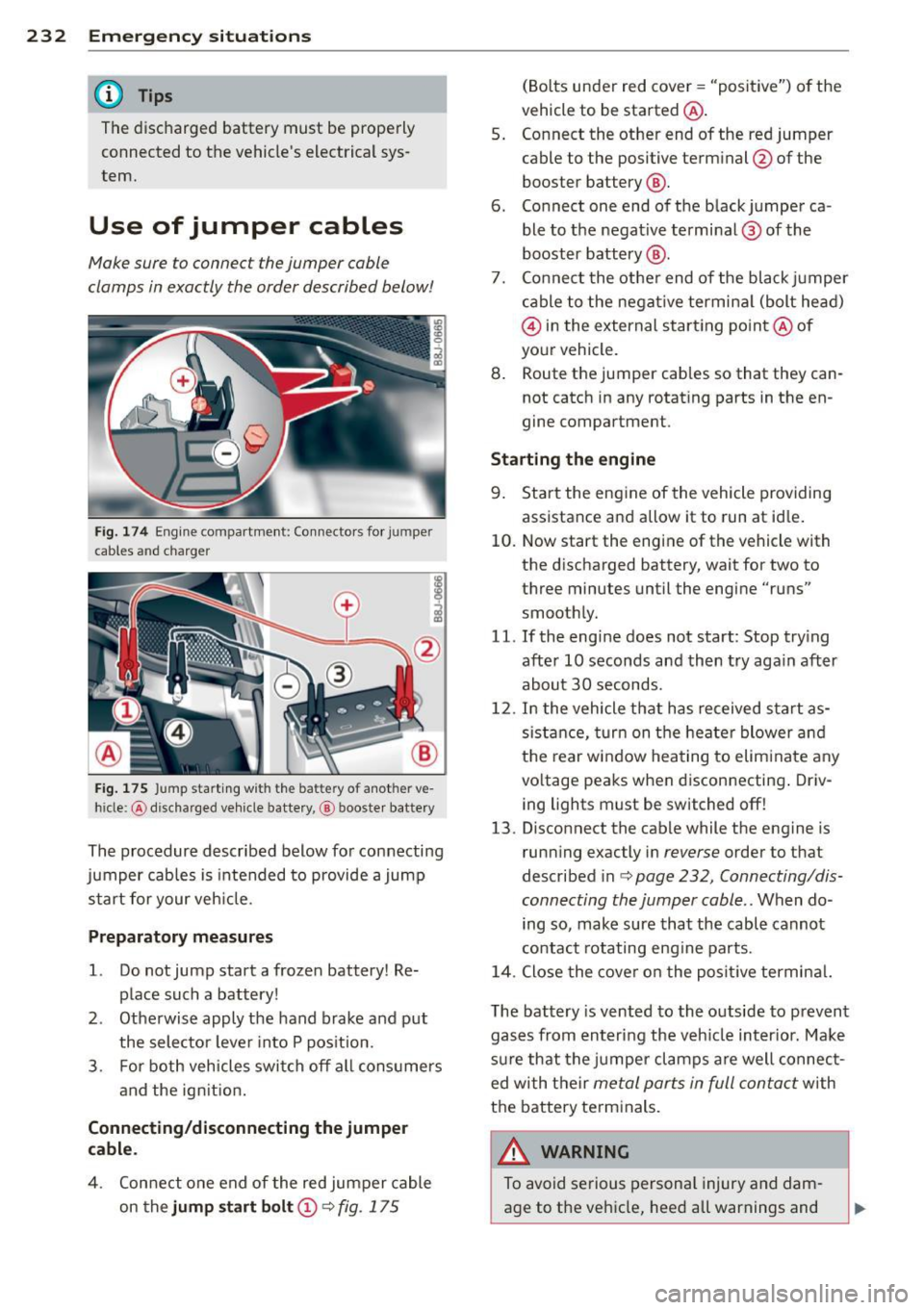
Fig. 174 Engine compart ment: Co nnectors for jumper
cables and charger
Fig. 175 Jump starting with the battery of another ve
hicle: @discharged veh icle battery, ® booste r battery
The procedure described below for connecting
jumper cables is intended to provide a jump
start for your veh icle.
Preparatory measures
1. Do not jump start a froze n battery! Re
place such a battery!
2 . Otherwise apply the hand brake and put
the selector lever into P position.
3. For both vehicles switch off all consumers
and the ign ition.
Connecting/disconnecting the jumper
cable .
4. Connect one end of the red jumper cable
on the
jump start bolt (D 9 fig. 175
(Bolts under red cover = "positive") of the
vehicle to be started @.
5. Connect the other end of the red jumper
cable to the positive terminal @of the
booster battery @.
6. Connect one end of the black jumper ca
ble to the negat ive terminal @of the
booster battery @.
7. Connect the other end of the black jumper
cable to the negative terminal (bolt head)
@ in the external start ing point @ of
your vehicle.
8. Route the jumper cables so that they can
not catch in any rotat ing parts in the en
gine compartment.
Starting the engine
9. Start the engine of the vehicle providing
assistance and allow it to run at id le .
10. Now start the engine of the vehicle with
the discharged battery, wait for two to
three minutes until the engine "runs"
smoothly.
11. If the eng ine does not start: Stop try ing
after 10 seconds and then try again after
about 30 seconds.
12. In the vehicle that has received start as
sistance, turn on the heater blower and
the rear window heating to elim inate any
vo ltage peaks when disconnecting . Driv
ing lights must be switched off!
13 . Disconnect the cable while the engine is
running exactly in
reverse order to that
described inc:>
page 232, Connecting/dis
connecting the jumper coble ..
When do
ing so, make sure that the cable cannot
contact rotating eng ine parts.
14. Close the cover on the posi tive terminal.
The battery is vented to the outside to prevent
gases from entering the vehicle inter ior. Make
sure that the jumper clamps are well connect
ed with their
metal parts in full contact with
the battery terminals.
A WARNING ~
To avoid serious personal injury and dam-
age to the vehicle, heed all warnings and
Page 250 of 260

248 Index
Dipstick
Reading the dipstick prop erly ..... .. . 183
Distance . . . . . . . . . . . . . . . . . . . . . . . . . . . 20
Driver information . . . . . . . . . . . . . . . . . . . 30
Dr iver info rmation system
M enu button . . . . . . . . . . . . . . . . . . . . . . 22
M enu display .............. .. .... .. 21
Open door or front lid warning .. .... .. 19
Outside temperature display .. .. .. .... 19
Red symbols ....................... 29
Service interval d isplay ......... ..... 24
Setting . . . . . . . . . . . . . . . . . . . . . . . . . . . 23
Sound system display ..... .. .. .. .. . . 19
Trip computer . . . . . . . . . . . . . . . . . . . . . . 20
ye llow symbo ls ........... .... .... .. 29
Driver seat
refer to Seat ing pos ition ........ ..... 99
Driving Run-flat tires ............ .. .. .... . 216
Driving saf ely . . . . . . . . . . . . . . . . . . . . . . . 98
Driving through water ....... .... .... 158
Duplicate key .............. ... .... .. 35
Dust filter . . . . . . . . . . . . . . . . . . . . . . . . . . 76
E
Efficiency program . . . . . . . . . . . . . . . . . . . 23
Fu el economy messages . . . . . . . . . . . . . 24
Memory levels . . . . . . . . . . . . . . . . . . . . . 20
Other equipmen t . . . . . . . . . . . . . . . . . . . 24
Elapsed time . . . . . . . . . . . . . . . . . . . . . . . . 20
Electro-mechanical power assist . . . 18, 153
El ect ronic different ial lock (EDL)
How the system works ..... .. .. .. .. . 149
Warning/indicator lights ....... .... .. 17
E lect ronic immobilizer . . . . . . . . . . . . 12, 36
Electronic power control
EPC warning/indicator light .. .. .. .... 14
El ect ronic speed limiter . . . . . . . . . . . . . . . 28
Electronic Stability Program ...... .... 148
Electronic stabilization program (ESP) Warning/indicator lights ... .. .. .... .. 15
Emergency flasher . . . . . . . . . . . . . . . . . . . 56
Warning/indicator lights ....... .... . . 15
Emer gency locking . . . . . . . . . . . . . . . . . . . 40 Emergency
operation
Convertible top .. .................. 49
Rear lid ... .. .. .. .. .............. .. 42
Emergency starting ............. .. .. 231
Emergency towing . ................ . 233
Energy management ................ 155
Battery power ... ................. 156
Driver notification ................. 156
Engine Check ing and filling locations ..... ... 180
Coolant . . . . . . . . . . . . . . . . . . . . . . . . . . 185
Hood ......... .. .. .............. . 178
Starting . . . . . . . . . . . . . . . . . . . . . . 80, 81
Starting with jumper cables ..... .... 231
Stopping .. .. .. .. .. ........... .... . 82
Eng ine compartment . . . . . . . . . . . . . . . . 180
Safety instructions ................ . 178
Working in the engine compartment 178
Engine coolant system
Malfunction ... .. .................. 31
Radiator fan ..... ................. 187
T em perature gauge ............ .... . 11
Engine cooling system . . . . . . . . . . . . . . . 185
Adding coolant . .. ............. .. .. 186
Checking the engine coolant level ... .. 185
Engine data ..... ................... 239
Engine hood Closing ... .... ................... 178
How to release the hood ............ 178
Engin e oil . ..... .. .. .............. . 180
Adding ....... .. ............. .... 183
Additives . ..... .. .. .............. . 183
Changing . .... .. ............. .... 184
Checking the engine oil level ..... .... 183
Indications and conditions requiring ex-
tra checking ..... ................ . 183
Oil consumpt io n .. .. ..... ........ .. 182
Oil grades . .. .. .. ............. .. .. 180
Recommended oil check intervals ... .. 183
Specification and viscosity ........... 180
Engine oil level . . . . . . . . . . . . . . . . . . . . . . 32
Engine oil pressure (malfunction) ... ... . 31
Engine oil sensor defective . . . . . . . . . . . . 32
Engine speed limitation .............. . 33
Environm ent
Break-in period ... ............. .... 157
Catalytic converter ................ . 158
Page 255 of 260
Index 253
Safety belts . . . . . . . . . . . . . . . . . . . . . . . . 110 Seats
Cleaning ... ................. .. ... 172
Danger to passengers who do not wear a
safety belt . . . . . . . . . . . . . . . . . . . . . . . 108
Fastening .. ............. .... .. ... 110
Improperly worn .............. .... 112
Not worn .. ... .. ... ..... .. .. .. .. . 108
pretensioners . . . . . . . . . . . . . . . . . . . . . 113
Safety belt position . . . . . . . . . . . . . . . . 111
Safety instructions ........ .. .. .. .. . 109
Securing child safety seats .......... 144
Special considerations for pregnant
women .... ................ ... ... 112
Unfastening .. ........... .. .. .. ... 112
Warning/indicator light ...... .. .. .. . 107
Why YOU MUST wear them . .. .. .. .. . 107
Worn properly .............. ... ... 109
Safety belt warning light . . . . . . . . . 16, 107
Safety compliance sticker ..... .. .. .. . 237
Safety equipment . . . . . . . . . . . . . . . . . . . . 98
Safety features for occupant restraint and
protection . . . . . . . . . . . . . . . . . . . . . . . . . . 98
Safety guidelines Seat adjustment. . . . . . . . . . . . . . . . . . . . 66
Safety instructions Engine compartment ......... .... .. 178
for using child safety seats . .. .. .. .. . 139
For using safety belts .......... .... 109
Monitoring the Advanced Airbag Sys-
tem . .... .. ................. .. ... 127
Safety lock (Ignition key) ........ ... ... 81
Seat adjustment Driver's seat . . . . . . . . . . . . . . . . . . . . . . . 66
Front passenger's seat . . . . . . . . . . . . . . . 67
Front seats . . . . . . . . . . . . . . . . . . . . . . . . 66
Head restraints .... ...... .. .. .. .. . 101
Head restraints, front seat . . . . . . . . . . . 70
Lumbar support . ............ .... ... 69
Manual controls . . . . . . . . . . . . . . . . . . . . 67
Power seats . . . . . . . . . . . . . . . . . . . . . . . 68
Safety guidelines ............ ..... .. 66
Seating capacity ................. ... 107
Seating position Driver ... .. .. ............. .. .. .... 99
Front passenger .......... .. .. .. .. . 100
How to adjust the front seats ... ... .. 100
Incorrect seat position .......... .... 102
Occupants .. ... .. .. ...... .. .. .. .. .. 99 Number of seats
................. . 107
Se lector lever emergency release . . . . . . . 92
Selector lever positions .......... .... . 87
Service and disposal Safety belt pretensioner ............ 113
Service interval display . . . . . . . . . . . . . . . . 24
Service position for windshield wipers .. . 62
Set menu ... .. .. .. ................. . 23
Setting Date d is play . . . . . . . . . . . . . . . . . . . . . . . 11
Digital clock . . . . . . . . . . . . . . . . . . . . . . . 11
Side airbags Description .. .. .. .... ........... .. 132
How they work . .. .. ..... .......... 134
Side marker lights . . . . . . . . . . . . . . . . . . . 53
Ski bag ... .. .. .. .. .. . ............... 70
Snow chains .. .. .. ................. 210
Sockets ..... ..... .. ................ 72
Soft top Care and cleaning . ............. .. .. 164
Sound system display ................ . 19
Sources of information about child re-
straints and their use ............... . 147
Speedometer . . . . . . . . . . . . . . . . . . . . . . . 12
Speed rating letter code .......... .. .. 206
Speed warning system . . . . . . . . . . . . . . . . 26
Sport button . . . . . . . . . . . . . . . . . . . . . . . . 86
Sport mode . . . . . . . . . . . . . . . . . . . . . . . . . 86
Starting assistance . ................. 232
Starting the engine . . . . . . . . . . . . . . 80, 81
What should I do if the engine does not
start? ...... .. .... .......... ...... 81
Steel wheels . ... .... ............... 167
Steering refer to Electro-mechanical power as-
sist . . . . . . . . . . . . . . . . . . . . . . . . . 18, 153
Steering column Adjusting . .. .. .. .. . .. .. ..... ..... . 80
Locking the steering ........... .... . 80
Steps for determining correct load limit . 202
Stopping the engine .. .............. .. 82
Storage .......... .. ..... ........... 73
Compartment in the front seats . . . . . . . 73
Cup holder .. .. .. .. ............... . 71
Glove compartment . . . . . . . . . . . . . . . . . 73
•
•