display AUDI TT ROADSTER 2011 Owner's Manual
[x] Cancel search | Manufacturer: AUDI, Model Year: 2011, Model line: TT ROADSTER, Model: AUDI TT ROADSTER 2011Pages: 260, PDF Size: 64.11 MB
Page 64 of 260
62 Clear vis ion
- Make sure the washer fl uid reservoir in
the engine compartment is topped
off
before going on a long trip . Look up
c:> page 192 for checking and fi lling the
washer container.
- The w ipers only operate w ith the hood
completely closed.
Headlight washer system
App lies to vehicles: with hea dlig ht washer system
The headlight washer system cleans the
headlights.
.. Operate the winds hield wiper/washer sys
tem
c:> page 60, fig. 68 ® with the head
li ghts turned on by holding the lever for lon
ger than one second.
The washer jets extend forward o ut of the
front bumper driven by water pressure to
spray the front headlights with water.
You shou ld inspect the headlights regularly
(for example when refue ling) and clean
off
any solid dirt or insects from the lenses .
To ensure the system works properly in winter,
keep the washer jets free of snow and remove
any ice using a de-icing spray.
Service position
It is only possible to change wiper blades if
you move the wiper arms to the service posi
tion
I n o rder to use the windsh ie ld w ipers, the
front lid must be comp letely closed
Moving wiper blades to the service
position
.. When there is a ris k of frost, ma ke s ure that
the wiper b lades are not frozen to the wind
shield .
.. Switch the ignition on .
.. Move the wiper lever to pos ition
0
c:> page 60, fig. 68 .
.. Press the I Reset I button until the Display
type menu appears in the Driver Informa
t ion System display . ..
Using the rocker switch and the
I R ese t I but
ton, se lect the Set > Wipe rs > Front > Se rv
ice po sition on function . The w indshield
w iper arms move to the service posit ion.
Mo ving wip er blades to pa rk position
.. Make certain that the w iper arms are ly ing
against the windshield .
.. Switch the ignition on and move the wipe r
lever from pos ition O
to 4 c:> page 60,
fig. 68.
The w iper arms will move back to
the park position.
@ Note
Never drive your veh icle when the wind
sh ield wiper arms are in the service posi
tion and pulled away from the winds hield.
When you d rive faster than 4 mph (6 km/
h), the wiper a rms automatically return to
the pa rk position and cou ld cause paint
d amage to the front l id!
@ Tips
= Yo u can also tur n on the se rvice posit ion,
for example, if yo u want to p rotect the
w indshield from icing by us ing a cover.
- The service posit ion moves to
off a uto
matically whe n you ope ra te the w ind
shield wiper lever, o r speed exceeds
4 mph (6 km/h) .
Page 66 of 260
64 Clear vis ion
- To he lp prevent damage to the wiper sys
tem, a lways loosen blades which are fro
z en to the windsh ie ld before operat ing
wipers.
- To he lp prevent damage to w iper blades,
do not use gasoline , kerosene, pa int
thinner, or other solvents on or near t he
wiper blades .
- To he lp prevent damage to the wiper
arms or other comp onents, do not at
tempt to move the wipers by hand .
(D Tips
-Commercial hot waxes applied by auto
matic car washes affect the cleanability
of the glass surface .
- The front wipe r blades are different
l engths; the blade on the driver's s ide is
l onger .
Digital compass
Activating or deactivating the compass
Applies to vehicles: with digital compass
The direction is displayed on the interior rear
view mirror.
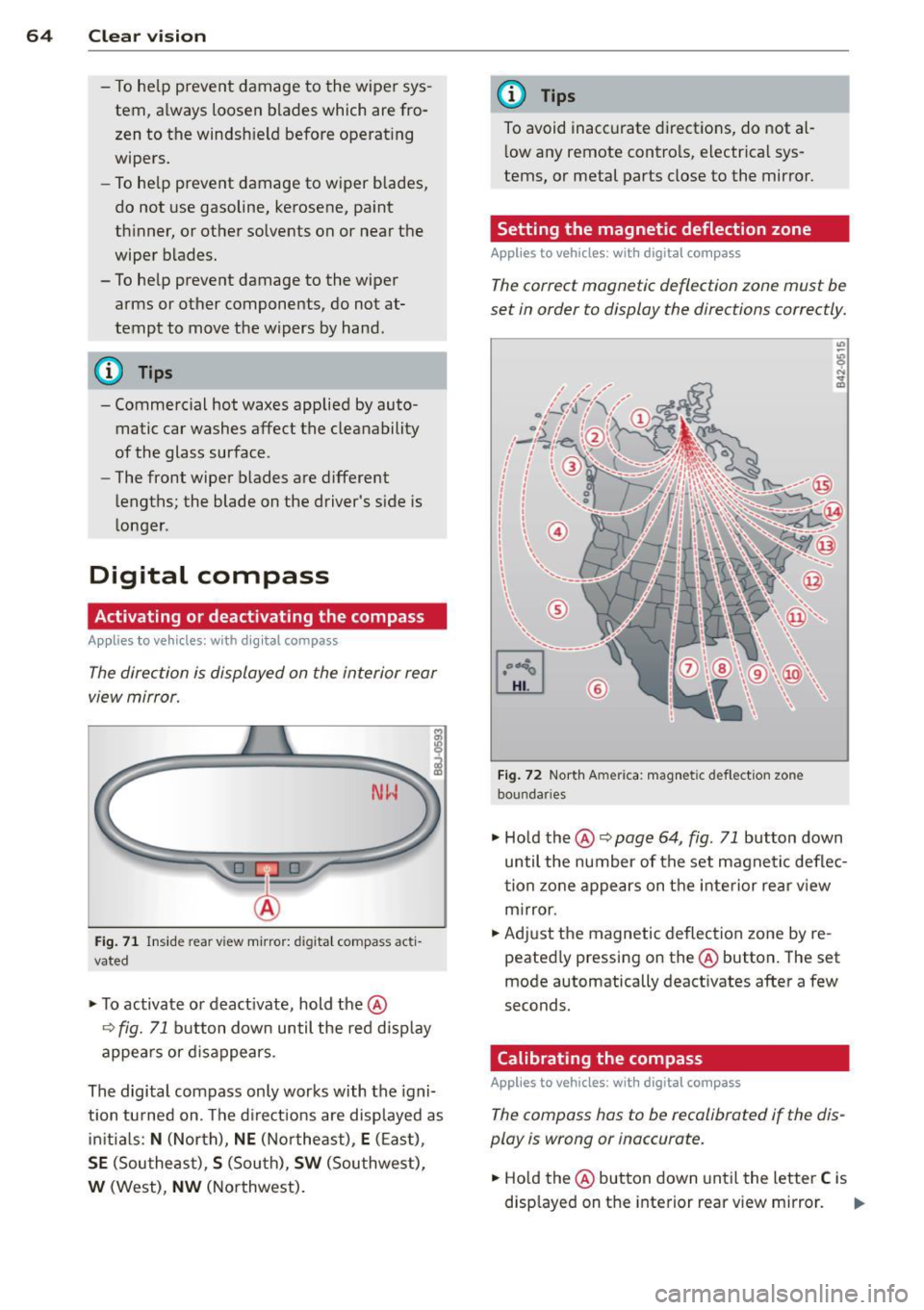
Fi g. 71 In side rea r view m irro r: di gita l compass acti
vated
.. To activate o r deact ivate, hold the@
¢ fig. 71 button down until the re d disp lay
appe ars or d is a ppears.
The digital compass only works with the igni
tion tu rned on . Th e d irect io ns are displayed as
ini tial s:
N (Nor th), NE (N ort he ast), E (E as t),
SE (Southe ast), S (Sou th), SW (Sou thwest),
W (West), NW (No rthwest).
(D Tips
To avoid inacc urate dir ections, do not a l
l ow any remote contro ls, electr ica l sys
tems , or metal parts close to the mirror.
Setting the magnetic deflection zone
Appl ies to vehicles: with digita l compass
The correct magnetic deflection zone must be
set in order to display the directions correctly.
©
Fi g. 72 Nort h Am eric a: mag neti c def le ction zone
bo un dar ies
" Ho ld the @ ~ page 64, fig . 71 button down
until the number of the set magne tic deflec
t ion zo ne appe ars on t he inte rior re ar v iew
m irror.
.. Adjust the magnetic deflec tion zone by re
peated ly pressing on the @button . The set
mode automatically deact ivates afte r a few
seconds.
Calibrating the compass
Applies to vehicles: with digita l compass
The compass hos to be recalibrated if the dis
play is wrong or inaccurate.
.. Ho ld the @button down until the letter C is
disp layed on t he interior rear v iew mirror. ..,.
Page 86 of 260
84 On the road
Potenti al malfunction s
If a warn ing buzzer sounds for a few seconds
when the ignition is switched on, there is a
system malf unction with the acoustic park as
sist. If the malfunction persists until the igni
tion is switched off, there will be no acoustic
warning at the next attempt to activate the
system. Have the problem corrected.
There is no confirmation tone when reverse
gear is engaged if there is a system malfunc
tion.
For the parking assist to operate, the sensors
must be kept clean and free of ice .
A WARNING
-Sensors have blind spots in which objects
cannot be detected. Pay special attention
to sma ll children and animals. They can
not always be detected by the sensors -
danger of an accident!
- The parking assist cannot replace the dr iver's attention. The d river alone is re
sponsible for parking and s imilar driving
maneuvers. A lways watc h where you a re
dr iv ing.
(D Note
Low obstacles al ready signalled by a warn
ing can disappear from the system's det ec
t ion range as they are approached and will
no t continue to be sign alled. Objects such
as barrier cha ins, trailer draw ba rs, thin
pa inted vertical poles, or fences may not
be detected by the system -risk of dam
age .
For the parking ass ist to operate, the sen
sors must be kept clea n and free of snow
and ice.
Cruise control
Switching the system on
The cruise control system makes it possible to
drive at a constant speed starting at 20 mph
(30kmlh).
®-
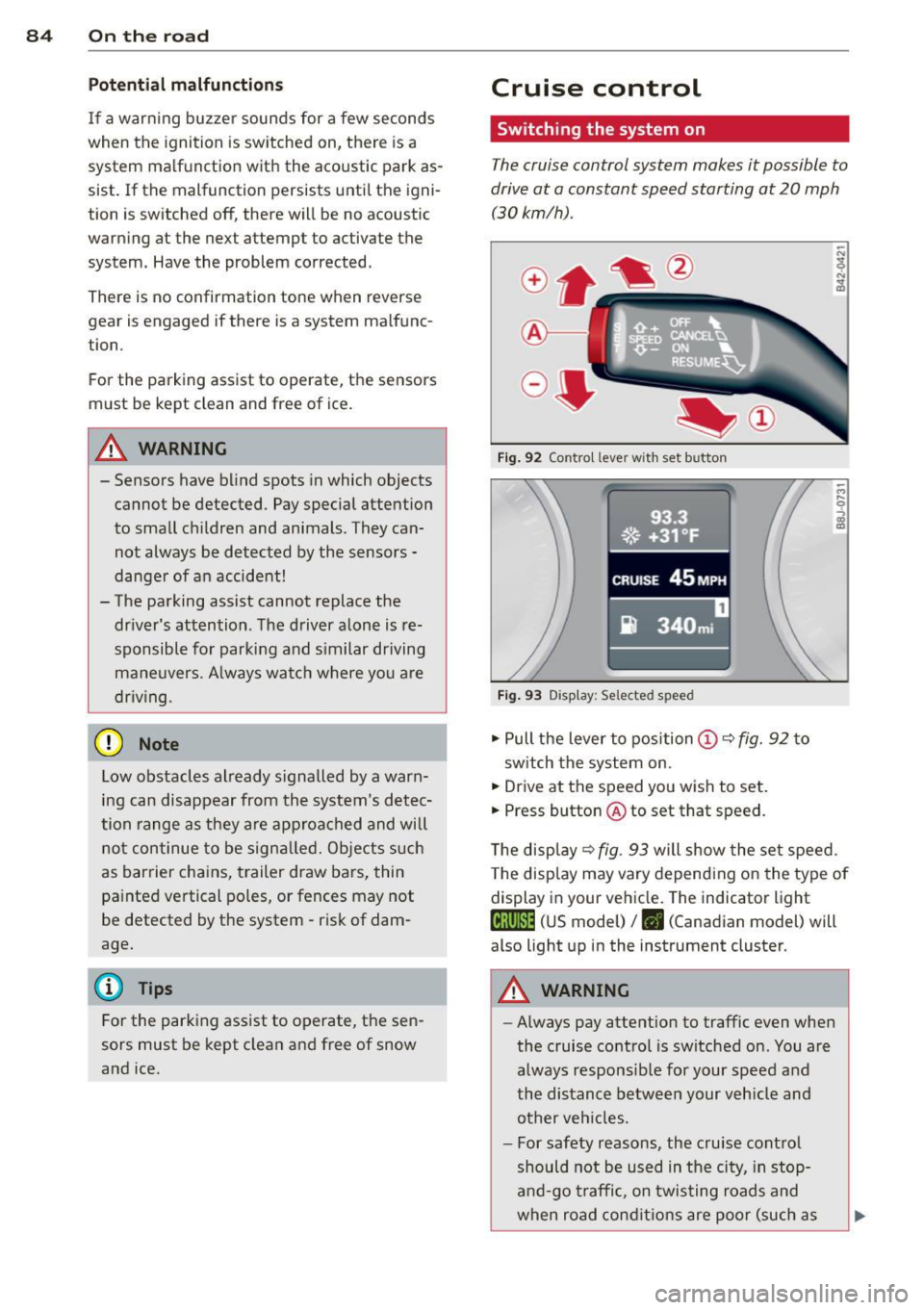
Fig . 9 2 Contro l lever wit h set button
93.3
. ®' ~.+31, ~F; ,
II .~~ .. . • , -,.::.._-.--~.I-~-
CRUISE 45 MPH
iR 340m i
Fig. 9 3 Display: Selected speed
.,. Pull the lever to position (D c::> fig. 92 to
sw itch the system on.
.,. Drive at the speed you wish to set.
.,. Press button @ to set that speed.
T he disp lay
c::> fig . 93 will show the se t speed.
T he disp lay may vary depend ing on the type of
display in your ve hicle. The indicator light
te;(Q~i~ (US model) /. (Canadian model) will
also light up in the instrument cluster.
A WARNING
--Always pay attention to traffic even whe n
the cruise contro l is switched on. You are
always respons ib le for your speed and
the distance between your veh icle and
other ve hicles.
- For safety reasons, the cru ise cont ro l
should not be used in the city, in stop
an d-go t raffic, on twis ting road s and
when road cond itio ns are poor (such as
Page 89 of 260
Transmission S tronic transmission
Introduction
Your vehicle is equipped with a S tronic trans miss ion, also called a double-clutch system/
transmission.
Power is transferred between the engine and
the transm ission by means of two i ndepend
ent clutches. They replace the to rque convert
e r of conventional automat ic transm iss ions
and a llow the vehicle to acce lerate without a
noticeable break in the power flow .
W it h the aid
of tiptroni c, the gears can op
tionally be sh ifted
manually¢ page 90.
Selector lever positions
All the selector lever positions are explained
in this section.
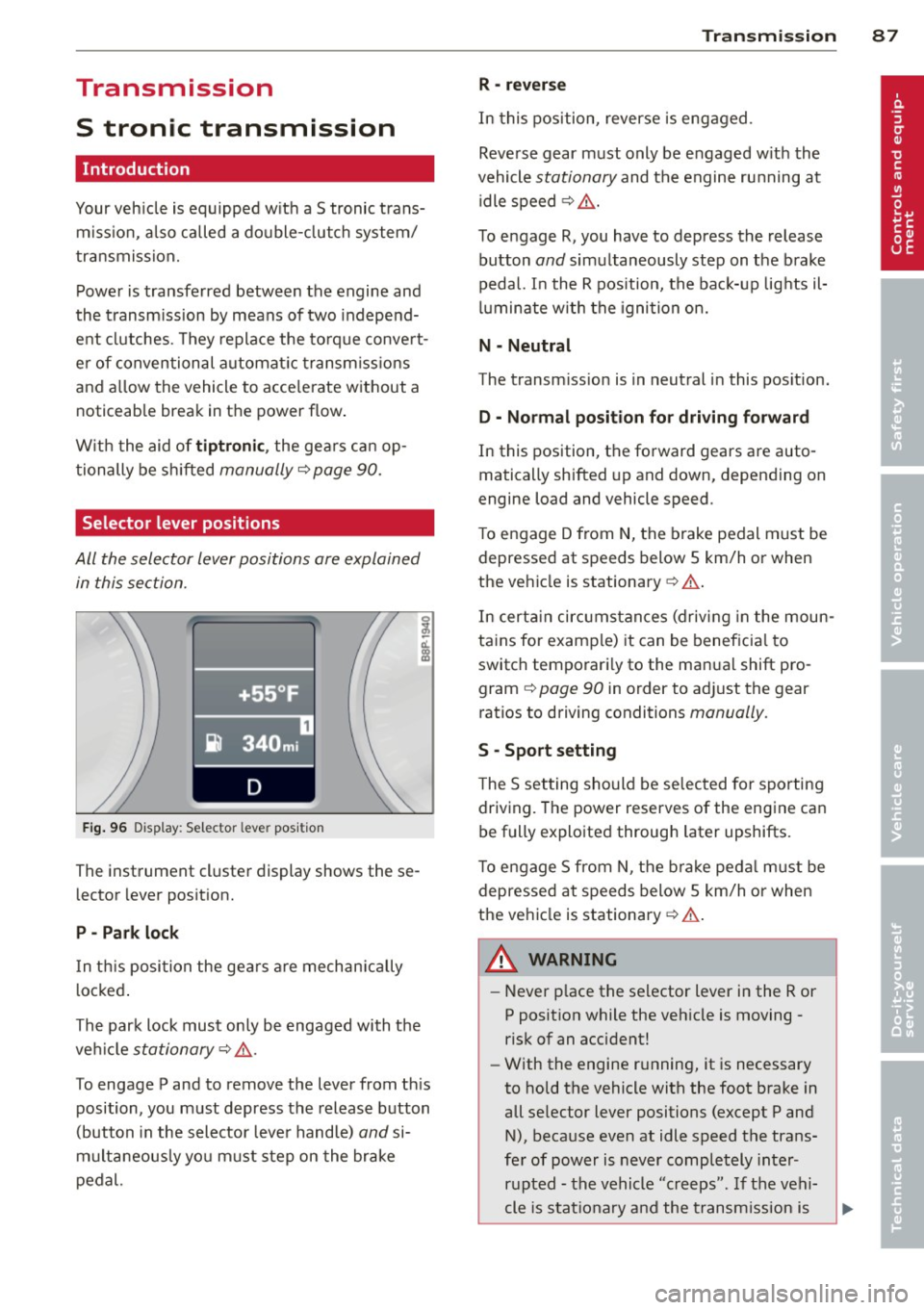
F ig . 96 Display: Selector lever position
The instrument cluster display shows these
l ector lever position.
P -Park lock
In th is posi tion the gea rs are mechan ically
l ocked .
The park lock must on ly be engaged with the
ve hicl e
stationary¢ /1..
To engage P and to remove the lever from th is
position, you must depress the release button
(button in the selector lever handle)
and si
multaneously yo u must step on the brake
pedal.
Tran sm iss ion 87
R -re ver se
In this position, reverse is eng aged.
Reverse gear must only be engaged w ith the
vehicle
stationary and the engine ru nning at
idle speed ¢
/1..
To engage R, you have to depress the release
button
and simultaneously step on the brake
pedal. I n the R pos ition, the bac k-up lights il
luminate w ith the ignition on.
N -Neutral
The transm iss ion is in neutral in this pos ition.
D -Normal po sition fo r dri ving forward
In this position, the forward gears are auto
matically shifted up and down, depending on
engine load and vehicle speed.
T o engage D from
N, the brake pedal must be
depressed at speeds below S km/h or when
the vehicle is stationary¢&. .
In certa in circ umstances (driving in the moun
tains for examp le) it can be beneficia l to
switch temporari ly to the man ual shift pro
gram ¢
page 90 in order to adjust the gear
ratios to driving conditions
manually .
S -Sport s etting
T he S set ting should be se lected for sporting
driving. The power reserves of the engine ca n
be fully explo ited through later upshifts.
T o e ngage S from N, the b ra ke peda l must be
depressed at speeds below 5 km/h or when
the ve hicle is stationary ¢&. .
A WARNING
-Never p lace the selector lever i n the R or
P posit ion while the veh icle is moving -
risk of an accident!
- With the engine r unning, it is necessary
to hold the vehicle with the foot brake in
all se lector lever positions (except P and
N), because even at idle speed the trans
fe r of power is never completely inter
r u pted -the vehicle "creeps". If t he vehi
cle is stat ionary and the t ransm ission is
Page 90 of 260
88 Transmi ssion
engaged, the engine shou ld never be
speeded up unintentionally (e.g. manual ly from under the hood). Otherwise the
vehicle will immediately start to move -
sometimes even if the parking brake is
firmly applied -risk of an accident!
- Before yo u or other persons open the
hood and work on a running eng ine, the
selector lever must be move d to P and
t h e parking bra ke applie d firm ly -ris k of
an a cciden t! Fo llow the w arning stickers
¢ page 17 2, Engine compartment.
@ Tips
If you have inadvertently shifting into N
while the veh icle is moving, yo u should re
move your foo t from the accelerato r and
wait until t he engine speed has dropped to
id le before shifting back to Dor S.
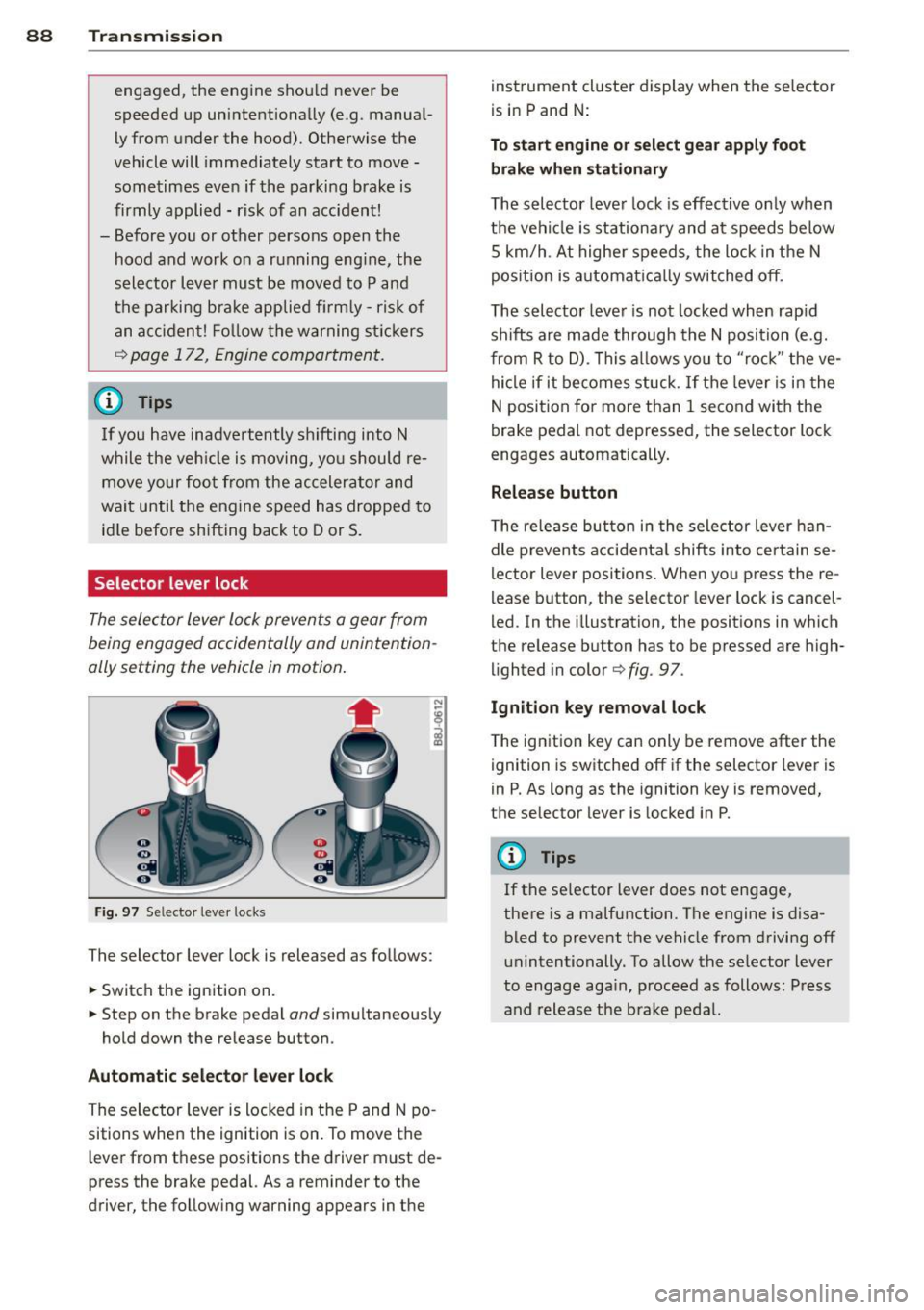
Selector lever lock
The selec tor lever lo ck prevent s a gear from
being engaged accidentally and unintention
ally setting the vehicle in motion .
Fig . 97 Se lecto r leve r locks
The selector lever lock is released as follows:
• Switch the ignition on.
• Step on the brake pedal
and simultaneous ly
hold down the re lease button .
Automatic selector lever lock
The selector lever is locked in the P and N po
sitions when the ignition is on. To move the
l ever from t hese positions the driver m ust de
press the brake pedal. As a reminder to the
driver, the follow ing warning appears in t he inst
rument cluste r display when the se lector
is in P and N:
To start engine or select gear apply foot brake when stationary
The selector leve r lock is eff ective o nly when
t h e vehi cle is stationary and at speeds be low
5 km/h . At hig he r sp eeds, the lock in the N
pos ition is a utomat ica lly switched off.
The selector leve r is not locked when rap id
sh ifts are made through the N posi tion (e.g.
from R to D) . This a llows you to "ro ck" the ve
hi cle if it becomes stuck. If the leve r is i n the
N position fo r more than 1 second with the
brake pedal not depressed, the selector lock
engages automatically.
Release button
T he re lease bu tton in t he sele ctor lever han
dle p revents acci dent al shifts into cer tain se
lector lever positions . When yo u press the re
l ease b utton , the selector lever lock is cancel
led. In the illustration , the posit ions in which
the re lease button has to be p ressed are high
li ghted in color
¢ fig . 97 .
Ignition key removal lock
The ign ition key can only be remove after the
ignit ion is switched off if the selector lever is
i n P. As long as the ignition key is removed,
the selector lever is locked i n P.
(D Tips
If t he se lector lever does not engage,
the re is a malfuncti on. The engine is disa
bled to prevent the vehicle from driving off
unintentionally. To allow the se lector lever
to engage aga in, p roceed as follows: P ress
and release the b ra ke pedal.
Page 91 of 260
Driving Notes
The forward gears are shifted up or down au
tomatically.
--
-
-
-
-
-
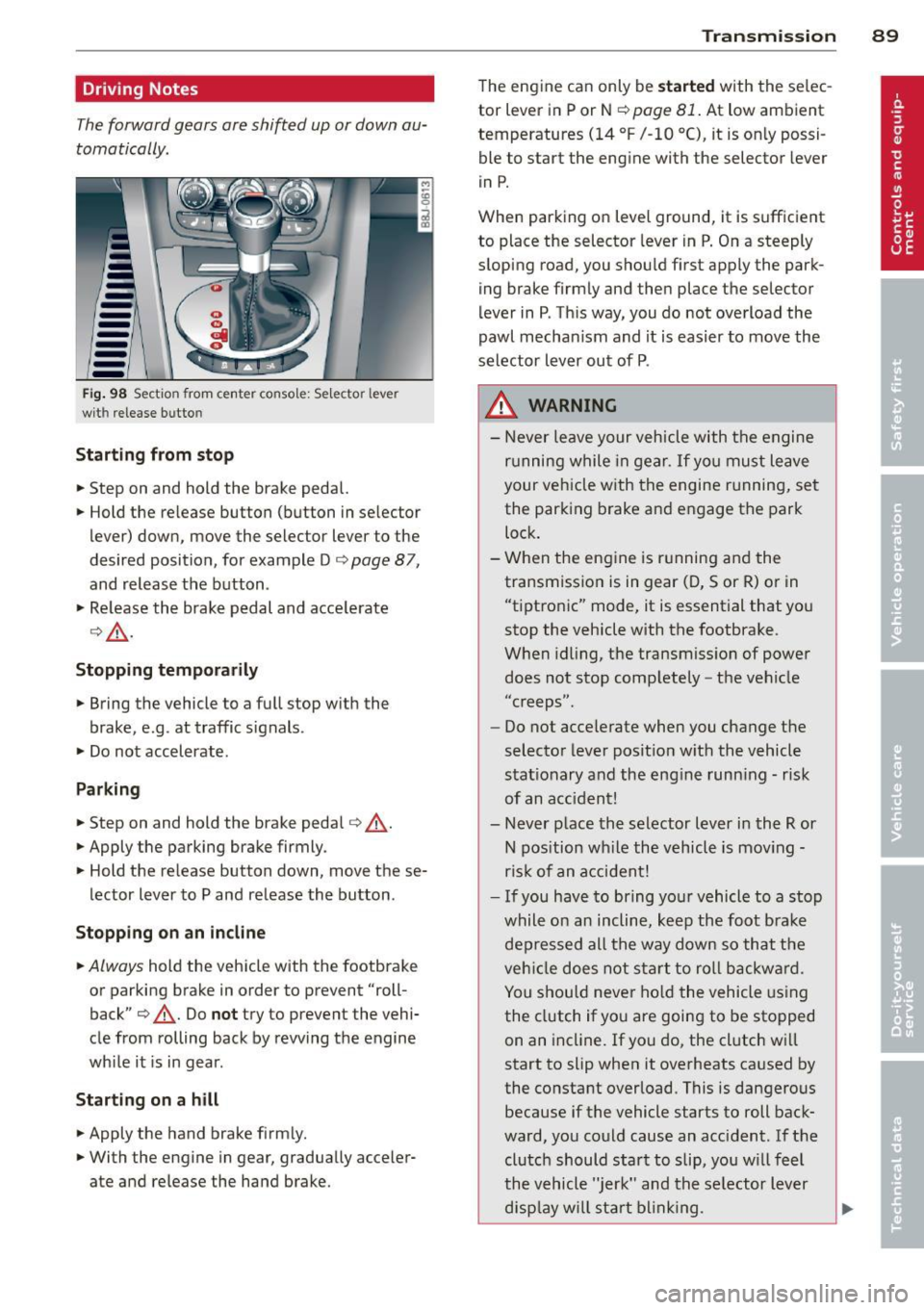
--Fig. 98 Section from cente r console: Selector lever
wit h rele ase butto n
Starting from stop
.. Step on and hold the brake pedal.
.. Hold the release button (button in selector
lever) down, move the selector lever to the
desired position, for example Do
page 87,
and release the button .
.,. Release the brake pedal and accelerate
o,& .
Stopping temporarily
.. Bring the vehicle to a full stop with the
brake, e.g . at traffic signals.
.. Do not accelerate.
Parking
.. Step on and hold the brake pedal o _&.
.. Apply the parking brake firmly.
.. Hold the release button down, move these
lector lever to P and release the button .
Stopping on an incline
.. Always hold the vehicle with the footbrake
or parking brake in order to prevent "roll
back" o
_&. Do not try to prevent the vehi
cle from rolling back by rewing the engine
while it is in gear.
Starting on a hill
.. Apply the hand brake firmly.
.. With the engine in gear, gradually acceler
ate and release the hand brake.
Transmission 89
The engine can only be started with the selec
tor lever in P or N
opage 81. At low ambient
temperatures
(14 °F /-10 °C), it is only possi
ble to start the engine with the selector lever
in P.
When parking on level ground, it is sufficient
to place the selector lever in P. On a steeply
sloping road, you should first apply the park
ing brake firmly and then place the selector
lever in P. This way, you do not overload the
pawl mechanism and it is easier to move the
selector lever out of P .
.&_ WARNING
-Never leave your vehicle with the engine
running while in gear. If you must leave
your vehicle with the engine running, set
the parking brake and engage the park
lock.
- When the engine is running and the
transmission is in gear (D, Sor R) or in
"tiptronic" mode, it is essential that you
stop the vehicle with the footbrake.
When idling, the transmission of power
does not stop completely -the vehicle
"c reeps" .
- Do not accelerate when you change the
selector lever position with the vehicle
stationary and the engine running - risk
of an accident!
- Never place the selector lever in the R or
N position while the vehicle is moving -
risk of an accident!
- If you have to bring your vehicle to a stop
while on an incline, keep the foot brake
depressed all the way down so that the
vehicle does not start to roll backward.
You should never hold the vehicle using
the clutch if you are going to be stopped
on an incline. If you do, the clutch will
start to slip when it overheats caused by
the constant overload . This is dangerous
because if the vehicle starts to roll back
ward, you could cause an accident. If the
clutch should start to slip, you will feel
the vehicle "jerk" and the selector lever
display will start blinking. ..,.
Page 93 of 260
If you have selected a lower gear than the cur
rent one, the transmission w ill only shift down
when the engine cannot be overspeeded .
If kick-down is actuated, the transmission
shifts into a lower gear independent ly of
speed and engine rpm .
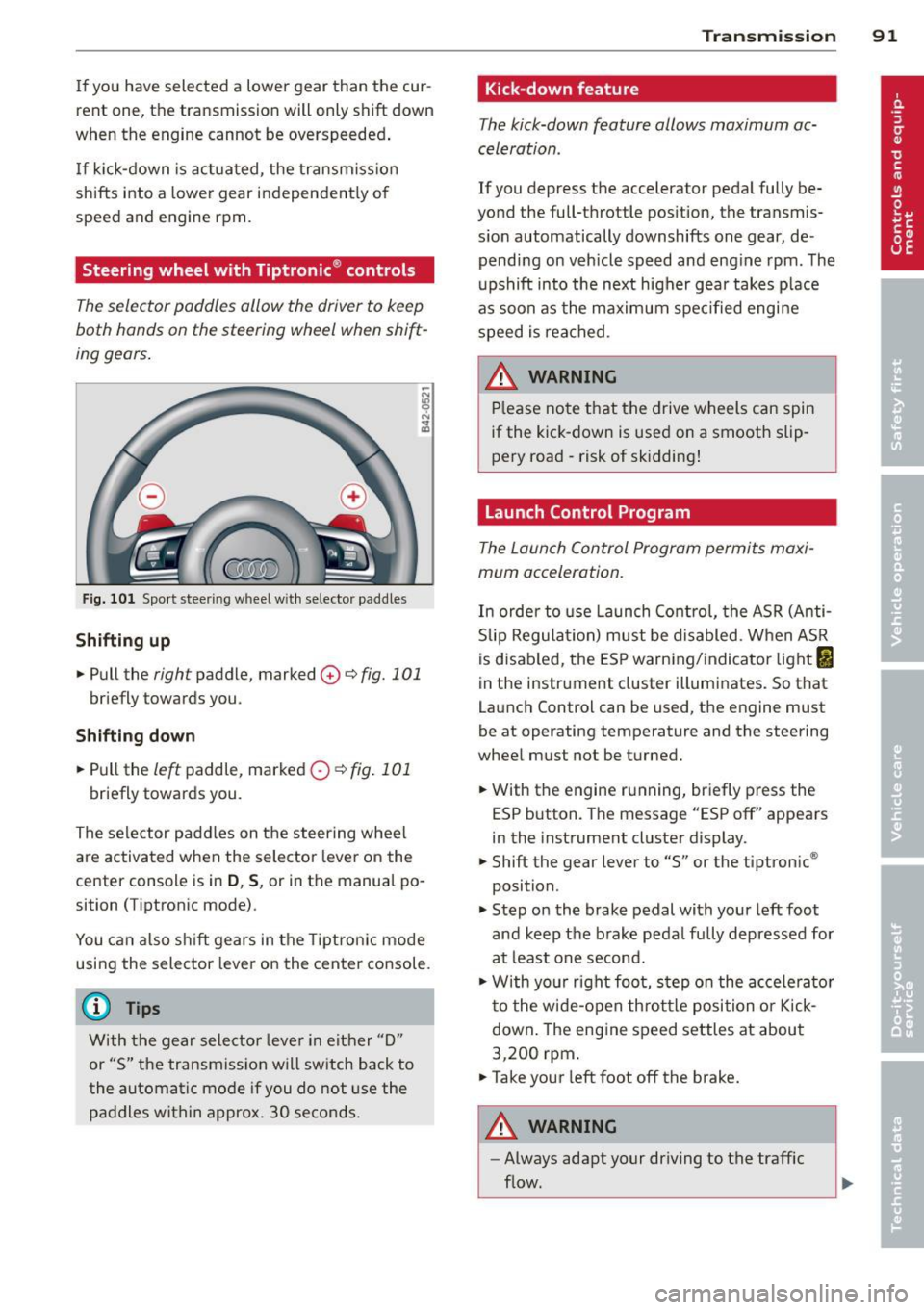
Steering wheel with Tiptronic ® controls
The selector paddl es allow the driver to keep
both hands on the steering wheel when shift
ing gears.
Fig. 101 Sport steer ing wheel w ith selector paddle s
Shifting up
.. Pull the right paddle, marked 0 ¢ fig. 101
briefly towards you .
Shifting down
.. Pull the left paddle, marked 0 ¢fig. 101
briefly towards you.
The selector paddles on the steering wheel
are activated when the selector lever on the
center console is in
D , S, or in the manual po
sition (Tiptronic mode) .
You can also shift gears in the Tiptronic mode
using the selector lever on the center console.
@ Tips
With the gear selector lever in either "D"
or "S" the transmission will switch back to
the automatic mode if you do not use the
paddles within approx. 30 seconds.
Transmission 91
Kick-down feature
The kick-down feature allows maximum ac
celeration .
If you depress the accelerator pedal fully be
yond the full-throttle position, the transmis
s ion automatically downshifts one gear, de
pending on vehicle speed and engine rpm. The
upshift into the next higher gear takes place
as soon as the maximum specified engine
speed is reached.
_&. WARNING
Please note that the drive wheels can spin
if the kick-down is used on a smooth slip
pery road -risk of sk idding!
Launch Control Program
The Launch Control Program permits maxi
mum acceleration.
In order to use Launch Control, the ASR (Anti
Slip Regulation) must be disabled. When ASR
is disabled, the ESP warning/indicator light
I
in the instrument cluster illuminates. So that
Launch Control can be used, the engine must
be at operating temperature and the steering
wheel must not be turned .
.. With the engine running, briefly press the
ESP button. The message "ESP off" appears
in the instrument cluster display.
.. Shift the gear lever to "S" or the tiptronic ®
position.
.. Step on the brake pedal with your left foot
and keep the brake pedal fully depressed for
at least one second.
.. W ith your right foot, step on the accelerator
to the wide-open throttle position or Kick
down. The engine speed settles at about
3,200 rpm.
.. Take your left foot off the brake.
&_ WARNING
-
-Always adapt your driving to the traffic
flow.
Page 94 of 260
92 Transmission
-Only use Launch Control when road and
traffic conditions allow it and other driv
ers will not be endangered or annoyed by
your driving and the acceleration of the
vehicle.
- Make sure that ESP remains enabled.
With the ESP disabled, the vehicle could
brake away, particularly on a slick and
slippery road -risk of skidding!
- Once acceleration is finished, switch ASR
on again by briefly pushing the ESP but
ton.
Back -up program
In the event of a system malfunction, there is
an back-up program .
In the event of system malfunction, the auto
matic transmission switches to the fail-safe
mode . All of the selector lever position dis
plays for the automatic transmission are high
lighted with a light background in the instru
ment cluster display . In some cases you can
not use reverse gear any more.
If the transmission switches to fail-safe
mode, you should take the vehicle to an au
thorized Audi dealership as soon as possible
to have the condition corrected.
Clutch is overheating
• Clutch is overheating! Please stop vehi
cle!
If the symbols are illuminated, the clutch is
overheating and could be damaged if you con
tinue to drive . Stop the vehicle and allow the
transmission to cool with the selector lever in
the
P position while the engine runs at idle. If
the warning does not turn off, do not continue
driving. See your authorized Audi dealer or
qualified repair facility for assistance. Other
wise serious transmission damage could re
sult. Once the indicator light has turned off,
drive to your authorized Audi dealer or quali
fied repair facility immediately to have the
malfunction corrected.
Selector lever emergency release
If the vehicle 's power supply fails, the selec
tor lever can be released in an emergency.
-
-
-
-
-
-
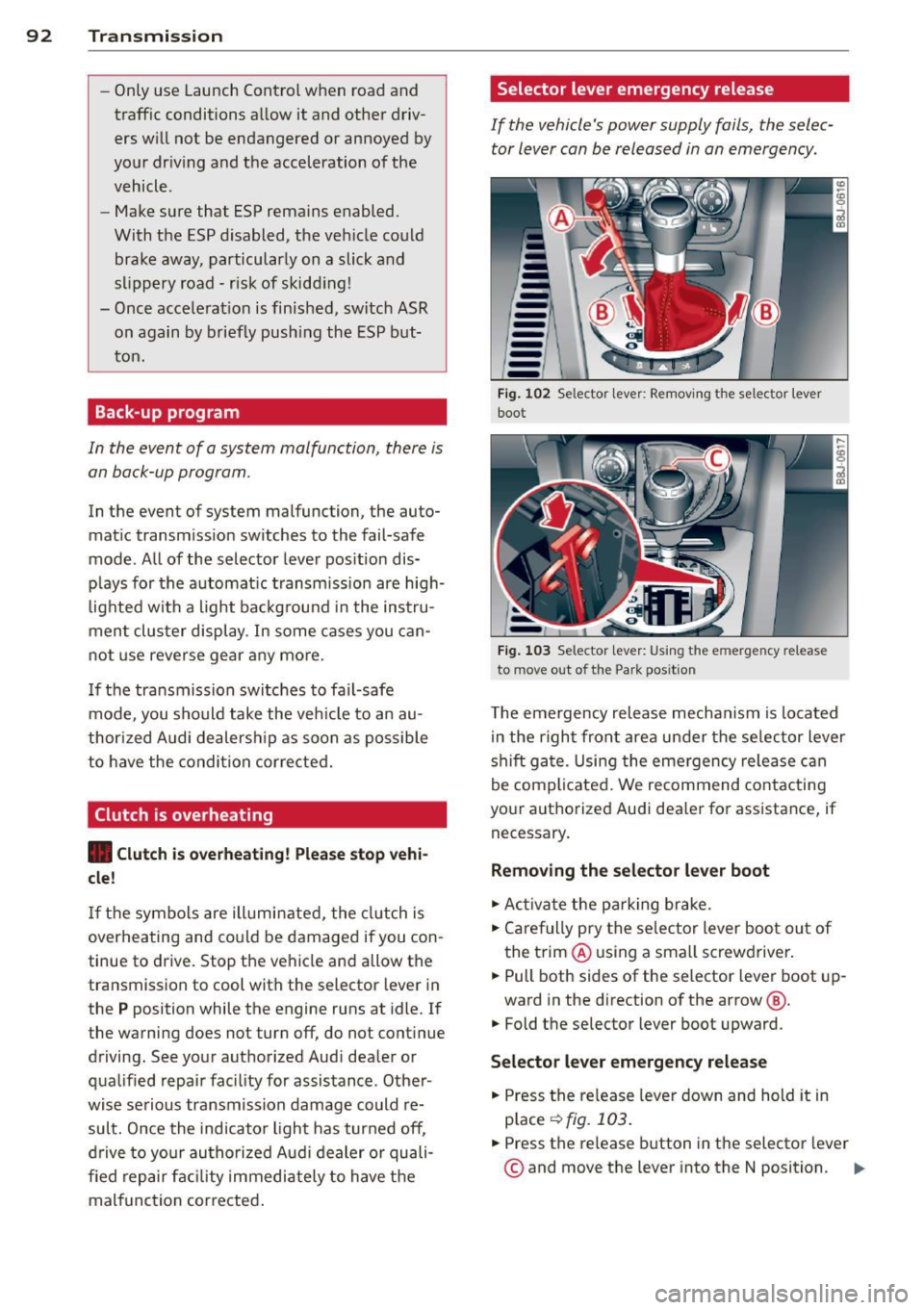
---Fig. 102 Selector lever: Removing t he selector lever
boot
Fig. 103 Selector lever: Using the e merge ncy release
to move o ut of the Park pos it ion
The emergency release mechanism is located
in the right front area under the selector lever
shift gate. Using the emergency release can
be complicated. We recommend contacting
your authorized Audi dealer for assistance, if necessary .
Removing the selector lever boot
.. Activate the parking brake.
.. Carefully pry the selector lever boot out of
the trim @ using a small screwdriver .
.. Pull both sides of the selector lever boot up-
ward in the direction of the arrow @.
.. Fold the selector lever boot upward.
Selector lever emergency release
.. Press the release lever down and hold it in
place
~ fig . 103 .
.. Press the release button in the selector lever
© and move the lever into the N position. Iii>
Page 157 of 260

Energy management
Starting ability is optimized
Energy management controls the distribution
of electrical energy and thus optimizes the
availability of electrical energy for starting the engine .
If a vehicle with a conventional energy system
is not driven for a long period of time, the bat
tery is discharged by idling current consumers
(e.g. immobilizer). In ce rtain c ircumstances it
can result in there being insuff icient ene rgy
avai lab le to start the engine .
Intell igent energy management in your vehi
cle handles the d istribution of electrical ener
gy. Starting ab il ity is markedly imp roved and
the life of the battery is extended .
Basically, energy management consists of
batt ery diagno sis, idlin g current man ag e
m ent
and dyn ami c en ergy manag emen t.
Batter y diagnosis
Battery diagnosis continuously determines
the state of the battery . Sensors determ ine
battery vo ltage, battery current and battery
temperature. This determ ines the current
state of charge and the powe r of the battery.
Idling curr ent man agement
Idling current management reduces energy
consumption while the vehicle is stand ing .
W ith the ignition switched off, it cont ro ls the
energy s upply to the various electr ical compo
nents . Data from battery diagnosis is consid
ered.
D epending on the batte ry's state of charge,
i nd ividua l consumers are gradual ly t urned off
to prevent excess ive d ischarge of the battery
and thus maintain starting capability .
Dynam ic en ergy management
While the vehicle is being driven, dynamic en
e rgy management dist ributes the energy gen
e rated according to the needs of the individu
a l components.
It reg ulates cons umption, so
that more electrical energy is not being used
Int ellig ent technolog y 155
than is being generated and ensures an opti
mal state of charge for the battery.
(0 Tips
- But even energy management canno t
negate the limits of physics . Consider
that the power and life of a battery are
limited .
- If starting ability is threatened, you are
informed by a warning
r::!)poge 156,
Driver notification in the instrument
cluster display.
What you should know
The highest priority is given to maintaining
starting capability.
The battery is severe ly taxed in short -distance
driving, in city traffic and during the cold time
of year. Abundant electrical energy is re quired, but only a little is generated .
It is also
critical if the engine is not running and electri
cal components are turned on . In this in
stance energy is be ing consumed but none is
being generated.
It is in precisely these situations that you will
notice energy management actively regulat
ing the d istribution of energy .
Vehicle stands for an e xtended peri od
If you do not drive your vehicle over a period
of several days or weeks, e lectr ical compo
nents are gradually cut back or switched off.
This reduces energy consumption and ma in
ta ins start ing capability over a longer period .
Take into considerat ion that when you unlock
your vehicle, some convenience functions, such as the remote key or power seat adjust
ment, may not be available . The conven ience
funct ions w ill be available again when you
tu rn o n the ignition and start the engine .
With the engine turned off
If you listen to the radio, for example, w ith
the engine turned off, the battery is being d is-
charged.
~
•
•
Page 158 of 260
156 Intelligent technology
If starting capability is jeopa rdized due to en
ergy consumption, a message appears in the
driver information disp lay.
You have to start the engine to charge the
battery.
With the engine running
A lthough electrical energy is generated when
the vehicle is being driven, the battery can be
come discharged. This happens most ly when
little energy is being generated and a great
deal consumed and the battery's state o f
charge is not optima l.
To bring the energy balance back into equili
brium, consumers which require especially
l arge amounts of energy are temporarily cut
back or switched off. Heating systems in par
ticular require a great dea l of energy. If you
notice, for example, that the heated seats* or
the heated rear window are not heating, they
have been temporar ily cut back or switched
off. These systems will be ava ilable again as
soon as the energy balance has been restored.
You will also notice that engine idle speed has been increased slightly . This is normal and not
a cause for concern . By increas ing engine idle
speed the add itiona l energy required is gener
ated and the battery is charged.
Driver notification in the instrument
cluster display
If battery power drops into the range where it
can limit the ability of the engine to start, th is
is shown in the instrument cluster display
with the following driver message:
(•) Low battery charge : battery will be
charged while driving
This notification reminds you that the starting
capability of the engine may be limited. As
soon as you start driving again, the battery
will be recharged and the notification will go
out.
Driver notification appears and goes out
again
If this driver notification appears after the ig
nition is turned on or whi le driving and it goes
out again after a while, the battery has been
adequately recharged.
Driver notification appears and does not
go out again
If this driver notif ication appears after the ig
nition is turned on or while driving and does
not go out again, the battery 's state of charge
is not in the optimal range. Starting ability is
restricted . Have the battery checked as soon
as possible by an autho rized Aud i dea le r o r
qualified wo rkshop.