child lock AUDI TT ROADSTER 2011 Owners Manual
[x] Cancel search | Manufacturer: AUDI, Model Year: 2011, Model line: TT ROADSTER, Model: AUDI TT ROADSTER 2011Pages: 260, PDF Size: 64.11 MB
Page 37 of 260
Opening and closing Keys
Key set
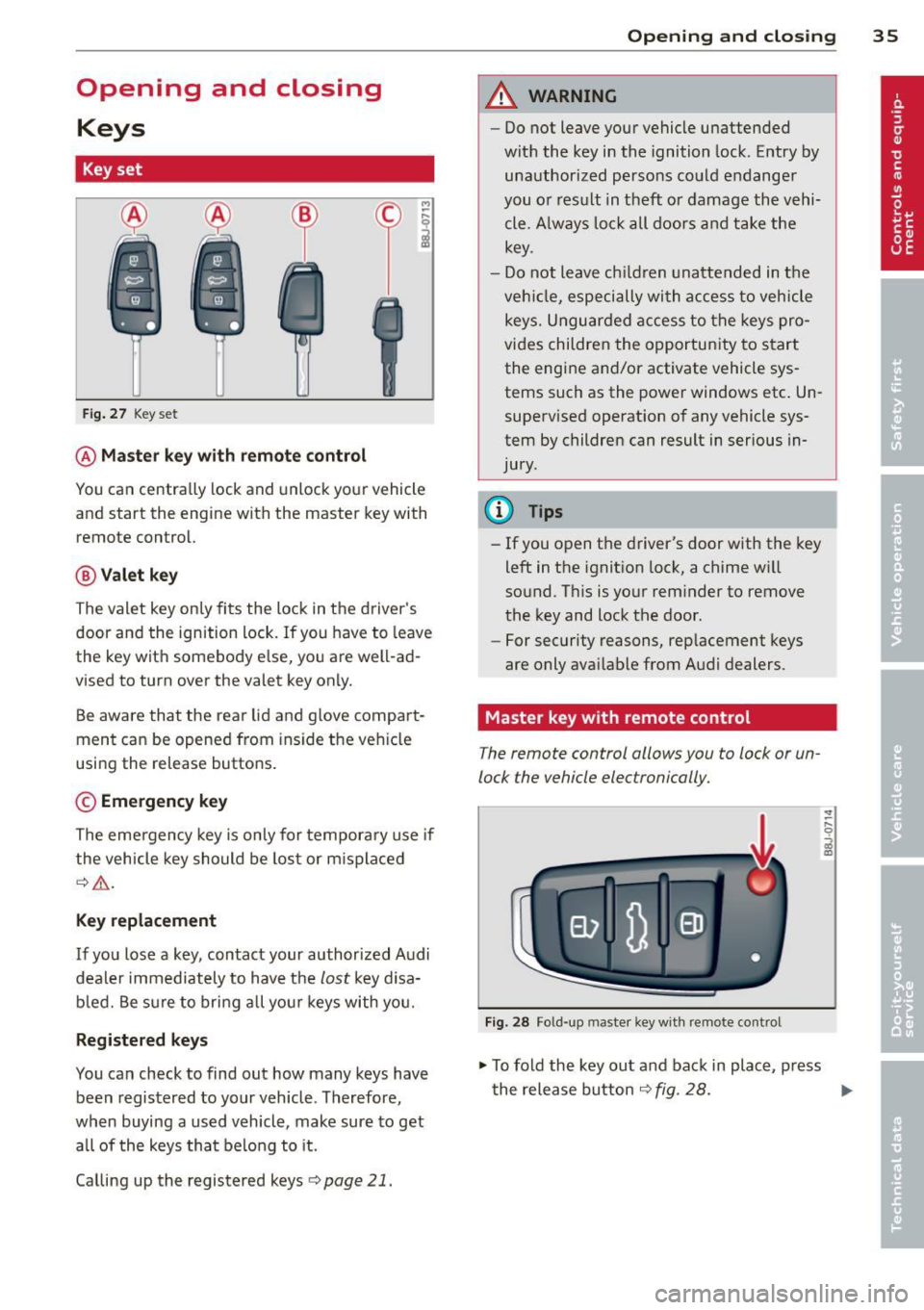
Fig. 27 Key set
@Master key with remote control
M
-~
il
You can centrally lock and unlock your vehicle
and start the engine with the master key with
remote control.
@ Valet key
The valet key only fits the lock in the d river's
door and the ignition lock. If you have to leave
the key with somebody e lse, yo u are well -ad
vised to turn over the valet key only.
Be aware that the rear lid and g love compa rt
ment can be opened from ins ide the vehicle
using the release buttons .
© Emergency key
The emergency key is only for temporary use if
the vehicle key should be lost or m isplaced
¢ .&,.
Key replacement
If you lose a key, contact your authorized Audi
dealer immediately to have the
lost key d isa
bled. Be sure to bring all your keys with you.
Registered keys
You can check to find out how many keys have
been registered to your veh icle . Therefore,
when buying a used vehicle, make sure to get all of the keys that belong to it.
Calling up the registered keys¢
page 21.
Opening and closing 35
A WARNING
-Do not leave your vehicle unattended
with the key in the ignition lock. Entry by
unauthorized persons could endanger
you o r result in theft or damage the vehi
cle. A lways lock all doors and take the
key.
- Do not leave ch ildren unattended in the
veh icle, especially with a ccess to vehicle
keys. Unguarded access to the keys pro
vides children the opportunity to start
the engine and/or activate vehicle sys
tems such as the power windows etc . Un
supervised operation of any vehicle sys
tem by children can result in serious in
jury.
(0 Tips
- If you open the driver's door with the key
left in the ignit ion lock, a chime w ill
sound. Th is is your reminder to remove
the key and lock the door .
- For security reasons, rep lacement keys
are only avai lable from Audi dealers.
Master key with remote control
The remote control allows you to lock or un
lock the vehicle electronically.
Fig. 28 Fo ld-up mas ter key with remote contro l
.,. To fold the key out and back in place, press
the release button ¢
fig. 28. ..,.
Page 40 of 260
38 Opening and clo sing
If you wish, you can have an authoriz ed Audi
deal er conv ert your power doo r lock syst em to
automatic lo cking .
.&_ WARNING
-When you lock your vehicle from outside,
nobody- especially children -should re
ma in ins ide the veh icle . Remember,
when you lock the vehicle from the out
side the windows cannot be opened from
the inside .
- When you leave the vehicle , always re
move the ignition key and ta ke it with
yo u. T his wi ll prevent pa ssengers ( chil
dre n, for examp le) from accidenta lly be
ing locked in the veh icle should they acci
dentally press the power locking switch.
- Do no t leave children ins ide the veh icle
unsupervised . In a n emergency it would
be impossib le to open the doors from
the outside w ithout the key .
(D Tips
-In the even t of a c rash with airbag de
ployment all locked doors will be auto
matically unlocked to give access to t he
vehicle occupants from the outside .
- If the power lock ing system should ma l
funct ion, you can lock each door indiv id
u a lly using the vehicle key .
- If the power locking system should fail,
you can still open the fue l tank f lap in an
emergency
c::;, page 177.
- You are we ll advised not to keep valua
bles inside an unattended vehicle, visib le
o r not. Even a properly locked vehicle
ca nnot provide the security of a safe!
Unlocking and locking the vehicle with
the remote control
How the remote control works .
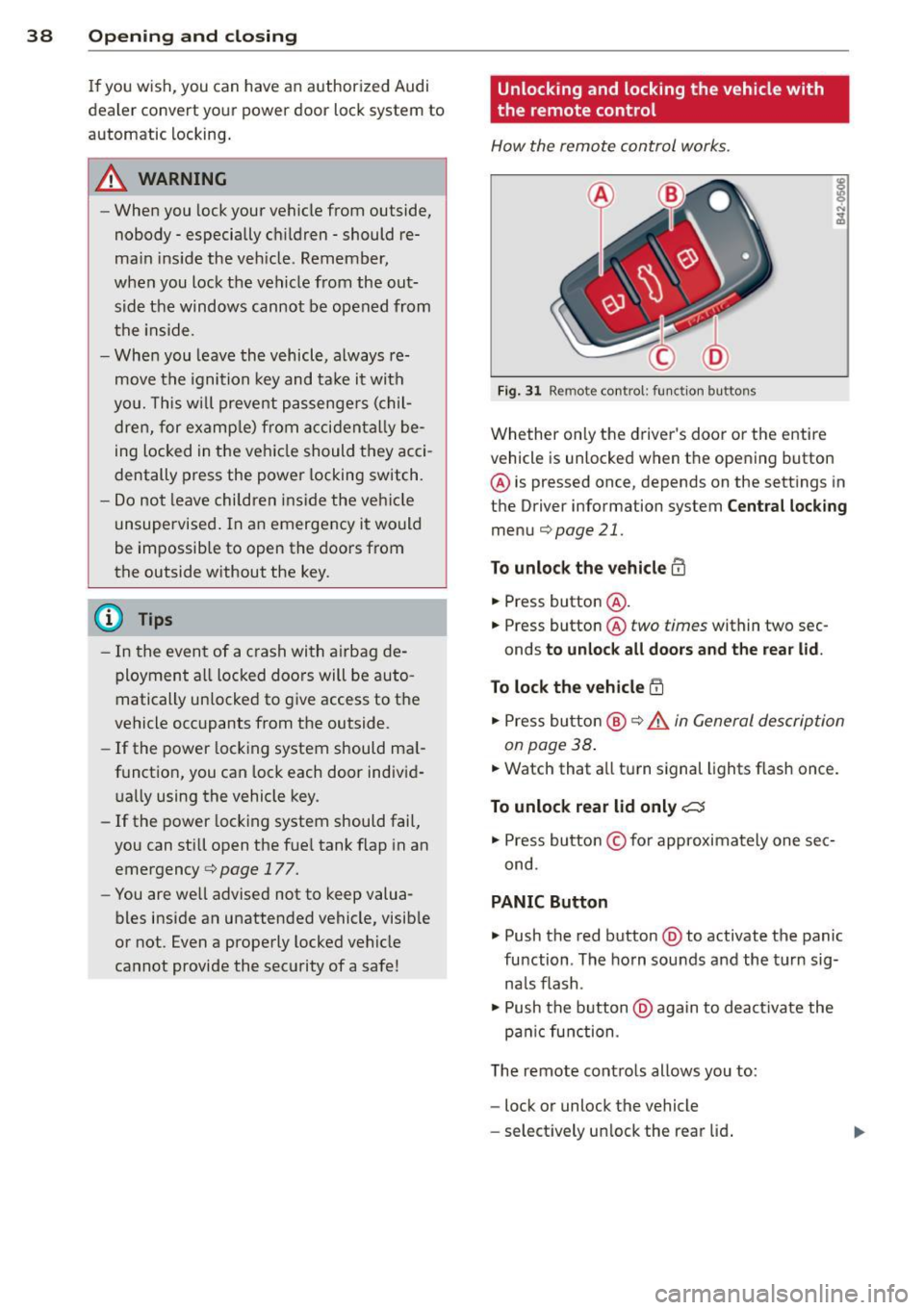
Fig . 31 Remo te control : fun ction bu ttons
Whether on ly the driver's door o r the entire
vehicl e is unlocked when t he opening button
@ is pressed once, depends on the sett ings in
t h e Driver information system
Cent ral lock ing
menu c::;,page 21.
To unlock the vehicle m
• Press button @.
• Press button @
two times within two sec
onds
to unloc k all doors and the rea r lid .
To lock th e vehicle !'.D
• Press bu tton @ c::;, .&. in General de scription
on page 38 .
• Watch that a ll turn signal lights f lash once.
To unlock rear lid only C:5
• Press button © for approximately one sec
ond .
PANIC Button
• Push the red button @to activate the panic
function . The ho rn sou nds and the t urn sig
na ls flash .
• Push the b utton @again to deact ivate the
pa nic function .
T he remote cont ro ls allows you to:
- lock or unlock the vehicle
- se lect ively un lock the rear lid .
Page 43 of 260
.. Inse rt the key into the inner slot ~ fig. 35
and turn it about 90 degrees to the right as
far as it can go.
.. Replace the cap.
After you close the door you will not no longer be ab le to open it from the outside.
You can open it from the ins ide, however, by
pu lling on the door latch
twice .
Rear lid/trunk lid
Opening and closing rear lid
You con open the rear lid from inside the vehi
cle using o switch in the driver's door .
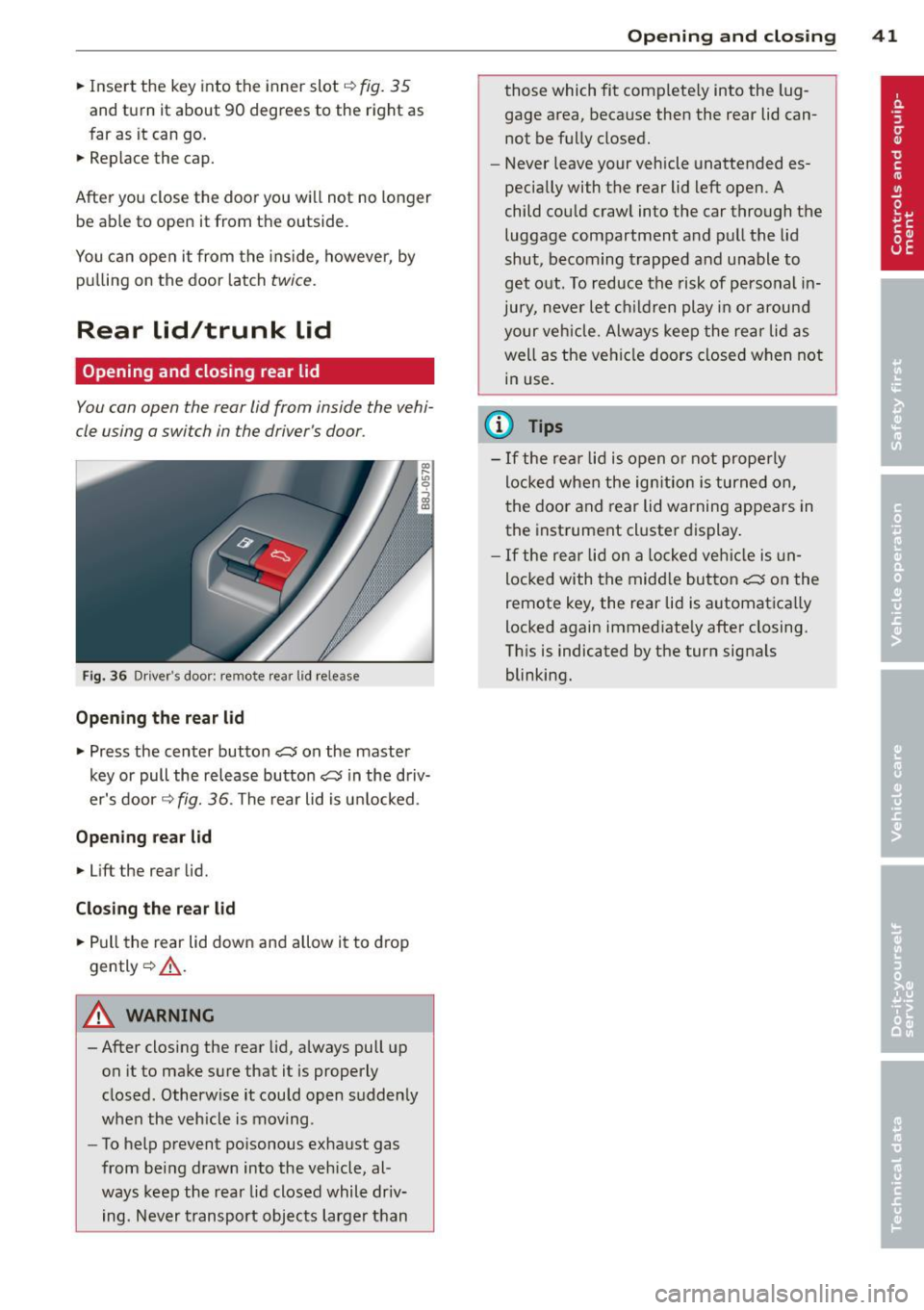
Fig. 36 Driver 's door : remote rear lid re lease
Opening th e re ar lid
.. Press the center button cs on the master
key or pull the release butto n
cs in the driv
er's door ¢
fig. 36. The rear lid is u nlocked.
Opening rear lid
.. Lift the rear lid.
Cl os ing th e re ar lid
.. Pull the rear lid down and a llow it to drop
gently ¢,&. .
A WARNING
-After closing the rear lid, always pull up
on it to make sure that it is properly
closed . Otherw ise it could open sudden ly
when the veh icle is mov ing .
- To help prevent po isonous exhaust gas
from being drawn into the vehicle, al
ways keep the rear lid closed while dr iv
ing. Never transport objects larger than
Op enin g an d clos ing 41
those which fit completely into the lug
gage area, because then the rear lid cannot be fully closed .
- Never leave your vehicle unattended es
pecially with the rear lid left open. A
child could crawl into the car through the
luggage compartment and pull the lid
shut, becoming trapped and unable to
get out. To reduce the risk of personal in
jury, never let children play in or around
your veh icle. Always keep the rear lid as
well as the vehicle doors closed when not
in use.
(l} Tips
- If the rear lid is open o r not properly
locked when the ig nition is turned on,
t he door and rear lid warning appears in
the instrument cl uster display .
- If the rear lid on a locked veh icle is un
locked with the midd le button
cs on the
remote key, the rear lid is automatica lly
locked again immediate ly after closing.
Th is is indicated by the turn signals
blinking.
Page 46 of 260
44 Opening and clo sing
Switch @ operates the window in the front
passenger's door .
.&_ WARNING
-Do not leave children unattended in the
vehicle, especially with access to vehicle
keys . Unsupervised use of the keys can
result in starting of t he engine and use
of vehicle systems such as power win
dows , etc. which cou ld result in serio us
mJury .
- Remember -you can still open or close
the power w indows for about ten m i
nu te s after the ignition is sw itche d off.
Only whe n eit her of the fron t doo rs a re
opened are the power windows sw itched
off.
- B e care ful when closing the windows .
C heck to see that no one is in the way, or
serious injury could result!
- Always remove the ignition key whenever
yo u leave yo ur vehicle.
- If you lock you r vehicle from the ou ts ide,
no one, especially children, sho uld re
main in the vehicle .
- Do not stick any thing on the windows o r
the windshie ld that may interfere with
the driver 's fie ld of vision .
(!} Tips
-When the doors a re opened, the w in
dows are a utomat ically lowered 10 mm.
- The w indows can still be ope ned and
closed for abou t ten m in utes after the
i gnition has been turned off. The power
win dows are not sh ut off until one of the
front doors is opened.
Convenience close/open feature
You can close or open the windows from out
side when you lock or unlock your car with the
key.
r
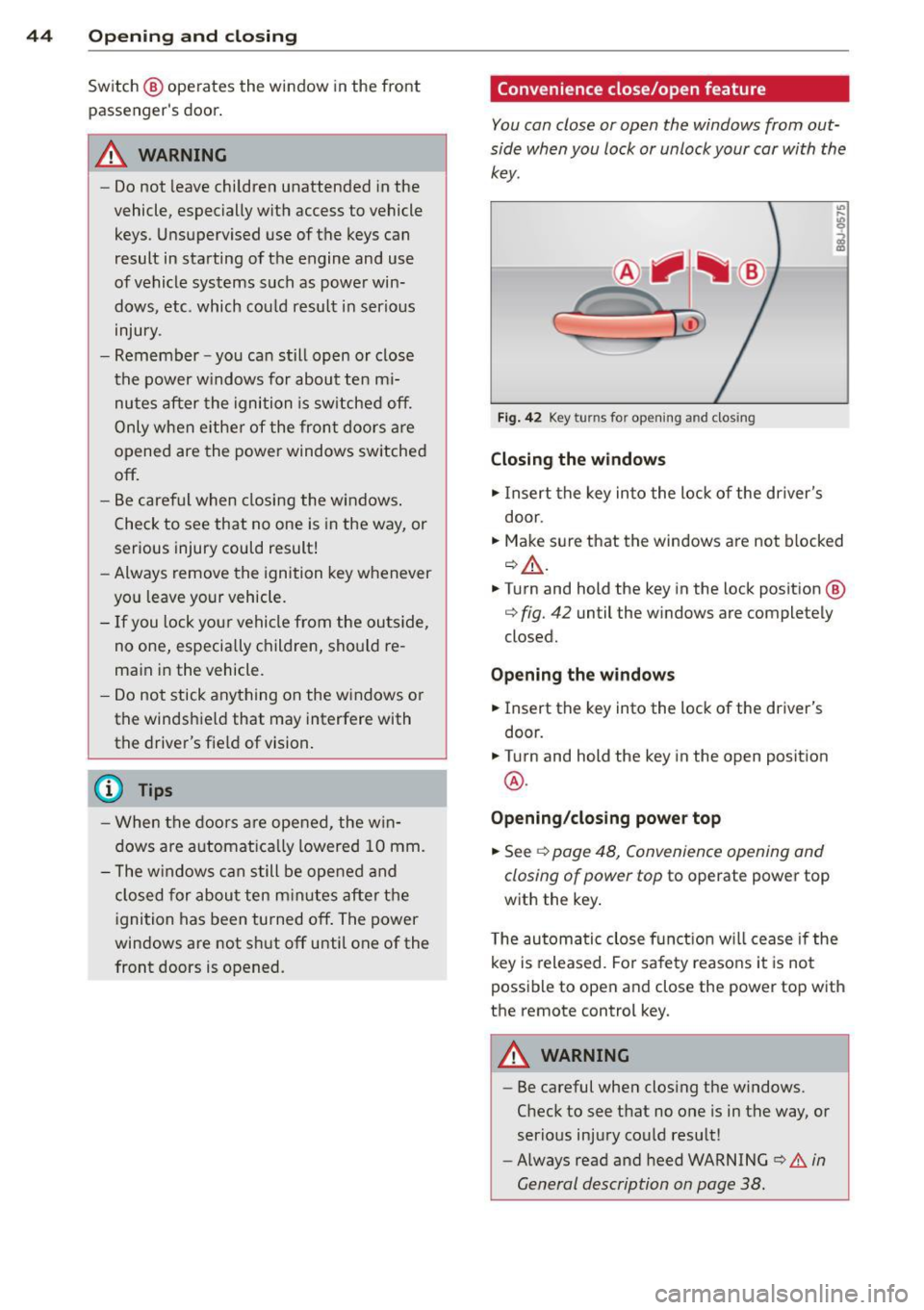
F ig. 4 2 Key turns fo r op enin g an d clos ing
Closing the windows
.,. Insert the key in to the lock of the driver's
door.
.,. Make s ure that the windows a re not blocked
~.&. .
.,. Turn and hold the key in the lock position @
q fig. 42 until the windows are completely
closed.
Opening the window s
.,. Insert the key into the lock of the driver's
door.
.,. Turn and hold the key in the open posit ion
@ .
Opening /closing power top
.,. See ¢ page 48, Convenience opening and
closing of power top
to operate power top
with the key .
T he automatic close function w ill cease if the
k ey is released . Fo r sa fe ty reaso ns it is no t
possible to open and close the power top with
the remote control key .
.&_ WARNING
-
-
- Be careful when clos ing the windows.
Check to
see t h at no one is in the way, or
serio us inju ry co uld resu lt!
- Always read and heed WARNING
~.&. in
General description on page 38 .
Page 75 of 260
Before you purchase any accessories, always
read and follow the information in
c::> page 243, Additional accessories and parts
replacement.
A WARNING
The outlet plus any appliances plugged in
to it remain functional even if the ignition
is switched off or the ignition key is re
moved. Never leave children inside the ve
hicle without supervision.
(D Note
To avo id damag ing the socket, only use
plugs that fit properly.
@ Tips
When the engine is off and accessories are still plugged in and are on, the vehicle bat
tery can still be dra ined.
Storage
General
A WARNING
- Always remove objects from the instru
ment panel. Any items not put away
cou ld slide around inside the vehicle
wh ile driving or when accelerating or
when applying the brakes or when driv ing around a corner.
-
- When you are driving make sure that
anything you may have placed in the cen
ter console or other storage locations cannot fall out into the footwells . In case
of sudden braking you would not be able
to brake or accelerate.
S ea ts a nd s to rage 73
Glove compartment
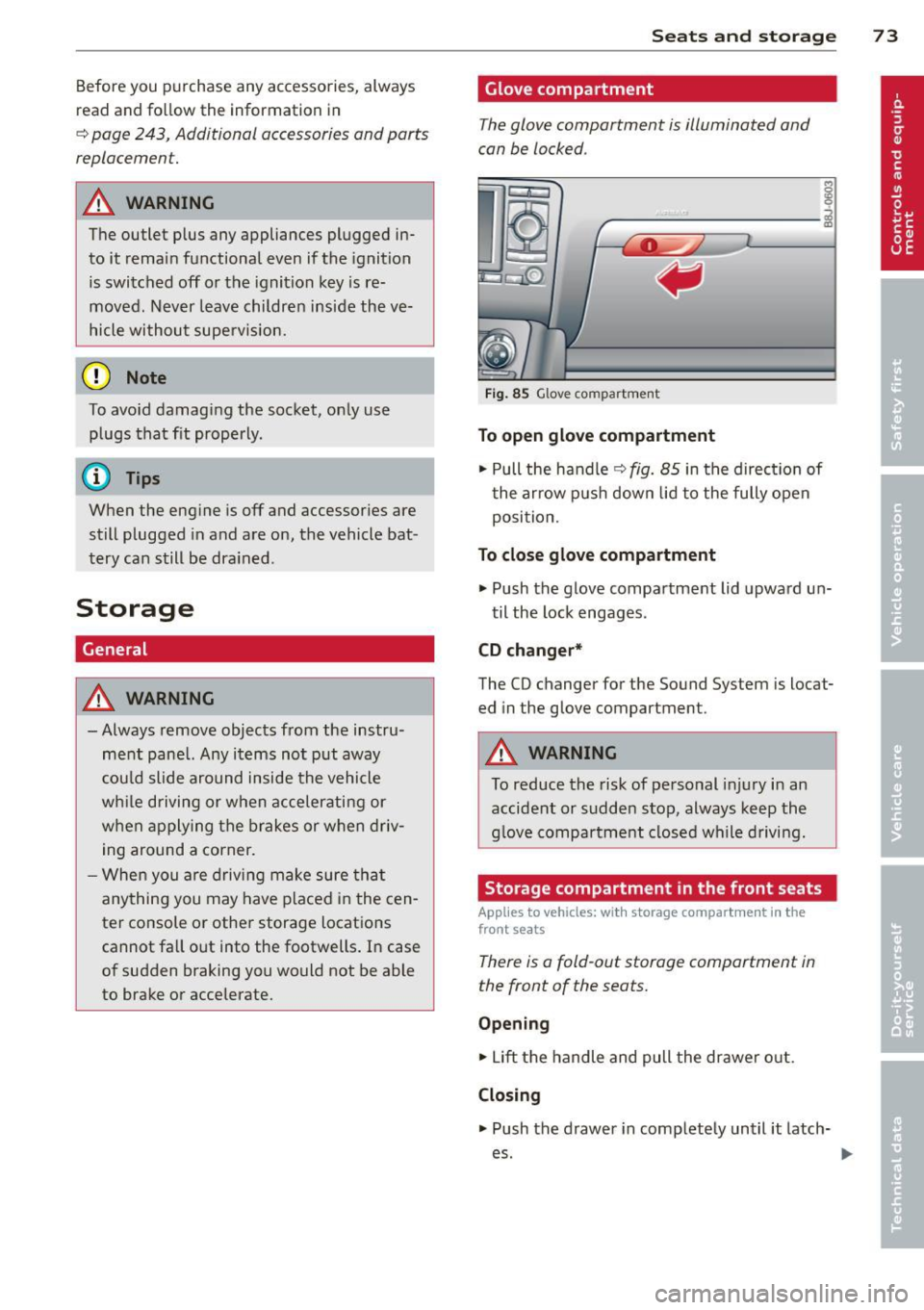
The glove compartment is illuminated and
can be locked .
i
----------- i
•
Fig . 85 Glove compartment
To open glo ve com partment
.,. Pull the handle c::> fig. 85 in the direct ion of
t he arrow pus h down lid to the fully open
position.
To clo se glove compartment
.,. Push the glove compartment lid upward un-
til the lock engages .
CD ch anger*
The CD changer for the Sound System is locat
ed in the glove compartment .
A WARNING
To reduce the risk of personal injury in an
accident or sudden stop, always keep the
glove compartment closed wh ile driving.
Storage compartment in the front seats
Applies to vehicles: with storage compartment in the
front seats
There is a fold-out storage compartment in
the front of the seats.
O pen ing
.,. Lift the handle and pull the drawer o ut.
Closin g
.. Push the drawer in completely until it latch
es.
Page 83 of 260
You should always lock the steering whenever
you leave your vehicle . This makes a vehicle
theft even more difficu lt ¢ & .
Ignition ke y safe ty lock
After switching off the ignition, the ig nit ion
key can only be removed from the ign ition
l ock when the selector lever is in the "P"
(Park) position . After you have removed the
key, the selector lever is locked and cannot be
moved.
Ignition on @
If it is difficult to turn the key after you have
inse rted it into the ignition lock, turn the
steering whee l back and forth. This will take
the load
off the steering lock mechan ism and
you will be able to turn the key freely and start the engine.
Starting the engin e@
In this position the engine starts . While the
engine is starting, the power supply to the headlights and other e lectr ica l consumers is
tempo rarily interrupted to conserve battery
power . After the engine has started, release
the key and it will return to posit io n @ .
Before the starter can be operated again the
key must be turned back to position@. The
non-r epeat lock prevents you from damag ing
the sta rter when the engine is runn ing .
A WARNING
-Never remove the key from the ign ition
lock whi le the vehicle is moving. The
steering wheel will lock causing loss of
control.
- If you have to leave your ve hicle -even
f or just a m in ute -always remove the ig
ni tion key and take it with you. This is es
pecially important if yo u a re going to
leave chi ldren behind in the vehicle. The
children cou ld start the engine or use
other vehicle controls. Unsupervised use
of vehicle controls (for example, power
windows) can cause serious personal in
jur ies .
-
On th e ro ad 81
(D Tips
If the vehicle battery has been disconnect
ed and then reconnected, then yo u must
l eave the key in posit ion @ for about 5
seconds before you can start the engine.
Starting and stopping
the engine
' Starting the engine
The engine can only be started with an origi
nal Audi key .
.,. Se t the par king brake.
.,. Move the selector lever in P or
N q ,& .
.,. Tu rn the ignition key to position ®
~ page 80, fig. 90 -do not depress the gas
peda l when starting the engine!
.,. Let go of the key as soon as the engine
starts.
A cold engine may at first be loud after it has
been started. This is due to the hydraulic
valves bu ild ing up the oil pressure. Th is nor
mal and no need for concern .
If the engine does not start immediately, stop
trying after 10 seconds and then try to restart
the engine about 30 seconds later.
A WARNING
-Never start or let the eng ine run in a con-
fined o r enclosed area . Exhaust fumes
from the engine contain carbon monoxide,
a colorless and odo rless gas. Ca rbon mon
oxide can be f atal if inhaled.
- Never leave the engine id ling unattend
ed. An una ttended veh icle with a runn ing
engine poses a danger o f personal injury
or theft .
(D Note
-Avo id high engine speeds, fast accelera
tion or heavy engine loads while the en
gine is still cold. This could damage the
engine.
- The engine cannot be started by pushing
or towing the vehicle . .,..
Page 85 of 260
(D Note
Only after the vehi cle has come to com
plete stop, should you f irm ly set the park
ing brake and either move the selector lev
er into "P".
Parking
To prevent a parked vehicle from rolling
away, there are a few things you should do.
When you park your vehicle, do the following:
.,. Stop the vehicle using the brake pedal.
... Set the parking b ra ke firmly .
... Switch
off the engine.
... Move the selector lever into the P position
¢ A .
... Remove the ign it ion key from the ignit ion
lock.
What else you should do when pa rking
your vehicle on an incline or decline
Turn the steering wheel so that if the vehicle
should start to roll, it will roll into the curb.
If you are parking on a decl ine (the front of
your vehicle facing downhill), turn the front
wheels to the right so that they point
toward
the curb.
If you are parking on an incline (the font of
your vehicle facing uph ill), turn the front
wheels to the left so that they po int
away
from the curb.
A WARNING
Th is is how you can reduce the risk of in
jury when leaving your veh icle.
- Never park the vehicle where it can come
in contact with d ry grass, sp illed fuel or
any othe r flammable mater ials .
- Never allow anyone -especially small
children -to remain in the vehicle whe n
it is locked . Locked doors ma ke it more
difficult for rescuers to access the pas
senge r compartmen t in the event of an
eme rgency. Danger to life!
- Never leave c hildren unsupervised in the
vehicle. Children co uld re lease the par k-
-
On th e ro ad 83
ing brake or move the gearsh ift leve r out
of gear. The vehicle could start to ro ll
away and cause an acc ident.
- No matter what the season is, the tem
perature in a parked ve hicle can reach
dangerous leve ls.
Acoustic parking
system
' Rear acoustic park assist
Applies to vehicles: with 4-channel acoust ic park assist
Acoustic park assist gives a warning about
obstacles behind the vehicle .
Description
The rea r acoustic pa rk ass ist (4-channel
a coustic park ass ist) de termines the dista nce
of the vehicle from an obstacle using ult ra
son ic sensors. The sensors are in the rear
bumper. The volume and the pitch of the
c hi mes can be adjusted throug h the men u dis
play¢
page 21.
T he range at wh ich the sensors start to meas
u re is
about :
To the side
Activation
2 feet (0.60 m)
5 feet (1.60 m)
T he park ing ass ist is activated when
rever se
g ear
is engaged. A br ief tone confirms th at
the sys tem is activated .
Backing up
Distance warning whe n backing up sta rts
whe n an obstacle is detected in the range of
t he pa rk ass ist system. As the distance de
c reases, the t ime inte rva l between the audible
tones becomes shorte r.
When the distance is less than 1 foot (0.30
m), the tone becomes continuous. At this
po in t you sho uld s top bac king up .
Please note that low objects already signalled
by a war ning ca n disappear from the system's
de te ction range and will not continue to be
s ignalled . .,._
Page 102 of 260
100 Driving Safely
• Grasp the top of the steering wheel with
your elbow(s) slightly bent.
• Adjust the head restraint so that the upper
edge is as even with the top of your head as
possible but no lower than eye level and so
that it is as close to the back of your head as
possible
t::;> fig. 108 .
• Fasten and wear safety belts correctly
t::;> page 110.
• Always keep both feet in the footwell so
that you are in control of the vehicle at all
times.
For detailed information on how to adjust the
driver's seat, see
¢page 67 .
.&_ WARNING
Drivers who are unbelted, out of position
or too close to the airbag can be seriously
injured by an airbag as it deploys. To help
reduce the risk of serious personal injury:
- Always adjust the driver's seat and the
steering wheel so that there are at least
10 inches (25 cm) between your breast
bone and the steering wheel.
- Always adjust the driver's seat and the
steering wheel so that there are at least
4 inches (10 cm) between the knees and
the lower part of the instrument panel.
- Always hold the steering wheel on the
outside of the steering wheel rim with
your hands at the 9 o'clock and 3 o'clock positions to help reduce the risk of per
sonal injury if the driver's airbag inflates.
- Never hold the steering wheel at the
12 o'clock position or with your hands at
other positions inside the steering wheel
rim or on the steering wheel hub. Hold
ing the steering wheel the wrong way
can cause serious injuries to the hands,
arms and head if the driver's airbag in
flates
- Pointing the steering wheel toward your
face decreases the ability of the supple
mental driver's airbag to protect you in a
collision.
- Always sit in an upright position and nev
er lean against or place any part of your body too close to the area where the air
bags are located.
- Before driving, always adjust the front
seats and head restraints properly and make sure that all passengers are prop
erly restrained .
- Never adjust the seats while the vehicle
is moving. Your seat may move unexpect
ed Ly and you could lose control of the ve
hicle .
- Never drive with the backrest reclined or
tilted far back! The farther the backrests
are tilted back, the greater the risk of in
jury due to incorrect positioning of the safety belt and improper seating posi
tion .
- Children must always ride in child seats
t::;> page 136. Special precautions apply
when installing a child seat on the front
passenger seat
t::;> page 115.
Proper seat ing position for the front
passenger
The proper front passenger seating position
is important for safe, relaxed driving.
For your own safety and to reduce the risk of
injury in the event of an accident, we recom
mend that you adjust the seat for the front
passenger to the following position :
• Adjust the angle of the seatback so that it is
in an upright position and your back comes
in full contact with it whenever the vehicle is
moving.
• Adjust the head restraint so that the upper
edge is as even with the top of your head as possible but not lower than eye level and so
that it is as close to the back of your head as
possible
¢ page 101.
• Keep both feet flat on the floor in front of
the front passenger seat.
• Fasten and wear safety belts correctly
t::;> page 110.
For detailed information on how to adjust the
front passenger's seat, see
¢ page 66.
Page 106 of 260
104 Driving Safely
• Distribute the load evenly in the luggage
compartment.
• Always place and properly secure heavy
items in the luggage compartment as far
forward as possible.
A WARNING
Improperly stored luggage or other items
can fly through the vehicle causing serious
personal injury in the event of hard brak
ing or an accident. To help reduce the risk
of serious personal injury:
- Always put objects, for example, luggage
or other heavy items in the luggage com
partment.
- Always secure objects in the luggage
compartment using the tie-down eyelets
and suitable straps.
A WARNING
Heavy loads will influence the way your ve
hicle handles. To help reduce the risk of a
loss of control leading to serious personal
injury:
-Always keep in mind when transporting
heavy objects, that a change in the cen
ter of gravity can also cause changes in
vehicle handling:
- Always distribute the load as evenly as
possible.
- Place heavy objects as far forward in
the luggage compartment as possible.
- Never exceed the Gross Axle Weight Rat
ing or the Gross Vehicle Weight Rating
specified on the safety compliance stick
er on the left door jamb. Exceeding per
missible weight standards can cause the
vehicle to slide and handle differently.
- Please observe information on safe driv ing
~ page 98.
A WARNING
To help prevent poisonous exhaust gas
from being drawn into the vehicle, always keep the rear lid closed while driving.
- Never transport objects larger than
-
those fitting completely into the luggage area because the rear lid cannot be fully
closed.
- If you absolutely must drive with the rear
lid open, observe the following notes to
reduce the risk of poisoning:
- Close all windows,
- Close the convertible top,
- Open all air outlets in the instrument
panel,
- Switch off the air recirculation,
- Set the fresh air fan to the highest
speed.
A WARNING
-Always make sure that the doors, all win-
dows, the convertible top and the rear lid
are securely closed and locked to reduce
the risk of injury when the vehicle is not
being used.
- After closing the rear lid, always make
sure that it is properly closed and locked.
- Never leave your vehicle unattended es pecially with the rear lid left open . A
child could crawl into the vehicle through
the luggage compartment and close the
rear lid becoming trapped and unable to
get out. Being trapped in a vehicle can
lead to serious personal injury.
- Never let children play in or around the
vehicle.
- Never let passengers ride in the luggage
compartment. Vehicle occupants must
always be properly restrained in one of
the vehicle's seating positions.
@ Tips
- Air circulation helps to reduce window
fogging. Stale air escapes to the outside
through vents in the trim panel, on the
left side of the luggage compartment.
Be sure to keep these slots free and
open.
- The tire pressure must correspond to the
load. The tire pressure is shown on the
tire pressure label. The tire pressure la bel is located on the driver's side B-pillar .
The tire pressure label lists the ..,
Page 112 of 260
110 Safety belts
-Never strap more than one person, in
cluding small children, into any single
safety belt.
- Neve r place a safety belt over a child sit
t ing on your lap.
- Always keep feet in the footwell in front
of the seat while the vehicle is being driv
en.
- Never let any person ride with feet on
the instrument panel or sticking out the
window or on the seat.
- Never remove a safety belt while the ve
hicle is moving. Doing so will increase
your risk of being injured or killed.
- Never wear belts twisted.
- Never wear belts over rigid or breakable
objects in or on your clothing, such as
eye glasses, pens, keys, etc., as these
may cause injury.
- Never wear the shoulder part of the belt
under your arm or otherwise out of posi
tion.
- Several layers of heavy clothing may in
terfere with correct positioning of belts
and reduce their effectiveness.
- Always keep belt buckles free of anything
that may prevent the buckle from latch
ing securely.
- Never use comfort clips or devices that
create slack in the shoulder belt. Howev
er, special clips may be required for the
correct use of some child restraint sys
tems.
- Never allow safety belts to become dam
aged by being caught in door or seat hardware.
- Torn or frayed safety belts can tear and
damaged belt hardware can break in an
accident. Inspect belts regularly.
If web
bing, bindings, buckles, or retractors are
damaged, have belts replaced by an au
thorized Audi dealer or qualified work
shop.
- Safety belts that have been worn and
loaded in an accident must be replaced
with the correct replacement safety belt by an a uthor ized Audi dealer or qualified
workshop . Replacement may be necessa- ry
even if damage cannot be clearly seen.
Anchorages that were loaded must also be inspected.
- Never remove, modify, disassemble, or
try to repai r the safety belts yourself.
- Always keep the belts clean. Dirty belts
may not work properly and can impair
the function of the inertia reel
c::> page 172, Safety belts.
Safety belts
Fastening safety belts
Seat first -everybody buckle up!
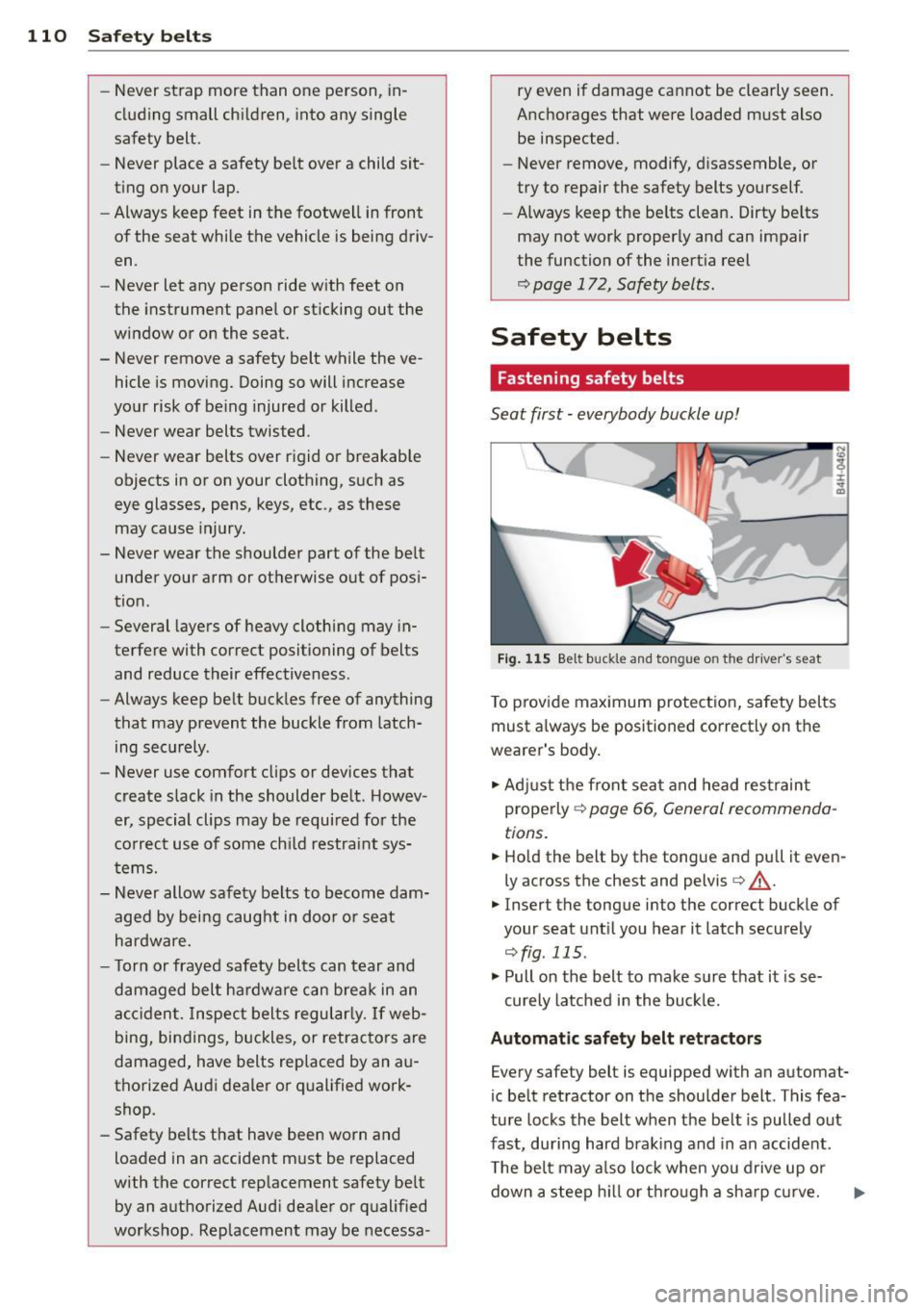
Fig. 115 Belt buckle and tongue on the driver's seat
To provide maximum protection, safety belts
must always be positioned correctly on the
wearer's body.
.,. Adjust the front seat and head restraint
properly
c::> page 66, General recommenda
tions.
.,. Hold the belt by the tongue and pull it even
ly across the chest and pelvis
c::> .&_.
.,. Insert the tongue into the correct buckle of
your seat until you hear it latch securely
c::>fig . 115.
.,. Pull on the belt to make sure that it is se-
curely latched in the buckle.
Automatic safety belt retractors
Every safety belt is equipped with an automat
ic be lt retractor on the shoulder belt . This fea
ture locks the belt when the belt is pulled out
fast, during hard braking and in an accident .
The belt may also lock when you drive up or
down a steep hill or through a sharp curve.