brake light AUDI TT ROADSTER 2014 User Guide
[x] Cancel search | Manufacturer: AUDI, Model Year: 2014, Model line: TT ROADSTER, Model: AUDI TT ROADSTER 2014Pages: 244, PDF Size: 60.87 MB
Page 44 of 244
42 Convertible top
Opening the Convertible Top Manually
Applies to vehicles: with manua l convertible top
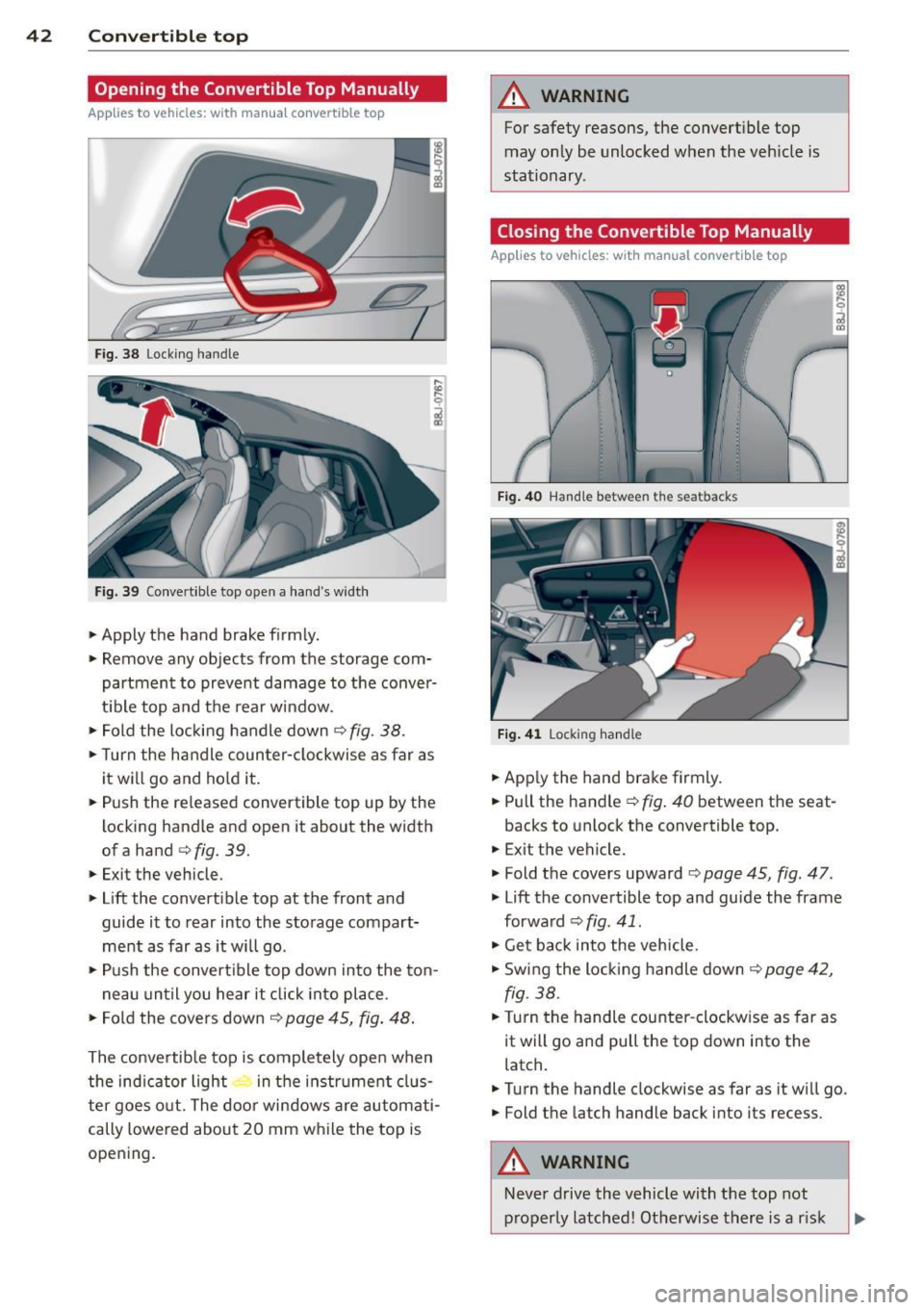
Fig. 38 Lock ing handle
Fig. 39 Convert ible top open a hand 's widt h
• Apply the hand brake f irmly.
• Remove any objects from the storage com
partment to prevent damage to the conver
t ib le top and the rear window.
• Fold the locking handle down
¢ fig . 38.
• Turn the handle coun ter-clockwise as far as
it w ill go and hold it.
• Push the released convertible top up by the
locking handle and open it about the width
ofa hand
¢ fig. 39.
• Exit the vehicle .
• Lift the convert ible top at the front and
guide it to rear into the storage compart
ment as far as it will go .
• Push the convert ible top down into the ton -
n eau until you hear it click into place .
• Fo ld the covers down ¢
page 45, fig. 48 .
The conve rtib le top is comple tely ope n when
the ind icator light in t he i nstr ument clus
ter goes o ut. The door windows a re automati
cally lowered about 20 mm w hile the top is
opening .
A WARNING
-~
For safety reasons, the convert ible top
may on ly be unlocked when the veh icle is
stationary .
Closing the Convertible Top Manually
Applies to vehicles: with manual convertib le top
F ig . 40 Hand le betwee n the sea tbacks
Fig. 4 1 Locking hand le
• App ly the hand brake firmly.
• Pull the handle¢
fig. 40 between the seat-
backs to unlock the convertible top.
• Exit the vehicle.
• Fold the covers upward ¢
page 45, fig. 47 .
• Lift the convertible top and guide the frame
forwa rd ¢
fig. 41.
• Get bac k into the vehicle.
• Swing the locking handle down <=?
page 42,
fig. 38.
• Turn the handle counter -clockw ise as far as
it will go and pull the top down into the
latch .
• Turn the handle clockwise as far as it wi ll go.
• Fold the la tch handle back into its recess.
A WARNING
-
-
Neve r drive the vehicle with the top not
p roperly latched! Otherwise there is a r isk
Page 62 of 244
60 Seats and stor age
Seats and storage
General recommen
dations
Why is your seat adjustment so
important?
The safety belts and the airbag system can
only provide maximum protection if the front
seats are correctly adjusted.
There are various ways of adjusting the front
seats to provide safe and comfortable support
for the driver and the front passenger. Adjust
you r seat prope rly so that :
- you can easily and quickly reach all the
switches and controls in the instrument
panel
-your body is properly supported thus reduc
ing physical stress and fatigue
- the safety be lts and airbag system can offer
maximum protection
¢ page 109.
In the following sections, you will see exactly
how you can best adjust your seats .
There are special regulations and instructions
for installing a child safety seat on the front
passenger's seat. Always heed the informa
tion regarding child safety provided in
¢ page 130, Child Safety.
A WARNING
Incorrect seating position of the driver and
all other passengers can result in serious
personal injury.
- Always keep your feet on the floor when
the vehicle is in motion -never put your
feet on top of the instrument panel, out
of the window or on top of the seat cush
ion! This applies especially to the passen
gers .
If your seating position is incorrect
you increase the risk of injury in the case
of sudden braking or an acc ident.
If the
airbag inflates and the seating position
is incorrect this could result in personal
injury or even death.
- It is important for both the driver and
front passenger to keep a distance of at least 10
inches (25 cm) between them
selves and the steering wheel and/or in
strument panel. If you're sitting any
closer than this, the airbag system can not protect you properly . In addition to
this, the front seats and head restraints
must be adjusted to your body height so
that they can give you maximum protec
tion.
- Always try to keep as much distance as
possible between yourself and the steer
ing wheel or instrument panel.
- Do not adjust the driver's or front pas
senger's seat whi le the vehicle is moving.
Your seat may move unexpectedly, caus
ing sudden loss of vehicle control and
personal injury. If you adjust your seat
while the vehicle is moving, you are out of position.
Driver's seat
The correct seat position is important for safe
and relaxed driving.
We recommend that you adjust the driver's
seat in the following manner :
.,. Adjust the seat in fore and aft direction so
that you can easily push the peda ls to the
floor whi le keeping your knee slightly bent
i::> A in Why is your seat adjustment so im
portant? on page 60 .
.,. Adjust the seatback so that when you sit
with your back against the seatback , you can
still grasp the top of the steering wheel.
.,. Position the head restraint according to the
occupant 's height
<=:> page 63 . For maxi
mum protection, the top of the head re
straint shou ld be at least at eye level, pref
erably higher and ideally level with the top
of the head
¢ page 95, fig. 102.
A WARNING "--
Never place any objects in the driver's foot-
well. An object could get into the pedal
area and interfere with pedal function. In
case of sudden braking or an accident, you
would not be able to brake or accelerate!
Page 76 of 244
74 On the road
you leave your vehicle. This makes a vehicle
theft even more difficult ¢ .&. .
Ignition key saf ety lock
Afte r swi tching off the ignition, t he ig nit ion
key can on ly be removed from the ig nition
lock when the se lector lever is in the "P"
(Park) position . After you have removed the
key, the selector lever is locked and cannot be
moved.
Ignition on @
If it is diffic ult to tu rn the key after you have
inserted it into the ignition lock, turn the
steering wheel back and forth. This will take
the load
off the steering lock mechanism and
you will be able to turn the key freely and
start the engine.
Starting the engine @
In this position the engine starts . While the
engine is starting , the power supply to the
headlights and other e lectrica l consumers is
temporari ly interrupted to conserve battery
power. After the engine has started, release
the key and it will return to posit ion
(D .
Before the starter can be operated again the
key must be turned back to position @. The
non -repeat loc k prevents you from damaging
the starter when the engine is runn ing .
A WARNING
-Never remove the key from the ign it ion
lock whi le the vehicle is moving. The
steeri ng wheel will lock causing loss of
c ontrol.
- If you have to leave your vehicle - even
for just a m inute -always remove t he ig
nition key and take it with you. This is es
pecially important if you a re going to
leave chi ldren behind in the vehicle. The
children co uld start the engine or use
other vehicle controls. Unsupervised use
of vehicle controls (for examp le, power
windows) can cause serious personal in
jur ies .
(D Tips
If the vehicle battery has been disconnect
ed and then reconnected, then you must
l eave the key in position
(D for about 5
seconds before you can start the engine.
Starting and stopping
the engine
Starting the engine
The engine can only be started with an origi
nal Audi key.
.,. Set the park ing brake.
.,. Move the selector lever in P or
N ~ &_ .
.,. Turn the ignition key to position @
¢ page 73, fig. 82 -do not depress the gas
pedal when starting the engine!
.,. Let go of the key as soon as the engine
starts .
A cold engine may at first be loud after it has
been started. This is due to the hydraulic
valves bu ild ing up the oil pressure . Th is nor
mal and no need for concern .
If the engine does not start immediate ly, stop
trying after 10 seconds and then try to restart
the engine about 30 seconds later .
A WARNING
-Never start or let the engine run in a con-
f ined or enclosed area. Exhaust fumes
from the engine conta in carbon monoxide,
a colorless and odorless gas. Carbon mon
oxide can be fatal if inhaled .
- Never leave the engi ne idling unattend
ed. An unat tended veh icle w ith a runn ing
engine poses a danger of personal injury
or theft .
(D Note
-Avo id h igh engine speeds, fast accelera
tion or heavy engine loads while the en
gine is still cold. This could damage the
engine.
- T he engine cannot be started by pushing
or towing the vehicle . ..,.
Page 77 of 244
@ For the sake of the environment
To avoid unnecessary engine wear and to reduce exhaust emissions, do not let your
vehicle stand and warm up. Be ready to
drive off immediately after start ing your
veh icle. Mainta in moderate speed until the
engine is completely warm . Remember,
the engine performs best at operating
temperature .
Stopping the engine
.,. Turn the ignition key to position @
¢page 73, fig. 82.
_& WARNING
-Never turn off the engine before the ve
hicle has come to a complete stop. The
full function of the brake booster and the
power steering is not guaranteed. You
must use more force to turn or brake if
necessary . Because you cannot steer and
brake as you usually would, this could
lead to crashes and serious injur ies.
- The radiator fan can continue to run for
up to 10 minutes even after you have
turned off the eng ine and removed the
ignition key. The radiator fan can also
turn on again if the engine coolant heats
up because of intense sunlight or heat
build-up in the engine compartment .
(D Note
Do not stop the engine immediately after
hard or extended driving. Keep the engine
r un ning for approximately two minutes to
prevent excessive heat build-up.
On the road 75
Parking brake
Parking brake
When the parking brake is set, it prevents the
vehicle from rolling away unintentionally .
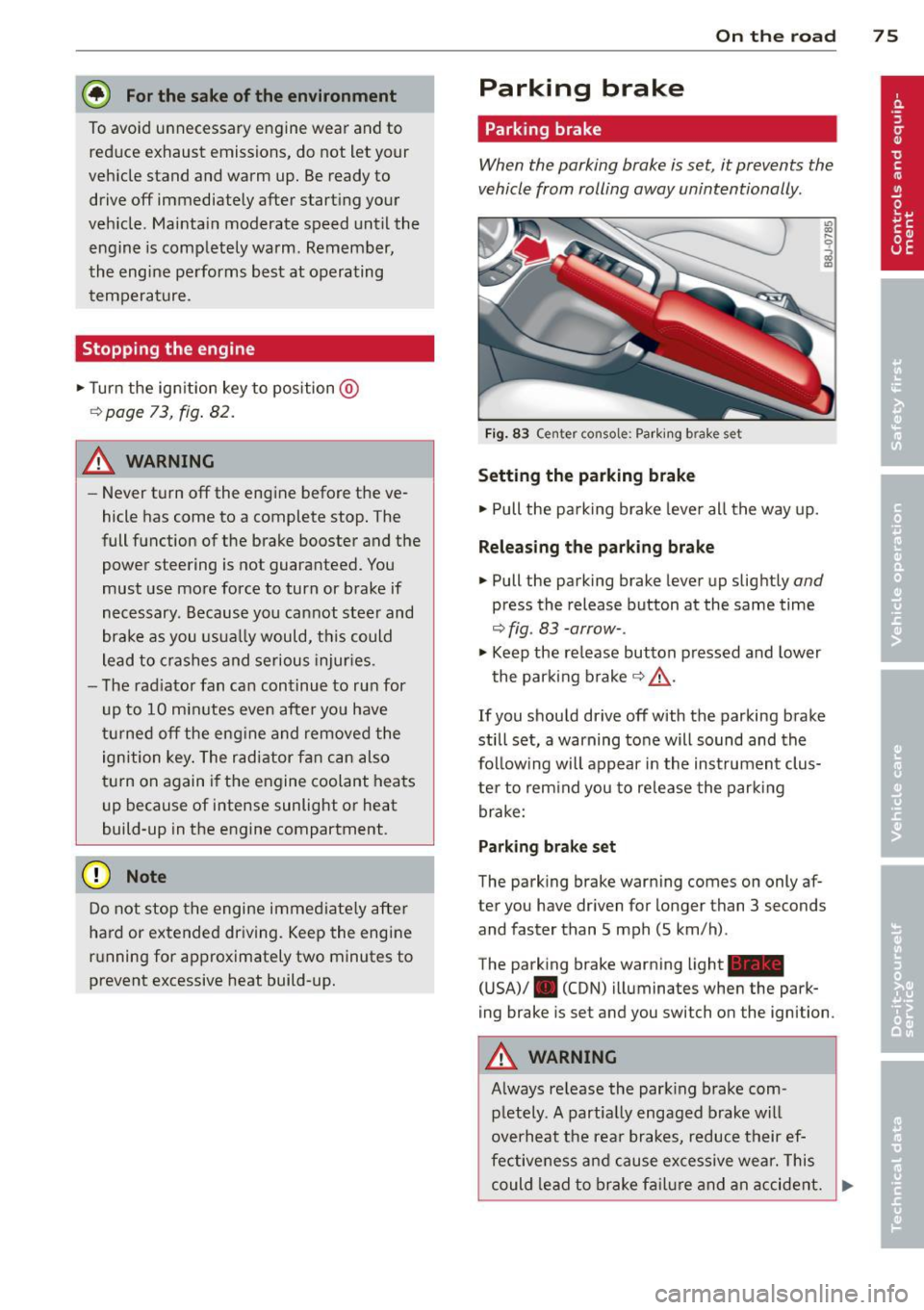
Fig. 83 Center console: Parki ng b rake set
Setting the parking brake
.. Pull the parking brake lever all the way up.
Releasing the parking brake
.. Pull the parking brake lever up slightly and
press the release button at the same time
¢ fig. 83 -arrow-.
.,. Keep the re lease button pressed and lower
the parking brake¢&_ .
If you should drive off with the parking brake
still set, a warning tone will sound and the
follow ing will appear in the instrument clus
ter to rem ind you to release the parking
brake:
Parking brake set
The parking brake warning comes on only af
ter you have driven for longer than 3 seconds
and faster than 5 mph (5 km/h) .
The parking brake warning light_
(USA)/ . (CON) illuminates when the park
ing brake is set and you switch on the ignition .
A WARNING
Always re lease the park ing brake com -
pletely. A partially engaged brake will
overheat the rear brakes, reduce their ef
fectiveness and cause excessive wear. This
could lead to brake failure and an accident. .,.
Page 84 of 244
82 Transmi ssion
Transmission
S tronic transmission
Introduction
App lies to vehicles : wit h S tro nic
Your veh icle is equipped with a S tronic trans
miss ion, a lso called a double-clutch system/
tra nsmission.
Power is transfe rred between the engine and
the transm ission by means of two i ndepend
ent cl utches. They replace the to rque conve rt
e r of conventional a utomat ic transm iss io ns
and a llow the vehicle to acce le rate w it h out a
noticeab le break in the power flow .
W ith the aid oftiptroni c, the gea rs can op
tionally be sh ifted
manually ¢ page 85.
Selector lever positions
App lies to vehicles: wit h S tro nic
All the selector lever positions are explained
in this section.
l-- -·· -----,,1
+55°F
~ 340mi
D
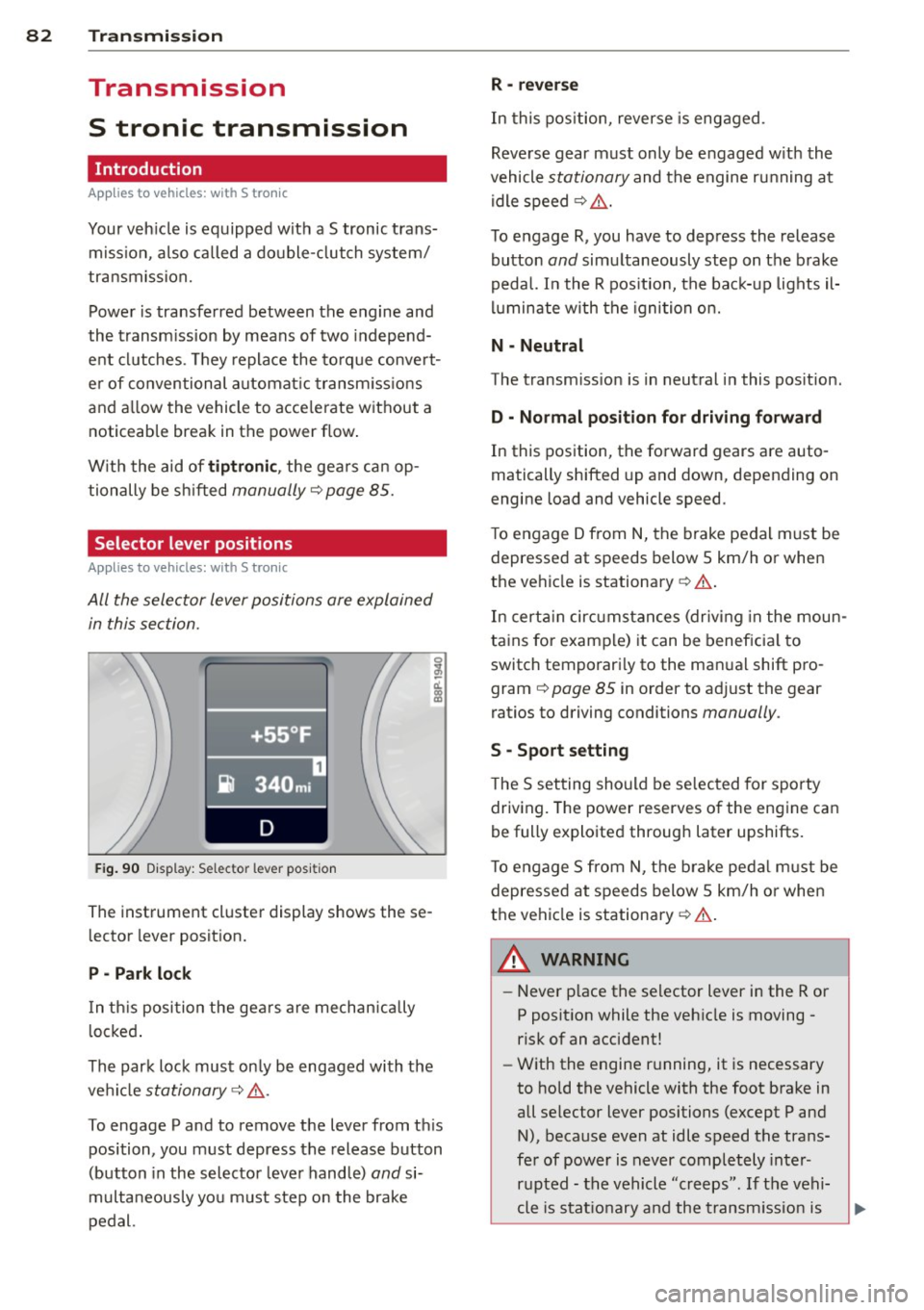
F ig. 90 Display: Selector lever posit ion
The instrument cluster display shows these
l ector lever posit ion.
P - Park lock
I n th is posi tion the ge ars are mechan ically
l ocked .
The park lock must on ly be engaged with t he
ve hicl e
stationary ¢&, .
To engage P and to remove the lever from th is
position, you must depress the release button
(button in the selector leve r hand le)
and si
multaneous ly yo u m ust s tep on the brake
pedal.
R -reverse
In this pos ition, reverse is eng aged .
Reve rse gear m ust only be e ngaged w ith the
vehicle
stationary and the engine ru nning at
idle speed ¢ &, .
T o engage R, you have to depress the release
button
and simultaneously step on the b rake
peda l. In the R pos ition, the bac k-up lights il
l u minate w ith the igni tion o n.
N - Neutral
The transm iss ion is in neut ral i n this pos ition.
D -No rmal position fo r driving forward
In this position, the forward gears are auto
matically shifted up and down, depending on
engine load and vehicle speed.
T o engage D from
N, the brake pedal m ust be
depressed at s peeds below 5 km/h or when
the ve hicle is stationary ¢& .
In cert ain circ umstan ces (driving in the moun
ta ins for examp le) it can be beneficia l to
switch temporari ly to the man ual shift pro
gram ¢
page 85 in order to ad just the gear
ratios to driving conditions
manually .
S -Sport setting
T he S setting sho uld be se lec ted for sporty
driving. The power reserves of the engine can
be fully explo ited through later upshifts.
T o engage S from N, t he brake peda l m ust be
depressed at speeds below 5 km/h o r when
t h e vehi cle is stationary ¢& .
A. WARNING
- Never p lace the se lector lever i n the R or
P posit ion while the veh icle is moving -
risk of an accident!
- W ith the engine r unning, it is necessary
to hold the vehicle with the foot brake in
all se lector lever positions (except P and
N), because even at idle speed the trans
fe r of power is never completely inter
r u pted - t he vehicle "creeps". If t he vehi-
cle is stat io nary and the t rans missio n is
~
Page 85 of 244
engaged, the engine should never be
speeded up unintentionally (e.g. manual ly from under the hood). Otherwise the
vehicle will immediately start to move -
sometimes even if the parking brake is
firmly applied - risk of an accident!
- Before you or other persons open the
hood and work on a running engine, the
selector lever must be moved to P and
the parking brake applied firmly - risk of
an accident! Follow the warning stickers.
@ Tips
If you have inadvertently sh ifted into N
while the veh icle is moving, you should re
move your foo t from the accelerator and
wait until the engi ne speed has dropped to
id le before shifting back to Dor S.
Selector lever lock
Applies to vehicles: with S tro nic
The selector lever lock prevents a gear from
being engaged occidentally and unintention
ally setting the vehicle in motion .
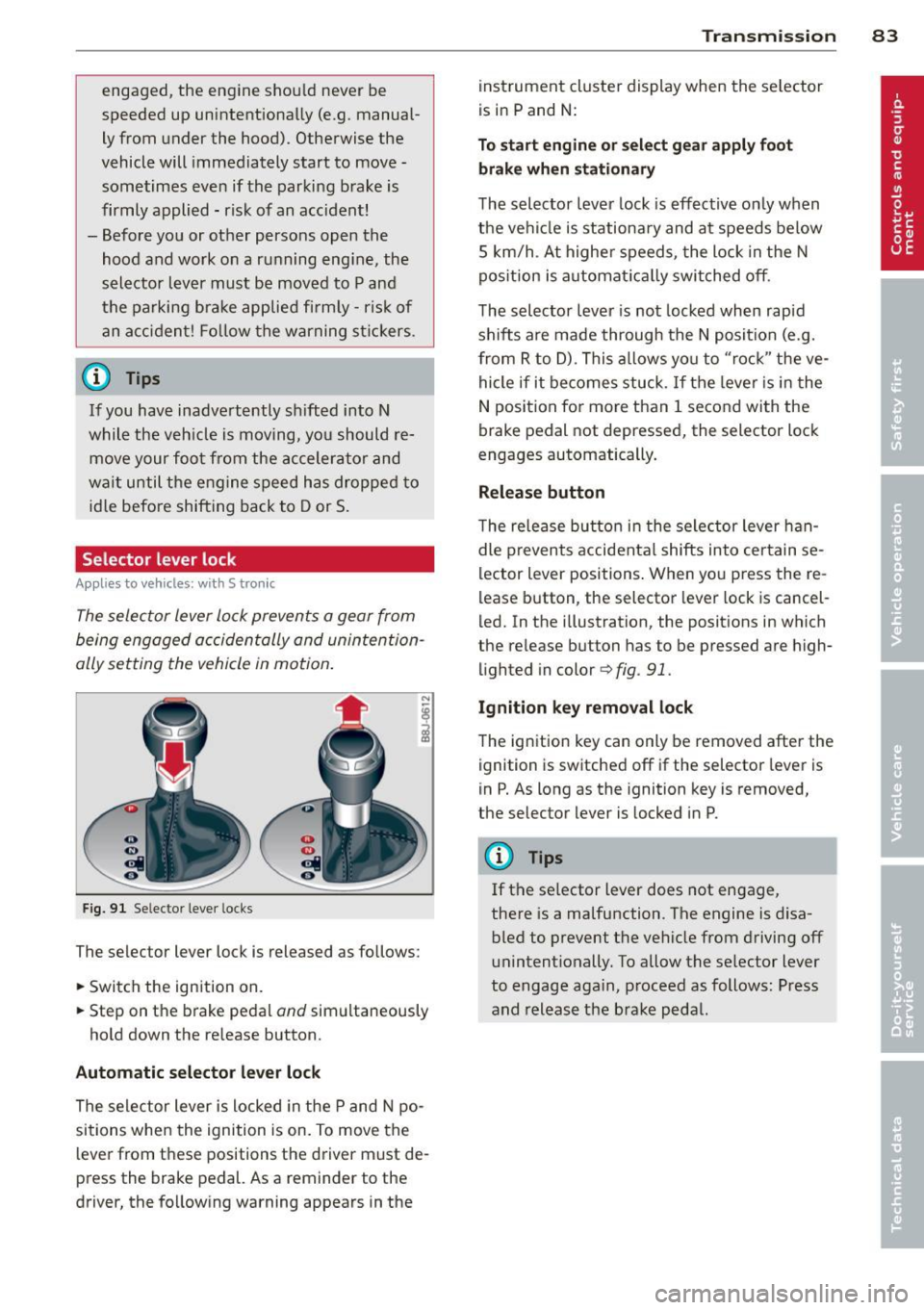
Fig. 91 Selector lever locks
The selector lever lock is released as follows:
.,. Switch the ignition on.
.,. Step on the brake pedal
and simultaneously
hold down the re lease button.
Automatic selector lever lock
The selector lever is locked in the P and N po
sitions when the ignition is on. To move the
l ever from these positions the driver must de
press the brake pedal. As a reminder to the
driver, the following warning appears in the
Transmission 83
instrument cluster display when the se lector
is in P and N:
To start engine or select gear apply foot
brake when stationary
The selector lever lock is effective only when
the vehi cle is stationary and a t speeds below
S km/h . At higher speeds, the lock in the N
pos ition is automat ically switched off.
The selector lever is not locked when rapid
shifts are made through the N position (e.g.
from R to D) . This allows you to "rock " the ve
hicle if it becomes stuck. If the lever is in the
N position for more than 1 second with the
brake pedal not depressed, the selector lock
engages automatically .
Release button
The release butto n in the selector lever han
dle prevents accidental shifts into certain se
lector lever positions . When you press the re
lease button , the selector lever lock is cancel
led. In the illustration, the positions in which
the release button has to be pressed are high
lighted in color
¢ fig . 91.
Ignition key removal lock
The ignition key can only be removed after the
ignition is switched off if the selector lever is
in P. As long as the ignition key is removed,
the selector lever is locked in P.
(y Tips
If the se lector lever does not engage,
there is a malfunction . The engine is disa
bled to prevent th e vehicle from driving off
unintentionally. To allow the selector lever
to engage again, proceed as follows: Press
and release the brake pedal.
Page 88 of 244
86 Transmis sion
If you have selected a lower gear than the cur
rent one, the transmission w ill only shift down
when the engine cannot be overspeeded.
I f kick-down is actuated, the transmiss ion
shifts into a lower gear independently of
speed and engine rpm .
Steering wheel with Tiptronic controls
Applies to vehicles: with S tro nic
The selector paddles allow the driver to keep
both hands on the steering wheel when shift
ing gears.
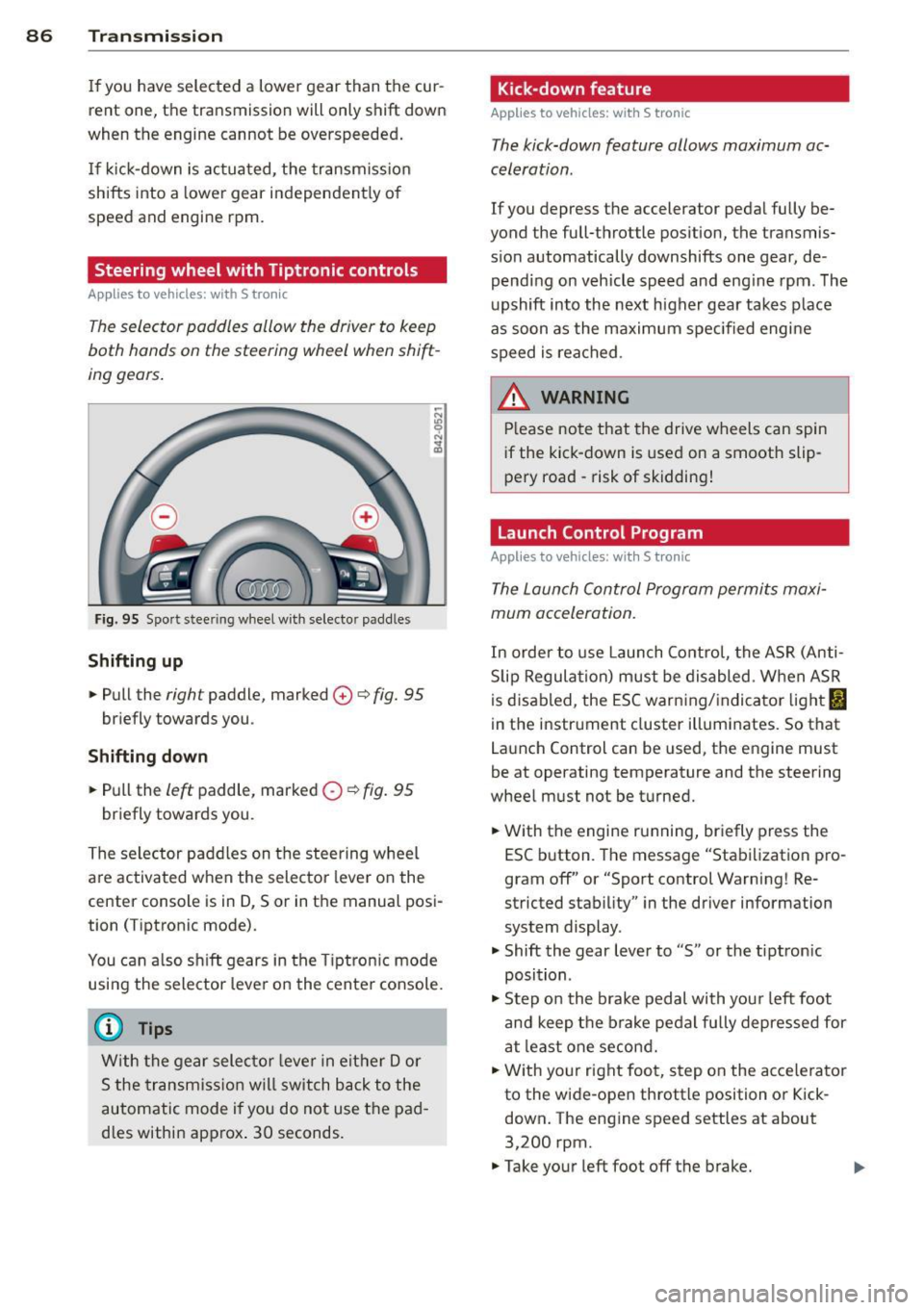
Fig. 95 Spo rt stee ring wheel w ith selecto r paddle s
Shifting up
.,. Pull the right paddle, marked 0 ¢ fig. 95
briefly towards you .
Shifting down
.,. Pull the left paddle, marked O ¢ fig. 95
briefly towards you .
The selector paddles on the steering wheel
are activated when the selector lever on the
center console is in D, 5 or in the manual posi
tion ( Tiptronic mode).
You can also shift gears in the Tiptronic mode
using the selector lever on the center console.
(D Tips
With the gear selector lever in either Dor
5 the transmission will switch back to the
automatic mode if you do not use the pad
dles within approx . 30 seconds.
Kick-down feature
Applies to vehicles: w it h S tronic
The kick-down feature allows maximum ac
celeration.
If you depress the accelerator pedal fully be
yond the full-throttle position, the transmis·
sion automatically downshifts one gear, de·
pending on vehicle speed and eng ine rpm. The
upshift into the next higher gear takes place
as soon as the maximum specified engine
speed is reached.
.&_ WARNING i-==
Please note that the drive wheels can spin
if the kick-down is used on a smooth slip·
pery road -risk of skidding!
Launch Control Program
Applies to veh icles: w it h S t ronic
The Launch Control Program permits maxi
mum acceleration.
In order to use Launch Control, the ASR (Anti
S lip Regulation) must be disabled . When ASR
is disabled , the ESC warning/indicator light
fl
in the instrument cluster illuminates. So that
Launch Control can be used, the engine must
be at operating temperature and the steering
wheel must not be turned.
.,. With the engine running, briefly press the
ESC button . The message "Stabilization pro
gram off" or "Sport control Warning! Re
stricted stability" in the driver information
system display .
.,. Shift the gear lever to "5" or the tiptronic
position .
.,. Step on the brake pedal with your left foot
and keep the brake pedal fully depressed for
at least one second.
.,. With yo ur right foot, step on the accelerator
to the wide-open throttle position or Kick·
down. The eng ine speed settles at about
3,200 rpm .
.,. Take your left foot off the brake. ..,.
Page 89 of 244
_& WARNING
-Always adapt your driving to the traffic
flow.
- Only use Launch Control when road and
traffic conditions allow it and other driv
ers will not be endangered or annoyed by
your driving and the acceleration of the
vehicle .
- Make sure that ESC remains enabled .
With the ESC disabled, the veh icle could
brake away, particularly on a slick and
slippery road -risk of skidding!
- Once acce lerat ion is finished, switch ASR
on again by briefly pushing the ESC but
ton.
@ Tips
- The transm ission temperature may in
crease significantly after using the
Launch Control Program. If that hap
pens, the program may not be available
for a few minutes. I t will be availab le
again after a coo l-down period.
- When accelerating using the Launch
Control program, all vehicle parts are
subject to heavy loads . This can result in
increased wear.
Back-up program
Applies to vehicles: with S tronic
In the event of a system malfunction, there is
a back-up program.
I n the event of system mal func tion, the auto
matic transmission switches to the fail-safe
mode. A ll of the selector lever position dis
plays for the automatic transmission are high
lighted with a light background in the instru
ment cluster display . In some cases you can
not use reverse gear any more .
If the transmission switches to fail-safe mode, you should take the vehicle to an au
thorized Audi dealership as soon as possible
to have the condition corrected.
Transmission 87
Clutch is overheating
Applies to vehicles: with S tronic
• Clutch is overheating! Please stop vehi
cle!
If the symbols are illuminated, the clutch is
overheating and could be damaged if you con
tinue to drive. Stop the vehicle and a llow the
transmission to cool with the se lector lever in
the P posit ion while the engine runs at idle.
If
the warning does not turn off, do not continue
driving. See your authorized A udi dealer or
qualified repair facility for assistance. Other
wise serious transmission damage could re
sult. Once the indicator light has turned off,
drive to your authorized Audi dealer or quali
fied repa ir facility immed iately to have the
malfunction corrected.
Selector lever emergency release
Applies to vehicles: wi th S tronic
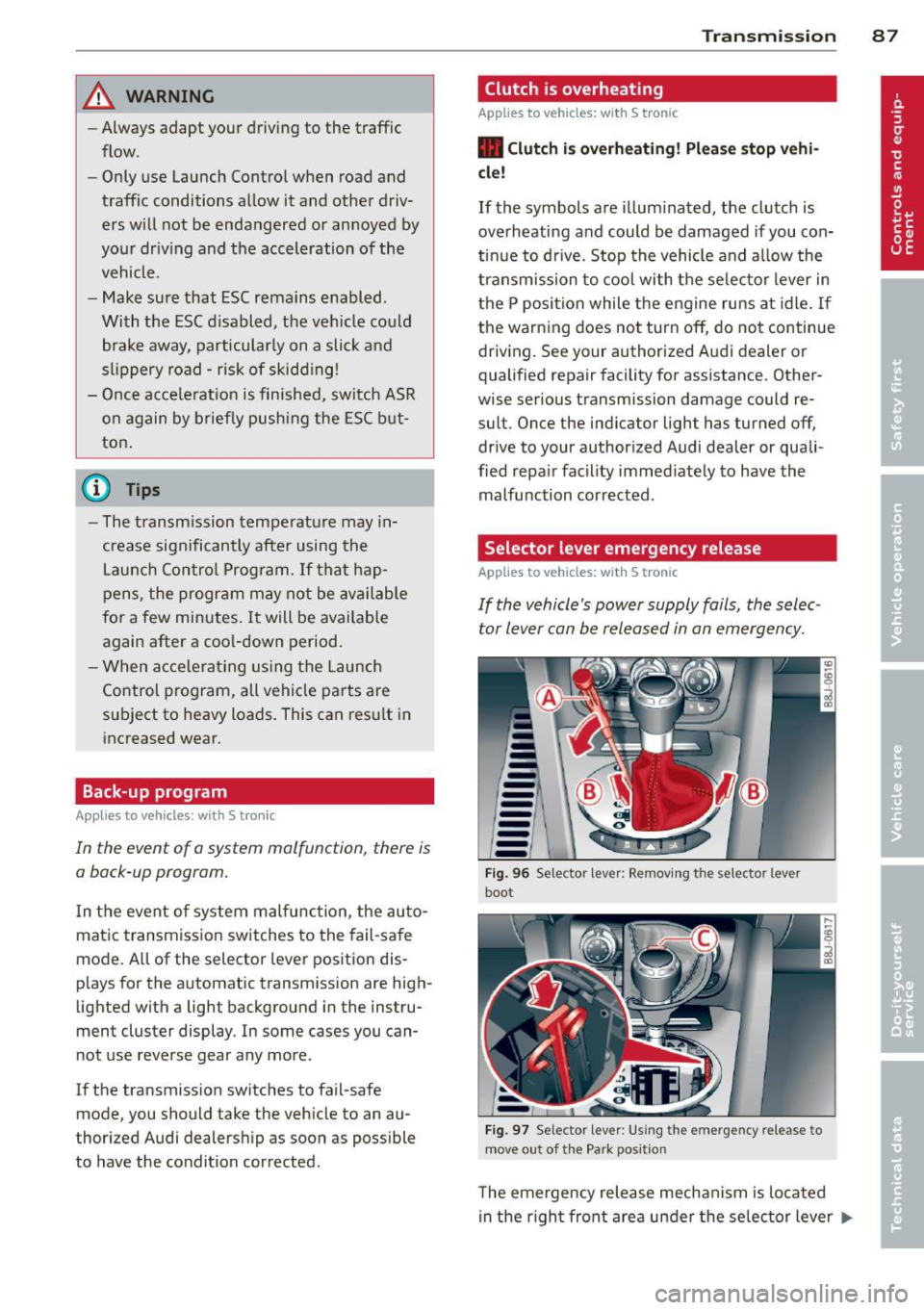
If the vehicle's power supply fails, the selec
tor lever can be released in an emergency.
--
-
-
-
-
---Fig. 96 Se lector lever : Removing the selector lever
boot
.. ~
- ,
Fig. 97 Selector lever : Using the em erge ncy release to
move out of the Park pos it ion
T he emergency release mechanism is located
in the right front area under the selector lever ..,.
Page 91 of 244
Homelink
Universal remote
control
General information
The HomeLink universal remote control can
be programmed with hand-held transmitters
from existing equipment.
You must first program the Homelink trans
mitter before you can use the system
~ page 89, Programming the HomeLink
transmitter.
In order to program the Homelink transmit
ter for devices utilizing rolling code, a second
person on a ladder who can safely reach the
garage door opener motor is recommended.
It is also necessary to locate the "learn" but
ton on your garage door opener motor . Refer
to the operating instructions for the opener, as the location and color of this button may
vary by manufacturer .
You can still use the origina l remote control
for the device at any time.
A WARNING
-
- Never use the Homelink transmitter
with any garage door opener that does
have not the safety stop and reverse fea
ture as requ ired by federal safety stand
ards. This includes any garage door open
er model manufactured before April 1,
1982.
- A garage door opener which cannot de
tect an object, signaling the door to stop
and reverse does not meet current feder
al safety standards. Using a garage door
opener without these features increases
risk of serious injury or death.
- For safety reasons never release the
parking brake or start the engine while
anyone is standing in front of the vehicle.
- A garage door or an estate gate may
sometimes be set in motion when the Homelink remote control is being pro
grammed. If the device is repeatedly ac-
Homelink 89
tivated, this can overstrain motor and
damage its electrical components -an
overheated motor is a fire hazard!
- To avoid possible injuries or property
damage, please always make absolutely
certain that no persons or objects are lo
cated in the range of motion of any
equipment being operated.
(!) Tips
- If you would like more information on
Homelink, where to purchase the Home
Link compat ible products, or would like
to purchase the Homelink Home Light
ing Package, please call toll-free:
1-800-355-3515.
- For Declaration of Compliance to United
States FCC and Industry Canada regu la
tions
~page 229.
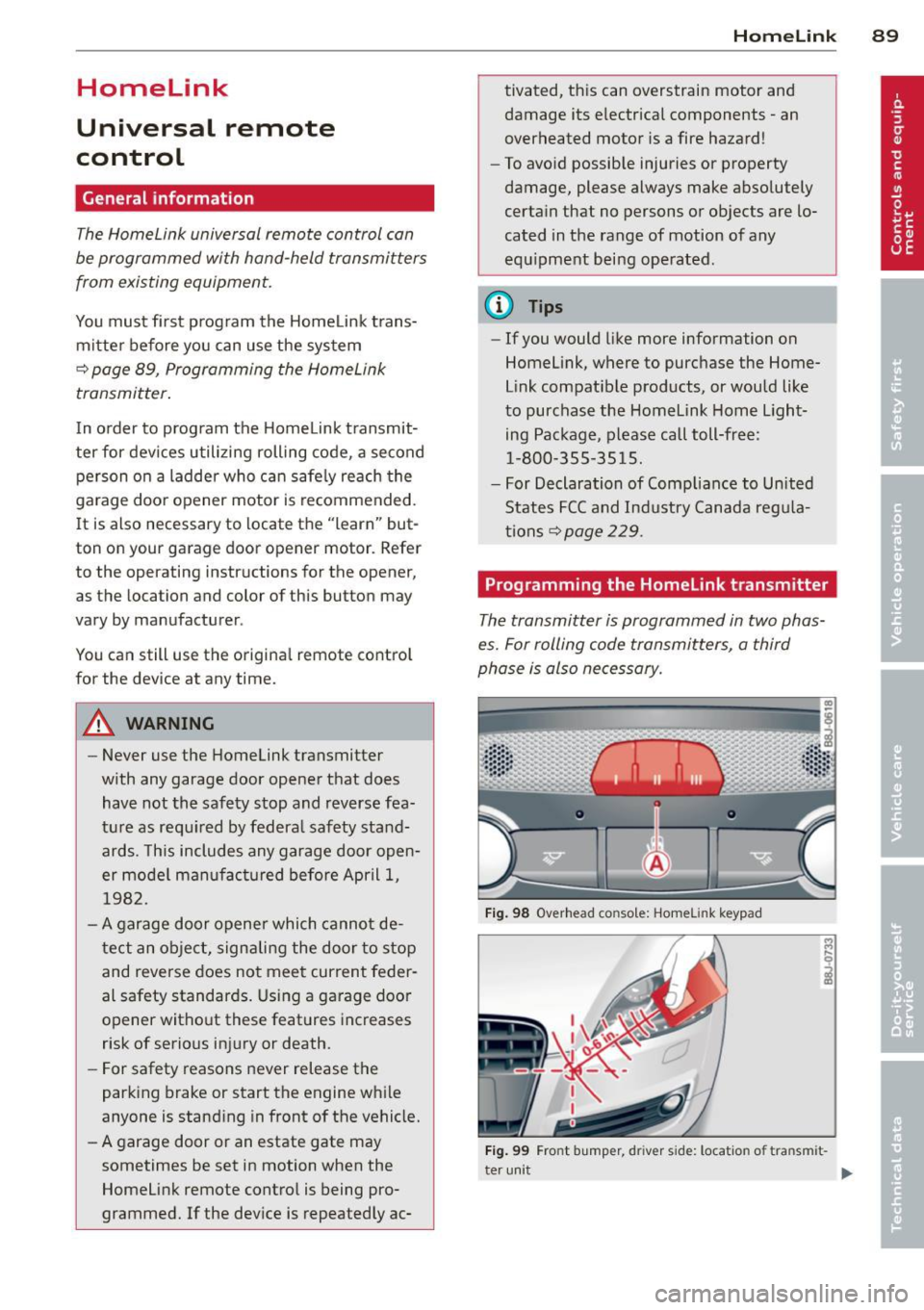
Programming the Homelink transmitter
The transmitter is programmed in two phas
es. For rolling code transmitters, a third
phase is also necessary.
Fig. 98 Overhead co nsole: Homelink keypad
Fig. 99 Fro nt bumper, d river side: locatio n of tra nsm it-
ter unit
IJ-
Page 92 of 244
90 Homelink
Phase 1:
programming the overhead keypad
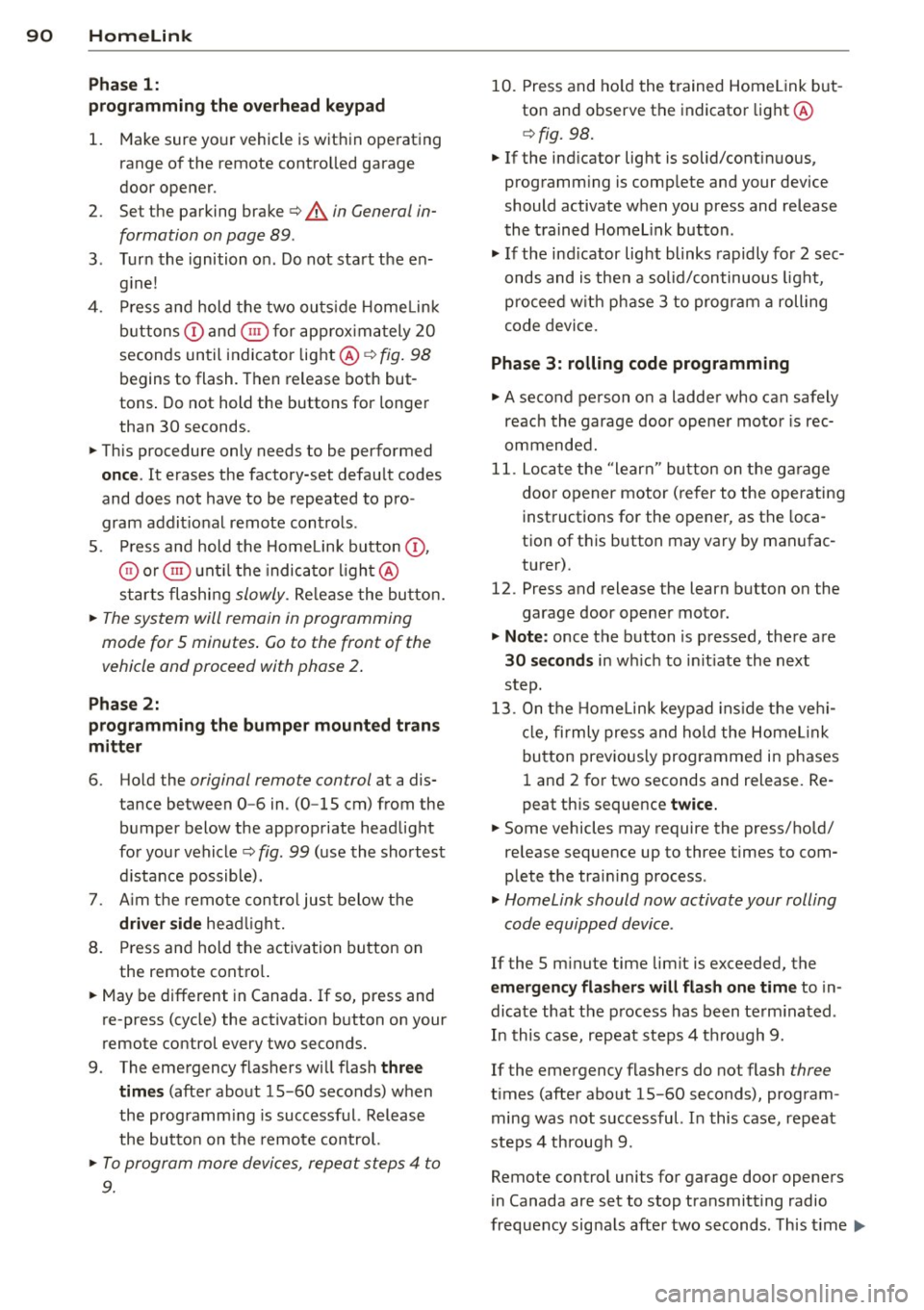
1. Make sure yo ur vehicle is wit hin o peratin g
range of the remote contro lled garage
door opener .
2. Set the parking brake¢.&. in General in
formation on page 89 .
3. Tur n the ignition on . Do not sta rt the e n
g ine!
4 . Pr ess and hold the two ou ts ide Home Link
b uttons
(D and @for app rox imately 2 0
seconds un til indicator light @¢fig . 98
begins to flash. Then release both but
tons . Do not hold the buttons for longe r
than
30 seconds.
.,. This procedure only needs to be performed
once . It erases the factory-set defau lt codes
and does not have to be repeated to pro
gram addit ional remote cont rols .
S . Press and hold the Hom elink button
(D ,
® or @ unt il the indica to r li gh t@
starts flashi ng
slowly. Re lease the bu tton.
.,. The system will remain in programming
mode for 5 minutes .
Co to the front of the
vehicle and proceed with phase 2 .
Phase 2:
programming the bumper mounted tran s
mitter
6 . Hold the original remote control at a dis
tance between
0 -6 in . (0 -15 cm) from the
b umper below the appropriate head light
fo r you r vehicle
q fig. 99 (u se the sho rtest
d istance possible).
7 . Aim t he remo te con trol jus t below the
driver side hea dligh t.
8 . Pr ess and hold the activation button on
the remote cont ro l.
.,. May be different in Canada. If so, press and
re-press (cycle) the activat ion b utton on your
remote control every two seconds.
9 . The eme rgency flashers will flash
three
time s
(after abo ut 15 -60 seconds) when
the programm ing is successf ul. Release
the butto n on the remote control.
.,. To program more devi ces, repea t steps 4 to
9.
10. Press and ho ld the trained Homelink but
ton and observe the indicator light @
¢fig. 98.
.,. If the ind icator lig ht is solid/contin uous,
prog ramm ing is comp lete and your device
should activate when you press and release
t he tra ined Homel ink b utton .
.,. If the ind icator light blinks rapidly fo r
2 se c
onds and is then a so lid/continuous ligh t,
procee d w ith p hase
3 to progr am a roll ing
code device.
Phase 3: rolling code programming
.,. A seco nd person o n a ladde r who can safely
reach th e garage door opene r moto r is rec
ommended .
11. Loc ate t he "lear n" bu tton on t he g arage
doo r opener motor ( re fer to the operating
inst ructions for the opener, as the loca
tion of t his button may vary by man ufac
turer).
12. Press and release the learn b utton on the
garage door opene r motor .
.,. Note : once the b utton is p ressed, the re a re
30 seconds in w hich to in it iate the next
step.
13. On t he Home link keypad ins ide t he ve hi
cl e, fi rmly press and hol d the Home link
bu tton prev ious ly progr ammed in phases
1 an d 2 for two seconds and release. Re
peat th is sequence
twice.
.,. Some vehicles may require the press/hold/
release sequence up to three times to com
plete the trai ning process .
.,. Homelink should now activate your rolling
code equipped d evice .
If the 5 minute time limit is exceeded , the
emergency flashers will flash one time to in
dicate that the p rocess has been te rm ina ted .
In this case, repeat steps 4 through 9.
If the emergency flashers do not flash
three
t imes (afte r about 15 -60 seconds) , program
ming was not successful. I n this case, repeat
steps 4 through 9 .
Remote contro l units for garage do or openers
in Canada are set to stop transmitting radio
fr eq uency sig nals afte r two seconds. Th is t ime ..,.