check engine AUDI TT ROADSTER 2014 User Guide
[x] Cancel search | Manufacturer: AUDI, Model Year: 2014, Model line: TT ROADSTER, Model: AUDI TT ROADSTER 2014Pages: 244, PDF Size: 60.87 MB
Page 22 of 244
20 Instruments and warning /indicator lights
speed displayed in the driver information sys
tem . Keep in mind that the engine speed will
not exceed the va lue disp layed in the driver in
formation system, for example when down
shifting.
Please go to an authorized Audi dea ler or oth
er qualified workshop to have the ma lfunction
repaired.
~ . Checking the engine oil level
II Please add max . 1 qt of engine oil!
If the II symbol comes on, add 1 quart (1 li
ter) of oil at the next opportunity
¢page 170.
~ ... Engine oil sensor defective
If the II symbol illuminates, contact your
author ized Audi dealer and have the oil sensor
inspected .
Bi) Fuel supply too low
When the 001 symbol illuminates, this means
there are about 1.9 gallons (7 liters) of fuel
left in the fuel tank. Time to refuel!
¢ page 162.
If the symbol lights up, even when there is
ample fuel in the tank, and the text
Tank sys
tem malfunction! Please contact workshop
appears in the display, there is a fault in the
system. Contact a qualified workshop to have
the fault rectified.
If the -symbol illum inates, add w indshield
washer f luid to the washer system
¢page 180.
~ Defective light bulb warning
The defective light bulb warning tells you
when a vehicle light bulb has become defec
tive.
If a defective bulb has been detected by the
system or a light bulb burns out,
the m sym
bol w ith a message appears in the display to
te ll you which bulb is burnt out and where it is
located. For example :
Rear left turn signal
After 5 seconds, the message disappears. If
you want to recall the message into the dis play, press the CHECK button
¢ page 10,
fig. 3
(J) .
There are three reasons why the defective
bulb message would appear in the display:
- The light bu lb has burnt out
¢page 216.
-The f use is "blown" ¢ page 213, Replacing
fuses .
-The wire connection to the light bulb is de-
fective.
Have the bulb replaced or the connect ion re
paired by your authorized Aud i Service depart
ment .
A WARNING
-
-Light bulbs are pressurized and could ex
p lode while they are being changed caus
ing serious personal injury.
- Work with due care when handling the
high-vo ltage section of gas discharge
(xenon) lamps. Failing to do so could re
sult in death or serious injury!
BRAKE LIGHT!<®> Brake light defective
In case of a malfunction or component fail-
ure, the symbol (USA models)/
It:$
repaired or replaced, as necessary:
- Brake light bulbs
- All wiring connections
- Brake light switch
Page 24 of 244
22 Driver in formation sy ste m
Driver information
system
Introduction
The Driver information display inside the in
strument cluster provides you, the driver ,
with important information.
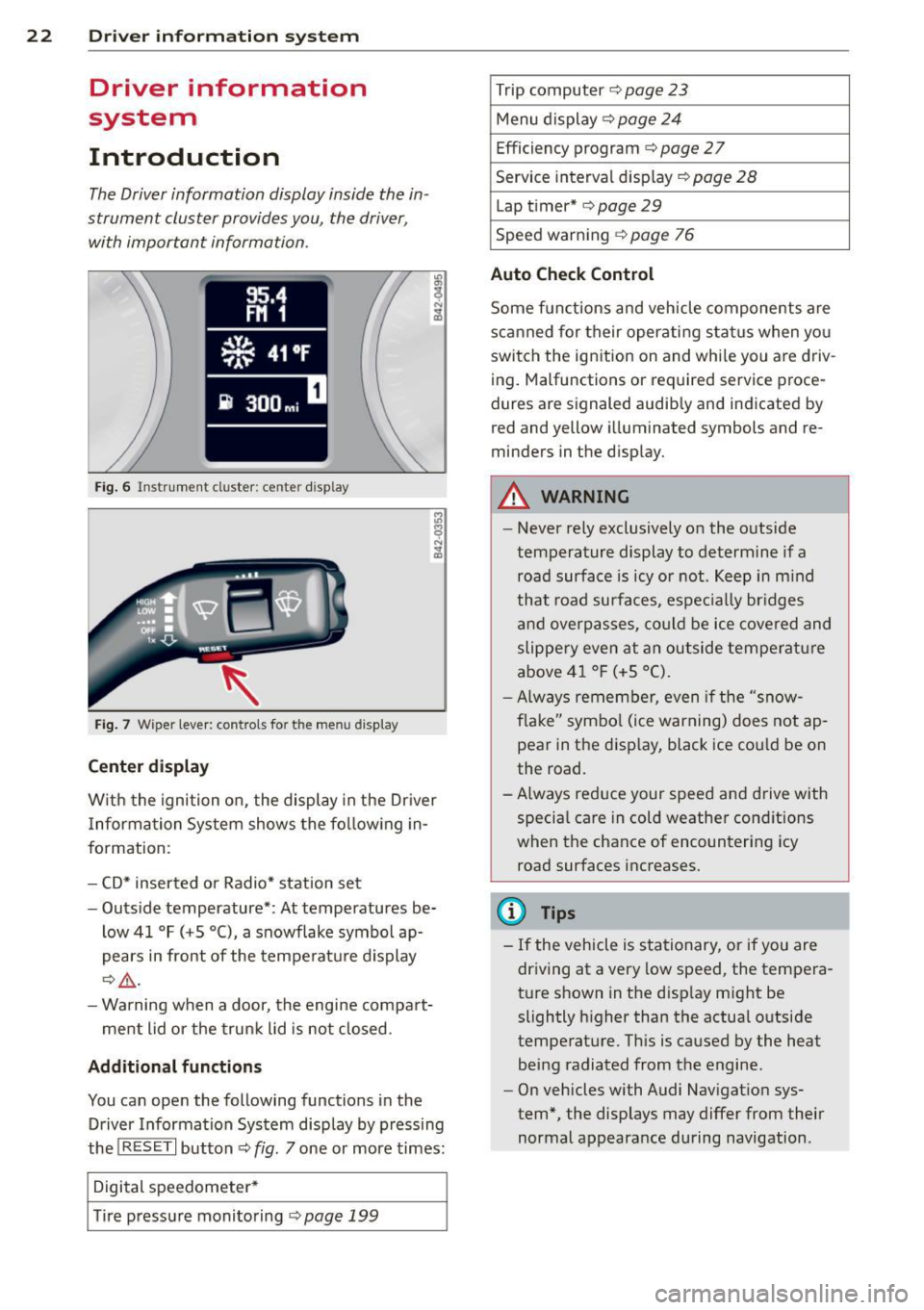
Fig . 6 In strum en t cl ust er: center display
Fig. 7 Wiper le ver: con trols fo r the menu disp lay
Cent er d ispla y
With the igni tion on, the display in the Dr iver
I nformation System shows the fol low ing in
formation :
- CD* inserted or Radio* station set
- Outs ide temperature* : At temperatures be-
low 41 °F ( +S °C), a snowflake symbol ap
pears in front of the temperatu re d isplay
c::> .&_ .
- Warning when a door, the engine compa rt-
ment lid or the trunk lid is not closed .
Additional functions
You can open the following functions in the
Driver Information Sys tem disp lay by p ressing
the
! R ESE T I button c::> fig. 7 one or more times:
Digital speedometer *
T ire pressure monitoring
c::> page 199
Trip computer c::> page 23
Menu d isplay c::> page 24
Efficiency program c::> page 27
Service interval disp lay
c::> page 28
Lap timer* c::> page 29
Speed warn ing
c::> page 76
Auto Check Control
Some f unct ions and vehicle components are
scanned for their operati ng sta tus when yo u
switch the ign ition on and whi le you a re driv
ing. Malfunctions or req uired service proce
dures ar e signaled audib ly and indicated by
red and yellow i lluminated symbols and re
m inders in the display.
A WARNING -
- Never rely exclusively on the outside
temperature display to determine if a
road surface is icy or not . K eep in m ind
that road surfaces, espec ially br idges
and overp asses, co uld be ice covered and
slippe ry even at an outside tempe ra tu re
above 4 1 °F (+5 °C).
- Always remembe r, even if the "snow
f lake" symbo l (ice warning) does not ap
pear in the disp lay, black ice could be on
the road .
- A lways reduce your speed and d rive with
specia l care in cold weather cond itions
when the chance of encountering icy
road surfaces increases.
(D Tips
- If the vehicle is stationary, or if you are
dr iving at a very low speed, the tempera
t u re s hown in the d isp lay m ight be
slightly h igher than the actual o utside
temperature. Th is is caused by the heat
being radiated from the engine .
- On vehicles with Audi Nav igat ion sys
tem *, the displays may differ from their
normal appearance during navigation .
Page 27 of 244
Each display type in the Start menu cont ains a
submenu with additional options.
Set Clock ¢ page 26
Computer c::>page 26
Acoustic park assist*
c:>page 80
Speed wa rning c::> page 78
Language c::> page 26
Units (distance, fue l consump-
tion, temperature)
c::> page 26
Tire press ure monitoring
c::> page 199
Lap timer* c:>page 29
Lighting* c::> page 48
Wiper (service posit ion)
c:> page 56
Wi ndow c::> page 40
Doors (unlock ing and locking
mode, for examp le Auto- lock)
c::> page 34, c::> page 34
Check Service c::> page 28
Chassis number c::> page 223
Engine oil temperature*
c:> page 26, c::> page 26
Registered keys c::> page 32
Menu off All of the messages show n in
veh icles without menu display
appear on the disp lay screen .
Navigating the menu
Use the racker switch on the windshield wiper
lever and the
I Reset ! button to operate the
menu and carry out inquiries and selections .
-----®
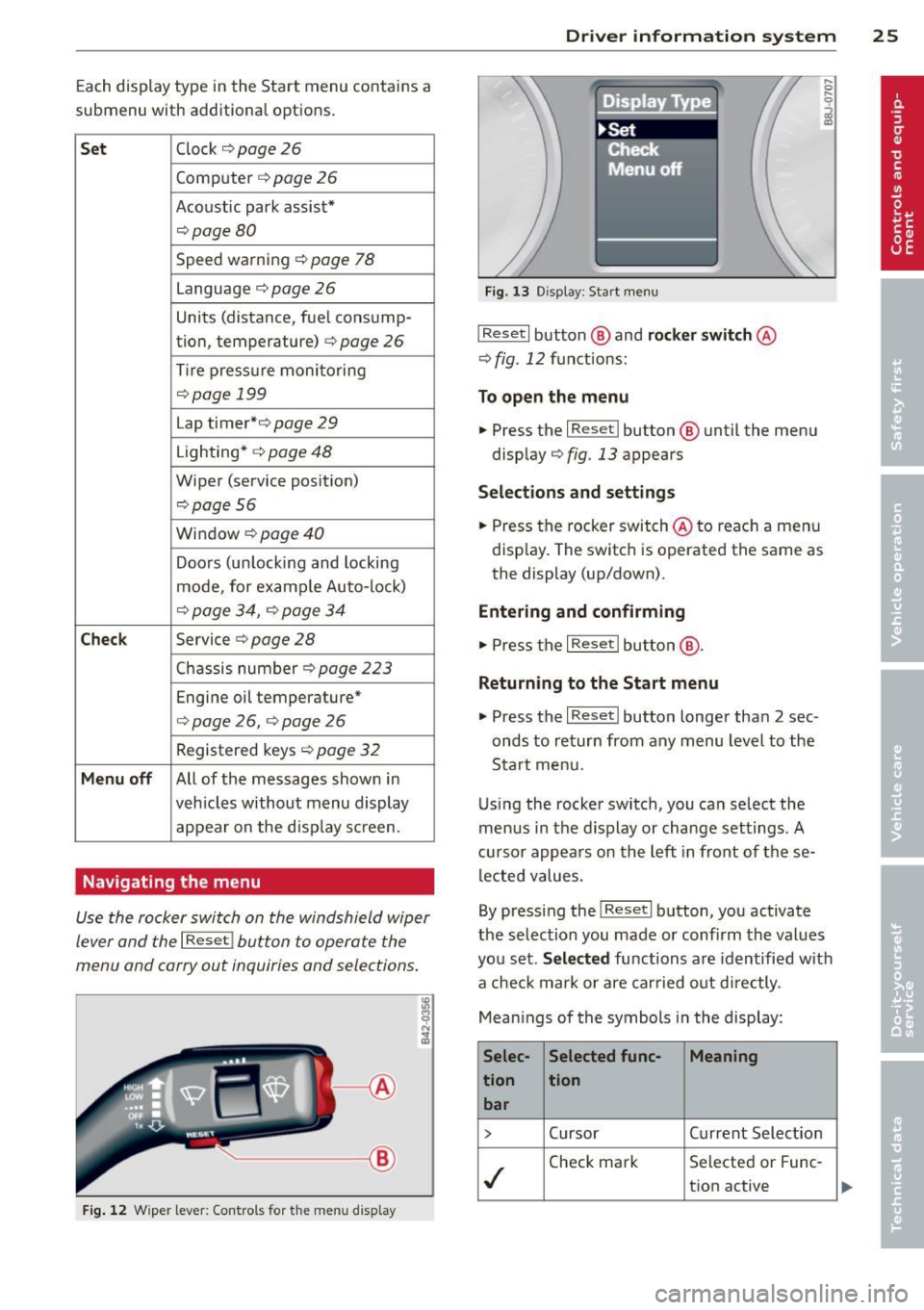
Fig. 12 W iper lever: Cont rols fo r th e me nu di splay
Dr iver in formation system 25
Fig . 1 3 D isplay: Start menu
I Reset I button @ and rocker switch @
c::> fig. 12 fu nctions:
To open the menu
.. Press the I Reset I button @ until the men u
disp lay
c::> fig . 13 appears
Sel ections and sett ing s
.. Press the rocker switch @to reach a men u
disp lay. The switch is operated the same as
the display (up/down) .
Entering and confirming
.. Press the I Reset I butt on @.
Returning to the Start menu
.. Press the I Reset I butto n longer tha n 2 sec
onds to return from any menu level to the
Sta rt me nu.
U sing the rocker switch, you can select the
menus in the d isplay or change settings. A
cu rsor appears on th e left in front of these
lec ted values.
By pressing the
I Reset I button, you activate
the se lection you made or confi rm the values
you set.
Selected functions are identified wit h
a check mark or are carried out d irectly .
Mean ings of the symbols in the display:
Selec- Selected func- Meaning
tion tion bar
> Cursor Current Selection
./
Check mark Se
lecte d or Fune-
t ion active
Page 34 of 244
32 Opening and clo sing
Opening and closing
Keys
Key set
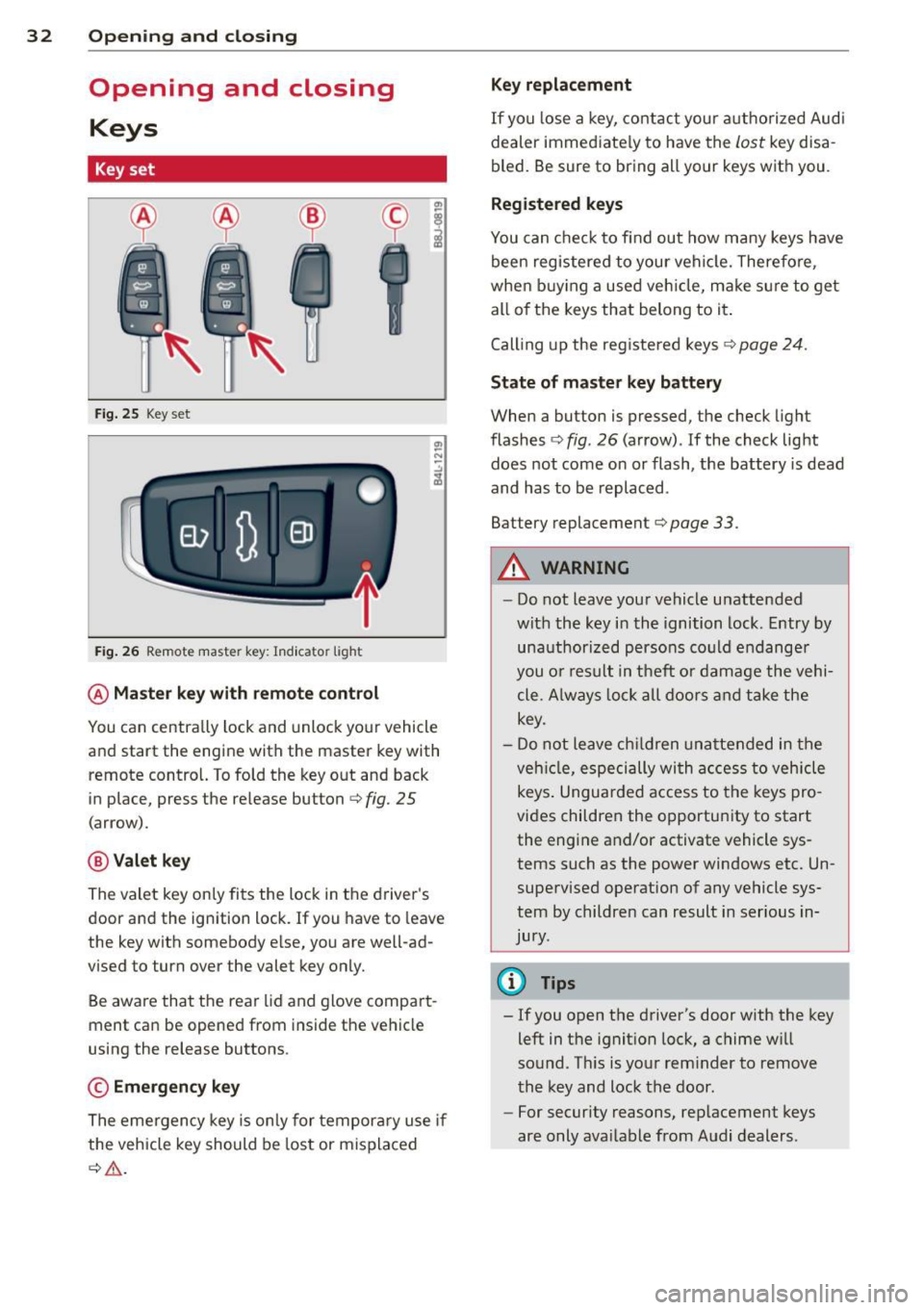
Fig . 25 Key set
Fig. 26 Remote master key : Indicator light
@ Ma ster key w ith remote control
You can centrally lock and unlock your vehicle
and start the engine with the master key with
remote control. To fold the key out and back
in place, press the re lease button
c:> fig. 25
(arrow).
@ Valet ke y
The valet key on ly fits the lock in the driver's
door and the ignition lock. If you have to leave
the key with somebody e lse, you are well-ad
vised to turn over the valet key only.
Be aware that the rear lid and glove compart
ment can be opened from inside the vehicle
using the release buttons .
© Emergency k ey
The eme rgency key is only for temporary use if
the vehicle key should be lost or misplaced
c:> & .
Ke y replac ement
If you lose a key, contact you r a uthorized Audi
dealer immed iate ly to have the
Lost key disa
bled. Be sure to bring all your keys with you .
Registered ke ys
You can check to find out how many keys have
been reg istered to your vehicle. Therefore,
when buy ing a used veh icle, make sure to get
all of the keys that belong to it.
Call ing up the reg istered keys
c:> page 24.
St ate of mas ter key b atter y
When a button is pressed, the check light
flashes
c:> fig . 26 (arrow) . If the check light
does not come on or flash, the battery is dead
and has to be replaced .
Battery replacement
c:> page 33.
_& WARNING ........... -
- Do not leave your vehicle unattended
wit h the key in the ignition lock. Entry by
unauthorized persons could endange r
you o r result in theft or damage the vehi
cle. A lways loc k all doors a nd take the
key.
- D o not leave ch ildren unattended in the
veh icle, especially wi th access to vehicle
keys . Unguarded access to the keys pro
vides children the opportunity to start
the engine and/or activate vehicle sys
tems such as the power windows etc. Un supervised operation of any vehicle sys
tem by children can result in ser ious in
jury.
{!) Tips
- If you open the driver's door with the key
left in the ignit ion lock, a chime will
sound . Th is is your rem inder to remove
the key and lock the door.
- For security reasons, rep lacement keys
are only ava ilable from Audi dealers .
Page 41 of 244
When will the anti theft ala rm system be
triggered?
When the vehicle is locked , the alarm system
monitors and protects the following parts of
the vehicle:
- engine compartment
- luggage compartment
- doo rs
- ignition
When the system is activated, the alarm will
be triggered if one of the doors, the engine
hood or the rear lid are opened, or if the ign i
tion is turned on.
The anti-theft alarm system will also go off
when the battery is disconnected.
You can a lso trigger the alarm by pressing the
PANIC button on your remote-control key.
This will alert other people in case of emer
gency. Press the
PANIC button again to turn
off the alarm .
How is the anti-theft alarm switched off
when triggered?
The alarm system is switched off when you
unlock the vehicle using the remote-control key or when the ignition is sw itched on . The
a larm will also switch itse lf off when it comes
to the end of its cycle.
Emergency flasher
The emergency flasher will blink briefly when
the doors, engine hood and rear lid are prop
erly closed.
If the emergency flashers do not blink, check
the doors, engine hood and rear lid to make
sure they are properly closed. If you close a
door, the hood or the rear lid with the ant i
theft alarm switched on, the emergency flash
ers will blink only after you have closed the
door or lid.
(1) Tips
For the anti-theft alarm system to func
tion properly, make sure all vehicle doors
and windows are closed before leaving the
vehicle.
Opening and closing 39
Power windows
Controls
The driver can operate all windows .
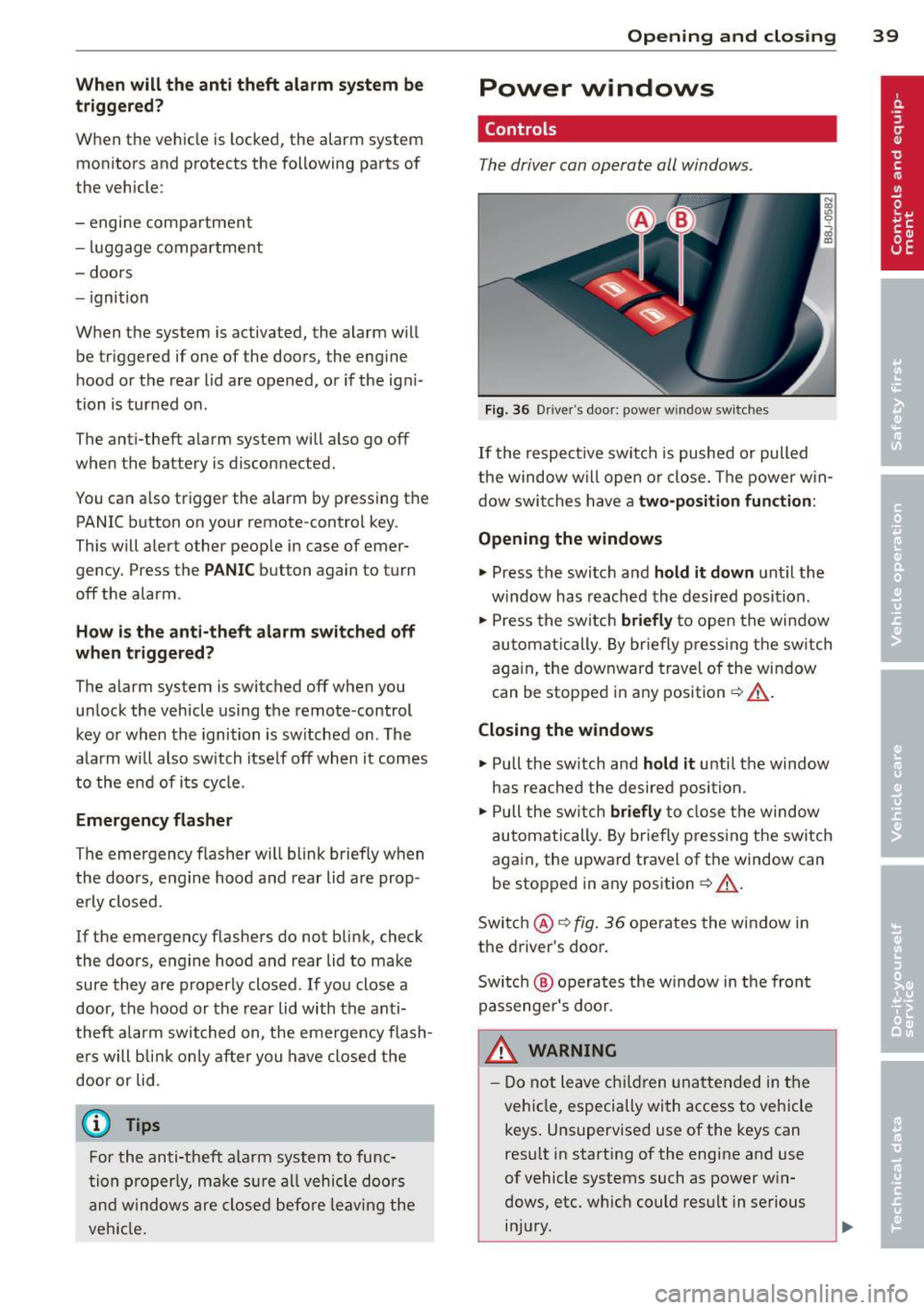
Fig. 36 Driver's door: power w indow switches
If the respective switch is pushed or pulled
the window w il l open or clos e. The power win
dow switches have a two-position function :
Opening the windows
.,. Press the switch and hold it down until the
w indow has reached the desired position .
.,. Press the switch
briefly to open the window
automatically. By briefly pressing the switch
again, the downward travel of the window
can be stopped in any position<=-> .&_.
Closing the windows
.,. Pull the sw itch and hold it unti l the window
has reached the desired position .
.,. Pull the switch
briefly to close the window
automatically. By briefly press ing the switch
aga in, the upward travel of the window can
be stopped in any position
~ .&_ .
Switch @<=->fig .
36 operates the window in
the driver's door.
Switch @ operates the window in the front
passenger 's door.
&_ WARNING
- Do not leave children unattended in the
vehicle, especially with access to vehicle
keys . Unsupervised use of the keys can
result in start ing of the engine and use
of vehicle systems such as power win
dows, etc. wh ich could result in serious
injury.
Page 57 of 244
During brief stops, e.g. at a red light, wiper
motion will automatically be reduced to the
next lower speed. Wipers already turning at
low speed change to intermittent wiping.
When the ignition is turned on, the washer
jets are heated.
A WARNING
- Wiper blades are crucial for safe driving!
Only when they are in good condition are
they able to clear the windows properly
to provide uncompromising visibility .
Worn or damaged wiper blades are a safety hazard ¢
page 5 7, Replacing
windshield wiper blades!
- The light/rain sensor* is only designed to
assist and support the driver.
It remains
entirely the driver's responsibility to
monitor outside weather conditions and
to manually activate the wipers as soon as rain or drizzle reduces visibility
through the windshield.
- The windshield must not be treated with
water-repellent materials. They can in
crease glare under poor visibility condi
tions such as wetness, darkness, or when
the sun is low on the horizon. In addi
tion, they can cause the windshield wip
ers to chatter .
(I) Note
In freezing or near freezing conditions:
- Always check that the wiper blades are
not frozen to the glass before you turn
the wipers on . Loosen a wiper blade
which is frozen in place before operating
the wipers to prevent damage to the
wiper blade or the wiper motor.
- Do not use the wipers to clear a frosted window . Using the wipers as a conven
ient ice scraper will destroy the wiper
blades.
- Before you take your vehicle to an auto
matic car wash, make sure you have the
windshield wiper system switched off (lever in position 0), otherwise the wind
shield wiper system could get damaged
Clear vision 5 5
in the car wash if it should suddenly
come on.
(0 Tips
- The windshield wipers are switched off
when the ignition is turned off. Activate
the windshield wipers after the ignition
is switched back on by moving the wind
shield wiper lever to any position.
- Worn or dirty windshield wiper blades
cause smearing, which can affect the op
eration of the light/rain sensor* . Check
the condition of your windshield wiper
blades regularly.
- The rain sensor is part of the interval
wiping system . Turning off the ignition
will also deactivate the rain sensor. To re activate the sensor, switch off the inter
val wiping function, then switch it back
on again.
-Applies to vehicles with light/rain sen
sor : When the wipers are switched on
manually and in rain conditions, the au
tomatic headlights* turn on¢
page 48,
Switching the headlights on and off
or
off during the day when the wipers are
no longer operating. The automatic
headlights* function is available in this
case only when the light switch is in the
"AUTO" position¢
page 48, fig. 53.
-Make sure the washer fluid reservoir in
the engine compartment is topped off
before going on a long trip. Look up
¢
page 180 for checking and filling the
washer container .
- The wipers only operate with the hood
completely closed .
Headlight washer system
Applies to vehicles: with headlight washer system
The headlight washer system cleans the
headlights.
"'Operate the windshield wiper/washer sys
tem
o page 54, fig. 63 ® with the head
lights turned on by holding the lever for lon-
ger than one second . ..,.
Page 75 of 244
On the road
Steering
Adjusting the steering wheel column
The steering wheel position can be continu
ously adjusted in height and distance.
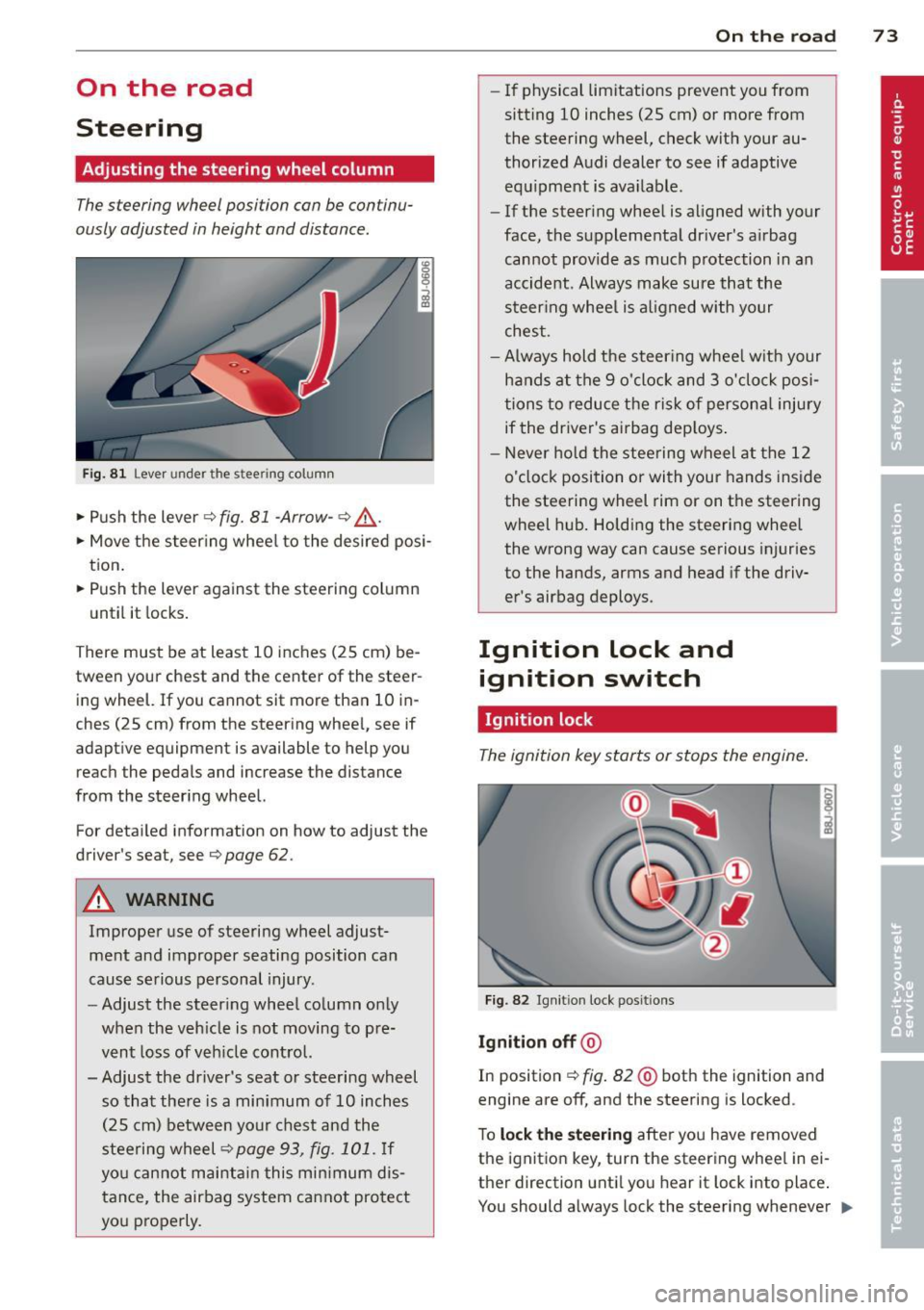
Fig. 81 Lever under the stee ring column
• Push the lever¢ fig. 81 -Arrow- ¢,&. .
• Move the steer ing wheel to the desired posi
tion.
• Push the lever against the steering column
until it locks.
There must be at least 10 inches (25 cm) be tween your chest and the center of the steer
ing wheel. If you cannot sit more than 10 in
ches (25 cm) from the steering wheel, see if
adaptive equipment is available to help you
reach the pedals and increase the distance
from the steering wheel.
For detailed information on how to adjust the
driver's seat, see
¢ page 62.
A WARNING
Improper use of steering wheel adjust
ment and improper seating position can
cause serious personal injury.
- Adjust the steering wheel column only
when the vehicle is not moving to pre
vent loss of vehicle control.
- Adjust the driver's seat or steering wheel so that there is a minimum of 10 inches
(25 cm) between your chest and the
steering wheel
¢page 93, fig. 101. If
you cannot maintain this minimum dis
tance, the airbag system cannot protect
you properly.
On the road 73
-If physical limitations prevent you from
sitt ing 10 inches (25 cm) or more from
the steering wheel, check with your au
thorized Audi dealer to see if adaptive equipment is ava ilable .
- If the steering wheel is aligned with your
face, the supplemental dr iver 's airbag
cannot provide as much protection in an
accident. Always make sure that the
steering wheel is al igned with your
chest .
-Always hold the steer ing wheel w ith your
hands at the 9 o'clock and 3 o'clock posi
tions to reduce the risk of persona l injury
if the driver's airbag deploys .
- Never hold the steering wheel at the 12
o'clock position or with your hands inside
the steering wheel rim or on the steering
wheel hub. Holding the steering wheel
the wrong way can cause serious injuries
to the hands, arms and head if the driv
er's airbag deploys.
Ignition lock and ignition switch
Ignition lock
The ignition key starts or stops the engine.
Fig. 82 Ignit ion lock posit ions
Ignition off @
In position ~ fig. 82@ both the ignition and
engine are off, and the steering is locked .
To
lock the steering after you have removed
the ignition key , turn the steering wheel in ei
ther direction until you hear it lock into place .
You should always lock the steering whenever ..,.
Page 147 of 244
(D Note
Never push the vehicle or apply force to
the rear spoiler -it could be damaged.
@ Tips
Clean the spoiler compartment every 2 to
3 months . The spoiler compartment must
always be free of ice, snow, leaves or other
debris.
Braking
General information
What affects braking efficiency?
Oper ating condit ions and d riving hab it s
T he brakes on today's automobi les are st ill
s ubject to wear, depending largely on opera t
ing conditions and dr iv ing habi ts
c> & . On
vehicles that are e ither driven mostly in stop
and-go city traffic or are d riven hard , the
b rake pads should be checked by you r author
i zed Audi dealer more often than specified i n
the
Warr ant y & Maint enan ce booklet . Failure
to have your brake pads inspected can res ult
in red uced brake performance.
On steep slopes, you shou ld use the brak ing
effect of the eng ine. This way, you p revent un
necessa ry wear on the brake system . If you
must use yo ur brakes, do not hold the brakes
down continuously. Pump th e brakes at inter
vals.
Noises may occur when braking d epending on
the speed, braki ng force and outside condi
tions such as temperature and humidity.
Moistu re or road salt
Unde r certain conditions, for example, w hen
driving through water or ve ry heavy rain, or
even after washing your vehicle, the braking
effect can be reduced d ue to moisture (or in
fre ezing conditions ice) on the brake pads . A
few ca utious brake applicat ions should dry off
the b rake pads or remove any ice coatings.
The effectiveness of the brakes can be reduced
when th e vehicle is driven on a salt-covered
Int ellig ent technolog y 145
road and the b rakes are no t used. Likewise ,
you clean off accumulated salt coating from brake d iscs and pads with a few cautious ap
plications of the brake
c> & .
Cor ro sion
T here may be a tendency for dir t to build up
on the brake pads and corrosion to form on
the discs if the car is not driven regu larly or
on ly fo r short trips with litt le use of the
brakes.
If the brakes are not used frequently, or if cor
rosion has formed on the discs, it is advisable
to clean off the pads and discs by braking
firmly a few times from a moderately high
speed
c> & .
Faults in the brak e syst em
If you shou ld notice a sudden increase in
brake pedal trave l, then one of the two brake
c ircuits may have fai led
c> & .
Low brake fluid lev el
Malfunctions can occur in the brake system if
the b rake fluid level is too low. The brake fluid
level is monitored electronica lly.
Brake booster
T he brake booster inc reases the pressure that
you generate with the brake peda l. It works
o nl y when the engine is running
.c> &
Brake lining wear status
Brake lining wear may be checked by visual in
spection of the condition of the brake pads
through the open ings in the wheel. If neces
sary, the wheel may be removed for t his in
spection
c> page 209, What should I be
aware of when changing a tire? .
A WARNING
--=
-You should perform braking maneuvers
for the purpose of cleaning the brake
system only if road conditions permit.
Other road users must not be put at risk -
you may cause an accident!
- Before descend ing a steep grade, reduce
speed and sh ift transmission into a lower
~
•
•
Page 148 of 244
146 Intellig ent technolog y
gear or lower driving range. Do no t ride
t h e brakes or hold the pedal down too
long or too often. This cou ld cause the
bra kes to get hot and dimin ish braking
efficiency .
- Do no t "ride the brakes" by resting your
foot on the pedal when you do not intend
to brake . Th is may cause the brakes to
overheat, prematu re wear and inc reased
stopp ing distan ce.
- Under certain climat ic and operating
c ondit ions such as passing through wa
ter, driving i n heavy ra in or after wash ing
the vehicle, the effect iveness of the
brakes can be red uced . In winter, ice can
accumulate on the brake pads, linings,
discs and d rums . Carefully apply brakes
for a test . Brakes will dry and ice coat
ings will be cleaned off after a few care
ful brake applications.
- Driving for an extended period of time on
salt-covered roads w ithout us ing your
brakes can also affect braking efficiency .
Clean off accumulated salt coating from
brake d iscs and pads w it h a few cautious
brake appli cat ions.
- If you damage the fro nt spo iler, or if you
ins tall a different spoiler, be su re the air
flow to the fron t bra kes is not o bstr uct
ed. O therwise the brake system co uld
overheat reducing the effectiveness of
the entire brake system.
- F ailure o f one bra ke c ircuit will impair
the b raking capability resulting in an in
creased stopp ing distance . Avoid driv ing
the vehicle and have it towed to the near
est Aud i dea le r o r qualified workshop.
- Never let the vehicle ro ll to a stop w ith
the engine shut off.
- If the brake booster is not working, t he
brake pedal must be pressed considera
bly harder to make up for the lack of
booster assistance . Electro-mechanical
power assist
The electro-mechanical power assist helps
the driver when steering .
The degree of power assi st is electronically
matched to vehicle speed .
T he power steering system assists the driver
so that he can steer the vehicle with reduced
physical effor t.
Power steering will not work if t he engine is
off . As a result, the steering wheel will be hard
to turn.
A WARNING
If the system develops a problem , you
must seek qualified profess iona l assis
tance .
(D Note
-
If there is an e lectronic malfunction, ser
votronic
will still function like a conven
tiona l power steering system, providing a
constant steering support force that is no
l onge r proportionate to the vehicle speed .
This is most not icea ble whe n tu rni ng the
s tee ring w heel a t low speeds (fo r example
when pa rking), -more effort w ill be re
q uired than us ua l.
- Be aware o f the diffe rent than usual
steering response and adjust your steer
ing force acco rdingly.
- Have the problem checked and set right
by an autho rize d Aud i dealer as soon as
possible.
- If a s teer ing mal func tion occurs, this is
signa led wit h the
,'Zr~ or .• indicato r
lights and a warning tone, see.
(D Tips
- If the powe r stee ring system sho uld fai l,
or if the engine is not ru nning (fo r exam
ple, whi le being towed), you will still be
able to steer the vehicle. However, more
effort will be required to do so.
11-
Page 151 of 244
off. These systems will be avai lable again as
soon as the energy ba lance has bee n restored.
You will also notice that engine idle speed has
been increased s lightly. This is normal and not
a cause for concern. By increasing engine idle
speed the additiona l energy required is gener
ated and the battery is charged .
Driver notification in the instrument
cluster display
If battery power drops into the range where it
can lim it the ab ility of the engine to start, th is
i s shown in the inst rument cluster display
with the following driver message:
(•) Low battery charge : battery will be
charged while driving
This notification reminds you that the starting
capability of the engine may be l imited. As
soon as you start driving aga in, the battery
w ill be recharged and the notification will go
out.
Driver notification appears and goes out
again
If th is driver notification appears after the ig
nition is turned on or while driving and it goes
out again after a wh ile, the battery has been
adequately recharged.
Driver notification appears and does not
go out again
If this driver notification appears after the ig
n ition is turned on or while driving and does
not go out again, the battery's state of charge
is not in the optimal range. Starting ability is
restr icted. Have the battery checked as soon
as possible by an author ized Audi dealer or
qualified workshop.
Intelligent technology 149
•
•