reset AUDI TT ROADSTER 2014 User Guide
[x] Cancel search | Manufacturer: AUDI, Model Year: 2014, Model line: TT ROADSTER, Model: AUDI TT ROADSTER 2014Pages: 244, PDF Size: 60.87 MB
Page 38 of 244
36 Opening and clo sing
- The operation of the remote cont ro l key
can be temporarily disrupted by interfer
ence from transmitters in the vicin ity of
the vehicle work ing in the same frequen
cy range (e.g. a cell phone, radio equip ment) .
- In order to make sure the locking func
tion is working, you should always keep
your eye on the vehicle to make sure it is
properly locked .
- Do not use the remote control if you are
i nside the car, otherwise you may unin
tentionally lock the vehicle, and then you
would set off the anti-theft ala rm when
you try to start the engine or open a
door . In case this happens anyhow, push
the un lock button
CD .
- Use the panic function only if you are in
an emergency situation.
Resetting the remote control
The remote control must be reset if the vehi
cle does not unlock .
.,,. Press the unlock button CD on the remote
control.
.,,. Manua lly unlock the driver's door lock with
the mechanical key within 30 seconds.
.,,. Press either the lock- 1'.D or the unlock
CD but
ton to comp lete th e reset sequence .
Operating locks with the key
To lock and unlock the vehicle from the out
side , turn the key in the lock of the driver 's
door .
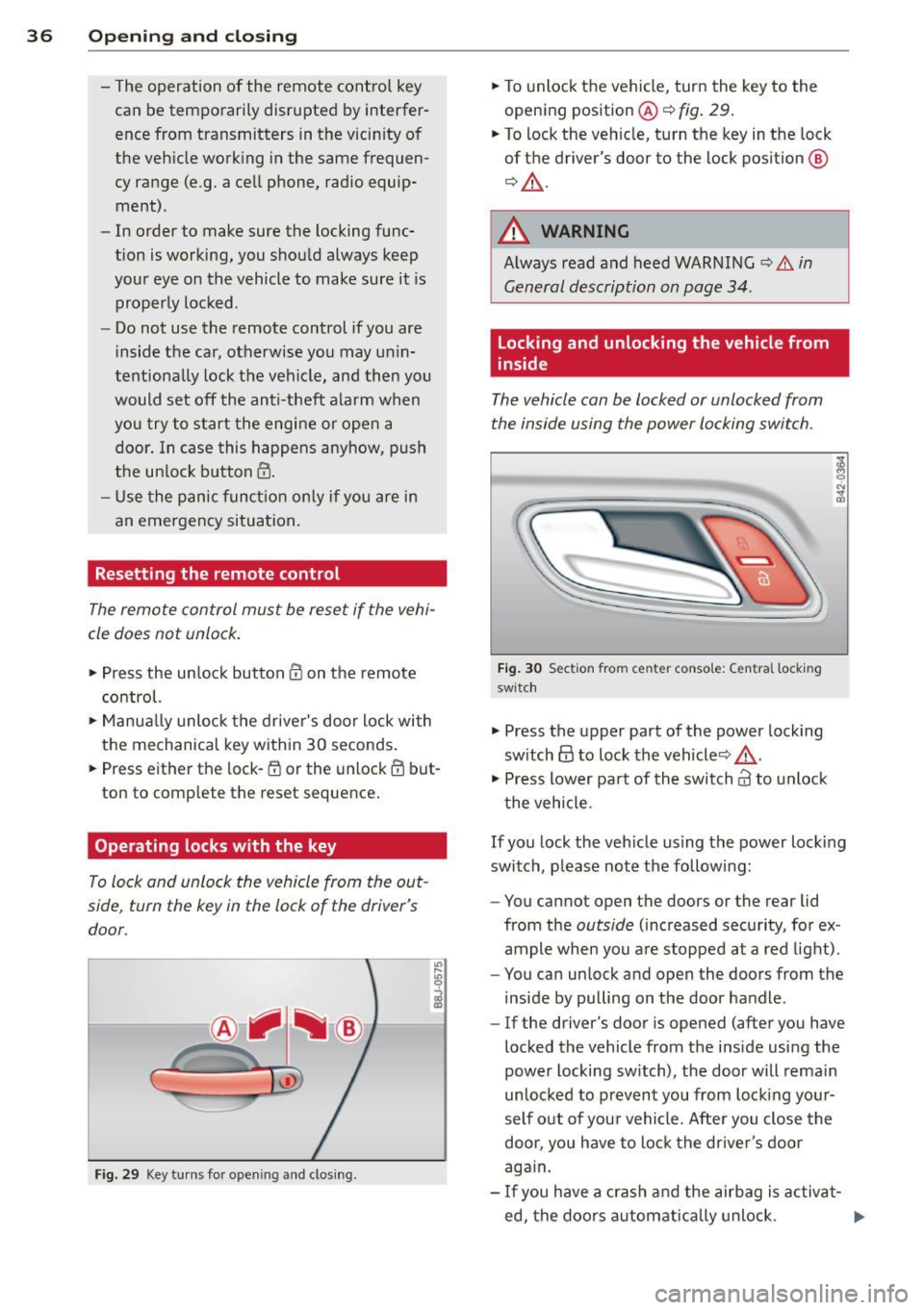
Fig. 29 Key tu rns fo r ope ning and clo sing.
.,,. To unlock the vehicle, turn the key to the
opening position@¢
fig. 29.
.,,. To lock the veh icle, turn the key in the lock
of the driver's door to the lock position
@
¢ &_ .
A WARNING
Always read and heed WARNING¢.&. in
General description on page 34 .
Locking and unlocking the vehicle from
inside
The vehicle can be locked or unlocked from
the inside using the power locking switch .
Fig. 30 Sec tion from center conso le: Ce ntra l locking
switch
.,,. Press the upper part of the power lock ing
sw itch
@ to lock the vehicle ¢&_ .
.,,. Press lower pa rt of the switch
crl to unlock
the vehicle .
If you lock the veh icle using the power locking
switch , please note the following:
- You cannot open the doors or the rear lid
from the
outside ( increased security, for ex
ample when you are stopped at a red light).
- You can unlock and open the doors from the
inside by pulling on the door handle .
-If the driver's door is opened (after you have
locked the vehicle from the inside using the
power locking switch), the door will remain
unlocked to prevent you from locking your
self out of you r vehicle. After you close the
door, you have to lock the driver 's door
aga in.
- If you have a crash and the airbag is activat-
ed, the doo rs automatically unlock. ..,.
Page 50 of 244
48 Clear vision
Clear vision Lights
Switching the headlights on and off
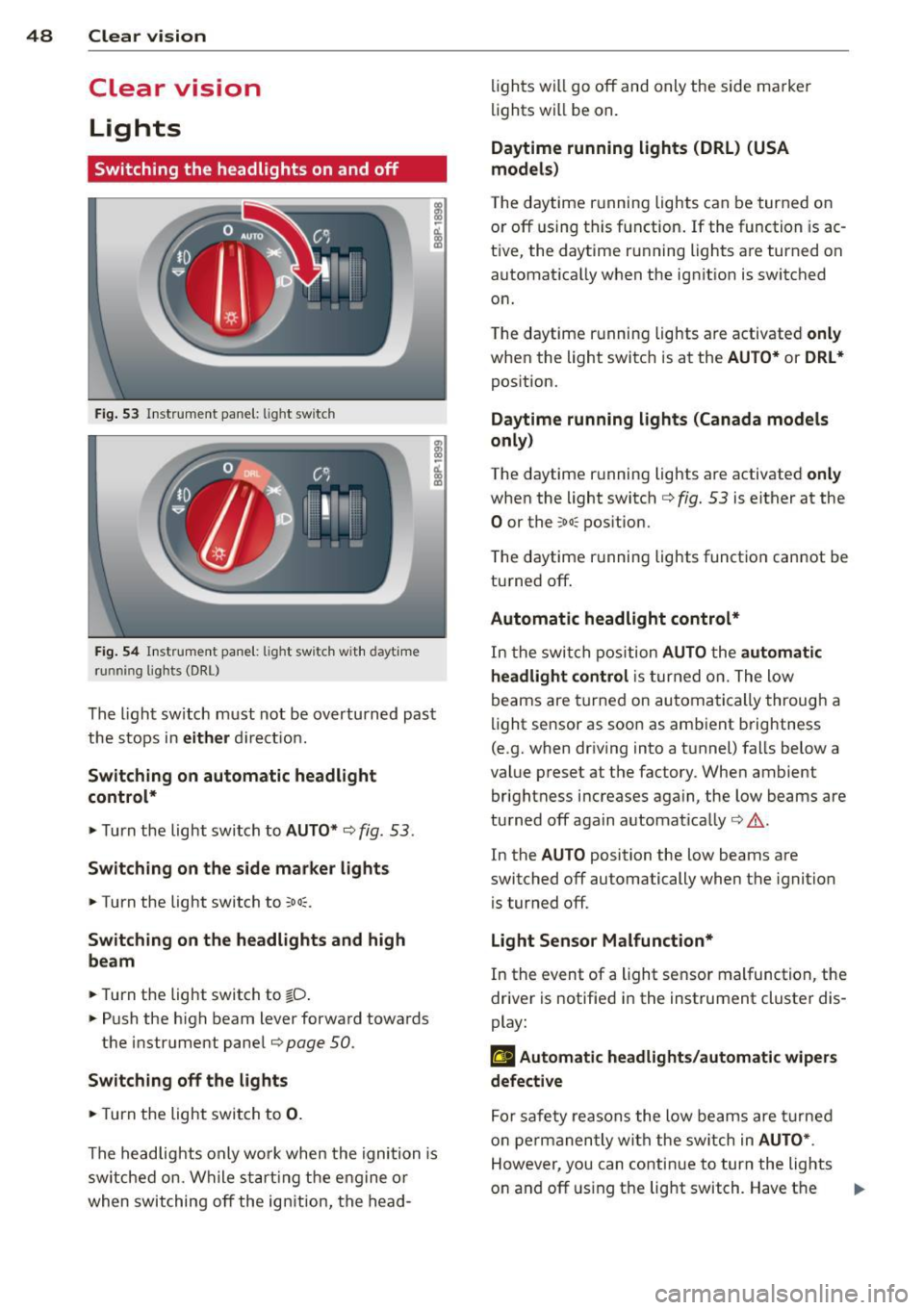
Fig . 53 Instr ument pane l: light sw itch
Fig. 54 Instr ument pane l: ligh t switch w ith dayti me
running lights (DR L)
The light switch must not be overturned past
the stops in
either direct ion.
Switching on automatic headlight
control*
.,. Turn the light switch to AUTO* ¢ fig. 53.
Switching on the side marker lights
... Turn the light switch to :;oo:.
Switching on the headlights and high
beam
... Turn the light switch to iD.
... Push the high beam lever forward towards
the instrument panel¢
page SO.
Switching off the lights
... Turn the light switch to 0.
The head lights only work when the ignition is
switched on. While start ing the engine or
when switching off the ignition, the head- lights
will go off and only the side ma rker
lights will be on.
Daytime running lights (DRL) (USA
models)
T he daytime running lights can be turned on
or off using this function. If the function is ac
tive, the daytime running lights are turned on
automatically when the ignit ion is switched
on.
The daytime running lights are activated
only
when the light switch is at the AUTO* or DRL *
position.
Daytime running lights (Canada models
only)
The daytime running lights are activated only
when the light switch ¢ fig. 53 is either at the
0 or the :;oo: position.
T he daytime r unning lights funct ion cannot be
turned off.
Automatic headlight control*
In the switch position AUTO the automatic
headlight control
is turned on. The low
beams are turned on automatically through a
light sensor as soon as ambient brightness
(e .g. when driving into a tunnel) falls below a
value preset at the factory. When ambient
brightness increases aga in, the low beams are
turned off again automatically ¢.&. .
In the
AUTO position the low beams are
switched off automatically when the ignition
is turned off .
Light Sensor Malfunction*
In the event of a light sensor malfunction, the
driver is notified in the instrument cluster dis
play:
El Automatic headlights/automatic wipers
defective
For safety reasons the low beams are turned
on permanently with the switch in
AUTO* .
However, you can continue to turn the lights
on and off using the light switch. Have the
Ill>-
Page 58 of 244
56 Clear vis ion
The washer jets extend forward out o f the
front bumper driven by water pressure to
spray the front headlights with water.
You shou ld inspect the headlights regularly
(for example when refueling) and clean
off
any solid dirt or insects from the lenses .
To ensure the system wo rks properly in wi nter,
keep the washer jets free of snow and remove
any ice using a de-icing spray.
Service position
It is only possible to change wiper blades if
you move the wiper arms to the service posi
tion .
In o rder to use the windsh ield wipers, t he
front lid mus t be comp lete ly closed.
Moving w iper blades to the service
position
• When there is a risk of frost, make s ure that
the wiper b lades a re not frozen to the wind
shield.
.. Switch the ignition on.
.. Move the wiper lever to position
0
c> page 54, fig. 63 .
.. Press the I Reset I button until the Displa y
typ e
menu appears in the Driver Informa
t ion System display .
.. Us ing the rocker switch and the
! Reset ! but
ton, select the
S et > W iper s > Front > Serv
ice positi on on
function. The winds hield
wiper arms move to the service position.
Moving wiper blades to park position
.. Make certain that the wiper arms are lying
against the windshie ld .
.. Switch the ign ition on and move t he wiper
l ever from posi tion
O to 4 c> page 54,
fig . 63 .
The wiper arms will move back to
the park position.
«I) Note
Never drive yo ur vehicle when the w ind
shie ld w iper arms are in the service pos i
tion and pulled away from the windshie ld .
When you dr ive faste r than 4 mp h (6 km/ h), the wiper a
rms automatically return to
the park position and cou ld cause paint
damage to the front lid!
(D Tips
- Yo u can also turn on the se rvice posit ion,
for example, if yo u want to protect the
w indshield from icing by using a cover .
- The service posit ion moves to
off a uto
matically when you operate the w ind
shield wiper lever, or speed exceeds
4 mph (6 km/h).
Cleaning windshield wiper blades
Clean the windshie ld w iper blades when they
begin to leave streaks.
.. Place the windshie ld w iper arms in the serv
ice pos it ion. Refer to
c> page 56.
.. Use a soft cloth and glass cleaner to clean
the windshield wiper blades .
A WARNING
Dirty windsh ield wipe r blades can impair
your view. This can lead to accidents .
Page 79 of 244
ignition, assuming that you have not changed
or reset the setting.
The speed warning symbo l
Jmj (USA models)/
caj (Canada models) in the wa rning 1 display
appears when you exceed the maximum
speed. It goes out when the speed falls below
the stored max imum speed .
The speed warning symbo l wi ll also go out if
the speed
exceeds the sto red maximum speed
by more than about 25 mph (40 km/h) for at
least 10 seconds. The stored maximum speed
is deleted .
Setting speed warning 1
¢ page 77.
Speed warning
2
Storing warning 2 is recommended if you al
ways
want to be reminded of a certain speed,
for example when yo u are traveling in a coun
try that has a general max imum speed limit,
or if you do not want to exceed a specified
speed for winter tires.
The speed warning 2 symbol,
(mj CUSA mod
e ls)/
(SJ (Canada models) appea rs in the dis
play when you exceed the stored speed limit.
Unlike warning 1, it will not go out until the
vehicle speed drops below the stored speed
limit.
Setting speed warning 2
¢ page 78.
@ Tips
Even though your vehicle is equipped wi th
a speed warning system, you should still
watch the speedometer to make sure you
are not driving faster than the speed limit.
On the road 77
Speed warning 1: setting a speed limit
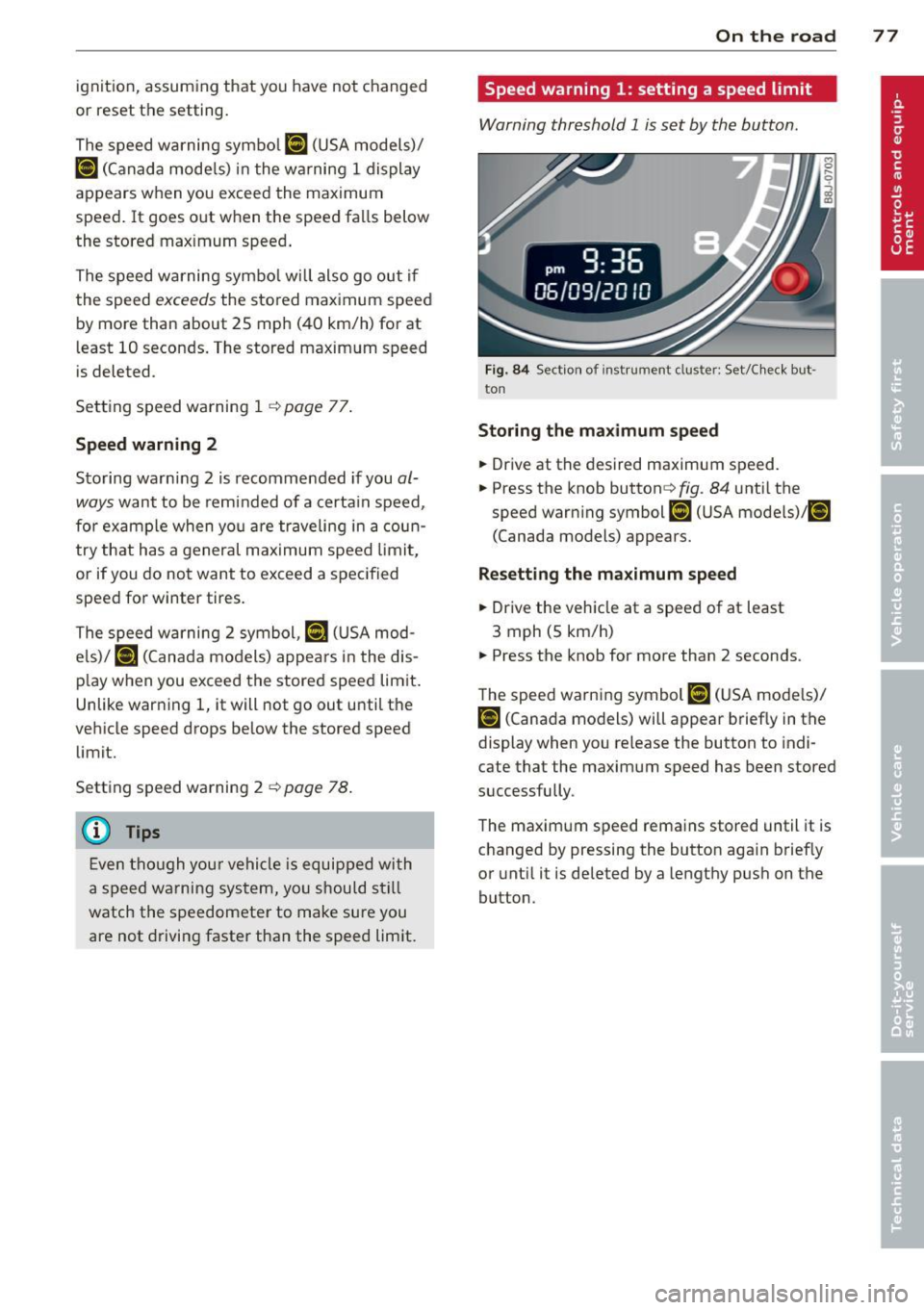
Warning threshold 1 is set by the button.
Fig. 84 Sect ion of instru ment clu ster: Set/C heck but ·
ton
Storing the maximum speed
.,. Drive at the desired maximum speed.
.,. Press the knob button ~fig .
84 unti l the
speed warning symbol
[fl (USA models)/ ~
(Canada models) appears.
Resetting the maximum speed
.,. Drive the vehicle at a speed of at least
3 mph (5 km/h)
.,. Press the knob for more than 2 seconds .
The speed warning symbol
fZl (USA models)/
i•j rcanada models) will appear briefly in the
display when you release the button to indi
cate that the maximum speed has been stored
successfully .
The maximum speed remains stored until it is
changed by pressing the button aga in briefly
or until it is deleted by a lengthy push on the
button.
Page 80 of 244
78 On the road
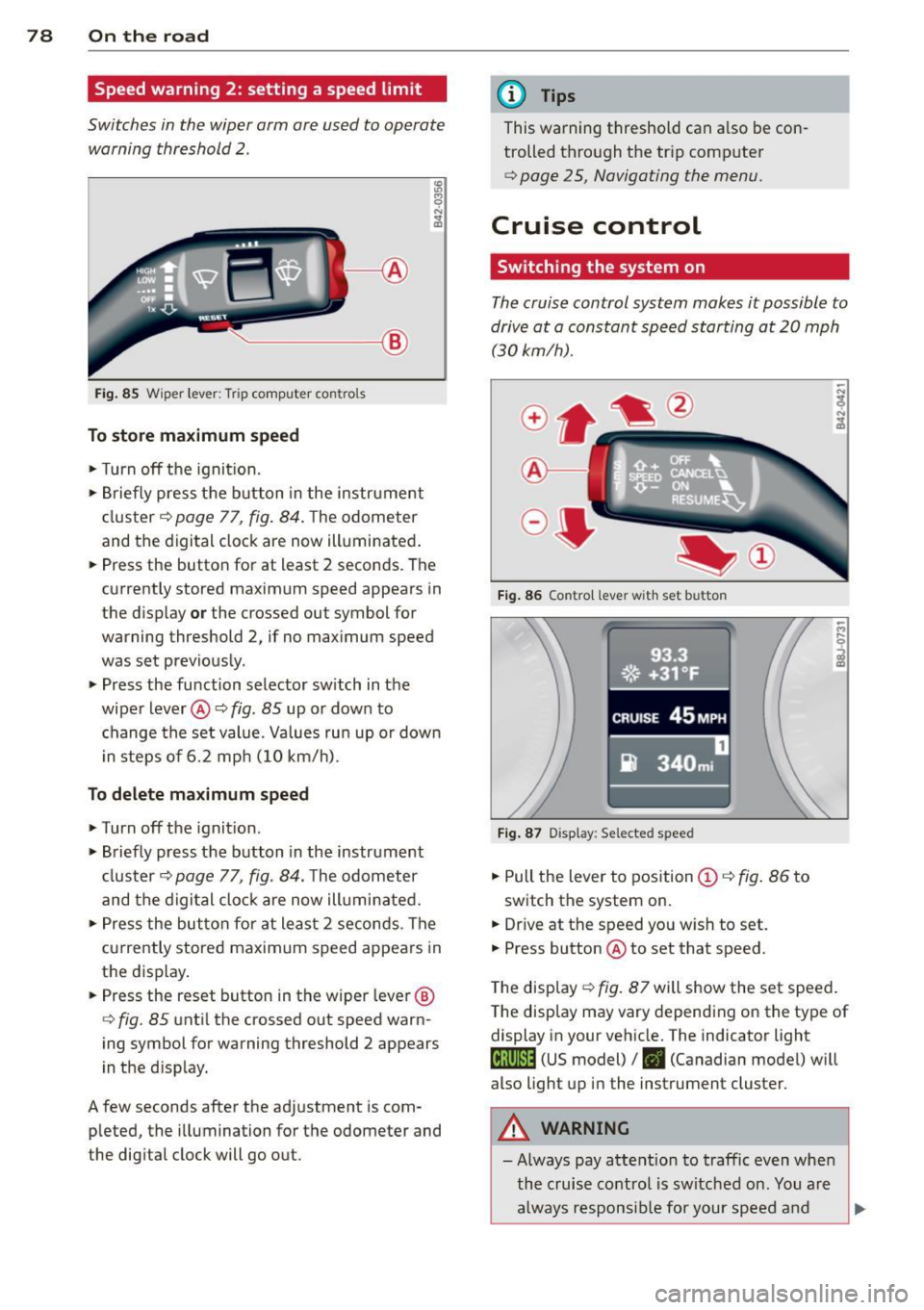
Speed warning 2: setting a speed limit
Switches in the wiper arm are used to operate
warning threshold
2 .
'----I ®
Fig. 85 Wiper lever: Tr ip computer con trols
To store maximum speed
>Turnoff the ignition.
> Briefly press the button in the instrument
cl uster ¢
page 77, fig. 84. The odometer
and the digital clock are now illuminated .
> Press the button for at least 2 seconds . The
currently stored maximum speed appears in
the display
or the crossed out symbol for
warning threshold 2, if no max imum speed
was set previously.
> Press the function selector sw itch in the
wipe r lever @¢
fig. 85 up or down to
change the set value. Values run up or dow n
i n steps of 6.2 mph (10 km/h).
To delete maximum speed
>Turnoff the ignit ion.
> Briefly press the button in the instrument
cluster <:::>
page 77, fig . 84 . The odometer
and the digital clock are now illumi nated.
> Press the button fo r at least 2 seconds . The
cu rrently stored maxim um speed appears in
the display.
> Press the reset button in the wiper lever ®
<:::>
fig . 85 until the crossed out speed warn
ing symbol for warning threshold 2 appears
i n the display.
A few seconds after the adjustment is com
pleted, the illumination for the odometer and
the dig ital clock will go out.
(D Tips
This warning threshold can a lso be con
trolled thro ugh the tr ip computer
¢ page 25, Navigating the menu.
Cruise control
Switching the system on
The cruise control system makes it possible to
drive at a constant speed starting at 20 mph (30 km/h) .
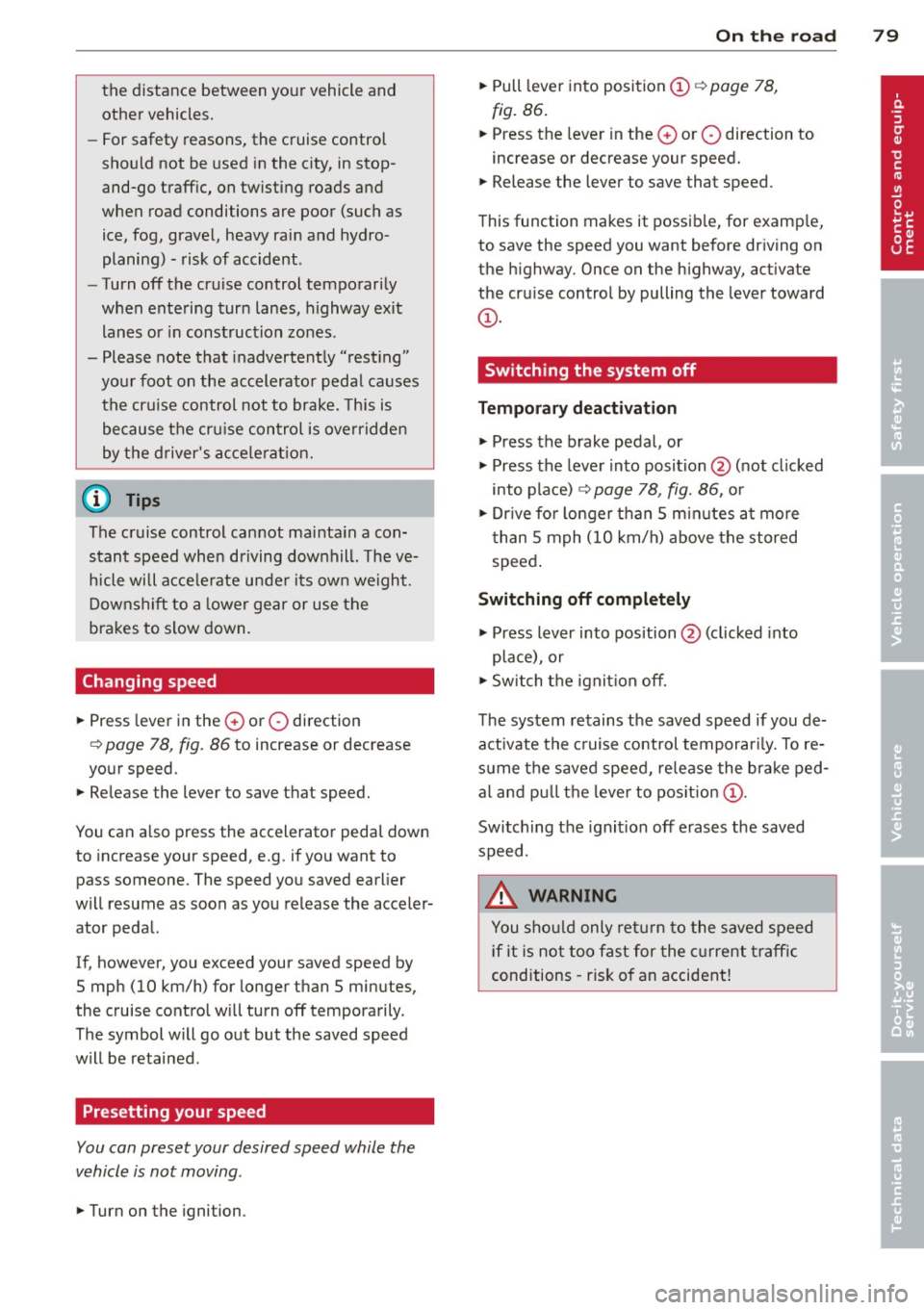
®-
Fig. 86 Contro l leve r with set b utton
Fig. 87 Display : Se lecte d speed
> Pull the lever to position (D <:::> fig. 86 to
switch the system on.
> Dr ive at the speed you w ish to set.
> Press button @ to set that speed.
.., ....
i
The display <:::> fig. 87 will show the set speed .
The display may vary depending on the type of
display in your vehicle. The indicator light
M;ll)~14 (US model)/ . (Canadian model) will
also light up in the instrument cluster .
A WARNING
- Always pay attention to traffic even when
the cruise control is switched on. You are
always responsib le for your speed and
Page 81 of 244
the distance between your vehicle and
other vehicles.
- For safety reasons, the cruise control
should not be used in the city, in stop
and-go traffic, on twisting roads and
when road conditions are poor (such as
ice, fog, grave l, heavy rain and hydro
planing) -risk of acc ident.
- Turn off the cruise control temporari ly
when entering turn lanes, highway exit
lanes or in const ruction zones.
- Please note that inadvertent ly "rest ing"
yo ur foot on the accelerato r peda l causes
the cruise control not to brake. This is
because t he cr uise con trol is overr idden
by the driver's acce le rat ion.
@ Tips
The cruise control cannot mai nta in a con
stant speed when driving downhill. The ve
hicle will acce lerate unde r its own weight.
Downshift to a lower gear or use t he
bra kes to slow down.
Changing speed
~ Press lever in the 0 or O direction
Q page 78, fig. 86 to increase or decrease
your speed.
~ Release the lever to save that speed.
You can a lso press the accelerator peda l down
to increase your speed, e.g. if you want to
pass someone. The speed you saved earlier
will resume as soon as you release the acceler
ator peda l.
If, however, you exceed your saved speed by
5 mph (10 km/h) for longer than 5 minutes,
the cruise contro l will turn off tempora rily.
The symbol will go out but the saved speed
will be retained.
Presetting your speed
You can preset your desired speed while the
vehicle is not moving .
~ Turn on the ignition.
On the ro ad 79
~ Pull leve r into position (D q page 78,
fig. 86 .
~ Press the leve r in the 0 or O direction to
increase or decrease your speed.
~ Release the lever to save that speed.
T his function makes it possib le, for examp le,
to save the speed you want before dr iving on
the highway. Once on the highway, activate
the cruise control by pulling the lever toward
(D .
Switching the system off
Temporary deactivation
~ Press the brake pedal, or
~ Press the leve r into position @(not clicked
into place)
q page 78, fig . 86, or
~ Dr ive fo r longer than 5 m inutes a t more
t han 5 mph (10 km/h) above the stored
speed .
Switching off completely
~ Press lever into position @ (clicked into
place), or
~ Switch the ignit ion off.
The system retains the saved speed if you de activate the c ruise control temporar ily. To re
s u me the saved speed, re lease the brake ped
al a nd pull th e leve r to pos it ion
(D .
Switching the ignit ion off erases the saved
speed.
.&_ WARNING
You shou ld only ret urn to the saved speed
if it is no t too fast for the c urre nt traffic
conditions -risk o f an accident!
Page 202 of 244
200 Tires and wheels
remain continuo usly illuminated . This se
quence will continue upon subsequent vehicle
start-ups as long as the ma lfunction ex ists.
When the malfunction indicator is illuminat
ed, the system may not be able to detect or
signal low tire pressure as intended. TPMS
malfunctions may occur for a variety of rea
sons, including the installation of replace ment or alternate tires or wheels on the vehi
cle that prevent the TPMS from functioning properly . Always check the TPMS malfunction
tellta le after replacing one or more t ires or
wheels on your veh icle to ensure that the re
placement or alternate tires and wheels allow
the TPMS to continue to function properly.
Tire pressure indicator appears
Applies to vehicles: with tire pressure monitoring system
The tire pressure indicator in the instrument
cluster informs you if the tire pressure is too
low or if there is a system malfunction.
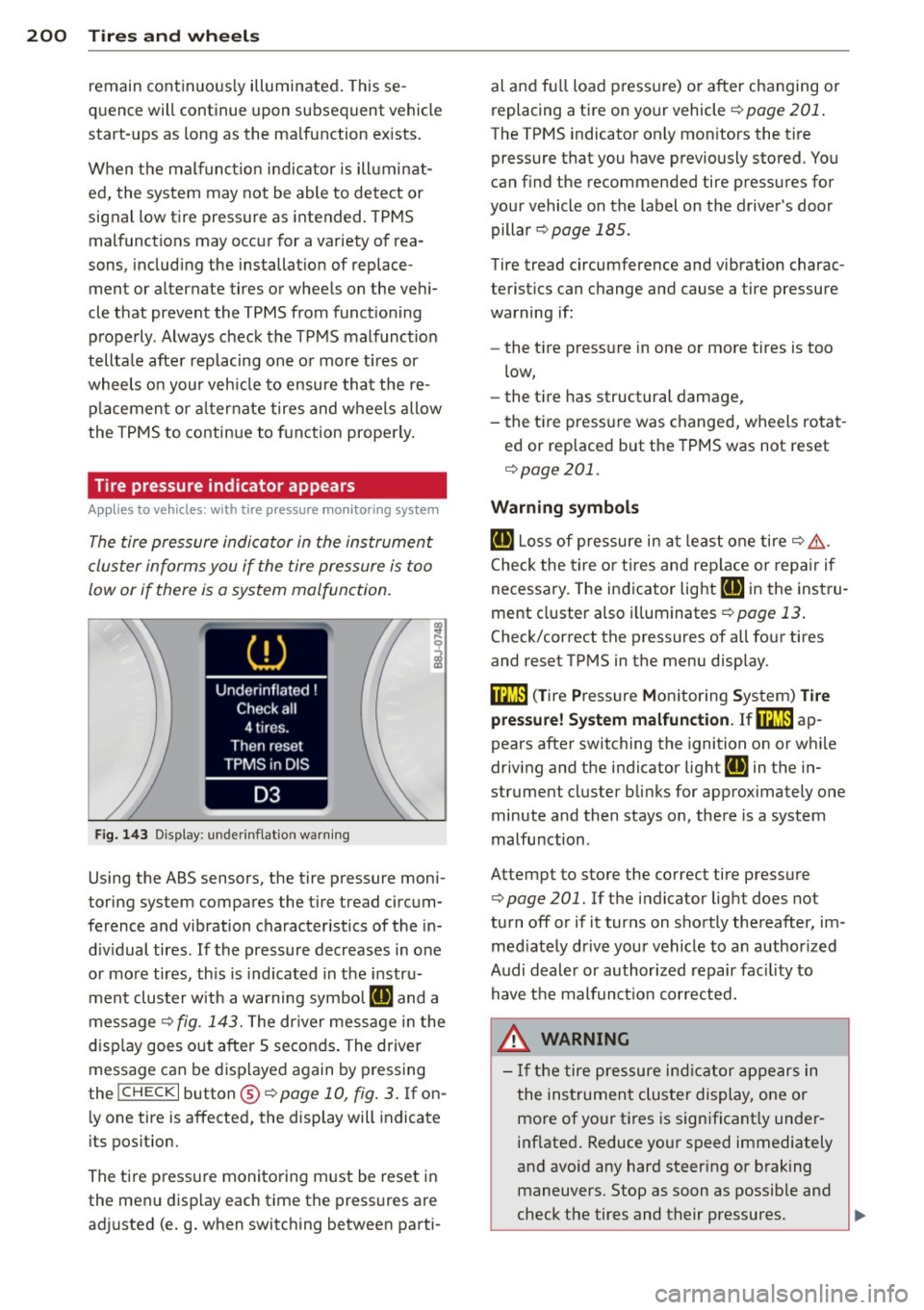
F ig. 143 Display : underi nflat io n warn ing
Using the ABS sensors, the tire pressure moni
toring sys tem compares the t ire tread circum
ference and vibration characteristics of the in
d iv idual tires . If the pressure decreases in one
or more tires, th is is indicated in the instru
ment clus ter with a warning symbo l
ail and a
message<>
fig. 143. The dr iver message in the
display goes out after 5 seconds . The driver
message can be displayed again by pressing
the
! CHECK I button @¢ page 10, fig . 3 . If on
l y one tire is affected, the display will indicate
its pos ition.
The tire press ure monitoring m ust be reset in
the menu display each time the pressures are
ad justed (e.g. when switching between parti- al and fu
ll load pressure) or after changing or
replacing a tire on your vehicle<>
page 201.
The TPMS indicator only mon itors the t ire
pressure that you have previously stored . You
can find the recommended tire pressures for
your vehicle on the label on the driver's door
pillar
¢ page 185.
Tire tread circumference and vibration charac
teristics can change and cause a tire pressure
warning if:
- the t ire pressure in one or more tires is too
low,
- the tire has structural damage,
- the tire pressure was changed, wheels rotat -
ed or replaced but the TPMS was not reset
¢ page 201.
Warning symbols
ail Loss of pressure in at least one tire¢& .
Check the tire or tires and replace or repa ir if
necessary . The indicator light
HE in the instru
ment cluster also illuminates
<>page 13.
Check/correct the pressures of all four tires
and reset TPMS in the menu display .
ffim (T ire Pressure Monitoring System) Tire
pressure! System malfunction. Ifffim
ap
pears after switching the ignition on or while
driv ing and the indicator lig ht
HE in the in
strument cluster blinks for approx ima tely one
minute and then stays on, there is a system
malfunction .
At tempt to store the correct tire pressure
¢ page 201. Ifthe indicator light does not
turn
off or if it turns on shortly thereafter, im
med iate ly drive your vehicle to an author ized
Audi dealer or author ized repair facility to
have the malfunction corrected.
_&. WARNING
-
- If the tire pressure indicat or appears in
the instrument cluster display, one or
more of your tires is significant ly under
inflated . Reduce your speed immediately
and avoid any hard steer ing or braking
maneuvers. Stop as soon as possible and
check the tires and their pressures.
IJJ,,
Page 203 of 244
Inflate the tire pressure to the proper
pressure as indicated on the vehicle's tire
pressure label¢
page 185. Driving on a
significantly under-inflated tire causes
the tire to overheat and can lead to tire
failure . Under-inflation also is likely to
impair the vehicle's handling and stop
ping ability.
- The driver is responsible for mainta ining
the correct tire pressures. You must
check the tire pressures regularly.
- Under certain conditions (such as a spor
ty driving style, wint er conditions or un
paved roads), the pressure monitor indi
cator may be delayed .
- Ask your authorized Audi dealer if run
flat tires may be used on your vehicle.
Your vehicle registration becomes invalid if you use these tires when not permit
ted. Damage to your vehicle or accidents
could also result.
- If you switch between standard and run
flat tires, an authorized Audi dealer or
qualified workshop must reprogram the
control module .
@ Tips
-The tire pressure monitoring system
stops working when there is an ESC/ABS
malfunction.
- Using snow chains may result in a system
malfunction.
- The tire pressure monitoring system on
your Audi was developed using tires with the "AO" or "RO" identification on the
tire sidewall¢
page 192. We recom
mend using these tires.
Tires and wheels 201
Reset tire pressure monitoring system
(Stepl)
Appl ies to vehicles: wi th tire p ress ure mo nito ring system
If the tire pressure is adjusted, wheels ore ro
tated or changed, the TPMS must be reset in
the menu display.
--- ®
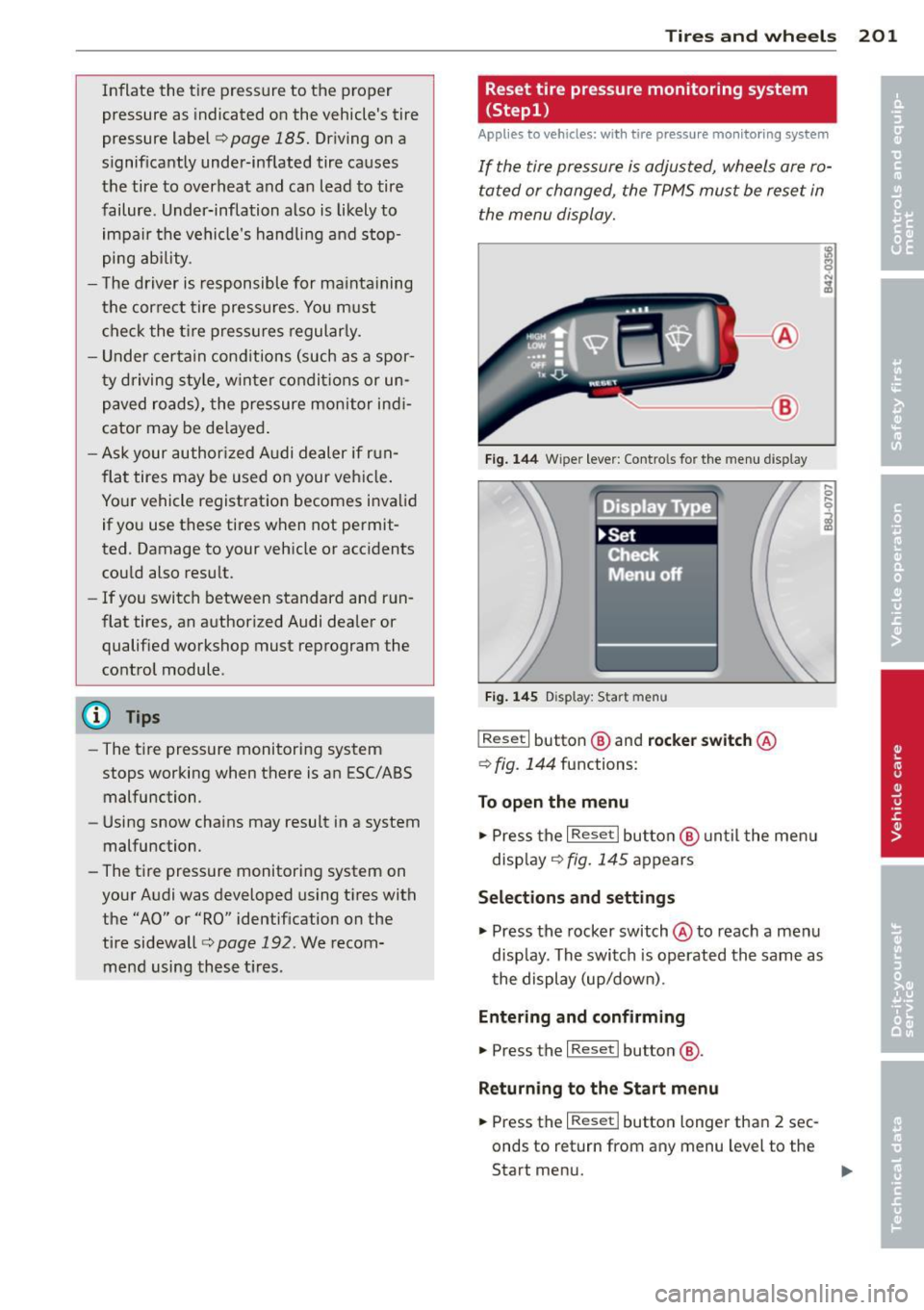
Fig. 144 Wiper lever : Controls for the menu display
Fig. 145 Display: Start menu
I Reset I button @ and rocker switch @
¢
fig. 144 functions:
To open the menu
.,. Press the I Reset I button @ until the menu
disp lay
9 fig. 145 appears
Selections and settings
.,. Press the rocker switch@ to reach a menu
disp lay. The switch is operated the same as
the display (up/down) .
Entering and confirming
.,. Press the I Reset I button @.
Returning to the Start menu
.,. Press the I Reset I button longer than 2 sec
onds to return from any menu level to the
Start menu. "'
Page 204 of 244
202 Tires and wheels
@ Tips
-Before resetting the TPMS, the current
pressures of
all four tires must corre
spond to the specif ied values. Adjust the
tire pressure and reset the pressure in
the tire pressure mon itor ing system ac
cord ing to the load you are carry ing
¢page 185.
- Do not store the tire pressure if there are
snow chains on the tire.
Reset tire pressure monitoring system
(Step2)
Ap plies to vehicles: with tire pressure mo nit oring sys te m
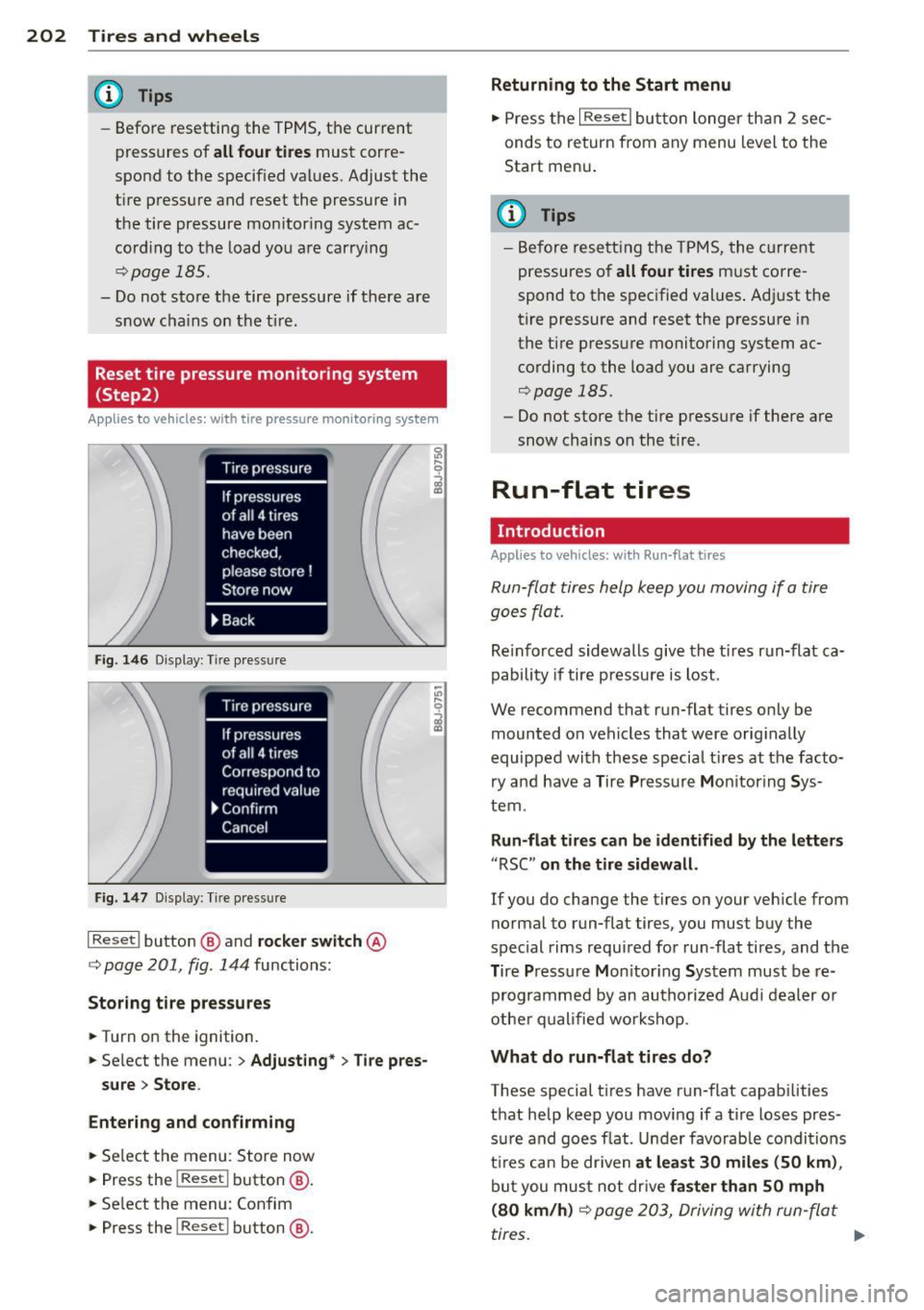
F ig. 146 Display: Tire pressure
Fig. 147 Display: Tire pres sure
I Reset I button @ and rocker switch @
c::, page 201, fig . 144 functions:
Storing tire pres sures
.. Turn on the ignition.
.. Se lect the menu :
> Adjust ing * > Tire pres
sure > Store.
Entering and confirming
.. Select the menu: Store now
.. Press the
I Reset ! button @.
.. Se lect the menu : Confim
.. Press the
I Reset ! button @.
Returning to the Start menu
.. Press the I Reset I button longer than 2 sec
onds to return from any menu level to the
Start men u.
(D Tips
-Before resetting the TPMS, the current
pressures o f
all four tires must corre
spond to the specified values . Adjust the
tire pressure and reset the pressure in
the tire pressure monitoring system ac
cording to the load you are carrying
c::, page 185.
-Do not store the tire pressure if there are
snow chains on the tire .
Run-flat tires
Introduction
Applies to vehicl es: wi th Run-fla t tires
Run-flat tires help keep you moving if a tire
goes flat.
Re inforced sidewalls give the ti res run-flat ca
pability if tire pressure is lost .
We recommend that run-flat tires only be
mounted on vehicles that were originally
equipped with these special t ires at the facto
ry and have a Tire Pressure Monitoring Sys
tem.
Run-flat tires can be identified by the letters
"RSC " on the tire sidewall.
If you do change the tires on your veh icle from
normal to run-flat tires., you must buy the
special rims required for run-flat tires, and the
T ire Pressu re M on itor ing System must be re
programmed by an authorized Audi dealer or
other qualified workshop .
What do run-flat tires do?
These special t ires have run-flat capabilities
that help keep you moving if a tire loses pres
su re and goes f lat . Under favorab le condit ions
t ir es can be dr iven
at least 30 miles (50 km) ,
but you must not drive faster than 50 mph
(80 km/h)
c::, page 203, Driving with run-flat
tires .
IJI>
Page 216 of 244
214 Fuses and bulbs
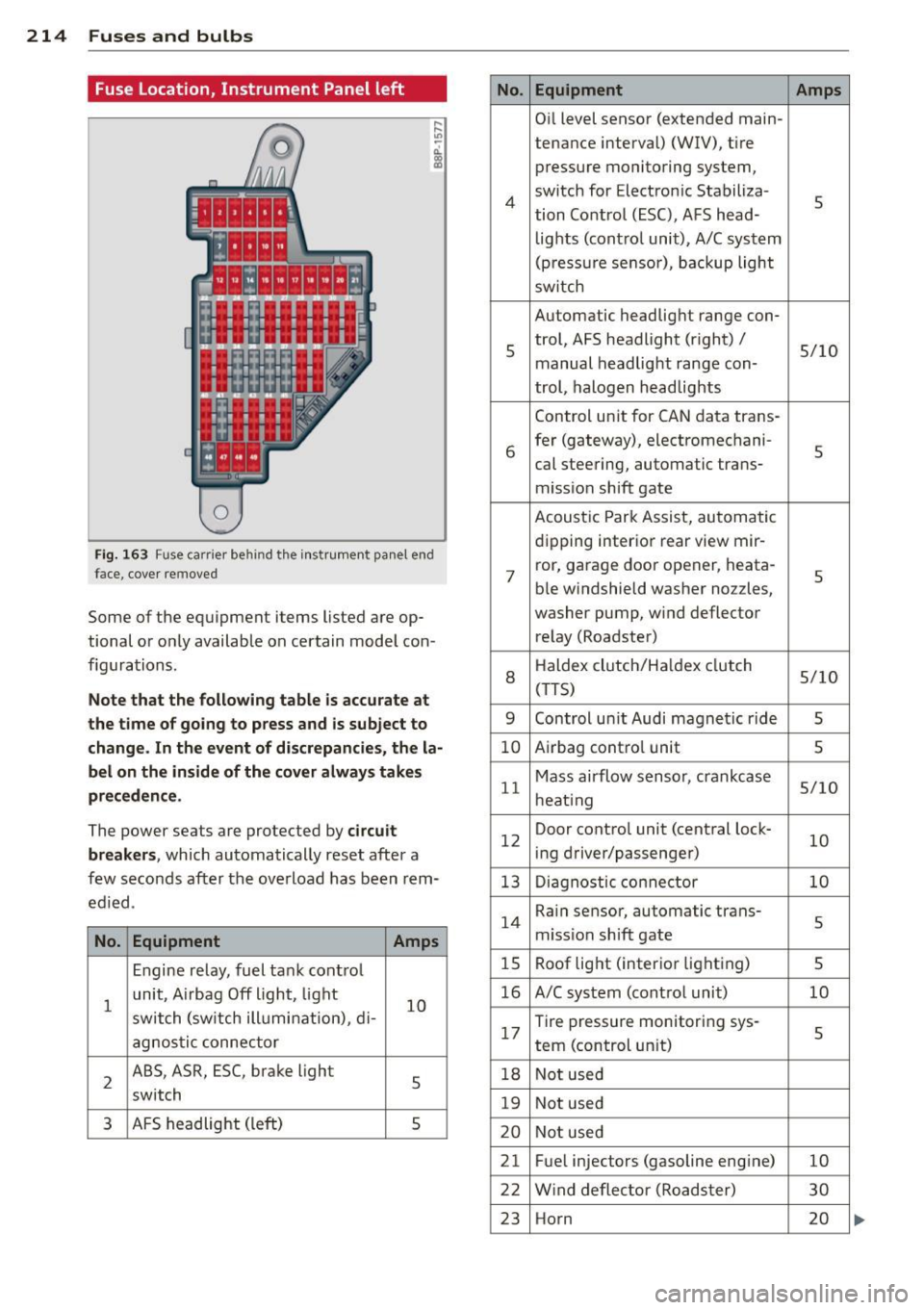
Fuse Location, Instrument Panel left
0
Fi g. 163 Fuse carrier behind the instrument panel end
face, cove r removed
Some of the equipment items listed are op
tional or only available on certain model con
figurations .
Note that the following table is accurate at
the time of going to press and is subject to
change. In the event of discrepancies, the la
bel on the inside of the cover always takes
preceden ce .
The power seats are protected by circuit
breaker s,
which automatically reset after a
few seconds after the overload has been rem
ed ied.
No . Equipment Amps
Engine relay, fuel tank control
1
unit, A irbag Off light, light
10 switch (sw itch illumination), d i-
agnos tic connector
2
ABS, ASR, ESC, brake light
5 switch
3 AFS headlight (left) s
No.
4
5
6
7
8
9
10
11
12
13
14
15
16
17
18
19
20
21
22
23
Equipment Amps
Oil level sensor (extended main-
tena nce interval) (WIV), tire
pressure monitoring system,
switch for Electronic Stabiliza-
s tion Control (ESC), AFS head-
lights (control unit), A/C system
(pressure sensor), backup light
sw itch
Automatic headlight range con-
trol, AFS headlight (right) /
5/10
manual headlight range con-
trol, halogen headlights
Control unit for CAN data trans-
fer (gateway), electromechani-
s cal steering, automatic trans-
mission shift gate
Acoustic Park Assist, automatic
dipping interior rear view mir- ror, garage door opener, heata-
s ble windshield washer nozzles,
washer pump, wind deflector
relay (Roadster)
H aldex clutch/Ha ldex clutch
5/10 (T TS)
Control un it Audi magnetic ride
s
Airbag contro l unit s
Mass airflow sensor, crankcase 5/10
heating
Door control unit (central lock-
10 ing driver/passenger)
Diagnostic connector
10
Rain sensor, automatic trans-
s miss ion shift gate
Roof light (interior lighting)
5
A/C system (control unit) 10
Tire pressure monitoring sys-
5 tern (control un it)
Not used
Not used
Not used
Fuel injectors (gasoline engine)
10
Wind deflector (Roadster) 30
Horn 20