key AUDI TT ROADSTER 2015 Owner's Manual
[x] Cancel search | Manufacturer: AUDI, Model Year: 2015, Model line: TT ROADSTER, Model: AUDI TT ROADSTER 2015Pages: 244, PDF Size: 60.74 MB
Page 76 of 244
7 4 On the road
@ For the sake of the environment
To avoid unnecessary engine wear and to reduce exhaust emissions, do not let your
veh icle stand and warm up. Be ready to
drive off immediately after start ing your
veh icle. Maintain moderate speed until the
engine is comp letely warm. Remember,
the engine performs best at operating
temperature.
Stopping the engine
• Turn the ign ition key to position@
~ page 72, fig. 81.
&_ WARNING
-Never turn off the engine before the ve
hicle has come to a complete stop. The
full function of the brake booster and the
power steering is not guaranteed. You
must use more force to turn or brake if
necessary. Because you cannot steer and
brake as you usually would, this could
lead to crashes and serious injuries.
- The radiator fan can continue to run for
up to 10 minutes even after you have
turned off the engine and removed the
ignition key . The radiator fan can also
turn on again if the engine coolant heats up because of intense sunlight or heat
build-up in the engine compartment.
(D Note
Do not stop the engine immediate ly after
hard or extended driving. Keep the engine
running for approximately two minutes to
prevent excessive heat build-up.
Parking brake
Parking brake
When the parking brake is set, it prevents the
vehicle from rolling away unintentionally.
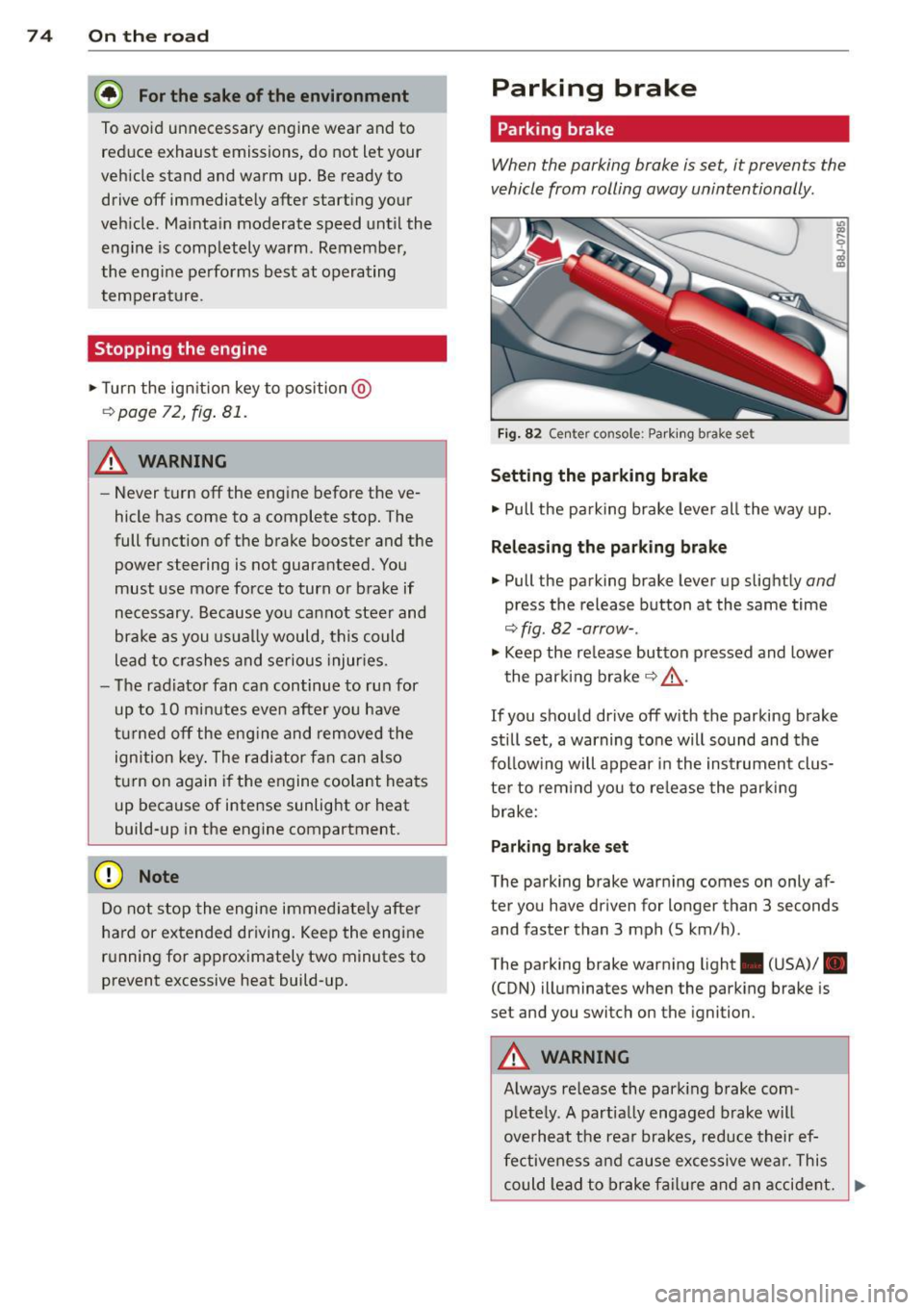
Fi g. 82 Center console: Park ing brake set
Setting the parking brake
• Pull the pa rking brake lever all the way up.
Releasing the parking brake
• Pull the parking brake lever up slightly and
press the release button at the same time
~fig. 82 -arrow-.
• Keep the release button pressed and lower
the parking brake~.&,.
If you should drive off with the parking brake
still set, a warning tone will sound and the
fol low ing will appear in the instrument clus
ter to remind you to release the parking
brake:
Parking brake set
The parking brake warning comes on only af
ter you have driven for longer than 3 seconds
and faster than 3 mph (5 km/h).
The parking brake warning light . (USA)/ .
(CON) illuminates when the parking brake is
set and you switch on the ignition.
&_ WARNING
Always release the park ing brake com-
pletely. A partially engaged brake will
overheat the rear brakes, reduce their ef
fectiveness and cause excessive wear. This
could lead to brake failure and an accident. .,..
Page 84 of 244
82 Transmi ssion
engag ed, the engine shou ld neve r be
spe eded up unintentionally (e.g. manual
ly from under the hood). Otherwise the
vehicle will immediately start to move -
sometimes even if the parking brake is
firmly applied -risk of an accident!
- Before you or other persons open the
hood and work on a running eng ine, the
selector lever must be move d to P and
t h e parking bra ke applied fi rm ly -ris k of
an a ccident! Fo ll ow the warning stickers .
a) Tips
If you have inadvertently s hifted into N
while the veh icle is moving, you should r e
move your foo t from the accelerato r and
wait until the eng ine speed h as droppe d to
id le before shifting back to Dor S.
Selector lever lock
The selec tor Lever Lo ck prevents a gear from
being engaged occidentally and unintention
ally setting the vehicle in motion .
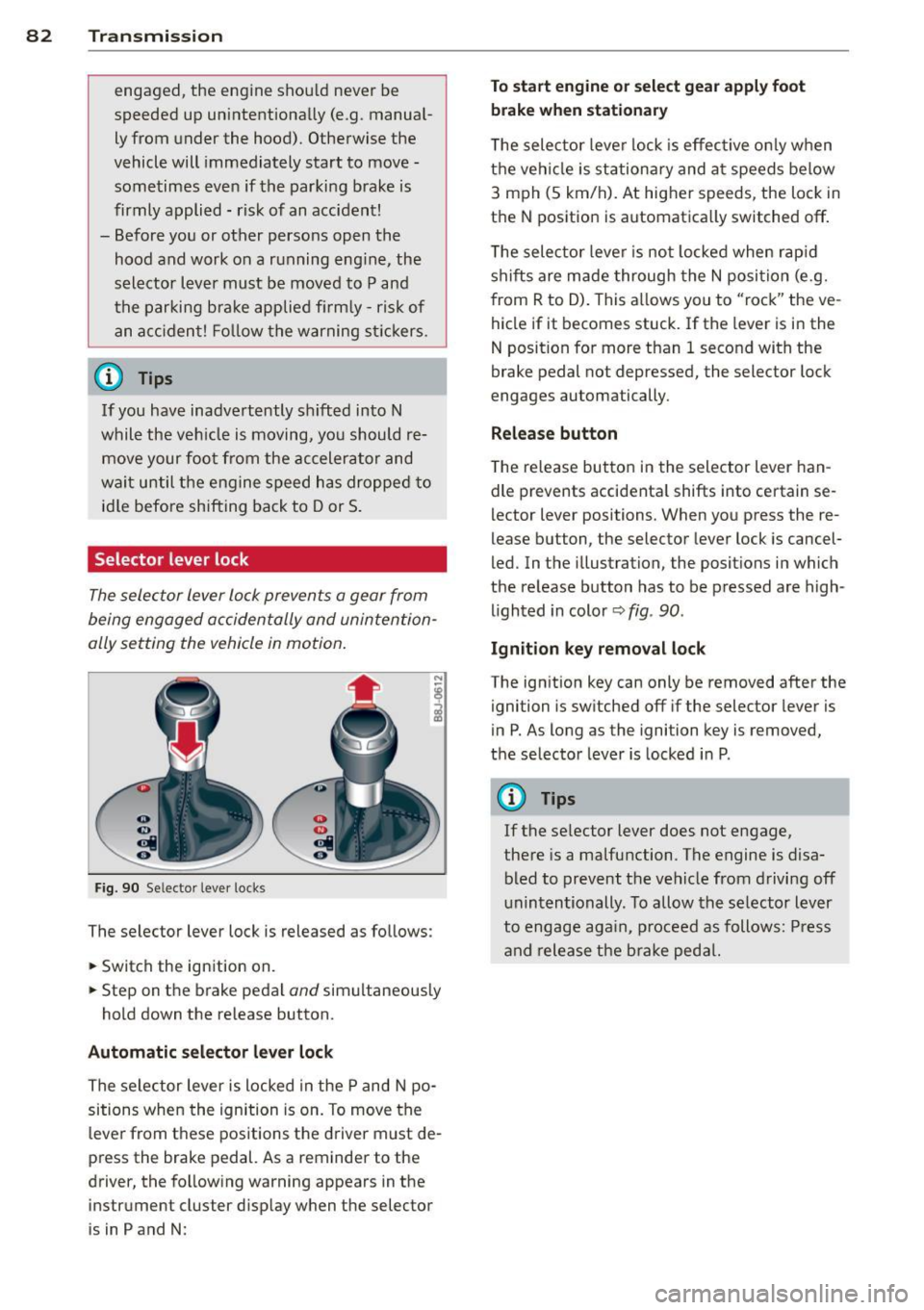
Fig. 90 Selecto r lever lo cks
The selector lever lock is released as follows:
.. Switch the ign ition on .
.. Step on the brake pedal
and simultaneous ly
hold down the release button .
Automatic selector lever lock
The selector lever is locked in the P and N po
sitions when the ignition is on. To move the
leve r from t hese positions the d river m ust de
press the brake pedal. As a reminder to the
driver, the fo llowing warning appears in the
inst rument cluster d isp lay when the selector
is in P and N :
To start engine or select gear apply foot
brake when stationar y
The selec tor leve r lock is effec tive on ly w hen
t h e veh icle is stationary and a t speeds below
3 m ph (5 km/h). At higher speeds, the lock in
t h e N position is automatica lly switched off .
T he selec tor leve r is not locked whe n rap id
shifts are made through the N posi tion (e.g.
from R to D). This a llows you to "rock" the ve
hicle if it becomes stuck. If the lever is in the
N position for more than 1 second with the
brake pedal not depre ssed, the selector lock
engages au tomatically.
Release button
T he re lease bu tton in the selector lever han
dle prevents accidenta l shifts into certain se
lector leve r positions. When you press the re
lease button, the selector lever lock is cancel
led. In the illustration, the posit ions i n which
the re lease button has to be p res sed are high
lighted in color ~
fig. 90 .
Ignition key remo val lock
The ign it ion key can only be removed after the
ignition is sw itched off if the selector lever is
in P . As long as the igni tion key is removed ,
the selector lever is locked in P.
(D Tips
If the se lector lever does not engage,
the re is a malfunction. The engine is disa
bled to prevent t he veh icle from drivi ng off
unintentionally . To allow the selector lever
to engage aga in, p roceed as follows: Press
an d release the bra ke peda l.
Page 90 of 244
88 Homelin k
Homelink
Universal remote
control
General information
The Homelink universal remote control can
be programmed with hand-held transmitters
from existing equipment .
You must first program the Homelink trans
mitter before you can use the system
~ page 88 , Programming the Homelink
transmitter.
In order to program the Homelink transmit
ter for devices utilizing rolling code, a second
person on a ladder who can safely reach the
garage door opener motor is recommended.
It is also necessary to locate the "learn" but
ton on your garag e door open er motor . Refer
to the ope rating instructions for the opener ,
as the location and color of this bu tton may
vary by manufacturer .
You can still use the original remote control
for the device at any time.
A WARNING
-
- Never use the Homelink transmitter
with any garage door opener that does
have not the safety stop and reverse fea
ture as required by federal safety stand
ards. This includes any garage door open
er model manufactured before April 1,
1982.
- A garage door opener which cannot de
tect an object, signaling the door to stop
and reverse does not meet current feder
al safety standards. Using a garage door
opener without these features increases
risk of serious injury or death.
- For safety reasons never release the
parking brake or start the engine while
anyone is standing in front of the vehicle.
- A garage door or an estate gate may
sometimes be set in motion when the
Homelink remote control is being pro
grammed. If the device is repeatedly ac- tivated, this can overstrain motor and
damage its electrical components - an
overheated motor
is a fire hazard!
- To avoid possible injuries or property
damage, please always make absolutely
certain that no persons or objects are lo
cated in the range of motion of any
equipment being operated.
(!) Tips
- If you would like more information on
Homelink, where to purchase the Home
Link compatible products, or would like
to purchase the Homelink Home Light
ing Package, please call toll-free :
1-800-355-3515.
- For Declaration of Compliance to United
States FCC and Industry Canada regula
tions ~
page 228.
Programming the Homelink transmitter
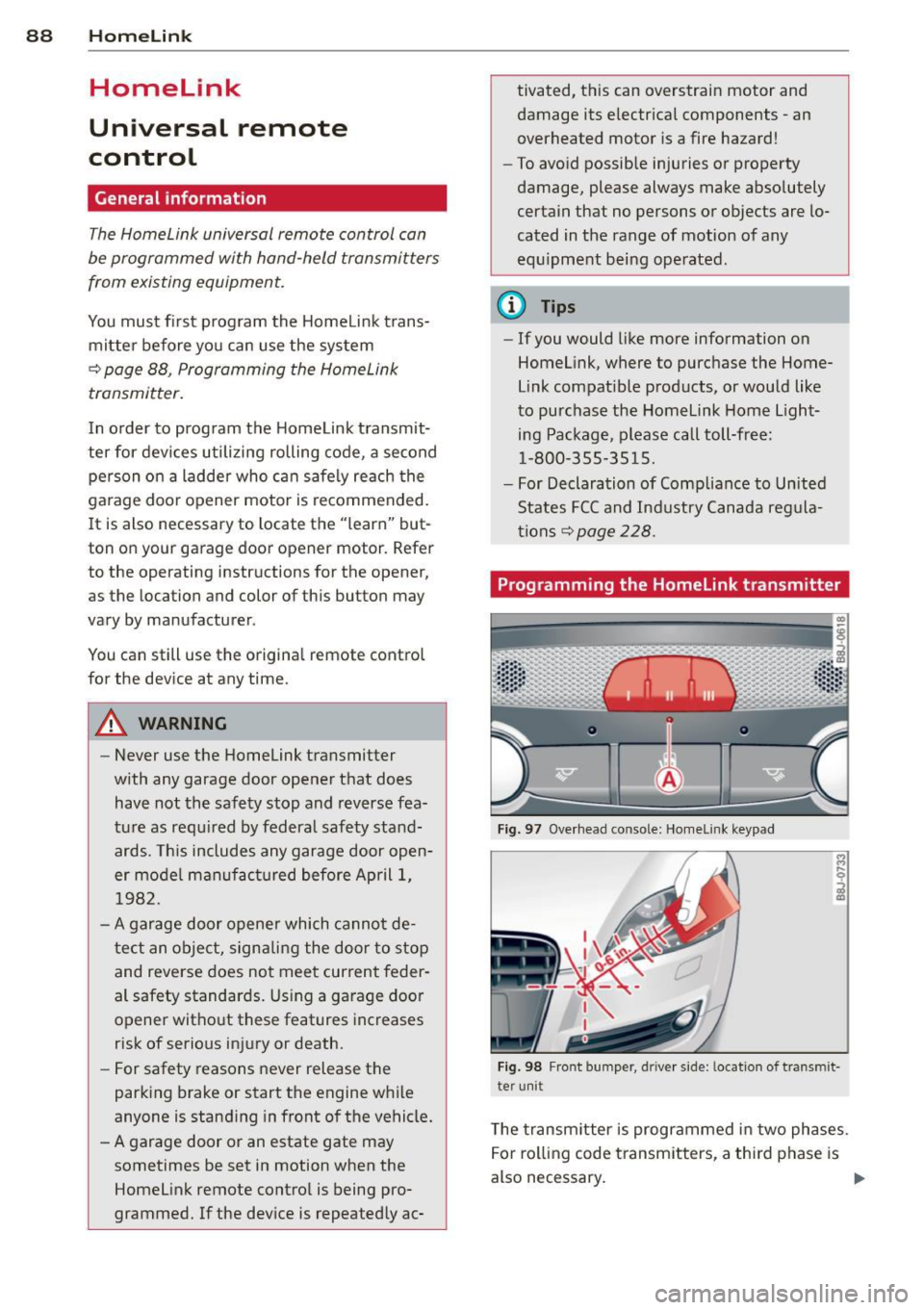
Fig. 97 Overhead co nsole: Homelink keypad
Fig. 98 Front bumper , driver side: lo catio n of tra n smi t
te r unit
The transmitter is programmed in two phases.
For rolling code transmitters, a third phase is
also necessary.
ll-
Page 91 of 244
Phase 1:
p rogramming th e overh ead keypad
1. Make sure yo ur vehicle is wit hin ope rating
range of the remote contro lled garage
door opener .
2. Set the parking brake
q A in General in
formation on page 88 .
3. Tur n the ignition on . Do not sta rt the en
g ine!
4. P ress and hold the two o utside Home Link
b uttons
(D and @for app rox ima tely 20
seconds until indicator light @
q fig . 97
begins to flash. Then release both but
tons . Do not hold the buttons for longer
than 30 seconds.
.,. This procedure only needs to be performed
once . It erases the factory-set defau lt codes
and does not have to be repeated to pro
gram add it ional remote controls .
S. Pr ess and hold t he Home link button (D ,
® or@ unt il the indicato r ligh t@
starts flashing
slowly . Release the bu tton.
.,. The system will remain in programming
mode for 5 minutes . Co to the front of the
vehicle and proceed with phase 2 .
Phase 2:
programming the bumper mounted trans
mitter
6. Hold the original remote control at a dis
tance between 0 -6 in . (0 -15 cm) from the
bumper below the appropriate head light
for your vehicle
q fig . 98 (use th e sho rtest
d istance possible) .
7. A im t he remote con trol jus t be low the
driver side head ligh t.
8 . Pr ess and hold the activa tion button on
the remote cont ro l.
.,. May be different in Canada.
If so, press and
re -press (cycle) the act ivat ion button on your
remote control every two seconds.
9 . The emergency flashers will flash
three
time s
(after about 15 -60 seconds) when
the prog ramm ing is successful. Release
the butto n on the re m ote control.
.,. To program more devi ces, repeat steps 4 to
9.
Homelink 89
10. Press and ho ld the t rained Home link b ut
ton and observe t he indicator light @
qfig. 97.
.,. If the ind icator light is solid/contin uous,
programm ing is comp lete and your device
should activate w hen you press and release
t he t ra ined Homel ink button .
.,. If the ind icator light blinks rapidly fo r 2 sec
onds and is t hen a so lid/continuous light,
p roceed w it h phase 3 to progr am a roll ing
code device.
Phase 3: rolling code programming
.,. A second pe rson o n a ladde r who can safely
reach th e garage door opene r motor is rec
ommended .
11. Loc ate t he "lea rn" bu tton on t he g arage
doo r opener motor ( re fer to the operating
inst ruct ions for the opener, as t he loca
t ion of t his button may va ry by man ufac
turer) .
12 . Press and release the learn b utton on the
garage door opener motor .
.,. Note : once the b utton is p ressed, there are
30 seconds in w hich to initiate the next
step.
13 . On t he Home link keypad ins ide t he ve hi
cl e, firmly press and hold t he Home link
bu tton prev iously progr ammed in phases
1 and 2 fo r two seconds and release . R e
peat this seque nce
twice.
.,. Some vehicles may require the press/ho ld/
re lease sequence up to three t imes to com
plete t he trai ning process .
.,. Homelink should now activate your rolling
code equipped device .
If the S minute time limit is exceeded , the
emergency flashers will flash one time to in
dicate that the p rocess has been te rm ina ted .
In this case, repeat steps 4 t hrough 9.
If the emergency flashers do not flash
three
times (afte r about lS -60 seconds) , program
ming was not successful. In this case, repeat
steps 4 through 9 .
Remote contro l units for garage door openers
in Canada are set to stop transmitting radio
fr eque ncy signa ls afte r two seconds . This t ime
Ill-
Page 92 of 244
90 Homelink
may not be s ufficient for the Homelin k sys
tem to learn t he radio frequency signal. Per
form all other steps as described above.
Operating the Homelink transmitter
The Homelink transm itter works in the same
manner as the orig inal handheld remote con
trol that came with the system .
.. Press the appropriate prog rammed button
Q) ,@ or @ ¢ page 88, fig . 97 to activate
the des ired remote control functio n ¢ .&.
in
General information on page
88 .
Reprogramming a single button
A Homel ink button can be rep rogrammed in
d iv idually wi tho ut affec ting t he o ther bu tton
a llo cat io ns.
Programming the overhead keypad
.. Press the appropriate Homel ink button u n-
t il the indicato r light begins flashing slowly .
Programming the bumper mounted trans
mitter
1. Hold the original remote control at a dis
tance between
0 -5 in . (0 -13 cm) from the
bumper below the app ropriate head light
fo r you r vehicle (use the shortest distance
possib le).
2. A im the remote control just below the
driver side head light.
3. P ress and hold the activation button on
the remote contro l.
4 . The emergency flashers will flash
three
tim es
(after about 15 -60 seconds) when
the programm ing is successful. Now re
lease the bu tton on the remote control.
.. If the device ut ilizes a roll ing code, p lease
fo llow p hase 3 of¢
page 88, Programming
the HomeLink transmitter
f or roll ing code
programming .
This procedure will cau se the exi sting pro
gramming on the Homelink button to be
e ra sed! Erasing the programming of the
Homelink transmitter
When you e
rase the prog ramming, the p ro
gramming on all three of the transmitte r
c h anne ls with be lost!
.. Per form steps 1 to 4 as described on
¢ page 89, Phase 1: programming the over
head keypad .
When completed, the Home link system will
be in the prog ramming mode and is then
ready to learn the codes for remote controlled
devices .
(D Tips
- Programmed buttons cannot be erased
individually .
- F or se curity reasons you are advise d to
erase the programming of the Homelink
system before yo u sell yo ur vehicle .
Page 105 of 244
-Never strap more than one person, in
cluding small children, into any single
safety belt.
- Never place a safety belt over a child sit
ting on your lap.
- Always keep feet in the footwell in front
of the seat while the vehicle is being driv
en.
- Never let any person ride with feet on
the instrument panel or sticking out the
window or on the seat.
- Never remove a safety belt while the ve hicle is moving. Doing so will increase
your risk of being injured or killed.
- Never wear belts twisted.
- Never wear belts over rigid or breakable
objects in or on your clothing, such as
eye glasses, pens, keys, etc., as these
may cause injury.
- Never wear the shoulder part of the belt under your arm or otherwise out of posi
tion.
- Several layers of heavy clothing may in
terfere with correct positioning of belts
and reduce their effectiveness.
- Always keep belt buckles free of anything
that may prevent the buckle from latch
ing securely .
- Never use comfort clips or devices that
create slack in the shoulder belt. Howev
er, special clips may be required for the
correct use of some child restraint sys
tems.
- Never allow safety belts to become dam
aged by being caught in door or seat hardware.
- Torn or frayed safety belts can tear and
damaged belt ha rdware can break in an
accident. Inspect belts regularly.
If web
bing, bindings, buckles, or retractors are
damaged, have belts replaced by an au
thorized Audi dealer or qualified work
shop.
- Safety belts that have been worn and
loaded in an accident must be replaced
with the correct replacement safety belt by an authorized Audi dealer or qualified
workshop . Replacement may be necessa-
Safety belts 103
ry even if damage cannot be clearly seen.
Anchorages that were loaded must also be inspected.
- Never remove, modify, disassemble, or
try to repair the safety belts yourself .
- Always keep the belts clean . Dirty be lts
may not work properly and can impair
the function of the inertia reel¢
ta
ble Cleaning interior on page 156.
Safety belts
Fastening safety belts
Seat first -everybody buckle up!
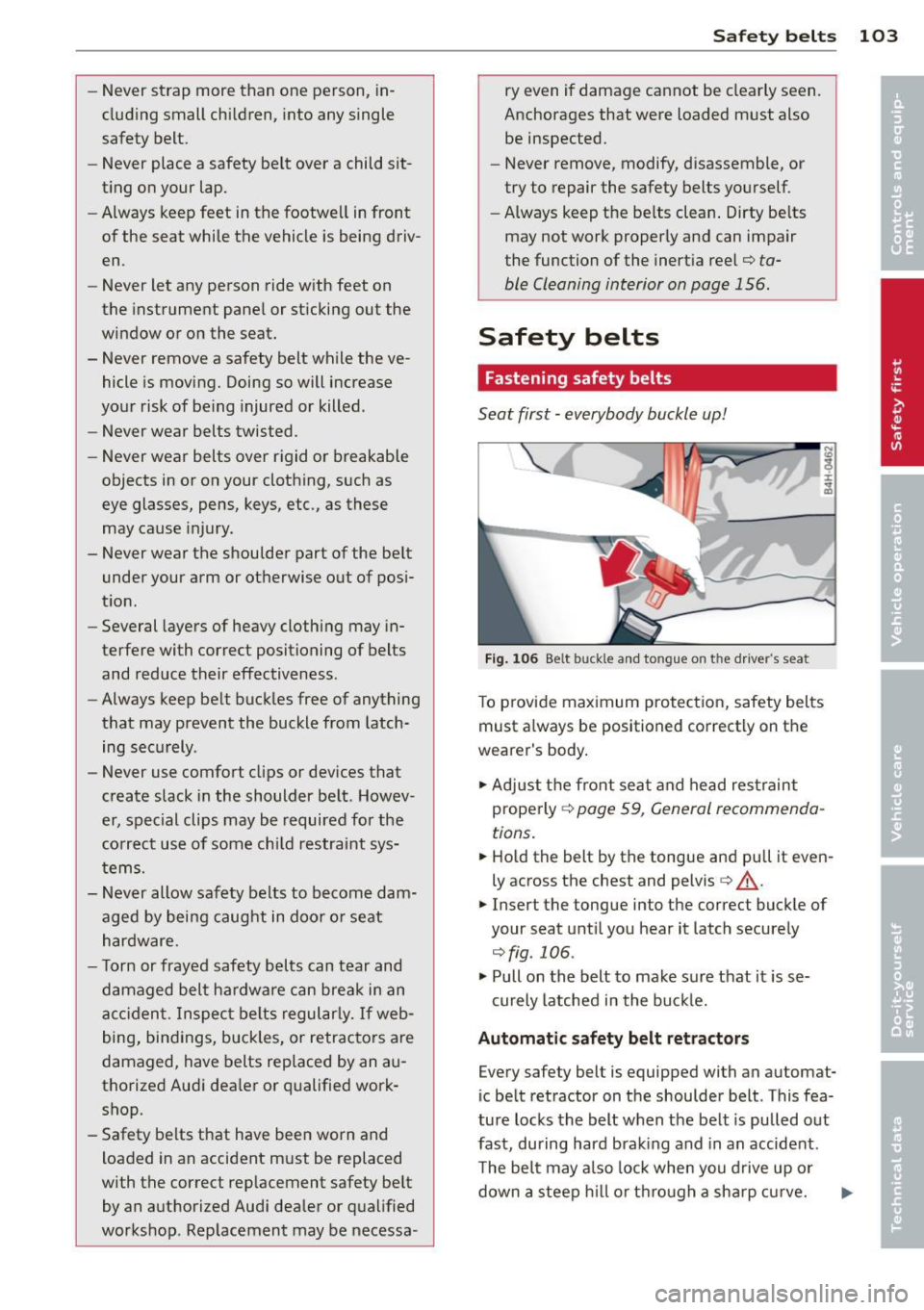
Fig. 106 Belt buck le and to ngue on t he driv er's se at
To provide maximum protection, safety belts
must always be positioned correctly on the
wearer's body.
.,. Adjust the front seat and head restraint
properly ¢
page 59, General recommenda
tions.
.,. Hold the belt by the tongue and pull it even
ly across the chest and pelvis
c:> _& .
.,. Insert the tongue into the correct buckle of
your seat until you hear it latch securely
¢fig . 106.
.,. Pull on the belt to make sure that it is se-
curely latched in the buckle.
Automatic safety belt retractors
Every safety belt is equipped with an automat
ic belt retractor on the shoulder belt . This fea
ture locks the belt when the belt is pulled out
fast, during hard braking and in an accident .
The belt may a lso lock when you drive up or
down a steep hill or through a sha rp curve.
Page 106 of 244
104 Safety belts
During normal driving the belt lets you move
freely.
Safety belt pretensioners
The safety belts are equipped with a belt pre
tensioner that helps to tighten the safety belt
and remove slack when the pretensioner is ac
tivated. The function of the pretensioner is
monitored by a warning light
q page 15.
Switchable locking feature
Every safety belt except the one on the driver
seat is equipped with a switchable locking fea
ture that
must be used when the safety belt is
used to attach a child seat. Be sure to read the
important information about this feature
¢ page 137.
.&_ WARNING
Improperly positioned safety belts can
cause serious injury in an accident
¢ page 104, Safety belt position .
-Safety belts offer optimum protection
only when the seatback is upright and
belts are properly positioned on the
body .
-
- Never attach the safety belt to the buck
le for another seat. Attaching the belt to
the wrong buckle will reduce safety belt
effectiveness and can cause serious per
sonal injury.
- A passenger who is not properly restrain
ed can be seriously injured by the safety
belt itself when it moves from the stron-
ger parts of the body into critical areas
like the abdomen.
- Always lock the convertible locking re
t ractor when you are securing a child
seat in the vehicle
q page 139.
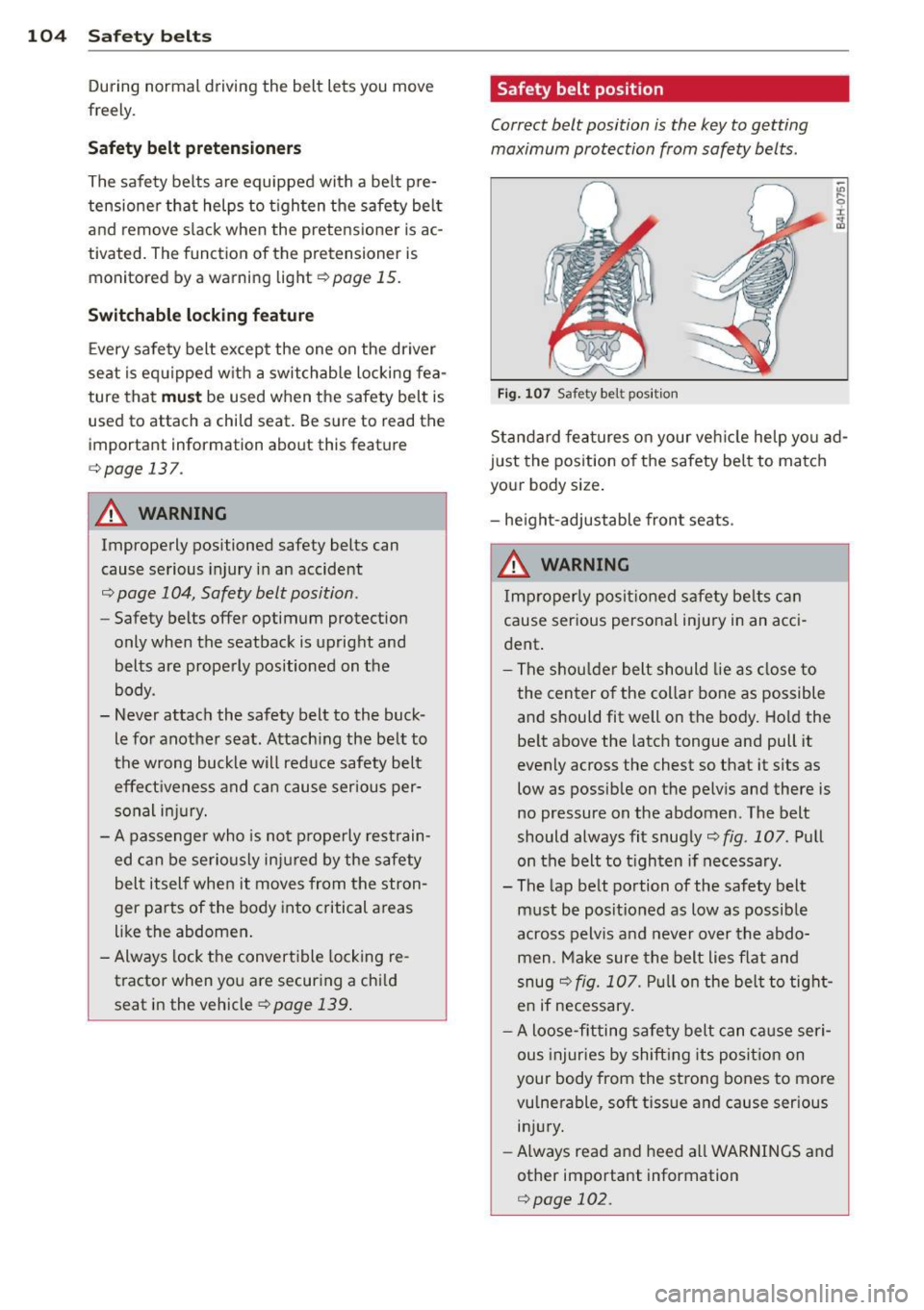
Safety belt position
Correct belt position is the key to getting
maximum protection from safety belts.
Fig. 107 Safety belt position
Standard features on your vehicle help you ad
just the position of the safety belt to match
your body size .
- height-adjustable front seats .
.&_ WARNING
Improperly positioned safety belts can
cause serious personal injury in an acci
dent.
-
- The shoulder belt should lie as close to
the center of the collar bone as possible and should fit well on the body. Hold the
belt above the latch tongue and pull it
evenly across the chest so that it sits as
low as possible on the pelvis and there is
no pressure on the abdomen . The belt
should always fit snugly
¢ fig . 10 7. Pull
on the belt to tighten if necessary .
- The lap belt portion of the safety belt
must be positioned as low as possible
across pelvis and never over the abdo
men . Make sure the belt lies flat and
snug
q fig. 107. Pull on the belt to tight
en if necessary.
- A loose-fitting safety belt can cause seri
ous injuries by shifting its position on
your body from the strong bones to more vulnerable, soft tissue and cause serious
injury.
- Always read and heed all WARNINGS and
other important information
¢page 102.
Page 149 of 244
Basically, energy management consists of
batter y di agno sis, idling cur rent man age
ment
and d yn ami c en ergy m anagement.
Battery diagnosis
Battery d iagnosis continuously dete rmines
the state of the battery. Senso rs determ ine
battery vo ltage, battery current and battery
temperature. This determines the current
state of charge and the power of the battery.
Idling curre nt management
Idling c urrent management red uces energy
consumption while the vehicle is standing.
With the ignition switched off, it contro ls the
energy supply to the various electrica l compo
nents . Data from battery diagnosis is consid
ered.
Depending on the battery's state of charge,
individua l consumers are grad ually turned off
to prevent excess ive d ischarge of the battery
and thus mainta in start ing capability.
Dynam ic energ y manag em ent
While the vehicle is being driven, dynamic en
ergy management distributes the energy gen
erated according to the needs of the individu
a l components. It regu lates consumption, so
that more electrical energy is not being used
than is being generated and ensures an opti
mal state of charge for the battery .
(D Tips
-But even energy management cannot
negate the limits of physics. Consider
that the power and life of a battery are l imited.
- If starting ab ility is threatened, you are
i nformed by a warn ing
c!;> page 148,
Driver notification in the instrument
cluster display.
Int ellig ent technolog y 147
What you should know
The highest priority is given to maintaining
starting capability.
The battery is severely taxed in short-distance
driv ing, in city traff ic and during the cold time
of year . Abundant electrical energy is re
quired, but only a l ittle is generated .
It is also
c ritical if the engi ne is not running and electri
ca l components are turned on . In this in
stance ene rgy is be ing consumed but none is
being generated.
It i s in precise ly these situations that you will
notice ene rgy management act ive ly regu lat
ing the d istribu tion of ene rgy.
V ehicle stands for an extended period
If you do not drive your vehicle over a period
of several days or weeks , e lectr ica l compo
nents a re g radually cut back or switched off.
T his reduces energy consumption and ma in
ta ins s tart ing capability over a longer pe riod .
Take into considerat ion that when you unlock
you r vehicle, some convenience functions,
s u ch as the remo te key o r power seat adjust
ment, may not be available. The convenience
f unct ions wi ll be available again when you
turn on the ignition and start the engine.
With the engine turned off
If you listen to the radio, for examp le, w ith
the engine tu rned o ff, the battery is being dis
charged .
If starting capabi lity is jeopardized due to en
ergy consumption , a message appears in the
driver in formation d isplay.
You have to start t he engine to charge the
battery.
With the engine running
Although electrical energy is generated when
the vehicle is being driven, the battery can be come discharged . This happens mostly when
little energy is being gene rated and a great
deal consumed and the battery's state of
c h arge is not opt imal.
•
•
Page 166 of 244
164 Checking and filling
Checking and filling
Engine hood
Releasing the engine hood
The engine hood is released from inside the
vehicle .
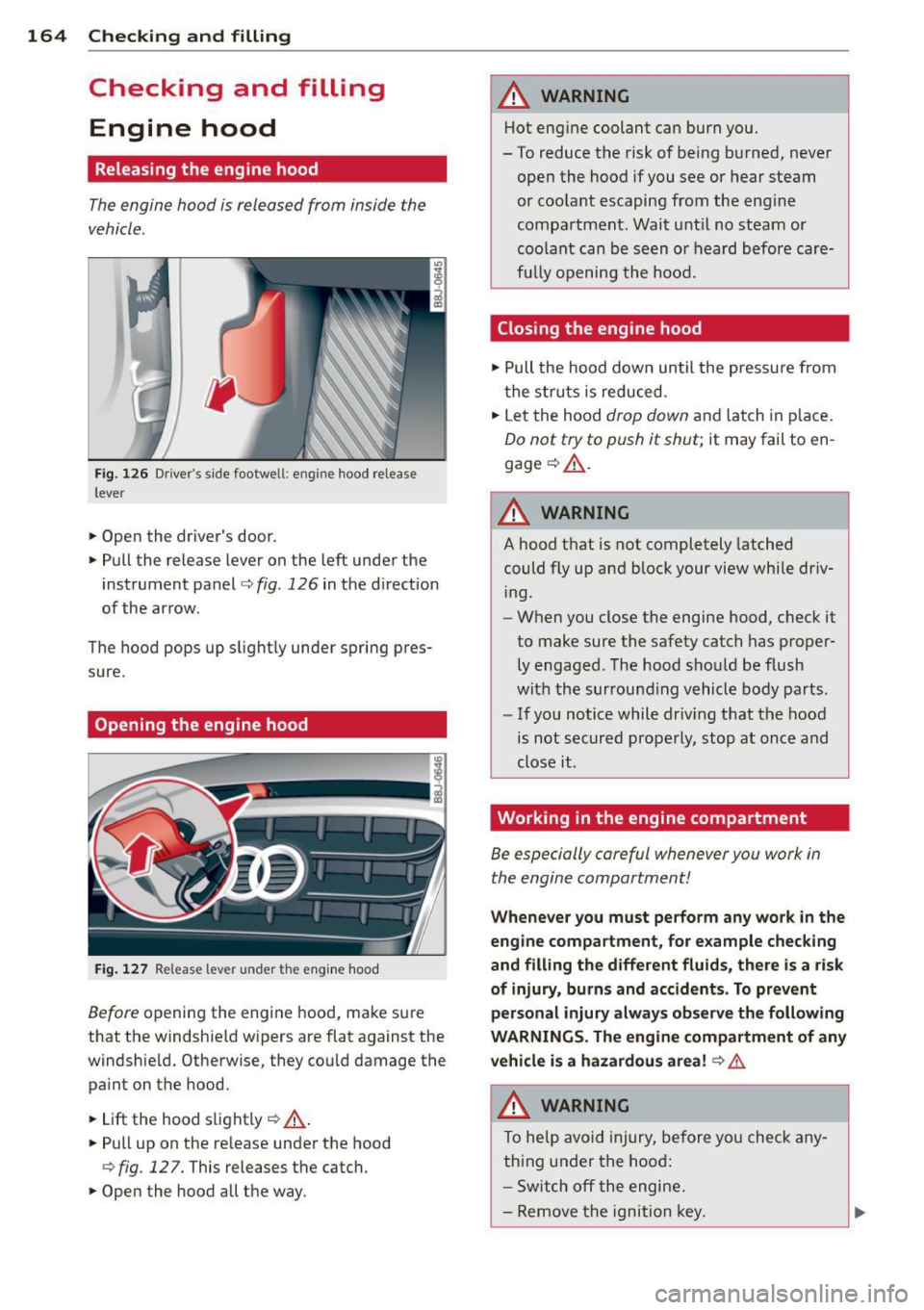
Fig. 126 Driver' s side footwe ll: e ngin e hood release
lever
.. Open the driver's door .
.. Pull the release lever on the left under the
instrument panel
c> fig . 126 in the direction
of the arrow .
The hood pops up slight ly under spring pres
sure.
Opening the engine hood
Fig . 127 Re lease lever under the engine hood
Before opening the engine hood, make sure
that the windshie ld wipers are flat against the
windshie ld. Otherwise, they cou ld damage the
pain t on the hood.
.. Lift the hood slight ly
c> .&, .
.. Pull up on the release under the hood
c> fig . 12 7. This releases the catch .
.. Open the hood all the way.
A WARNING
-Hot engine coolant can burn you.
- To reduce the risk of being burned, never
open the hood if you see or hear steam
or coo lant escaping from the eng ine
compartment . Wait unt il no steam or
coolant can be seen or heard before care
fu lly opening the hood.
Closing the engine hood
.. Pull the hood down until the pressure from
the struts is reduced .
.. Let the hood
drop down and latch in p lace.
Do not try to push it shut; it may fail to en
gage
c> .&, .
A WARNING
--
A hood that is not completely latched
could fly up and b lock your view while dr iv
i ng.
- When you close the engine hood, check it
to make sure the safety catch has proper
ly engaged . The hood should be flush
with the surrounding vehicle body parts.
- If you notice while dr iv ing that the hood
is not secured properly, stop at once and
close it .
Working in the engine compartment
Be especially careful whenever you work in
the engine compartment!
Whene ve r y ou must pe rform any wo rk in th e
eng ine compartment, for e xample chec king
and filling the diff ere nt fluids, ther e is a risk
of injury , burn s and accident s. To prevent
p ers onal injury alwa ys obs erv e the follo win g
WARNING S. Th e engin e c ompartm ent of an y
v e hicl e is a hazardou s area!
c> .&.
A WARNING
To help avoid injury, before you check any
thing under the hood:
- Sw itch off the engine .
- Remove the ignition key.
Page 214 of 244
212 Fuses and bulbs
Fuses and bulbs
Electrical fuses
Replacing fuses
Fuses that have blown will have metal strips
that have burned through .
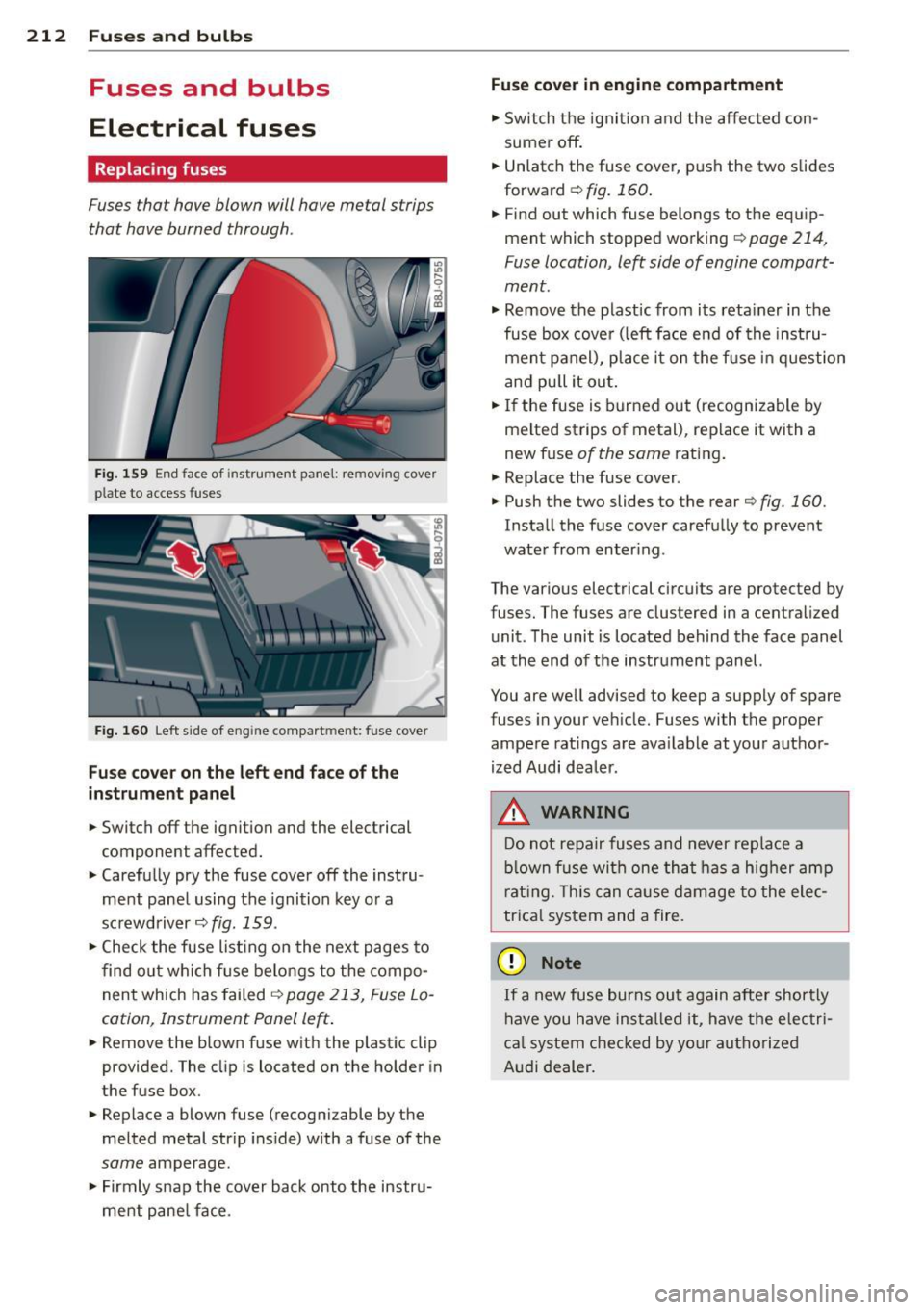
Fig. 159 End face of instrument panel: rem ov ing cover
p la te to access fuses
Fig. 160 Left side of eng ine compart men t: fuse cove r
Fuse cover on the left end face of the
inst rument pane l
.. Switch off the ignition and the electrical
component affected.
.. Carefully pry the fuse cover off the instru
ment panel using the ignition key or a
screwdriver
c;::> fig. 159 .
.. Check the fuse list ing on the next pages to
find out which fuse belongs to the compo
nent which has failed
o page 213, Fuse Lo
cation, Instrument Panel left .
.. Remove the blown fuse with the plastic clip
provided. The cl ip is located on the holder in
the fuse box .
.. Replace a blown fuse (recognizable by the
melted metal str ip ins ide) with a fuse of the
same amperage .
.. Firmly snap the cover back onto the instru
ment pane l face .
Fuse cover in engine compartment
.. Switch the ignit ion and the affected con
sumer off .
.. Unlatch the fuse cover , push the two slides
forward
c;::> fig. 160.
.. Find out which fuse belongs to the equip
ment which stopped working
c;::> page 214,
Fuse location , le~ side of engine compart
ment .
.. Remove the plastic from its retainer in the
fuse box cover (left face end of the instru
ment panel), place it on the fu se in question
and pull it out .
.. If the fuse is burned out (recognizable by
melted strips of metal), replace it with a
new fuse
of the same rating.
.. Replace the fuse cover .
.. Push the two slides to the rear
o fig. 160.
Install the fuse cover carefully to prevent
water from enter ing .
The various electrical circuits are protected by
fuses. The fuses are clustered in a centralized unit. The unit is located behind the face panel
at the end of the instrument panel.
You are well advised to keep a supply of spare
fuses in your vehicle. Fuses with the proper
ampere ratings are available at your author
ized Audi dealer.
A WARNING -
Do not repa ir fuses and never replace a
blown fuse with one that has a higher amp
rating. This can cause damage to the elec
trica l system and a fire.
(D Note
If a new fuse burns out again after shortly
have you have installed it, have the electri
ca l system checked by your authorized
Audi dealer.