change time AUDI TT ROADSTER 2015 Owners Manual
[x] Cancel search | Manufacturer: AUDI, Model Year: 2015, Model line: TT ROADSTER, Model: AUDI TT ROADSTER 2015Pages: 244, PDF Size: 60.74 MB
Page 22 of 244
20 Instruments and warning/indicator lights
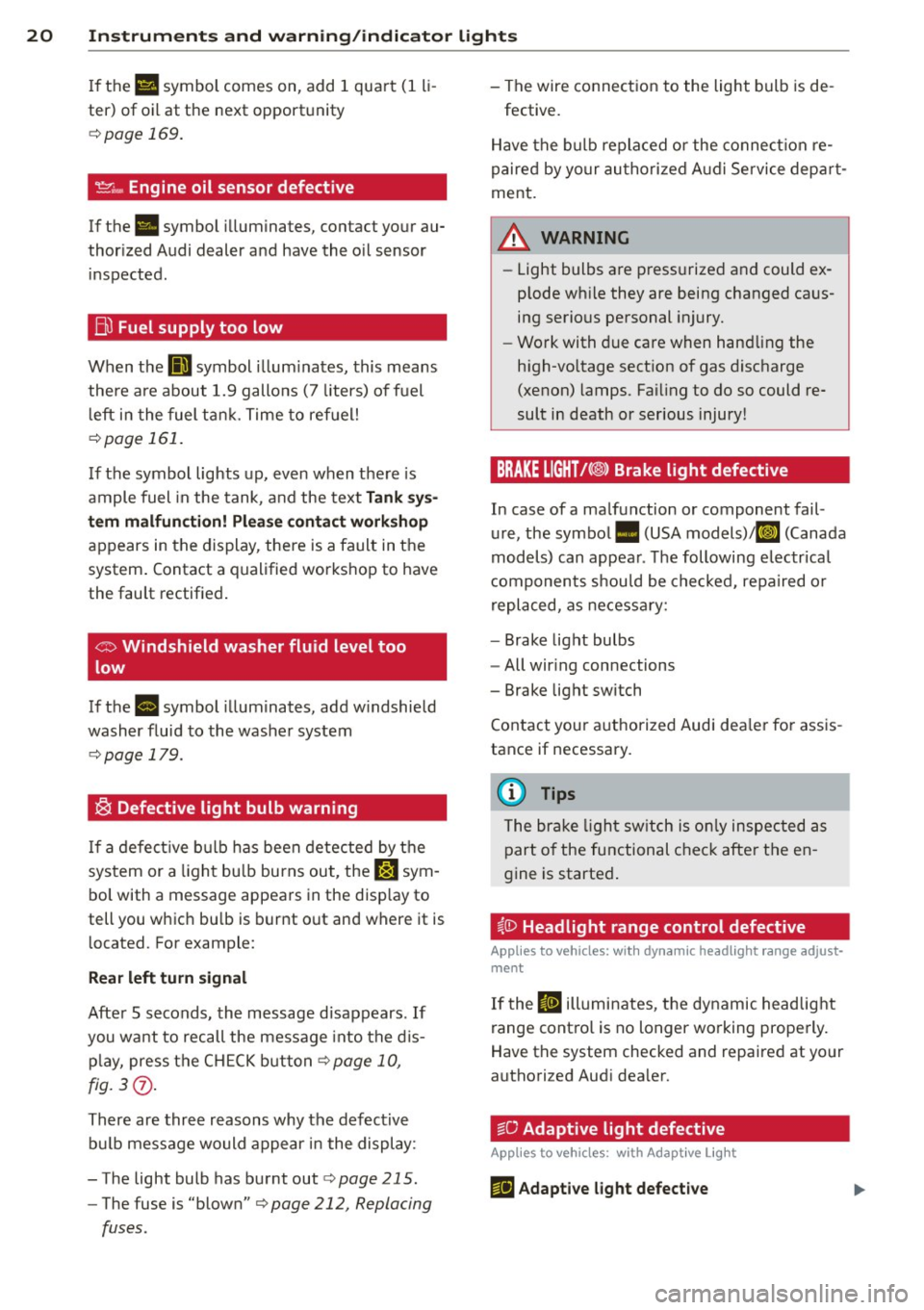
If the Ill symbol comes on, add 1 quart (1 li
ter) of oil at the next opportunity
c:::> page 169.
'.!2" .... Engine oil sensor defective
If the. symbol illuminates, contact your au
thorized Audi dealer and have the oil sensor inspected.
Bil Fuel supply too low
When the D symbol illuminates, this means
there are about 1.9 gallons (7 liters) of fuel
left in the fuel tank. Time to refuel!
c:::> page 161.
If the symbol lights up, even when there is
ample fuel in the tank, and the text
Tank sys
tem malfunction! Please contact workshop
appears in the display, there is a fault in the
system. Contact a qualified workshop to have
the fault rectified.
co Windshield washer fluid level too
low
If the B symbol illuminates, add windshield
washer fluid to the washer system
c:::> page 179.
® Defective light bulb warning
If a defective bulb has been detected by the
system or a light bulb burns out, the
&:J sym
bol with a message appears in the display to
tell you which bulb is burnt out and where it is
located. For example:
Rear left turn signal
After 5 seconds, the message disappears . If
you want to recall the message into the dis
play, press the CH ECK button
c:::> page 10,
fig. 3(i) .
There are three reasons why the defective
bulb message would appear in the display:
- The light bulb has burnt out
r:> page 215.
-The fuse is "blown" r:> page 212, Replacing
fuses .
-The wire connection to the light bulb is de-
fective.
Have the bulb replaced or the connection re
paired by your authorized Audi Service depart
ment.
A WARNING
- Light bulbs are pressurized and could ex
plode while they are being changed caus
ing serious personal injury.
- Work with due care when handling the
high-voltage section of gas discharge
(xenon) lamps. Failing to do so could re
sult in death or serious injury!
BRAKE LIGHT!<®> Brake light defective
In case of a malfunction or component fail
ure, the symbol. (USA models)/Kf' ~» (Canada
models) can appear. The following electrical
components should be checked, repaired or
replaced, as necessary:
- Brake light bulbs
- All wiring connections
- Brake light switch
Contact your authorized Audi dealer for assis
tance if necessary.
(D Tips
The brake light switch is only inspected as
part of the functional check after the en
gine is started.
~CD Headlight range control defective
Applies to vehicles: wit h dynamic headlight range adjust·
ment
If the II illuminates, the dynamic headlight
range control is no longer working properly.
Have the system checked and repaired at your
authorized Audi dealer.
~O Adaptive light defective
Applies to vehicles: with Adapt ive Lig ht
m;J Adaptive light defective
Page 25 of 244
Trip computer
Introduction
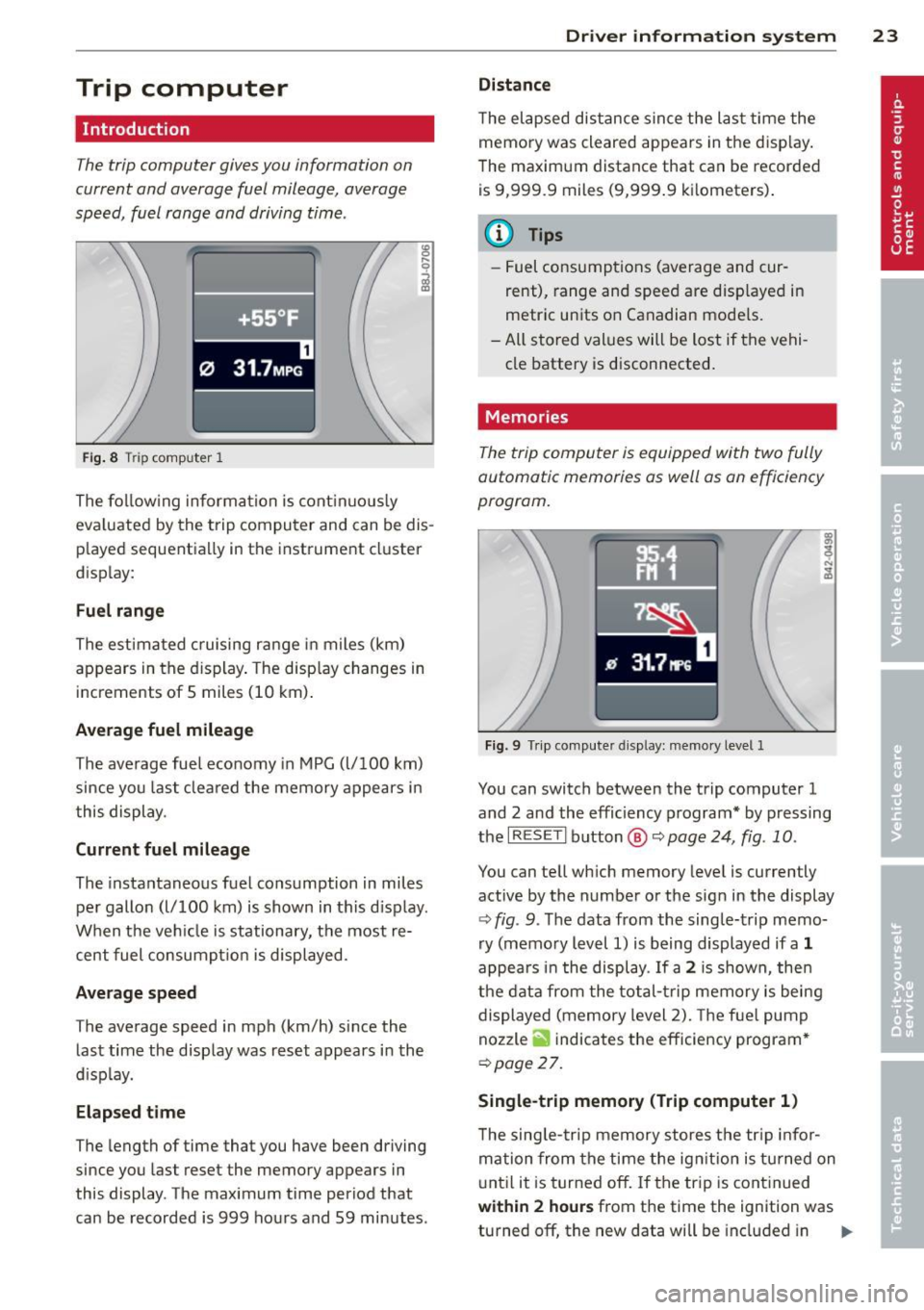
The trip computer gives you information on
current and average fuel mileage, average
speed, fuel range and driving time .
Fig. 8 T rip comp ute r 1
The fo llow ing informa tion is cont inuo usly
eva luated by the trip compu ter and can be dis
p layed sequentia lly in the instrument cl uster
d isplay:
Fuel range
The estimated c ruising ra nge in miles (km)
appears in the d isplay . The disp lay changes in
increments of 5 miles (10 km) .
Average fuel mileage
The average fue l economy in MPG (l/ 100 km)
since you last clea red the memory appears in
t his display .
Current fuel mileage
The instantaneous fuel consumption in miles
pe r gallon (l/ 100 km) is shown in this d isp lay .
When the ve hicle is stationary, the most re
cent fuel consumpt io n is displayed.
Average speed
The average speed in mph (km/h) since the
last time the display was reset appears i n the
d isp lay.
Elap sed t ime
The length of time that you have been driving
since you las t reset the memory appears in
this display . The maximum t ime period that
can be recorded is 999 ho urs and 59 minutes .
Driver in formation system 23
Distance
The elapsed dis tance sin ce the las t time the
memory was cleared appears in the d isp lay .
T he maxim um distance that can be recorded
is 9 ,999.9 miles (9,999 .9 k ilometers) .
(D Tips
- Fuel consump tions (average and cur
rent), range and speed are disp layed in
metric un its on Canadian mode ls.
- All sto red val ues wil l be lost if t he vehi
cle battery is d isconnected .
' . Memories
The trip computer is equipped with two fully
automatic memories as well as on efficiency
progrom.
Fi g. 9 Trip co mputer d isplay: memo ry level 1
You can switch between the trip computer 1
and 2 and the efficiency program* by pressing
the
I R ES ET I button @ c::> page 24, fig . 10 .
You can tell wh ich memory leve l is currently
active by the number or the sign in the display
c::> fig . 9. The data from the single-trip memo
ry (memo ry level 1) is being displayed if a
1
appea rs i n t he display . If a 2 is shown, then
the data from the total- trip memory is being
displayed (memory level 2). The f ue l pump
nozzle
ii indicates the efficiency program *
c::>poge 27.
Single-trip memory (Trip computer 1 )
The sing le -t rip memory stores the tr ip info r
ma tion from the time the ig nition is tu rned on
u nt il it is tur ned off. If the tr ip is cont inued
within 2 hour s from the time the ignit ion was
turned off, the new data will be included in ..,.
Page 27 of 244
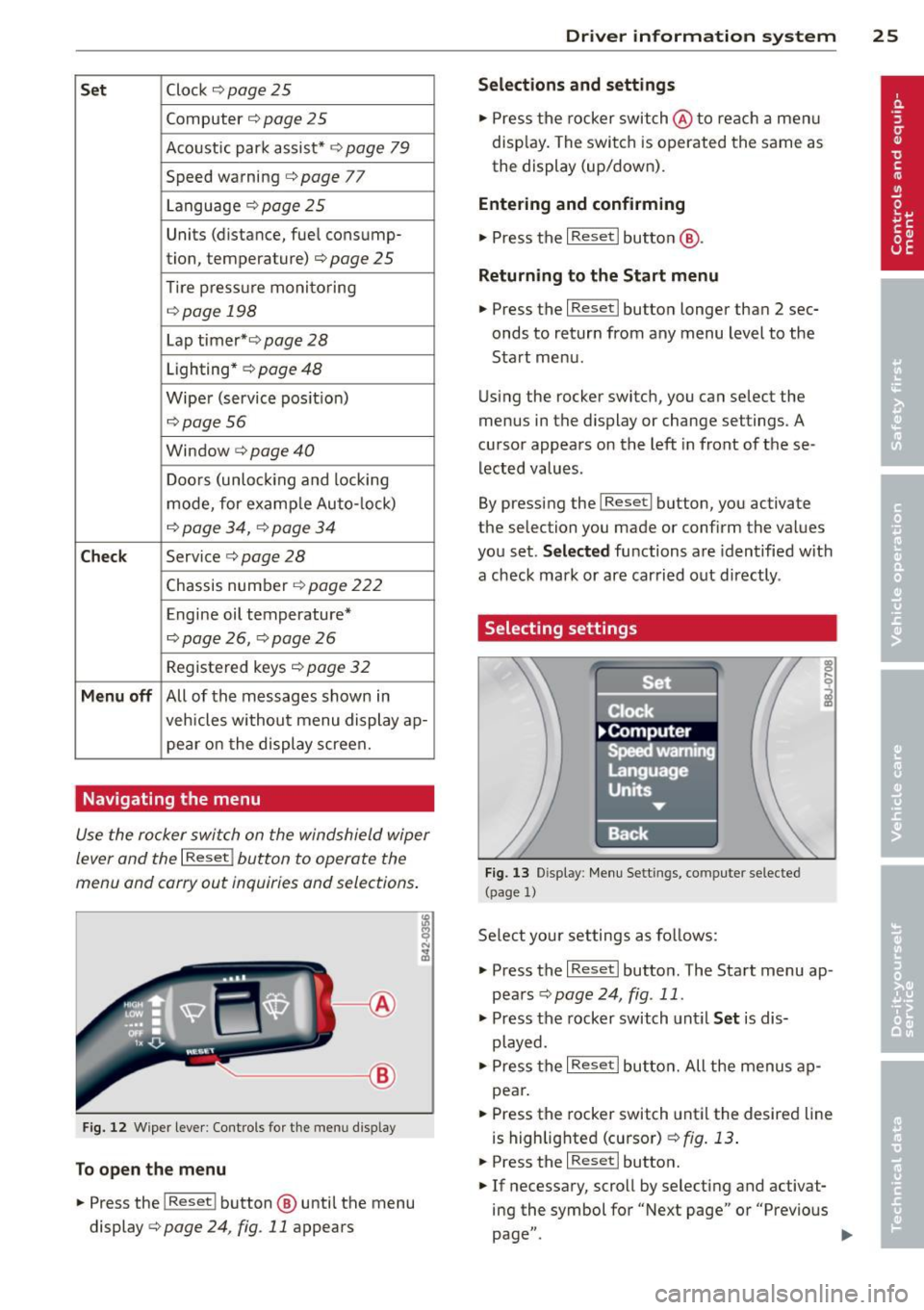
Set Clock ¢ page 2 5
Computer¢ page 25
Acoustic par k assist* ¢ page 79
Speed warning ¢ page 77
Language ¢
page 2 5
Units (distance, fue l consump-
tion, temperature) ¢
page 25
Tire press ure moni toring
c> page 198
Lap timer* c>page 28
Lighting* ¢ page 48
Wiper (service pos it io n)
¢page 56
Window c> page 40
Doors (unlo ck ing and locking
mode, for example Auto- lock)
¢ page 34, c> page 34
Check
Service c> page 28
Chassis numbe r c> page 2 22
Engine oil temperature*
¢
page 26, c> page 26
Registe red keys ¢ page 32
Menu off
All of the messages shown in
vehicles withou t menu display ap-
pe ar o n the display screen.
Navigating the menu
Use the rocker switch on the windshield wiper
lever and the
I Reset ! button to operate the
menu and carry out inquiries and selections.
~-- @
Fig. 1 2 Wiper leve r: Controls for the men u disp lay
To open the menu
.. Press the I Reset ! button @ until the menu
display
i=> page 24 , fig . 11 appears
Dr iver in formation system 25
Selections and settings
.. Press the rocker switch @to reac h a men u
disp lay. The swi tch is operated the same as
the display (up/down).
Entering and confirming
.,. Press the I Reset I butto n @ .
Returning to the Start menu
.. Press the I Reset I button longer tha n 2 sec
onds to return from any menu level to the
Sta rt menu .
U sing the rocker switc h, you can select the
menus in the display or change settings. A
cursor appea rs on the left in front of these
lected values .
By pressing the
I Reset! button, you activate
the selection you made or confirm the values
you set.
Selected fu nctions are identified wit h
a check mark or ar e car ried out directly .
Selecting settings
Fig. 13 D isplay: Menu Sett ings, co mpute r selected
(page
l)
Se lect you r settings a s foll ows:
.,. Press the
I Reset I butto n. The Sta rt menu ap
pears ¢
page 24 , fig . 11 .
.. Press the rocker switch unt il Set is dis
played .
.. Press the
I Reset I butto n. All the menu s a p
pe a r .
.. Press the rocker switch until the desire d line
is highlig hted (curso r)
¢ fig . 13 .
.. Press the I Reset I button.
.. If necessary, scro ll by selecting and activat
ing the symbol for "Next page" o r "Previous
page" .
~
Page 30 of 244
28 Driver information system
-The fuel economy messages are not dis
played in every instance, but rather in in
terva ls over a period of ti me.
Service interval display
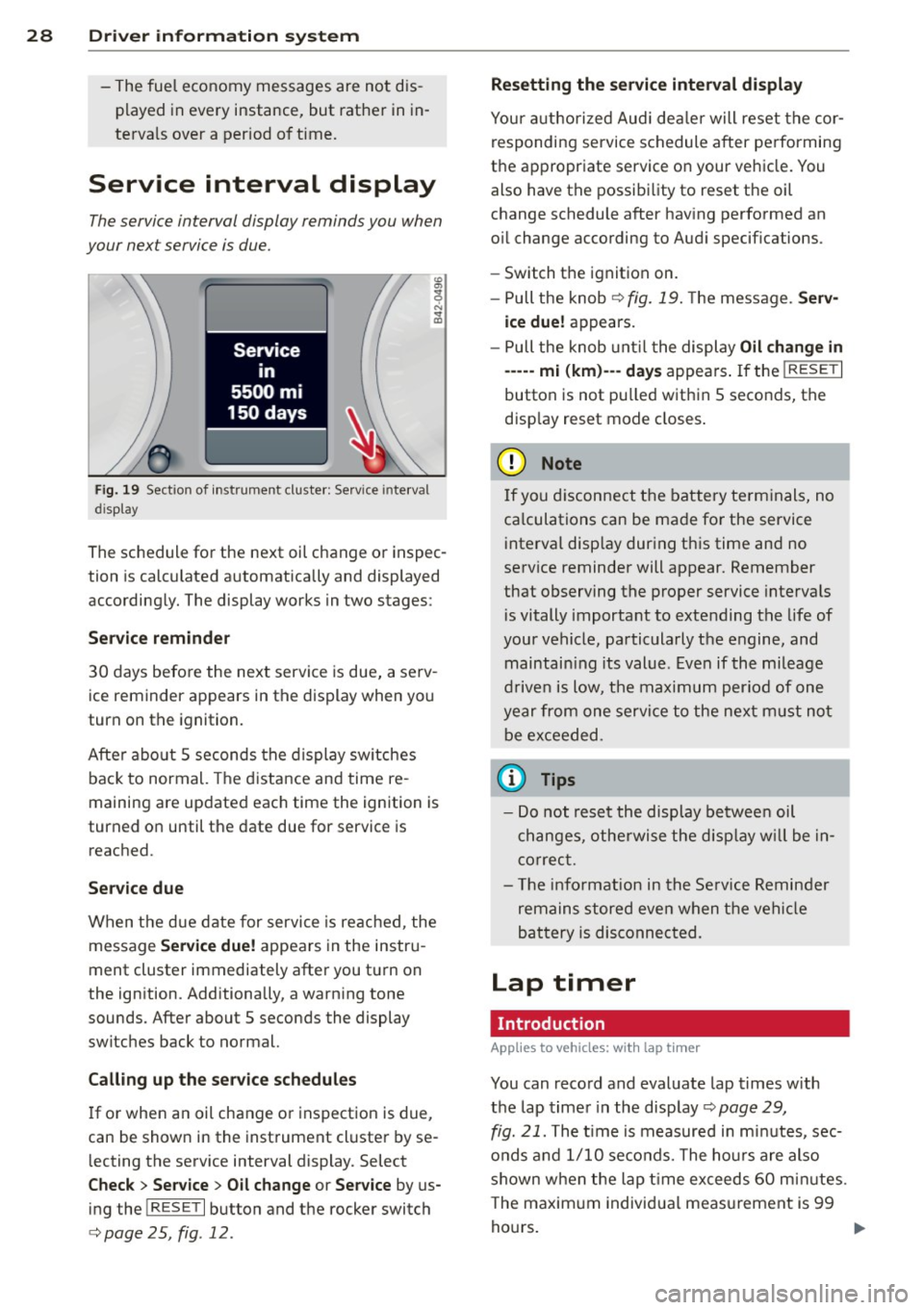
The service interval display reminds you when
your nex t service is due.
Fig. 19 Sect ion of instrument cluster: Serv ice in terva l
d isp lay
The schedule for the next oil change or inspec
tion is calculated automatically and displayed
accordingly. The display works in two stages :
Service reminder
30 days before the next service is due, a serv
ice reminder appears in the display when you
turn on the ignition.
After about
5 seconds the display switches
back to normal. The distance and time re
maining are updated each time the ignition is
turned on until the date due for service is
reached.
Service due
When the due date for service is reached , the
message
Service due! appears in the instru
ment cluster immediately after you turn on
the ignition. Additionally, a warning tone
sounds . After about
5 seconds the display
switches back to normal.
Calling up the service schedules
If or when an oil change or inspection is due,
can be shown in the instrument cluster by se
lecting the serv ice interval display. Select
Check > Service > Oil change or Service by us
ing the
! R ES ET I button and the rocker switch
c> page 25 , fig . 12.
Resetting the service interval display
Your authorized Audi dealer will reset the cor
responding service schedule after performing
the appropriate service on your veh icle. You
also have the possibility to reset the oil
change schedule after having performed an
o il change according to Audi specifications.
- Switch the ignition on.
- Pull the knob
c> fig. 19. The message. Serv-
ice due!
appears.
- Pull the knob until the display
Oil change in
-----mi (km)---day s appears . If the I RESET I
button is not pulled within 5 seconds, the
disp lay reset mode closes.
(D Note
If you disconnect the battery terminals, no
ca lculations can be made for the service
interval display during this time and no
service reminder will appear. Remember
that observing the proper service intervals
i s vitally important to extending the life of
your vehicle, particularly the engine, and
maintain ing its value . Even if the mileage
driven is low, the maximum period of one
year from one service to the next must not
be exceeded.
'
(D Tips
-Do not reset the display between oil
changes, otherwise the display w ill be in
correct.
- Th e information in the Service Reminder
remains stored even when the vehicle
battery is disconnected.
Lap timer
I ntrod ucti on
App lies to vehicles: wit h lap timer
You can record and evaluate lap times with
the lap timer in the display c>page
29,
fig. 21. The time is measured in minutes, sec
onds and
1/10 seconds. The hours are also
shown when the lap t ime exceeds
60 min utes .
T he maximum individual measurement is 99
hours. ..,.
Page 54 of 244
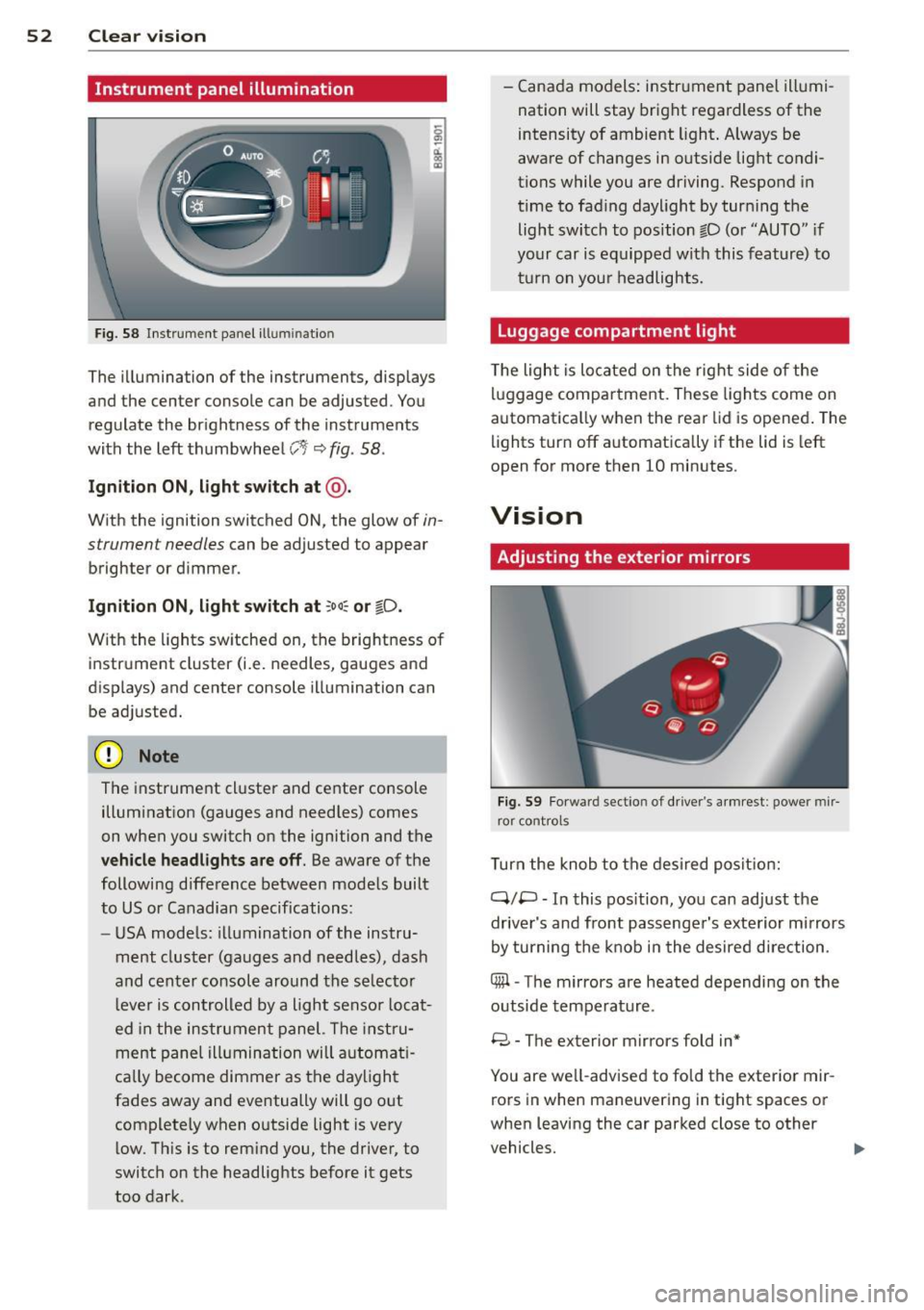
52 Clear vis ion
Instrument panel illumination
F ig. 58 Instrument panel ill umination
The illumination of the instruments, displays
and the center console can be adjusted. You
regulate the brightness of the instruments
with the left thumbwheel
CJ:J ~ fig. 58.
Ignition ON, light switch at @ .
With the ignition switched ON, the glow of in
strument needles can be adjusted to appear
brighter or dimmer.
Ignition ON , light switch at ;oo~ or io .
With the l ights sw itched on, the brightness of
instrument cluster (i.e. needles, gauges and
displays) and center console illumination can
be adjusted.
@ Note
The instrument cl uster and cente r console
illumination (gauges and needles) comes
on when you switch on the ignition and the
vehicle headligh ts ar e off . Be aware of the
following difference between mode ls built
to US or Canadian specifications:
- USA mode ls: illumination of the instru
ment cluster (gauges and needles), dash
and center consol e around the se lector
l ever is controlled by a light senso r locat
ed in the instrument panel. The instru
ment pane l illumination will a utomat i
cally become dimmer as the daylight
fades away and eventually will go out
complete ly when outside light is very
l ow . Th is is to rem ind you, the driver, to
switch on the headlights before it gets
too dark . -
Canada models: instrument panel illumi
nation will stay bright regardless of the
intensity of ambient light . Always be
aware of changes in outside light condi
tions while you are driving. Respond in
time to fading daylight by tur ning the
light switch to position fD (o r "AUTO" if
your car is equipped with this feature) to
t ur n on you r headlights.
Luggage compartment light
The light is located on the right side of the
lu ggage compartme nt. These lights come on
automat ica lly when the rear lid is opened . The
lights turn off automatica lly if the lid is left
open for more then 10 minutes.
Vision
Adjusting the exterior mirrors
Fig. 59 Fo rwa rd section of driver's a rmrest: power mir
ror controls
Turn the knob to the desired posit ion:
Q/ P -In this pos ition, you can adjust the
driver's and front passenger's exte rior m irrors
by turning the knob in the desired d irection.
4iil -The mirrors are heated depending on the
outside temperature .
8 -The exterior mirrors fold in*
You are we ll-advised to fold the exterior mir
rors in when maneuvering in tight spaces or
when leaving the car parked close to other
vehicles. ..,,.
Page 69 of 244
Warm and cold Climate controls
Controls
W arm and cold 6 7
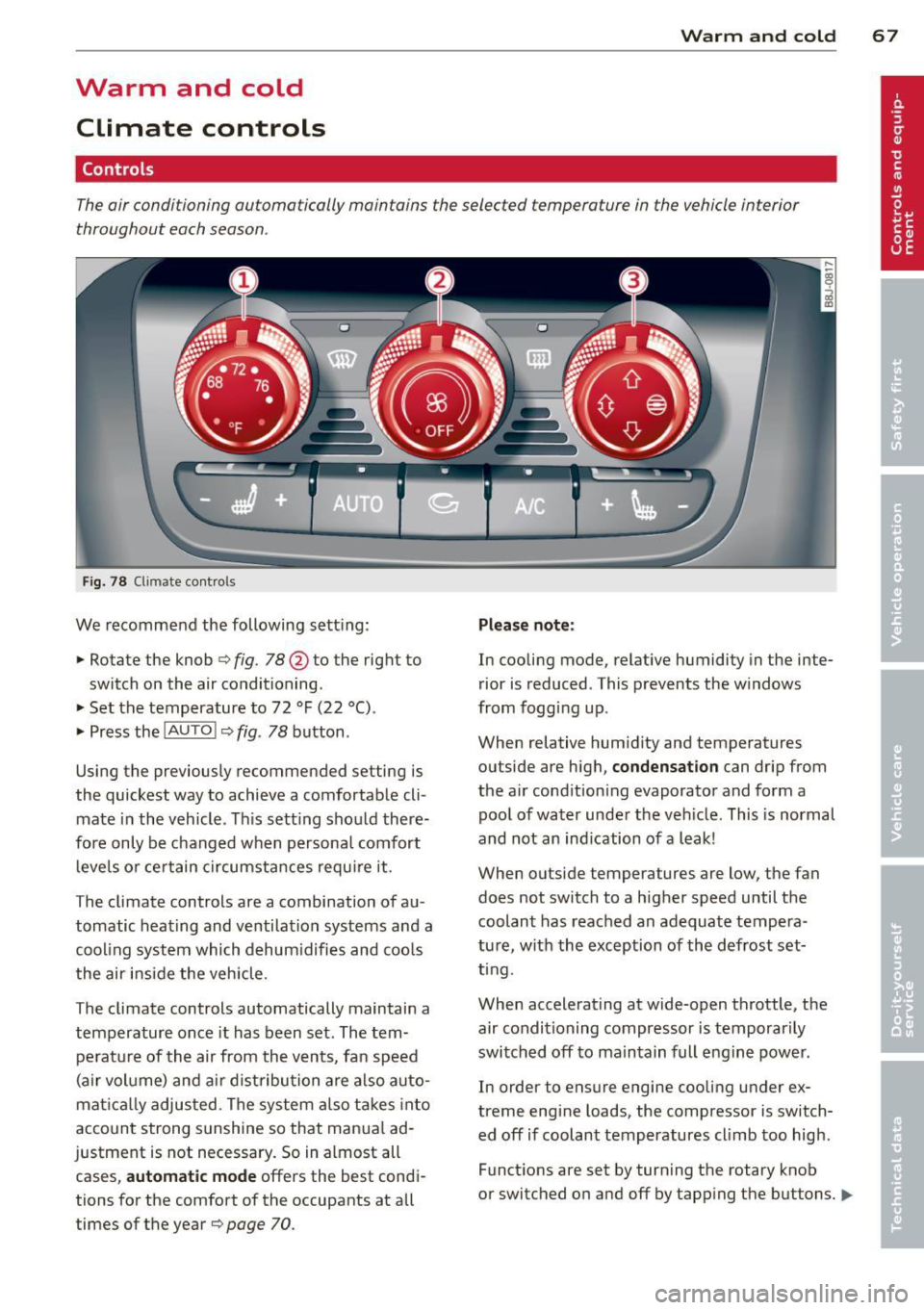
The air conditioning automatically maintains the selected temperature in the vehicle interior
throughout each season .
Fig. 78 Climate contro ls
We recommend the following sett ing :
• Rotate the knob
c::> fig. 78 @ to the right to
switch on the air conditioning .
• Set the temperature to 72 °F (22 °() .
• Press the
!AUTO I c::> fig . 78 button .
Using the previously recommended setting is
the quickest way to achieve a comfortable cli
mate in the vehicle . Th is setting should there
fore only be changed when persona l comfort
l eve ls o r certain circumstances requ ire it .
The climate controls are a combination of au
tomatic heating and ventilation systems and a
coo ling system which dehum idifies and coo ls
the air inside the vehicle .
The climate controls automatically maintain a temperature once it has been set. The tempe rat ure of the air from the v ents, fan speed
(air vo lume) and ai r distribu tion are also auto
mat ica lly adjusted . The system also takes into
account strong sunshine so that manua l ad
justment is not necessary . So in almost all
cases,
a utomatic mode offers the best cond i
tions for the comfort of the occupants at all
times of the year
c::> page 70 .
Plea se note:
In cooling mode, relative humidity in the inte
rior is reduced . This prevents the w indows
from fogg ing up .
When relative hum idity and temperatures
outside are high,
condensation can drip from
the a ir cond ition ing evaporator and form a
poo l of water under the veh icle. This is normal
and not an ind ication of a leak!
When outside temperatures are low, the fan
does not switch to a higher speed until the coolant has reached an adequate tempera
tu re , with the exception of the defrost set
t ing.
When accelerating at wide-open throttle, the
air condit ioning compressor is temporar ily
switched off to maintain full engine power.
In order to ensure engine cooling under ex
treme engine loads, the compressor is switch
ed off if coolant temperatures cl imb too high .
Funct ions are set by turn ing the rotary knob
or switched o n and off by tapp ing the buttons.
1111-
Page 143 of 244
Intelligent technology Notice about data
recorded by vehicle
control modules
Your vehicle is not equipped with an Event Da
ta Recorder (EDR), installed by some manu
facturers for the express purpose of capturing
data for retrieval after an accident or crash
event. EDR's are sometimes called "crash re
corders".
Some state laws restrict the retr ieval or down
loading of data stored by EDR's that were in
stalled in a vehicle for the express purpose of
retrieving data after an accident or crash
event without the owner's consent.
Although your vehicle is not equipped with an
EDR, it is equipped with a number of electron
ic control modules for various vehicle systems
such as, for examp le, engine function, emis
sion control, as well as for the airbags and
safety belts.
These electronic control modules also record
vehicle-related data during norma l vehicle op
eration for diagnostic and repair purposes.
The recording capacity of the electronic con
trol modules is limited to data (no sound is re
corded) and only a small amount of data is ac
tually recorded over a very limited period of
time and stored when a system fault or other
condition is sensed by a control unit. Some of
the data then stored may relate to vehicle
speed, direction, braking as we ll as restraint
system use and performance in the event of a
crash or other condition. Stored data can only be read and downloaded with special equip
ment.
Electronic Stabilization
Control (ESC)
Description
ESC helps to improve road holding and vehicle
dynamics to help reduce the probability of
skidding and loss of veh icle control. It works
only when the engine is running. ESC detects
Intelligent technology 141
certain difficult driving situations, including
when the vehicle is beginning to spin (yaw)
out of control and helps you to get the veh icle
back under control by se lectively braking the
wheels, and/or reducing engine power and
providing steering ass istance to help hold the
vehicle on the driver's intended course. The in
dicator light
B.J in the instrument cluster
blinks when ESC is taking action to help you
control the vehicle.
ESC has limitations .
It is important to remem
ber that ESC cannot overcome the laws of
physics.
It will not always be able to help out
under all conditions you may come up against.
For example, ESC may not always be able to
help you master situations where there is a
sudden change in the coefficient of friction of
the road surface. When there is a section of dry road that is suddenly covered with water,
slush or snow, ESC cannot perform the same
way it would on the dry surface. If the vehicle
hydroplanes (rides on a cushion of water in
stead of the road surface), ESC will not be
able to help you steer the vehicle because con
tact with the pavement has been interrupted
and the vehicle cannot be braked or steered .
During fast cornering, particularly on winding
roads, ESC cannot always deal as effectively
with difficu lt driving situations as at lower
speeds.
Always adjust your speed and driving style to
road, traffic §&and weather conditions. ESC
cannot override the vehicle's physical limits,
increase the available traction, or keep a vehi
cle on the road if road departure is a result of
driver inattention. Instead, ESC improves the
poss ibility of keeping the vehicle under con
trol and on the road dur ing extreme maneu
vers by usin g the driver's steering inputs to
help keep the vehicle going in the intended di
rection. If you are traveling at a speed that
causes you to run off the road before ESC can
provide any assistance, you may not experi
ence the benefits of ESC.
ESC includes and/or works together with the
anti- lock brake system (ABS), brake assist sys -
tem and anti-slip regu lation (ASR). ESC is
Ill>
•
•
Page 144 of 244
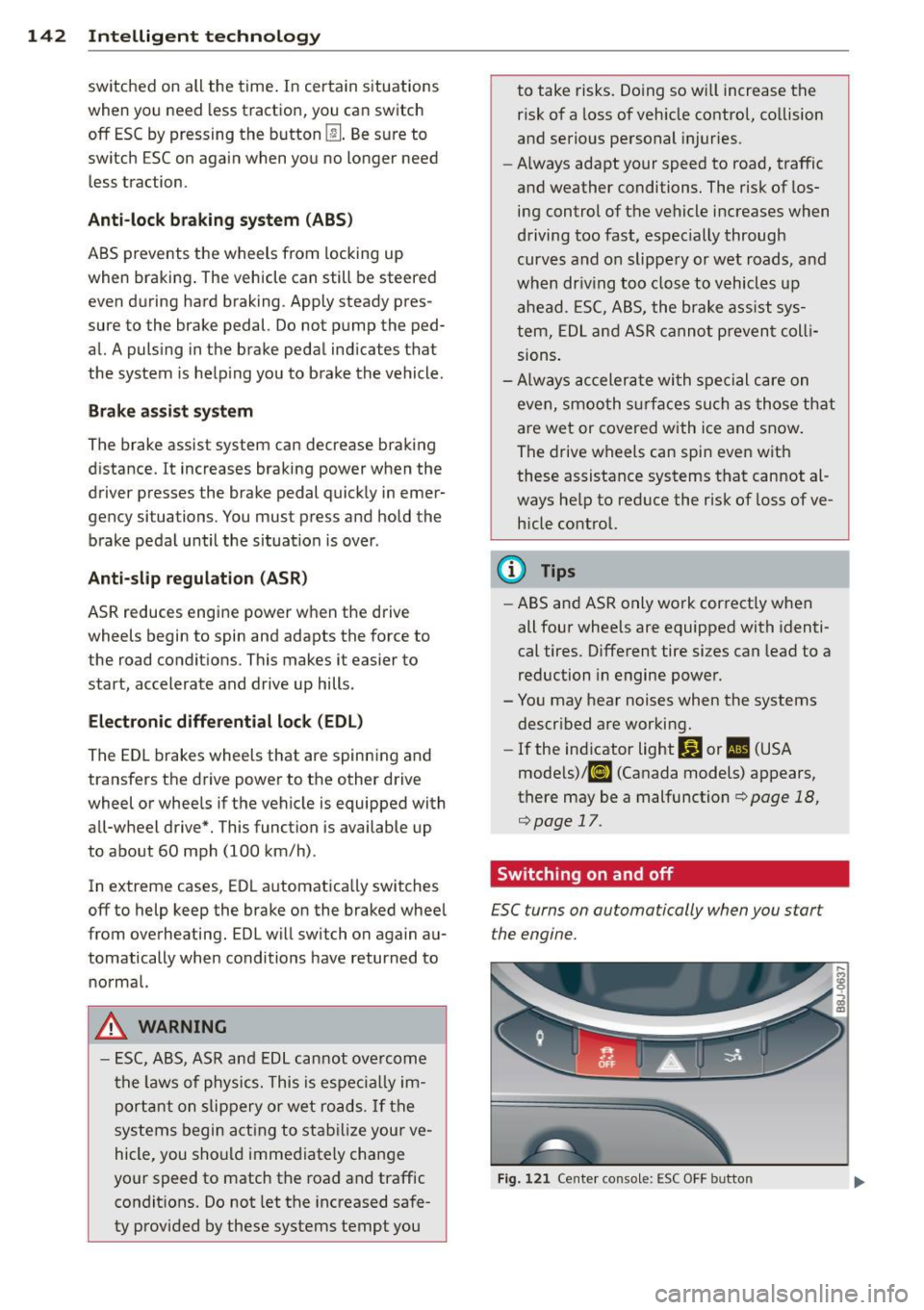
142 Intelligent technology
switched on all the time. In certain situations
when you need less traction, you can switch
off ESC by pressing the button
l!l . Be sure to
switch ESC on again when you no longer need
less traction.
Anti -toc k brak ing system (ABS)
ABS prevents the wheels from lock ing up
when braking . The vehicle can still be steered
even during hard brak ing . Apply steady pres
sure to the brake pedal. Do not pump the ped
al. A puls ing in the brake pedal ind icates that
the system is he lp ing you to brake the vehicle .
Brake assist sy stem
The brake assist system can decrease braking
d istance. It increases braking power when the
driver presse s the brake pedal quickly in emer
gency si tuations. You must press and hold the
brake peda l until the situation is over .
Anti-slip regulation (ASR)
ASR reduces engine power when the drive
wheels begin to spin and adapts the force to the road conditions . This makes it easier to
start, accelerate and drive up hills.
E lectronic differential lock (EDL )
The ED L brakes wheels that are spinning and
transfers the drive power to the other drive
wheel or whee ls if the vehicle is equipped with
all-wheel drive*. This function is available up
to about 60 mph (100 km/h) .
In extreme cases, EDL a utomatica lly switches
off to help keep the brake on the braked whee l
from overheating. EDL will switch on aga in au
tomatically when conditions have returned to normal.
A WARNING
- ESC, ABS, ASR and ED L can not ove rcome
t h e laws of phy sics. This is espe cial ly im
por tant on slip pery or wet ro ads .
If th e
sys tems begin a ct in g to stab ilize your ve
hicle, you shou ld imme diately change
yo ur speed to match the road and traffic
condit ions. Do not let the inc reased safe
ty provided by these systems tempt you to take risks. Do
ing so w ill increase the
risk of a loss of veh icle control, co llision
and serious pe rsonal injuries .
- Always adapt your speed to road, traffic
and weather conditions. The risk of los
ing control of t he vehicle increases when
driving too fast, espec ially through
curves and on slippe ry or wet roads, and
wh en dr iv ing too clos e to vehicl es u p
ahead. ESC, A BS, the brake ass ist sys
tem, ED L and ASR cannot p reven t coll i
si ons .
- Always acceler ate wi th sp ecial c are on
even, smoo th s urfaces such as those th at
are wet or covered with ice and snow .
The drive wheels can spin even with
these assistance systems that cannot al ways he lp to reduce the risk of loss of ve
h icle co ntrol.
(D Tips
- ABS an d ASR only wo rk correct ly when
all four whee ls are equipped with identi
cal tires . D ifferent tire si zes can lead to a
reduction in engine powe r.
- Yo u may hear noises when the systems
descr ibed are working.
- If the ind icator light Ii) or II (USA
mode ls)/ Ei] (Canada models) appears,
there may be a malfunction
¢ page 18,
¢ page 17.
Switching on and off
£SC turns on automatically when you start
the engine.
Fig . 12 1 Ce nte r conso le: ESC OFF b utto n
Page 163 of 244
Many gasoline grades are blended to perform
especia lly we ll for winter or summer driving.
During seasonal change-over , we suggest that
you fill up at busy gas stations where the sea sonal adjustment is more likely to be made in
time.
Q;) Note
- Methanol fuels which do not meet these
requirements may cause corrosion and
damage to plastic and rubber compo
nents in the fuel system.
- Do not use fuels that fail to meet the
spec ified criter ia in this chapter .
- If you are unable to determine whether
or not a particular fuel blend meets the
spec ificat ions, ask your service station or
i ts fuel supplier .
- Do not use fuel for which the contents
cannot be identified.
- Fuel system damage and performance
problems resulting from the use of fuels
different from those specified are not
the respons ibility of Audi and are not
covered under the New Vehicle or the
Emission Control System Warranties.
- If you experience a loss of fue l economy
or driveability and performance prob l ems due to the use of one of these fuel
blends, we recommend that you switch
to unblended fuel.
Gasoline additives
A major concern among many auto manufac
turers is carbon deposit build-up caused by
the type of gasoline you use .
Although gasoline grades differ from one manufacturer to another, they have cer tain
things in common. All gasoline grades contain substances that can cause deposits to collect
on vital engine parts, such as fuel injectors
and intake valves. Although most gasoline
brands include additives to keep engine and
fuel systems clean, they are not equally effec
tive.
Fuel supply and filling your fuel tank 161
Audi recommends using TOP TIER Detergent
Gasoline . For more information on TOP TIER
Detergent Gasoline, please go to the official
website (www .toptiergas .com) .
After an extended period of using inadequate
fuels, built -up carbon deposits can rob your
engine of peak performance.
CJ) Note
Damage or malfunction due to poor fuel
quality is not covered by the Audi New Ve
hicle Limited Warranty.
Fuel tank
Fuel filler neck
The fuel filler neck is located on the right rear
s ide panel behind the fuel filler flap.
If the unlocking system should fail, you can
still open the flap manually -for detailed in
structions see
~ page 163.
You can find the fuel tank capacity of your ve
hicle in
~page 223 .
The label on the inside of the fuel filler flap
tells you the correct fuel for your vehicle. For
more information about fuel specifications,
see
~ page 160 .
Your vehicle fuel tank has an on-board refuel
ling vapor recovery system. This feature helps
to prevent fuel vapors from escaping from the
tank and pollut ing the environment while you
refuel your vehicle. In order to fill the tank
properly while protecting the environment,
please follow this refueling procedure careful
ly.
A WARNING ~
Under normal operating conditions, never
carry additional fuel containers in your car.
Gas canisters and other containers used to
transport fuel can be dangerous. Such con
tainers, full or empty, may leak and could
cause a fire in a collision . If you must
transpo rt fuel to use for your lawn mower, ..,.
•
•
Page 169 of 244
oils available today provide better engine lu
brication that can outlast traditional petrole
um-based oils, making them a smart choice
for use throughout the life of your Audi.
Whether you use synthetic or petroleumbased engine oil, the oil that you use must
conform to Audi's oil quality standard
VW 502 00 to help keep your vehicle's engine running smoothly and help prevent the for
mation of harmful deposits, sometimes called
" sludge," that over time can lead to expensive
repairs .
At the time of printing, engine oils available in the U .S . and Canada that meet the exacting
specifications of Audi oil standard VW 502 00
are synthetic engine oils . This does not mean,
however, that every synthetic engine oil will
meet Audi oil standard VW 502 00 . So always
be sure that you use an approved oil.
To help prevent the formation of harmful de posits use only oil with the following specifi
cations printed on the oil container :
Audi oil standard VW S02 00
Oil container labels may carry the specifica
tion singly or in combination with other desig
nations and oil quality standards .
Viscosity
Engine oils are graded according to their vis
cosity . The proper viscosity grade oil for your
engine depends on climactic or seasonal con
ditions where you drive. You can use oil with a
viscosity grade of SA E SW40 across all tem
perature ranges for normal driving conditions.
However, if engine oil viscosity grade SAE
SW40 is not available, you can also use viscos
ity grade SAE SW-30 or SAE OW-40 as long as
it meets Audi oil quali ty standard VW 502 00
specifications .
Because engine oil that meets the Audi oil
standard may not be available everywhere
when you need it, we strongly recommend
that you always carry with you an extra quart (liter) of oil that expressly conforms to the
Checking and filling 167
VW 502 00 specification, in case you have to
top
off the oil while on the road.
Only if the level of the oil is at or below the
minimum mark on the oil dipstick - and no oil
that expressly conforms to Audi oil standard
VW 502 00 specifications is available - may
you top
off with a high quality engine oil, pref
erably synthetic-based, that meets ACEA A3
or API SM specifications, but even then, only
in viscosity grades SA E SW-40, SA E 5W -30, or
SAE OW-40. However, during the entire time
between oil change intervals, never top
off
with more than a total of 0.5 qt/liter engine
oil that does not conform to Audi oil specifica
tion VW 502 00.
For more information about engine oil that
has been approved for your vehicle, please
contact either your autho rized Audi dealer or
Audi Customer Relations at 1 (800) 822-2834
or visit our web site at www.audiusa .com or
www.audicanada.ca . Here you will also find a
current list of oils (manufacturers, brand
names etc.) that conform to Audi oil standard
vw 502 00.
Changing the engine oil
The engine oil and oil filter must be changed
according to the mileage (kilometers) and
time intervals specified in your vehicle's War
ranty
& Maintenance booklet. Do not exceed
these intervals -harmful deposits from old
engine oil can reduce engine performance and
can lead to expensive engine repairs.
Changing the oil at the recommended inter
vals is so very important because the lubricat
ing properties of oil decrease gradually during
normal vehicle use. If you are not sure when
you have your oil changed, ask your author
ized Audi Serv ice Adv isor.
Under some circumstances the engine oil
should even be changed more frequently. Change oil more often if you drive mostly
short distances, operate the vehicle in dusty
areas or mostly under stop-and-go traffic con
ditions, or when you use your vehicle where
temperatures stay below freezing point for
long periods.
•
•