tires AUDI TT ROADSTER 2015 Owners Manual
[x] Cancel search | Manufacturer: AUDI, Model Year: 2015, Model line: TT ROADSTER, Model: AUDI TT ROADSTER 2015Pages: 244, PDF Size: 60.74 MB
Page 5 of 244
Knee airbags . . . . . . . . . . . . . . . . . . . . . 123
Side airbags . . . . . . . . . . . . . . . . . . . . . 125
Child Safety . . . . . . . . . . . . . . . . . . . 129
Important things to know ......... .
Child safety seats ................ .
Instal ling a chi ld safety seat .. .. .. . .
Additional Information ........... .
Vehicle operation ............ .
Intelligent technology .. .. .. . .
Notice about data recorded by vehicle
control modules .............. ... .
Electronic Stabilization Control (ESC) .
Rear spoiler ................ ... . .
Braking ........................ .
E lect ro-me chan ical power assis t ... . .
D riving w ith your quattro ......... .
Energy management ............. .
Driving and environment .....
The first 1,000 miles (1,500 km) and
afterwards .............. .. .. .. . .
Avoid damaging the vehicle ........ .
Driving through water on roads ... . .
Catalytic converter ............... .
Shutting down vehicle ............ .
Operate your vehicle economically and
minimize pollution ............... . 129
134
137
140
141
141
141
14 1
143
144
145
1 46
146
1 4 9
149
150
150 150
151
15 1
Tra iler towing . . . . . . . . . . . . . . . . . . . . 153
Vehicle care . . . . . . . . . . . . . . . . . . . 154
Vehicle care and cleaning . . . . . 154
General information . . . . . . . . . . . . . . 154
Car washes . . . . . . . . . . . . . . . . . . . . . . 154
Cleaning and care information . . . . . . 155
Fuel supply and filling your
fuel tank . . . . . . . . . . . . . . . . . . . . . . .
160
Gasoline . . . . . . . . . . . . . . . . . . . . . . . . 160
Fuel tank. . . . . . . . . . . . . . . . . . . . . . . . 161
Checking and filling . . . . . . . . . . . 164
Engine hood . . . . . . . . . . . . . . . . . . . . . 164
Eng ine oil . . . . . . . . . . . . . . . . . . . . . . . 166
Eng ine cooling system ............. 171
Brake fluid ...................... 174
Table of contents 3
Battery . . . . . . . . . . . . . . . . . . . . . . . . . 175
Windshield/headlight washer
container . . . . . . . . . . . . . . . . . . . . . . . 179
Tires and wheels ........... .. .
Tires ..... .. .... .. . .. .......... .
Tire pressure monitoring system ... .
Run-flat tire s .. .. ............... .
Do-it-yourself service ........ .
What do I do now? ........... .
Trunk escape handle ............. .
Vehicle tool kit .... .............. .
T ire repai r .... ... .. ............. .
What should I be aware of when
h . t
' 7 c angmg a ire .................. .
Fuses and bulbs .. .. .. ..... ... .
El ectr ical fuses . .. .. ............. .
Bulbs .......................... .
Emergency situations ........ .
General ........................ .
Starting by pushing or towing ...... .
Starting with jumper cables ....... .
U se of jump er cables ............. .
Emergency towing with commercia l
tow truck ...................... .
Lifting vehicle .. .. ............... . 180
180
198
201
204
204
204
204
205
208
212
212
215
2 16
216
216
216
217
218
221
Technical data . . . . . . . . . . . . . . . . . 222
Technical Data . . . . . . . . . . . . . . . . . 222
Vehicle identification . . . . . . . . . . . . . . 222
Weights . . . . . . . . . . . . . . . . . . . . . . . . 222
Dimensions . . . . . . . . . . . . . . . . . . . . . . 223
Capacities . . . . . . . . . . . . . . . . . . . . . . . 223
Gasoline engines . . . . . . . . . . . . . . . . . 224
Consumer Information . . . . . . . 225
Warranty coverages . . . . . . . . . . . . . . . 225
Operating your vehicle outside the
U.S. A. or Canada . . . . . . . . . . . . . . . . . 225
Audi Service Repair Manuals and
Literature . . . . . . . . . . . . . . . . . . . . . . . 225
Maintenance. . . . . . . . . . . . . . . . . . . . . 225
Additional accessories, modifications
and parts rep lacement . . . . . . . . . . . . 227
•
•
Page 32 of 244
30 Driver information system
@ Tips
-Saved lap times cannot be individually
deleted from the total results.
- The saved lap timer values will not be
lost after turning the ignition off .
On-Board Diagnostic
system (OBD)
Malfunction Indicator Lamp (MIL)
The Malfunction Indicator Lamp (MIL) Ill in
the instrument cluster is part of the On-Board
Diagnostic (OBD II) system.
The warning/indicator light illuminates when
the ignition is switched on and goes o ut after
the engine starts and the idle has stabilized.
This indicates that the MIL is working proper
ly.
If the light does not go out after the engine
is started, or illuminates whi le you are driv
ing, a ma lfunction may exist in the engine sys
tem. If the light illuminates, the catalytic con
verter could be damaged.
Continue driving
with reduced power (avoid
ing sustained high speeds and/or rapid accel
erations) and have the condition corrected.
Contact your authorized Audi dealer .
If the light illuminates, the electronic speed limiter may also be malfunctioning. For more
information ¢
page 30, Electronic speed
limiter.
An improperly closed fuel filler cap may also
cause the MIL light to illuminate
¢page 162.
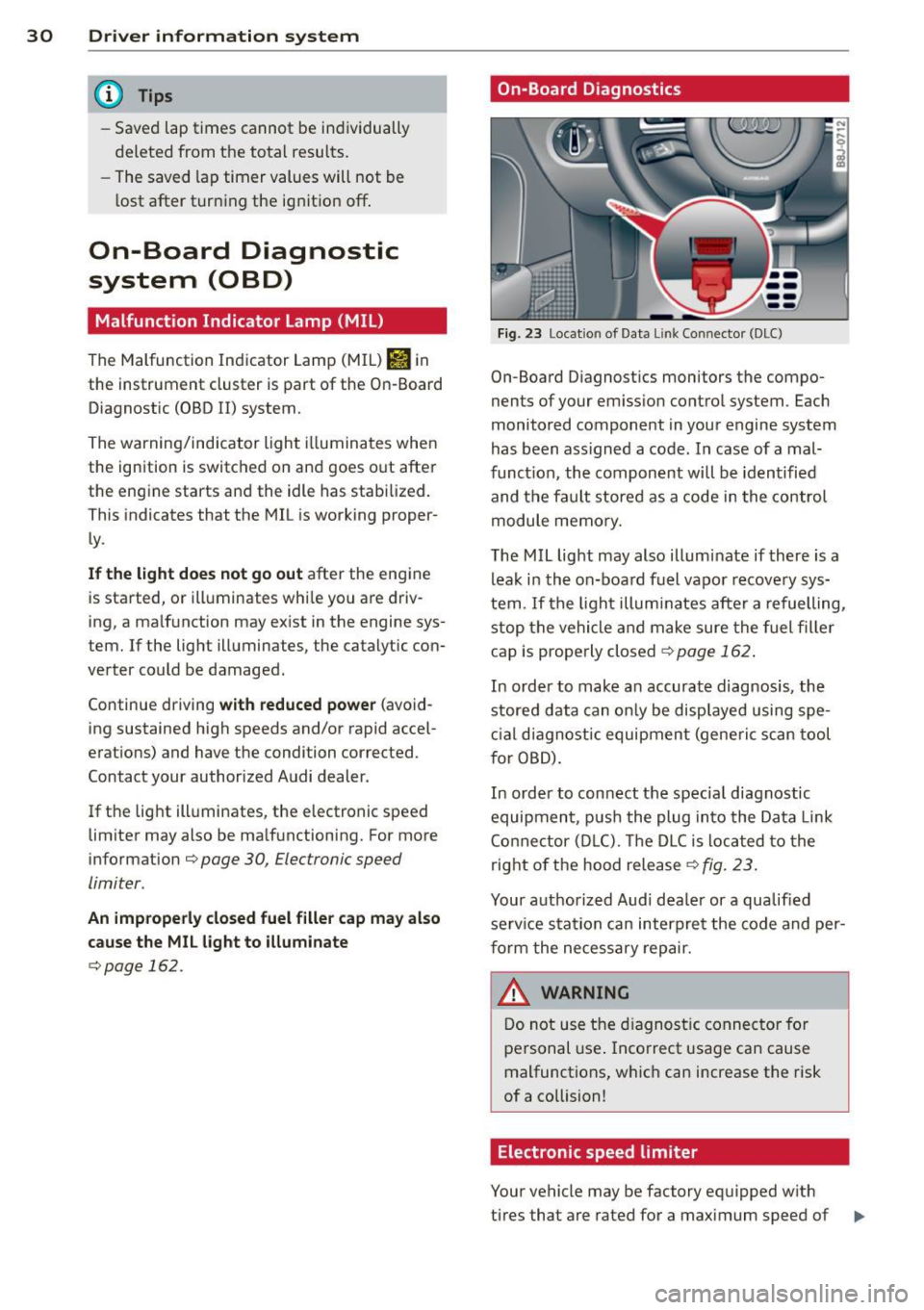
On-Board Diagnostics
Fig. 23 Location of Data Lin k Co nn ector (DLC)
On-Board D iagnostics monitors the compo
nents of your emission control system . Each
monitored component in your engine system
has been ass igned a code. In case of a mal
funct ion, the component will be identified
and the fault stored as a code in the control
module memory.
The MIL light may also illuminate if there is a
leak in the on-board fuel vapor recovery sys
tem .
If the light illuminates after a refuelling,
stop the vehicle and make sure the fuel filler
cap is properly closed¢
page 162 .
In order to make a n accurate diagnosis, the
stored data can only be displayed using spe
cial diagn ostic equipment (generi c scan tool
f or OBD).
In order to connect the spec ial diagnostic
equipment , push the plug into the Data Link
Connector (DLC). Th e DLC is located to the
right of the hood release
¢fig. 23.
Your authorized Audi dealer or a qualified
service s ta tion can interpret the code and per
form the necessary repair.
~ARNING
Do not use the diagnostic connector for
personal use . Incorrect usage can cause
malfunctions, which can increase the risk
of a collision!
Electronic speed limiter
Your vehicle may be factory equipped w ith
-
tires that are rated for a maximum speed of .,..
Page 33 of 244
130 mph (210 km/h). This is less than the
maximum speed of your vehicle. To reduce the
risk of sudden tire failure and loss of control if
the vehicle is operated at excessive speeds,
your vehicle also has an electronic speed limit
er . The electronic speed limiter prevents your
veh icle from going faster than the tire speed
rating . For more informat ion
.:;, page 191 .
If the engine control unit receives faulty vehi
cle roadspeed signa ls, the Malfunction Indica
tor L ight (MIL)
Ill will illuminate . If this oc
curs, contact the nearest authorized Audi
dealer for assistance.
S models
Your vehicle's top speed is elec tronically limit
ed to 155 mph (250 km/h) .
If the engine control unit rece ives fau lty vehi
cle roadspeed signals, the Malfunction Indica
tor Lamp (MIU
¢..ijj will illuminate. If th is oc
curs, contact the nearest authorized Audi
dealer for assistance .
&, WARNING
Always observe the posted speed limits
and adjust your speed to suit prevailing
road, traffic and weather conditions. Never
drive your vehicle faster than the maxi
mum speed rating of the tires installed.
Driver information system 31
Page 78 of 244
![AUDI TT ROADSTER 2015 Owners Manual 76 On the road
ignition, assum ing that you have not changed
or reset the setting.
The speed warning symbo l
ID] (USA models)/
1aj (Canada models) in the warning 1 displ ay
appears](/img/6/57664/w960_57664-77.png "AUDI TT ROADSTER 2015 Owners Manual 76 On the road
ignition, assum ing that you have not changed
or reset the setting.
The speed warning symbo l
ID] (USA models)/
1aj (Canada models) in the warning 1 displ ay
appears")
76 On the road
ignition, assum ing that you have not changed
or reset the setting.
The speed warning symbo l
ID] (USA models)/
1aj (Canada models) in the warning 1 displ ay
appears when you exceed the maximum
speed. It goes o ut when the speed fa lls below
the stored max imum speed .
The speed wa rning symbo l w ill also go out i f
the speed
exceeds the sto red max imum speed
by more than about 25 mph (40 km/h) for at
l east 10 seconds. The stored maxim um speed
is deleted .
Sett ing speed warning 1
¢page 76 .
Speed warning 2
Sto ring warning 2 is re commended if you al
ways
want to be reminded of a certa in speed,
for exam ple when yo u are traveling i n a cou n
try th at has a general maximum speed limi t,
or if you do not want to exceed a specified
speed for winter tires.
The speed w arning 2 symbol,
lDJ (USA mod
e ls)/
lDJ (Canada models) appea rs in the dis
p lay when you exceed the stored speed limit .
Unlike warning 1, it will not go out unti l th e
vehicle speed drops below the stored speed limit.
Setting s peed warn ing 2
¢ page 77 .
@ Tips
Even t hough your vehicle is equ ipped wi th
a speed w arni ng sys tem, yo u shou ld st ill
watch the s peedomete r to make sure you
are not driving faster than the speed lim it.
Speed warning 1: setting a speed limit
Warning threshold 1 is set by the button .
Fig. 8 3 Sectio n of instru ment clus ter: Set/C heck b ut
to n
Storing the max imum speed
.,. Dr ive at the desired ma ximum speed.
.,. Press the knob buttonc>fig .
83 unti l the
speed warn ing
symbo1 1m1 (U SA mode ls)/ 181
(Canada models) appears.
Resetting the maximum speed
.,. Dr ive the veh icle at a spee d of at least
3 mph ( 5 km/h)
.,. Press the knob for more than 2 seconds.
T he speed warning symbol
ID] (USA mode ls)/
k•j
cate that the maximum speed has been stored
s uccessfully .
The maxim um speed remains stored until it is
c h anged by pressing the button aga in b rief ly
or unt il it is deleted by a lengthy push on the
button.
Page 100 of 244
98 Driving Safely
recommended co ld tir e in flat io n pr es
s ur es for the ve h icle at its maxim um c a
p acity weight a nd t he tires t hat we re o n
you r vehicl e at t he time it was ma nufac
tur ed. For r ecomm ended tire pre ss ure s
f o r nor mal load co nd itio ns, pl eas e see
ch ap ter
~pag e 184 .
Reporting Safety
Defects
Applicable to U.S.A.
If you believe that your vehicle
has a defect which could cause
a crash or could cause injury or
death, you should immediately
inform the National Highway
Traffic Safety Administration (NHTSA) in addition to notify
ing Audi of America, Inc.
If NHTSA receives similar com
plaints, it may open an investi
gation, and if it finds that a
safety defects exists in a group
of vehicles, it may order a recall
and remedy campaign. Howev
er, NHTSA cannot become in
volved in individual problems between you, your dealer, or
Audi of America, Inc .
To contact NHTSA, you may call
the Vehicle Safety Hotline toll
free at:
Tel.: 1-888-327-4236 (TTY: 1-800-424-9153) or
1-800-424-9 3 9 3 or you may write to:
Administrator NHTSA 1200 New Jersey Avenue, SE
Washington, D .C. 20590
You can also obtain other infor mation about motor vehicle
safety from :
http://www.safercar .gov
Applicable to Canada
If you live in Canada and you
believe that your vehicle has a
defect that could cause a crash
,
injury or death , you should im
mediately inform Transport
Canada, Defect Investigations
and Recalls. You should also no
tify Volkswagen Group Canada, Inc.
Canadian customers who wish
to report a safety-related de
fect to Transport Canada, De
fe ct Investigation s and Recalls,
may either call Transport Cana
da toll-free at:
Tel.: 1-800-333-0510 or
Tel.: 1-819-994-3328 (Ottawa region and from other coun
tries)
TTY for hearing impaired: Tel.: 1-888-67 5-6863
Page 144 of 244
142 Intelligent technology
switched on all the time. In certain situations
when you need less traction, you can switch
off ESC by pressing the button
l!l . Be sure to
switch ESC on again when you no longer need
less traction.
Anti -toc k brak ing system (ABS)
ABS prevents the wheels from lock ing up
when braking . The vehicle can still be steered
even during hard brak ing . Apply steady pres
sure to the brake pedal. Do not pump the ped
al. A puls ing in the brake pedal ind icates that
the system is he lp ing you to brake the vehicle .
Brake assist sy stem
The brake assist system can decrease braking
d istance. It increases braking power when the
driver presse s the brake pedal quickly in emer
gency si tuations. You must press and hold the
brake peda l until the situation is over .
Anti-slip regulation (ASR)
ASR reduces engine power when the drive
wheels begin to spin and adapts the force to the road conditions . This makes it easier to
start, accelerate and drive up hills.
E lectronic differential lock (EDL )
The ED L brakes wheels that are spinning and
transfers the drive power to the other drive
wheel or whee ls if the vehicle is equipped with
all-wheel drive*. This function is available up
to about 60 mph (100 km/h) .
In extreme cases, EDL a utomatica lly switches
off to help keep the brake on the braked whee l
from overheating. EDL will switch on aga in au
tomatically when conditions have returned to normal.
A WARNING
- ESC, ABS, ASR and ED L can not ove rcome
t h e laws of phy sics. This is espe cial ly im
por tant on slip pery or wet ro ads .
If th e
sys tems begin a ct in g to stab ilize your ve
hicle, you shou ld imme diately change
yo ur speed to match the road and traffic
condit ions. Do not let the inc reased safe
ty provided by these systems tempt you to take risks. Do
ing so w ill increase the
risk of a loss of veh icle control, co llision
and serious pe rsonal injuries .
- Always adapt your speed to road, traffic
and weather conditions. The risk of los
ing control of t he vehicle increases when
driving too fast, espec ially through
curves and on slippe ry or wet roads, and
wh en dr iv ing too clos e to vehicl es u p
ahead. ESC, A BS, the brake ass ist sys
tem, ED L and ASR cannot p reven t coll i
si ons .
- Always acceler ate wi th sp ecial c are on
even, smoo th s urfaces such as those th at
are wet or covered with ice and snow .
The drive wheels can spin even with
these assistance systems that cannot al ways he lp to reduce the risk of loss of ve
h icle co ntrol.
(D Tips
- ABS an d ASR only wo rk correct ly when
all four whee ls are equipped with identi
cal tires . D ifferent tire si zes can lead to a
reduction in engine powe r.
- Yo u may hear noises when the systems
descr ibed are working.
- If the ind icator light Ii) or II (USA
mode ls)/ Ei] (Canada models) appears,
there may be a malfunction
¢ page 18,
¢ page 17.
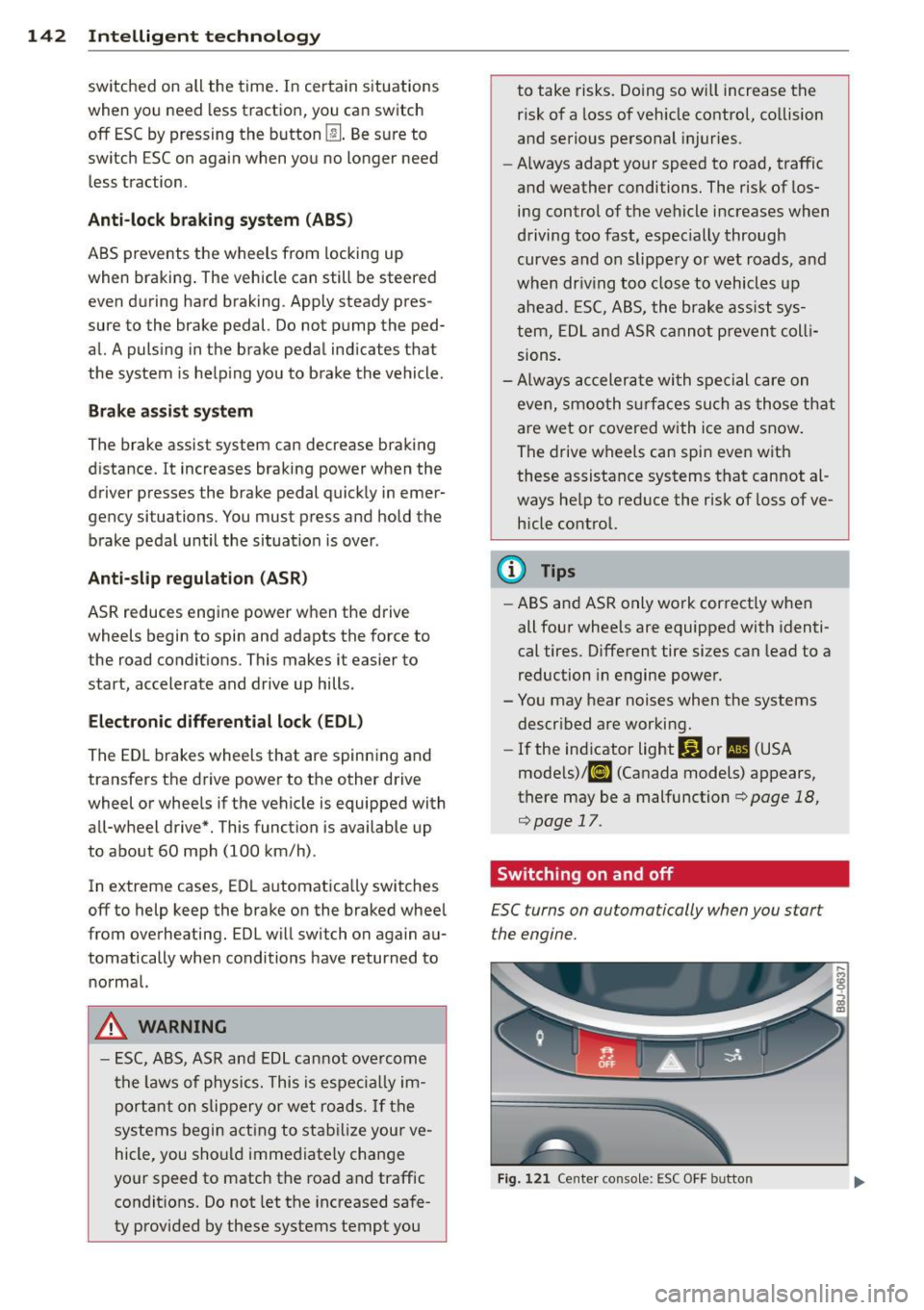
Switching on and off
£SC turns on automatically when you start
the engine.
Fig . 12 1 Ce nte r conso le: ESC OFF b utto n
Page 148 of 244
146 Intellig ent technolog y
-If the power steering system should fail,
or if the eng ine is not running (for exam
ple, while being towed), yo u wi ll st ill be
able to steer the veh icle. However, more
effort will be requ ired to do so .
- If the power steering system is not func
tioning properly, contact your authorized
Audi dealer immediately .
Driving with your
quattro
App lies to vehicles: with all-wheel drive
With all-wheel drive, all four wheels are driv
en.
General information
W ith all-whee l drive , power is distributed to
a ll four wheels . This happens automa tica lly
depending on your dr iv ing sty le and the road
conditions at the time. See also ~
page 141.
The all-wheel drive concept is designed for
high engine powe r. You r vehicle is exception
ally powerful and has ex ce ll ent dr iving charac
teristics bot h under normal driving conditions
and on snow and ice. Always read and fo llow
safety precautions ¢
.&..
Winter ti re s
When dr iving in the w inte r, your ve hicle w ith
a ll-wheel d rive has an advantage, even with
regular tires . In winter road conditions it may
be advisable to mount winter tires (or all-sea
son tir es) for improv ed driveability and brak
ing: these tires must be mounted on
a ll fo ur
wheels . See also ¢ page 195, Win ter tires.
Snow cha in s
Where tire chains are mandatory on certain roads, this normally a lso applies to vehicles
with a ll-wheel drive¢
page 196, Snow
chains.
Replacing whe els /t ires
Vehicles wit h all-wheel drive mus t always
have tires of the same size . Also avoid tires
with different tread depths. For details see page
q page 191, New tires and replacing
tires and wheels .
Off-Road driving ?
Your Aud i does no t have enough g round clear
ance to be used as an off-road vehicle. It is
therefore bes t to avoid rough tracks and un
even terrain as much as possib le . Also refer to
¢ page 150 .
A WARNING
-Always ad just your dr iv ing to road and traf-
f ic conditions. Do not let the extra safety
afforded by all-wheel drive tempt you into
taking extra risks.
- Although the all-wheel drive is very ef
fective, always remember that braking capacity is lim ited by tire t raction . You
should therefore not d rive at excessive
speeds on icy or slippe ry road surfaces.
- On wet road surfaces, be careful not to
d rive too fast because the front whee ls
could begin to slide o n top of the water
(aquaplan ing). If th is should occur, yo u
will have no warning from a s udden in
crease in eng ine speed as wit h a front
wheel drive vehicle. Always drive at
speeds which are su ited to the road con
d itions. -risk of crash.
Energy management
Starting ability is optimized
Energy management controls the distribution
of electrical energy and thus optimizes the
availability of electrical energy for starting the engine.
If a vehicle with a conventional energy system
is not driven for a long per iod of t ime, the bat
te ry is discharged by idling cur rent consume rs
(e .g. immobili zer) . In cert ain circumstances it
can resu lt in the re being insufficient energy
available to start the eng ine.
Intelligent energy management in you r vehi
cle h andles the dis trib ution of e lectr ica l ene r
gy. Start ing ability is ma rkedly improved and
the life of the battery is extended . .,._
Page 151 of 244
Driving and
environment
The first 1
1000
miles
(11500 km) and
afterwards
New engine
The engine needs to be run-in during the first
1,000 miles (1 ,500 km) .
For the first 600 mile s (1,000
kilometre s):
.,. Do not use full throttle .
.,. Do not drive at engine speeds that are more
than 2/3 of the max imimum permitted
RPM .
.,. Avoid high engine speeds.
From 600 to 1,000 miles (1 ,000 to
1,500 kilometres):
.. Speeds can gradually be increased to the
maximum pe rm iss ib le road or eng ine speed .
During and after break-in period
.. Do not rev the engine up to high speeds
when it is cold . T hi s applies whether the
transmission is in N (Neutral) o r in gear.
After the break- in period
.. Do not exceed max imum eng ine speed un
der any circumstances .
.. Upshift into the next hig her gear
before
reaching the red area at the end of the tach
ometer scale
<::;> page 10.
During the first few hours of driving, the en
g ine 's inter na l friction is higher than later
when all the moving pa rts have been broken
i n. How well this break-in p rocess is done de
pends to a considerable ex tent on the way t he
ve hicl e is driven d uring the first 1,000 miles
(1, 500 kilome tres) .
(D Note
Extremely high engine speeds a re auto
mat ic al ly reduced. However, t hese RPM-
Driving and environment 149
limits were programmed for an eng ine
well run-in, not a new eng ine.
@ For the sake of the environment
Do not d rive wi th unnecessar ily h igh en
gine speeds -upshifting ear ly saves f uel,
r educes noise and protects the environ
ment.
New tires
If your vehicle is running on new tires, drive
particularly carefu l for the first 350 miles
(500 ki lometres) after fitting .
A WARNING
-New tires tend to be s lippery and must a l-
so be "b roken-in". Be s ure to remembe r
this dur ing t he firs t 35 0 m iles (500 kilo
me tres) . Brake gent ly . Avo id following
closely behind other vehicles or other sit uations that m ight require sudden, hard
b raking.
New brake pads
Remember that new brake pads do not have a
full brak ing effect during the first 250 miles
(400 kilometres) after they are installed.
New brake pads have to be "burnished in" be
fore they have optima l grab¢ .&..
D uring the break-in period, yo u should avoid
putting seve re loads on the brakes . Severe
l oads include, for example, su dden hard brak
ing, in particular at very h igh speeds or, for
example, on mou nta in passes.
A WARNING
Until t hey develop the maximum "bite" fo r
best stopping power, the s urfaces on new
b rake pads requ ire some "brea king- in" dur
in g the initial 10 0 to 150 miles (15 0 to
20 0 kilome tres) of normal c ity dr iv ing. Yo u
can compensate for this by press ing the
b rake peda l more f irm ly . This applies
whenever new pads are installed.
•
•
Page 153 of 244
the exhaust system and this could cause
the catalytic converter to overheat.
- Do not turn off the ignition while the ve
hicle is moving .
- Do not continue to operate yo ur vehicle
under these conditions, as otherwise fuel
can reach the cata lytic converter. This
could result in overheating of the con
verter, requ iring its replacement.
- To assure efficient operation of the Emis
sion Control System:
- Have your veh icle ma inta ined properly
and in acco rdance with the service rec
ommendations in your Warranty
&
Ma intenan ce booklet.
- Lac k of proper maintenance as well as
improper use of the vehicle will impa ir
t he funct ion of the emission control
system and cou ld lead to damage.
@ For the sake of the environment
Even when the Emission Contro l System is
operating p roperly, the exhaust gas can
have a s ulfu r- like exhaust gas smell under
some operating states. This depends on
the s ulfur content of the fue l being used.
Using a different brand of fuel may help,
or filling the tank w ith lead-free super
grade gasoline .
Shutting down vehicle
If you would like your veh icle to remain inop
erat ive for a longer period of time, contact an
Aud i or other specialized deale r. T hey can ad
vise you on necessary precautions e.g . corro
sion prevention, ma intenance and storage.
Pay attention to add itiona l information con
cerning the battery . Re fer to~
page 175.
Dri vin g and en vironm ent 151
Operate your vehicle
economically and
minimize pollution
General
Your personal style of driving will determine
the economy of your vehicle, as well as ex
haust and noise levels.
Fuel economy, environmenta l impact, and
wear on your eng ine, brakes and tires largely
depend on three factors:
- your personal d riving s tyle
- operati ng conditions
- technical limitat ions
If you ant ic ipate what you need to do next and
drive economically, you can easily cut you r
fuel consumpt io n by 1O-lS percent . T his sec
tion w ill give you some tips on how you can
help the env ironment and your po cketbook.
@ Tips
The consumption estimates as published
by ENVIRONME NTAL PROT ECTI ON AGENCY
( E PA) a nd Tra nsp o rt Canada may no t corre
spond to your actual consump tion on the
r oad, which will va ry depending upon vehi
cle load and speed, road and weather con
ditions, trip length, etc.
Drive smoothly and keep a lookout
ahead
Vehicles use the most fuel when they are ac
celerating.
Avoid unnecessary acce lerating and braking .
Vehicles use the most f ue l when they are ac
ce le rat ing. If you ant icipate what is going to
happen next, you will need to brake less and,
thus, acce lerate less . Let the vehicle coast
whenever possible - for examp le when you see
that the next traff ic light is red.
•
•
Page 156 of 244
154 Vehicle care and cleaning
Vehicle care and
cleaning
General information
Regular, proper care helps to maintain your
vehicle 's value. It can also be a requirement
when subm itting warranty claims for corro
sion damage and paint defects on the body .
The required cleaning and care products can be obtained from your authorized Audi dealer
or a qualified workshop. Read and follow the instructions for use on the packaging .
A WARNING
-Us ing cleaning and care products incor
rectly can be dangerous to your hea lth .
- Always store cleaning and care products
out of reach of children to reduce the ris k
of poisoning.
@ For the sake of the environment
-Preferably use environmentally-friendly
products when buying cleaning agents .
- Do not d ispose of leftover cleaning and
ca re products with household trash .
Car washes
-
The longer that deposits such as insects, bird
droppings , tree sap or road salt rema in on the
vehicle, the more the surface can be dam
aged. High temperatures such as those
caused by s unligh t increase the corrosive ef
fect.
Before washing, wet heavy deposits with plen
ty of water.
Also, wash the underside of your vehicle once
road salt stops be ing used for the season .
Pressure wa shers
When washing your vehicles with a pressure
washer, always follow the operating instruc
tions provided w ith the pressure washer. Th is
is especially important in regard to the pres
sure and spray ing distance . Do not aim the
spray directly at seals on side w indows, doors, the
hood, the rear lid or the convertible top or
at tires, rubber hoses, insulating material
orsensors* . Keep a distance of at least 16 in
ches (40 cm) .
Do not remove snow and ice with a pressure
washer.
Never use rotary nozzles or high pressure noz
zles.
The water temperature must not be above
140
°F (60 °() .
Automatic car washes
Spray off the vehicle before washing.
Make sure that the windows are closed and
the windshie ld wipers are off. Follow instruc
tions from the car wash operator, especially if
there are accessories attached to your vehicle .
If possible, use car washes that do not have
brushes .
Washing by hand
Clean the vehicle starting from the top and
working down using a soft sponge or cleaning
brush . Use solvent-free cleaning products.
Washing vehicles with matte finish paint
by hand
To avoid damaging the paint when washing,
first remove dust and large particles from
your vehicle. Insects, grease spots and finger
prints are best removed with a special cleaner
for matte finish paint .
Apply the product using a microfiber cloth. To
avoid damaging the paint surface, do not use
too much pressure.
Rinse the vehicle thoroughly with water. Then
clean using a neutra l shampoo and a soft mi
crofiber cloth.
Rinse the vehicl e thoroughly again and let it
air dry. Remove any water residue using a sham my.
Stubbo rn deposits such as bird droppings o r
tree sap are best removed with p lenty of wa-
ter and a microfiber cloth. .,.