phone AUDI TT ROADSTER 2016 User Guide
[x] Cancel search | Manufacturer: AUDI, Model Year: 2016, Model line: TT ROADSTER, Model: AUDI TT ROADSTER 2016Pages: 306, PDF Size: 31.82 MB
Page 133 of 306
Downloaded from www.Manualslib.com manuals search engine 0
N
,.....
N
......
0
,.....
Vl
CX) ®
(J)
®
®
@
@
@
@
@
@
@
@
@
@
@
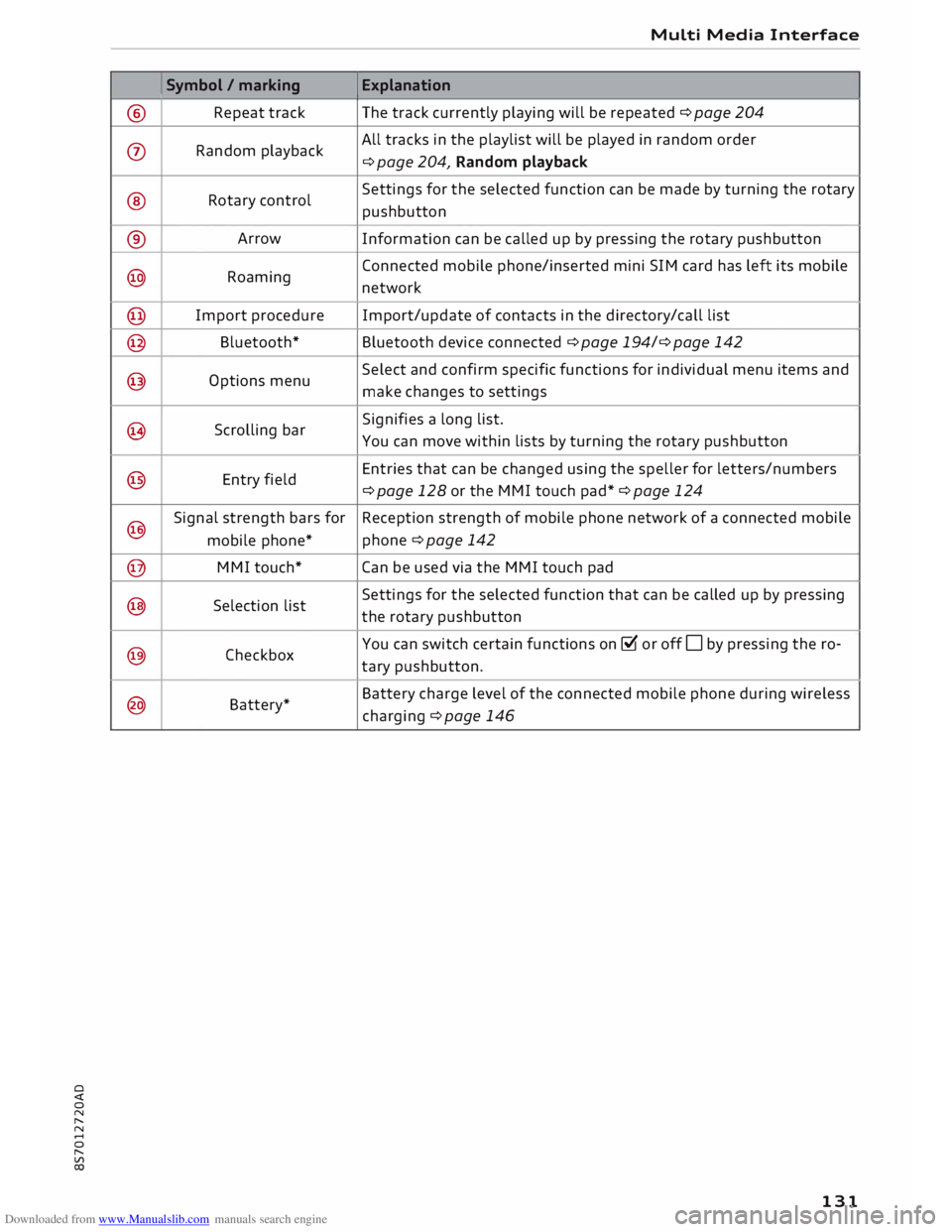
Symbol
/ marking
Repeat track
Random playback
Rotary control
Arrow
Roaming
Import procedure
Bluetooth*
Options menu
Scrolling bar
Entry field
Signal strength bars for
mobile phone*
MMI touch*
Selection list
Checkbox
Battery* Multi
Media Interface
Explanation
The track currently playing will be repeated ¢ page 204
All tracks in the playlist will be played in random order
¢ page 204, Random playback
Settings for the selected function can be made by turning the rotary
pushbutton
Information can be called up by pressing the rotary pushbutton
Connected mobile phone/inserted mini SIM card has left its mobile
network
Import/update of contacts in the directory/call list
Bluetooth device connected ¢ page 194/¢ page 142
Select and confirm specific functions for individual menu items and
make changes to settings
Signifies a long list.
You can move within lists by turning the rotary pushbutton
Entries that can be changed using the speller for letters/numbers
¢ page 128 or the MMI touch pad*¢ page 124
Reception strength of mobile phone network of a connected mobile
phone ¢ page 142
Can be used via the MMI touch pad
Settings for the selected function that can be called up by pressing
the rotary pushbutton
You can switch certain functions on� or off Oby pressing the ro-
tary pushbutton.
Battery charge level of the connected mobile phone during wireless
charging ¢ page 146
131
Page 134 of 306
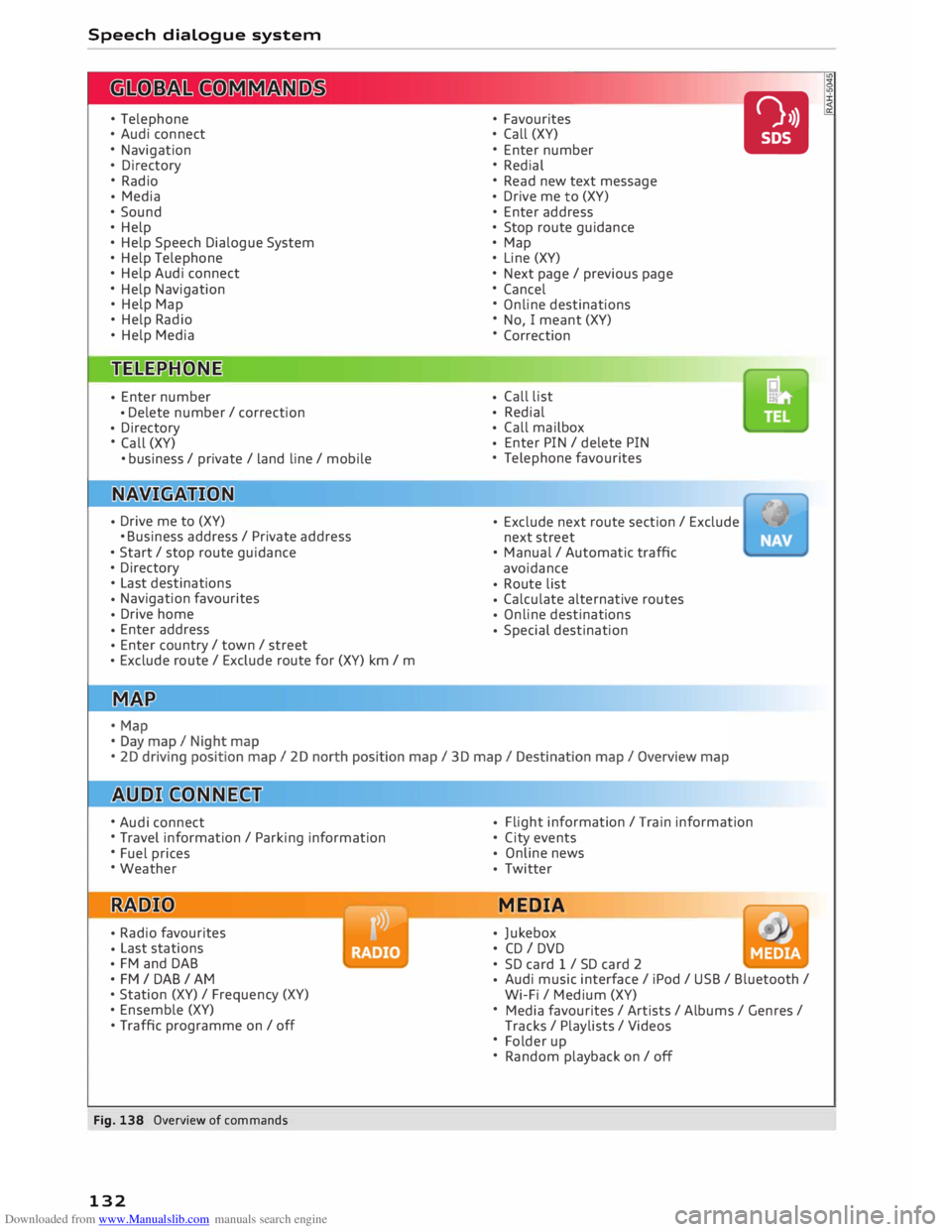
Downloaded from www.Manualslib.com manuals search engine Speech
dialogue system
• Telephone
• Audi connect
• Navigation
• Directory
• Radio
• Media
• Sound
• Help
• Help Speech Dialogue System
• Help Telephone
• Help Audi connect
• Help Navigation
• Help Map
• Help Radio
• Help Media
• Enter
number
• Delete
number / correction
• Directory
• Call (XY)
•business/ private/ Land line/ mobile
• Drive
me to (XY)
• Business address/ Private address
• Start/ stop route guidance
• Directory
• Last destinations
• Navigation
favourites
• Drive
home
• Enter
address
• Enter
country/ town/ street
• Exclude
route/ Exclude route for (XY) km/ m
• Audi connect
• Travel information / Parking information
• Fuel prices
• Weather
• Radio
favourites
• Last
stations
• FM
and DAB
•FM/ DAB/ AM
• Station (XY) / Frequency (XY)
• Ensemble (XY)
• Traffic programme on/ off
Fig. 138 Overview of commands
132 •
Favourites
• Call (XY)
• Enter number
• Redial
• Read new text message
• Drive
me to (XY)
• Enter address
• Stop route guidance
• Map
• Line (XY)
• Next page / previous page
• Cancel
• Online destinations
• No, I meant (XY)
• Correction
• Call
list
• Redial
• Call
mailbox
• Enter
PIN / delete PIN
• Telephone favourites
• Exclude
next route section / Exclude
next street
• Manual / Automatic traffic
avoidance
• Route
list
• Calculate
alternative routes
• Online
destinations
• Special
destination •
• Flight
information / Train information
• City events
• Online
news
• Twitter
MEDIA
• Jukebox
• CD I DVD
• SD card 1 / SD card 2
• Audi
music interface / iPod / USB / Bluetooth /
Wi-Fi / Medium (XY)
• Media favourites/ Artists/ Albums/ Genres/
Tracks / Playlists / Videos
• Folder up
• Random playback on / off
Page 135 of 306
Downloaded from www.Manualslib.com manuals search engine 0
N
,.....
N
....
0
,.....
Vl
CX) Speech
dialogue system
How to use the speech
dialogue system
Applies to: vehicles with speech dialogue system
You can operate many infotainment functions
conveniently by voice.
Important: The ignition and the MMI system
must be switched on, you must not be talking on
the phone, and the parking aid must not be ac
tive.
� To switch on: Briefly press the [2!l button @ on
the multi-function steering wheel¢ page 23,
Fig. 10 and give a spoken command after the
beep signal.
� To switch off: Press and hold the [2!l button for
several seconds. Or: Say the command Cancel.
� To pause: Say the command Pause. To end the
pause, press the [2!l button.
� To make a correction: Press the� button once
® ¢page 21, Fig. 8. Or: Say the command Cor
rection.
Input help
The system guides you through the input routine
with cues and messages.
- Input help messages on screen: After the
speech dialogue system is switched on, a selec
tion of possible commands will be shown. The
command display can be switched on/off via
IM ENU I
> Settings > left control button > MMI
settings > Speech dialogue system.
- Spoken input help cues: To have the system
play the commands currently possible, press
the [2!l button on the multi-function steering
wheel and say Help.
How to help the system understand you
Speak clearly in a normal volume. Speak louder if
you are driving fast.
Speak in a normal tone without long pauses.
Avoid speaking when the speech dialogue system
is saying a cue. Speech
dialogue system
Close doors and windows and soft top* to reduce
background noise. Make sure that passengers are
not talking when you say a command.
Keep the air outlets of the air distribution system
pointed away from the microphone, which is fit
ted in the vicinity of the front interior lights in
the headliner/on the driver's seat belt*. For more
information about the seat belt microphone, re
fer to¢ page 157.
The system should only be operated by the driv
er, since the handsfree microphone is directed
towards the driver.
Other settings
Refer to¢ page 218, Speech dialogue system.
&_ WARNING
- Please direct your full attention to the road
at all times! As the driver, you have full re
sponsibility for the safety of the vehicle and
other road users. For this reason, you should
only use the functions in a manner that al
lows you to maintain control of the vehicle
in all situations -accident risk!
- The speech dialogue system must not be
used in cases of emergency, since the voice
changes in stressful situations. This could
result in a failed or delayed telephone con
nection. Always dial emergency numbers
manually!
(@ Note
- The dialogue is paused when an incoming
telephone call is received; you can continue
the dialogue by ignoring the call. If you an
swer the call, the dialogue will be cancelled.
- No navigation cues* or traffic announce
ments* are played when a dialogue is active.
- You can select an entry from a list both via
the speech dialogue system and using the
rotary pushbutton.
- The speech dialogue system does not sup
port commands in Arabic, Norwegian or
Hungarian.
133
Page 136 of 306
Downloaded from www.Manualslib.com manuals search engine Speech
dialogue system
Notes on the overviews
of commands
Applies to: vehicles with speech dialogue system
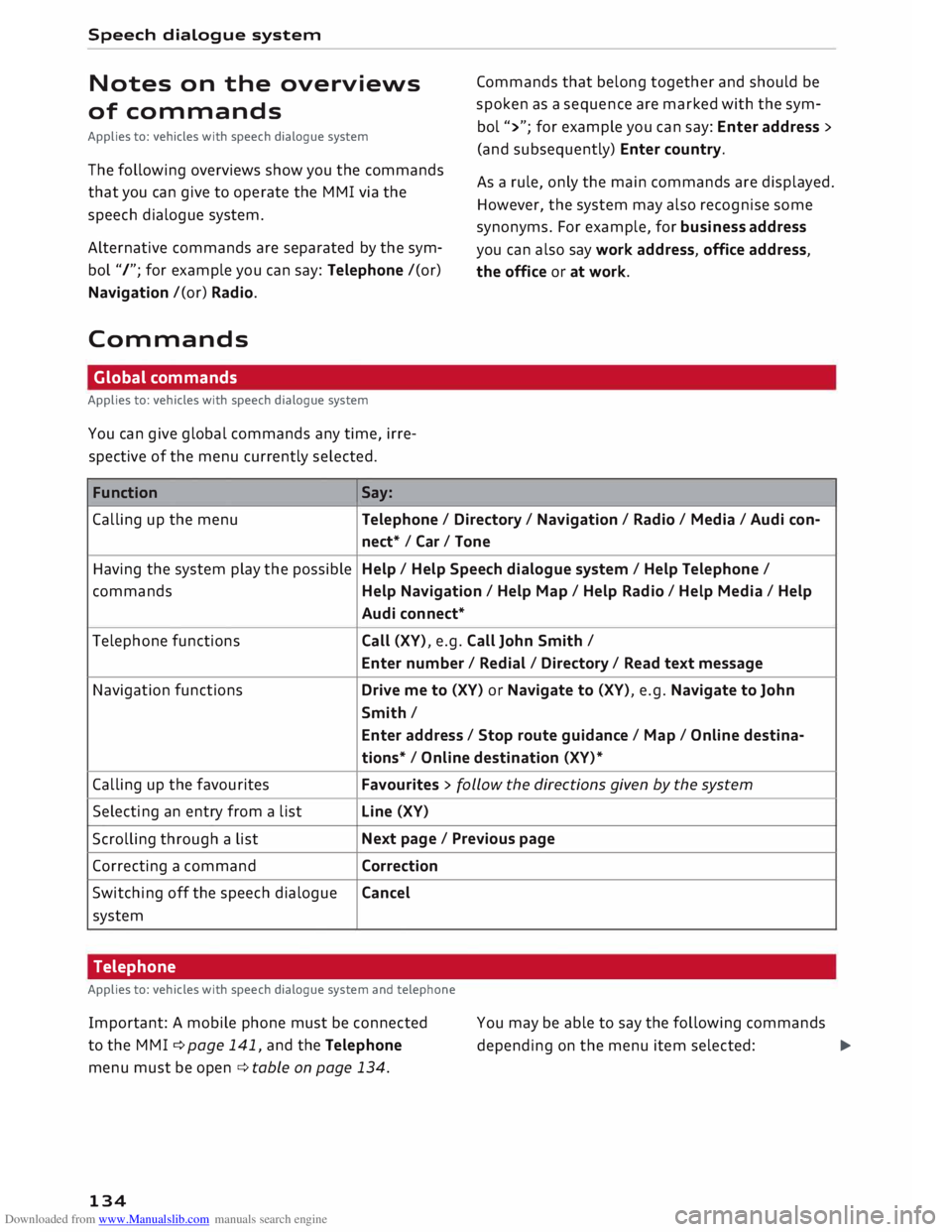
The following overviews show you the commands
that you can give to operate the MMI via the
speech dialogue system.
Alternative commands are separated by the sym
bol "/"; for example you can say: Telephone /(or)
Navigation /(or) Radio.
Commands Global commands
Applies to: vehicles with speech dialogue system
You can give global commands any time, irre
spective of the menu currently selected.
Function Say: Commands
that belong together and should be
spoken as a sequence are marked with the sym
bol ">"; for example you can say: Enter address >
(and subsequently) Enter country.
As a rule, only the main commands are displayed.
However, the system may also recognise some
synonyms. For example, for business address
you can also say work address, office address,
the office or at work.
Calling up the menu Telephone/ Directory/ Navigation / Radio / Media / Audi con-
nect* /Car/ Tone
Having the system play the possible Help
/ Help Speech dialogue system / Help Telephone /
commands Help Navigation / Help Map/ Help Radio/ Help Media / Help
Audi connect*
Telephone functions Call (XV), e.g. Call John Smith /
Enter number/ Redial/ Directory/ Read text message
Navigation functions Drive me to (XV) or Navigate to (XV), e.g. Navigate to John
Smith/ Enter address / Stop route guidance/ Map/ Online destina-
tions* / Online destination (XV)*
Calling up the favourites Favourites
> follow the directions given by the system
Selecting an entry from a list Line
(XV)
Scrolling through a list Next
page / Previous page
Correcting a command Correction
Switching off the speech dialogue Cancel
system
Telephone
Applies to: vehicles with speech dialogue system and telephone
Important: A mobile phone must be connected
to the M MI ¢ page 141, and the Telephone
menu must be open ¢ table on page 134.
134 You
may be able to say the following commands
depending on the menu item selected:
�
Page 137 of 306
Downloaded from www.Manualslib.com manuals search engine 0
N
,.....
N
......
0
,.....
Vl
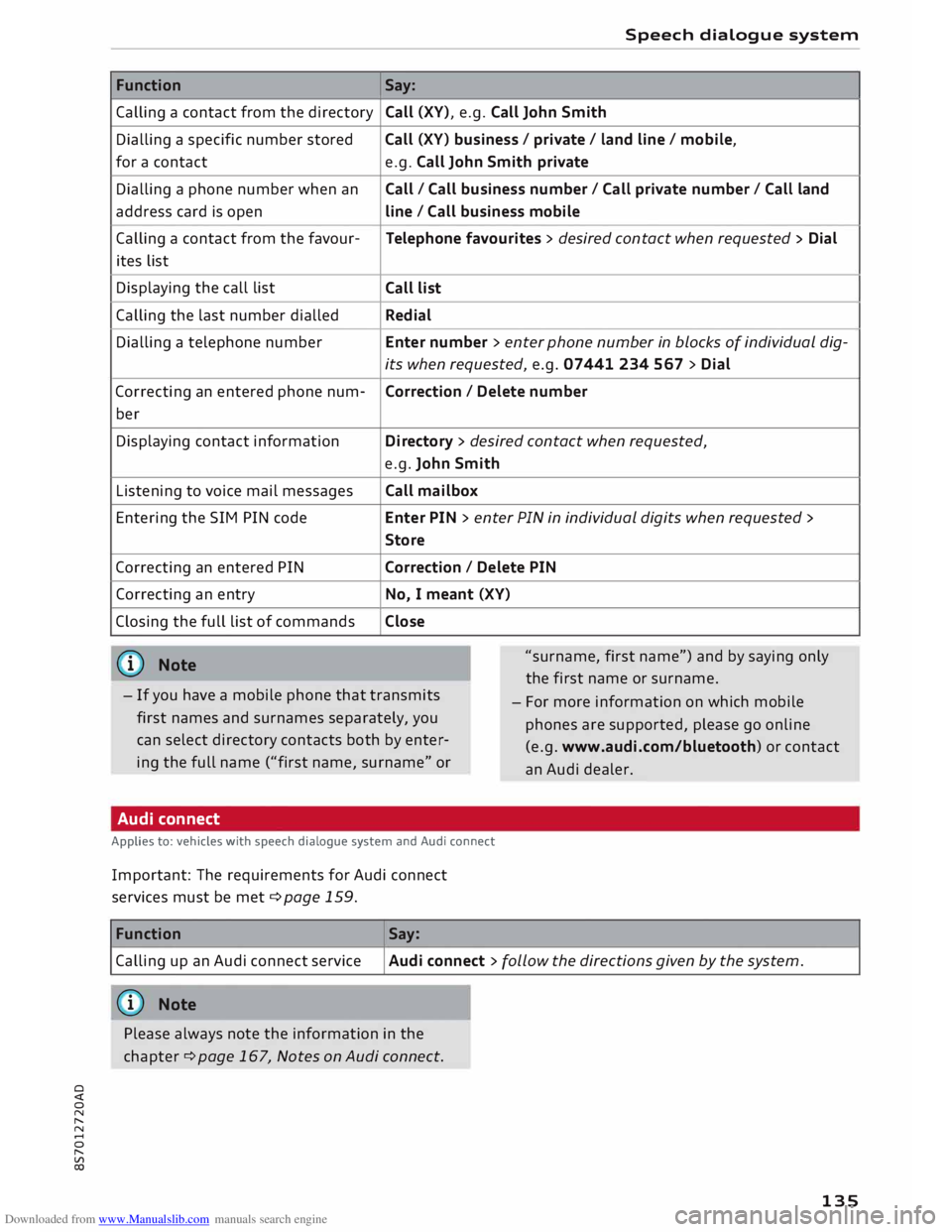
CX) Function
Calling a contact from the directory
Dialling a specific number stored
for a contact
Dialling a phone number when an
address card is open
Calling a contact from the favour-
ites list
Displaying the call list
Calling the last number dialled
Dialling a telephone number
Correcting an entered phone num-
ber
Displaying contact information
Listening to voice mail messages
Entering the SIM PIN code
Correcting an entered PIN
Correcting an entry
Closing the full list of commands
((I)) Note Speech
dialogue system
Say: Call (XV), e.g. Call John Smith
Call (XV) business/ private/ land line/ mobile,
e.g. Call John Smith private
Call/ Call business number/ Call private number/ Call land
line / Call business mobile
Telephone favourites > desired contact when requested > Dial
Call list
Redial
Enter number > enter phone number in blocks of individual dig-
its when requested, e.g. 07441 234 567 > Dial
Correction I Delete number
Directory > desired contact when requested,
e.g. John Smith
Call mailbox
Enter PIN > enter PIN in individual digits when requested >
Store
Correction I Delete PIN
No, I meant (XV)
Close
"surname, first name") and by saying only
the first name or surname.
- If you have a mobile phone that transmits
first names and surnames separately, you
can select directory contacts both by enter
ing the full name ("first name, surname" or -
For more information on which mobile
phones are supported, please go on line
(e.g. www.audi.com/bluetooth) or contact
an Audi dealer.
Audi connect
Applies to: vehicles with speech dialogue system and Audi connect
Important: The requirements for Audi connect
services must be met ¢page 159.
Function Say:
Calling up an Audi connect service
Audi connect > follow the directions given by the system.
((!)) Note
Please always note the information in the
chapter ¢ page 167, Notes on Audi connect.
135
Page 138 of 306
Downloaded from www.Manualslib.com manuals search engine Speech
dialogue system
Messages
Applies to: vehicles with speech dialogue system and SIM card reader
A mini SIM card with a messaging option must be
inserted in the control console's SIM card reader*
¢ page 144 and the option Telephone installed
in vehicle (SIM card) must have been selected
¢page 145. (MAP
-Message Access Profile) and must be con
nected to the MM I ¢ page 142. Please refer to
the operating instructions for your mobile phone
to find out whether it supports this function.
Or: Your mobile phone must have message ac
cess rights activated in its Bluetooth settings
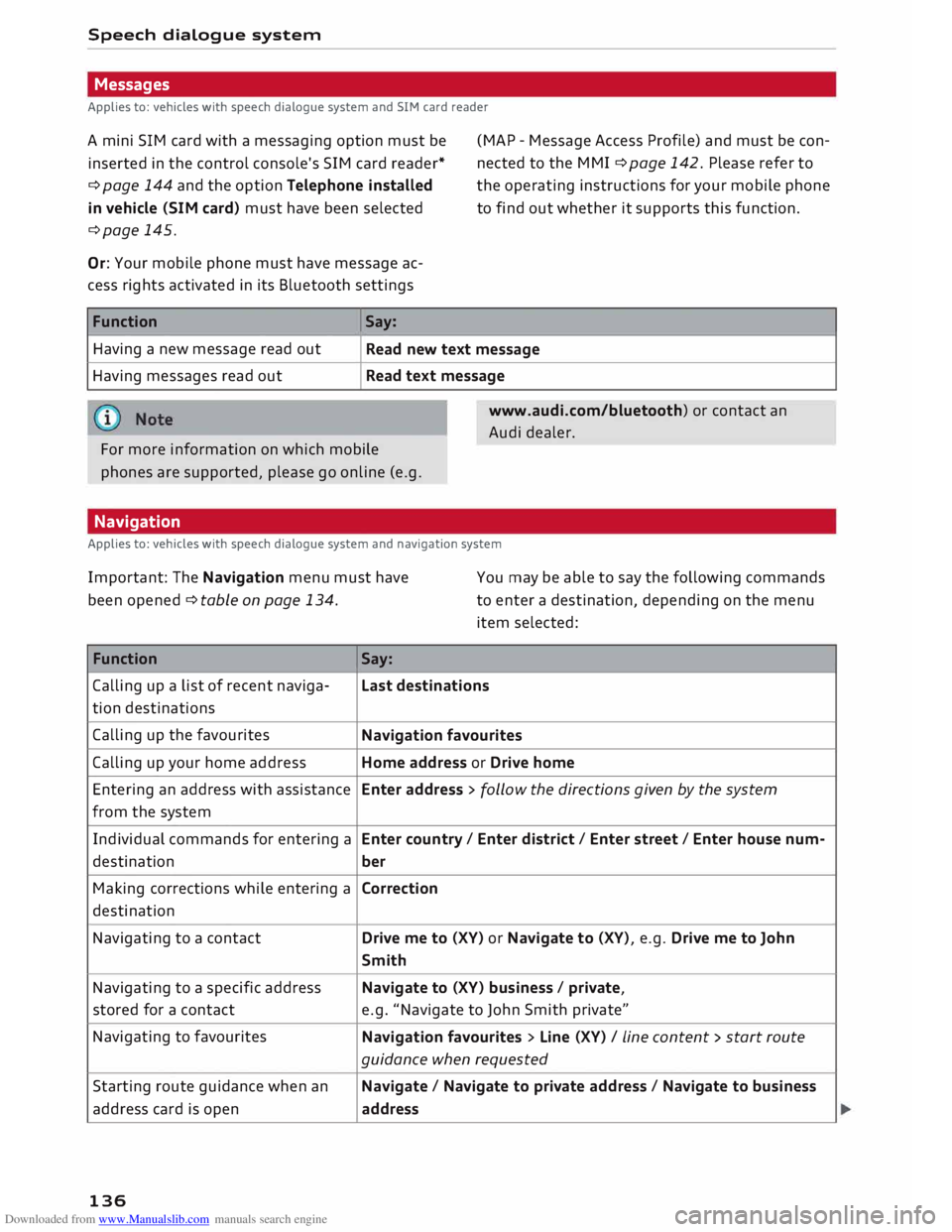
Function Having a new message read out
Having messages read out Say:
Read new text message
Read text message
www.audi.com/bluetooth) or contact an
Audi dealer.
For more information on which mobile
phones are supported, please go online (e.g.
Navigation
Applies to: vehicles with speech dialogue system and navigation system
Important: The Navigation menu must have
been opened ¢ table on page 134. You
may be able to say the following commands
to enter a destination, depending on the menu
item selected:
Function Say:
Calling up a list of recent naviga- Last destinations
tion destinations
Calling up the favourites
Navigation favourites
Calling up your home address Home address or Drive home
Entering an address with assistance Enter address > follow the directions given by the system
from the system
Individual commands for entering a Enter country/ Enter district/ Enter street/ Enter house num-
destination ber
Making corrections while entering a
Correction
destination
Navigating to a contact Drive
me to (XV) or Navigate to (XV), e.g. Drive me to John
Smith
Navigating to a specific address Navigate
to (XV) business/ private,
stored for a contact e.g.
"Navigate to John Smith private"
Navigating to favourites
Navigation favourites > Line (XV) / Line content> start route
guidance when requested
Starting route guidance when an Navigate/ Navigate to private address / Navigate to business
address card is open
address
136
Page 140 of 306
Downloaded from www.Manualslib.com manuals search engine Speech
dialogue system
- Please always note the information in the
chapter ¢ page 167, Notes on Audi con
nect.
Radio
Applies to: vehicles with speech dialogue system
Important: The Radio menu must have already
been opened. You
may be able to say the following commands
depending on the waveband selected:
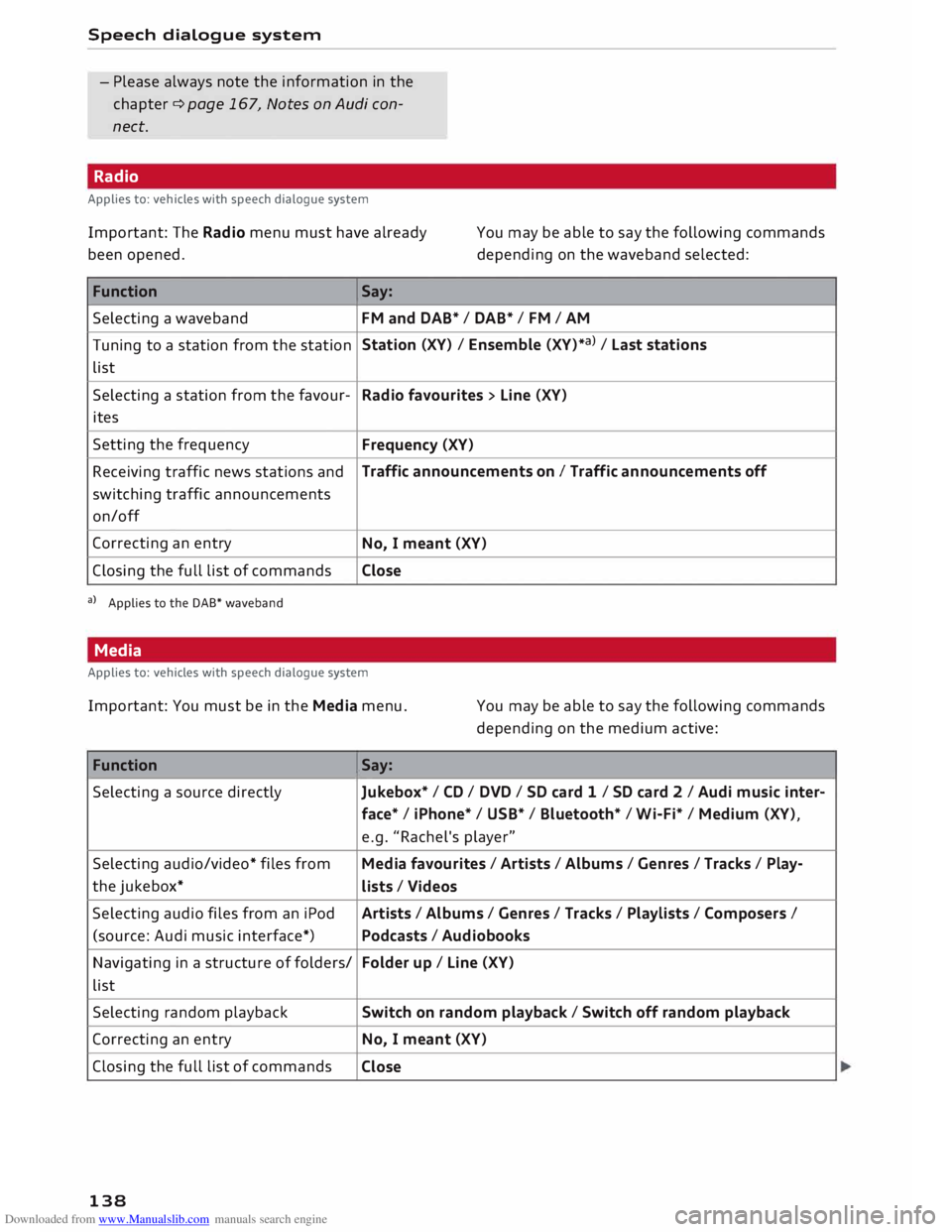
Function Say:
Selecting a waveband
FM and DAB* / DAB* / FM / AM
Tuning to a station from the station Station
(XV) / Ensemble (XV)*a) / La st stations
list
Selecting a station from the favour-
Radio favourites > Line (XV)
ites
Setting the frequency
Frequency (XV)
Receiving traffic news stations and Traffic
announcements on I Traffic announcements off
switching traffic announcements
on/off
Correcting an entry
No, I meant (XV)
Closing the full list of commands Close
a) Applies to the DAB* waveband
Media
Applies to: vehicles with speech dialogue system
Important: You must be in the Media menu. You may be able to say the following commands
depending on the medium active:
Function Say:
Selecting a source directly
Jukebox*/ CD/ DVD/ SD card 1 / SD card 2 I Audi music inter-
face* I iPhone* / USB* / Bluetooth* / Wi-Fi* / Medium (XV),
e.g. "Rachel's player"
Selecting audio/video* files from Media favourites / Artists / Albums / Genres I Tracks / Play-
the jukebox*
Lists / Videos
Selecting audio files from an iPod
Artists/ Albums / Genres I Tracks / Playlists / Composers I
(source: Audi music interface*) Podcasts / Audiobooks
Navigating in a structure of folders/ Folder
up/ Line (XV)
list
Selecting random playback Switch
on random playback/ Switch off random playback
Correcting an entry
No, I meant (XV)
Closing the full list of commands
Close
138
Page 141 of 306
Downloaded from www.Manualslib.com manuals search engine CD
CAUTION
Please always observe the information ¢(0 in
Wi-Fi hotspot on page 166.
Natural commands
Applies to: vehicles with speech dialogue system Speech
dialogue system
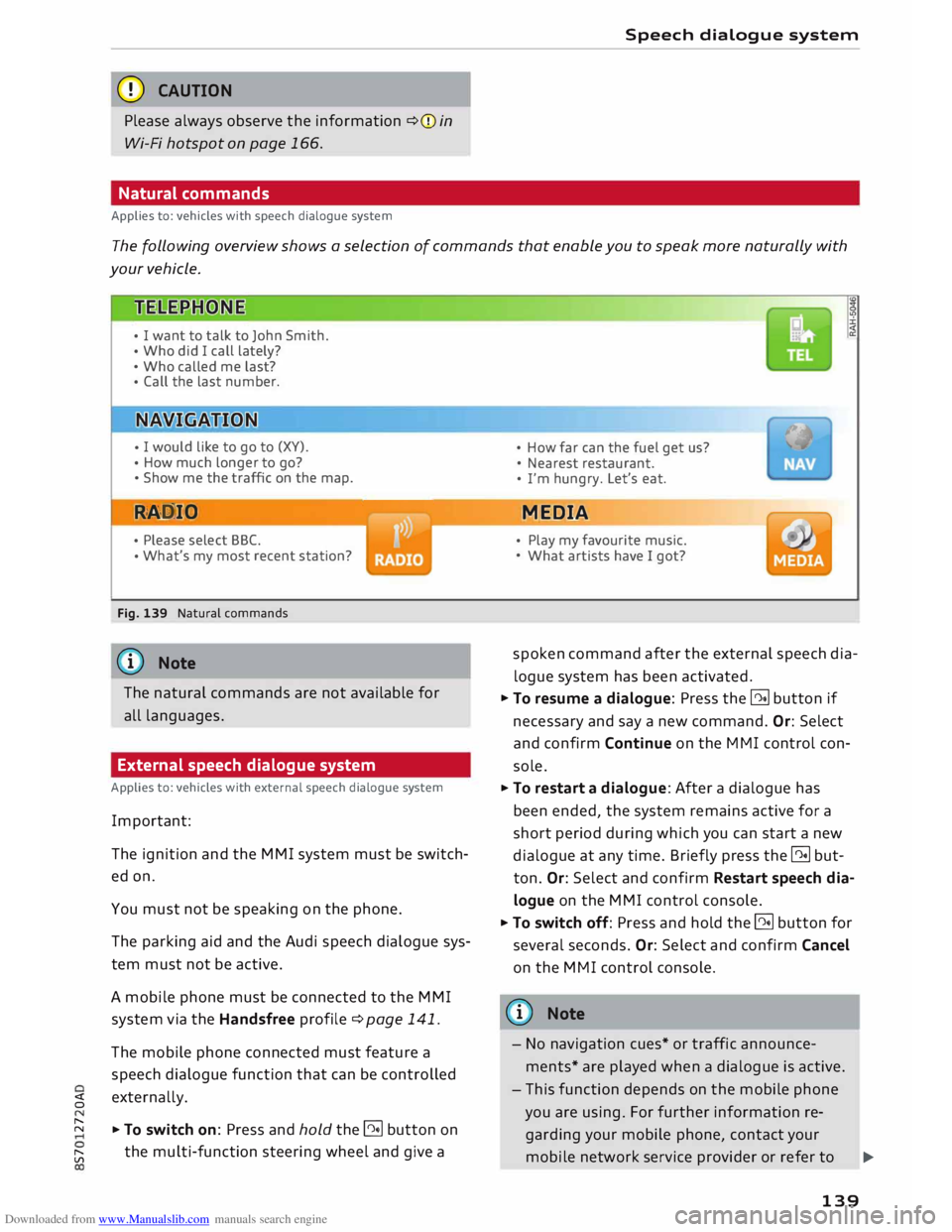
The following overview shows a selection of commands that enable you to speak more naturally with
your vehicle.
• I want to talk to John Smith.
• Who did I call lately?
• Who called me last?
• Call the last number.
• I
would like to go to (XY).
• How much longer to go?
• Show me the traffic on the map.
RAD IO
• Please select BBC.
• What's
my most recent station?
Fig. 139 Natural commands
ijj} Note
The natural commands are not available for
all languages.
External speech dialogue system
Applies to: vehicles with external speech dialogue system
Important: The ignition and the MMI system must be switch
ed on.
You must not be speaking on the phone.
The parking aid and the Audi speech dialogue sys
tem must not be active.
A mobile phone must be connected to the MMI
system via the Handsfree profile¢ page 141.
The mobile phone connected must feature a
speech dialogue function that can be controlled
� externally.
� � To switch on: Press and hold the@!l button on
[;:j the
multi-function steering wheel and give a •
How far can the fuel get us?
• Nearest restaurant.
• I'm hungry. Let's eat.
MEDIA
• Play my favourite music.
• What artists have I got?
spoken command after the external speech dia
logue system has been activated.
� To resume a dialogue: Press the @!l button if
necessary and say a new command. Or: Select
and confirm Continue on the MMI control con
sole.
� To restart a dialogue: After a dialogue has
been ended, the system remains active for a
short period during which you can start a new
dialogue at any time. Briefly press the @!l but
ton. Or: Select and confirm Restart speech dia
logue on the MMI control console.
� To switch off: Press and hold the @!l button for
several seconds. Or: Select and confirm Cancel
on the MMI control console.
@ Note
- No navigation cues* or traffic announce
ments* are played when a dialogue is active.
- This function depends on the mobile phone
you are using. For further information re
garding your mobile phone, contact your
mobile network service provider or refer to
..,_
139
Page 142 of 306
Downloaded from www.Manualslib.com manuals search engine Speech
dialogue system
the operating instructions for your mobile
phone.
- AUDI AG only enables you to access your
mobile phone's speech dialogue system and
accepts no responsibility for the content
and commands of the external speech dia
logue system.
140
Page 143 of 306
Downloaded from www.Manualslib.com manuals search engine 0
N
,.....
N
......
0
,.....
Vl
CX) Telephone
Introduction
Applies to: vehicles with telephone
You have different options for making calls in
your vehicle via the MMI; this depends on your
vehicle's equipment and the features of your mo
bile phone.
Handsfree operation
After connecting your mobile phone to the MMI
system via Bluetooth, you can operate the hands
free system and the telephone functions conven
iently via the MMI. Your phone calls will be made
via the antenna of your mobile phone.
With the Audi phone box*, you can use the vehi
cle's external aerial to make calls. The use of the
external aerial reduces radiation in the vehicle
and also ensures better reception quality
¢page 146.
Car phone d
)
As part of Audi connect*, the Audi phone box* in
cludes a car telephone function which can be
used via a separate mini SIM card in the SIM card
reader* or an rSAP 2
>-enabled mobile phone. With
the car telephone function, you can use the vehi
cle's external aerial to make calls. The use of the
external aerial reduces radiation in the vehicle
and also ensures better reception quality
¢page 146.
Once a connection has been established success
fully, you can also change the profiles at a later
time. Refer to¢ page 213, Connection manag
er.
A WARNING
- According to health organisations, mobile
phones may interfere with the function of
pacemakers. A minimum distance of 20 cm
should be kept between the mobile phone
aerial and the pacemaker.
l) Not available in all markets. On vehicles with Audi con
nect* and Audi phone box*
2 > Remote SIM Access Profile Telephone
- Do not carry a mobile phone in your breast
pocket directly over the pacemaker when
the phone is switched on.
- If you suspect interference, switch the
mobile phone off immediately.
- The speech dialogue system*¢ page 133
must not be used in cases of emergency,
since the voice changes in stressful situa
tions. This could result in a failed or delayed
telephone connection. Always dial emergen
cy numbers manually!
- Switch off your mobile phones in all areas
where there may be a risk of explosion. Re
member that these areas may not always be
adequately marked. Such places are filling
stations, fuel and chemical storage facilities
or transport vehicles and other places where
fumes, chemicals (e.g. from leaking pro
pane or fuel vapours in vehicles or build
ings) or large quantities of dust particles
(e.g. from flour, wood or metal) could accu
mulate in the air. This warning also applies
to all other places where you would normal
ly switch off your engine.
- Today's driving conditions require the full
attention of drivers. Please always note the
information in the chapter ¢page 121,
Notes on traffic safety.
CD CAUTION
Please always observe the information ¢(Din
Wi-Fi hotspot on page 166.
- For information regarding which Bluetooth
connections and functions your mobile
phone supports, contact your mobile net
work
service
provider or consult the mobile
device database at www.audi.com/blue
tooth.
- The maximum range of the Bluetooth con
nection is limited to the interior of the vehi
cle. The connection can be susceptible to in-
terference from other electronic devices.
..,.
141