power steering AUDI TT ROADSTER 2016 User Guide
[x] Cancel search | Manufacturer: AUDI, Model Year: 2016, Model line: TT ROADSTER, Model: AUDI TT ROADSTER 2016Pages: 306, PDF Size: 31.82 MB
Page 99 of 306
Downloaded from www.Manualslib.com manuals search engine 0
N
,.....
N
......
0
,.....
Vl
CX) G
meter
The G meter shows the Lateral and Longitudinal
forces generated. The maximum values meas
ured are stored and displayed when the vehicle is
stationary.
� To reset the stored values, select the following
on the multi-function steering wheel: right con
trol button > Reset values.
Engine data
The engine data display shows the current power
and torque Levels.
Tyre pressure display
The tyre pressure display shows the current infla
tion pressures and temperature. Also refer to
¢ page 260, Tyre pressure monitoring system.
Audi side assist (Lane
change assist feature)
Description
Applies to: vehicles with Audi side assist
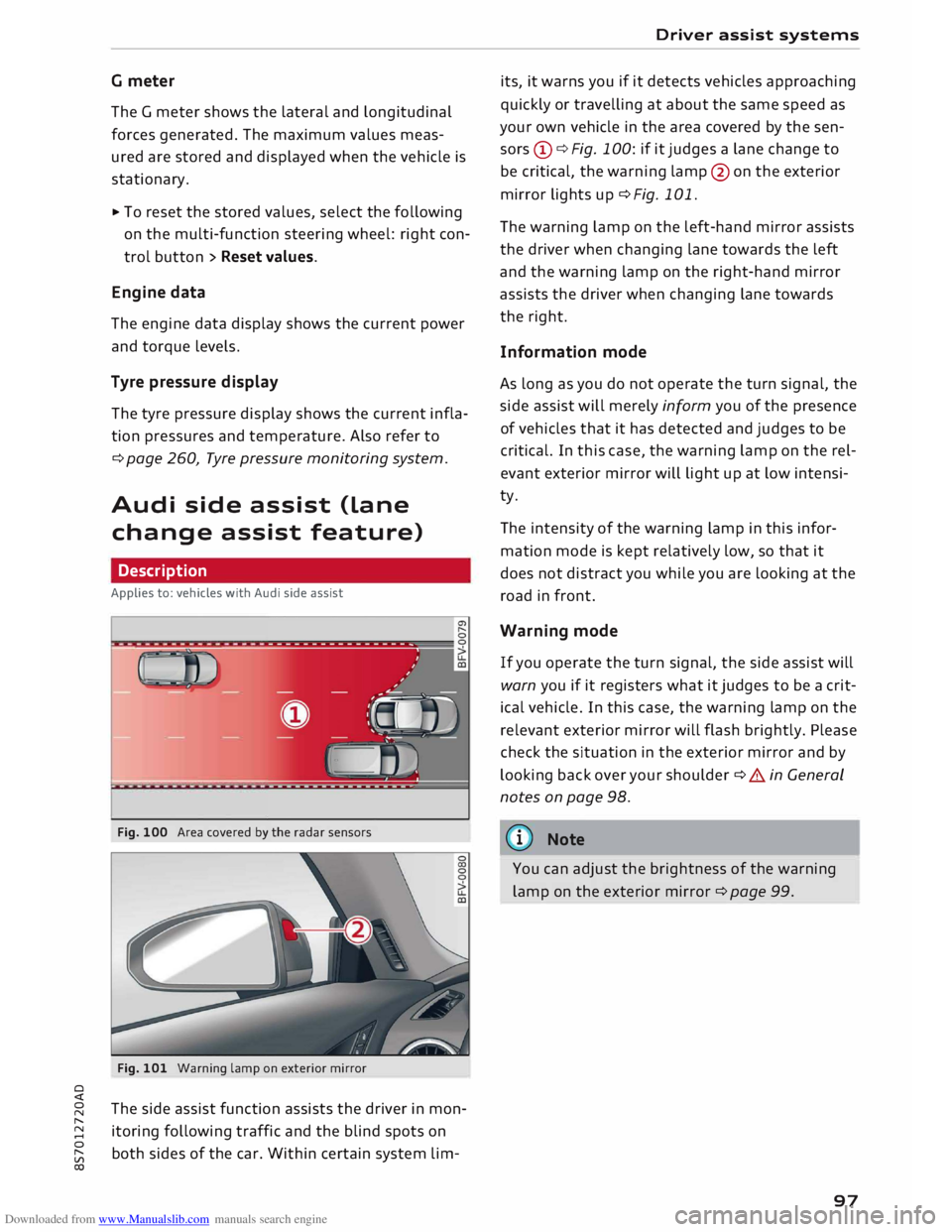
Fig. 100 Area covered by the radar sensors
Fig. 101 Warning lamp on exterior mirror
The side assist function assists the driver in mon
itoring following traffic and the blind spots on
both sides of the car. Within certain system Lim- Driver
assist systems
its, it warns you if it detects vehicles approaching
quickly or travelling at about the same speed as
your own vehicle in the area covered by the sen
sors (!)¢ Fig. 100: if it judges a Lane change to
be critical, the warning Lamp@on the exterior
mirror Lights up¢ Fig. 101.
The warning Lamp on the Left-hand mirror assists
the driver when changing Lane towards the Left
and the warning Lamp on the right-hand mirror
assists the driver when changing Lane towards
the right.
Information mode
As Long as you do not operate the turn signal, the
side assist will merely inform you of the presence
of vehicles that it has detected and judges to be
critical. In this case, the warning Lamp on the rel
evant exterior mirror will Light up at Low intensi
ty.
The intensity of the warning Lamp in this infor
mation mode is kept relatively Low, so that it
does not distract you while you are Looking at the
road in front.
Warning mode
If you operate the turn signal, the side assist will
warn you if it registers what it judges to be a crit
ical vehicle. In this case, the warning Lamp on the
relevant exterior mirror will flash brightly. Please
check the situation in the exterior mirror and by
Looking back over your shoulder¢ A in General
notes on page 98.
((1)) Note
You can adjust the brightness of the warning
Lamp on the exterior mirror¢ page 99.
97
Page 102 of 306
Downloaded from www.Manualslib.com manuals search engine Driver
assist systems
racks, stickers, deposits or any other substances.
If necessary, clean the area in front of the sen
sors ¢ page 98, Fig. 103.
@j Audi side
assist: currently unavailable.
See owner's manual
The side assist is temporarily inoperative and
cannot be switched on (for instance if the battery
is not sufficiently charged).
@j Audi
side assist: fault. Please contact
workshop
The system cannot detect vehicles reliably and
will be deactivated. The sensors are out of align
ment or defective. Have the system checked by a
qualified workshop soon.
Audi drive select (vehicle
set-up functions)
Introduction
Applies to: vehicles with Audi drive select
Drive select allows you to use different set-ups
on your vehicle. The four modes efficiency*, com
fort, auto and dynamic allow the driver, for ex
ample, to change from a sporty mode to a more
comfortable one via the �.:i.l\:'I button in the centre
console or via the infotainment system. In addi
tion, the individual mode allows you to adapt the
vehicle set-up to suit your personal driving style.
For example, you might choose to combine a
more dynamic engine set-up with a lighter steer
ing response.
Description
Applies to: vehicles with Audi drive select
The possible vehicle set-up in each mode de
pends on which equipment is installed on your
vehicle.
Engine and automatic gearbox*
The response of the engine and automatic gear
box* to accelerator pedal movements will be
more spontaneous or balanced, depending on
which mode you select. In efficiency* mode the
automatic gearbox* selects the next gear at low
er engine speeds and the coasting mode is activa-
100 ted
¢ page 82. This helps to reduce fuel con
sumption.
Suspension control (Audi magnetic ride)*
The suspension control uses sensors to collect in
formation on steering movements, braking and
acceleration input by the driver, road surface
quality, road speed and vehicle loading. With
drive select you can choose between dynamic and
comfort-oriented suspension set-ups (dynamic
and comfort modes), or opt for a more balanced
set-up (auto mode).
Steering
The degree of power assistance can be varied.
The light, indirect steering response in comfort
mode is particularly suitable on long motorway
trips, for instance. The steering has a tighter,
more direct feel in dynamic mode.
Air conditioner*
The air conditioner runs in a particularly econom
ical mode when the efficiency* setting is selec
ted. When this function is selected, eco* is shown
in the display of the automatic air conditioner.
Cruise control system*
The acceleration response is particularly econom
ical in efficiency* mode.
Engine sound*
The sound of the engine is matched to the selec
ted mode and ranges from subdued to dynamic.
(QJ} Note
- On some models the vehicle's maximum
speed can only be obtained in the auto and
dynamic modes.
- On vehicles with manual gearbox, an E ap
pears in the gear-change indicator when ef
ficiency* mode is activated.
-Applies to vehicles with manual gearbox: If
you press the accelerator right down past
the point of resistance in efficiency* mode,
the engine power is automatically control
led to give your vehicle maximum accelera-
tion. ..,.
Page 115 of 306
Downloaded from www.Manualslib.com manuals search engine Intelligent
technology
Electronic stabilisation
control (ESC)
Description
The electronic stabilisation control (ESC) increa
ses the car's stability. It reduces the tendency to
skid and improves the stability and road holding
of the vehicle. The ESC detects critical handling
situations, such as understeer, oversteer and
wheelspin on the driven wheels. It stabilises the
vehicle by braking individual wheels or by reduc
ing the engine torque. The indicator lamp DJ in
the instrument cluster starts flashing as soon as
the ESC intervenes.
The following systems are integrated in the ESC:
Anti-lock brake system (ABS)
ABS prevents the wheels from locking up under
braking until the vehicle has reached a virtual
standstill. You can continue to steer the vehicle
even when the brakes are on full. Keep your foot
on the brake pedal and do not pump the brakes.
You will feel the brake pedal pulsate while the
anti-lock brake system is working.
Brake assist system
The brake assist system can shorten the braking
distance. The braking force is automatically boos
ted if you press the brake pedal quickly in an
emergency. You must keep pressing the brake
pedal until the danger has passed.
Traction control system (ASR)
In the event of wheelspin, the traction control
system reduces the engine torque to match the
amount of grip available. This helps the car to
start moving, accelerate or climb a gradient.
Electronic differential lock (EDL)
When the EDL detects wheelspin, it brakes the
spinning wheel and directs the power to the oth
er driven wheel (or wheels on quattro* versions).
0 This
function is not available at high speeds.
� To
prevent the disc brake of the braked wheel
8 from
overheating, the EDL cuts out automatically
"
Vl Intelligent
technology
if subjected to excessive loads. The vehicle can
still be driven. The EDL will switch on again auto
matically when the brake has cooled down.
Steering recommendation
The ESC helps to stabilise the vehicle by changing
the steering wheel torque.
Selective wheel torque control
Selective wheel torque control intervenes when
cornering by braking the wheel(s) on the inside of
the bend individually as required. This enables
precision cornering. The relevant system may not
intervene in the wet or snow.
Multicollision brake assist system
The "multicollision brake assist system" can help
to reduce the risk of skidding and further colli
sions during an accident. If the airbag control
unit detects that a collision has taken place up
wards of a certain speed, the vehicle is braked by
the ESC.
The vehicle will not be braked automatically if:
- the driver presses the accelerator,
- the brake pressure applied by pressing the
brake pedal is higher than the brake pressure
initiated by the system,
- or the ESC, the brake system or the vehicle's
electrical system are not fully functional.
A WARNING
- The grip provided by the ESC and the inte
grated systems is still subject to the physi
cal limits of adhesion. Always bear this in
mind, especially on wet or slippery roads. If
you notice the systems cutting in, you
should reduce your speed immediately to
suit the road and traffic conditions. Do not
let the extra safety provided tempt you into
taking any risks when driving -this can
cause accidents.
- Remember that the accident risk always in
creases if you drive fast, especially in cor
ners or on a wet or slippery road, or if you
follow too close behind the vehicle in front
of you. Please bear in mind that even the
113
Page 118 of 306
Downloaded from www.Manualslib.com manuals search engine Intelligent
technology
Brake servo
The brake servo amplifies the pressure you apply
to the brake pedal.
A WARNING
- When applying the brakes to clean off de
posits on the pads and discs, select a clear,
dry road. Be sure not to inconvenience or en
danger other road users; do not risk an acci
dent.
- Never let the car coast with the engine
switched off (this can cause accidents).
CD CAUTION
- Never let the brakes "drag" by leaving your
foot on the pedal
when
you do not really in
tend to brake. This overheats the brakes, re
sulting in longer stopping distances and
greater wear.
- Before driving down a long, steep gradient,
it is advisable to reduce speed and select a
lower gear. In this way you will make use of
the engine braking effect and relieve the
load on the brakes. If you still have to use
the brakes, it is better to brake firmly at in
tervals than to apply the brakes continuous
ly.
� Note
-If the brake servo is out of action, you must
apply considerably more pressure to the
brake pedal than you normally would.
- If you wish to equip the car with accessories
such as a front spoiler or wheel covers, it is
important that the flow of air to the front
wheels is not obstructed, otherwise the
brakes can overheat.
Electro-mechanical
power steering
Electro-mechanical power steering assists the
driver when steering.
The degree of power assistance is adapted elec
tronically, depending on the speed.
116 Warning/indicator
lamps and driver
messages
• Steering: fault. Please stop vehicle
If the warning lamp Lights up permanently and
the message appears, there may be a power
steering failure.
Stop the vehicle in a safe place as soon as possi
ble. Do NOT drive on. Obtain professional assis
tance.
� Steering: fault. You can continue driving
If the indicator lamp lights up, the steering re
sponse may be heavier or Lighter than usual. In
addition, it is possible that the steering wheel
will be off centre when driving in a straight Line.
Drive slowly to a qualified workshop and have the
fault rectified.
('!)) Note
You can drive on if the warning/indicator
lamp . or� Lights up only briefly.
Four-wheel drive
(quattro)
Applies to: vehicles with four-wheel drive
On quattro models the engine power is distrib
uted to all four wheels.
General notes
On four-wheel drive vehicles, the engine power is
distributed to all four wheels. The distribution of
power is controlled automatically according to
your driving style and the road conditions. Also
refer to¢ page 113, Electronic stabilisation con
trol (ESC).
The four-wheel drive is specially designed to
complement the superior engine power of your
Audi. This combination gives the car exceptional
handling and performance capabilities -both on
normal roads and in more difficult conditions,
such as snow and ice. Even so (or perhaps espe
cially for this reason), it is important to observe
certain safety points¢&.
�
Page 282 of 306
Downloaded from www.Manualslib.com manuals search engine Mobility
Vehicle being towed (rear)
� Ensure that the ignition is switched on, the
steering wheel is not locked, and that you can
operate the turn signals, horn or windscreen
wipers if necessary ¢ A-
� The brake servo only works when the engine is
running. The power steering only works when
the ignition is on and the vehicle is moving 1
).
Otherwise you will need to press the brake ped
al significantly harder and apply more force to
move the steering wheel.
� Please ensure that the steering wheel is un-
locked and that it moves freely.
� Release the parking brake¢ page 74.
� Manual gearbox: Put the gear lever in neutral.
� Automatic gearbox: Move the selector lever to
position N.
� Ensure that the tow-rope remains taut at all
times when towing.
A WARNING
If the vehicle has no electrical power, do NOT
use a tow-bar or tow-rope to tow the vehicle
(D Note
You can use the turn signals to indicate a
change of direction (or lane) even when the
hazard warning lights are on. The hazard
warning lights will be interrupted temporari
ly.
Tow-starting
Please observe the important safety warnings on
¢page 278.
Important: Your vehicle must be fitted with a
manual gearbox. If your vehicle has a petrol en
gine, it must not be towed further than SO me
tres ¢(D.
� Attach the tow-rope or the tow-bar only to the
towing anchorages provided for this purpose
¢page 280, ¢page 281.
� Engage second or third gear before moving off.
� Press the clutch and hold the pedal down.
l l
Important: The vehicle battery must be adequately charg
ed.
280 �
Switch on the ignition.
� Once both vehicles are moving, release the
clutch.
� As soon as the engine starts, press the clutch
pedal and put the gear lever in neutral.
CD CAUTION
When tow-starting the vehicle, do not tow it
further than 50 metres; otherwise the cata
lytic converter could be damaged.
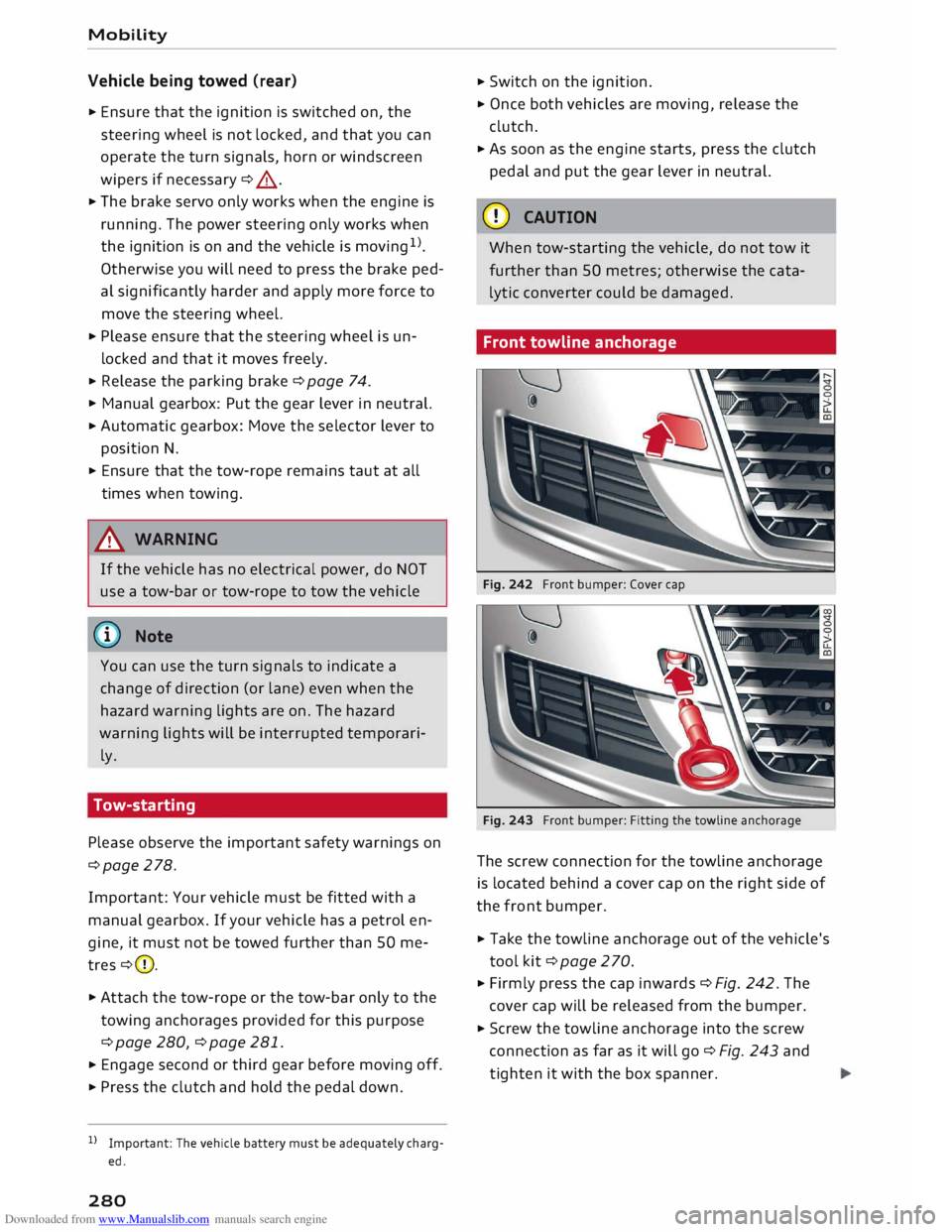
Front towline anchorage
Fig. 242 Front bumper: Cover cap
Fig. 243 Front bumper: Fitting the towline anchorage
The screw connection for the towline anchorage
is located behind a cover cap on the right side of
the front bumper.
� Take the towline anchorage out of the vehicle's
tool kit¢ page 2 70.
� Firmly press the cap inwards ¢ Fig. 242. The
cover cap will be released from the bumper.
� Screw the towline anchorage into the screw
connection as far as it will go¢ Fig. 243 and
tighten it with the box spanner.
Page 293 of 306
Downloaded from www.Manualslib.com manuals search engine Audi
phone box . . . . . . . . . . . . . . . . . . . . . . . 146
Audi side assist
see Side assist . . . . . . . . . . . . . . . . . . . . . . . 97
Audi smartphone interface ......... 210, 215
Audi virtual cockpit (instrument cluster) 10
AUTO Automatic air conditioner . . . . . . . . . . . . . . 62
Automatic headlights . . . . . . . . . . . . . . . . . 44
Auto Lock (central locking system) . . . . . . . .
27
Automatic air conditioner
see Air conditioner (automatic) . . . . . . . . . . 62
Automatic gearbox . . . . . . . . . . . . . . . . . . . . .
76
Back-up programme . . . . . . . . . . . . . . . . . . 83
Downhill speed control
. . . . . . . . . . . . . . . .
80
Driving tips . . . . . . . . . . . . . . . . . . . . . . . . . .
79
Kick-down . . . . . . . . . . . . . . . . . . . . . . . . . . . 81
Launch control programme . . . . . . . . . . . . . 82
Malfunction . . . . . . . . . . . . . . . . . . . . . . . . . 78
Manual gear selection . . . . . . . . . . . . . . . . . 81
Manual release of selector lever . . . . . . 84, 85
Selector lever lock . . . . . . . . . . . . . . . . . . . . 78
Selector lever positions . . . . . . . . . . . . . . . .
77
Steering wheel with paddle levers . . . . . . . 81
tiptronic . . . . . . . . . . . . . . . . . . . . . . . . . . . .
81
Automatic zoom (navigation) . . . . . . . . . . .
180
AUX input . . . . . . . . . . . . . . . . . . . . . . . 198, 199
Average fuel consumption . . . . . . . . . . . . . . .
25
Average speed . . . . . . . . . . . . . . . . . . . . . . . .
25
Axle loads . . . . . . . . . . . . . . . . . . . . . . . . . . . 288
B
BACK button . . . . . . . . . . . . . . . . . . . . . . . . .
121
Background lighting . . . . . . . . . . . . . . . . . . . . 48
Balance (sound) ...................... 217
Bandages see First-aid kit . . . . . . . . . . . . . . . . . . . . . 269
Bass (sound) . . . . . . . . . . . . . . . . . . . . . . . . .
217
Battery . . . . . . . . . . . . . . . . . . . . . . . . . . . . .
250
Charge . . . . . . . . . . . . . . . . . . . . . . . . . . . . 118
Charging . . . . . . . . . . . . . . . . . . . . . . . . 15, 251
Indicator lamp . . . . . . . . . . . . . . . . . . . . . . . 15
Power management .. . . . . . . . . . . . . . . . . 118
Winter conditions . . . . . . . . . . . . . . . . . . . 251
0
� Battery,
charging (mobile devices) . . . . . . . 146
� Belts
::2 see
Seat belts . . . . . . . . . . . . . . . . . . . . . . . 230
Vl
CX) Index
Better route (navigation) . . . . . . . . . . . . . . . 184
Biodiesel . . . . . . . . . . . . . . . . . . . . . . . . . . . . 241
Bioethanol (fuel) . . . . . . . . . . . . . . . . . . . . .
241
Blower (air conditioner) . . . . . . . . . . . . . . 61, 62
Bluetooth Audio player . . . . . . . . . . . . . . . . . . . . . . . . 194
Connecting a mobile phone . . . . . . . . . . . . 142
Remote SIM Access Profile . . . . . . . . . . . . 160
Settings . . . . . . . . . . . . . . . . . . . . . . . . . . . 215
Boost pressure display . . . . . . . . . . . . . . . . . . 26
Boot see Luggage compartment . . . . . . . . . . . . 227
Boot lid
Manual release . . . . . . . . . . . . . . . . . . . . . . . 34
Opening/closing . . . . . . . . . . . . . . . . . . . . . . 33
Brake fluid Checking brake fluid level . . . . . . . . . . . . . 250
Brakes . . . . . . . . . . . . . . . . . . . . . . . . . . . . . . 115
Brake assist system . . . . . . . . . . . . . . . . . . 113
Brake fluid . . . . . . . . . . . . . . . . . . . . . . . . . 250
Brake pads worn . . . . . . . . . . . . . . . . . . . . . 16
Brake pedal . . . . . . . . . . . . . . . . . . . . . . . .
226
Brake servo . . . . . . . . . . . . . . . . . . . . . . . . .
115
Electro-mechanical parking brake. . . . . . . . 74
Emergency braking aid . . . . . . . . . . . . . . . 113
Emergency braking function . . . . . . . . . . . . 74
New brake pads . . . . . . . . . . . . . . . . . . . . . 115
Warning lamp . . . . . . . . . . . . . . . . . . . . . . . 13
Browser see Media centre . . . . . . . . . . . . . . . . . . . .
201
Bucket seat . . . . . . . . . . . . . . . . . . . . . . . . . . . 55
Bulbs, changing . . . . . . . . . . . . . . . . . . . . . . 284
Buttons Multi-function steering wheel. . . . . . . . 21, 23
Operating unit (MMI)................. 121
C
Cables (USB adapter/AUX adapter) . . . . . . . 197
Calling up media . . . . . . . . . . . . . . . . . . . . . .
200
Call list . . . . . . . . . . . . . . . . . . . . . . . . . . . . . 147
Call options . . . . . . . . . . . . . . . . . . . . . . . . . .
155
Camera-based traffic sign recognition . . . . . 90
Capacities Fuel tank. . . . . . . . . . . . . . . . . . . . . . . . . . .
288
Washer fluid reservoir . . . . . . . . . . . . . . . . 288
Caps for wheel bolts, removing . . . . . . . . . .
272
291
Page 295 of 306
Downloaded from www.Manualslib.com manuals search engine 0
N
,.....
N
......
0
,.....
Vl
CX) Cup
holders . . . . . . . . . . . . . . . . . . . . . . . . . . .
57
D
Data connection . . . . . . . . . . . . . . . . . . . . . .
166
Data protection . . . . . . . . . . . . . . . . . . . . . . . 168
Date . . . . . . . . . . . . . . . . . . . . . . . . . . . . . . . .
212
Daytime running lights . . . . . . . . . . . . . . . . . 44
Deactivating passenger's airbag . . . . . . . . . 237
Defrosting windows . . . . . . . . . . . . . . . . . 61, 63
DEF (instrument cluster) . . . . . . . . . . . . . . . . 24
Deluxe automatic air conditioner
see Air conditioner (automatic) . . . . . . . . . . 62
Diagnostic connection . . . . . . . . . . . . . . . . . 119
Diesel Diesel particulate filter . . . . . . . . . . . . . . . 244
Draining fuel filter . . . . . . . . . . . . . . . . . . . . 18
Engine oil . . . . . . . . . . . . . . . . . . . . . . . . . . 247
Fuel............................... 241
Indicator lamp . . . . . . . . . . . . . . . . . . . . . . .
17
Preheating (glow plugs) . . . . . . . . . . . . . . .
68
Digital compass . . . . . . . . . . . . . . . . . . . . . . .
52
Dimensions Vehicle dimensions . . . . . . . . . . . . . . . . . .
288
Dipped headlights . . . . . . . . . . . . . . . . . . . . . 44
Directional tread (tyres) . . . . . . . . . . . . . . . . 275
Directory see Contacts . . . . . . . . . . . . . . . . . . . . . . . .
153
Display see Audi virtual cockpit (instrument
cluster) . . . . . . . . . . . . . . . . . . . . . . . . . .
21, 23
Distance covered . . . . . . . . . . . . . . . . . . . . . . . 25
Doors Locking doors manually . . . . . . . . . . . . . . . . 32
Door safelock . . . . . . . . . . . . . . . . . . . . . . . . . 32
Downhill speed control . . . . . . . . . . . . . . . . .
80
Draining fuel filter (diesel) . . . . . . . . . . . . . . . 18
Driver information system . . . . . . . . . . . . 21, 23
Driver messages . . . . . . . . . . . . . . . . . . . . . .
11
On-board computer . . . . . . . . . . . . . . . . . . .
25
Outside temperature display. . . . . . . . . . . .
20
Service interval display . . . . . . . . . . . . . . . 252
Warning and indicator lamps . . . . . . . . . . . 11
Drives see Media . . . . . . . . . . . . . . . . . . . . . . 191,
200
Drive select . . . . . . . . . . . . . . . . . . . . . . . . . . 100
Driving on left . . . . . . . . . . . . . . . . . . . . . . . . . 47 Index
Driving on right . . . . . . . . . . . . . . . . . . . . . . . . 47
Driving on right/left . . . . . . . . . . . . . . . . . . . . 44
Driving through water . . . . . . . . . . . . . . . . . .
66
Driving time . . . . . . . . . . . . . . . . . . . . . . . . . .
25
Dust filter
see Pollution filter . . . . . . . . . . . . . . . . . . . . 60
DVD drive (media drives) . . . . . . . . . . . . . . . 192
Dynamic volume control
see System volume .................. 217
E
E-mail
ElO 151
see Ethanol (fuel) .
. . . . . . . . . . . . . . . . . . .
241
Economical driving . . . . . . . . . . . . . . . . . . . . . 67
Economical route . . . . . . . . . . . . . . . . . . . . . 177
EDL see Electronic differential lock . . . . . . . . . 113
Electrical socket . . . . . . . . . . . . . . . . . . . . . . .
56
Electric seat adjustment . . . . . . . . . . . . . . . .
54
Electric windows . . . . . . . . . . . . . . . . . . . . . . . 34
Convenience open/close . . . . . . . . . . . . . . . 35
Malfunction . . . . . . . . . . . . . . . . . . . . . . . . .
35
Electro-mechanical parking brake . . . . . . . . . 74
Electro-mechanical power steering . . . . . . .
116
Indicator lamp . . . . . . . . . . . . . . . . . . . . . . 116
Electronic differential lock . . . . . . . . . . . . . . 113
Electronic immobiliser . . . . . . . . . . . . . . . . . . 27
Electronic stabilisation control (ESC) . . . . . 113
Indicator lamp . . . . . . . . . . . . . . . . . . . . . . . 16
Multicollision brake assist system . . . . . . 113
Sport mode . . . . . . . . . . . . . . . . . . . . . . . . 114
Emergency braking function . . . . . . . . . . . . . 74
Emergency call, making . . . . . . . . . . . . . . . . 152
Emergency key . . . . . . . . . . . . . . . . . . . . . 27, 28
Emission control systems
Catalytic converter . . . . . . . . . . . . . . . . . . .
244
Diesel particulate filter . . . . . . . . . . . . . . .
244
Emission control system (indicator lamp) . . . 17
Emissions . . . . . . . . . . . . . . . . . . . . . . . . . . . 287
Engine Coolant . . . . . . . . . . . . . . . . . . . . . . . . . . . . 249
Jump-starting . . . . . . . . . . . . . . . . . . . . . . .
277
Letting engine warm up/cool down . . . . . . 66
Power output . . . . . . . . . . . . . . . . . . . . . . . 289
Preheating (glow plugs) . . . . . . . . . . . . . . . 68
293
Page 300 of 306
Downloaded from www.Manualslib.com manuals search engine Index
Paint number 287
Park assist . . . . . . . . . . . . . . . . . . . . . . . . . . .
108
Description . . . . . . . . . . . . . . . . . . . . . . . . .
108
Driver messages . . . . . . . . . . . . . . . . . . . . .
111
Driving out of a parking space . . . . . . . . . . 110
Finding a parking space . . . . . . . . . . . . . . . 109
Parking . . . . . . . . . . . . . . . . . . . . . . . . . . . .
110
Parking aid . . . . . . . . . . . . . . . . . . . . . . . . . .
103
Parking aids
360 °
display . . . . . . . . . . . . . . . . . . . . . . . .
104
Adjusting graphic display/warning beeps 112
Cleaning reversing camera . . . . . . . . . . . . 106
Cleaning sensors/camera . . . . . . . . . . . . . 264
Malfunction . . . . . . . . . . . . . . . . . . . . . . . . 112
Park assist . . . . . . . . . . . . . . . . . . . . . . . . . 108
Parking system plus . . . . . . . . . . . . . . . . . . 104
Rear parking aid . . . . . . . . . . . . . . . . . . . . .
104
Reversing camera . . . . . . . . . . . . . . . . . . . .
106
Parking brake Warning lamp . . . . . . . . . . . . . . . . . . . . . . .
13
see also Electro-mechanical parking brake 74
Parking lights . . . . . . . . . . . . . . . . . . . . . . . . .
45
Parking system
see Parking aids . . . . . . . . . . . . . . . . . 104,
106
Parking (automatic
gearbox) . . . . . . . . . . . . . 79
Particulate filter (diesel) . . . . . . . . . . . . . . . 244
Passenger's door, locking manually . . . . . . . 32
Path descriptions in Owner's Manual . . . . .
123
Pause (audio/video file) . . . . . . . . . . . . . 23, 200
Pedals . . . . . . . . . . . . . . . . . . . . . . . . . . . . . .
226
Pedestrian protection system . . . . . . . . . . . 228
Servicing . . . . . . . . . . . . . . . . . . . . . . . . . . . 229
Performance (engine) . . . . . . . . . . . . . . . . . . 289
Personal Wi-Fi hotspot . . . . . . . . . . . . . . . . .
161
Petrol . . . . . . . . . . . . . . . . . . . . . . . . . . . . . .
241
Phone book
see Contacts . . . . . . . . . . . . . . . . . . . . . . . .
153
Picture format (video) . . . . . . . . . . . . . . . . .
203
Playback (media) . . . . . . . . . . . . . . . . . . . . .
200
Playlist . . . . . . . . . . . . . . . . . . . . . . . . . . . . .
203
Point of interest search ................
173
Polishing . . . . . . . . . . . . . . . . . . . . . . . . . . . .
265
Pollen filter
see Pollution filter . . . . . . . . . . . . . . . . . . . .
60
Pollution filter . . . . . . . . . . . . . . . . . . . . . . . .
60
298 Power/torque
display
see Sport displays . . . . . . . . . . . . . . . . . . . . 96
Power management . . . . . . . . . . . . . . . . . . . 118
Power steering
see Electro-mechanical power steering . .
116
Preheating (glow plugs) . . . . . . . . . . . . . . . . . 68
Pressures (tyres) . . . . . . . . . . . . . . . . . . . . . .
256
Pressure (tyres) . . . . . . . . . . . . . . . . . . . . . .
258
Privacy . . . . . . . . . . . . . . . . . . . . . . . . . . . . . . 191
Programme guide Radio . . . . . . . . . . . . . . . . . . . . . . . . . . . . .
185
Q
quattro (four-wheel drive) . . . . . . . . . . . . . .
116
R
Radio . . . . . . . . . . . . . . . . . . . . . . . . . . . . . . .
185
Radio text . . . . . . . . . . . . . . . . . . . . . . . . . .
186
Station names . . . . . . . . . . . . . . . . . . . . . .
187
Radio-operated remote control
see Remote control keys . . . . . . . . . . . . . . . 2 7
Radio equipment . . . . . . . . . . . . . . . . . . . . . 286
Radio frequency
see Waveband . . . . . . . . . . . . . . . . . . . . . . 185
Radio transmitters . . . . . . . . . . . . . . . . . . . . 286
Rain sensor/light sensor
Headlights . . . . . . . . . . . . . . . . . . . . . . . . . . 44
Indicator lamp . . . . . . . . . . . . . . . . . . . . . . . 19
Intermittent wipe (windscreen wipers) . . .
50
Random playback . . . . . . . . . . . . . . . . . . . . . 203
Reading lights . . . . . . . . . . . . . . . . . . . . . . . . . 47
Rear spoiler . . . . . . . . . . . . . . . . . . . . . . . . . . 117
Rear window heating . . . . . . . . . . . . . . . . 61, 63
Recuperation . . . . . . . . . . . . . . . . . . . . . . . . . 25
Refuelling with spare fuel canister . . . . . . . 243
Reminder signal . . . . . . . . . . . . . . . . . . . . . .
212
Remote control keys. . . . . . . . . . . . . . . . . . . .
27
LED . . . . . . . . . . . . . . . . . . . . . . . . . . . . . . . .
29
Locking and unlocking the vehicle . . . . . . .
29
Personalising . . . . . . . . . . . . . . . . . . . . . . . . 2 7
Replacing the battery . . . . . . . . . . . . . . . . .
29
Repair kit
Tyre Mobility System (tyre repair kit) . . . .
270
Repairs . . . . . . . . . . . . . . . . . . . . . . . . . . . . .
285
Replacement parts . . . . . . . . . . . . . . . . . . . .
285
Page 302 of 306
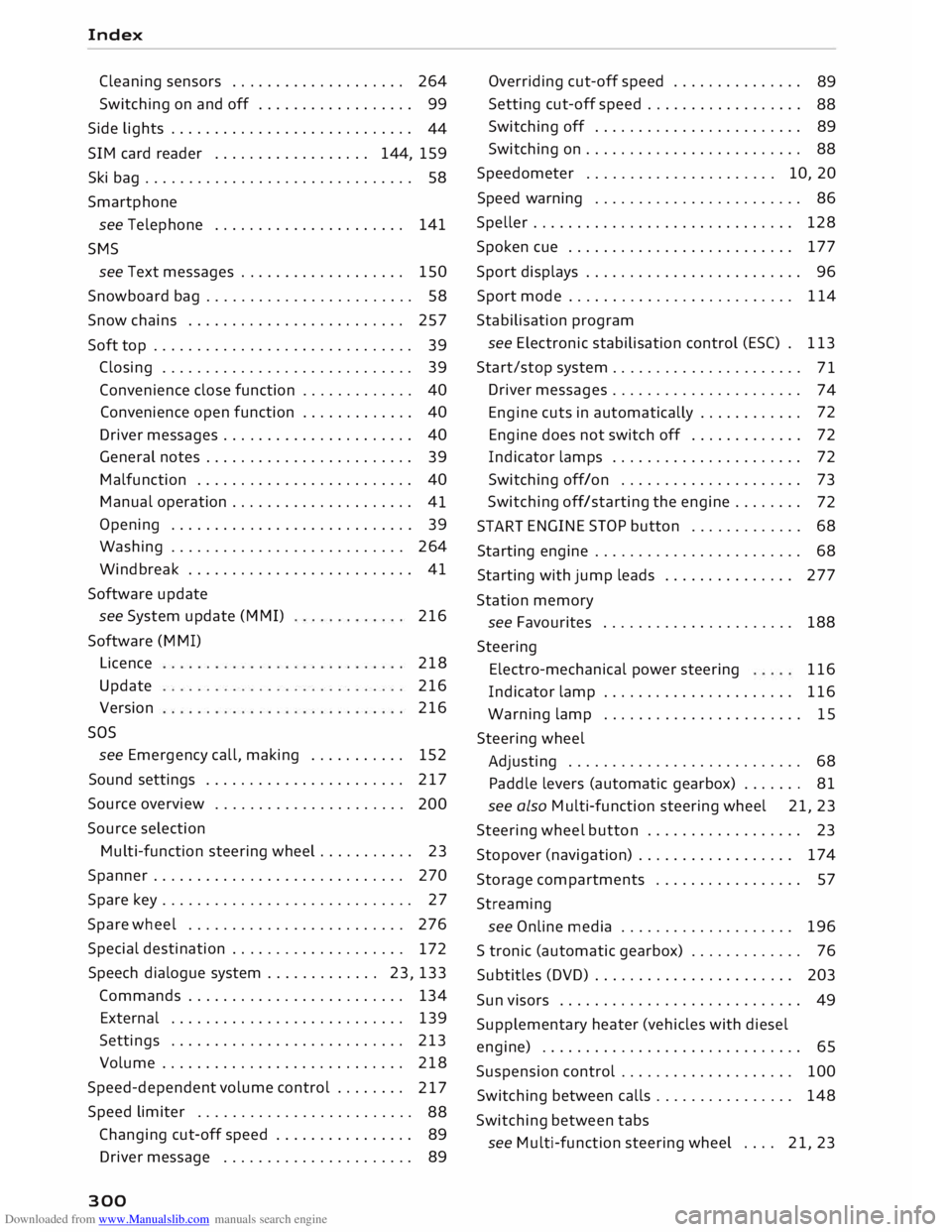
Downloaded from www.Manualslib.com manuals search engine Index
Cleaning sensors . . . . . . . . . . . . . . . . . . . . 264
Switching on and off . . . . . . . . . . . . . . . . . .
99
Side lights . . . . . . . . . . . . . . . . . . . . . . . . . . . .
44
SIM card reader . . . . . . . . . . . . . . . . . . 144, 159
Ski bag............................... 58
Smartphone see Telephone . . . . . . . . . . . . . . . . . . . . . . 141
SMS see Text messages . . . . . . . . . . . . . . . . . . .
150
Snowboard bag . . . . . . . . . . . . . . . . . . . . . . . . 58
Snow chains . . . . . . . . . . . . . . . . . . . . . . . . . 257
Soft top . . . . . . . . . . . . . . . . . . . . . . . . . . . . . . 39
Closing . . . . . . . . . . . . . . . . . . . . . . . . . . . . . 39
Convenience close function . . . . . . . . . . . . . 40
Convenience open function . . . . . . . . . . . . . 40
Driver messages . . . . . . . . . . . . . . . . . . . . . . 40
General notes . . . . . . . . . . . . . . . . . . . . . . . . 39
Malfunction . . . . . . . . . . . . . . . . . . . . . . . . . 40
Manual operation . . . . . . . . . . . . . . . . . . . . . 41
Opening . . . . . . . . . . . . . . . . . . . . . . . . . . . .
39
Washing . . . . . . . . . . . . . . . . . . . . . . . . . . . 264
Windbreak . . . . . . . . . . . . . . . . . . . . . . . . . . 41
Software update
see System update (MMI)
Software (MMI)
Licence
Update
Version
sos 216
218
216
216
see Emergency call, making . . . . . . . . . . . 152
Sound settings . . . . . . . . . . . . . . . . . . . . . . .
217
Source overview . . . . . . . . . . . . . . . . . . . . . .
200
Source selection
Multi-function steering wheel . . . . . . . . . . . 23
Spanner . . . . . . . . . . . . . . . . . . . . . . . . . . . . . 270
Spare key. . . . . . . . . . . . . . . . . . . . . . . . . . . . . 27
Spare wheel . . . . . . . . . . . . . . . . . . . . . . . . . 276
Special destination . . . . . . . . . . . . . . . . . . . .
172
Speech dialogue system . . . . . . . . . . . . . 23, 133
Commands . . . . . . . . . . . . . . . . . . . . . . . . . 134
External . . . . . . . . . . . . . . . . . . . . . . . . . . . 139
Settings . . . . . . . . . . . . . . . . . . . . . . . . . . . 213
Volume ............................ 218
Speed-dependent volume control . . . . . . . .
217
Speed limiter . . . . . . . . . . . . . . . . . . . . . . . . .
88
Changing cut-off speed . . . . . . . . . . . . . . . .
89
Driver message . . . . . . . . . . . . . . . . . . . . . .
89
300 Overriding
cut-off speed . . . . . . . . . . . . . . .
89
Setting cut-off speed . . . . . . . . . . . . . . . . . .
88
Switching off . . . . . . . . . . . . . . . . . . . . . . . .
89
Switching on . . . . . . . . . . . . . . . . . . . . . . . . .
88
Speedometer . . . . . . . . . . . . . . . . . . . . . . 10, 20
Speed warning . . . . . . . . . . . . . . . . . . . . . . . . 86
Speller . . . . . . . . . . . . . . . . . . . . . . . . . . . . . . 128
Spoken cue . . . . . . . . . . . . . . . . . . . . . . . . . .
177
Sport displays . . . . . . . . . . . . . . . . . . . . . . . . . 96
Sport mode . . . . . . . . . . . . . . . . . . . . . . . . . . 114
Stabilisation program
see Electronic stabilisation control (ES() . 113
Start/stop system . . . . . . . . . . . . . . . . . . . . . .
71
Driver messages . . . . . . . . . . . . . . . . . . . . . .
74
Engine cuts in automatically . . . . . . . . . . . . 72
Engine does not switch off . . . . . . . . . . . . . 72
Indicator lamps . . . . . . . . . . . . . . . . . . . . . .
72
Switching off/on . . . . . . . . . . . . . . . . . . . . . 73
Switching off/starting the engine . . . . . . . .
72
START ENGINE
STOP button . . . . . . . . . . . . .
68
Starting engine . . . . . . . . . . . . . . . . . . . . . . . . 68
Starting with jump leads . . . . . . . . . . . . . . . 277
Station memory
see Favourites ..................... .
188
Steering Electro-mechanical power steering 116
Indicator lamp . . . . . . . . . . . . . . . . . . . . . . 116
Warning lamp
. . . . . . . . . . . . . . . . . . . . . . . 15
Steering wheel
Adjusting . . . . . . . . . . . . . . . . . . . . . . . . . . .
68
Paddle levers (automatic gearbox) . . . . . . . 81
see also Multi-function steering wheel 21, 23
Steering wheel button . . . . . . . . . . . . . . . . . . 23
Stopover (navigation) . . . . . . . . . . . . . . . . . . 174
Storage compartments . . . . . . . . . . . . . . . . . 57
Streaming see Online media . . . . . . . . . . . . . . . . . . . .
196
S tronic (automatic gearbox) . . . . . . . . . . . . . 76
Subtitles (DVD) . . . . . . . . . . . . . . . . . . . . . . . 203
Sun visors . . . . . . . . . . . . . . . . . . . . . . . . . . . . 49
Supplementary heater (vehicles with diesel
engine) . . . . . . . . . . . . . . . . . . . . . . . . . . . . . . 65
Suspension control . . . . . . . . . . . . . . . . . . . . 100
Switching between calls . . . . . . . . . . . . . . . . 148
Switching between tabs
see Multi-function steering wheel . . . . 21,
23