start stop button AUDI TT ROADSTER 2016 User Guide
[x] Cancel search | Manufacturer: AUDI, Model Year: 2016, Model line: TT ROADSTER, Model: AUDI TT ROADSTER 2016Pages: 306, PDF Size: 31.82 MB
Page 78 of 306
Downloaded from www.Manualslib.com manuals search engine Driving
order to hold the vehicle and make it easier for
you to drive away.
Driving off with the hold assist
Applies to: vehicles with hold assist
The hold assist helps the driver if the vehicle is
stationary for a long period or very often, for in
stance at traffic lights, on steep gradients or in
stop-and-go traffic.
Important: The driver's door must be closed and
the engine must be running.
.,. To switch the hold assist on/off, press the but
ton(@) @¢page 74, Fig. 78, ¢A .The LED in
the button will light up or go out.
.,. Once it detects that the vehicle has stopped,
the hold assist keeps the vehicle stationary.
You can now take your foot off the brake pedal.
.,. Drive
off in the normal way: the brake will be
released automatically and the vehicle will
start moving.
In certain situations, the hold assist transfers the
job of holding the vehicle to the parking brake.
As soon as the parking brake is holding the vehi
cle still, the warning lamp. appears in the in
strument cluster. In addition, the LED in the C®)
button will light up.
Driver messages in the instrument cluster
display
[iJ Hold assist: unavailable
If this message appears, the system require
ments have not been met.
A WARNING
Applies to: vehicles with hill hold assist
If you do not drive away immediately after re
leasing the brake pedal, or if the engine
stalls, the vehicle may start to roll back. You
should therefore immediately press the brake
pedal or apply the parking brake.
A WARNING
The intelligent technology in the hold assist*
and hill hold assist functions cannot defy the
laws of physics. Do not let the extra conven
ience afforded by the hold assist* and hill
76 hold
assist functions tempt you into taking
any risks when driving -this can cause acci
dents.
- The hold assist* and hill hold assist func
tions cannot keep the vehicle stationary in
all conditions on a gradient (e.g. if the road
is slippery or icy).
- Always ensure that the vehicle is stopped
properly and safely -risk of accident!
CD CAUTION
Switch off the hold assist* function before
driving the vehicle into a car wash.
� Note
Applies to: vehicles with automatic gearbox
When the hold assist* function is switched
on, it stops the vehicle from creeping for
wards when you take your foot off the brake
pedal.
Automatic gearbox
Introduction
Applies to: vehicles with automatic gearbox
The vehicle is equipped with an electronically
controlled dual-clutch gearbox (S tronic). Torque
between the engine and the gearbox is transmit
ted via two independent clutches. They enable
smooth, uninterrupted acceleration of the vehi
cle.
The gearbox shifts up or down automatically and
continuously adapts the timing of the gear
changes to your driving style.
When you drive at moderate speeds the gearbox
will select the most economical shift pro
gramme. It will then change up early and delay
the downshifts to give better fuel economy.
If you drive at higher speeds with heavy accelera
tion, if you open the throttle quickly, or if you use
the kick-down or the car's maximum speed, the
gearbox will automatically select the more "spor
ty" shift programmes.
If desired, you can also select the gears manually
(tiptronic mode).
Page 81 of 306
Downloaded from www.Manualslib.com manuals search engine 0
N
,.....
N
......
0
,.....
Vl
CX) -
If the vehicle does not move in the desired
direction, the system may have failed to en
gage the gear correctly. In this case, press
the brake pedal and select the gear again.
- If the vehicle still does not move in the de
sired direction, a system malfunction has
occurred. Seek professional assistance and
have the system checked.
General notes on driving an automatic
Applies to: vehicles with automatic gearbox
The gearbox changes the forward gears up and
down automatically.
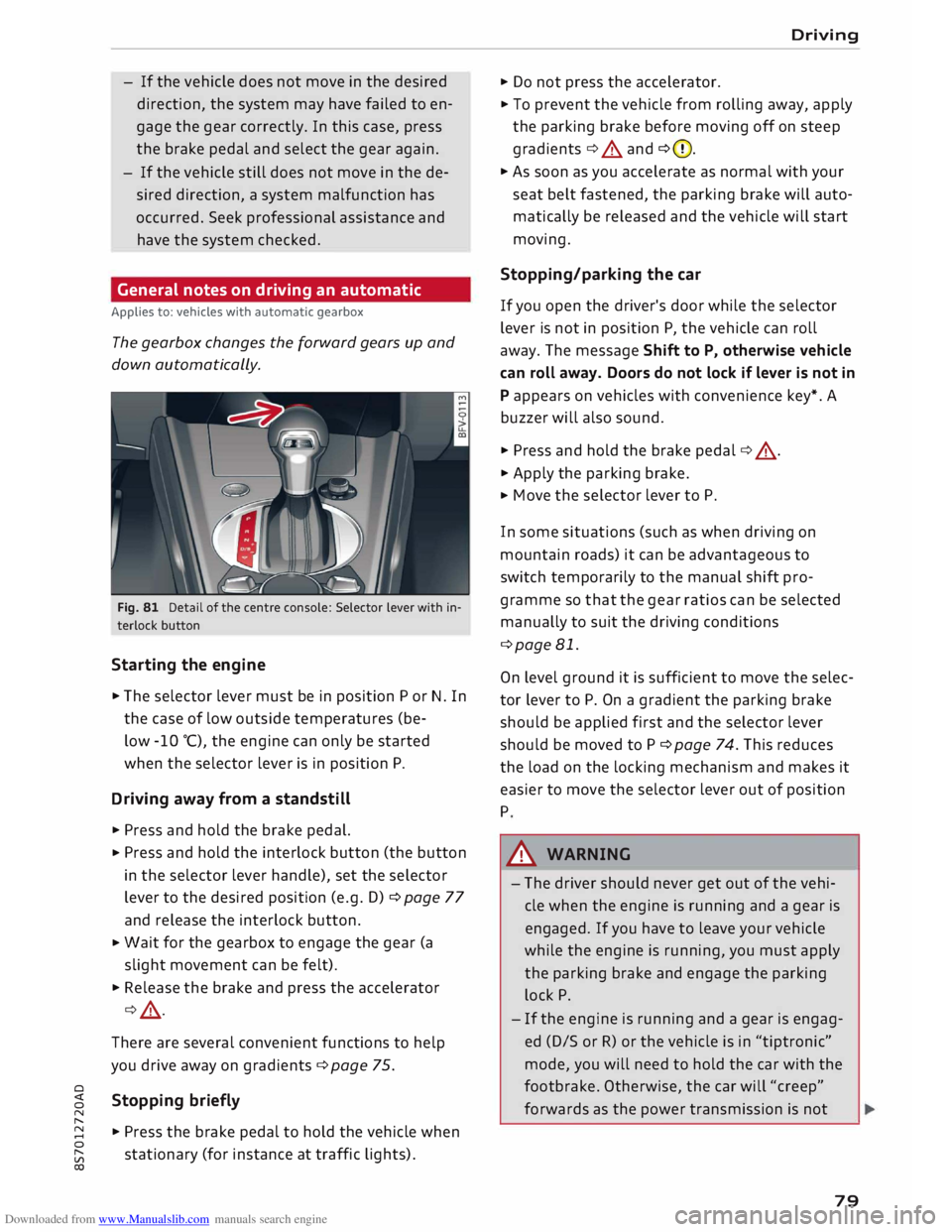
Fig. 81 Detail of the centre console: Selector lever with in
terlock button
Starting the engine
.,. The selector lever must be in position P or N. In
the case of low outside temperatures (be-
low -10 °(), the engine can only be started
when the selector lever is in position P.
Driving away from a standstill
.,. Press and hold the brake pedal.
.,. Press
and hold the interlock button (the button
in the selector lever handle), set the selector
lever to the desired position (e.g. D) ¢ page 77
and release the interlock button.
.,. Wait
for the gearbox to engage the gear (a
slight movement can be felt).
.,. Release the brake and press the accelerator
¢ .&, .
There are several convenient functions to help
you drive away on gradients ¢page 75.
Stopping briefly
.,. Press the brake pedal to hold the vehicle when
stationary (for instance at traffic lights). Driving
.,. Do not press the accelerator .
.,. To prevent the vehicle from rolling away, apply
the parking brake before moving off on steep
gradients ¢.&. and ¢(D.
.,. As soon as you accelerate as normal with your
seat belt fastened, the parking brake will auto
matically be released and the vehicle will start
moving.
Stopping/parking the car
If you open the driver's door while the selector
lever is not in position P, the vehicle can roll
away. The message Shift to P, otherwise vehicle
can roll away. Doors do not lock if lever is not in
P appears on vehicles with convenience key*. A
buzzer will also sound .
.,. Press and hold the brake pedal¢ .&, .
.,. Apply the parking brake .
.,. Move
the selector lever to P.
In some situations (such as when driving on
mountain roads) it can be advantageous to
switch temporarily to the manual shift pro
gramme so that the gear ratios can be selected
manually to suit the driving conditions
¢page 81.
On level ground it is sufficient to move the selec
tor lever to P. On a gradient the parking brake
should be applied first and the selector lever
should be moved to P ¢ page 74. This reduces
the load on the locking mechanism and makes it
easier to move the selector lever out of position
P
A WARNING
- The driver should never get out of the vehi
cle when the engine is running and a gear is
engaged. If you have to leave your vehicle
while the engine is running, you must apply
the parking brake and engage the parking
lock P.
- If the engine is running and a gear is engag
ed (D/S or R) or the vehicle is in "tiptronic"
mode, you will need to hold the car with the
footbrake. Otherwise, the car will "creep"
forwards as the power transmission is not
79
Page 84 of 306
Downloaded from www.Manualslib.com manuals search engine Driving
the next higher gear is delayed until the engine
reaches maximum rpm.
A WARNING
Please note that if the road surface is slippery
or wet, the kick-down feature could cause the
driving wheels to spin, which could result in
skidding.
Coast ing mode
Applies to: vehicles with automatic gearbox
In coasting mode, you can use the vehicle's kinet
ic energy to drive without using the accelerator
on certain stretches of road. This saves fuel by al
lowing you to take your foot off the accelerator
earlier and let the vehicle coast (for instance
when approaching a speed restriction in a built
up area).
Switching on coa sting mode
Important: Selector lever must be in D, gradient
must be less than 12 %.
� Select efficiency mode in drive select*
¢page 100 (you only have to do this once).
� Take your foot off the accelerator.
If you have selected the "on-board computer"
display, the message Coasting mode will then
appear. The gearbox automatically disengages
the clutch at speeds above 20 km/h and lets the
vehicle coast without the engine braking effect.
The engine ticks over at idling speed while the ve
hicle is coasting.
Stopping coasting mode
� Press the brake pedal or accelerator.
To use the engine braking effect and overrun fuel
cut-off again, all you need to do is tap the brake
pedal briefly.
You can improve your fuel economy and help to
reduce emissions by using a combination of the
coa sting mode (i.e. coasting with low fuel con-
l l
The ESC lamp lights up permanently and the message
Stabilisation control (ESC): sport. Warning! Restricted
stability appears temporarily in the infotainment display
to indicate the deactivation status.
82 sumption
on a longer stretch of road) and the
overrun fuel cut-off (i.e. using the engine brak
ing effect with no fuel consumption on a shorter
stretch of road).
A WARNING
- If you are approaching an obstruction when
coasting mode is switched on, please re
member that the vehicle will not slow down
as quickly as usual when you take your foot
off the accelerator -risk of accident!
- The vehicle can pick up speed if you are driv
ing down a slope in coasting mode -risk of
accident!
- If other people are using your car, you
should draw their attention to the coasting
mode.
ijJ) Note
- Coasting mode is only available in efficien
cy* mode (drive select*).
- The message Coasting mode only appears
when the current fuel consumption display
is selected. The gear is no longer displayed
when you are in coasting mode (e.g. E in
stead of E6).
- The coasting mode is deactivated tempora
rily on gradients of 15 % or greater.
Launch control programme
Applies to: vehicles with automatic gearbox
The launch control programme enables maxi
mum acceleration.
Important: The engine must be warm and the
steering wheel must be pointing straight ahead.
� Deactivate the start/stop system*¢ page 73.
The LED in the l(A)""
I button will light up.
� Deactivate the hold assist* ¢ page 76. The LED
in the button will go out.
� Press the IJ,OFF! button
once briefly while the
engine is running 1
). �
Page 85 of 306
Downloaded from www.Manualslib.com manuals search engine 0
N
,.....
N
......
0
,.....
Vl
CX) ...
Briefly pull the selector lever back from posi
tion D/S to select position S, or move the selec
tor lever to the right into the tiptronic gate, or
select dynamic mode in drive select*
�page 100.
... Press the brake pedal firmly with your left foot
and hold it down for at least one second.
... At the same time, press the accelerator all the
way down with your right foot until the engine
revs are high and steady.
... Take your left foot off the brake.
A WARNING
-Always adapt your driving style to the traffic
conditions.
- Only use the launch control programme
when road and traffic conditions permit,
and make sure your manner of driving and
accelerating the vehicle does not inconven
ience or endanger other road users.
- Please note that the driven wheels may
start to spin when the sport mode is switch
ed on, causing the vehicle to lose grip, in
particular on slippery or wet roads -danger
of skidding!
- When acceleration has been completed, you
should deactivate the sport mode again by
briefly pressing
the I� OFF! button.
(D) Note
- The gearbox may be hot after you have used
the launch control programme. In this case,
the programme may not be available for
several minutes. The programme will be
available again after a cool-down period.
-Accelerating with the launch control pro
gramme places a heavy load on all parts of
the vehicle. This can result in increased wear
and tear.
Gearbox malfunction
Applies to: vehicles with automatic gearbox
• Gearbox malfunction! Please stop the vehi
cle and select P Driving
There is a malfunction in the gearbox. Park the
vehicle safely and do not drive on. Obtain profes
sional assistance.
• Gearbox overheating: please stop vehicle
The gearbox is overheating and could be dam
aged. Stop the vehicle and let the gearbox cool
down with the engine idling and the selector lev
er in position P. If the indicator lamp and the
message disappear, drive to a qualified workshop
soon and have the fault rectified. Do not drive on
if the warning lamp stays on and the message
does not disappear. You should obtain professio
nal assistance.
ID Gearbox malfunction: you can continue driv
ing. See owner's manual
Drive to a qualified workshop soon and have the
fault rectified.
ID Gearbox malfunction: no reverse gear. You
can continue driving
A gearbox malfunction has occurred. The gearbox
will switch to the back-up programme. The pro
gramme will only move into certain gears or may
not be able to shift gears at all. The engine may
stall. You can no longer engage reverse gear.
Drive to a qualified workshop without delay and
have the fault rectified.
ID Gearbox malfunction: you can continue driv
ing in D until engine off
Park your vehicle well away from moving traffic.
Obtain professional assistance.
ID Gearbox overheating: please adapt driving
style
You can continue driving at moderate speed. You
can resume normal driving if the indicator lamp
goes out.
ID Gearbox: please press brake pedal and select
gear again
If a gearbox malfunction has occurred due to
overheating, this message will appear once the
gearbox has cooled down again.
83
Page 96 of 306
Downloaded from www.Manualslib.com manuals search engine Driver
assist systems
This message is displayed when the camera is no
longer functional after the system has continu
ously failed to detect the lane markings. This can
have the following causes:
- The outside of the camera window¢ page 93,
Fig. 95 is dirty or frosted. Remove dirt or ice
from this area of the windscreen.
- The inside of the camera window is misted up.
In this case, wait for the camera window to de
mist before switching on the active lane assist
system again.
- Due to the road conditions, the system has not
been able to detect the lane markings for a
long period. Do not switch the active lane assist
system on again before the lane markings are
discernible.
Audi active lane assist: currently unavailable.
See owner's manual
A temporary fault is preventing the active lane
assist system from being switched on. Try switch
ing on the active lane assist system again later.
Audi active lane assist: fault. See owner's man
ual
Drive to a qualified workshop soon and have the
fault rectified.
Audi active lane assist: please take over steering
This message will appear if you do not steer the
vehicle yourself. In this case, the active lane as
sist will switch to "not ready for warning" but will
not be deactivated completely. The system can
assist you to keep the vehicle in the lane. Howev
er it is your own responsibility to steer and con
trol the vehicle.
A WARNING
Please note that the messages only appear
with a delay or are not displayed at all on
vehicles with additional equipment (such as
steering wheel knobs) fitted on the steering
wheel. Always keep your hands on the steer
ing wheel.
l l
The steering input function is not available on all export
versions.
94 Setting
the steering input time and
vibration warning
Applies to: vehicles with Audi active lane assist
You can change the active Lane assist settings on
the infotainment system to suit your individual
preferences.
Select the following
on the infotainment system:
!MENU! button> Car > left control button> Driv
er assist > Audi active lane assist.
Steering input1
)
early: If this setting is selected, a continuous
steering input assists the driver to keep the vehi
cle in the middle of the lane.
late: If this setting is selected, the steering is not
corrected until just before a wheel touches a de
tected lane marking.
Vibration warning
You can switch the additional steering wheel vi
bration warning on/off.
(Q'j) Note
Your personal settings are stored automati
cally and assigned to the remote control key
which is being used (only applies to some
countries).
Lap timer
Introduction
Applies to: vehicles with lap timer
Lap timer
You can use the lap timer in the display to record
and evaluate lap times. The times are recorded in
minutes, seconds and tenths of a second. The
hour will appear in the display and the tenths of a
second will disappear if the session lasts for over
60 minutes.
Individual lap times stop automatically after
99 hours 59 minutes and 59 seconds. A new lap
will then start automatically.
�
Page 97 of 306
Downloaded from www.Manualslib.com manuals search engine 0
N
,.....
N
......
0
,.....
Vl
CX) The
lap timer stops after a maximum of 30 laps.
You can then evaluate the lap times or start a
new session.
The lap timer is operated using the controls on
the multi-function steering wheel¢ page 95.
A WARNING
Please direct your full attention at all times to
the road! As the driver, you have full responsi
bility for the safety of the vehicle and other
road users. For this reason, you should only
use the lap timer functions in a manner that
allows you to maintain control of the vehicle
in all situations -accident risk!
ijj} Note
You can call up information from the on
board computer while the stopwatch of the
lap timer is running.
Calling up the lap timer and recording lap
times
Applies to: vehicles with lap timer
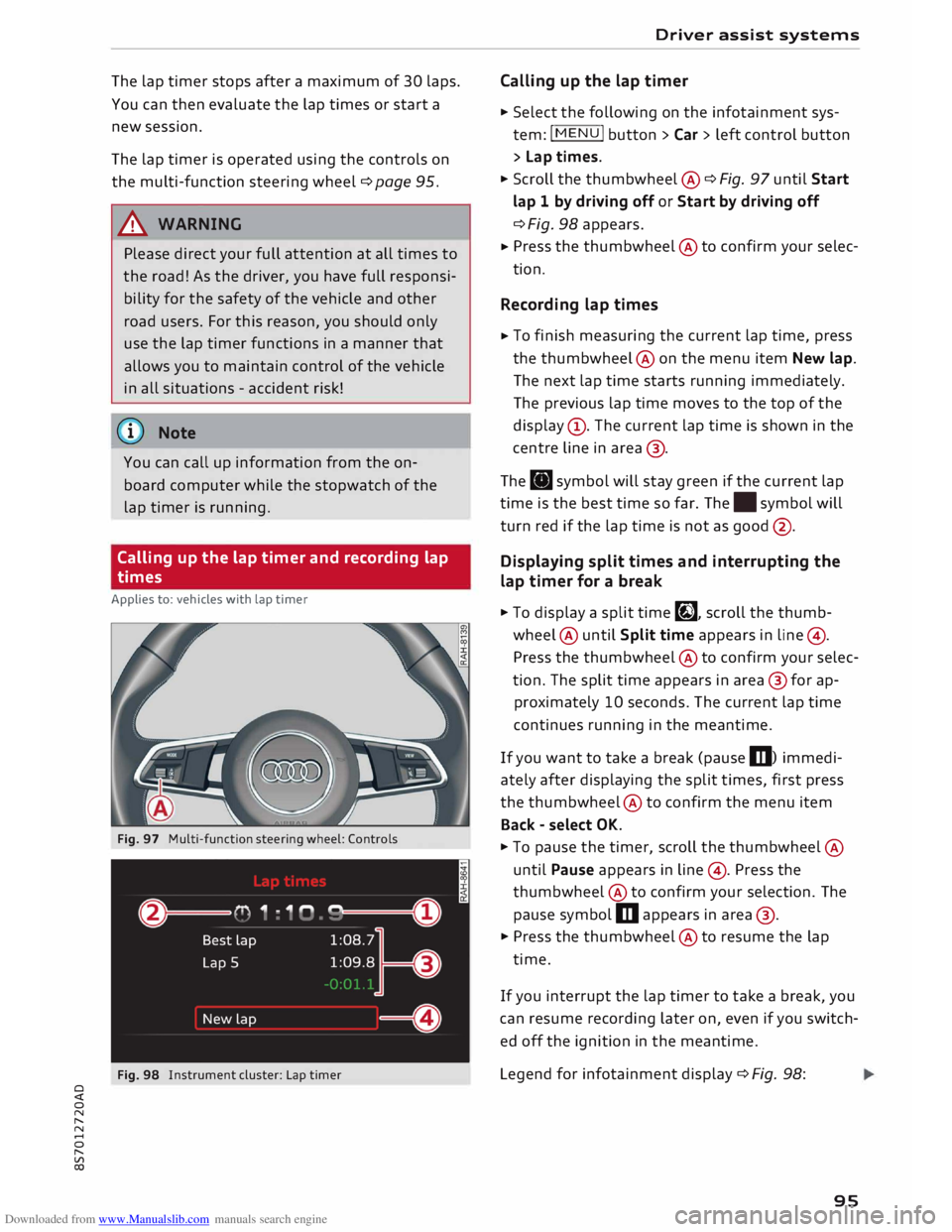
Fig. 97 Multi-function steering wheel: Controls
Fig. 98 Instrument cluster: Lap timer Driver
assist systems
Calling up the lap timer
� Select the following on the infotainment sys
tem: I MENU I button >Car> left control button
> Lap times.
� Scroll the thumbwheel @ ¢ Fig. 97 until Start
lap 1 by driving off or Start by driving off
¢ Fig. 98 appears.
� Press
the thumbwheel @to confirm your selec
tion.
Recording lap times
� To
finish measuring the current lap time, press
the thumbwheel@ on the menu item New lap.
The next lap time starts running immediately.
The previous lap time moves to the top of the
display (!). The current lap time is shown in the
centre line in area @.
The . symbol will stay green if the current lap
time is the best time so far. The. symbol will
turn red if the lap time is not as good @.
Displaying split times and interrupting the
lap timer for a break
� To display a split time�, scroll the thumb
wheel @ until Split time appears in line@) .
Press the thumbwheel @to confirm your selec
tion. The split time appears in area @for ap
proximately 10 seconds. The current lap time
continues running in the meantime.
If you want to take a break (pause m) immedi
ately after displaying the split times, first press
the thumbwheel @to confirm the menu item
Back -select OK.
� To pause the timer, scroll the thumbwheel @
until Pause appears in line @). Press the
thumbwheel @to confirm your selection. The
pause symbol m appears in area @.
� Press the thumbwheel @to resume the lap
time.
If you interrupt the lap timer to take a break, you
can resume recording later on, even if you switch
ed off the ignition in the meantime.
Legend for infotainment display¢ Fig. 98:
95
Page 112 of 306
Downloaded from www.Manualslib.com manuals search engine Parking
aids
- The best parking results will be achieved if
you position the vehicle as parallel as possi
ble to the line of parked cars or the kerb be
fore you start the actual parking manoeu
vre.
-If there are suitable parking spaces on both
sides of the road (for instance on a one-way
street), you can change the direction of the
turn signals to park on the other side, even
if you have already activated the park assist.
Parking parallel to the roadside
Applies to: vehicles with park assist
The driver is responsible for parking the vehicle.
t' 3 '\.
I
\
- IR
�
- 1 '"*-w )
' -,-,.
-
\
}
__
D�
; READY
'\. * OFF
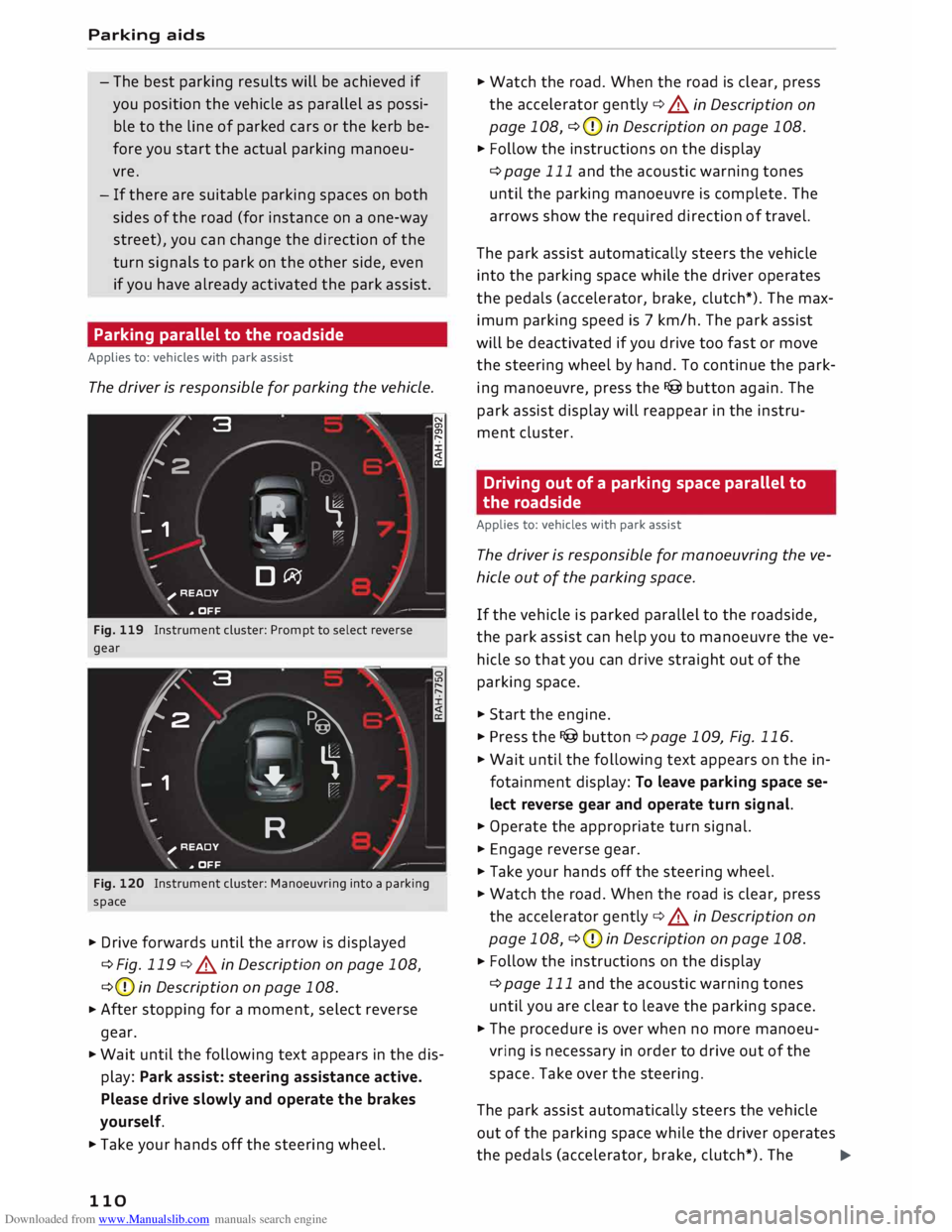
Fig. 119 Instrument cluster: Prompt to select reverse
gear
'2' 3
2
,
I
- - 1 '\.
� \
�
'-.
'--""'."" ' I
R )_
;
READY
_,,..,
'\. * OFF
Fig. 120 Instrument cluster: Manoeuvring into a parking
space
� Drive forwards until the arrow is displayed
¢Fig. 119 ¢.&.
in Description on page 108,
¢ (D
in Description on page 108.
� After
stopping for a moment, select reverse
gear.
� Wait until the following text appears in the dis
play: Park assist: steering assistance active.
Please drive slowly and operate the brakes
yourself.
� Take your hands off the steering wheel.
110 �
Watch the road. When the road is clear, press
the accelerator gently ¢.&.
in Description on
page 108, ¢(D
in Description on page 108.
� Follow the instructions on the display
¢page 111 and the acoustic warning tones
until the parking manoeuvre is complete. The
arrows show the required direction of travel.
The park assist automatically steers the vehicle
into the parking space while the driver operates
the pedals (accelerator, brake, clutch*). The max
imum parking speed is 7 km/h. The park assist
will be deactivated if you drive too fast or move
the steering wheel by hand. To continue the park
ing manoeuvre, press the I@ button again. The
park assist display will reappear in the instru
ment cluster.
Driving out of a parking space parallel to
the roadside
Applies to: vehicles with park assist
The driver is responsible for manoeuvring the ve
hicle out of the parking space.
If the vehicle is parked parallel to the roadside,
the park assist can help you to manoeuvre the ve
hicle so that you can drive straight out of the
parking space.
� Start the engine.
� Press the I@ button ¢ page 109, Fig. 116.
� Wait until the following text appears on the in
fotainment display: To leave parking space se
lect reverse gear and operate turn signal.
� Operate the appropriate turn signal.
� Engage reverse gear.
� Take your hands off the steering wheel.
� Watch the road. When the road is clear, press
the accelerator gently ¢.&.
in Description on
page 108, ¢(D
in Description on page 108.
� Follow
the instructions on the display
¢page 111 and the acoustic warning tones
until you are clear to leave the parking space.
� The procedure is over when no more manoeu
vring is necessary in order to drive out of the
space. Take over the steering.
The park assist automatically steers the vehicle
out of the parking space while the driver operates
the pedals (accelerator, brake, clutch*). The
�
Page 113 of 306
Downloaded from www.Manualslib.com manuals search engine maximum
manoeuvring speed is 5 km/h. The
park assist will be deactivated if you drive too
fast or move the steering wheel by hand. To con
tinue the parking manoeuvre, switch the engine
off/on. Then press the I@ button again. Alterna
tively, drive out of the parking space without us
ing the park assist.
Driver messages
Applies to: vehicles with park assist
Iii! Park assist: steering assistance active.
Please drive slowly and operate the brakes your
self
The park assist is ready. You can now park the ve
hicle. Watch the road ¢ & in Description on
page 108.
Ill Park assist: ended. Please take over steer
ing.
The park assist has finished the parking manoeu
vre.
Ill Park assist: cancelled. Continue steering ve
hicle!
The park assist has interrupted the parking ma
noeuvre to avoid a collision between the vehicle
and an obstacle.
Ill Park assist: cancelled. Steering input detec
ted. Continue steering vehicle!
The steering assistant has been deactivated be
cause the driver has intervened in the steering.
To continue the parking manoeuvre, press the
I@ button again.
[9] Reduce your speed! For the best results when
passing the line of parked cars where you want to
park, do not drive faster than 30 km/h (if parking
parallel to the roadside) or 20 km/h (if parking
perpendicular to the roadside) ¢ page 109.
Ill Park assist: cancelled. Speed too high. Con
tinue steering vehicle!
You were driving too fast into the parking space.
Do not exceed 7 km/h when driving into the park-
� ing space.
� Ill
Park assist: currently unavailable. Stabilisa
o
[;:j tion
control (ESC) off Parking aids
Switch the ES( on to use the park assist.
Iii! To leave parking space select reverse gear
and operate turn signal
The park assist is ready. You can leave the park
ing space. Watch the road ¢ & in Description on
page 108.
Ill Park assist: cancelled. Stabilisation control
(ESC) input. Continue steering vehicle!
Take over the steering. Finish parking without
the park assist or drive out of the parking space.
The park assist has interrupted the parking ma
noeuvre, because the ESC has been switched off.
Take over the steering or switch on the ESC
¢page 114 and start the parking manoeuvre
again ¢page 109.
Ill Park assist: ended. Please take over steering
and continue driving.
The park assist has finished manoeuvring the ve
hicle out of the parking space. Please take over
the steering.
Ill Park assist: cancelled. Space too small
The assist function is unable to automatically
steer the vehicle out of the parking space be
cause the space is too small. Manoeuvre the vehi
cle out of the parking space without using the
park assist.
Ill Park assist: time limit exceeded
Ill Park assist: cancelled. Time limit exceeded.
Continue steering vehicle!
The parking manoeuvre was not completed with
in about six minutes after the park assist was ac
tivated. To continue the parking manoeuvre,
press the I@ button again.
Ill Park assist: currently unavailable
Ill Park assist: currently unavailable. Continue
steering vehicle!
The park assist cannot be used to park the vehi
cle. Try repeating the parking manoeuvre or
switching the ignition off and on again.
Ill Park assist: not stopped long enough
Ill-
111
Page 130 of 306
Downloaded from www.Manualslib.com manuals search engine Multi
Media Interface
Speller for Letters/numbers
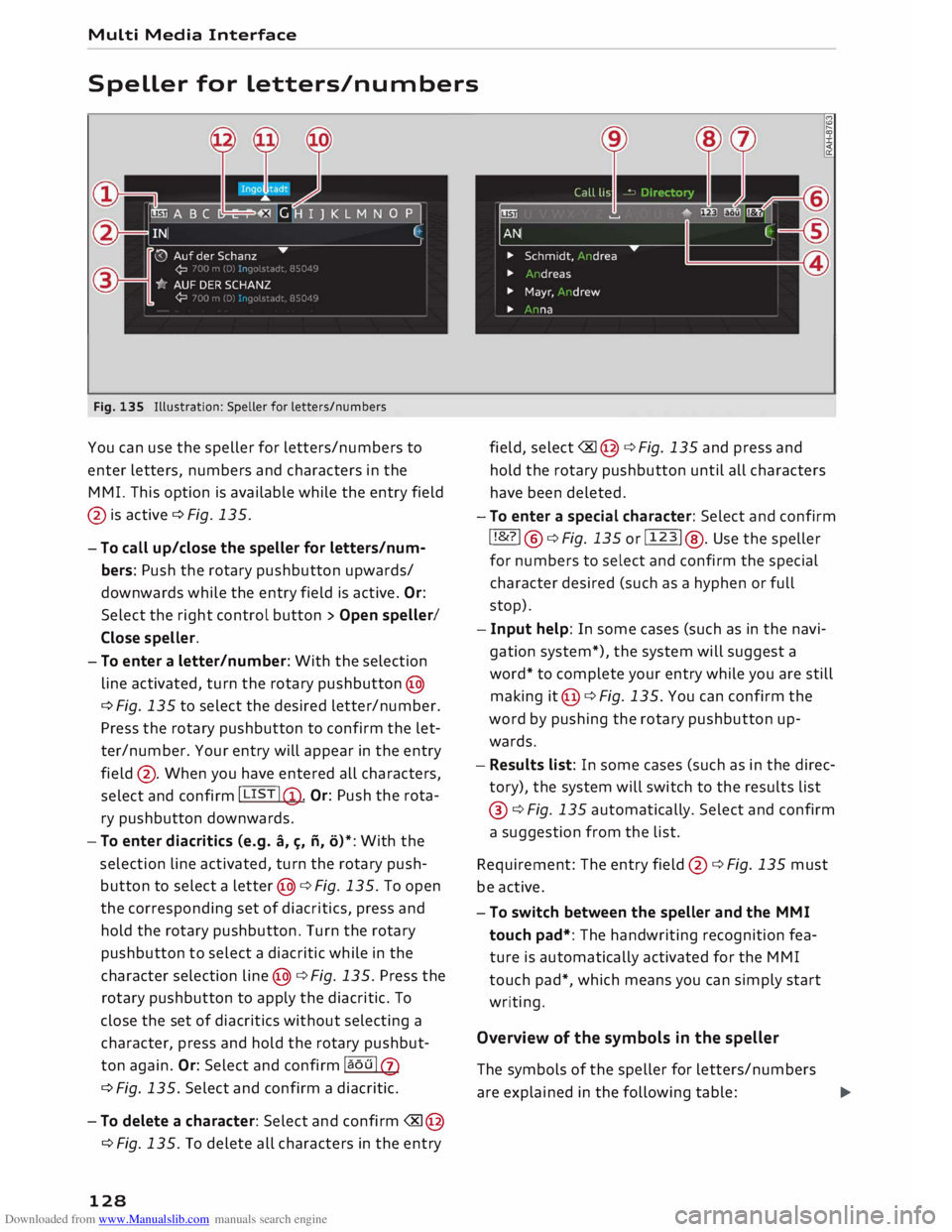
Fig. 135 Illustration: Speller for letters/numbers
You can use the speller for letters/numbers to
enter letters, numbers and characters in the
MMI. This option is available while the entry field
@ is active ¢ Fig. 135.
- To call up/close the speller for letters/num
bers: Push the rotary pushbutton upwards/
downwards while the entry field is active. Or:
Select the right control button > Open speller/
Close speller.
- To enter a letter/number: With the selection
line activated, turn the rotary pushbutton @
¢ Fig. 135 to select the desired letter/number.
Press the rotary pushbutton to confirm the let
ter/number. Your entry will appear in the entry
field @. When you have entered all characters,
select and confirm I LIST !@ .
Or: Push the rota
ry pushbutton downwards.
- To enter diacritics (e.g. a,�. ii, o)*: With the
selection line activated, turn the rotary push
button to select a letter @¢ Fig. 135. To open
the corresponding set of diacritics, press and
hold the rotary pushbutton. Turn the rotary
pushbutton to select a diacritic while in the
character selection line@¢ Fig. 135. Press the
rotary pushbutton to apply the diacritic. To
close the set of diacritics without selecting a
character, press and hold the rotary pushbut
ton again. Or: Select and confirm la ou lQ)
¢ Fig. 135. Select and confirm a diacritic.
-To delete a character: Select and confirm �@
¢Fig. 135. To delete all characters in the entry
128 field,
select� @¢ Fig. 135 and press and
hold the rotary pushbutton until all characters
have been deleted.
- To enter a special character: Select and confirm
! !&?! @¢Fig. 135 or!123! @. Use the speller
for numbers to select and confirm the special
character desired (such as a hyphen or full
stop).
- Input help: In some cases (such as in the navi
gation system*), the system will suggest a
word* to complete your entry while you are still
making it@ ¢ Fig. 135. You can confirm the
word by pushing the rotary pushbutton up
wards.
- Results list: In some cases (such as in the direc
tory), the system will switch to the results list
@ ¢Fig. 135 automatically. Select and confirm
a suggestion from the list.
Requirement: The entry field@¢ Fig. 135 must
be active.
- To switch between the speller and the MMI
touch pad*: The handwriting recognition fea
ture is automatically activated for the MMI
touch pad*, which means you can simply start
writing.
Overview of the symbols in the speller
The symbols of the speller for letters/numbers
are explained in the following table:
�
Page 131 of 306
Downloaded from www.Manualslib.com manuals search engine 0
N
,.....
N
....
0
,.....
Vl
CX) CD
@ ®
@
®
®
0
®
®
@
@
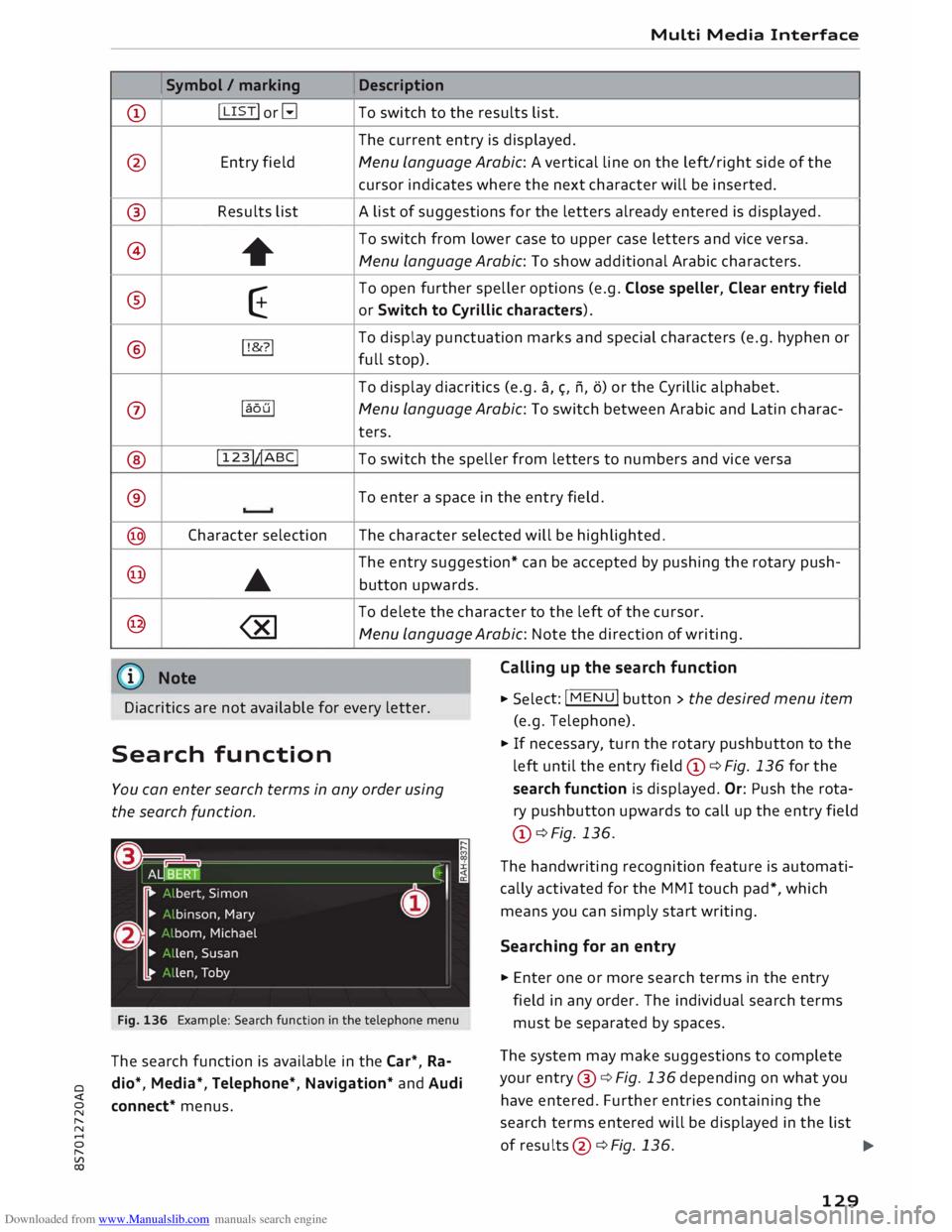
@ Symbol
/ marking
I LIST! or�
Entry field
Results list +
E
!!&? !
laoul
! 123!�ABC!
Character selection
•
Media Interface
Description
To switch to the results list.
The current entry is displayed.
Menu Language Arabic: A vertical line on the left/right side of the
cursor indicates where the next character will be inserted.
A list of suggestions for the letters already entered is displayed.
To switch from lower case to upper case letters and vice versa.
Menu Language Arabic: To show additional Arabic characters.
To open further speller options (e.g. Close speller, Clear entry field
or Switch to Cyrillic characters).
To display punctuation marks and special characters (e.g. hyphen or
full stop).
To display diacritics (e.g. a,�. n, o) or the Cyrillic alphabet.
Menu Language Arabic: To switch between Arabic and Latin charac-
ters.
To switch the speller from letters to numbers and vice versa
To enter a space in the entry field .
The character selected will be highlighted.
The entry suggestion* can be accepted by pushing the rotary push-
button upwards.
To delete the character to the left of the cursor.
Menu Language Arabic: Note the direction of writing.
Calling up the search function
Diacritics are not available for every letter. .,.
Select: !MENU
! button > the desired menu item
(e.g. Telephone) .
Search function
You can enter search terms in any order using
the search function.
Fig. 136 Example: Search function in the telephone menu
The search function is available in the Car*, Ra
dio*, Media*, Telephone*, Navigation* and Audi
connect* menus. .,.
If necessary, turn the rotary pushbutton to the
left until the entry field CD¢ Fig. 136 for the
search function is displayed. Or: Push the rota
ry pushbutton upwards to call up the entry field
CD ¢ Fig. 136.
The handwriting recognition feature is automati
cally activated for the MMI touch pad*, which
means you can simply start writing.
Searching for an entry
.,. Enter one or more search terms in the entry
field in any order. The individual search terms
must be separated by spaces.
The system may make suggestions to complete
your entry @¢ Fig. 136 depending on what you
have entered. Further entries containing the
search terms entered will be displayed in the list
of results
@¢
Fig.136.
1)11,,
129