tow AUDI TT ROADSTER 2016 User Guide
[x] Cancel search | Manufacturer: AUDI, Model Year: 2016, Model line: TT ROADSTER, Model: AUDI TT ROADSTER 2016Pages: 306, PDF Size: 31.82 MB
Page 60 of 306
Downloaded from www.Manualslib.com manuals search engine Seats
and storage
Luggage compartment
General notes
A WARNING
Please refer to the important safety notes on
¢page 227, Stowing Luggage safely.
Load-through hatch with bag
Applies to: vehicles with load-through hatch and removable
ski bag
The bag can be used to transport Long items
(such as skis).
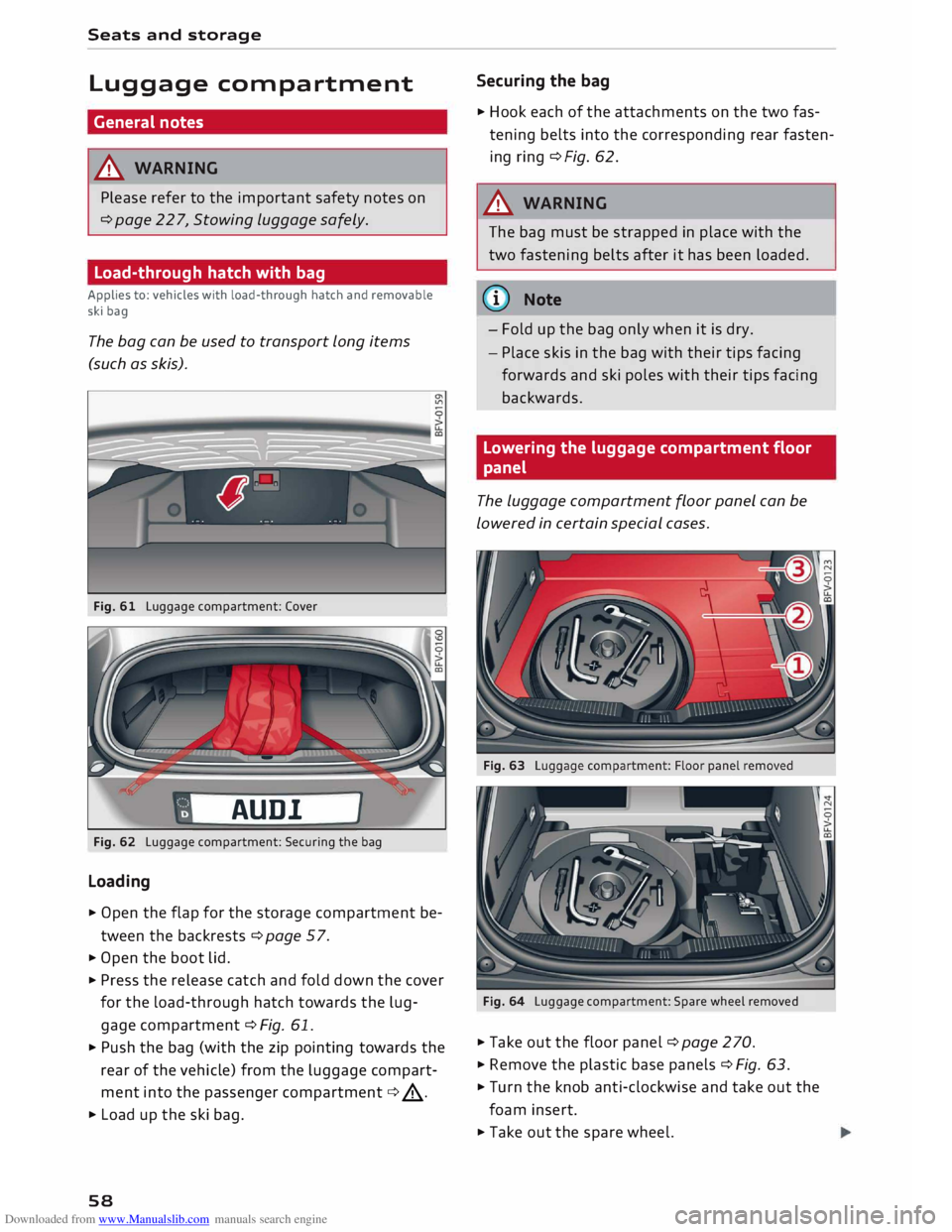
Fig. 61 Luggage compartment: Cover
AUD!
Fig. 62 Luggage compartment: Securing the bag
Loading
� Open the flap for the storage compartment be
tween the backrests ¢page 57.
� Open the boot lid.
� Press the release catch and fold down the cover
for the load-through hatch towards the lug
gage compartment ¢ Fig. 61.
� Push the bag (with the zip pointing towards the
rear of the vehicle) from the luggage compart
ment into the passenger compartment ¢.&_.
� Load up the ski bag.
58 Securing
the bag
� Hook each of the attachments on the two fas
tening belts into the corresponding rear fasten
ing ring ¢Fig. 62.
A WARNING
The bag must be strapped in place with the
two fastening belts after it has been loaded.
(D) Note
- Fold up the bag only when it is dry.
- Place skis in the bag with their tips facing
forwards and ski poles with their tips facing
backwards.
Lowering the luggage compartment floor
panel
The Luggage compartment floor panel can be
Lowered in certain special cases.
Fig. 64 Luggage compartment: Spare wheel removed
� Take out the floor panel ¢ page 270.
� Remove the plastic base panels ¢ Fig. 63.
� Turn the knob anti-clockwise and take out the
foam insert.
� Take out the spare wheel.
Page 70 of 306
Downloaded from www.Manualslib.com manuals search engine Driving
The tyre pressures should always be checked
when the tyres are cold.
Do not use winter tyres all through the year; they
will increase fuel consumption by up to 10 %.
Avoid carrying unnecessary loads
Every kilo of extra weight will increase the fuel
consumption, so it is worth checking the luggage
compartment occasionally to make sure that no
unnecessary loads are being transported.
Save electrical energy
The engine drives the alternator to generate elec
tricity. This means that fuel consumption rises
when more power is required for electrical equip
ment. Switch off electrical equipment when it is
not needed. Electrical equipment which uses a
lot of electricity includes the blower (at a high
setting), the rear window heating and the seat
heating*.
Steering Adjusting the steering wheel position
The height and reach of the steering wheel can
be adjusted as required to suit the driver.
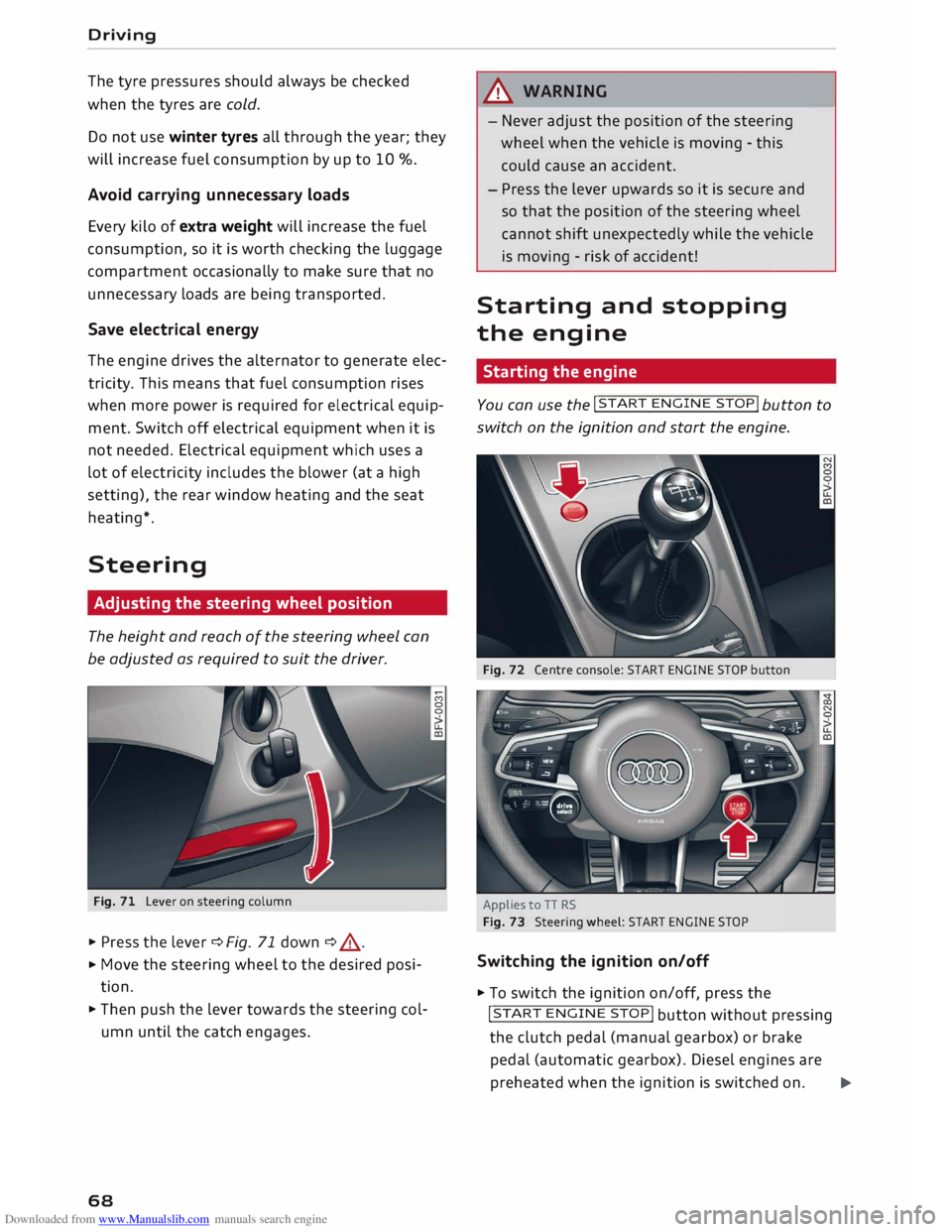
Fig. 71 Lever on steering column
� Press the lever¢ Fig. 71 down ¢ .&, .
� Move
the steering wheel to the desired posi
tion.
� Then push the lever towards the steering col
umn until the catch engages.
68 A
WARNING
- Never adjust the position of the steering
wheel when the vehicle is moving - this
could cause an accident.
- Press the lever upwards so it is secure and
so that the position of the steering wheel
cannot shift unexpectedly while the vehicle
is moving -risk of accident!
Starting and stopping
the engine
Starting the engine -
You can use the !START
ENGINE STOP!
button to
switch on the ignition and start the engine.
Fig. 72 Centre console: START ENGINE STOP button
Applies to TT RS
Fig. 73 Steering wheel: START ENGINE STOP
Switching the ignition on/off
� To switch the ignition on/off, press the
!START ENGINE STOP!
button without pressing
the clutch pedal (manual gearbox) or brake
pedal (automatic gearbox). Diesel engines are
preheated when the ignition is switched on.�
Page 82 of 306
Downloaded from www.Manualslib.com manuals search engine Driving
fully interrupted even when the engine is
idling.
- The accelerator pedal must on no account
be pressed inadvertently when the vehicle is
stationary. The vehicle could otherwise start
moving immediately (in some cases even if
the parking brake is engaged) and possibly
cause an accident.
- Do not press the accelerator while selecting
a gear with the vehicle stationary and the
engine running, as this could cause an acci
dent.
- Never move the selector lever to R or P
when driving at normal speeds, as this could
cause an accident.
- Before you drive down a steep gradient, re
duce the speed and use "tiptronic" to select
a low gear.
- Never allow the brake to drag when driving
downhill and do not use the brake pedal too
often or for long periods. Constant braking
will cause the brakes to overheat and will
considerably reduce the effectiveness of the
brakes. It will increase the braking distance
and could cause the brake system to fail.
- To avoid rolling back on gradients always
hold the vehicle with the footbrake or park
ing brake if you have to stop.
- Never attempt to hold the vehicle with the
clutch when stopping on a gradient. The
clutch is disengaged automatically if it is
overloaded and becomes too hot -accident
risk! If the clutch is overloaded, the indica
tor lamp 51 will light up and a message will
appear ¢page 83.
CD CAUTION
- When you have stopped on a gradient, do
not try to stop the vehicle rolling back by ac
celerating when a gear is engaged. This
could cause the automatic gearbox to over
heat and become damaged. Apply the park
ing brake or press the brake pedal in order
to prevent the vehicle from rolling back.
- If you allow the car to roll with the selector
lever in position N with the engine switched
off, the automatic gearbox will be damaged
as it will not be lubricated.
80 -
In certain driving and traffic conditions, for
instance in stop-and-go traffic, if you have
to pull away frequently or if the vehicle
creeps forwards over a long distance, the
gearbox can overheat and become dam
aged. If the indicator lamp 51 or the warn
ing lamp . lights up, stop the vehicle at
the first opportunity and let the gearbox
cool down ¢page 83.
- If you allow the car to roll with the engine
switched off, the S tronic gearbox will be
damaged as it will not be lubricated
¢ page 2 78, Tow-starting I towing away.
ijJ) Note
For safety reasons the parking brake will only
release automatically if the driver's seat belt
is engaged in its buckle.
Downhill speed control
Applies to: vehicles with automatic gearbox
The downhill speed control function helps the
driver when driving down steep gradients.
Downhill speed control is activated on a downhill
gradient when the selector lever is in D/S and the
driver presses the brake pedal. The gearbox auto
matically selects a suitable gear for the gradient.
The downhill speed control function attempts to
maintain the speed at which the vehicle was trav
elling when the foot brake was applied (subject
to the laws of physics and technical limitations of
the power train). It may be necessary to adjust
the speed again using the foot brake. The down
hill speed control can change down to 3rd gear
but no further, so it may be necessary to change
to tiptronic mode on very steep gradients. In this
case, change down manually to 2nd or 1st gear in
tiptronic mode to use the engine braking effect
and reduce the load on the brakes.
Downhill speed control is deactivated as soon as
the road levels out again or you press the acceler
ator pedal.
On vehicles with cruise control system*
¢ page 86, downhill speed control is activated
when you set a cruising speed.
�
Page 86 of 306
Downloaded from www.Manualslib.com manuals search engine Driving
Releasing the selector lever manually (LHD
vehicles)
Applies to: vehicles with automatic gearbox
The selector Lever can be released manually if
the electrical power supply should fail.
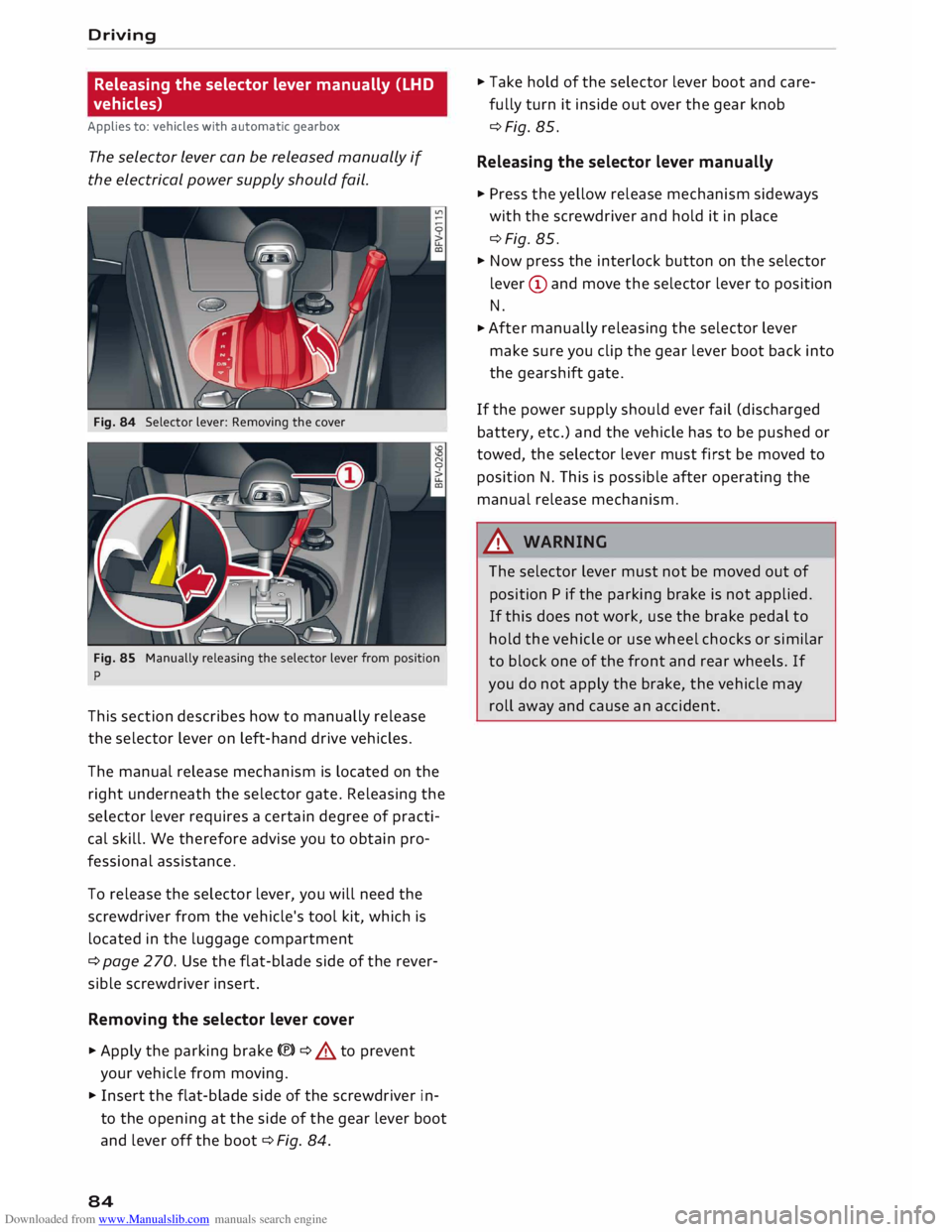
Fig. 84 Selector lever: Removing the cover
Fig. 85 Manually releasing the selector lever from position
p
This section describes how to manually release
the selector lever on left-hand drive vehicles.
The manual release mechanism is located on the
right underneath the selector gate. Releasing the
selector lever requires a certain degree of practi
cal skill. We therefore advise you to obtain pro
fessional assistance.
To release the selector lever, you will need the
screwdriver from the vehicle's tool kit, which is
located in the luggage compartment
¢ page 270. Use the flat-blade side of the rever
sible screwdriver insert.
Removing the selector lever cover
� Apply the parking brake(®)¢ & to prevent
your vehicle from moving.
� Insert the flat-blade side of the screwdriver in
to the opening at the side of the gear lever boot
and lever off the boot ¢Fig. 84.
84 �
Take hold of the selector lever boot and care
fully turn it inside out over the gear knob
¢Fig. 85.
Releasing the selector lever manually
� Press the yellow release mechanism sideways
with the screwdriver and hold it in place
¢Fig. 85.
� Now press the interlock button on the selector
lever (D and move the selector lever to position
N.
� After
manually releasing the selector lever
make sure you clip the gear lever boot back into
the gearshift gate.
If the power supply should ever fail (discharged
battery, etc.) and the vehicle has to be pushed or
towed, the selector lever must first be moved to
position N. This is possible after operating the
manual release mechanism .
.&_ WARNING
The selector lever must not be moved out of
position P if the parking brake is not applied.
If this does not work, use the brake pedal to
hold the vehicle or use wheel chocks or similar
to block one of the front and rear wheels. If
you do not apply the brake, the vehicle may
roll away and cause an accident.
Page 87 of 306
Downloaded from www.Manualslib.com manuals search engine Releasing
the selector lever manually (RHD
vehicles)
Applies to: vehicles with automatic gearbox
The selector Lever can be released manually if
the electrical power supply should fail.
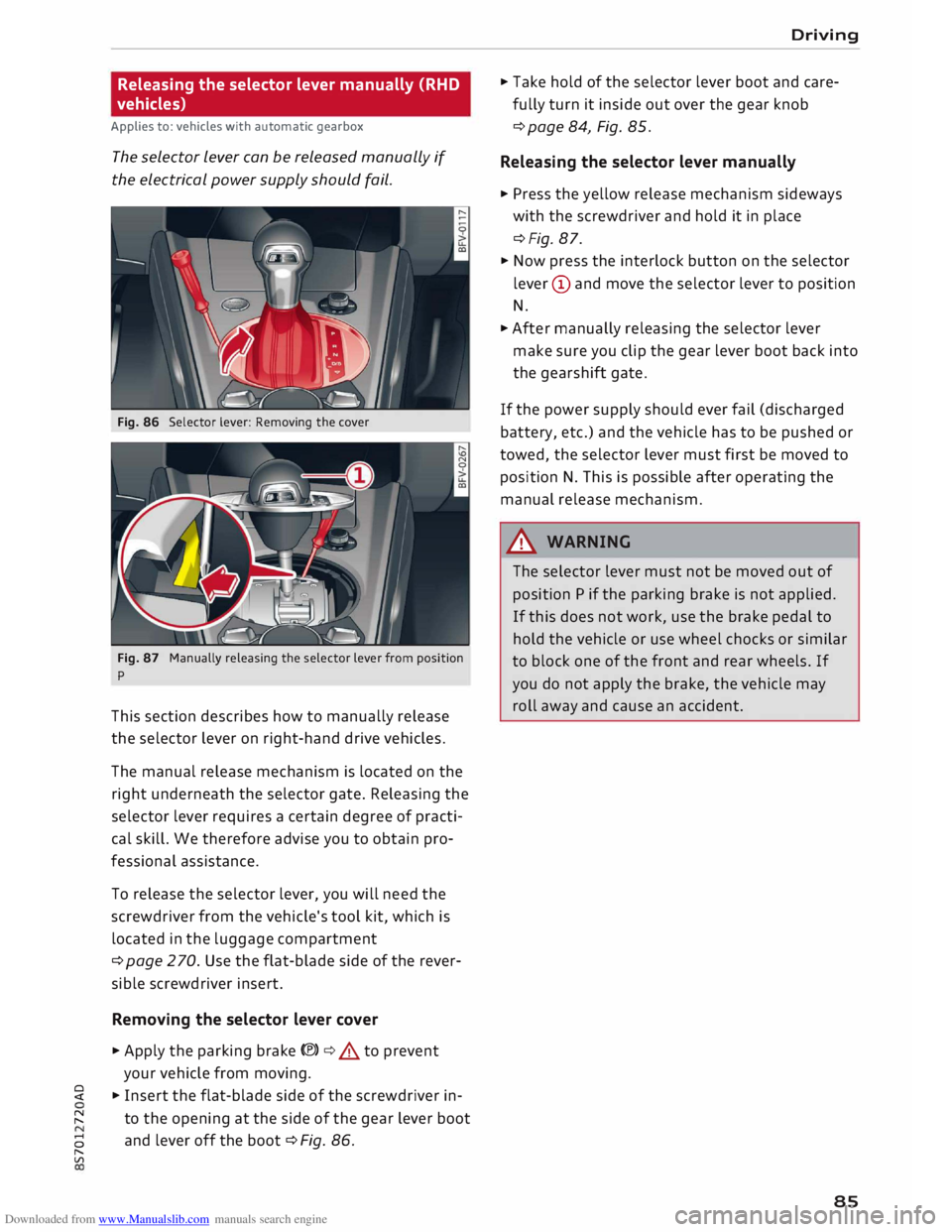
Fig. 86 Selector lever: Removing the cover
Fig. 87 Manually releasing the selector lever from position
p
This section describes how to manually release
the selector lever on right-hand drive vehicles.
The manual release mechanism is located on the
right underneath the selector gate. Releasing the
selector lever requires a certain degree of practi
cal skill. We therefore advise you to obtain pro
fessional assistance.
To release the selector lever, you will need the
screwdriver from the vehicle's tool kit, which is
located in the luggage compartment
¢ page 2 70. Use the flat-blade side of the rever
sible screwdriver insert.
Removing the selector lever cover
� Apply the parking brake(®)¢.&. to prevent
your vehicle from moving.
� � Insert the flat-blade side of the screwdriver in-
� to
the opening at the side of the gear lever boot
8 and
lever off the boot ¢ Fig. 86.
"
Vl Driving
� Take hold of the selector lever boot and care
fully turn it inside out over the gear knob
¢ page 84, Fig. 85.
Releasing the selector lever manually
� Press the yellow release mechanism sideways
with the screwdriver and hold it in place
¢Fig. 87.
� Now press the interlock button on the selector
lever (D and move the selector lever to position
N.
� After manually releasing the selector lever
make sure you clip the gear lever boot back into
the gearshift gate.
If the power supply should ever fail (discharged
battery, etc.) and the vehicle has to be pushed or
towed, the selector lever must first be moved to
position N. This is possible after operating the
manual release mechanism.
&_ WARNING
The selector lever must not be moved out of
position P if the parking brake is not applied.
If this does not work, use the brake pedal to
hold the vehicle or use wheel chocks or similar
to block one of the front and rear wheels. If
you do not apply the brake, the vehicle may
roll away and cause an accident.
85
Page 89 of 306
Downloaded from www.Manualslib.com manuals search engine -
Make sure you do not unintentionally rest
your foot on the accelerator -this will over
ride the cruise control system which, as a re
sult, will not brake the vehicle.
- The automatic braking function may be de
activated if a system fault occurs in the
brake system (e.g. if the brakes overheat)
while the cruise control system is activated.
All the other cruise control functions remain
activated as long as the indicator lamp.
is
lit.
@ Note
- Vehicles with manual gearbox: The set
speed cannot be reached if the currently se
lected gear is too high or too low or if the
engine would overrev or fail to run smoothly
at the target speed. Make sure to change up
or down a gear in good time.
- The brake lights come on when the system
brakes the vehicle.
Adjusting the speed
Applies to: vehicles with cruise control system
... To increase or reduce the cruising speed in
steps of 1 km/h, briefly push the lever one lev
el upwards or downwards towards
GY0
¢ page 86, Fig. 88 .
.., To increase or reduce the cruising speed in
steps of 10 km/h, briefly push the lever two
levels upwards or downwards towards
GY 0
¢ page 86, Fig. 88 .
.., To increase or reduce the speed gradually, hold
the Lever towards
GYO until
you reach the de
sired cruising speed.
Overriding the set speed
Applies to: vehicles with cruise control system
You can use the accelerator pedal to increase
speed in the normal way, for example to overtake
another vehicle. Once you release the accelera
tor, the system will revert to the speed you stor
ed initially.
� However,
if the vehicle exceeds the programmed
� speed
significantly for a long time, the cruise
::2 control
system will be deactivated temporarily.
Vl
CX) Driver
assist systems
The indicator lamp.
in the instrument cluster
will go out, but the programmed speed will re
main stored.
Pre-selecting a speed
Applies to: vehicles with cruise control system
You can pre-select a desired speed while the ve
hicle is stationary.
.., Switch on the ignition .
... Pull the Lever to position
(!)¢
page 86, Fig. 88.
... Press the Lever up towards 0 or down towards
0 in order to increase or reduce the cruising
speed setting.
This function allows you to enter the desired
cruise control setting speed ahead of time, for
example before joining a motorway. Once you are
on the motorway, you can activate the cruise con
trol system by pulling the Lever to position
(!).
Switching off
Applies to: vehicles with cruise control system
Switching off temporarily
... Press the brake pedal, or
.., Push the lever towards
@ (click
stop not en
gaged) ¢ page 86, Fig. 88.
Switching off completely
.., Push the Lever to position
@ (click
stop engag-
ed), or
.., Switch off the ignition.
The speed setting will remain stored after the
system is temporarily deactivated. To resume the
programmed cruising speed, release the clutch
or brake pedal and pull the lever to position
(!).
The stored speed will be deleted once the igni
tion is switched off.
.&, WARNING
Do not resume the programmed cruising
speed if this is too high for the traffic condi
tions -this can cause accidents.
87
Page 91 of 306
Downloaded from www.Manualslib.com manuals search engine 0
N
,.....
N
....
0
,.....
Vl
CX) Changing
the cut-off speed
Applies to: vehicles with speed limiter
.,. To increase or reduce the cut-off speed in steps
of 1 km/h, briefly push the lever one level up
wards or downwards towards
G
Y 0
¢
page 88,
Fig. 90.
.,. To increase or reduce the cut-off speed in steps
of 10 km/h, briefly push the lever two levels
upwards or downwards towards
GJl
0 .
.,. To
increase or reduce the cut-off speed continu
ously, push the lever one or two levels upwards
or downwards towards G)/0 and hold the Lev
er until the desired speed is reached.
Overriding the cut-off speed
Applies to: vehicles with speed limiter
To override the speed limiter temporarily, press
the accelerator fully past the point of resistance
(kick-down feature).
Speed limiting is suspended temporarily. The in
dicator lamp Ill flashes while the system is deac
tivated; the cut-off speed setting will remain
stored. The system is reactivated automatically
as soon as your speed drops below the original
stored setting.
Switching off
Applies to: vehicles with speed limiter
Switching off temporarily
.,. Push
the lever towards @ (click stop not en
gaged) ¢ page 88, Fig. 90. The instrument
cluster will indicate the stored cut-off speed,
and the indicator Lamp mm will Light up.
Switching off completely
.,. Push the Lever to position @ (click stop engag-
ed), or
.,. Switch off the ignition.
The cut-off speed setting will remain stored after
the system is temporarily deactivated. To resume
the programmed cut-off speed, pull the lever to
position (!). The vehicle speed is limited to the
stored cut-off setting as soon as your current
driving speed drops below the stored cut-off
speed. Driver
assist systems
The stored cut-off speed will be deleted once the
ignition is switched off.
Automatic deactivation
mm Speed limiter: currently unavailable. See
owner's manual
The speed limiter has been automatically deacti
vated because the system has detected a fault
which could impair its function. Try switching on
the speed limiter again later .
& WARNING
The speed limiter may be deactivated if a
fault occurs in the brake system (e.g. if the
brakes overheat) while the speed limiter is ac
tivated.
{CD) Note
If a system fault requires the speed limiter to
switch off automatically, for safety reasons it
does not switch off completely until the driver
releases the accelerator pedal once or deacti
vates the system manually.
89
Page 99 of 306
Downloaded from www.Manualslib.com manuals search engine 0
N
,.....
N
......
0
,.....
Vl
CX) G
meter
The G meter shows the Lateral and Longitudinal
forces generated. The maximum values meas
ured are stored and displayed when the vehicle is
stationary.
� To reset the stored values, select the following
on the multi-function steering wheel: right con
trol button > Reset values.
Engine data
The engine data display shows the current power
and torque Levels.
Tyre pressure display
The tyre pressure display shows the current infla
tion pressures and temperature. Also refer to
¢ page 260, Tyre pressure monitoring system.
Audi side assist (Lane
change assist feature)
Description
Applies to: vehicles with Audi side assist
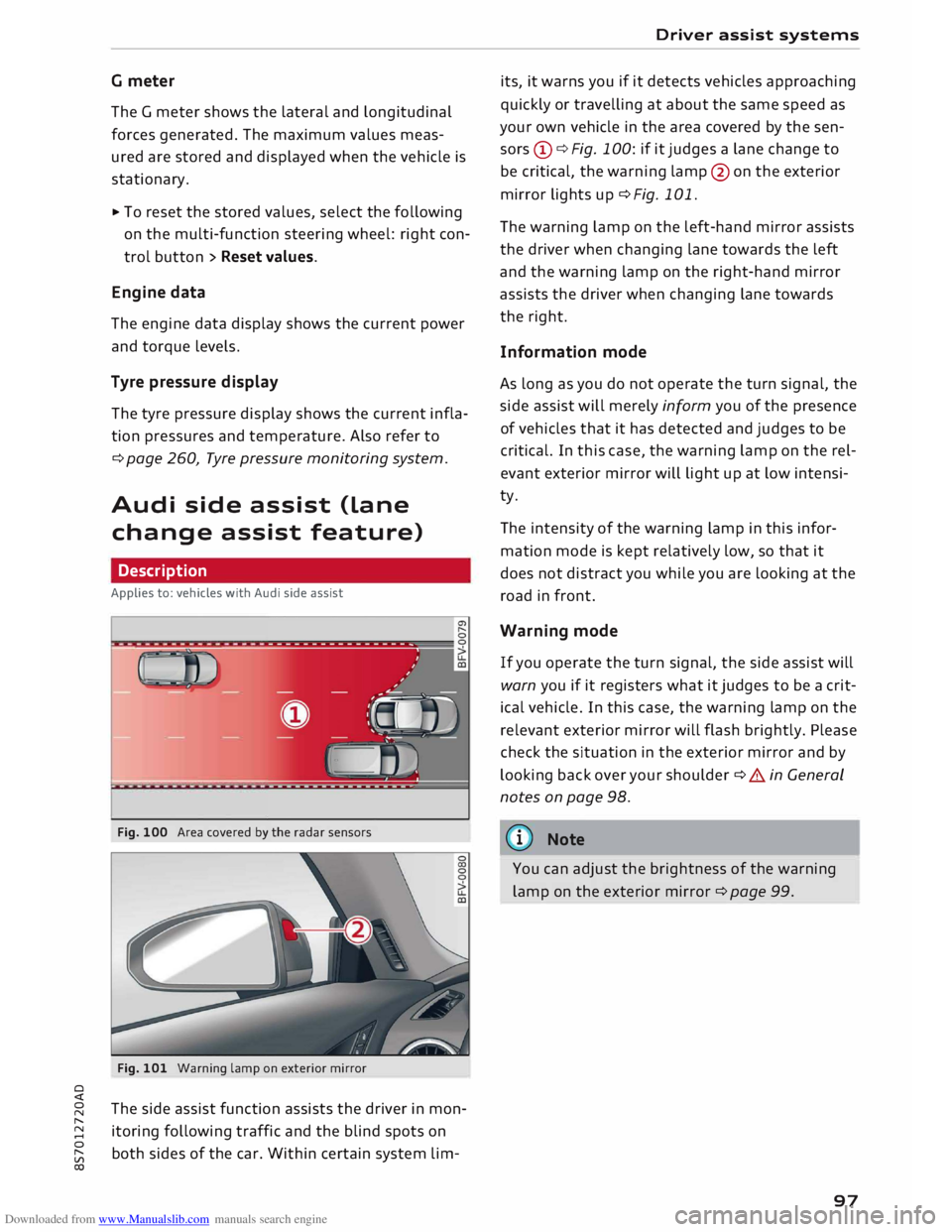
Fig. 100 Area covered by the radar sensors
Fig. 101 Warning lamp on exterior mirror
The side assist function assists the driver in mon
itoring following traffic and the blind spots on
both sides of the car. Within certain system Lim- Driver
assist systems
its, it warns you if it detects vehicles approaching
quickly or travelling at about the same speed as
your own vehicle in the area covered by the sen
sors (!)¢ Fig. 100: if it judges a Lane change to
be critical, the warning Lamp@on the exterior
mirror Lights up¢ Fig. 101.
The warning Lamp on the Left-hand mirror assists
the driver when changing Lane towards the Left
and the warning Lamp on the right-hand mirror
assists the driver when changing Lane towards
the right.
Information mode
As Long as you do not operate the turn signal, the
side assist will merely inform you of the presence
of vehicles that it has detected and judges to be
critical. In this case, the warning Lamp on the rel
evant exterior mirror will Light up at Low intensi
ty.
The intensity of the warning Lamp in this infor
mation mode is kept relatively Low, so that it
does not distract you while you are Looking at the
road in front.
Warning mode
If you operate the turn signal, the side assist will
warn you if it registers what it judges to be a crit
ical vehicle. In this case, the warning Lamp on the
relevant exterior mirror will flash brightly. Please
check the situation in the exterior mirror and by
Looking back over your shoulder¢ A in General
notes on page 98.
((1)) Note
You can adjust the brightness of the warning
Lamp on the exterior mirror¢ page 99.
97
Page 107 of 306
Downloaded from www.Manualslib.com manuals search engine 0
N
,.....
N
....
0
,.....
Vl
CX) (D}
Note
Zone ®
* is detected and analysed as the vehi
cle is moving past. When you switch on the ig
nition or after the vehicle has been stationary
for a while or a door is opened, the ambient
surroundings may have changed. Zone®
* is
displayed in black on the infotainment system
for this reason.
Switching on/off
Applies to: vehicles with parking system plus
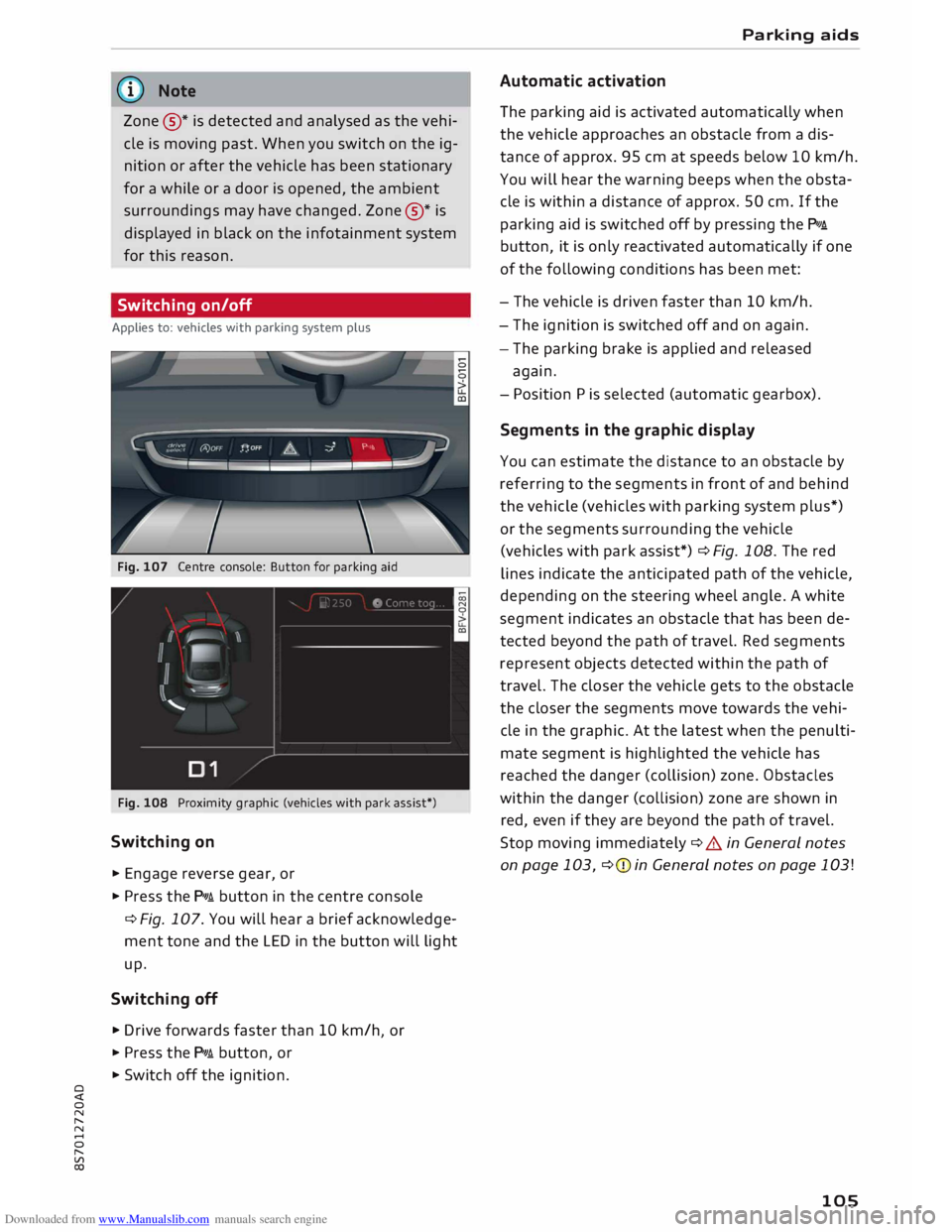
Fig. 107 Centre console: Button for parking aid
Fig. 108 Proximity graphic (vehicles with park assist*)
Switching on
... Engage reverse gear, or
... Press the p,,,i button in the centre console
¢ Fig. 107. You will hear a brief acknowledge
ment tone and the LED in the button will light
up.
Switching off
.,. Drive forwards faster than 10 km/h or
I
... Press the p,,,i button, or
... Switch off the ignition. Parking
aids
Automatic activation
The parking aid is activated automatically when
the vehicle approaches an obstacle from a dis
tance of approx. 95 cm at speeds below 10 km/h.
You will hear the warning beeps when the obsta
cle is within a distance of approx. 50 cm. If the
parking aid is switched off by pressing the P,#A.
button, it is only reactivated automatically if one
of the following conditions has been met:
- The vehicle is driven faster than 10 km/h.
- The ignition is switched off and on again.
- The parking brake is applied and released
again.
- Position Pis selected (automatic gearbox).
Segments in the graphic display
You can estimate the distance to an obstacle by
referring to the segments in front of and behind
the vehicle (vehicles with parking system plus*)
or the segments surrounding the vehicle
(vehicles with park assist*) ¢Fig. 108. The red
lines indicate the anticipated path of the vehicle,
depending on the steering wheel angle. A white
segment indicates an obstacle that has been de
tected beyond the path of travel. Red segments
represent objects detected within the path of
travel. The closer the vehicle gets to the obstacle
the closer the segments move towards the vehi
cle in the graphic. At the latest when the penulti
mate segment is highlighted the vehicle has
reached the danger (collision) zone. Obstacles
within the danger (collision) zone are shown in
red, even if they are beyond the path of travel.
Stop moving immediately ¢ A in General notes
on page 103, ¢(Din General notes on page 103!
105
Page 108 of 306
Downloaded from www.Manualslib.com manuals search engine Parking
aids
Reversing camera
Introduction
Applies to: vehicles with reversing camera
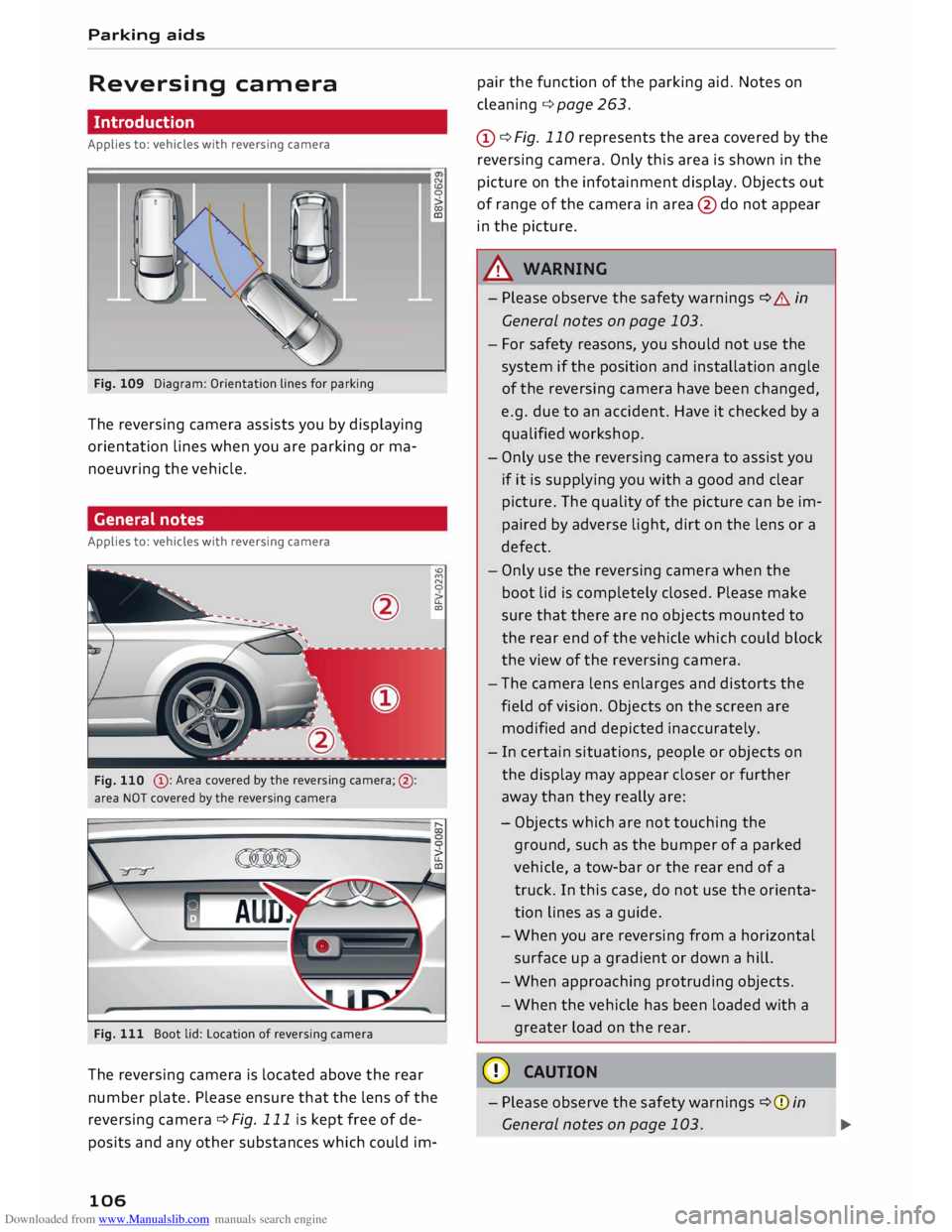
Fig. 109 Diagram: Orientation lines for parking
The reversing camera assists you by displaying
orientation lines when you are parking or ma
noeuvring the vehicle.
General notes
Applies to: vehicles with reversing camera
@ : Area covered by the reversing camera;@:
area NOT covered by the reversing camera
Fig. 111 Boot lid: Location of reversing camera N
CD
0
co
ID
'°
M
N
0
u..
CXl
The reversing camera is located above the rear
number plate. Please ensure that the lens of the
reversing camera ¢ Fig. 111 is kept free of de
posits and any other substances which could im-
106 pair
the function of the parking aid. Notes on
cleaning ¢page 263.
(D ¢ Fig. 110 represents the area covered by the
reversing camera. Only this area is shown in the
picture on the infotainment display. Objects out
of range of the camera in area @do not appear
in the picture.
A WARNING
- Please observe the safety warnings ¢ A in
General notes on page 103.
- For safety reasons, you should not use the
system if the position and installation angle
of the reversing camera have been changed,
e.g. due to an accident. Have it checked by a
qualified workshop.
- Only use the reversing camera to assist you
if it is supplying you with a good and clear
picture. The quality of the picture can be im
paired by adverse light, dirt on the lens or a
defect.
- Only use the reversing camera when the
boot lid is completely closed. Please make
sure that there are no objects mounted to
the rear end of the vehicle which could block
the view of the reversing camera.
- The camera lens enlarges and distorts the
field of vision. Objects on the screen are
modified and depicted inaccurately.
- In certain situations, people or objects on
the display may appear closer or further
away than they really are:
- Objects which are not touching the
ground, such as the bumper of a parked
vehicle, a tow-bar or the rear end of a
truck. In this case, do not use the orienta
tion lines as a guide.
- When you are reversing from a horizontal
surface up a gradient or down a hill.
- When approaching protruding objects.
- When the vehicle has been loaded with a
greater load on the rear.
CD CAUTION
- Please observe the safety warnings ¢(Din
General notes on page 103.