change wheel AUDI TT ROADSTER 2016 Owner's Manual
[x] Cancel search | Manufacturer: AUDI, Model Year: 2016, Model line: TT ROADSTER, Model: AUDI TT ROADSTER 2016Pages: 306, PDF Size: 31.82 MB
Page 276 of 306
Downloaded from www.Manualslib.com manuals search engine Mobility
Raising the vehicle
Applies to: vehicles with jack
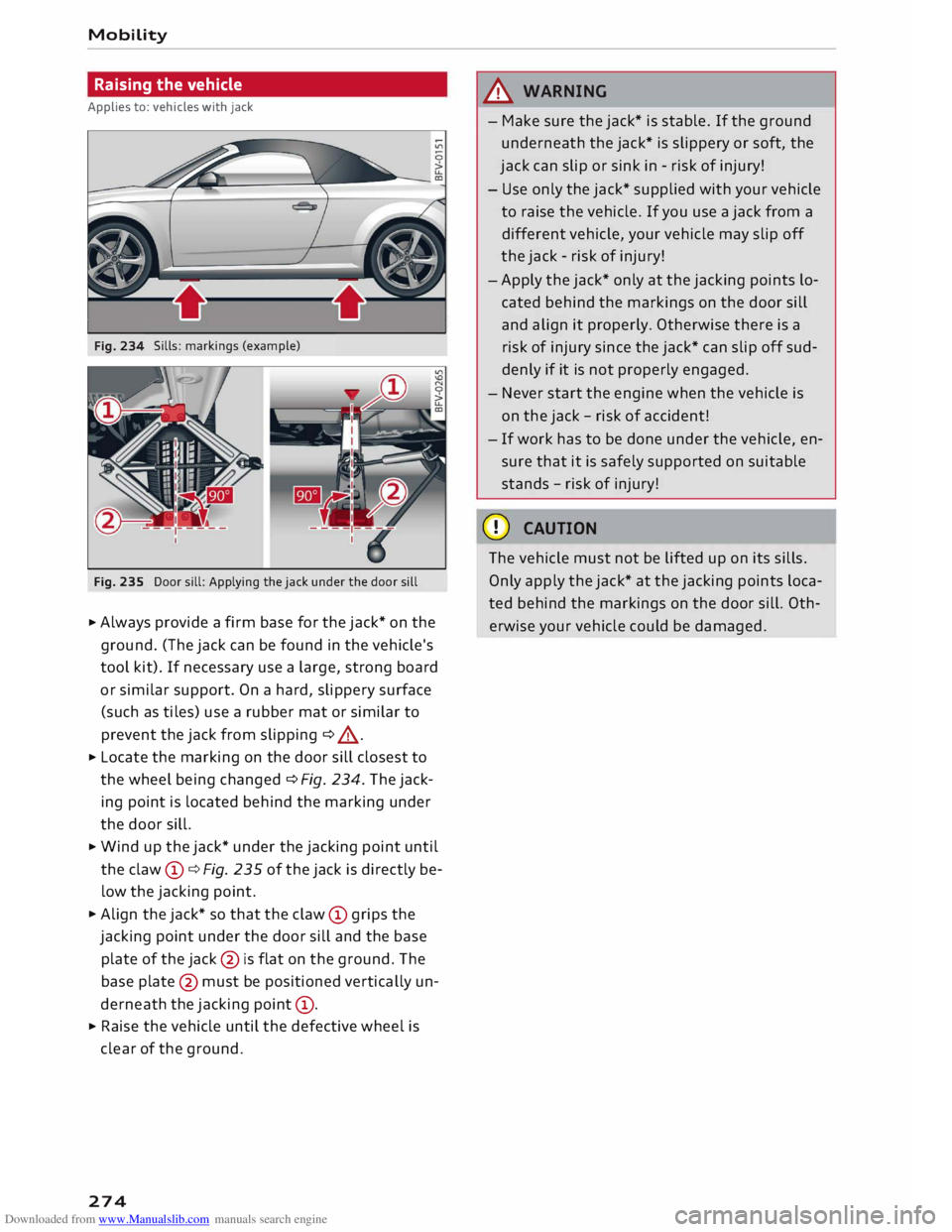
Sills: markings (example)
Fig. 235 Door sill: Applying the jack under the door sill
.., Always provide a firm base for the jack* on the
ground. (The jack can be found in the vehicle's
tool kit). If necessary use a large, strong board
or similar support. On a hard, slippery surface
(such as tiles) use a rubber mat or similar to
prevent the jack from slipping ¢ A .
.., Locate the marking on the door sill closest to
the wheel being changed ¢ Fig. 234. The jack
ing point is located behind the marking under
the door sill.
.., Wind up the jack* under the jacking point until
the claw (D
¢ Fig. 235 of the jack is directly be
low the jacking point .
.., Align the jack* so that the claw (D
grips the
jacking point under the door sill and the base
plate of the jack@
is flat on the ground. The
base plate @
must be positioned vertically un
derneath the jacking point (D
.
.., Raise the vehicle until the defective wheel is
clear of the ground.
274 .&_
WARNING
- Make sure the jack* is stable. If the ground
underneath the jack* is slippery or soft, the
jack can slip or sink in -risk of injury!
- Use only the jack* supplied with your vehicle
to raise the vehicle. If you use a jack from a
different vehicle, your vehicle may slip off
the jack -risk of injury!
-Apply the jack* only at the jacking points lo
cated behind the markings on the door sill
and align it properly. Otherwise there is a
risk of injury since the jack* can slip off sud
denly if it is not properly engaged.
- Never start the engine when the vehicle is
on the jack -risk of accident!
- If work has to be done under the vehicle, en
sure that it is safely supported on suitable
stands -risk of injury!
CD CAUTION
The vehicle must not be lifted up on its sills.
Only apply the jack* at the jacking points loca
ted behind the markings on the door sill. Oth
erwise your vehicle could be damaged.
Page 282 of 306
Downloaded from www.Manualslib.com manuals search engine Mobility
Vehicle being towed (rear)
� Ensure that the ignition is switched on, the
steering wheel is not locked, and that you can
operate the turn signals, horn or windscreen
wipers if necessary ¢ A-
� The brake servo only works when the engine is
running. The power steering only works when
the ignition is on and the vehicle is moving 1
).
Otherwise you will need to press the brake ped
al significantly harder and apply more force to
move the steering wheel.
� Please ensure that the steering wheel is un-
locked and that it moves freely.
� Release the parking brake¢ page 74.
� Manual gearbox: Put the gear lever in neutral.
� Automatic gearbox: Move the selector lever to
position N.
� Ensure that the tow-rope remains taut at all
times when towing.
A WARNING
If the vehicle has no electrical power, do NOT
use a tow-bar or tow-rope to tow the vehicle
(D Note
You can use the turn signals to indicate a
change of direction (or lane) even when the
hazard warning lights are on. The hazard
warning lights will be interrupted temporari
ly.
Tow-starting
Please observe the important safety warnings on
¢page 278.
Important: Your vehicle must be fitted with a
manual gearbox. If your vehicle has a petrol en
gine, it must not be towed further than SO me
tres ¢(D.
� Attach the tow-rope or the tow-bar only to the
towing anchorages provided for this purpose
¢page 280, ¢page 281.
� Engage second or third gear before moving off.
� Press the clutch and hold the pedal down.
l l
Important: The vehicle battery must be adequately charg
ed.
280 �
Switch on the ignition.
� Once both vehicles are moving, release the
clutch.
� As soon as the engine starts, press the clutch
pedal and put the gear lever in neutral.
CD CAUTION
When tow-starting the vehicle, do not tow it
further than 50 metres; otherwise the cata
lytic converter could be damaged.
Front towline anchorage
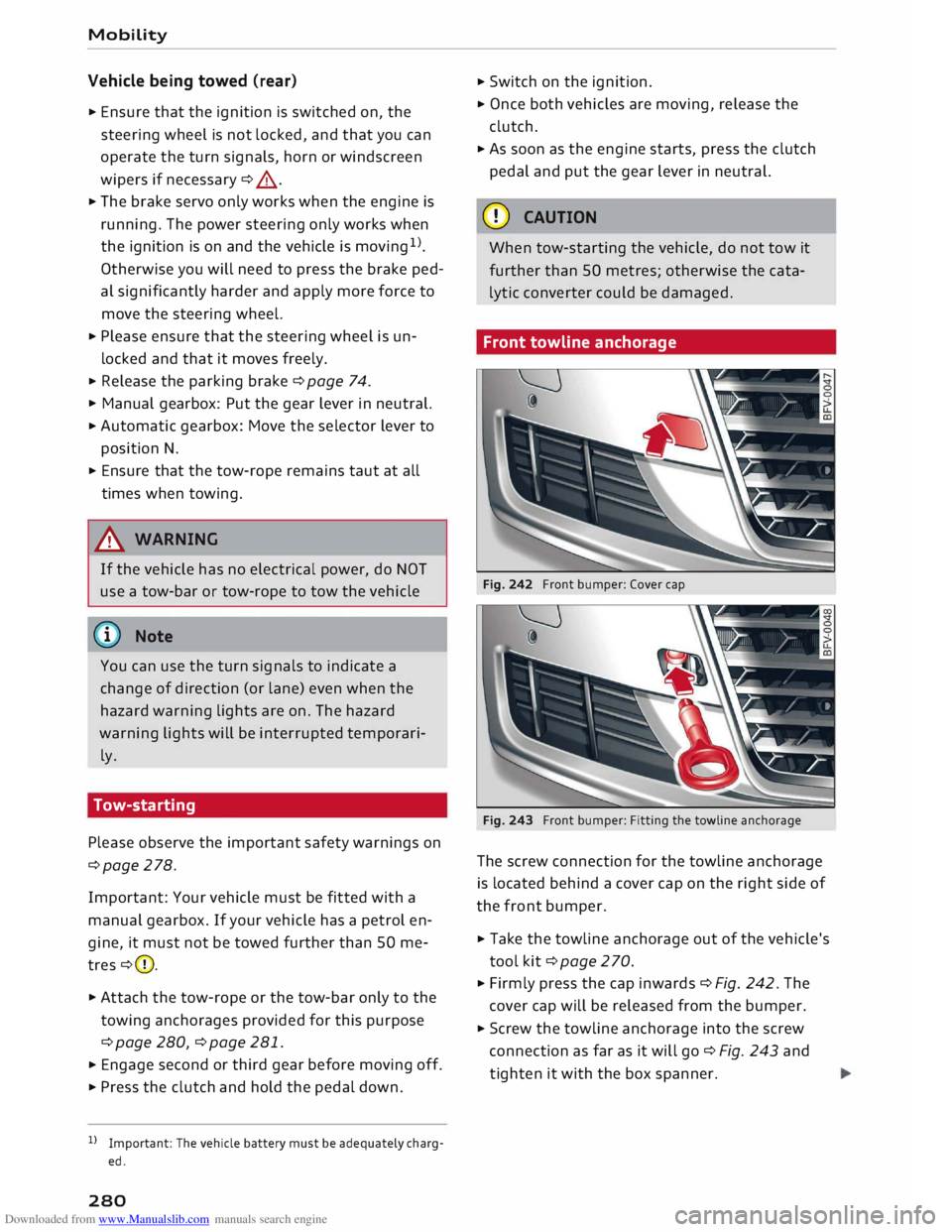
Fig. 242 Front bumper: Cover cap
Fig. 243 Front bumper: Fitting the towline anchorage
The screw connection for the towline anchorage
is located behind a cover cap on the right side of
the front bumper.
� Take the towline anchorage out of the vehicle's
tool kit¢ page 2 70.
� Firmly press the cap inwards ¢ Fig. 242. The
cover cap will be released from the bumper.
� Screw the towline anchorage into the screw
connection as far as it will go¢ Fig. 243 and
tighten it with the box spanner.
Page 296 of 306
Downloaded from www.Manualslib.com manuals search engine Index
Start/stop system . . . . . . . . . . . . . . . . . . . . 71
Starting . . . . . . . . . . . . . . . . . . . . . . . . . 68, 70
Switching off . . . . . . . . . . . . . . . . . . . . . . . . 69
Engine compartment
Layout ............................. 246
Opening/closing bonnet . . . . . . . . . . . . . .
245
Safety notes . . . . . . . . . . . . . . . . . . . . . . . .
244
Engine data
see Sport displays . . . . . . . . . . . . . . . . . . . . 96
Engine management (indicator lamp) . . . . . .
17
Engine oil . . . . . . . . . . . . . . . . . . . . . . . . . . .
247
Changing . . . . . . . . . . . . . . . . . . . . . . . . . .
247
Checking oil level . . . . . . . . . . . . . . . . . . . .
247
Consumption . . . . . . . . . . . . . . . . . . . . . . .
247
Dipstick . . . . . . . . . . . . . . . . . . . . . . . . . . . .
247
Indicator lamp . . . . . . . . . . . . . . . . . . . . . . . 18
Oil change service . . . . . . . . . . . . . . . . . . .
247
Service intervals . . . . . . . . . . . . . . . . . . . . .
247
Temperature gauge . . . . . . . . . . . . . . . . . . . 26
Topping up . . . . . . . . . . . . . . . . . . . . . . . . . 247
Warning lamp . . . . . . . . . . . . . . . . . . . . . . .
14
Engine speed governing (indicator lamp) 17
Engine start/stop mode
see Start/stop system . . . . . . . . . . . . . . . . . 73
Entering information
Using MMI touch . . . . . . . . . . . . . . . . . . . . 124
Using the speller . . . . . . . . . . . . . . . . . . . . 128
Entry Using MMI touch 124
Environmental tips
Filling the tank . . . . . . . . . . . . . . . . . . . . . . 242
Leaks.............................. 245
Minimising pollution . . . . . . . . . . . . . . . . . . 67
ESC see Electronic stabilisation control (ES() . 113
ESP see Electronic stabilisation control (ES() . 113
Ethanol (fuel) . . . . . . . . . . . . . . . . . . . . . . . .
241
Event data recorder . . . . . . . . . . . . . . . . . . . 119
Event memory. . . . . . . . . . . . . . . . . . . . . . . .
119
Exterior lights . . . . . . . . . . . . . . . . . . . . . . . . . 44
Exterior mirrors
Adjusting . . . . . . . . . . . . . . . . . . . . . . . . . . .
48
Anti-dazzle setting . . . . . . . . . . . . . . . . . . .
49
Heating . . . . . . . . . . . . . . . . . . . . . . . . . . . . .
48
External speech dialogue system . . . . . . . . 139
294 F
Factory settings (MMI) . . . . . . . . . . . . . . . . .
213
Fader(sound) ........................ 217
FAME (fuel) . . . . . . . . . . . . . . . . . . . . . . . . . . 241
Fastening rings . . . . . . . . . . . . . . . . . . . . . . . 228
Fast forward/rewind (audio/video file) . . . . 200
Fast route
177
Favourites Media ............................. 203
Navigation . . . . . . . . . . . . . . . . . . . . . . . . . 171
Telephone . . . . . . . . . . . . . . . . . . . . . . . . . .
149
File formats (media drives) . . . . . . . . . . . . .
206
Filling the tank . . . . . . . . . . . . . . . . . . . . . . . 242
Fuel gauge . . . . . . . . . . . . . . . . . . . . . . . . . . 10
Opening fuel tank flap . . . . . . . . . . . . . . . . 242
Releasing tank flap manually . . . . . . . . . . 244
Tank capacity . . . . . . . . . . . . . . . . . . . . . . .
288
Using spare fuel canister . . . . . . . . . . . . . . 243
Finding entries
see Search function . . . . . . . . . . . . . . . . . .
129
Fire extinguisher . . . . . . . . . . . . . . . . . . . . . .
269
First-aid kit . . . . . . . . . . . . . . . . . . . . . . . . . .
269
Fixed oil change service . . . . . . . . . . . . . . . . 247
Flexible oil change service . . . . . . . . . . . . . . 247
Floor mats . . . . . . . . . . . . . . . . . . . . . . . . . . . 227
Fog lights . . . . . . . . . . . . . . . . . . . . . . . . . . . . 44
Footwell light . . . . . . . . . . . . . . . . . . . . . . . . .
48
Four-wheel drive . . . . . . . . . . . . . . . . . . . . . . 116
Frequency band
see Waveband 185
Front seats
see Seats . . . . . . . . . . . . . . . . . . . . . . . . . . .
54
Front window
see Windscreen . . . . . . . . . . . . . . . . . . . . . . SO
Fuel . . . . . . . . . . . . . . . . . . . . . . . . . . . . . . . .
241
Consumption . . . . . . . . . . . . . . . . . . . . 25, 287
Ethanol . . . . . . . . . . . . . . . . . . . . . . . . . . . . 241
Fuel gauge . . . . . . . . . . . . . . . . . . . . . . . . . . 10
Saving fuel ...................... 67, 100
Tank capacity . . . . . . . . . . . . . . . . . . . . . . . 288
Warning light . . . . . . . . . . . . . . . . . . . . . . . . 18
Fuel economy
Coasting mode . . . . . . . . . . . . . . . . . . . . . . .
82
Fuel range . . . . . . . . . . . . . . . . . . . . . . . . . . . . 25
Page 299 of 306
Downloaded from www.Manualslib.com manuals search engine 0
N
,.....
N
....
0
,.....
Vl
CX) Memory
card
SD card readers . . . . . . . . . . . . . . . . . . . . . 192
Types/formats supported . . . . . . . . . . . . .
206
Memory list
see Favourites . . . . . . . . . . . . . . . . . . . . . .
188
MENU button . . . . . . . . . . . . . . . . . . . . . . . .
121
Menus/symbols . . . . . . . . . . . . . . . . . . . . . .
130
Messages . . . . . . . . . . . . . . . . . . . . . . . . . . .
150
see also E-mail ...................... 151
Mileage recorder. . . . . . . . . . . . . . . . . . . . . . . 24
Mirrors Adjusting exterior mirrors . . . . . . . . . . . . . .
48
Anti-dazzle setting . . . . . . . . . . . . . . . . . . .
49
Make-up mirrors . . . . . . . . . . . . . . . . . . . . .
49
MMI see Multi Media Interface
MMI search 121
see Search function . . . . . . . . . . . . . . . . . . 129
MMI touch . . . . . . . . . . . . . . . . . . . . . . . . . . . 124
Mobile phone . . . . . . . . . . . . . . . . . . . . . . . . 286
Connecting . . . . . . . . . . . . . . . . . . . . . . . . . 160
Playing music . . . . . . . . . . . . . . . . . . . . . . . 194
see also Telephone . . . . . . . . . . . . . . . . . . 141
Mobile phone tray
see Audi phone box . . . . . . . . . . . . . . . . . . 146
MODE ............................... 23
Modifications . . . . . . . . . . . . . . . . . . . . . . . .
285
Mounting pin (for changing wheels) . . . . . .
270
Moving off.. . . . . . . . . . . . . . . . . . . . . . . . . . . 75
MP3 see Jukebox . . . . . . . . . . . . . . . . . . . . . . . . 193
Multi-function steering wheel . . . . . . . . . 21, 23
Buttons............................. 23
Controls . . . . . . . . . . . . . . . . . . . . . . . . . . . .
21
Operation . . . . . . . . . . . . . . . . . . . . . . . . . . .
23
Multicollision brake assist system . . . . . . . . 113
Multi Media Interface.................. 121
Music see Media . . . . . . . . . . . . . . . . . . . . . .
191, 200
Music collection
see Jukebox . . . . . . . . . . . . . . . . . . . . . . . .
193
Mute . . . . . . . . . . . . . . . . . . . . . . . . . . . . 23, 217
myAudi Configuring Audi connect services . . . . . . 162
Importing contacts . . . . . . . . . . . . . . . . . . 154 Index
Logging on in the vehicle . . . . . . . . . . . . . . 162
PIN . . . . . . . . . . . . . . . . . . . . . . . . . . . . . . . 162
N
Natural commands (speech dialogue
system) . . . . . . . . . . . . . . . . . . . . . . . . . . . . . 139
NAV/MAP button . . . . . . . . . . . . . . . . . . . . . 169
Navigation . . . . . . . . . . . . . . . . . . . . . . . . . . . 169
Operating unit (MMI) . . . . . . . . . . . . . . . . .
169
see also Map . . . . . . . . . . . . . . . . . . . . . . . 178
Neck heating . . . . . . . . . . . . . . . . . . . . . . . . . . 64
Network connection (Wi-Fi) . . . . . . . . . . . . .
165
Network selection (telephone mode) . . . . . 155
Numbers/characters, entering (using the
speller) . . . . . . . . . . . . . . . . . . . . . . . . . . . . .
128
0
Octane rating (petrol)
Oil 241
see Engine oil . . . . . . . . . . . . . . . . . . . . . . .
247
Oil change intervals . . . . . . . . . . . . . . . . . . . 252
Oil change service . . . . . . . . . . . . . . . . . . . . .
247
On-board computer . . . . . . . . . . . . . . . . . . . . 25
On-board Handbook . . . . . . . . . . . . . . . . . . .
216
ON/OFF button (MMI) . . . . . . . . . . . . . . . . .
121
Online destinations
see Point of interest search . . . . . . . . . . . . 173
Online media . . . . . . . . . . . . . . . . . . . . . . . . . 196
Online services
see Audi connect 159
Opening Bonnet . . . . . . . . . . . . . . . . . . . . . . . . . . . . 245
Fuel tank flap . . . . . . . . . . . . . . . . . . . . . . . 242
Windows ........................... 34
Operation Multi-function steering wheel . . . . . . . . . . . 23
Multi Media Interface . . . . . . . . . . . . . . . . 122
Speech dialogue system . . . . . . . . . . . . . .
133
Options menu . . . . . . . . . . . . . . . . . . . . 126, 127
Outside temperature display . . . . . . . . . . . . . 20
Overview (controls and displays) . . . . . . . . . . . 8
p
Paddle levers (automatic gearbox) . . . . . . . . 81
Paint damage . . . . . . . . . . . . . . . . . . . . . . . . 265
297