instrument cluster AUDI TT ROADSTER 2016 Owner's Manual
[x] Cancel search | Manufacturer: AUDI, Model Year: 2016, Model line: TT ROADSTER, Model: AUDI TT ROADSTER 2016Pages: 306, PDF Size: 31.82 MB
Page 111 of 306
Downloaded from www.Manualslib.com manuals search engine 0
N
,.....
N
......
0
,.....
Vl
CX) -
The park assist cannot be used to park the
vehicle on tight bends.
Switching on and off
Applies to: vehicles with park assist
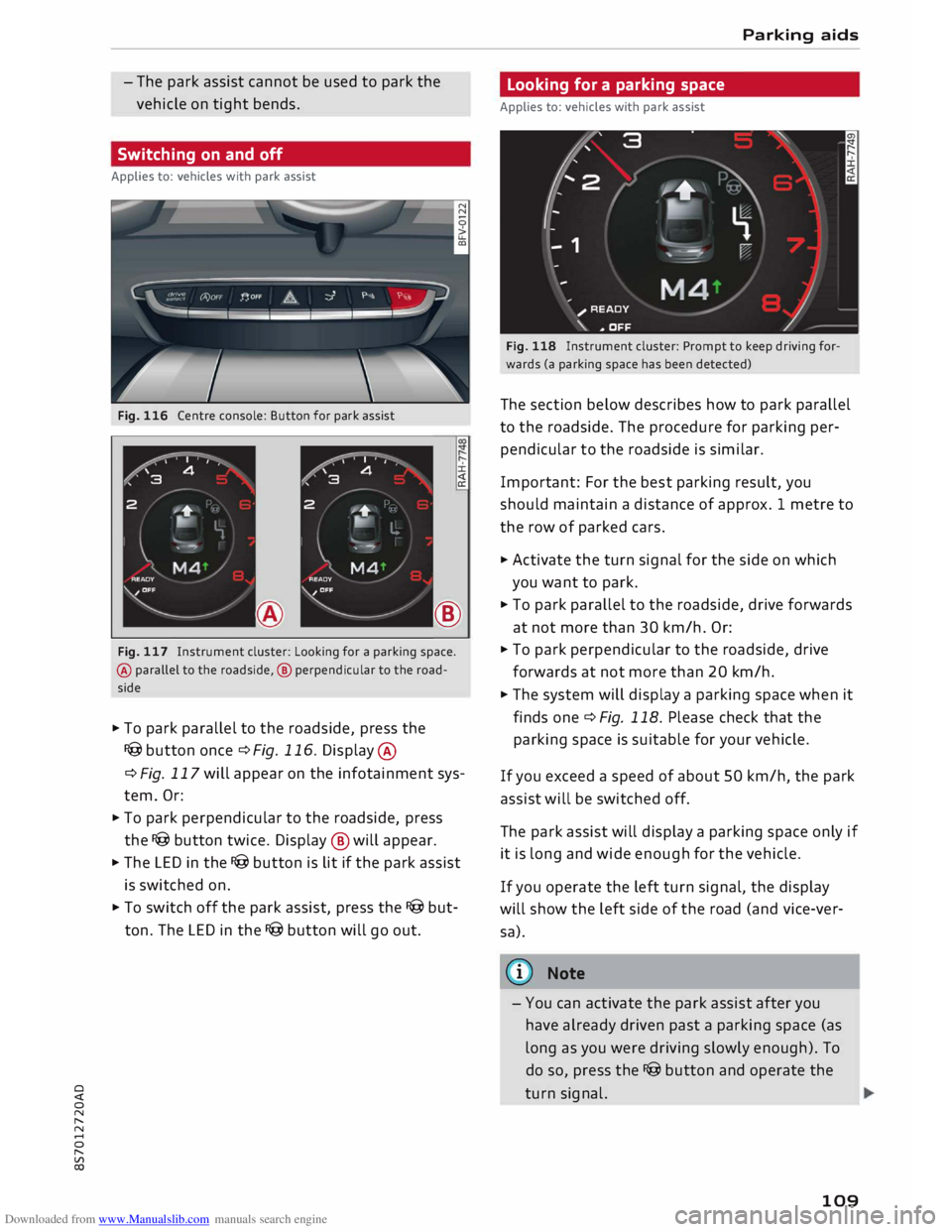
Fig. 116 Centre console: Button for park assist
±.
®
Fig. 117 Instrument cluster: Looking for a parking space.
@ parallel to the roadside, @ perpendicular to the road
side
� To park parallel to the roadside, press the
I@ button once¢ Fig. 116. Display @
¢ Fig. 117 will appear on the infotainment sys
tem. Or:
� To park perpendicular to the roadside, press
the I@ button twice. Display ® will appear.
� The LED in the I@ button is lit if the park assist
is switched on.
� To switch off the park assist, press the I@ but
ton. The LED in the I@ button will go out. Parking aids
Looking for a parking space
Applies to: vehicles with park assist
Fig. 118 Instrument cluster: Prompt to keep driving for
wards (a parking space has been detected)
The section below describes how to park parallel
to the roadside. The procedure for parking per
pendicular to the roadside is similar.
Important: For the best parking result, you
should maintain a distance of approx. 1 metre to
the row of parked cars.
� Activate the turn signal for the side on which
you want to park.
� To park parallel to the roadside, drive forwards
at not more than 30 km/h. Or:
� To park perpendicular to the roadside, drive
forwards at not more than 20 km/h.
� The system will display a parking space when it
finds one¢ Fig. 118. Please check that the
parking space is suitable for your vehicle.
If you exceed a speed of about 50 km/h, the park
assist will be switched off.
The park assist will display a parking space only if
it is Long and wide enough for the vehicle.
If you operate the left turn signal, the display
will show the left side of the road (and vice-ver
sa).
@ Note
- You can activate the park assist after you
have already driven past a parking space (as
Long as you were driving slowly enough). To
do so, press the I@ button and operate the
turn signal.
109
Page 112 of 306
Downloaded from www.Manualslib.com manuals search engine Parking
aids
- The best parking results will be achieved if
you position the vehicle as parallel as possi
ble to the line of parked cars or the kerb be
fore you start the actual parking manoeu
vre.
-If there are suitable parking spaces on both
sides of the road (for instance on a one-way
street), you can change the direction of the
turn signals to park on the other side, even
if you have already activated the park assist.
Parking parallel to the roadside
Applies to: vehicles with park assist
The driver is responsible for parking the vehicle.
t' 3 '\.
I
\
- IR
�
- 1 '"*-w )
' -,-,.
-
\
}
__
D�
; READY
'\. * OFF
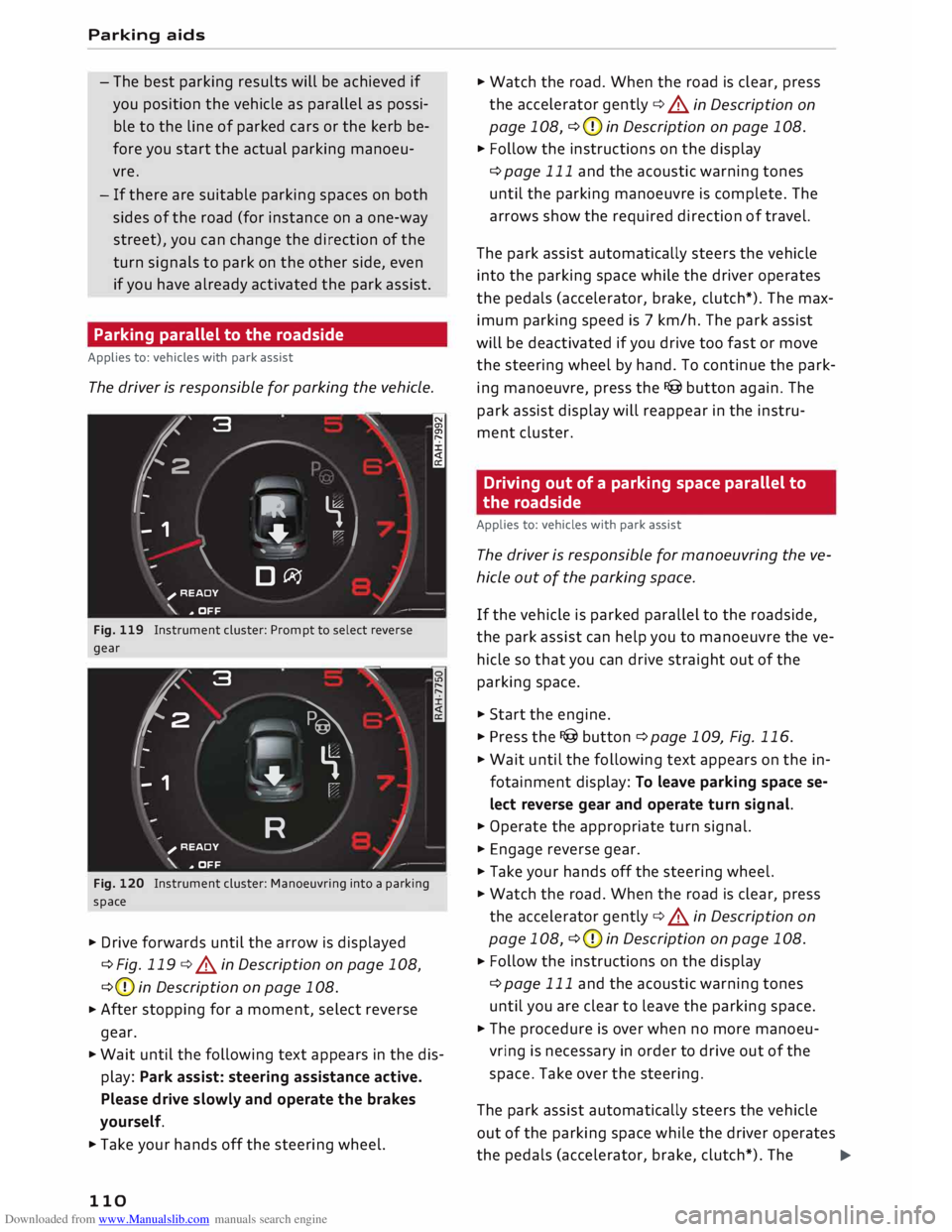
Fig. 119 Instrument cluster: Prompt to select reverse
gear
'2' 3
2
,
I
- - 1 '\.
� \
�
'-.
'--""'."" ' I
R )_
;
READY
_,,..,
'\. * OFF
Fig. 120 Instrument cluster: Manoeuvring into a parking
space
� Drive forwards until the arrow is displayed
¢Fig. 119 ¢.&.
in Description on page 108,
¢ (D
in Description on page 108.
� After
stopping for a moment, select reverse
gear.
� Wait until the following text appears in the dis
play: Park assist: steering assistance active.
Please drive slowly and operate the brakes
yourself.
� Take your hands off the steering wheel.
110 �
Watch the road. When the road is clear, press
the accelerator gently ¢.&.
in Description on
page 108, ¢(D
in Description on page 108.
� Follow the instructions on the display
¢page 111 and the acoustic warning tones
until the parking manoeuvre is complete. The
arrows show the required direction of travel.
The park assist automatically steers the vehicle
into the parking space while the driver operates
the pedals (accelerator, brake, clutch*). The max
imum parking speed is 7 km/h. The park assist
will be deactivated if you drive too fast or move
the steering wheel by hand. To continue the park
ing manoeuvre, press the I@ button again. The
park assist display will reappear in the instru
ment cluster.
Driving out of a parking space parallel to
the roadside
Applies to: vehicles with park assist
The driver is responsible for manoeuvring the ve
hicle out of the parking space.
If the vehicle is parked parallel to the roadside,
the park assist can help you to manoeuvre the ve
hicle so that you can drive straight out of the
parking space.
� Start the engine.
� Press the I@ button ¢ page 109, Fig. 116.
� Wait until the following text appears on the in
fotainment display: To leave parking space se
lect reverse gear and operate turn signal.
� Operate the appropriate turn signal.
� Engage reverse gear.
� Take your hands off the steering wheel.
� Watch the road. When the road is clear, press
the accelerator gently ¢.&.
in Description on
page 108, ¢(D
in Description on page 108.
� Follow
the instructions on the display
¢page 111 and the acoustic warning tones
until you are clear to leave the parking space.
� The procedure is over when no more manoeu
vring is necessary in order to drive out of the
space. Take over the steering.
The park assist automatically steers the vehicle
out of the parking space while the driver operates
the pedals (accelerator, brake, clutch*). The
�
Page 115 of 306
Downloaded from www.Manualslib.com manuals search engine Intelligent
technology
Electronic stabilisation
control (ESC)
Description
The electronic stabilisation control (ESC) increa
ses the car's stability. It reduces the tendency to
skid and improves the stability and road holding
of the vehicle. The ESC detects critical handling
situations, such as understeer, oversteer and
wheelspin on the driven wheels. It stabilises the
vehicle by braking individual wheels or by reduc
ing the engine torque. The indicator lamp DJ in
the instrument cluster starts flashing as soon as
the ESC intervenes.
The following systems are integrated in the ESC:
Anti-lock brake system (ABS)
ABS prevents the wheels from locking up under
braking until the vehicle has reached a virtual
standstill. You can continue to steer the vehicle
even when the brakes are on full. Keep your foot
on the brake pedal and do not pump the brakes.
You will feel the brake pedal pulsate while the
anti-lock brake system is working.
Brake assist system
The brake assist system can shorten the braking
distance. The braking force is automatically boos
ted if you press the brake pedal quickly in an
emergency. You must keep pressing the brake
pedal until the danger has passed.
Traction control system (ASR)
In the event of wheelspin, the traction control
system reduces the engine torque to match the
amount of grip available. This helps the car to
start moving, accelerate or climb a gradient.
Electronic differential lock (EDL)
When the EDL detects wheelspin, it brakes the
spinning wheel and directs the power to the oth
er driven wheel (or wheels on quattro* versions).
0 This
function is not available at high speeds.
� To
prevent the disc brake of the braked wheel
8 from
overheating, the EDL cuts out automatically
"
Vl Intelligent
technology
if subjected to excessive loads. The vehicle can
still be driven. The EDL will switch on again auto
matically when the brake has cooled down.
Steering recommendation
The ESC helps to stabilise the vehicle by changing
the steering wheel torque.
Selective wheel torque control
Selective wheel torque control intervenes when
cornering by braking the wheel(s) on the inside of
the bend individually as required. This enables
precision cornering. The relevant system may not
intervene in the wet or snow.
Multicollision brake assist system
The "multicollision brake assist system" can help
to reduce the risk of skidding and further colli
sions during an accident. If the airbag control
unit detects that a collision has taken place up
wards of a certain speed, the vehicle is braked by
the ESC.
The vehicle will not be braked automatically if:
- the driver presses the accelerator,
- the brake pressure applied by pressing the
brake pedal is higher than the brake pressure
initiated by the system,
- or the ESC, the brake system or the vehicle's
electrical system are not fully functional.
A WARNING
- The grip provided by the ESC and the inte
grated systems is still subject to the physi
cal limits of adhesion. Always bear this in
mind, especially on wet or slippery roads. If
you notice the systems cutting in, you
should reduce your speed immediately to
suit the road and traffic conditions. Do not
let the extra safety provided tempt you into
taking any risks when driving -this can
cause accidents.
- Remember that the accident risk always in
creases if you drive fast, especially in cor
ners or on a wet or slippery road, or if you
follow too close behind the vehicle in front
of you. Please bear in mind that even the
113
Page 121 of 306
Downloaded from www.Manualslib.com manuals search engine 0
N
,.....
N
......
0
,.....
Vl
CX) consumed,
but only a small amount is supplied.
The situation is also critical if electrical equip
ment is in use when the engine is not running. In
this case power is consumed when none is being
generated.
In these situations you will be aware that the
power management system is intervening to con
trol the distribution of electrical power.
When the vehicle is parked for long periods
If you do not drive your vehicle for a period of
several days or weeks, the power management
will gradually shut off the on-board systems one
by one, or reduce the amount of current they are
using. This limits the amount of power consumed
and helps to ensure reliable starting even after a
long period. Certain convenience features, such
as remote control unlocking, may not be availa
ble. These functions will be restored when you
switch on the ignition and start the engine.
With the engine switched off
If you listen to the radio or use the other info
tainment functions when the engine is not run
ning, this will discharge the vehicle battery.
The infotainment display will show a warning
message before the battery power drops to a lev
el where the starting ability is impaired. This
message warns you that the system you are using
will soon be switched off automatically. You
should therefore start the engine if you wish to
continue using the system.
When the engine is running
Although the alternator generates electrical
power, the vehicle battery can still become dis
charged while the vehicle is being driven. This can
occur when a lot of power is being consumed but
only a small amount supplied, especially if the
vehicle battery is not fully charged initially.
To restore the necessary energy balance, the sys
tem will then temporarily shut off the electrical
components that are using a lot of power, or re
duce the current they are consuming. Heating
systems in particular use a large amount of elec
trical power. If you notice, for instance, that the
seat heating* or the rear window heater is not Intelligent
technology
working, they may have been temporarily switch
ed off or regulated to a lower heat output. These
systems will be available again as soon as suffi
cient electrical power is available.
You may also notice that the engine runs at a
slightly faster idling speed. This is quite normal,
and no cause for concern. The increased idling
speed allows the alternator to meet the greater
power requirement and charge the vehicle bat
tery at the same time.
Information saved in the
control units
The vehicle is fitted in the factory with electronic
control units that, among other things, control
the engine and the gearbox. The control units al
so monitor the exhaust system and the airbags.
The control units continually analyse data rele
vant to the vehicle while you are driving. In the
event of faults or anomalies in the vehicle data,
only these data are saved. As a rule, faults are
shown by the warning lamps in the instrument
cluster.
Data saved in the control units can only be read
and analysed with special equipment.
A qualified workshop is only able to recognise
and deal with faults by using the relevant saved
data. Among other things, the saved data may
contain the following information:
- Data relating to the engine and the gearbox
-Speed
- Direction of travel
- Braking force
- Seat belt warning system data
The control units installed will not under any cir
cumstances record conversations in the vehicle.
Event data recorder
Your vehicle is not equipped with an event data
recorder.
In an event data recorder, information about
the
vehicle is temporarily saved. In the event of an
accident, you can therefore obtain detailed infor-
mation about the course of events. On vehicles ...,.
119
Page 220 of 306
Downloaded from www.Manualslib.com manuals search engine System
settings
Ring tone volume: You can adjust the volume of
the ring tone currently selected by turning the ro
tary pushbutton.
Message volume: You can adjust the volume of
the tone informing you of a new text message by
turning the rotary pushbutton.
Microphone input Level: You can adjust the vol
ume during a call by turning the rotary pushbut
ton.
Navigation
Applies to: vehicles with navigation system
Voice guidance: Refer to ¢ page 177, Voice guid
ance.
Voice guidance during calls: Refer to
¢ page 177, Voice guidance.
Volume of spoken cues: You can adjust the vol
ume of the spoken cues while route guidance is
active by turning the rotary pushbutton.
Entertainment fader: This option allows the vol
ume of the current audio source to be temporari
ly reduced when the parking aid is active or while
a navigation cue is being played.
Announ cements
Traffic announcements: Refer to¢ page 186.
DAB announcements*: Refer to¢ page 186.
Volume of announcements: You can adjust the
volume of traffic announcements by turning the
rotary pushbutton.
Speech dialogue system
Applies to: vehicles with speech dialogue system
Short dialogue: This option can be switched on/
off. When it is activated, the spoken cues played
by the system are shortened.
Speech dialogue system volume: You can adjust
the volume of the spoken cues by turning the ro
tary pushbutton.
Parking aid*
Turn the rotary pushbutton to adjust the volume
of the beeps.
- To adjust the front volume: Select and confirm
high, medium or Low.
218 -
To adjust the rear volume: Select and confirm
high, medium or Low.
MMI touch volume*
You can adjust the volume of the M MI touch*
spoken cues by turning the rotary pushbutton.
Audi heartbeat
You can adjust the volume of the Audi heartbeat
by turning the rotary pushbutton.
� Note
Please note that the speech dialogue system*
is not available as a factory option for Cabrio
let models without a seat belt microphone.
Restarting the MMI
system (Reset)
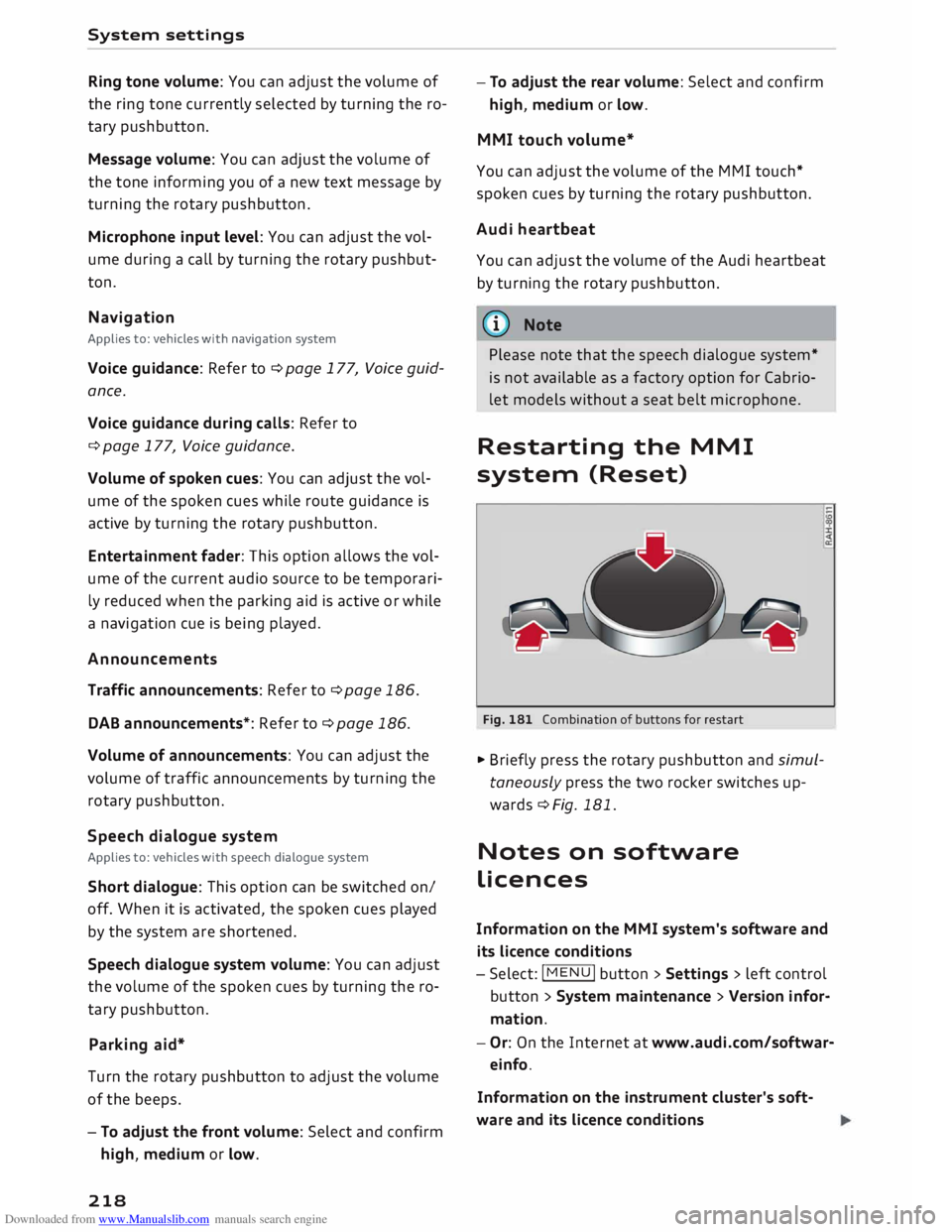
Fig. 181 Combination of buttons for restart
.,. Briefly press the rotary pushbutton and simul
taneously press the two rocker switches up
wards¢ Fig. 181.
Notes on software
licences
Information on the MMI system's software and
its Licence conditions
- Select: I MENU
I button
>Settings > left control
button > System maintenance > Version infor
mation.
- Or: On the Internet at www.audi.com/softwar
einfo.
Information on the instrument cluster's soft
ware and its Licence conditions
Page 237 of 306
Downloaded from www.Manualslib.com manuals search engine 0
N
,.....
N
......
0
,.....
Vl
CX) Airbag
system
Description of airbag
system
General notes on airbag system
The airbag is an integral part of the car's passive
safety system.
In conjunction with the seat belts, the airbag sys
tem gives the front occupants additional protec
tion for the head and chest in the event of a se
vere frontal collision.
In a severe side collision the side airbags reduce
the risk of injury to the occupants ¢,&..
In addition to their normal function of protecting
the occupants in a collision, the seat belts also
hold them in a position where the airbags can in
flate properly and provide maximum protection.
The airbag system will only work with the igni
tion on. The airbag system is monitored electron
ically; the indicator lamp m indicates whether
the system is functioning properly.
The main parts of the airbag system are:
- The electronic monitoring system (control unit
and sensors)
- The two front airbags
- The two side airbags
- The indicator lamp El in the instrument cluster
There is a fault in the airbag system if the
warning lamp
- does not come on when the ignition is switched
on.
- does not go out about 4 seconds after the igni
tion is switched on.
- goes out and then comes on again after the ig
nition is switched on.
- comes on or flickers while the car is moving.
A WARNING
- The airbags are not a substitute for the seat
belts; they are an integral part of the car's
overall passive safety system. The airbags
can only offer effective protection if the oc
cupants are wearing their seat belts. For Airbag
system
this reason it is very important to wear the
seat belts at all times ¢ page 230, Why is it
so important to use seat belts?.
- The seat belts and airbags can only provide
maximum protection if the occupants are
seated correctly ¢ page 54, Front seats.
- If you do not wear a seat belt, if you lean
forward, or are not seated correctly while
the vehicle is in motion, you are at greater
risk of injury should the airbag system be
triggered in an accident.
- Components of the airbag system are loca
ted in various parts of the vehicle. If repairs
to other vehicle components make it neces
sary to perform work on the airbag system
or to remove or install parts of the airbag
system, this may cause damage to the air
bag system. As a result, the airbags may not
inflate correctly or may not be triggered at
all in an accident situation. For this reason,
you should always have the work carried out
by a qualified workshop.
- If a fault should occur in the airbag system,
have the system checked immediately by a
qualified workshop. Otherwise the system
may fail to trigger in an accident.
- Do not attempt to modify components of
the airbag system in any way.
- Never make any alterations to the front
bumper or the body.
- Do not remove the seats.
- The airbag system can only be activated
once; if the airbag has been triggered, the
system must be replaced. Should the airbag
system or airbag modules have to be re
placed, the qualified workshop carrying out
the replacement will document all details.
- If any repair work is required or the airbag
and restraint systems have to be replaced,
have the work carried out by your authorised
Audi dealer or a qualified workshop which
adheres to the Audi factory standards. This
will minimise the risk of injury.
- If you sell the vehicle, remember to pass on
the complete Service Wallet to the new
owner. If any of the airbags have been deac
tivated, it is important that the new owner
is also given the relevant documents.
..,.
235
Page 249 of 306
Downloaded from www.Manualslib.com manuals search engine 0
N
,.....
N
......
0
,.....
Vl
CX) ®
Fuse box¢ page 282
0 Windscreen washer container {�)
c:::>page 252
The positions of the engine oil dipstick and en
gine oil filler cap¢ Fig. 214 (items @and @)
may be different on some engine versions.
Engine oil
Choosing the correct engine oil grade
The service interval display in the instrument
cluster of your vehicle will inform you when it is
time for an oil change. We recommend having
the oil changed by a qualified workshop.
If you have to top up the oil between oil changes,
use the grades of oil specified in the table in ac
cordance with VW standards.
- the vehicle is being serviced based on the flexi
ble or fixed oil change service (see last service
record).
- the vehicle has a petrol or diesel engine (see
sticker on inside of fuel tank flap).
Oil Change Service
Flexible Fixed
Petrol engines vw
504 00 vw 502 00
Diesel engines
vw 507 00 With
diesel
particulate fil-
ter:
vw 507 00
Without diesel
particulate fil-
ter:
vw sos 00
Audi recommends
�Castrol )g[Ij)@[g ?m»E«!JJ1)JJ.lf..
Audi recommends Longlife high-performance
engine oil from Audi Genuine Parts
(© Note
If the oil grades specified in the table are not
available, you can use one of the following
grades as a substitute. To prevent damage to
the engine, this should not be done more Checking
and topping up fluids
than once between oil changes and no more
than 0.5 litres should be used.
- Petrol engines: ACEA A3 or API SN (API SM)
standard
- Diesel engines: ACEA C3 or API CJ-4 stand
ard
((!)) Note
The flexible oil change service is not available
for all models in all countries.
Checking and topping up the engine oil
level
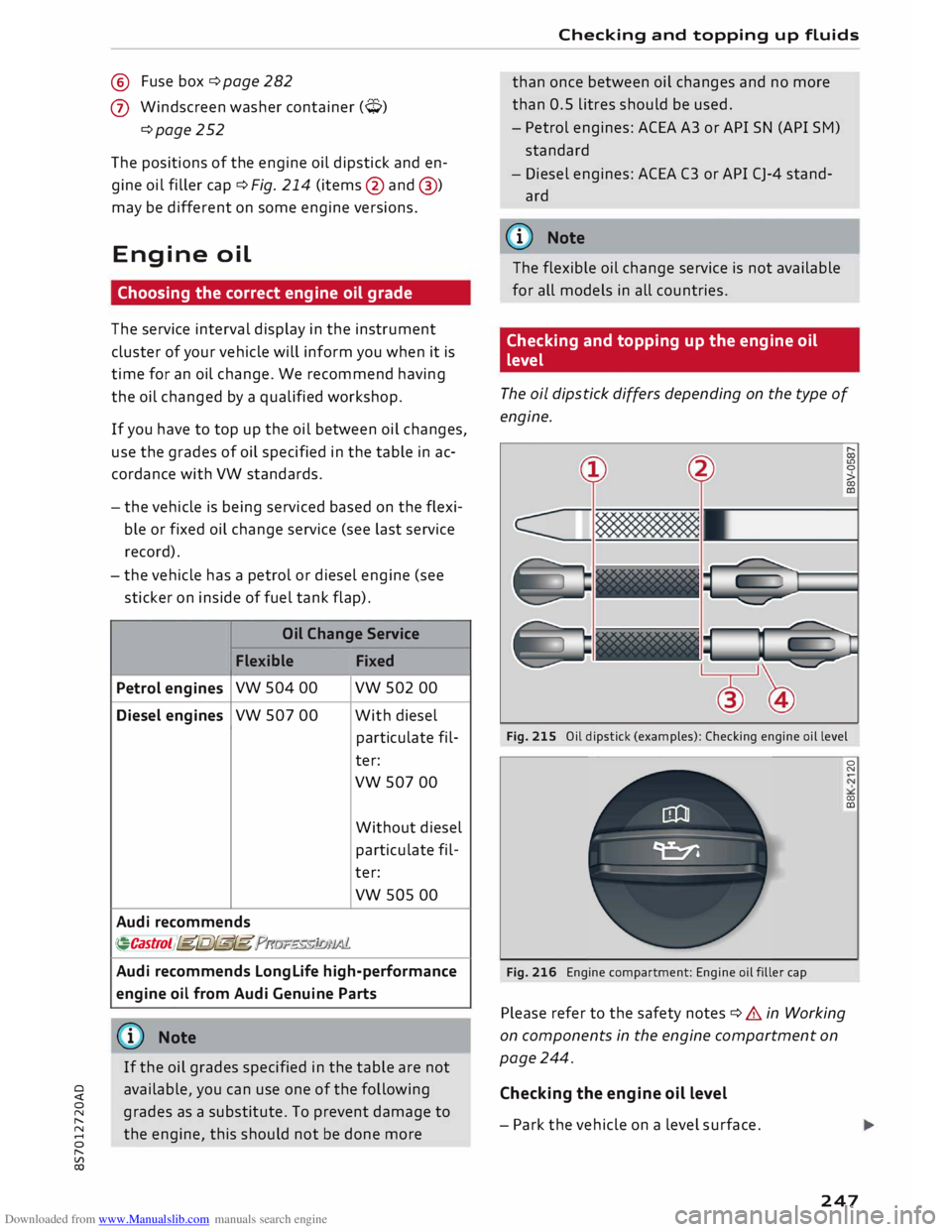
The oil dipstick differs depending on the type of
engine.
Fig. 215 Oil dipstick (examples): Checking engine oil level
Fig. 216 Engine compartment: Engine oil filler cap
Please refer to the safety notes ¢ .& in Working
on components in the engine compartment on
page 244.
Checking the engine oil level
- Park the vehicle on a level surface. 0
N
00
a:,
247
Page 260 of 306
Downloaded from www.Manualslib.com manuals search engine Wheels
... Check that the snow chains are correctly seated
after driving for a few yards; follow the instruc
tions given by the manufacturer.
... Keep your speed below 50 km/h. Please ob-
serve the applicable local regulations.
For technical reasons snow chains may only be
used on tyres with certain wheel rim/tyre combi
nations.
Rim size Rim offset Tyre size
7Jx17 47 mm 225/50
8Jx19 52
mm
225/40
You must remove the snow chains on roads which
are free of snow; otherwise the vehicle handling
may be impaired and the tyres may be damaged.
A WARNING
Unsuitable or incorrectly mounted snow
chains can cause you to lose control of the ve
hicle -risk of accident!
CD CAUTION
- Snow chains can damage the rim/hubcap* if
they make direct contact with it. Remove
the hubcaps* beforehand. Use snow chains
which have a protective coating.
- If you use snow chains with links that pro
trude more than 13.5 mm, this could cause
severe damage to the wheel housings and
other parts of the vehicle.
({D Note
When driving with snow chains, it may help to
switch on sport mode ¢ page 114.
Low-profile tyres
Applies to: vehicles with low-profile tyres
Your vehicle is fitted with low-profile tyres* as
standard equipment. Low-profile tyres have a
lower sidewall and provide a wider tread surface
and rim diameter than other wheel/tyre combi
nations. This makes the car's handling more
agile. However, the ride may be less comfortable
on poor-quality roads and tracks, and rolling
noise may be louder.
258 Low-profile
tyres can be damaged more quickly
than standard tyres, for example by heavy jolts,
potholes, manhole covers, speed humps and
kerbs. It is therefore particularly important to
ensure that they are inflated to the correct pres
sure c:>page 256.
Drive with particular care on poor-quality roads
to ensure that you do not damage the rims and
tyres.
Make sure to check your wheels regularly (every
3,000 km) for damage such as blisters/tears on
the tyre sidewalls or deformations/cracks on the
rims.
After a heavy jolt, or if any damage occurs, you
should have the rims and tyres checked and if
necessary replaced by a qualified workshop.
Tyre wear occurs more quickly on low-profile
tyres than on standard tyres.
Summer tyres are not suitable for cold condi
tions, snow or ice. Use winter or all-season tyres
when driving in these conditions c:::> page 257.
Tyre pressure Loss
indicator
Tyre pressure loss indicator in instrument
cluster
Applies to: vehicles with tyre pressure loss indicator
The tyre pressure Loss indicator in the instrument
cluster informs the driver if the tyre pressure is
too Low or a system malfunction has occurred.
The tyre pressure loss indicator makes use of the
ABS sensors to compare the rolling circumfer
ence and the vibration of the tyres. If changes in
the inflation pressure are detected on one or
more tyres, the driver is alerted by an indicator
lamp [tE and a message on the infotainment dis
play. If only one tyre is affected, the display will
indicate its position.
Each time you change a tyre, change the wheels
round or change the tyre pressures on your vehi
cle (e.g. when switching from partial load to full
load and vice-versa), you must store the new tyre
pressures on the infotainment system
c:::> page 259. Monitoring of the tyre pressures is
�
Page 264 of 306
Downloaded from www.Manualslib.com manuals search engine Wheels
A WARNING
Please observe the important safety informa
tion and notes <=> page 260.
Possible malfunctions
Applies to: vehicles with tyre pressure monitoring system
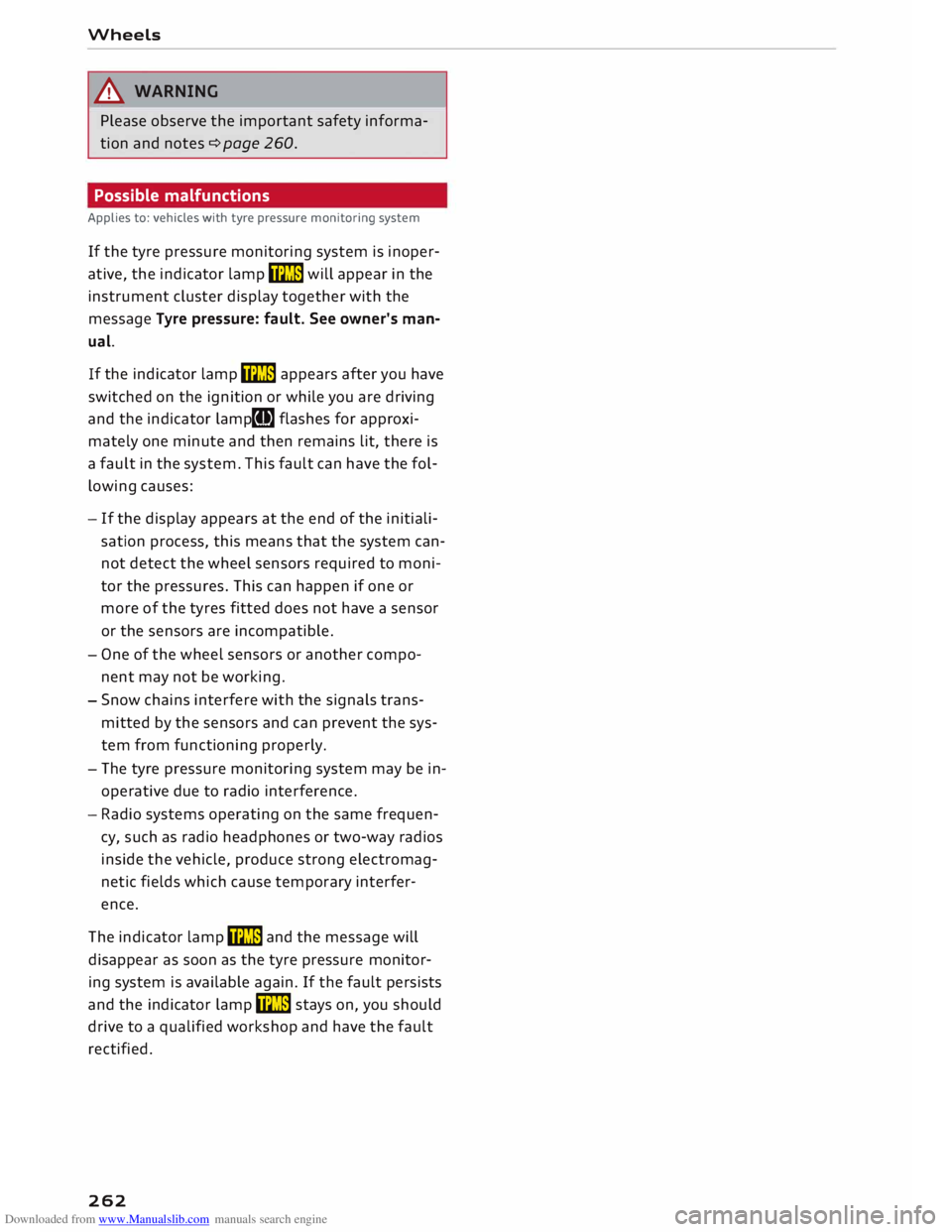
If the tyre pressure monitoring system is inoper
ative, the indicator lamp mm will appear in the
instrument cluster display together with the
message Tyre pressure: fault. See owner's man
ual.
If the indicator lamp mm appears after you have
switched on the ignition or while you are driving
and the indicator lamp[I] flashes for approxi
mately one minute and then remains lit, there is
a fault in the system. This fault can have the fol
lowing causes:
- If the display appears at the end of the initiali
sation process, this means that the system can
not detect the wheel sensors required to moni
tor the pressures. This can happen if one or
more of the tyres fitted does not have a sensor
or the sensors are incompatible.
- One of the wheel sensors or another compo
nent may not be working.
- Snow chains interfere with the signals trans
mitted by the sensors and can prevent the sys
tem from functioning properly.
- The tyre pressure monitoring system may be in
operative due to radio interference.
- Radio systems operating on the same frequen
cy, such as radio headphones or two-way radios
inside the vehicle, produce strong electromag
netic fields which cause temporary interfer
ence.
The indicator lamp mm and the message will
disappear as soon as the tyre pressure monitor
ing system is available again. If the fault persists
and the indicator lamp mm stays on, you should
drive to a qualified workshop and have the fault
rectified.
262
Page 267 of 306
Downloaded from www.Manualslib.com manuals search engine 0
N
,.....
N
....
0
,.....
Vl
CX) Care
of vehicle and cleaning
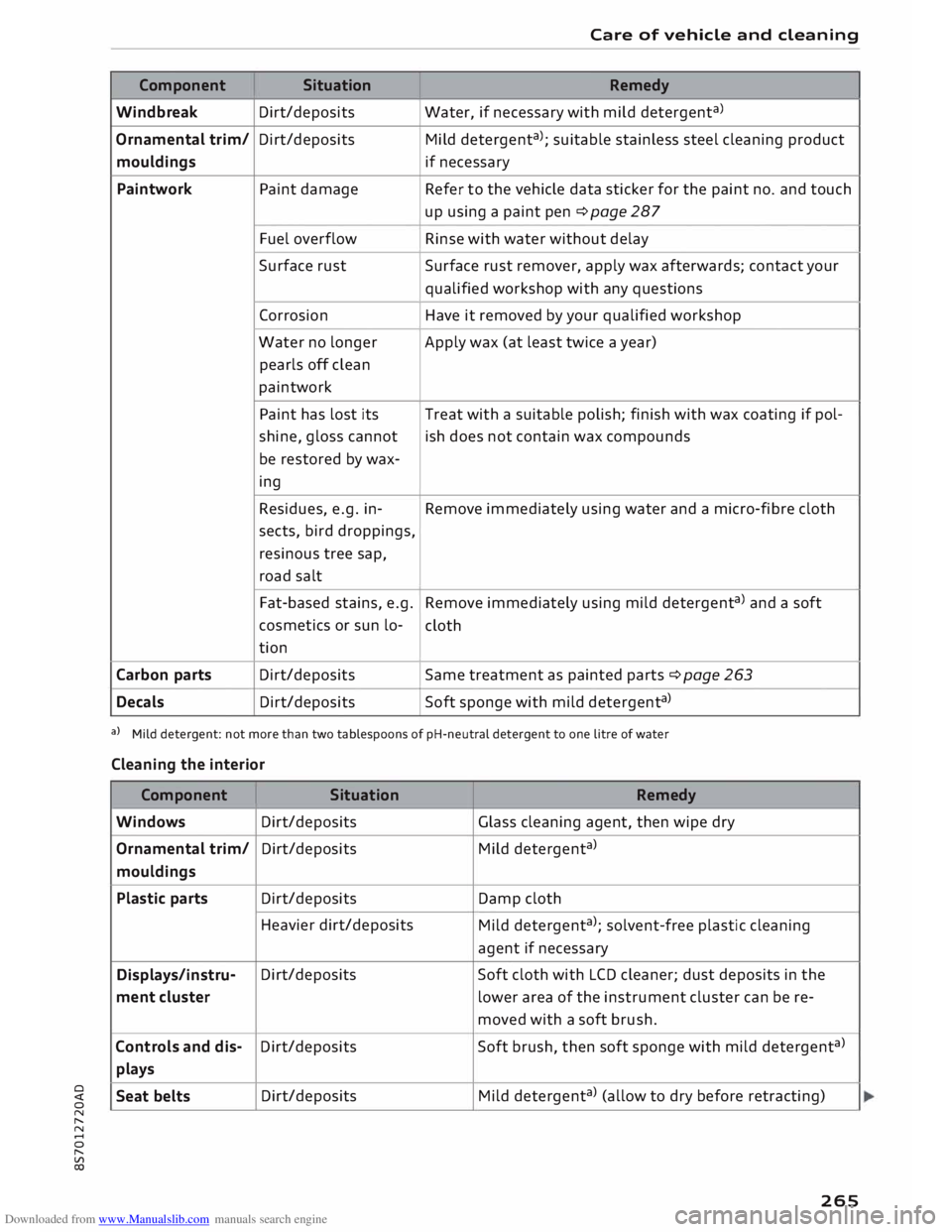
Component Situation Remedy
Windbreak Dirt/deposits Water,
if necessary with mild detergent a
>
Ornamental trim/ Dirt/deposits
Mild detergent a
>; suitable stainless steel cleaning product
mouldings if necessary
Paintwork Paint damage Refer to
the vehicle data sticker for the paint no. and touch
up using a paint pen � page 287
Fuel overflow
Rinse with water without delay
Surface rust
Surface rust remover, apply wax afterwards; contact your
qualified workshop with any questions
Corrosion Have it removed by your qualified workshop
Water no longer
Apply wax (at least twice a year)
pearls off clean
paintwork
Paint has lost its Treat
with a suitable polish; finish with wax coating if pol-
shine, gloss cannot ish does not contain wax compounds
be restored by wax-
ing
Residues, e.g. in- Remove immediately using water and a micro-fibre cloth
sects, bird droppings,
resinous tree sap,
road salt
Fat-based stains, e.g.
Remove immediately using mild detergent a
> and a soft
cosmetics or sun lo-
cloth
tion
Carbon parts Dirt/deposits
Same treatment as painted parts �page 263
Decals Dirt/deposits Soft
sponge with mild detergent a
>
al Mild detergent: not more than two tablespoons of pH-neutral detergent to one litre of water
Cleaning the interior
Component Situation Remedy
Windows Dirt/deposits Glass
cleaning agent, then wipe dry
Ornamental trim/ Dirt/deposits
Mild detergent a
>
mouldings
Plastic parts Dirt/deposits Damp
cloth
Heavier dirt/deposits
Mild detergent a
>
; solvent-free plastic cleaning
agent if necessary
Displays/instru- Dirt/deposits
Soft cloth with LCD cleaner; dust deposits in the
ment cluster lower
area of the instrument cluster can be re-
moved with a soft brush.
Controls and dis- Dirt/deposits
Soft brush, then soft sponge with mild detergent a
>
plays
Seat belts Dirt/deposits
Mild
detergent a
>
(allow to dry before retracting)
265