check engine AUDI TT ROADSTER 2016 Repair Manual
[x] Cancel search | Manufacturer: AUDI, Model Year: 2016, Model line: TT ROADSTER, Model: AUDI TT ROADSTER 2016Pages: 306, PDF Size: 31.82 MB
Page 263 of 306
Downloaded from www.Manualslib.com manuals search engine 0
N
,.....
N
......
0
,.....
Vl
CX) (D)
Note
The tyre pressures and temperatures are not
shown in the display when the vehicle is sta
tionary or during the initialisation phase. Hor
izontal dashes--.--will appear instead of the
pressure and temperature figures.
(1) Loss of tyre pressure
Applies to: vehicles with tyre pressure monitoring system
If the indicator lamp RE appears, the tyre pres
sure on at least one of the wheels is too low or
new sensors have not yet been initialised.
Indicator lamp [Bl lights up after switching
on the ignition
The tyre pressure is too low compared with the
reference value.
... Adjust the pressure of the relevant tyre(s) at
the next opportunity and store the pressures
¢page 261.
Indicator lamp [Bl lights up during a journey
Wheels with new sensors have not yet been ini
tialised or the tyre pressure has reached a critical
level compared with the reference value.
... Avoid unnecessary braking and steering ma
noeuvres.
... Adapt your driving style to the prevailing condi
tions.
... As soon as you can do so safely, stop and check
the tyre(s).
... If it is possible to continue driving, you should
take the vehicle to a qualified workshop and
have the defective tyre(s) repaired or replaced
immediately.
A WARNING
Please observe the important safety informa
tion and notes ¢page 260. Wheels
Storing new tyre pressures
Applies to: vehicles with tyre pressure monitoring system
To enable the tyre pressure monitoring system
to work reliably, it is important to store the cor
rect pressure settings.
You should always store the tyre pressures if new
sensors are fitted or after changing the pressures
when carrying a different amount of passengers
or luggage.
... Before storing the new tyre pressures, check
that the current pressures on all four wheels
correspond to the specified values and adapt
the pressures to the current load ¢ page 256,
Fig. 222. Only adjust and store the inflation
pressure of the tyres when they are at approxi
mately ambient temperature. If the tyre tem
peratures are higher than the ambient temper
ature, the inflation pressures should be in
creased by approx. 0.2 bar above the pressures
specified on the tyre pressure sticker.
... Switch on the ignition.
... Select the following on the infotainment sys
tem: I MENU I button > Servicing & checks >
Tyre pressure loss indicator > Store tyre pres
sures > Yes, store now. The tyre pressure moni
toring system will then measure the current
tyre pressures when you drive the vehicle and
store them as the new reference values .
... If the new tyre pressures do not appear on the
infotainment display, you will need to drive for
about 10 minutes so that the sensor signal
from the wheels can be received again .
During this initialisation phase,--.--will be
shown on the pressure and temperature display
and some functions of the tyre pressure monitor
ing system will not be available. The system will
warn you only if the pressure of one or more tyres
is below the minimum reference pressure.
If the indicator lamp RE lights up and the mes
sage Tyre pressure: wheel change detected.
Please check all tyres and store pressures in
MMI appears, the system has detected that the
sensor positions have changed because of a
wheel change or that new sensors have been fit-
ted. Store the new tyre pressures.
llll-
261
Page 272 of 306
Downloaded from www.Manualslib.com manuals search engine Mobility
Check how the fire extinguisher works before you
need to use it. The instructions for use are shown
on the fire extinguisher.
A WARNING
If the fire extinguisher is not secured properly
it could be catapulted through the vehicle
during driving and braking manoeuvres or in
the event of an accident. This poses a risk of
injury to occupants.
(D Note
- The fire extinguisher must be replaced with
a new one after use or once it has reached
its expiry date.
- The fire extinguisher must comply with le
gal requirements.
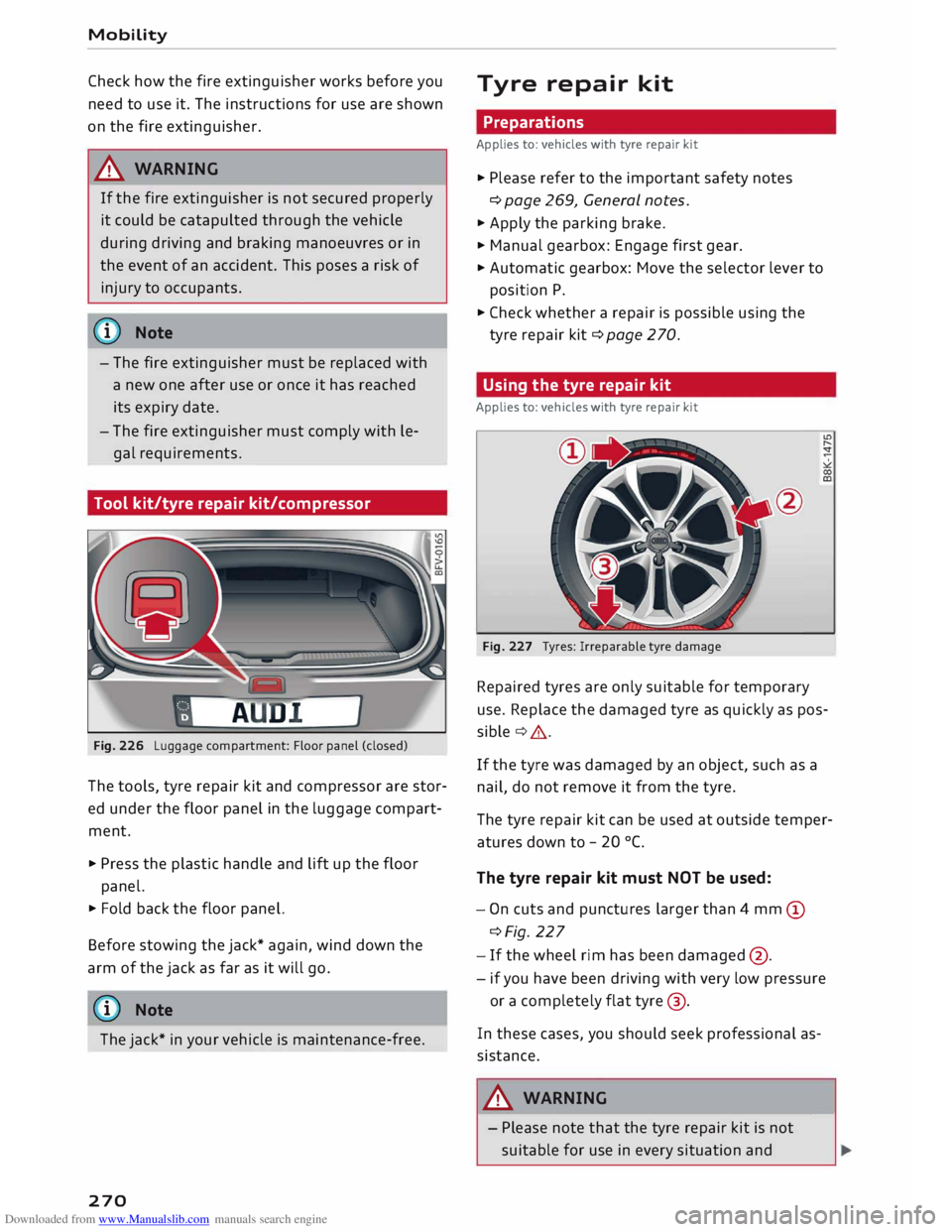
Tool kit/tyre repair kit/compressor
Fig. 226 Luggage compartment: Floor panel (closed)
The tools, tyre repair kit and compressor are stor
ed under the floor panel in the luggage compart
ment.
.., Press the plastic handle and lift up the floor
panel.
.., Fold back the floor panel.
Before stowing the jack* again, wind down the
arm of the jack as far as it will go.
ij} Note
The jack* in your vehicle is maintenance-free.
270 Tyre
repair kit
Preparations
Applies to: vehicles with tyre repair kit
.., Please refer to the important safety notes
¢ page 269, General notes.
.., Apply the parking brake.
.., Manual gearbox: Engage first gear.
.., Automatic gearbox: Move the selector lever to
position P .
.., Check whether a repair is possible using the
tyre repair kit¢ page 270.
Using the tyre repair kit
Applies to: vehicles with tyre repair kit
Fig. 227 Tyres: Irreparable tyre damage
Repaired tyres are only suitable for temporary
use. Replace the damaged tyre as quickly as pos
sible ¢& .
If the tyre was damaged by an object, such as a
nail, do not remove it from the tyre.
The tyre repair kit can be used at outside temper
atures down to -20 °(.
The tyre repair kit must NOT be used:
- On cuts and punctures larger than 4 mm (D
¢Fig. 227
- If the wheel rim has been damaged @.
- if you have been driving with very low pressure
or a completely flat tyre@.
In these cases, you should seek professional as
sistance.
A WARNING
- Please note that the tyre repair kit is not
suitable for use in every situation and-
Page 274 of 306
Downloaded from www.Manualslib.com manuals search engine Mobility
- If it was not possible to build up a tyre pres
sure of 2.0 bar within 6 minutes this means
that the tyre is too badly damaged. Do not
drive on.
- Seek professional assistance if the repair of
a tyre puncture is not possible with the seal
ing compound.
{D Note
Do not use the compressor for longer than
6 minutes at a time, as it could overheat.
When the compressor has cooled down, you
can use it again.
After repairing a tyre
Applies to: vehicles with tyre repair kit
.,. Affix the sticker "max. 80 km/h", which is inclu
ded in the tyre repair kit, to the dashboard
where the driver will see it.
.,. After about 10 minutes, stop to check the tyre
pressure .
.,. If
tyre pressure is less than 1.3 bar, the tyre is
too badly damaged. Do not drive on.
A WARNING
After repairing a tyre please note the follow
ing points:
- Do not drive faster than 80 km/h.
-Avoid heavy acceleration, hard braking and
fast cornering.
- Vehicle handling could be impaired.
- If the tyre is too badly damaged, you should
seek professional assistance.
® For the sake of the environment
A used can of sealing compound can be re
turned to your qualified workshop for dispos
al.
@ Note
After repairing a tyre, remember to buy a new
tyre sealant can at a qualified workshop.
272 Changing
a wheel
Preparations
Certain preparations must be made before you
change the wheel.
.,. Please refer to the important safety notes
¢ page 269, General notes.
.,. Apply the
parking brake .
.,. Manual gearbox: Engage first gear.
.,. Automatic gearbox: Move the selector lever to
position P.
.,. Take out the
tools ¢ page 2 70 and spare wheel
¢page 276.
A WARNING
If you have to use the jack* on a gradient or
off-road track, block the wheel diagonally op
posite the wheel being changed by placing
suitable objects underneath both the front
and rear of the wheel to prevent the vehicle
from rolling away.
Removing the hubcap/wheel bolt caps -
Page 278 of 306
Downloaded from www.Manualslib.com manuals search engine Mobility
...
Put the tools and jack back in the luggage com
partment.
... If the replaced wheel will not fit into the spare
wheel well, stow it safely in the luggage com
partment ¢page 227.
... Check
the tyre pressure of the fitted wheel as
soon as possible.
... Adjust the tyre pressures and store them via
the infotainment system.
... The
wheel bolts should be tightened to 120
Nm. Have this checked as soon as possible with
a torque wrench. Until then, drive with caution .
... Have the flat tyre replaced as quickly as possi
ble.
Spare wheel
General notes
Applies to: vehicles with compact temporary spare wheel
AUD!
Fig. 238 Luggage compartment: Spare wheel
Fig. 239 Compact temporary spare wheel (example) ""
N
u..
co
The compact temporary spare wheel is only in
tended for temporary use over short distances.
Have the damaged wheel checked as soon as pos
sible by a qualified workshop and, if necessary,
replaced.
Please note the following restrictions when using
the compact temporary spare wheel. The com-
276 pact
temporary spare wheel is designed specifi
cally for this model. For this reason, do not use a
spare wheel from a different type of vehicle .
Removing the spare wheel
... Turn the centre plastic knob¢ Fig. 238 © anti-
clockwise.
... Take out the spare wheel.
Removing the jack
... Lift open the trim on the right side of the lug-
gage compartment and take out the jack.
Snow chains
For technical reasons, snow chains must not be
used on the compact temporary spare wheel.
Should you have a puncture on one of the front
wheels when using snow chains, fit the compact
temporary spare wheel in place of one of the rear
wheels. You can then attach the snow chains to
the wheel taken from the rear and use this wheel
to replace the punctured front wheel.
A WARNING
- The tyre pressure must be checked as soon
as possible after fitting the spare wheel -an
incorrectly inflated tyre can increase the risk
of accident. You can find the tyre pressures
here ¢ page 256, Fig. 222.
- Do not drive faster than 80 km/h when the
compact temporary spare wheel is fitted
higher speeds can cause an accident.
- Avoid heavy acceleration, hard braking and
fast cornering when the compact temporary
spare wheel is fitted -risk of accident!
- Never use two or more compact spare tyres
at the same time -risk of accident!
- No other type of tyre (normal summer or
winter tyres) may be fitted on the compact
temporary spare wheel.
Page 279 of 306
![AUDI TT ROADSTER 2016 Repair Manual Downloaded from www.Manualslib.com manuals search engine 0
<t
0
N
,.....
N
......
0
,.....
Vl
CX) ]ump-starting
Before starting the engine
If necessary, the engine can be started by](/img/6/57670/w960_57670-278.png "AUDI TT ROADSTER 2016 Repair Manual Downloaded from www.Manualslib.com manuals search engine 0
<t
0
N
,.....
N
......
0
,.....
Vl
CX) ]ump-starting
Before starting the engine
If necessary, the engine can be started by")
Downloaded from www.Manualslib.com manuals search engine 0
N
,.....
N
......
0
,.....
Vl
CX) ]ump-starting
Before starting the engine
If necessary, the engine can be started by con
necting it to the battery of another vehicle.
If the engine fails to start because of a dis
charged battery, the vehicle battery can be con
nected to the battery of another vehicle to start
the engine. Suitable jump leads are required.
Both vehicle batteries must be rated at 12 Volts.
The capacity (Ah) of the booster battery should
not be significantly lower than that of the dis
charged battery.
Jump leads
The jump leads must be heavy enough to carry
the starter current. Refer to the details given by
the manufacturer.
Only use jump leads with insulated battery
clamps.
Positive cable -usually red.
Negative cable -usually black.
A WARNING
- When it is discharged the battery can freeze
at temperatures around 0°
(. A frozen bat
tery must first be thawed out before con
necting the jump leads -risk of explosion
and chemical burns! After jump-starting the
vehicle, drive to a qualified workshop with
out delay and have the vehicle battery
checked.
- Note the safety warnings referring to work
ing in the engine compartment ¢ page 244.
ij}) Note
- There must be no contact between the two
vehicles as otherwise current could flow as
soon as the positive terminals are connec
ted. This would discharge the boosting bat
tery.
- The discharged vehicle battery must be
properly connected to the vehicle's electri
cal system. Mobility
- Switch off the car telephone if necessary.
Details will be given in the manufacturer's
instructions for the car telephone.
Starting the engine
The two jump Leads must be connected in the
correct sequence.
Fig. 240 Engine compartment: Terminals for jump leads
and battery charger
Fig. 241 Jump-starting with the battery of another vehi
cle: A -Discharged battery, B -Boosting battery
Preparations
... Apply the parking brake and move the gear lev
er to neutral (manual gearbox) or move these
lector lever to P (automatic gearbox).
... Switch off all electrical equipment and the igni-
tion on both vehicles.
Connecting and disconnecting the jump
leads
... Before jump-starting the vehicle you must open
the cap on the positive terminal.
... Connect one end of the red jump lead to the
positive terminal (!) ¢Fig. 241 ofthejump
start connection @ in your vehicle.
... Connect the other end of the red jump lead to
the positive terminal @of the boosting battery
® · �
277
Page 284 of 306
Downloaded from www.Manualslib.com manuals search engine Fuses
and bulbs
Fuses and bulbs
Fuses Fuses in vehicle interior
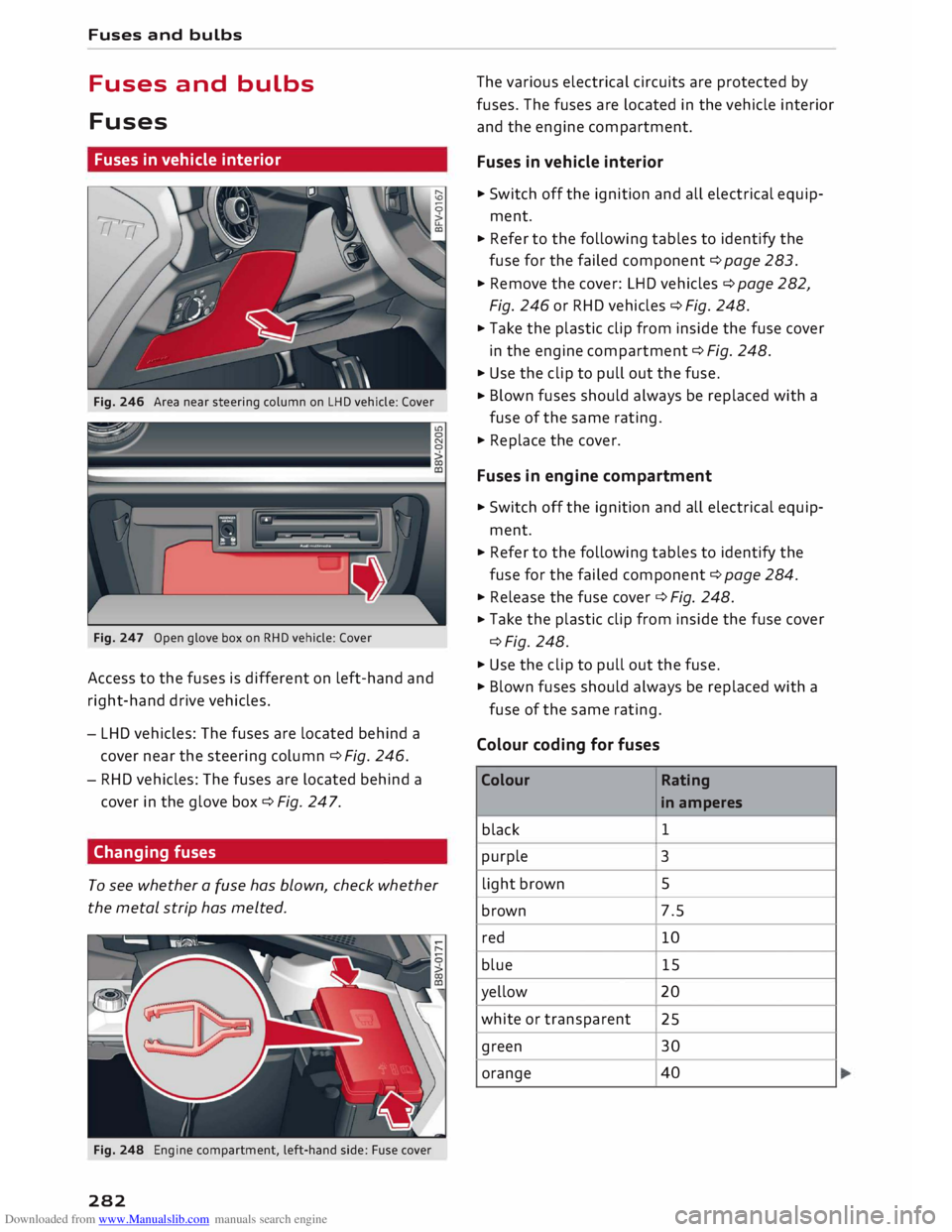
Fig. 246 Area near steering column on LHD vehicle: Cover
Fig. 247 Open glove box on RHD vehicle: Cover
Access to the fuses is different on left-hand and
right-hand drive vehicles.
- LHD vehicles: The fuses are located behind a
cover near the steering column c::> Fig. 246.
- RHD vehicles: The fuses are located behind a
cover in the glove box c::> Fig. 247.
Changing fuses
To see whether a fuse has blown, check whether
the metal strip has melted.
Fig. 248 Engine compartment, left-hand side: Fuse cover
282 The
various electrical circuits are protected by
fuses. The fuses are located in the vehicle interior
and the engine compartment.
Fuses in vehicle interior
.,,. Switch off the ignition and all electrical equip
ment .
... Refer to the following tables to identify the
fuse for the failed component c::> page 283 .
... Remove the cover: LHD vehicles c::> page 282,
Fig. 246 or RHD vehicles c::> Fig. 248 .
... Take the plastic clip from inside the fuse cover
in the engine compartment c::> Fig. 248 .
... Use the clip to pull out the fuse .
... Blown
fuses should always be replaced with a
fuse of the same rating .
.,,. Replace the cover.
Fuses in engine compartment
... Switch off the ignition and all electrical equip
ment .
... Refer to the following tables to identify the
fuse for the failed component c::> page 284 .
... Release the fuse cover c::> Fig. 248 .
... Take
the plastic clip from inside the fuse cover
c::>Fig. 248 .
.,,. Use the clip to pull out the fuse.
.,,. Blown fuses should always be replaced with a
fuse of the same rating.
Colour coding for fuses
Colour Rating
in amperes
black 1
purple 3
light brown 5
brown 7.5
red 10
blue 15
yellow 20
white or transparent
25
green 30
orange 40
Page 285 of 306
Downloaded from www.Manualslib.com manuals search engine 0
N
,.....
N
......
0
,.....
Vl
CX) &,
WARNING
Never attempt to repair a fuse or replace a
blown fuse by fitting a fuse with a higher am
pere rating. This could damage the electrical
system -risk of fire!
CD CAUTION
If a newly replaced fuse blows again after a
short time, the electrical system must be
checked by a qualified workshop as soon as
possible.
@ Note
- Unassigned fuse locations are not shown in
the tables below.
- Some of the items of equipment listed in
the tables below are only fitted on certain
models or are optional extras.
Fuses in vehicle interior
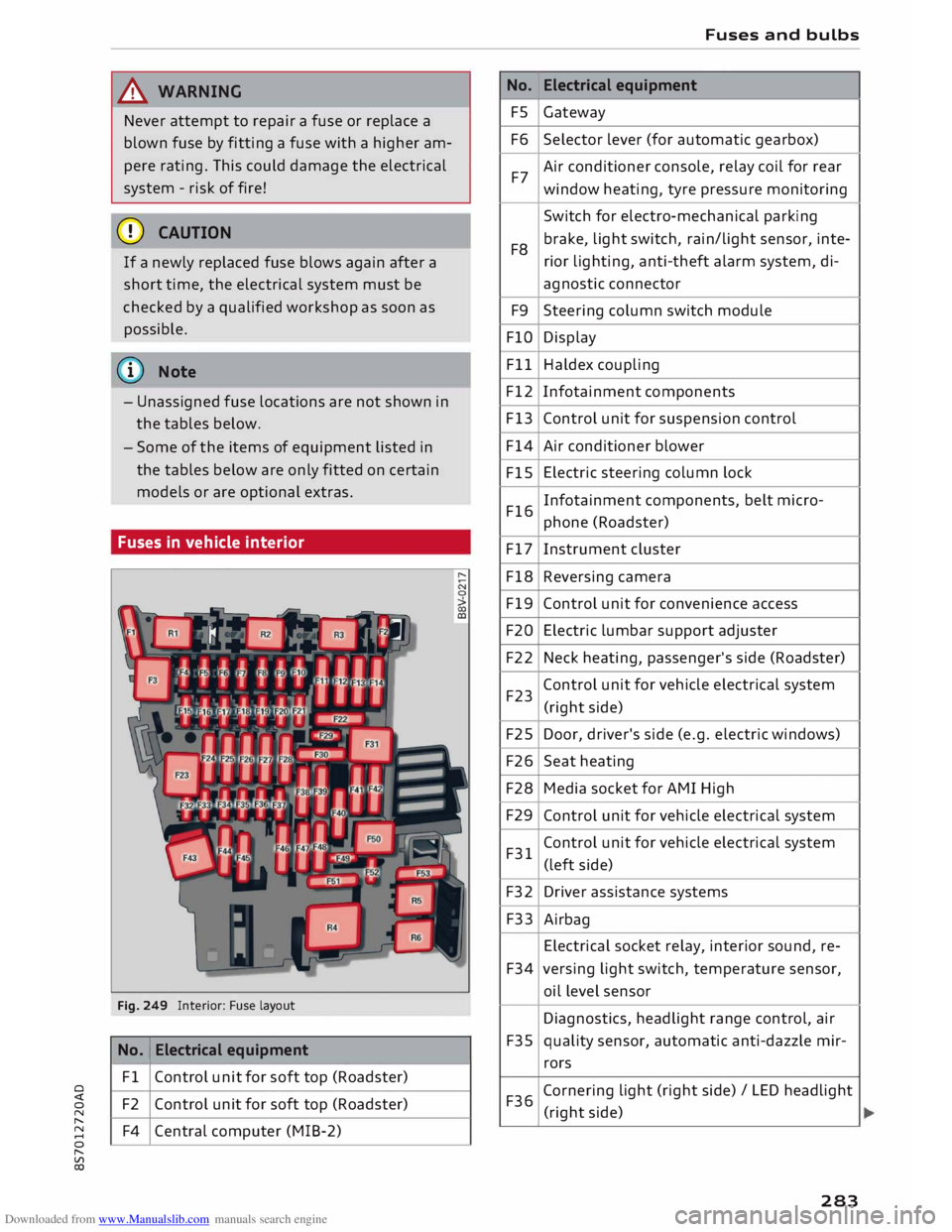
Fig. 249 Interior: Fuse layout
No. 1
Electrical equipment
Fl Control unit for soft top (Roadster)
F2 Control unit for soft top (Roadster)
F4 Central computer (MIB-2) No.
FS
F6
F7
F8 F9
FlO
Fll
F12
F13
F14
FlS
F16
F17
F18
F19
F20
F22
F23
F25
F26
F28
F29
F31
F32
F33
F34
F35
F36 Fuses
and bulbs
Electrical equipment
Gateway
Selector lever (for automatic gearbox)
Air conditioner console, relay coil for rear
window heating, tyre pressure monitoring
Switch for electro-mechanical parking
brake, light switch, rain/light sensor, inte-
rior lighting, anti-theft alarm system, di-
agnostic connector
Steering column switch module
Display
Haldex coupling
Infotainment components
Control unit for suspension control
Air conditioner blower
Electric steering column lock
Infotainment components, belt micro-
phone (Roadster)
Instrument cluster
Reversing camera
Control unit for convenience access
Electric lumbar support adjuster
Neck heating, passenger's side (Roadster)
Control unit for vehicle electrical system
(right side)
Door, driver's side (e.g. electric windows)
Seat heating
Media socket for AMI High
Control unit for vehicle electrical system
Control unit for vehicle electrical system
(left side)
Driver assistance systems
Airbag
Electrical socket relay, interior sound, re-
versing light switch, temperature sensor,
oil level sensor
Diagnostics, headlight range control, air
quality sensor, automatic anti-dazzle mir-
rors
Cornering light (right side)/ LED headlight
(right side)
283
Page 289 of 306
Downloaded from www.Manualslib.com manuals search engine Technical
data
Vehicle identification
data
XXXXX XX -X -XXXX XXX
(1\_J_ FAHRZG. -llENT -NR.
� VEHnE-IOENT -NO. xx
P /TYPE XXXXXXXX
XX X
XXXXXXXX
XXX XXX
I XX
XXXXXXX XX X.X XX
XXX KW
XXX
®i �i��:-:::s��
OE
xxxx
XXX XXX
©+ �N
:t,) N
�:� r.
xxxx I xxxx XXX I xx
M. -AUSSl/ !M'TIONS
EOA 7D5
4UB 6XM 5SG 5RW
2EH JOZ lLB
lAS 1BA
3FC 5MU 7X1
FOA 9G3 OG7
OYH
OJF
TL6 3KA 8EH UlA X9B QZ7 lXW
803 908 8Z4 D2D
7T6 CV7
7KO
4X3 2K2
3L4 4KC 3YO
4I3 5D2
15A 7GB 01A
4GO
® XX.
X XX.
X XX. X xxxx
® @ © @
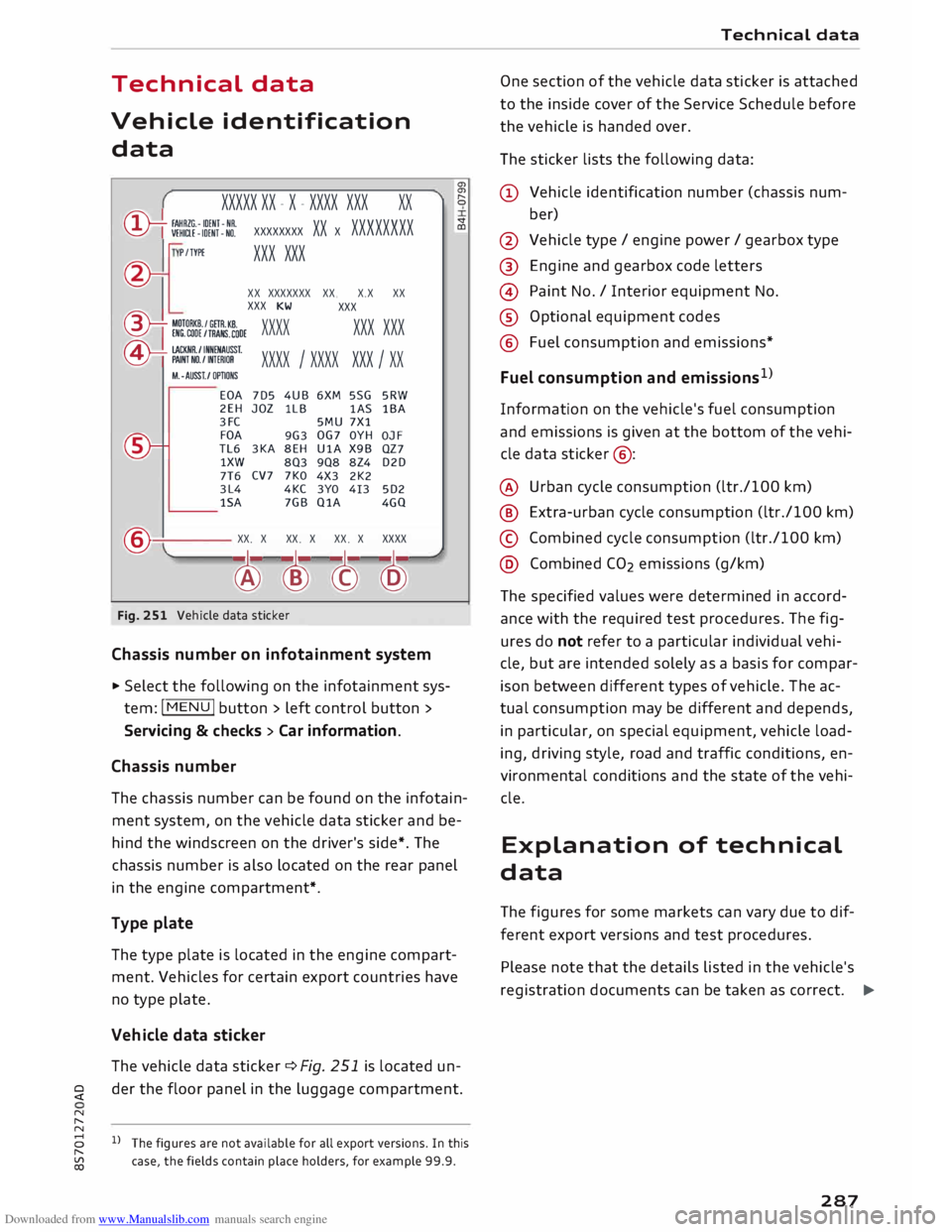
Fig. 251 Vehicle data sticker
Chassis number on infotainment system
... Select the following on the infotainment sys
tem: I MENU I button > left control button >
Servicing & checks > Car information.
Chassis number a,
a,
"
0
V
CD
The chassis number can be found on the infotain
ment system, on the vehicle data sticker and be
hind the windscreen on the driver's side*. The
chassis number is also located on the rear panel
in the engine compartment*.
Type plate
The type plate is located in the engine compart
ment. Vehicles for certain export countries have
no type plate.
Vehicle data sticker
The vehicle data sticker¢ Fig. 251 is located un-
� der
the floor panel in the luggage compartment.
N
,.....
N
8 l}The figures are not available for all export versions. In this
,.....
� case,
the fields contain place holders, for example 99.9. Technical
data
One section of the vehicle data sticker is attached
to the inside cover of the Service Schedule before
the vehicle is handed over.
The sticker lists the following data:
(!) Vehicle identification number (chassis num-
ber)
@ Vehicle type/ engine power/ gearbox type
@ Engine and gearbox code letters
@ Paint No./ Interior equipment No.
® Optional equipment codes
@ Fuel consumption and emissions*
Fuel consumption and emissions 1
>
Information on the vehicle's fuel consumption
and emissions is given at the bottom of the vehi
cle data sticker @:
@ Urban cycle consumption (ltr./100 km)
@ Extra-urban cycle consumption (ltr./100 km)
© Combined cycle consumption (ltr./100 km)
@ Combined CO2 emissions (g/km)
The specified values were determined in accord
ance with the required test procedures. The fig
ures do not refer to a particular individual vehi
cle, but are intended solely as a basis for compar
ison between different types of vehicle. The ac
tual consumption may be different and depends,
in particular, on special equipment, vehicle load
ing, driving style, road and traffic conditions, en
vironmental conditions and the state of the vehi
cle.
Explanation of technical
data
The figures for some markets can vary due to dif
ferent export versions and test procedures.
Please note that the details listed in the vehicle's
registration documents can be taken as correct. .,.
287
Page 293 of 306
Downloaded from www.Manualslib.com manuals search engine Audi
phone box . . . . . . . . . . . . . . . . . . . . . . . 146
Audi side assist
see Side assist . . . . . . . . . . . . . . . . . . . . . . . 97
Audi smartphone interface ......... 210, 215
Audi virtual cockpit (instrument cluster) 10
AUTO Automatic air conditioner . . . . . . . . . . . . . . 62
Automatic headlights . . . . . . . . . . . . . . . . . 44
Auto Lock (central locking system) . . . . . . . .
27
Automatic air conditioner
see Air conditioner (automatic) . . . . . . . . . . 62
Automatic gearbox . . . . . . . . . . . . . . . . . . . . .
76
Back-up programme . . . . . . . . . . . . . . . . . . 83
Downhill speed control
. . . . . . . . . . . . . . . .
80
Driving tips . . . . . . . . . . . . . . . . . . . . . . . . . .
79
Kick-down . . . . . . . . . . . . . . . . . . . . . . . . . . . 81
Launch control programme . . . . . . . . . . . . . 82
Malfunction . . . . . . . . . . . . . . . . . . . . . . . . . 78
Manual gear selection . . . . . . . . . . . . . . . . . 81
Manual release of selector lever . . . . . . 84, 85
Selector lever lock . . . . . . . . . . . . . . . . . . . . 78
Selector lever positions . . . . . . . . . . . . . . . .
77
Steering wheel with paddle levers . . . . . . . 81
tiptronic . . . . . . . . . . . . . . . . . . . . . . . . . . . .
81
Automatic zoom (navigation) . . . . . . . . . . .
180
AUX input . . . . . . . . . . . . . . . . . . . . . . . 198, 199
Average fuel consumption . . . . . . . . . . . . . . .
25
Average speed . . . . . . . . . . . . . . . . . . . . . . . .
25
Axle loads . . . . . . . . . . . . . . . . . . . . . . . . . . . 288
B
BACK button . . . . . . . . . . . . . . . . . . . . . . . . .
121
Background lighting . . . . . . . . . . . . . . . . . . . . 48
Balance (sound) ...................... 217
Bandages see First-aid kit . . . . . . . . . . . . . . . . . . . . . 269
Bass (sound) . . . . . . . . . . . . . . . . . . . . . . . . .
217
Battery . . . . . . . . . . . . . . . . . . . . . . . . . . . . .
250
Charge . . . . . . . . . . . . . . . . . . . . . . . . . . . . 118
Charging . . . . . . . . . . . . . . . . . . . . . . . . 15, 251
Indicator lamp . . . . . . . . . . . . . . . . . . . . . . . 15
Power management .. . . . . . . . . . . . . . . . . 118
Winter conditions . . . . . . . . . . . . . . . . . . . 251
0
� Battery,
charging (mobile devices) . . . . . . . 146
� Belts
::2 see
Seat belts . . . . . . . . . . . . . . . . . . . . . . . 230
Vl
CX) Index
Better route (navigation) . . . . . . . . . . . . . . . 184
Biodiesel . . . . . . . . . . . . . . . . . . . . . . . . . . . . 241
Bioethanol (fuel) . . . . . . . . . . . . . . . . . . . . .
241
Blower (air conditioner) . . . . . . . . . . . . . . 61, 62
Bluetooth Audio player . . . . . . . . . . . . . . . . . . . . . . . . 194
Connecting a mobile phone . . . . . . . . . . . . 142
Remote SIM Access Profile . . . . . . . . . . . . 160
Settings . . . . . . . . . . . . . . . . . . . . . . . . . . . 215
Boost pressure display . . . . . . . . . . . . . . . . . . 26
Boot see Luggage compartment . . . . . . . . . . . . 227
Boot lid
Manual release . . . . . . . . . . . . . . . . . . . . . . . 34
Opening/closing . . . . . . . . . . . . . . . . . . . . . . 33
Brake fluid Checking brake fluid level . . . . . . . . . . . . . 250
Brakes . . . . . . . . . . . . . . . . . . . . . . . . . . . . . . 115
Brake assist system . . . . . . . . . . . . . . . . . . 113
Brake fluid . . . . . . . . . . . . . . . . . . . . . . . . . 250
Brake pads worn . . . . . . . . . . . . . . . . . . . . . 16
Brake pedal . . . . . . . . . . . . . . . . . . . . . . . .
226
Brake servo . . . . . . . . . . . . . . . . . . . . . . . . .
115
Electro-mechanical parking brake. . . . . . . . 74
Emergency braking aid . . . . . . . . . . . . . . . 113
Emergency braking function . . . . . . . . . . . . 74
New brake pads . . . . . . . . . . . . . . . . . . . . . 115
Warning lamp . . . . . . . . . . . . . . . . . . . . . . . 13
Browser see Media centre . . . . . . . . . . . . . . . . . . . .
201
Bucket seat . . . . . . . . . . . . . . . . . . . . . . . . . . . 55
Bulbs, changing . . . . . . . . . . . . . . . . . . . . . . 284
Buttons Multi-function steering wheel. . . . . . . . 21, 23
Operating unit (MMI)................. 121
C
Cables (USB adapter/AUX adapter) . . . . . . . 197
Calling up media . . . . . . . . . . . . . . . . . . . . . .
200
Call list . . . . . . . . . . . . . . . . . . . . . . . . . . . . . 147
Call options . . . . . . . . . . . . . . . . . . . . . . . . . .
155
Camera-based traffic sign recognition . . . . . 90
Capacities Fuel tank. . . . . . . . . . . . . . . . . . . . . . . . . . .
288
Washer fluid reservoir . . . . . . . . . . . . . . . . 288
Caps for wheel bolts, removing . . . . . . . . . .
272
291
Page 294 of 306
Downloaded from www.Manualslib.com manuals search engine Index
Car care
Washing/cleaning . . . . . . . . . . . . . . . . . . . 263
Car keys . . . . . . . . . . . . . . . . . . . . . . . . . . . . . . 27
Car phone . . . . . . . . . . . . . . . . . . . . . . . 141, 156
Catalytic converter . . . . . . . . . . . . . . . . . . . .
244
CD drive . . . . . . . . . . . . . . . . . . . . . . . . . . . . .
193
Central locking system . . . . . . . . . . . . . . . . . .
27
Boot lid . . . . . . . . . . . . . . . . . . . . . . . . . . . . . 33
Central locking switch . . . . . . . . . . . . . . . . .
31
Electric windows . . . . . . . . . . . . . . . . . . . . .
35
Locking doors manually . . . . . . . . . . . . . . . . 32
Remote control key . . . . . . . . . . . . . . . . . . .
29
Settings .. .. .. .. .. .. .. .. .. .. . . .. .. ..
31
Centre armrest . . . . . . . . . . . . . . . . . . . . . . . .
55
Centre console lighting, adjusting brightness
.48
Cetane number (diesel) . . . . . . . . . . . . . . . .
241
Changing bulbs . . . . . . . . . . . . . . . . . . . . . . .
284
Charging battery (mobile devices) . . . . 198, 199
Chassis number . . . . . . . . . . . . . . . . . . . . . .
287
Child lock . . . . . . . . . . . . . . . . . . . . . . . . . . .
204
Child seats . . . . . . . . . . . . . . . . . . . . . . . . . .
223
Categories . . . . . . . . . . . . . . . . . . . . . . . . .
224
ISOFIX . . . . . . . . . . . . . . . . . . . . . . . . . . . .
225
Side airbags . . . . . . . . . . . . . . . . . . . . . . . .
224
Cigarette lighter . . . . . . . . . . . . . . . . . . . . . . . 56
Cleaning . . . . . . . . . . . . . . . . . . . . . . . . . . . .
263
Cleaning/de-icing windows . . . . . . . . . . . . . 265
Cleaning/treating natural leather . . . . . . . . 266
Cleaning Alcantara . . . . . . . . . . . . . . . . . . . .
266
Cleaning Audi virtual cockpit . . . . . . . . . . . .
265
Cleaning carbon parts . . . . . . . . . . . . . 265, 266
Cleaning controls and displays . . . . . . . . . . 265
Cleaning displays . . . . . . . . . . . . . . . . . . . . . 265
Cleaning fabrics . . . . . . . . . . . . . . . . . . . . . .
266
Cleaning instrument cluster . . . . . . . . . . . .
265
Cleaning leatherette . . . . . . . . . . . . . . . . . . .
266
Cleaning plastic parts . . . . . . . . . . . . . . . . . .
265
Cleaning seat upholstery . . . . . . . . . . . . . . . 266
Cleaning windbreak
Closing 265
Bonnet . . . . . . . . . . . . . . . . . . . . . . . . . . . .
245
Windows ........................... 34
Coasting mode . . . . . . . . . . . . . . . . . . . . . . . .
82
Coat hooks . . . . . . . . . . . . . . . . . . . . . . . . . . .
5 7
Cold engine . . . . . . . . . . . . . . . . . . . . . . . . . . . 66
292 Colour
code . . . . . . . . . . . . . . . . . . . . . . . . . .
287
Coming home . . . . . . . . . . . . . . . . . . . . . . . . . 47
Command see Command (speech dialogue system) . 132
Command (speech dialogue system) . . . . . . 133
Compact temporary spare wheel . . . . . . . . . 276
Compartments . . . . . . . . . . . . . . . . . . . . . . . .
57
Compass in mirror . . . . . . . . . . . . . . . . . . . . .
52
Conference calls . . . . . . . . . . . . . . . . . . . . . . 148
Connection manager 213
Connections see Media . . . . . . . . . . . . . . . . . . . . . .
191, 200
Connection settings . . . . . . . . . . . . . . . . . . .
213
Consumption (fuel)
. . . . . . . . . . . . . . . . 25, 287
Contacts Displaying details.. . . . . . . . . . . . . . . . . . . 154
From another directory . . . . . . . . . . . . . . . 214
Importing/exporting . . . . . . . . . . . . . . . . .
154
Memory capacity . . . . . . . . . . . . . . . . . . . .
156
Searching for . . . . . . . . . . . . . . . . . . . . . . .
154
Storing as a destination...............
175
Control buttons . . . . . . . . . . . . . . . . . . . . . .
123
Controls Multi-function steering wheel..... ...... 21
Controls and displays (overview) . . . . . . . . . . . 8
Control units . . . . . . . . . . . . . . . . . . . . . . . . . 119
Convenience key
Indicator lamp . . . . . . . . . . . . . . . . . . . . . . .
70
Switching off engine (START ENGINE STOP
button) . . . . . . . . . . . . . . . . . . . . . . . . . . . . . 69
Convenience open/close . . . . . . . . . . . . . . . . . 35
Cooling mode (air conditioner) . . . . . . . . 61, 62
Cooling system
Anti-freeze . . . . . . . . . . . . . . . . . . . . . . . . . 249
Checking coolant level . . . . . . . . . . . . . . . . 249
Coolant temperature gauge . . . . . . . . . . . . 10
Topping up coolant . . . . . . . . . . . . . . . . . . 249
Warning lamp . . . . . . . . . . . . . . . . . . . . . . . 14
Cornering light . . . . . . . . . . . . . . . . . . . . . . . 100
Crank (for closing soft top manually) . . . . . . 42
Crosshairs . . . . . . . . . . . . . . . . . . . . . . . . . . . 171
Cruise control system
Adjusting stored speed . . . . . . . . . . . . . . . .
87
Pre-selecting a speed . . . . . . . . . . . . . . . . . .
87
Switching off . . . . . . . . . . . . . . . . . . . . . . . .
87
Switching on . . . . . . . . . . . . . . . . . . . . . . . . . 86