ignition AUDI TT ROADSTER 2016 Manual Online
[x] Cancel search | Manufacturer: AUDI, Model Year: 2016, Model line: TT ROADSTER, Model: AUDI TT ROADSTER 2016Pages: 306, PDF Size: 31.82 MB
Page 261 of 306
Downloaded from www.Manualslib.com manuals search engine 0
N
,.....
N
......
0
,.....
Vl
CX) based
on the tyre pressures you have stored. The
inflation pressures recommended for your vehicle
are given on the tyre pressure sticker
¢page 256, Fig. 222.
The rolling circumference and vibration can
change and cause a tyre pressure warning if:
- The inflation pressure in one or more tyres is
too low.
- The tyre has suffered structural damage.
- The wheels were changed or the tyre pressures
were changed and the new tyre pressures were
not stored ¢ page 259.
- You are driving with the temporary spare
wheel*.
Indicator lamps
RE- Loss of pressure on one or more tyres¢.&,.
Check and change or repair the tyre(s). Check and
adjust the inflation pressures of all four tyres
again and store the new tyre pressures on the in
fotainment system¢ page 259.
@m (Tyre Pressure Monitoring System) Tyre
pressure: fault. See owner's manual -If @m
ap
pears and the indicator lamp RE in the instru
ment cluster display flashes for approx. one mi
nute and then remains lit after you have switched
on the ignition or while you are driving, there is a
fault in the system. Try to store the correct tyre
pressures ¢ page 259. If the indicator lamp
does not go out or if it comes on again after a
short time, drive to a qualified workshop without
delay and have the fault rectified.
& WARNING
- If the tyre pressure loss indicator appears
on the display, slow down immediately and
avoid any severe braking or steering ma
noeuvres. As soon as you can do so safely,
stop and check the tyres and the tyre pres
sures.
- It is the driver's responsibility to ensure that
the tyre pressures are correct. For this rea
son you must check the tyre pressures regu
larly.
- Under certain conditions (e.g. driving at
high speeds, on ice and snow or on poor Wheels
road surfaces) the tyre pressure loss indica
tor may not appear immediately.
- The use of run-flat tyres on your vehicle is
NOT authorised! Unauthorised use can cause
an accident or damage your vehicle.
((D) Note
- If a malfunction occurs in the ESC system,
the tyre pressure loss indicator may also be
out of action.
- When driving with snow chains, a system
malfunction can occur.
- The tyre pressure loss indicator on your Audi
is specially matched to tyres with the mark
ing "AO"¢ page 254. We recommend that
you use these tyres.
Storing tyre pressure settings
Applies to: vehicles with tyre pressure loss indicator
When you change a tyre or the tyre pressure on
your vehicle, you must confirm the change on the
infotainment system.
.., Before storing the new tyre pressures, check
that the current pressures on all four wheels
correspond to the specified values and adapt
the pressures to the current load ¢ page 255.
.., Switch on the ignition.
.., Select the following on the infotainment sys
tem: I MENU I button >Car> left control button
> Servicing & checks > Tyre pressure loss indi
cator.
(D} Note
Do not store the tyre pressures if you are driv
ing with snow chains.
259
Page 263 of 306
Downloaded from www.Manualslib.com manuals search engine 0
N
,.....
N
......
0
,.....
Vl
CX) (D)
Note
The tyre pressures and temperatures are not
shown in the display when the vehicle is sta
tionary or during the initialisation phase. Hor
izontal dashes--.--will appear instead of the
pressure and temperature figures.
(1) Loss of tyre pressure
Applies to: vehicles with tyre pressure monitoring system
If the indicator lamp RE appears, the tyre pres
sure on at least one of the wheels is too low or
new sensors have not yet been initialised.
Indicator lamp [Bl lights up after switching
on the ignition
The tyre pressure is too low compared with the
reference value.
... Adjust the pressure of the relevant tyre(s) at
the next opportunity and store the pressures
¢page 261.
Indicator lamp [Bl lights up during a journey
Wheels with new sensors have not yet been ini
tialised or the tyre pressure has reached a critical
level compared with the reference value.
... Avoid unnecessary braking and steering ma
noeuvres.
... Adapt your driving style to the prevailing condi
tions.
... As soon as you can do so safely, stop and check
the tyre(s).
... If it is possible to continue driving, you should
take the vehicle to a qualified workshop and
have the defective tyre(s) repaired or replaced
immediately.
A WARNING
Please observe the important safety informa
tion and notes ¢page 260. Wheels
Storing new tyre pressures
Applies to: vehicles with tyre pressure monitoring system
To enable the tyre pressure monitoring system
to work reliably, it is important to store the cor
rect pressure settings.
You should always store the tyre pressures if new
sensors are fitted or after changing the pressures
when carrying a different amount of passengers
or luggage.
... Before storing the new tyre pressures, check
that the current pressures on all four wheels
correspond to the specified values and adapt
the pressures to the current load ¢ page 256,
Fig. 222. Only adjust and store the inflation
pressure of the tyres when they are at approxi
mately ambient temperature. If the tyre tem
peratures are higher than the ambient temper
ature, the inflation pressures should be in
creased by approx. 0.2 bar above the pressures
specified on the tyre pressure sticker.
... Switch on the ignition.
... Select the following on the infotainment sys
tem: I MENU I button > Servicing & checks >
Tyre pressure loss indicator > Store tyre pres
sures > Yes, store now. The tyre pressure moni
toring system will then measure the current
tyre pressures when you drive the vehicle and
store them as the new reference values .
... If the new tyre pressures do not appear on the
infotainment display, you will need to drive for
about 10 minutes so that the sensor signal
from the wheels can be received again .
During this initialisation phase,--.--will be
shown on the pressure and temperature display
and some functions of the tyre pressure monitor
ing system will not be available. The system will
warn you only if the pressure of one or more tyres
is below the minimum reference pressure.
If the indicator lamp RE lights up and the mes
sage Tyre pressure: wheel change detected.
Please check all tyres and store pressures in
MMI appears, the system has detected that the
sensor positions have changed because of a
wheel change or that new sensors have been fit-
ted. Store the new tyre pressures.
llll-
261
Page 264 of 306
Downloaded from www.Manualslib.com manuals search engine Wheels
A WARNING
Please observe the important safety informa
tion and notes <=> page 260.
Possible malfunctions
Applies to: vehicles with tyre pressure monitoring system
If the tyre pressure monitoring system is inoper
ative, the indicator lamp mm will appear in the
instrument cluster display together with the
message Tyre pressure: fault. See owner's man
ual.
If the indicator lamp mm appears after you have
switched on the ignition or while you are driving
and the indicator lamp[I] flashes for approxi
mately one minute and then remains lit, there is
a fault in the system. This fault can have the fol
lowing causes:
- If the display appears at the end of the initiali
sation process, this means that the system can
not detect the wheel sensors required to moni
tor the pressures. This can happen if one or
more of the tyres fitted does not have a sensor
or the sensors are incompatible.
- One of the wheel sensors or another compo
nent may not be working.
- Snow chains interfere with the signals trans
mitted by the sensors and can prevent the sys
tem from functioning properly.
- The tyre pressure monitoring system may be in
operative due to radio interference.
- Radio systems operating on the same frequen
cy, such as radio headphones or two-way radios
inside the vehicle, produce strong electromag
netic fields which cause temporary interfer
ence.
The indicator lamp mm and the message will
disappear as soon as the tyre pressure monitor
ing system is available again. If the fault persists
and the indicator lamp mm stays on, you should
drive to a qualified workshop and have the fault
rectified.
262
Page 266 of 306
Downloaded from www.Manualslib.com manuals search engine Care
of vehicle and cleaning
.&_ WARNING
- Follow the rules and recommendations of
the car wash operator and do not wash the
vehicle with the ignition switched on -risk
of accident!
- To avoid cutting yourself on sharp metal
parts, always wear suitable protection when
cleaning the underside of the car or inside
the wheel arches.
-After the car has been washed, the full brak
ing effect can be delayed by moisture (or in
winter by ice) on the discs and brake pads -
risk of accident! The brakes should be dried
by pressing the pedal to restore full braking
effect.
CD CAUTION
- Before washing the vehicle in an automatic
car wash, please make sure to retract the
exterior mirrors and, if necessary, retract
the automatic rear spoiler* to prevent dam
age. Always use the electrical power control
to fold the mirrors in/out on vehicles with
electrically retractable exterior mirrors*.-
Notes on cleaning and care
For cleaning and care of individual components
on the vehicle, please refer to the tables below.
These are recommendations only. If you have
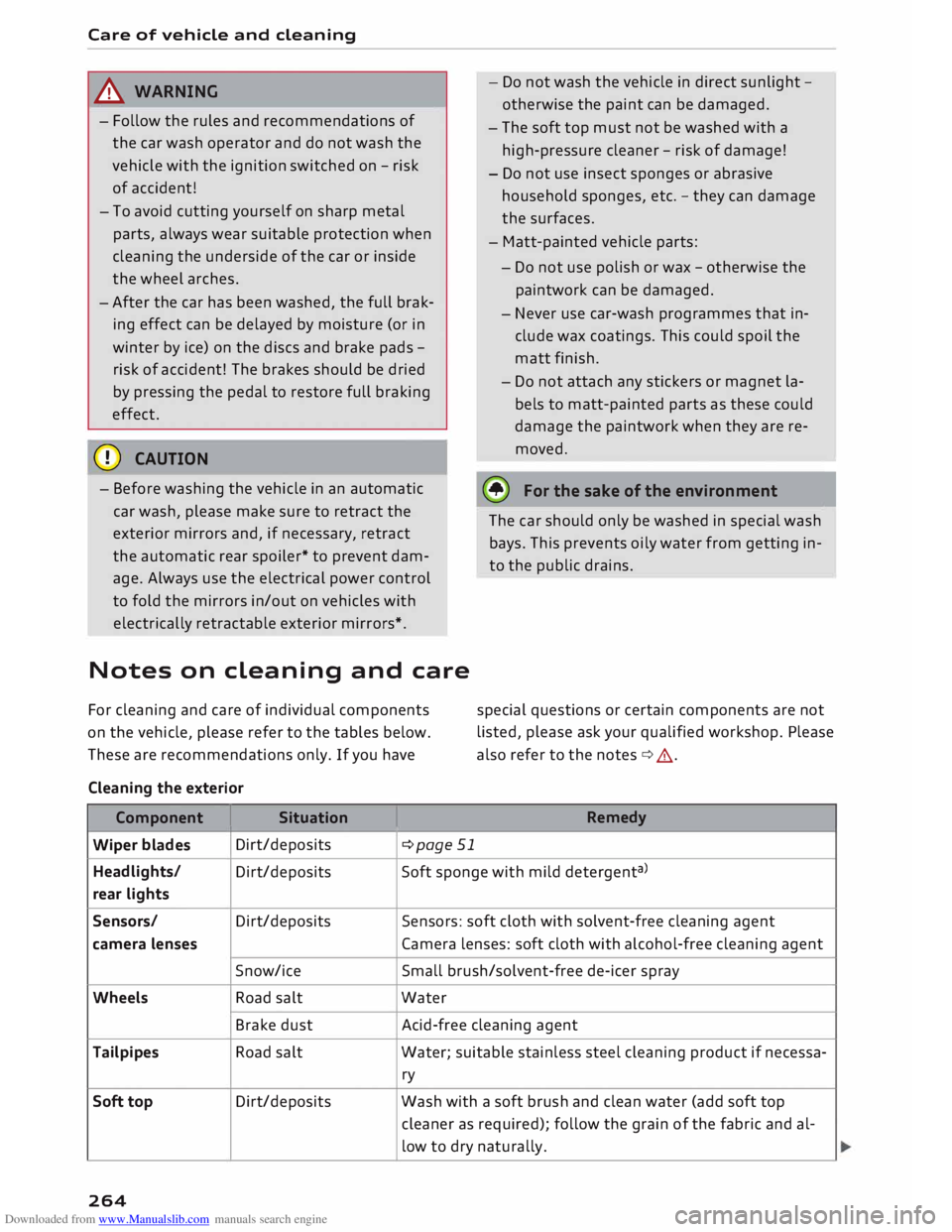
Cleaning the exterior
Component I Situation
Wiper blades Dirt/deposits
¢page 51 -
Do not wash the vehicle in direct sunlight -
otherwise the paint can be damaged.
- The soft top must not be washed with a
high-pressure cleaner -risk of damage!
- Do not use insect sponges or abrasive
household sponges, etc. -they can damage
the surfaces.
- Matt-painted vehicle parts:
- Do not use polish or wax -otherwise the
paintwork can be damaged.
- Never use car-wash programmes that in
clude wax coatings. This could spoil the
matt finish.
- Do not attach any stickers or magnet la
bels to matt-painted parts as these could
damage the paintwork when they are re
moved.
@ For
the sake of the environment
The car should only be washed in special wash
bays. This prevents oily water from getting in
to the public drains.
special questions or certain components are not
listed, please ask your qualified workshop. Please
also refer to the notes ¢,&.
Remedy
Headlights/ Dirt/deposits Soft
sponge with mild detergent a
>
rear lights
Sensors/ Dirt/deposits Sensors:
soft cloth with solvent-free cleaning agent
camera lenses Camera lenses: soft cloth with alcohol-free cleaning agent
Snow/ice Small brush/solvent-free de-icer spray
Wheels Road salt Water
Brake dust Acid-free
cleaning agent
Tailpipes Road salt Water;
suitable stainless steel cleaning product if necessa-
ry
Soft top Dirt/deposits
Wash with a soft brush and clean water (add soft top
cleaner as required); follow the grain of the fabric and al-
low to dry naturally.
264
Page 273 of 306
Downloaded from www.Manualslib.com manuals search engine 0
N
,.....
N
......
0
,.....
Vl
CX) should
only be used as a temporary meas
ure.
- Do not allow the sealant to come into con
tact with your eyes, skin or clothing.
- If you do come into contact with the sealant
immediately rinse the eyes or skin affected
with clean water.
- Make sure you do not breathe in the fumes.
- If you accidentally swallow tyre sealant, im-
mediately rinse your mouth thoroughly and
drink a large amount of water. Do not in
duce vomiting. Immediately contact a doc
tor.
- Change clothing immediately if it becomes
soiled with the tyre sealant.
- If any allergic reactions should occur get
medical help immediately.
- Keep the sealant away from children.
(©) Note
- If sealant should leak out, leave it to dry.
When it has dried, you can pull it off like a
piece of foil.
- Observe the expiry date stated on the seal
ing compound can. Have the sealing com
pound exchanged by a qualified workshop.
- Interference to the radio reception may oc
cur when using the compressor*.
- Please observe the relevant regulations.
Tyre repairs
Applies to: vehicles with tyre repair kit
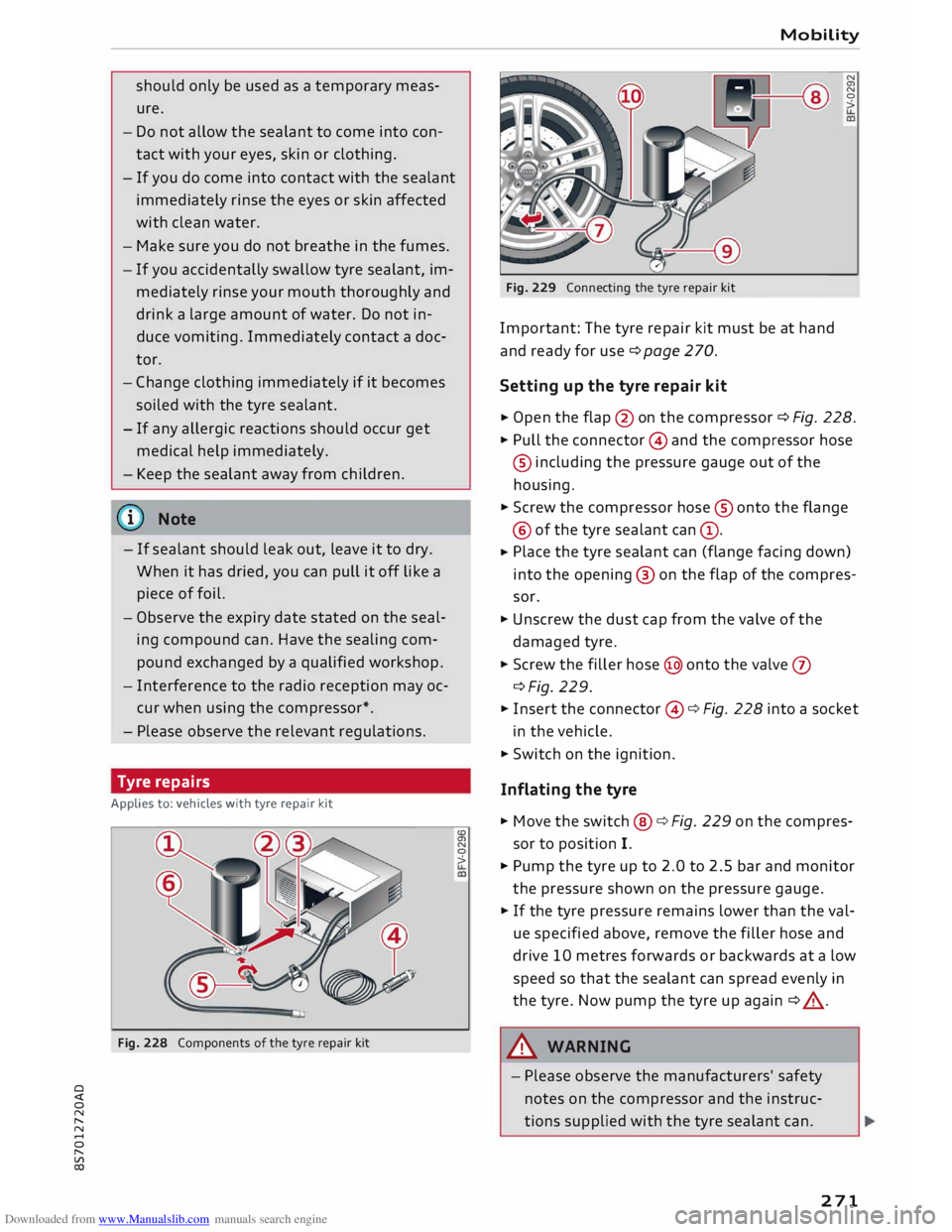
Fig. 228 Components of the tyre repair kit <.O
a,
N
0
> Mobility
Fig. 229 Connecting the tyre repair kit
Important: The tyre repair kit must be at hand
and ready for use ¢ page 2 70.
Setting up the tyre repair kit N
a,
N
0
>
� Open
the flap @on the compressor ¢ Fig. 228.
� Pull the connector © and the compressor hose
® including the pressure gauge out of the
housing.
� Screw the compressor hose® onto the flange
@ of the tyre sealant can@.
� Place
the tyre sealant can (flange facing down)
into the opening @ on the flap of the compres
sor.
� Unscrew the dust cap from the valve of the
damaged tyre.
� Screw the filler hose@ onto the valve 0
c:::>Fig. 229.
� Insert the connector ©¢ Fig. 228 into a socket
in the vehicle.
� Switch on the ignition.
Inflating the tyre
� Move the switch@ ¢ Fig. 229 on the compres
sor to position I.
� Pump the tyre up to 2.0 to 2.5 bar and monitor
the pressure shown on the pressure gauge.
� If the tyre pressure remains lower than the val
ue specified above, remove the filler hose and
drive 10 metres forwards or backwards at a low
speed so that the sealant can spread evenly in
the tyre. Now pump the tyre up again ¢ _A .
.&_ WARNING
- Please observe the manufacturers' safety
notes on the compressor and the instruc
tions supplied with the tyre sealant can.
271
Page 281 of 306
Downloaded from www.Manualslib.com manuals search engine 0
N
,.....
N
......
0
,.....
Vl
CX) Notes
on towing vehicles
The vehicle can be towed with a tow-bar or tow
rope. When the engine is not running, the gear
box will not be adequately lubricated if the fol
lowing speed/distance restrictions are not ob
served:
- The vehicle must not be towed faster than
SO km/h.
- The vehicle must not be towed further than
SO km.
Additional notes on towing by breakdown
truck
If one of the axles has to be raised in order to
tow the vehicle, please refer to the following ta
ble to determine the appropriate axle for your
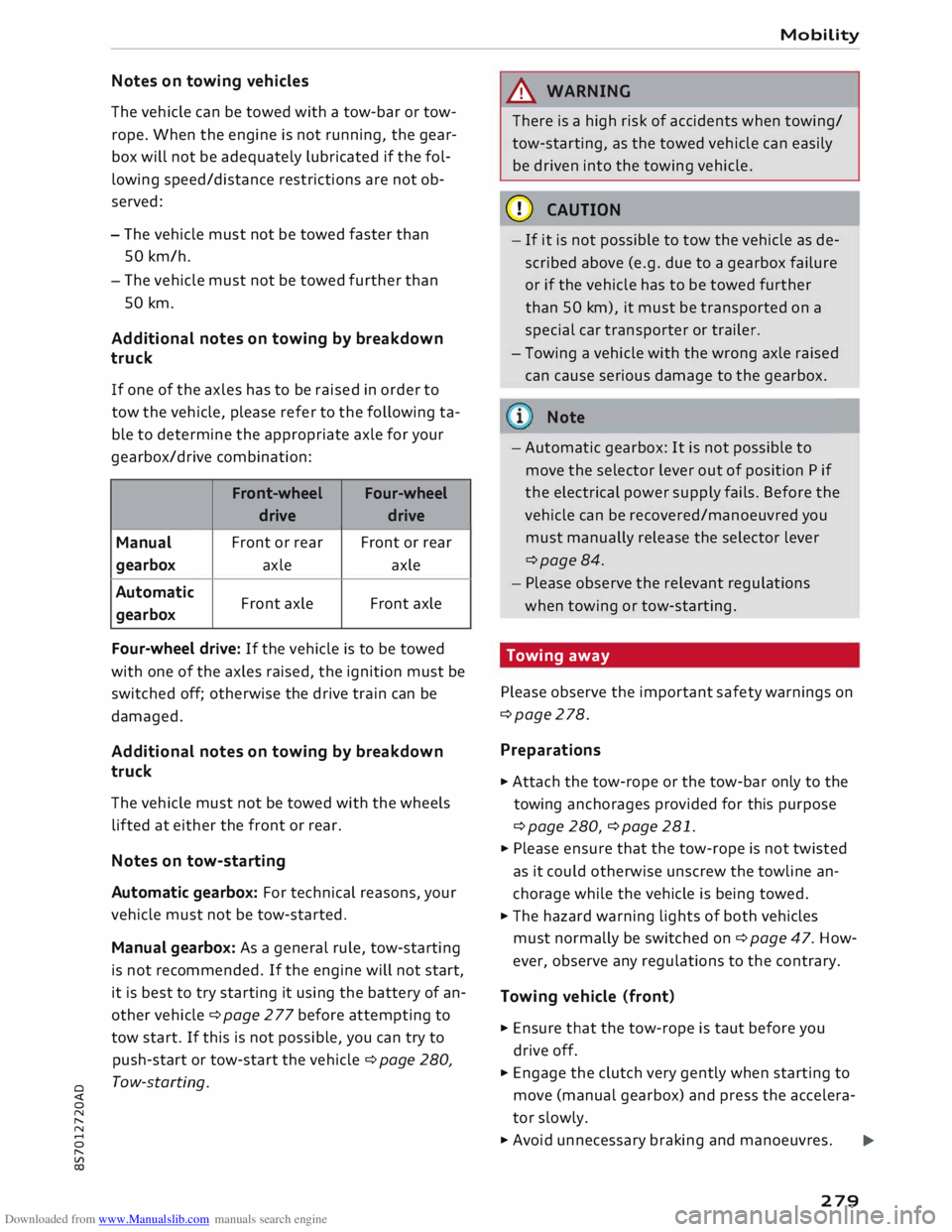
gearbox/drive combination:
Front -wheel
Four-wheel
drive drive
Manual Front
or rear Front or rear
gearbox axle
axle
Automatic Front axle Front
axle
gearbox
Four-wheel drive: If the vehicle is to be towed
with one of the axles raised, the ignition must be
switched off; otherwise the drive train can be
damaged.
Additional notes on towing by breakdown
truck
The vehicle must not be towed with the wheels
lifted at either the front or rear.
Notes on tow-starting
Automatic gearbox: For technical reasons, your
vehicle must not be tow-started.
Manual gearbox: As a general rule, tow-starting
is not recommended. If the engine will not start,
it is best to try starting it using the battery of an
other vehicle ¢ page 2 77 before attempting to
tow start. If this is not possible, you can try to
push-start or tow-start the vehicle ¢ page 280,
Tow-starting. Mobility
& WARNING
There is a high risk of accidents when towing/
tow-starting, as the towed vehicle can easily
be driven into the towing vehicle.
CD CAUTION
- If it is not possible to tow the vehicle as de
scribed above (e.g. due to a gearbox failure
or if the vehicle has to be towed further
than SO km), it must be transported on a
special car transporter or trailer.
- Towing a vehicle with the wrong axle raised
can cause serious damage to the gearbox.
Note
- Automatic gearbox: It is not possible to
move the selector lever out of position P if
the electrical power supply fails. Before the
vehicle can be recovered/manoeuvred you
must manually release the selector lever
¢page 84.
- Please observe the relevant regulations
when towing or tow-starting.
Towing away
Please observe the important safety warnings on
¢page 278.
Preparat ions
.,. Attach the tow-rope or the tow-bar only to the
towing anchorages provided for this purpose
¢page 280, ¢page 281 .
.,. Please ensure that the tow-rope is not twisted
as it could otherwise unscrew the towline an
chorage while the vehicle is being towed.
.,. The hazard warning lights of both vehicles
must normally be switched on¢ page 47. How
ever, observe any regulations to the contrary.
Towing vehicle (front}
.,. Ensure that the tow-rope is taut before you
drive off.
.,. Engage the clutch very gently when starting to
move (manual gearbox) and press the accelera
tor slowly.
.,. Avoid unnecessary braking and manoeuvres.
..,.
279
Page 282 of 306
Downloaded from www.Manualslib.com manuals search engine Mobility
Vehicle being towed (rear)
� Ensure that the ignition is switched on, the
steering wheel is not locked, and that you can
operate the turn signals, horn or windscreen
wipers if necessary ¢ A-
� The brake servo only works when the engine is
running. The power steering only works when
the ignition is on and the vehicle is moving 1
).
Otherwise you will need to press the brake ped
al significantly harder and apply more force to
move the steering wheel.
� Please ensure that the steering wheel is un-
locked and that it moves freely.
� Release the parking brake¢ page 74.
� Manual gearbox: Put the gear lever in neutral.
� Automatic gearbox: Move the selector lever to
position N.
� Ensure that the tow-rope remains taut at all
times when towing.
A WARNING
If the vehicle has no electrical power, do NOT
use a tow-bar or tow-rope to tow the vehicle
(D Note
You can use the turn signals to indicate a
change of direction (or lane) even when the
hazard warning lights are on. The hazard
warning lights will be interrupted temporari
ly.
Tow-starting
Please observe the important safety warnings on
¢page 278.
Important: Your vehicle must be fitted with a
manual gearbox. If your vehicle has a petrol en
gine, it must not be towed further than SO me
tres ¢(D.
� Attach the tow-rope or the tow-bar only to the
towing anchorages provided for this purpose
¢page 280, ¢page 281.
� Engage second or third gear before moving off.
� Press the clutch and hold the pedal down.
l l
Important: The vehicle battery must be adequately charg
ed.
280 �
Switch on the ignition.
� Once both vehicles are moving, release the
clutch.
� As soon as the engine starts, press the clutch
pedal and put the gear lever in neutral.
CD CAUTION
When tow-starting the vehicle, do not tow it
further than 50 metres; otherwise the cata
lytic converter could be damaged.
Front towline anchorage
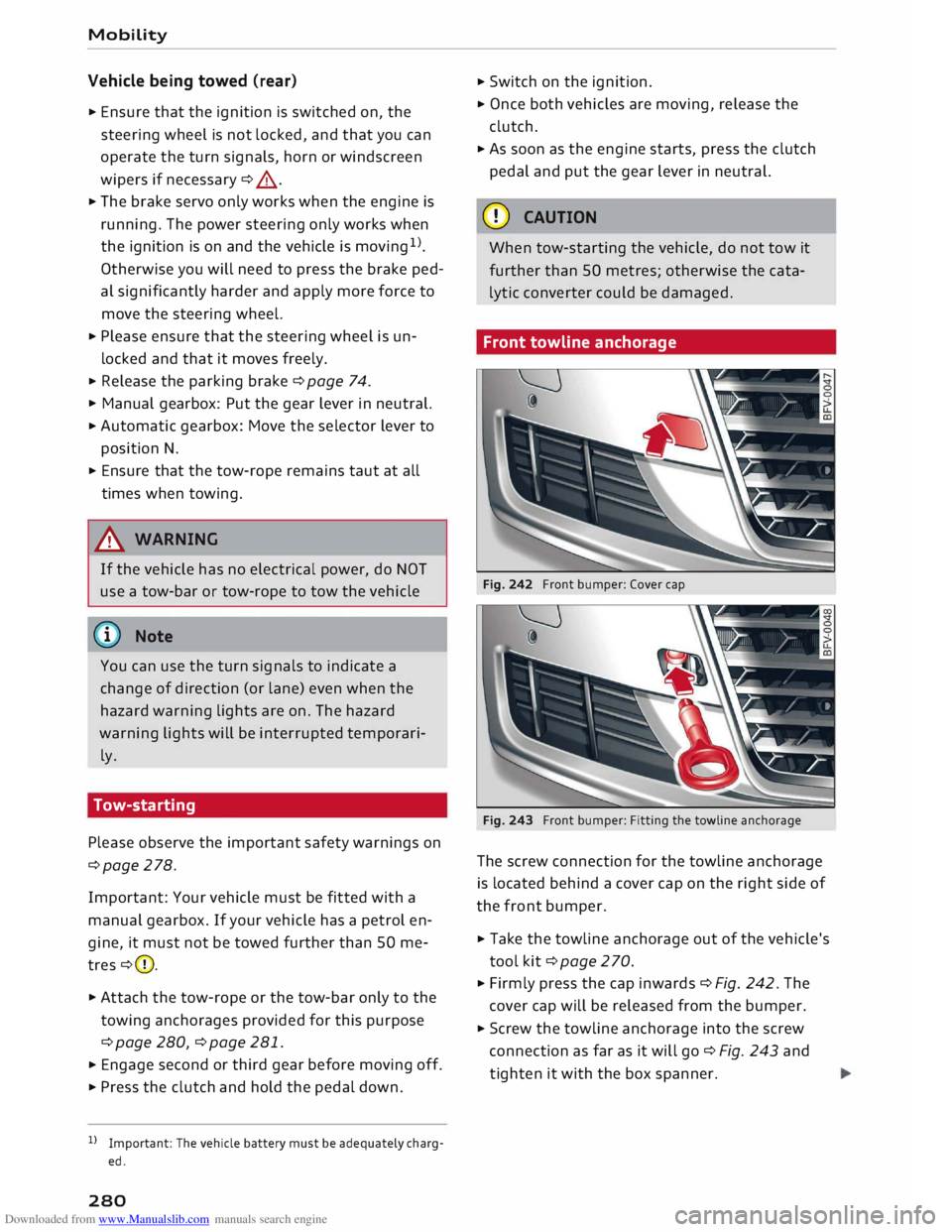
Fig. 242 Front bumper: Cover cap
Fig. 243 Front bumper: Fitting the towline anchorage
The screw connection for the towline anchorage
is located behind a cover cap on the right side of
the front bumper.
� Take the towline anchorage out of the vehicle's
tool kit¢ page 2 70.
� Firmly press the cap inwards ¢ Fig. 242. The
cover cap will be released from the bumper.
� Screw the towline anchorage into the screw
connection as far as it will go¢ Fig. 243 and
tighten it with the box spanner.
Page 284 of 306
Downloaded from www.Manualslib.com manuals search engine Fuses
and bulbs
Fuses and bulbs
Fuses Fuses in vehicle interior
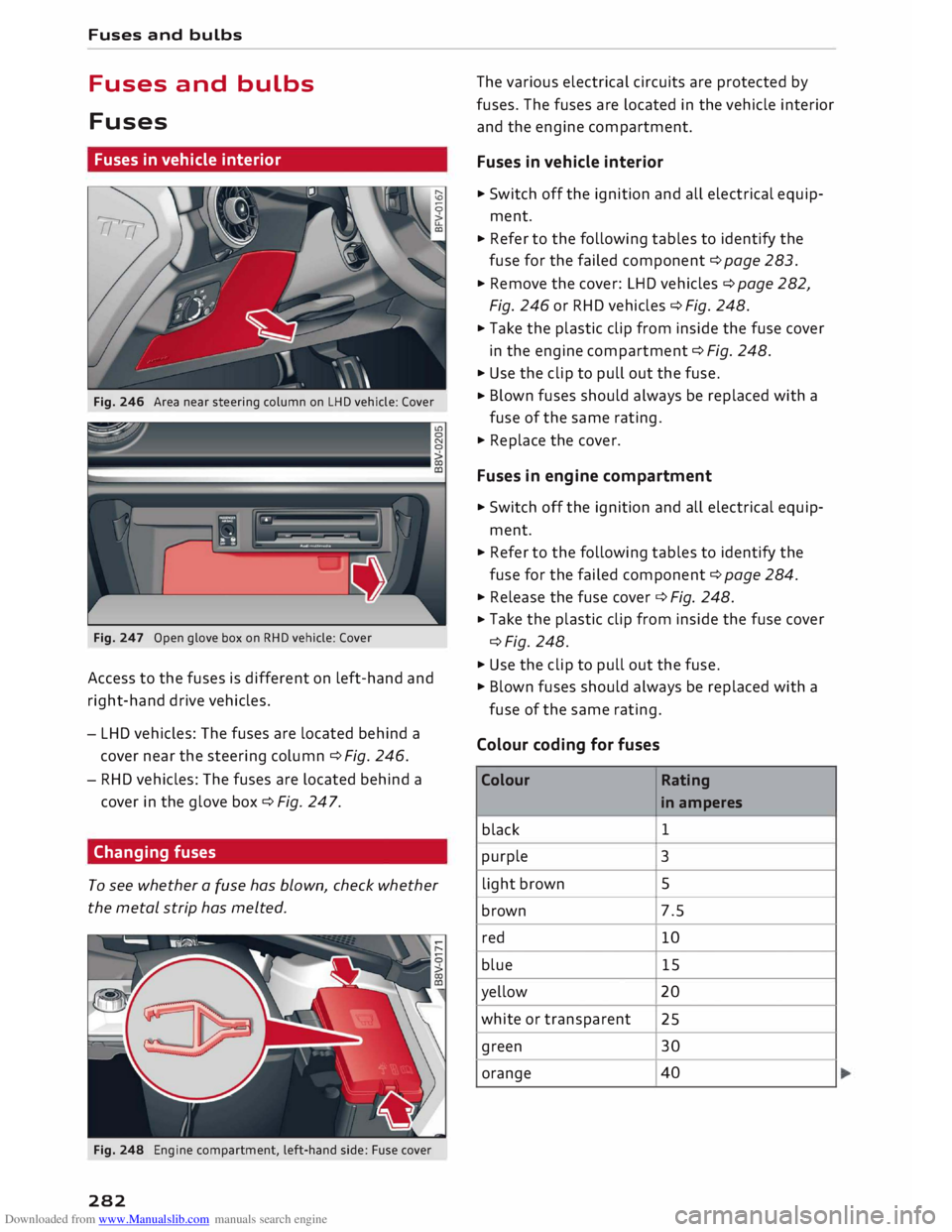
Fig. 246 Area near steering column on LHD vehicle: Cover
Fig. 247 Open glove box on RHD vehicle: Cover
Access to the fuses is different on left-hand and
right-hand drive vehicles.
- LHD vehicles: The fuses are located behind a
cover near the steering column c::> Fig. 246.
- RHD vehicles: The fuses are located behind a
cover in the glove box c::> Fig. 247.
Changing fuses
To see whether a fuse has blown, check whether
the metal strip has melted.
Fig. 248 Engine compartment, left-hand side: Fuse cover
282 The
various electrical circuits are protected by
fuses. The fuses are located in the vehicle interior
and the engine compartment.
Fuses in vehicle interior
.,,. Switch off the ignition and all electrical equip
ment .
... Refer to the following tables to identify the
fuse for the failed component c::> page 283 .
... Remove the cover: LHD vehicles c::> page 282,
Fig. 246 or RHD vehicles c::> Fig. 248 .
... Take the plastic clip from inside the fuse cover
in the engine compartment c::> Fig. 248 .
... Use the clip to pull out the fuse .
... Blown
fuses should always be replaced with a
fuse of the same rating .
.,,. Replace the cover.
Fuses in engine compartment
... Switch off the ignition and all electrical equip
ment .
... Refer to the following tables to identify the
fuse for the failed component c::> page 284 .
... Release the fuse cover c::> Fig. 248 .
... Take
the plastic clip from inside the fuse cover
c::>Fig. 248 .
.,,. Use the clip to pull out the fuse.
.,,. Blown fuses should always be replaced with a
fuse of the same rating.
Colour coding for fuses
Colour Rating
in amperes
black 1
purple 3
light brown 5
brown 7.5
red 10
blue 15
yellow 20
white or transparent
25
green 30
orange 40
Page 286 of 306
Downloaded from www.Manualslib.com manuals search engine Fuses
and bulbs
No. Electrical
equipment
F37 Cornering
light (left side) / LED headlight
(left side)
F38 Engine control unit, ESC control unit
F39 Door,
passenger's side (e.g. electric win-
dows)
F40 Cigarette lighter, electrical sockets
F41 SCR relay and delivery unit
F42 Central locking system
F43 On-board computer
F45 Electrically adjustable seat (driver's side)
F46 Neck heating, driver's side (Roadster)
F49 Starter, clutch sensor
F53 Rear window heating
The seats with electric adjustment* are protected
by circuit breakers. These reset automatically af
ter a few seconds when the overload has been
corrected.
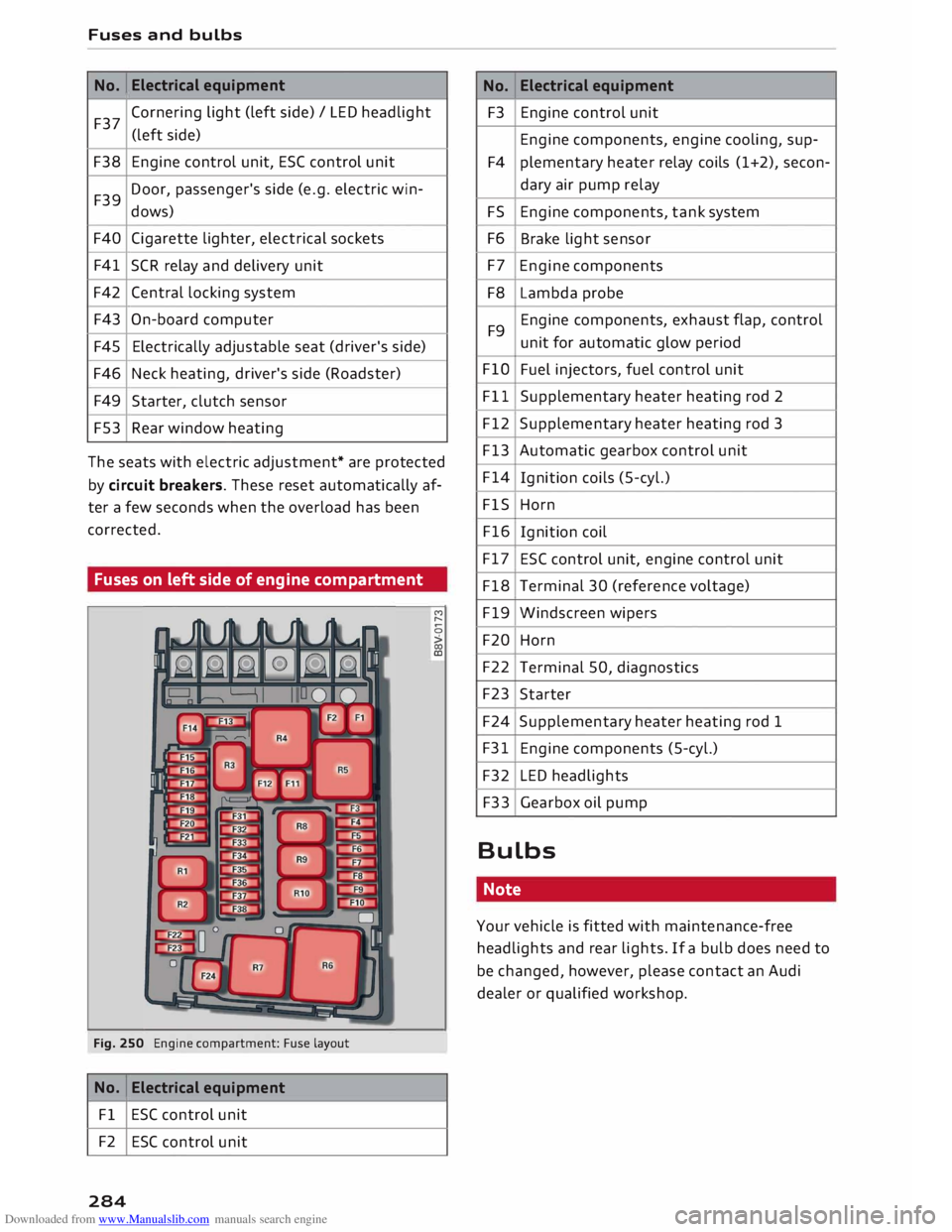
Fuses on left side of engine compartment
Fig. 250 Engine compartment: Fuse layout
No. Electrical
equipment
Fl ESC control unit
F2 ESC control unit
284 M
r--
0
> 00
ID No.
Electrical
equipment
F3 Engine control unit
Engine components, engine cooling, sup-
F4 plementary
heater relay coils (1+2), secon-
dary air pump relay
FS Engine components, tank system
F6 Brake light sensor
F7 Engine components
F8 Lambda probe
F9 Engine components,
exhaust flap, control
unit for automatic glow period
FlO Fuel injectors, fuel control unit
Fll Supplementary heater heating rod 2
F12 Supplementary heater heating rod 3
F13 Automatic gearbox control unit
F14 Ignition coils (5-cyl.)
FlS Horn
F16 Ignition coil
F17 ESC control unit, engine control unit
F18 Terminal 30 (reference voltage)
F19 Windscreen wipers
F20 Horn
F22 Terminal 50, diagnostics
F23 Starter
F24 Supplementary heater heating rod 1
F31 Engine components (5-cyl.)
F32 LED headlights
F33 Gearbox oil pump
Bulbs Note
Your vehicle is fitted with maintenance-free
headlights and rear lights. If a bulb does need to
be changed, however, please contact an Audi
dealer or qualified workshop.
Page 297 of 306
Downloaded from www.Manualslib.com manuals search engine 0
N
,.....
N
....
0
,.....
Vl
CX) Fuses
Changing 282
Fuse list . . . . . . . . . . . . . . . . . . . . . . . . . . .
283
In vehicle interior . . . . . . . . . . . . . . . . . . . .
282
G
GALA see Speed-dependent volume control . . . 217
Garage door opener (Homelink) . . . . . . . . . .
35
Gearbox malfunction (indicator lamp) 83
Generator see Alternator (warning lamp) . . . . . . . . . . 15
Global commands (speech dialogue system) .1.34
Glove box . . . . . . . . . . . . . . . . . . . . . . . . . . . . 57
G meter
see Sport displays . . . . . . . . . . . . . . . . . . . .
96
H
Handbrake see Electro-mechanical parking brake . . . . 74
Handsfree . . . . . . . . . . . . . . . . . . . . . . . . . . . 141
Hazard warning lights . . . . . . . . . . . . . . . . . . 47
Headlamp converter . . . . . . . . . . . . . . . . . . . . 47
Headlight range control . . . . . . . . . . . . . . . . . 44
Headlight range control (indicator lamp)
19
Headlights Headlight range control . . . . . . . . . . . . . . . 44
Washer system . . . . . . . . . . . . . . . . . . . . . .
50
Washing . . . . . . . . . . . . . . . . . . . . . . . . . . . 264
Heated Exterior mirrors . . . . . . . . . . . . . . . . . . . . . .
48
Rear window .. . . . . . . . . . . . . . . . . . . . . 61, 63
Washer jets . . . . . . . . . . . . . . . . . . . . . . . . .
50
Heater (supplementary heater for diesel en-
gine) . . . . . . . . . . . . . . . . . . . . . . . . . . . . . . . .
65
Heating Seats . . . . . . . . . . . . . . . . . . . . . . . . . . . . . . .
63
Heating/ventilation system
Adjusting air outlets . . . . . . . . . . . . . . . . . . 63
Controls . . . . . . . . . . . . . . . . . . . . . . . . . . . .
60
Hill hold assist . . . . . . . . . . . . . . . . . . . . . . . .
75
Hill starting
see Hill hold assist . . . . . . . . . . . . . . . . . . . . 75
Home address .................... 171, 175
Homelink (garage door opener) . . . . . . . . . . 35 Index
Horn . . . . . . . . . . . . . . . . . . . . . . . . . . . . . . . . . 8
Hubcaps , removing . . . . . . . . . . . . . . . . . . . . 272
I
Ignition (warning lamp) . . . . . . . . . . . . . . . . . 15
Immobiliser . . . . . . . . . . . . . . . . . . . . . . . . . . 27
Importing/exporting contacts . . . . . . . . . . . 154
Indicator lamps
see Warning lamps . . . . . . . . . . . . . . . . . . . 11
Inflation pressures
Tyre pressure monitoring system . . . . . . . 260
Inflation pressure
(tyres) . . . . . . . . . . . . . . . 258
Input level (media) . . . . . . . . . . . . . . . . . . . .
203
Inspection intervals . . . . . . . . . . . . . . . . . . . 252
Instrument cluster . . . . . . . . . . . . . . . . . . . . .
10
Instruments . . . . . . . . . . . . . . . . . . . . . . . . . .
10
Adjusting brightness . . . . . . . . . . . . . . . . . . 48
Interior lights . . . . . . . . . . . . . . . . . . . . . . 4 7, 48
Interior monitor . . . . . . . . . . . . . . . . . . . . . . . 32
Intermittent wipe (windscreen wipers) . . . . .
50
Internet see Audi connect . . . . . . . . . . . . . . . . . . . .
159
Internet radio . . . . . . . . . . . . . . . . . . . . . . . .
196
iPod see Audi music interface . . . . . . . . . .
197, 198
ISOFIX (securing child seats) . . . . . . . . . . . . 225
iTunes tagging . . . . . . . . . . . . . . . . . . . . . . .
185
J
Jack ........................ 270, 274, 276
Jacking points. . . . . . . . . . . . . . . . . . . . . . . 274
Jack plug (3.5 mm)
see AUX input . . . . . . . . . . . . . . . . . . .
198, 199
Joystick function (MMI) . . . . . . . . . . . . . . . .
126
Jukebox . . . . . . . . . . . . . . . . . . . . . . . . . . . . .
193
Jump-starting 277
K
Key-coded settings (air conditioner) . . . . . . . 60
Key-operated switch for passenger's airbag 23 7
Keys . . . . . . . . . . . . . . . . . . . . . . . . . . . . . . . . . 27
Driver messages . . . . . . . . . . . . . . . . . . . . . .
70
Emergency key . . . . . . . . . . . . . . . . . . . . 27, 28
295