ABS AUDI TT ROADSTER 2016 Owners Manual
[x] Cancel search | Manufacturer: AUDI, Model Year: 2016, Model line: TT ROADSTER, Model: AUDI TT ROADSTER 2016Pages: 306, PDF Size: 31.82 MB
Page 13 of 306
Downloaded from www.Manualslib.com manuals search engine 0
N
,.....
N
......
0
,.....
Vl
CX) Instruments
and warning/indicator lamps
The tank capacity of your vehicle is given in the
Technical data section ¢ page 288.
CD CAUTION
Never run the tank completely dry. If there is
an irregular fuel supply, misfiring can occur.
Unburnt fuel can then enter the exhaust sys
tem. This can lead to overheating and dam
age to the catalytic converter.
Warning and indicator
Lamps
Description
The warning and indicator lamps light up or flash
in the instrument cluster. Their purpose is to in
dicate functions or faults.
Some of the warning and indicator lamps may be
accompanied by a driver message and a warning
tone. The warning/indicator lamps and driver
messages on the display can be masked by fur
ther displays. To display a warning or message
again, use the controls on the multi-function
steering wheel to select the display tab for warn
ing/indicator lamps and messages ¢ page 20.
If several malfunctions have occurred, you can
use the thumbwheel to scroll through them on
the display.
Some of the warning lamps may be displayed in
different colours.
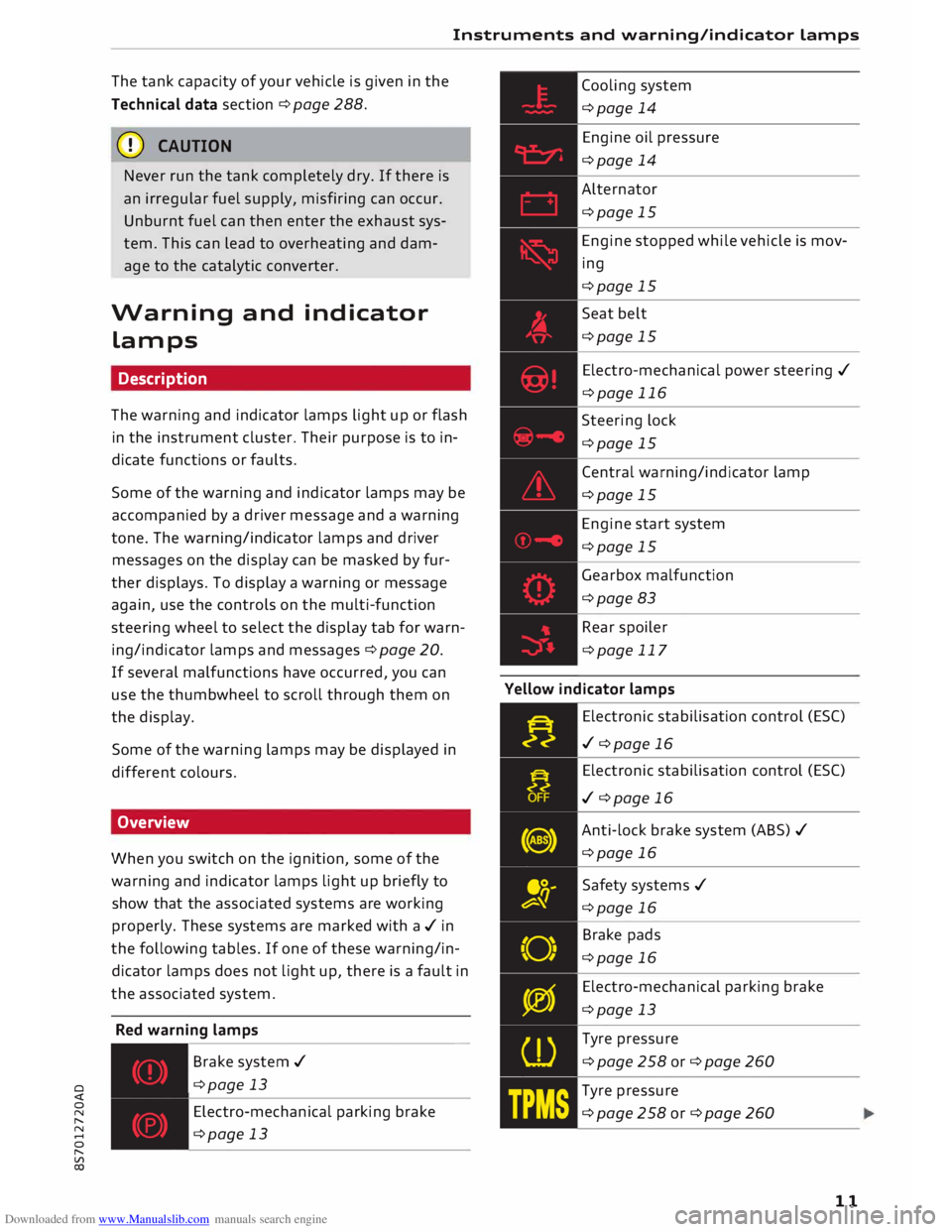
Overview
When you switch on the ignition, some of the
warning and indicator lamps light up briefly to
show that the associated systems are working
properly. These systems are marked with a../ in
the following tables. If one of these warning/in
dicator lamps does not light up, there is a fault in
the associated system.
Red warning lamps
---------------
Br a k e system ../
¢page 13
Electro-mechanical parking brake
¢page 13 Cooling
system
¢page 14
Engine oil pressure
¢page 14
Alternator
¢page 15
Engine stopped while vehicle is mov
ing
¢page 15
Seat belt
¢page 15
Electro-mechanical power steering ../
¢page 116
Steering lock
¢page 15
Central warning/indicator lamp
¢page 15
Engine start system
¢page 15
Gearbox malfunction
¢page 83
Rear spoiler
¢page 117
Yellow indicator lamps
Electronic stabilisation control (ES()
../ ¢page 16
Electronic stabilisation control (ES()
../ ¢page 16
Anti-lock brake system (ABS) ../
¢page 16
Safety systems ../
¢page 16
Brake pads
¢page 16
Electro-mechanical parking brake
¢page 13
Tyre pressure
¢page258or¢page260
Tyre pressure
¢page258or¢page260
11
Page 15 of 306
Downloaded from www.Manualslib.com manuals search engine 0
N
,.....
N
......
0
,.....
Vl
CX) Instruments
and warning/indicator lamps
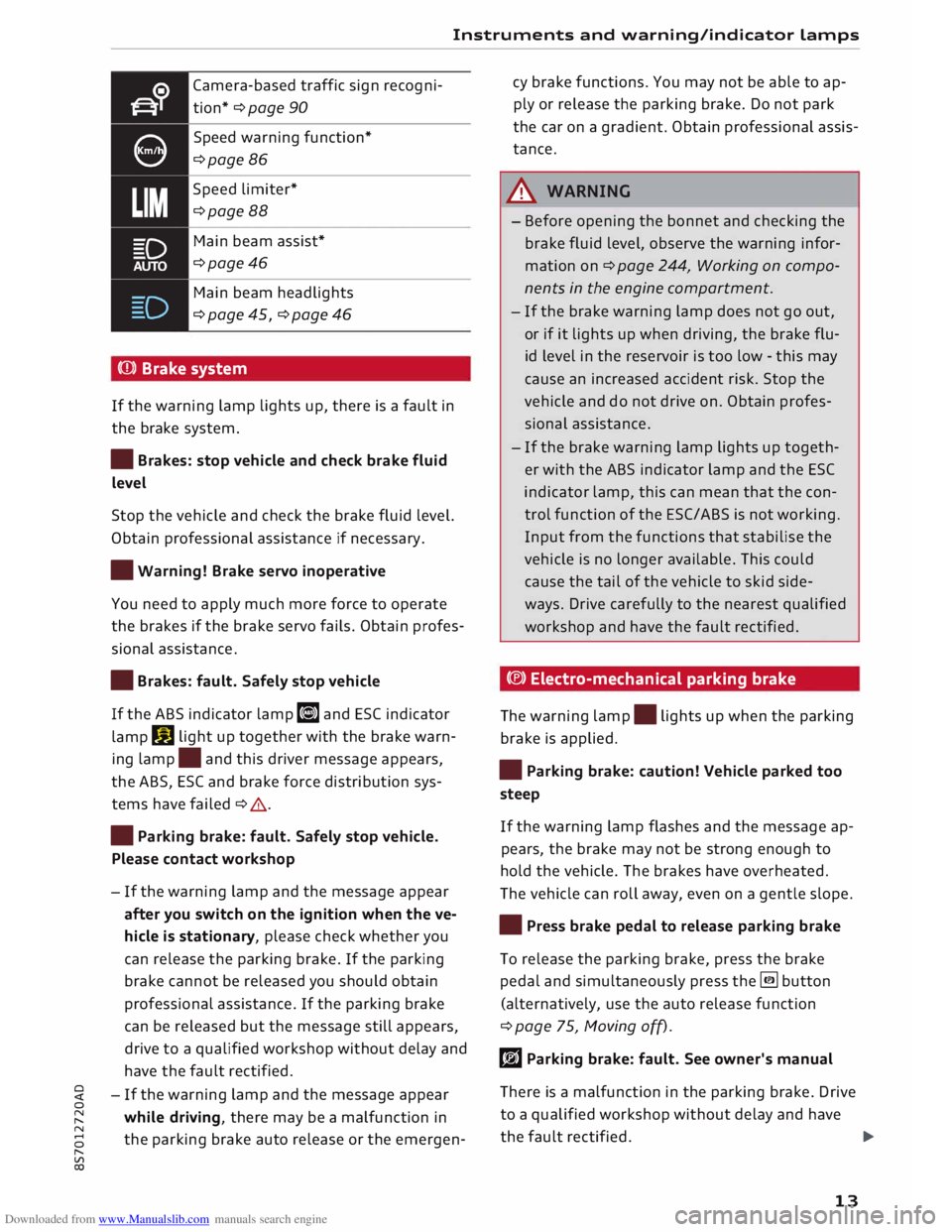
Camera-based traffic sign recogni
tion* ¢ page 90
Speed warning function*
¢page 86
Speed limiter*
¢page 88
Main beam assist*
¢page46
Main beam headlights
¢ page 45, ¢ page 46
(Q)) Brake system
If the warning lamp lights up, there is a fault in
the brake system.
• Brakes: stop vehicle and check brake fluid
Level
Stop the vehicle and check the brake fluid level.
Obtain professional assistance if necessary.
• Warning! Brake servo inoperative
You need to apply much more force to operate
the brakes if the brake servo fails. Obtain profes
sional assistance .
• Brakes: fault. Safely stop vehicle
If the ABS indicator lamp liJ and ESC indicator
lamp DJ
light up together with the brake warn
ing lamp .
and this driver message appears,
the ABS, ESC and brake force distribution sys
tems have failed ¢ .&. .
• Parking brake: fault. Safely stop vehicle.
Please contact workshop
- If the warning lamp and the message appear
after you switch on the ignition when the ve
hicle is stationary, please check whether you
can release the parking brake. If the parking
brake cannot be released you should obtain
professional assistance. If the parking brake
can be released but the message still appears,
drive to a qualified workshop without delay and
have the fault rectified.
- If the warning lamp and the message appear
while driving, there may be a malfunction in
the parking brake auto release or the emergen- cy
brake functions. You may not be able to ap
ply or release the parking brake. Do not park
the car on a gradient. Obtain professional assis
tance.
A WARNING
- Before opening the bonnet and checking the
brake fluid level, observe the warning infor
mation on ¢ page 244, Working on compo
nents in the engine compartment.
- If the brake warning lamp does not go out,
or if it lights up when driving, the brake flu
id level in the reservoir is too low -this may
cause an increased accident risk. Stop the
vehicle and do not drive on. Obtain profes
sional assistance.
- If the brake warning lamp lights up togeth
er with the ABS indicator lamp and the ESC
indicator lamp, this can mean that the con
trol function of the ESC/ABS is not working.
Input from the functions that stabilise the
vehicle is no longer available. This could
cause the tail of the vehicle to skid side
ways. Drive carefully to the nearest qualified
workshop and have the fault rectified.
C®) Electro-mechanical parking brake
The warning lamp.
lights up when the parking
brake is applied.
• Parking brake: caution! Vehicle parked too
steep
If the warning lamp flashes and the message ap
pears, the brake may not be strong enough to
hold the vehicle. The brakes have overheated.
The vehicle can roll away, even on a gentle slope.
• Press brake pedal to release parking brake
To release the parking brake, press the brake
pedal and simultaneously press the� button
(alternatively, use the auto release function
¢ page 75, Moving off).
rlJ Parking brake: fault. See owner's manual
There is a malfunction in the parking brake. Drive
to a qualified workshop without delay and have
the fault rectified.
..,.
13
Page 17 of 306
Downloaded from www.Manualslib.com manuals search engine 0
N
,.....
N
......
0
,.....
Vl
CX) Instruments
and warning/indicator lamps
(D) Note
The oil pressure warning lamp is not an indi
cator for the oil level. The oil level should
therefore be checked regularly.
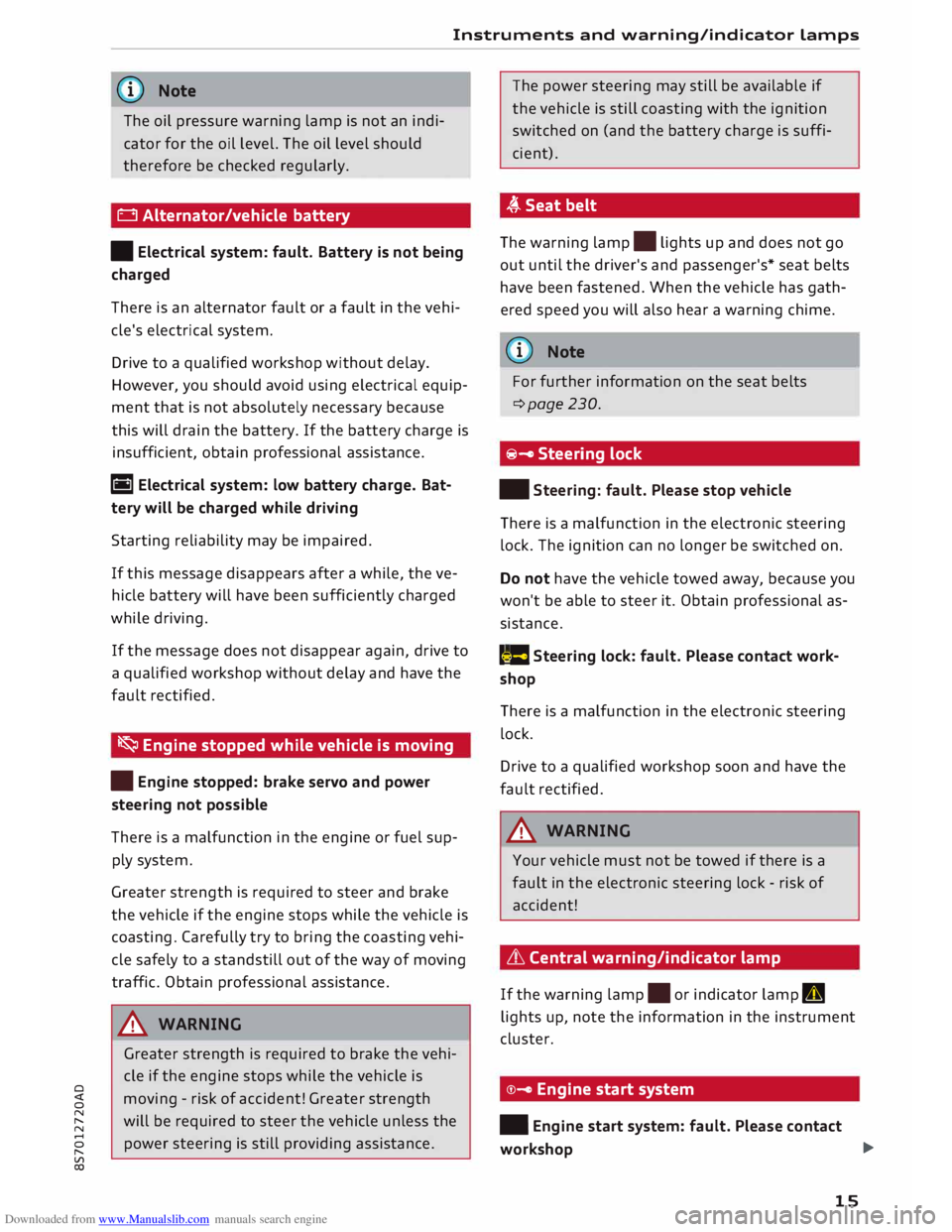
0 Alternator/vehicle battery
• Electrical system: fault. Battery is not being
charged
There is an alternator fault or a fault in the vehi
cle's electrical system.
Drive to a qualified workshop without delay.
However, you should avoid using electrical equip
ment that is not absolutely necessary because
this will drain the battery. If the battery charge is
insufficient, obtain professional assistance.
ri1 Electrical system: low battery charge. Bat
tery will be charged while driving
Starting reliability may be impaired.
If this message disappears after a while, the ve
hicle battery will have been sufficiently charged
while driving.
If the message does not disappear again, drive to
a qualified workshop without delay and have the
fault rectified.
� Engine stopped while vehicle is moving
• Engine stopped: brake servo and power
steering not possible
There is a malfunction in the engine or fuel sup
ply system.
Greater strength is required to steer and brake
the vehicle if the engine stops while the vehicle is
coasting. Carefully try to bring the coasting vehi
cle safely to a standstill out of the way of moving
traffic. Obtain professional assistance.
_& WARNING
Greater strength is required to brake the vehi
cle if the engine stops while the vehicle is
moving -risk of accident! Greater strength
will be required to steer the vehicle unless the
power steering is still providing assistance. The
power steering may still be available if
the vehicle is still coasting with the ignition
switched on (and the battery charge is suffi
cient).
,(,.Seatbelt
The warning lamp.
lights up and does not go
out until the driver's and passenger's* seat belts
have been fastened. When the vehicle has gath
ered speed you will also hear a warning chime.
(Q)) Note
For further information on the seat belts
¢page 230.
@- Steering lock
• Steering: fault. Please stop vehicle
There is a malfunction in the electronic steering
lock. The ignition can no longer be switched on.
Do not have the vehicle towed away, because you
won't be able to steer it. Obtain professional as
sistance.
(::$ Steering
lock: fault. Please contact work
shop
There is a malfunction in the electronic steering
lock.
Drive to a qualified workshop soon and have the
fault rectified.
_& WARNING
Your vehicle must not be towed if there is a
fault in the electronic steering lock -risk of
accident!
& Central warning/indicator lamp
If the warning lamp.
or indicator lamp II
lights up, note the information in the instrument
cluster.
©- Engine start system
• Engine start system: fault. Please contact
workshop ..,.
15
Page 18 of 306
Downloaded from www.Manualslib.com manuals search engine Instruments
and warning/indicator Lamps
Do not switch off the ignition; otherwise you may
not be able to switch it on again.
Drive to a qualified workshop without delay and
have the fault rectified.
Im Engine start system: fault. Please contact
workshop
There is a malfunction in the engine start system.
Drive to a qualified workshop soon and have the
fault rectified.
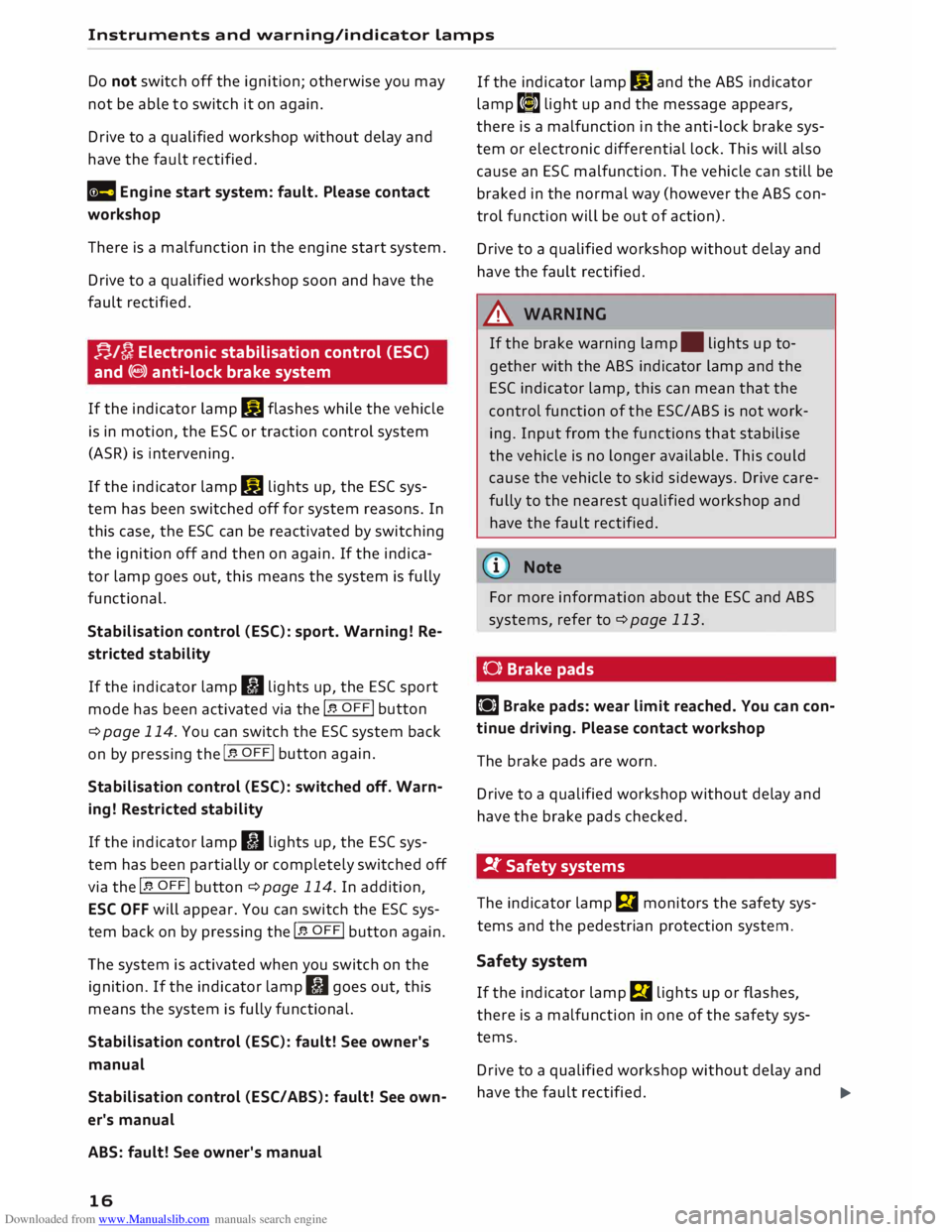
f-j./[}; Electronic stabilisation control (ESC)
and (8) anti-lock brake system
If the indicator lamp DJ flashes while the vehicle
is in motion, the ESC or traction control system
(ASR) is intervening.
If the indicator lamp DJ lights up, the ESC sys
tem has been switched off for system reasons. In
this case, the ESC can be reactivated by switching
the ignition off and then on again. If the indica
tor lamp goes out, this means the system is fully
functional.
Stabilisation control (ESC): sport. Warning! Re
stricted stability
If the indicator lamp II lights up, the ESC sport
mode has been activated via the 1.$ OFF! button
¢page 114. You can switch the ESC system back
on by pressing the 1.$ OFF! button
again.
Stabilisation control (ESC): switched off. Warn
ing! Restricted stability
If the indicator lamp II lights up, the ESC sys
tem has been partially or completely switched off
via the I.$ OFF! button ¢page 114. In addition,
ESC OFF will appear. You can switch the ESC sys
tem back on by pressing the 1.$ OFF!
button again.
The system is activated when you switch on the
ignition. If the indicator lamp II goes out, this
means the system is fully functional.
Stabilisation control (ESC): fault! See owner's
manual
Stabilisation control (ESC/ ABS): fault! See own
er's manual
ABS: fault! See owner's manual
16 If
the indicator lamp DJ and the ABS indicator
lamp t�» light up and the message appears,
there is a malfunction in the anti-lock brake sys
tem or electronic differential lock. This will also
cause an ESC malfunction. The vehicle can still be
braked in the normal way (however the ABS con
trol function will be out of action).
Drive to a qualified workshop without delay and
have the fault rectified.
_& WARNING
If the brake warning lamp. lights up to
gether with the ABS indicator lamp and the
ES( indicator lamp, this can mean that the
control function of the ESC/ ABS is not work
ing. Input from the functions that stabilise
the vehicle is no longer available. This could
cause the vehicle to skid sideways. Drive care
fully to the nearest qualified workshop and
have the fault rectified.
{D) Note
For more information about the ESC and ABS
systems, refer to ¢page 113.
(0) Brake pads
LiJ Brake pads: wear limit reached. You can con
tinue driving. Please contact workshop
The brake pads are worn.
Drive to a qualified workshop without delay and
have the brake pads checked.
!f Safety systems
The indicator lamp El monitors the safety sys
tems and the pedestrian protection system.
Safety system
If the indicator lamp El lights up or flashes,
there is a malfunction in one of the safety sys
tems.
Drive to a qualified workshop without delay and
have the fault rectified.
liJII>
Page 23 of 306
Downloaded from www.Manualslib.com manuals search engine 0
N
,.....
N
......
0
,.....
Vl
CX) -
When the vehicle is stationary or travelling
at very low speeds, the temperature dis
played may be slightly higher than the ac
tual outside temperature as a result of the
heat radiated from the engine.
- At temperatures below +S°
C a snowflake
symbol appears next to the temperature
display¢ 8,.
Multi-function steering
wheel plus
Overview
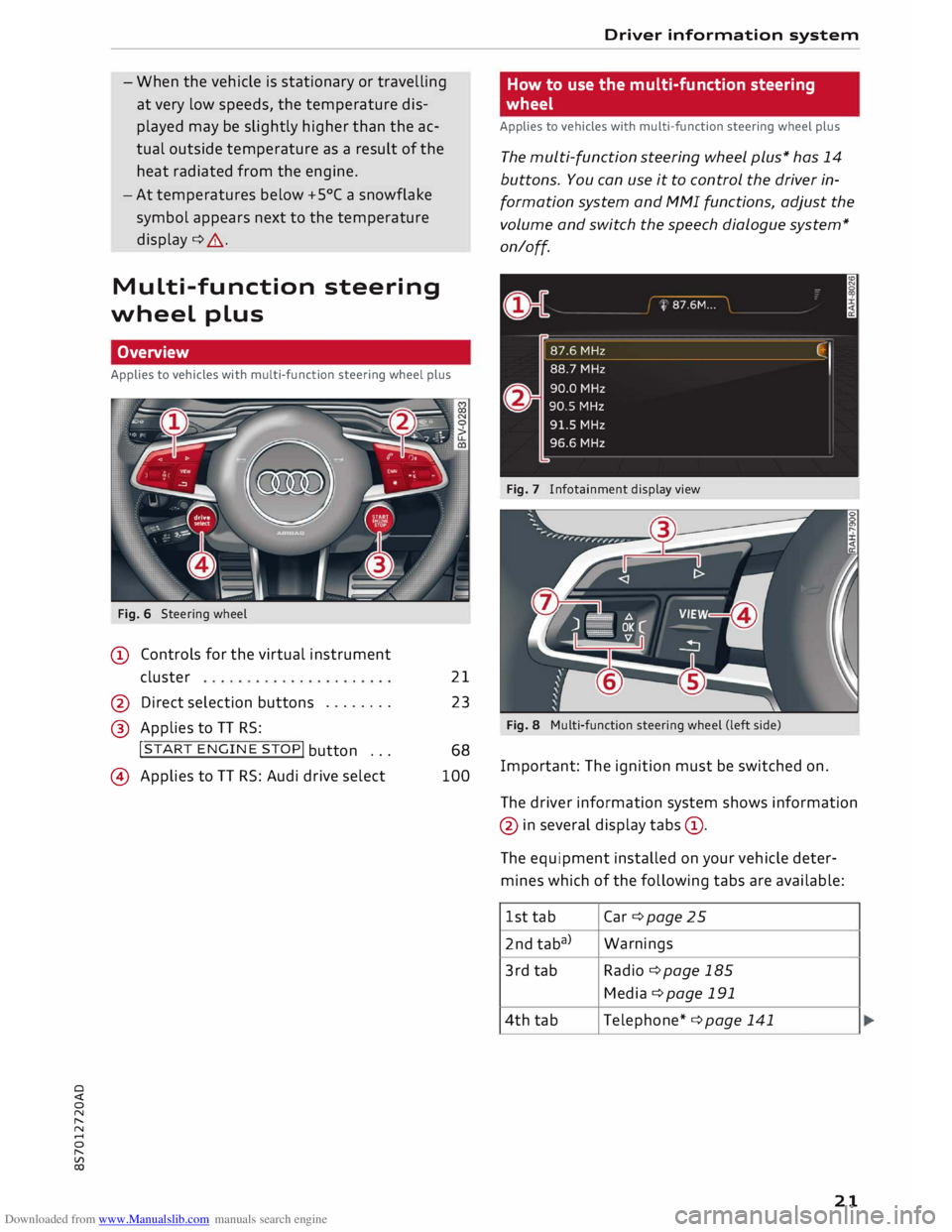
Applies to vehicles with multi-function steering wheel plus
Fig. 6 Steering wheel
(D Controls for the virtual instrument
cluster
@ Direct selection buttons .......
.
@ Applies to TT RS: 21
23
!START ENGINE STOP!
button ...
@) Applies to TT RS: Audi drive select 68
100 Driver
information system
How to use the multi-function steering
wheel
Applies to vehicles with multi-function steering wheel plus
The multi-function steering wheel plus* has 14
buttons. You can use it to control the driver in
formation system and MMI functions, adjust the
volume and switch the speech dialogue system*
on/off.
Fig. 7 Infotainment display view
Fig. 8 Multi-function steering wheel (left side)
Important: The ignition must be switched on.
The driver information system shows information
@ in several display tabs©-
The equipment installed on your vehicle deter
mines which of the following tabs are available:
1st tab Car
¢page 25
2nd taba) Warnings
3rd tab
Radio ¢page 185
Media ¢page 191
4th tab
Telephone* ¢ page 141
21
Page 24 of 306
Downloaded from www.Manualslib.com manuals search engine Driver
information system
5th tab Navigation*
¢ page 169
Map* ¢page 178
6th tabb)
Sound ¢page 212
Audi connect* ¢page 159
Settings ¢page 212
al This tab is only visible if one or more warning/indicator
lamps or driver messages are displayed or if the relevant
system is switched on.
b l
The tab contents depend on which menu you used last.
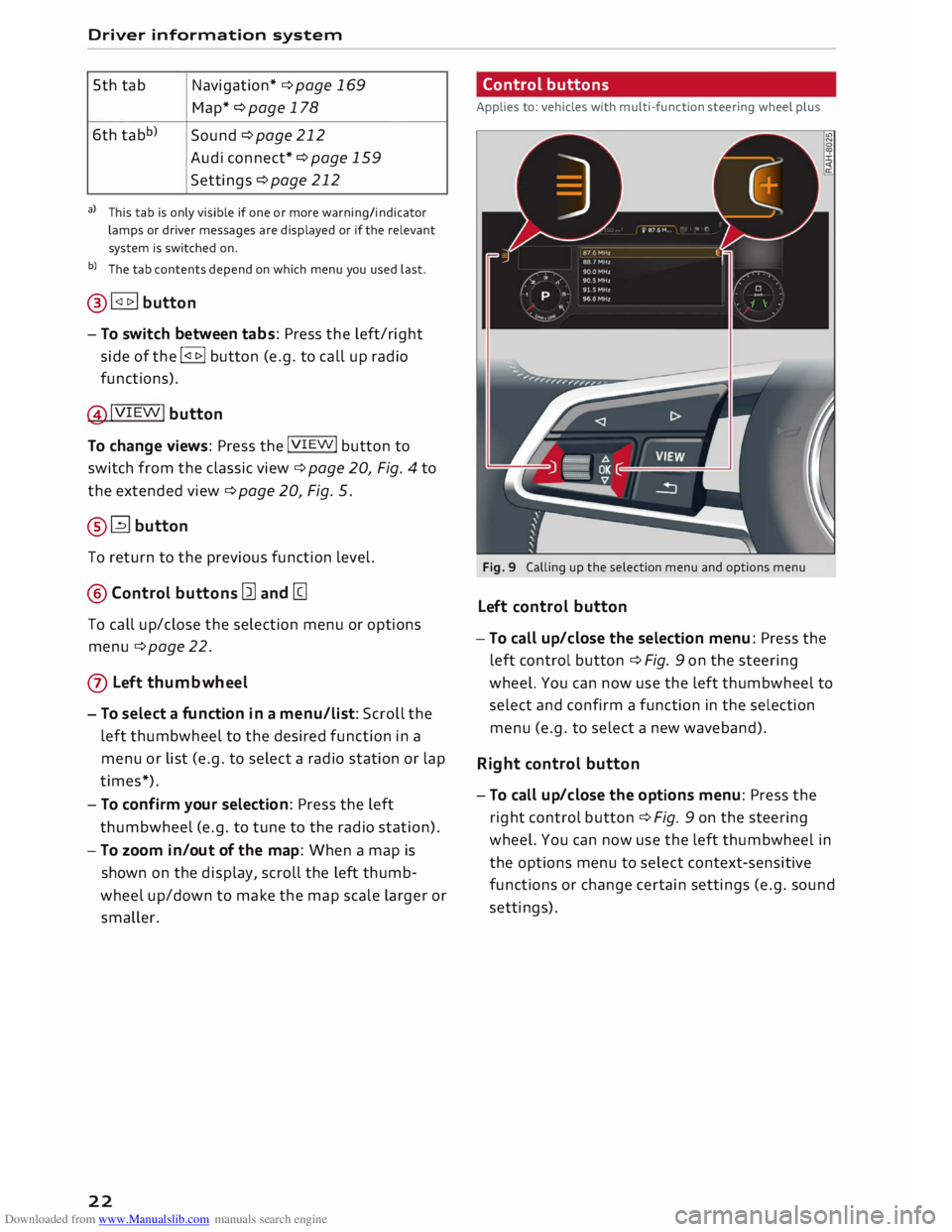
@� button
- To switch between tabs: Press the left/right
side of the !<1 t>I button (e.g. to call up radio
functions).
@!VIEW! button
To change views: Press the !VIEW! button to
switch from the classic view ¢ page 20, Fig. 4 to
the extended view¢ page 20, Fig. 5.
®� button
To return to the previous function level.
@ Control buttons [ll and [g
To call up/close the selection menu or options
menu ¢ page 22.
0 Left thumbwheel
- To select a fun ction in a menu/list: Scroll the
left thumbwheel to the desired function in a
menu or list (e.g. to select a radio station or lap
times*).
- To con firm your selection: Press the left
thumbwheel (e.g. to tune to the radio station).
- To zoom in/out of the map: When a map is
shown on the display, scroll the left thumb
wheel up/down to make the map scale larger or
smaller.
22 Control
buttons
Applies to: vehicles with multi-function steering wheel plus
Fig. 9 Calling up the selection menu and options menu
Left control button
-To call up/close the selection menu: Press the
left control button ¢ Fig. 9 on the steering
wheel. You can now use the left thumbwheel to
select and confirm a function in the selection
menu (e.g. to select a new waveband).
Right control button
- To call up/close the options menu: Press the
right control button ¢ Fig. 9 on the steering
wheel. You can now use the left thumbwheel in
the options menu to select context-sensitive
functions or change certain settings (e.g. sound
settings).
Page 25 of 306
Downloaded from www.Manualslib.com manuals search engine 0
N
,.....
N
....
0
,.....
Vl
CX) Direct
selection buttons
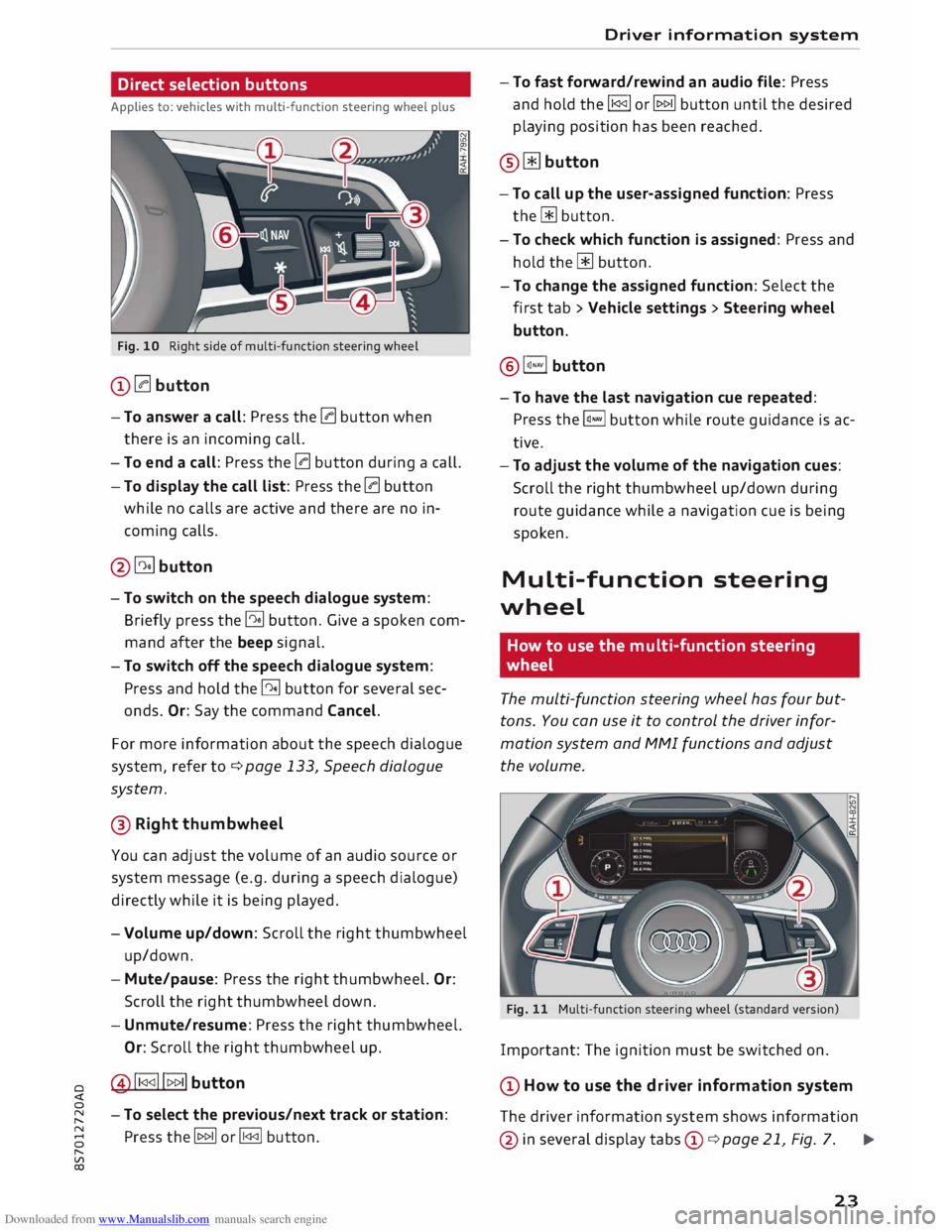
Applies to: vehicles with multi-function steering wheel plus
Fig. 10 Right side of multi-function steering wheel
(D 0 button
- To answer a call: Press the 0 button when
there is an incoming call.
- To end a call: Press the 0 button during a call.
- To display the call list: Press the 0 button
while no calls are active and there are no in
coming calls.
@�button
- To switch on the speech dialogue system:
Briefly press the� button. Give a spoken com
mand after the beep signal.
- To switch off the speech dialogue system:
Press and hold the� button for several sec
onds. Or: Say the command Cancel.
For more information about the speech dialogue
system, refer to ¢ page 133, Speech dialogue
system.
® Right thumbwheel
You can adj
ust the volume of an audio source or
system message (e.g. during a speech dialogue)
directly while it is being played.
- Volume up/down: Scroll the right thumbwheel
up/down.
- Mute/pause: Press the right thumbwheel. Or:
Scroll the right thumbwheel down.
- Unmute/resume: Press the right thumbwheel.
Or: Scroll the right thumbwheel up.
@!1 <1<1!!t>t> 1I button
- To select the previous/next track or station:
Press the� or� button. Driver information
system
- To fast forward/rewind an audio file: Press
and hold the !1<1<1!
or� button until the desired
playing position has been reached.
® � button
- To call up the user-assigned function: Press
the� button.
- To check which function is assigned: Press and
hold the� button.
- To change the assigned function: Select the
first tab > Vehicle settings > Steering wheel
button.
@ l�.,vl button
-To have the last navigation cue repeated:
Press the�
button while route guidance is ac
tive.
- To adjust the volume of the navigation cues:
Scroll the right thumbwheel up/down during
route guidance while a navigation cue is being
spoken.
Multi-function steering
wheel
How to use the multi-function steering
wheel
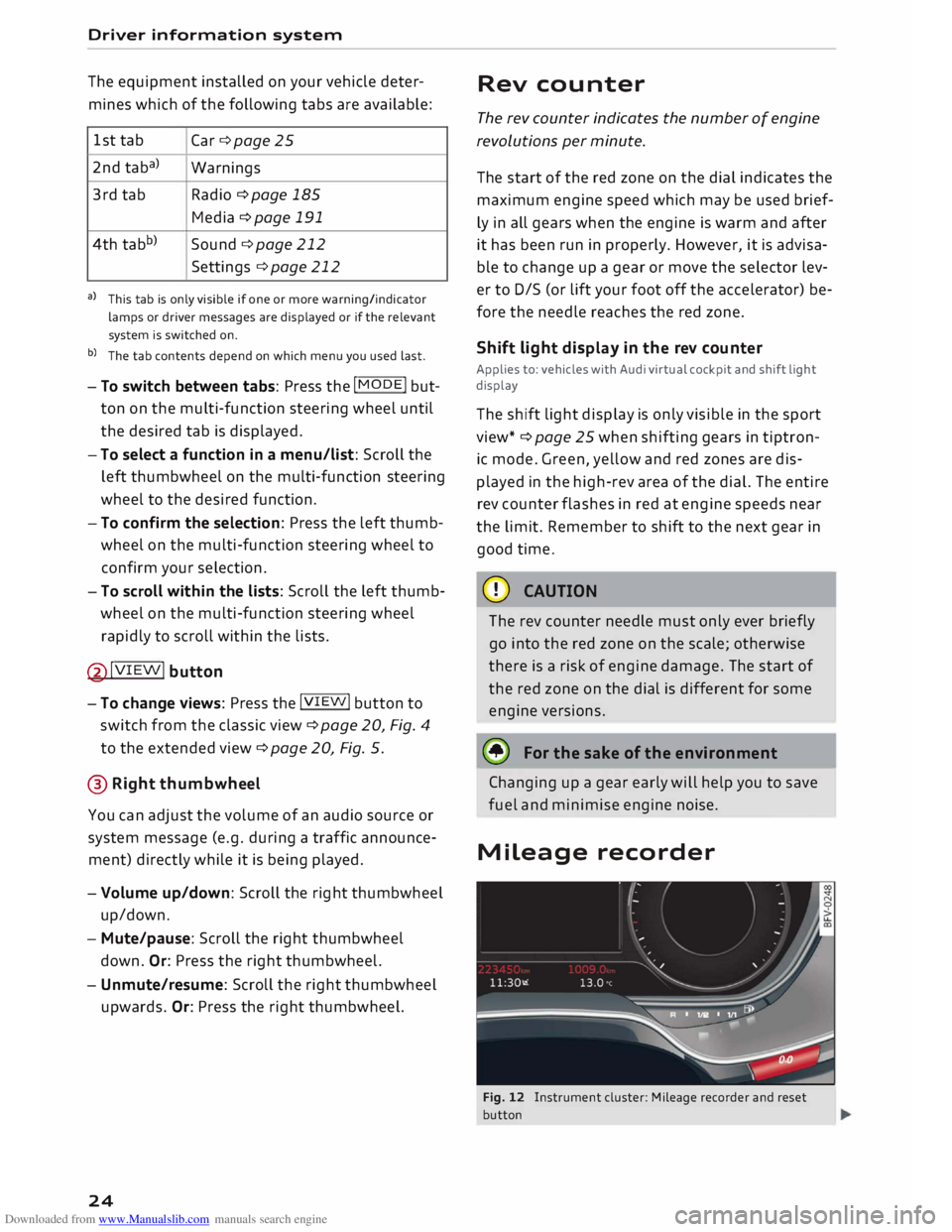
The multi-function steering wheel has four but
tons. You can use it to control the driver infor
mation system and MMI functions and adjust
the volume.
Fig. 11 Multi-function steering wheel (standard version)
Important: The ignition must be switched on.
(D How to use the driver information system
The driver information system shows information
@ in several display tabs©
¢ page 21, Fig. 7. .,..
23
Page 26 of 306
Downloaded from www.Manualslib.com manuals search engine Driver
information system
The equipment installed on your vehicle deter
mines which of the following tabs are available:
1st tab
Car ¢page 25
2nd taba)
Warnings
3rd tab Radio
¢ page 185
Media ¢ page 191
4th tabb)
Sound ¢page 212
Settings ¢page 212
a) This tab is only visible if one or more warning/indicator
lamps or driver messages are displayed or if the relevant
system is switched on.
b) The tab contents depend on which menu you used last.
- To switch between tabs: Press the
I MOD
E
! but
ton on the multi-function steering wheel until
the desired tab is displayed.
- To select a function in a menu/list: Scroll the
left thumbwheel on the multi-function steering
wheel to the desired function.
- To confirm the selection: Press the left thumb
wheel on the multi-function steering wheel to
confirm your selection.
- To scroll within the lists: Scroll the left thumb
wheel on the multi-function steering wheel
rapidly to scroll within the lists.
@!VIEW! button
- To change views: Press the !VIE
W! button to
switch from the classic view¢ page 20, Fig. 4
to the extended view¢ page 20, Fig. 5.
@ Right thumbwheel
You can adjust the volume of an audio source or
system message (e.g. during a traffic announce
ment) directly while it is being played.
- Volume up/down: Scroll the right thumbwheel
up/down.
- Mute/pause: Scroll the right thumbwheel
down. Or: Press the right thumbwheel.
- Unmute/resume: Scroll the right thumbwheel
upwards. Or: Press the right thumbwheel.
24 Rev
counter
The rev counter indicates the number of engine
revolutions per minute.
The start of the red zone on the dial indicates the
maximum engine speed which may be used brief
ly in all gears when the engine is warm and after
it has been run in properly. However, it is advisa
ble to change up a gear or move the selector lev
er to D/S (or lift your foot off the accelerator) be
fore the needle reaches the red zone.
Shift light display in the rev counter
Applies to: vehicles with Audi virtual cockpit and shift light
display
The shift light display is only visible in the sport
view* ¢ page 25 when shifting gears in tiptron
ic mode. Green, yellow and red zones are dis
played in the high-rev area of the dial. The entire
rev counter flashes in red at engine speeds near
the limit. Remember to shift to the next gear in
good time.
CD CAUTION
The rev counter needle must only ever briefly
go into the red zone on the scale; otherwise
there is a risk of engine damage. The start of
the red zone on the dial is different for some
engine versions.
@ For the sake of the environment
Changing up a gear early will help you to save
fuel and minimise engine noise.
Mileage recorder
Fig. 12 Instrument cluster: Mileage recorder and reset
button
Page 77 of 306
Downloaded from www.Manualslib.com manuals search engine 0
N
,.....
N
......
0
,.....
Vl
CX) A
WARNING
- Never press the accelerator pedal or release
the clutch inadvertently if a gear is engaged
or if the selector lever is not in position P or
N (on automatic vehicles) while the vehicle
is stationary with the engine running. The
vehicle will otherwise start moving immedi
ately and could cause an accident.
- You should only use the emergency braking
function in a real emergency, for example if
the brake system were to fail or if the brake
pedal were to be obstructed. If you use the
emergency braking function by activating
the parking brake switch, this has the same
effect as heavy braking. Please remember
that the ESC (and the integrated ABS, EDL
and traction control functions) is still sub
ject to certain physical limits. In a corner or
in bad road or weather conditions an emer
gency stop can cause the vehicle to skid or
lose steering control.
- It is not possible to apply the parking brake
if the electrical power supply fails. In this
case, park the vehicle on a level surface and
select 1st gear (manual gearbox) or move
the selector lever to position P (automatic
gearbox) to prevent it from rolling. Obtain
professional assistance.
- Always take the key with you when leaving
your vehicle -even if you only intend to be
gone for a short time. This is especially im
portant if children are left in the car. They
might otherwise be able to start the engine,
release the parking brake or use power-op
erated equipment such as the electric win
dows -this could lead to injuries.
- Do not leave anyone (especially children) in
the vehicle when it is locked. Locked doors
could delay assistance in an emergency, po
tentially putting lives at risk.
Applies to: vehicles with automatic gearbox
You can apply the parking brake manually or
switch on the hold assist* when stopping at
traffic lights, etc. You do not then have to
hold the car with the brake pedal, as the Driving
brakes will stop it creeping forward while a
gear is engaged in the automatic transmis
sion. When you drive off in the normal way,
the parking brake will be released automati
cally and your vehicle will start moving
¢page 75.
(CD) Note
- Any slight noise which may be heard when
the parking brake is applied or released is
quite normal and no cause for concern.
- The parking brake runs an automatic test
cycle at regular intervals when the vehicle is
parked. This may cause a slight noise, which
is normal.
- If the electrical power supply fails, it is not
possible to release the parking brake (if it
was applied) or to apply the parking brake
(if it was released) ¢ &,. Obtain professional
assistance.
Moving off
Various features and safety functions are availa
ble for driving off, depending on the equipment
in your vehicle.
Hill starting with the parking brake applied
Important: The driver's door must be closed.
� To drive off more easily on a slope, apply the
parking brake and drive off just as you usually
would. The parking brake will be released auto
matically, but not until there is enough power
at the wheels to make the vehicle move in the
desired direction.
Hill starting with the hill hold assist
The hill hold assist function makes it easier to
drive away on a slope.
Important: The driver's door must be closed and
the engine must be running.
� To activate the hill hold assist, press and hold
the brake pedal for several seconds. The vehicle
must be on a slope and facing uphill.
When you release the brake pedal the braking
force will be maintained for a moment ¢.&. in
..,.
75
Page 115 of 306
Downloaded from www.Manualslib.com manuals search engine Intelligent
technology
Electronic stabilisation
control (ESC)
Description
The electronic stabilisation control (ESC) increa
ses the car's stability. It reduces the tendency to
skid and improves the stability and road holding
of the vehicle. The ESC detects critical handling
situations, such as understeer, oversteer and
wheelspin on the driven wheels. It stabilises the
vehicle by braking individual wheels or by reduc
ing the engine torque. The indicator lamp DJ in
the instrument cluster starts flashing as soon as
the ESC intervenes.
The following systems are integrated in the ESC:
Anti-lock brake system (ABS)
ABS prevents the wheels from locking up under
braking until the vehicle has reached a virtual
standstill. You can continue to steer the vehicle
even when the brakes are on full. Keep your foot
on the brake pedal and do not pump the brakes.
You will feel the brake pedal pulsate while the
anti-lock brake system is working.
Brake assist system
The brake assist system can shorten the braking
distance. The braking force is automatically boos
ted if you press the brake pedal quickly in an
emergency. You must keep pressing the brake
pedal until the danger has passed.
Traction control system (ASR)
In the event of wheelspin, the traction control
system reduces the engine torque to match the
amount of grip available. This helps the car to
start moving, accelerate or climb a gradient.
Electronic differential lock (EDL)
When the EDL detects wheelspin, it brakes the
spinning wheel and directs the power to the oth
er driven wheel (or wheels on quattro* versions).
0 This
function is not available at high speeds.
� To
prevent the disc brake of the braked wheel
8 from
overheating, the EDL cuts out automatically
"
Vl Intelligent
technology
if subjected to excessive loads. The vehicle can
still be driven. The EDL will switch on again auto
matically when the brake has cooled down.
Steering recommendation
The ESC helps to stabilise the vehicle by changing
the steering wheel torque.
Selective wheel torque control
Selective wheel torque control intervenes when
cornering by braking the wheel(s) on the inside of
the bend individually as required. This enables
precision cornering. The relevant system may not
intervene in the wet or snow.
Multicollision brake assist system
The "multicollision brake assist system" can help
to reduce the risk of skidding and further colli
sions during an accident. If the airbag control
unit detects that a collision has taken place up
wards of a certain speed, the vehicle is braked by
the ESC.
The vehicle will not be braked automatically if:
- the driver presses the accelerator,
- the brake pressure applied by pressing the
brake pedal is higher than the brake pressure
initiated by the system,
- or the ESC, the brake system or the vehicle's
electrical system are not fully functional.
A WARNING
- The grip provided by the ESC and the inte
grated systems is still subject to the physi
cal limits of adhesion. Always bear this in
mind, especially on wet or slippery roads. If
you notice the systems cutting in, you
should reduce your speed immediately to
suit the road and traffic conditions. Do not
let the extra safety provided tempt you into
taking any risks when driving -this can
cause accidents.
- Remember that the accident risk always in
creases if you drive fast, especially in cor
ners or on a wet or slippery road, or if you
follow too close behind the vehicle in front
of you. Please bear in mind that even the
113