air condition AUDI TT ROADSTER 2016 Owners Manual
[x] Cancel search | Manufacturer: AUDI, Model Year: 2016, Model line: TT ROADSTER, Model: AUDI TT ROADSTER 2016Pages: 306, PDF Size: 31.82 MB
Page 4 of 306
Downloaded from www.Manualslib.com manuals search engine Table
of Contents
Notes on this Owner's Manual 5
Quick reference ................. . 6
6
6
6
6
6
6
6
7
7
FAQs
............................. .
Before you set off ................... .
Breakdowns and emergencies ......... .
Useful functions .................... .
Using the infotainment system ........ .
Communication .................... .
Navigation ........................ .
Entertainment ..................... .
Tips and tricks ..................... .
Controls and displays . . . . . . . . . . . . 8
View of cockpit . . . . . . . . . . . . . . . . . . .
8
Controls at a glance . . . . . . . . . . . . . . . . . .
8
Instruments and warning/
indicator lamps . . . . . . . . . . . . . . . . . . 10
Instruments . . . . . . . . . . . . . . . . . . . . . . . . 10
Warning and indicator lamps . . . . . . . . . . 11
Driver information system . . . . . . 20
Overview . . . . . . . . . . . . . . . . . . . . . . . . . . .
20
Multi-function steering wheel plus...... 21
Multi-function steering wheel . . . . . . . . . . 23
Rev counter . . . . . . . . . . . . . . . . . . . . . . . . 24
Mileage recorder . . . . . . . . . . . . . . . . . . . .
24
On-board computer . . . . . . . . . . . . . . . . . . 25
Sport view . . . . . . . . . . . . . . . . . . . . . . . . . 25
Setting off. . . . . . . . . . . . . . . . . . . . . . . .
27
Doors and windows . . . . . . . . . . . . . . 27
Central locking system . . . . . . . . . . . . . . .
27
Boot lid . . . . . . . . . . . . . . . . . . . . . . . . . . . .
33
Electric windows ................... .
Garage door opener (Homelink) ....... . 34
35
Soft top (folding roof) .......... .
39
39
41
41
Soft
top .......................... .
Windbreak ........................ .
Manual operation of the soft top
Lights and vision ................ .
44
44
47
2 Exterior
lights ..................... .
Interior lights ...................... .
Clear vision . . . . . . . . . . . . . . . . . . . . . . . . .
48 Windscreen
wipers . . . . . . . . . . . . . . . . . .
50
Digital compass . . . . . . . . . . . . . . . . . . . . . 52
Seats and storage . . . . . . . . . . . . . . . .
54
General notes . . . . . . . . . . . . . . . . . . . . . . .
54
Front seats . . . . . . . . . . . . . . . . . . . . . . . . .
54
Ashtray . . . . . . . . . . . . . . . . . . . . . . . . . . . . 56
Cigarette lighter and electrical socket . . . 56
Storage . . . . . . . . . . . . . . . . . . . . . . . . . . . . 57
Luggage compartment . . . . . . . . . . . . . . . 58
Heating and cooling . . . . . . . . . . . . . 60
Air conditioner . . . . . . . . . . . . . . . . . . . . . .
60
Driving ............................ 66
General notes . . . . . . . . . . . . . . . . . . . . . . .
66
Steering . . . . . . . . . . . . . . . . . . . . . . . . . . .
68
Starting and stopping the engine . . . . . . .
68
Start/stop system . . . . . . . . . . . . . . . . . . .
71
Electro-mechanical parking brake. . . . . . .
74
Moving off. . . . . . . . . . . . . . . . . . . . . . . . .
75
Automatic gearbox . . . . . . . . . . . . . . . . . .
76
Driver assistance . . . . . . . . . . . . . . . . . 86
Driver assist
systems . . . . . . . . . . . . 86
Speed warning function . . . . . . . . . . . . . . .
86
Cruise control system . . . . . . . . . . . . . . . . 86
Speed limiter . . . . . . . . . . . . . . . . . . . . . . .
88
Camera-based traffic sign recognition . . .
90
Audi active Lane assist (Lane departure
warning feature) . . . . . . . . . . . . . . . . . . . .
92
Lap timer . . . . . . . . . . . . . . . . . . . . . . . . . .
94
Sport displays . . . . . . . . . . . . . . . . . . . . . . .
96
Audi side assist (lane change assist
feature) . . . . . . . . . . . . . . . . . . . . . . . . . . .
97
Audi drive select (vehicle set-up
functions) . . . . . . . . . . . . . . . . . . . . . . . . . . 100
Parking aids . . . . . . . . . . . . . . . . . . . . . . 103
General notes . . . . . . . . . . . . . . . . . . . . . . . 103
Rear parking aid . . . . . . . . . . . . . . . . . . . . .
104
Parking system plus . . . . . . . . . . . . . . . . . .
104
Reversing camera . . . . . . . . . . . . . . . . . . . .
106
Park assist with 360°
display . . . . . . . . . .
108
Page 30 of 306
Downloaded from www.Manualslib.com manuals search engine Doors
and windows
@ Key fob with vehicle code*
You can reveal the vehicle code* on the key fob by
rubbing off the coating. It is not, however, rele
vant for this vehicle.
Replacing a key
If you should lose a key, please contact an Audi
dealer. Have the remote control coding for that
key deactivated. For this purpose you should
bring all available keys with you. It is also impor
tant to notify your insurance company if a key has
been lost.
Number of keys
You can check how many keys are initialised for
your vehicle using the infotainment system. To
do so, select: I MENU I button >Car> left control
button > Servicing & checks > Car information.
This feature enables used car buyers to make
sure they have received all of the keys.
Electronic immobiliser
The immobiliser is designed to prevent unauthor
ised persons from driving the vehicle.
It may not be possible to start the engine with
the key if there is another remote control key
from a different make of vehicle on the same key
ring.
Data stored on remote control key
Data related to the service and maintenance of
the vehicle are stored continuously on your re
mote control key while you are driving. Your Audi
dealer can read out the data and will then be able
to tell you what service work is required. This also
applies to vehicles with convenience key*.
Personal convenience settings
If two people use the same car regularly, it is a
good idea for each person to have his or her
"own" remote control key. When you switch off
the ignition or lock the vehicle, your personal set
tings for the following convenience features are
stored and assigned to the remote control key:
- Air conditioner
- Parking aid*
- Active lane assist*
28 -
Side assist*
- Drive select
The stored settings are then recalled automati
cally the next time the vehicle is unlocked, the
doors are opened or the ignition is switched on.
A WARNING
Always take the key with you when leaving the
vehicle -even if you only intend to be gone for
a short time. This is especially important if
children are left in the car. They might other
wise be able to start the engine or use power
operated equipment such as the electric win
dows -this could lead to injuries.
.
1 Note
The function of the remote control key may
be impaired by interference from other near
by radio signals (for example from a mobile
telephone or TV transmitter) if these are in
the same frequency range. You should always
check that your vehicle is locked.
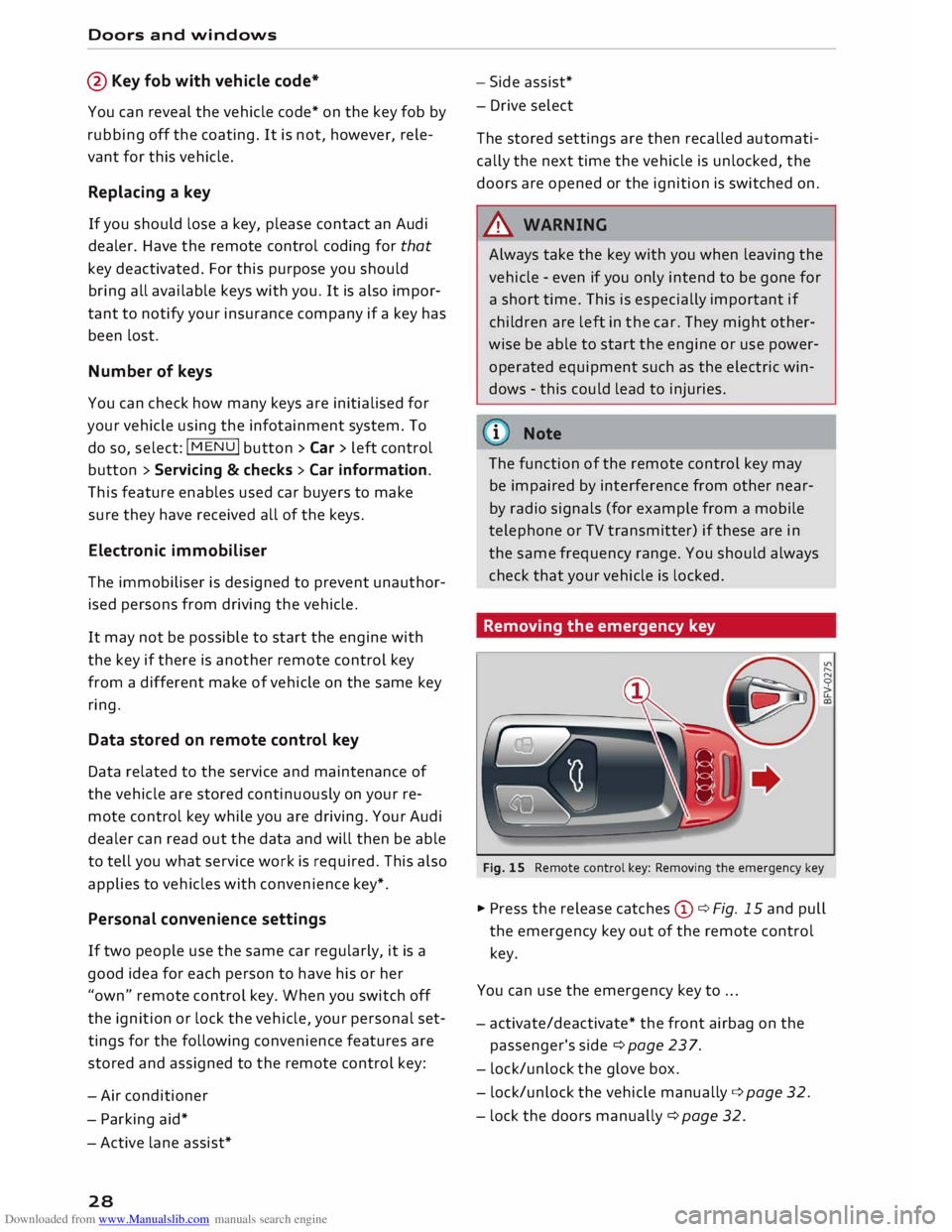
Removing the emergency key
Fig. 15 Remote control key: Removing the emergency key
� Press the release catches Cy¢ Fig. 15 and pull
the emergency key out of the remote control
key.
You can use the emergency key to ...
- activate/deactivate* the front airbag on the
passenger's side¢ page 237.
- lock/unlock the glove box.
- lock/unlock the vehicle manually ¢page 32.
- lock the doors manually ¢ page 32.
Page 41 of 306
Downloaded from www.Manualslib.com manuals search engine 0
N
,.....
N
......
0
,.....
Vl
CX) Soft
top (folding roof)
Soft top
General notes
The soft top opens and closes automatically.
When the top opens, it folds away completely in
to the storage box. The soft top can be opened or
closed at a speed of up to SO km/h.
In normal conditions the soft top is windproof
and waterproof. In extremely bad weather (such
as torrential or continuous rain), a few droplets
of water may possibly form inside the car. This is
quite normal, and no cause for concern.
To preserve the appearance of the soft top and
keep it waterproof, please follow the instructions
for cleaning and care ¢page 263, Care of vehi
cle and cleaning. You should also note the fol
lowing points:
- Open and stow the soft top only when it is
clean and dry. Pressure creases can form if the
soft top is stowed when damp, and mildew or
other damage can occur if left for long periods.
To avoid scratching or damaging the soft top,
do not use sharp objects to remove ice and
snow. A normal ice scraper can be used to clear
the rear window.
- Do not leave the soft top open for weeks at a
time to prevent any discolouration in the folds
of the fabric.
- Do not open the soft top at temperatures be
low O 0
C. The fabric loses its elasticity at sub
zero temperatures.
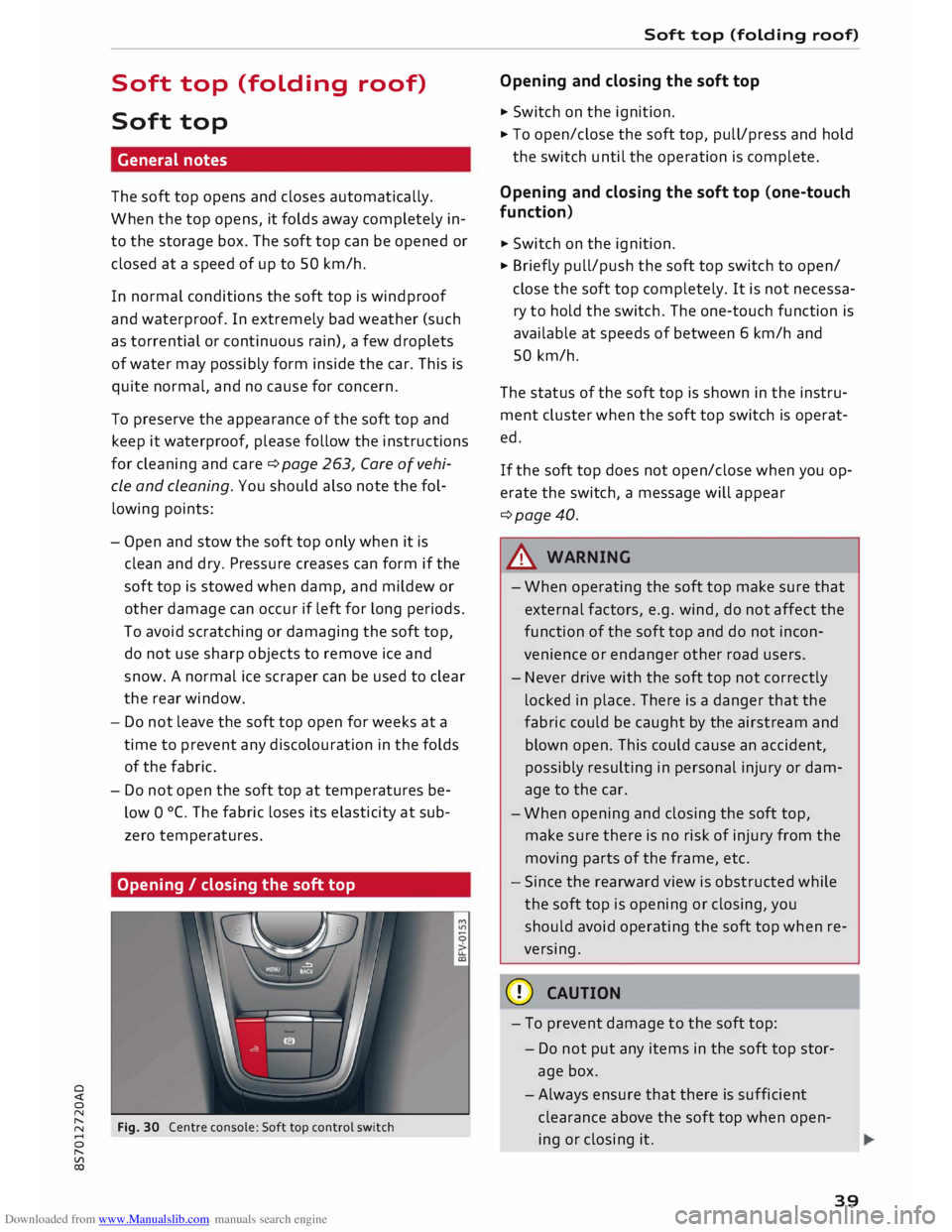
Opening / closing the soft top
Fig. 30 Centre console: Soft top control switch Soft
top (folding roof)
Opening and closing the soft top
� Switch on the ignition.
� To open/close the soft top, pull/press and hold
the switch until the operation is complete.
Opening and closing the soft top (one-touch
function)
� Switch on the ignition.
� Briefly pull/push the soft top switch to open/
close the soft top completely. It is not necessa
ry to hold the switch. The one-touch function is
available at speeds of between 6 km/h and
SO km/h.
The status of the soft top is shown in the instru
ment cluster when the soft top switch is operat
ed.
If the soft top does not open/close when you op
erate the switch, a message will appear
¢page 40.
A WARNING
- When operating the soft top make sure that
external factors, e.g. wind, do not affect the
function of the soft top and do not incon
venience or endanger other road users.
- Never drive with the soft top not correctly
locked in place. There is a danger that the
fabric could be caught by the airstream and
blown open. This could cause an accident,
possibly resulting in personal injury or dam
age to the car.
- When opening and closing the soft top,
make sure there is no risk of injury from the
moving parts of the frame, etc.
- Since the rearward view is obstructed while
the soft top is opening or closing, you
should avoid operating the soft top when re
versing.
CD CAUTION
- To prevent damage to the soft top:
- Do not put any items in the soft top stor-
age box.
- Always ensure that there is sufficient
clearance above the soft top when open
ing or closing it .
39
Page 48 of 306
Downloaded from www.Manualslib.com manuals search engine Lights
and vision
Main beam assist
Applies to: vehicles with main beam assist
The main beam assist automatically switches
the main beam headlights on or off depending
on the surrounding light conditions.
A sensor (Located in the mounting for the interior
mirror) detects light sources from other road
users. The main beams are activated or deactiva
ted automatically depending on the position of
vehicles on either side of the road, on the road
speed, and on other traffic and ambient condi
tions.
On vehicles with matrix LED headlights, individu
al segments of the main beam are activated or
deactivated. The relevant sector in front of the
vehicle is masked, while the surrounding areas
remain lit. The ambient surroundings are thus il
luminated optimally without dazzling other road
users.
Activating the main beam assist
Important: The light switch must be set to AUTO,
the dipped beam headlights must be on and the
main beam assist must be activated on the info
tainment system¢ page 47.
... Press the lever forwards ®¢ page 45, Fig. 41
to activate the main beam assist. The indicator
lamp� will light up in the infotainment dis
play and the main beams will be switched on/
off automatically. An indicator lamp. lights
up when the main beams are switched on.
Switching the main beams on/off manually
If the main beams are not switched on or if the
headlights are not dipped as expected, you can
control the dip function manually:
.., To switch on the main beams manually, push
the lever to position @. The indicator lamp.
will light up .
... To dip the headlights manually, pull the lever
towards you@. The main beam assist will be
deactivated.
Flashing the headlights
... Pull the lever towards you© to flash the head
lights when the main beam assist is activated
46 and
the main beams are dipped. The main
beam assist will remain activated.
Driver messages on the infotainment display
Main beam assist: fault. See owner's manual
Drive to a qualified workshop soon and have the
fault rectified. You can still switch the main
beam headlights on and off manually.
Main beam assist: currently unavailable. Cam
era view restricted due to surroundings. See
owner's manual
The camera vision is impaired, e.g. by stickers or
dirt.
The sensor is located between the interior mirror
and the windscreen. Do not affix any stickers on
this section of the windscreen.
A WARNING
The main beam assist is only intended to as
sist the driver. The driver must always ensure
that the headlights are used when required,
and may have to switch them on or off man
ually, e.g. when the light conditions or visibili
ty are poor. In the following situations man
ual intervention may be necessary:
- Hazardous weather conditions such as fog,
heavy rain and snow or water splashes
- Roads on which oncoming traffic is partially
concealed (e.g. on motorways)
- Indiscernible road users (e.g. cyclists with
insufficient lighting or vehicles with dirty
rear lights)
- Tight corners, steep hill crests or valleys
- Poorly lit towns
- Highly reflective objects, such as road signs
- Windscreen misted up, dirty, frosted or cov-
ered by stickers in front of the sensor
(CD) Note
The main beam assist is deactivated whenever
you intervene by switching the main beams
on or off manually @.
Page 52 of 306
Downloaded from www.Manualslib.com manuals search engine Lights
and vision
Windscreen wipers
Switching on the windscreen wipers
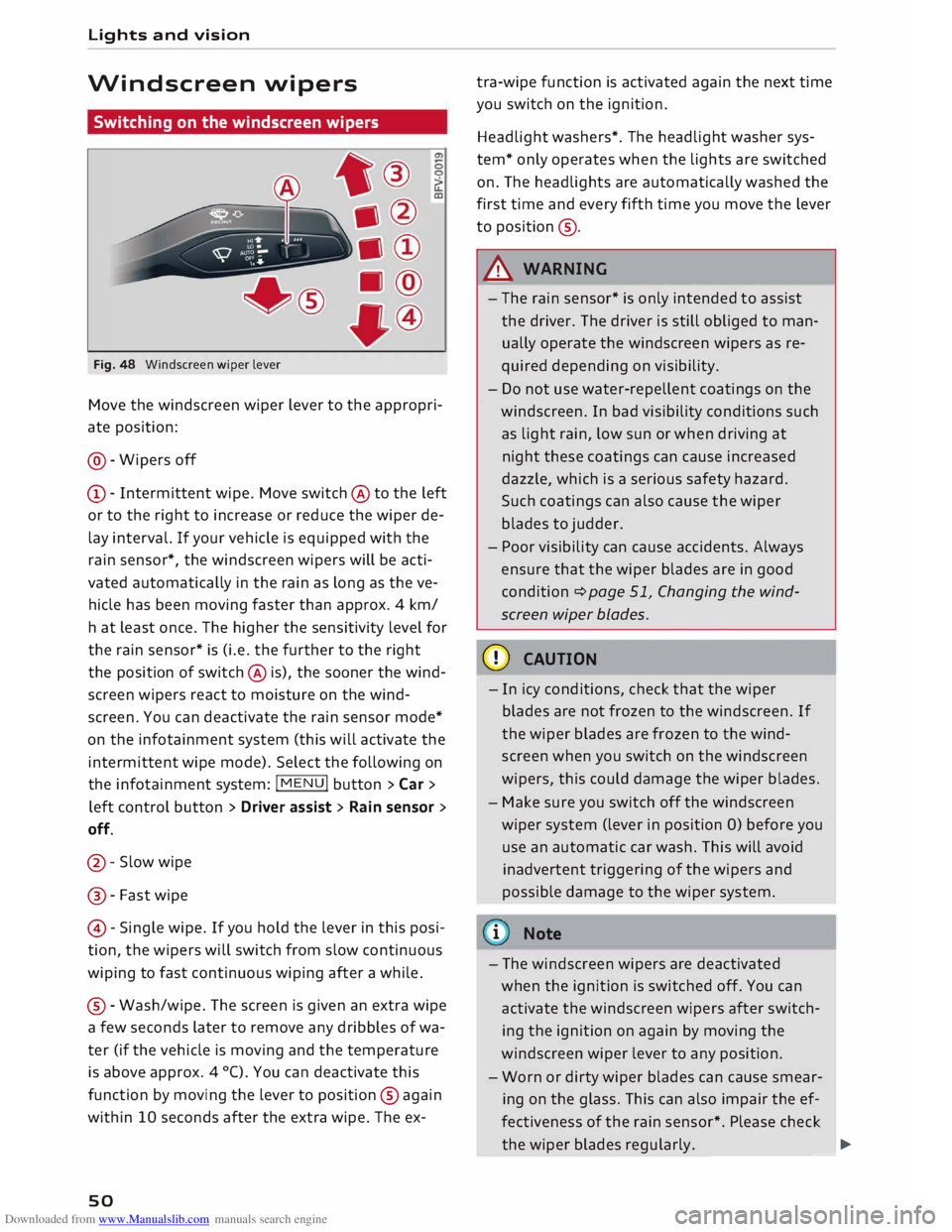
Fig. 48 Windscreen wiper lever
Move the windscreen wiper lever to the appropri
ate position:
@- Wipers off
CD- Intermittent wipe. Move switch @ to the left
or to the right to increase or reduce the wiper de
lay interval. If your vehicle is equipped with the
rain sensor*, the windscreen wipers will be acti
vated automatically in the rain as long as the ve
hicle has been moving faster than approx. 4 km/
ha t least once. The higher the sensitivity level for
the rain sensor* is (i.e. the further to the right
the position of switch @ is), the sooner the wind
screen wipers react to moisture on the wind
screen. You can deactivate the rain sensor mode*
on the infotainment system (this will activate the
intermittent wipe mode). Select the following on
the infotainment system: !MENU! button> Car >
left control button > Driver assist> Rain sensor >
off.
@- Slow wipe
@ -Fast wipe
@ -Single wipe. If you hold the lever in this posi
tion, the wipers will switch from slow continuous
wiping to fast continuous wiping after a while.
® -Wash/wipe. The screen is given an extra wipe
a few seconds later to remove any dribbles of wa
ter (if the vehicle is moving and the temperature
is above approx. 4 °C). You can deactivate this
function by moving the lever to position @again
within 10 seconds after the extra wipe. The ex-
so tra-wipe
function is activated again the next time
you switch on the ignition.
Headlight washers*. The headlight washer sys
tem* only operates when the lights are switched
on. The headlights are automatically washed the
first time and every fifth time you move the lever
to position ®·
A WARNING
- The rain sensor* is only intended to assist
the driver. The driver is still obliged to man
ually operate the windscreen wipers as re
quired depending on visibility.
- Do not use water-repellent coatings on the
windscreen. In bad visibility conditions such
as light rain, low sun or when driving at
night these coatings can cause increased
dazzle, which is a serious safety hazard.
Such coatings can also cause the wiper
blades to judder.
- Poor visibility can cause accidents. Always
ensure that the wiper blades are in good
condition ¢ page 51, Changing the wind
screen wiper blades.
CD CAUTION
- In icy conditions, check that the wiper
blades are not frozen to the windscreen. If
the wiper blades are frozen to the wind
screen when you switch on the windscreen
wipers, this could damage the wiper blades.
- Make sure you switch off the windscreen
wiper system (lever in position 0) before you
use an automatic car wash. This will avoid
inadvertent triggering of the wipers and
possible damage to the wiper system.
i Note
- The windscreen wipers are deactivated
when the ignition is switched off. You can
activate the windscreen wipers after switch
ing the ignition on again by moving the
windscreen wiper lever to any position.
- Worn or dirty wiper blades can cause smear
ing on the glass. This can also impair the ef
fectiveness of the rain sensor*. Please check
the wiper blades regularly. ______ �
Page 62 of 306
Downloaded from www.Manualslib.com manuals search engine Heating
and cooling
Heating and cooling
Air conditioner
Description
The air conditioner heats, cools and dehumidifies
the air inside the vehicle. It operates most effec
tively with the windows closed. If the vehicle has
been standing in the sun, it may cool down faster
if you open the windows briefly to let the hot air
escape.
Pollution filter
The pollution filter removes impurities, such as
dust and pollen, from the air.
Key-coded settings
Certain settings will be automatically stored and
assigned to the remote control key in use.
® For the sake of the environment
If you wish to save fuel, switch off the cooling
mode on the air conditioner by pressing the
Controls for manual air conditioner
Applies to vehicles with manual air conditioner
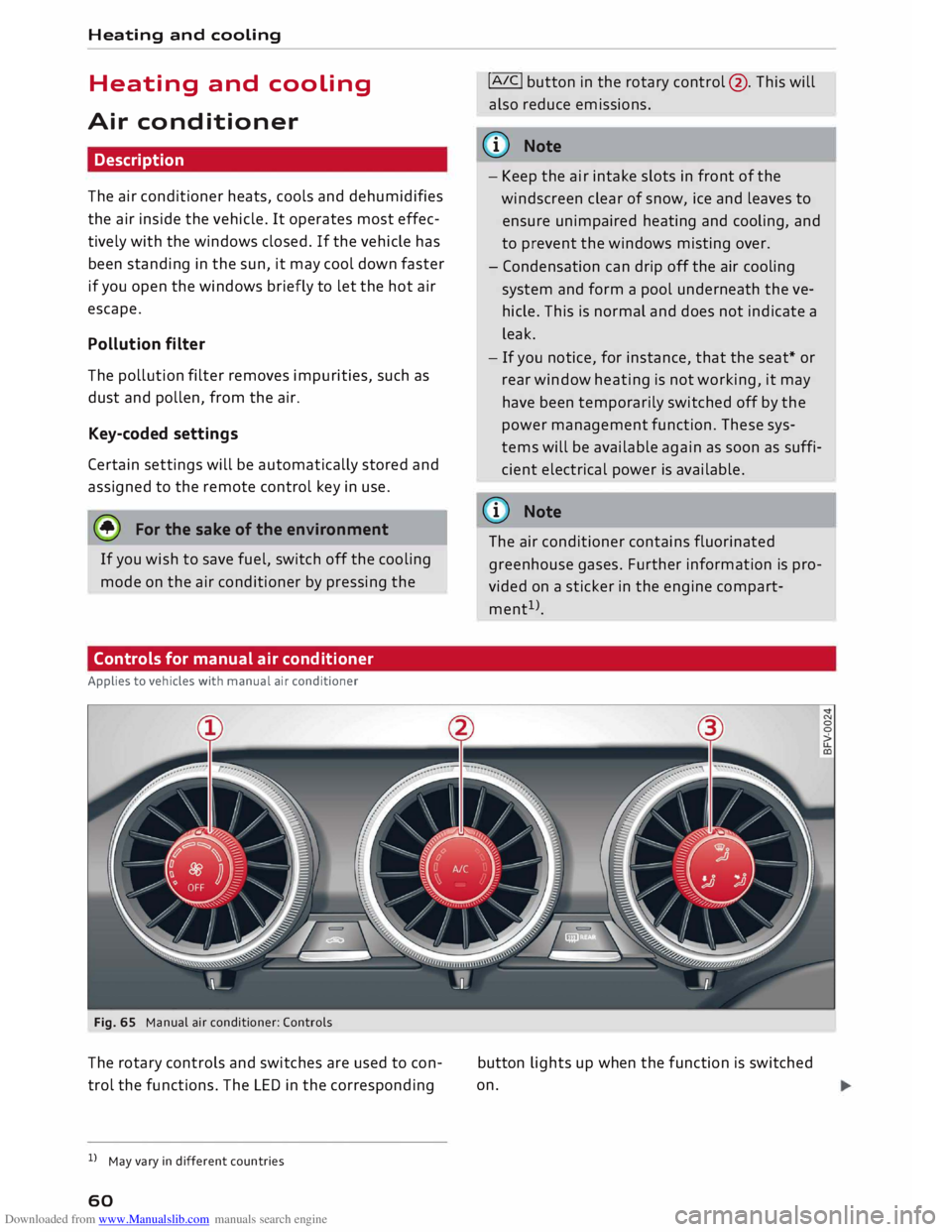
Fig. 65 Manual air conditioner: Controls
The rotary controls and switches are used to con
trol the functions. The LED in the corresponding
l l
May vary in different countries
60 !AIC!
button in the rotary control@. This will
also reduce emissions.
@ Note
- Keep the air intake slots in front of the
windscreen clear of snow, ice and leaves to
ensure unimpaired heating and cooling, and
to prevent the windows misting over.
- Condensation can drip off the air cooling
system and form a pool underneath the ve
hicle. This is normal and does not indicate a
leak.
- If you notice, for instance, that the seat* or
rear window heating is not working, it may
have been temporarily switched off by the
power management function. These sys
tems will be available again as soon as suffi
cient electrical power is available.
@ Note
The air conditioner contains fluorinated
greenhouse gases. Further information is pro
vided on a sticker in the engine compart
ment 1
>.
button lights up when the function is switched
on.
Page 64 of 306
Downloaded from www.Manualslib.com manuals search engine Heating
and cooling
Controls for automatic air conditioner
Applies to: vehicles with automatic air conditioner
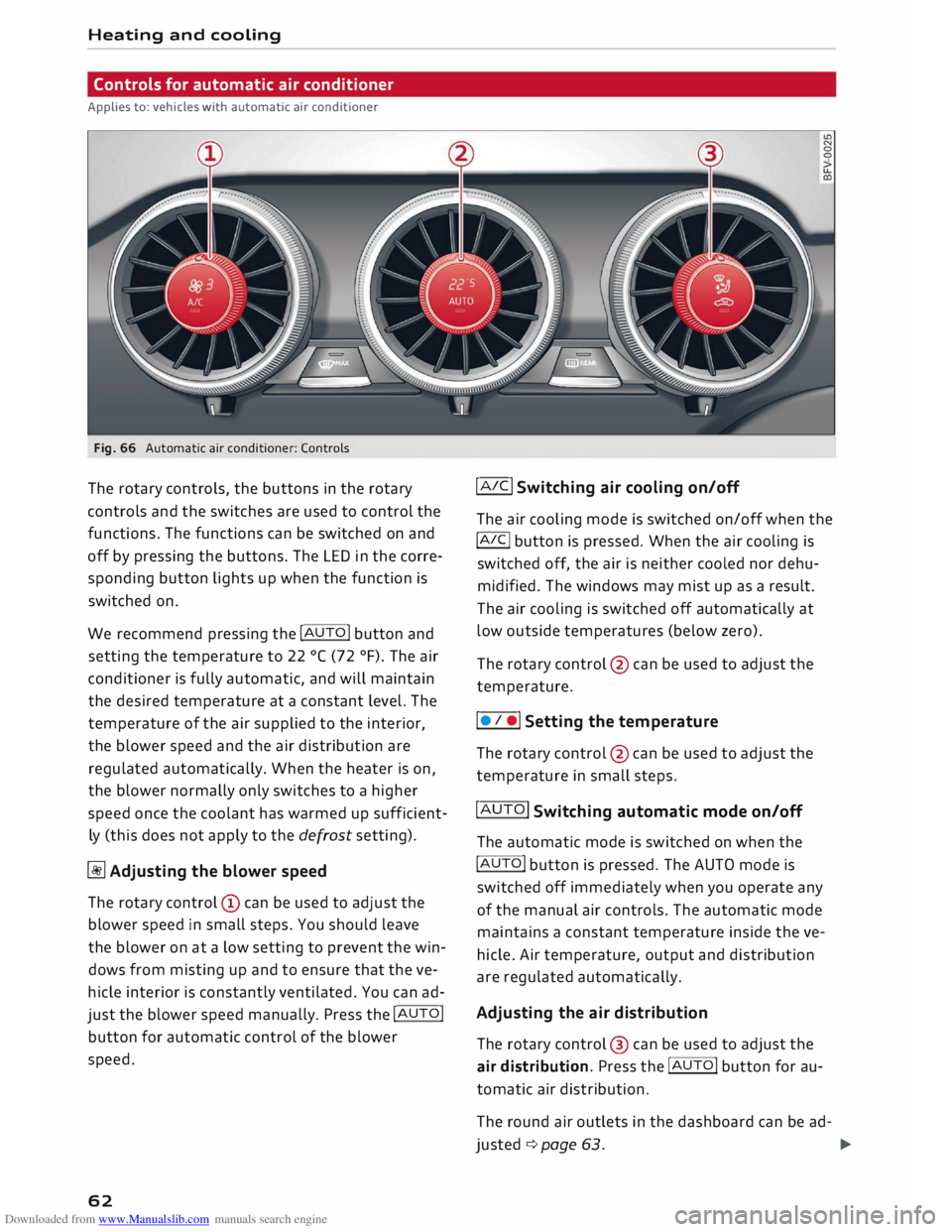
Fig. 66 Automatic air conditioner: Controls
The rotary controls, the buttons in the rotary
controls and the switches are used to control the
functions. The functions can be switched on and
off by pressing the buttons. The LED in the corre
sponding button lights up when the function is
switched on.
We recommend pressing the !AUTO! button and
setting the temperature to 22 °( (72 °F). The air
conditioner is fully automatic, and will maintain
the desired temperature at a constant level. The
temperature of the air supplied to the interior,
the blower speed and the air distribution are
regulated automatically. When the heater is on,
the blower normally only switches to a higher
speed once the coolant has warmed up sufficient
ly (this does not apply to the defrost setting).
� Adjusting the blower speed
The rotary control @ can be used to adjust the
blower speed in small steps. You should leave
the blower on at a low setting to prevent the win
dows from misting up and to ensure that the ve
hicle interior is constantly ventilated. You can ad
just the blower speed manually. Press the !AUTO!
button for automatic control of the blower
speed.
62 !AIC!
Switching air cooling on/off
The air cooling mode is switched on/off when the
!A IC!
button is pressed. When the air cooling is
switched off, the air is neither cooled nor dehu
midified. The windows may mist up as a result.
The air cooling is switched off automatically at
low outside temperatures (below zero).
The rotary control @ can be used to adjust the
temperature.
I • I •I Setting the temperature
The rotary control @ can be used to adjust the
temperature in small steps.
!AUTO! Switching automatic mode on/off
The automatic mode is switched on when the
!AUTO! button is pressed. The AUTO mode is
switched off immediately when you operate any
of the manual air controls. The automatic mode
maintains a constant temperature inside the ve
hicle. Air temperature, output and distribution
are regulated automatically.
Adjusting the air distribution
The rotary control @ can be used to adjust the
air distribution. Press the !AUTO! button for au
tomatic air distribution.
The round air outlets in the dashboard can be ad-
justed ¢ page 63.
�
Page 75 of 306
Downloaded from www.Manualslib.com manuals search engine 0
N
,.....
N
......
0
,.....
Vl
CX) -
The engine has not yet reached the minimum
temperature required for start/stop mode.
- The interior temperature selected on the air
conditioner has not yet been reached.
- The exterior temperature is very high/Low.
- The windscreen is being defrosted @.
- The parking aid* or park assist* is switched on.
- The vehicle battery charge is too Low.
- The steering wheel is close to full Lock or the
vehicle is being steered.
- Reverse gear has just been selected.
- The vehicle is on a steep gradient.
� will appear in the infotainment display to in
dicate this status.
Engine cuts in again automatically
The stop phase is interrupted in the following sit
uations, for example. The engine cuts in auto
matically without intervention from the driver.
- The vehicle starts to roll (e.g. on a hill).
- The interior temperature deviates from the air
conditioner setting.
- The windscreen is being defrosted @.
- The brake pedal is pressed several times in suc-
cession.
- The vehicle battery charge drops to an insuffi-
cient level.
- The power consumption is high.
Ignition is switched off automatically
To prevent the vehicle battery from being dis
charged, the ignition will be switched off auto
matically if certain conditions are met. For in
stance:
- The vehicle has already been driven.
- The start/stop system has switched off the en-
gine.
- The driver's door is opened.
- The driver's seat belt is unbuckled.
- The brake pedal is not pressed.
- The vehicle is stationary.
If the dipped beam headlights are on when this
happens, the side lights will be turned on instead
and the message Side Lights will be automatical
ly switched off in 30 minutes. See owner's man
ual will appear on the infotainment display. After Driving
approx. 30 minutes, or when you Lock the vehicle,
the side lights will be switched off.
If the start/stop system has not stopped the en
gine or if you have switched off the start/stop
system manually, the engine will continue run
ning and the ignition will not be switched off au
tomatically¢,&..
A WARNING
Never run the engine in confined spaces. The
exhaust gases are toxic -risk of poisoning!
(© Note
If you select D, No r S (on vehicles with auto
matic gearbox) after selecting reverse gear,
the car must have been moving at over
10 km/h before the system can switch off the
engine again.
Switching the start/stop system off and on
manually
Applies to: vehicles with start/stop system
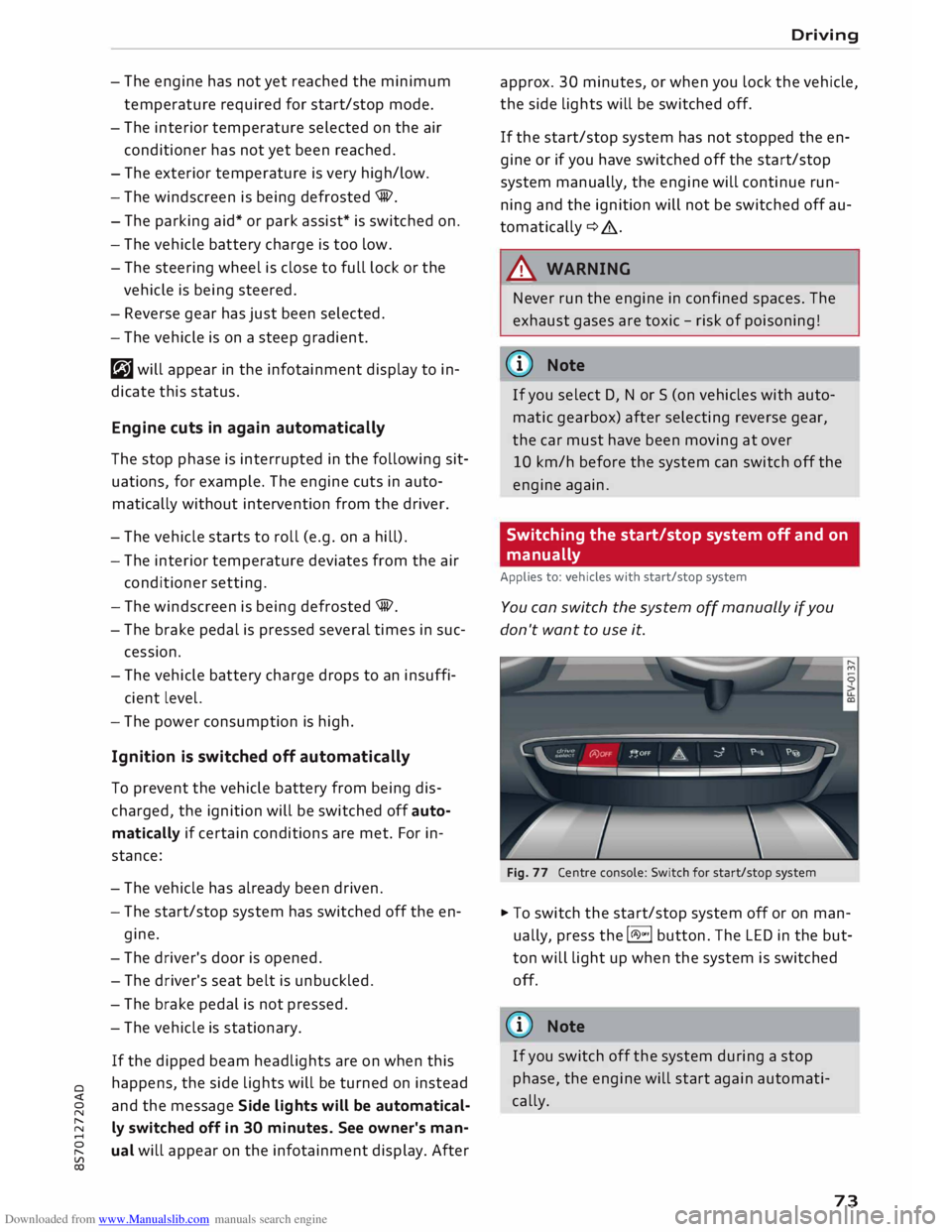
You can switch the system off manually if you
don't want to use it.
Fig. 77 Centre console: Switch for start/stop system
� To switch the start/stop system off or on man
ually, press the l(A)"'I button. The LED in the but
ton will light up when the system is switched
off.
@ Note
If you switch off the system during a stop
phase, the engine will start again automati
cally.
73
Page 92 of 306
Downloaded from www.Manualslib.com manuals search engine Driver
assist systems
Camera-based traffic
sign recognition
Description
Applies to: vehicles with camera-based traffic sign recogni
tion
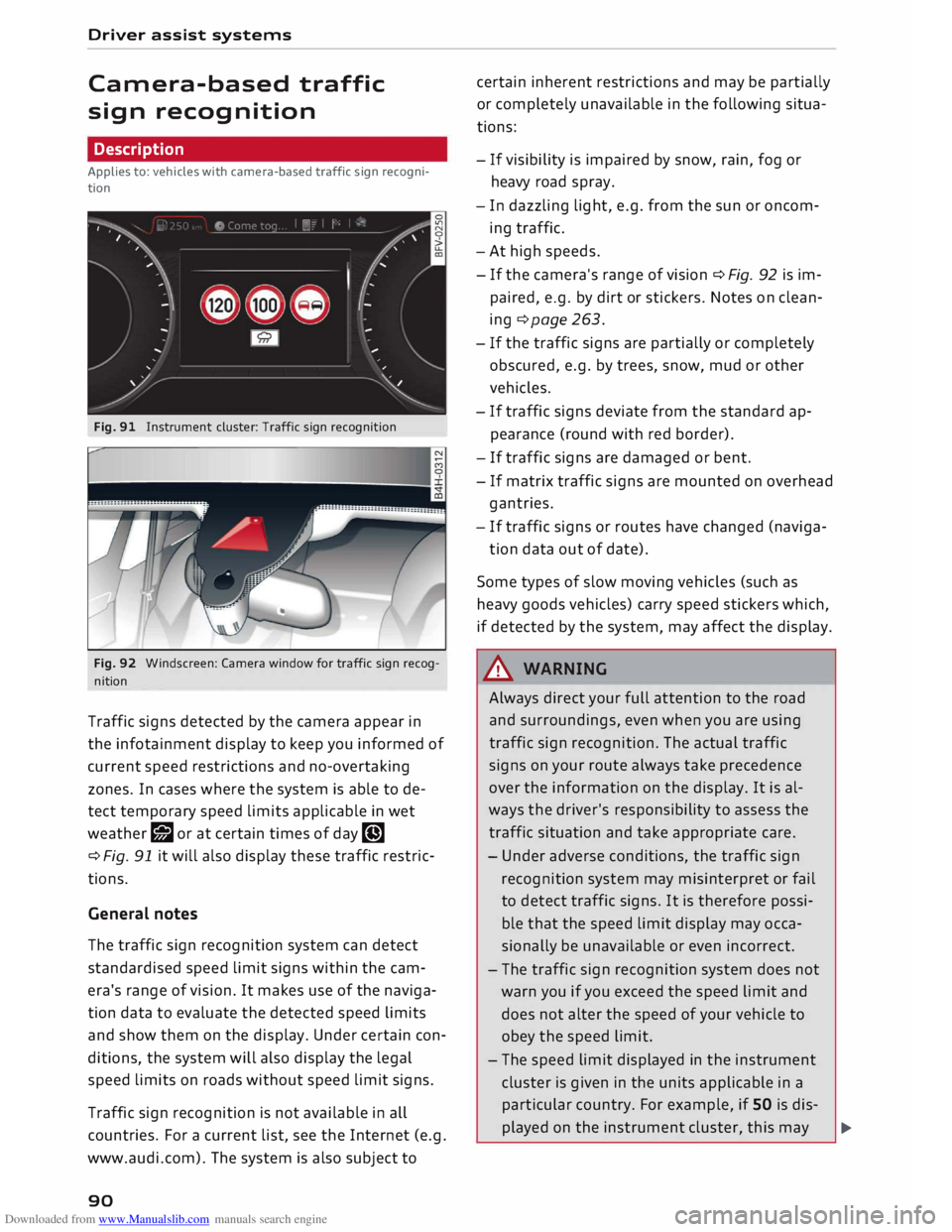
Fig. 91 Instrument cluster: Traffic sign recognition
Fig. 92 Windscreen: Camera window for traffic sign recog
nition
Traffic signs detected by the camera appear in
the infotainment display to keep you informed of
current speed restrictions and no-overtaking
zones. In cases where the system is able to de
tect temporary speed limits applicable in wet
weather r;J or at certain times of day �
¢ Fig. 91 it will also display these traffic restric
tions.
General notes
The traffic sign recognition system can detect
standardised speed limit signs within the cam
era's range of vision. It makes use of the naviga
tion data to evaluate the detected speed limits
and show them on the display. Under certain con
ditions, the system will also display the legal
speed limits on roads without speed limit signs.
Traffic sign recognition is not available in all
countries. For a current list, see the Internet (e.g.
www.audi.com). The system is also subject to
90 certain
inherent restrictions and may be partially
or completely unavailable in the following situa
tions:
- If visibility is impaired by snow, rain, fog or
heavy road spray.
- In dazzling light, e.g. from the sun or oncom
ing traffic.
- At high speeds.
- If the camera's range of vision ¢ Fig. 92 is im-
paired, e.g. by dirt or stickers. Notes on clean
ing ¢page 263.
- If the traffic signs are partially or completely
obscured, e.g. by trees, snow, mud or other
vehicles.
- If traffic signs deviate from the standard ap
pearance (round with red border).
- If traffic signs are damaged or bent.
- If matrix traffic signs are mounted on overhead
gantries.
- If traffic signs or routes have changed (naviga-
tion data out of date).
Some types of slow moving vehicles (such as
heavy goods vehicles) carry speed stickers which,
if detected by the system, may affect the display.
A WARNING
Always direct your full attention to the road
and surroundings, even when you are using
traffic sign recognition. The actual traffic
signs on your route always take precedence
over the information on the display. It is al
ways the driver's responsibility to assess the
traffic situation and take appropriate care.
- Under adverse conditions, the traffic sign
recognition system may misinterpret or fail
to detect traffic signs. It is therefore possi
ble that the speed limit display may occa
sionally be unavailable or even incorrect.
- The traffic sign recognition system does not
warn you if you exceed the speed limit and
does not alter the speed of your vehicle to
obey the speed limit.
- The speed limit displayed in the instrument
cluster is given in the units applicable in a
particular country. For example, if SO is dis-
played on the instrument cluster, this may �
Page 100 of 306
Downloaded from www.Manualslib.com manuals search engine Driver
assist systems
General notes
Applies to: vehicles with Audi side assist
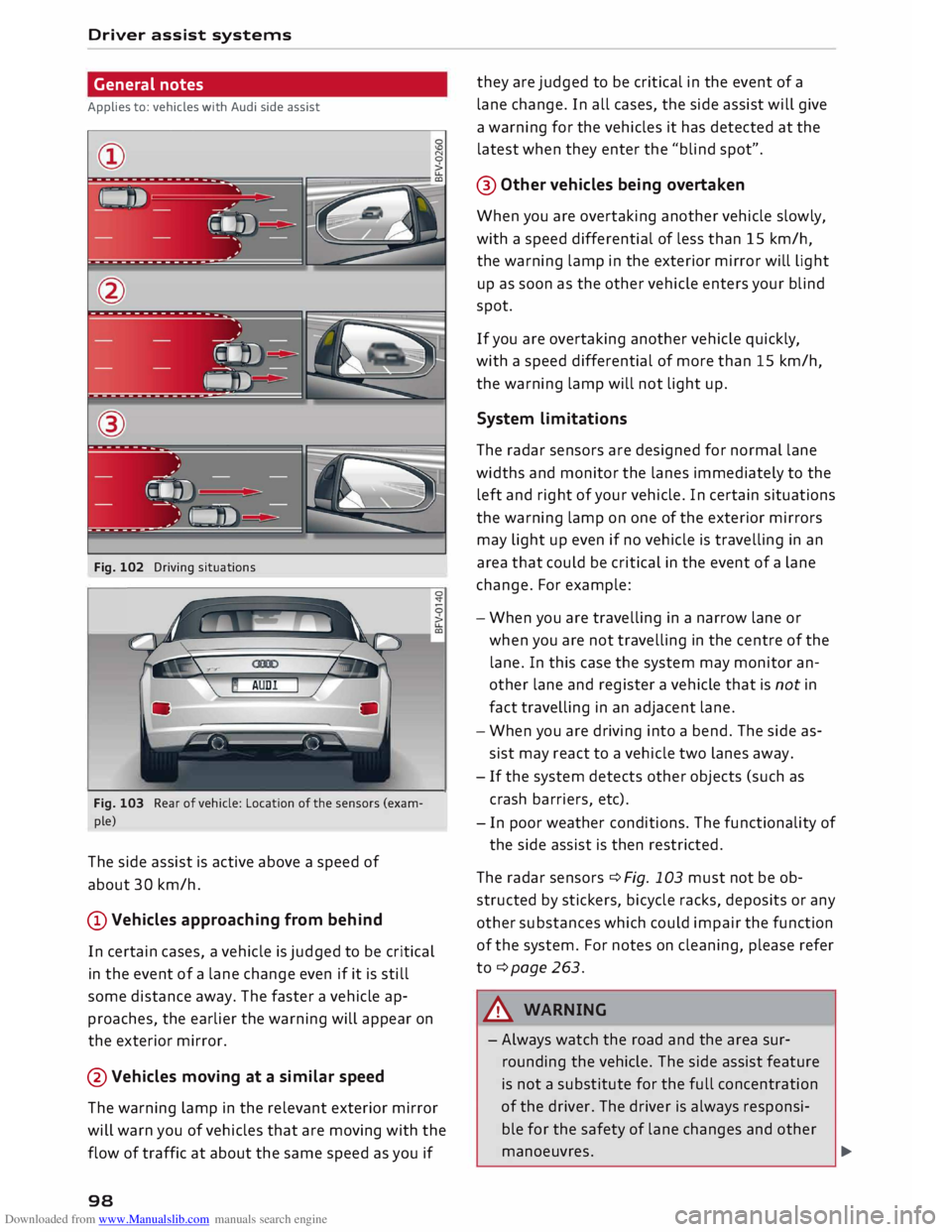
Fig. 102 Driving situations
--'(; --1 ) --
Fig. 103 Rear of vehicle: Location of the sensors (exam
ple)
The side assist is active above a speed of
about 30 km/h.
@Vehicles approaching from behind
In certain cases, a vehicle is judged to be critical
in the event of a lane change even if it is still
some distance away. The faster a vehicle ap
proaches, the earlier the warning will appear on
the exterior mirror.
@Vehicles moving at a similar speed
The warning lamp in the relevant exterior mirror
will warn you of vehicles that are moving with the
flow of traffic at about the same speed as you if
98 they
are judged to be critical in the event of a
lane change. In all cases, the side assist will give
a warning for the vehicles it has detected at the
latest when they enter the "blind spot".
@ Other vehicles being overtaken
When you are overtaking another vehicle slowly,
with a speed differential of less than 15 km/h,
the warning lamp in the exterior mirror will light
up as soon as the other vehicle enters your blind
spot.
If you are overtaking another vehicle quickly,
with a speed differential of more than 15 km/h,
the warning lamp will not light up.
System limitations
The radar sensors are designed for normal lane
widths and monitor the lanes immediately to the
left and right of your vehicle. In certain situations
the warning lamp on one of the exterior mirrors
may light up even if no vehicle is travelling in an
area that could be critical in the event of a lane
change. For example:
- When you are travelling in a narrow lane or
when you a re not travelling in the centre of the
lane. In this case the system may monitor an
other lane and register a vehicle that is not in
fact travelling in an adjacent lane.
- When you are driving into a bend. The side as
sist may react to a vehicle two lanes away.
- If the system detects other objects (such as
crash barriers, etc).
- In poor weather conditions. The functionality of
the side assist is then restricted.
The radar sensors ¢ Fig. 103 must not be ob
structed by stickers, bicycle racks, deposits or any
other substances which could impair the function
of the system. For notes on cleaning, please refer
to ¢page 263.
A WARNING
- Always watch the road and the area sur
rounding the vehicle. The side assist feature
is not a substitute for the full concentration
of the driver. The driver is always responsi
ble for the safety of lane changes and other
manoeuvres. �