belt AUDI TT ROADSTER 2016 Owners Manual
[x] Cancel search | Manufacturer: AUDI, Model Year: 2016, Model line: TT ROADSTER, Model: AUDI TT ROADSTER 2016Pages: 306, PDF Size: 31.82 MB
Page 5 of 306
Downloaded from www.Manualslib.com manuals search engine 0
N
,.....
N
......
0
,.....
Vl
CX) Adjusting
graphic display and warning
beeps . . . . . . . . . . . . . . . . . . . . . . . . . . . . . 112
Fault warnings . . . . . . . . . . . . . . . . . . . . . .
112
Intelligent technology........... 113
Electronic stabilisation control (ESC) . . . . 113
Brakes............................. 115
Electro-mechanical power steering . . . . .
116
Four-wheel drive (quattro)
. . . . . . . . . . . . 116
Rear spoiler ........................ 117
Power management.................. 118
Information saved in the control units . . . 119
Infotainment..................... 121
Multi Media Interface ............ 121
Notes on traffic safety . . . . . . . . . . . . . . . .
121
Introduction . . . . . . . . . . . . . . . . . . . . . . . .
121
M MI ON/OFF button with joystick
function . . . . . . . . . . . . . . . . . . . . . . . . . . .
121
How to use the MMI . . . . . . . . . . . . . . . . . . 122
MMI touch . . . . . . . . . . . . . . . . . . . . . . . . . 124
Rotary pushbutton with joystick function 126
Speller for letters/numbers . . . . . . . . . . . 128
Search function . . . . . . . . . . . . . . . . . . . . . 129
Menus and symbols . . . . . . . . . . . . . . . . . . 130
Speech dialogue system . . . . . . . . . 133
How to use the speech dialogue system . . 132
Notes on the overviews of commands . . .
134
Commands . . . . . . . . . . . . . . . . . . . . . . . . .
134
Telephone . . . . . . . . . . . . . . . . . . . . . . . .
141
Introduction . . . . . . . . . . . . . . . . . . . . . . . .
141
Setting up . . . . . . . . . . . . . . . . . . . . . . . . . .
142
Using the Audi phone box . . . . . . . . . . . . . 146
Using the telephone . . . . . . . . . . . . . . . . .
147
Favourites . . . . . . . . . . . . . . . . . . . . . . . . . . 149
Messages . . . . . . . . . . . . . . . . . . . . . . . . . . 150
Listening to
voicemail messages.. . . . . . . 152
Emergency call functions . . . . . . . . . . . . . 152
Directory . . . . . . . . . . . . . . . . . . . . . . . . . . .
153
Settings . . . . . . . . . . . . . . . . . . . . . . . . . . .
155
Seat belt microphone . . . . . . . . . . . . . . . .
157
Troubleshooting . . . . . . . . . . . . . . . . . . . . .
158
Audi connect . . . . . . . . . . . . . . . . . . . . .
159
Introduction . . . . . . . . . . . . . . . . . . . . . . . .
159
Setting up . . . . . . . . . . . . . . . . . . . . . . . . . .
159 Table
of Contents
Configuring using myAudi . . . . . . . . . . . . . 162
Audi connect
services . . . . . . . . . . . . . . . . . 162
Wi-Fi hotspot . . . . . . . . . . . . . . . . . . . . . . . 165
Configuring the data connection . . . . . . . . 166
Notes on Audi connect . . . . . . . . . . . . . . . . 167
Troubleshooting . . . . . . . . . . . . . . . . . . . . .
168
Navigation . . . . . . . . . . . . . . . . . . . . . . . . 169
Calling up the navigation menu . . . . . . . . 169
Entering a destination . . . . . . . . . . . . . . . . 170
Stop route guidance . . . . . . . . . . . . . . . . .
175
Home address . . . . . . . . . . . . . . . . . . . . . .
175
Favourites . . . . . . . . . . . . . . . . . . . . . . . . . .
17 5
Directory contacts ................... 175
Other settings . . . . . . . . . . . . . . . . . . . . . .
176
Ma p
............................... 178
Google Earth map display . . . . . . . . . . . . .
181
Calling up traffic information . . . . . . . . . .
182
Troubleshooting . . . . . . . . . . . . . . . . . . . . .
184
Radio ............................. 185
Calling up the radio menu . . . . . . . . . . . . . 185
Radio functions . . . . . . . . . . . . . . . . . . . . . 185
Radio menu . . . . . . . . . . . . . . . . . . . . . . . . 187
Favourites . . . . . . . . . . . . . . . . . . . . . . . . . . 188
Other settings . . . . . . . . . . . . . . . . . . . . . .
188
Troubleshooting . . . . . . . . . . . . . . . . . . . . . 190
Media ............................. 191
Introduction . . . . . . . . . . . . . . . . . . . . . . . . 191
Notes . . . . . . . . . . . . . . . . . . . . . . . . . . . . . 191
Media drives . . . . . . . . . . . . . . . . . . . . . . . .
192
Bluetooth audio player . . . . . . . . . . . . . . . 194
Wi-Fi audio players . . . . . . . . . . . . . . . . . . 195
Online media and Internet radio . . . . . . . .
196
Multimedia connections . . . . . . . . . . . . . .
197
Playing media . . . . . . . . . . . . . . . . . . . . . . .
200
Other settings . . . . . . . . . . . . . . . . . . . . . .
203
Supported media and file formats . . . . . .
206
Troubleshooting . . . . . . . . . . . . . . . . . . . . .
207
3
Page 6 of 306
Downloaded from www.Manualslib.com manuals search engine Table
of Contents
Audi smartphone interface . . . . . . 210
Setting up.......................... 210
How to use . . . . . . . . . . . . . . . . . . . . . . . . . 211
Troubleshooting..................... 211
System settings .................. 212
Setting the time and date . . . . . . . . . . . . .
212
MMI settings . . . . . . . . . . . . . . . . . . . . . . .
212
Connection manager . . . . . . . . . . . . . . . . .
213
System update . . . . . . . . . . . . . . . . . . . . . .
216
On-board Handbook.................. 216
Sound settings . . . . . . . . . . . . . . . . . . . . . .
217
Volume settings ..................... 217
Restarting the MMI system (Reset) . . . . . 218
Notes on software licences 218
Safety ............................ 220
Safe driving . . . . . . . . . . . . . . . . . . . . . . 220
General notes . . . . . . . . . . . . . . . . . . . . . . .
220
Correct sitting positions . . . . . . . . . . . . . . 221
Child seats . . . . . . . . . . . . . . . . . . . . . . . . .
223
Securing a child seat . . . . . . . . . . . . . . . . .
225
Pedal area . . . . . . . . . . . . . . . . . . . . . . . . . . 226
Stowing luggage safely . . . . . . . . . . . . . . .
227
Pedestrian protection system . . . . . . . . . . 228
Seat belts . . . . . . . . . . . . . . . . . . . . . . . .
230
Why is it so important to use seat belts? . 230
Forces acting in a collision . . . . . . . . . . . . .
231
How to wear seat belts properly . . . . . . . .
232
Belt tensioners . . . . . . . . . . . . . . . . . . . . . .
234
Airbag system . . . . . . . . . . . . . . . . . . . . 235
Description of airbag system . . . . . . . . . . .
235
Front airbags . . . . . . . . . . . . . . . . . . . . . . .
236
Side airbags . . . . . . . . . . . . . . . . . . . . . . . .
239
Service and care . . . . . . . . . . . . . . . . . . 241
Checking and topping up fluids . 241
Fuel . . . . . . . . . . . . . . . . . . . . . . . . . . . . . . . 241
Filling the tank . . . . . . . . . . . . . . . . . . . . . . 242
Emission control systems . . . . . . . . . . . . . 244
Engine compartment . . . . . . . . . . . . . . . . . 244
Engine oil . . . . . . . . . . . . . . . . . . . . . . . . . .
247
Cooling system . . . . . . . . . . . . . . . . . . . . . .
249
Brake fluid . . . . . . . . . . . . . . . . . . . . . . . . .
250
Battery . . . . . . . . . . . . . . . . . . . . . . . . . . . .
250
4 Windscreen
washer . . . . . . . . . . . . . . . . . .
252
Service interval display . . . . . . . . . . . . . . .
252
Wheels ........................... 254
Tyres and rims . . . . . . . . . . . . . . . . . . . . . .
254
Tyre pressure loss indicator . . . . . . . . . . . . 258
Tyre pressure monitoring system . . . . . . .
260
Care of vehicle and cleaning . . . . .
263
General notes . . . . . . . . . . . . . . . . . . . . . . .
263
Washing the vehicle . . . . . . . . . . . . . . . . . .
263
Notes on cleaning and care . . . . . . . . . . . . 264
Taking the vehicle out of service . . . . . . . . 268
Self-help . . . . . . . . . . . . . . . . . . . . . . . . .
269
Mobility . . . . . . . . . . . . . . . . . . . . . . . . . . 269
General notes . . . . . . . . . . . . . . . . . . . . . . .
269
Equipment . . . . . . . . . . . . . . . . . . . . . . . . .
269
Tyre repair kit . . . . . . . . . . . . . . . . . . . . . . .
270
Changing a wheel . . . . . . . . . . . . . . . . . . . .
272
Spare wheel . . . . . . . . . . . . . . . . . . . . . . . .
276
Jump-starting . . . . . . . . . . . . . . . . . . . . . . .
277
Tow-starting / towing away. . . . . . . . . . . . 278
Fuses and bulbs . . . . . . . . . . . . . . . . . .
282
Fuses.............................. 282
Bulbs.............................. 284
Accessories and technical data . . 285
Accessories and modifications
to the vehicle . . . . . . . . . . . . . . . . . . . . . 285
Accessories, replacement parts and
repairs . . . . . . . . . . . . . . . . . . . . . . . . . . . . 285
Modifications . . . . . . . . . . . . . . . . . . . . . . . 285
Radio transmitters and business
equipment . . . . . . . . . . . . . . . . . . . . . . . . . 286
Technical data . . . . . . . . . . . . . . . . . . . . 287
Vehicle identification
data . . . . . . . . . . . . . 287
Explanation of technical data . . . . . . . . . . 287
Dimensions . . . . . . . . . . . . . . . . . . . . . . . . . 288
Capacities . . . . . . . . . . . . . . . . . . . . . . . . . . 288
Weights . . . . . . . . . . . . . . . . . . . . . . . . . . .
288
Engine data . . . . . . . . . . . . . . . . . . . . . . . .
289
Index ............................. 290
Page 13 of 306
Downloaded from www.Manualslib.com manuals search engine 0
N
,.....
N
......
0
,.....
Vl
CX) Instruments
and warning/indicator lamps
The tank capacity of your vehicle is given in the
Technical data section ¢ page 288.
CD CAUTION
Never run the tank completely dry. If there is
an irregular fuel supply, misfiring can occur.
Unburnt fuel can then enter the exhaust sys
tem. This can lead to overheating and dam
age to the catalytic converter.
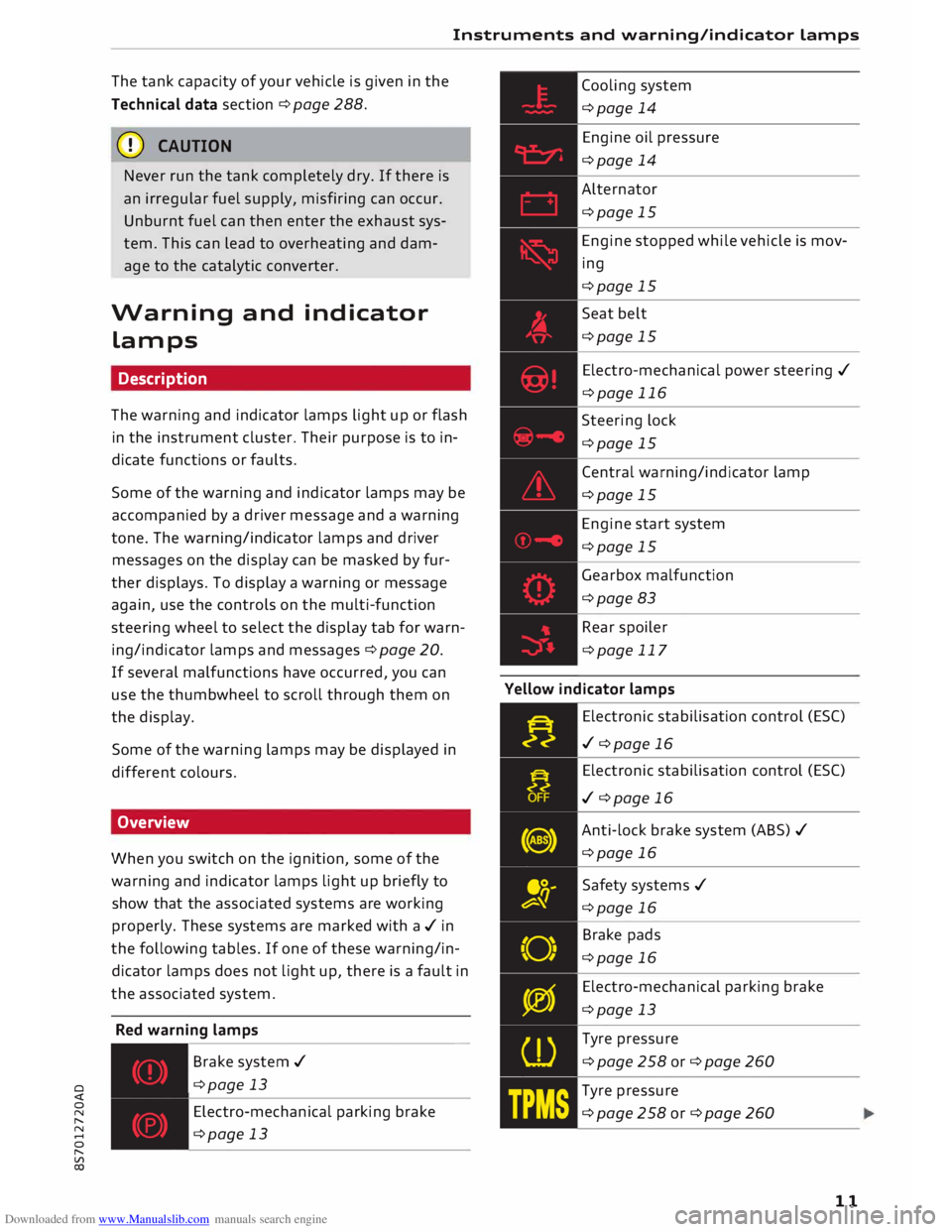
Warning and indicator
Lamps
Description
The warning and indicator lamps light up or flash
in the instrument cluster. Their purpose is to in
dicate functions or faults.
Some of the warning and indicator lamps may be
accompanied by a driver message and a warning
tone. The warning/indicator lamps and driver
messages on the display can be masked by fur
ther displays. To display a warning or message
again, use the controls on the multi-function
steering wheel to select the display tab for warn
ing/indicator lamps and messages ¢ page 20.
If several malfunctions have occurred, you can
use the thumbwheel to scroll through them on
the display.
Some of the warning lamps may be displayed in
different colours.
Overview
When you switch on the ignition, some of the
warning and indicator lamps light up briefly to
show that the associated systems are working
properly. These systems are marked with a../ in
the following tables. If one of these warning/in
dicator lamps does not light up, there is a fault in
the associated system.
Red warning lamps
---------------
Br a k e system ../
¢page 13
Electro-mechanical parking brake
¢page 13 Cooling
system
¢page 14
Engine oil pressure
¢page 14
Alternator
¢page 15
Engine stopped while vehicle is mov
ing
¢page 15
Seat belt
¢page 15
Electro-mechanical power steering ../
¢page 116
Steering lock
¢page 15
Central warning/indicator lamp
¢page 15
Engine start system
¢page 15
Gearbox malfunction
¢page 83
Rear spoiler
¢page 117
Yellow indicator lamps
Electronic stabilisation control (ES()
../ ¢page 16
Electronic stabilisation control (ES()
../ ¢page 16
Anti-lock brake system (ABS) ../
¢page 16
Safety systems ../
¢page 16
Brake pads
¢page 16
Electro-mechanical parking brake
¢page 13
Tyre pressure
¢page258or¢page260
Tyre pressure
¢page258or¢page260
11
Page 16 of 306
Downloaded from www.Manualslib.com manuals search engine Instruments
and warning/indicator Lamps
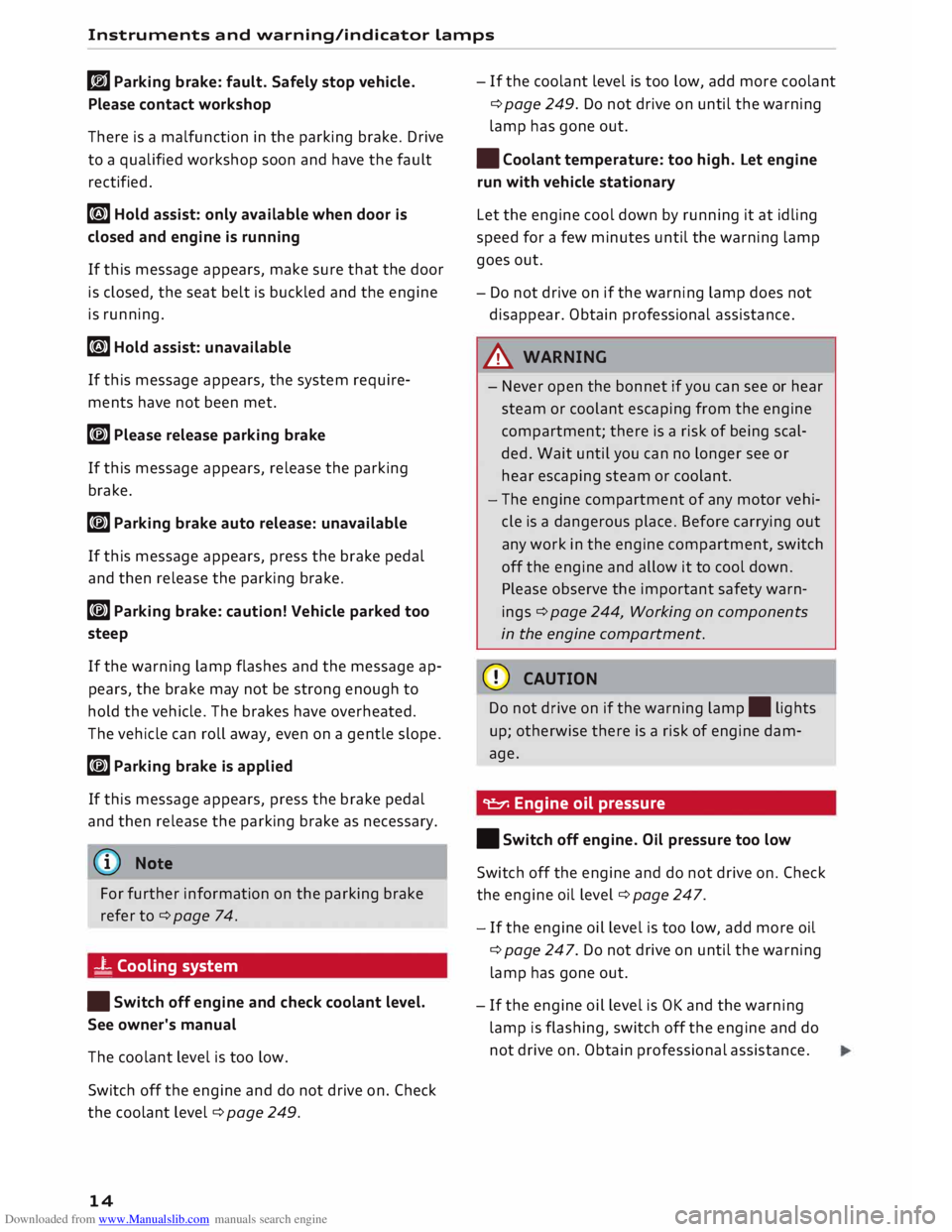
rlJ Parking brake: fault. Safely stop vehicle.
Please contact workshop
There is a malfunction in the parking brake. Drive
to a qualified workshop soon and have the fault
rectified.
[i] Hold assist: only available when door is
closed and engine is running
If this message appears, make sure that the door
is closed, the seat belt is buckled and the engine
is running.
[i] Hold assist: unavailable
If this message appears, the system require
ments have not been met.
� Please release parking brake
If this message appears, release the parking
brake.
� Parking brake auto release: unavailable
If this message appears, press the brake pedal
and then release the parking brake.
� Parking brake: caution! Vehicle parked too
steep
If the warning Lamp flashes and the message ap
pears, the brake may not be strong enough to
hold the vehicle. The brakes have overheated.
The vehicle can roll away, even on a gentle slope.
� Parking brake is applied
If this message appears, press the brake pedal
and then release the parking brake as necessary.
(D Note
For further information on the parking brake
refer to¢ page 74.
_t Cooling system
• Switch off engine and check coolant level.
See owner's manual
The coolant Level is too Low.
Switch off the engine and do not drive on. Check
the coolant Level¢ page 249.
14 -
If the coolant Level is too Low, add more coolant
¢ page 249. Do not drive on until the warning
Lamp has gone out.
• Coolant temperature: too high. Let engine
run with vehicle stationary
Let the engine cool down by running it at idling
speed for a few minutes until the warning Lamp
goes out.
- Do not drive on if the warning Lamp does not
disappear. Obtain professional assistance.
A WARNING
- Never open the bonnet if you can see or hear
steam or coolant escaping from the engine
compartment; there is a risk of being scal
ded. Wait until you can no Longer see or
hear escaping steam or coolant.
- The engine compartment of any motor vehi
cle is a dangerous place. Before carrying out
any work in the engine compartment, switch
off the engine and allow it to cool down.
Please observe the important safety warn
ings ¢ page 244, Working on components
in the engine compartment.
CD CAUTION
Do not drive on if the warning Lamp. Lights
up; otherwise there is a risk of engine dam
age.
9::::r. Engine oil pressure
• Switch off engine. Oil pressure too low
Switch off the engine and do not drive on. Check
the engine oil Level ¢ page 247.
- If the engine oil Level is too Low, add more oil
¢ page 247. Do not drive on until the warning
Lamp has gone out .
- If the engine oil Level is OK and the warning
Lamp is flashing, switch off the engine and do
not drive on. Obtain professional assistance.
Page 17 of 306
Downloaded from www.Manualslib.com manuals search engine 0
N
,.....
N
......
0
,.....
Vl
CX) Instruments
and warning/indicator lamps
(D) Note
The oil pressure warning lamp is not an indi
cator for the oil level. The oil level should
therefore be checked regularly.
0 Alternator/vehicle battery
• Electrical system: fault. Battery is not being
charged
There is an alternator fault or a fault in the vehi
cle's electrical system.
Drive to a qualified workshop without delay.
However, you should avoid using electrical equip
ment that is not absolutely necessary because
this will drain the battery. If the battery charge is
insufficient, obtain professional assistance.
ri1 Electrical system: low battery charge. Bat
tery will be charged while driving
Starting reliability may be impaired.
If this message disappears after a while, the ve
hicle battery will have been sufficiently charged
while driving.
If the message does not disappear again, drive to
a qualified workshop without delay and have the
fault rectified.
� Engine stopped while vehicle is moving
• Engine stopped: brake servo and power
steering not possible
There is a malfunction in the engine or fuel sup
ply system.
Greater strength is required to steer and brake
the vehicle if the engine stops while the vehicle is
coasting. Carefully try to bring the coasting vehi
cle safely to a standstill out of the way of moving
traffic. Obtain professional assistance.
_& WARNING
Greater strength is required to brake the vehi
cle if the engine stops while the vehicle is
moving -risk of accident! Greater strength
will be required to steer the vehicle unless the
power steering is still providing assistance. The
power steering may still be available if
the vehicle is still coasting with the ignition
switched on (and the battery charge is suffi
cient).
,(,.Seatbelt
The warning lamp.
lights up and does not go
out until the driver's and passenger's* seat belts
have been fastened. When the vehicle has gath
ered speed you will also hear a warning chime.
(Q)) Note
For further information on the seat belts
¢page 230.
@- Steering lock
• Steering: fault. Please stop vehicle
There is a malfunction in the electronic steering
lock. The ignition can no longer be switched on.
Do not have the vehicle towed away, because you
won't be able to steer it. Obtain professional as
sistance.
(::$ Steering
lock: fault. Please contact work
shop
There is a malfunction in the electronic steering
lock.
Drive to a qualified workshop soon and have the
fault rectified.
_& WARNING
Your vehicle must not be towed if there is a
fault in the electronic steering lock -risk of
accident!
& Central warning/indicator lamp
If the warning lamp.
or indicator lamp II
lights up, note the information in the instrument
cluster.
©- Engine start system
• Engine start system: fault. Please contact
workshop ..,.
15
Page 56 of 306
Downloaded from www.Manualslib.com manuals search engine Seats
and storage
Seats and storage
General notes
A WARNING
You will find important information, tips, sug
gestions and warnings that you should read
and observe for your own safety and the safe
ty of your passengers on¢ page 220, Safe
driving.
Front seats
Manual adjustment of seats
Applies to: vehicles with manual seat adjustment
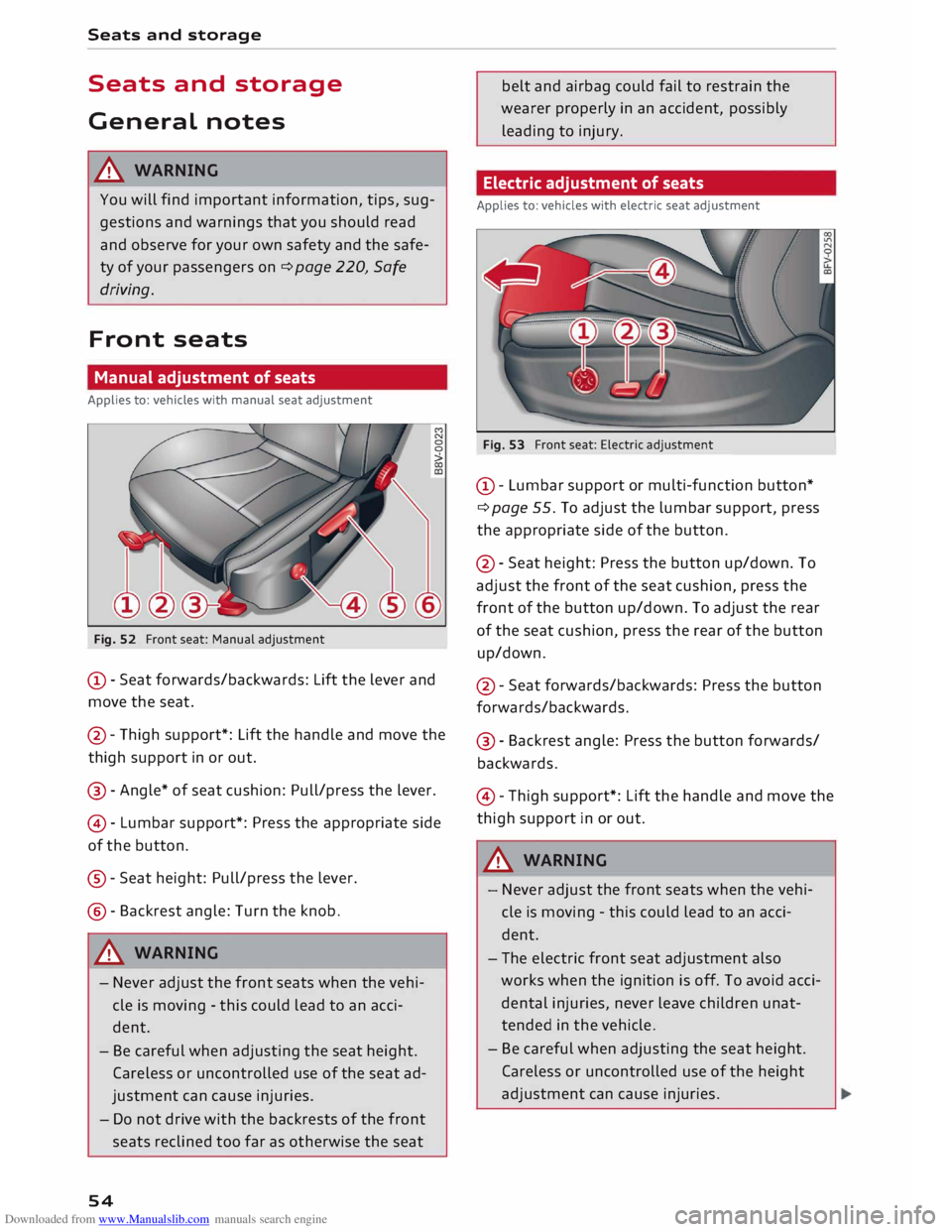
Fig. 52 Front seat: Manual adjustment
@ -Seat forwards/backwards: Lift the lever and
move the seat.
@ -Thigh support*: Lift the handle and move the
thigh support in or out.
@ -Angle* of seat cushion: Pull/press the lever.
@ -Lumbar support*: Press the appropriate side
of the button.
®- Seat height: Pull/press the lever.
@- Backrest angle: Turn the knob.
A WARNING
- Never adjust the front seats when the vehi
cle is moving -this could lead to an acci
dent.
- Be careful when adjusting the seat height.
Careless or uncontrolled use of the seat ad
justment can cause injuries.
- Do not drive with the backrests of the front
seats reclined too far as otherwise the seat
54 belt
and airbag could fail to restrain the
wearer properly in an accident, possibly
leading to injury.
Electric adjustment of seats
Applies to: vehicles with electric seat adjustment
Fig. 53 Front seat: Electric adjustment
@ -Lumbar support or multi-function button*
¢ page 55. To adjust the lumbar support, press
the appropriate side of the button.
@- Seat height: Press the button up/down. To
adjust the front of the seat cushion, press the
front of the button up/down. To adjust the rear
of the seat cushion, press the rear of the button
up/down.
@ -Seat forwards/backwards: Press the button
forwards/backwards.
@ -Backrest angle: Press the button forwards/
backwards.
© -Thigh support*: Lift the handle and move the
thigh support in or out.
A WARNING
- Never adjust the front seats when the vehi
cle is moving -this could lead to an acci
dent.
- The electric front seat adjustment also
works when the ignition is off. To avoid acci
dental injuries, never leave children unat
tended in the vehicle.
- Be careful when adjusting the seat height.
Careless or uncontrolled use of the height
adjustment can cause injuries.
Page 57 of 306
Downloaded from www.Manualslib.com manuals search engine 0
N
,.....
N
......
0
,.....
Vl
CX) -
Do not drive with the backrests of the front
seats reclined too far as otherwise the seat
belt and airbag could fail to restrain the
wearer properly in an accident, possibly
leading to injury.
Bucket seat adjustment
Applies to: vehicles with bucket seats
Fig. 54 Bucket seat: Adjuster controls M
co
Ll)
0
co
CD
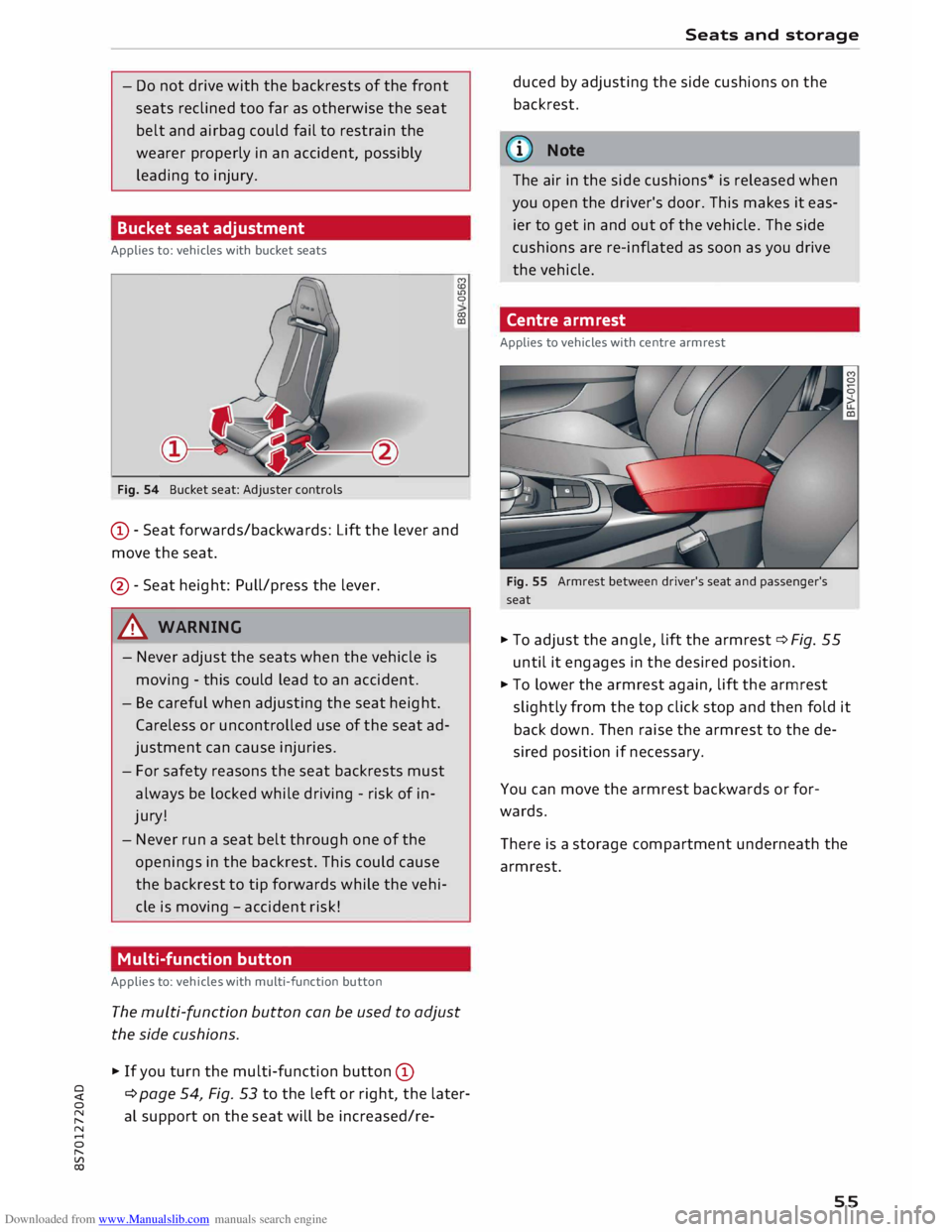
CD -Seat forwards/backwards: Lift the lever and
move the seat.
@ -Seat height: Pull/press the lever.
A WARNING
- Never adjust the seats when the vehicle is
moving -this could lead to an accident.
- Be careful when adjusting the seat height.
Careless or uncontrolled use of the seat ad
justment can cause injuries.
- For safety reasons the seat backrests must
always be locked while driving -risk of in
jury!
- Never run a seat belt through one of the
openings in the backrest. This could cause
the backrest to tip forwards while the vehi
cle is moving -accident risk!
Multi-function button
Applies to: vehicles with multi-function button
The multi-function button can be used to adjust
the side cushions.
� If you turn the multi-function button CD
¢ page 54, Fig. 53 to the left or right, the later
al support on the seat will be increased/re- Seats
and storage
duced by adjusting the side cushions on the
backrest.
@ Note
The air in the side cushions* is released when
you open the driver's door. This makes it eas
ier to get in and out of the vehicle. The side
cushions are re-inflated as soon as you drive
the vehicle.
Centre armrest
Applies to vehicles with centre armrest
Fig. 55 Armrest between driver's seat and passenger's
seat
� To adjust the angle, lift the armrest ¢ Fig. 55
until it engages in the desired position.
� To lower the armrest again, lift the armrest
slightly from the top click stop and then fold it
back down. Then raise the armrest to the de
sired position if necessary.
You can move the armrest backwards or for
wards.
There is a storage compartment underneath the
armrest.
55
Page 60 of 306
Downloaded from www.Manualslib.com manuals search engine Seats
and storage
Luggage compartment
General notes
A WARNING
Please refer to the important safety notes on
¢page 227, Stowing Luggage safely.
Load-through hatch with bag
Applies to: vehicles with load-through hatch and removable
ski bag
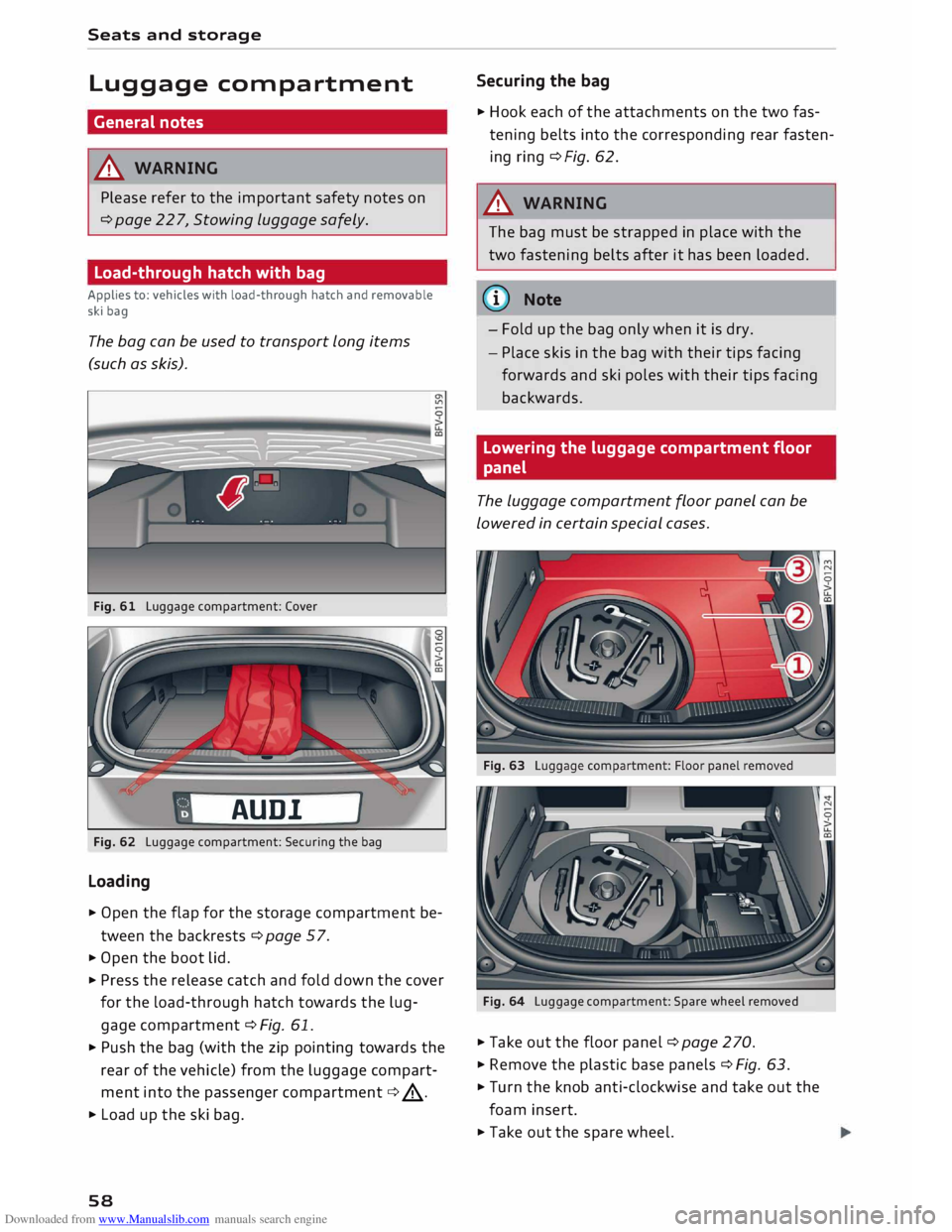
The bag can be used to transport Long items
(such as skis).
Fig. 61 Luggage compartment: Cover
AUD!
Fig. 62 Luggage compartment: Securing the bag
Loading
� Open the flap for the storage compartment be
tween the backrests ¢page 57.
� Open the boot lid.
� Press the release catch and fold down the cover
for the load-through hatch towards the lug
gage compartment ¢ Fig. 61.
� Push the bag (with the zip pointing towards the
rear of the vehicle) from the luggage compart
ment into the passenger compartment ¢.&_.
� Load up the ski bag.
58 Securing
the bag
� Hook each of the attachments on the two fas
tening belts into the corresponding rear fasten
ing ring ¢Fig. 62.
A WARNING
The bag must be strapped in place with the
two fastening belts after it has been loaded.
(D) Note
- Fold up the bag only when it is dry.
- Place skis in the bag with their tips facing
forwards and ski poles with their tips facing
backwards.
Lowering the luggage compartment floor
panel
The Luggage compartment floor panel can be
Lowered in certain special cases.
Fig. 64 Luggage compartment: Spare wheel removed
� Take out the floor panel ¢ page 270.
� Remove the plastic base panels ¢ Fig. 63.
� Turn the knob anti-clockwise and take out the
foam insert.
� Take out the spare wheel.
Page 73 of 306
Downloaded from www.Manualslib.com manuals search engine !START
E
NGIN E
STOP!
button. Put the selector
lever in position P; otherwise the vehicle can roll
away. If the lever is not in position P you will not
be able to lock the vehicle using the locking sen
sor on the door handle or the convenience key.
Starting the engine after a malfunction
If the remote control key battery is exhausted or
if radio interference or a system malfunction oc
curs, extra steps may be necessary in order to
start the engine.
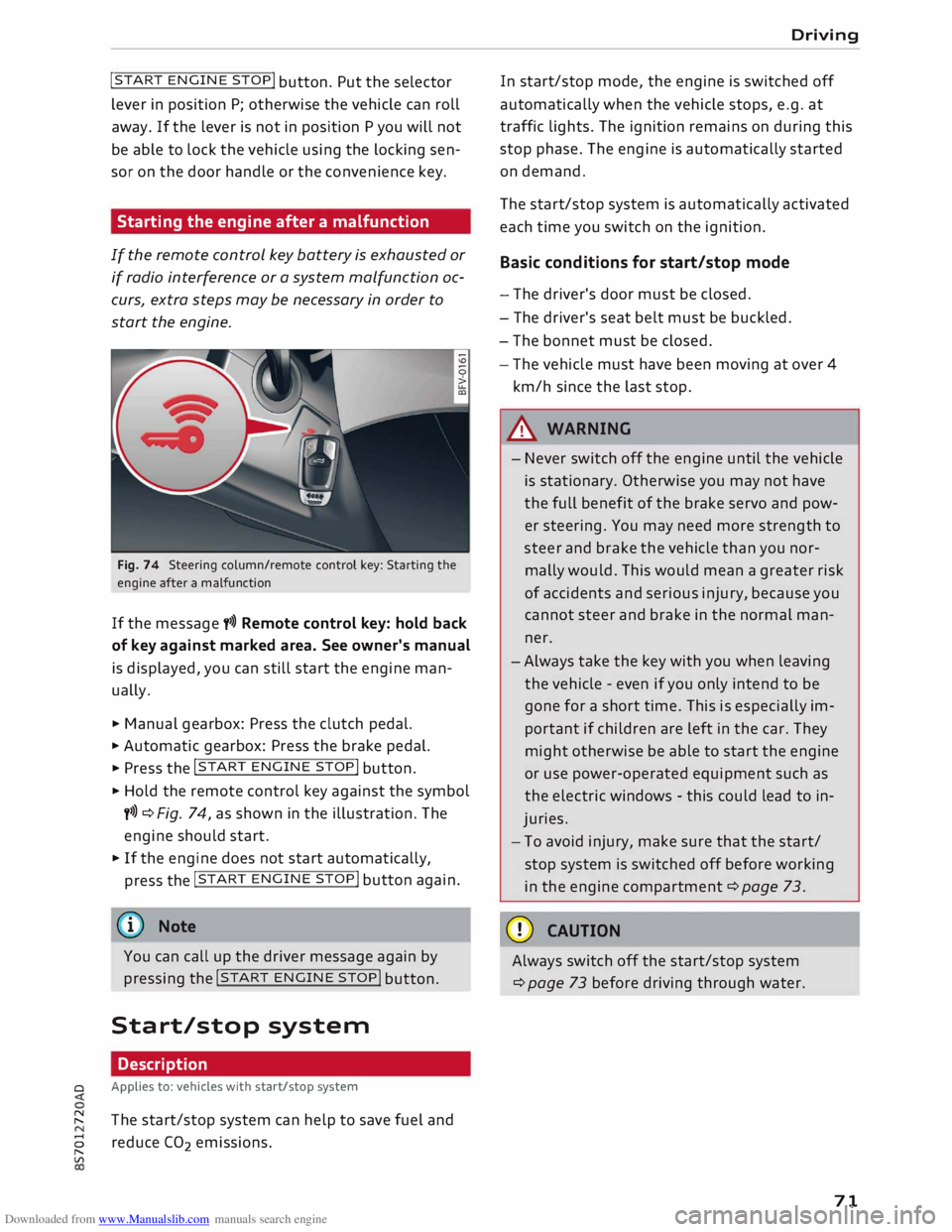
Fig. 74 Steering column/remote control key: Starting the
engine after a malfunction
If the message t>>) Remote control key: hold back
of key against marked area. See owner's manual
is displayed, you can still start the engine man
ually.
� Manual gearbox: Press the clutch pedal.
� Automatic gearbox: Press the brake pedal.
� Press the !START
ENGINE STOP!
button.
� Hold the remote control key against the symbol
y>>) ¢Fig. 74, as shown in the illustration. The
engine should start.
� If the engine does not start automatically,
press the !START
E
NGINE STOP!
button again.
@ Note
You can call up the driver message again by
pressing the !START
ENGINE STOP!
button.
Start/stop system Description
0 Applies
to: vehicles with start/stop system
� The start/stop system can help to save fuel and
8 reduce CO
2 emissions.
"
Vl Driving
In start/stop mode, the engine is switched off
automatically when the vehicle stops, e.g. at
traffic lights. The ignition remains on during this
stop phase. The engine is automatically started
on demand.
The start/stop system is automatically activated
each time you switch on the ignition.
Basic conditions for start/stop mode
- The driver's door must be closed.
- The driver's seat belt must be buckled.
- The bonnet must be closed.
- The vehicle must have been moving at over 4
km/h since the last stop.
A WARNING
- Never switch off the engine until the vehicle
is stationary. Otherwise you may not have
the full benefit of the brake servo and pow
er steering. You may need more strength to
steer and brake the vehicle than you nor
mally would. This would mean a greater risk
of accidents and serious injury, because you
cannot steer and brake in the normal man
ner.
- Always take the key with you when leaving
the vehicle -even if you only intend to be
gone for a short time. This is especially im
portant if children are left in the car. They
might otherwise be able to start the engine
or use power-operated equipment such as
the electric windows -this could lead to in
juries.
- To avoid injury, make sure that the start/
stop system is switched off before working
in the engine compartment ¢page 73.
CD CAUTION
Always switch off the start/stop system
¢page 73 before driving through water.
71
Page 75 of 306
Downloaded from www.Manualslib.com manuals search engine 0
N
,.....
N
......
0
,.....
Vl
CX) -
The engine has not yet reached the minimum
temperature required for start/stop mode.
- The interior temperature selected on the air
conditioner has not yet been reached.
- The exterior temperature is very high/Low.
- The windscreen is being defrosted @.
- The parking aid* or park assist* is switched on.
- The vehicle battery charge is too Low.
- The steering wheel is close to full Lock or the
vehicle is being steered.
- Reverse gear has just been selected.
- The vehicle is on a steep gradient.
� will appear in the infotainment display to in
dicate this status.
Engine cuts in again automatically
The stop phase is interrupted in the following sit
uations, for example. The engine cuts in auto
matically without intervention from the driver.
- The vehicle starts to roll (e.g. on a hill).
- The interior temperature deviates from the air
conditioner setting.
- The windscreen is being defrosted @.
- The brake pedal is pressed several times in suc-
cession.
- The vehicle battery charge drops to an insuffi-
cient level.
- The power consumption is high.
Ignition is switched off automatically
To prevent the vehicle battery from being dis
charged, the ignition will be switched off auto
matically if certain conditions are met. For in
stance:
- The vehicle has already been driven.
- The start/stop system has switched off the en-
gine.
- The driver's door is opened.
- The driver's seat belt is unbuckled.
- The brake pedal is not pressed.
- The vehicle is stationary.
If the dipped beam headlights are on when this
happens, the side lights will be turned on instead
and the message Side Lights will be automatical
ly switched off in 30 minutes. See owner's man
ual will appear on the infotainment display. After Driving
approx. 30 minutes, or when you Lock the vehicle,
the side lights will be switched off.
If the start/stop system has not stopped the en
gine or if you have switched off the start/stop
system manually, the engine will continue run
ning and the ignition will not be switched off au
tomatically¢,&..
A WARNING
Never run the engine in confined spaces. The
exhaust gases are toxic -risk of poisoning!
(© Note
If you select D, No r S (on vehicles with auto
matic gearbox) after selecting reverse gear,
the car must have been moving at over
10 km/h before the system can switch off the
engine again.
Switching the start/stop system off and on
manually
Applies to: vehicles with start/stop system
You can switch the system off manually if you
don't want to use it.
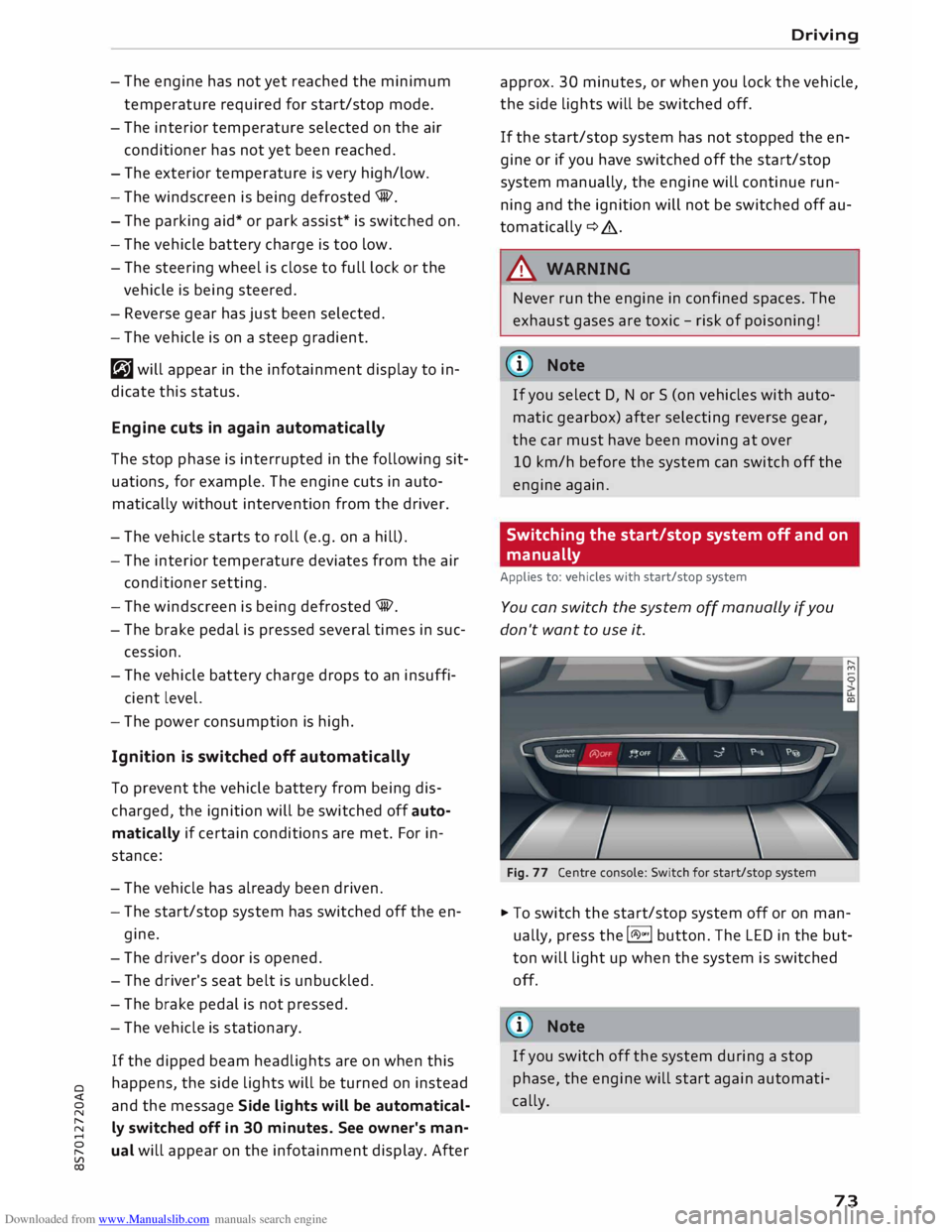
Fig. 77 Centre console: Switch for start/stop system
� To switch the start/stop system off or on man
ually, press the l(A)"'I button. The LED in the but
ton will light up when the system is switched
off.
@ Note
If you switch off the system during a stop
phase, the engine will start again automati
cally.
73