clock AUDI TT ROADSTER 2016 Owners Manual
[x] Cancel search | Manufacturer: AUDI, Model Year: 2016, Model line: TT ROADSTER, Model: AUDI TT ROADSTER 2016Pages: 306, PDF Size: 31.82 MB
Page 45 of 306
Downloaded from www.Manualslib.com manuals search engine 0
N
,.....
N
......
0
,.....
Vl
CX) ...
Use the screwdriver to remove the cover in the
centre of the soft top at the front ¢ Fig. 38.
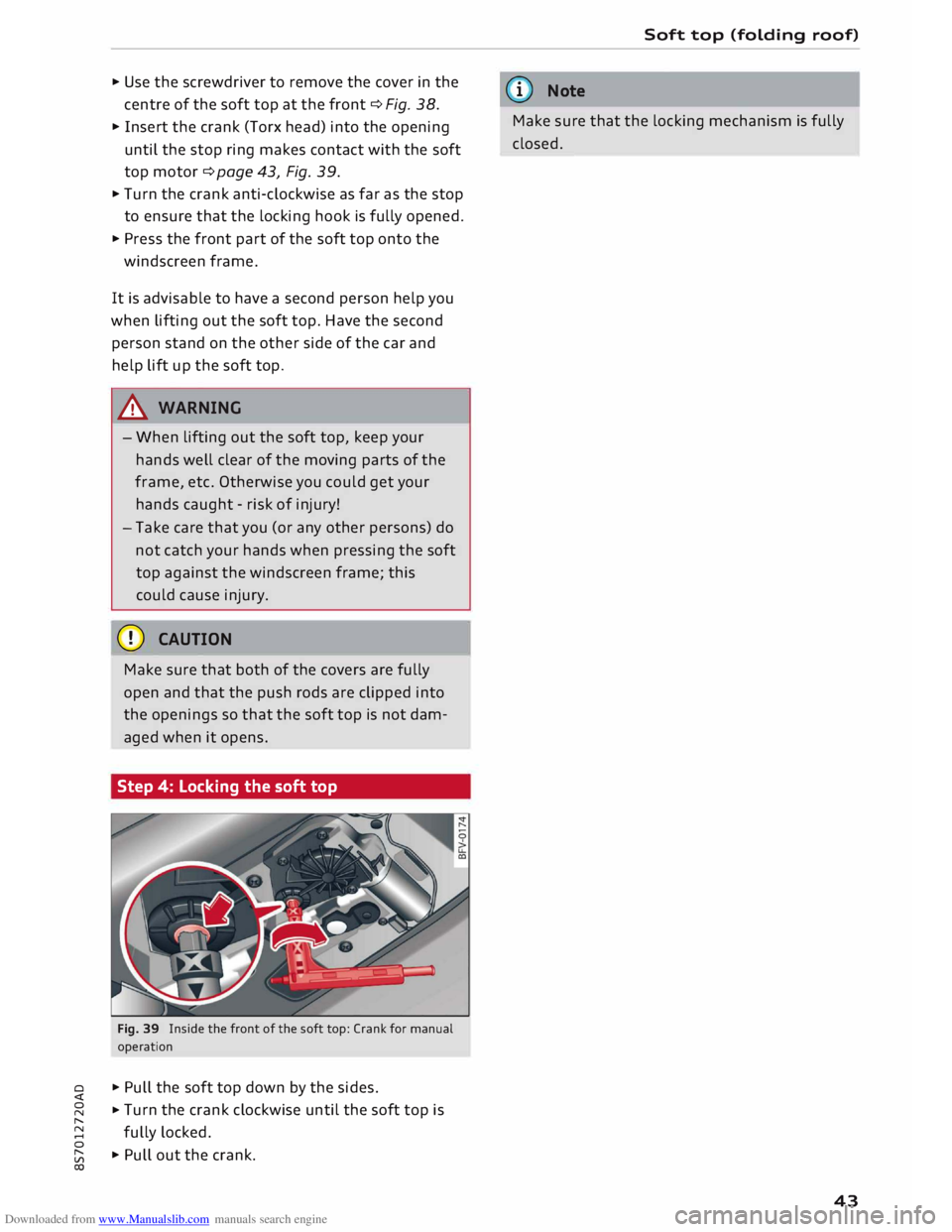
... Insert the crank (Torx head) into the opening
until the stop ring makes contact with the soft
top motor ¢ page 43, Fig. 39 .
... Turn the crank anti-clockwise as far as the stop
to ensure that the locking hook is fully opened .
... Press the front part of the soft top onto the
windscreen frame.
It is advisable to have a second person help you
when lifting out the soft top. Have the second
person stand on the other side of the car and
help lift up the soft top.
& WARNING
- When lifting out the soft top, keep your
hands well clear of the moving parts of the
frame, etc. Otherwise you could get your
hands caught -risk of injury!
- Take care that you (or any other persons) do
not catch your hands when pressing the soft
top against the windscreen frame; this
could cause injury.
CD CAUTION
Make sure that both of the covers are fully
open and that the push rods are clipped into
the openings so that the soft top is not dam
aged when it opens.
Step 4: Locking the soft top
Fig. 39 Inside the front of the soft top: Crank for manual
operation
... Pull the soft top down by the sides.
... Turn
the crank clockwise until the soft top is
fully locked.
... Pull out the crank. Soft
top (folding roof)
ijj) Note
Make sure that the locking mechanism is fully
closed.
43
Page 60 of 306
Downloaded from www.Manualslib.com manuals search engine Seats
and storage
Luggage compartment
General notes
A WARNING
Please refer to the important safety notes on
¢page 227, Stowing Luggage safely.
Load-through hatch with bag
Applies to: vehicles with load-through hatch and removable
ski bag
The bag can be used to transport Long items
(such as skis).
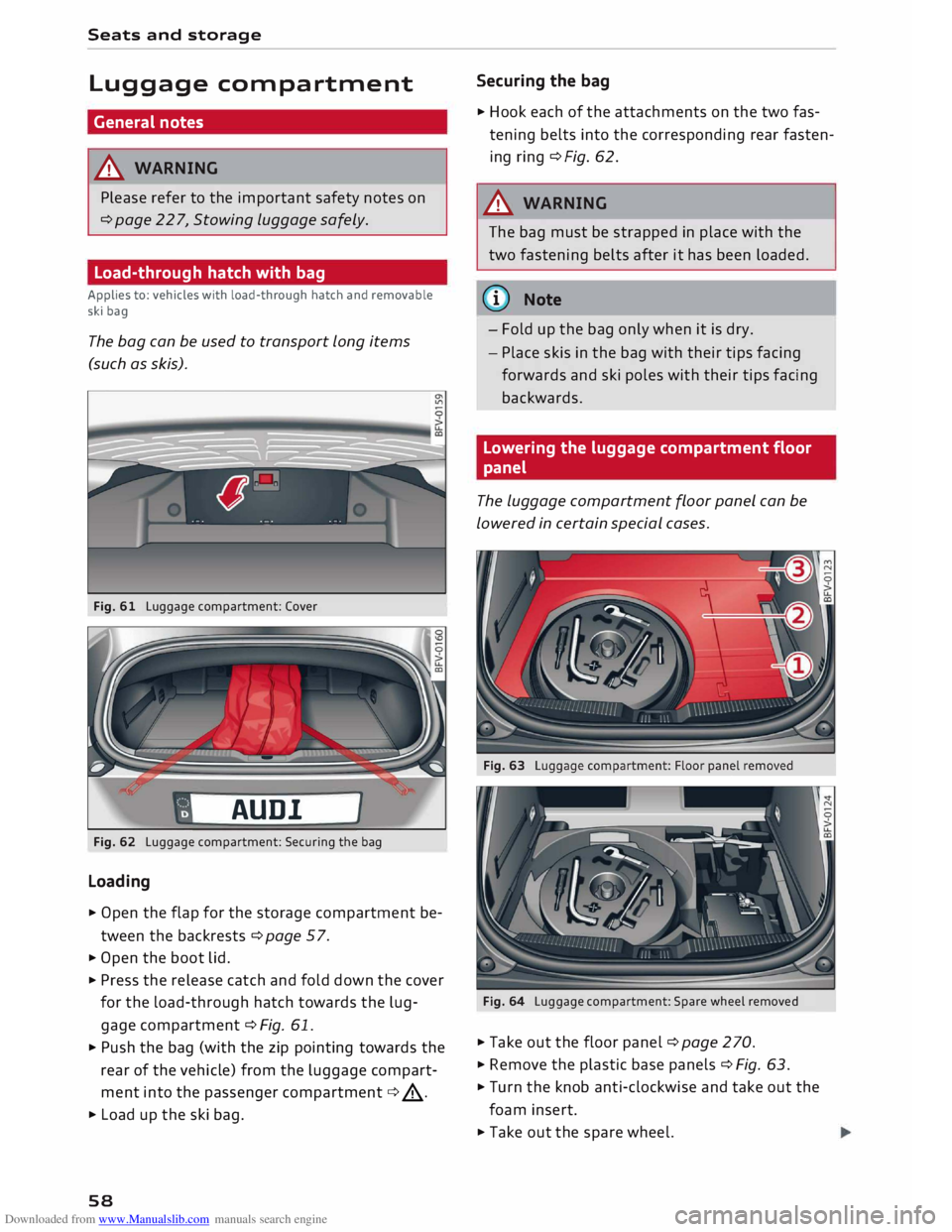
Fig. 61 Luggage compartment: Cover
AUD!
Fig. 62 Luggage compartment: Securing the bag
Loading
� Open the flap for the storage compartment be
tween the backrests ¢page 57.
� Open the boot lid.
� Press the release catch and fold down the cover
for the load-through hatch towards the lug
gage compartment ¢ Fig. 61.
� Push the bag (with the zip pointing towards the
rear of the vehicle) from the luggage compart
ment into the passenger compartment ¢.&_.
� Load up the ski bag.
58 Securing
the bag
� Hook each of the attachments on the two fas
tening belts into the corresponding rear fasten
ing ring ¢Fig. 62.
A WARNING
The bag must be strapped in place with the
two fastening belts after it has been loaded.
(D) Note
- Fold up the bag only when it is dry.
- Place skis in the bag with their tips facing
forwards and ski poles with their tips facing
backwards.
Lowering the luggage compartment floor
panel
The Luggage compartment floor panel can be
Lowered in certain special cases.
Fig. 64 Luggage compartment: Spare wheel removed
� Take out the floor panel ¢ page 270.
� Remove the plastic base panels ¢ Fig. 63.
� Turn the knob anti-clockwise and take out the
foam insert.
� Take out the spare wheel.
Page 61 of 306
Downloaded from www.Manualslib.com manuals search engine 0
N
,.....
N
......
0
,.....
Vl
CX) ...
Put the foam insert back in and tighten the
knob by turning it clockwise .
... Put the floor panel back in the luggage com
partment.
A WARNING
Please be aware that you will be unable to
drive the vehicle in the event of a flat tyre.
Note the relevant statutory regulations be
fore removing the spare wheel. Seats
and storage
59
Page 66 of 306
Downloaded from www.Manualslib.com manuals search engine Heating
and cooling
The seat heating has three levels. The heat level
is indicated by an LED.
... To switch on the seat heating, press the� but
ton once .
... To reduce the level, press the� button again .
... To switch off the seat heating, press the� but-
ton repeatedly until all the LEDs have gone out.
The seat heating automatically switches from
level 3 to level 2 after about 10 minutes.
When not to switch on the seat heating
Do not switch on the seat heating in the follow
ing situations:
- Seat is unused
- A protective cover is fitted on the seat
- A child seat is fitted on the seat
- The seat is damp or wet
A WARNING
People with limited capacity to feel pain or
sense temperature could burn themselves
when using the seat heating. These people
must not use the seat heating -risk of injury!
CD CAUTION
To avoid damaging the heating elements of
the seat heating, please do not kneel on the
seat or apply sharp pressure at a single point.
Note
- The setting for the driver's seat heating is
assigned to the key in use.
- If the passenger's seat heating was on when
you last switched off the ignition, it will be
switched on automatically only if the igni
tion is switched on again within 10 minutes.
64 Neck
heating
Applies to: vehicles with neck heating
The neck heating works when the engine is run
ning.
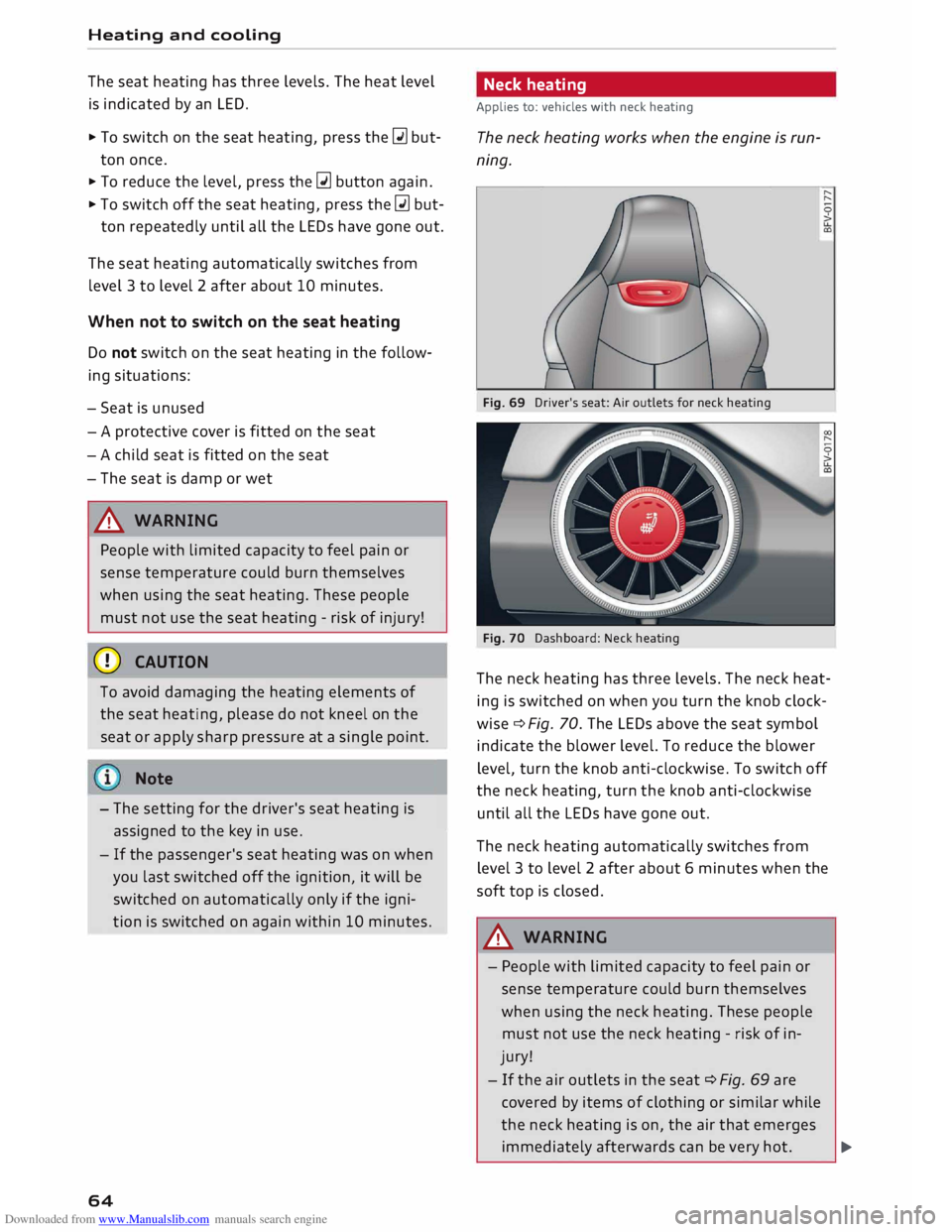
Fig. 69 Driver's seat: Air outlets for neck heating
Fig. 70 Dashboard: Neck heating
The neck heating has three levels. The neck heat
ing is switched on when you turn the knob clock
wise ¢ Fig. 70. The LEDs above the seat symbol
indicate the blower level. To reduce the blower
level, turn the knob anti-clockwise. To switch off
the neck heating, turn the knob anti-clockwise
until all the LEDs have gone out.
The neck heating automatically switches from
level 3 to level 2 after about 6 minutes when the
soft top is closed.
A WARNING
- People with limited capacity to feel pain or
sense temperature could burn themselves
when using the neck heating. These people
must not use the neck heating -risk of in
jury!
- If the air outlets in the seat ¢ Fig. 69 are
covered by items of clothing or similar while
the neck heating is on, the air that emerges
immediately afterwards can be very hot.
..,
Page 173 of 306
Downloaded from www.Manualslib.com manuals search engine 0
N
,.....
N
......
0
,.....
Vl
CX) the
Enter destination menu c::> page 169,
Fig. 153.
Entering an address
Applies to: vehicles with navigation system
� Press the I NAV/MAPI
button repeatedly until
the Enter destination menu is displayed
c:>page 169, Fig. 153.
� Select: left control button> Enter address.
- Select and confirm a line (e.g. Street, House
number or Country) and enter the data you
wish to use.
- Select and confirm Start route guidance.
Setting a destination from the map
Applies to: vehicles with navigation system
A Location on the map can be set as a destina
tion.
� Press the I NAV/MAP!
button repeatedly until
the map is displayed.
- To set a convenient map scale: Turn the rotary
pushbutton anti-clockwise or clockwise to
change the map scale.
- To activate the crosshairs: Press the rotary
pushbutton. The crosshairs will appear on the
map.
-To move the crosshairs: Use the MMI touch pad
to move the crosshairs to the destination.
- To use the destination for route guidance:
Press the rotary pushbutton when the cross
hairs are displayed. If you wish to set a stop
over, select and confirm Set as stopover and
then Start route guidance.
- To hide the crosshairs: Press the I BACK!
button.
Additional information on the point selected
with the crosshairs: If you use the crosshairs to
preselect a location on the map, any existing in
formation on this location (e.g. town name or
special destinations) will be displayed ®
c:>page 178, Fig. 159. Navigation
Using home address/favourite as the
destination
Applies to: vehicles with navigation system
The home address option is a quick and easy way
to have the system guide you home. The favour
ites make it easier to access destinations you re
quire regularly.
� Press the I NAV/MAP!
button repeatedly until
the Enter destination menu is displayed
c:>page 169, Fig. 153.
Using the home address as the dest ination
Important: A home address must have been stor
ed c::> page 175.
Your home address is displayed in the Enter des
tination menu@c:>page 169, Fig. 153.
- Select and confirm the home address.
- Select and confirm Start route guidance.
Using a favourite as the dest ination
Important: At least one destination must have
been stored as a favourite c::> page 175.
- Enter one or more letters in the entry field for
the search function. The favourites found will
be shown on the infotainment display and
marked with the corresponding symbol@
c:>page 169, Fig. 153.
- Select and confirm the desired favourite.
- Select and confirm Start route guidance.
@ Note
- Further home address settings can be found
on c:>page 175.
- Further favourites settings can be found on
c:>page 175.
171
Page 180 of 306
Downloaded from www.Manualslib.com manuals search engine Navigation
You can use the rotary pushbutton to preselect
the possible alternative routes and have them
displayed on the map. Select and confirm the
Map How to use the map
Applies to: vehicles with navigation system
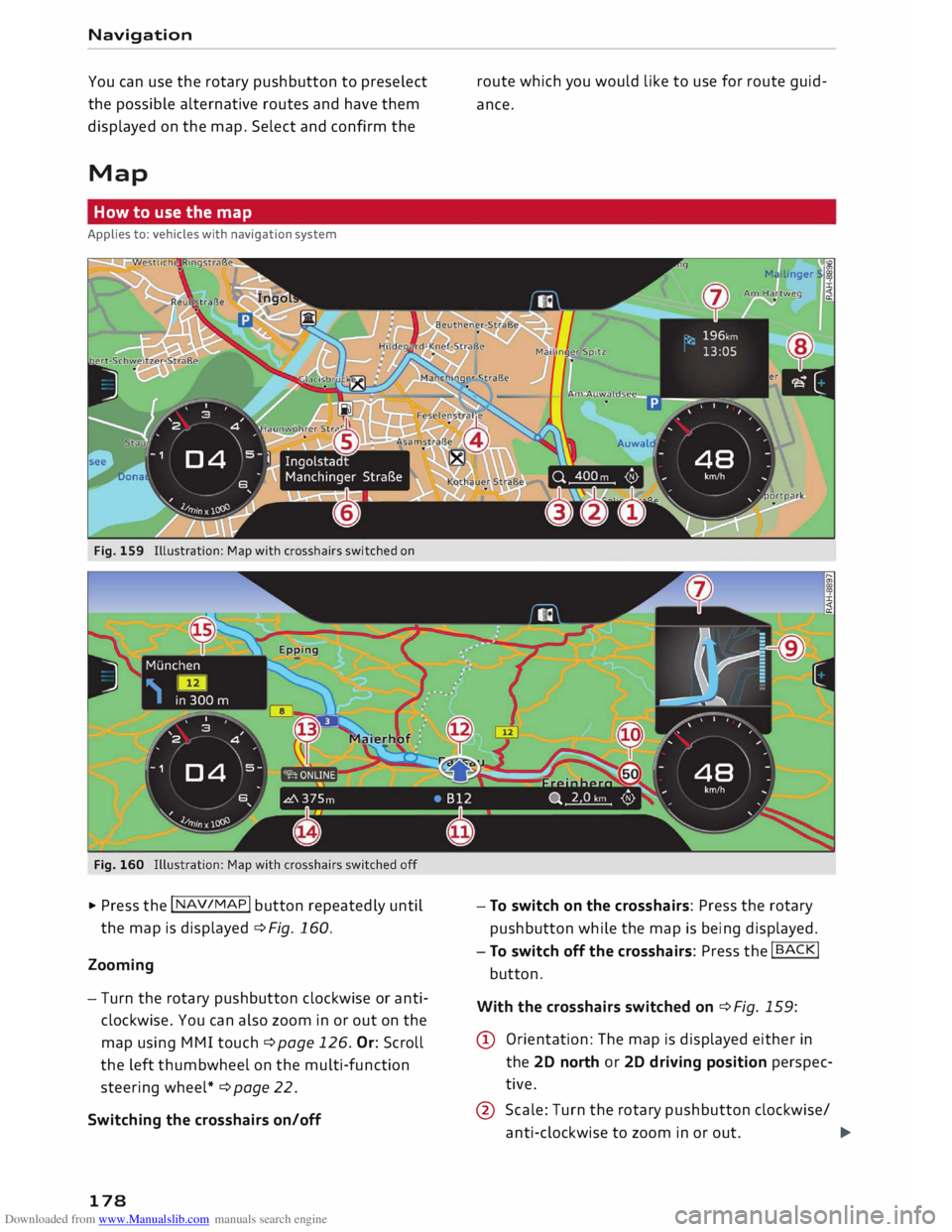
Fig. 159 Illustration: Map with crosshairs switched on
Fig. 160
� Press the I NAV /MAP
I button
repeatedly until
the map is displayed ¢Fig. 160.
Zooming
- Turn the rotary pushbutton clockwise or anti
clockwise. You can also zoom in or out on the
map using MMI touch ¢ page 126. Or: Scroll
the left thumbwheel on the multi-function
steering wheel* ¢page 22.
Switching the crosshairs on/off
178 route
which you would like to use for route guid
ance.
- To switch on the crosshairs: Press the rotary
pushbutton while the map is being displayed.
- To switch off the crosshairs: Press the
I BACK!
button.
With the crosshairs switched on ¢Fig. 159:
@ Orientation: The map is displayed either in
the 2D north or 2D driving position perspec
tive.
@ Scale: Turn the rotary pushbutton clockwise/
anti-clockwise to zoom in or out.
�
Page 188 of 306
Downloaded from www.Manualslib.com manuals search engine Radio
The following options may be available to you de
pending on the waveband:
- Sound settings: Refer to ¢ page 217.
- Store as favourite: Refer to¢ page 188, Fa-
vourites.
- Tag this song for iTunes*: 1
>2
> Connect your Ap
ple device to the Audi music interface*. Select
and confirm Tag this song for iTunes. The track
that is currently playing will be copied to your
Apple device. Synchronise your Apple device
with iTunes. The next time you call up your
iTunes library, the tagged tracks will be dis
played. If no Apple device is connected, the
tagged tracks will be stored temporarily on the
MMI system (max. 50 tracks). As soon as you
connect your Apple device to the Audi music in
terface, the tags will be imported to the device.
- Programme guide:3
>
The current and next radio
programmes are listed in the digital pro
gramme guide for all supported stations. Se
lect and confirm a radio programme to have
more details on the programme displayed.
- Manual station search:4
>
The frequency bar is
displayed. Select and confirm the desired fre
quency.
- Seek: 5
>
The previous/next receivable frequency
will be set.
- Radio settings: Refer to¢ page 188.
Announcements
"" Select: I RADIO! button> right control button>
Announcements.
Traffic announcements: 6
)
- off: Traffic announcements are not played.
- FM: Traffic announcements can be received via
FM and played by the system irrespective of the
selected waveband.
l l
This function is only available in the Mexican market.
2 l
Still under development at the time of print.
3 l
Not in the FM, AM station lists
4 l
Not in the DAB* waveband or in the mixed FM/DAB* sta
tion list.
S l
Not in the mixed station list FM/DAB*
6 l
This function is not available in the Mexican market.
186 -
FM/DAB*: You receive traffic announcements
from both wavebands. If DAB traffic announce
ments are not available from the station cur
rently set, they will be received from the FM
waveband.
DAB announcements*: 6
)
Depending on station availability, information
(e.g. news, weather information) may be played
when the function � is switched on.
Volume of announcements: 6
)
Refer to¢ page 218, Announcements.
Radio text
"" Select: I RADIO I
button > left control button > a
waveband (e.g. FM)> a station.
""Select: right control button > Radio text.
To browse radio text entries: Turn the rotary
pushbutton clockwise or anti-clockwise.
Important: A radio text entry must be displayed,
and the station must be transmitting a telephone
number, navigation destination or a text mes
sage number as RadioText Plus information.
If a location, telephone number or text message
number has been stored for a radio text entry,
the entry will be displayed with a coloured frame.
The following options are available:
Call*/Start route guidance*/Write text mes
sage*:
- Select a radio text entry with Radio Text Plus in
formation and press the rotary pushbutton.
- Select and confirm Call*/Start route guid
ance*/Write text message*. Or: Press the
I BACK
I button to cancel the process.
Page 219 of 306
Downloaded from www.Manualslib.com manuals search engine 0
N
,.....
N
......
0
,.....
Vl
CX) Note
- The On-board Handbook is not available in
all countries. Your Audi dealer will be able
to provide you with more detailed informa
tion.
- Switch off the ignition while you are instal
ling/updating the On-board Handbook.
- Please note that the On-board Handbook is
not a substitute for the printed Owner's
Manual.
Sound settings
You can adjust the sound and volume of the MMI
individually. The settings depend on the equip
ment fitted in your vehicle.
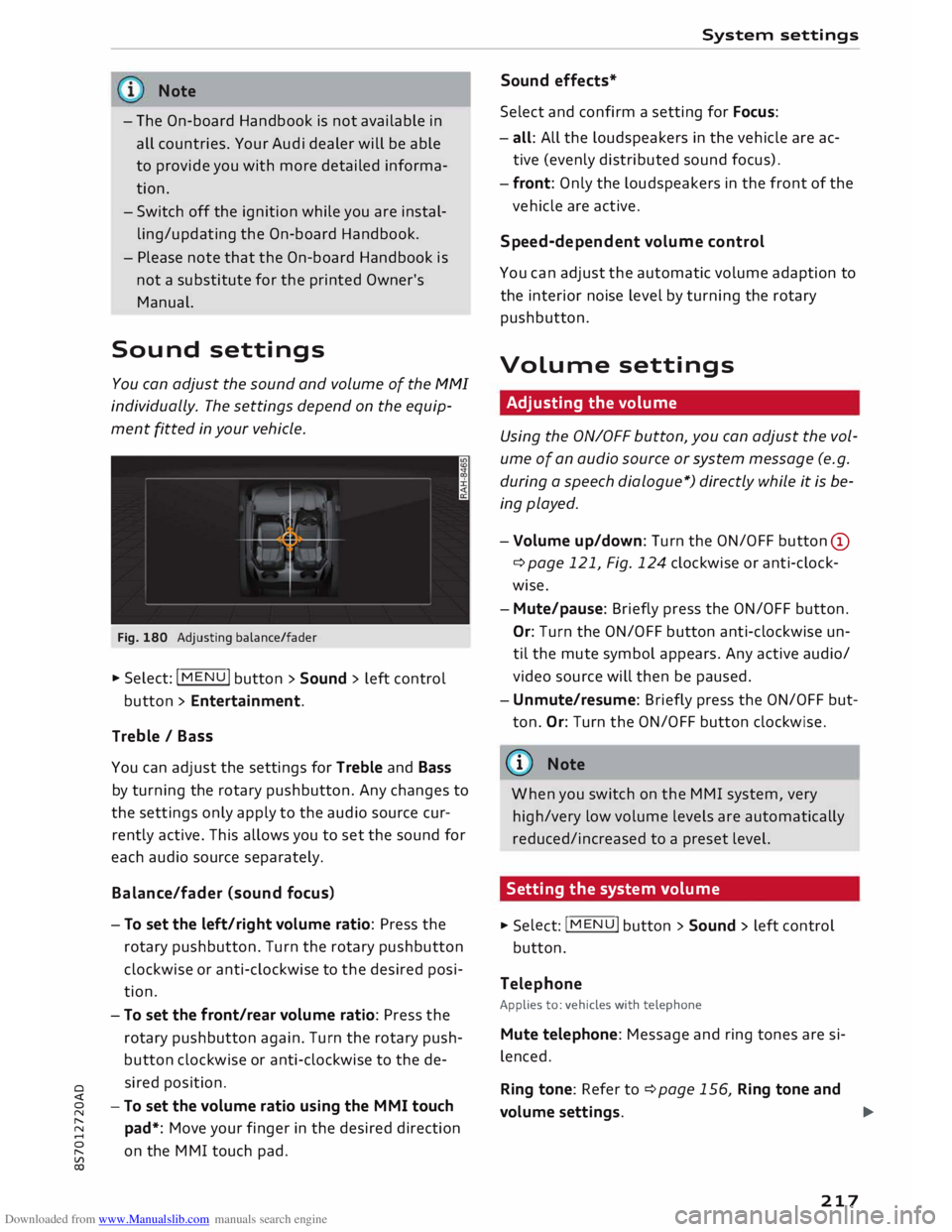
Fig. 180 Adjusting balance/fader
� Select: IM
E
N
u I button > Sound > left control
button > Entertainment.
Treble / Bass
You can adjust the settings for Treble and Bass
by turning the rotary pushbutton. Any changes to
the settings only apply to the audio source cur
rently active. This allows you to set the sound for
each audio source separately.
Bala nce/fader (sound focus)
- To set the left/right volume ratio: Press the
rotary pushbutton. Turn the rotary pushbutton
clockwise or anti-clockwise to the desired posi
tion.
- To set the front/rear volume ratio: Press the
rotary pushbutton again. Turn the rotary push
button clockwise or anti-clockwise to the de
sired position.
-To set the volume ratio using the MMI touch
pad*: Move your finger in the desired direction
on the MMI touch pad. System
settings
Sound effects*
Select and confirm a setting for Focus:
- all: All the loudspeakers in the vehicle are ac
tive (evenly distributed sound focus).
- front: Only the loudspeakers in the front of the
vehicle are active.
Speed-d ependent volume control
You can adjust the automatic volume adaption to
the interior noise level by turning the rotary
pushbutton.
Volume settings
Adjusting the volume
Using the ON/OFF button, you can adjust the vol
ume of an audio source or system message (e.g.
during a speech dialogue*) directly while it is be
ing played.
- Volume up/down: Turn the ON/OFF button (D
¢ page 121, Fig. 124 clockwise or anti-clock
wise.
- Mute/pause: Briefly press the ON/OFF button.
Or: Turn the ON/OFF button anti-clockwise un
til the mute symbol appears. Any active audio/
video source will then be paused.
- Unmute/resume: Briefly press the ON/OFF but
ton. Or: Turn the ON/OFF button clockwise.
{a)) Note
When you switch on the MMI system, very
high/very low volume levels are automatically
reduced/increased to a preset level.
Setting the system volume � Sele
ct:
IMENU! button > Sound > left control
button.
Telephone
Applies to: vehicles with telephone
Mute telephone: Message and ring tones are si
lenced.
Ring tone: Refer to ¢page 156, Ring tone and
volume settings.
..,.
217
Page 224 of 306
Downloaded from www.Manualslib.com manuals search engine Safe
driving
-Adjust the driver's seat and steering wheel
so there is a distance of at least 25 cm be
tween your breastbone and the centre of the
steering wheel¢ Fig. 182.
- While driving, always hold the steering
wheel with both hands on the outside of the
rim at about the 9 o'clock and 3 o'clock posi
tion. This reduces the risk of injury if the
driver's airbag inflates.
- Never hold the steering wheel at the 12
o'clock position, or with your hands inside
the rim or on the steering wheel hub. This
could result in serious injuries to the arms,
hands and head if the driver's airbag in
flates.
- To reduce any risk of injury to the driver dur
ing a sudden brake application or in an acci
dent, never drive with the backrest tilted
too far back. The airbag system and seat
belts can only provide proper protection
when the backrest is in an upright position
and the driver is wearing the seat belt in the
correct position. The further the backrest is
tilted back, the greater the risk of injury due
to incorrect positioning of the belt webbing
or an incorrect sitting position.
Correct position for the passenger
The front seat passenger must sit at least 25 cm
away from the dash panel so that the airbag has
enough room to inflate and give maximum pro
tection in an accident.
For your own safety and to reduce the risk of in
jury in the event of an accident, we recommend
adjusting the passenger's seat as follows:
"" Adjust the backrest to an upright position so
that your back remains in contact with the up
holstery.
"" Keep both feet in the footwell in front of the
seat.
"" Fasten your seat belt correctly ¢ page 232.
In exceptional cases you can disable the pas
senger's airbag via the key-operated switch*
¢page 237.
222 For
detailed information on how to adjust the
passenger's seat, see ¢ page 54, Front seats.
A WARNING
A passenger who is not sitting in the correct
position or who is not wearing a seat belt can
be fatally injured if the airbag is triggered.
-Adjust the passenger's seat so there is a dis-
tance of at least 25 cm between your
breastbone and the dash panel.
- Always keep your feet on the floor when the
vehicle is moving; never rest them on the in
strument panel, out of the window or on the
seat. If you sit in an incorrect position, you
increase your risk of injury in the event of
sudden braking or an accident. If the airbag
is triggered, you could sustain potentially
fatal injuries by sitting out of position.
- To reduce the risk of injury to the passenger
in the case of sudden braking or an accident,
the passenger should never travel in a mov
ing vehicle with the backrest reclined. The
airbag system and seat belt can only provide
proper protection when the backrest is in an
upright position and the passenger is wear
ing the seat belt in the correct position. The
further the backrest is tilted back, the
greater the risk of injury due to incorrect po
sitioning of the belt webbing or an incorrect
sitting position.
Examples of incorrect seating positions
Occupants can suffer severe or fatal injuries if
they sit in an incorrect position while the vehicle
is moving.
Seat belts can only provide maximum protection
if the belt webbing is positioned correctly. Sitting
out of position greatly reduces the effectiveness
of the seat belts and increases the risk of injury
since the belt webbing is not worn in the position
for which it is designed. The driver is responsible
for the safety of all vehicle occupants, especially
for children.
"" Never allow anyone to sit out of position while
the vehicle is moving ¢,&. . ..,.
Page 251 of 306
Downloaded from www.Manualslib.com manuals search engine 0
N
,.....
N
......
0
,.....
Vl
CX) Cooling
system
Coolant
The engine cooling system is filled at the factory
with a mixture of conditioned water and coolant
additive. This coolant must not be changed.
The coolant level is monitored by a warning lamp
• ¢page 14. However, we recommend that it
should be checked occasionally.
If you do need to top up the coolant, use a mix
ture of water and coolant additive. We recom
mend mixing coolant additive with distilled wa
ter.
Coolant additive
The coolant additive contains anti-freeze and cor
rosion protection agent. Only use one of the fol
lowing coolant additives. It is possible to mix
these additives.
Coolant additive Specification
G13 TL 774
J
G12++ TL 774 G
The amount of coolant additive which needs to
be mixed with the water depends on the temper
atures to be expected in the winter season. If the
anti-freeze concentration is too low, the coolant
can freeze and cause engine damage.
Cool ant addi· Frost protec-
tive tion
Hot regions min. 40%,
min. -25 °C
max. 45%
Cold regions
min. 50%, max. -40 °C
max. 55%
CD CAUTION
- Have your qualified workshop check the
cooling system before the winter season to
make sure that the anti-freeze concentra
tion is adequate for the conditions to be ex
pected. This applies particularly if you drive
into a colder climate zone.
- To prevent damage to the engine, do not
use a different type of anti-freeze additive if
the approved type of additive is not availa- Checking
and topping up fluids
ble. In this case use only water and bring
the coolant concentration back up to the
correct level as soon as possible by putting
in the specified additive.
-Always top up with fresh, unused coolant.
- Radiator sealants must not be added to the
coolant.
Topping up coolant
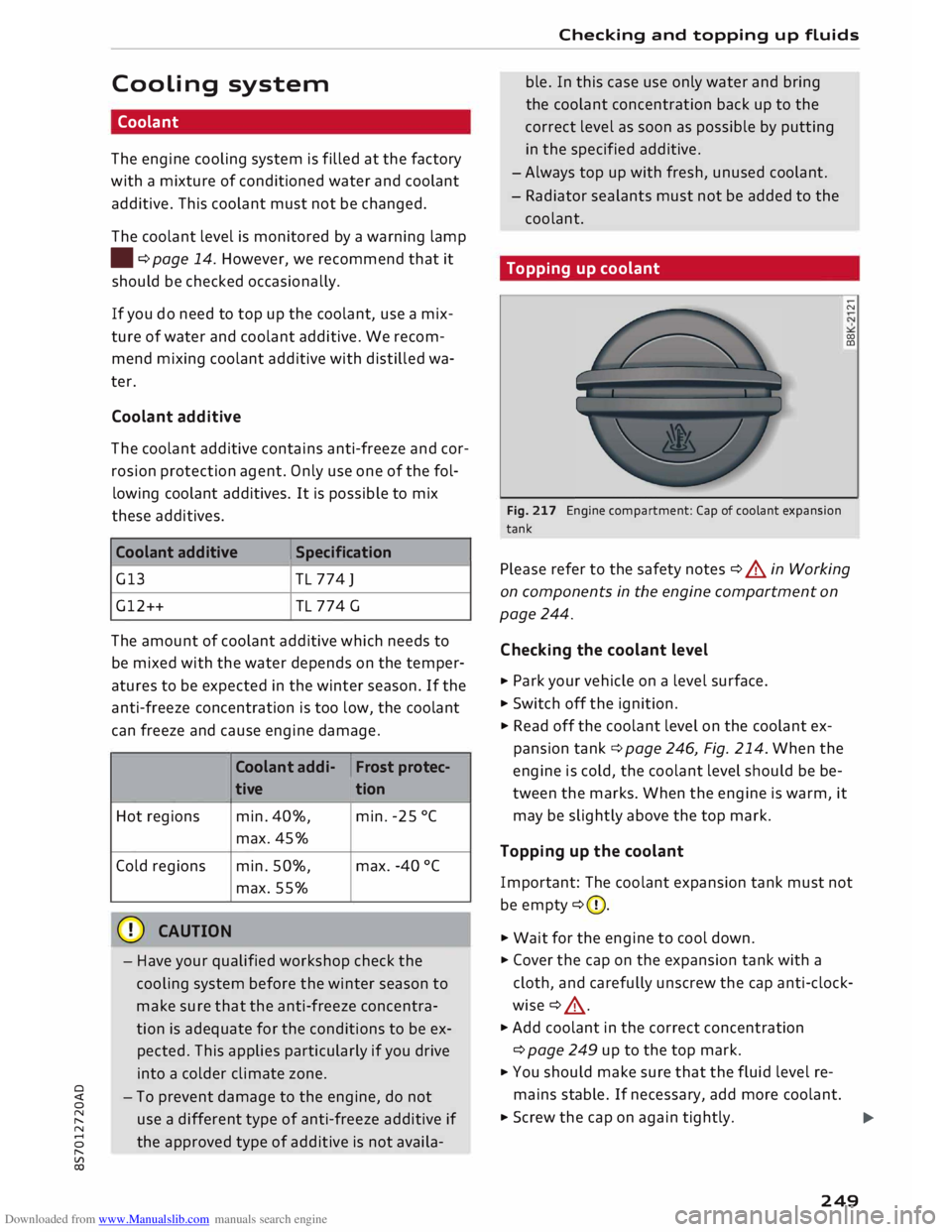
Fig. 217 Engine compartment: Cap of coolant expansion
tank ;:::;
co
CD
Please refer to the safety notes ¢ A in Working
on components in the engine compartment on
page 244.
Checking the coolant level
... Park your vehicle on a level surface.
.,.. Switch off the ignition.
.,.. Read
off the coolant level on the coolant ex
pansion tank¢ page 246, Fig. 214. When the
engine is cold, the coolant level should be be
tween the marks. When the engine is warm, it
may be slightly above the top mark.
Topping up the coolant
Important: The coolant expansion tank must not
be empty ¢(D.
.,.. Wait for the engine to cool down .
.,.. Cover the cap on the expansion tank with a
cloth, and carefully unscrew the cap anti-clock
wise ¢ ,& .
.,.. Add coolant in the correct concentration
¢ page 249 up to the top mark.
... You should make sure that the fluid level re
mains stable. If necessary, add more coolant.
... Screw the cap on again tightly.
IJi-
249