fuel pressure AUDI TT ROADSTER 2016 Owners Manual
[x] Cancel search | Manufacturer: AUDI, Model Year: 2016, Model line: TT ROADSTER, Model: AUDI TT ROADSTER 2016Pages: 306, PDF Size: 31.82 MB
Page 6 of 306
Downloaded from www.Manualslib.com manuals search engine Table
of Contents
Audi smartphone interface . . . . . . 210
Setting up.......................... 210
How to use . . . . . . . . . . . . . . . . . . . . . . . . . 211
Troubleshooting..................... 211
System settings .................. 212
Setting the time and date . . . . . . . . . . . . .
212
MMI settings . . . . . . . . . . . . . . . . . . . . . . .
212
Connection manager . . . . . . . . . . . . . . . . .
213
System update . . . . . . . . . . . . . . . . . . . . . .
216
On-board Handbook.................. 216
Sound settings . . . . . . . . . . . . . . . . . . . . . .
217
Volume settings ..................... 217
Restarting the MMI system (Reset) . . . . . 218
Notes on software licences 218
Safety ............................ 220
Safe driving . . . . . . . . . . . . . . . . . . . . . . 220
General notes . . . . . . . . . . . . . . . . . . . . . . .
220
Correct sitting positions . . . . . . . . . . . . . . 221
Child seats . . . . . . . . . . . . . . . . . . . . . . . . .
223
Securing a child seat . . . . . . . . . . . . . . . . .
225
Pedal area . . . . . . . . . . . . . . . . . . . . . . . . . . 226
Stowing luggage safely . . . . . . . . . . . . . . .
227
Pedestrian protection system . . . . . . . . . . 228
Seat belts . . . . . . . . . . . . . . . . . . . . . . . .
230
Why is it so important to use seat belts? . 230
Forces acting in a collision . . . . . . . . . . . . .
231
How to wear seat belts properly . . . . . . . .
232
Belt tensioners . . . . . . . . . . . . . . . . . . . . . .
234
Airbag system . . . . . . . . . . . . . . . . . . . . 235
Description of airbag system . . . . . . . . . . .
235
Front airbags . . . . . . . . . . . . . . . . . . . . . . .
236
Side airbags . . . . . . . . . . . . . . . . . . . . . . . .
239
Service and care . . . . . . . . . . . . . . . . . . 241
Checking and topping up fluids . 241
Fuel . . . . . . . . . . . . . . . . . . . . . . . . . . . . . . . 241
Filling the tank . . . . . . . . . . . . . . . . . . . . . . 242
Emission control systems . . . . . . . . . . . . . 244
Engine compartment . . . . . . . . . . . . . . . . . 244
Engine oil . . . . . . . . . . . . . . . . . . . . . . . . . .
247
Cooling system . . . . . . . . . . . . . . . . . . . . . .
249
Brake fluid . . . . . . . . . . . . . . . . . . . . . . . . .
250
Battery . . . . . . . . . . . . . . . . . . . . . . . . . . . .
250
4 Windscreen
washer . . . . . . . . . . . . . . . . . .
252
Service interval display . . . . . . . . . . . . . . .
252
Wheels ........................... 254
Tyres and rims . . . . . . . . . . . . . . . . . . . . . .
254
Tyre pressure loss indicator . . . . . . . . . . . . 258
Tyre pressure monitoring system . . . . . . .
260
Care of vehicle and cleaning . . . . .
263
General notes . . . . . . . . . . . . . . . . . . . . . . .
263
Washing the vehicle . . . . . . . . . . . . . . . . . .
263
Notes on cleaning and care . . . . . . . . . . . . 264
Taking the vehicle out of service . . . . . . . . 268
Self-help . . . . . . . . . . . . . . . . . . . . . . . . .
269
Mobility . . . . . . . . . . . . . . . . . . . . . . . . . . 269
General notes . . . . . . . . . . . . . . . . . . . . . . .
269
Equipment . . . . . . . . . . . . . . . . . . . . . . . . .
269
Tyre repair kit . . . . . . . . . . . . . . . . . . . . . . .
270
Changing a wheel . . . . . . . . . . . . . . . . . . . .
272
Spare wheel . . . . . . . . . . . . . . . . . . . . . . . .
276
Jump-starting . . . . . . . . . . . . . . . . . . . . . . .
277
Tow-starting / towing away. . . . . . . . . . . . 278
Fuses and bulbs . . . . . . . . . . . . . . . . . .
282
Fuses.............................. 282
Bulbs.............................. 284
Accessories and technical data . . 285
Accessories and modifications
to the vehicle . . . . . . . . . . . . . . . . . . . . . 285
Accessories, replacement parts and
repairs . . . . . . . . . . . . . . . . . . . . . . . . . . . . 285
Modifications . . . . . . . . . . . . . . . . . . . . . . . 285
Radio transmitters and business
equipment . . . . . . . . . . . . . . . . . . . . . . . . . 286
Technical data . . . . . . . . . . . . . . . . . . . . 287
Vehicle identification
data . . . . . . . . . . . . . 287
Explanation of technical data . . . . . . . . . . 287
Dimensions . . . . . . . . . . . . . . . . . . . . . . . . . 288
Capacities . . . . . . . . . . . . . . . . . . . . . . . . . . 288
Weights . . . . . . . . . . . . . . . . . . . . . . . . . . .
288
Engine data . . . . . . . . . . . . . . . . . . . . . . . .
289
Index ............................. 290
Page 8 of 306
Downloaded from www.Manualslib.com manuals search engine FAQs
FAQs
Before you set off
- How do I adjust the seats? ¢ page 54.
- How do I adjust the steering wheel?
¢page 68.
- How does the selector lever for the automatic
gearbox work? ¢ page 77.
- How does the electro-mechanical parking brake
work? ¢page 74.
- How do I adjust the exterior mirrors?
¢page 48.
- How do I refuel my vehicle? ¢ page 242.
- How do
I operate
the windscreen wipers on
vehicles with rain sensor? ¢ page 50.
- Where is the windscreen washer container?
¢page 246.
- How can I store the tyre pressures?
¢page 259 or ¢page 261.
Breakdowns and
emergencies
- How do I jump-start the vehicle? ¢page 277.
- Where can I find the warning triangle?
¢page 269.
- Where can I find the first-aid kit? ¢ page 269.
- Where can I find the recommended tyre pres-
sures? ¢ page 256.
- Which airbags are installed in my vehicle?
¢page 235.
- Where are the towline anchorages on the vehi
cle? ¢page 278.
- How can I release the tank flap manually?
¢page 244.
Useful functions
- How can I use the parking aid?¢ page 103.
- How do I operate the main beam assist for the
headlights? ¢ page 46.
- How can I drive off more easily? ¢ page 76,
Driving off with the hold assist.
- How can I stay in my lane more easily?
6 ¢
page 92, Audi active lane assist (lane de
parture warning feature). -
How can I check the blind spot more easily
when changing lanes? ¢page 97, Audi side
assist (lane change assist feature).
- How can I adjust the brightness of the instru
ment and display lighting? ¢ page 48.
- How can I change the vehicle set-up in different
driving situations depending on my personal
mood and driving style? ¢page 100, Audi
drive select (vehicle set-up functions).
Using the infotainment
system
- How do I switch on the infotainment system
and adjust the volume? ¢ page 121.
- How do
I navigate
through the infotainment
menus? ¢ page 122, How to use the MMI.
- How can I enter letters and numbers by hand
writing? ¢ page 124, MMI touch.
- How do I use the search function on the info
tainment system?¢ page 129, Search func
tion.
- How do I operate the infotainment system by
voice? ¢ page 133.
- Which functions can I control using the buttons
on the steering wheel?¢ page 21, Multi
function steering wheel plus.
- How do I set the date and time? ¢ page 212.
Communication
- How can I connect my mobile phone to the
handsfree telephone system? ¢ page 142.
- How can I charge my mobile phone battery
without a cable? ¢ page 146, Using the Audi
phone box.
- How can I control certain apps on my smart
phone via the infotainment system?
¢ page 210, Audi smartphone interface.
- How can I call up information online?
¢ page 159, Audi connect.
- How can I use the Wi-Fi hotspot?¢ page 165.
Navigation
- What ways are there to enter a navigation des-
tination? ¢ page 170.
�
Page 13 of 306
Downloaded from www.Manualslib.com manuals search engine 0
N
,.....
N
......
0
,.....
Vl
CX) Instruments
and warning/indicator lamps
The tank capacity of your vehicle is given in the
Technical data section ¢ page 288.
CD CAUTION
Never run the tank completely dry. If there is
an irregular fuel supply, misfiring can occur.
Unburnt fuel can then enter the exhaust sys
tem. This can lead to overheating and dam
age to the catalytic converter.
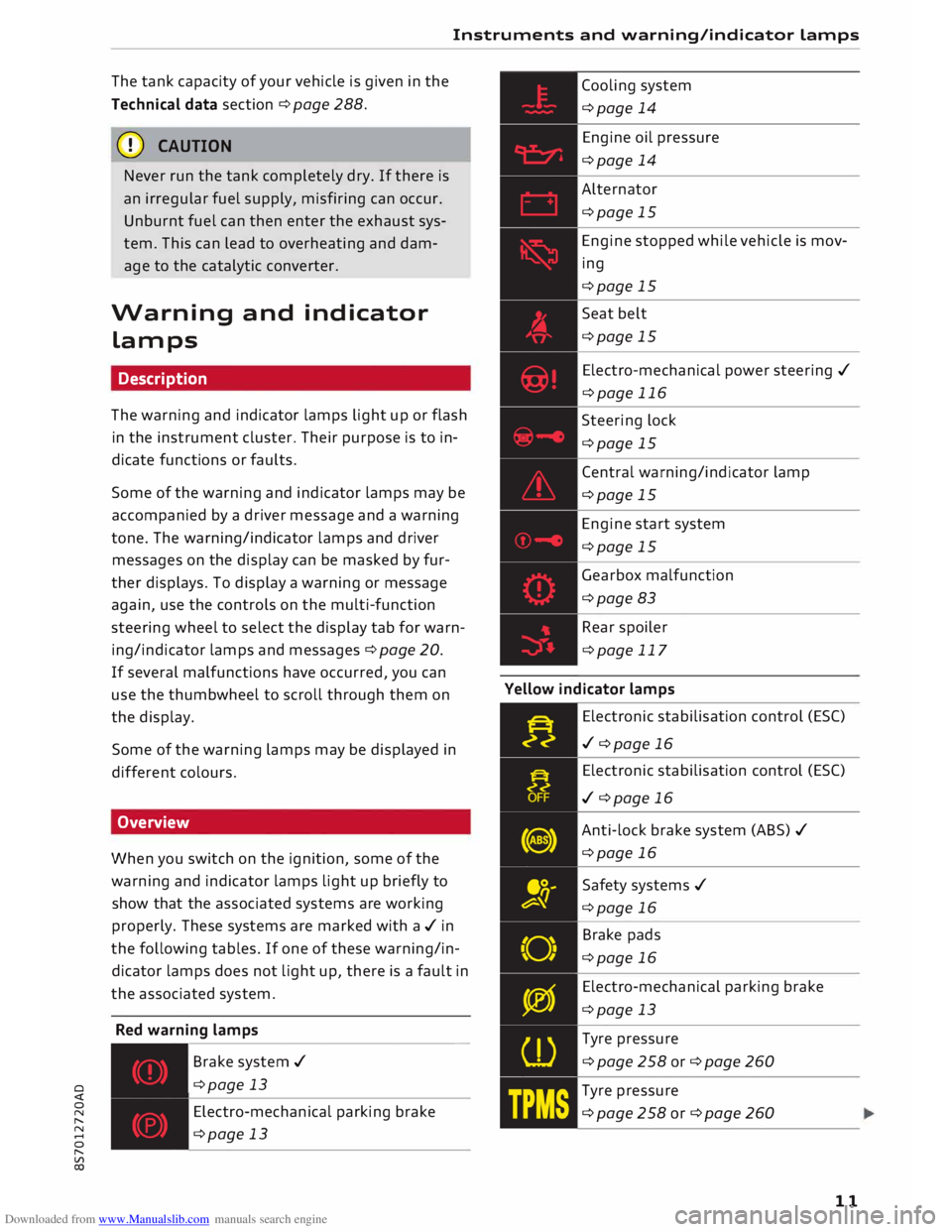
Warning and indicator
Lamps
Description
The warning and indicator lamps light up or flash
in the instrument cluster. Their purpose is to in
dicate functions or faults.
Some of the warning and indicator lamps may be
accompanied by a driver message and a warning
tone. The warning/indicator lamps and driver
messages on the display can be masked by fur
ther displays. To display a warning or message
again, use the controls on the multi-function
steering wheel to select the display tab for warn
ing/indicator lamps and messages ¢ page 20.
If several malfunctions have occurred, you can
use the thumbwheel to scroll through them on
the display.
Some of the warning lamps may be displayed in
different colours.
Overview
When you switch on the ignition, some of the
warning and indicator lamps light up briefly to
show that the associated systems are working
properly. These systems are marked with a../ in
the following tables. If one of these warning/in
dicator lamps does not light up, there is a fault in
the associated system.
Red warning lamps
---------------
Br a k e system ../
¢page 13
Electro-mechanical parking brake
¢page 13 Cooling
system
¢page 14
Engine oil pressure
¢page 14
Alternator
¢page 15
Engine stopped while vehicle is mov
ing
¢page 15
Seat belt
¢page 15
Electro-mechanical power steering ../
¢page 116
Steering lock
¢page 15
Central warning/indicator lamp
¢page 15
Engine start system
¢page 15
Gearbox malfunction
¢page 83
Rear spoiler
¢page 117
Yellow indicator lamps
Electronic stabilisation control (ES()
../ ¢page 16
Electronic stabilisation control (ES()
../ ¢page 16
Anti-lock brake system (ABS) ../
¢page 16
Safety systems ../
¢page 16
Brake pads
¢page 16
Electro-mechanical parking brake
¢page 13
Tyre pressure
¢page258or¢page260
Tyre pressure
¢page258or¢page260
11
Page 17 of 306
Downloaded from www.Manualslib.com manuals search engine 0
N
,.....
N
......
0
,.....
Vl
CX) Instruments
and warning/indicator lamps
(D) Note
The oil pressure warning lamp is not an indi
cator for the oil level. The oil level should
therefore be checked regularly.
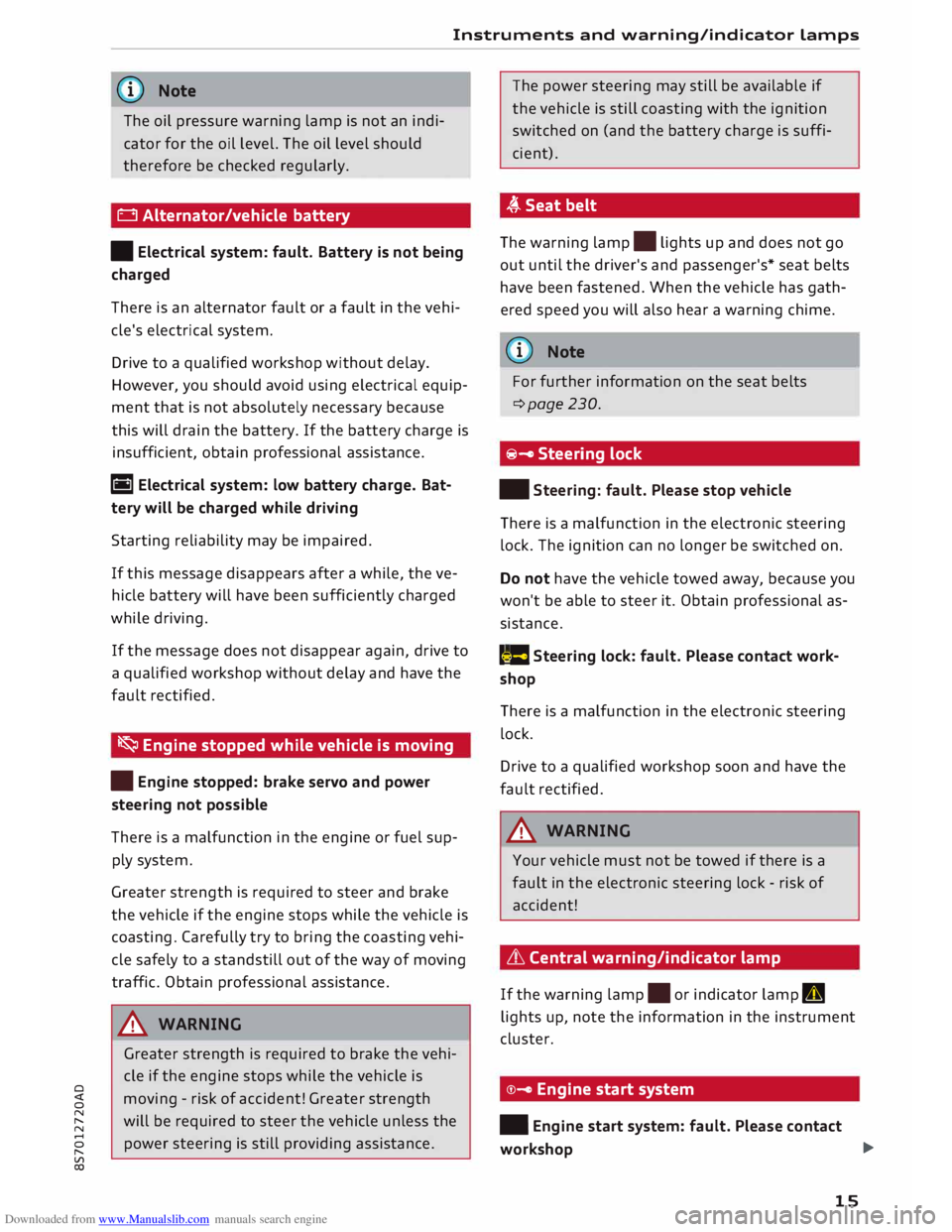
0 Alternator/vehicle battery
• Electrical system: fault. Battery is not being
charged
There is an alternator fault or a fault in the vehi
cle's electrical system.
Drive to a qualified workshop without delay.
However, you should avoid using electrical equip
ment that is not absolutely necessary because
this will drain the battery. If the battery charge is
insufficient, obtain professional assistance.
ri1 Electrical system: low battery charge. Bat
tery will be charged while driving
Starting reliability may be impaired.
If this message disappears after a while, the ve
hicle battery will have been sufficiently charged
while driving.
If the message does not disappear again, drive to
a qualified workshop without delay and have the
fault rectified.
� Engine stopped while vehicle is moving
• Engine stopped: brake servo and power
steering not possible
There is a malfunction in the engine or fuel sup
ply system.
Greater strength is required to steer and brake
the vehicle if the engine stops while the vehicle is
coasting. Carefully try to bring the coasting vehi
cle safely to a standstill out of the way of moving
traffic. Obtain professional assistance.
_& WARNING
Greater strength is required to brake the vehi
cle if the engine stops while the vehicle is
moving -risk of accident! Greater strength
will be required to steer the vehicle unless the
power steering is still providing assistance. The
power steering may still be available if
the vehicle is still coasting with the ignition
switched on (and the battery charge is suffi
cient).
,(,.Seatbelt
The warning lamp.
lights up and does not go
out until the driver's and passenger's* seat belts
have been fastened. When the vehicle has gath
ered speed you will also hear a warning chime.
(Q)) Note
For further information on the seat belts
¢page 230.
@- Steering lock
• Steering: fault. Please stop vehicle
There is a malfunction in the electronic steering
lock. The ignition can no longer be switched on.
Do not have the vehicle towed away, because you
won't be able to steer it. Obtain professional as
sistance.
(::$ Steering
lock: fault. Please contact work
shop
There is a malfunction in the electronic steering
lock.
Drive to a qualified workshop soon and have the
fault rectified.
_& WARNING
Your vehicle must not be towed if there is a
fault in the electronic steering lock -risk of
accident!
& Central warning/indicator lamp
If the warning lamp.
or indicator lamp II
lights up, note the information in the instrument
cluster.
©- Engine start system
• Engine start system: fault. Please contact
workshop ..,.
15
Page 27 of 306
Downloaded from www.Manualslib.com manuals search engine 0
N
,.....
N
....
0
,.....
Vl
CX) Trip
recorder/odometer
The trip recorder shows the distance that has
been travelled since it was last reset. It is used to
measure individual journeys.
The trip recorder can be reset to zero by pressing
the reset button lo.al ¢Fig. 12.
The odometer records the vehicle's total mileage.
Fault display
If there is a fault in the instruments, the letters
DEF appear in the trip recorder display. Have the
fault rectified as soon as possible.
On-board computer
You can call up the following information se
quentially on the on-board computer ¢ page 20,
Fig. 4@ :
-Time & date ¢page 212
-Average consumption
- Fuel range
- Single journey memory summary
- Total journey memory summary
The single journey memory processes the infor
mation on a journey from the time the ignition is
Sport view Driver
information system
switched on until it is switched off. If the journey
is resumed within two hours after the ignition is
switched off, the new figures are automatically
included in the calculation.
Unlike the single journey memory, the total jour
ney memory is not erased automatically. In this
way, you can determine the period for which you
wish the on-board computer to supply driving in
formation.
Fuel consumption
The current fuel consumption can be shown in a
bar display. The average fuel consumption from
the single journey memory can also be displayed.
If the bar turns green, your vehicle is saving fuel
using one of the following functions:
- Recuperation: Electrical energy can be stored in
the vehicle battery (recuperation) if the vehicle
is travelling downhill or coasting in gear (over
run). In this case, the bar will move towards the
t:::3 symbol.
- Coasting mode* ¢ page 82.
@ Note
The date, time and display format can be
changed via the infotainment system.
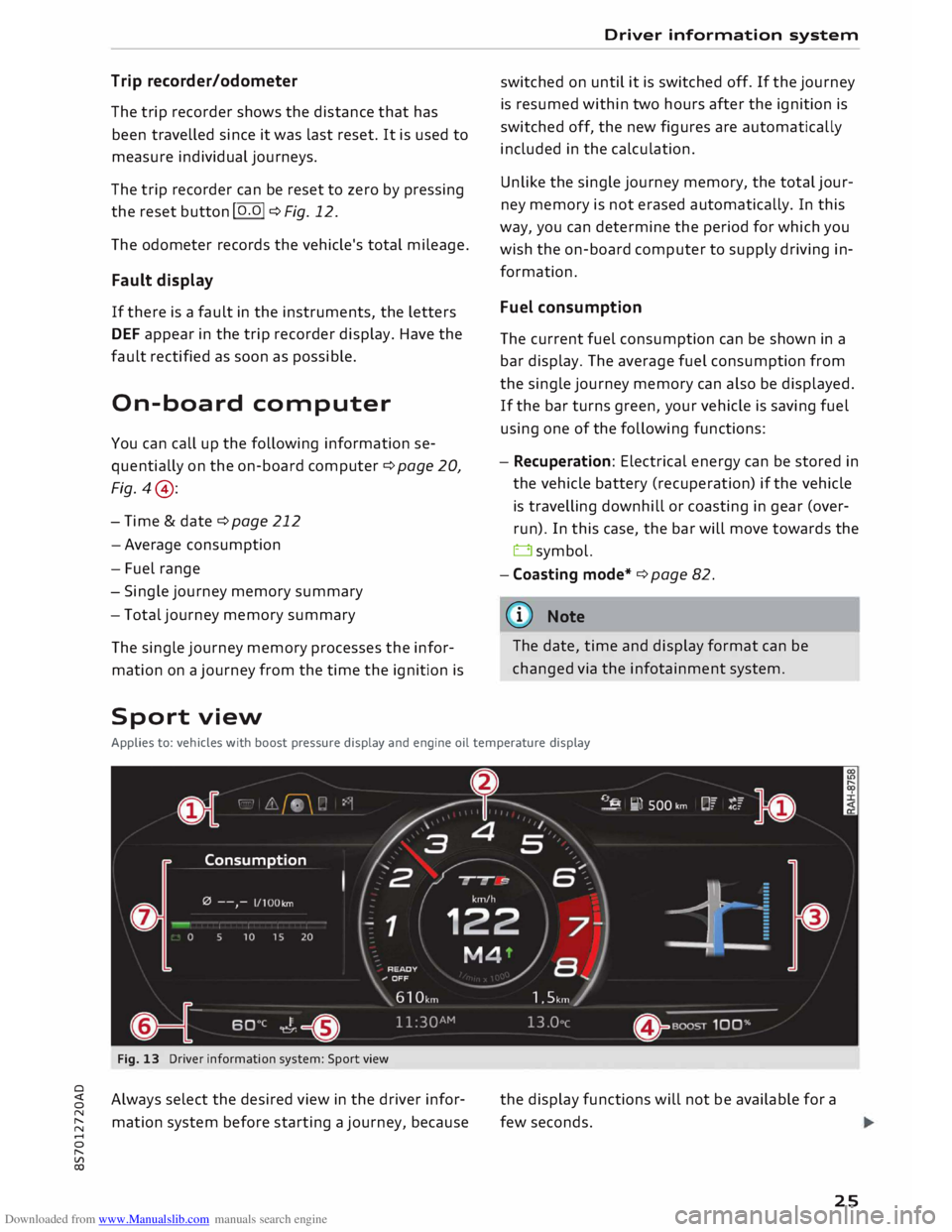
Applies to: vehicles with boost pressure display and engine oil temperature display
Fig. 13 Driver information system: Sport view
Always select the desired view in the driver infor
mation system before starting a journey, because the
display functions will not be available for a
few seconds.
25
Page 69 of 306
Downloaded from www.Manualslib.com manuals search engine 0
N
,.....
N
......
0
,.....
Vl
CX) -
Do NOT stop the vehicle, drive in reverse or
switch off the engine before you are out of
the water.
- Bear in mind that waves created by oncom
ing traffic could exceed the permissible
wading depth of your vehicle.
- Avoid driving through salt water (corrosion).
How to improve economy and minimise
pollution
Fuel economy, environmental impact and wear
on the engine, brakes and tyres depend largely
on the way you drive the vehicle. By adopting an
economical driving style and anticipating the
traffic situation ahead, you can reduce fuel con
sumption by 10-15%. The following section gives
you some tips on lessening the impact on the en
vironment and reducing your operating costs at
the same time.
Anticipate well in advance
A car uses most fuel when accelerating. If you an
ticipate hazards and speed changes well in ad
vance, you will need to brake less and thus accel
erate less. Wherever possible, let the car slow
down gradually with a gear engaged, for in
stance when you can see that the next traffic
lights are red.
Change gear early to save fuel
An effective way of saving fuel is to change up
quickly through the gears. Running the engine at
high rpm in the lower gears uses an unnecessary
amount of fuel. Press the accelerator slowly and
avoid using the "kick-down" feature.
Avoid driving at high speed
Avoid travelling at top speed. Fuel consumption,
exhaust emissions and noise levels all increase
very rapidly at higher speeds. Driving at moder
ate speeds will help to save fuel.
Do not let the engine idle for longer than
necessary
Engine idling periods are automatically reduced
on vehicles with start/stop system*. On vehicles
without start/stop system*, it is worthwhile
switching off the engine at level crossings, for in- Driving
stance, or at traffic lights with a long red phase.
The fuel saved after only 30 -40 seconds is
greater than the amount of fuel needed to re
start the engine.
The engine takes a very long time to warm up
when it is running at idling speed. Mechanical
wear and pollutant emissions are also especially
high during this initial warm-up phase. It is
therefore best to drive off immediately after
starting the engine. Avoid running the engine at
high speed.
Regular servicing
Regular servicing can establish a basis for good
fuel economy before you start driving. A well
serviced engine gives you the benefit of im
proved fuel efficiency as well as maximum relia
bility and an enhanced resale value.
A poorly maintained engine can consume up to
ten percent more fuel than necessary.
Check the oil level when filling the tank. Oil con
sumption depends to a great extent on the en
gine load and engine speed. It is quite normal
that the oil consumption of a new engine only
reaches its lowest level after a certain mileage.
This means that the oil consumption can only be
properly assessed after about 5,000 km.
Avoid short trips
The engine and emission control system need to
reach their proper working temperature in order
to minimise fuel consumption and emissions.
A cold engine uses disproportionately more fuel.
The engine only reaches its working temperature
after about four kilometres, when fuel consump
tion will return to a normal level.
Check tyre pressures
Always make sure the tyres are inflated to the
correct tyre pressures to save fuel. If the tyre
pressures are just 0.5 bar too low, this can in
crease the fuel consumption by as much as 5 %.
Due to the greater rolling resistance, under-infla
tion also increases tyre wear and impairs han
dling.
67
Page 70 of 306
Downloaded from www.Manualslib.com manuals search engine Driving
The tyre pressures should always be checked
when the tyres are cold.
Do not use winter tyres all through the year; they
will increase fuel consumption by up to 10 %.
Avoid carrying unnecessary loads
Every kilo of extra weight will increase the fuel
consumption, so it is worth checking the luggage
compartment occasionally to make sure that no
unnecessary loads are being transported.
Save electrical energy
The engine drives the alternator to generate elec
tricity. This means that fuel consumption rises
when more power is required for electrical equip
ment. Switch off electrical equipment when it is
not needed. Electrical equipment which uses a
lot of electricity includes the blower (at a high
setting), the rear window heating and the seat
heating*.
Steering Adjusting the steering wheel position
The height and reach of the steering wheel can
be adjusted as required to suit the driver.
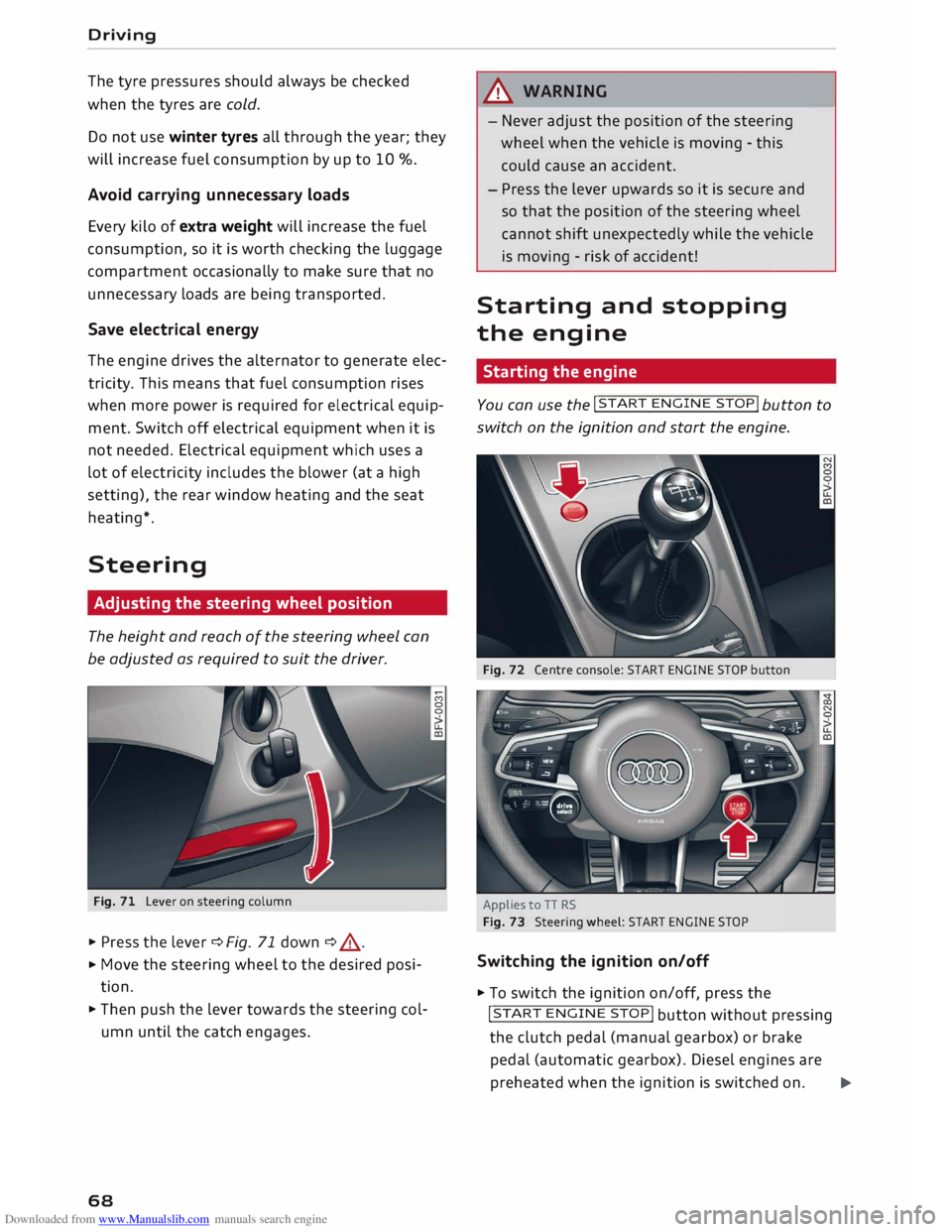
Fig. 71 Lever on steering column
� Press the lever¢ Fig. 71 down ¢ .&, .
� Move
the steering wheel to the desired posi
tion.
� Then push the lever towards the steering col
umn until the catch engages.
68 A
WARNING
- Never adjust the position of the steering
wheel when the vehicle is moving - this
could cause an accident.
- Press the lever upwards so it is secure and
so that the position of the steering wheel
cannot shift unexpectedly while the vehicle
is moving -risk of accident!
Starting and stopping
the engine
Starting the engine -
You can use the !START
ENGINE STOP!
button to
switch on the ignition and start the engine.
Fig. 72 Centre console: START ENGINE STOP button
Applies to TT RS
Fig. 73 Steering wheel: START ENGINE STOP
Switching the ignition on/off
� To switch the ignition on/off, press the
!START ENGINE STOP!
button without pressing
the clutch pedal (manual gearbox) or brake
pedal (automatic gearbox). Diesel engines are
preheated when the ignition is switched on.�
Page 247 of 306
Downloaded from www.Manualslib.com manuals search engine 0
N
,.....
N
......
0
,.....
Vl
CX) -
Never spill fluids on a hot engine. These flu
ids can cause a fire (e.g. radiator anti
freeze).
- Take care not to cause short circuits in the
electrical system, especially when working
on the battery.
- When working in the engine compartment
be aware that the radiator fan may start
running suddenly, even if the ignition is
switched off -risk of injury!
- Do not unscrew the cap on the expansion
tank when the engine is hot. The cooling
system is under pressure.
- Protect face, hands and arms by covering
the cap with a large, thick rag to protect
against escaping coolant and steam.
- Never remove the engine cover panel -risk
of burns!
- If any tests have to be performed with the
engine running, there is an extra safety risk
from the rotating parts, such as the drive
belts, alternator and radiator fan, etc., and
from the high-voltage ignition system.
- Vehicles with automatic gearbox: Never
open the throttle inadvertently (for instance
by hand from the engine compartment) if a
gear is engaged while the vehicle is station
ary with the engine running. The vehicle will
otherwise start moving immediately and
could cause an accident.
- Observe the following additional warnings if
work on the fuel system or the electrical
system is necessary:
- Do not smoke.
- Never work near naked flames.
- Always keep an approved fire extinguisher
immediately available.
- Any work on the batteries and electrical sys
tem in your vehicle entails a risk of injury
and chemical burns in addition to danger of
accident or fire. For this reason, you must
have the work carried out by a qualified
workshop.
CD CAUTION
When topping up fluids make sure the correct
fluid is put into the correct filler opening. This Checking
and topping up fluids
can otherwise cause serious malfunctions or
engine damage.
@ For the sake of the environment
Inspect the ground underneath your vehicle
regularly so that any leaks are detected at an
early stage. If you find spots of oil or other
fluids, have your vehicle inspected in the
workshop.
i Note
On right-hand drive vehicles* some of the
containers/ reservoirs mentioned below are
located on the other side of the engine com
partment.
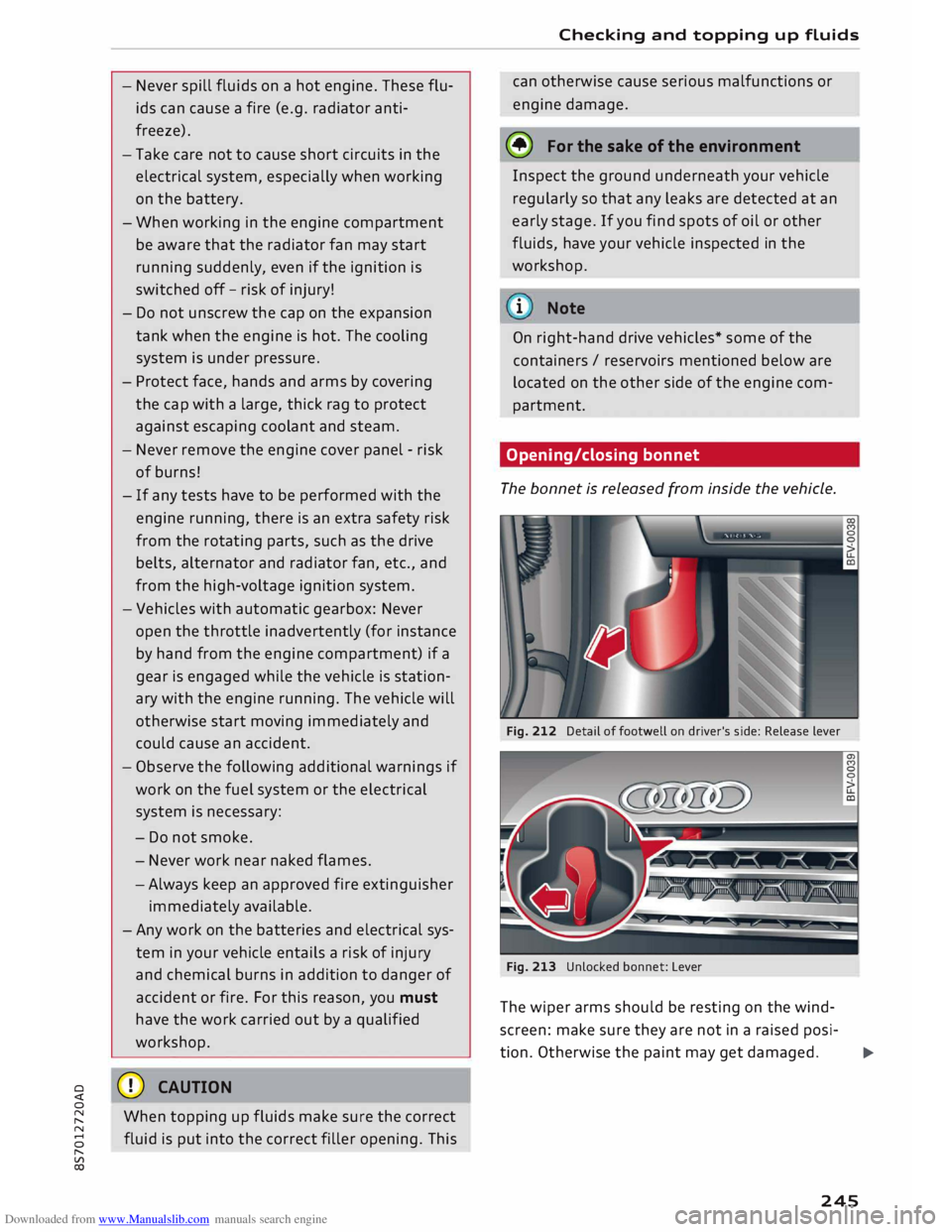
Opening/closing bonnet
The bonnet is released from inside the vehicle.
Fig. 212 Detail of footwell on driver's side: Release lever
Fig. 213 Unlocked bonnet: Lever
The wiper arms should be resting on the wind
screen: make sure they are not in a raised posi-
tion. Otherwise the paint may get damaged.
..,..
245
Page 259 of 306
Downloaded from www.Manualslib.com manuals search engine 0
N
,.....
N
......
0
,.....
Vl
CX) @
For the sake of the environment
Under-inflated tyres will increase the fuel
consumption. -------------
We recommend always using either the tyre
pressure setting (D for partial loads or the
setting @for full loads.
Wheel bolts and rims
Wheel bolts
The wheel bolts should be clean and turn easily.
A special adapter is required to turn the anti
theft wheel bolts* cc> page 2 73.
Rims Rims with a bolted rim flange* or bolted trim
parts* consist of several components. A special
technique is applied to bolt these components
together. Never attempt to repair or dismantle
them c:::>A.
A WARNING
If the wheel bolts have not been tightened or
serviced correctly, they can come loose, and
you could lose control of the vehicle -risk of
accident! For the correct tightening torque,
refer to cc> page 2 75, A�er changing a wheel.
- Make sure that the wheel bolts and threads
in the wheel hubs are always clean and free
from grease.
- Only use wheel bolts that are designed to
match the rims on your car.
- Always have damaged rims repaired by a
qualified workshop. Never attempt to repair
or dismantle rims yourself -risk of accident!
Winter tyres
In winter road conditions winter tyres will consid
erably improve the car's handling. Due to their
type of construction (width, rubber compound,
tread pattern), summer tyres give less grip on ice
and snow.
� Winter tyres must be fitted on all four wheels . Wheels
� Only use winter tyres of the correct type ap
proved for your vehicle.
� Please note that the maximum permissible
speed for winter tyres may be lower than for
summer tyres cc>.&_ . Your specialist retailer can
advise you of the maximum speed for your
tyres.
� After fitting the wheels you must always check
the tyre pressures cc> page 256.
Winter tyres lose their effectiveness when the
tread is worn down to a depth of 4 mm. The per
formance of winter tyres is also severely impaired
by ageing, even if the tread is still much deeper
than 4 mm.
A WARNING
- Never exceed the maximum approved speed
for your tyres. This causes the tyres to over
heat and can even result in a blow-out -risk
of accident!
- Always adapt your driving style to the pre
vailing road and traffic conditions. Drive
carefully and reduce your speed on icy or
slippery roads. Even winter tyres lose their
grip on black ice.
@ For the sake of the environment
Summer tyres should be fitted again as
soon
as possible; they give better handling on
roads which are free of snow and ice. They are
quieter, do not wear so quickly and reduce
fuel consumption.
(© Note
All-weather tyres can also be used instead of
winter tyres. Please note that winter tyres
with the£ symbol are required by law during
the winter season in some countries.
Snow chains
Snow chains will improve braking ability as well
as traction in winter conditions.
� Snow chains can be used on the front wheels
only. This also applies to vehicles with four-
wheel drive*.
..,.
257
Page 293 of 306
Downloaded from www.Manualslib.com manuals search engine Audi
phone box . . . . . . . . . . . . . . . . . . . . . . . 146
Audi side assist
see Side assist . . . . . . . . . . . . . . . . . . . . . . . 97
Audi smartphone interface ......... 210, 215
Audi virtual cockpit (instrument cluster) 10
AUTO Automatic air conditioner . . . . . . . . . . . . . . 62
Automatic headlights . . . . . . . . . . . . . . . . . 44
Auto Lock (central locking system) . . . . . . . .
27
Automatic air conditioner
see Air conditioner (automatic) . . . . . . . . . . 62
Automatic gearbox . . . . . . . . . . . . . . . . . . . . .
76
Back-up programme . . . . . . . . . . . . . . . . . . 83
Downhill speed control
. . . . . . . . . . . . . . . .
80
Driving tips . . . . . . . . . . . . . . . . . . . . . . . . . .
79
Kick-down . . . . . . . . . . . . . . . . . . . . . . . . . . . 81
Launch control programme . . . . . . . . . . . . . 82
Malfunction . . . . . . . . . . . . . . . . . . . . . . . . . 78
Manual gear selection . . . . . . . . . . . . . . . . . 81
Manual release of selector lever . . . . . . 84, 85
Selector lever lock . . . . . . . . . . . . . . . . . . . . 78
Selector lever positions . . . . . . . . . . . . . . . .
77
Steering wheel with paddle levers . . . . . . . 81
tiptronic . . . . . . . . . . . . . . . . . . . . . . . . . . . .
81
Automatic zoom (navigation) . . . . . . . . . . .
180
AUX input . . . . . . . . . . . . . . . . . . . . . . . 198, 199
Average fuel consumption . . . . . . . . . . . . . . .
25
Average speed . . . . . . . . . . . . . . . . . . . . . . . .
25
Axle loads . . . . . . . . . . . . . . . . . . . . . . . . . . . 288
B
BACK button . . . . . . . . . . . . . . . . . . . . . . . . .
121
Background lighting . . . . . . . . . . . . . . . . . . . . 48
Balance (sound) ...................... 217
Bandages see First-aid kit . . . . . . . . . . . . . . . . . . . . . 269
Bass (sound) . . . . . . . . . . . . . . . . . . . . . . . . .
217
Battery . . . . . . . . . . . . . . . . . . . . . . . . . . . . .
250
Charge . . . . . . . . . . . . . . . . . . . . . . . . . . . . 118
Charging . . . . . . . . . . . . . . . . . . . . . . . . 15, 251
Indicator lamp . . . . . . . . . . . . . . . . . . . . . . . 15
Power management .. . . . . . . . . . . . . . . . . 118
Winter conditions . . . . . . . . . . . . . . . . . . . 251
0
� Battery,
charging (mobile devices) . . . . . . . 146
� Belts
::2 see
Seat belts . . . . . . . . . . . . . . . . . . . . . . . 230
Vl
CX) Index
Better route (navigation) . . . . . . . . . . . . . . . 184
Biodiesel . . . . . . . . . . . . . . . . . . . . . . . . . . . . 241
Bioethanol (fuel) . . . . . . . . . . . . . . . . . . . . .
241
Blower (air conditioner) . . . . . . . . . . . . . . 61, 62
Bluetooth Audio player . . . . . . . . . . . . . . . . . . . . . . . . 194
Connecting a mobile phone . . . . . . . . . . . . 142
Remote SIM Access Profile . . . . . . . . . . . . 160
Settings . . . . . . . . . . . . . . . . . . . . . . . . . . . 215
Boost pressure display . . . . . . . . . . . . . . . . . . 26
Boot see Luggage compartment . . . . . . . . . . . . 227
Boot lid
Manual release . . . . . . . . . . . . . . . . . . . . . . . 34
Opening/closing . . . . . . . . . . . . . . . . . . . . . . 33
Brake fluid Checking brake fluid level . . . . . . . . . . . . . 250
Brakes . . . . . . . . . . . . . . . . . . . . . . . . . . . . . . 115
Brake assist system . . . . . . . . . . . . . . . . . . 113
Brake fluid . . . . . . . . . . . . . . . . . . . . . . . . . 250
Brake pads worn . . . . . . . . . . . . . . . . . . . . . 16
Brake pedal . . . . . . . . . . . . . . . . . . . . . . . .
226
Brake servo . . . . . . . . . . . . . . . . . . . . . . . . .
115
Electro-mechanical parking brake. . . . . . . . 74
Emergency braking aid . . . . . . . . . . . . . . . 113
Emergency braking function . . . . . . . . . . . . 74
New brake pads . . . . . . . . . . . . . . . . . . . . . 115
Warning lamp . . . . . . . . . . . . . . . . . . . . . . . 13
Browser see Media centre . . . . . . . . . . . . . . . . . . . .
201
Bucket seat . . . . . . . . . . . . . . . . . . . . . . . . . . . 55
Bulbs, changing . . . . . . . . . . . . . . . . . . . . . . 284
Buttons Multi-function steering wheel. . . . . . . . 21, 23
Operating unit (MMI)................. 121
C
Cables (USB adapter/AUX adapter) . . . . . . . 197
Calling up media . . . . . . . . . . . . . . . . . . . . . .
200
Call list . . . . . . . . . . . . . . . . . . . . . . . . . . . . . 147
Call options . . . . . . . . . . . . . . . . . . . . . . . . . .
155
Camera-based traffic sign recognition . . . . . 90
Capacities Fuel tank. . . . . . . . . . . . . . . . . . . . . . . . . . .
288
Washer fluid reservoir . . . . . . . . . . . . . . . . 288
Caps for wheel bolts, removing . . . . . . . . . .
272
291