light AUDI TT ROADSTER 2017 Owners Manual
[x] Cancel search | Manufacturer: AUDI, Model Year: 2017, Model line: TT ROADSTER, Model: AUDI TT ROADSTER 2017Pages: 314, PDF Size: 76.54 MB
Page 271 of 314
co
co
.... N
" N .... 0
" "' c:o
Care and cleaning
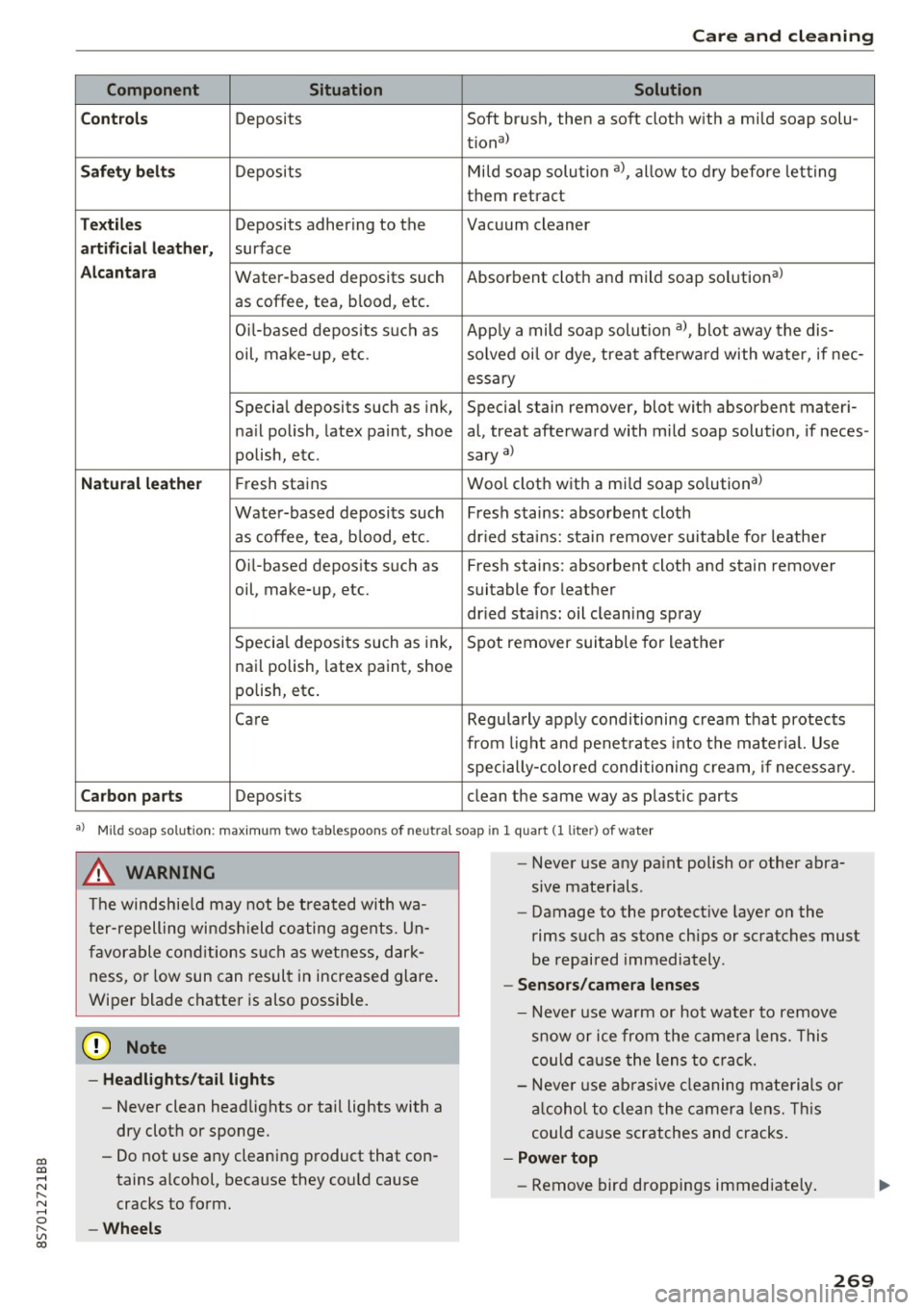
Component Situation Solution
C ont rols
Deposits Soft brush, then a soft cloth with a mild soap solu-
tiona)
Saf ety be lts Deposits Mi
ld soap solution a), allow to dry before letting
them retra ct
T ex til es Deposits adhering to the Vacuum cleaner
artificial l eather, surface
Alcantar a Water-based deposits such Absorbent cloth and mild soap solutiona)
as coffee, tea, blood, etc.
O il-based depos its s uch as App ly a mild soap solut ion a), blot away the dis-
oil, make-up, etc. solved oi l o r dye, treat afterwa rd with water, if nee-
essary
Special deposits such as ink, Special stain remover, blot with absorbent materi-
na il polish, latex paint, shoe al, treat afterward with mild soap solution, if neces-
polish, etc. sary
a)
Natu ral lea the r Fresh stains Wool cloth with a mi
ld soap solutiona >
Water-based deposits such Fresh stains: absorbent cloth
as coffee, tea, b lood, etc. dr ied stains: sta in remove r su itable for leathe r
Oi l-based deposits such as Fresh stains: absorbent cloth and stain remover
oil, make-up, etc. suitable for leather
dr ied stains: oil cleaning spray
Specia l deposits such as ink, Spot remover suitable for leather
nai l polish, latex paint, shoe
polish, etc.
Care Regularly apply conditioning cream that protects
from light and penet ra tes into the mater ial. Use
specially-colored conditioning cream, if necessa ry.
Carbon parts Deposits clean the same way as plastic parts
•> Mild soap solution: maximum two tablespoons of neutral soap in 1 quart (1 liter ) of water
A WARNING
The windshie ld may not be treated with wa
t er-repelling windshield coating agents. Un
favorable cond itions such as wetness, dark
ness, or low sun can result in increased glare .
Wiper blade chatter is also possib le.
{U) Note
- Headligh ts /t ail li ghts
- Never clean headlights or tai l lights with a
dry cloth or sponge.
- Do not use any cleaning product that con
tains alcohol, because they cou ld cause
cracks to form.
-Whe els
-
- Never use any pa int polish or other abra
sive materials.
- Damage to the protect ive layer on the
rims such as stone chips or scratches must
be repaired immediately.
- Sensors /cam era lenses
- Neve r use warm or hot water to remove
s n ow or ice from the came ra lens. This
could ca use the lens to crack.
- Neve r use ab rasive cleaning materials or
a lcohol to clean the camera lens. Th is
could cause scratches and cracks .
-Power top
- Remove bird droppings immediately.
269
Page 272 of 314
Care and cleaning
- Never use gasoline, spot remover, ben
zene, paint thinner or other solvents to
remove.
- Door window s
-Remove snow and ice on windows and ex-
terior mirrors with a p lastic scraper . To
avoid sc ratches, move the scrape r only in
one direction and not back and forth .
- Never remove snow or ice from door win
dows and m irrors using warm or hot water
because this could cause cracks to form.
- To avoid damage to the rear w indow de
fogge r, do not apply any stickers on the
heating w ires on the inside of the window.
- Decorati ve parts /tr im
- Never use chrome care or cleaning prod-
ucts.
-Paint
-To reduce the risk of scratches, the vehicle
must be free of dirt and dust before pol
ishing or waxing.
- To prevent pa int damage, do not polish or
wax the veh icle in direct sunlight .
-To reduce the risk of pa int damage, do not
polish away rust spots .
- Remove cosmetics and sunscreen immedi
ately- these could damage the paint.
- Instrument cluster
- Make sure that the instrument clus ter is
switched off and has cooled off before
cleaning it.
- The instr ument cluster and the trim sur
round ing it must not be cleaned w ith dry
cleaning methods because they could ge t
scratched.
- Make sure no fluids ente r th e spaces be
t ween the ins trumen t cluster and the
trim, because that could ca use damage .
-Control s
-Make sure that no fluids enter the con-
trols, because this could cause damage.
- Safety belts
- Do not remove the safety belts to clean
them .
- Never clean safety belts or their compo
nents chemically or with cor rosive flu ids
or so lvents and neve r a llow sha rp objects
270
to come into contact with the safety belts .
This could ca use damage to the belt web
b ing.
- If there is damage to the webbing, the
connections, the retractors or the buckles,
have them replaced by an authorized Aud i
dealer or authori zed Audi Serv ice Facility .
-Te xtile s/artificial leather / Alcantara
- Neve r treat art ificial leather/Alcantara
with leathe r ca re products, solvents, floor
polish, shoe polish, spot remove o r similar
p roducts.
- H ave a spec ialist remove stubborn stains
to prevent damage .
- Never use steam cleaners, brushes , hard
sponges, etc. when cleaning.
- Do not turn on the seat heating* to dry the
seat .
- Objects w ith sharp edges, such as zippers
or rivets on clothing or belts , can cause
damage to the surface.
- Open hook and loop faste ne rs, fo r exam
p le on clothing, can damage seat covers .
Make sure hook and loop fastene rs a re
closed .
-Natural leather
- Never treat leather with solvents, floor
polish, shoe polish, spot remover or sim i
lar products.
- Objects w ith sharp edges, such as zippe rs
or rivets on clothing or belts, can cause
damage to the surface.
- Never use steam cleaners, brushes, hard
sponges, etc. when cleaning.
- Do not turn on the seat heating* to dry the
seat .
- To he lp prevent the leather from fading ,
do not leave the vehicle in d irect sunlight
for long periods of time. If leav ing the ve
h icle parked for long periods of time, you
should cover the leather to protect it from
d irect sunlight.
@ Tips
- Insects are easier to remove from paint that
has been freshly waxed.
IJ,,
Page 278 of 314
Emergency assistance
Loosening the wheel bolts
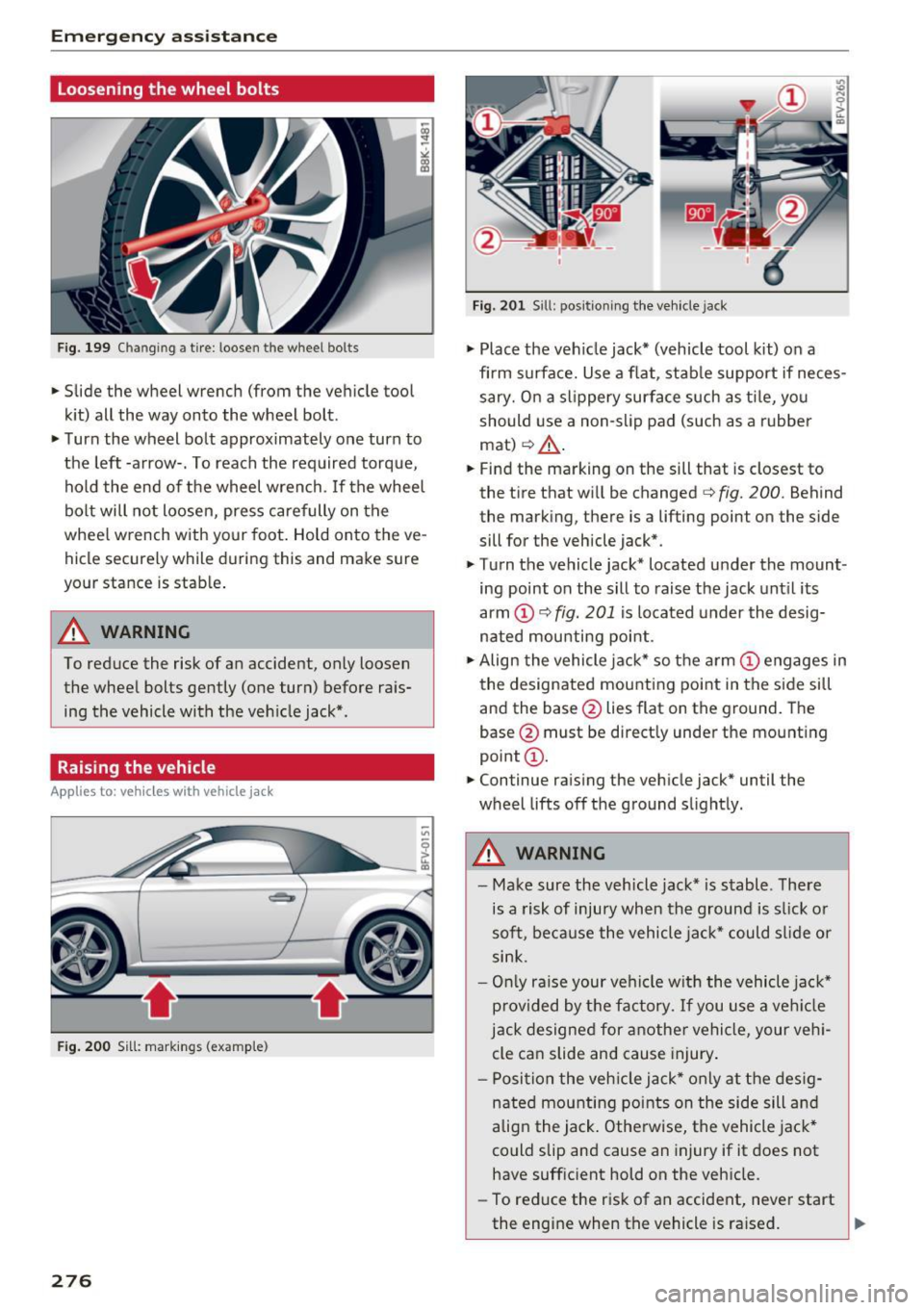
Fig. 199 Changing a tire: loosen the wheel bolts
• Slide the wheel wrench (from the vehicle tool
kit) all the way onto the wheel bolt.
• Turn the wheel bolt approximately one turn to
the left -arrow-. To reach the required torque,
hold the end of the wheel wrench. If the wheel
bolt will not loosen, press carefully on the
whee l wrench with your foot. Hold onto the ve
hicle securely while during this and make sure
your stance is stable .
A WARNING
To reduce the risk of an accident, only loosen
the wheel bolts gently (one turn) before rais
ing the vehicle with the veh icle jack*.
Raising the vehicle
Appl ies to: ve hicles w ith vehicle jack
- ,tr.-----,:
Fig. 200 Sill: markings (examp le)
276
Fig. 201 Sill: positio ning the vehicle jack
• Place the veh icle jack* (vehicle tool kit) on a
firm s urface. Use a flat, stable support if neces
sary. On a slippery surface such as tile, you
should use a non-slip pad (such as a rubber
mat)
c:> & .
• Find the marking on the sill that is closest to
the tire that will be changed
c:> fig. 200. Behind
the marking, there is a lifting point on the side
sill for the vehicle jack*.
• Tu rn the vehicle jack* located u nder the mount
ing point on the sill to raise the jack until its
arm
(D c:> fig. 201 i s located under the desig
nated mou nting point .
• Align the vehicle jack* so the arm @engages in
the designated mounting point in the side sill
and the base @lies flat on the ground. The
base @must be direct ly under the mounting
point @.
• Continue raising the vehicle jack* until the
wheel lifts off the ground slightly.
A WARNING
- Make sure the vehicle jack* is stable. There
is a risk of injury when the ground is slick or
soft, because the vehicle jack* could slide or
sink.
- Only raise your vehicle w ith the vehicle jack*
provided by the factory. If you use a vehicle
jack designed for another vehicle, your vehi
cle can slide and cause injury .
- Pos ition the vehicle jack* only at the desig
nated mounting points on the side sill and
align the jack . Otherwise, the vehicle jack*
co uld slip and cause an injury if it does not
have sufficient hold on the vehicle.
- To reduce the risk of an accident, never start
the engine when the vehicle is raised.
Page 283 of 314
CD
CD
.... N
" N ...... 0 r--. V, co
Fuses and bulbs
Electrical fuses
Replacing fuses
A fuse that has blown will have metal strips tha t
have burned through .
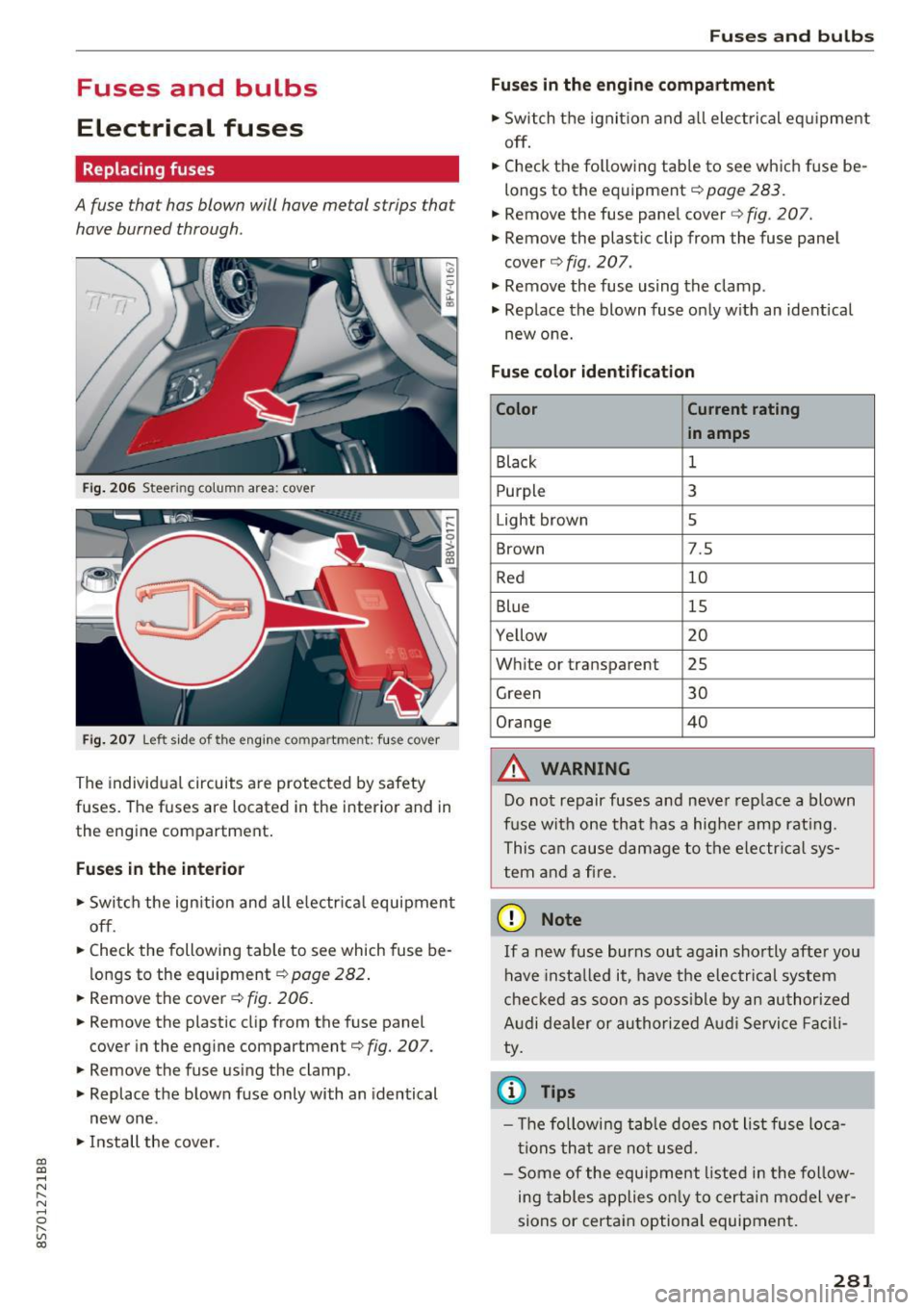
Fig. 206 Steer ing colu mn area : cove r
Fig. 207 Left side of the engin e com partment : fus e cover
The individual circuits are protected by safety
fuses. The fuses are located in the interior and in
the engine compartment.
Fuses in the interior
"S witch the ignition and all electrical equipment
off .
"C heck the following table to see which fuse be
longs to the equipment ¢
page 282.
" Remove the cover ¢ fig. 206.
"Remove the plastic clip from the fuse panel
cover in the engine compartment¢
fig. 207.
"Remove the fuse using the clamp.
" Replace the blown fuse only with an identical
new one .
"Install the cover .
Fuses and bulbs
Fuses in the engine compartment
"S witch the ignition and all electrical equipment
off .
.. Check the following table to see which fuse be
longs to the equipment¢
page 283.
.. Remove the fuse panel cover c::> fig. 207.
" Remove the plastic clip from the fuse panel
cover ¢
fig. 207.
" Remove the fuse using the clamp .
.. Rep lace the blown fuse only with an identical
new one.
Fuse color identification
Color Current rating
in amps
Black
1
Purpl e 3
Light brown 5
Brown 7.5
Red 10
Blue 15
Yellow 20
White or transparent 25
Green 30
Orange 40
&, WARNING
-
Do not repair fuses and never replace a blown
fuse with one that has a higher amp rating.
This can cause damage to the electrica l sys
tem and a fire .
(D Note
If a new fuse burns out again shortly after you
have instal led it, have the electrical system
checked as soon as possible by an authorized
Audi dealer or authorized Audi Service Facili
ty.
© Tips
- Th e following table does not list fuse loca
tions that are not used.
- Some of the equipment listed in the follow
ing tables applies only to certain model ver
sions or certain optional equipment.
281
Page 284 of 314

Fuses and bulbs
Interior fuse assignment
Fig. 208 Vehicle inter ior: fuse assignme nt
No. Equipment
Fl Power top control modu
le (Roadster)
F2 Power top control module (Roadster)
F3 ESC control module
F4 Central computer processor (MIB-2)
FS Gateway
F6 Anti-theft alarm system Climate control system, selector lever (au-
F7 tomatic transmission), parking heater,
rear window heater relay coil
Diagnos is, electrical parking brake switch,
F8 light swi tch, rain/light sensor, interior
lighting
F9 Steering column switch module
Fl0 Display
F ll Haldex clutch
F12 MMI area
F 13 Adaptive dampers control module
F14 Climate control system blower
FlS Electronic steering co lumn lock
F16 MMI components, safety be
lt microphone
(Roadster)
282
No . Equipment
F17 Instrument cluster
F18 Rearview camera
F19 Convenience key system control module
F20 Power lumbar support adjustment
F22 Front passenger's side neck heating (Road-
ster)
F23 R
ig ht exterior lighting, on-board compute r
(right)
F 25 Driver's s
ide door (for example power win-
dows)
F26 Seat heating
F28 AMI H igh med ia port
F29 On-board computer
F31 Left on-board computer
F32 Driver assistance systems
F33 Airbag
Socket relay, interior sound, back-up light
F34 switch, temperature sensor, oil level sen-
sor
Diagnosis, headlight range control system,
F35 air quality sensor, automatic dimming
rearview mirror
F36 Right cornering light/ r ight LED-h eadlight
F37 Left cornering light/ left LED-headlight
F38 E
ng ine control module, ESC control mod-
ul e
F39 Front passenger's side door (for example
power windows)
F40 Cigarette lighter, sockets
F41 SCR relay and delivery unit
F42 Central locking area
F43 On-board computer
F45 Power adjustable driver's side seat
F46 Driver's side neck heat ing (Roadster)
F49 Starter, clutch sensor
FS0 ESC valves
F53 Rear window defogger
The power seats* are protected v ia
circuit break
ers
that automatically switch on after a few sec
onds after the overload has been reduced.
Page 285 of 314
CD
CD
.... N
" N .... 0 r--. V, co
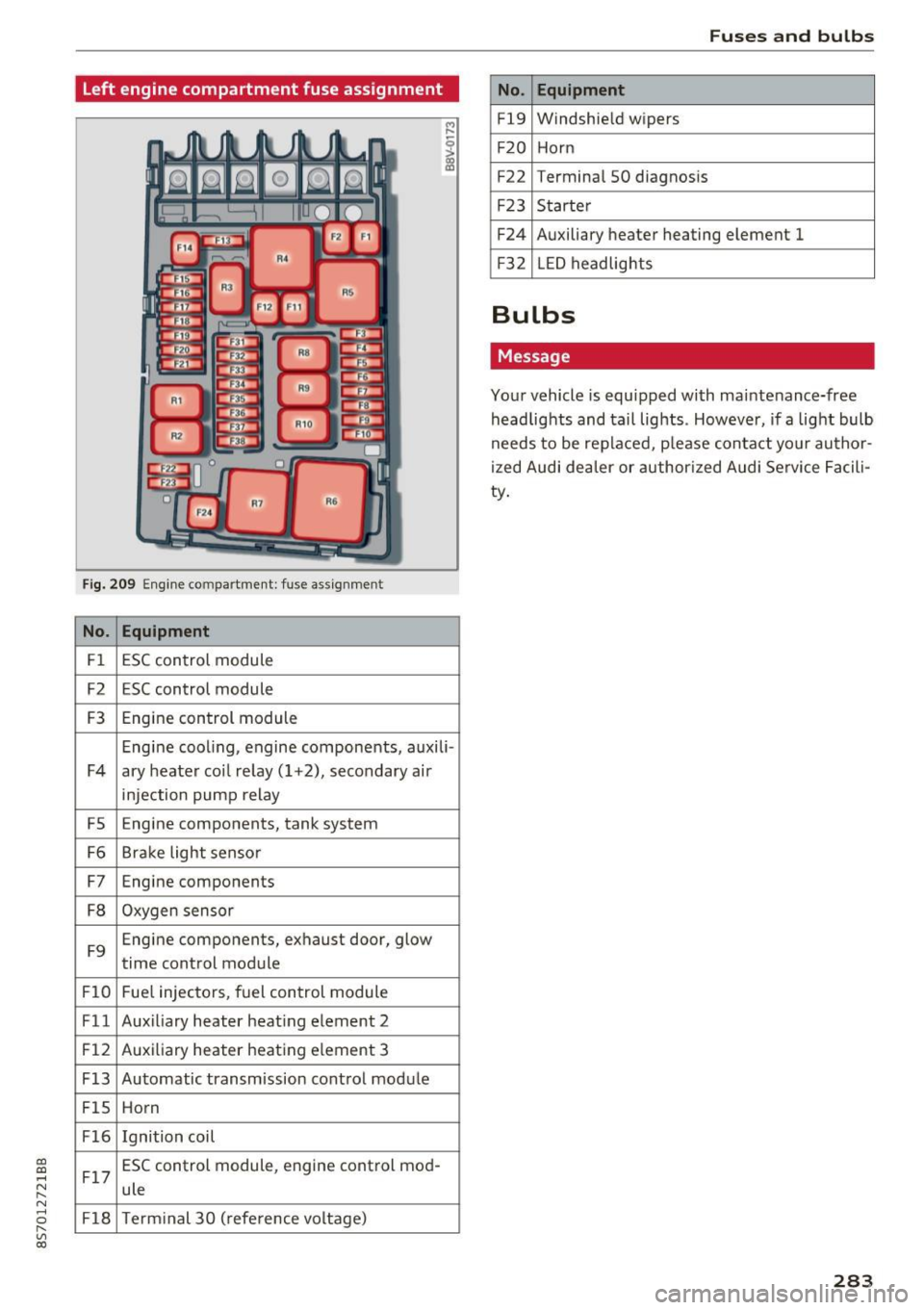
Left engine compartment fuse assignment
Fig. 209 Engine compartment: fuse ass ignment
No. Equipment
Fl ESC control module
F2 ESC control module
F3 Engine control module
Engine cooling, engine components, auxili -
F4 ary heater coil re lay ( 1+2), secondary air
injection pump relay
FS E
ngine components, tank system
F6 Brake light sensor
F7 Engine components
F8 Oxygen sensor
F9 Engine components, exhaust door, glow
time control module
FlO Fuel injectors, fuel control module
Fll Auxiliary heater heating element 2
F 12 Auxiliary heater heating e
lement 3
F13 Automatic transmission cont rol module
FlS Horn
F16 Ignition coil
F17 ESC control module
, engine control mod-
ule
F18 Term inal 30 (reference voltage)
Fuses and bulbs
No . Equipment
Fl9 Windshield wipers
F20 Horn
F22 Terminal SO diagnos
is
F23 Starter
F24 Auxiliary heater heating element 1
F3 2 LED headlights
Bulbs
Message
Your vehicle is equ ipped with maintenance-free
headlights and tail lights . However, if a light bulb
needs to be replaced, p lease contact yo ur author
ized Audi dea ler or authorized Audi Service Facili
ty.
283
Page 286 of 314
Emergency situations
Emergency situations
General
This chapter is intended for trained emergency crews and working personnel who have the nec
essary tools and equipment to perform these
operations.
Starting by pushing or
towing
CD Note
Vehicles with an automatic transmission can
not be started by pushing or towing.
Starting with jumper
cables
If necessary, the engine con be started by con
necting it to the battery of another vehicle .
If the engine should fail to start because of a dis
charged or weak battery, the battery can be con
nected to the battery of
another vehicle, using a
pair of jumper cables to start the engine.
Jumper cables
Use only jumper cables of sufficiently large cross
section
to carry the starter current safely. Refer
to the manufacturer's specifications.
Use only jumper cables with
insulated terminal
clamps which are distinctly marked :
plus(+) cable in most cases colored red
minus(-) cable
in most cases colored black .
A WARNING
Batteries contain electricity, acid, and gas.
Any of these can cause very serious or fatal in
jury. Follow the instructions below for safe hand Ling of your vehicle's battery .
-Always shield your eyes and avoid leaning
over the battery whenever possible.
-A discharged battery can freeze at tempera
tures just below 32 °F (0 °C). Before con
necting a jumper cable, you must thaw the
284
frozen battery completely, otherwise it could explode .
- Do not allow battery acid to contact eyes or
skin. Flush any contacted area with water immediately.
- Improper use of a booster battery to start a
vehicle may cause an explosion.
- Vehicle batteries generate explosive gases.
Keep sparks, flame and lighted cigarettes
away from batteries.
- Do not try to jump start any vehicle with a
low acid level in the battery .
- The voltage of the booster battery must also
have a 12-volt rating. The capacity (Ah) of
the booster battery should not be lower
than that of the discharged battery. Use of
batteries of different voltage or substantial
ly different "Ah" rating may cause an explo
sion and personal injury .
- Never charge a frozen battery. Gas trapped in the ice may cause an explosion .
- Never charge or use a battery that has been
frozen . The battery case may have be weak
ened .
- Use of batteries of different voltage or sub stantially different capacity (Ah) rating may
cause an explosion and injury. The capacity
(Ah) of the booster battery should not be
lower than that of the discharged battery.
- Before you check anything in the engine
compartment, always read and heed all
WARNINGS
~page 235.
CD Note
-Applying a higher voltage booster battery
will cause expensive damage to sensitive
electronic components, such as control
units, relays, radio, etc.
- There must be no electrical contact between
the vehicles as otherwise current could al
ready start to flow as soon as the positive
(+) terminals are connected.
@ Tips
The discharged battery must be properly con-
nected to the vehicle's electrical system. .,..
Page 287 of 314
CD
CD
.... N
" N ...... 0
" V, co
When jump starting or charging the battery,
never connect the negative ground cable to
the battery negative post because the battery
manager system must be able to detect the
battery's state of charge. Always connect the
negative ground cable to the negat ive ground
post of the battery manager control unit .
Use of jumper cables
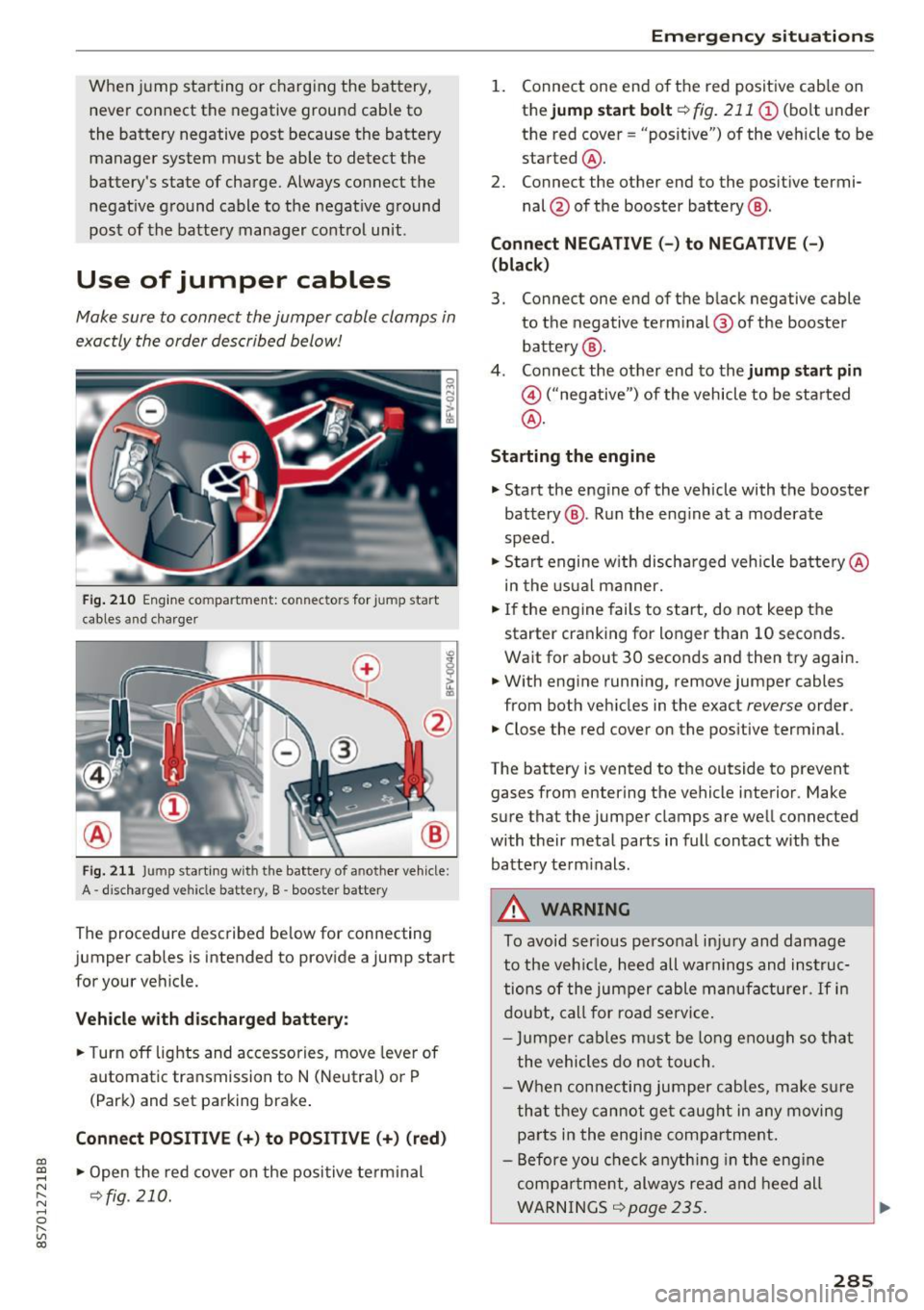
Make sure to connect the jumper cable clamps in
exactly the order described below!
Fig. 210 Engine compartment: connectors for jump start
cables and c harger
Fig. 211 Jump starting w ith the battery of another vehicle :
A -discharged vehicle battery, B -booster battery
The proc edure desc ribed below for connecting
jumper cables is intended to provide a jump start
for your vehicle.
Vehicle with discharged battery:
.. Turn off lights and accessories, move lever of
automatic transmission to N (Neutral) or P
(Park) and set parking brake .
Connect POSITIVE(+) to POSITIVE(+) (red)
.,. Open the red cover on the positive terminal
~fig. 210.
Emergency situations
1. Connect one end of the red positive cab le on
the
jump start bolt~ fig. 211 (D (bolt und er
the red cover= "posit ive") of the veh icle to be
sta rted @.
2. Connect the other end to the posit ive termi-
nal @of the booster battery @.
Connect NEGATIVE (-) to NEGATIVE (- )
(black)
3. Connect one end of the black negative cable
to the negative terminal @ of the booster
battery @.
4. Connect the other end to the
jump start pin
@ ("negative") of the vehicle to be started
@.
Starting the engine
.. Start the engine of the vehicle with the booster
battery @. Run the eng ine at a moderate
speed .
.,. Start engine w ith discharged vehicle battery @
in the usual manner.
.,. If the engine fails to start, do not keep the
starter cranking for longer than 10 seconds.
Wait for about 30 seconds and then try again .
.. With engine running, remove jumper cables
from both vehicles in the exact
reverse order .
.. Close the red cover on the positive terminal.
The battery is vented to the outside to prevent
gases from entering the vehicle interior . Make
sure that the jumper clamps are well connected
with their metal parts in full contact with the battery term inals .
A WARNING
To avoid ser ious personal injury and damage
to the vehicle, heed all warnings and instruc
tions of the jumper cable manufacturer.
If in
doubt, call for road service.
- Jumpe r cables must be long enough so that
the vehicles do not touch .
- When connecting jumper cables, make sur e
that they cannot get caug ht in any moving
parts in the engine compartment.
- Before you check anything in the engine
compa rtment, always read and heed all
WARNINGS ~
page 235 .
285
Page 293 of 314
co
co
.... N
" N .... 0
" "' c:o
Gross Axle Weight Rating
The G ross Axle We igh t Rating is the max imum
l oad that can be applied at each axle of the vehi
cle ~.& .
Vehicle capacity weight
The vehicle capac ity we ight (max. load) is listed
on the drive r's side 8-p illar.
_& WARNING
- T he ac tual Gross Ax le Weight Ra ting a t the
front and rear axles sho uld not exceed the
permissible weights, and their combination
must not exceed the Gross Ve hicle We ight
Rating.
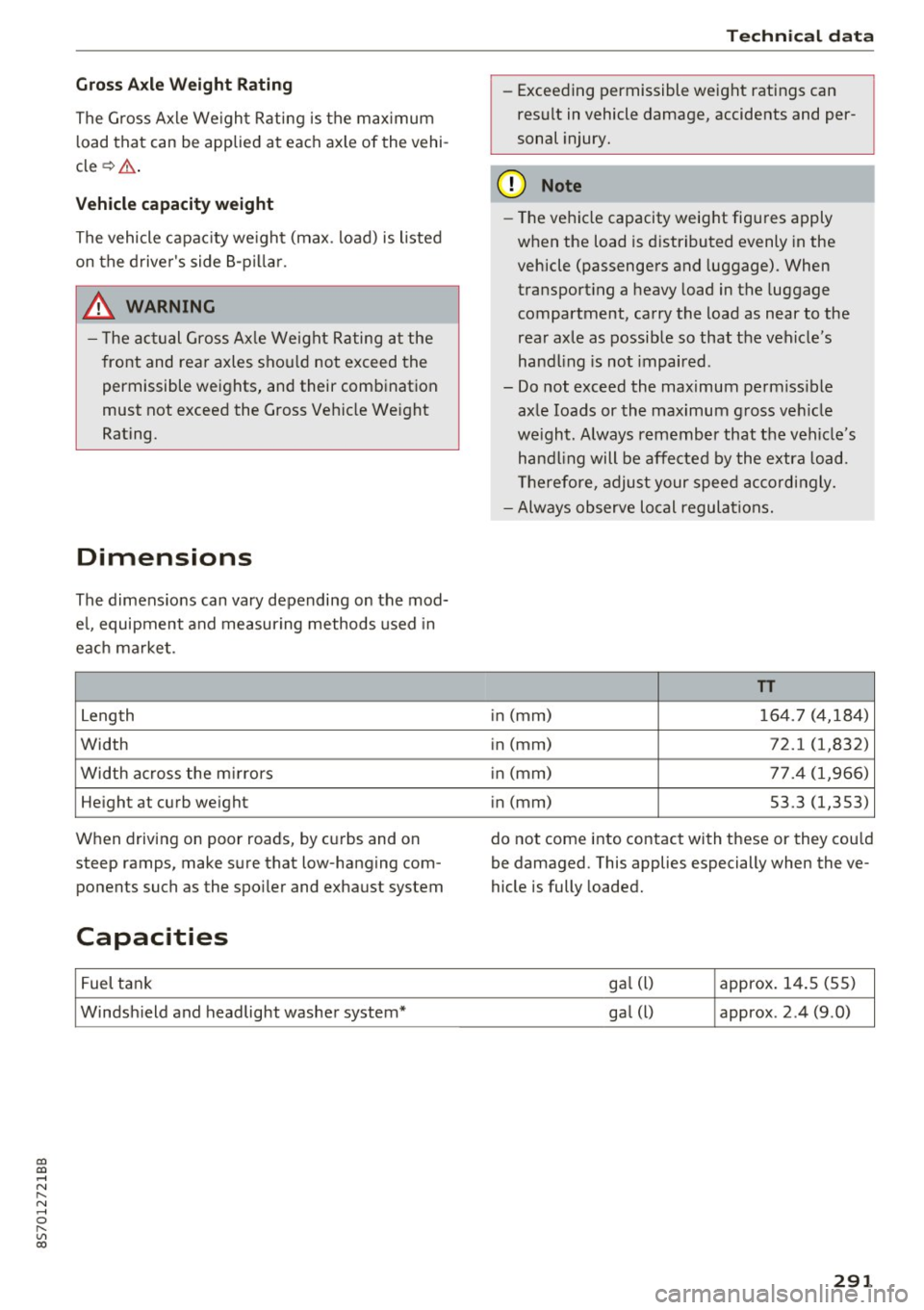
Dimensions
The dimens io ns can vary depending on the mod
e l, equipment and measur ing methods used in
e a ch ma rket.
Leng th
Width
Width across the m irrors
He ight at cu rb we ight
When driving on poor roads, by cu rbs and on
steep ramps, make s ure that low-hang ing com
ponents such as the spo iler and exhaust system
Capacities
F uel t ank
Windsh ield and headlight washer system*
Techn ical data
- Exceeding permissible weight ratings can
res ult in vehicle damage, accidents and per
sonal injury.
(D Note
- The vehi cle capacity weig ht figures apply
when the load is d istributed evenly in the
vehicle (passengers and luggage) . When
transport ing a heavy load in the luggage
compartment, carry the load as near to the
rear axle as possib le so that the veh icle's
hand ling is not impaired .
- Do not exceed the maximum perm iss ible
ax le loads or the maximum g ross ve hicle
we igh t. Always remember that the veh icle's
han dling will be affe cted by the extra load.
Th erefore, adjust your spee d accordingly.
- Always observe local regulations.
TT
in (mm) 164. 7 (4,18 4)
i n (mm)
72.1 (1,832)
i n (mm) 77 .4 (1,966)
i n (mm) 53.3 (1,353)
do not come i nto contact with these or they cou ld
be damaged. This applies especially when the ve
hicle is fully loaded.
ga l (l) approx. 1 4.5 (5 5)
ga l
(l) approx . 2 .4 (9 .0)
291
Page 299 of 314
co
co
.... N
" N .... 0
" "' c:o
A
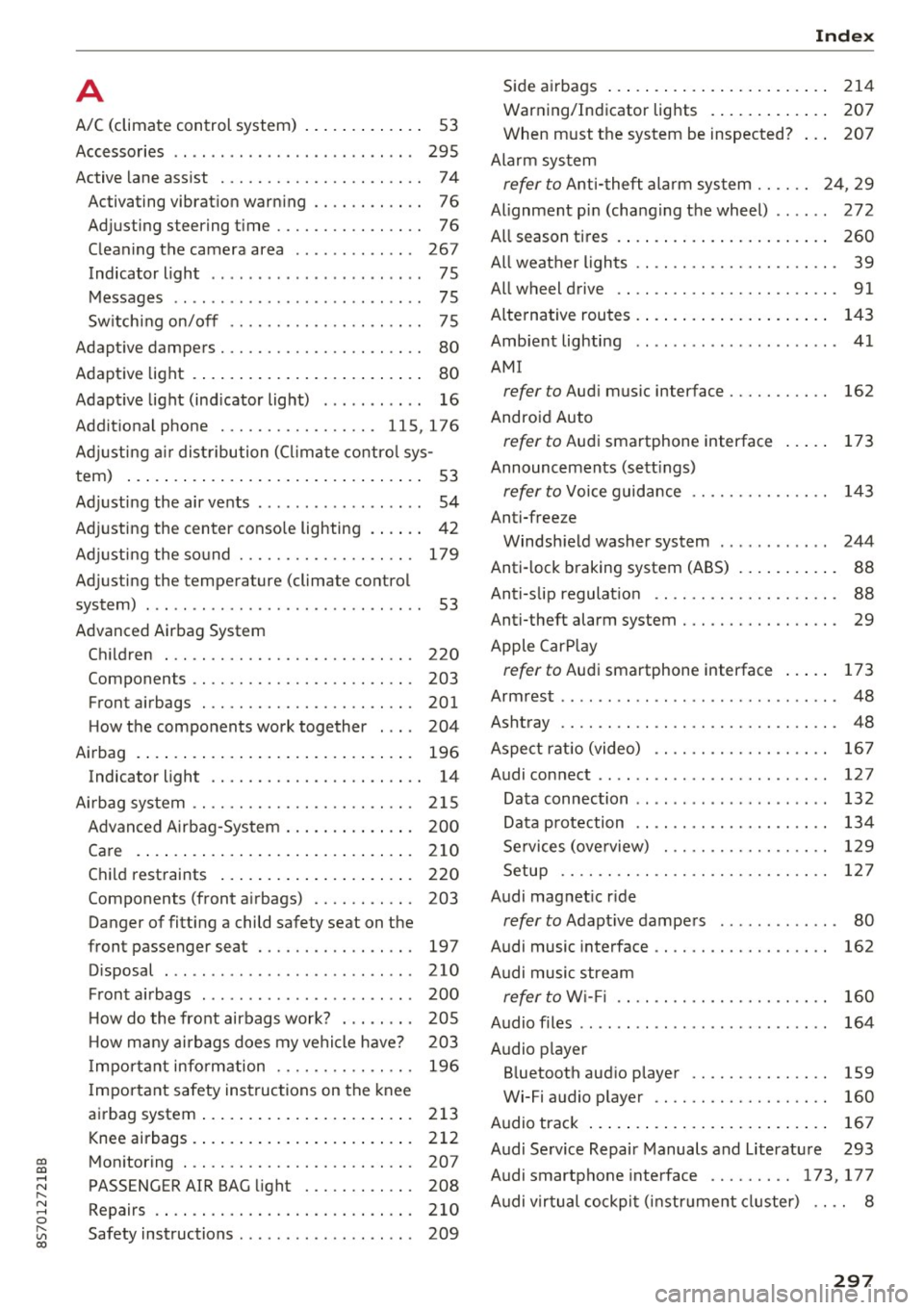
A/C (climate control system) . . . . . . . . . . . . . 53
Accessories . . . . . . . . . . . . . . . . . . . . . . . . . . 295
Active lane assist . . . . . . . . . . . . . . . . . . . . . . 7 4
Activating vibration warning . . . . . . . . . . . .
76
Adjusting steering time . . . . . . . . . . . . . . . . 76
Cleaning the camera area . . . . . . . . . . . . . 267
Indicator light . . . . . . . . . . . . . . . . . . . . . . . 75
Messages . . . . . . . . . . . . . . . . . . . . . . . . . . . 75
Switching on/off . . . . . . . . . . . . . . . . . . . . . 75
Adaptive dampers . . . . . . . . . . . . . . . . . . . . . . 80
Adaptive light . . . . . . . . . . . . . . . . . . . . . . . . . 80
Adapt ive light (indicator light) . . . . . . . . . . . 16
Additional phone ............ .. .. . 115, 176
Adjusting a ir distribution (Cl imate control sys-
tem) . . . . . . . . . . . . . . . . . . . . . . . . . . . . . . . .
53
Adjusting the air vents . . . . . . . . . . . . . . . . . . 54
Adjusting the center console lighting . . . . . . 42
Adjusting the sound . . . . . . . . . . . . . . . . . . . 179
Adjusting the temperature (climate control
system) . . . . . . . . . . . . . . . . . . . . . . . . . . . . . .
53
Advanced Airbag System
Children . . . . . . . . . . . . . . . . . . . . . . . . . . . 220
Componen ts . . . . . . . . . . . . . . . . . . . . . . . .
203
Front airbags . . . . . . . . . . . . . . . . . . . . . . . 201
How the components work together . . . . 204
Airbag . . . . . . . . . . . . . . . . . . . . . . . . . . . . . . 196
Indicator light . . . . . . . . . . . . . . . . . . . . . . . 14
Airbag system . . . . . . . . . . . . . . . . . . . . . . . . 215
Advanced Airbag-System . . . . . . . . . . . . . . 200
Care . . . . . . . . . . . . . . . . . . . . . . . . . . . . . . 210
Child restraints . . . . . . . . . . . . . . . . . . . . . 220
Components (front airbags) . . . . . . . . . . . 203
Danger of fitting a child safety seat on the
front passenger seat . . . . . . . . . . . . . . . . .
197
Disposal . . . . . . . . . . . . . . . . . . . . . . . . . . . 210
Front airbags . . . . . . . . . . . . . . . . . . . . . . . 200
H ow do the front airbags work? . . . . . . . . 205
H ow many airbags does my vehicle have? 203
Important information . . . . . . . . . . . . . . . 196
Important safety instructions on the knee
airbag system ................. ..... .
213
Knee airbags. ....................... 212
Monitoring . . . . . . . . . . . . . . . . . . . . . . . . . 207
PASSENGER AIR BAG light . . . . . . . . . . . . 208
Repairs ... . .. .. ............. .. .. .. . 210
Safety instructions . . . . . . . . . . . . . . . . . . . 209
Index
Side airbags . . . . . . . . . . . . . . . . . . . . . . . . 214
Warning/Indicator lights . . . . . . . . . . . . . 207
When must the system be inspected? . . . 207
Alarm system
refer to Anti-theft alarm system . . . . . . 24, 29
Alignment pin (changing the wheel) . . . . . . 272
All season tires . . . . . . . . . . . . . . . . . . . . . . . 260
All weather lights . . . . . . . . . . . . . . . . . . . . . . 39
All wheel drive . . . . . . . . . . . . . . . . . . . . . . . . 91
Alternative routes .. .. ................. 143
Ambient lighting . . . . . . . . . . . . . . . . . . . . . . 41
AMI
refer to Audi music interface . . . . . . . . . . . 162
Android Auto
refer to Audi smartphone interface
Announcements (settings)
refer to Voice guidance ........... .. . .
Anti-freeze
173
143
Windshield washer system . . . . . . . . . . . . 244
Anti-lock braking system (ABS) . . . . . . . . . . . 88
Anti-s lip regulat ion . . . . . . . . . . . . . . . . . . . . 88
Anti-theft alarm system . . . . . . . . . . . . . . . . . 29
Apple CarPlay
refer to Audi smartphone interface . . . . . 173
Armrest .......... .. .................. 48
Ashtray . . . . . . . . . . . . . . . . . . . . . . . . . . . . . . 48
Aspect rat io (video) . . . . . . . . . . . . . . . . . . .
167
Audi connect . . . . . . . . . . . . . . . . . . . . . . . . . 127
Data connection . . . . . . . . . . . . . . . . . . . . . 132
Data protection . . . . . . . . . . . . . . . . . . . . . 134
Services (overview) . . . . . . . . . . . . . . . . . . 129
Setup . . . . . . . . . . . . . . . . . . . . . . . . . . . . . 127
Audi magnetic ride
refer to Adaptive dampers . . . . . . . . . . . . . 80
Audi music interface . . . . . . . . . . . . . . . . . . . 162
Audi music stream
refer to W i- Fi . . . . . . . . . . . . . . . . . . . . . . . 160
Audio files . . . . . . . . . . . . . . . . . . . . . . . . . . . 164
Audio player
Bluetooth audio player . . . . . . . . . . . . . . .
159
Wi-Fi aud io player . . . . . . . . . . . . . . . . . . . 160
Audio track . . . . . . . . . . . . . . . . . . . . . . . . . . 167
Audi Service Repair Manuals and Literature 293
Audi smartphone interface ......... 173, 177
Audi virtual cockpit (instrument cluster) . . . . 8
297