light AUDI TT ROADSTER 2017 Repair Manual
[x] Cancel search | Manufacturer: AUDI, Model Year: 2017, Model line: TT ROADSTER, Model: AUDI TT ROADSTER 2017Pages: 314, PDF Size: 76.54 MB
Page 158 of 314
Media
Media
Introduction
There are various media drives and connections
available in the MMI. You can play , for example,
audio/video files from the Jukebox* or connect
your mobile device to the Audi music interface*
and operate it through the MMI.
Notes
General information
Media and format restrictions:
the MMI (includ
ing the SD card reader and the USB storage de
vice connection*) was tested with a variety of products and media on the market. However,
there may be cases where individual devices or media and audio/video* files may not be recog
nized, may play only with restrictions or may not
play at all.
Digital Rights Management: please note that
t he audio/video files are subject to copyright pro
tection .
The media drives do not play files that are pro
tected by ORM and that are identified with the
symbol
!'.TI.
Data security: never store important data on SD
cards, the Jukebox*, CDs/DVDs or mobile devices.
Audi AG is not responsible for damaged or lost
files and media .
Loading times: the more files/folders/playlists
that are on a storage medium, the longer it will
take to load the audio/video files* . Audi recom
mends using storage media tha t only contain au
dio/video files* . To decrease the time it takes to
load audio/video files*, create subfolders (for ex
ample , for the artist or album). The loading time
will also increase when importing files.
Additional information: when playing, audio
files are automatically displayed with any addi
tional information that is stored (such as the ar
tist, track and album cover).
If this information is
not available on the storage medium, the MMI
will check the Grace note metadata database.
156
However, in some cases, the additional informa
tion may not be displayed.
Restricted functionality: reset the Media set
tings
to the factory default settings if functional
ity is restricted
¢ page 176.
Reset the Jukebox* to the factory default set
tings if functionality is restricted
¢page 176.
For information about the properties of support
ed media and file formats, see
¢ page 169 .
((D} Note
You are responsible for all precautions taken
for data protection, anti-virus protection and
protection against loss of data on mobile de
vices that are used to access the Internet
through the Wi-Fi hotspot.
CD/DVD operation
CD/DVD and format restrictions:
the functionali
ty of individual storage media may be limited due
to the variety of blank CDs/DVDs available and
the various capacities . Aud io CDs or video DVDs
with copy protection, CDs/DVDs that do not con
form to the standard and multisession CDs may
have limited playback or may not play at all. Audi
recommends finalizing the recording process
when creating multisession CDs . Multisession is
not supported for DVDs .
Using CDs/DVDs, the CD drive or the DVD drive:
to ensure correct, high-quality playback and to
prevent damage to the drive or disc reading er
rors, always store CDs/DVDs in a protective
sleeve and do not expose them to direct sunlight.
Do
not use:
- Damaged, dirty or scratched CDs/DVDs
- Single CDs/DVDs (3 inch/8 cm diameter)
- CD/DVDs that are not round
- CDs/DVDs with labels
- Protective rings
- Cleaning CDs
Thermal protection switch : CD/DVD playback
may be temporarily unavailable if outside tem
peratures are extremely hot or cold. A thermal
Page 164 of 314
Media
@ Tips
-Depending on the Internet connection and
network traffic, a connection loss can occur
during p layback of on line media serv ices.
- Online media and Internet radio usage de·
pends on the service avai lability of the third
party provider.
- Audi AG simply makes the access to online
media serv ices possible th rough the MMI
and does not take any respons ibility for the
contents of the online med ia services.
- Always read the chapter <=>page 133, About
Audi connect.
- Depending on the mobile device used, the re
may be interrupt ions during media playback
and when using the
Audi MMI connect app .
To avoid interruptions when usi ng a mob ile
d evice, do not loc k the sc reen on yo ur mo
bile devi ce and keep the
Audi MMI connect
a pp in the foreground.
- Contact you r authorized Audi dea ler or au
thorized Audi Se rvice F acili ty for a ddi tional
i n format io n a bout o n line medi a.
Multimedia connections
USB adapter for Audi music interface or
USB charging port
Depending on the vehicle equipment , you can
connect your mobile devices (such as a smart
phone or MP3 player) to the Audi music interface
or a USB charging port using a special USB
adapter.
Fig . 14 2 Aud i USS ada pte rs
CD US B adapter for dev ices w it h a m icro USB con
nection
162
@ USB adapte r fo r devi ces wi th an Apple Light
ning connection
@ USB ad ap ter fo r devices wi th an Apple Dock
con nector
You can purchase the USB adapter from an au
tho rized Audi dea ler or at specialty s to res.
(D Note
Hand le the USB adapter carefully. Do not al
l ow it to be pinched .
Audi music interface
Applies to: vehicles with Aud i music interface
Connect your mobile devices to the Audi music
interface in order to operate them through the
MMI and charge the battery.
Fi g. 14 3 Connect ing mob ile devic es
The Audi music interface is located in the center
console storage compartment @
~ page 6,
fig. 2.
- Connecting a mobile device using a USB
adapter :
connect the applicab le USB adapter @
c:!) fig. 143 to the port on the Audi music inter
face ® and then connect the adapter to the
mob ile dev ice
CD (suc h as an iPod).
- Charging a mobile device using a USB adapter :
when you connect a mobile device to the Audi
mus ic interface ® using the applicable USB
adapter @<=> fig . 143 , the battery w ill auto
mat ically cha rge.
- Disconnecting a mobile d evice from the Audi
music interface :
remove the USB adapter @
<=> fig . 143 from the Audi music interface ®
r=;, fig. 143.
-Disconn ecting mobile devices with an Apple
Dock connecto r:
remove the Apple Dock .,..
Page 167 of 314
CD
CD
.... N
" N .... 0 r--. V, co
Media center
Various categories for selecting audio/video*
files are available in the media center .
Fig. 146 Example: USB stick catego ries
Fig . 147 Examp le: USB stick categories
~ Press the I MEDIAi button. Press the left control
button until the source overview is disp layed.
Se lect and confirm the desired source.
(!) Active source
The active source is highlighted. The active
source symbol @ may change depending on the
connected device, t he online media service* or
Internet radio*. As an example, a USB stick is
shown ¢
fig. 146 connected to the Audi music in
terface*.
Depending on the active source, you can select
audio/video files* from the fo llowing categories
and add them to the playlist:
@ Favorites
The Favorites category appears if at least one en
try is stored in the favorites list . See
¢ page 166,
Favorites.
@ Artists
All available artists are displayed. Se lect and con
f ir m an artist, an album and then a track.
Media
@ Albums
All available albums are displayed . Select and
confirm an album and then a track .
® Genres
All availab le genres are displayed. Select and
confirm a genre (s uch as
Pop ), an artist, an al
bum and then a song.
@ Tracks
All available tracks are displayed . Select and con
firm a track.
0 Folders
The folder structure or track/chapter list is dis
played . Select a folder, if necessary . Select and
confirm a track.
® Playlists
All availab le playlists from the source and the
smart playlists are displayed. Se lect and confirm
a playlist and then a track.
Smart playlists :
- Last played tracks :
the last tracks played in the
selected source are displayed.
- Most played : the most played songs in these
lected source are displayed.
- 5 stars to 1 star: tracks from the selected
source are displayed according to their rating.
- Not rated: all files from the selected source
without rating information (for example, in the
!D3 tag) are displayed.
@ Videos*
All ava ilab le video files are displayed . Select and
confirm a video file.
@ Tips
-Only the categories supported by the medi
um are available . For example, CD/DVD
ROM tracks cannot be selected with catego
r ies such as
Artists , Albums or Genres .
With an iPod (source: Audi music interface
¢ page 162), the Pod casts, Audio books
and Composers categor ies are also availa
ble .
165
Page 175 of 314
co
co
.... N
" N .... 0
" "' c:o
Audi smartphone interface
Setup
App lies to: ve hicles with Audi smartpho ne interface
You can connect your smartphone to the MMI us
ing the Audi smartphone interface . Certain con
tent on your smartphone is adapted to the Info
tainment system display while driving and can
be operated through the MMI control panel.
Requirement:
The vehicle must be stationary and the ignition
must be switched on.
iPhone generation 5 or higher with Lightning
connector and iOS 7.1.2 operating system or
h igher.
O r:
Smartphone with Android Auto app and Android
5 .0 Loll ipop operating system or higher.
.,. Connect your smar tphone to the Audi music in
te rface
c:> page 162 using a USB adapter
¢page 162, fig. 142 .
.. Se lect and confirm A cti va te Apple CarPl ay or
Acti vate And roid Auto now.
.. Follow the system instruct ions.
.,. Pay attention to any add itional system prompts
on your smartphone if applicable.
If you chose not to use Apple CarPlay or Android
Auto when connecting your smartphone for the
first time, you can start the Audi smartphone in
terface later on using the
Connection m an ager .
.. Se lect: I MENU I button > Audi smartphone in·
terfa ce
> Change to connecti on manager .
.. Connect your smar tphone to the Audi music in
terface
c:>page 162 using a USB adapter
¢page 162, fig. 142 .
.. Se lect and confirm Audi smartphone : in the
Connection manager c:> page 176. You can se
lect your smartphone in the list of devices that
are already paired
c:> page 177.
.,. Follow the system instruct ions.
l ) In preparat io n at the t ime of pr inting.
Aud i smartphon e int erfac e
{!) Tips
-The functions that can be used depend on
the fo llow ing factors, among others:
- the brand of your smartphone
- the vers ion of the operating system in
your smartphone
- the software ve rsion of the app used
- the USB adapter cab le and correct connec-
tion
- your cell phone service provider
- the customized settings on your smart -
phone
- One of the factors
above or a combina tion
of any of them could cause your smartphone
to be incompatib le wit h the Audi smart
phone interface. Compatibility cannot be
guaranteed for all types of smartphones.
For more informat ion and assistance, refe r
to the use r guide and the manufactu rer of
your smartphone .
- If the connected smartphone has voice con
tr ol, you can operate your smartpho ne usi ng
the external voice recognition system*
c:>page 113.
-The menu language show n in the MMI is
based on the settings in you r smartphone .
- The time d isplayed in the MMI is based o n
t he settings in your smartphone.
- Several MMI functions are not avai lab le
when Apple Car Play or Andro id Auto is ac
tive.
- You cannot co nnect any mob ile dev ices via
Bl uetooth when an App le CarPlay connec
tion is act ive .
- Whe n the Apple CarPlay connection is ac
tive,
Tag this song for iTunes*1 ) is not ava il
able
¢page 152 .
Operating
Appl ies to: vehicles wit h Audi smartp hone interface
Opening a menu
App le CarPlay : you can go back to the Apple Ca r
Play main me nu regardless of the selected menu
item by p ressing and holding the
I BACKI button. Ill>-
173
Page 183 of 314
co
co
.... N
" N .... 0
" "' c:o
Safe driving Basics
Safe driving habits
Please remember -safety first!
This chapter contains important information,
tips, instructions and warnings that you need to
read and observe for your own safety, the safety
of your passengers and others . We have summar
ized here what you need to know about safety
be lts, airbags, child restraints as well as child
safety. Yo ur safety is for us
priority number 1. Al
ways observe the info rmation and warn ings i n
this section - for you r own safety as well as that
of your passengers.
The information in this sect ion app lies to all
model ve rsions of your vehicle. Some of the fea
tures descr ibed in t his sec tions may be standa rd
equipment on some models, or may be optional
equipment on others . If you are not sure, ask
your authorized Audi dealer.
A WARNING
- Always make sure that you follow the in
struct ions and heed the WARNINGS in th is
Manual. It is in your interest and in the in
terest of your passengers .
-
-Always keep the complete Owner's Litera
ture in your Audi when you lend or sell your
vehicle so that this important information
will always be available to the d river and
passenge rs.
- Always keep the Owne r's literature handy so
that you can find it easily if you have ques
t ions.
Safety equipment
The safety features are part of the occupant re
straint system and work together to help reduce
the risk of injury in a wide variety of accident sit
uations.
Your safety and the safety of yo ur passenger
should not be left to c han ce. Advances in tech
nology have made a var iety of features ava ilab le
t o he lp reduce the risk of injury in an accident.
Safe d riv ing
The following is a lis t of just a few of the sa fe ty
features in yo ur Audi :
- sophisti cated safety be lts fo r dr ive r and pas -
senger seat ing pos ition,
- safety belt p re tensioners,
- safety belt force lim ite rs,
- front airbags,
- knee airbags*
- side airbags in the seats,
- specia l LATCH anchorages for child restraints,
- ad justab le steer ing colum n.
These ind iv idual safety features , ca n work to
gether as a system to he lp p rotect you and your
passenger in a w ide range of acc idents. These
f ea tures canno t work as a system if they are not
always correc tly ad justed and cor rect ly used.
Safet y is everybody's r esponsibility!
Important things to do before driving
Safety is everybody 's job! Vehicle and occupant
saf ety always depends on the informed and care
f1,1/ driver .
For your safety and the safety of your passenger,
before driv ing always:
.,. Make sure that all lights and s ignals are operat
ing correctly .
.,. Make sure that the tire pressure is correct .
.,. Ma ke sure that a ll w indows are clean and afford
good v isibility to the outs ide.
.,. Sec ure all luggage and othe r items c arefully
¢ page 185, ¢ page 49.
.,. Make sure that not hing can i nterfere with the
peda ls .
.,. Adj ust seat and mirro rs cor rectly for your
he ight .
.,. Make sure to use the right child restra int cor
rectly to protect children ¢
page 218, Child
safety .
.,. Sit p roper ly in you r seat a nd make sure that
your passenger do the same¢
page 47, Seats
and storage .
.,. Fasten your safety belt and wear i t properly . Al
so instruct your passenge r to fasten his safety
be lt properly
c:!:> page 189.
181
Page 184 of 314
Safe driving
What impairs driving safety?
Safe driving is directly related to the condition of
the vehicle, the driver as well as the driver's abili
ty to concentrate on the road without being dis
tracted.
The driver is respons ible for the safety of the ve
hicle and all of its occupants. If your ability to
drive is impaired, safety risks for everybody in the
vehicle increase and you also become a hazard to
everyone else on the road
c:::> .&_. Therefore :
~ Do not let yourself be distracted by passenger
or by using a cellular telephone.
~ NEVER drive when your driving ability is im
paired (by medications, alcohol, drugs, etc.).
~ Observe all traffic laws, rules of the road and
speed limits and plain common sense.
~ ALWAYS adjust your speed to road, traffic and
weather conditions.
~ Take frequent breaks on long trips. Do not drive
for more than two hours at a stretch.
~ Do NOT drive when you are tired, under pres
sure or when you are stressed.
..&, WARNING
Impaired driving safety increases the risk of
serious personal injury and death whenever a
vehicle is being used.
Correct passenger
seating positions
Proper seating position for the driver
The proper driver seating position is important
for safe, relaxed driving.
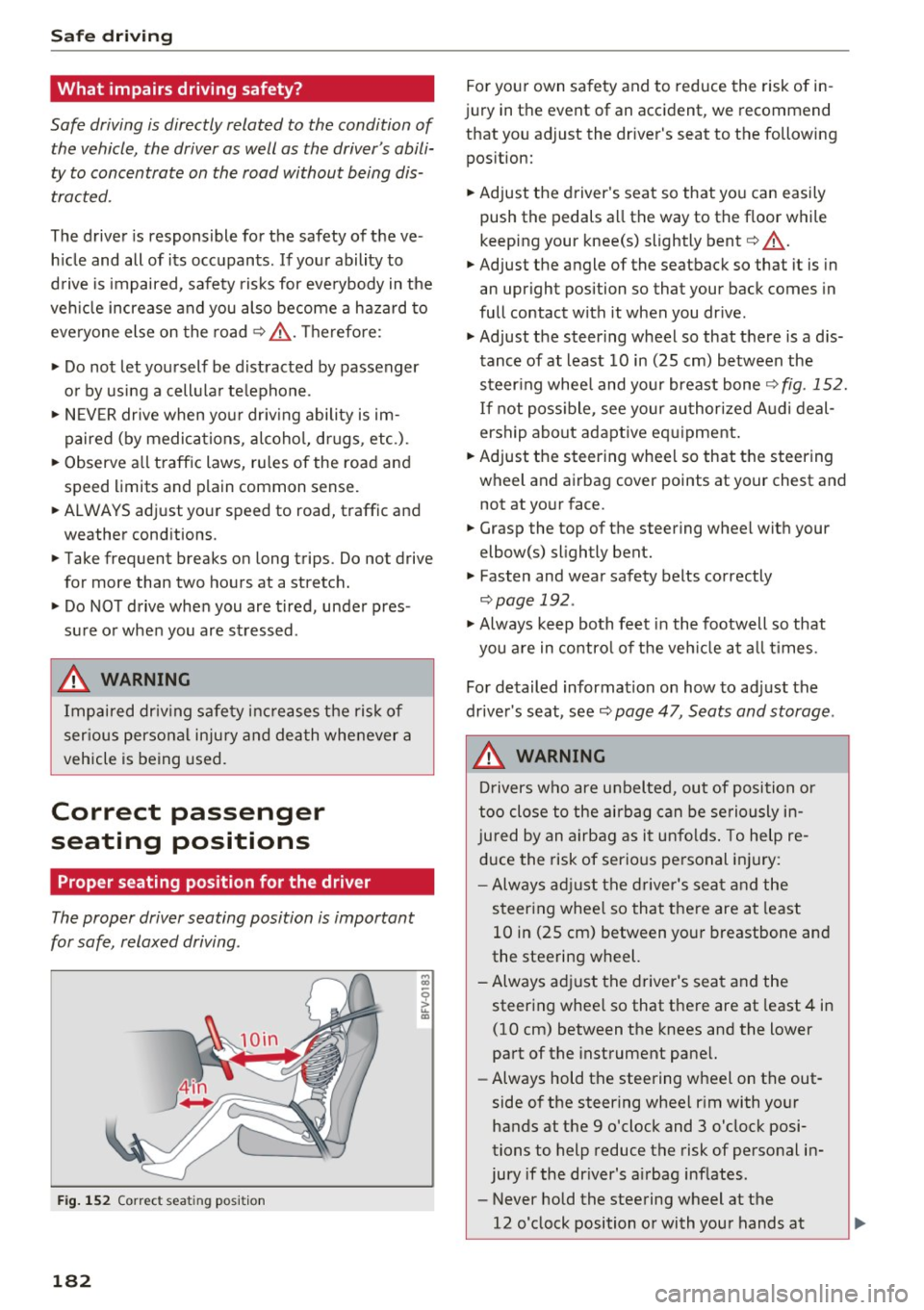
Fig. 152 Correct seating position
182
For your own safety and to reduce the risk of in
jury in the event of an accident, we recommend
that you adjust the driver's seat to the following
position:
~ Adjust the driver 's seat so that you can easily
push the pedals all the way to the floor while
keeping your knee(s) slightly bent
c:::> .&_.
~ Adjust the angle of the seatback so that it is in
an upright position so that your back comes in
full contact with it when you drive.
~ Adjust the steering wheel so that there is a d is
tance of at least 10 in (25 cm) between the
steering wheel and your breast bone
c:::>fig. 152.
If not possible, see your authorized Audi deal
ership about adaptive equipment.
~ Adjust the steering wheel so that the steering
wheel and airbag cover points at your chest and not at your face.
~ Grasp the top of the steering wheel with your
elbow(s) slightly bent.
~ Fasten and wear safety belts correctly
c:::> page 192.
~ Always keep both feet in the footwell so that
you are in control of the vehicle at all times .
For detailed information on how to adjust the
driver's seat, see
c:::> page 47, Seats and storage.
..&, WARNING
Drivers who are unbelted, out of position or
too close to the airbag can be seriously in
jured by an airbag as it unfolds. To help re
duce the risk of serious personal injury:
- Always adjust the driver's seat and the
steering wheel so that there are at least
10 in (25 cm) between your breastbone and
the steering wheel.
-Always adjust the driver's seat and the
steering wheel so that there are at least 4 in
(10 cm) between the knees and the lower
part of the instrument panel.
- Always hold the steering wheel on the out
side of the steering wheel rim with your
hands at the 9 o'clock and 3 o'clock posi
tions to help reduce the risk of personal in
jury if the driver's airbag inflates.
- Never hold the steering wheel at the
12 o'clock position or with your hands at
-
Page 191 of 314
co
co
..... N
" N ..... 0
" "' c:o
Safety belts
General notes
Always wear safety belts!
Wearing safety belts correctly saves lives!
This chapter explains why safety belts are neces
sary, how they work and how to adjust and wear
them correctly. .. Read all the information that follows and heed
all of the instructions and WARNINGS.
A WARNING
Not wearing safety belts or wearing them im
properly increases the risk of serious personal
injury and death .
- Safety belts are the single most effective
means available to reduce the risk of serious
injury and death in automobile accidents.
For your protection and that of your passen
gers, always correctly wear safety belts
when the vehicle is moving.
- Pregnant women, injured, or physically im
paired persons must also use safety belts.
Like all vehicle occupants, they are more
likely to be seriously injured if they do not
wear safety belts. The best way to protect a
fetus is to protect the mother -throughout
the entire pregnancy.
Number of seats
Your Audi TT Roadster has two seating positions. Each seating position has a safety belt .
A WARNING
Not wearing safety belts or wearing them im
properly increases the risk of serious personal
injury and death .
- Never strap more than one person, includ
ing small children, into any belt .
It is espe
cially dangerous to place a safety belt over a
child sit ting on your lap.
- Never let more people ride in the vehicle
than there are safety belts ava ilable.
Safety belts
-Be sure everyone riding in the vehicle is
properly restrained with a separate safety
belt or child restraint.
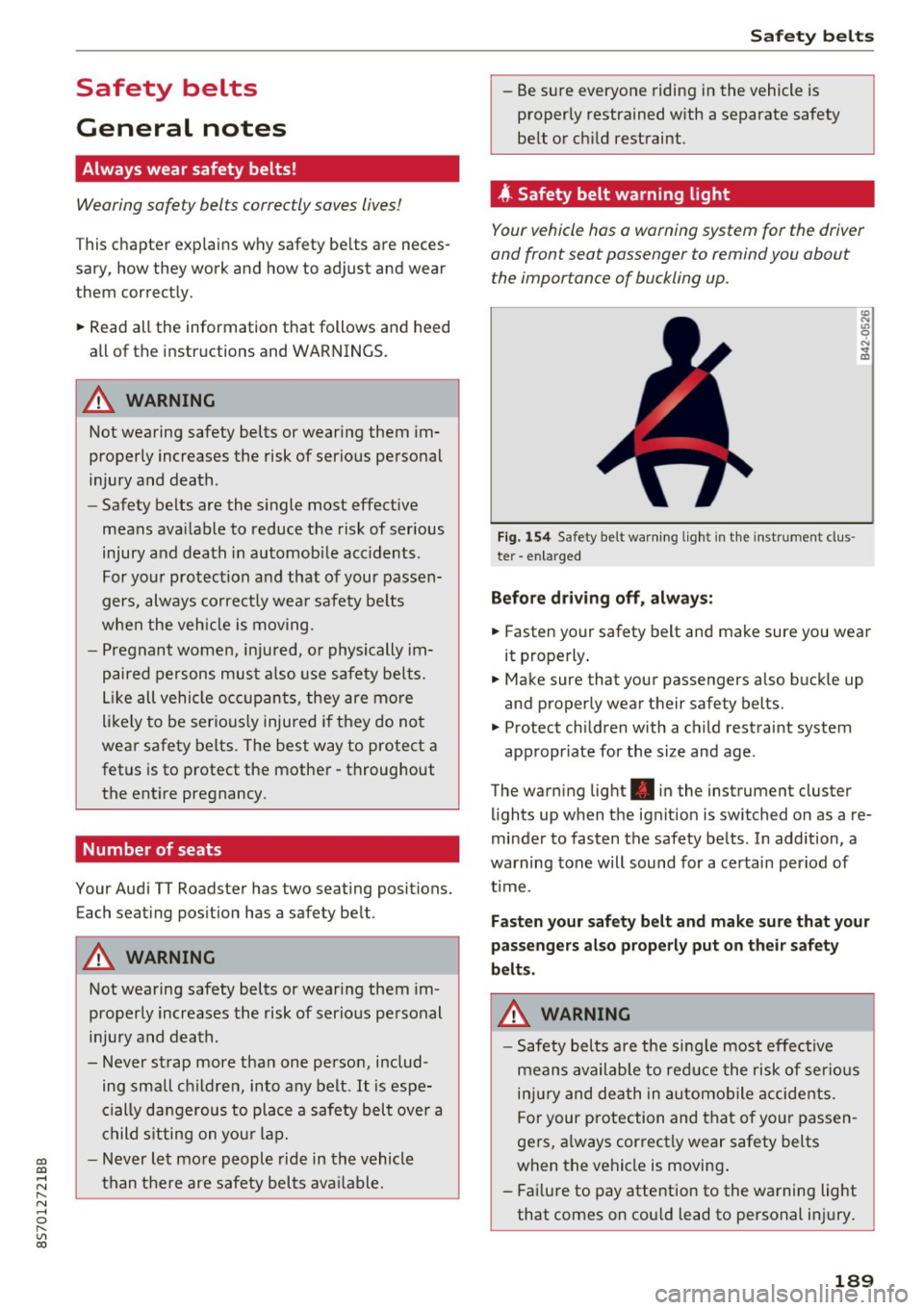
4 Safety belt warning l ight
Your vehicle hos o warning system for the driver
and front seat passenger to remind you about the importance of buckling up.
Fi g. 154 Safety belt warn ing light in the instrument clus
te r -enlarged
Before driving off, always:
.. Fasten your safety belt and make sure you wear
it properly.
.,. Make sure that your passengers also buckle up
and properly wear their safety belts.
.,. Protect children with a child restraint system
appropr iate for the size and age.
The warning light . in the instrument cluster
lights up when the ignit ion is switched on as a re
minder to fasten the safety belts . In addition, a
warning tone will sound for a certain period of
t im e.
Fasten your safety belt and make sure that your
passengers also properly put on their safety
belts.
A WARNING
-
- Safety belts are the sing le most effective
means available to reduce the risk of serious
injury and death in automobile accidents.
F or your protection and that of your passen
gers, a lways correctly wear safety belts
when the vehicle is moving .
- Failure to pay attention to the warning light
that comes on could lead to personal injury.
189
Page 194 of 314
Safe ty belts
-Never remove a safety be lt while the ve hicle
is mov ing . Do ing so will increase your r isk of
being injured or killed.
- Never wear belts twisted.
- Never wear belts over rigid or breakable ob -
jects in or on your cloth ing, such as eye
glasses, pens, keys, etc., as these may cause
injury.
- Never allow safety be lts to become dam
aged by being caught in door or seat hard
ware.
- Do not wear the shoulder part of the belt
under your arm or otherwise out of position.
- Severa l layers of heavy clothing may inter
fere with cor rect positioning of belts and re
duce the overall effectiveness of t he system.
- Always keep belt buckles free of anything
that may prevent the b uckle from latching
secu rely.
- Never use comfort clips or devices that cre
ate slack in the shoulder belt. However, spe
c ial clips may be requ ired for the prope r use
of some chi ld restraint systems.
- Torn or frayed safety belts can tear and
damaged belt hardware can break in an acc i
dent. Inspect belts regula rly .
If webbing,
bind ings, buckles, or ret rac to rs are dam
aged, have belts repl aced by an auth orized
Audi dealer or quali fied workshop.
- Safety belt s th at have been wo rn a nd loaded
in an accident m ust be rep lace d wi th the
c orrect repl acemen t sa fety be lt by an au
t h o rized Aud i dea le r. Replacement may be
necessary even if damage cannot be clear ly
seen. Anchorages that were loaded m ust al
so be inspected.
- Never remove, modify, disassemble, or try
to repair the safety belts yourself.
- Always keep t he be lts clean . Di rty be lts may
not work properly and can impai r the f unc
tion of the inertia reel¢
table Interior
cleaning on page 268.
192
Safety belts
Fastening safety belts
Seat first -everybody buckle up!
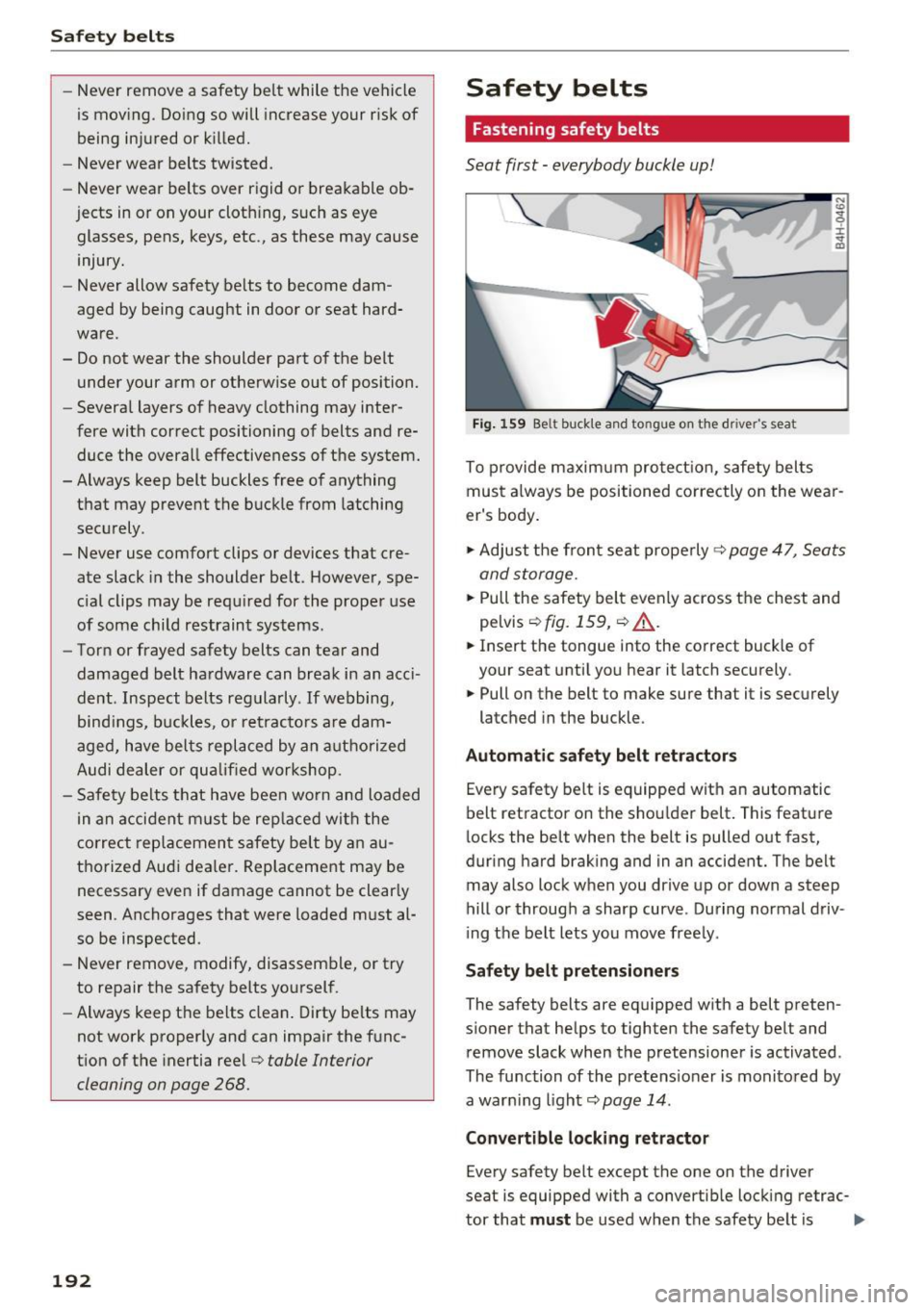
Fig. 159 Be lt buc kle and tongue on the driver 's seat
N
CD
~ ::i: .. a,
To p rovide m axim um pro te ct io n, safety belts
must a lways be positioned co rrectly on the wear
er's body .
.., Ad just the fron t se at prope rly ¢
page 47 , Seats
and storage.
.., Pull the safety belt even ly across the chest and
pe lvis
r::!>fig. 159, ¢ _& .
.., Insert the tongue into the correct buck le of
your seat until you hear it latch securely.
.., Pull on the belt to make sure that it is sec urely
latched in the buckle .
Automatic safety belt ret ractors
Every safety belt is equipped wit h an automatic
belt retractor on the shou lder belt . This feature
locks the belt when the belt is pulled out fast,
during hard brak ing and in an accident. The belt
may also lock when you dr ive up or down a steep
hill or through a sharp curve . During normal driv
i ng t he belt lets you move free ly .
S afety belt pretensioners
The safety belts are equ ipped w ith a belt preten
s ioner that he lps to tighten the safety belt and
remove slack when the pretensioner is activated .
The function of the pretens ioner is monitored by
a war ning light¢
page 14 .
Convertible lock ing retractor
Every safety belt except the one on the driver
seat is equipped with a convertib le lock ing retrac-
tor that
mu st be used when the safety be lt is Ill>-
Page 200 of 314
Airbag system
Standard 208 with which the Advanced Airbag
System in your vehicle was cert ified has been in
stalled on the front passenger seat. For a listing
of the child restraints that were used to certify
compliance with the US Safety Standard
¢page 220.
The PASSENGER AIR BAG OFF~; light in the
headliner tells you when the front Advanced Air
bag on the passenger side has been turned off by
the electronic control unit.
Each t ime you turn on the ignition, the
PASSEN·
GER AIR BAG OFF,-;; ON ~
light will come on
for a few seconds and:
- PASSENGER AIR BAG OFF~; will come on if
the front passenger seat is not occupied,
- PASSENGER AIR BAG OFF ~; will come on if
the e lectrical capacitance measured by the ca
pacitive passenger detection system for the
front passenger seat equals the combined ca pacitance of an infant up to about one year of
age and one of the rearward-facing or forward
facing child restraints listed in Federal Motor
Vehicle Safety Standard 208 with which the Ad
vanced Airbag System in your vehicle was certi
fied. For a listing of the child restraints that
were used to certify your vehicle's compliance
with the U.S. Safety Standard¢
page 220.
-PASSENGER AIR BAG OFF ~; will come on if
there is a small child or chi ld restraint on the
front passenger seat,
- PASSENGER AIR BAG ON @will go off if the
front passenger seat is occupied by an adult as
registered by the capacitive passenger detec
tion system ¢
page 20 7, Monitoring the Ad
vanced Airbag System.
The PASSENGER AIR BAG OFF~; light comes on
when electrical capacitance registered on the
front passenger seat is equa l to or less than the
comb ined capacitance of a typ ica l 1 year-old in
fant and one of the rearward-fac ing or forward
facing ch ild restraints listed in Federal Motor Ve
h icle Safety Standard 208 with wh ich the Ad
vanced Ai rbag System in your vehicle was cert i
fied.
If the total electrical capac itance registered on
the front passenger seat is more than that of a
198
typical 1 year -old chi ld but less than the weight
of a sma ll adult, the front airbag on the passen
ger side can deploy (the
PASSENGER AIR BAG
OFF ~;
light does not come on).
If the
PASSENGER AIR BAG OFF~; light does
not come on, the front airbag on the passenger
s ide has not been turned off by the e lectron ic
contro l unit and can deploy if the control unit
senses an impact that meets the conditions stor
ed in its memory .
For example, the airbag may deploy if :
-a small child that is heav ier than a typical 1
year -old child is on the front passenger seat
(regard less of whether the child is in one of the
child safety seats listed¢
page 220), or
- a child who has outgrown child restraints is on
the front passenger seat.
If the front passenger airbag is turned off, the
PASSENGER AIR BAG OFF,-;; light comes on in
the headliner and stays on .
If the front passenger airbag deploys, the Feder
al Standard requ ires the airbag to meet the " low
risk" deployment criteria to reduce the risk of in
jur y through interaction with the airbag. "Low
risk" deployment occurs in those crashes that
take place at lower decelerations as defined in
the electronic control unit¢
page 208, PASSEN
GER AIR BAG OFF~; ON~ light.
Always remember, a child seat or infant carrier
installed on the front seat may be struck and
knocked out of posit ion by the rapidly inflating
passenger's airbag in a frontal collision. The a ir
bag could greatly reduce the effectiveness of the
ch ild restraint and even ser iously injure the child
during inflation.
.&, WARNING
-
A child in a rearward-facing child seat instal
l ed on the front passenger seat will be seri
ously injured and can be killed if the front air
bag inflates - even with an Advanced Airbag
System.
- The inflating airbag will hit the ch ild seat or
infant carrier with great force and will .,.
Page 201 of 314
co
co
.... N
" N .... 0
" "' c:o
smash the child seat and child against the
backrest, center armrest, door or roof.
- Forward-facing child seats installed on the
front passenger's seat may interfere with
the deployment of the airbag and cause se
rious personal injury to the child.
A WARNING
If, in exceptional circumstances, you must in
stall a forward-facing child restraint on the
front passenger's seat:
- Always make sure the forward-facing seat
has been designed and certified by its man
ufacturer for use on a front seat with a pas
senger front and side airbag.
- Never put the forward-facing child restraint
up against or very near the instrument pan
el.
- Always move the front passenger seat to
the highest position in the up and down ad
justment range and move it back to the
rearmost position in the seat's fore and aft
adjustment range, as far away from the air
bag as possible, before installing the for·
ward-facing child restraint.
- Always make sure that the safety belt upper
anchorage is behind the child restraint and
not next to or in front of the child restraint
so that the safety belt will be properly posi
tioned.
- Make sure that the
PASSENGER AIR BAG
OFF~;
light comes on and stays on all the
time whenever the ignition is switched on.
A WARNING
To reduce the risk of serious injury, make sure
that the
PASSENGER AIR BAG OFF~; light
will be displayed whenever a child restraint is
installed on the front passenger seat and the
ignition is switched on.
- If the PASSENGER AIR BAG OFF~; light
does not stay on, perform the checks descri
bed
Q page 20 7, Monitoring the Advanced
Airbag System.
- Have the airbag system inspected by your
Audi dealer immediately.
Airbag system
-Always carefully follow instructions from
child restraint manufacturers when instal
ling child restraints.
A WARNING
If, in exceptional circumstances, you must in
stall a forward or rearward-facing child re
straint on the front passenger's seat:
- Improper installation of child restraints can
reduce their effectiveness or even prevent
them from providing any protection.
- An improperly installed child restraint can
interfere with the airbag as it deploys and
seriously injure or even kill the child -even
with an Advanced Airbag System.
- Always carefully follow the manufacturer's
instructions provided with the child seat or
earner.
-Always make sure that there is nothing on
the front passenger seat that will cause the
capacitive passenger detection system in
the seat to signal to the Airbag System that
the seat is occupied by a person when it is
not, or to signal that it is occupied by some ·
one who is heavier than the person actually
sitting on the seat. The presence of addi
tional objects could cause the passenger
front airbag to be turned on when it should
be off, or could cause the airbag to work in a
way that is different from the way it would have worked without the object on the seat.
199