remote control AUDI TT ROADSTER 2017 User Guide
[x] Cancel search | Manufacturer: AUDI, Model Year: 2017, Model line: TT ROADSTER, Model: AUDI TT ROADSTER 2017Pages: 314, PDF Size: 76.54 MB
Page 35 of 314
co
co
.... N
" N .... 0
" "' c:o
9. If the garage door or other systems do not
open with the Home link buttons even if the programm ing was successfu l, the system
may use a rolling code instead of a fixed
code. You must also then perform
ro lling
c o de progr amm ing
c:> page 33 .
The other two buttons in the contro l pane l can be
programmed using the instructions given above.
Star t wi th step 3 .
Dele ting button prog ramm ing
The programmed buttons cannot be de leted indi
vidually. They must be deleted all at once . Repro
gram the buttons if necessary.
"' Switch on the ignition.
.. Press both of the outside buttons on the con
trol unit until the yellow LED @turns off and
the green LED@ blinks.
Reprogramming button s
"'Switch on the ignition.
"'T o reprogram an individua l button, press the
desired b utton until the green LED(!) turns off
and the ye llow LED @star ts to blink (after ap
proximately 20 seconds). Release the button
immediately. The programming mode is active
for S m inutes.
"' Cont inue with step 5 .
@ Tips
-The distance needed between the remote
control transm itter and the Homelink mod
ule in the rad iator grille c:>
fig. 27 depends
on the system you are programm ing .
- Depending on the system model, you may need to release the button on the remote
control t ransm itter while it is programming
and press it again. Hold every posit ion you
try when programming for at least 15 sec
onds befo re trying a new posi tion. Keep an
eye on the vehicle turn signals while doing
this .
Op ening and cl osing
Rolling code programming
Applies to: vehicles with garage door opener (Home link)
On some systems, programming a rolling code is
also necessary.
Id enti fying a rolling c ode
"' Press the button in the control unit that is a l
ready programmed again and hold it down.
"' Watch the green LED (!)c:>
page 32 , fig. 26. If
the green L ED bl inks quickly, the system (such
as a garage door) has a roll ing code .
"' Program the rolling code as follows:
Acti vating the sys tem moto r unit
.. Locate the programming button on the system
motor unit. The exact location and color of the
button may vary depending on the system man
ufacturer 's brand .
"' Press the programming button on the system
motor unit (usua lly this will activa te a "display "
on the motor un it) . You now have approx ima te
ly
30 se cond s to prog ram the button in the
control panel.
Programming the button in the control
pan el
.. Press the previous ly programmed button in the
control panel for 2 seconds .
.. To complet e rolling code programming, press
the button again for 2 seconds.
.. On some systems, the button might need to be
pressed a third time to end the programm ing
procedure .
After programming, the system should recogni ze
the signal and operate when the button in the
control panel is pressed . Now you may program
the other buttons as needed .
(D Tips
-The ro lling code can be programmed more
quickly and more easily with the help of a
second person .
- If any d ifficult ies occur when programm ing
the roll ing code, it may be helpful to read
the system operating manual.
33
Page 37 of 314
CD
CD
.... N
" N ...... 0 r--. V, co
-When operating the power top, visibility to
the rear is limited. Avoid operating the top
while driving in reverse.
(D Note
-To prevent damage to the power top:
- do not store any objects in the power top
storage compartment .
- make sure there is enough space above
the vehicle when opening or closing the
power top.
(D Tips
- To prevent the vehicle battery from draining
unnecessarily, do not open or close the pow
er top repeatedly when the engine is switch
ed off.
- A message will appear in the instrument cluster if there is a malfunction in the power
top
¢ page 35.
- The power top can also be operated manual
l y temporarily if there is a malfunction
¢ page 3 7, Power top emergency opera
tion.
An authori zed A udi dealer or au thor
i zed Audi Service Facility should diag nose
and correct the cause of the ma lfunction as
soon as possib le .
- If the vehicle is parked with the power top open, the vehicle interior is not p rotected
from damaging weather or unauthorized ac
cess. Lock any items you leave behind in the
l uggage compartment. Close the power top
before leaving the vehicle .
- The side windows automat ically lower
slight ly when opening or closing the power
top.
P owe r top
Power top convenience opening and closing
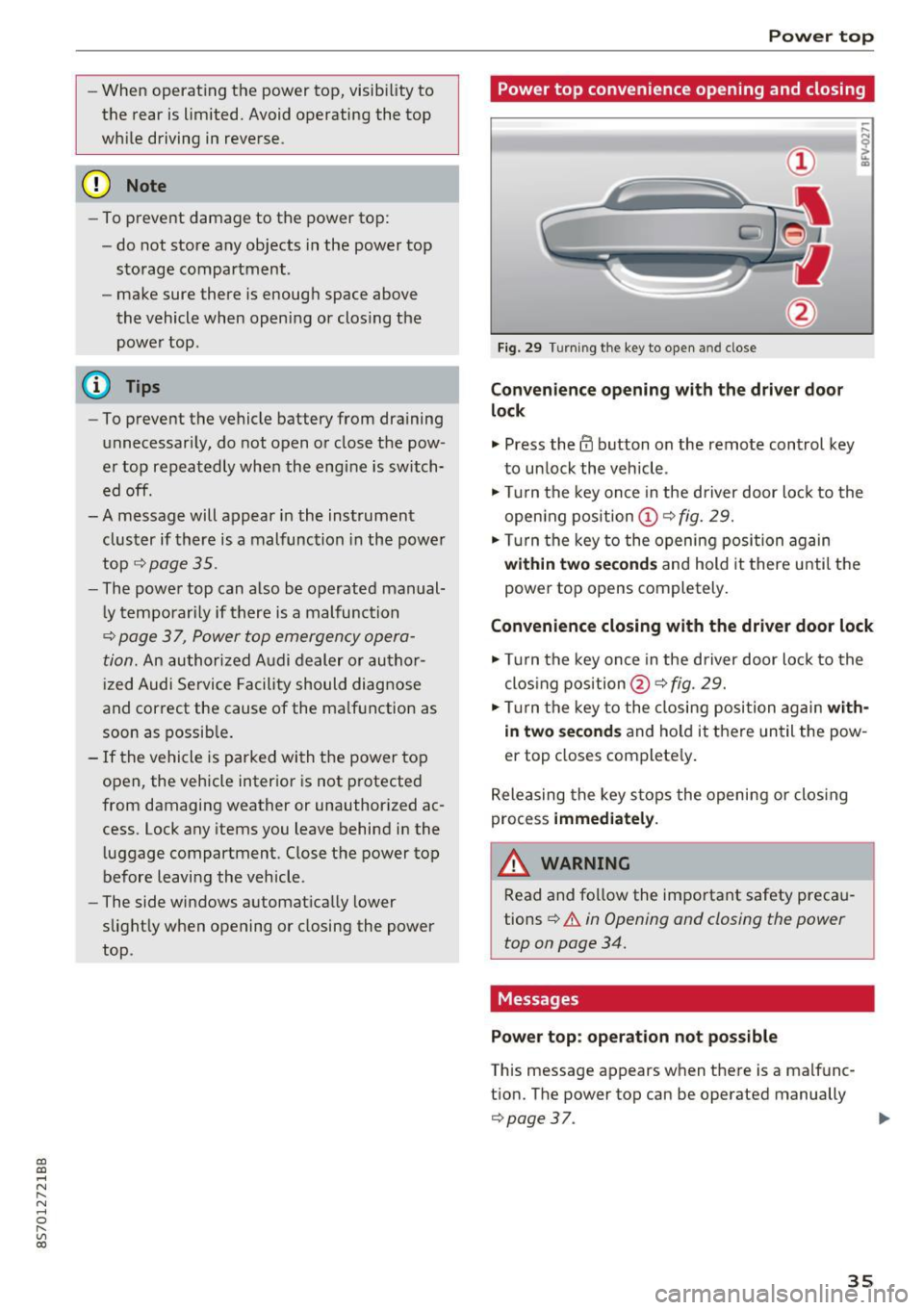
Fig. 29 Turning the key to open and close
Conven ience opening with the dri ver door
lock
.,. Press the 63 button on the remote control key
to un lock the vehicle .
.,. Turn the key once in the driver door lock to the
open ing pos ition
© ¢fig. 29.
.,. Turn the key to the opening posi tion again
within tw o second s and hold it there until the
power top opens completely.
Convenience closing with the driver door lock
.,. Turn the key once in the driver door lock to the
clos ing position @¢
fig. 29.
.,. Tur n the key to the closing position again
with
in two second s
and ho ld it there un til the pow
er top closes complete ly .
Releasing the key s tops the opening or clos ing
process
immedi ate ly.
A WARNING
-
Read and fo llow the important safety preca u
tions
¢ .&. in Opening and closing the power
top on page 34.
Messages
Pow er top : operation n ot pos sibl e
This message appears when there is a malfunc
t ion. The power top can be operated manually
¢ page 37. ..,.
35
Page 48 of 314
Lights and Vision
@ Tips
To prevent inaccurate compass readings, do
not bring any remote controls, e lectr ica l dev i
ces or metall ic objects near the mirro r.
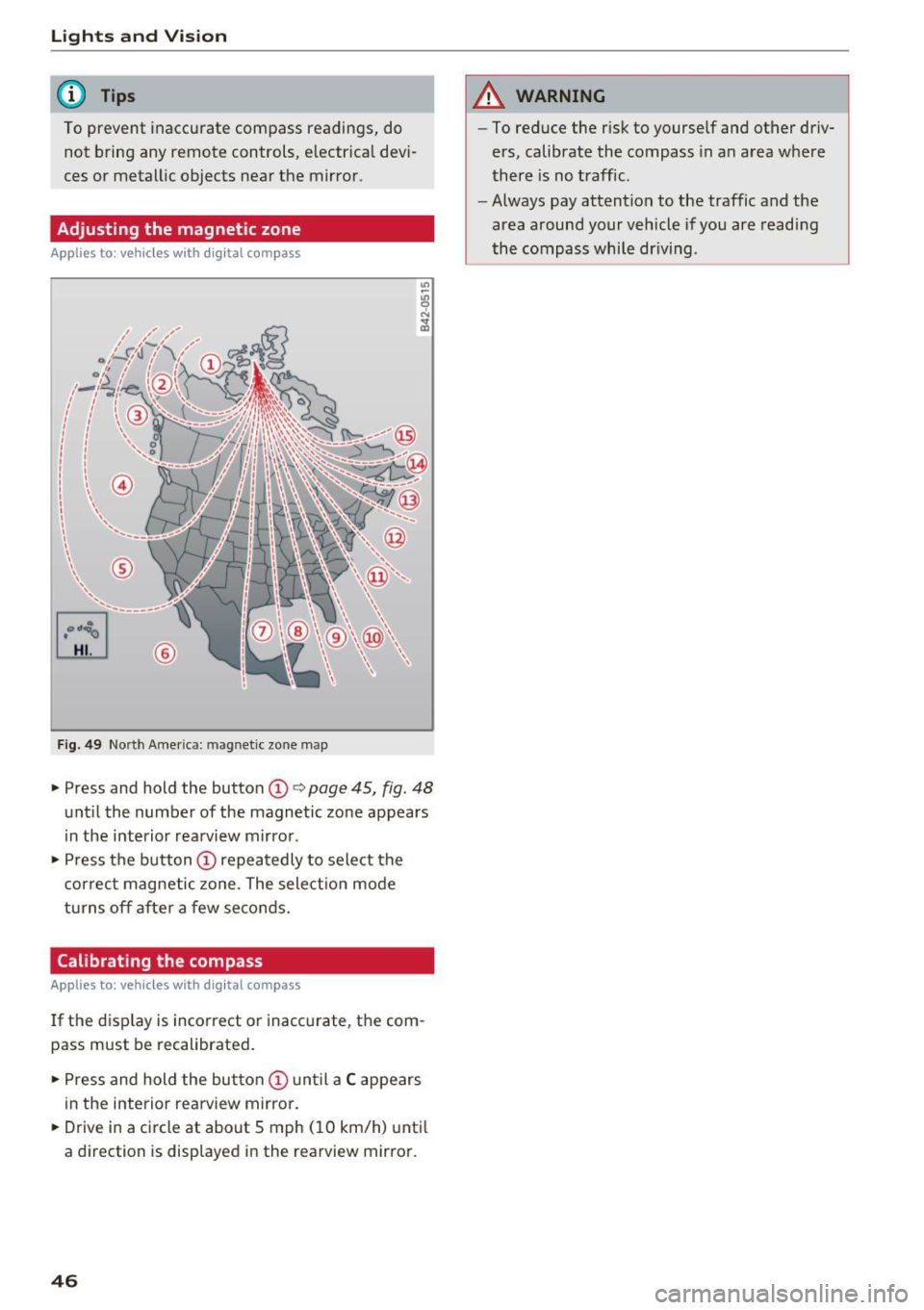
Adjusting the magnetic zone
A pp lies to: ve hicles w ith digital compass
[o::J
UiL.J ®
F ig . 4 9 Nort h Amer ica : ma gnetic zo ne m ap
.- Press and hold the button CD i:> page 45, fig. 48
unt il the number of the magnetic zone appears
in the interior rea rview m irro r .
.- Press t he button
CD repea tedly to select the
correc t magne tic zone . The select io n mode
turns off afte r a few seco nds.
Calibrating the compass
A pp lies to: ve hicles w ith digi tal compass
If the d isp lay is incorrect or inacc urate, t he com
pass must be recalibrated .
.- Pre ss and hold the button
CD un til a C appears
in the inte rio r rearview mirror .
.- Drive in a circle at about 5 mph ( 10 km/h) unti l
a dir ection is disp layed i n the rearvi ew mirro r.
46
A WARNING
- To reduce the r isk to yourself and other driv
ers, calibrate the compass in an area whe re
there is no traffic .
- Always pay attention to the traffic and the
area around your vehicle if you are readi ng
the compass whi le dr iv ing .
Page 54 of 314
Warm and cold
Warm and cold
Climate control system
Description
The climate control system warms, cools and re moves humidity from the air in the vehicle interi
or. It functions most effectively when the w in
dows are closed .
If there is a build-up of heat in
side the vehicle , ventilation can help to speed up
the cooling process.
Pollutant filter
The po llutant filter removes pollutants such as
dust and pollen from the a ir.
Key recognit ion
Certain settings are automatically stored and as
signed to the remote control key be ing used .
.&_ WARNING
Poor visibility can lead to accidents.
- For safer driving, keep all windows free of
ice, snow and fog.
- Become familiar as quickly as possible with
the correct use and function of the cl imate
contro l system, especially w ith the defrost
ing and defogging function.
- Whe n the temperature is below freez ing,
on ly use the windsh ield washer system after
the windsh ie ld has been warmed by the cli
mate contro l system . T he washer fluid cou ld
freeze o n the windshield and impair visibili
ty .
(D Note
-If yo u suspect that the climate control sys
tem is damaged, switch the sys tem off to
52
prevent further damage and have it checked
by an authorized Audi dea ler or authorized
Audi Service Facility .
- Repairs to the Audi climate control system
require special technical knowledge and
special tools. See an authori zed Aud i dea ler
or authori zed Aud i Service Facility.
@) For the sa ke of the environment
Reducing the amo unt of fuel used also re
duces the amount of pollutants that enter the
a ir .
(D Tips
- To prevent interference with the heating
and cooling output and to prevent the win
dows from fogging over, the a ir intake in
front of the windshie ld m ust be free of ice ,
snow or leaves .
- Condensation from the cooling system can
dr ip and form a pudd le of water under t he
vehicle . This is norma l and does not mean
there is a lea k.
- The energy management system may sw itch
the seat heating* or rear window defroster
off tempora rily . These systems a re available
aga in as soo n as the energy supp ly has been
restore d.
- Th e flows throug h the vents under the rea r
window. Make su re t he openings are no t
c overed when plac ing clothing on the lug
gage compa rtment cove r.
Page 63 of 314
CD
CD
.... N
" N ...... 0 r--. V, co
have the malfunction corrected. To start the en
gine, press and hold the
! START ENGINE STOPI
button.
DJ R emot e control key : hold b ack of key
again st the d esignated are a. See owner's man
ual
This message appea rs if the re is no convenie nce
key inside the vehicle or if the system does not
recognize the key . The conven ience key may not
be recognized, for example, if it is cove red by an
object that
disrupts the signal (such as a brief
case), or if the key battery is weak. Electronic de
vices such as cell phones can also interfere with
the signal.
To still be able to start or stop the eng ine, see
c:::> page 61, Starting the engine when there is a
malfunction .
Ill Remote control key : key not recogn ized . Is
the ke y still in th e vehi cle?
The Ill ind icator light turns on and this message
appears if the conve nience key was removed from
the vehicle when the engine was running.
If the
conven ience key is no longer in the vehicle, you
cannot switch the ign ition on or start the engine
once you stop it. You a lso cannot lock the vehicle
from the outside .
Please press brake p edal
This message appears if you do not press the
brake pedal when starting the eng ine.
Please pr ess clut ch p edal
This message appea rs in vehicles w it h manual
transmissions if you do not press the clutch pedal
when sta rting the engine . The engine can on ly be
started when t he clu tch pedal is pressed.
Pl ease select N or P
This message appea rs when starting or stopping
the eng ine if the selector lever is not in the Nor P
position . The engine will not start/stop.
Shift to P , otherw ise vehi cle can roll awa y.
Doors can be lo cked i n P only
This message appears for safety reasons a long
with a warning tone. It appears if the selector
lever for the automatic transmission is not in the
D rivi ng
P position when switch ing the ignit ion off w ith
the
I START ENGINE STOPI b utton. P lace these
l ector lever in the P position. The veh icle cou ld
roll if the lever is not in P. You also cannot lock
the vehicle using the locking sensor on the door handle or using the conven ience key .
Starting the engine when there is a
malfunction
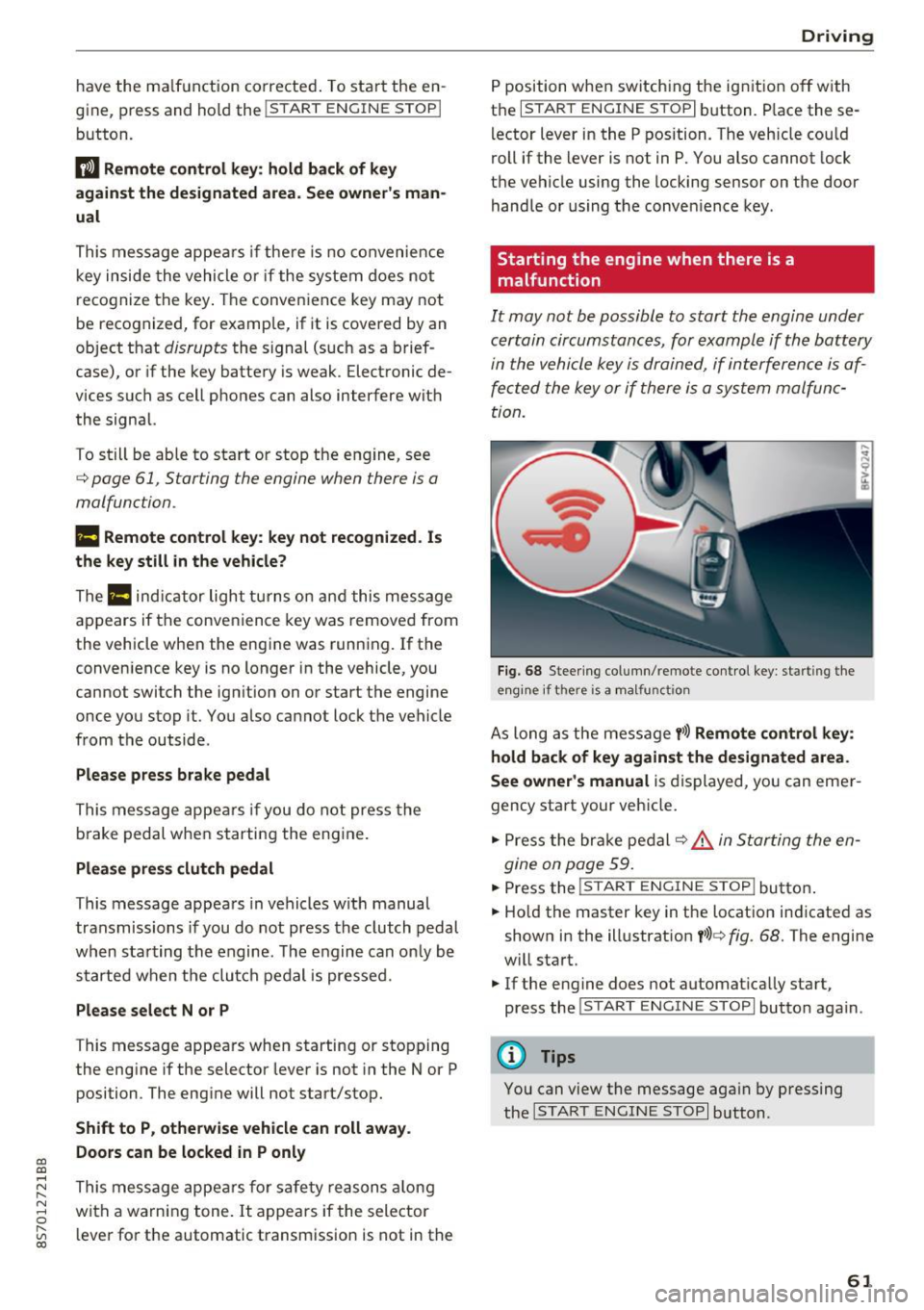
It may not be possible to start the engine under
certain circumstances, for example if th e battery
in the vehicle key is drained, if interference is af
fected the key or if there is a system malfunc
tion.
F ig. 68 Steering column/ remote control key: starting the
e n g in e if there is
a m alfunct ion
As long as the message y >l) Remote control key :
hold back of key against the designated are a.
See owner's manual
is displayed, you can emer
gency start your vehicle.
.. Press the brake pedal
c:::> .&. in Starting the en
gine on page 59.
... Press the ~I s=T ~A ~ R~ T~ E_N _G _I _N =E - S~ T= o- P~I button .
.,. Ho ld the master key in the location ind icated as
shown in the illustrat ion
y >l) c:::, fig. 68. The engine
w ill start.
.. If the engine does not automat ica lly start,
press the
! S TART ENGINE STOPI butto n again .
(D Tips
You can view the message aga in by pressing
the
I S TA RT ENGINE S TOP I button.
61
Page 78 of 314
Assist
-The camera field of view~ page 75, fig. 79 is
dirty or covered in ice. Clean this area on the
windshield.
- The camera field of view is fogged over. Wait
until the fog has cleared before switching the
active lane assist on again.
- The system has been unable to detect the lanes
for an extended period of time due to road con
ditions. Switch active lane assist back on when
the lines are more visible.
Audi active lane assist : currently unavailable.
See owner's manual
There is a temporary active lane assist malfunc
tion. Try switching the active lane assist on aga in
later .
Audi active lane assist : malfunction! See own
er's manual
Drive to an authorized Aud i dea ler or authorized
Audi Service Facility immediately to have the
malfunct io n corrected.
Audi active lane assist: Please take over steer
ing!
This message appears if you are not steering by
yourse lf. If th is is the case, active lane assist does
not switch off, but it is "not ready " to provide a
warn ing . The system can he lp you keep the veh i
cle in the lane. However, you are responsible for
driving the vehicle and must steer it yourself .
Adjusting the steering time and vibration
warning
Applies to: vehicles with Audi active lane assist
You can adjust individual active lane assis t set
tings in the Infotainment system.
Select in the Infotainment system: I MENU ! but
ton>
Vehicle > left control button >Driver assis
tance
> Audi active lane assist
1l The correct ive steer ing fu nctio n is not available in all mar
kets.
76
Steering time1>
Early: in this setting, the corrective steering hap
pens continuously to help keep the veh icle in the
center of the lane.
Late : in this setting, the system provides correc
tive steering just before a vehicle wheel touches a
detected lane marker line .
Vibration warning
You can switch the add itional vibrat ion warn ing
i n the steering wheel on or off.
(D Tips
In certain markets: your settings are stored
a ut omat ically and assigned to the remote
control key in use.
Audi side assist
Description
Applies to: vehicles with Audi side assist
Fig. 81 Sensor detec tion rang e
Fig. 82 Display on the exterior mirror
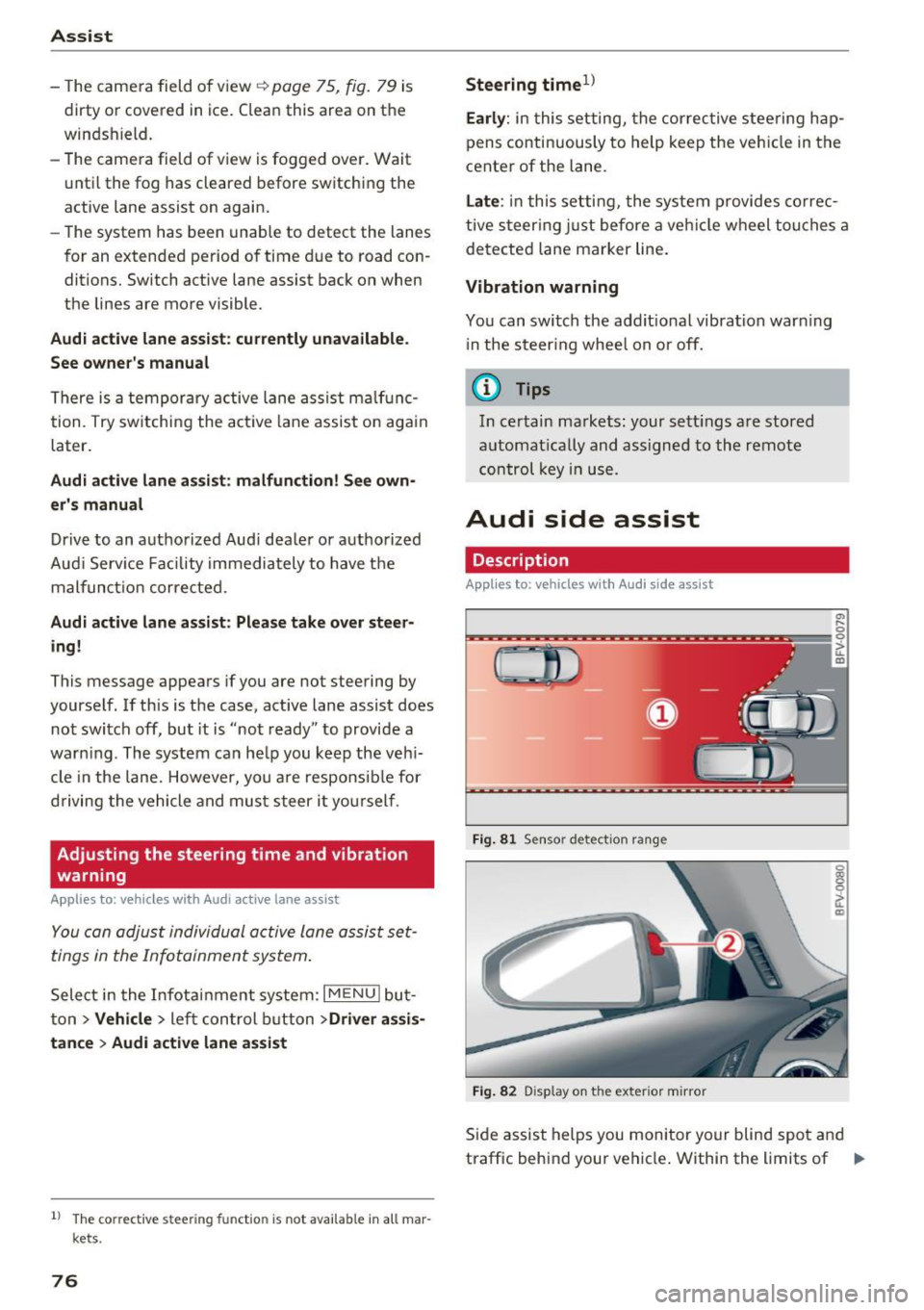
Side assist helps you monitor your blind spot and
traffic behind your vehicle . Within the limits of .,.
Page 88 of 314
Parking systems
Switching off
.. Drive faster than 6 mph (10 km/h), or
.. Press the
P"1A button, or
.. Switch the ignition
off.
(D) Tips
- The visual display in the left part of the dis
play should help you detect the critical vehi
cle areas .
- You can change the volume of the sig nals
and the display
¢page 86.
Perpendicular parking
Appl ies to: ve hicles with rea rview ca mera
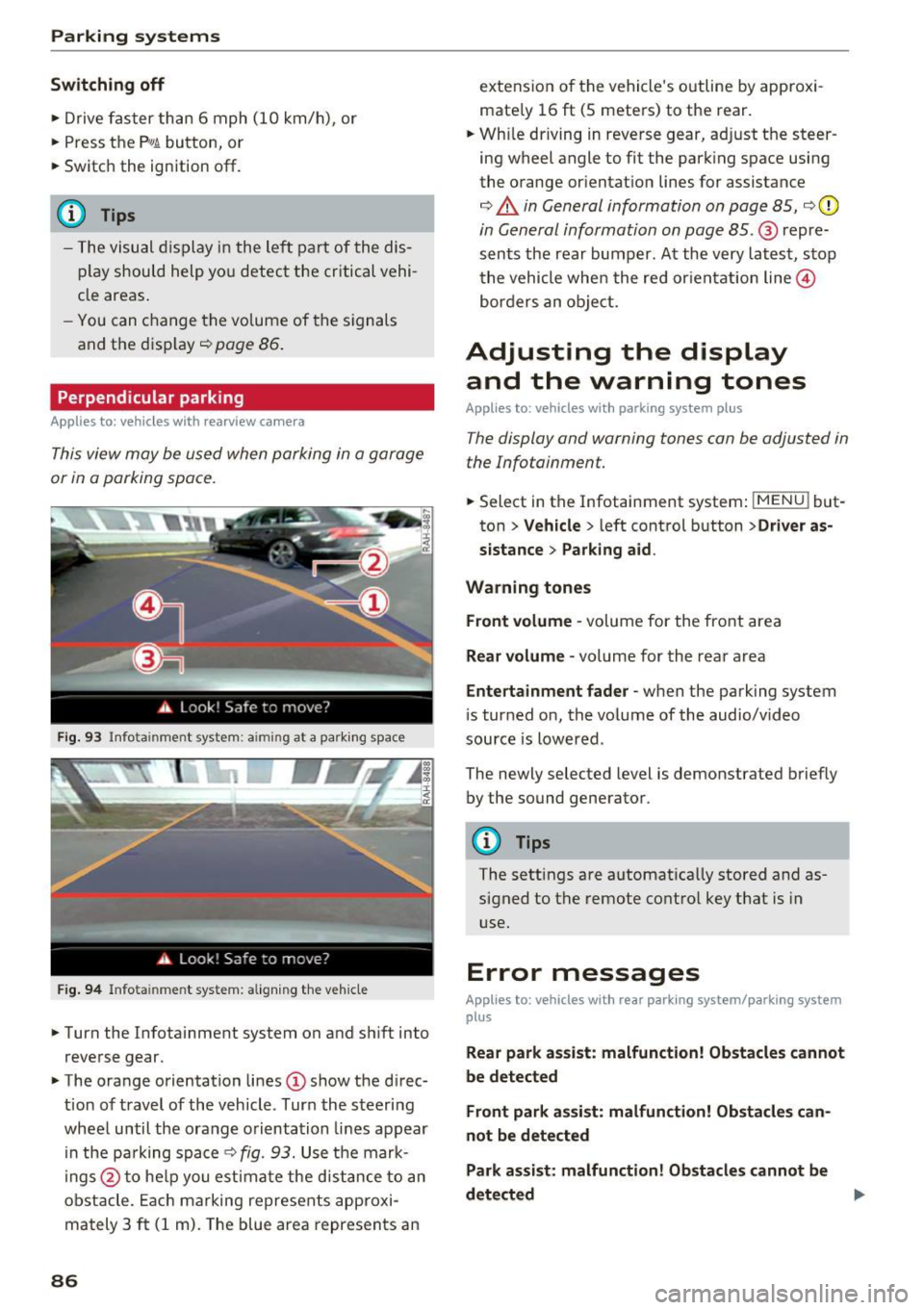
This view may be used when parking in a garage
or in a parking space.
Fig. 93 Info ta inment syste m: aim ing at a pa rking space
Fig. 94 Infota inme nt sys tem: aligning the vehicle
.. Turn the Infotainment system on and shift into
reverse gear.
.. The orange orientation lines
(I) show the direc
tion of travel of the vehicle . Turn the steering
wheel until the orange orientation lines appear
in the pa rking space
c:!;> fig. 93. Use the mark
ings @to help you estimate the d istance to an
obstacle. Each marking represents approxi
mately 3
ft (1 m). The blue area represents an
86
extension of the vehicle 's outline by approxi
mate ly 16
ft (5 meters) to the rear .
.. Wh ile driving in reverse gear, adjust the steer
ing wheel angle to fit the parking space using
the orange orientation lines for assistance
¢ &. in General information on page 85, ¢(D
in General information on page 85. @ repre
sents the rear bumper. At the very latest, stop
the vehicle when the red or ientation line@
borders an object.
Adjusting the display
and the warning tones
Applies to: vehicles with parkin g sys tem plus
The display and warning tones can be adjusted in
the Infotainment.
.. Select in the Infotainment system : IMENUj but
ton
> Vehicle > left control button >Driver as
sistance> Parking aid .
Warning tones Front volume -
volume for the front area
Rear volume -volume for the rear area
Entertainment fader -when the parking system
is turned on, the volume of the audio/video
source is lowered .
The newly selected level is demonstrated briefly by the sound generator.
{!) Tips
The settings are automat ically stored and as
signed to the remote control key that is in
use.
Error messages
App lies to : vehicles wit h rear parking system/parking system
plus
Rear park assist: malfunction! Obstacles cannot
be detected
Front park assist: malfunction! Obstacles can
not be detected
Park assist: malfunction! Obstacles cannot be
detected ..,._
Page 96 of 314
Intelligent Technology
greater than the amount being generated in or
der to maintain an optimal vehicle battery charge
level.
(D Tips
- Energy management cannot overcome the laws of physics. Note that the charge level
and length of the vehicle battery life are
limited.
- When the starting ability is jeopardized, the
(•j indicator light turns on¢ page 13.
What you should know
Maintaining the starting ability is the highest
priority.
A lot of stress is placed on the vehicle battery
when driving short distances, during city driving,
and at cold times of the year. A lot of energy is
used but little is generated. It is also critical
when the engine is not running but electrical
equipment is switched on. In this case, energy is used but none is generated .
In situations like this, energy management will
actively regulate the distribution of energy.
Long periods without use
If you do not drive your vehicle for several days or
weeks, electrical equipment is gradually scaled
back or switched off. This reduces energy use and
ensures the vehicle will be able to start after long
periods of time. Some convenience functions
such as opening with the remote control key may not be available . These convenience functions
will be available again once you switch the igni tion on and start the engine.
With the engine switched off
The vehicle battery will drain if you use Infotain ment functions such as listening to the radio
while the engine is switched off .
If the vehicle's ability to start may be impaired by
the energy use, a message will appear in the In
fotainment system display. The message indi cates that the system will switch off automatically soon .
If you would like to continue using the
functions, you must start the engine.
94
With the engine running
Although e lectrical energy is generated while
driving , the vehicle battery can drain . This can
happen if little energy is generated but much is
used, and the charge level of the vehicle battery
is not optimal.
To restore the balance of energy , components
that require large amounts of energy are tempo
rarily scaled back or switched off. Heating sys
tems in particular require a great deal of energy.
If you notice, for example, that the seat heating*
or rear window defroster is not working, then it has been temporarily reduced or switched off .
These systems are available again as soon as the energy supply has been restored.
In addition, you may notice that the idle speed
has slightly increased . That is normal and no
cause for concern . By increasing the idling speed ,
the additional required energy will be generated
and the vehicle battery will be charged.
Information about data
recorded by vehicle
control modules
Your vehicle is not equipped with a crash data re
corder . This device is installed by some vehicle
manufacturers to record data about crashes so
that it can be analyzed later. Crash data record
ers are also called "Event Data Recorders (EDR)".
In some legal jurisdictions, it is not permitted to
access or download data recorded by pre-instal
led crash data recorders in order to evaluate a
crash without clear consent of the vehicle owner.
Your vehicle is not equipped with a crash data re
corder. However it does contain a variety of elec
tronic control modules for various vehicle sys
tems such as engine function, exhaust treatment
or airbags and safety belts.
These electronic control modules record vehicle
data during normal driving for diagnosis and re
pair purposes. The recording capability of the
electronic control modules is limited to data only
- no sound is recorded. If the control module de
tects a system malfunction or other change in
status, a very limited amount of data is recorded .,,.
Page 179 of 314
MMI connect app
Applies to: vehicles with Audi connect
Requ ireme nt: the Audi MMI connect app m ust
be i nst alled and open on your mobile devi ce.
- Connect new dev ice : search for and connect a
mobile device (s uch as a smartp hone).
- List of devices already paired : select your mo
bile device from th e list of a ll the devices that
are already paired.
Music
Applies to vehicles with Bluetooth or Wi -Fi audio player
Audio player
Req uirement: the Bl uetooth func tion a nd v is ib ili
ty mus t be sw itche d on in the MMI
¢page 177
and on the ce ll phone.
- Connect new device : press the contro l knob .
Se lect
Bluetooth audio player . Search fo r and
c o nne ct a mobile device.
- List of devices already paired : selec t a Bl ue
tooth device fro m the l ist of all the devi ces that
are already paire d.
Wi-Fi audio player
Req uirement: the Wi -Fi hotspot on the M MI
¢
page 131 and the Wi-Fi o n your cell p ho ne
must be switch ed on .
-Connect new device : press the control knob.
Sea rch for and connect a Wi-Fi capable device .
-DisconnectWi-Fi audio player : deactivate the
Wi-Fi on your Wi-Fi capab le device . The dev ice
will be automat ically removed from the list .
Directory
Applies to: vehicles with telephone
Display contacts from a cell phone (or an addi
tional cell phone) .
Requirement: cell phones must not be connected
to the MMI through the B luetooth remote SIM
access p rofile o r thr ough t he
Handsfree profi le.
co -Connect new device : search for and connect a co
;:::: new cell p hone.
" N ...... 0
" "' c:o
System settings
- List of devices already paired : select yo ur cell
phone from t he list of all the cell phones that
are a lready paired .
Audi smartphone
Applies to: vehicles with Aud i smartphone interface
- Connect yo ur ce ll phone to the Audi music in
terface¢
page 162 using a USB adapter
¢ page 162, fig . 142 .
-Select your cell pho ne from the list of cell
p hones that have a lready bee n connected .
Additional options
Depending on the selected f unction, yo u can use
t h e right contro l bu tto n to access the ava ilab le
additional options in t he connection manager.
Bluetooth settings
- Bluetooth:
select a nd confi rm a setti ng for the
Bluetooth co nnection visib ility . Se lect
Visible
for the MMI to be vis ible to othe r devic es. Se
lect
Invisible for the MMI to not be visib le to
o the r dev ices. However, i t is st ill poss ible t o es ·
t ablish a Blue tooth connec tion wit h pa ire d de
vices when the vi sibili ty is sw itched off . Select
Off to turn v is ib ility off . Then a Bl uetooth con
nection is not possib le .
- Bluetooth audio player: when t his function is
sw itched on~, the B luetooth a udio p laye r is
avai lab le as a source in the
Media men u.
- Delete Bluetooth device : the selected cell
phone/mob ile dev ice is disconnected from the
M MI.
- Show Bluetooth profile : you can Connect or
Disconnect the Handsfree profile and the Di
rectory/contacts *
separately.
- Bluetooth audio player : switch this f unction on
~ to be able to select the Bluetooth aud io play
er as a source i n the Med ia menu .
-Bluetooth name : the MMI Bluetooth name (fo r
examp le .,A UDI MMI 2017") is d isp layed and
can be changed.
When the funct io n is switched on~, the symbol
@ ¢
page 105 , fig. 111 appea rs in the In fotain-
ment system display.
1111-
177
Page 300 of 314
Index
AUTO Automatic climate control system . . . . . . . 53
Automatic headlights . . . . . . . . . . . . . . . . . 39
Auto Lock (central locking) . . . . . . . . . . . . . . 24
Automatic belt retractor . . . . . . . . . . . . . . . 192
Automatic climate control system
refer to Climate control system (automatic) .S3
Automatic key . . . . . . . . . . . . . . . . . . . . . . . . . 24
Automatic transmission . . . . . . . . . . . . . . . . . 63
Driving tips . . . . . . . . . . . . . . . . . . . . . . . . . . 66
Emergency mode . . . . . . . . . . . . . . . . . . . . . 70
Hill descent contro l . . . . . . . . . . . . . . . . . . . 68
Kick-down . . . . . . . . . . . . . . . . . . . . . . . . . . . 69
La unch Control-Program . . . . . . . . . . . . . . . 69
malfunction . . . . . . . . . . . . . . . . . . . . . . . . . 65
Selector lever emergency release . . . . . . . . 71
Selector lever lock . . . . . . . . . . . . . . . . . . . . 65
Selector lever positions . . . . . . . . . . . . . . . . 64
Shifting manually . . . . . . . . . . . . . . . . . . . . 68
Steering wheel with shift paddles. . . . . . . . 68
tiptronic . . . . . . . . . . . . . . . . . . . . . . . . . . . . 68
Automatic wipe/wash system . . . . . . . . . . . . 43
Automatic zoom (navigation) . . . . . . . . . . . 146 Brakes . .
. . . . . . . . . . . . . . . . . . . . . . . . . . . . . 89
Brake assist system . . . . . . . . . . . . . . . . . . . 88
Brake booster . . . . . . . . . . . . . . . . . . . . . . . . 89
Brake fluid . . . . . . . . . . . . . . . . . . . . . . . . . 242
Electromechanical parking brake . . . . . . . . 62
Indicator light . . . . . . . . . . . . . . . . . . . . . . . 10
New brake pads . . . . . . . . . . . . . . . . . . . . . . 89
Braking Brake assist . . . . . . . . . . . . . . . . . . . . . . . . . 88
Emergency braking function . . . . . . . . . . . . 62
Worn brake pads . . . . . . . . . . . . . . . . . . . . . 14
Break-in security feature . . . . . . . . . . . . . . . . 24
Breaking in New engine . . . . . . . . . . . . . . . . . . . . . . . . . 57
New tires . . . . . . . . . . . . . . . . . . . . . . . . . . 253
Browser
refer to Media center . . . . . . . . . . . . . . . . . 165
Bulb failure (indicator light) . . . . . . . . . . . . . 16
Bulb replacement . . . . . . . . . . . . . . . . . . . . . 283
Buttons Control panel (MMI) . . . . . . . . . . . . . . . . . . 96
Multifunction steering wheel . . . . . . . . 20, 22
Auto Safety Hotline . . . . . . . . . . . . . . . . . . . 187 C
AUX input . . . . . . . . . . . . . . . . . . . . . . . . . . . 162
Average fuel consumption . . . . . . . . . . . . . . . 23
Average speed . . . . . . . . . . . . . . . . . . . . . . . . 23
Avoid damaging the vehicle . . . . . . . . . . . . . . 57
B
BACK button . . . . . . . . . . . . . . . . . . . . . . . . . . 96
Balance (sound) . . . . . . . . . . . . . . . . . . . . . . 179
Bass (sound) . . . . . . . . . . . . . . . . . . . . . . . . . 179
Battery Jump starting . . . . . . . . . . . . . . . . . . . . . . . 284
Before driving . . . . . . . . . . . . . . . . . . . . . . . . 181
Better route (navigation) . . . . . . . . . . . . . . . 150
Blended gasoline . . . . . . . . . . . . . . . . . . . . . 231
Blower (climate control system) . . . . . . . . . . 53
Bluetooth Aud io player . . . . . . . . . . . . . . . . . . . . . . . . 159
Connecting a cell phone . . . . . . . . . . . . . . 114
Settings . . . . . . . . . . . . . . . . . . . . . . . . . . . 177
Booster seats . . . . . . . . . . . . . . . . . . . . . . . . 225
Brake fluid Checking the brake fluid level . . . . . . . . . . 242
298
Cable (USB adapter/AUX connector cable) 162
California Proposition 65 Warning . . . . . . . 235
Battery specific . . . . . . . . . . . . . . . . . . . . . 243
Call list . . . . . . . . . . . . . . . . . . . . . . . . . . . . . 117
Call options . . . . . . . . . . . . . . . . . . . . . . . . . . 124
Capacities Fuel tank ..... ... .. .. ............... 291
Washer fluid reservoir . . . . . . . . . . . . . . . . 291
Care . . . . . . . . . . . . . . . . . . . . . . . . . . . . . . . . 266
Cargo area
refer to Luggage compartment . . . . . . . . . 185
CD drive (media drives) . . . . . . . . . . . . . . . . 158
Cell phone Playing music . . . . . . . . . . . . . . . . . . . . . . . 159
also refer to Telephone . . . . . . . . . . . . . . . 114
Central locking . . . . . . . . . . . . . . . . . . . . . . . . 24
Centra l locking sw itch . . . . . . . . . . . . . . . . . 28
Emergency locking . . . . . . . . . . . . . . . . . . . . 29
Luggage compartment lid . . . . . . . . . . . . . . 29
Power windows . ... .. ................ 31
Remote control key . . . . . . . . . . . . . . . . . . . 26
Setting . . . . . . . . . . . . . . . . . . . . . . . . . . . . . 28