audio AUDI TT ROADSTER 2017 Owner's Manual
[x] Cancel search | Manufacturer: AUDI, Model Year: 2017, Model line: TT ROADSTER, Model: AUDI TT ROADSTER 2017Pages: 314, PDF Size: 76.54 MB
Page 170 of 314
Media
Depending on availability, various information
will load about the track currently playing when
this function is switched on~-
Copy to jukebo x
See¢ page 158, Adding files to the Jukebox.
Favorite s
See ¢page 166.
Additional opt ions
Requirement: the vehicle must be stationary and
a video file* or a DVD * must be playing.
Parental control *
Playback of v ideo DVDs can be rest ricted using
parental control.
E nter the password fo r parenta l control. Pass
wo rd set at the factory:
12 34 . You have the fol
low ing options :
-Protection l evel: select and confi rm the protec
tion level (for example, Leve l 5). Eight diffe rent
protect ion leve ls can be set fo r parenta l con
trol.
If you set the parental control leve l at Lev
el 5, a ll DVDs from level 1 -5 can be played . Vid
eo DVDs with a higher leve l will not play. Se lect
No restriction to remove a ll of the restrictions .
-Change pa ssword : edit the current password .
Switch to full screen
The video image is displayed . T urn the control
knob to disp lay the playl ist.
Or : press the I BACKI
button.
Replay video
When this function is sw itched on~. the current
video will replay .
Show DVD menu
Select ing a menu item :
select and confirm a
menu item.
Or : move your finger on the MMI
touch control pad* and press the control knob.
l) Depe nding o n the DVD, thi s may not be possib le dur ing
p layback.
1 6 8
Audio trac k1
)
You can man ua lly se t the audio t rack (lang uage
and audio format). The language and audio fo r
mat options depend on the video DVD .
Subtitles1>
You can set subtitles for p laybac k manually. The
l anguages availab le depend on the DVD.
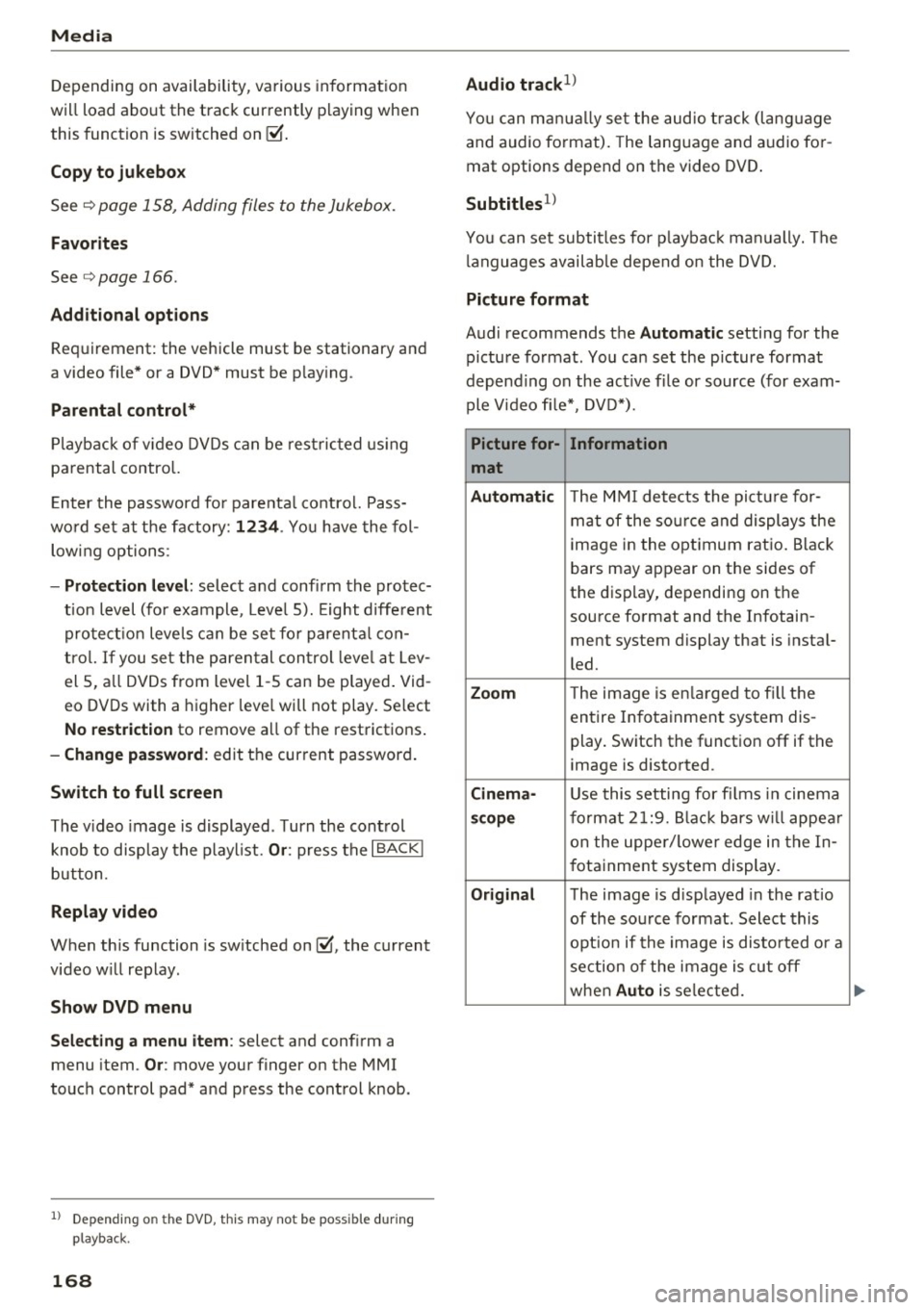
Picture fo rmat
Audi recommends the Automatic setting for the
picture format . You can set the picture format
depending on the act ive file or source (for exam
ple Video fi le* , DVD*).
Picture for-
Information
mat
Aut omati c
The M MI detects the picture for-
mat of the so urce and displays the
image in the opt imum ratio. Black
bars may appear on the sides of
the display, depending on the
source format and the Infotain-
ment system display that is instal-
led.
Zoom T he image is en la rged to f ill the
entire Infotainment system dis-
play. Switch the function off if the
image is distorted .
Cinema-Use this setting for fi lms in cinema
sco pe format 2 1:9. B lack bars w ill appea r
on the uppe r/ lower edge in the In-
fotainment system display.
Original The image is displayed in the ratio
of the source fo rmat. Select this
opt io n if the image is disto rted o r a
section of the image is cut off
when
Au to is selected.
Page 171 of 314
co
co
.... N
" N .... 0
" "' c:o
Picture for-
mat
4:3
16: 9
(D Tips Information
The image is fixed in the 4:3 pie-
ture format.
Black bars are shown
on the s ides of the Infotainment
system display.
The image is fixed in the 16 :9 pie-
ture format . B lack bars are shown
in the upper and lower edges of the
Infotainment system display.
Media
- The security levels for the Parental cont rol
are based on the US standards from the Mo
tion P icture Associat ion of America (MPAA).
Note that the age levels for v ideo DVDs in
European countries may differ.
- Password entry for
P ar ental contro l will be
locked for approx imately one m inute if you
enter the incorrect password three t imes in
a row. The password can only be reset by an
authorized Audi dealer.
- Not a ll video DVDs have parental control.
Supported media and file formats
Overview
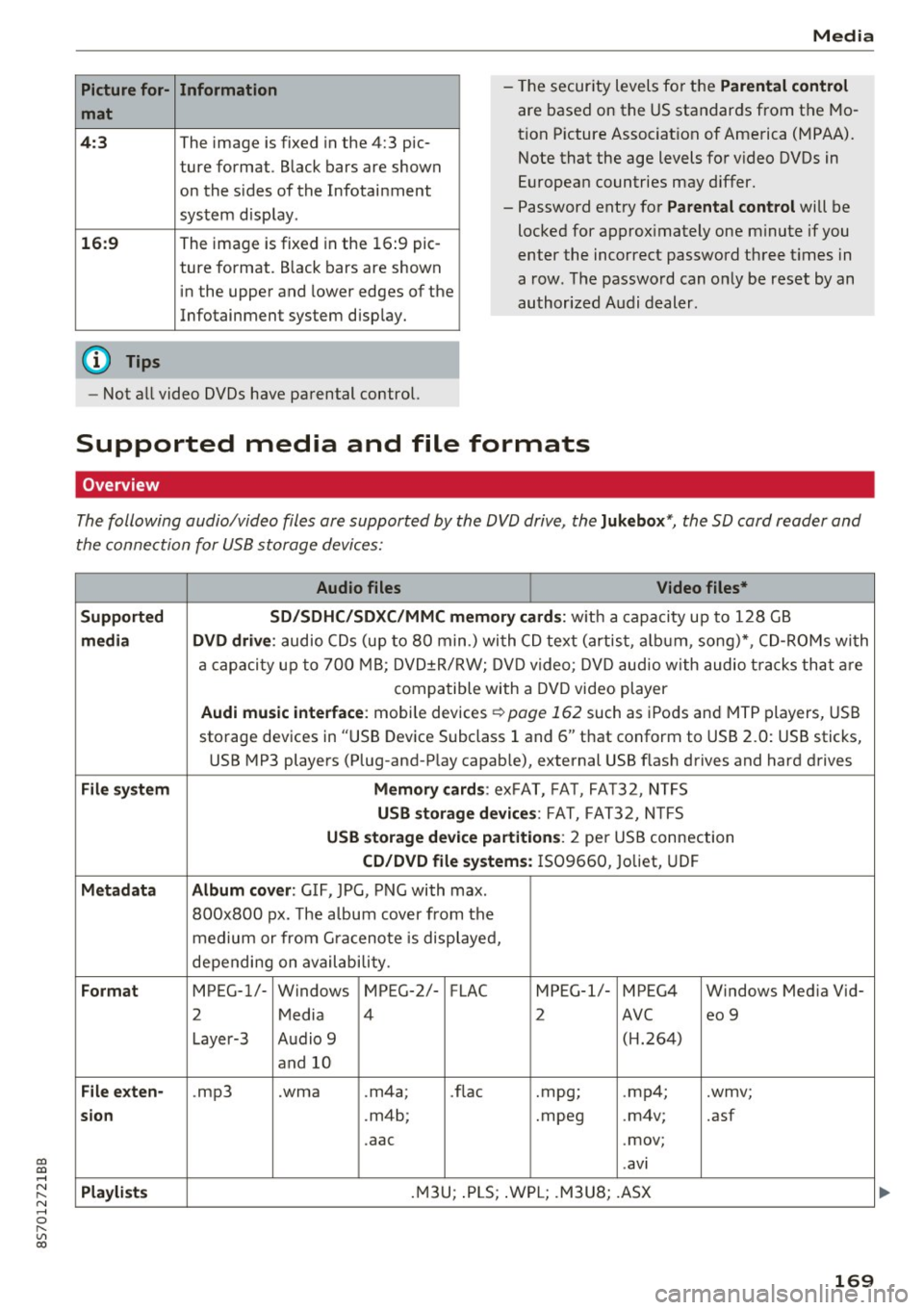
The following audio/video files are supported by the DVD drive, the Juk eb ox*, the SD card reader and
the connection for USB storage devices:
Audio fil es Vid eo fil es*
Support ed SD/SDH C/SDX C/MM C me mory ca rds:
w ith a capacity up to 128 GB
m edi a DV D driv e: audio CDs (up to 80 min .) with CD text (artist, a lbum, song)*, CD-ROMs with
a capacity up to 700 MB; DVD±R/RW; DVD video; DVD audio with audio t racks that are
compatible with a DVD video player
Aud i mu sic int erfac e: mobile devices r=>page 162 such as iPods and MTP players, USB
storage devices in "USB Device Subclass 1 and 6" that conform to USB 2.0: USB sticks,
USB MP3 players (Plug-and-Play capable), external USB flash drives and hard drives
File syste m Memory c ard s: exFAT, FA T, FA T32, NTFS
USB sto rag e devices: FAT, FAT32, N TFS
USB stora ge device pa rtition s: 2 per USB connection
CD/DV D file sy ste ms: IS09660, Joliet, UDF
Metadat a Album co ver: GIF, JPG, PNG with max.
800x800 px. The a lbum cover from the
medium or from Gra cenote is displayed,
depending on availability.
Form at MPEG-1/- Windows MPEG-2/- FLAC MPEG-1/- MPEG4 Windows Media Vid-
2 Media 4 2 AVC
eo 9
Layer-3 Audio 9 (H.264)
and 10
Fil e ex ten -.mp3 .wma .m4a;
.flac .mpg;
.mp4; .wmv;
si on .m4b; .mpeg .m4v; .asf
.aac .mov;
.avi
Playlist s .M3U; .PLS; .WPL; .M3U8; .ASX
169
Page 172 of 314
Media
Audio files Video files*
Characteris-
up to maximum 320 kbit/s and 48 kHz up to maximum 2,000 kbit/s and
tics
Number of
files
(D Tips
48 kHz sampling frequencies sampling 720x576 px. at maximum 2Sfps
frequen-
cy
DVD drive*: max. 1,000 files per medium
Jukebox* : approximate ly 10 GB memory capacity; max . 3,000 files can be imported
USB storage devices and memory cards: max. 10000 files per medium; max. 1000
fi les pe r playlist/directory
on the system language and cannot always
be guaranteed.
- The media drives do not support the Win
dows Media Audio 9 Voice format. -
Th e manufacturer of the storage device can
provide informat ion about its "USB Dev ice
Subclass".
-
To compress MP3 fil es, a bit rate of at least
160 kbit/s is recommended. The display
showing the remaining play time may differ
for MP3 f iles w ith variable bit rate.
- Specia l characters (such as those in 103 tag
in format ion) display different ly depending
CD drive
A ppl ies to: ve hicles w ith a CD drive
- Some MTP player functions are not support
ed, such as rating mus ic tracks and video
playback.
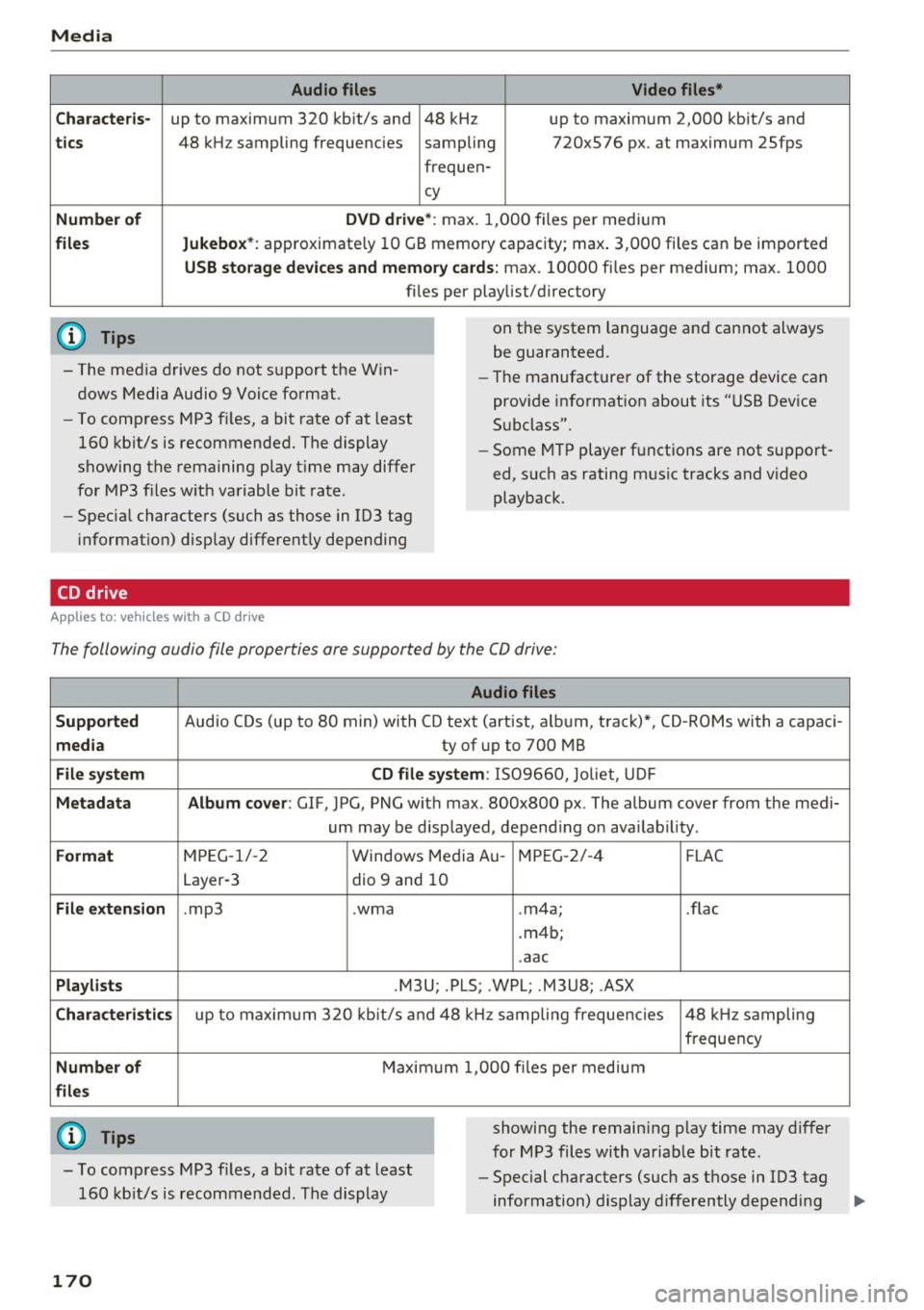
The following audio file properties are supported by the CO drive:
Supported
media
File system
Metadata
Format
File extension
Playlists
Characteristics
Number of
files
(0 Tips
Audio files
Audio CDs (up to 80 min) with CD text (artist, a lbum, track)*, CD-ROMs with a capaci-
ty of up to 700 MB
CD file system: 1509660, Jo liet, UDF
Album cover: GlF, JPG, PNG w ith max. 800x800 px. The album cover from the medi-
um may be d isplayed, depend ing on availab ility.
MPEG-1/-2 Windows Med ia Au -MPEG-2/-4 FLAC
Layer-3 dio 9 and 10
. mp3 .wma .m4a; .flac
. m4b;
.aac
.M3U; .PLS; .WPL; .M3U8; .ASX
up to maximum 320 kbit/s and 48 kHz sampling frequencies 48 kHz sampling
frequency
Maximum 1,000 files per medium
showing the remain ing play time may differ
for MP3 files with variable bit rate .
- To comp ress MP3 files, a bit rate of at least
160 kb it/s is recommended. The display -
Special characters (such as those in 103 tag
information) display differently depending
170
Page 173 of 314
co
co
.... N
" N .... 0
" "' c:o
Media
on the system language and cannot a lways
be g uaranteed .
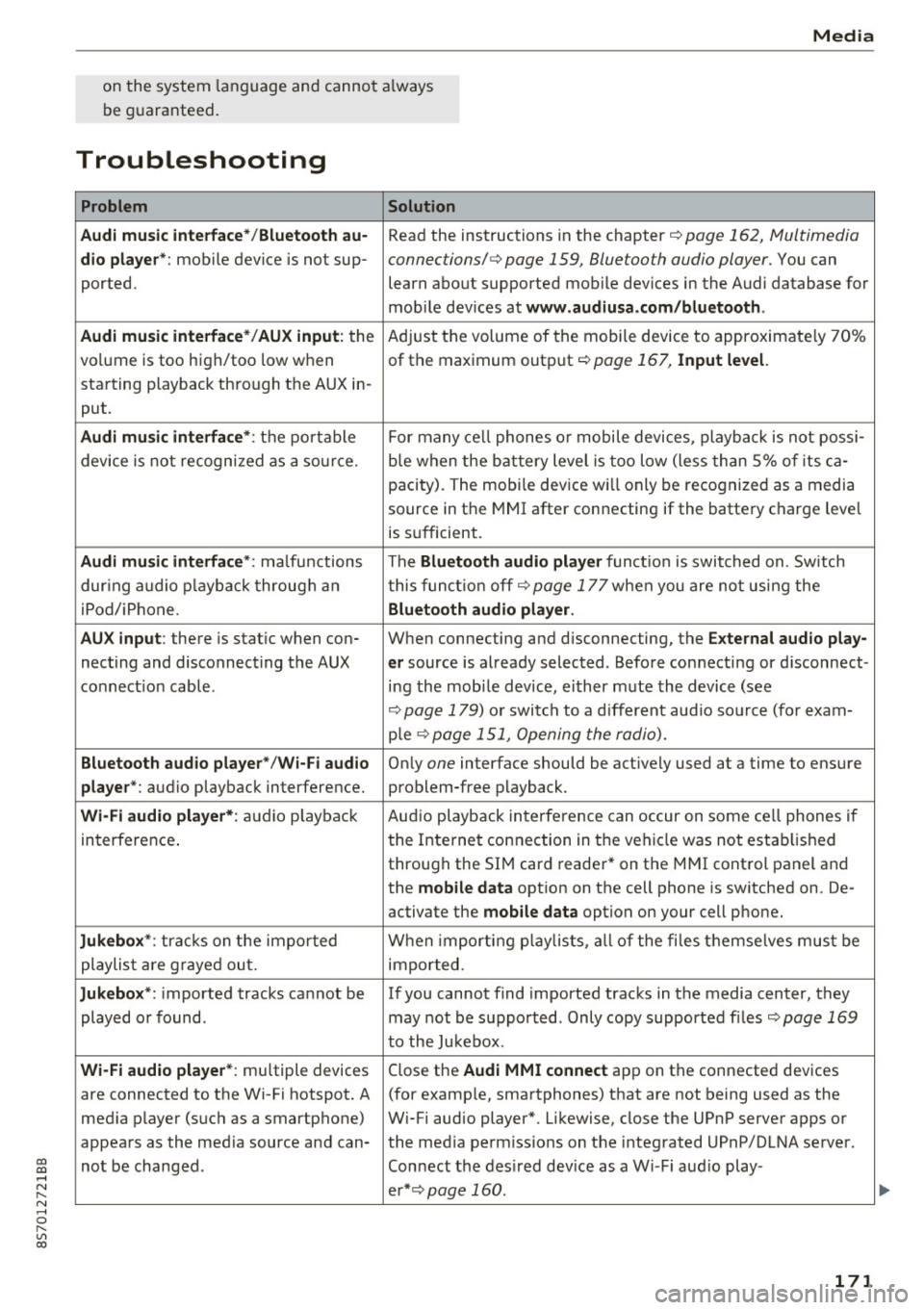
Troubleshooting
Problem Solution
Audi music interface* /Bluetooth au-
Read the instructions in the chapter ¢ page 162, Multimedia
dio player *: mobile device is not sup-connections/ ¢ page 159, Bluetooth audio player. You can
ported. learn about supported mobile devices in the Audi database for
mob ile dev ices at
www .audiusa.com /bluetooth .
Audi music interface* /AUX input:
the Adjust the volume of the mobile device to approximate ly 70%
volume is too high/too low when of the maximum output
¢ page 167, Input level.
starting playback through the AUX in-
put.
Audi music interface *: the portable For many cell phones or mobile devices, playback is not possi-
device is not recognized as a source. b
le when the battery level is too low (less than 5% of its ca-
pacity) . The mobi le device will only be recognized as a media
source in the MMI after connecting if the battery charge level
is sufficient.
Audi music interface *: malfunctions The Bluetooth audio player functio n is switched on. Switch
dur ing audio playback through an this funct io n off¢
page 177 when you are not using the
iPod/ iPhone .
Bluetooth audio player.
AUX input:
there is stat ic when con- When connecting and d isconnecting, the E xternal audio play-
necting and disconnect ing the AUX er source is already selected . Before connecting or d isconnect-
connection cable. ing the mobile dev ice, either m ute the device (see
¢ page 179) or switch to a different aud io so urce (fo r exam-
p ie
¢page 151, Opening the radio).
Bluetooth audio player * /Wi-Fi audio On ly one interface should be act ively used at a time to ensure
player* : audio playback interference. problem-free playback.
Wi-Fi audio player* : audio pla yback Aud io playback interference can occur on some ce ll phones if
in terference . the Internet connection in the vehicle was not estab lished
through the SIM card reader* on the MMI control panel and
the
mobile data option on the cell phone is switched on. De-
activate the
mobile data option on your cell phone.
Jukebox* : tracks on the imported When importing p laylists , all of the files themse lves must be
playlist are grayed out. imported.
Jukebox*: imported tracks cannot be If you cannot find imported tracks in the media center, they
played or found . may not be supported. Only copy supported f iles
¢ page 169
to the Jukebox .
Wi-Fi audio player* : multiple devices
Close the Audi MMI connect app on the connected devices
are connected to the Wi-Fi hotspot. A (for exam ple, smartphones) that are not being used as the
med ia p layer (such as a smartphone) Wi-Fi audio player*. Likewise, close the UPnP server apps or
appears as the med ia source and can- the med ia permiss ions on the integrated UPnP/DLNA server.
not be changed . Connect the desired dev ice as a W i- F i aud io play-
er* ¢page 160 .
171
...
Page 174 of 314
Media
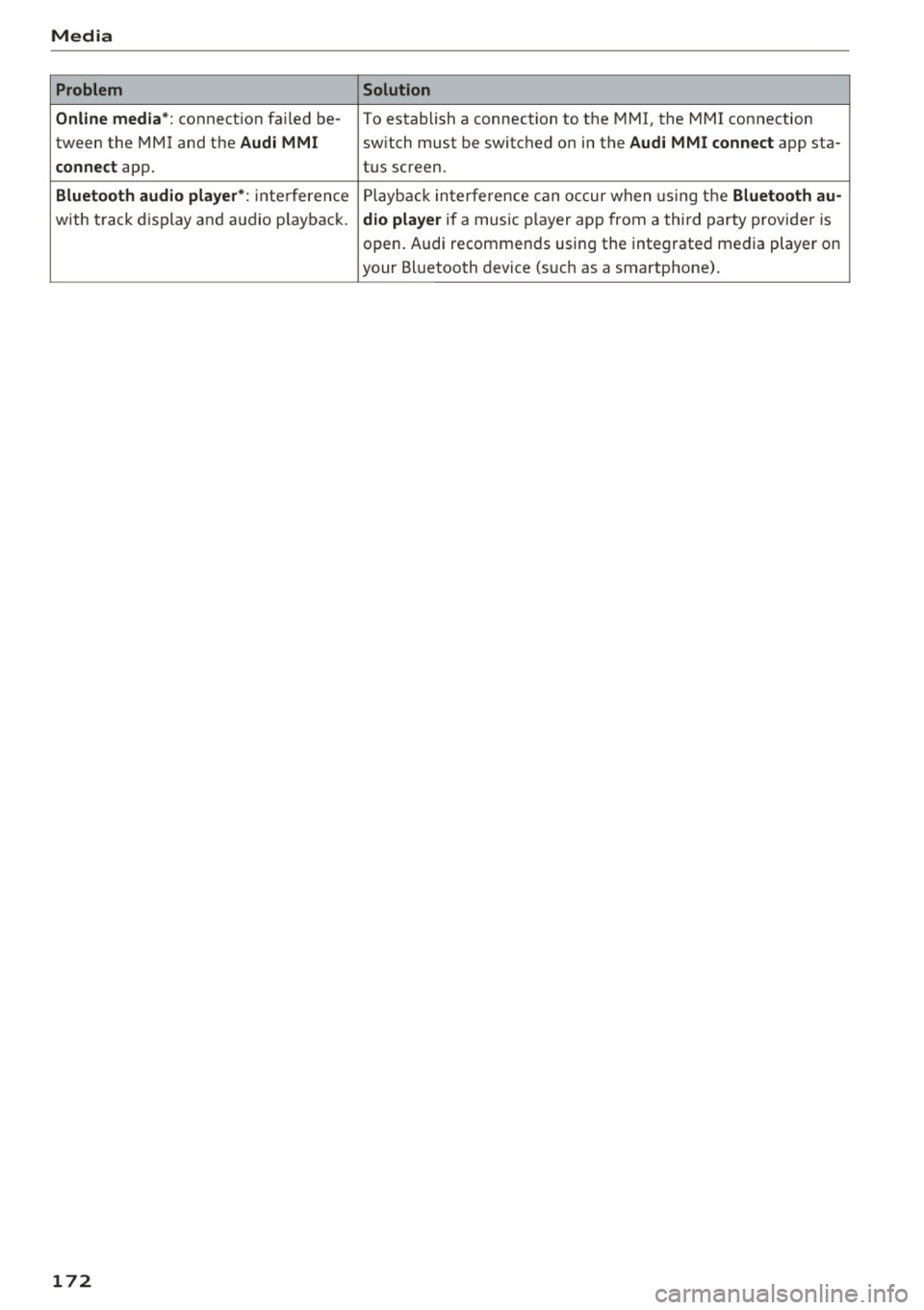
Problem Solution
Online media*:
connection failed be-To establish a connection to the MMI, the MMI connection
tween the MMI and the
Audi MMI switch must lbe switched on in the Audi MMI connect app sta-
connect app. tus screen.
Bluetooth
audio player *: interference Playback interference can occur when using the Bluetooth au-
with track display and audio playback. dio player if a music player app from a third party provider is
open. Audi recommends using the integrated media player on
your Bluetooth device (such as a smartphone) .
172
Page 179 of 314
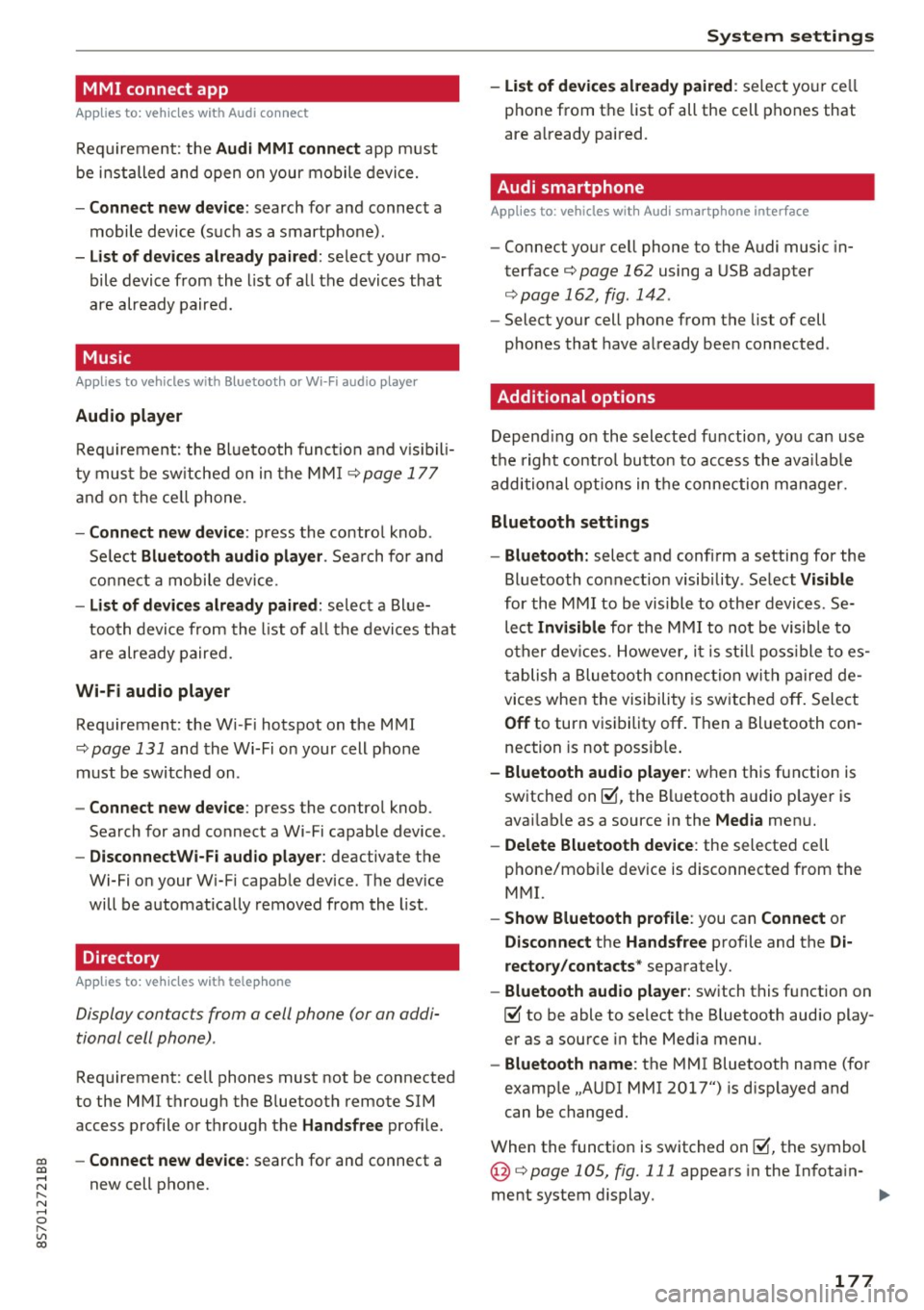
MMI connect app
Applies to: vehicles with Audi connect
Requ ireme nt: the Audi MMI connect app m ust
be i nst alled and open on your mobile devi ce.
- Connect new dev ice : search for and connect a
mobile device (s uch as a smartp hone).
- List of devices already paired : select your mo
bile device from th e list of a ll the devices that
are already paired.
Music
Applies to vehicles with Bluetooth or Wi -Fi audio player
Audio player
Req uirement: the Bl uetooth func tion a nd v is ib ili
ty mus t be sw itche d on in the MMI
¢page 177
and on the ce ll phone.
- Connect new device : press the contro l knob .
Se lect
Bluetooth audio player . Search fo r and
c o nne ct a mobile device.
- List of devices already paired : selec t a Bl ue
tooth device fro m the l ist of all the devi ces that
are already paire d.
Wi-Fi audio player
Req uirement: the Wi -Fi hotspot on the M MI
¢
page 131 and the Wi-Fi o n your cell p ho ne
must be switch ed on .
-Connect new device : press the control knob.
Sea rch for and connect a Wi-Fi capable device .
-DisconnectWi-Fi audio player : deactivate the
Wi-Fi on your Wi-Fi capab le device . The dev ice
will be automat ically removed from the list .
Directory
Applies to: vehicles with telephone
Display contacts from a cell phone (or an addi
tional cell phone) .
Requirement: cell phones must not be connected
to the MMI through the B luetooth remote SIM
access p rofile o r thr ough t he
Handsfree profi le.
co -Connect new device : search for and connect a co
;:::: new cell p hone.
" N ...... 0
" "' c:o
System settings
- List of devices already paired : select yo ur cell
phone from t he list of all the cell phones that
are a lready paired .
Audi smartphone
Applies to: vehicles with Aud i smartphone interface
- Connect yo ur ce ll phone to the Audi music in
terface¢
page 162 using a USB adapter
¢ page 162, fig . 142 .
-Select your cell pho ne from the list of cell
p hones that have a lready bee n connected .
Additional options
Depending on the selected f unction, yo u can use
t h e right contro l bu tto n to access the ava ilab le
additional options in t he connection manager.
Bluetooth settings
- Bluetooth:
select a nd confi rm a setti ng for the
Bluetooth co nnection visib ility . Se lect
Visible
for the MMI to be vis ible to othe r devic es. Se
lect
Invisible for the MMI to not be visib le to
o the r dev ices. However, i t is st ill poss ible t o es ·
t ablish a Blue tooth connec tion wit h pa ire d de
vices when the vi sibili ty is sw itched off . Select
Off to turn v is ib ility off . Then a Bl uetooth con
nection is not possib le .
- Bluetooth audio player: when t his function is
sw itched on~, the B luetooth a udio p laye r is
avai lab le as a source in the
Media men u.
- Delete Bluetooth device : the selected cell
phone/mob ile dev ice is disconnected from the
M MI.
- Show Bluetooth profile : you can Connect or
Disconnect the Handsfree profile and the Di
rectory/contacts *
separately.
- Bluetooth audio player : switch this f unction on
~ to be able to select the Bluetooth aud io play
er as a source i n the Med ia menu .
-Bluetooth name : the MMI Bluetooth name (fo r
examp le .,A UDI MMI 2017") is d isp layed and
can be changed.
When the funct io n is switched on~, the symbol
@ ¢
page 105 , fig. 111 appea rs in the In fotain-
ment system display.
1111-
177
Page 181 of 314
CD
CD
.... N
" N ...... 0
" V, co
Sound settings
The sound distribution and volume of the MMI
can be adjusted individually. The settings depend
on vehicle equipment.
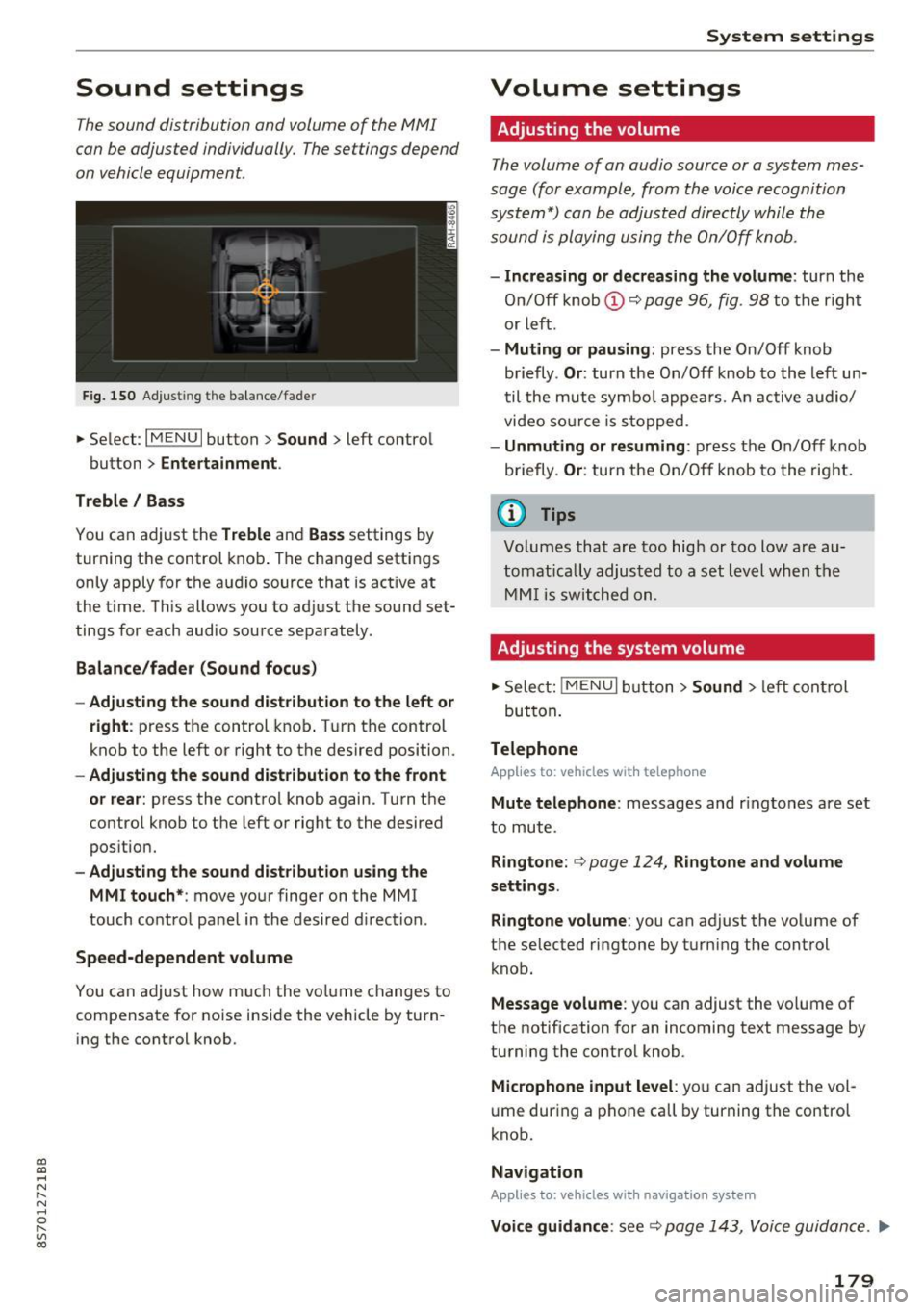
Fig. 150 Adjusting the balance/fader
~ Select: IM ENU I button > Sound > left contro l
button
> Entertainment .
Treble/ Bass
You can adjust the Treble and Bass settings by
turning the control knob. The changed settings
only apply for the audio source that is active at
the time. This allows you to adjust the sound set
tings for each audio source separately .
Balance/fader (Sound focus)
- Adjusting the sound distribution to the left or
right :
press the control knob. Turn the control
knob to the left or right to the desired position.
-Adjusting the sound distribution to the front
or rear:
press the control knob again. Turn the
control knob to the left or right to the desired
position.
- Adjusting the sound distribution using the
MMI touch* :
move your finger on the MMI
touch control panel in the desired direction .
Speed-dependent volume
You can adjust how much the volume changes to
compensate for noise inside the vehicle by turn
ing the control knob.
System settings
Volume settings
Adjusting the volume
The volume of an audio source or a system mes
sage (for example, from the voice recognition
system*) can be adjusted directly while the
sound is playing using the On/Off knob.
- Increasing or decreasing the volume : turn the
On/Off knob@Q
page 96, fig . 98 to the right
or left.
- Muting or pausing : press the On/Off knob
briefly .
Or: turn the On/Off knob to the left un
til the mute symbo l appears. An active audio/
video source is stopped.
-Unmuting or resuming : press the On/Off knob
briefly .
Or: turn the On/Off knob to the right.
(D Tips
Volumes that are too high or too low are au
tomatically adjusted to a set level when the
MMI is switched on.
Adjusting the system volume
~ Select: jMENUI button> Sound > left control
but ton .
Telephone
Applies to: vehicles with telephone
Mute telephone : messages and ringtones are set
to mute.
Ringtone: Q page 124, Ringtone and volume
settings.
Ringtone volume:
you can adjust the volume of
t he selected ringtone by turning the control
knob.
Message volume : you can adjust the volume of
the notification for an incoming text message by
turning the contro l knob.
Microphone input level : you can adjust the vol
ume during a phone call by turning the control
knob.
Navigation
Applies to: vehicles with navigation system
Voice guidance : see Q page 143, Voice guidance . ..,.
179
Page 212 of 314
Airbag syste m
the system inspected immediately by your
authorized Audi dealer. It is possible that
the airbag will inflate when it is not sup
posed to, or will not inflate when it should.
A WARNING
If the front airbag inflates, a child without a
child restra int, or in a rearward-facing child
safety seat, or in a forward-facing child re
straint that has not been properly installed
w ill be seriously injured and can be killed.
- If you must install a rearward-fac ing child
seat on the front passenger seat because of
exceptional c ircumstances and the
PA SSEN
G ER AIR BAG OFF,;;
light does not appear
and stay on, have the airbag system inspect
ed by your Audi dealer.
- If, in exceptional circumstances, you must
install a forward-facing chi ld restraint on
the front passenger seat, always move the
seat into its rearmost pos ition in the seat's
fore and aft adjustment range, as far away
from the airbag as possible. The backrest
must be adjusted to an upright posit ion.
Make s ure that the PASSENGER AI R BAG
OFF ,;;
light comes on and stays on a ll the
t ime whenever the ignition is switched on.
A WARNING
If the PAS SENGER AIR BAG OFF~; light does
not go out when an adult is s itting on the
front passenger seat afte r taking the steps
described above, have the airbag system in
spected by your Audi dealer before transport
ing anyone on the front passenger seat.
(D Tips
If the capacitive passenger detection system
determines that the front passenger seat is
empty, the frontal airbag on the passenger
side w ill be turned off, and the
PA SSENGER
AIR BA G OFF ~;
light will stay on.
Repair, care and disposal of the airbags
Parts of the a irbag system are installed at many
d ifferent places on your Aud i. Instal ling, remov-
210
ing, servicing or repairing a part in an area of the
vehicle can damage a part of an airbag system
and prevent that system from work ing properly
i n a coll is ion.
There are some important things you have to know to make sure that the effectiveness of the
system will not be impaired and that discarded
components do not cause injury or pollute the
environment.
A WARNING
Improper care, servicing and repair proce
dures can increase the risk of personal injury
and death by preventing an airbag from de
p loying when needed or deploy ing an a irbag
unexpectedly:
-
- Never cover, obstruct, or change the steer
ing wheel ho rn pad or airbag cover or the in
strumen t panel or modify them in any way.
- Never attach any objects such as cup ho lde rs
or telephone mountings to the surfaces cov
ering the a irbag un its.
- For cleaning the horn pad or instr ument
panel, use only a soft, dry doth or one mois
tened w ith plain water. Solvents or cleaners
could damage the airbag cover or change
the st iffness or strength of the material so
that the airbag cannot deploy and protect proper ly.
- Never repair, ad just, or change any parts of
the airbag system.
- All work on the steering wheel, inst rument
panel, front seats or e lectr ica l system (in
cluding the installation of audio equ ipment,
cellular te lephones and CB radios, etc.)
m ust be perfo rmed by a qualified techn ician
who has the training and spec ial equipment
necessary.
- For any work on the airbag system, we
strong ly recommend tha t you see you r au
thori zed A udi dealer or qualified wo rkshop.
- Never modify the front bumper or pa rts of
the vehicle body.
- Always make sure that the side a irbag can
inflate w ithout interfe rence:
Page 299 of 314
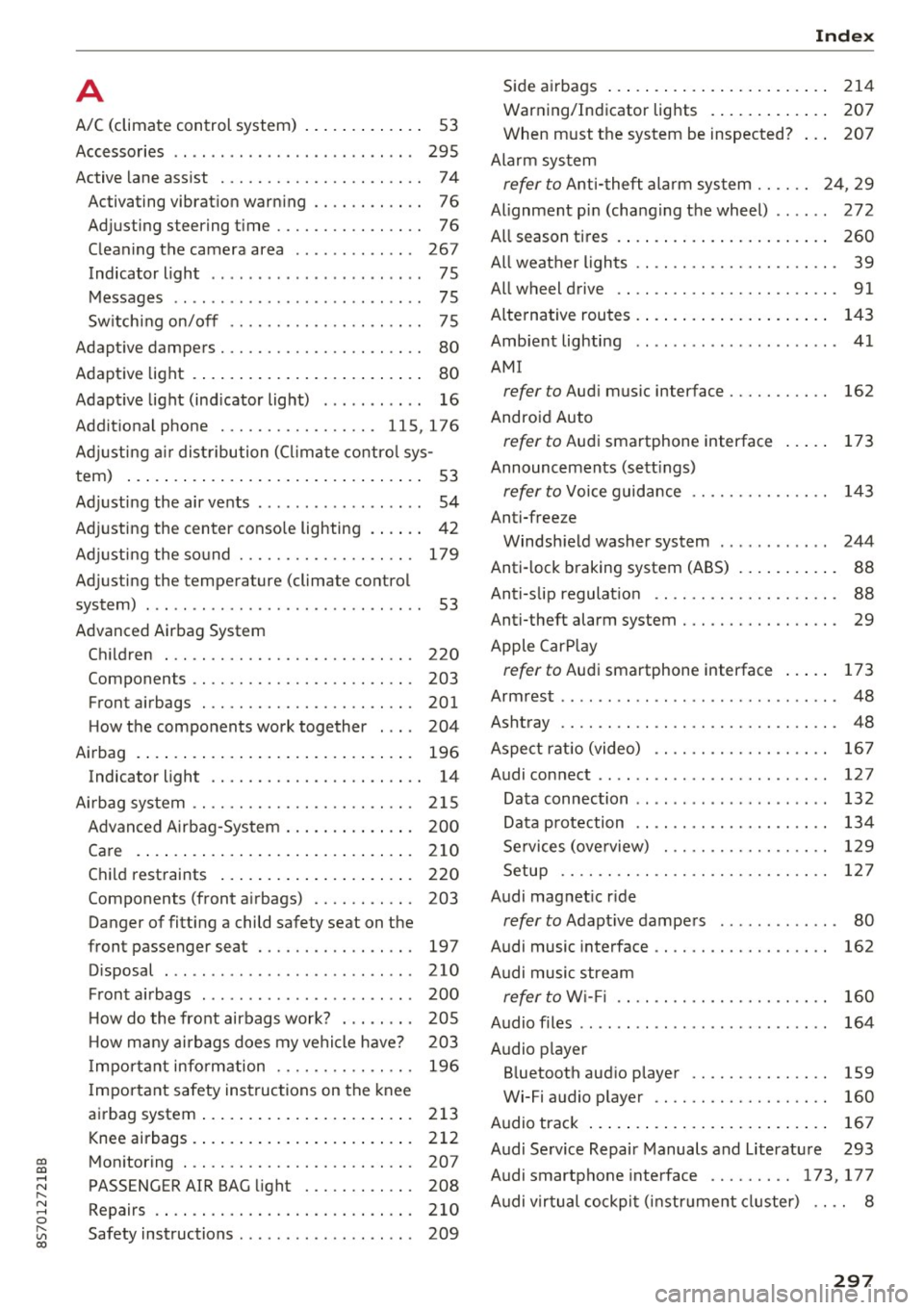
co
co
.... N
" N .... 0
" "' c:o
A
A/C (climate control system) . . . . . . . . . . . . . 53
Accessories . . . . . . . . . . . . . . . . . . . . . . . . . . 295
Active lane assist . . . . . . . . . . . . . . . . . . . . . . 7 4
Activating vibration warning . . . . . . . . . . . .
76
Adjusting steering time . . . . . . . . . . . . . . . . 76
Cleaning the camera area . . . . . . . . . . . . . 267
Indicator light . . . . . . . . . . . . . . . . . . . . . . . 75
Messages . . . . . . . . . . . . . . . . . . . . . . . . . . . 75
Switching on/off . . . . . . . . . . . . . . . . . . . . . 75
Adaptive dampers . . . . . . . . . . . . . . . . . . . . . . 80
Adaptive light . . . . . . . . . . . . . . . . . . . . . . . . . 80
Adapt ive light (indicator light) . . . . . . . . . . . 16
Additional phone ............ .. .. . 115, 176
Adjusting a ir distribution (Cl imate control sys-
tem) . . . . . . . . . . . . . . . . . . . . . . . . . . . . . . . .
53
Adjusting the air vents . . . . . . . . . . . . . . . . . . 54
Adjusting the center console lighting . . . . . . 42
Adjusting the sound . . . . . . . . . . . . . . . . . . . 179
Adjusting the temperature (climate control
system) . . . . . . . . . . . . . . . . . . . . . . . . . . . . . .
53
Advanced Airbag System
Children . . . . . . . . . . . . . . . . . . . . . . . . . . . 220
Componen ts . . . . . . . . . . . . . . . . . . . . . . . .
203
Front airbags . . . . . . . . . . . . . . . . . . . . . . . 201
How the components work together . . . . 204
Airbag . . . . . . . . . . . . . . . . . . . . . . . . . . . . . . 196
Indicator light . . . . . . . . . . . . . . . . . . . . . . . 14
Airbag system . . . . . . . . . . . . . . . . . . . . . . . . 215
Advanced Airbag-System . . . . . . . . . . . . . . 200
Care . . . . . . . . . . . . . . . . . . . . . . . . . . . . . . 210
Child restraints . . . . . . . . . . . . . . . . . . . . . 220
Components (front airbags) . . . . . . . . . . . 203
Danger of fitting a child safety seat on the
front passenger seat . . . . . . . . . . . . . . . . .
197
Disposal . . . . . . . . . . . . . . . . . . . . . . . . . . . 210
Front airbags . . . . . . . . . . . . . . . . . . . . . . . 200
H ow do the front airbags work? . . . . . . . . 205
H ow many airbags does my vehicle have? 203
Important information . . . . . . . . . . . . . . . 196
Important safety instructions on the knee
airbag system ................. ..... .
213
Knee airbags. ....................... 212
Monitoring . . . . . . . . . . . . . . . . . . . . . . . . . 207
PASSENGER AIR BAG light . . . . . . . . . . . . 208
Repairs ... . .. .. ............. .. .. .. . 210
Safety instructions . . . . . . . . . . . . . . . . . . . 209
Index
Side airbags . . . . . . . . . . . . . . . . . . . . . . . . 214
Warning/Indicator lights . . . . . . . . . . . . . 207
When must the system be inspected? . . . 207
Alarm system
refer to Anti-theft alarm system . . . . . . 24, 29
Alignment pin (changing the wheel) . . . . . . 272
All season tires . . . . . . . . . . . . . . . . . . . . . . . 260
All weather lights . . . . . . . . . . . . . . . . . . . . . . 39
All wheel drive . . . . . . . . . . . . . . . . . . . . . . . . 91
Alternative routes .. .. ................. 143
Ambient lighting . . . . . . . . . . . . . . . . . . . . . . 41
AMI
refer to Audi music interface . . . . . . . . . . . 162
Android Auto
refer to Audi smartphone interface
Announcements (settings)
refer to Voice guidance ........... .. . .
Anti-freeze
173
143
Windshield washer system . . . . . . . . . . . . 244
Anti-lock braking system (ABS) . . . . . . . . . . . 88
Anti-s lip regulat ion . . . . . . . . . . . . . . . . . . . . 88
Anti-theft alarm system . . . . . . . . . . . . . . . . . 29
Apple CarPlay
refer to Audi smartphone interface . . . . . 173
Armrest .......... .. .................. 48
Ashtray . . . . . . . . . . . . . . . . . . . . . . . . . . . . . . 48
Aspect rat io (video) . . . . . . . . . . . . . . . . . . .
167
Audi connect . . . . . . . . . . . . . . . . . . . . . . . . . 127
Data connection . . . . . . . . . . . . . . . . . . . . . 132
Data protection . . . . . . . . . . . . . . . . . . . . . 134
Services (overview) . . . . . . . . . . . . . . . . . . 129
Setup . . . . . . . . . . . . . . . . . . . . . . . . . . . . . 127
Audi magnetic ride
refer to Adaptive dampers . . . . . . . . . . . . . 80
Audi music interface . . . . . . . . . . . . . . . . . . . 162
Audi music stream
refer to W i- Fi . . . . . . . . . . . . . . . . . . . . . . . 160
Audio files . . . . . . . . . . . . . . . . . . . . . . . . . . . 164
Audio player
Bluetooth audio player . . . . . . . . . . . . . . .
159
Wi-Fi aud io player . . . . . . . . . . . . . . . . . . . 160
Audio track . . . . . . . . . . . . . . . . . . . . . . . . . . 167
Audi Service Repair Manuals and Literature 293
Audi smartphone interface ......... 173, 177
Audi virtual cockpit (instrument cluster) . . . . 8
297
Page 303 of 314
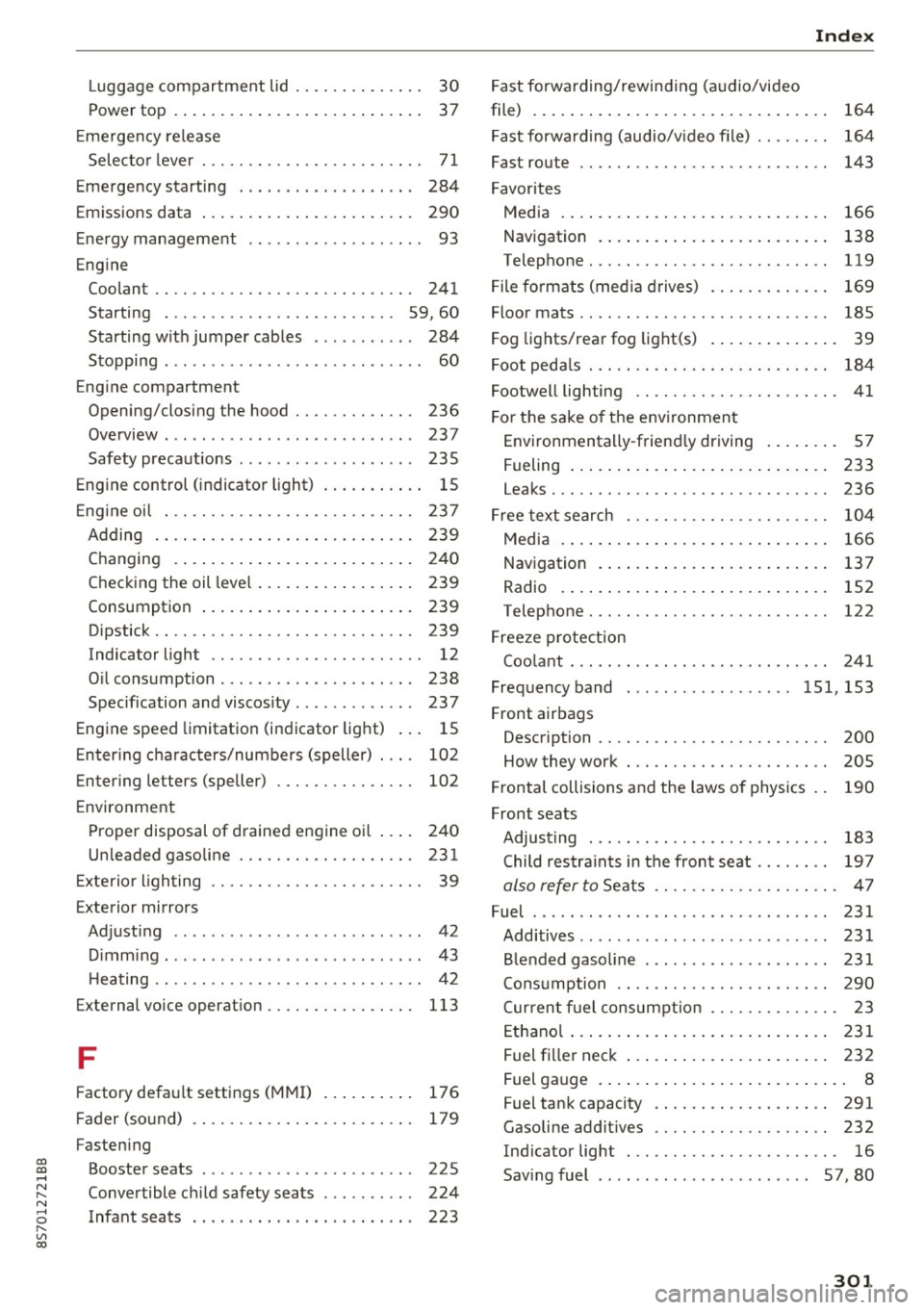
co
co
.... N
" N .... 0
" "' c:o
Luggage compartment lid . . . . . . . . . . . . . . 30
Power top . . . . . . . . . . . . . . . . . . . . . . . . . . . 37
E me rgency release
Selec to r l eve r . . . . . . . . . . . . . . . . . . . . . . . . 7 1
Emergency starting . . . . . . . . . . . . . . . . . . . 284
Emi ssions data . . . . . . . . . . . . . . . . . . . . . . . 290
E nergy management . . . . . . . . . . . . . . . . . . . 93
Eng ine
Coolant . . . . . . . . . . . . . . . . . . . . . . . . . . . . 241
Starting . . . . . . . . . . . . . . . . . . . . . . . . . 59, 60
Starting w it h jumper cables . . . . . . . . . . . 284
Stopping . . . . . . . . . . . . . . . . . . . . . . . . . . . . 60
Eng ine compartment
Opening/closing the hood . . . . . . . . . . . . . 236
Ove rview. ...................... ... . 237
Safety preca utions . . . . . . . . . . . . . . . . . . . 235
Engine control (indicato r light) . . . . . . . . . . . 1 5
E ng ine oi l . . . . . . . . . . . . . . . . . . . . . . . . . . . 237
Adding .. .. .. ............... .. ..... 239
Changing . . . . . . . . . . . . . . . . . . . . . . . . . . 24 0
Checking the oil leve l . . . . . . . . . . . . . . . . . 239
Consumption . . . . . . . . . . . . . . . . . . . . . . . 239
Dipstick . . . . . . . . . . . . . . . . . . . . . . . . . . . . 239
Indicator light . . . . . . . . . . . . . . . . . . . . . . . 12
O il consumption . . . . . . . . . . . . . . . . . . . . . 238
Specification and viscos ity . . . . . . . . . . . . . 23 7
Engine speed limitatio n (indicator light) . . . 15
E nter ing characters/numbers (speller) . . . . 102
Enter ing letters (speller) . . . . . . . . . . . . . . . 102
E nvironment
Proper disposal of d rained engine oil . . . . 24 0
Unleaded gaso line . . . . . . . . . . . . . . . . . . . 231
E xte rio r ligh ting . . . . . . . . . . . . . . . . . . . . . . . 39
Exterior mirrors
Adj ust ing . . . . . . . . . . . . . . . . . . . . . . . . . . . 42
D immi ng . ..... ........... ...... ... .. 43
H eating .. .. .. ............... .. .... .. 42
External voice operat ion................ 113
F
Factory default settings (MMI)
176
F ader (so und) . . . . . . . . . . . . . . . . . . . . . . . . 179
Fasten ing
Booster seats . . . . . . . . . . . . . . . . . . . . . . . 225
Conve rtible c hild safety sea ts . . . . . . . . . . 224
Infant seats . . . . . . . . . . . . . . . . . . . . . . . . 223
Index
Fast forwarding/rewind ing (a udio/video
file) . . . . . . . . . . . . . . . . . . . . . . . . . . . . . . . . 164
F ast forwarding (audio/video file) . . . . . . . . 164
Fast route . . . . . . . . . . . . . . . . . . . . . . . . . . . 143
F avorites
Media . . . . . . . . . . . . . . . . . . . . . . . . . . . . . 166
Nav igation . . . . . . . . . . . . . . . . . . . . . . . . . 138
Telephone.......................... 119
F ile fo rmats (media d rives) . . . . . . . . . . . . . 169
Floor mats . . . . . . . . . . . . . . . . . . . . . . . . . . . 18S
F og lights/rea r fog light(s) . . . . . . . . . . . . . . 39
Foot peda ls . . . . . . . . . . . . . . . . . . . . . . . . . . 184
Footwell lighting . . . . . . . . . . . . . . . . . . . . . . 41
F or the sake o f the env ironmen t
Environmentally -friend ly driving . . . . . . . . 57
Fueling . . . . . . . . . . . . . . . . . . . . . . . . . . . . 233
Leaks. .... .... ................... .. 236
F ree text search . . . . . . . . . . . . . . . . . . . . . . 104
Medi a . . . . . . . . . . . . . . . . . . . . . . . . . . . . . 166
Navigation . . . . . . . . . . . . . . . . . . . . . . . . . 137
Radio . . . . . . . . . . . . . . . . . . . . . . . . . . . . . 152
Telephone. . . . . . . . . . . . . . . . . . . . . . . . . . 122
F ree ze p ro tection
Coo lant . . . . . . . . . . . . . . . . . . . . . . . . . . . . 2 41
Freq uency band .... .............. 151, 153
F ront airbags
Description . . . . . . . . . . . . . . . . . . . . . . . . . 200
How they work . . . . . . . . . . . . . . . . . . . . . . 205
F rontal collisions and the laws o f physics . . 190
Front seats Adjusting . . . . . . . . . . . . . . . . . . . . . . . . . . 183
Child restra ints in the fron t sea t . . . . . . . . 1 97
also refer to Seats . . . . . . . . . . . . . . . . . . . . 47
Fuel . . . . . . . . . . . . . . . . . . . . . . . . . . . . . . . . 231
Additives . . . . . . . . . . . . . . . . . . . . . . . . . . . 231
B lended gaso line ... .. ... ..... .... ... 231
Cons umption . . . . . . . . . . . . . . . . . . . . . . . 290
C urren t fu el consum ption . . . . . . . . . . . . . . 23
E thano l . . . . . . . . . . . . . . . . . . . . . . . . . . . . 2 31
F uel fi lle r nec k . . . . . . . . . . . . . . . . . . . . . . 232
Fuel gauge . . . . . . . . . . . . . . . . . . . . . . . . . . . 8
Fuel tank capacity . . . . . . . . . . . . . . . . . . . 291
Gasoline addit ives . . . . . . . . . . . . . . . . . . . 232
Indicator light . . . . . . . . . . . . . . . . . . . . . . . 16
Sav ing fuel . . . . . . . . . . . . . . . . . . . . . . . 57, 80
301