seats AUDI TT ROADSTER 2017 Owners Manual
[x] Cancel search | Manufacturer: AUDI, Model Year: 2017, Model line: TT ROADSTER, Model: AUDI TT ROADSTER 2017Pages: 314, PDF Size: 76.54 MB
Page 4 of 314
Table of content s
About this Owne r's Manual . .. .. .
5
Cockpi t . . . . . . . . . . . . . . . . . . . . . . . . . . . 6
Cockpit overview . . . . . . . . . . . . . . . . . 6
Controls at a glance . . . . . . . . . . . . . . . . . . 6
Instruments and indicator lights 8
Instruments . . . . . . . . . . . . . . . . . . . . . . . . 8
Indicator lights . . . . . . . . . . . . . . . . . . . . . 9
On-Board Diagnostic system (OBD) . . . . .
17
Drive r information system . . . . . . 19
Overview . . . . . . . . . . . . . . . . . . . . . . . . . . . 19
M ultifunction steering wheel plus . . . . . . 20
Mu ltifunction steering wheel . . . . . . . . . . 22
Tachometer . . . . . . . . . . . . . . . . . . . . . . . . 23
Odometer . . . . . . . . . . . . . . . . . . . . . . . . . . 23
On-board computer . . . . . . . . . . . . . . . . . . 23
Start ing and driving . . . . . . . . . . . . . 24
Opening and clo sing ........... . .
Cent ral lock ing .... ........... .... .. . 24
24
L uggage compa rtment lid . . . . . . . . . . . . . 29
P ower w indow . . . . . . . . . . . . . . . . . . . . . . 30
Garage doo r opener (Home link) . . . . . . . .
3 1
Power top . . . . . . . . . . . . . . . . . . . . . . . . 34
P ower top . . . . . . . . . . . . . . . . . . . . . . . . . . 34
Wind deflector . . . . . . . . . . . . . . . . . . . . . . 36
Power top emergency operation . . . . . . . . 37
Ligh ts and Vi sion . . . . . . . . . . . . . . . . . 39
Exterior lighting . . . . . . . . . . . . . . . . . . . . . 39
Interior lighting . . . . . . . . . . . . . . . . . . . . .
41
V1s1on . . . . . . . . . . . . . . . . . . . . . . . . . . . . . 42
W indshield wipers . . . . . . . . . . . . . . . . . . . 43
Dig ital compass . . . . . . . . . . . . . . . . . . . . . 45
Seats and storage ................ 47
General information . . . . . . . . . . . . . . . . . 47
Front seats . . . . . . . . . . . . . . . . . . . . . . . . . 47
Ashtray . . . . . . . . . . . . . . . . . . . . . . . . . . . . 48
Cigarette lighter and socket . . . . . . . . . . . 48
S to rage . . . . . . . . . . . . . . . . . . . . . . . . . . . . 49
L uggage compartment . . . . . . . . . . . . . . . 5 0
2
Warm and cold . . . . . . . . . . . . . . . . . . . 52
Climate contro l system . . . . . . . . . . . . . . . 52
Dr1v1ng ... .. .. .. .. .. .. .. .. .... ... . .
Genera l information .. ... . .. .... ... . .
Steering . ... .. .. .. .. ... .. ..... ... . .
Start ing and stopping the engine
Electromechanical parking brake ...... .
Start ing from a stop .. ... ....... ... . .
Automat ic transmission ....... ..... . .
Tra ile r towing ...................... .
Driver assistance .............. .. .
Assist ............................ .
Electronic speed lim iter ..... ....... .. .
Speed warning sy stem . .. ........... . .
Cruise cont rol sys tem
Audi active lane assist ... . ... .... ... . .
Audi side assist . ... ... .. .. ..... ... . .
Audi drive select (drive settings) ... ... . .
Park ing sy stem s
Genera l information
Rear parking system
Parking system plus . .. .. ........... . .
Rearv iew camera . .. .. .............. .
Adjusting the d isplay and the warning
tones ........ ... ................ .. .
Er ror messages .. .. .. ... ....... ... . .
Intelligent Technology ......... .
Electron ic stabilization control (ESC) .. . .
B rakes ............................ .
El ectrome chanical steering .......... .
A ll wheel drive (quattro) .. .. ..... ... . .
Rear spoiler ... .. .. .. ... .. ..... ... . .
Energy management .. .. . ... .... ... . .
Information about data recorded by
57
57
59
59
62
63
63
71
72
72
72
72
72
74
76
79
82
82
83
83
84
86
86
88
88 89
91
91
92
93
vehicle control modules . . . . . . . . . . . . . . 94
Infotainment system . . . . . . . . . . . . 96
Multi Media Inte rface . . . . . . . . . . . . 96
Traffic safety information . . . . . . . . . . . . . 96
Introduction . . . . . . . . . . . . . . . . . . . . . . . . 96
MMI On/Off knob with joystick function . . 96
MM I ope ration . . . . . . . . . . . . . . . . . . . . . . 97
MM I touch . . . . . . . . . . . . . . . . . . . . . . . . . 98
Operat ing . . . . . . . . . . . . . . . . . . . . . . . . . .
101
Page 6 of 314
Table of content s
Safety belts . . . . . . . . . . . . . . . . . . . . . . . . 192
Safety belt tensioner . . . . . . . . . . . . . . . . . 194
Airbag system ... . ...... ... .. .. ... 19 6
I mportant info rmation . . . . . . . . . . . . . . . 196
F ront airbags . . . . . . . . . . . . . . . . . . . . . . . 200
Mon itoring the Advanced Airbag System . 207
Knee airbags........................ 212
Side airbags . . . . . . . . . . . . . . . . . . . . . . . . 214
Ch ild safety . . . . . . . . . . . . . . . . . . . . . . 218
Important information . . . . . . . . . . . . . . . 218
Ch ild seats . . . . . . . . . . . . . . . . . . . . . . . . . 223
Secur ing ch ild seats . . . . . . . . . . . . . . . . . . 227
Add it io nal info rmation . . . . . . . . . . . . . . . 230
Maintenanc e and Care . . . . . . . . . . . 23 1
Checking and Filling . . . . . . . . . . . . . 23 1
F ue l... .. .. .. .. ... .......... .... .. . 23 1
Refueling . . . . . . . . . . . . . . . . . . . . . . . . . . 232
E ng ine compartment . . . . . . . . . . . . . . . . . 235
Eng ine oi l .... .. ... .. ..... ... .. .. ... 237
Cooling system . . . . . . . . . . . . . . . . . . . . . . 241
Brake fluid . . . . . . . . . . . . . . . . . . . . . . . . . 242
Battery . . . . . . . . . . . . . . . . . . . . . . . . . . . . 243
W indshield washer system . . . . . . . . . . . . 244
Service interval display . . . . . . . . . . . . . . . 245
Wheels ... .. ... ............ .... .. . 246
Wheels and Tires . . . . . . . . . . . . . . . . . . . . 246
Tire pressure monitoring system 263
Care and cleaning . . . . . . . . . . . . . . . . 266
General information . . . . . . . . . . . . . . . . . 266
Ca r washes . . . . . . . . . . . . . . . . . . . . . . . . . 266
C lea ning and care information . . . . . . . . . 267
P lacing your veh icle o ut of se rvice 27 1
Troubleshooting . . . . . . . . . . . . . . . . . 27 2
Emergency assistance . . . . . . . . . . . 272
T runk es cape l atch . . . . . . . . . . . . . . . . . . . 27 2
G eneral informa tion . . . . . . . . . . . . . . . . . 272
Equipment . . . . . . . . . . . . . . . . . . . . . . . . . 272
Tire mobility k it . . . . . . . . . . . . . . . . . . . . . 273
Replac ing whee ls . . . . . . . . . . . . . . . . . . . . 275
Spare tire . . . . . . . . . . . . . . . . . . . . . . . . . . 279
4
Fuses and bulbs . . . . . . . . . . . . . . . . . . 281
E lectrica l fuses . . . . . . . . . . . . . . . . . . . . . . 281
Bu lbs. . . . . . . . . . . . . . . . . . . . . . . . . . . . . . 283
Emergency situations . . . . . . . . . . . . 2 8 4
Genera l . . . . . . . . . . . . . . . . . . . . . . . . . . . . 284
Start ing by push ing or tow ing . . . . . . . . . . 284
Start ing with jumper cables . . . . . . . . . . . 284
Use o f jumper cables . . . . . . . . . . . . . . . . . 28S
T owing with a tow truck . . . . . . . . . . . . . . 286
Raising the vehicle . . . . . . . . . . . . . . . . . . . 288
Accessories and technical data . . 290
Technical data . . . . . . . . . . . . . . . . . . . . 290
Vehicle spec ificat ions . . . . . . . . . . . . . . . . 290
Weights . . . . . . . . . . . . . . . . . . . . . . . . . . . 290
D imens ions. . . . . . . . . . . . . . . . . . . . . . . . . 291
Capaci ties . . . . . . . . . . . . . . . . . . . . . . . . . . 291
Gasoline engines . . . . . . . . . . . . . . . . . . . . 292
Consumer information and
technical data . . . . . . . . . . . . . . . . . . . .
293
Consumer information . . . . . . . . . . 293
Warranty coverages . . . . . . . . . . . . . . . . . . 293
Operat ing your vehicle outside the U.S.A.
or Canada . . . . . . . . . . . . . . . . . . . . . . . . . . 293
Audi Service Repair Manuals and Lite rat ure . . . . . . . . . . . . . . . . . . . . . . . . . . 293
Maintenance. . . . . . . . . . . . . . . . . . . . . . . . 293
Accessor ies a nd techn ica l changes 295
Index .......... ... ............. ... 297
Page 49 of 314
CD
CD
.... N
" N .... 0 r--. V, co
Seats and storage
General information
A WARNING
See¢ page 181 , Safe driving for important
information, tips, suggestions and warnings
that you sho uld read and follow for your own
safety and the safety of your passengers .
Front seats
Power seat adjustment
Applies to vehicles with power adjustable seats
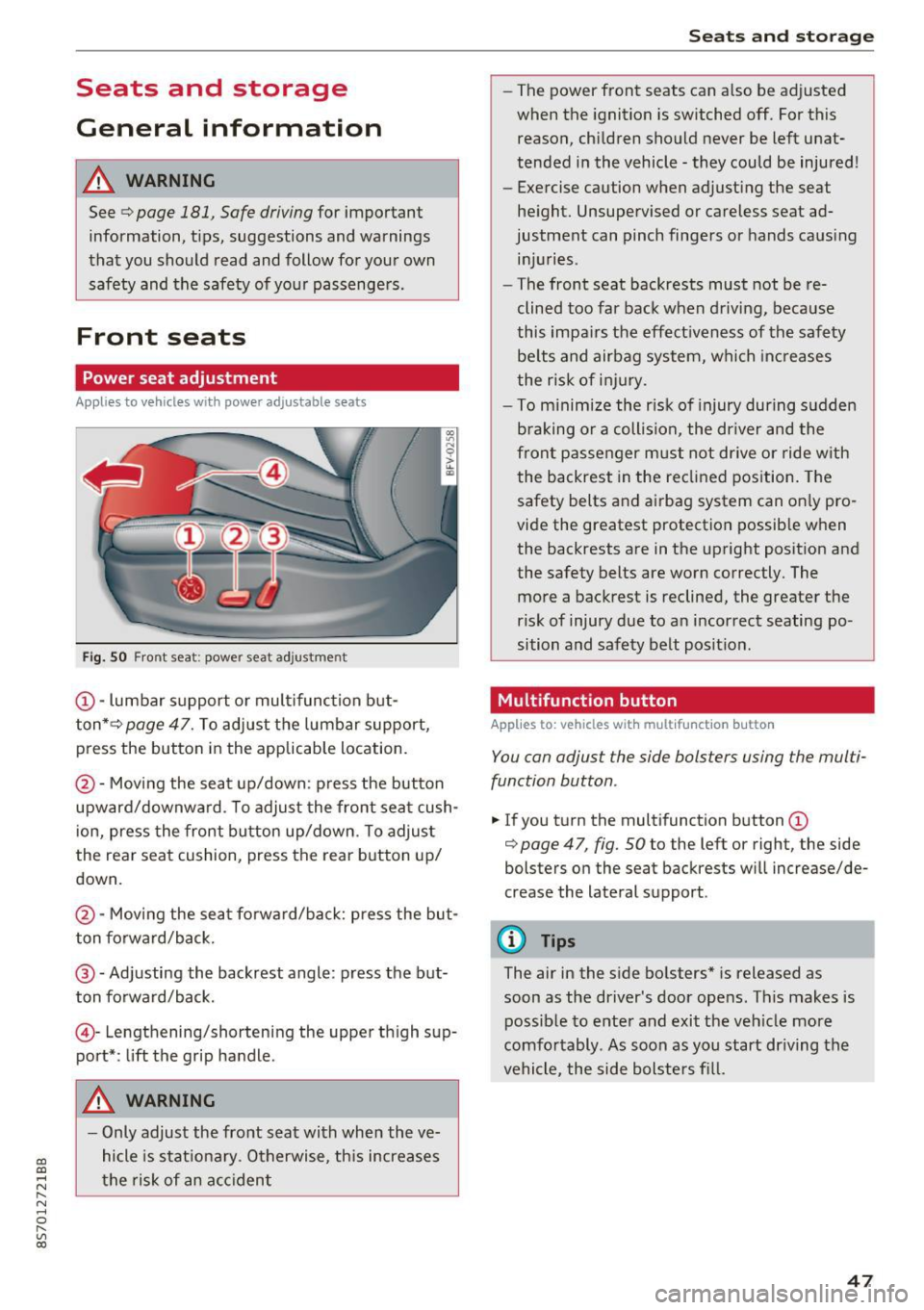
Fig. 50 F ro nt seat: powe r seat ad jus tme nt
@ -lumbar support o r mult ifunct ion but
ton* ¢
page 47. To adjust the lumbar support,
press the button in the applicable location.
@ -Moving the seat up/down : p ress the button
upward/downwa rd . To adjust the front sea t cush
i on, press the front bu tton up/down . T o adjus t
the rear seat cushion, press the rear button up/
down.
@ -Mov ing the sea t fo rwa rd/back: press the but
ton forward/back.
@ -Adjusting the backrest angle : press the but
ton fo rward/back.
© -Lengthening/shorteni ng the upper th igh sup
port* : lift the grip ha ndle .
A WARNING
-Only adjust the fro nt sea t with whe n the ve
hicle is stat iona ry . O therwise, th is increases
t h e risk of an a cc ident
Seats and storag e
-The power front seats can a lso be adjusted
when the ignition is switched off. For this
reason, chi ldren should never be left unat
tended i n the vehicle -they could be injured!
- E xercise caution when adjust ing the seat
he ight. Unsupe rvised or careless seat ad
justment can pinch finge rs or hands caus ing
in ju ries .
- The front seat backrests must not be re
clined too far back when driv ing, because
this impa irs the effect iveness of the safety
be lts and airbag system, w hich inc rea ses
the risk of i nju ry.
- T o m inimize the r isk of injury during s udden
b raking or a collision, the dr iver and the
front passe nger m ust not drive o r ride w ith
the backrest in the re clin ed position. The
safety belts and airbag system can on ly pro
vide the greatest protection possib le w hen
the backrests are in the up right posit ion and
the safety belts are worn correctly. The
more a backrest is reclined , the greater the
risk of injury due to an i ncorrec t seating po
sition and safety belt posit ion .
Multifunction button
Applies to: vehicles with multifunction button
You can adjust the side bols ters using the mul ti
function button .
.. If you t urn the multifunction button(!)
¢
page 47 , fig. 50 to the left or right, the side
bolsters o n the seat backrests w ill increase/de
crease the lateral s upport .
(D Tips
The air in the s ide bo lsters* is released as
soon as the driver's door ope ns. This makes is
possib le to ente r and exit the veh icle more
comfo rtably . As soon as you start dr iving the
vehicle, the side bolsters fi ll.
47
Page 50 of 314
Seats and storage
Center armrest
Applies to: vehicles with center armrest
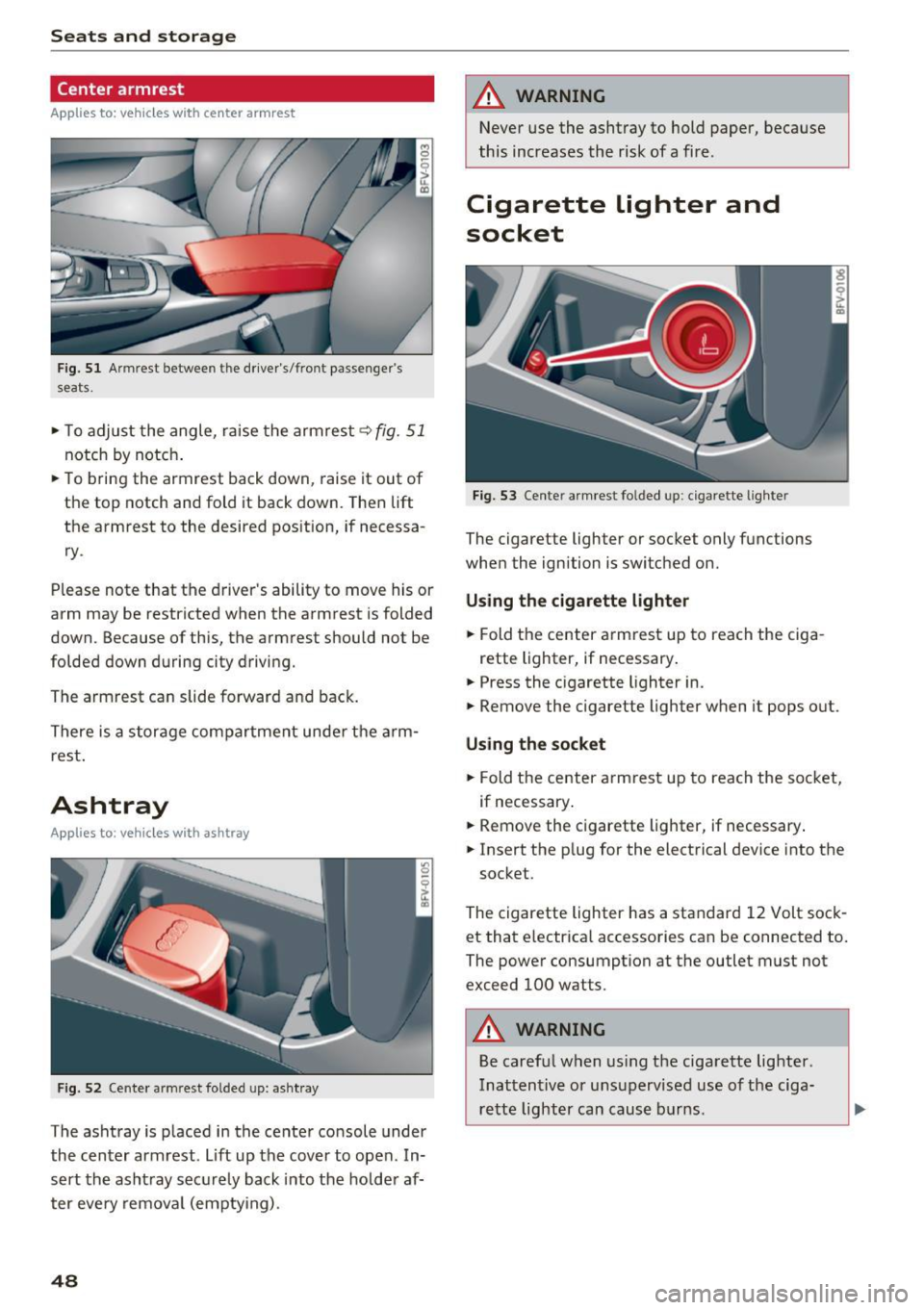
Fig. 51 Armrest between the driver's/front passenger's
seats.
,.. To adjust the angle, raise the armrest q fig. 51
notch by notch .
,.. To bring the armrest back down, raise it out of
the top notch and fold it back down. Then lift
the armrest to the desired pos ition, if necessa
ry .
Please note that the d river 's ability to move his or
arm may be restricted when the armrest is folded
down. Because of this, the armrest should not be
folded down during city driving.
The armrest can slide forward and back.
There is a storage compartment under the arm
rest .
Ashtray
Applies to : vehicles with ashtray
Fig . 52 Cente r armrest folded up: asht ray
The ashtray is p laced in the center console under
the center armrest. Lift up the cover to open . In
sert the asht ray securely back into the hold er af
ter eve ry removal (emptying) .
48
A WARNING
Never use the ashtray to hold paper, because
this increases the risk of a fire .
Cigarette lighter and
socket
Fig. 53 Center armrest folded up: cigarette lighter
The cigarette lighter or socket only functions
when the ignition is switched on.
Using the cigarette lighter
,.. Fold the center armrest up to reach the ciga-
rette lighter, if necessary .
,.. Press the cigarette lighter in.
,.. Remove the cigarette lighter when it pops out.
Using the socket
,.. Fold the center armrest up to reach the socket,
if necessary .
,.. Remove the c igarette lighter, if necessary .
,.. Insert the p lug for the electrical device into the
socket.
The cigarette lighter has a standard 12 Volt sock et that electrica l accessories can be connected to.
The power consumption at the outlet must not
exceed 100 watts.
A WARNING
Be careful when using the cigarette lighter.
Inattentive or unsupervised use of the ciga
rette lighter can cause burns .
-
Page 51 of 314
CD
CD
.... N
" N .... 0 r--. V, co
CD Note
-To reduce the risk of damage to the vehicle
electrical system, never attempt to charge
the veh icle battery by connect ing accesso
ries that prov ide power, such as solar panels
or battery chargers, to the 12 Volt sockets
or the cigarette lighter.
- To reduce the risk of damage to the sockets,
on ly use plugs that fit correctly .
Storage
Beverage holders
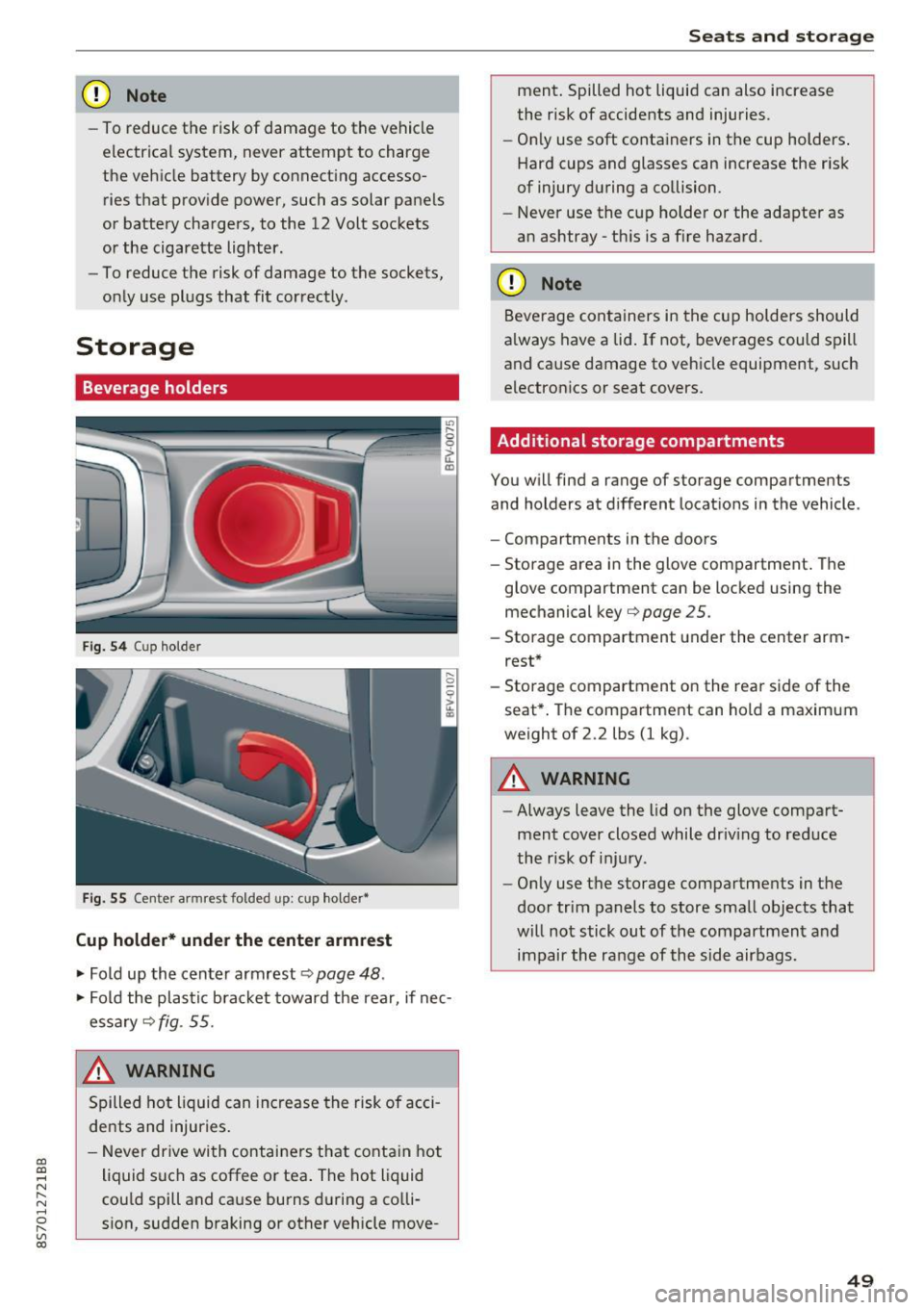
Fig. 5 4 Cup holder
Fig. 55 Cente r armrest folded up: cup holder•
Cup holder* under the center armrest
~ Fold up the center armrest q page 48 .
~ Fold the plas tic bracket toward the rear, if nec
essary
q fig . 55.
,&_ WARNING
Spilled hot liquid can increase the risk of acci
de nts and injuries .
- Never drive wi th containers that contain hot
liquid such as coffee or tea . The hot liquid
cou ld spill and cause burns during a colli·
sion, sudden braking or other vehicle move -
Seats and storage
ment. Spilled hot liquid can also increase
the risk of accidents and injuries.
- On ly use soft containers in the cup holders .
Hard cups and glasses can increase the risk
of injury during a collision.
- Never use the cup holder or the adapter as
an ashtray -th is is a f ire hazard.
CD Note
Beverage containers in the cup holders should
a lways have a lid. If not, beverages could spill
and cause damage to vehicle equipment, such
electronics or seat covers.
Additional storage compartments
You w ill find a range of storage compartments
and holders at different locat ions in the vehicle .
- Compartments in the doors
- Storage area in the glove compartment . The
glove compartment can be locked using the mechanical key
qpage 25 .
-Storage compartment under the center arm
rest*
- Storage compartment on the rea r side of the
seat*. The compartment can hold a maximum
weight of 2.2 lbs (1 kg) .
A WARNING
-
-Always leave the lid on the glove compart
ment cover closed while driv ing to reduce
the risk of injury.
- Only use the storage compartments in the
door trim panels to store small objects that
will not stick out of the compartment and
impair the range of the side airbags.
-
49
Page 53 of 314
CD
CD
.... N
" N ...... 0 r--. V, co
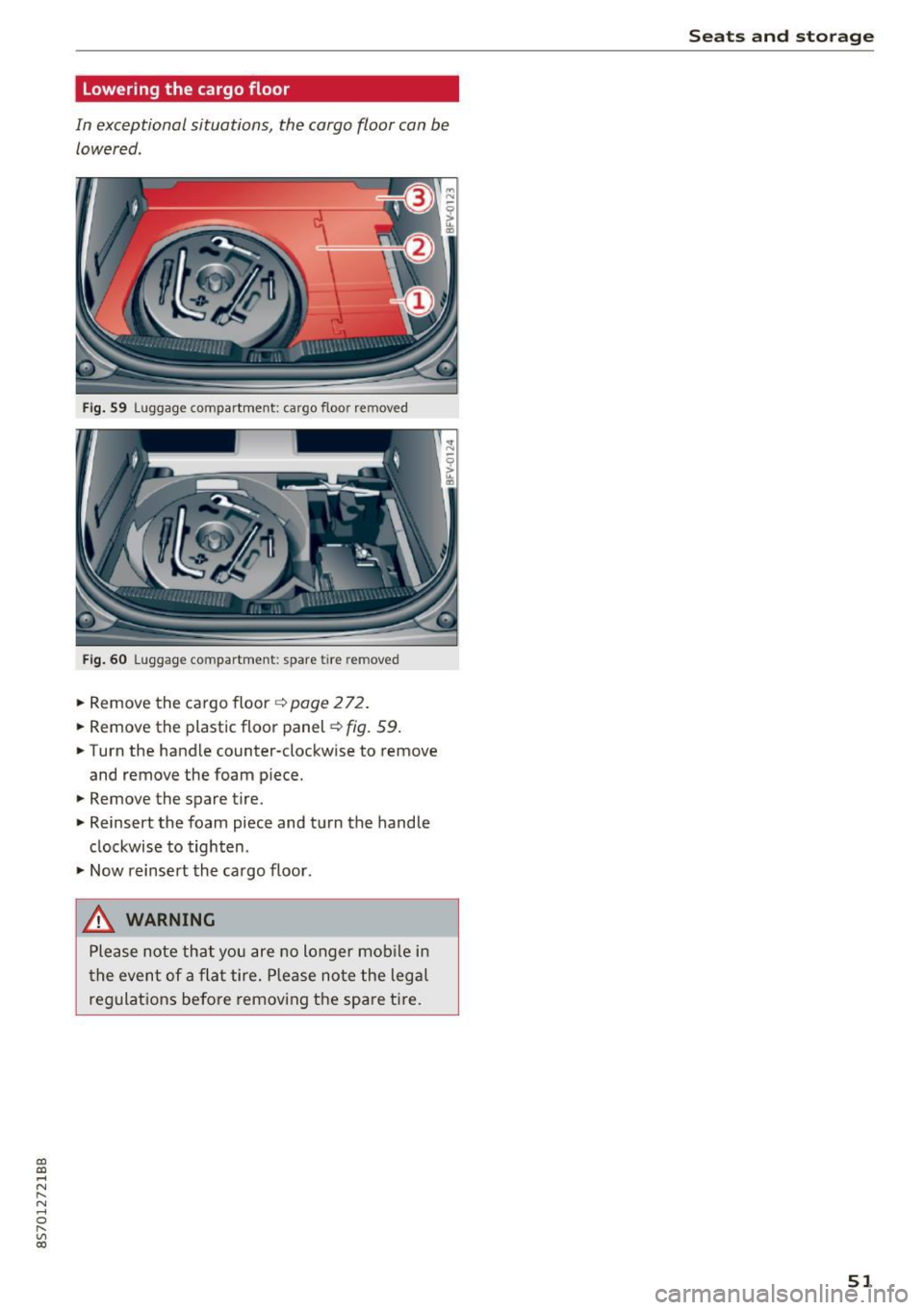
Lowering the cargo floor
In exceptional situations, the cargo floor can be lowered .
Fig. S9 Luggage compartment: ca rgo floor removed
Fig. 60 Luggage compartment: spare tire rem oved
.. Remove the cargo floor q page 2 72 .
.. Remove the plastic floor panel~
fig. 59 .
.. Turn the handle counter-clockwise to remove
and remove the foam p iece .
.. Remove the spare tire .
.. Reinsert the foam piece and turn the handle
clockwise to tighten .
.,. Now reinsert the cargo floor .
_& WARNING
Please note that you are no longer mob ile i n
t he event of a fla t tire. P lease no te the legal
regulat ions befo re removing the spa re tire.
Seats and storag e
51
Page 57 of 314
CD
CD
.... N
" N ...... 0
" V, co
.. To switch the seat heat ing off, press the~ but -
ton repeatedly unti l the LED turns off.
The seat heating switches automatically from sett ing 3 to setting 2 after 10 minutes .
When seat heating sh ould not be switched
on
Do n ot tur n the seat heating on under the follow
i n g circumstances:
- The seat is unoccupied .
- The seat is covered w ith a seat cover.
- The seat is covered with a child seat.
- The seat is damp or wet.
A WARNING
Individua ls with reduced sensitiv ity to pain or
temperature could develop burns when using
the seat heating function. To reduce the risk
of injury, these individuals should not use
seat heat ing.
(D Note
To avoid damage to the heating elements in
the seats, do not kneel on the seats or place
heavy loads o n a sma ll area of the seat.
@ Tips
- The setting for the seat heating on the driv
er's side is ass igned to the key that is in use.
- If the front passenger's seat heating is
turned on, it w ill not turn on again automat
i cally if more than 10 m inutes have passed
between sw itching the ign ition off and
switching it on again.
Warm and cold
Neck heating
Applies to: vehicles with neck heating
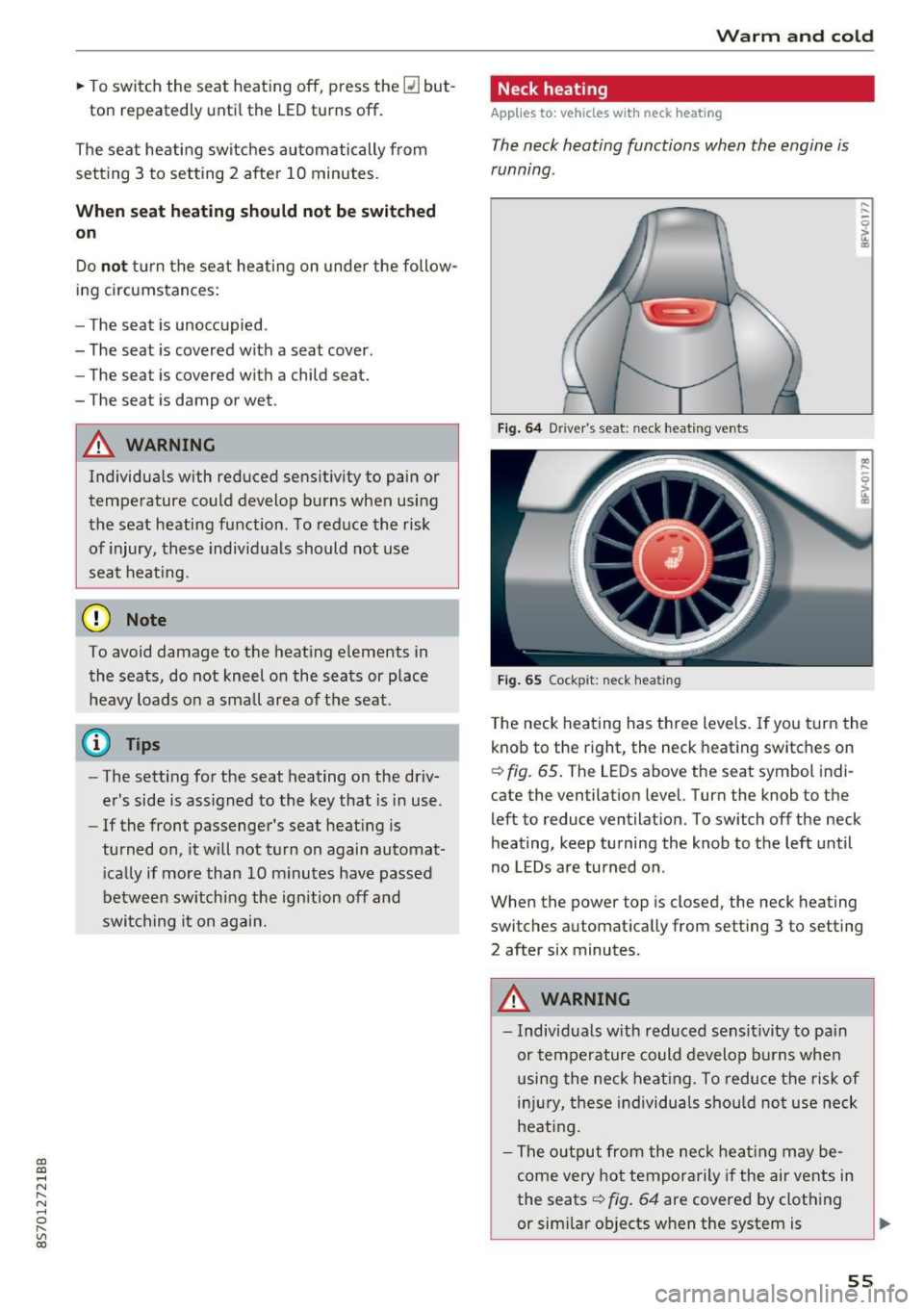
The neck heating functions when the engine is
running .
Fig . 64 Driver 's seat : neclc heating vents
Fi g. 65 Cockp it: neck hea ting
T he neck heating has three levels . If you turn the
knob to the right, the neck heating switches on
Q fig. 65. The LEDs above the seat symbol indi
cate the ventilation level. Turn the knob to the
left to reduce ventilat ion. To switch off the neck
heating, keep turning the knob to the left until
no LEDs are turned on.
When the power top is closed, the neck heating
switches automat ically from setting 3 to setting
2 after six minutes.
A WARNING
- Individuals w ith reduced sensit ivity to pa in
or temperature could develop burns when
using the neck heat ing. To reduce the risk of
i njur y, these individuals sho uld not use neck
heati ng.
- The output from the neck heating may be
come very hot temporarily if the air vents in
the seats
Q fig . 64 are covered by clothing
or sim ilar ob jects when the system is
~
55
Page 135 of 314
co
co
.... N
" N .... 0
" "' c:o
-It is only safe to use tablets, laptops, mo
bile devices and other similar devices when
the vehicle is stationary because, like all loose objects, they could be thrown around
the inside of the vehicle in a crash and cause
serious injuries. Store these types of devices
securely while driving.
- Do not use any wireless devices on the front
seats within range of the airbags while driv
ing. Also read the warnings in the chapter
¢page 196.
- Do not use any Wi-Fi devices within range of
the airbags while driving. Also read the
warnings in the chapter
¢page 196.
{[) Note
You are responsible for all precautions taken
for data protection , anti-virus protection and
protection against loss of data on mobile de
vices that are used to access the Internet
through the Wi-Fi hotspot .
@ Tips
-For more information on roaming fees, con
tact Audi connect customer service at 1
(877) SOS-AUDI (2834).
- The speed of the data connection may vary
depending on the vehicle location , the cov
erage area of your cell phone service provid
er and if the recommended provider is used
or not .
- A data connection cannot be established if
incorrect data is entered in the connection
settings.
- For more information on roaming charges,
contact your cell phone service provider .
- The Wi-Fi hotspot reception quality depends
on the signal strength and the availability of
the mobile network. For more information,
contact your current network provider.
- For additional information, visit
www.audiusa.com/connect.
Audi connect
About Audi connect
Audi connect services
Applies to : vehicles wit h Audi connect
(D Tips
- Audi connect services are only available with
an existing or separate cell phone contract
and only within the mobile network cover
age area. Depending on your cell phone
rates, there may be additional costs when
connecting to the Internet using data pack
ets, particularly with international service.
Based on the high data volume, using a flat
rate data plan is highly recommended.
- You can only use services supported by Audi
connect if you have the optional MMI Navi
gation plus equipment with MMI touch and
Audi connect.
- Use of the LTE* mobile network standard is
not available in every country . Contact your
authorized Audi dealer or authorized Audi
Service Facility or your cell phone service
provider for additional information .
- Using Audi connect services requires a mini
SIM card with data options and, when using
LTE*, it also requires LTE options.
- Usage of Audi connect services depends on
the availability of services through third par
ty providers.
- Also note the information in the chapter
¢page 114, Telephone.
-Audi connect is designed for use only with
the provided SIM card . Receiving data pack
ets from the Internet will quickly increase
the volume of data used. For more informa
tion, contact Audi connect customer service
at 1 (877) SOS-AUDI (2834).
- The Audi connect services are available in
the USA. Audi connect services are currently
not available in Canada or in Mexico.
- Availability, scope, providers, screen display
and costs of services may vary depending on
the country, model, model year, end device and rates . Additional information can be
found under
www.audiusa.com/audicon
nect .
133
Page 183 of 314
co
co
.... N
" N .... 0
" "' c:o
Safe driving Basics
Safe driving habits
Please remember -safety first!
This chapter contains important information,
tips, instructions and warnings that you need to
read and observe for your own safety, the safety
of your passengers and others . We have summar
ized here what you need to know about safety
be lts, airbags, child restraints as well as child
safety. Yo ur safety is for us
priority number 1. Al
ways observe the info rmation and warn ings i n
this section - for you r own safety as well as that
of your passengers.
The information in this sect ion app lies to all
model ve rsions of your vehicle. Some of the fea
tures descr ibed in t his sec tions may be standa rd
equipment on some models, or may be optional
equipment on others . If you are not sure, ask
your authorized Audi dealer.
A WARNING
- Always make sure that you follow the in
struct ions and heed the WARNINGS in th is
Manual. It is in your interest and in the in
terest of your passengers .
-
-Always keep the complete Owner's Litera
ture in your Audi when you lend or sell your
vehicle so that this important information
will always be available to the d river and
passenge rs.
- Always keep the Owne r's literature handy so
that you can find it easily if you have ques
t ions.
Safety equipment
The safety features are part of the occupant re
straint system and work together to help reduce
the risk of injury in a wide variety of accident sit
uations.
Your safety and the safety of yo ur passenger
should not be left to c han ce. Advances in tech
nology have made a var iety of features ava ilab le
t o he lp reduce the risk of injury in an accident.
Safe d riv ing
The following is a lis t of just a few of the sa fe ty
features in yo ur Audi :
- sophisti cated safety be lts fo r dr ive r and pas -
senger seat ing pos ition,
- safety belt p re tensioners,
- safety belt force lim ite rs,
- front airbags,
- knee airbags*
- side airbags in the seats,
- specia l LATCH anchorages for child restraints,
- ad justab le steer ing colum n.
These ind iv idual safety features , ca n work to
gether as a system to he lp p rotect you and your
passenger in a w ide range of acc idents. These
f ea tures canno t work as a system if they are not
always correc tly ad justed and cor rect ly used.
Safet y is everybody's r esponsibility!
Important things to do before driving
Safety is everybody 's job! Vehicle and occupant
saf ety always depends on the informed and care
f1,1/ driver .
For your safety and the safety of your passenger,
before driv ing always:
.,. Make sure that all lights and s ignals are operat
ing correctly .
.,. Make sure that the tire pressure is correct .
.,. Ma ke sure that a ll w indows are clean and afford
good v isibility to the outs ide.
.,. Sec ure all luggage and othe r items c arefully
¢ page 185, ¢ page 49.
.,. Make sure that not hing can i nterfere with the
peda ls .
.,. Adj ust seat and mirro rs cor rectly for your
he ight .
.,. Make sure to use the right child restra int cor
rectly to protect children ¢
page 218, Child
safety .
.,. Sit p roper ly in you r seat a nd make sure that
your passenger do the same¢
page 47, Seats
and storage .
.,. Fasten your safety belt and wear i t properly . Al
so instruct your passenge r to fasten his safety
be lt properly
c:!:> page 189.
181
Page 184 of 314
Safe driving
What impairs driving safety?
Safe driving is directly related to the condition of
the vehicle, the driver as well as the driver's abili
ty to concentrate on the road without being dis
tracted.
The driver is respons ible for the safety of the ve
hicle and all of its occupants. If your ability to
drive is impaired, safety risks for everybody in the
vehicle increase and you also become a hazard to
everyone else on the road
c:::> .&_. Therefore :
~ Do not let yourself be distracted by passenger
or by using a cellular telephone.
~ NEVER drive when your driving ability is im
paired (by medications, alcohol, drugs, etc.).
~ Observe all traffic laws, rules of the road and
speed limits and plain common sense.
~ ALWAYS adjust your speed to road, traffic and
weather conditions.
~ Take frequent breaks on long trips. Do not drive
for more than two hours at a stretch.
~ Do NOT drive when you are tired, under pres
sure or when you are stressed.
..&, WARNING
Impaired driving safety increases the risk of
serious personal injury and death whenever a
vehicle is being used.
Correct passenger
seating positions
Proper seating position for the driver
The proper driver seating position is important
for safe, relaxed driving.
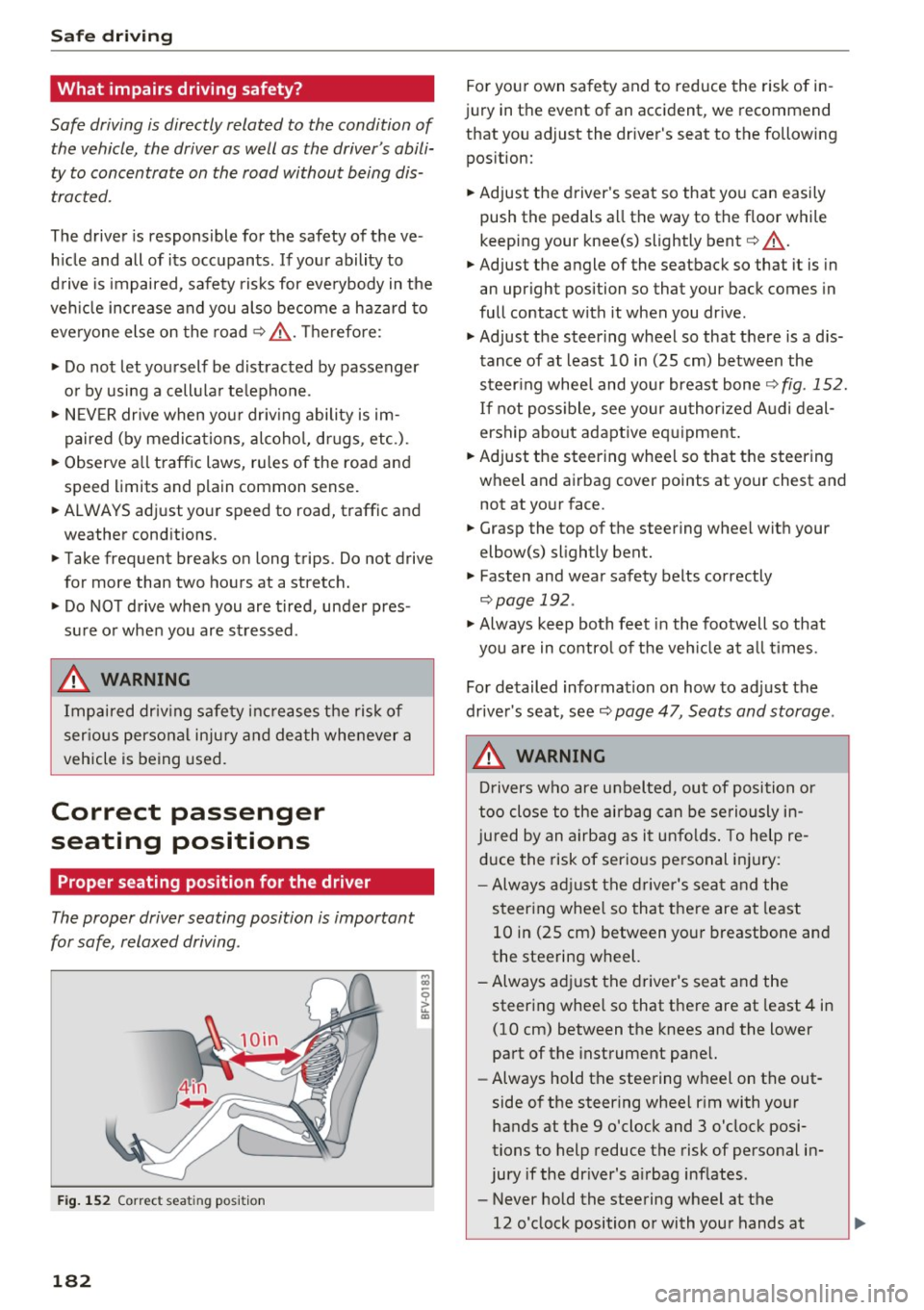
Fig. 152 Correct seating position
182
For your own safety and to reduce the risk of in
jury in the event of an accident, we recommend
that you adjust the driver's seat to the following
position:
~ Adjust the driver 's seat so that you can easily
push the pedals all the way to the floor while
keeping your knee(s) slightly bent
c:::> .&_.
~ Adjust the angle of the seatback so that it is in
an upright position so that your back comes in
full contact with it when you drive.
~ Adjust the steering wheel so that there is a d is
tance of at least 10 in (25 cm) between the
steering wheel and your breast bone
c:::>fig. 152.
If not possible, see your authorized Audi deal
ership about adaptive equipment.
~ Adjust the steering wheel so that the steering
wheel and airbag cover points at your chest and not at your face.
~ Grasp the top of the steering wheel with your
elbow(s) slightly bent.
~ Fasten and wear safety belts correctly
c:::> page 192.
~ Always keep both feet in the footwell so that
you are in control of the vehicle at all times .
For detailed information on how to adjust the
driver's seat, see
c:::> page 47, Seats and storage.
..&, WARNING
Drivers who are unbelted, out of position or
too close to the airbag can be seriously in
jured by an airbag as it unfolds. To help re
duce the risk of serious personal injury:
- Always adjust the driver's seat and the
steering wheel so that there are at least
10 in (25 cm) between your breastbone and
the steering wheel.
-Always adjust the driver's seat and the
steering wheel so that there are at least 4 in
(10 cm) between the knees and the lower
part of the instrument panel.
- Always hold the steering wheel on the out
side of the steering wheel rim with your
hands at the 9 o'clock and 3 o'clock posi
tions to help reduce the risk of personal in
jury if the driver's airbag inflates.
- Never hold the steering wheel at the
12 o'clock position or with your hands at
-