mirror AUDI TT ROADSTER 2017 Owners Manual
[x] Cancel search | Manufacturer: AUDI, Model Year: 2017, Model line: TT ROADSTER, Model: AUDI TT ROADSTER 2017Pages: 314, PDF Size: 76.54 MB
Page 9 of 314
co
co
.... N
" N .... 0
" "' c:o
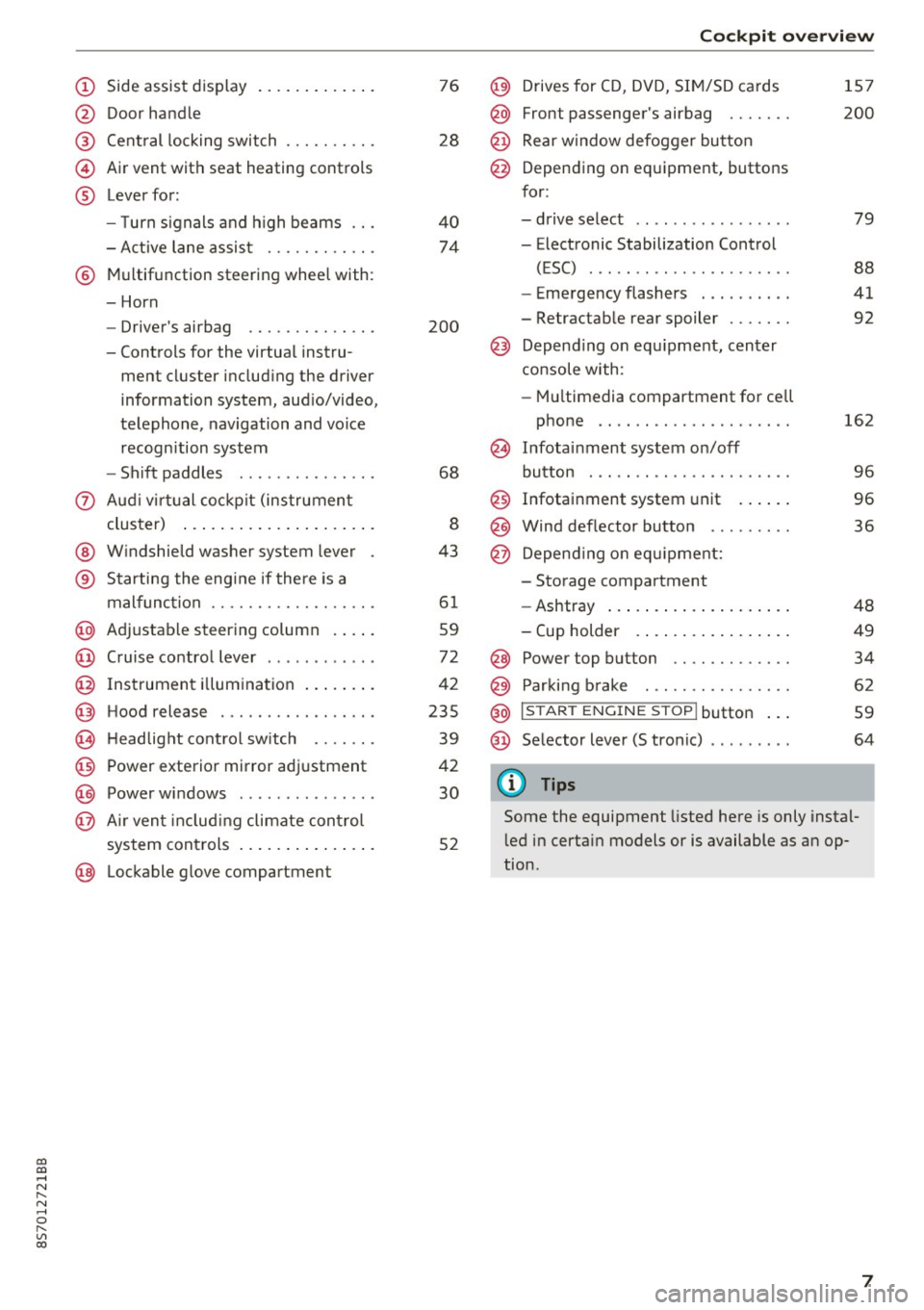
(!) Side assist display ..... ... .. .. .
@ Door handle
®
©
®
Cent ral locking switch
Air vent with seat heating controls
Lever for:
- T urn s ignals and h igh beams .. .
- Active lane assis t ......... .. .
® Multifunction steering wheel with :
- Horn
- Driver's ai rbag .. ......... .. .
- Controls for the virtual instru-
ment cluster includ ing the driver
information system, aud io/video,
telephone, navigation and voice
recogn ition system
- Shift paddles . .... ..... ... . .
0 Aud i v ir tu al co ckpit (instrument
cluster) ... .... .. .... ... .. .. .
@ W indshield washer system lever
® S tarting the engi ne if the re is a
mal func tion .. ........... .. .. .
@ Adjustab le st eering column . ... .
@ Cruise co ntrol lever .. ..... ... . .
@ Ins trument i llum ination ... .. .. .
@ Hood release . .... ......... .. .
0 H eadlight cont rol sw itch .... .. .
@ Power exterior mirror adjustment
@ Power windows . .... ..... ... . .
@ A ir ven t incl uding climate con trol
system controls ... .... ... .. .. .
@ Lockable g love compartment
76
28
40
74
200
68
8
43
6 1
59
72
42
235
39
42
30
52
Coc kpit o ve rv iew
@) Drives for CD, DVD, SI M/SD cards
@ Front passenger's ai rbag ...... .
@ Rear window defogger bu tton
@ Depending on equipment, buttons
for:
- drive select .. .. ............ .
- Electronic Stabilization Control
(ESC) ..... .. .. ............ .
- Emergency flashers . ...... .. .
- Retractab le rear spoiler ...... .
@ Depend ing on equ ipment , center
co nsole with:
- Mu ltimedia compartment for cell
phone .... .. .............. .
~ Infotai nment system on/off
button . .. .. .. .. ............ .
@ Infotainment system unit ... .. .
@ Wind deflector button ........ .
@ Depending o n eq uipment:
- Storage compartment
- Ashtray ... .. ... .. .. ..... .. .
- Cup holder .. ... .. .. ..... .. .
@ Power top button ............ .
@ Parking b rake . .. ............ .
@ I S TAR T ENGINE ST OP I butto n ...
@ Selector lever (S tronic)
@ Tips
1S7
200
79
88
41
92
162
9 6
96
36
48
49
34
62
59
64
Some the equipment listed here is only instal
l ed in certa in models or is available as an op
tion.
7
Page 33 of 314
CD
CD
.... N
" N ,-I 0 r--. V, co
@ Tips
-You can still open and close the windows for
approximately 10 minutes after turn ing the
ignition off. The power windows do not
switch off until the driver's door or front passenger's door has been opened.
- When opening the doors and when open
i ng/closing the power top, the windows au
tomatically lower approximately 10 mm.
Convenience opening/closing
All windows can be opened and closed at the
same time.
Convenience opening feature
• Press the Im button on the remote control key
until all windows reach the desired position.
Convenience closing feature
• Press the {D button on the remote control key
u nti l all windows are closed¢
A or
Convenience closing with the convenience
key*
• Touch the sensor* on the door handle long
enough until all windows and the power top*
are closed . Do not place your hand in the door
hand le when doing this.
Setting convenience opening in the
Infotainment system
• Select in the Infotainment system: !MENUI but
ton
> Vehicle> left control button >Vehicle set
tings .
To enable the convenience window opening func
tion, the
Long press to open windows function
must be switched
on.
.&_ WARNING
- Never close the windows or power top* care lessly or in an uncontrolled manner, be
cause this increases the risk of injury.
- For security reasons, the windows and the
power top* can only be opened and closed
with the remote control key at a maximum
distance of approximately 6 ft (2 m) away
Open ing and closing
from the vehicle . Always pay attention when
pressing the
Im button to close the w indows
and the power top* so that no one is
pinched. The closing process w ill stop im
mediately when the
Im button is released .
Correcting power window malfunctions
You can reactivate the one-touch up/down func
tion if it malfunctions.
• Pull the power window switch up until the win
dow is completely raised.
• Release the switch and pull it up aga in for at
least one second .
Garage door opener
(Homelink)
Description
Applies to : veh icles w ith garage door o pen er (Home link)
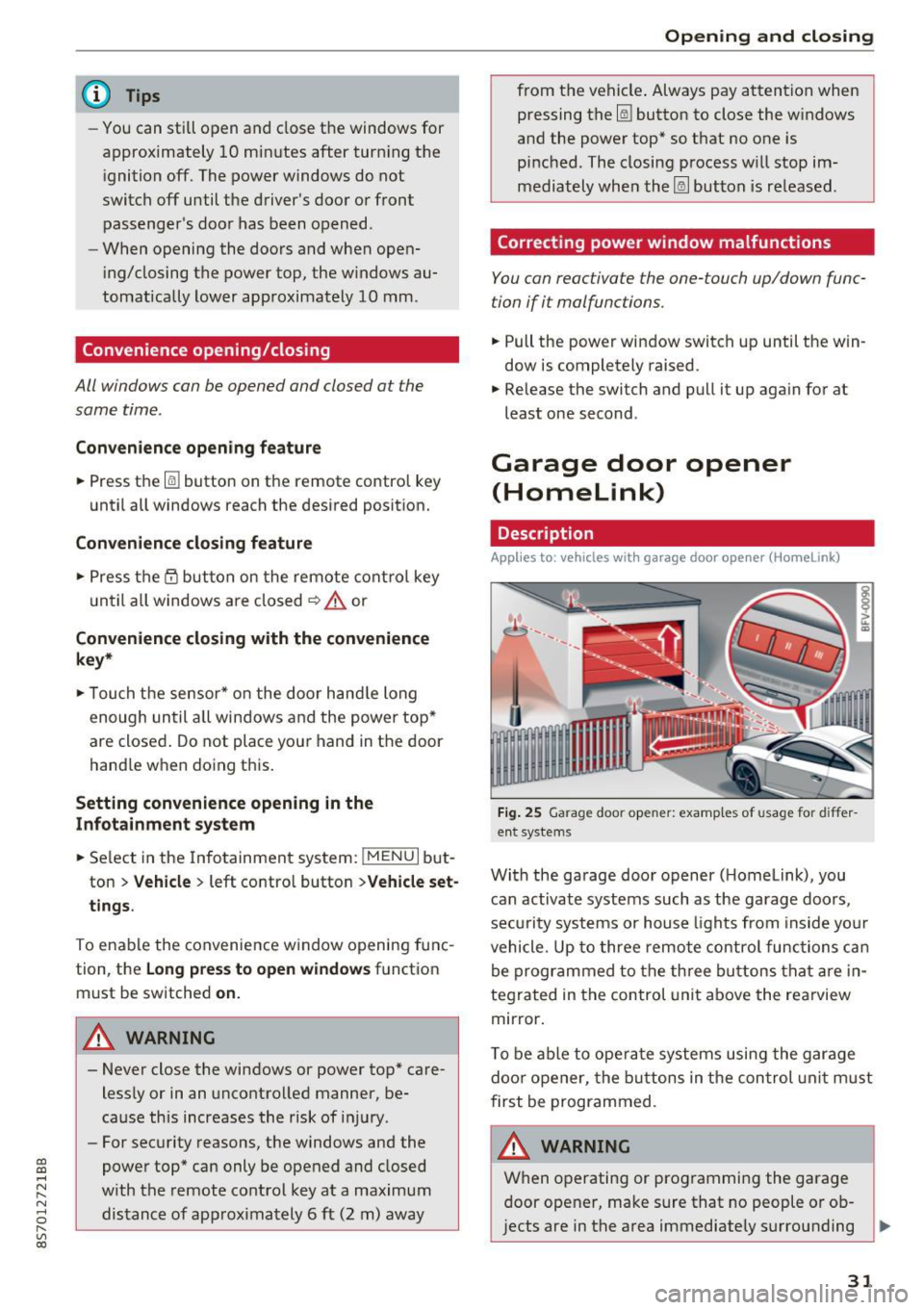
Fig. 25 Garage door opener: examples of usage for differ
ent systems
With the garage door opener ( Homelink), you
can activate systems such as the garage doors,
security systems or house lights from inside your
vehicle. Up to three remote control functions can
be programmed to the three buttons that are in
tegrated in the control unit above the rearview
mirror.
T o be able to operate systems using the garage
door opener, the buttons in the control unit must
first be programmed.
A WARNING ~
When operating or programming the garage
door opener, make sure that no people or ob
jects are in the area immediately surrounding ..,.
31
Page 34 of 314
Opening and closing
the equipment. Peop le can be injured or prop
erty can be damaged if struck when closing.
(D Tips
- For secu rity reasons, we recommend that
you clear the programmed buttons before
selling the vehicle.
- For additional information about Homelink,
v is it
www .homelink .com.
- For the Declaration of Conformity with the
provisions from the FCC in the United States
and Industry Canada, see¢
page 296 .
Operation
Applies to: ve hicles w ith garage doo r opener (Homeli nk)
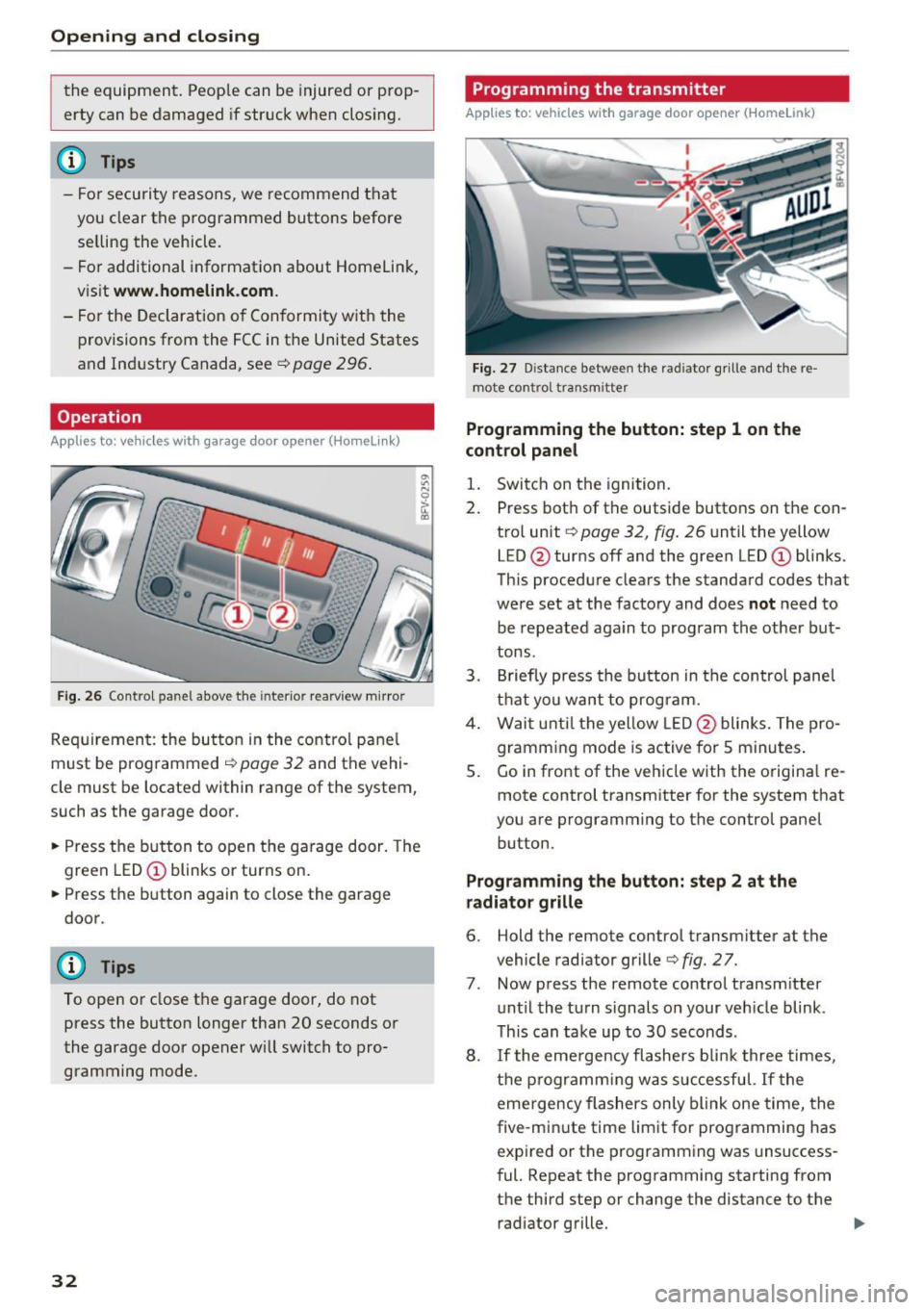
Fig. 26 Contro l pa nel above the inter io r rearview mirror
Requirement: the but ton in the control panel
m ust be programmed
i:!> page 32 and the vehi
cle must be located within range of the system,
such as the garage door .
.. Press the button to open the garage door. The
green LED
CD blinks or turns on.
.. Press the button again to close the garage
door.
(D} Tips
To open or close the garage door, do not
press the button longer than 20 seconds or
the garage door opener w ill switch to pro
gramming mode.
32
Programming the transmitter
App lies to : vehicles wit h garage door o pener (Horne link)
Fig. 27 D istance between the rad iator g rille and the re
mote contro l transm itter
Programming the button: step 1 on the
control panel
1. Switch on the ignition.
2. Press both of the outside buttons on the con
trol unit ¢
page 32, fig. 26 until the yellow
LED @turns off and the green LED
CD blinks.
This procedure clears the standard codes that
were set at the factory and does
not need to
be repeated again to program the other but
tons.
3. Briefly press the button in the control panel
that you want to program.
4. Wait until the yellow LED@blinks. The pro
gramming mode is active for S minutes.
5. Go in front of the vehicle w ith the origina l re
mote control transmitter for the system that
you are programming to the control panel button .
Programming the button: step 2 at the
radiator grille
6. Hold the remote control transmitter at the
vehicle radiator grille¢
fig. 27.
7 . Now press the remote control transm itter
until the turn signals on your veh icle blink .
This can take up to 30 seconds .
8. If the eme rgency flashers blink three times,
the programming was successful. If the
emergency flashers only blink one time, the
five -min ute time limit for programming has
expired or the programming was unsuccess
ful. Repeat the programming starting from
the third step or change the distance to the radiator grille.
Page 44 of 314
Lights and Vision
Instrument illumination
Fig . 42 Inst ru m ent illuminat io n
"' ~ 0 0
~ (0
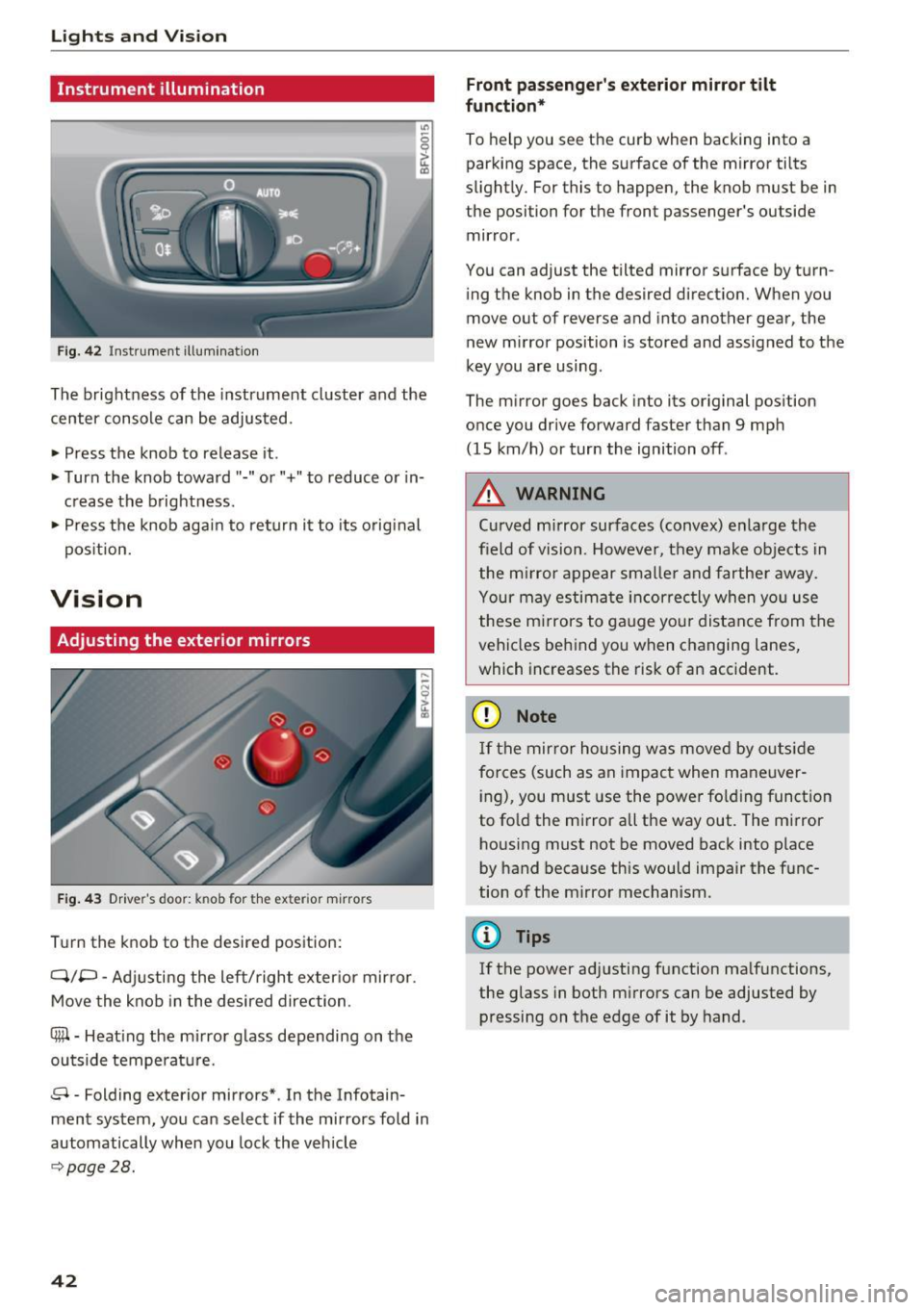
The brightness of the instrument cluster and the
center console can be adjusted.
• Press the knob to release it .
• Turn the knob toward"-" or"+" to reduce or in
c rease the b rightness .
• Press the knob again to ret urn it to its original
pos ition.
Vision
Adjusting the exterior mirrors
F ig. 4 3 Driver's door: knob for the exter ior m irrors
T u rn the knob to the desired pos ition:
Q/P -Adjusti ng the left/right exter ior mir ror.
Move the knob in the desired direction.
®-Heat ing the mi rror g lass depending on the
outside temperat ure.
8 -Folding exterior mirrors *. In the Infotain
ment system, you can select if the mirrors fold in
automatically when you lock the vehicle
9 page28.
42
Front passenge r's exterior mirror tilt
function *
To help you see the cur b when backing into a
parking space, the surface of the m irror tilts
slight ly. For this to happen, the knob must be in
the position for the front passenger's outside
mir ror .
You can adjust the tilted mirror s urface by turn
i ng the knob in the desired direct ion. When you
move out of reverse and into another gear, the
new m irror position is stored and assigned to the
key you are using.
The m irror goes back into its or ig inal pos ition
once you drive forward faster than 9 mp h
(15 km/h) or turn the ignition off .
,&. WARNING
Curved mirror surfaces (convex) e nla rge the
field of vision. Howeve r, they make objec ts in
the m irror appear s maller and fart he r aw ay.
Your may estima te inc orrec tly when yo u use
these m irrors to ga uge you r distan ce from the
vehicles behind you w hen changing la nes ,
which increases the risk of an accident.
(D Note
If th e mir ror h ousing w as move d by o utsid e
forces (such as an imp act when ma neuver
i ng), you must use the power fo lding funct ion
to fo ld the m irror all the way out. The m irror
h ousing must not be moved back into place
by hand because this would impair the func
tion o f the m irro r mechan ism.
(D Tips
If the power ad justing function ma lfunctions ,
the glass in both m irrors can be adjusted by
pressing on t he edge of it by hand.
-
Page 45 of 314
CD
CD
.... N
" N ...... 0
" V, co
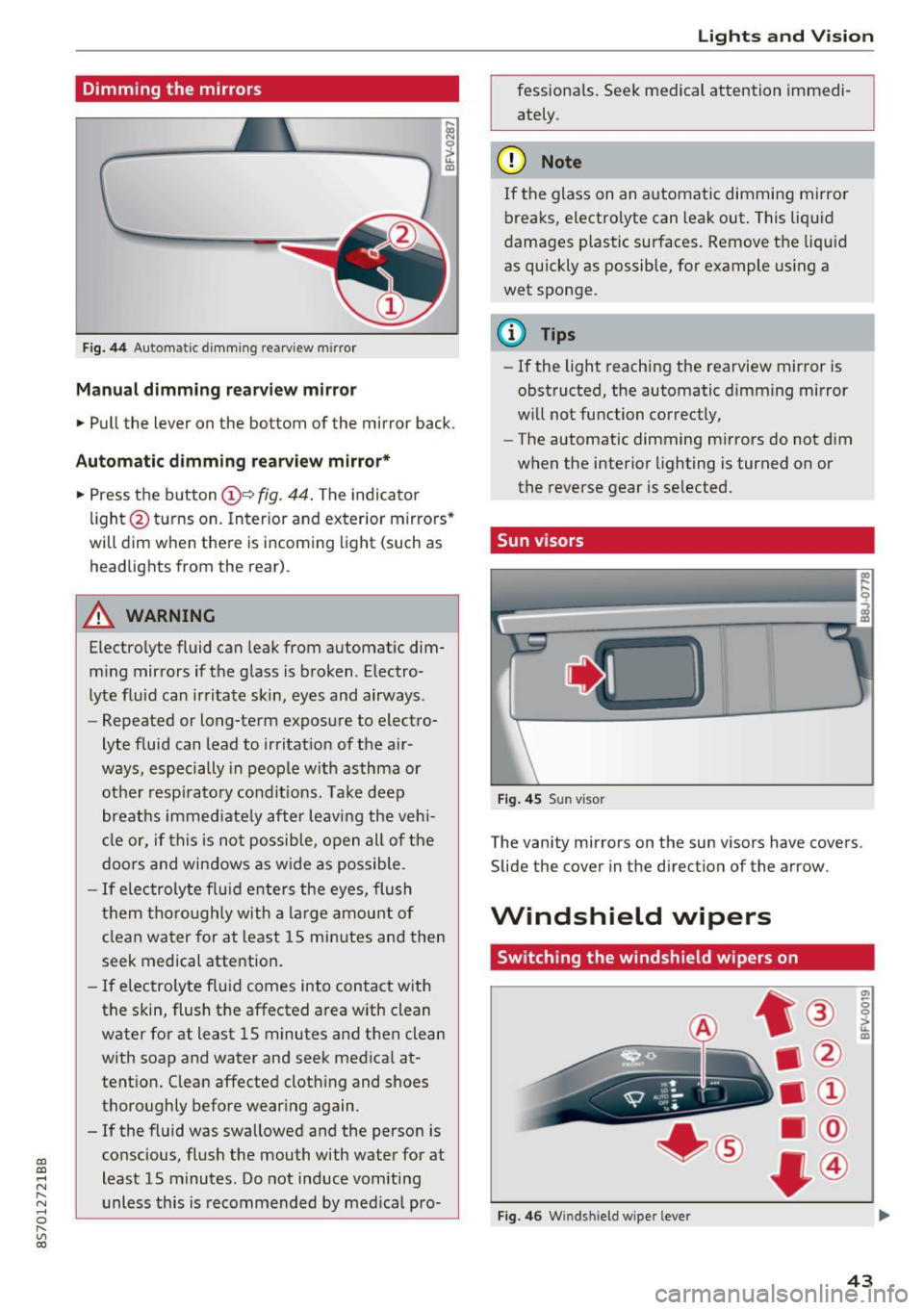
Dimming the mirrors
Fig . 44 Automat ic dimm ing rearview mirror
Manual dimming rear view mirror
• Pull the lever on the bottom of the mirror back.
Automatic dimming rea rvie w mirror*
• Press t he button @~
fig. 44 . The indicato r
li ght @turns on. In terior and exterior mirrors"
will dim when there is incoming light (such as
headlights from the rear).
A WARNING
Electrolyte fluid can leak from automat ic dim
m ing mirrors if t he g lass is b roken . Electro
lyte fluid can ir ritate skin, eyes and airways .
- Repeated or long-term exposure to elect ro-
lyte fluid can lead to irritat ion of the a ir
ways, especially in peo ple with asthma or
ot he r resp irato ry condi tions. Take deep
breat hs immed iate ly after leaving the veh i
cl e or, if this is n ot possib le, open all of t he
doo rs and windows as wide as possible.
- If elec troly te flu id ente rs the eyes, flush
t hem thorough ly with a large amou nt o f
cl ean water for at least 15 mi nutes and then
seek medical attention.
- If elec troly te f lu id comes into con tact wit h
the skin, flush t he affected area with clean
water for at least 15 minutes a nd then clean
with soap and water and seek medical at
tent ion. Clean affected cloth ing and shoes
thoroughly before wear ing again .
- If the fluid was swallowed and the person is
conscious, flus h the mouth with water for at
least 15 minutes. Do not induce vomiting
unless this is recommended by med ica l pro-
Lights and V ision
fessionals. Seek medical attention immedi
ately .
(D Note
If the glass on an a utomat ic dimmi ng mirror
breaks, electro lyte can leak out. This liquid
damages plastic sur faces. Remove t he liqu id
as quickly as possible, for example using a
wet sponge.
@ Tips
- If the light reaching the rearview mirror is
obstructed, the automatic dimming mirror
w ill not function correctly,
- The automatic dimming m irrors do not dim
w hen the interior lighting is turned on or
the reverse gear is selected.
Sun visors
Fi g. 4 5 Su n visor
The vanity mirrors on the sun visors have covers.
Slide the
cover in the direction of the arrow.
Windshield wipers
Switching the windshield wipers on
Fig. 4 6 W indshi eld wiper leve r
(7)
-0 0 :,;.. u. m
43
Page 47 of 314
CD
CD
.... N
" N .... 0 r--. V, co
_& WARNING
Dirty windshield wiper blades can impair vi
sion, which increases the risk of a n accident.
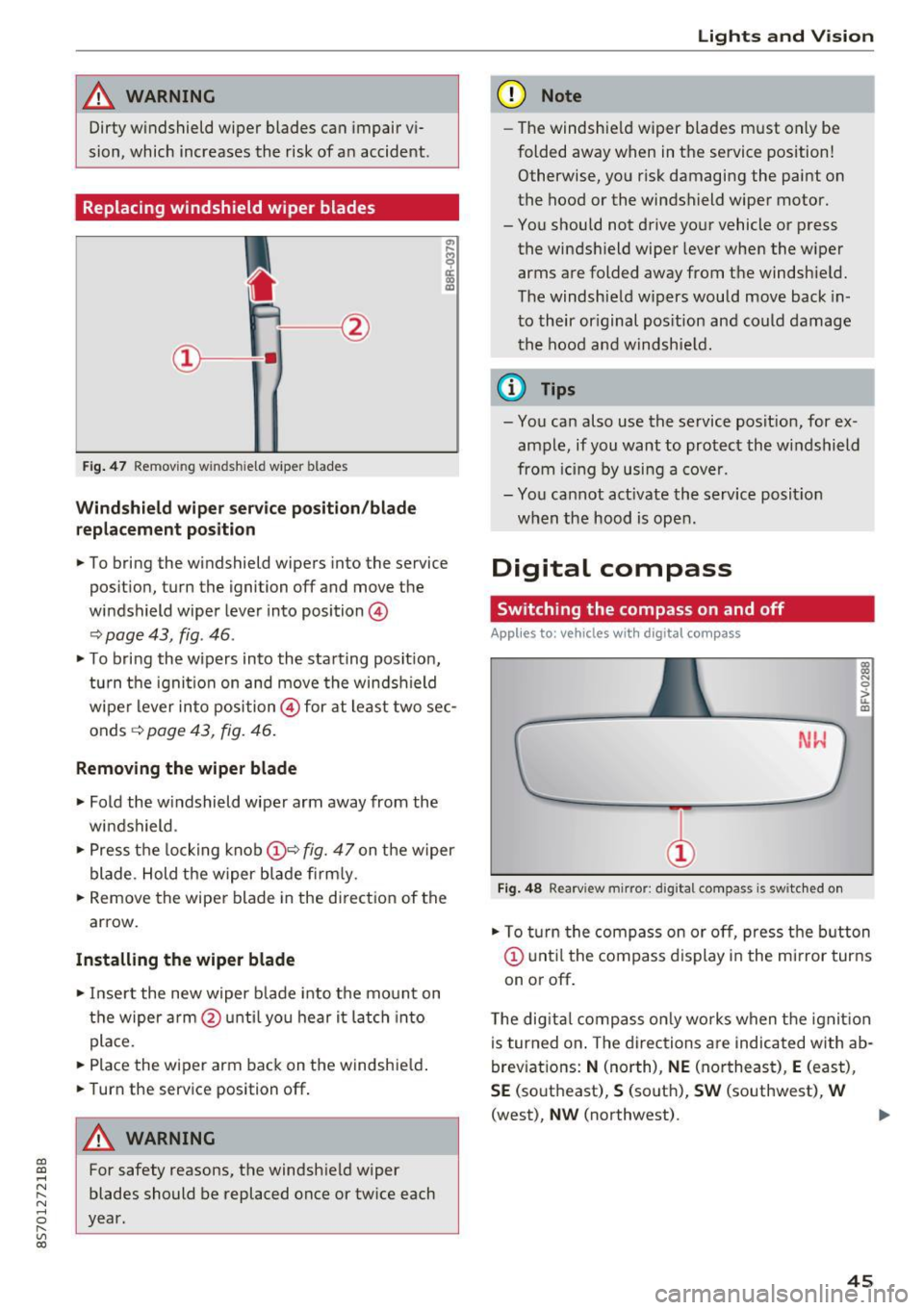
Replacing windshield wiper blades
Fig . 47 Remov ing windshie ld wiper blades
Windshield wiper service position /blade
replacement position
"'
~ a: a) OJ
.. To bring the windshield wipers into the service
pos it ion, turn the ignition off and move the
windshield wiper lever into position @
~ page 43, fig. 46 .
.. To bring the wipers into the starting posit ion,
tu rn the ignition on and move the windshield
wiper lever into position@ for at least two sec
onds ~
page 43, fig. 46.
Removing the wiper blade
.. Fold the windshield wiper arm away from the
windshield .
.,. Press the locking knob@~
fig. 47 on the wiper
blade. Hold the wiper blade firmly.
.. Remove the wiper blade in the direct ion of the
arrow.
Installing the wiper blade
.. Insert the new wiper b lade into the mount on
the wiper arm @until you hear it latch into
place.
.. Place the wiper arm back on the windshie ld .
.. Turn the service position off.
A WARNING
-
For safety reasons, the windshield wiper
blades should be replaced once or twice each
year.
Lights and V ision
(D Note
-The windshie ld wiper blades must only be
folded away when in the service position!
Otherwise, you risk damaging the paint on
the hood or the windshield wiper motor.
- You should not drive your vehicle or press the windsh ield wiper lever when the wiper
arms are folded away from the windshield.
The windshield wipers would move back in
to their original pos ition and could damage
the hood and windshie ld.
(1} Tips
-You can also use the service posit ion, for ex
ample, if you want to protect the windshield
from icing by using a cover.
- You cannot act ivate the service posit ion
when the hood is open.
Digital compass
Switching the compass on and off
Applies to: vehicles wit h digita l compass
Fig. 48 Rearview mirror: digita l compass is switc hed on
::l
"' 0
> LL OJ
.. To turn the compass on or off, press the button
@ until the compass d isplay in the mirror turns
on or off .
The digita l compass only works when the ignit ion
is turned on . The directions are indicated with ab
breviations:
N (north), NE (northeast), E (east),
SE (southeast), S (south), SW (southwest), W
(west),
NW (northwest). ..,_
45
Page 48 of 314
Lights and Vision
@ Tips
To prevent inaccurate compass readings, do
not bring any remote controls, e lectr ica l dev i
ces or metall ic objects near the mirro r.
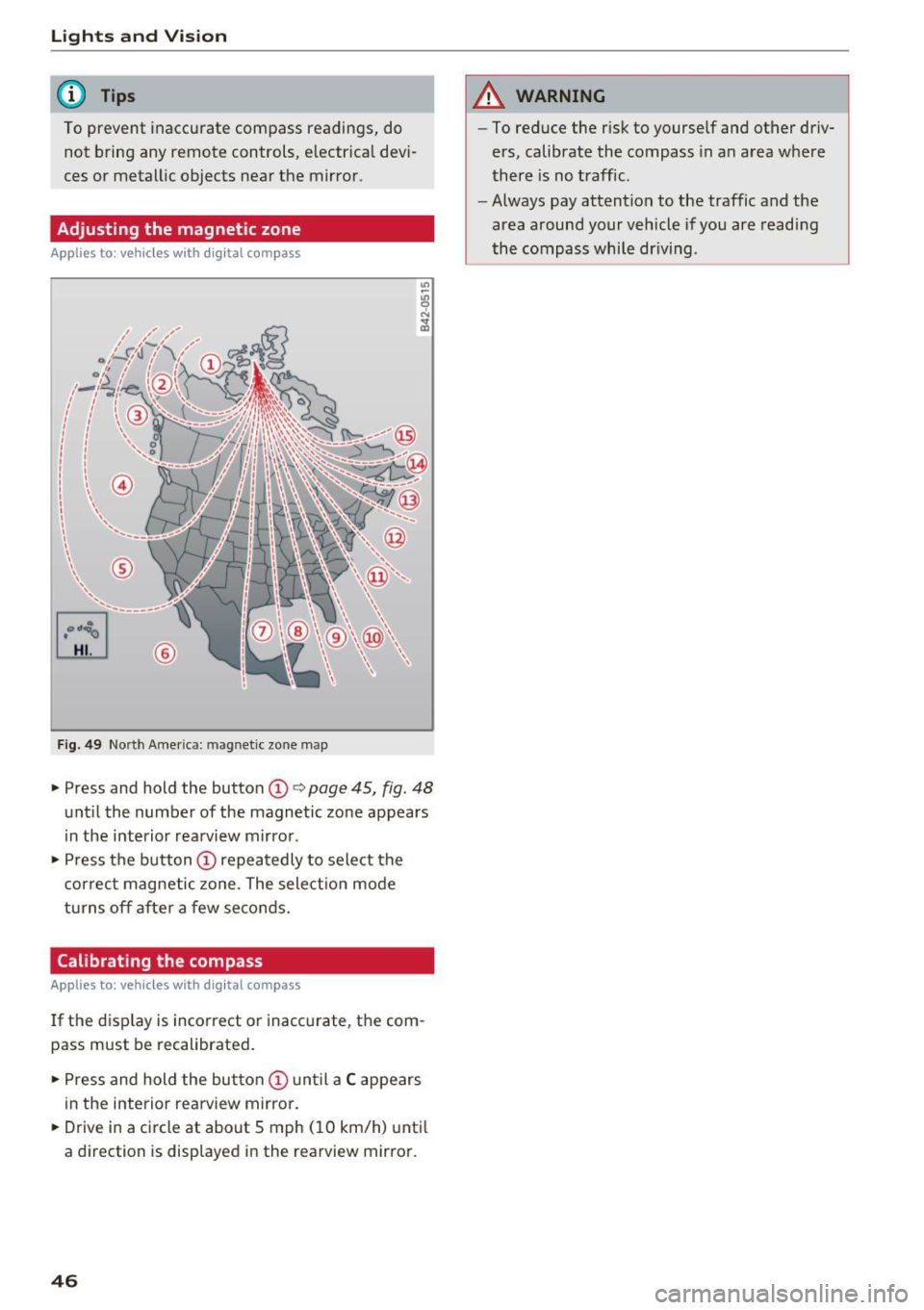
Adjusting the magnetic zone
A pp lies to: ve hicles w ith digital compass
[o::J
UiL.J ®
F ig . 4 9 Nort h Amer ica : ma gnetic zo ne m ap
.- Press and hold the button CD i:> page 45, fig. 48
unt il the number of the magnetic zone appears
in the interior rea rview m irro r .
.- Press t he button
CD repea tedly to select the
correc t magne tic zone . The select io n mode
turns off afte r a few seco nds.
Calibrating the compass
A pp lies to: ve hicles w ith digi tal compass
If the d isp lay is incorrect or inacc urate, t he com
pass must be recalibrated .
.- Pre ss and hold the button
CD un til a C appears
in the inte rio r rearview mirror .
.- Drive in a circle at about 5 mph ( 10 km/h) unti l
a dir ection is disp layed i n the rearvi ew mirro r.
46
A WARNING
- To reduce the r isk to yourself and other driv
ers, calibrate the compass in an area whe re
there is no traffic .
- Always pay attention to the traffic and the
area around your vehicle if you are readi ng
the compass whi le dr iv ing .
Page 78 of 314
Assist
-The camera field of view~ page 75, fig. 79 is
dirty or covered in ice. Clean this area on the
windshield.
- The camera field of view is fogged over. Wait
until the fog has cleared before switching the
active lane assist on again.
- The system has been unable to detect the lanes
for an extended period of time due to road con
ditions. Switch active lane assist back on when
the lines are more visible.
Audi active lane assist : currently unavailable.
See owner's manual
There is a temporary active lane assist malfunc
tion. Try switching the active lane assist on aga in
later .
Audi active lane assist : malfunction! See own
er's manual
Drive to an authorized Aud i dea ler or authorized
Audi Service Facility immediately to have the
malfunct io n corrected.
Audi active lane assist: Please take over steer
ing!
This message appears if you are not steering by
yourse lf. If th is is the case, active lane assist does
not switch off, but it is "not ready " to provide a
warn ing . The system can he lp you keep the veh i
cle in the lane. However, you are responsible for
driving the vehicle and must steer it yourself .
Adjusting the steering time and vibration
warning
Applies to: vehicles with Audi active lane assist
You can adjust individual active lane assis t set
tings in the Infotainment system.
Select in the Infotainment system: I MENU ! but
ton>
Vehicle > left control button >Driver assis
tance
> Audi active lane assist
1l The correct ive steer ing fu nctio n is not available in all mar
kets.
76
Steering time1>
Early: in this setting, the corrective steering hap
pens continuously to help keep the veh icle in the
center of the lane.
Late : in this setting, the system provides correc
tive steering just before a vehicle wheel touches a
detected lane marker line .
Vibration warning
You can switch the add itional vibrat ion warn ing
i n the steering wheel on or off.
(D Tips
In certain markets: your settings are stored
a ut omat ically and assigned to the remote
control key in use.
Audi side assist
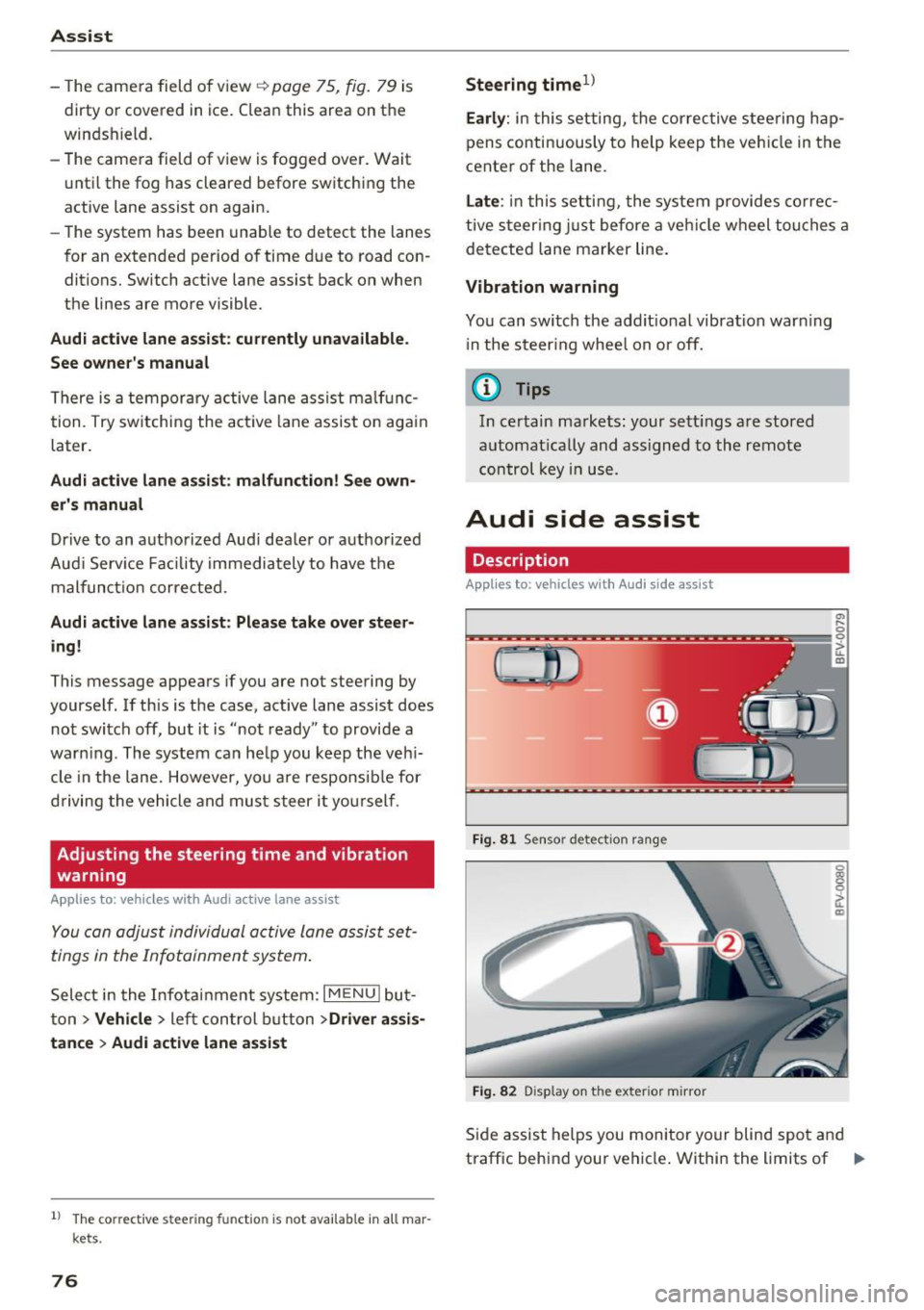
Description
Applies to: vehicles with Audi side assist
Fig. 81 Sensor detec tion rang e
Fig. 82 Display on the exterior mirror
Side assist helps you monitor your blind spot and
traffic behind your vehicle . Within the limits of .,.
Page 79 of 314
CD
CD
.... N
" N ...... 0
" V, co
the system, it warns you about vehicles that are
coming closer or that are traveling with you with
in sensor range(!)¢
fig. 81: if a lane change is
classified as critical, the display @ in the exter ior
mirror
¢ fig . 82 turns on.
The display in the left exterior mirror provides as
sistance when making a lane change to the left,
while the d isp lay in the right exterior mirror pro
vides assistance when mak ing a lane change to
the r ight.
Information stage
As long as you do not activate the turn signal,
side assist
informs you about vehicles that are
detected and classified as crit ical. The display in
the m irror turns on, but is dim.
The display remains dim in the information stage
so that your view toward the front is not distur
bed.
Warning stage
If you activate the turn signal, side assist warns
you about vehicles that are detected and classi
fied as critical. The display in the respective mir
ror blinks brightly . If this happens, check traffic
by glancing in the exterior mirrors and over your
shoulder¢ .&
in General information on
page 78.
@ Tips
You can adjust the brightness on of the dis
play on the rearview mirror ¢
page 79.
Assist
General information
Applies to : veh icles w it h Aud i s ide ass ist
Fig . 83 Driv ing s ituat ions
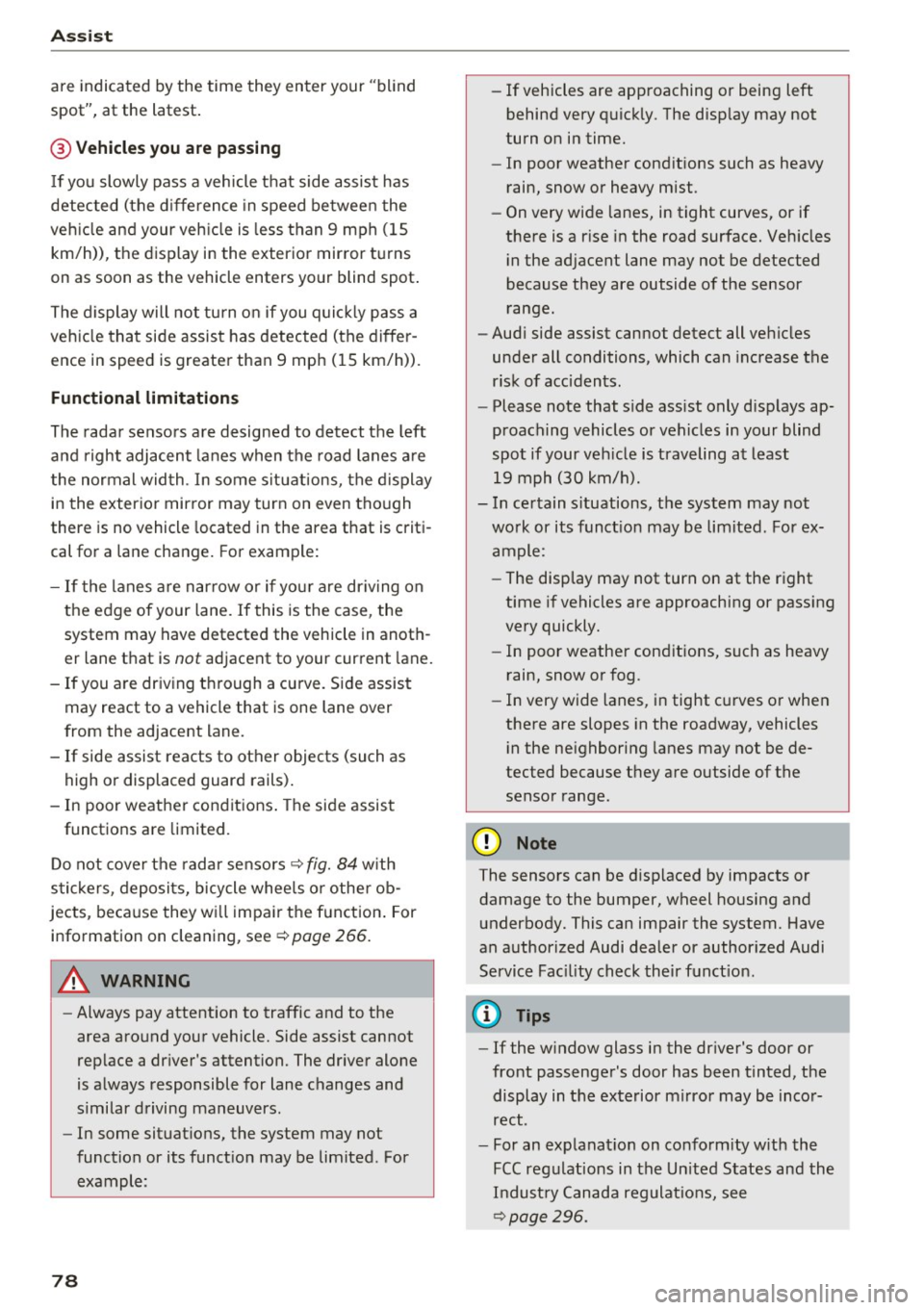
Fig. 84 Rear of t he ve hicle: positio n of the sensors (exam
ple)
S id e assist funct ions at speeds above approxi
mately 19 mph (30 km/h).
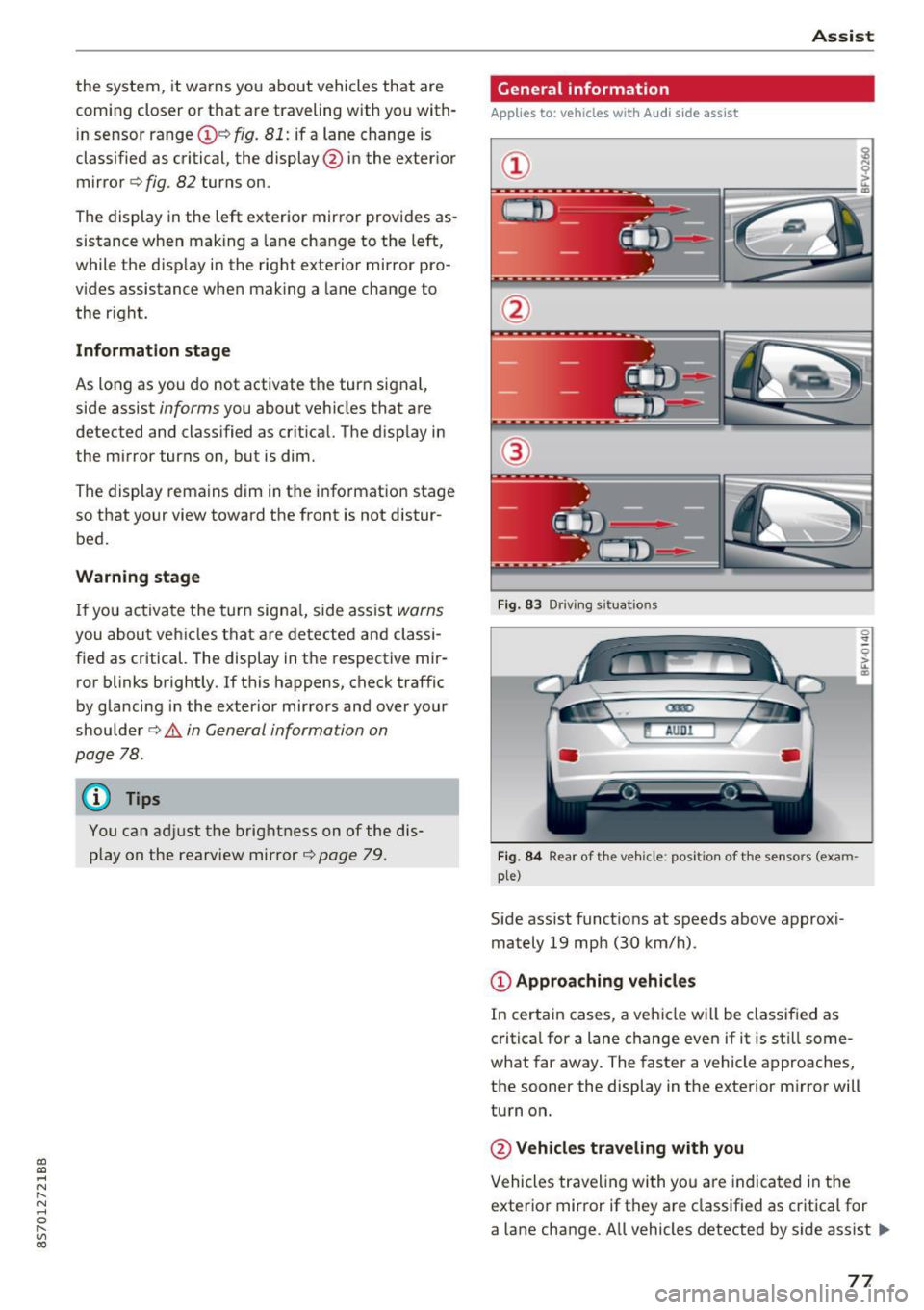
@ Approaching vehicles
In certain cases, a vehicle will be classified as
critical for a lane change even if it is still some
what far away. The faster a vehicle approaches,
the sooner the display in the exterior m irror will
turn on.
@ Vehicles traveling with you
Vehicles traveling with yo u are indicated in the
exterior mirror if they are classified as critica l for
a lane change. All vehicles detected by side assist
lli>-
77
Page 80 of 314
Ass is t
are indicated by the time they enter your "blind
spot", at the latest .
@Vehicles you are passing
If you slowly pass a veh icle that side assist has
detected (the d ifference in speed be twee n the
veh icle and your veh icle is less t han 9 mph (15
km/h)), the d isplay in the exterior mirror turns
on as soon as the vehicle enters your blind spot .
The display will not tu rn o n if you quick ly pass a
veh icle tha t side assist has detected (the differ
ence in speed is greate r than 9 mph ( 15 km/h)).
Functional limitations
The rada r senso rs a re designed to detect the left
and right adjacen t lanes when the road lanes a re
the normal wid th . In some s ituat ions, the d isplay
in the exter ior mirror may tur n on even tho ugh
there is no vehicle located in the area that is criti
cal for a lane change. For example:
- If the lanes a re nar row o r if yo ur are dr iving on
the edge of your lane. If this is the case, the system may have detected the vehicle in anoth
er lane t hat is
not adjacent to your current lane.
- If you are dr iv ing t hrough a curve. Side assis t
may react to a vehicle that is one lane over
from the adjacent lane.
- If side assist reacts to other objects (such as high or displaced guard rails) .
- In poor weather condit ions . The side assis t
functions are limited.
Do not cove r the radar sensors¢
fig. 84 w ith
s tick ers, deposits, bicycle whee ls o r othe r ob
jects, beca use they w ill impa ir the f unction . For
information on cleaning, see¢
page 266.
A WARNING
-Always pay attention to traffic and to the
area aro und your vehicle. Side assist cannot
rep lace a dr iver's attention. The drive r alone
is a lways responsible for lane changes and
similar driving maneuvers.
- In some situat io ns, the system may not
function or its funct ion may be limited . For
example:
78
-
- If vehicles are app roaching or being left
behind very q uickly. The disp lay may not
turn on in time.
- In poor weathe r cond it ions such as heavy
r ain, snow or heavy mist.
- On very wide lanes, in tight curves, or if
the re is a r ise in the road surface. Veh icles
i n the adjacent lane may not be detected
because they are outside of the sensor
r ange.
- Aud i side assist can not detect all ve hicles
under all conditions, which can inc rease the
r is k of acciden ts.
- Please note that s ide ass ist only d isp lays ap
proach ing vehicles or veh icles in your blind
spot if your veh icle is traveling a t least
19 mph (30 km/h).
- In ce rtain s ituations, t he sys tem may not
wo rk or its funct ion may be limited. For ex
ample:
- The disp lay may not turn on at the r ight
time if vehicles are approaching or pass ing
very quickly.
- In poor weathe r con ditions, such as heavy
r ain, snow or fog.
- In very wide lanes, in tight c urves o r whe n
the re are slopes in the roadway, vehicles
i n the ne ighboring lanes may not be de
tected because they a re outside of the
senso r range.
(D Note
The sensors can be d isplaced by impacts or
damage to the bumper, wheel housing and underbody. This can impair the system. Have
an authorized Audi dealer or author ized Audi
Service Fac ility check the ir f unct io n.
(D Tips
- If the w indow glass i n the dr iver's door or
front passenger's door has been tinted, the display in t he exterior mirro r may be inco r
rect.
- For an ex planat ion on co nfo rm ity w ith the
FCC reg ulations in the Un ited States and the
In dust ry Can ada regulat io ns, see
¢page 296.