ECO mode AUDI TT ROADSTER 2018 User Guide
[x] Cancel search | Manufacturer: AUDI, Model Year: 2018, Model line: TT ROADSTER, Model: AUDI TT ROADSTER 2018Pages: 310, PDF Size: 46.95 MB
Page 69 of 310
Cl co .... N ,....
N ...... 0 ,....
Vl co
Hill descent control
The hill descent control system assists the driver
when driving down hills .
Hill descent control is activated when the selec
tor lever is in the "D" or "S" position and you press the brake pedal. The transm iss ion auto
mat ically selects a gear that is suitable for the
h ill. Hill descent con trol tries to maintain the
speed ach ieved at the t ime of b raking, w ith in
phys ica l and technical limi tatio ns. If may still be
necessa ry to adjust the speed with the brakes .
Because hill descent contro l cannot sh ift down
farther than 3rd gear, it may be necessary to
shift into tiptronic mode in very steep areas. In
this case, shift manually into 1st or 2nd gear in
tiptron ic mode to use the engine 's braking force
to relieve the brakes .
Hill descent control switches off once the hill lev
els out or you press the accelerator pedal.
On vehicles with a cruise contro l system*
¢ page 71, hill descent control is also activated
when the speed is set .
A WARNING
Hill descent control cannot overcome physical
limitations , so it may not be able to maintain
a constant speed under all condit ions . Always
be ready to apply the brakes .
Shifting manually (tiptronic mode)
The tiptronic mode allows the driver to shift the
gears manually .
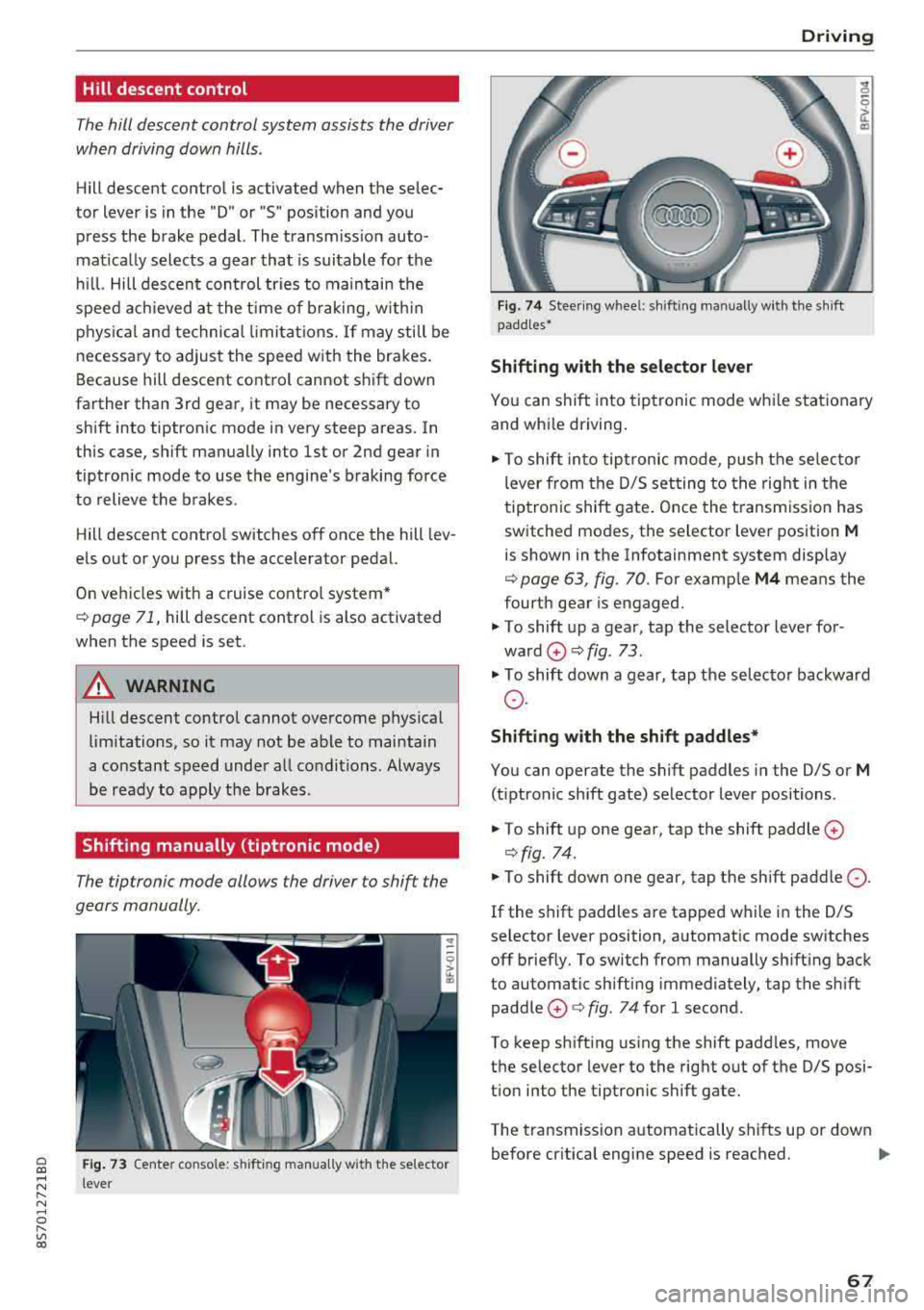
Fig. 73 Center co nso le: s hift ing ma nually w it h the selector
l ever
D rivi ng
Fig. 74 Steer ing w hee l: sh ifting manually w it h the sh ift
padd les•
Shifting with the s elector le ver
"' 0 6
~
"'
Yo u can shift into tiptronic mode whi le stat ionary
and whi le driving.
.,. To shift into tip tronic mode, push the selec to r
lever from the D/S setting to the right in the
tiptronic shift gate . Once the t ransmiss ion has
switched modes, the selector lever position
M
is shown in the Infotainment system disp lay
¢ page 63, fig. 70. For examp le M4 means the
fourth gear is engaged.
.,. T o shift up a gear, tap the selector lever for
ward
0 ¢ fig. 73 .
.,. To shift down a gear, tap the selecto r backward
o.
Shift ing with the shift paddle s*
You can operate the shift paddles in the D/S or
M
(t iptronic shift gate) selector lever positions .
.,. To shift up one gear, tap the shift paddle 0
¢fig. 74 .
.,. To shift down one gear, tap the shift paddle 0 -
If the shift paddles are tapped w hile in the D/S
selector lever position, automatic mode switches off brief ly. To switch from manually sh ifting back
to automatic sh ifting immediately, tap the shift
paddle
0 ¢ fig . 74 for 1 second.
To keep sh ifting using the shift padd les, move
the selector lever to the rig ht out of the D/S posi
t ion into the tiptronic shift gate.
The transmission automatically shifts up or down before cr itical engine speed is reached.
..,.
67
Page 70 of 310
Drivin g
The transmission only a llows manual shifting
w hen t he engine spee d is within t he permitted
range.
(D Tips
tiptronic does not work if the transmission is
running in emergency mode .
Kick-down
Kick-down enables maximum acc ele ration .
When you press the accele rato r peda l dow n be
yond the resistance po int, the automatic trans
miss io n downshifts into a lower gea r and the
en
gine utilizes its f ull power, depending on veh icle
speed and engine RPM . It shifts up into the next
h igher gear once the maximum spec ified engine
RPM is reached.
A WARNING
Please note that the wheels could spin on
slick or slippery roads when kick -down is
ac
t ive .
Launch Control Program
-
The Launch Control Program enables maximum
acceleration .
Requirement: the eng ine must be at operating
temperature and the steer ing whee l must not be
turned.
.. With the engine running, p ress th e l~ O FF ! but
ton b riefly one time
ll .
.. Pu ll the selector lever back out of the "D/S" po
s ition briefly to select the "S" position, or press
i t toward the r ight into the tiptron ic posit ion or
select the
D ynamic d riving mode in d rive se
lect* ~ page 78 .
.,. Press t he b rake peda l firmly with you r left foot
and hold it all the way dow n fo r a t least 1 sec
ond.
1 > T he ESC lig ht t urns on con tinuous ly and the mess age S ta
bil iza tio n con trol ( ESC ): sp ort. Warni ng! Reduced sta bil
ity appe ars te m porar ily in the Infota inment sy st em t o in
dic ate th at t he s yst em w as d eactivate d.
68
.. At the same time, press the gas peda l all the
way down with your rig ht foot until the engine
reaches and stays at a hig h RPM leve l.
.. Remove your left foot from the brake.
A WARNING
-Always adapt your driving to the traff ic flow.
- On ly use Launch Control when road and traf-
fic conditions allow it and other drivers w ill
not be endange red or impacted by your dr iv
ing and the vehicle's acceleration .
- Please note that the d rive wheels can spin
and the vehicle can b reak away when spo rt
mode is switched on, especially when the
road is slippery.
- Once the vehicle has started mov ing, press
the
IB OFF I button b riefly to turn the spor t
mode
off.
(D Tips
- The transmission temperat ure may increase
significant ly after using the launch control
prog ram . If that happens, the prog ram may
not be ava ilab le for a few minutes. I t will be
avail able ag ain afte r a coo l-down period.
- Whe n accelerating using the launch contro l
prog ram, all vehicle pa rts a re subje ct to
he avy loads. This c an le ad t o incre ased
wea r.
Transmission malfunction
• Tran smiss ion: malfunction! Plea se stop ve
hicle and shift to P
There is a ma lf u nction in the transm ission. Park
t h e ve hicle secure ly and do not continue driving .
See an authorized Audi dealer or authorized A udi
Service Facility for assistance .
• Transmission : too hot . Ple ase stop vehicle
The t ra nsmission is too hot and can become dam
aged. Stop and let the t ransmiss io n coo l w it h t he
engine r unning (a t idle) in t he "P" se lector lever
.,.
Page 71 of 310
Cl co .... N ,....
N ...... 0 ,....
Vl co
position. Then the indicator light and the mes
sage turn off, drive to an authorized Audi dea ler
or author ized Audi Service Facility immed iately to
have the malfunction corrected.
If the ind icator
light and the driver message do not turn off, do
not continue driving . See an authorized Audi
dealer or authorized Aud i Serv ice Facility for as
sistance .
DI Transmission : malfunction! You can contin
ue driving. See owner's manual
Drive to an authorized Aud i dea ler or authorized
Aud i Service Facility immediately to have the
malfunction corrected .
DI Transmission: malfunction! You may contin
ue driving. No reverse gear
There is a system mal funct ion in the transm is
sion. The transmission is switching to emergency
mode. This mode only shifts into certain gears or
will no longer shift at all. The engine may stall.
You cannot engage the reverse gear . Drive to an
author ized Audi dealer or authorized Audi Service
Facility immediately to have the malfunction cor
rected .
DI Transm ission : malfunction! You may contin
ue driving in D until engine off
Drive the vehicle away from moving traffic and
park. See an authorized Audi dealer or authorized
Aud i Service Facility for assistance.
DI Transmission: too hot. Please adapt driving
style
The transmission temperature has increased s ig
nificantly. Drive ve ry cautiously or take a break
from driving until the temperature returns to the
norma l range and the indicator light turns off.
DI Transmission : Please press brake pedal and
select gear again
I f the transmission ma lfunctions because the
temperature is too high, a message appears
when the transmission is cooled .
Driving
Selector lever emergency release
If the vehicle 's power supply fails, the selector
lever can be released in an emergency .
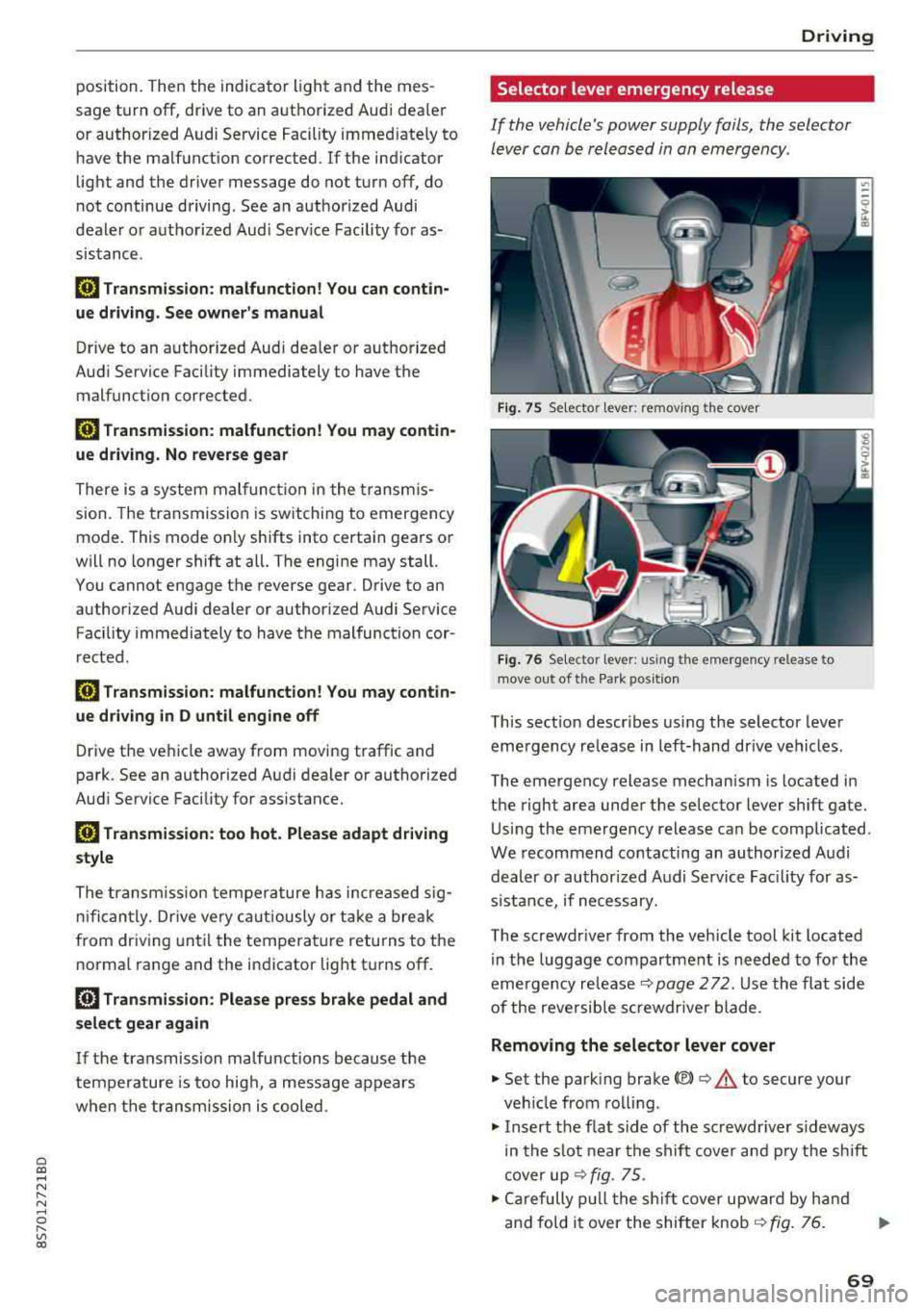
Fig. 7 S Selecto r lever : remov ing the cov er
Fig. 76 Se lecto r le ver: u sing th e em erge ncy re lease to
move out of t he Pa rk po siti on
This sect ion descr ibes using the selector lever
eme rgency release in left-hand dr ive vehicles .
The emergency release mechanism is located in
the right area under the selector lever shift gate.
Using the emergency release can be complicated .
We recommend contacting an authorized Audi
dealer or authorized A udi Service Fac ility for as
s istan ce, if necessary.
The screwdr iver from the vehicle tool kit located
in the luggage compartment is needed to for the
emergency
re lease ¢ page 2 72 . Use the flat side
of the reversible sc rewdr ive r blade .
Removing the selector lever cover
.,. Set the park ing brake<®> ¢.&. to secure your
veh icle from rolling.
.,. Insert the f lat s ide of the screwdr iver s ideways
in the slot near the shift cover and pry the shift
cover up
¢ fig . 75 .
.,. Carefully pull the shift cover upward by hand
and fold it over the shifter knob
¢ fig. 76. ..,.
69
Page 73 of 310
Cl co .... N ,....
N ...... 0 ,....
Vl co
Assistance systems Speed warning system
Description
App lies to: vehicles with speed warning system
The speed warning system helps you to stay be
low a specified maximum speed that can be set,
changed or deleted in the Infotainment system .
The speed warning system warns you if you are
exceeding the maximum speed that you have set .
A warning tone will sound as soon as your speed
exceeds the stored value slightly. The
(Ol (USA
models)/
(01 (Canada models) indicato r light
and a message appear i n the ins trumen t cluster
d isplay at the same time. The
(Sl (USA models)/
(O] (Canada models) indicator light and the mes
sage turn off when the ve hicle speed drops below
the stored maximum speed.
Sett ing a threshold is recommended if you would
like to be reminded when you reach a certain
maximum speed . Situations where you may want
to do so include driving in a country with a gener
al speed limit or if there is a specified maximum
speed for winter tires.
Setting the warning thr eshold
.. Se lect in the Infotainment system: ! MENUI b ut
ton
> Vehicle > left contro l button > Driver a s
s istan ce
> S peed warning > Manual.
@ Tips
Regard less of the speed warning system, you
should always monitor your speed using the
speedometer and make sure you are following
the legal speed limit.
A ssi st a nce systems
Cruise control system
Switching on
Applies to: vehicles with cruise control system
The cruise control system makes it possible to
drive at a constant speed starting at 15 mph
(20 km/h).
0
f
~
0
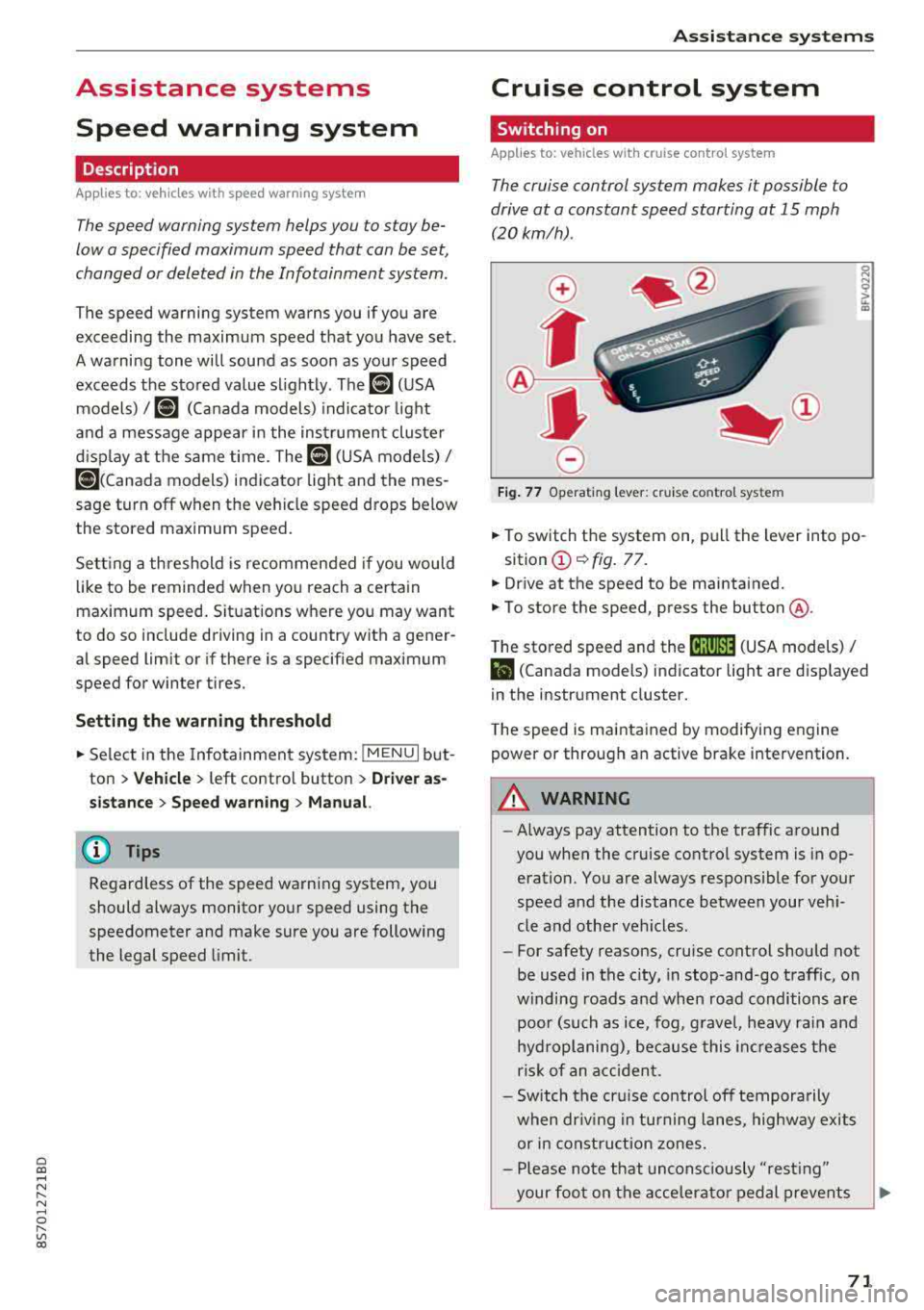
Fig . 7 7 Operat ing leve r: cru ise control system
.. To switch t he system on, pull the lever into po-
sition
(D ¢ fig. 77.
.. Drive at the speed to be maintained.
.. To store the speed, press the button @.
T he stored speed and the
@jltJ~i, (USA models) /
l'I (Canada models) ind icator lig ht are d isp layed
in the instrument cluster.
T he speed is maintained by modifying engine
power or through an active brake intervention.
_8 WARNING
---A lways pay attention to the traffic around
you when the cruise control system is in op
eration. You are always responsible for your
speed and the distance between your vehi
cle and othe r vehicles.
-For safety reasons, cruise control should not
be used in the city, in stop-and-go traffic, on
w inding roads a nd when road conditions a re
poor (such as ice, fog, g rave l, heavy rai n and
hydroplaning), because this in cr eases the
risk of an acciden t.
-Sw itch the cr uise con trol off tempora rily
when dr iv ing in tu rning lanes, highway exits
or in const ruc tion zones.
-Please no te that uncons ciously "resting"
your foo t on the accelera to r ped al prevents
-
71
Page 74 of 310
Ass is tanc e system s
the cruise control from braking. This is be
cause pressing the accelerator pedal over
rides the cruise contro l system .
- If a brake system ma lfunction such as over
heating occurs when the cruise control sys
tem is sw itched on, the braking function in
the system may be switched off . The rest of
the cruise control system functions remain act ive as long as
the @jll)~i~ (USA models) /
i'I (Canada models) indicator light is on.
(j) Tips
The brake lights turn on when the brakes are appl ied automatically .
Changing speed
Applies to: vehicles with cruise control system
.,. To inc rease/decrease the speed in increments,
br iefly
tap the leve r towa rd 0 10 ~ page 71,
fig.
77 up/down to the first level.
.. T o increase o r decrease the speed in incre
ments,
tap the lever toward 0 10 i::> page 71,
fig .
77 up/down to the second leve l.
.. To increase or decrease the speed quickly, hold
the lever in the
0 10 direct ion until the de
s ired speed is reached .
Overriding the speed
Applies to: vehicles with cruise control system
You can press the accelerator pedal to increase
your speed, for example if you want to pass someo ne. The speed yo u set ea rlier w ill res ume
as soon as yo u release the acceler ator pedal.
H owever , if you are driving cons iderably faster
than the stored speed fo r a long period of time,
the cruise co ntrol system w ill tempora rily swi tch
off.
Th e@jll )~i~ (USA mode ls) tl'II ( C anada mod
e ls) indicator light in the inst rument cluste r
turns off and the stored speed is maintained .
Preselecting the speed
Applies to: vehicles with cruise control system
You can pre -select your desired speed when the
vehicle is stationary.
.,. Switc h the ign ition on.
72
.. Pull the lever into position (D ¢ page 71,
fig.
77 .
.. To increase or decrease the speed, tap the lever
toward
0 10 .
This function makes it possible, for example, to
save the speed you want before driving on the
highway. Once you are on the expressway, acti
vate the cruise control system by pulling the lev er into position
(D .
Switching off
Applies to: vehicles with cruise control system
Deactivating temporarily
.. Press the brake pedal, or
.. Press the lever toward @ (not locked into
place)
~ page 71, fig . 77.
Switching off completely
.. Press the lever into position @(clicked into
place), or
.. Switch the ignit ion off .
T he speed you stored will be maintained if the
cruise contro l has been switched off temporarily .
To resume the stored speed, release the brake or
clutch pedal and pull the lever to position
(D .
Switch ing the ignit ion off w ill erase the stored
speed .
A WARNING
You should only resume the stored speed if it
is not too high for existing traff ic conditions.
Othe rw ise you can inc rease the risk of an acc i
dent.
Audi active lane assist
Description
Applies to: vehicles with Audi active lane assist
Active lane assist detects lane marker lines w ith -
i n the lim its of the system using a camera in the
windshield. If you are approach ing a detected
lane marker line and it appears likely that you
will leave the lane, the system w ill warn you with
cor rective stee ring . You can over ride this stee ring
at any t ime. If you pass ove r a line, the stee ring
1111>
Page 80 of 310
Assistance systems
Messages
App lies to: ve hicles w ith Aud i side ass ist
If th e side assist sw itches off automatically, a
message appears in the Infotainment system dis
p la y.
@j Audi side assist: currently unavailable.
Sensor vision restricted due to surroundings.
See owner's manual
The radar sensor vision is impaired . Do not cover
the area in front of the sensors with bike wheels,
stickers, dirt or other objects. Clean the area in
front of the sensors, if necessary
c:> page 76,
fig . 84 .
@j Audi side assist: currently unavailable.
See owner's manual
Side assist cannot be switched on at th is time be
cause there is a malfunction (for example, the battery charge level may be too low) .
@j Audi side assist: malfunction! Please
contact Service
The system cannot guarantee that it will detect
veh icles correctly and it has switched off . The
sensors have been moved or are faulty. Have the
system checked by an author ized Audi deale r or
authorized Audi Service Facility soon.
Audi drive select (drive
settings)
Introduction
A pp lies to: ve hicles w ith Aud i d rive select
Drive select makes it possible to expe rience d if
fe rent types of vehicle settings in one vehicle.
The driver can select from three modes, Comfort,
Auto and Dynamic , using the
i:l:ta button in the
center console or by using the Infotainment sys
tem . T his allows you to switch between a sporty
and a comfortab le driving mode, for examp le. In
the Indi vidual mode, the settings can be adjust
ed to your personal preferences. This makes it
possible to combine sett ings such as a sporty en
g ine setting w ith light steering.
78
A WARNING
Using Aud i drive select incorrectly can lead to
coll is ions, other accidents and serious inju
ries.
Description
App lies to: vehicles with A udi drive se lect
The veh icle setup in each mode depends on the
vehicle's features.
Engine and automatic transmission
Depending on the mode, the engine and auto
matic transmission respond more quickly or in a
more balanced manner to accelerator pedal
movements.
Suspension control (Audi magnetic ride)*
The suspension control uses sensors to record in
format ion regarding steering movements, brak
i ng and acceleration operations by the driver, as
well as information about the road surface, driv
i ng speed, and load. W ith dr ive se lect, you can
adjust the suspension control to sporty (dynam
ic ), comfortable (comfort) or balanced (auto).
Steering
The power steering adapts . Indirect steering that
moves eas ily as in comfort mode is espec ially
su ited to long drives on a highway . The dynamic
mode provides sporty, direct steering.
Engine sound*
The engine sound adapts to the current mode
and can be subtle to sporty .
(D Tips
In some models, the maximum vehicle speed
can only be reached in the auto and dynamic
modes .
Page 92 of 310
Intelligent Technology
snow and ice. Always read and follow safety pre
cautions
¢ .&. .
Winter tires
By using all wheel drive, your vehicle has good
forward motion with standard tires in winter con
ditions. However, in winter we recommend using
winter or all season tires on
all four wheels, be
cause this will improve the
broking effect.
Snow chains
If there are snow chain laws, snow chains must
also be used on vehicles with all wheel drive
c::> page 259, Snow chains.
Replacing tires
For vehicles with all wheel drive, only wheels with
the same rolling circumference should be used .
Avoid using tires with different tread depths
c::> page 251, New tires or wheels.
Offroad vehicle?
Your Aud i is not an offroad vehicle - there is not
enough ground clearance. For this reason, avoid
difficult terrain.
,& WARNING
- Also, in vehicles with all wheel drive, adapt
your driv ing style to the current road and
t ra ffic conditions. Do not let the increased
safety provided tempt you into taking risks,
because this increases the r isk of an acci
dent.
- The braking ability of your vehicle is limited
to the traction of the wheels. In this way, it
is not different from a two wheel drive vehi
cle. Do not be tempted to accelerate to a
high speed when the road is slippery, be
cause this increases the risk of an accident.
- Note that on wet streets, the front wheels
can "hydroplane" if driving at speeds that
are too high. Unlike front whee l drive
vehicles, the engine does not rev higher sud
denly when the vehicle begins hydroplaning.
For this reason, adapt your speed to the
road conditions to reduce the risk of an acci
dent.
90
Rear spoiler
Applies to: vehicles with retractable rear spoile r
The extendoble rear spoiler increases driving sta
bility.
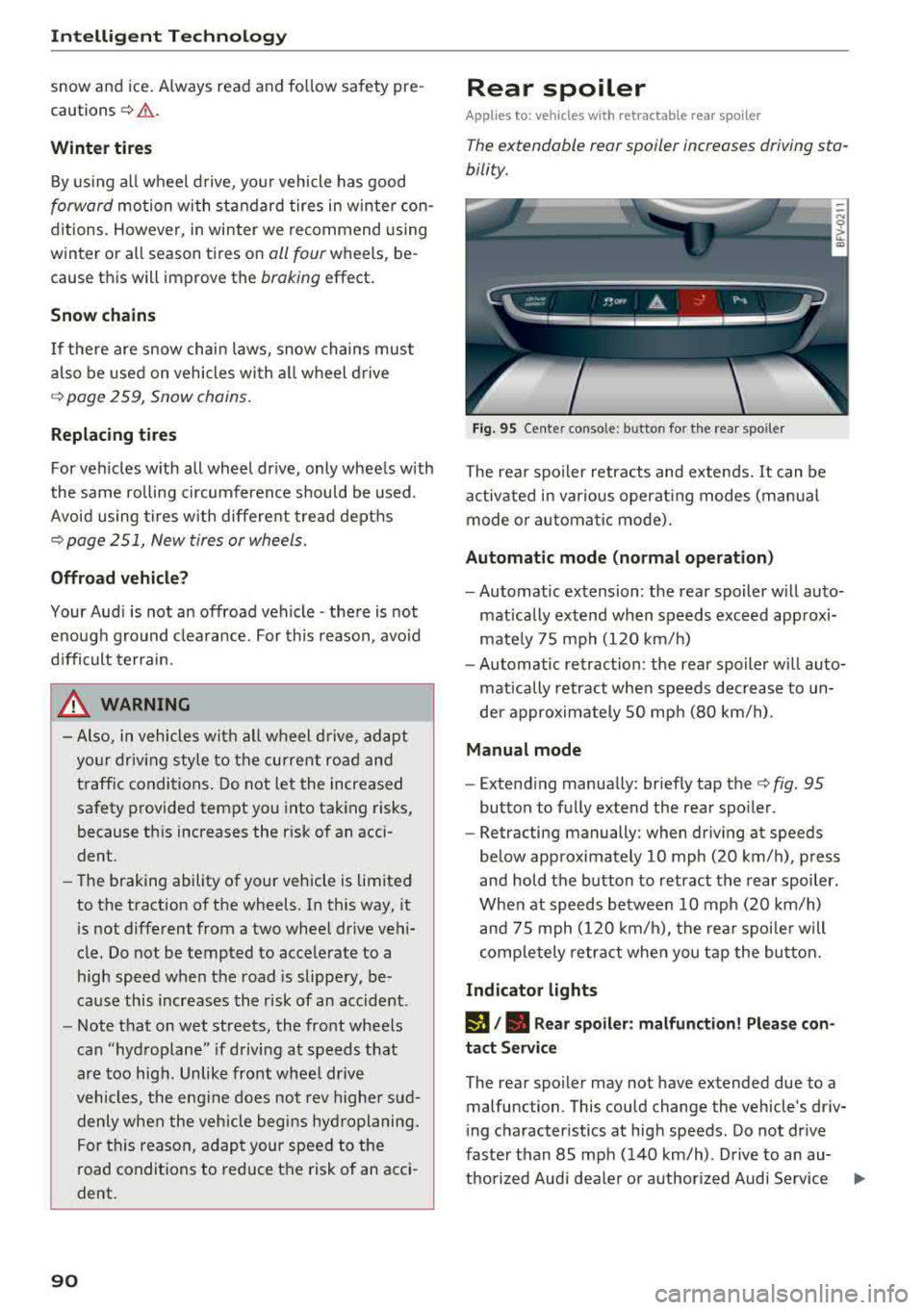
Fig. 95 Center conso le: button for the rear spoiler
The rear spoiler retracts and extends. It can be
activated in various operat ing modes (manua l
mode or automatic mode).
Automatic mode (normal operation)
- Automatic extension: the rear spoiler w ill auto
matically extend when speeds exceed approxi
mately 75 mph (120 km/h)
- Automatic retraction: the rear spoiler w ill auto
matically retract when speeds decrease to un
der approximately 50 mph (80 km/h).
Manual mode
- Extend ing manually : briefly tap the
c::> fig. 95
button to fully extend the rear spoiler .
- Retracting manually: when driving at speeds
below approximately 10 mph (20 km/h), press
and hold the b utton to retract the rear spoiler.
When at speeds between 10 mph (20 km/h)
and 75 mph (120 km/h), the rear spoiler will
completely retract when you tap the button.
Indicator lights
I), . Rear spoiler: malfunction! Please con
tact Service
The rear spoiler may not have extended due to a
malfunction . This could change the vehicle's driv
ing characteristics at high speeds . Do not drive
faster than 85 mph (140 km/h) . Drive to an au-
thorized Audi dea ler or authorized Audi Service
..,.
Page 134 of 310
Audi connect
-Using Audi connect services requires a mini
SIM card with data options and, when using L TE*, it also requires L TE options.
-Usage of Audi connect services depends on
the availability of services through third par
ty providers .
-Also read the information in the chapter
¢page 111, Telephone.
-Audi connect is designed for use only with
the provided SIM card. Receiving data pack
ets from the Internet will quickly increase
the volume of data used. For more informa
tion, contact Audi connect customer service
at 1 (877) SOS -AUDI (2834) .
-The Audi connect services are available in
the USA. Audi connect services are currently not available in Canada or in Mexico.
-Availability, scope, providers, screen display
and costs of services may vary depending on
the country, model, model year, end device
and rates . For additional information, visit
www.audiusa.com.
-An initial registration/activation on the
myAudi platform at www.audiusa.com/
myaudi is required to use individual serv
ices. You can contact an authorized Audi
dealer or Audi connect customer service at
877-SOS-AUDI (2834) to receive informa
tion on options for expanding your usage
and any costs that may result.
-It is only possible to use Audi connect serv
ices with a valid Audi connect SIM card.
- To ensure all of the Audi connect features
work correctly, Audi recommends setting up
data service and a Wi-Fi package with your
network service provider. Your network
service provider can be authorized by law,
through a judicial order or other lawful in
structions, to disclose the position of your
vehicle. Additional information on your cell phone service provider's privacy policies can
be found in their Terms of Use.
-The Audi connect services are a Wi-Fi/lnter
net-based system. If the system does not
function correctly even though all of the re
quirements are met, please try again later
or contact Audi connect customer service at
877-SOS-AUDI (2834).
132
-Additional information for Audi connect and
the applicable terms of use are found at
www.audiusa.com.
Data protection
App lies to : vehicles wit h Aud i connect
(D Tips
- You can find additional information in your
MMI in the options menu
¢ page 94 for the
selected Audi connect service and also on
line at www.audiusa .com.
- Your privacy is important to us.
- AUDI AG collects, processes, shares and
transmits your personal information in ac
cordance with legal regulations in order to
ensure proper function and availability of
the individual Audi connect services. You
can view the complete, current and valid
Audi connect data protection policy in your
MMI. The myAudi website is available for to
you to activate additional Audi connect serv
ices and to transfer data with your vehicle,
among other services. A one-time registra
tion is required to establish a connection to
your vehicle . For this purpose, AUDI AG col
lects, processes, transmits and uses your re
quired personal information as required for
you to use the services provided by AUDI
AG. Your information is not distributed to
third parties. Using your cell phone with the
help of your myAudi platform, you can
transfer information for Audi connect serv
ices functions to your vehicle and allow spe
cific information to be transmitted from
your vehicle .
- By activating special information services
that are part of your Audi connect portfolio,
you can use these functions directly in your
vehicle by entering data to confirm your
identity (to use social networks, for exam
ple). To do this, the identification informa
tion you provided is forwarded with the re
quest to the respective service provider.
Then you can access your personal content using a secure connection. This content is
displayed in the vehicle for your use. Your
personal content is not stored within Audi
.,..
Page 181 of 310
Cl 00 .-< N r--N .-< 0 r--Vl 00
Safe driving Basics
Safe driving habits
Please remember -safety first!
The individua l safety features of your vehicle can
work together as a system to help protect you
and your passengers in a wide range of accidents.
These features cannot work as a system if they
are not always correctly adjusted and correctly
used .
This chapter contains important informat ion,
tips, instruct ions and warn ings that you need to
read and observe for your own safety, the safety
of your passenge rs and others . We have summar
i zed here w hat you need to know about safety
be lts, a irbags, child restra ints as well as child
safety. Yo ur safety is for us priority number 1. Al
ways observe the information and warnings in
this section - for your own safety as well as that
of your passengers.
The informa tion in t his sect ion app lies to all
model versions of your vehicle. Some of the fea
tures described in t his sections may be standard
eq uipment on some models, or may be optional
equ ipment on others. If you are not sure, ask
your author ized Audi dealer.
A WARNING
-Always make sure that you follow the in
st ruct ions and heed the WAR NINGS in t his
Manua l. It is in your i nterest a nd in the in
t e res t of your passengers .
-
-Always keep the complete Owner's Litera
t ur e in yo ur Audi whe n you lend or se ll yo ur
vehicle so tha t this import ant information
w ill a lways be available to t he d rive r and
passengers.
-Alw ays keep t he Owne r's lite rature h andy so
that you can f ind it easily if yo u have ques
tions .
Safe dri ving
Important things to do before driving
Safety is everybody 's job ! Vehicle and occupant
safety always depends on the informed and care
ful driver .
For your safety and the safety of your passenger,
b efor e driving alw ay s:
.. Make sure that a ll lights and s ignals are operat
ing correctly.
.. Make sure tha t the tire pressure is correct .
.. Make sure that all windows are clean and afford
good vis ibility to the outs ide .
.. Secure all luggage and othe r items ca refully
c::> page 183, c::> page 49.
.. M ak e sure tha t not hing c an in terfere wi th the
peda ls .
.. Adj ust seat and mirrors correctly for your
height .
.. Make sure to use the right child restra int cor
rectly to protect children
c::> page 216, Child
safety.
.. Sit properly in your seat and make sure that
your passenger do the
same ¢ page 46, Front
seats.
.. Fasten yo ur safety belt and wear i t properly. Al
so inst ru ct yo ur passenge r to fas ten his safety
be lt properly
¢ page 187.
What impairs driving safety?
Safe driving is dire ctly related to the condition of
the vehicle, the driver as well as the driver's abili
ty to concentrate on the road without being dis
tracted.
T he dr iver is responsib le for the sa fe ty of the ve
hicle and a ll of its occupants. If your ability to
drive is impai red, safety risks for everybody in the
vehicl e inc rease and you a lso become a hazard to
everyone else on the road
¢ A_ . Therefore:
.. Do not let yourse lf be distracted by passenge r
or by using a ce llular telephone .
.. NEVER drive when your driving ability is im
pa ired (by med ications, alcohol, drugs, etc.) .
.. Observe all traffic laws, rules of the road and
speed lim its and plain common sense .
.. ALWAYS adjust your speed to road, traffic and
weather conditions .
.,.
179
Page 211 of 310
Cl 00 .-< N r-N .-< 0 r-Vl 00
-Never install seat covers or replacement
upholstery over the front seatbacks that
have not been specifically approved by
Aud i.
- Never use add itiona l seat cushions that
cover the areas where the s ide airbags in
flate.
- Damage to the origina l seat covers or to
the seam in the area of the side airbag module must always be repaired immedi
ately by an authorized Audi dealer.
- The airbag system can deploy only once . Af
ter an airbag has been deployed, it must be
rep laced with new rep lacement parts de
signed and approved especially fo r you r
Audi mode l version. Replacement of com
plete airbag systems or airbag components
must be performed by qualified workshops
only . Make sure that any airbag service ac
tion is entered in your Audi Warranty
&
Maintenance booklet under AIRBAG RE
PLACEMENT RECORD.
- For safety reasons in severe accidents, the
alternator and starter are separated from
the vehicle battery with a pyrotechn ic circuit
interrupter.
-Work on the pyrotechnic circu it interrupt
er must only be performed by a qualified
technicians who have the experience, in
formation and special tools necessary to perform the work safely.
-If the vehicle or the circuit interrupter is
scrapped, all app licab le safety precautions
must be followed.
@ For the sake of the environment
Undep loyed airbag modu les and pretension
ers might be classified as Perch lorate Materi
al
-special handling may apply, see
www.dtsc.ca.gov/hazardouswaste/perchlo
rate . When the veh icle or parts of the re
straint system including airbag modules and
safety belts with p retensioners are scrapped,
all appli cable laws and regulations must be
observed. Your authorized Audi dealer is fa
m il iar with these requi rements and we re com
mend that you have you r dealer per form this
service for you.
Airbag syste m
Other things that can affect Advanced
Airbag performance
Changing the vehicle's suspension system can
change the way that the Advanced Airbag System
performs in a crash. For example, using tire-rim
combinations not approved by Audi, lowering the
vehicle, changing the stiffness of the suspension, including the springs, suspension struts, shock
absorbers etc . can change the forces that are
measured by the airbag sensors and sent to the
electronic cont rol u nit. Some suspension c hanges
can, for example, increase the fo rce leve ls meas
u red by the sensors and make t he a irbag system
deploy in crashes in which it wou ld not deploy if
the changes had not been made. Other kinds of
changes may reduce the force levels measured by
the sensors and prevent the a irbag from deploy
ing when it should.
A WARNING
-
Changing the vehicle's suspension including use of unapproved tire-rim combinations can
change Advanced Airbag perfo rmance and in
crease the risk of serious personal injury in a
crash.
- Never install suspension components that
do not have the same performance charac
ter istics as the components o riginally instal
led on your vehicle .
-Never use tire-rim combin ations that have
not been approved by Audi .
209