battery AUDI TT ROADSTER 2018 User Guide
[x] Cancel search | Manufacturer: AUDI, Model Year: 2018, Model line: TT ROADSTER, Model: AUDI TT ROADSTER 2018Pages: 310, PDF Size: 46.95 MB
Page 57 of 310
Cl 00 .-< N r-N .-< 0 r-Vl 00
switched on. This can cause burns on unpro
tected skin exposed direct ly to the vents.
(D Tips
- The fan speed is always lower when the
power top is closed than when it is open.
- Energy
management~ page 91 may re
duce the heat output if the battery voltage is too low.
Warm and c old
55
Page 61 of 310
Cl 00 .-< N r--N .-< 0 r--Vl 00
-Never turn off the engine before the vehicle
has come to a complete stop.
- The brake booster and power steering only
work when the engine is running. If the en gine is off, you have to use more force when
steering or braking. Because you cannot
steer and brake as you usually would, this
could lead to accidents and serious injuries.
@ Note
Avoid high engine speed, full throttle, and
heavy engine load if the engine has not
reached operating temperature yet. You could
damage the engine.
@ For the sake of the environment
Do not let the engine run while parked to
warm up. Begin driving immediately . This re
duces unnecessary emissions.
(D Tips
-Some noise after starting the engine is nor
mal and is no cause for concern.
- If you leave the vehicle with the ignition
switched on, the ignition will switch off af
ter a certain amount of time. Make sure that
electrical equipment such as the exterior
lights are switched off.
Stopping the engine
.,. Bring the vehicle to a full stop.
.,. Move the selector lever into the P position .
... Press the I START ENGINE STOPI button.
Emergency off function*
If it is absolutely necessary, the engine can also
be turned off while driving at speeds starting at
4 mph (7 km/h). To switch the engine off, press
the
I START ENGINE STOPI button twice in a row
br iefly or press and hold for longer than two sec
onds.
A WARNING
- Never turn off the engine before the vehicle has come to a complete stop.
Driving
-Please note that the brake booster and pow
er steering only work when the engine is
running. When the engine off, you must use
more force to steer or brake the vehicle. Be
cause the usual steering and braking capa
bility is not available, the risk of accidents or
. . . . mJunes increases.
-For safety reasons, always park the vehicle
with the selector lever in the P position.
Otherwise, there is the risk that the vehicle
could roll.
- After the engine has been switched off, the
radiator fan can continue to run for up to 10
minutes
-even with the ignition switched
off. It can also switch on again after some
time if the coolant temperature rises as the result of heat buildup or if the engine is al
ready warm and the engine compartment is
also heated by the sun's rays.
@ Note
If the engine has been under heavy load for
an extended period of time, heat builds up in
the engine compartment after the
engine is
switched off and there is a risk of damaging
the engine . For this reason, let the engine run
at idle for approximately two minutes before
shutting it off.
(D Tips
For up to 10 minutes after stopping the en
gine, the radiator fan may turn on again auto matically or it may continue to run (even if
the ignition is switched off) for the following
reasons :
- The coolant temperature is increasing due
to trapped heat.
- If the engine is warm and the engine com
partment also heats up from strong sun
light.
Messages
Turn off ignition before leaving vehicle. Battery
is discharging
This message appears and a warning tone sounds
if you open the driver's door when the ignition is
..,
59
Page 62 of 310
Driving
switched on. Switch the ignition off so that the
battery will not discharge .
Pressing start /stop button again will swit ch off
e ngine.
This message appea rs when you press the
I S TAR T
ENGI NE STOP I but ton while dr iving .
Engine start sy st e m: malfunction! Please con
tact Se rvice
The engine automatic start system has a mal
function. Drive to an author ized Audi dealer or
author ized Audi Service Facility immed iate ly to
have the malfunct ion co rrected . To sta rt the en
g ine, p ress and ho ld the lS TART
ENGINE STOPI
button.
fl Remote control key : hold back of key
again st the designated area. See owner 's man
ual
This message appears if there is no convenience
key inside the vehicle or if the system does not
recognize the key. The conve nience key may not
be recognized, for examp le, if it is covered by an
object that
disrupts t he s ignal (such as a b rief
case), o r if the key ba tte ry is weak. Elect ronic de
vices s uch as cell phones can also interfere w it h
the sign al.
T o sti ll be able to sta rt or stop the e ngine, see
~ page 60, Starting the engine when there i s a
malfunction .
Ill Remote control key: key not recognized . Is
the key still in the vehicle?
The Ill ind icator light turns on and this message
appears if the conve nience key was removed from
the vehicle whe n the eng ine was running .
If the
conven ience key is no longer in the vehicle, you
cannot swi tch the ig nition on or st art the engine
once yo u stop it. Yo u also cannot lock the veh icle
from the outside.
Please press brake pedal
This message appears if you do not press the
b rake pedal whe n starting the engine.
Please select N o r P
60
This message appears w hen starting or stopping
the engine if the selecto r lever is not in the "N " or
" P" pos ition. The engine will not sta rt/stop.
Shift to P, otherwise vehicle c an roll away.
Door s do not lock if gearshift is not in P
This message appears for safety reasons along
with a war ning tone. It appears if t he selec to r
l ever for the a utoma tic tr ansmiss ion is no t in the
P position when switching the ign ition off with
the I START
ENGINE STOPI button. Shift these
l ector lever to the P pos ition. Otherwise, t he vehi
cle co uld ro ll. You also cannot lock the veh icle us
ing the lock ing sensor on the door handle or us
i ng the conven ience key .
Starting the engine when there is a
malfunction
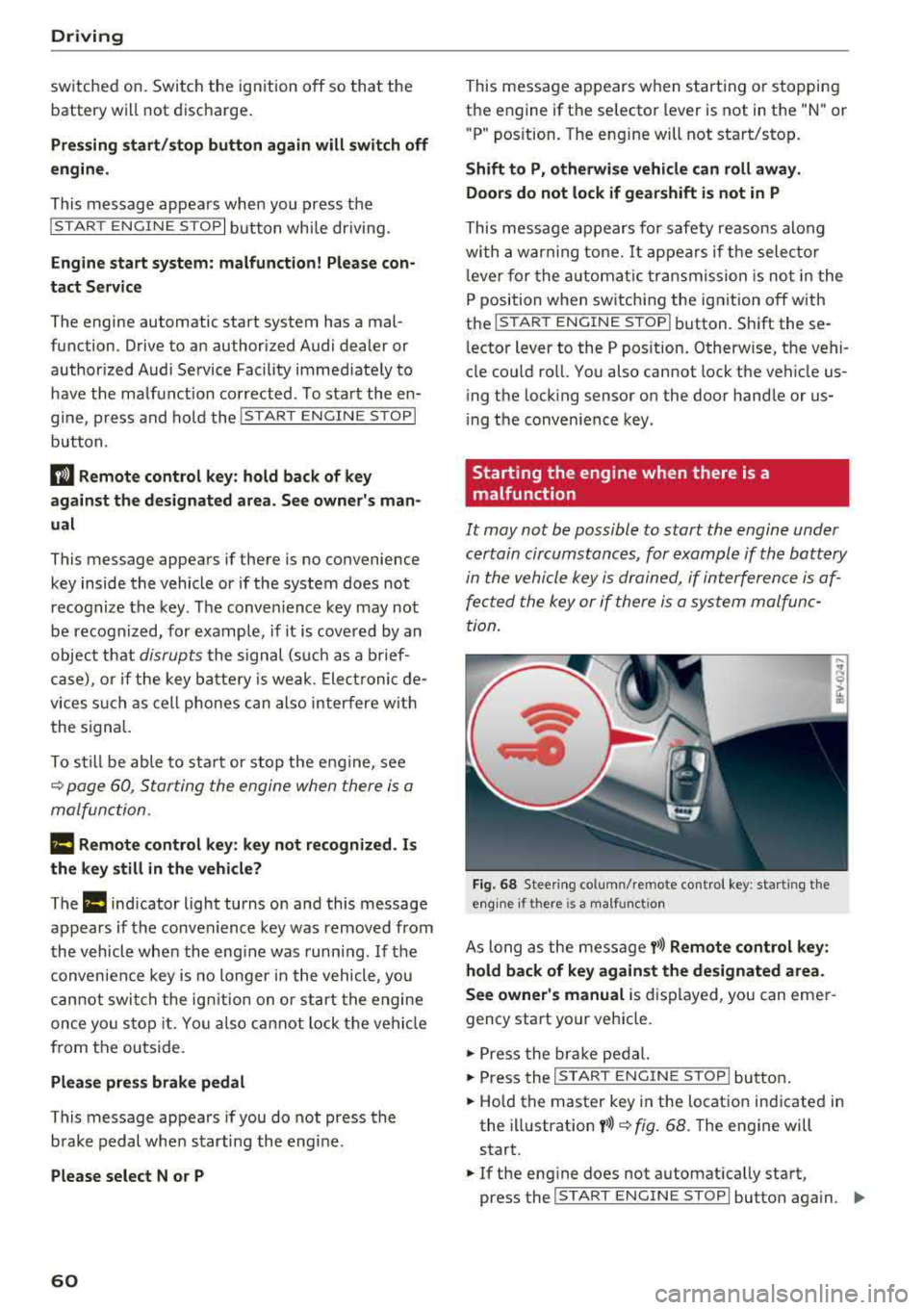
It may not be possible to start the engine under
certain circumstances, for example if the battery
in the vehicle key i s drained, if in terferen ce is af
fe cted the key or if there i s a system malfunc
tion.
Fi g. 6 8 Stee ring co lumn /remote contro l key : sta rting t he
e n g in e if there is
a m alfunct io n
As long as the message y>>) Remote control key :
hold back of key against the designated area.
See owner's manual
is d isplayed, you can emer
gency start your vehicle.
.,. Press the br ake pe dal.
... Press the I S TAR T ENGINE ST OP ! butto n.
.,. Hold the master key in the location ind icated in
the illustration
y >>) ~ fig . 68. The engine will
start .
.,. If the eng ine does not automat ica lly start,
press the
I S TART E NGINE STOPI butto n aga in . ..,.
Page 72 of 310
Drivin g
Selector le ver em ergency r ele ase
.,. Press and hold the yellow release bu tton with
the screwdriver
c:::> fig. 76 .
.,. Press the lock button on the se lector lever (D
and move the lever into the N position .
.,. Clip the shift cover back into the shift gate after
us ing the emergency release .
If the ve hicle must be pushed or towed due to a
power failure (for example, the battery is dead),
the selector lever must first be moved to the N position us ing the emergency release mecha
n ism .
A WARNING
-Only activate the emergency release while
on a level su rface or a slight slope.
- Only move the selector lever out of the "P" pos it ion when the parking brake is set. If it
is not funct ioning, secu re the vehicle from
rolling using the b rake pedal o r othe r su ita
ble means, such as bloc king a front and a
rear whee l. An unsecured veh icle may roll
away, which increases the risk of an acci
dent.
Trailer towing
General information
Your Audi TT Roadster is not designed to tow a
trailer .
-
Towing a trailer w ith your Aud i TI Roadster is not
recommended and can cause damage to the car .
Damaged caused by tow ing a trailer is not cov
ered by your Audi Warranty .
70
Page 80 of 310
Assistance systems
Messages
App lies to: ve hicles w ith Aud i side ass ist
If th e side assist sw itches off automatically, a
message appears in the Infotainment system dis
p la y.
@j Audi side assist: currently unavailable.
Sensor vision restricted due to surroundings.
See owner's manual
The radar sensor vision is impaired . Do not cover
the area in front of the sensors with bike wheels,
stickers, dirt or other objects. Clean the area in
front of the sensors, if necessary
c:> page 76,
fig . 84 .
@j Audi side assist: currently unavailable.
See owner's manual
Side assist cannot be switched on at th is time be
cause there is a malfunction (for example, the battery charge level may be too low) .
@j Audi side assist: malfunction! Please
contact Service
The system cannot guarantee that it will detect
veh icles correctly and it has switched off . The
sensors have been moved or are faulty. Have the
system checked by an author ized Audi deale r or
authorized Audi Service Facility soon.
Audi drive select (drive
settings)
Introduction
A pp lies to: ve hicles w ith Aud i d rive select
Drive select makes it possible to expe rience d if
fe rent types of vehicle settings in one vehicle.
The driver can select from three modes, Comfort,
Auto and Dynamic , using the
i:l:ta button in the
center console or by using the Infotainment sys
tem . T his allows you to switch between a sporty
and a comfortab le driving mode, for examp le. In
the Indi vidual mode, the settings can be adjust
ed to your personal preferences. This makes it
possible to combine sett ings such as a sporty en
g ine setting w ith light steering.
78
A WARNING
Using Aud i drive select incorrectly can lead to
coll is ions, other accidents and serious inju
ries.
Description
App lies to: vehicles with A udi drive se lect
The veh icle setup in each mode depends on the
vehicle's features.
Engine and automatic transmission
Depending on the mode, the engine and auto
matic transmission respond more quickly or in a
more balanced manner to accelerator pedal
movements.
Suspension control (Audi magnetic ride)*
The suspension control uses sensors to record in
format ion regarding steering movements, brak
i ng and acceleration operations by the driver, as
well as information about the road surface, driv
i ng speed, and load. W ith dr ive se lect, you can
adjust the suspension control to sporty (dynam
ic ), comfortable (comfort) or balanced (auto).
Steering
The power steering adapts . Indirect steering that
moves eas ily as in comfort mode is espec ially
su ited to long drives on a highway . The dynamic
mode provides sporty, direct steering.
Engine sound*
The engine sound adapts to the current mode
and can be subtle to sporty .
(D Tips
In some models, the maximum vehicle speed
can only be reached in the auto and dynamic
modes .
Page 93 of 310
Cl 00 .-< N r-N .-< 0 r-Vl 00
Facility immediately to have the malfunction cor
rected. The color of the indicator light depends
on the vehicle speed.
A WARNING
-
Driving at higher speeds without the rear
spoiler deployed can impair handling charac
teristics, making the vehicle harder to con
trol.
- Always make sure that the spoiler is de
ployed when driving at speeds over 85 mph
(140 km/h) . If the rear spoiler warning/ind i
cator lig ht in the instrument cluste r comes
on, the rear spoiler may not have deployed.
- Never drive at speeds higher than 85 mph
(140 km/h) if the spoile r is not deployed.
Have the spo iler inspected as soon as possi
ble by an author ized Audi dealer or qua lified
works hop .
- Always obey speed l imits and othe r traffic
laws .
A WARNING
Improper operation of t he rear spoiler can
cause crushing injuries.
- Always make sure that nobody, especia lly
children, is in the way when the rear spoi ler
is deployed or retracted .
(Llj) Note
-Never push on the vehicle on the rear spo il
er. This cou ld cause damage.
- To p reve nt damage to the rear spoiler do
not lean o r place anyt hing on it.
-
- Only ope rate the rear spoiler manually when
the luggage compartment lid is close and
the rear spoiler mov ing parts are not
blocked. Otherwise, damage could occur .
(j) Tips
Clean the rear spoiler compartment eve ry 2 to
3 months . To function co rrectly, the rear
spoiler must be free of ice, snow and leaves .
Intellig ent T echn olo gy
Energy management
Your vehicle is equipped with an intelligent ener
gy management system for distributing electrici
ty. This significantly improves the starting ability
and increases the vehicle battery life.
(D Tips
- If you drive short distances frequent ly, the
vehicle battery may not charge enough
wh ile driving. As a result, convenience func
tions for electr ical equipment may be tem
pera rily unavailable .
- The vehicle battery w ill gradually drain if
the vehicle is not driven for long per iods of
t ime, or if electr ical equ ipment is used
when the engine is not runn ing. To ensure
that the veh icle can still be started, the
elect rical eq uipment w ill be red uced or
sw itched
off.
Information about data
recorded by vehicle
control modules
Your vehicle is not equipped with a crash data re
corder . This dev ice is installed by some veh icle
manufacturers to record data about crashes so
t h at it can be ana lyzed later. Crash data reco rd
ers are also called " Event Data Recorders (EDR)".
In some legal jurisdictions, it is not permitted to
access or down load data recorded by pre-instal
led crash data recorders in orde r to evaluate a
crash without clear consent of the vehicle owner.
Your vehicle is not equ ipped w ith a crash data re
corder . However it does contain a variety of e lec
tronic control modules for various vehicle sys
tems such as engine function, exha ust treatment
or airbags and safety belts.
T hese electronic contro l modu les record veh icle
data du ring normal driv ing fo r diagnosis and re
pair purposes. The record ing capability of the
electronic control modules is limited to data only
-no sound is recorded . If the contro l module de
tects a system ma lfunction or other change in
status, a very limited amount of data is recorded
for an extremely small period of time. Data that
..,.
9 1
Page 96 of 310
Multi Media Interface
A WARNING
Adjust the volume of the audio system so that signals from outside the vehicle, such as po
lice and fire sirens, can be heard easily at all
times .
(j) Tips
The MMI switches off automatically if the en
gine is not running and the vehicle battery is
low .
MMI operation
Selecting and confirming a function
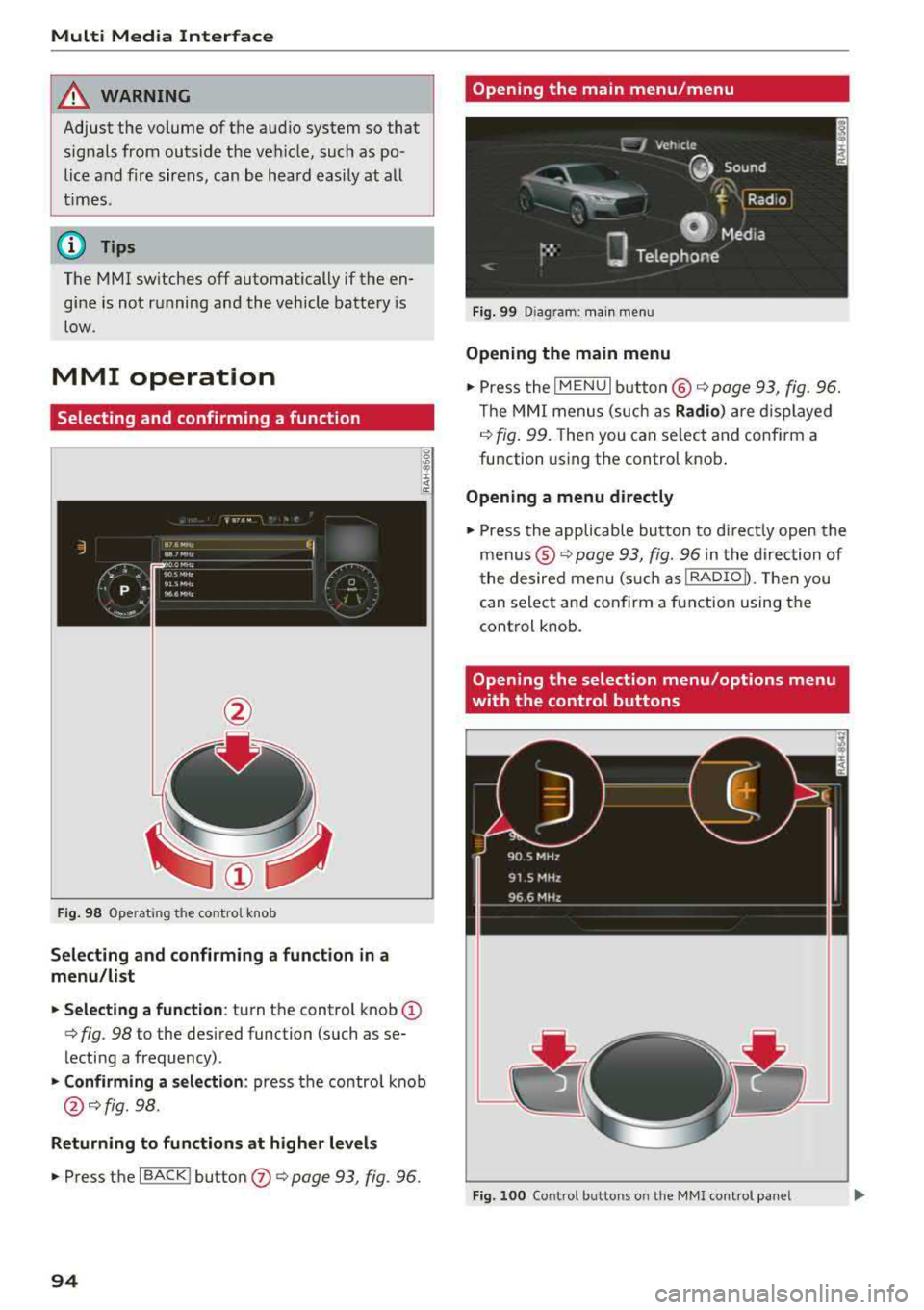
Fig . 98 Operat ing the control knob
Selecting and confirming a function in a
menu/list
.. Selecting a function : turn the control knob (D
c> fig. 98 to the desired function (such as se
lecting a frequency) .
.. Confirming a selection : press the contro l knob
@ c>fig . 98.
Returning to functions at higher levels
.. Press the I BACK ! button (J) c> page 93, fig. 96.
94
Opening the main menu/menu
Fig. 99 Diagram: main menu
Opening the main menu
.,. Press the I MENU I button @ c> page 93, fig. 96.
Th e MMI menus (such as
Radio) are displayed
c>fig. 99. Then you can select and conf irm a
function using the control knob.
Opening a menu directly
.. Press the applicable button to directly open the
menus ®
c> page 93, fig. 96 in the direction of
the desired menu (such as
!RADIOD. Th en you
can select and confirm a function using the
control knob.
Opening the selection menu/options menu
with the control buttons
Fig. 100 Control butto ns on the MMI cont rol panel
Page 159 of 310
Cl 00 .-< N r--N .-< 0 r--Vl 00
When importing, the audio files are automatical
l y sorted into the media center categories based
on the stored addit ional information
¢ page 163. The copied video files are stored in
the media center under the
Videos category.
Playing the Ju kebo x
Requirement: the Jukebox must contain audio/
video fi les
¢ page 156, Adding files to the Juke
box.
The Jukebox is accessed and operated t hrough
the M MI
(D ¢ page 162, fig . 141.
Di splaying Jukebox memory capacity
Select : right control button > Juk ebox m emor y
ca pa city .
Info rmation about the Ju kebox memory
capacity and the numbe r of sto red t racks is dis
p layed .
Deleting tracks from the Jukebox1
)
Requirement: the Jukebox must contain audio/
v ideo fi les.
- Dele ting an en tr y: selec t an entry from the
Jukebox media center . Select: right control but
ton
> D elete from ju kebo x> This entr y or En
tire list .
-The status of the deleting process is shown in
the MMI. Jukebox playback stops during the de let ing p rocess a nd starts again automatically
once the deletion is comp lete .
0 Note
Do not import aud io/video files when the en
g in e is t urned off because this will d rain the
ve hicl e battery.
0) Tips
-Tracks from aud io CDs cannot be impo rted
to the Jukebox for legal reasons.
- Files that have al ready been imported are
automat ica lly recogn ized and cannot be
cop ied to the J ukebox again.
- It is not possib le to play audio/v ideo* files
i n the CD/DVD* dr ive while import ing them.
ll Not in the Playback view .
Media
- T he Jukebox does not provide an expo rt
function due to legal reasons .
- Files or tracks w ithout additional stored in
formation are listed as
Unknown . Audi rec
ommends adding additional information
(such as 103 tags) to audio f iles.
- Reset the Jukebox to the factory default set
tings when selling your
vehicle ¢ page 174 .
Bluetooth audio player
Applies to: vehicles with Bluetooth audio player
With the Bluetooth audio player, you can play
music wirelessly from your Bluetooth-capable
device (such as a cell phone) through the
MMI.
Requirement: the vehicle must be stationary and
the ignit ion must be switched on. The B luetooth
settings w ill open on your mobile device during
the connection setup . The Bluetooth function
and visibility of the MMI
¢ page 175 and mob ile
device must be sw itched on . Th e
Bluetooth audio
playe r¢ page 175 must be sw itched on in the
MM I.
-Conn ect ing a Bluetooth de vice : press the
!M EDIAi button. Press the left control button
until t he sources overv iew is d isp layed. Select
and confirm
Blu etooth audio pla yer®
¢ page 162, fig . 142 .
- If ne cessa ry, select and co nfirm , Not c onn ected
> Conn ect Blu etooth audio pla yer. Th e Blue
tooth device search starts. Fo llow the inst ruc
tions in the MMI.
- Select and confirm the desired Bluetooth de
vice from the list . The MMI generates a PIN for
the connection .
- Select and confirm
Yes.
- Enter the PIN for connect ing on your Bl uetooth
device .
Or: if the PIN is already displayed on
your Bluetooth device, confirm it in the Blue
tooth device and in the MMI. The time a llowed
for entering the PIN is limited to approximately 30 seconds .
The media is started and operated through the mobile device or t he MMI, depending on the de -
vice being used .
.,.
157
Page 163 of 310
Cl co ..... N ,....
N ..... 0 ,....
Vl co
Audi music interface
Applies to: ve hicles with Audi m usic in terface
Connect your mobile devices to the Audi music
interface in order to operate them through the
MMI and charge the battery.
'" •.I 'I'
1 .
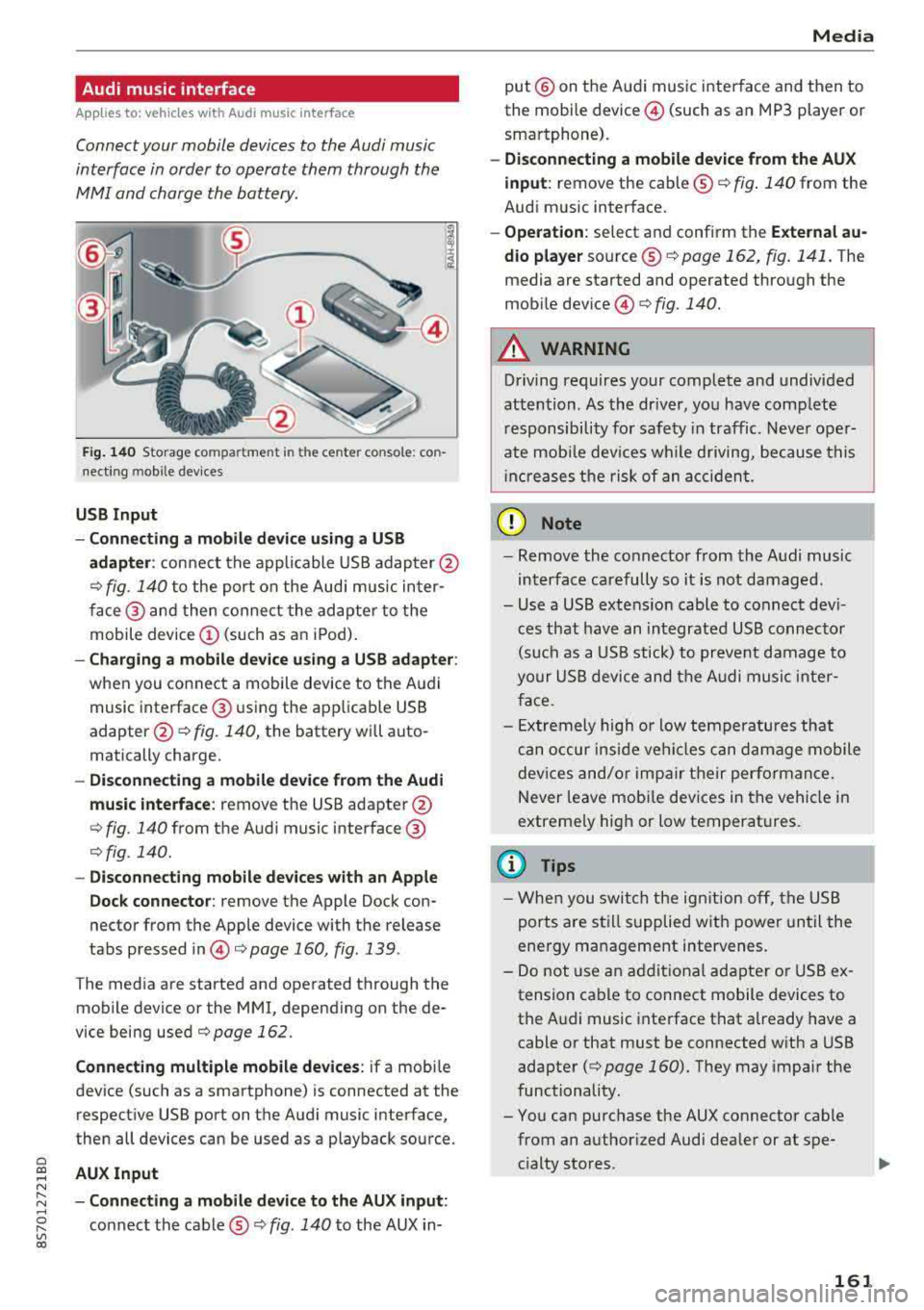
Fig. 140 S torage co mpa rtment in the ce nte r conso le: co n
nect ing m ob ile dev ices
USB Input
- Connecting a mobile device using a
USB
adapter : connect the applicable USB adap ter @
¢ fig. 140 to the port on the Audi music inter
face @ and then connect the adapter to the
mobile device
(D (such as an iPod).
-Charging a mobile device using a USB adapter :
when you connect a mobile device to the Audi
music interface @ using the app licab le USB
adapter @¢ fig. 140, the battery will auto
matically charge .
-Disconnecting a mobile device from the Audi
music interface :
remove the USB adapter @
¢ fig. 140 from the Audi music interface @
¢fig . 140.
-Disconnecting mobile devices with an Apple
Dock connector:
remove the Apple Dock con
nector from the Apple device with the release
tabs pressed
in @ ¢page 160, fig .139 .
The media are started and operated through the
mobile device or the MMI , depending on the de
vice being used
¢page 162 .
Connecting multiple mobile devices: if a mobile
device (such as a smartphone) is connected at the respect ive USB port on the Audi music interface,
then all devices can be used as a playback source .
AUX Input
-Connecting a mobile device to the AUX input:
connect the cable®¢ fig. 140 to the AUX in-
Media
put @ on the Audi music interface and then to
the mobile
device @ (such as an MP3 player or
smartphone).
- Disconnecting a mobile device from the AUX
input :
remove the cable ®¢ fig. 140 from the
Audi music interface.
- Operation : select and confirm the External au
dio player
source ®¢ page 162, fig . 141. The
media are started and operated through the
mob ile
device @) ¢fig. 140.
A WARNING
-
Driving requires your complete and undivided
attention . As the driver, you have complete
responsibility for safety in traffic. Never oper
ate mobile devices wh ile d riving, because this
i nc reases the risk of an accident.
(D Note
-Remove the connector from the Audi music
interface carefully so it is not damaged.
- Use a USB extens ion cable to connect devi
ces that have an integrated USB connector
(such as a USB stick) to prevent damage to
your USB device and the Audi music inter
face .
- E xtremely high or low temperatures that
can occur inside vehi cles can damage mobile
devices and/or impair their performance.
Never leave mobi le dev ices in the vehicle in
extreme ly high or low temperat ures.
@ Tips
- When you switch the ignitio n off, the USB
ports are still supplied with power until the
energy management intervenes.
- Do not u se an additional adapter or USB ex
tension cable to connect mobile devices to
the Audi music interface that already have a
cable or that must be connected with a USB
adapter
( ¢ page 160). They may impair the
functionality.
- You can purchase the AUX connector cable from an authorized Audi dealer or at spe
cialty stores .
161
Page 172 of 310
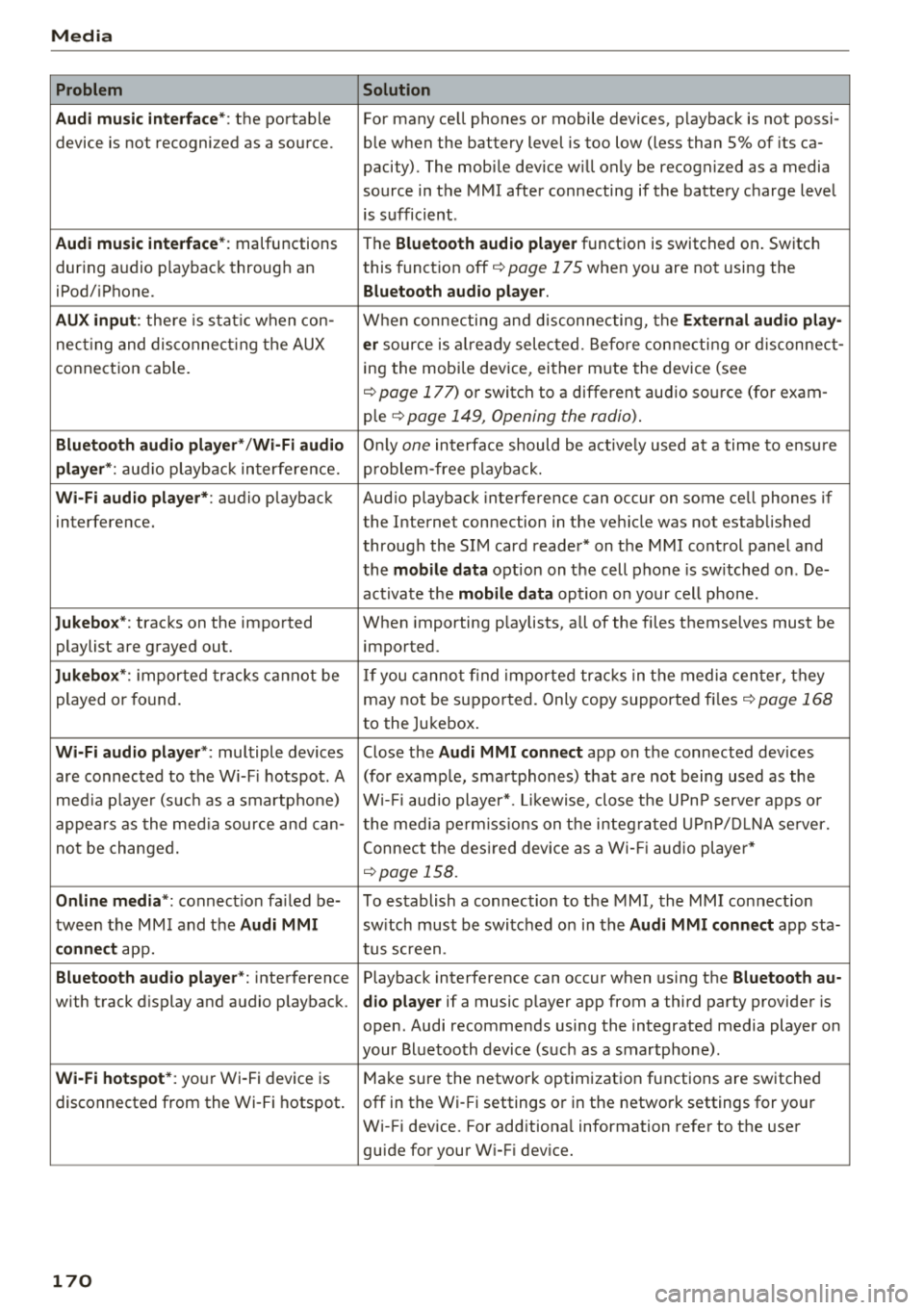
Media Problem Solution
Audi music interface* :
the portable For many cell phones or mobile devices, playback is not possi-
device is not recognized as a source. ble when the battery level is too low (less than 5% of its ca-
pacity) . The mobile device w ill only be recognized as a media
source in the MMI after connecting if the battery charge level
is sufficient .
Audi music interface* : malfunctions
The Bluetooth audio player function is switched on . Switch
dur ing audio p layback throug h an this
funct ion off
i::> page 175 when you are not using the
iPod/ iPhone.
Bluetooth audio player.
AUX input :
there is stat ic when con- When connecting and disconnecting, the External audio play-
necting and disconnect ing the AUX er source is al ready selected . Before connecting or disconnect-
connection cable. ing
the mobi le device, either m ute the device (see
<=:>page 177) or switch to a different audio source (for exam -
ple
i::> page 149, Opening the radio) .
Bluetooth audio player* /Wi-Fi audio Only one interface should be act ive ly used at a time to ensu re
player *: audio playback interfe re nc e. problem -free playback.
Wi-Fi audio player* : audio playback Aud io playback interference can occur on some cell phones if
interference. the Internet connection in the ve hicle was no t established
through the SIM card reader* on the MMI control panel and
the
mobile data option on the cell phone is sw itched on . De-
activate the
mobile data option on your cell phone.
Jukebox* : tracks on the imported When importing playlists, all of the files themselves must be
playlist are grayed out. imported
.
Jukebox*: imported tracks cannot be If you cannot find imported tracks in the media center, they
played or found. may not be supported. Only copy supported files
i::> page 168
to the Jukebox .
Wi-Fi audio player *: multiple devices Close the Audi MMI connect app on the connected devices
are connected to the Wi-Fi hotspot. A (for example, smartphones) that are not being used as the
media pla ye r (suc h as a smartphone) Wi-Fi audio player*. Likewise , close the UPn P serve r apps or
appears as the media source and can- t he media permissions on the integ rated UPnP/DLNA server.
not be changed. Connect the desired device as a Wi-Fi audio player*
<=:> page 158.
Online media *: connection fa iled be- To establish a connection to the MMI, the MMI connection
tween the MMI and the
Audi MMI switch must be switched on in the Audi MMI connect app sta-
connect app. tus screen .
Bluetooth audio player *: interference Playback interference can occur when using the Bluetooth au-
with track d isplay and audio p layback. dio player if a music player app from a third party provider is
open . Audi recommends using the integrated media player on
your Bluetoo th device (such as a smartphone) .
Wi-Fi hotspot*: your Wi-Fi device is
Make sure the network optimization functions are switched
disconnected from the Wi-Fi hotspot. off in the Wi- Fi settings or in the network settings for your
Wi-Fi device. For additiona l information refer to the user
guide for your W i-F i dev ice.
170