change time AUDI TT ROADSTER 2018 User Guide
[x] Cancel search | Manufacturer: AUDI, Model Year: 2018, Model line: TT ROADSTER, Model: AUDI TT ROADSTER 2018Pages: 310, PDF Size: 46.95 MB
Page 114 of 310
Tele phone
~ Se lect and confirm the desired ce ll phone from
the list of disp layed Bluetooth devices.
~ The MMI generates a PIN for the connect ion
setup
¢ fig. 112 .
~ Select and confirm Y es.
~ Enter the PIN for connecting on your cell
phone .
Or: when the PIN is d isplayed on your
ce ll phone, co nfirm the P IN on your ce ll phone
and in t he M MI. The time a llowed for ente ring
the P IN is lim ited to app rox ima tely 30 seconds.
~ Pay attention to any additiona l system prompts
displayed on your cell phone, for example i f the
system s hou ld connect automatically in the fu
ture . Depending on the ce ll phone, you may
have to confirm downloading the directory sep
arately .
After conn ect ing succ essfully
After connecting successfully, a short message
with information about the connected profi les
will appear. You can also change profiles later.
Select:
! MENU ! button> Setting s> left control
button
> MMI se ttings > Conn ection manag er
¢page 175.
In addition, the cell phone contacts are automat ically loaded in the MMI directory. Th is process
can take several minutes, depend ing o n the num
ber of contacts .
@ Note
Always follow the information found in c:::;,il]) in
Wi-Fi hotspot on page 130.
(D Tips
- Making phone calls throug h the MMI is only
possib le using the
Handsfree Bluetooth pro
file.
- You can apply additional settings to con
nected mobile devices using the co nnect ion
manager
¢ page 174.
- You can also search for the MMI in your cell
phone us ing the Bluetooth device search.
- You only have to pair your device one t ime.
B luetooth dev ices that are already pa ired
automat ically connect to the MMI when the
Bluetooth function is sw itched on, they are
within range and t he ign it io n is switched on.
112
Th e last connected cell p hone is given first
priority .
- Au thoriz ing the M MI connec tion in your cell
phone wi ll make automatic connection pos
sible.
- Pay attention to any system prompts dis
played on your ce ll phone, for example if
the system should connect automatically in
the future. Depend ing on the ce ll phone,
you may also need to download the directo ry and confirm access to your text messages
separately .
- Whe n leaving the vehicle, the Bluetooth
connect io n to the cell phone will automati
cally d isconnect. Dependi ng on you r cell
phone, phone calls in prog ress may be auto
matically red irected from the MM I to you r
cell p ho ne a nd you can con tinue the c all on
your phone.
- Yo u can ob tain more i nfo rmat ion fro m you r
cell p ho ne serv ice p rovider or from yo ur cell
phone user guide . For in formation on using
the te lephone, visit www.audi usa .com/
bluetooth or contact an authorized Audi
dea ler or author ized Audi Service Facility.
- Applies to : vehicles without secondary
phone: Several cell phones can be paired to
the MMI, but only one cell phone can be ac
t ively connected to the M Ml.
- Applies to: vehicles without secondary
phone: If a Bluetooth device is a lready con
nected to the MMI, it will be d isconnected
w hen another device connects to the MMI.
Operating two telephones through the
MMI
You can connect two cell phones to the MMI, for
example your business cell phone as the primary
phone and your private cell phone as the secon dary phone. You can be reached in your vehicle
through both cell phones .
The first connected ce ll phone is d isplayed as the
pr imary phone in the MM I. The secon d cell phone
is connected as the secondary phone .
The directory from the connected pr ima ry phone
will a lways be d isplayed . If yo u wo uld like to use
t h e d irec to ry from the secondary phone, you
..,.
Page 128 of 310
Audi connect
Audi connect services
Basic functions
Applies to: vehicles with Audi connect
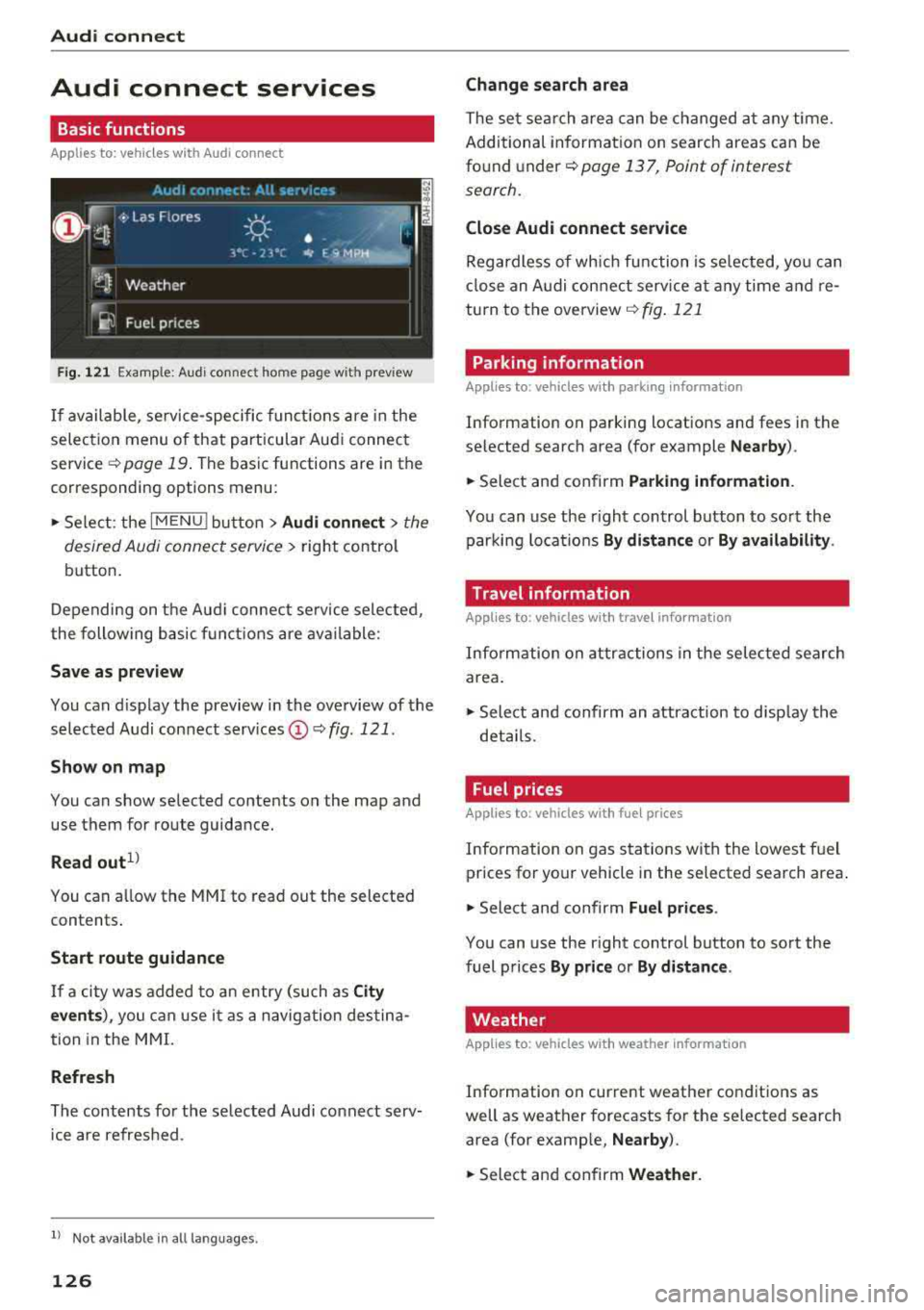
Fig. 121 Example: Aud i connect home page with preview
If available, service-specific functions are in the
selection menu of that particular Audi connect
service
q page 19 . The basic functions are in the
corresponding options menu:
,,. Select: the IMENU ! button> Audi connect> the
desired Audi connect service
> right control
button.
Depending on the Audi connect service selected,
the following basic functions are available:
Save as preview
You can d isplay the preview in the overview of the
selected Audi connect services
(D q fig . 121.
Show on map
You can show selected contents on the map and
use them for route guidance.
Read out1 )
You can a llow the MM I to read out the selected
contents .
Start route guidance
If a city was added to an entry (such as City
events),
you can use it as a navigation destina
tion in the MMI.
Refresh
The contents for the selected Audi connect serv
ice are refreshed .
ll Not availab le in a ll languages .
126
Change search area
The set sea rch area can be changed at any time.
Additional information on search areas can be
found under
<:!;> page 13 7, Point of interest
search.
Close Audi connect service
Regardless of wh ich function is selected, you can
close an Audi connect service at any time and re
turn to the overview
<:!> fig . 121
Parking information
Applies to: vehicles with parking information
Information on parking locations and fees in the
selected search area (for example
Nearby ).
,,. Select and confirm Parking information .
You can use the right control button to sort the
parking locations
By distance or By availability.
Travel information
Applies to: vehicles with travel information
Information on attractions in the selected search
area.
,,. Select and confirm an attract ion to disp lay the
details .
Fuel prices
Applies to: vehicles with fuel prices
Information on gas stations with the lowest fuel
prices for your vehicle in the selected search area .
,,. Select and confirm Fuel prices .
You can use the right control button to sort the
fuel prices
By price or By distance .
Weather
Applies to: vehicles with weather information
Information on current weather conditions as
well as weather forecasts for the selected search
area (for example,
Nearby ).
,,. Select and confirm Weather .
Page 129 of 310
Cl 00 .-< N r-N .-< 0 r-Vl 00
Flight information
Applies to: vehicles with flight information
Information on flig hts and current arr ival/depa r
ture times in the selected searc h area .
.,. Select and confirm Flight information .
You can select the desired information using the
right control button.
City events
Applies to: vehicles with City events
Information on events in various categories in
the desired search area .
.. Select City Events > left control button > cate
gory.
Online news
Applies to: vehicles with online news
You can check the current headlines of your fa
vor ite pub lications in the MMI.
Requirement: your myAudi account must be sub
scr ibed to newsfeeds and your vehicle must be
connected to myAudi
~page 125.
.. Se lect : Online news > desired newsfeed > a
headline.
(D Tips
If you have not subscr ibed to any personal
newsfeeds in your myAud i account, pre-con
figured newsfeeds wi ll be displayed.
Twitter
Applies to: vehicles with Twitter
You can access the most important functions in
your Twitter account through your
MMI.
Requirement:
You must have connected your myAudi account
with Twitter. You can find additional information
at www.audiusa .com/myaudi.
You must have connected your vehicle with
myAudi
~page 125.
Audi connect
.. Select Twitter > left control button > desired
function
(for examp le, Trends ).
T he following categories can be selected in the
Twitter menu:
- My tweets: News Feed and the Tweets you have
posted are listed.
- Home : the Tweets for everyone you fo llow are
d isp layed.
- Trends : top ics on Twitter that are currently
popu lar within a country.
Different functions are ava ilable depending on
the Twitter category you have selected :
- New tweet: you can post a new tweet using
pre-made templates or using custom ized tem
plates in your myAudi account.
- Refresh : the se lected Twitter function is re
freshed.
- Favorite : mark a Tweet as favorite to show you
Liked it.
- Retweet : you can quote a Tweet to share it wit h
others.
(D Tips
- You can find additional information on con
necting your myAudi account to Twitter at
www.aud iusa.com/myaudi.
- Other settings suc h as account, language,
Tweet security and locat ion settings
cannot
be changed in the MMI. These changes m ust
be made on the Tw itter website.
- You can only connect
one Twitter account
w ith your myAudi account.
- Audi connect makes it possible to access
Twitter. Permanent availability cannot be
guaranteed, because that depends on Twit
ter.
Travel (travel guide)
Applies to: vehicles with Travel (travel guide)
You can use the Audi MMI connect opp to store
points of interest on your mobile device (such as a smartphone) and then use them for route
guidance in the
MMI .
Requirement:
127
Page 130 of 310
Audi conn ect
The Audi MMI con nect app must be installed and
open on your mobile device.
You must be logged into yo ur myAud i acco unt in
t he
Audi MMI connect app and you must have se
lected you r vehicle .
The Wi-Fi funct ion on you r mobile device and on
the MMI must be sw itched on.
The MMI must be connected to the network .
~ Select : I MENU I button > Aud i conn ect> left
cont ro l button
> In formation category> Tra v
el.
After opening th e travel guide , travel tips in your
area will be d isplayed including current rat ings as
well as the corresponding ca tegory.
~ Press the left control button to change the cat
egory (such as bars nearby) .
A WARNING
-It is only safe to use tab lets, laptops, mo
bile devices and othe r similar devices w hen
the vehicle is st ationa ry be cause, like all
loose objects, they could be thrown aro und
the inside of the vehicle in a crash and cause serious injuries . Store t hese types of devices
securely whi le driving.
- Do not use any wireless devices on the front
seats w ith in range of the a irbags while driv
ing. Also read the warnings in the chapter
Q page 198, Front airbags.
@ Note
Always follow the information found in Q i© in
Wi-Fi hotspot on page 130.
@ Tips
Units of meas urement, language settings and
time are shown in the Infotainment system
disp lay based on how they were set in the
MMI system settings
<=) page 173 .
-
ll AUDI AG pr ovide s access to services fro m third party pro
v ider s. Pe rma ne nt ava ilabil ity c anno t be guara nteed , be
c a use that depen ds on th e th ird party provid er.
128 Audi connect services in navigation
App
lies to : vehicles wit h naviga tion sys te m and A udi connect
The following Aud i connect services a re current ly
available :
- Navigation with
satellite map1> Q page 145 .
-Point of Interest (POI ) on line sear ch wi th
v oi ce recognit ion
(such as restaurants) : plan
route guidance using the MMI control panel
and the vo ice recognit ion system
<=) page 105 .
- Set up destinations in your MMI using your
m yA udi account or the sat ellite map view l )
r=;, page 145 .
-Online traffic information : receive up-to-the
m inute traffic informat ion about acc idents,
road const ruct ion and other inc idents
r=;, page 146 .
-Map updates *: import navigat ion map updates
in yo ur MMI using an S D card.
(D Tips
-For the map update Audi connect serv ice
using an SD card, check t he current soft
w ar e version in yo ur vehicle and compare it
w ith www.aud iusa.com/myaudi to see if a
new ve rsion is avai lab le . You can a lso have
the new navigation data installed by an Audi dea ler, which can be done for an addit iona l
charge.
- You can find additional information about
the
map update at www.a udiusa.com/
myaudi.
Audi connect services in the Media menu
App lies to: vehicles wit h Audi conne ct
- Online media and Internet radio : offers access
to d ifferent online med ia services as well as In
ternet radio and ope ration through the
MMI us
ing the
A udi MMI connect app Q page 159.
App lies to: vehicles wi th Wi-Fi au dio player
- Wi-Fi audio playe r: you can access the media
center through W i-F i connected med ia p layers
(such as smartphones)
Q page 158. Ill-
Page 137 of 310
Cl 00 ... N r--N ... 0 r--Vl 00
(D Tips
-You can find information about importing a
map update to your MMI using an
SD card
at www.audiusa.com/myaudi.
- Snow and obstructions on the GPS antenna
or interference caused by trees and large
buildings can impair satellite reception and
affect the system's ab ility to determine the
vehicle position . Several deact ivated or mal
funct ion ing satellites can also inte rrupt GPS
r eception and affect t he system's ab ility to
dete rm ine the ve hicle position.
- Because st reet names sometimes change,
t h e names stored in the M MI may in ra re
c a ses differ from the ac tual street name.
Entering a destination
Free text search for destinations
App lies to: ve hicles with navigation system
Using the MMI touch contro l pad, you can enter
the data for a navigation dest ination all at once
in any orde r (for example, Los Angeles,
20 Main St .) . Likewise, you can search for points
of interest, contacts, p revious dest inat io ns or fa
vor ites to n avigate to the desired address .
.,. Press the I NAV/MAPI button repeatedly until
the
Ent er de stination menu is displayed
c=>page 134, fig . 122.
.,. Keep turning the contro l knob to t he left unti l
the input fie ld appears.
- E nte r o ne or mo re search te rms into t he i nput
field.
- If avai lab le, confirm the input suggestion* to
complete the entry or a word suggest ion*. See
c=>
page 99, Letter/number speller.
- T urn the cont rol knob to the rig ht to change
the results list.
- Se lect and confirm a destination from the re-
s ul ts l ist .
- Se lect and conf irm
Start rou te guidanc e.
The route is displayed as an overview in the map
and the route guidance is already active .
Navigation
Narrowing the s earch area
All co unt ries/states are selec ted at the factory
f or the free text sea rch.
- Select the right cont rol button
> Countr y/state
s el ec tion
in the input field (D c:> page 134,
fig. 122.
- Select the cou ntry or state (. ) th at sho uld be
searched fo r in t he free text sea rch in o rder to
na rrow the number of results and increase t he
search speed. The se lected entry in the coun
try/state selection is stored.
Or : select All
c ount rie s/ s tates .
All co untries/states are selected at the factory
f or the free text search. Using the
Countr y/state
s election ,
you can deselect the irrelevant coun
tries/states to increase the search speed and nar
row the results list.
(D Tips
- Th e M MI inp ut suggestions depend on the
last nav igated dest inat ions.
- Up to SO entries can be stored in the last
destinations list .
-Additiona l information on free text sea rches
can be fo und under
c:> page 101.
Loading previous destinations
Applies to: vehicles wit h navigat ion system
Your last destinations are automatically stored
and can be loaded directly as a destination .
Requirement: a destinat io n was already navigat
ed to .
.,. Press the INAV/MAPI button repeatedly unti l
t he
Enter des tination menu is disp layed
c=> page 134, fig. 122 .
Your last destinations will be listed d irectly in the
En ter d estination menu and a re marked with the
symbol @c=>page
134, fig. 122.
-Select and confirm one of the last destinations
from the list .
- Select and confirm
Start route guid ance.
Deleting pre vio us de stination s
-Select one of the last destinations from the list . .,.
135
Page 165 of 310
Cl co .... N ,....
N .... 0 ,....
Vl co
®
0
®
such as an MP3 player connected to
the AUX input
Bluetooth audio player*
Wi-Fi audio player* .......... .
Online media*
and Internet radio*
157
158
159
-Playing audio/video files: select a source in the
Media menu > category (such as artists > al
bum
> track) .
-Moving one level up in the folder structure:
press the I BACK I button. Or: select and confirm
Folder up.
- Selecting the previous or next track/chapter
1): press the On/Off knob on the MMI control
panel briefly to the left
l
-Fast-forwarding and rewinding audio/video
files :
press and hold the On/Off knob on the
MMI control panel to the left l
a longer time.
-Pausing or resuming playback: press the On/
Off knob on the MMI control panel briefly.
@ Tips
-You can scroll through long lists quickly by
turning the control knob quickly. The scroll
i ng speed depends on the number of list en
tries.
-For safety reasons, the video image is only
displayed when the vehicle is stationary. On ly the sound from the v ideo plays while driv
i ng .
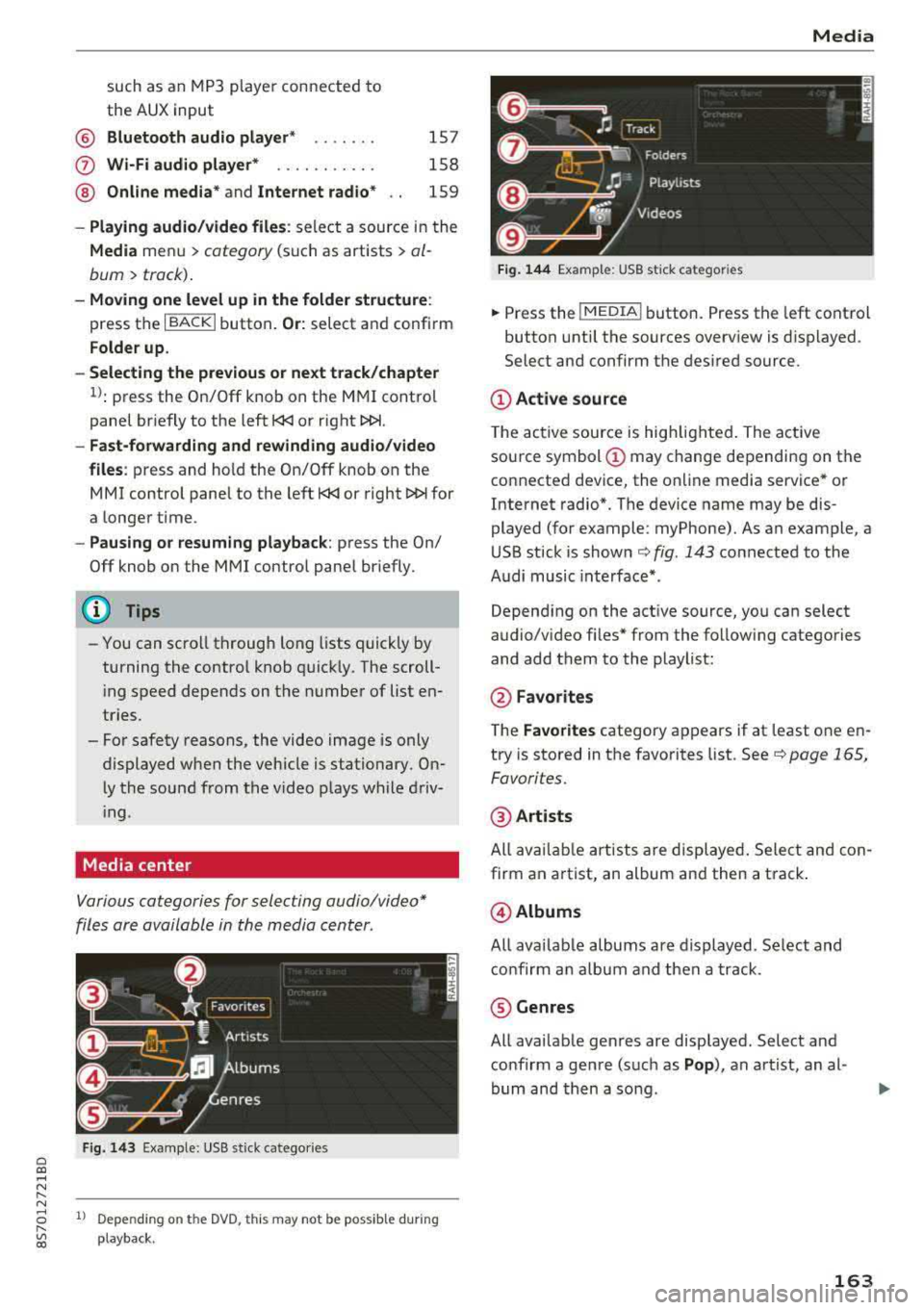
Media center
Various categories for selecting audio/video*
files are available in the media center .
Fig. 143 Example: USB stick catego ries
1l Depe ndi ng o n th e DVD, t his may not be possible during
playba ck .
Media
Fi g. 144 Example: USB stick categories
... Press the I MEDIA! button. Press the left control
button until the sources overview is displayed.
Select and confirm the desired source.
(D Active source
The active source is highlighted . The active
source symbol
(D may change depending on the
connected device, the online media service* or
Internet radio*. The device name may be dis
played (for example: myPhone). As an example, a
USB stick is shown
c:> fig. 143 connected to the
Audi music interface* .
Depending on the active source, you can select
audio/video fi les* from the follow ing categories
and add them to the playlist:
@ Favo rites
The Favorites category appears if at least one en
try is stored in the favorites list. See
c:> page 165,
Favorites.
@ Artists
All available artists are displayed. Select and con
firm an a rtist, an album and then a track .
@Albums
All availab le albums are displayed. Select and
confirm an album and then a track .
® Genres
All available genres are displayed. Select and
confirm a genre (such as
Pop ), an artist, an al
bum and then a song .
163
Page 172 of 310
Media Problem Solution
Audi music interface* :
the portable For many cell phones or mobile devices, playback is not possi-
device is not recognized as a source. ble when the battery level is too low (less than 5% of its ca-
pacity) . The mobile device w ill only be recognized as a media
source in the MMI after connecting if the battery charge level
is sufficient .
Audi music interface* : malfunctions
The Bluetooth audio player function is switched on . Switch
dur ing audio p layback throug h an this
funct ion off
i::> page 175 when you are not using the
iPod/ iPhone.
Bluetooth audio player.
AUX input :
there is stat ic when con- When connecting and disconnecting, the External audio play-
necting and disconnect ing the AUX er source is al ready selected . Before connecting or disconnect-
connection cable. ing
the mobi le device, either m ute the device (see
<=:>page 177) or switch to a different audio source (for exam -
ple
i::> page 149, Opening the radio) .
Bluetooth audio player* /Wi-Fi audio Only one interface should be act ive ly used at a time to ensu re
player *: audio playback interfe re nc e. problem -free playback.
Wi-Fi audio player* : audio playback Aud io playback interference can occur on some cell phones if
interference. the Internet connection in the ve hicle was no t established
through the SIM card reader* on the MMI control panel and
the
mobile data option on the cell phone is sw itched on . De-
activate the
mobile data option on your cell phone.
Jukebox* : tracks on the imported When importing playlists, all of the files themselves must be
playlist are grayed out. imported
.
Jukebox*: imported tracks cannot be If you cannot find imported tracks in the media center, they
played or found. may not be supported. Only copy supported files
i::> page 168
to the Jukebox .
Wi-Fi audio player *: multiple devices Close the Audi MMI connect app on the connected devices
are connected to the Wi-Fi hotspot. A (for example, smartphones) that are not being used as the
media pla ye r (suc h as a smartphone) Wi-Fi audio player*. Likewise , close the UPn P serve r apps or
appears as the media source and can- t he media permissions on the integ rated UPnP/DLNA server.
not be changed. Connect the desired device as a Wi-Fi audio player*
<=:> page 158.
Online media *: connection fa iled be- To establish a connection to the MMI, the MMI connection
tween the MMI and the
Audi MMI switch must be switched on in the Audi MMI connect app sta-
connect app. tus screen .
Bluetooth audio player *: interference Playback interference can occur when using the Bluetooth au-
with track d isplay and audio p layback. dio player if a music player app from a third party provider is
open . Audi recommends using the integrated media player on
your Bluetoo th device (such as a smartphone) .
Wi-Fi hotspot*: your Wi-Fi device is
Make sure the network optimization functions are switched
disconnected from the Wi-Fi hotspot. off in the Wi- Fi settings or in the network settings for your
Wi-Fi device. For additiona l information refer to the user
guide for your W i-F i dev ice.
170
Page 173 of 310
Cl 00 ... N r--N ... 0 r--Vl 00
Audi smartphone interface
Setup
A ppl ies to : ve hicles w ith Audi smartpho ne inte rfa ce
You con connect your smortphone to the MMI us
ing the Audi smortphone interface . Certain con
tent on your smortphone is adopted to the Info
tainment system display while driving and con
be operated through the
MMI control panel .
Requirement:
The vehicle must be stat ionary and the ignition
must be switched on .
iPhone generation 5 or h igher w ith Lightning
connector and iOS 7 .1.2 operating system or h igher.
O r:
Smartphone with Android Auto app and Android
5 .0 Loll ipop operating system or higher.
.,. Connec t your sma rtphone to the Audi music in
terface
¢ page 161 using a USB adapte r
¢page 160, fig. 139 .
.. Select and confirm A ctivate Apple CarPlay or
Acti vate And roid Auto now .
.. Follow the system instruct ions.
.. Pay attention to any additiona l system prompts
on your smartphone if applicable .
If you chose not to use Apple CarP lay or Android
Auto when connecting your smartphone for the
first time, you can start the Audi smartphone in
terface later on using the
Connection manager.
.,. Se lect : I MENU I button > Audi smartphone in-
terfa ce
> Change to connection manager .
.. Connect your sma rtphone to the A udi music in
terface
¢ page 161 using a USB adapter
¢ page 160, fig. 139 .
.. Select and confirm Audi smartphone in t he
Connection manager ¢ page 174. You can se
l ect your smartphone in the list of devices that
are already paired
¢page 175.
.,. Follow the system instruct ions .
ll In prep arat io n at t he t im e of pr in tin g .
Aud i smartph one interfac e
@ Note
Always fo llow the information fo und in ¢ @ in
Wi-Fi hotspot on page 130.
(D Tips
-T he f unctions that can be used depend on
the fo llow ing factors, among others:
-the brand of your smartphone
-the vers io n of the ope rating system in
your smartphone
-the software ve rsion of the app used
-the USB adapter cab le an d correct connec -
tion
-your cell phone service provide r
-the customized se tt in g s on yo ur sm art-
phone
-O ne of t he factors above o r a com binat ion
o f any of them could cause you r sma rtphone
to be incompatib le wit h the Audi smart
phone interface. Compatibility cannot be
guaranteed for all types of smartphones.
For more informat ion and assistance, refe r
to the user guide and the man ufacturer of
your smartphone .
-If the connected smartphone has voice con
trol, you can operate you r smartp hon e usi ng
t he ex ter nal voice recognition system*
¢page 110.
-T he menu language show n in t he MMI is
based on t he sett ings in you r smartp ho ne.
-The time d isplayed in the MMI is based o n
t he settings in yo ur smartphone .
-Several M MI functions a re not avai lab le
w hen Apple Car Play or Andro id A uto is ac
t ive .
-You cannot co nnect any mob ile dev ices via
Bluetooth whe n an Apple CarPlay connec
tion is act ive.
-Whe n the App le CarPlay connection is ac
t ive,
Tag this song for iTunes*1
) is not ava il
able
¢page 150 .
171
Page 175 of 310
Cl 00 .-< N r-N .-< 0 r-Vl 00
System settings
Setting the date and
time
You can set the clock time manually or using the
CPS .
.. Select : IMENUI button> Settings> left control
button >
MMI settings > Date & time.
.. Or : select: IMENUI button> Vehicle> left con-
trol button >
Vehicle settings > Date & time .
Automatic setting
When this function is switched on~. the time
and date are automatically set.
Time
Requirement: the Automatic setting must be
switched
off .
Press the control knob. You can set the Time
manually by turning and pressing the control
knob.
Date
Requirement: the Automatic setting must be
switched
off.
Press the control knob . You can set the Date
manually by turning and press ing the control
knob.
Time zone
When selecting the appropriate time zone, a
sampling of countries in this zone will be listed .
Automatic time zone*
When this function is switched on~. the time
will automatically adjust to the corresponding
time zone.
Time format
If you select 24h , the clock will display, for ex
ample,
13:00. If you se lect AM/PM, the clock
will disp lay, for examp le,
1:00 PM.
Date format
I f you select DD.MM.YYYY , the date display will
show, for example,
31.08.2017 . If you select
MM/DD/YYYY , the date disp lay wi ll show, for ex-
System settings
ample, 08/31/2017. If you select YYYY-MM
DD ,
the date display will show, for example,
2017-08-31.
MMI settings
.. Select: IMENUI button> Settings > left control
button >
MMI settings .
Language
You can change the display language as well as
t h e la nguage for the voice guidance* and voice
recognition system*.
T he number of languages available depends on
the market .
Measurement units
The following measurement un its can be set de
pend ing on ava ilab ility:
Speed , Distance , Tem
perature , Fuel consumption , Volume , Pressure.
Tool tips
When this funct ion is switched on~. your MMI
shows you tips for input. The frequency of how
often it displays decreases w ith time . You can
switch
off the operating tips at any time .
Speech dialog system
Applies to: vehicles with voice recognition system
Command display: when this function is switch
ed
on~. the MMI will show you the possible
commands for voice input in the respective
menu. You can sw itch the funct ion
off at any
t ime .
Short dialog : when this function is sw itched on
~. a shorter form of the prompts is used . You
can switch the function
off at any time .
Speech dialog system volume: you can adjust
the volume of the prompts by turning the contro l
knob.
Individual speech training (only when the vehi
cle is stationary): you can adapt the voice recog
nition system to your voice or pronunciation in
order to improve the system's ability to recogn ize
your speech. Ind iv idual speech tra ining is com
prised of 20 speech entr ies that consist of com-
mands and sequences of numbers . You can
.,,_
173
Page 178 of 310
System settings
Select Invisible for t he MMI to not be v is ibl e to
othe r devices. Howeve r, it is still possib le to es
ta bli sh a B luetooth con nection with paired de
vices when the v is ibility is switched off . Se lect
Off to turn visibi lity off . Then a B luetooth con
nect io n is not possible .
-Bluetooth audio player : when this function is
switched on
g, t h e Blue tooth aud io player is
available as a so urce in t he
Media menu .
-Delete Bluetooth device : th e se lected cell
phone/mobile device is d isconnected from t he
MMI.
- Show Bluetooth profiles : you ca n Connect or
Disconnect the Handsfree profi le a nd the Di
rectory /contacts *
separately.
- Bluetooth audio player : switch th is function on
g to be a ble to selec t the B luetoo th a udio p lay
er as a source in t he M edia me nu.
-Bluetooth name : the MMI B luetoo th name (for
example ,,AUDI M MI 2017") is displayed and
can be changed .
W hen the function is switched on
g , the symbo l
@<=>page 102, fig . 110 appears in the Infotain
ment sys tem disp lay.
Online settings*
- Data connection settings :
see<=> page 130,
Configuring the data connection
- Data usage counter : th e amount of data pack
ets that a re sent and received throug h the MMI
is d isp layed. You can reset the data usage infor
mation to zero using the
Reset data counter
opt ion.
- Network status : the mobile netwo rk p rovider
for data se rvice as well as the network status
are disp layed .
Wi-Fi settings*
See <=> page 129, Wi -Fi hotspot.
SIM PIN settings*
- Automatic PIN entry:
when this funct ion is
swi tched on
g , th e S IM PIN is automatically
saved in the MMI after it is entered for t he first
time. The SI M PIN for four d ifferent SIM ca rds
can be saved i n the MMI. With the function
switched off, the cur rently stored SI M PIN i s
dele ted from the MMI. When the a utomat ic
176
P IN entry is swi tched on, the re a re no S IM P IN
prompts .
-Disable PIN query : when sw itche d on, there are
no SIM PIN queries . The a utomatic PIN entry is
not use d in this case .
-Change PIN : you can change the P IN on you r
SI M card . First ente r th e cur rent SI M PIN. T he
SI M PIN may on ly conta in digits 0 -9 . T he new
SI M PIN must be entered twice for security a nd
then it w ill be saved to the SI M card .
Apple CarPlay sound settings/ Android Auto
sound settings
App lies to : vehicles wit h Audi s m artph one interface
See<=> page 177.
About Apple CarPlay/ About Android Auto
App lies to : vehicles wi th Audi sma rtphone interface
Here you w ill find leg al inform ation reg arding
t h e use o f A pple Car Play o r And ro id Auto and in
fo rmat ion about devi ce -s p ecific data exc han ge.
Delete CarPlay device/Delete Android Auto
device
App lies to : vehicles wi th Audi s m artph one interface
Requirement: yo ur cell phone m ust not be con
necte d to the Au di music interface with a USB
adapter.
S e le ct :
Audi smartphone > a d evice from th e list
> righ t con trol button .
To re m ove your cell p ho ne from the list, se lect
a nd con firm
Delete CarPlay device or Delete An
droid Auto device .
© Tips
Some SIM cards do not allo w the SIM PIN
qu eri es to be sw itch ed off .
System update
.,. Selec t: !ME NUI butt on> Settings > left cont rol
bu tton >
System maintenance.
- System update :
slide the storage device with
t he upda te da ta into the a pprop ria te d rive
r=;, page 155. Selec t an d co nfirm t he drive>
Start update . The leng th of the p rocess de
pe nd s on the s ize of the up dat e.