change time AUDI TT ROADSTER 2018 Owners Manual
[x] Cancel search | Manufacturer: AUDI, Model Year: 2018, Model line: TT ROADSTER, Model: AUDI TT ROADSTER 2018Pages: 310, PDF Size: 46.95 MB
Page 17 of 310
Cl 00
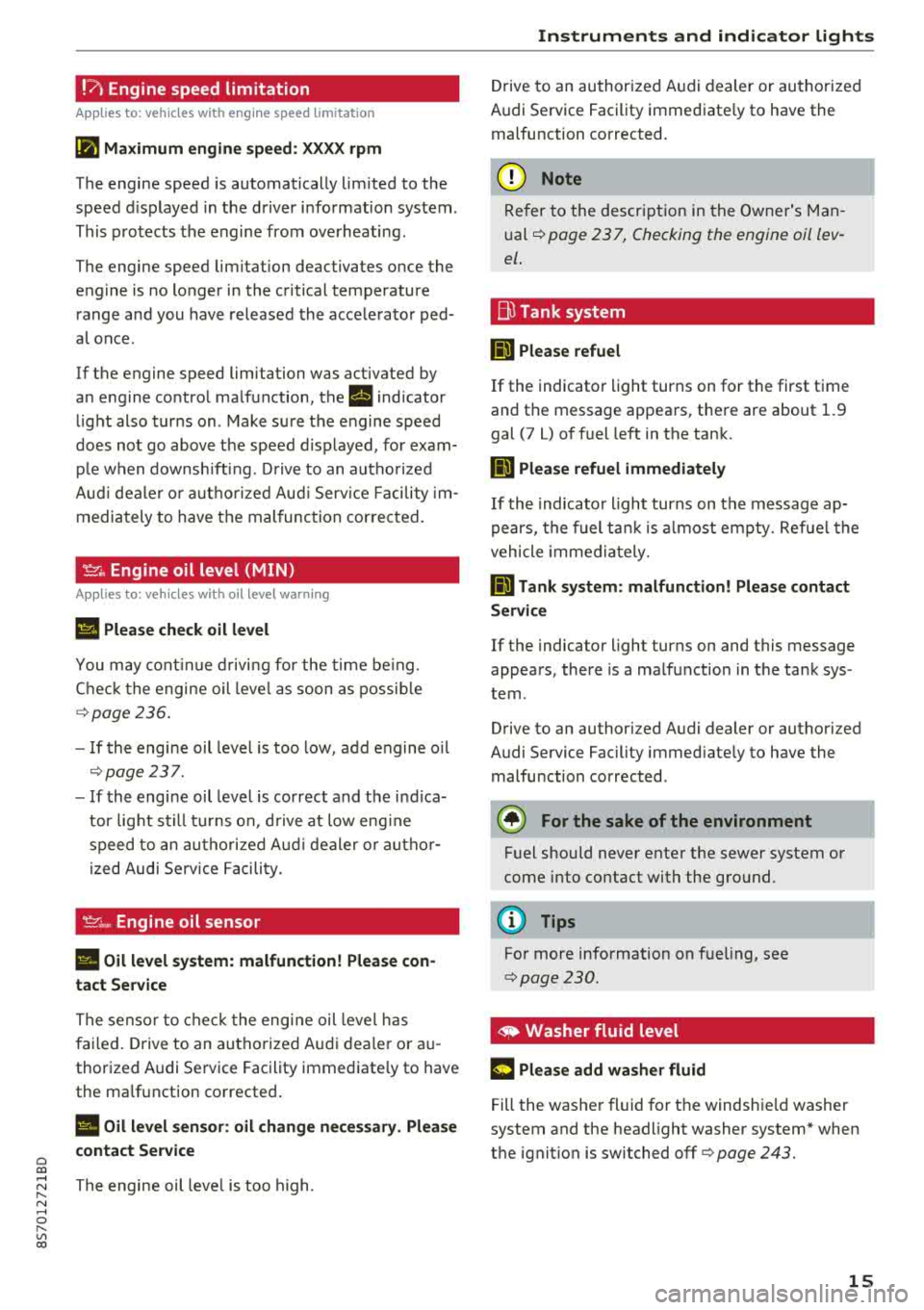
!?) Engine speed limitation
Applies to: vehicles with engine speed limitation
(II Maximum engine speed : XXXX rpm
The engine speed is automatically lim ited to the
speed d isplayed in the driver information system .
This protects the engine from overheating .
The engine speed limitation deactivates once the
engine is no longer in the critical temperature range and you have released the accelerator ped
a l once.
If the engine speed limitation was activated by
an engine control malfunction, the
rl indicator
light also turns on. Make sure the engine speed
does not go
above the speed d isplayed, for exam
ple when downsh ift ing. Drive to an autho rized
Aud i dealer o r authorized Aud i Service Facility im
mediately to have the malfunction corrected.
~. Engine oil level (MIN)
Applies to: vehicles with oil level warning
Ill Please check oil level
You may continue driving for the time being.
Check the engine oil leve l as soon as possible
r=> page236.
-If the engine oil level is too low, add engine oil
r=>page 237.
-If the engine oil level is correct and the ind ica
tor light still turns on, drive at low eng ine
speed to an authori zed A udi dealer or autho r
ized Audi Serv ice Facility.
'IY ;.., Engine oil sensor
II Oil level system: malfunction! Please con
tact Service
The sensor to check the engine oil level has
failed. Drive to an authorized Audi dealer or au
thorized Audi Service Facility immediate ly to have
the malfunction corrected .
II Oil level sensor: oil change necessary. Please
contact Service
~ The engine oil leve l is too high.
N ...... 0 r--Vl 00
Instruments and indicator lights
Drive to an authorized Audi dealer or authorized
Audi Service Facility immediate ly to have the
malfunction corrected.
@ Note
Refer to the description in the Owner's Man
ual
r=> page 2 3 7, Checking the engine oil lev
el .
Bu Tank system
ml Please refuel
If the indicator light turns on for the first time
and the message appears, there are about 1.9
gal (7 L) of fuel left in the tank.
ID Please refuel immediately
If the indicator light turns on the message ap
pears, the fuel tank is almost empty. Refue l the
vehicle immediately.
ml Tank system: malfunction! Please contact
Service
If the indicator light turns on and this message
appears, there is a malfunction in the tank sys
tem .
Drive to an authorized Audi dealer or authorized
Audi Service Facility immed iately to have the
malfunction corrected .
@) For the sake of the environment
Fuel should never enter the sewer system or
come into contact with the ground.
(D Tips
For more information on fueling, see
r=> page 230.
,. Washer fluid level
m Please add washer fluid
Fill the washer fluid for th e windshie ld washer
system and the headlight washer system* when
the ignition is switched off
r=> page 243.
15
Page 26 of 310
Opening and closing
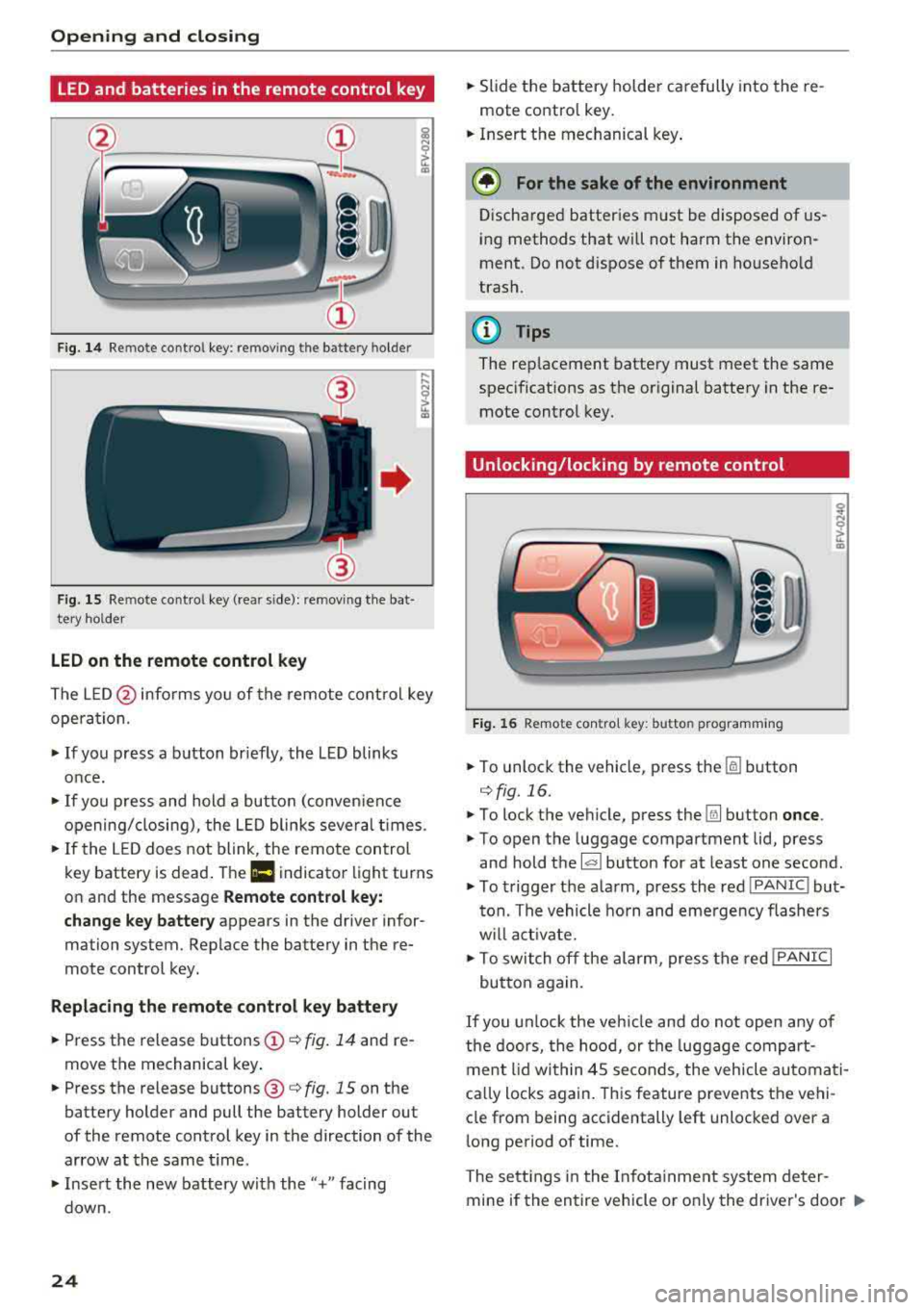
LED and batteries in the remote control key
Fig. 14 Remote control key: removing the battery holder
Fig. 15 Re mote control key (rear side): removing the bat·
tery holder
LED on the remote control key
The L E D @ informs you of the remote control key
opera tion.
~ If you press a button briefly, the LED blinks
once.
~ If you press and hold a button (conven ience
opening/closing), the LED blinks several times.
~ If the LED does not blink, the remote control
key battery is dead . The
Ill indicator light turns
on and the message
Remote control key:
change key battery
appears in the driver infor·
mation system. Replace the battery in the re
mote control key.
Replacing the remote control key battery
~ Press the release buttons (!)¢ fig. 14 and re
move the mechanical key .
~ Press the release buttons@¢ fig. 15 on the
battery holder and pull the battery holder out
of the remote control key in the direction of the
arrow at the same time.
~ Insert the new battery w ith the"+" facing
down.
24
~ Slide the battery holder carefully into the re
mote contro l key.
~ Insert the mechanical key .
@ For the sake of the environment
Discharged batteries must be disposed of us
ing methods that will not harm the environ
ment. Do not dispose of them in household
trash.
@ Tips
The rep lacement battery must meet the same
specifications as the original battery in the re
mote control key.
Unlocking/locking by remote control
Fig. 16 Remote contro l key: butto n programm ing
~ To unlock the vehicle, press the [§] button
c:> fig. 16.
~ To lock the vehicle, press the Ifill button once .
~ To open the luggage compartment lid, press
and hold the
l al button for at least one second.
~ To trigger the alarm, press the red IPANIC I but
ton. The vehicle horn and emergency flashers
w ill activate.
~ To switch off the alarm, press the red !PANIC I
button again.
If you unlock the vehicle and do not open any of
the doors, the hood, or the luggage compart
ment lid within 45 seconds, the vehicle automati
ca lly locks again. This feature prevents the vehi
cle from being accidentally left unlocked over a
long period of time.
The settings in the Infotainment system deter
mine if the entire vehicle or o nly the driver's door
..,_
Page 33 of 310
Cl co ..... N ,....
N ...... 0 ,....
Vl co
Programming the transmitter
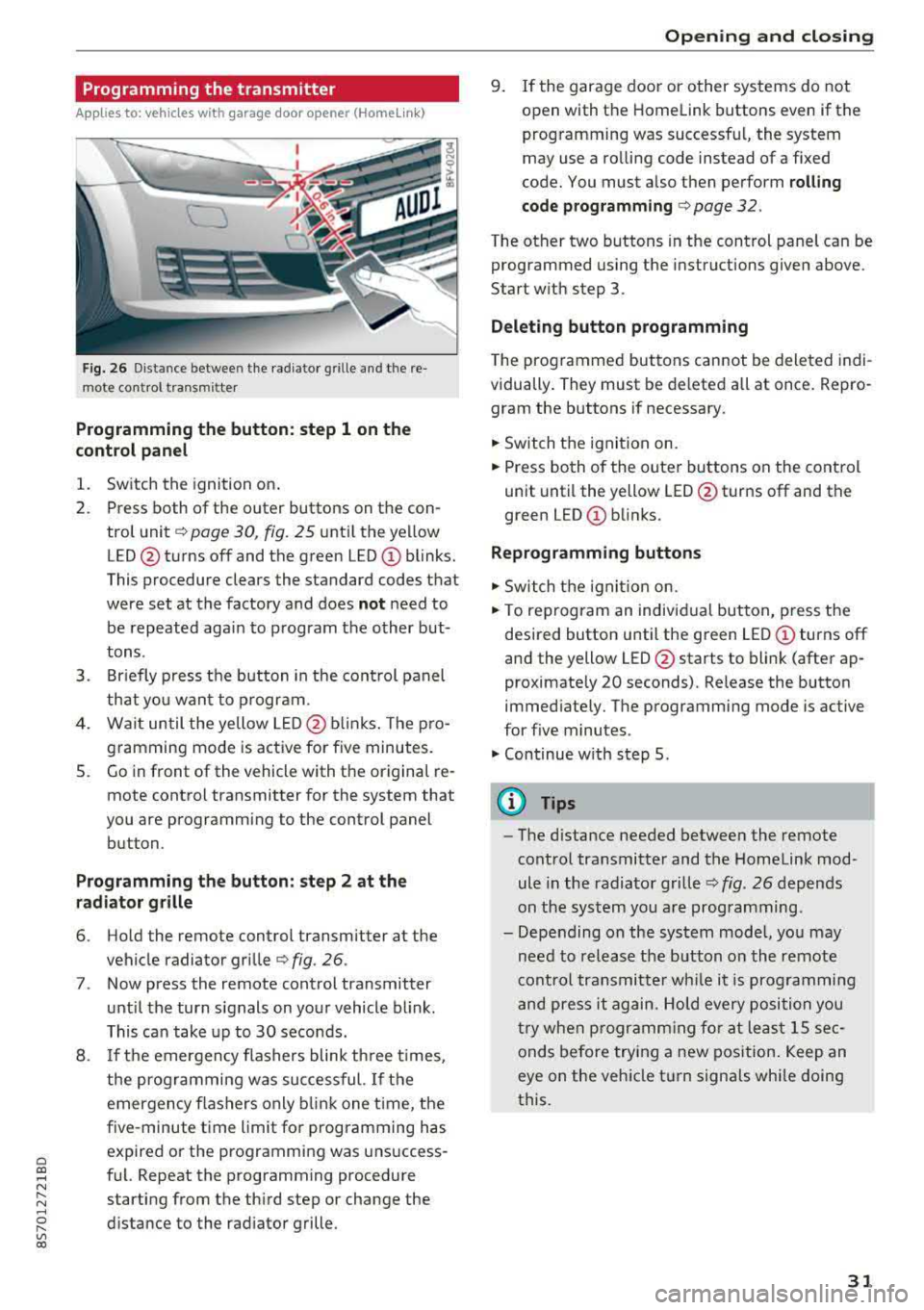
Applies to: vehicles with garage door opener (Homelink)
Fig. 26 Distance betwee n the radia tor grille and t he re
mote control transmitter
Programming the button: step 1 on the
control panel
1. Switch the ignition on.
2. Press both of the outer buttons on the con
trol unit
c:, page 30, fig. 25 unt il the yellow
LED @turns off and the green
LED (!) blinks.
This procedure clears the standard codes that
were set at the factory and does
not need to
be repeated again to program the other but
tons .
3. Briefly press the button in the control panel
that you want to program.
4. Wait until the yellow LED@blinks. The pro
gramming mode is active for five minutes.
S. Go in front of the vehicle with the original re
mote control transmitter for the system that
you are programming to the control panel button.
Programming the button: step 2 at the
radiator grille
6. Hold the remote control transmitter at the
vehicle radiator grille
¢fig . 26 .
7. Now press the remote control transmitter
until the turn signals on your vehicle blink.
This can take up to 30 seconds.
8 . If the emergency flashers blink three times,
the programming was successful. If the
emergency flashers only blink one time, the
five-minute time limit for programming has
expired or the programming was unsuccess
ful. Repeat the programming procedure
starting from the third step or change the
distance to the radiator grille .
Opening and closing
9. If the garage door or other systems do not
open with the Home link buttons even if the
programming was successful, the system
may use a ro lling code instead of a fixed
code. You must also then perform
rolling
code programming
c:, page 32 .
The other two buttons in the control panel can be
programmed using the instructions given above.
Start with step 3.
Deleting button programming
The programmed buttons cannot be deleted indi
vidually. They must be deleted all at once. Repro
gram the buttons if necessary.
"' Switch the ignit ion on.
"' Press both of the outer buttons on the control
unit until the yellow LED@turns off and the
green LED
0) blinks.
Reprogramming buttons
"' Switch the ignit ion on.
"'To reprogram an individual button, press the
desired button until the green LED
0) turns off
and the yellow LED@starts to blink (after ap
proximately 20 seconds). Release the button immediately. The programming mode is active
for f ive minutes.
"'Continue w ith step 5 .
(D Tips
-The d istance needed between the remote
control transmitter and the Homelink mod
ule in the radiator grille
c:, fig. 26 depends
on the system you are programming.
- Depending on the system model, you may need to release the button on the remote
cont rol transmitter while it is programming
and press it again. Hold every position you
try when programming for at least 15 sec
onds before trying a new position. Keep an
eye on the vehicle turn signals while doing
this.
31
Page 40 of 310
Lights and Vision
Lights and Vision
Exterior lighting
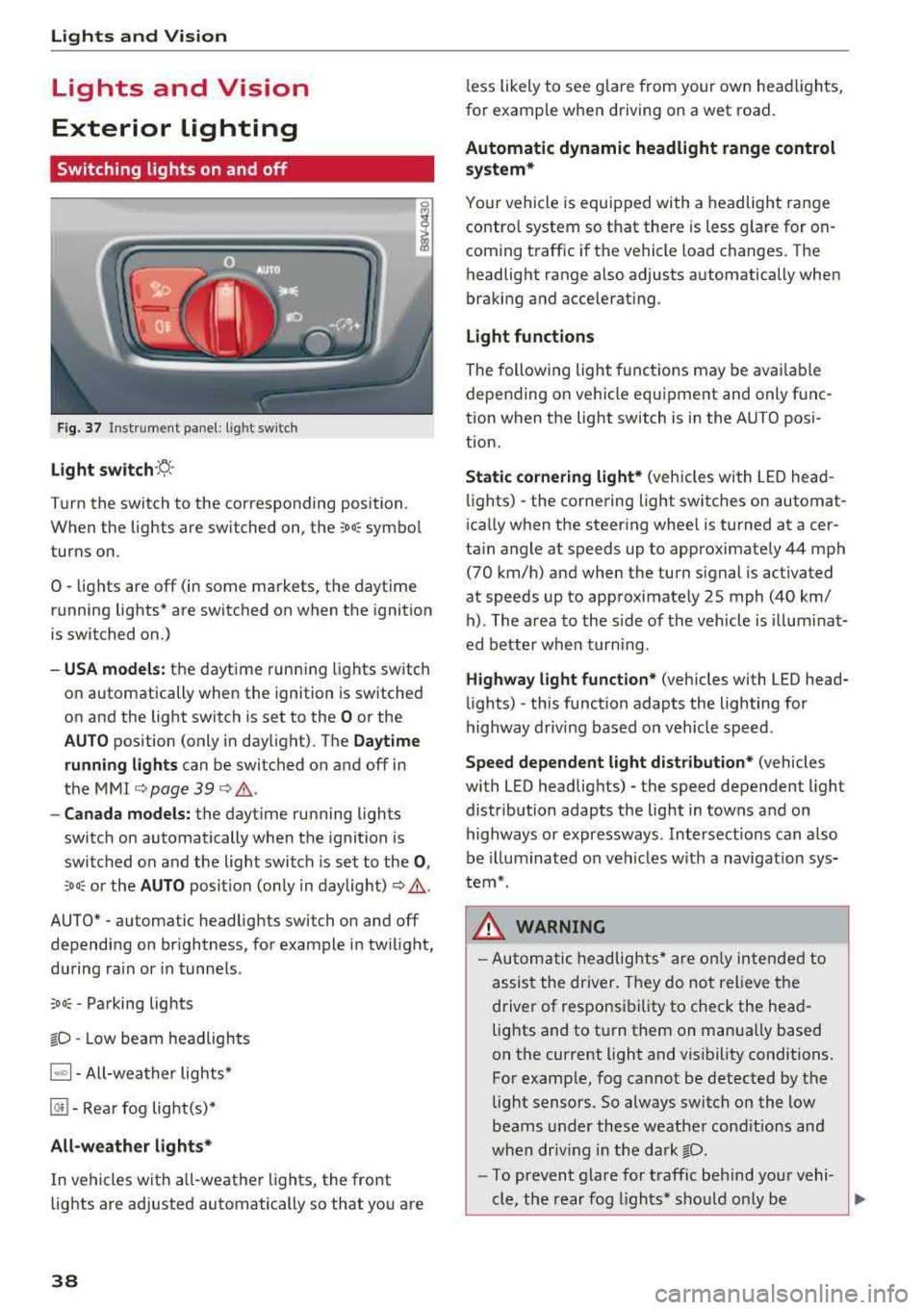
Switching lights on and off
F ig. 37 Instrument panel: l ight sw itch
Light s witch ·~ ·
I
Turn the switch to the corresponding position.
When the lights are switched on, the
;Do: symbo l
turns on.
0
• lights are off (in some markets, the daytime
running lights* are switched on when the ignition
is switched on.)
-USA models : the daytime running lights switch
on automatically when the ignition is sw itched
on and the light switch is set to the
O or the
AUTO position (only in daylight). The Daytime
runn ing lights
can be switched on and off in
the
MMI c::;, page 39 c::;, ,&. .
-Canad a models: the dayt ime running lights
switch on automatically when the ignition is
switched on and the light switch is set to the
0 ,
:'.Do: or the AUTO position (only in daylight) c::;, ,&. .
AUTO* - automatic headlig hts switch on and off
depending on br ightness, for example in tw ilight,
during ra in or in tunne ls .
;Do: -Parking lights
tD -Low beam headlights
1~"' 1-All-weather lights*
@!I -Rear fog light(s)*
All-weather light s*
In vehicles with a ll-weathe r lights, the front
lights are adjusted automatically so that yo u are
38
less likely to see g lare from your own head lights,
fo r example when driving on a wet road.
Automatic dynamic headlight range control
system*
Your vehicle is equipped with a headlight range
contro l system so that there is less g la re for on
coming t raffic if the vehicle load changes. The
headlight range also adjusts automatically when
braking and accelerat ing.
Light function s
The following light funct ions may be ava ilable
depending on ve hicle equipment and only f unc
tion when the light switch is in the AUTO posi
t ion.
Static cornering light* (vehicles with LED head
li ghts) - the corne ring light switches on automat
i ca lly when the steer ing whee l is turned at acer
ta in angle at speeds up to approximately 44 mph
(70 km/h) and when the turn signal is activated
at speeds up to approximately 25 mph (40 km/ h) . The area to the side of the veh icle is illum ina t
ed bette r whe n turn ing .
Highway l ight function * (vehicles with LED head
li ghts)
-this function adapts the lighting for
highway driv ing based on veh icle speed .
Speed dependent light dist ribution* (vehicles
with LED headlig hts) - the speed dependent light
distribution adapts the light in towns and on
highways or expressways . Intersections can a lso
be illuminated on veh icles w ith a navigat ion sys
tem*.
& WARNING
- Autom atic headlig hts * are o nly in tended to
assis t the driver. They do not relieve the
driver of responsi bility to check the head
lights and to t urn them on manually based
on the current light and v is ibility conditions.
For examp le, fog cannot be detected by the
light sensors . So always switch on the low
beams under these weather cond it io ns an d
when dr iv ing in the da rk
tD.
-To prevent gla re for traffic be hind you r vehi-
cle, the rear fog lights* sho uld only be
..,.
Page 42 of 310
Lights and Vision
Canada models: this function cannot be switched
off . They activate automatica lly each time the ig
n ition is switched on . T his menu item is shown
with a "gray background".
Entry /exit lighting
The ent ry li ghti ng function illum ina tes the area
outside the vehicle when you unlock the vehicle
when it is dark . To switch on the function, select
Ent ry/ex it lighting .
The exit light ing fun ct io n illum inates the area
outside the vehicle when you turn the ignition o ff
an d open the driver 's door when it is dark. To
sw itch on the function, select
Entry /exit light·
ing .
The ent ry/exit lighting only wo rks when it is dar k
an d the light switch is in the
AUTO position.
Emergency flashers
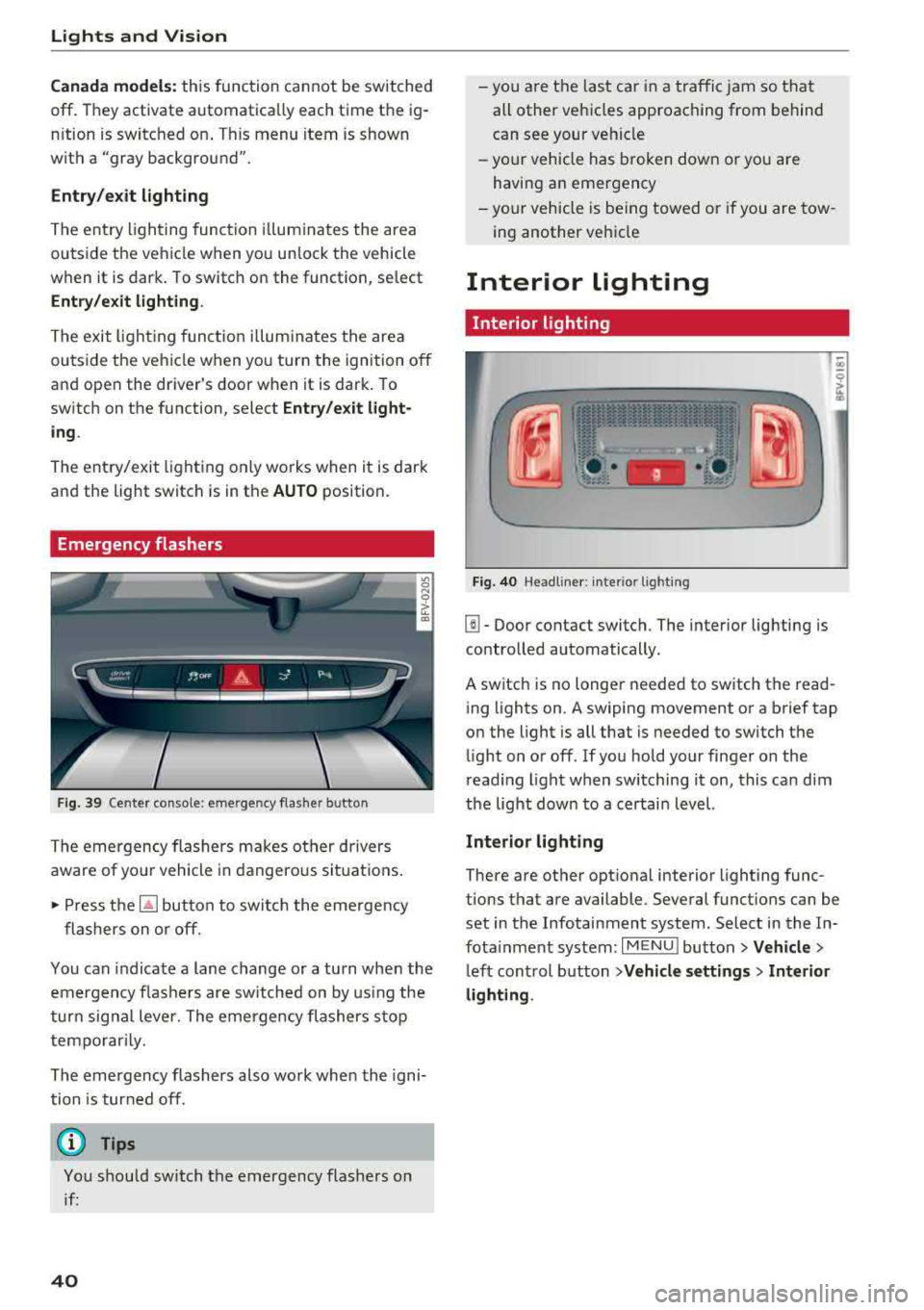
Fig. 39 Cente r conso le : eme rge ncy f las her butto n
The emergency flashers makes ot her dr ivers
aware of yo ur vehicle in dangerous si tuat io ns.
• P ress t h e ~ button to swi tch the eme rgency
flashers on or off.
You can indicate a lane change or a tu rn when the
em ergency fl ashe rs are sw itched on by us ing the
tur n sig na l lever. The emergency flashers s to p
tempo rarily.
The emergency flashers also work whe n the igni
tion is tur ned off.
(D Tips
You s hou ld switch t he emergency flashers on
i f :
40
-yo u are t he las t car in a traffi c jam so that
all other vehi cles approaching from behind
can see your ve hicle
- yo ur vehicle has broken down o r yo u a re
havin g an emerge ncy
-yo ur vehicle is be ing towed or if you a re tow
ing another vehi cle
Interior lighting
Interior lighting
Fi g. 40 Head lin e r: int eri or light ing
[]] - Door contact switch. The interior lighting is
contro lled automatically.
A switch is no longer needed to sw itch the read
i ng lights on .
A swiping movement o r a b rief tap
o n the light is all that is needed to switch the
li ght on o r off. If yo u ho ld your finger on the
r ead ing light when switching it on, this ca n dim
the lig ht dow n to a certai n level.
Interior lighting
There are othe r opt ional interior lighting func
tions that are available . Seve ral funct ions can be
set in the Infotainment system. Select in the In
fota inment system :
I MENU I button> Vehicle >
left con trol b utton > Vehicle settings > Interior
lighting .
Page 73 of 310
Cl co .... N ,....
N ...... 0 ,....
Vl co
Assistance systems Speed warning system
Description
App lies to: vehicles with speed warning system
The speed warning system helps you to stay be
low a specified maximum speed that can be set,
changed or deleted in the Infotainment system .
The speed warning system warns you if you are
exceeding the maximum speed that you have set .
A warning tone will sound as soon as your speed
exceeds the stored value slightly. The
(Ol (USA
models)/
(01 (Canada models) indicato r light
and a message appear i n the ins trumen t cluster
d isplay at the same time. The
(Sl (USA models)/
(O] (Canada models) indicator light and the mes
sage turn off when the ve hicle speed drops below
the stored maximum speed.
Sett ing a threshold is recommended if you would
like to be reminded when you reach a certain
maximum speed . Situations where you may want
to do so include driving in a country with a gener
al speed limit or if there is a specified maximum
speed for winter tires.
Setting the warning thr eshold
.. Se lect in the Infotainment system: ! MENUI b ut
ton
> Vehicle > left contro l button > Driver a s
s istan ce
> S peed warning > Manual.
@ Tips
Regard less of the speed warning system, you
should always monitor your speed using the
speedometer and make sure you are following
the legal speed limit.
A ssi st a nce systems
Cruise control system
Switching on
Applies to: vehicles with cruise control system
The cruise control system makes it possible to
drive at a constant speed starting at 15 mph
(20 km/h).
0
f
~
0
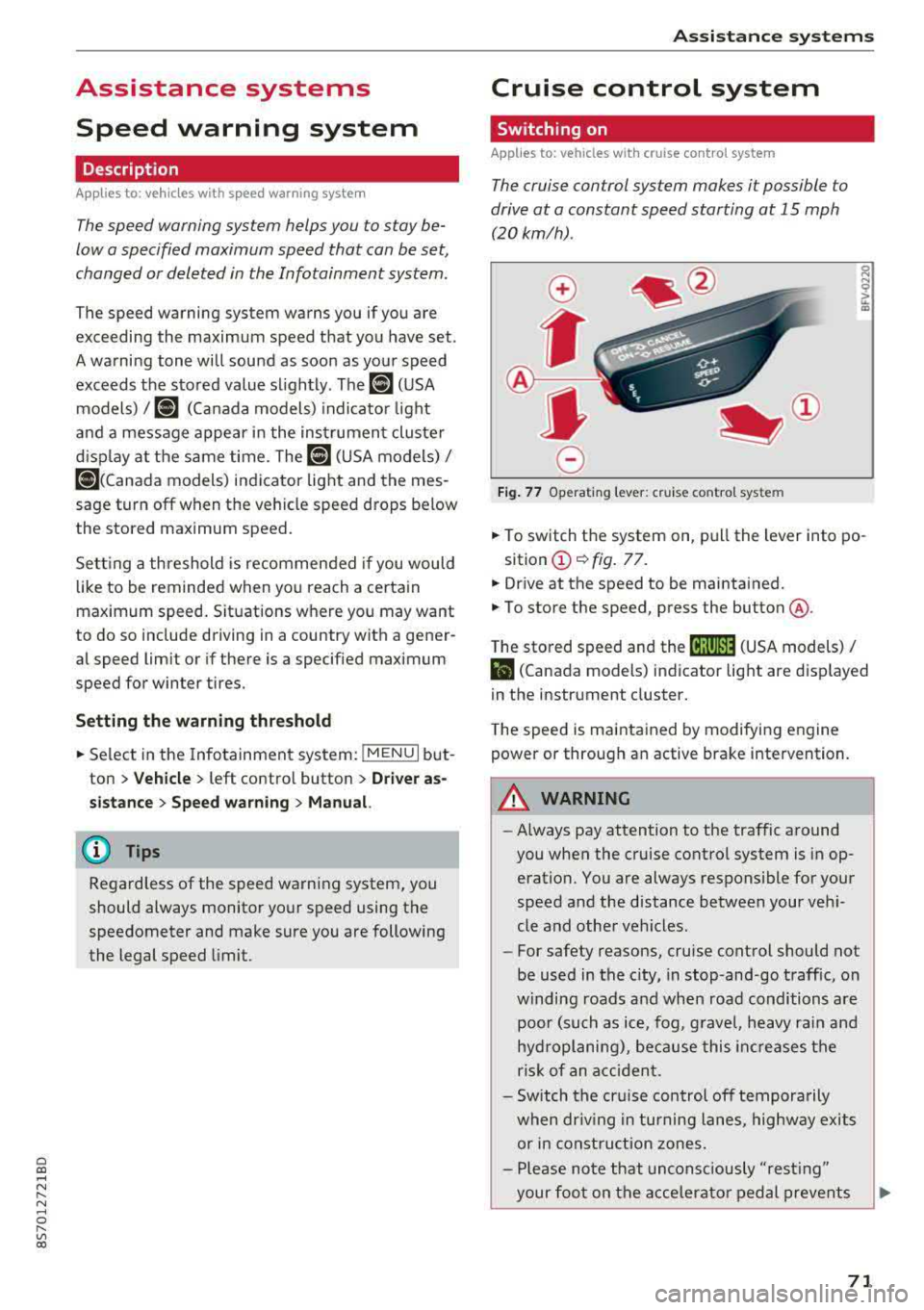
Fig . 7 7 Operat ing leve r: cru ise control system
.. To switch t he system on, pull the lever into po-
sition
(D ¢ fig. 77.
.. Drive at the speed to be maintained.
.. To store the speed, press the button @.
T he stored speed and the
@jltJ~i, (USA models) /
l'I (Canada models) ind icator lig ht are d isp layed
in the instrument cluster.
T he speed is maintained by modifying engine
power or through an active brake intervention.
_8 WARNING
---A lways pay attention to the traffic around
you when the cruise control system is in op
eration. You are always responsible for your
speed and the distance between your vehi
cle and othe r vehicles.
-For safety reasons, cruise control should not
be used in the city, in stop-and-go traffic, on
w inding roads a nd when road conditions a re
poor (such as ice, fog, g rave l, heavy rai n and
hydroplaning), because this in cr eases the
risk of an acciden t.
-Sw itch the cr uise con trol off tempora rily
when dr iv ing in tu rning lanes, highway exits
or in const ruc tion zones.
-Please no te that uncons ciously "resting"
your foo t on the accelera to r ped al prevents
-
71
Page 77 of 310
Cl co .... N ,....
N
This message appears if you are not stee ring by
yourse lf . If this is th e case, active lane ass ist does
not switch off, but it is "not ready" to provide a
warning . The system can he lp you keep the veh i
cle in the lane. However, you are responsible for
driving the vehicle and must steer it yourself .
A WARNING
Note that messages may be delayed or not
displayed on vehicles with accessor ies mount
ed on the steer ing whee l, such as a stee ring
wheel sp inner knob. Always keep you r hands
on t he steering whee l.
Adjusting the steering time and vibration
warning
Appl ies to: vehicles with Audi act ive lane ass ist
You con adjust individual act ive lone assist set
tings in the Infotainment system.
Selec t in the Infotai nment system : I MENUI but
ton>
Vehicle > left con trol button > Driv er a ssis
tance > Audi acti ve lane assist
Steering time
1>
Early : in this setting, the correct ive steering hap
pens continuously to help keep the vehicle in the
center of the lane .
Late : in this setting, the system provides correc
tive steering just before a vehicle whee l touches a
detected lane ma rker line .
Vibration warning
You can switch the additional vibration warning
in the steering wheel o n or off.
(I) Tips
In certain markets: your settings are stored
automatically and assigned to the remote
cont rol key in use .
8 1l The co rrect ive stee rin g fu nctio n is not ava ilabl e in all mar ,..._
~ kets.
A ssi st a nce systems
Audi side assist
Description
Applies to: veh icles w ith Audi side assist
0, :;; 0
it m
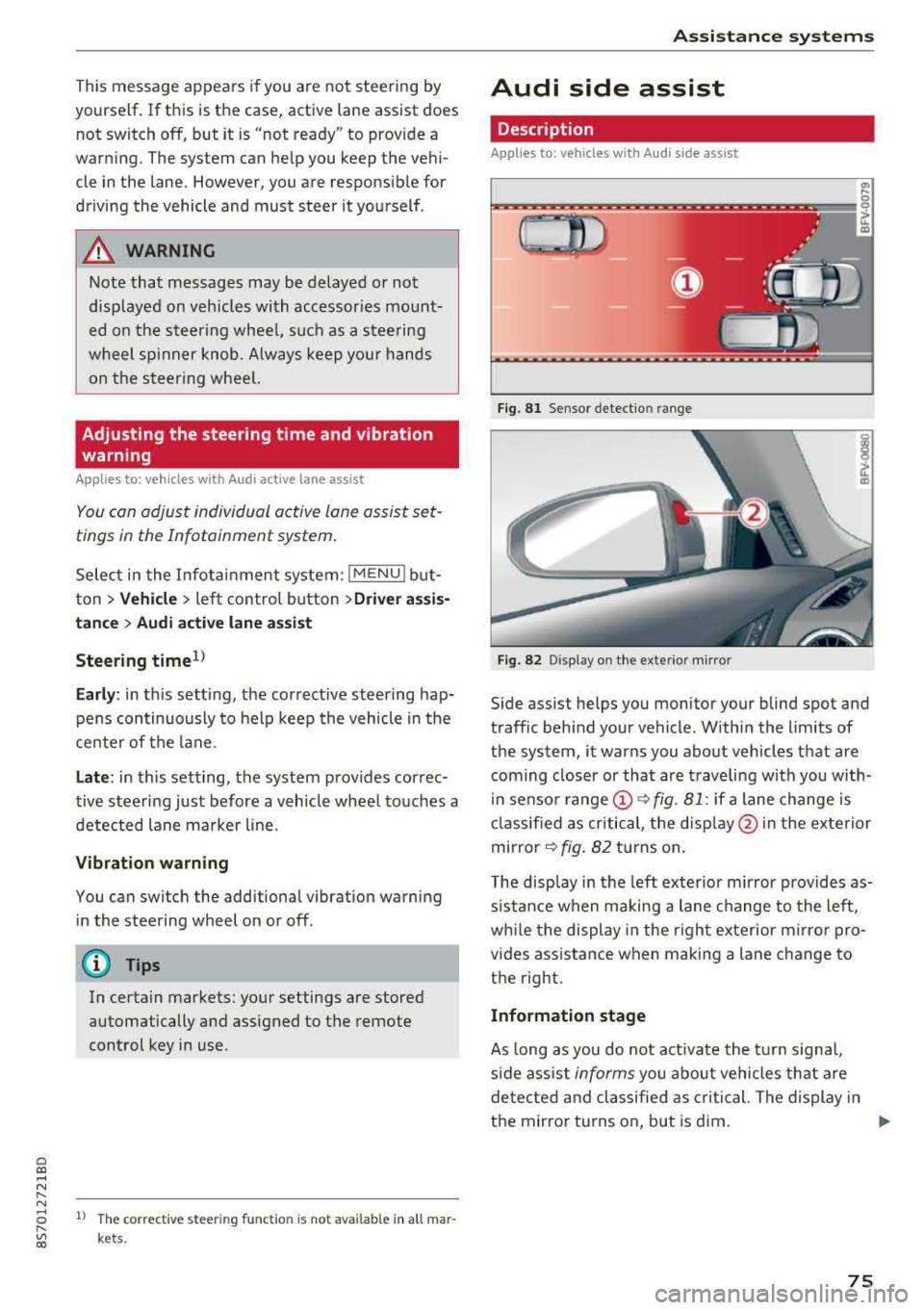
Fig . 81 Senso r de tect io n range
Fi g. 82 Disp lay on t he ex te ri or m irro r
Side assist helps you monitor your blind spot and
traff ic beh ind your vehicle . Withi n the limits of
the system , it warns you abo ut vehicles that are
coming closer or that a re t raveling with you with
i n senso r
range @~ fig. 81: if a lane change is
cla ssified as critical , the disp lay @ in the e xte rior
mirror
~ fig . 82 turns on .
T he display in the left exterio r m irror p rovides as
s istance when making a lane change to the left,
whi le the display in the r ight exterior mirro r pro
vides ass istance when m aking a lane change to
the right.
Information stage
As long as you do not act ivate the tu rn s igna l,
s ide ass ist
informs you about vehicles tha t are
detec ted and classifie d as critical. The display in
t h e mirror tu rns on, but is d im.
75
Page 78 of 310
Assistance systems
The display remains dim in the information stage
so that your view toward the front is not distur
bed .
Warning stage
If you activate the turn signa l, side assist warns
you abou t veh icles that are detected and classi
fied as critical. The display in the respective mir
ror blinks brightly. If this happens, check traffic
by glancing in the exterior mirrors and over your
shoulder
c:> .& in General information on
page
77.
(D Tips
You can ad just the brightness on of the dis
play on the rearview mirror
c:> page 77.
General information
Applies to: vehicles with Audi side assist
®
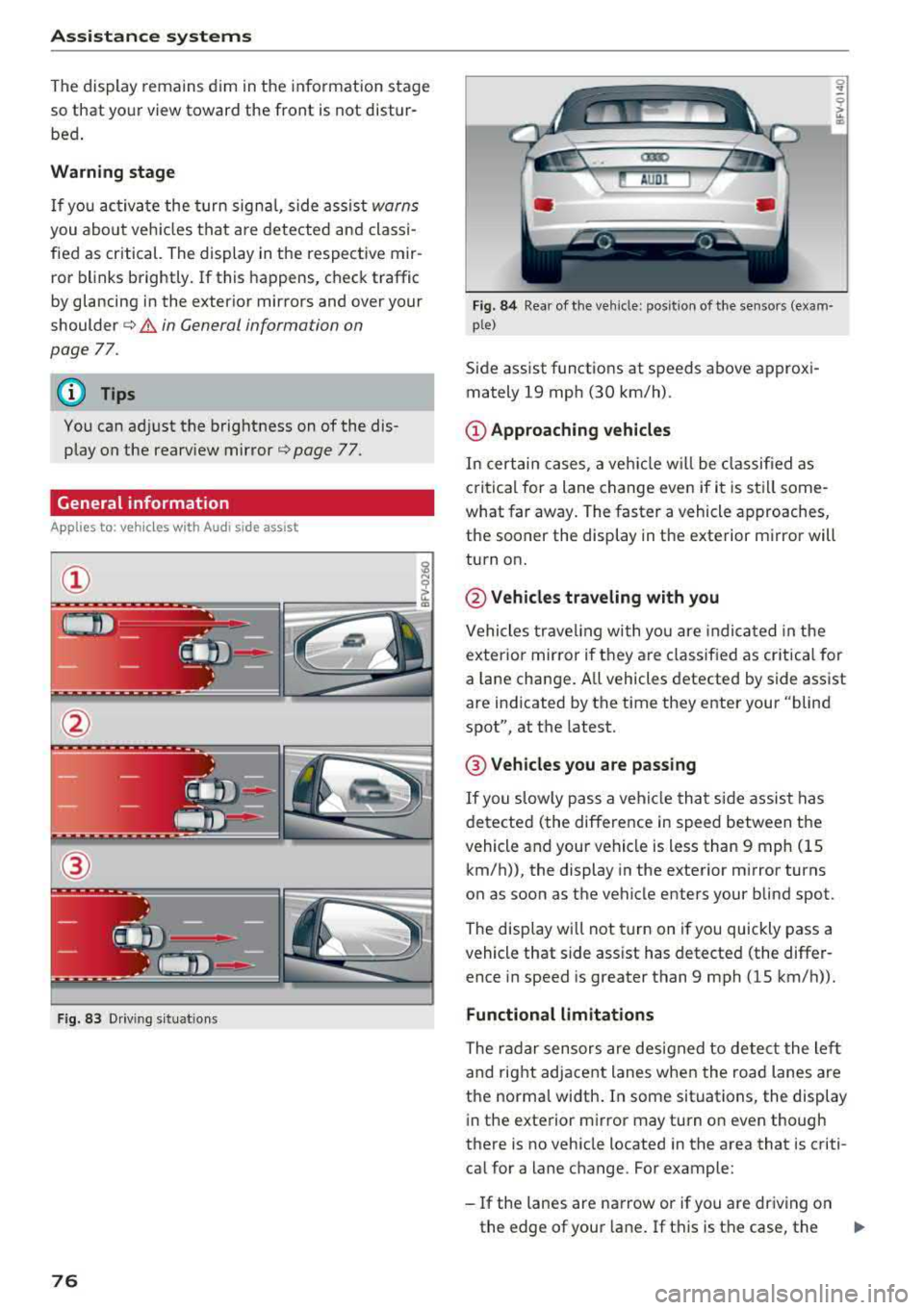
Fig. 83 Driving situat ions
76
Fig. 84 Rear of the veh icle: pos it ion of the sensors (exam·
p le)
Side assist funct ions at speeds above approxi
mately 19 mph (30 km/h) .
(D Approaching vehicles
In certain cases, a vehicle w ill be class ified as
c ritical for a lane change even if it is still some
what far away. The faster a vehicle approaches,
the sooner the display in the exterior m irror will
turn on.
@ Vehicles traveling with you
Vehicles traveling with you are indica ted in the
exterior mirror if t hey are classified as critical for
a lan e change. A ll vehicles detected by side assist
are indicated by the time they enter your "blind
spot", at the latest.
@ Vehicles you are passing
If you slowly pass a vehicle that side assist has
detected (the difference in speed between the
vehicle and your vehicle is less than 9 mph (15 km/h)), the display in the exterior mirror turns
on as soon as the vehicle enters your blind spot.
The display wi ll not turn on if you quickly pass a
vehicle that side ass ist has detected (the differ
ence in speed is greater than 9 mph (15 km/h)).
Functional limitations
The radar sensors are designed to detect the left
and right adjacent lanes when the road lanes are
the norma l width . In some situations, the display
in the exterior mirror may turn on even though
there is no vehicle located in the area that is criti
cal for a lane change. For example:
-If the lanes are narrow or if you are driving on
the edge of your lane . If this is the case, the
.,,_
Page 93 of 310
Cl 00 .-< N r-N .-< 0 r-Vl 00
Facility immediately to have the malfunction cor
rected. The color of the indicator light depends
on the vehicle speed.
A WARNING
-
Driving at higher speeds without the rear
spoiler deployed can impair handling charac
teristics, making the vehicle harder to con
trol.
- Always make sure that the spoiler is de
ployed when driving at speeds over 85 mph
(140 km/h) . If the rear spoiler warning/ind i
cator lig ht in the instrument cluste r comes
on, the rear spoiler may not have deployed.
- Never drive at speeds higher than 85 mph
(140 km/h) if the spoile r is not deployed.
Have the spo iler inspected as soon as possi
ble by an author ized Audi dealer or qua lified
works hop .
- Always obey speed l imits and othe r traffic
laws .
A WARNING
Improper operation of t he rear spoiler can
cause crushing injuries.
- Always make sure that nobody, especia lly
children, is in the way when the rear spoi ler
is deployed or retracted .
(Llj) Note
-Never push on the vehicle on the rear spo il
er. This cou ld cause damage.
- To p reve nt damage to the rear spoiler do
not lean o r place anyt hing on it.
-
- Only ope rate the rear spoiler manually when
the luggage compartment lid is close and
the rear spoiler mov ing parts are not
blocked. Otherwise, damage could occur .
(j) Tips
Clean the rear spoiler compartment eve ry 2 to
3 months . To function co rrectly, the rear
spoiler must be free of ice, snow and leaves .
Intellig ent T echn olo gy
Energy management
Your vehicle is equipped with an intelligent ener
gy management system for distributing electrici
ty. This significantly improves the starting ability
and increases the vehicle battery life.
(D Tips
- If you drive short distances frequent ly, the
vehicle battery may not charge enough
wh ile driving. As a result, convenience func
tions for electr ical equipment may be tem
pera rily unavailable .
- The vehicle battery w ill gradually drain if
the vehicle is not driven for long per iods of
t ime, or if electr ical equ ipment is used
when the engine is not runn ing. To ensure
that the veh icle can still be started, the
elect rical eq uipment w ill be red uced or
sw itched
off.
Information about data
recorded by vehicle
control modules
Your vehicle is not equipped with a crash data re
corder . This dev ice is installed by some veh icle
manufacturers to record data about crashes so
t h at it can be ana lyzed later. Crash data reco rd
ers are also called " Event Data Recorders (EDR)".
In some legal jurisdictions, it is not permitted to
access or down load data recorded by pre-instal
led crash data recorders in orde r to evaluate a
crash without clear consent of the vehicle owner.
Your vehicle is not equ ipped w ith a crash data re
corder . However it does contain a variety of e lec
tronic control modules for various vehicle sys
tems such as engine function, exha ust treatment
or airbags and safety belts.
T hese electronic contro l modu les record veh icle
data du ring normal driv ing fo r diagnosis and re
pair purposes. The record ing capability of the
electronic control modules is limited to data only
-no sound is recorded . If the contro l module de
tects a system ma lfunction or other change in
status, a very limited amount of data is recorded
for an extremely small period of time. Data that
..,.
9 1
Page 111 of 310
Cl 00 .-< N r--N .-< 0 r--Vl 00
Voice recognition system
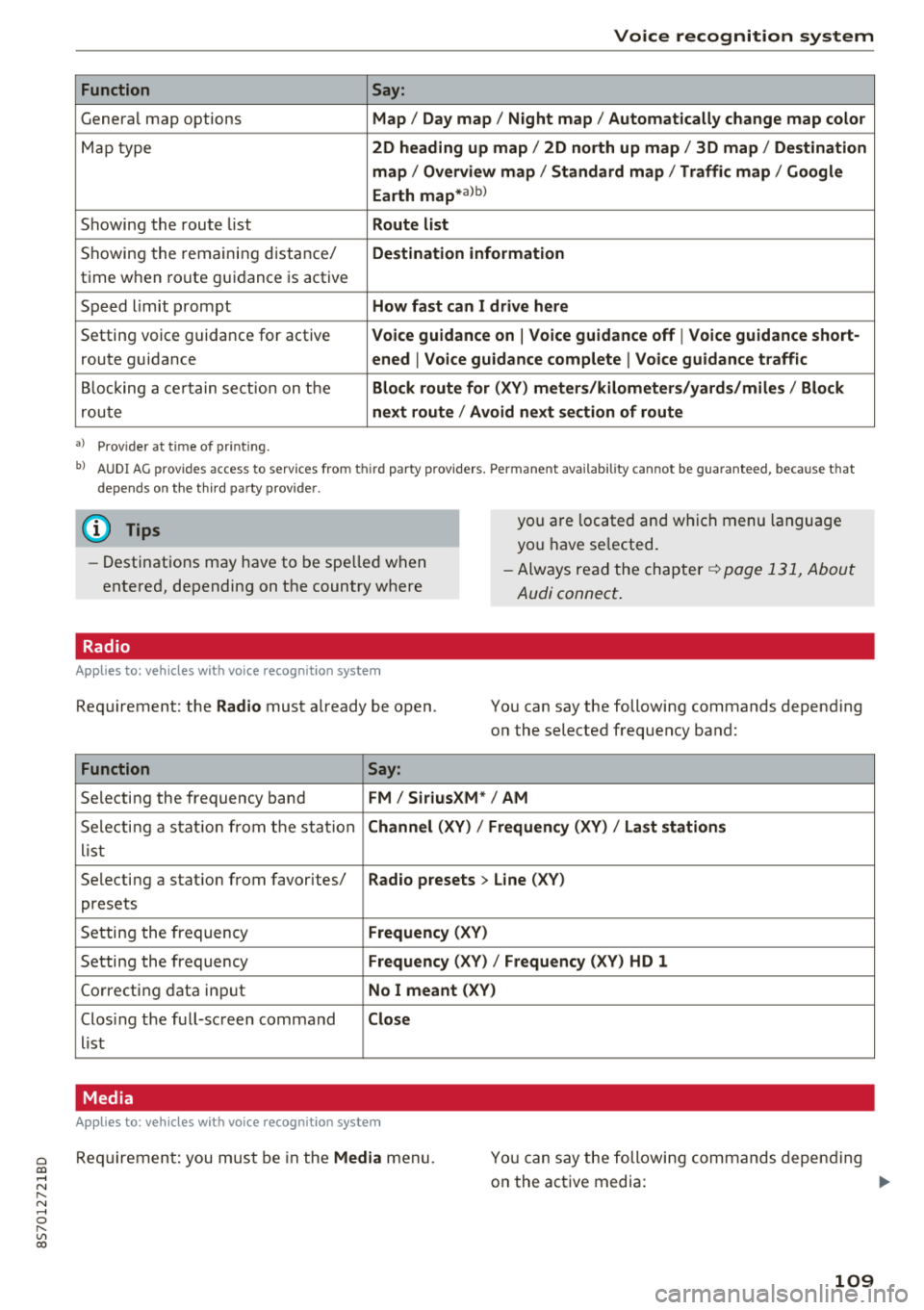
Function Say:
General map options Map / Day map / Night map / Automatically change map color
Map type 2D heading up map / 2D north up map / 3D map / Destination
map / Overview map / Standard map / Traffic map / Google
Earth
map* a)b )
Showing the route list Route list
Showing the remaining distance/ Destination information
time when route guidance is active
Speed limit prompt
How fast can I drive here
Setting voice guidance for active Voice guidance on I Voice guidance off I Voice guidance short-
route guidance ened I Voice guidance complete I Voice guidance traffic
Blocking a certain section on the Block route for (XV) meters/kilometers/yards/miles / Block
route next route I Avoid next section of route
a) Pro vid er a t tim e of printing .
bl A U DI AG provides access to ser vices fro m th ird par ty prov iders. Perm anent a vailabi lity canno t be guaranteed , beca use t hat
depends on the th ird party p rov ider.
(D Tips
- Destinations may have to be spelled when
entered, depending on the country where
Radio
Applies to: vehicles with voice recognitio n system
Requirement: the Radio must already be open .
Function Say:
you are located and which menu language
you have selected.
- Always read the chapter
q page 131, About
Audi connect .
You can say the following commands depending
on the selected frequency band:
Selecting the frequency band
FM / SiriusXM* / AM
Selecti ng a stat ion from the station Channel (XY) / Frequency (XV) / Last stations
list
Selecting a stat ion from favorites/
Radio presets > Line (XV)
presets
Setting the frequency
Frequency (XV)
Setting the frequency Frequency (XV) / Frequency (XV) HD 1
Correcting data input No I meant (XV)
Closing the full-sc reen command Close
list
Media
Applies to : vehicles with voice recognition system
Requirement: you must be in the Media menu. You can say the following commands depending
on the active media:
109