park assist AUDI TT ROADSTER 2018 User Guide
[x] Cancel search | Manufacturer: AUDI, Model Year: 2018, Model line: TT ROADSTER, Model: AUDI TT ROADSTER 2018Pages: 310, PDF Size: 46.95 MB
Page 71 of 310
Cl co .... N ,....
N ...... 0 ,....
Vl co
position. Then the indicator light and the mes
sage turn off, drive to an authorized Audi dea ler
or author ized Audi Service Facility immed iately to
have the malfunction corrected.
If the ind icator
light and the driver message do not turn off, do
not continue driving . See an authorized Audi
dealer or authorized Aud i Serv ice Facility for as
sistance .
DI Transmission : malfunction! You can contin
ue driving. See owner's manual
Drive to an authorized Aud i dea ler or authorized
Aud i Service Facility immediately to have the
malfunction corrected .
DI Transmission: malfunction! You may contin
ue driving. No reverse gear
There is a system mal funct ion in the transm is
sion. The transmission is switching to emergency
mode. This mode only shifts into certain gears or
will no longer shift at all. The engine may stall.
You cannot engage the reverse gear . Drive to an
author ized Audi dealer or authorized Audi Service
Facility immediately to have the malfunction cor
rected .
DI Transm ission : malfunction! You may contin
ue driving in D until engine off
Drive the vehicle away from moving traffic and
park. See an authorized Audi dealer or authorized
Aud i Service Facility for assistance.
DI Transmission: too hot. Please adapt driving
style
The transmission temperature has increased s ig
nificantly. Drive ve ry cautiously or take a break
from driving until the temperature returns to the
norma l range and the indicator light turns off.
DI Transmission : Please press brake pedal and
select gear again
I f the transmission ma lfunctions because the
temperature is too high, a message appears
when the transmission is cooled .
Driving
Selector lever emergency release
If the vehicle 's power supply fails, the selector
lever can be released in an emergency .
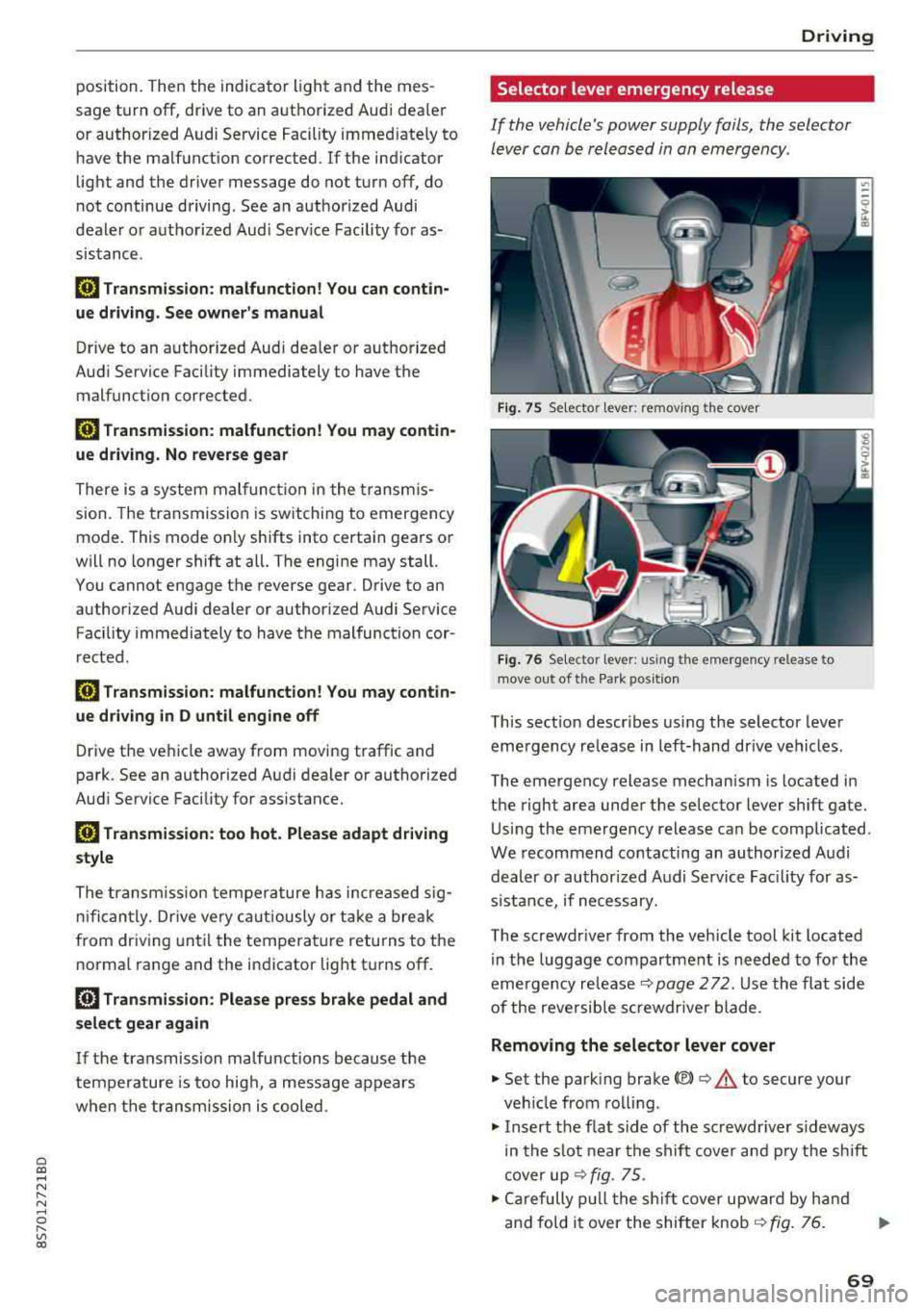
Fig. 7 S Selecto r lever : remov ing the cov er
Fig. 76 Se lecto r le ver: u sing th e em erge ncy re lease to
move out of t he Pa rk po siti on
This sect ion descr ibes using the selector lever
eme rgency release in left-hand dr ive vehicles .
The emergency release mechanism is located in
the right area under the selector lever shift gate.
Using the emergency release can be complicated .
We recommend contacting an authorized Audi
dealer or authorized A udi Service Fac ility for as
s istan ce, if necessary.
The screwdr iver from the vehicle tool kit located
in the luggage compartment is needed to for the
emergency
re lease ¢ page 2 72 . Use the flat side
of the reversible sc rewdr ive r blade .
Removing the selector lever cover
.,. Set the park ing brake<®> ¢.&. to secure your
veh icle from rolling.
.,. Insert the f lat s ide of the screwdr iver s ideways
in the slot near the shift cover and pry the shift
cover up
¢ fig . 75 .
.,. Carefully pull the shift cover upward by hand
and fold it over the shifter knob
¢ fig. 76. ..,.
69
Page 82 of 310
Parking syste m s
Parking systems
General information
A pplies to: ve hicles w ith rear park in g syste m/pa rk in g system
p lus
Depending on your vehicle 's equipment , various
parking aids will help you when parking and ma
neuvering.
The
r ea r p arki ng sys te m is an aud ible parking a id
that warns you of obstacles
behind the vehicle
¢ page 81.
The parki ng sys te m plu s assists you when park
ing by aud ibly and visually indicating objects de
tected
in front of and behind the veh icle
¢ page 81.
The rea rv iew ca mera shows the area behind the
veh icle in the Infotainment system d isplay . The
lines in the rearv iew camera image he lp you to
pa rk or maneuve r
¢page 82.
_& WARNING
-Always look for traff ic and check the area
around your vehicle by looking at it direct ly
as well. The parking system cannot replace
the driver's attention . The driver is always
responsib le when entering or leaving a park
ing space and during similar maneuvers.
- Please note that some surfaces, such as
clothing, are not detected by the system.
-
- Sensors and cameras have blind spots in
which people and objects cannot be detect
ed . Be especially cautious of small children
and animals.
- The sensors can be displaced by impacts or
damage to the radiator gr ille, bumper,
wheel housing and the underbody . The park
i ng system may be impa ired as a result .
Have an authorized Audi dealer or author
ized Audi Serv ice Facility check their func
t ion.
- Make su re the senso rs a re not obst ructed by
st ickers, depos its or othe r ma ter ia ls.
If they
are, the senso r funct io n could be impai red .
For additiona l information on cleaning, see
¢ page 266 .
80
@ Note
-Some objects are not detected or disp layed
by t he system under certain c ircumstances:
- objects such as barrier cha ins, tra iler draw
bars, vertical po les or fences
- objects above the sensors such as wall ex
tensions
- objects with certain surfaces or structures
such as cha in link fences or powder snow
- If you continue driving closer to a low ob
ject, it may disappear from the sensor range . Note that you will no longer be
wa rned about th is obstacle.
- Keep enough distance from the curb to re
duce the risk of damage to the rims .
(D Tips
-The system may provide a warning even
though there are no obstacles in the cover
age area in some situations, such as :
- certain road surfaces or when there is tall grass
- externa l ultrasonic sources such as from
cleaning vehicles
- in heavy rain, snow, or th ick vehicle ex
h a u st
- We recommend that you practice par king in
a traffic -free location or parking lot to be
come familiar with the system . When doing
this, there shou ld be good light and weath
er conditions.
- You can change the vo lume of the signa ls.
- What appea rs in the disp lay is slight ly de -
layed.
- Th e sensors m ust be kept clean and free of
snow and ice for the parking aid to operate .
Page 83 of 310
Cl co .... N ,....
N .... 0 ,....
Vl co
Rear parking system
Description
A pplies to: ve hicles with rear park ing system
The rear parking system is an audible parking
aid .
Desc ripti on
There is a sensor in the rear bumper cover. If
these detect an obstacle, audible signals warn
you .
Make sure the sensors are not covered by stick
ers, deposits or any other obstructions as it may
impair the sensor function. For informat ion on
cleaning, see
c::;.page 266 .
The range at which the sensors begin to measure
is approximately:
side 3 ft (0.90 m)
rear
center 5.2 ft (1.60 m)
The closer you get to the obstacle, the shorter
the interval between the audible signals . A con
tinuous tone sounds when the obstacle is less
than approximately 1 foot (0.30 meters) away.
Do not cont inue back ing up
c::;. &. in General infor
mation on page 80,
c::;. @ in General information
on page 80!
If the distance to an obstacle remains constant,
the volume of the distance warning gradually
drops after about four seconds (this does not ap ply in the continuous tone range).
Acti vat ing
The rear parking assist activates a utomatically
when the reverse gear is engaged. A brief confir
mat ion tone will sound.
Parking systems
Parking system plus
Description
App lies to: vehicles wit h parking system pl us
Parking system plus provides audio and visual
signals when parking.
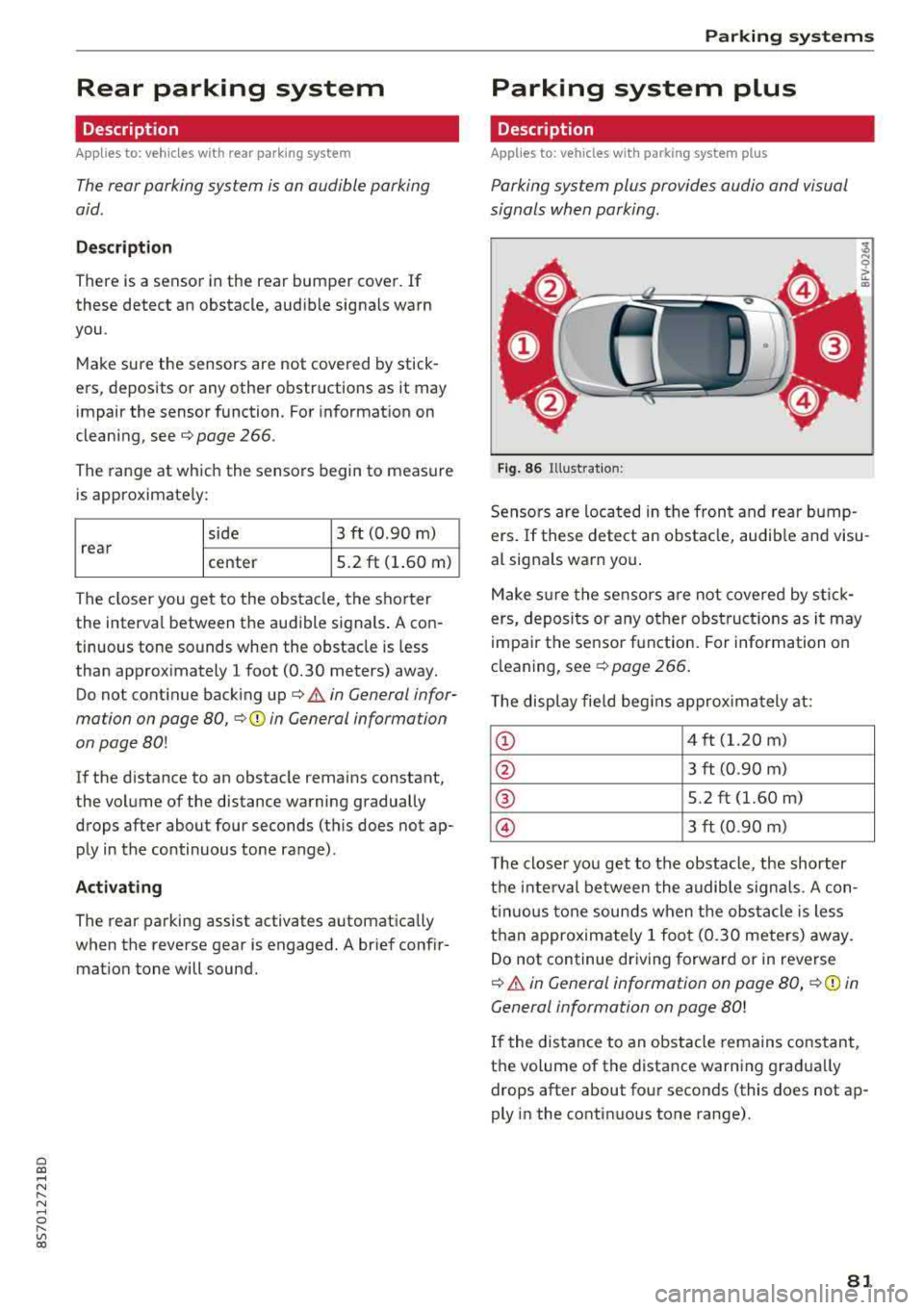
Fig . 86 Illust rat io n:
Sensors are located in the front and rear bump
ers. If these detect an obstacle, audib le and visu
al signals warn you .
Make s ure the sensors are not covered by st ick
ers, deposi ts or any other obstruc tions as it may
impa ir the se nsor function. For information on
cleaning, see
c::;. page 266 .
The display fie ld beg ins approx ima tely at:
CD 4 ft (1.20 m)
0 3 ft (0.90 m)
® 5.2 ft (1.60 m)
© 3 ft (0.90 m)
T he close r you get to the obstacle, the shorter
t h e i nte rval be twee n the audible signa ls . A con
t in u ous tone sounds when the obs tacle is less
than appro ximately 1 foot (0.30 meters) away.
Do not continue dr iving forward or in reverse
c::;. &. in General information on page 80, c::;. (D in
General information on page 80!
If the distance to an obstacle remains constant,
the volume of the distance warn ing gradua lly
drops after about four seconds (this does not ap
ply in the continuous tone range).
81
Page 85 of 310
Cl co .... N ,....
N ...... 0 ,....
Vl co
General information
Applies to: ve hicles with rearview camera
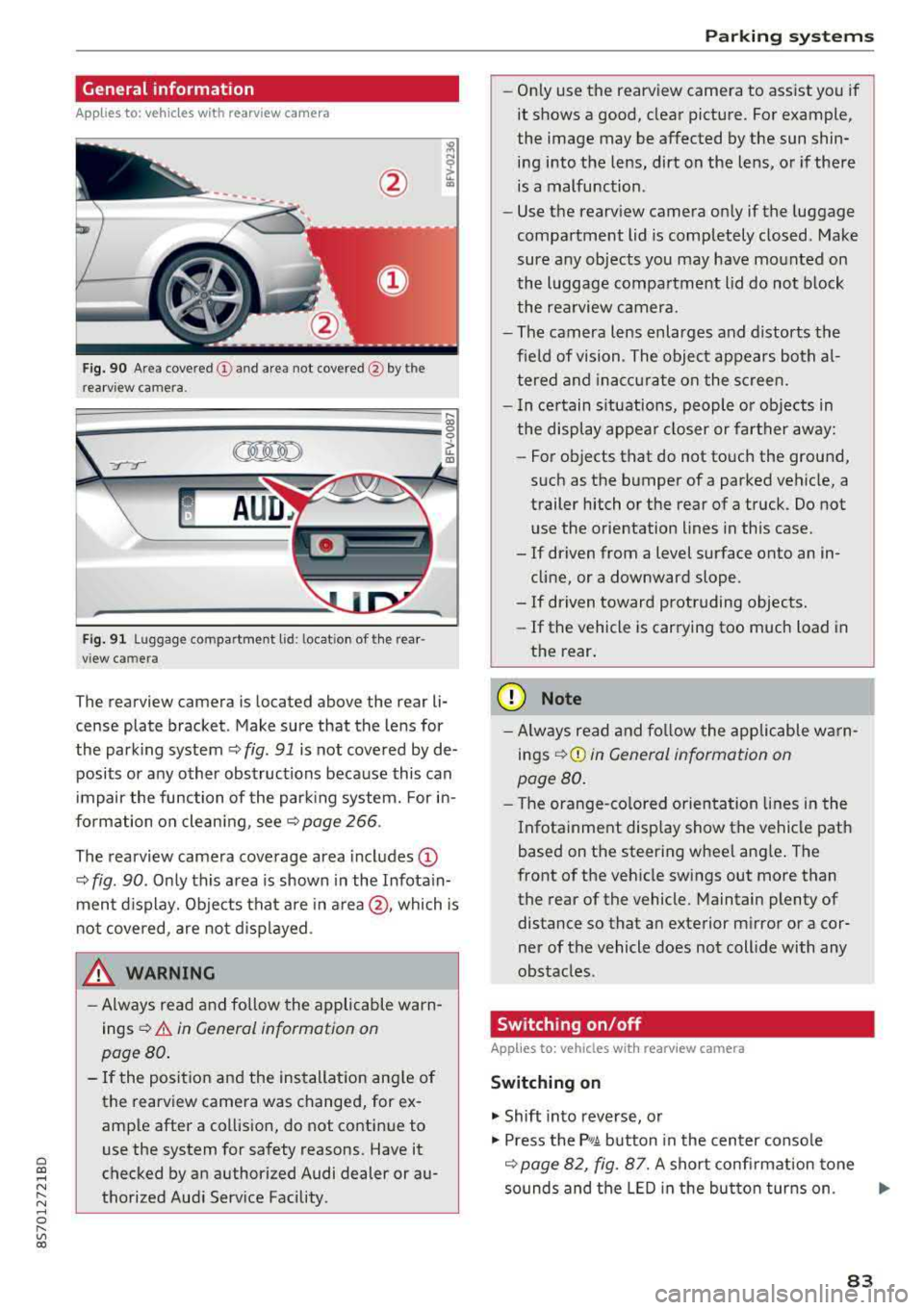
Fig . 90 Area covered (!) and area not covered @ by the
rea rview camera.
:;,
~;..------: :.·~- ---~ _.,- ,.,,.--------g
(Jo00oD ~
Fig. 91 Luggag e compartment lid: locat ion of the rear
view camera
The rearview camera is located above the rear li
cense plate bracket. Make sure that the lens for
the parking system¢
fig. 91 is not covered by de
posits or any other obstructions because this can
impair the function of the parking system. For in
formation on cleaning, see¢
page 266 .
The rearview camera coverage area includes
(D
¢ fig. 90. Only this area is shown in the Infotain
ment display. Objects that are in
area @, which is
not covered, are not displayed.
A WARNING
-Always read and follow the applicable warn
ings ¢
A in General information on
page 80.
- If the position and the installation angle of
the rearv iew camera was changed, for ex
ample after a collision, do not continue to
use the system for safety reasons. Have it
checked by an authorized Audi dealer or au
thorized Audi Service Facility .
Parking systems
-Only use the rearview camera to assist you if
it shows a good, clear picture. For example,
the image may be affected by the sun shin
ing into the lens, dirt on the lens, or if there
is a malfunction.
- Use the rearview camera only if the luggage
compartment lid is completely closed. Make
sure any objects you may have mounted on
the luggage compartment lid do not block
the rearview camera.
- The camera lens enlarges and distorts the
field of vision. The object appears both al
tered and inaccurate on the screen.
- In certain situations, people or objects in
the display appear closer or farther away:
- For objects that do not touch the ground,
such as the bumper of a parked vehicle, a
trailer hitch or the rear of a truck. Do not use the orientation lines in this case.
- If driven from a level surface onto an in cline, or a downward slope .
- If driven toward protruding objects.
- If the vehicle is carrying too much load in
the rear.
(D Note
-Always read and follow the applicable warn
ings
¢ (D in General information on
page 80.
- The orange-colored orientation lines in the
Infotainment display show the vehicle path
based on the steering wheel angle. The
front of the vehicle swings out more than
the rear of the vehicle. Maintain plenty of
distance so that an exterior mirror or a cor
ner of the vehicle does not collide with any
obstacles.
Switching on/off
App lies to : vehicles wi th rearv iew camera
Switching on
.,. Shift into reverse, or
.,. Press the P,q.A button in the center console
¢ page 82, fig. 87. A short confirmation tone
sounds and the LED in the button turns on.
..,.
83
Page 86 of 310
Parking systems
Switching off
~ Drive faster than 6 mph (10 km/h), or
~ Press the P"'il button, or
~ Switch the ignition off .
(D Tips
-The visual display in the left part of the dis
play should help you detect the critical vehi
cle areas .
- You can change the volume of the signals
and the display
¢page 84.
Perpendicular parking
Applies to: vehicles with rearview camera
This view may be used when parking in a garage
or in a parking space.
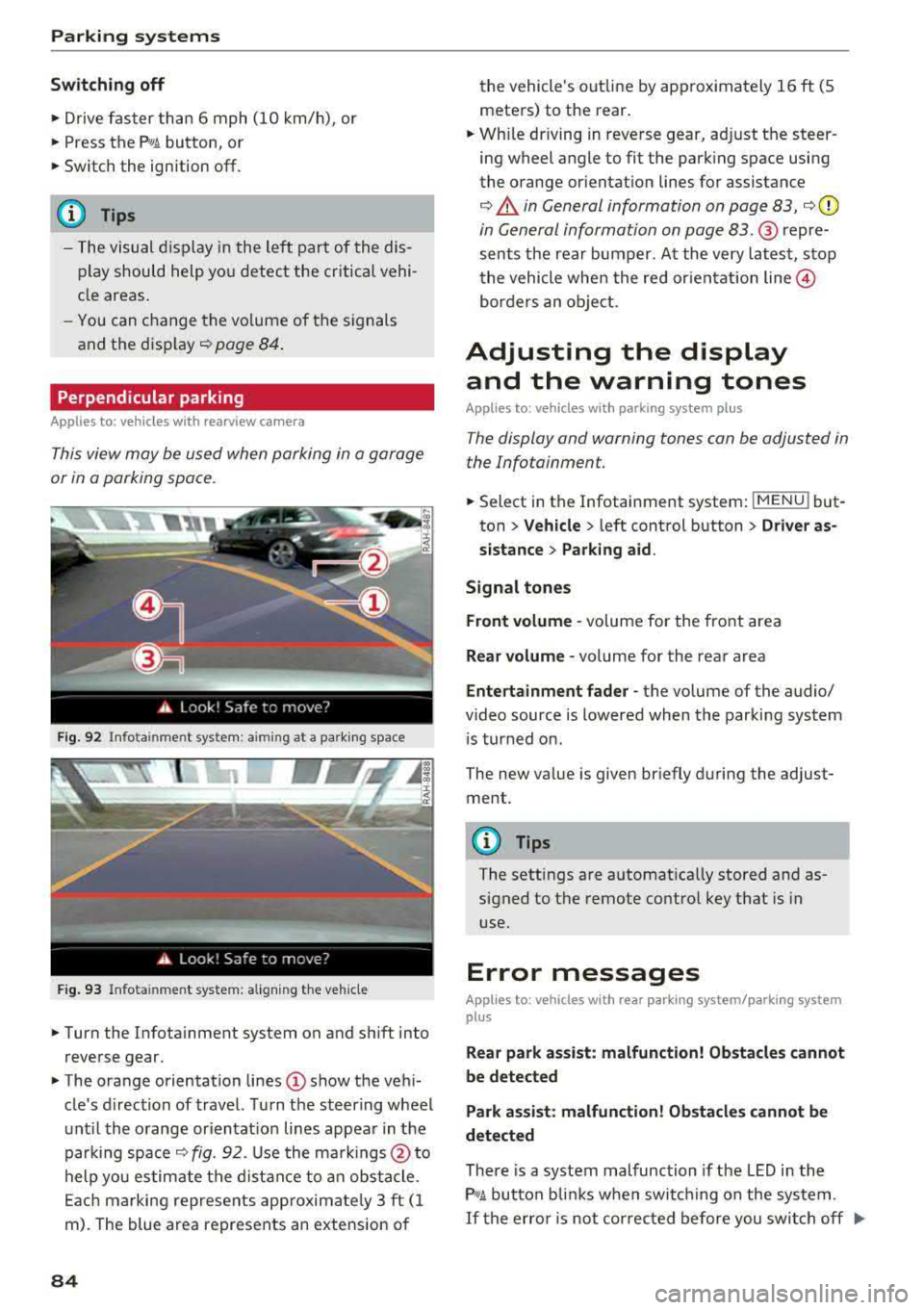
F ig. 92 Info ta in ment system: a im ing at a park ing space
Fig. 93 Infota inme nt system: aligning the vehicle
~ Turn the Infota inment system on and shift into
reverse gear.
~ The orange orientation lines (D show the vehi
cle's d irection of travel. Turn the steering wheel
until the orange or ientat ion lines appear in the
parking space
¢ fig. 92. Use the markings @to
help you estimate the distance to an obstacle.
Each marking represents app roximate ly 3 ft (1
m). The blue area represents an extension of
84
the vehicle 's out line by approximately 16 ft (5
meters) to the rear.
~ Wh ile driving in reverse gear, adjust the steer
ing wheel angle to fit the parking space using
the orange orientation lines for assistance
¢ .&. in General information on page 83, ¢(D
in General information on page 83. ® repre
sents the rear bumper. At the very latest, stop
the vehicle when the red or ientat ion
line @
borders an object.
Adjusting the display
and the warning tones
Applies to: vehicles with parking system plus
The display and warning tones can be adjusted in
the Infotainment.
~ Select in the Infotainment system : IMENU! but
ton
> Vehicle > left control button > Driver as
sistance> Parking aid.
Signal tones
Front volume -
volume for the front area
Rear volume -volume for the rear area
Entertainment fader -the volume of the audio/
video source is lowered when the parking system
i s turned on.
The new value is given briefly during the adjust ment.
{!) Tips
The settings are automat ically stored and as
signed to the remote control key that is in
use.
Error messages
App lies to: vehicles with rear park ing system/parking system
plus
Rear park assist: malfunction! Obstacles cannot
be detected
Park assist: malfunction! Obstacles cannot be
detected
There is a system malfunction if the LED in the
P'1
1 .ll button blin ks when switc hing on the system .
If the error is not corrected before you switch off Ill-
Page 107 of 310
Cl 00 .-< N r-N .-< 0 r-Vl 00
Voice recognition system Operating
Applies to: vehicles with voice recognitio n system
You con operate many Infotainment functions
conveniently by speaking.
Requirement: the ignition and the MM I must be
switched on, there m ust be no phone call in p rog
ress and the park ing system must not be active.
~ Switching on : briefly p ress t h e ~ but ton @
¢page 19, fig . 9 on the multif unction steering
whee l and say th e desi red command after the
Beep .
~ Switching off : press and hold the ~ button .
Or: say the command Cancel.
~ Pausing : say the command Pause . To resume,
press
the~ b utt on .
~ Corr ecting : press t h e ~ button one t ime ®
¢ page 18, fig. 7. Or: say the co mmand Correc
tion .
Input assistance
The system g uides you throug h the input with
v isua l and aud io feedback .
-Visual input assistance : after switching on
vo ice recogn it io n, a display with a se lection of
poss ible commands appears . The command
display can be sw itched on/off under
I M EN U I >
Setting s> left contro l butto n > MMI setting s>
Speech dialog system .
- Audio input assistance:
to have the poss ible
c omma nds read, press t he
10, I bu tton o n the
mul tifunc tion steering w heel b riefly and say
Help.
For the system to understand you:
Speak clearly and dis tinct ly a t a normal vo lume .
Speak lo uder when d riving faste r.
Emphasi ze the words in the commands even ly
a n d do not leave long pauses .
Do not spea k a command when the voice recogni
tion system is m aking an a nno uncement.
C lose the doors, the windows and the sunroof* to
r e duce background noise. Make s ure that passe n-
Voice recognition system
gers are not speaking w hen you are g iv ing a voice
comman d.
D o no t direct the vents towa rd the handsfree mi
c rophone, wh ic h is near the fro nt inter ior lights
on the roof headline r or on the dr iver's safety
belt*. Fo r additional informat io n on th e safety
belt m ic rophone, see
¢ pag e 122 .
Only use the system from the dr ive r's sea t be
ca use the hands -free microphone is di rected to
ward that s eat .
Additional settings
See ¢ page 178, Voice recognition system.
_&. WARNING
- D ir e ct y ou r full a tte ntio n to dr iv in g. A s t he
dr iver, you have com ple te re spon sibility fo r
safety in t raff ic . O nly use the functions in
such a way t hat you a lways maintai n com
p lete contro l over your vehicle in all traffic
situations.
- Do not use t he voice recognition system in
emergencies beca use your voice may change
in st ressfu l s ituations. It may ta ke longe r to
d ia l the number o r th e system may not be
ab le to d ia l it at all. Dia l the emergency
number manually .
(D Tips
-The d ialog pauses w hen the re is a n incom
ing phone call a nd will con tinue if yo u ig
nore the ca ll. The dia log ends if yo u answer
t he ca ll.
- There are no vo ice gu idance* prompts when
a dialog is ac tive .
- Yo u ca n select a n item in the list us ing ei
t her the vo ice recogn ition sys tem o r the
cont ro l knob .
Command overview
information
Applies to: vehicles with voice recognition system
T he following overv iews des crib e the co m man ds
t h at can be used to oper ate the MMI using the
vo ice recognit ion system.
..,.
105
Page 243 of 310
Cl co .... N ,....
N .... 0 ,....
Vl co
continue driving. See an authorized A udi deal
er or authorized Audi Service Facility for
assistance.
Brake fluid
F ig . 18 4 Engine co mpar tment : cove r on the brake flu id
r eservo ir
Observe the safety precautions c:> .&. in Working
in the engine compar tmen t on page 233.
Checking th e brake f luid l ev el
.,. Read the brake fluid level on the brake fluid
reservoir
i:> page 236, fig. 180. The bra ke fluid
l ev el must be between the MI N and MAX mark
ings
c:> ,&. .
The brake flu id level is mon itored a utomat ica lly.
Changing the brake fluid
H ave the b rake flu id changed regularly by an a u
thor ized Audi dealer or au thor ized A udi Se rvice
F acility .
A WARNING
-If the br ake f luid level is be low the M IN
marking, it can impair the braking effect
and dr iv ing safety, which increase the risk of
an acc ident. Do not cont inue driving . See an
authorized Audi dealer or authorized Audi
Service Facility for assistance .
- If the brake f luid is o ld, bubbles may form
in the brake system du ring heavy braking.
Th is would impair brak ing performance and
dr iv ing safety, which increases the risk of an
acc ident.
- To ensure the brake system functions cor
rectly, only use brake fluids that comply
Chec king and Filling
wit h VW standard 501 14 or
FMVSS-116 DOT 4.
(D Note
- If the brake f lu id leve l is a bove the MA X
marking, bra ke f luid may leak o ut over the
edge of the reservo ir and result i n damage
to the vehicle.
- Do not get any b rake fl uid on the vehicle
paint, because it w ill corrode the paint .
Battery
General warnings about batteries
Bec au se of t he complex power sup ply, all wo rk
o n batter ies such as d iscon necti ng, replac ing,
etc., sho uld
onl y be performed by an au thorized
Audi dealer or authorized A udi Service Facility
c:> &_ .
The term "veh icle ba ttery" refe rs to the 12 Volt
battery in you r vehicle .
Detailed warnings for the vehicle battery :
~
Always wear eye protection .
&
Battery acid is highly corros ive . A lways
wear protective gloves a nd eye p rotection .
®
Fire, sparks , open flame and smok ing are
forbidden.
£
A hig hly explos ive m ix ture of gases ca n
for m when ch arging b att er ies.
®
Always keep children far away from bat-
tery electrolyte and the battery.
~
Always follow the instruct ions in the oper-
ating manual.
A WARNING ,.__ -All work on the battery or electrical system in
your vehicle can result in injuries, chem ica l
burns, acc idents or burns . Because of this, all
work must be pe rformed
only by an author
iz ed Audi dealer or authorized A udi Service
F ac ility.
..,.
241
Page 274 of 310
Emergency assistance
Emergency assistance
Trunk escape latch
In case of an emergency , the rear lid can be
opened from the inside using the trunk escape
latch.
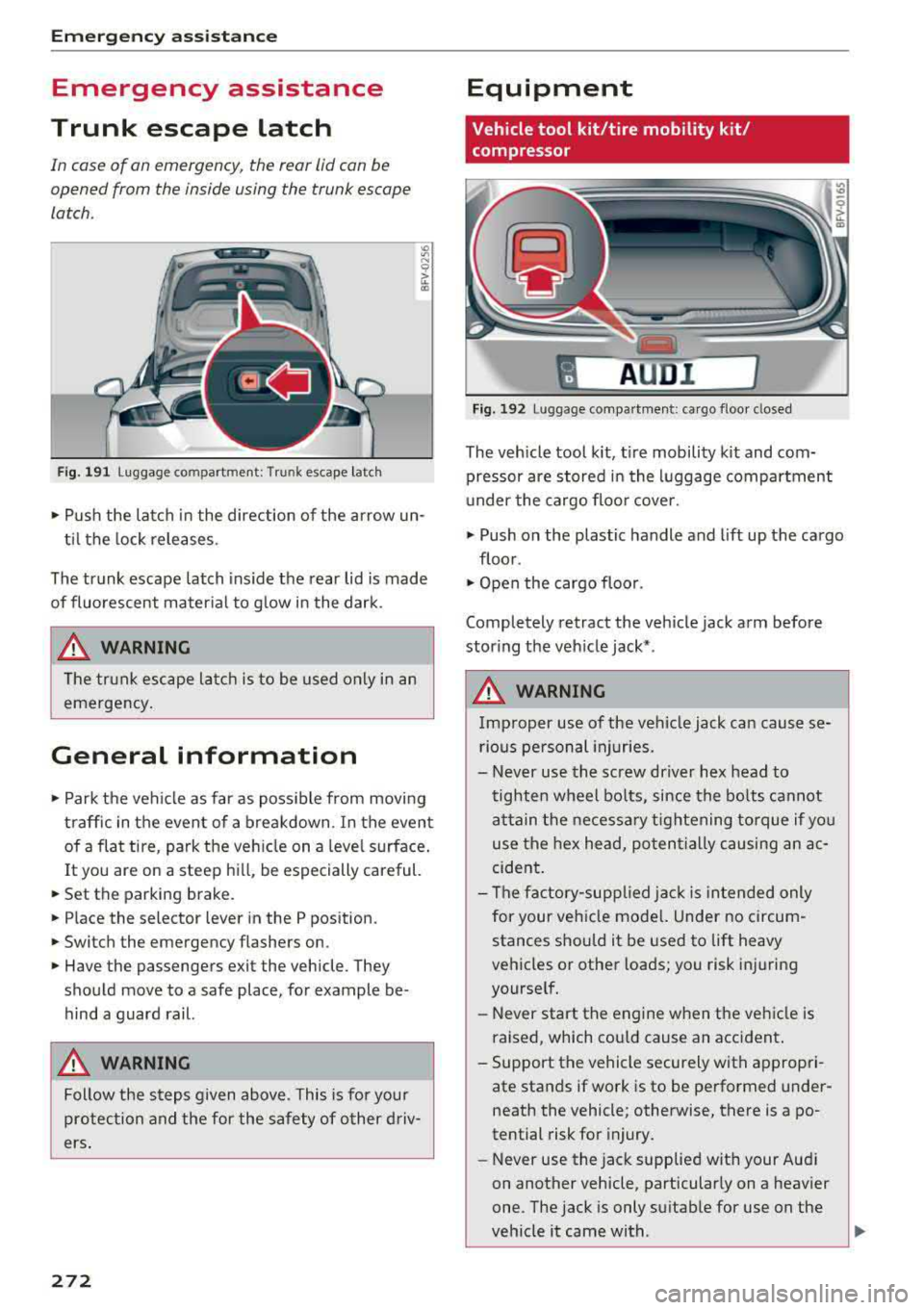
Fig. 191 L uggage compartment: Trunk escape latch
• Pu sh the latch in the direction of the arrow un
til the lock releases .
The trunk escape latch inside the rear lid is made
of fluorescent material to g low in the dark.
.&_ WARNING
The trunk escape latch is to be used only in an
emergency.
General information
• Park the vehicle as far as poss ible from moving
traffic in the event of a breakdown . In the event
of a flat tire , park the vehicle on a level surface .
It you are on a steep hill, be especially careful.
• Set the parking brake.
• Place the selector lever in the P position.
• Switch the emergency flashers on.
• Have the passengers exit the vehicle. They
should move to a safe place, for example be
hind a guard rail.
.&_ WARNING
Follow the steps given above . This is for your
protection and the for the safety of other driv
ers.
272
Equipment
Vehicle tool kit/tire mobility kit/
compressor
A UD i 1
Fig. 192 Lu ggage compartmen t: cargo floor closed
The vehicle tool kit, tire mobility kit and com·
pressor are stored in the luggage compartment
u nder the cargo floor cover.
• Push on the plastic handle and lift up the cargo
floor .
• Open the cargo floor.
Completely retract the vehicle jack arm before
storing the vehicle jack* .
.&_ WARNING
Improper use of the veh icle jack can cause se
rious personal injuries.
- Never use the screw driver hex head to
tighten wheel bolts, since the bolts cannot
attain the necessary tightening torque if you
use the hex head, potentially causing an ac
cident.
- The factory-supplied jack is intended only
for your vehicle mode l. Under no circum
stances should it be used to lift heavy
vehicles or other loads; you risk injuring
yourself.
- Never start the engine when the vehicle is
raised, which cou ld cause an accident .
- Support the vehicle securely with appropri
ate stands if work is to be performed under
neath the vehicle; otherwise, there is a
po
tential risk for injury.
- Never use the jack supplied with your Aud i
on another vehicle, particularly on a heavier
one. The jack is only suitable for use on the
vehicle it came with .
...
Page 275 of 310
Cl co .... N ,....
N ...... 0 ,....
Vl co
(D Tips
The vehicle jack* in your vehicle is maintena nee-free.
Ti re mobility kit
Preparation
A ppl ies to: ve hicles with tire mobility kit
~ Read and follow the important safety precau-
t ions ¢
page 2 72, General information.
~ Set the parking b rake.
~ Select the "P" selector lever position .
~ Check if a repair with the tire mobility kit is pos
sible c:>page 273.
Using the tire mobility kit
Appl ies to: ve hicles w ith tire mob ility kit
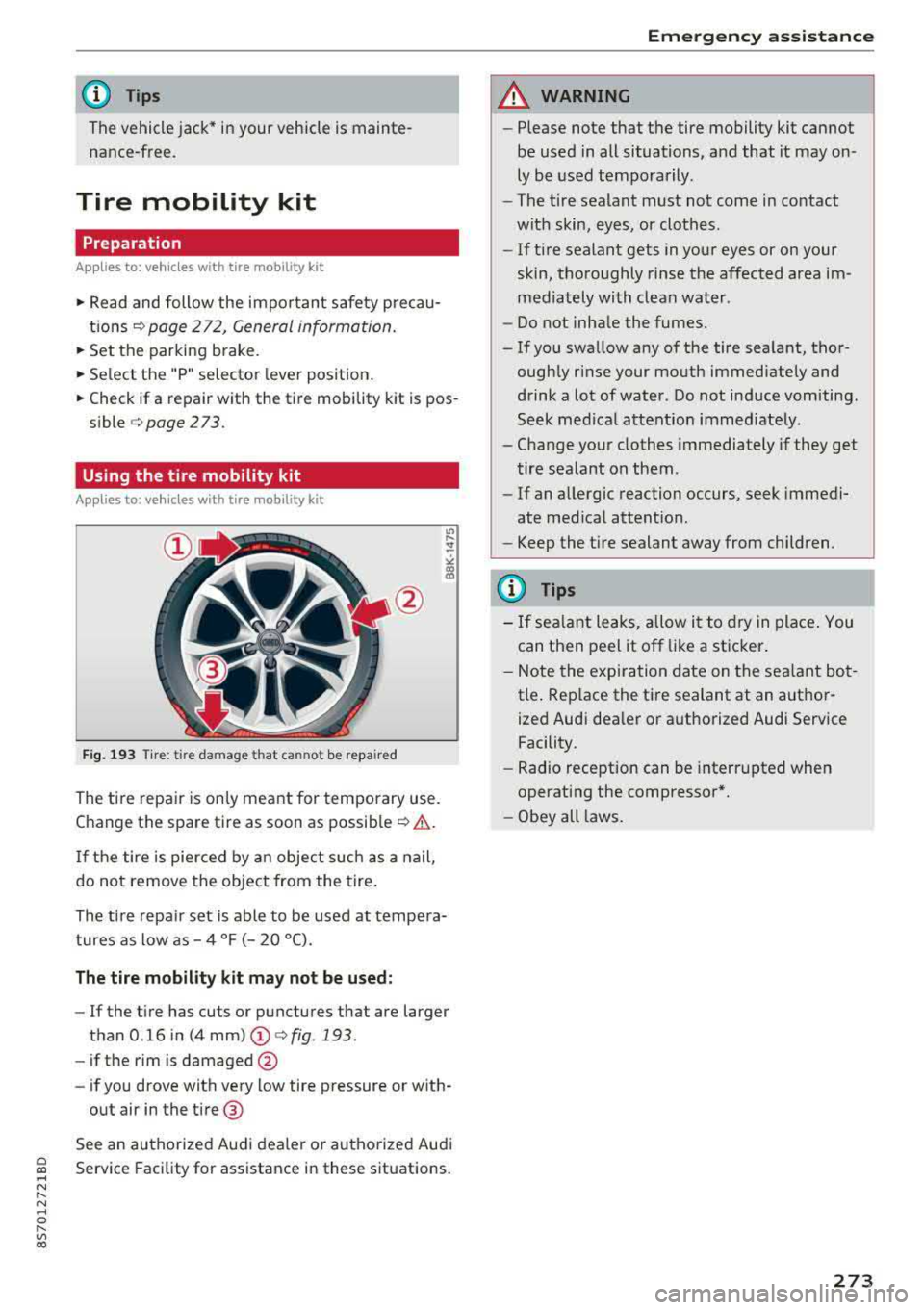
Fig . 193 Tire : tire da mage that canno t be repa ired
The tire repair is only meant for temporary use .
Change the spare tire as soon as
possib le ¢ .& .
If the tire is pierced by a n object such as a nail,
do not remove the object from the tire .
The tire repa ir set is able to be used at tempe ra
tures as low as
-4 °F (- 20 °C).
The tire mobility kit ma y not be u sed:
- If the t i re has cuts or punctures that are larger
than 0 .16 in (4
mm) (!)¢ fig. 193.
-if the rim is damaged @
- if you drove with very low tire pressure or with-
out air in the tire @
See an authorized Audi dealer or authorized Aud i
Service Facility for assistance in these situations.
Em ergen cy as sis tanc e
A WARNING
-Please note that the tire mobility kit cannot
be used in all situations, and that it may on
ly be used temporarily.
- The tire sealant must not come in contact
with skin, eyes , or clothes.
- If tire sealant gets in your eyes or on your
skin, thoroughly rinse the affected area im
mediately with clean water .
- Do not inha le the fumes.
-If you swa llow any of the tire sealant, thor-
ough ly rinse your mouth immediately and
drink a lot of water . Do not induce vomiting .
Seek med ica l attent ion immed iate ly.
-Change your clothes immediately if they get
tire sealant on them.
-If an allergic reaction occurs, seek immedi
ate med ical attention.
-Keep the tire sealant away from children.
(D Tips
- If sea lant leaks, allow it to dry in place . You
can then peel it off like a st icker .
- Note the expi ra tion date on the sea lant bot
tle . Rep lace the tire sealant at an autho r
ized Audi dealer or authorized Audi Service Facility.
- Radio reception can be interr upted when
operating the compressor*.
- Obey all laws .
273
Page 277 of 310
Cl co .... N ,..._
N ...... 0 ,..._
Vl co
-If the tire is too severely damaged , see an
authorized Aud i dealer or authorized Aud i
Service Facility for assistance .
@ For the sake of the environment
You can give the used tire sealant bottle to an
author ized Audi dealer or authorized A udi
Service Facility for disposal.
@ Tips
Remember to obtain a new bottle of sea lant
from an authorized Audi dea ler or authorized
Audi Service Facility after repairing a tire.
Replacing wheels
Preparation
You must complete the preparation before
changing a tire .
"' Read and follow the important safety precau-
t ions
Q page 2 72, General information .
"' Set the parking brake .
"'Se lect the "P" selec to r l ever position.
"'Lay out the vehicle tool kit Q page 2 72 and the
spare tire
Q page 279 .
A WARNING ,-
You or your passenger could be injured while
changing a wheel if you do not follow these
safety precautions:
- If you have a flat tire, move a safe distance
off the road. Turn off the engine, turn the
emergency flashers on and use other warn
ing devices to alert other motorists.
- Make sure that passengers wait in a safe place away f rom the vehicle and well away
from the road and traffic .
- To help prevent the vehicle from moving suddenly and possibly slipping off the jack,
always fully set the parking brake and block
the front and back of the wheel diagonally
opposite the w heel be ing changed. Whe n
one front whee l is lifted off the ground,
pla cing the A utoma tic Transm ission in P
(Park) will
not prevent the ve hicle from
moving .
Emergen cy as sis tanc e
-Before you change a wheel, be sure the
ground is level and firm . If necessary, use a
sturdy board under the jack.
- Always store the vehicle too l kit, the jack
and the replaced tire in the luggage com
partment
<=) page 183.
(D Tips
Obey all laws .
Removing the cover
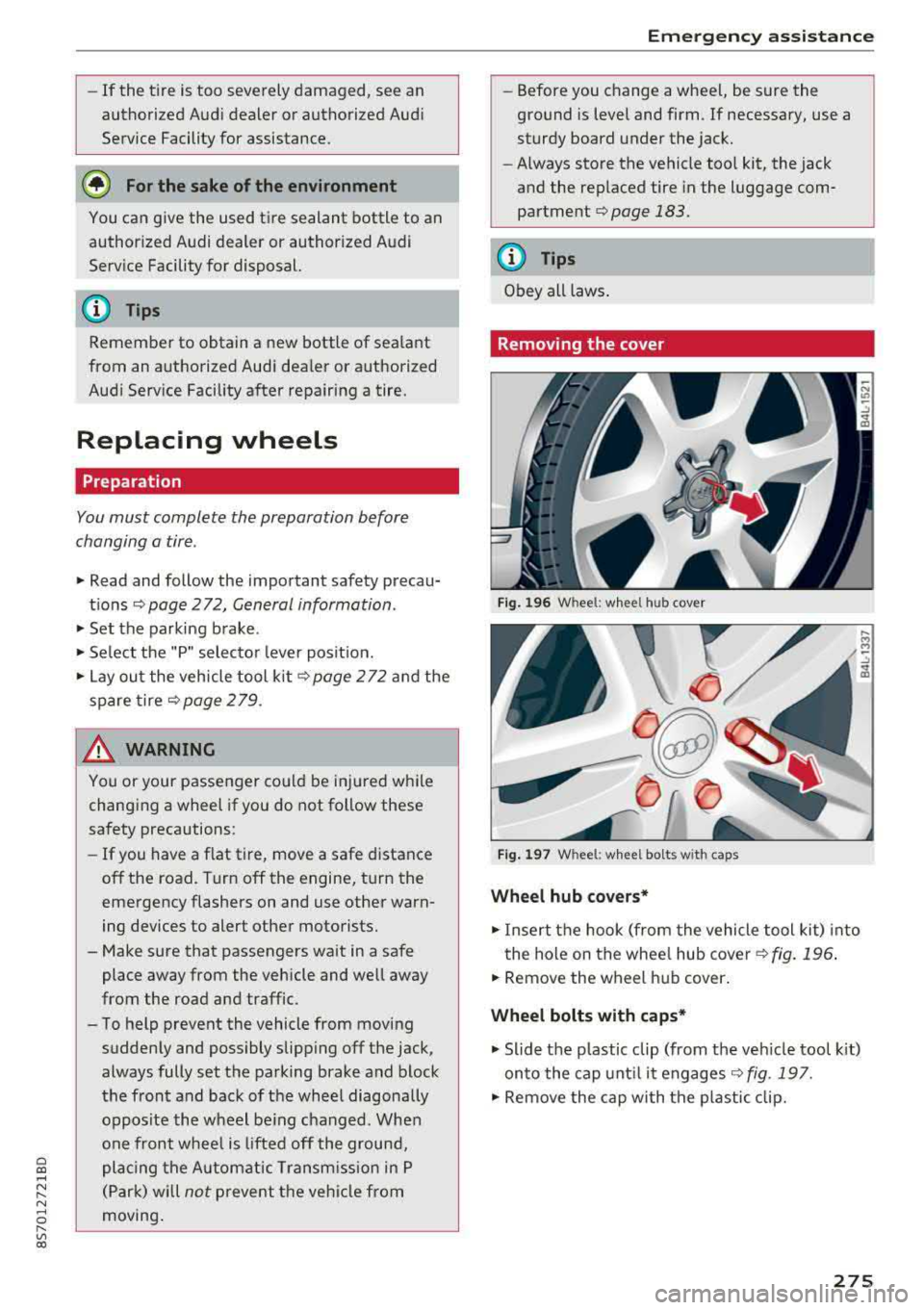
Fig. 196 W heel: wh eel hu b cov er
F ig. 1 97 Wheel: wh eel bol ts with cap s
Wheel hub covers*
"'Insert the hook (from the vehicle tool kit) into
the hole on the whee l hub cover
Q fig. 196 .
"'Remove the wheel h ub cover .
Wheel bolts with caps *
"'Slide the p lastic clip (from the veh icle too l kit)
onto the cap unt il it engages
Q fig . 197.
"' Remove the cap with the p lastic clip.
275