remote control AUDI TT ROADSTER 2018 User Guide
[x] Cancel search | Manufacturer: AUDI, Model Year: 2018, Model line: TT ROADSTER, Model: AUDI TT ROADSTER 2018Pages: 310, PDF Size: 46.95 MB
Page 36 of 310
Power top
-Visibility to the rear is limited when operat
ing the power top. Avoid operat ing the top
wh ile driving in reverse.
(D Note
- To prevent damage to the power top:
- do not store any objects in the power top
storage compartment.
- make sure there is enough space above
the vehicle when opening or clos ing the
powe r top.
(D Tips
- To prevent the vehicle battery from dra ining
unnecessari ly, do not open or close the pow
er top repeatedly when the engine is switch
ed off.
- A message will appear in the instrument
cluster if there is a malfunction in the powe r
top
~ page 34.
- The powe r top can also be operated manual
l y temporari ly if there is a malfunction
~ page 36, Power top emergency opera
tion.
An authorized A udi dealer or author
ized Audi Service Facility should diagnose
and correct the cause of the ma lfunction as
soon as possib le .
- If the vehicle is parked with the power top open, the vehicle interior is not protected
from damaging weather or unauthor ized ac
cess. Lock any items you leave behind in the
luggage compartment. C lose the power top
before leaving the vehicle .
- The side windows automat ically lower
slightly when opening or closing the power
top.
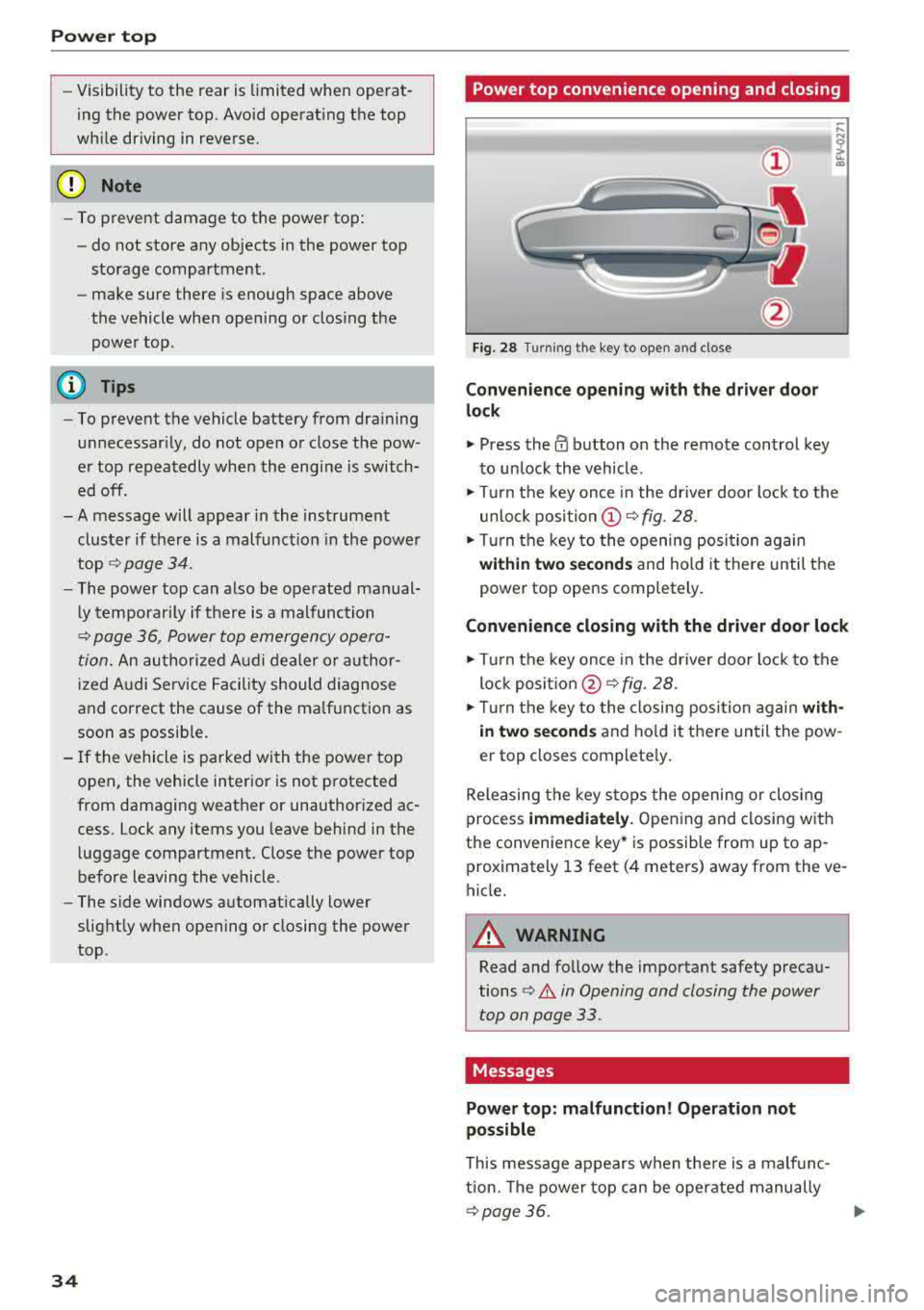
34 Power top convenience opening and closing
Fig. 28 Turn
ing the key to open and close
Convenience opening with t he dri ver door
lock
.,. Press the 0 button on the remote control key
to un lock the vehicle .
.,. Turn the key once in the driver door lock to the
unlo ck
position @~ fig. 28 .
.. Turn the key to the opening posi tion again
within two se cond s and hold it there until the
power top opens completely .
Convenience closing with the driver door lock
.,. Turn the key once in the driver door lock to the
lock
posit ion @ ~ fig. 28.
.. T urn the key to the closing posi tion again w ith
i n two second s
and ho ld it there until the pow
er top closes complete ly .
Releasing the key stops the opening or clos ing
process
immedi ately . Opening and closing with
the convenience key* is possible from up to ap
prox imately 13 feet (4 meters) away from the ve
hicle.
A WARNING
Read and follow the important safety precau
tions
¢ .&. in Opening and closing the power
top on page 33.
Messages
Power top: m alfunction! Oper ation not
possible
This message appears when the re is a malfunc
tion. The power top can be operated manually
~ page 36. .,.
Page 47 of 310
Cl co .... N ,..._
N .... 0 ,..._
Vl co
(D Tips
To prevent inaccurate compass readings, do not bring any remote controls, e lectr ica l devi
ces or metallic objects near the mirror .
Adjusting the magnetic zone
Applies to: vehicles with digital compass
I
I I
' I
I I
®
' ' ' '
®
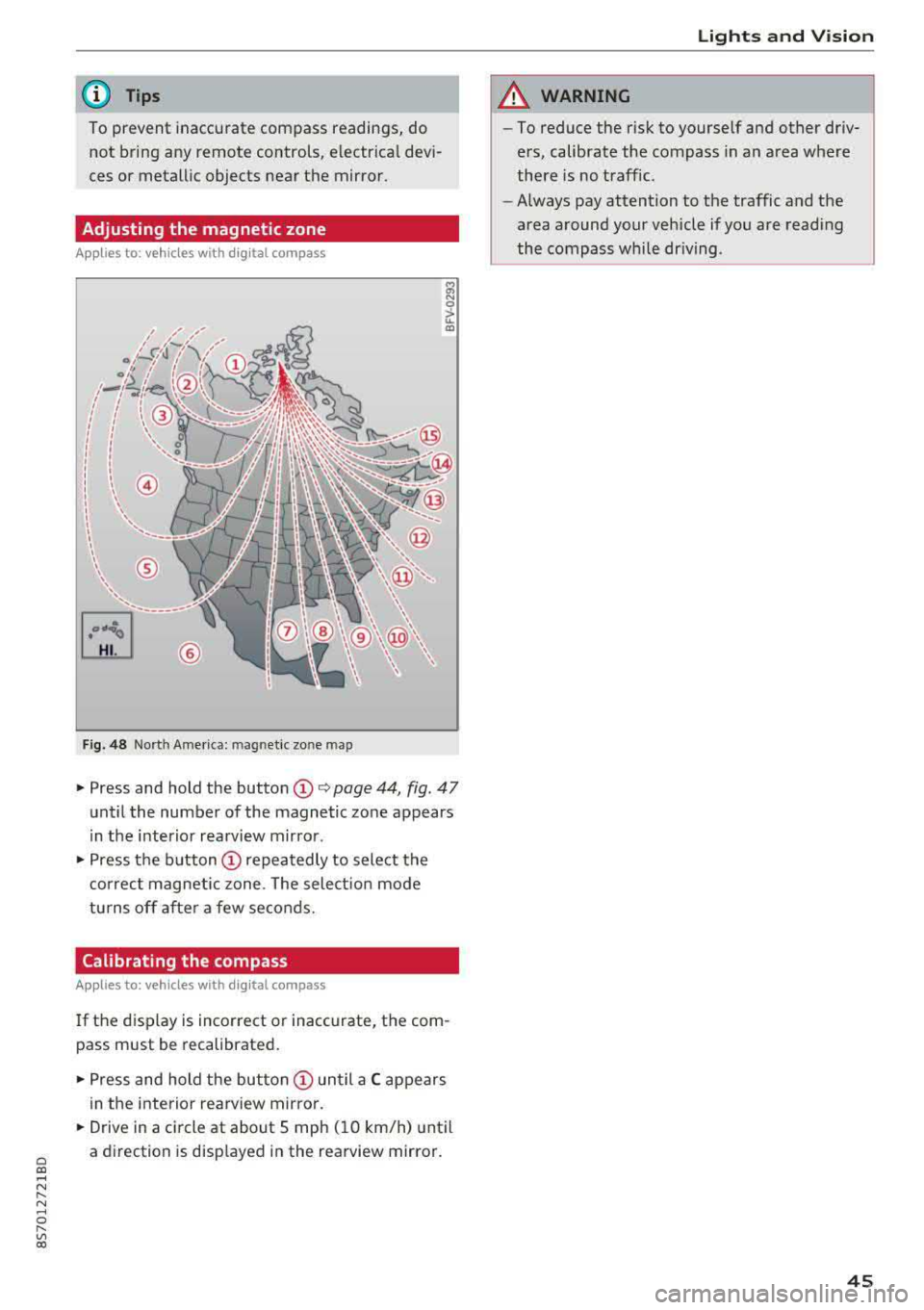
Fig. 48 Nort h Ame rica: mag netic zo ne map
~ N 0
> u. ID
• Press and hold the button (D Q page 44, fig . 47
until the number of the magnetic zone appears
in the interior rearview mirror .
• Press the button (D repeatedly to select the
correct magnetic zone . The select ion mode
turns off after a few seconds.
Calibrating the compass
Applies to: vehicles with digital compass
If the display is incorrect or inaccurate, the com
pass must be recalibrated.
• Press and hold the button (D until a C appears
in the interior rearview mirror .
.,. Drive in a circle at about 5 mph ( 10 km/h) until
a direction is displayed in the rearview mirror .
Lights and Vision
A WARNING
-To reduce the risk to yourself and other driv
ers, calibrate the compass in an area where
there is no traffic.
- Always pay attention to the traffic and the
area around your vehicle if you are reading
the compass while driving .
45
Page 53 of 310
Cl 00 .-< N r-N .-< 0 r-Vl 00
Warm and cold Climate control system
Description
The climate control system warms , cools and re
moves humidity from the air in the vehicle inte ri
or. It functions most effective ly w hen the w in
dows are closed. If there is a build -up of heat in
side the vehicle, venti lation can help to speed up
the cooling process .
Pollutant filter
The pollutant filte r removes pollutants such as
d ust and pollen from the a ir.
Key recognition
Certain settings are automat ically stored and as
signed to the remote contro l key being used .
A WARNING
Poor vis ibili ty ca n lead to ac cidents .
- For safer d riving, keep all windows free of
ice, snow a nd fog.
- Become fam ilia r as qu ickly as possible with
the correct use and function of the cl imate
c o ntro l system, espe cially with the defrost
ing and defogg ing func tion.
- Whe n the tempe ratu re is below free zing,
o nly use the win dshi eld washer sys tem after
the wi nds hield ha s been war med by t he cli
mate co ntro l sys tem. The washer fluid co ul d
freeze on the w indshield and impair visibili
ty .
{LlJ) Note
-If yo u suspect t hat the clim ate con trol sys
tem is d amaged, sw itch the system off to
Warm and c old
preven t furt her damage and have it chec ked
by an autho rized Audi dea ler o r auth orized
Audi Service Facility .
- Repairs to t he Audi climate control system
require special technical know ledge and
special tools. Have it inspected by an a u
thorized Aud i dealership or a qualified elec
tronics store.
@) For the sake of the environment
Reducing the amount of fue l used a lso re
duces the amount of pollutants that enter the
a ir.
{!) Tips
- To prevent interference with the heat ing
and cooling output and to prevent the win
dows from fogging over , th e a ir intake in
fro nt of t he w indshie ld m ust be free of ice,
snow o r leaves .
- Condensation from the cooli ng system can
dr ip and form a pudd le of water unde r the
veh icle . T h is is no rma l and does not mean
there is a le ak .
- Th e ene rgy managemen t system may tem
pora rily switch off certa in fu nctions, s uch as
the seat heati ng* o r rear window defogger.
Th ese sys tems are availab le aga in as soon
as t he ene rgy supply has been res tored .
- Th e flows throug h the vents under the re ar
w indow. Make s ure the openings are no t
cove red when plac ing clothing on t he lug
gage compa rtment cover .
51
Page 62 of 310
Driving
switched on. Switch the ignition off so that the
battery will not discharge .
Pressing start /stop button again will swit ch off
e ngine.
This message appea rs when you press the
I S TAR T
ENGI NE STOP I but ton while dr iving .
Engine start sy st e m: malfunction! Please con
tact Se rvice
The engine automatic start system has a mal
function. Drive to an author ized Audi dealer or
author ized Audi Service Facility immed iate ly to
have the malfunct ion co rrected . To sta rt the en
g ine, p ress and ho ld the lS TART
ENGINE STOPI
button.
fl Remote control key : hold back of key
again st the designated area. See owner 's man
ual
This message appears if there is no convenience
key inside the vehicle or if the system does not
recognize the key. The conve nience key may not
be recognized, for examp le, if it is covered by an
object that
disrupts t he s ignal (such as a b rief
case), o r if the key ba tte ry is weak. Elect ronic de
vices s uch as cell phones can also interfere w it h
the sign al.
T o sti ll be able to sta rt or stop the e ngine, see
~ page 60, Starting the engine when there i s a
malfunction .
Ill Remote control key: key not recognized . Is
the key still in the vehicle?
The Ill ind icator light turns on and this message
appears if the conve nience key was removed from
the vehicle whe n the eng ine was running .
If the
conven ience key is no longer in the vehicle, you
cannot swi tch the ig nition on or st art the engine
once yo u stop it. Yo u also cannot lock the veh icle
from the outside.
Please press brake pedal
This message appears if you do not press the
b rake pedal whe n starting the engine.
Please select N o r P
60
This message appears w hen starting or stopping
the engine if the selecto r lever is not in the "N " or
" P" pos ition. The engine will not sta rt/stop.
Shift to P, otherwise vehicle c an roll away.
Door s do not lock if gearshift is not in P
This message appears for safety reasons along
with a war ning tone. It appears if t he selec to r
l ever for the a utoma tic tr ansmiss ion is no t in the
P position when switching the ign ition off with
the I START
ENGINE STOPI button. Shift these
l ector lever to the P pos ition. Otherwise, t he vehi
cle co uld ro ll. You also cannot lock the veh icle us
ing the lock ing sensor on the door handle or us
i ng the conven ience key .
Starting the engine when there is a
malfunction
It may not be possible to start the engine under
certain circumstances, for example if the battery
in the vehicle key i s drained, if in terferen ce is af
fe cted the key or if there i s a system malfunc
tion.
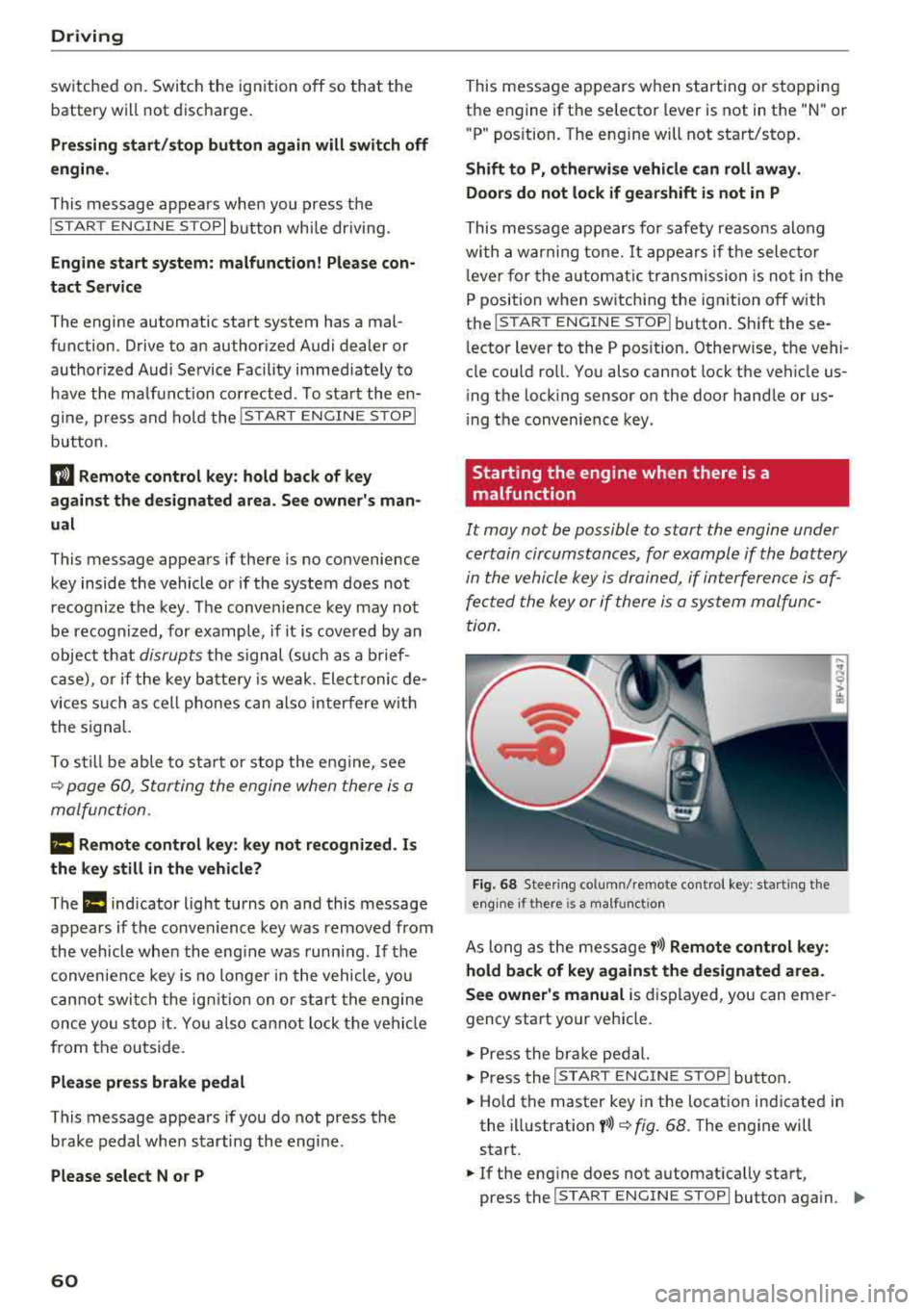
Fi g. 6 8 Stee ring co lumn /remote contro l key : sta rting t he
e n g in e if there is
a m alfunct io n
As long as the message y>>) Remote control key :
hold back of key against the designated area.
See owner's manual
is d isplayed, you can emer
gency start your vehicle.
.,. Press the br ake pe dal.
... Press the I S TAR T ENGINE ST OP ! butto n.
.,. Hold the master key in the location ind icated in
the illustration
y >>) ~ fig . 68. The engine will
start .
.,. If the eng ine does not automat ica lly start,
press the
I S TART E NGINE STOPI butto n aga in . ..,.
Page 79 of 310
Cl 00 ... N r-N ... 0 r-Vl 00
system may have detected a vehicle in another
l ane that is
not adjacent to your current lane .
- If you are dr iving t hrough a curve . Side assist
may react to a vehicle that is one lane over
from the adjacent lane .
- If side assist reacts to other objects (such as
high or displaced guard rails) .
- In poor weat her condit ions . The side assist
functions a re limited.
D o no t cove r the radar
sensors ¢ fig. 84 wit h
sticke rs, deposits, bicycle whee ls o r othe r ob
jects , beca use they w ill impai r the f unct ion . For
information on cleaning,
see¢ page 266 .
A WARNING
-Always pay atte ntion to traffic and to the
area aro und yo ur vehicle. Side assist cannot
rep lace a dr ive r's attention. The dr ive r alone
is a lways responsib le for lane changes and
s imi lar driving maneuvers .
- In some situat ions, the system may not
function or its funct io n may be limited . For
example:
- If vehicles a re a ppro ac hi ng o r being le ft
behind very quickly. The display may not
tur n on in t ime .
- I n poo r weather cond itions s uch as heavy
rain, snow o r heavy mist .
- On very wide lanes, in t ight curves, o r if
there is a rise in the road s urface. Vehicles
in the adjacent lane may not be detected
beca use they are outs ide of the sensor
range.
{Ll) Note
The sensors can be disp laced by im pacts o r
damage to the bumpe r, whee l housing and
underbody. Th is can impa ir the system. Have
an authorized A udi dealer or autho rized Audi
Serv ice Facility c heck their fu nction.
(D Tips
- If the window g lass in the d river 's doo r or
front passenger 's doo r has been t inted, the
display in the exterior mirror may be i ncor
r ect .
-
Ass istance systems
- F or an exp lanat ion on co nf orm ity w it h t he
FCC regulat ions in the Un ite d States an d the
Indust ry Canada regulat ions, see
¢ page 293.
Switching on and off
App lies to : vehicles wi th Audi side ass ist
.. Select in the Infotainmen t system: I M ENU ! but
ton
> Vehicle > left control b utton > Driver a s
s istance > Audi side a ssist
If the system is activated, the disp lays in the ex
terior m irrors w ill turn on briefly when the igni
t ion is switched on .
Adjusting the display brightness
Applies to : vehicles wit h Audi s ide ass ist
The display brightness con be adjusted in the In
fotainment system .
.. Select in the Infotainment system: I MENU! but
ton
> Vehicle > left control button >Dri ver as
sistance > Audi side assist
The disp lay br ightness adjusts automatically to
the brightness of the surroundings, both in the
i nformation and in the wa rn ing stage. I n very
dark or very br ight surround ings, the automatic
adjustment w ill set the display to t he m inimum
o r max imum level. In such cases, yo u may notice
no ch ange when adj usting the br igh tne ss, or the
c h ange m ay only be noticeab le on ce t he sur
r oundings change.
Adjust the br ightness to a leve l w he re the d isplay
in th e i nfo rm atio n stage will not disrupt yo ur
v iew ahe ad. If yo u change the br igh tness , the d is
play in the exterio r mirror wi ll briefly show the
brightness leve l in the information stage . The
brig htness of th e warning stage is linked to the
brightness in the information stage and is adjust
ed along with the information stage.
(D Tips
- Side ass ist is not act ive while you are mak
ing the adjustment.
- Yo ur settings a re automat ica lly stored and
assigned to the remote control key be ing
used.
77
Page 81 of 310
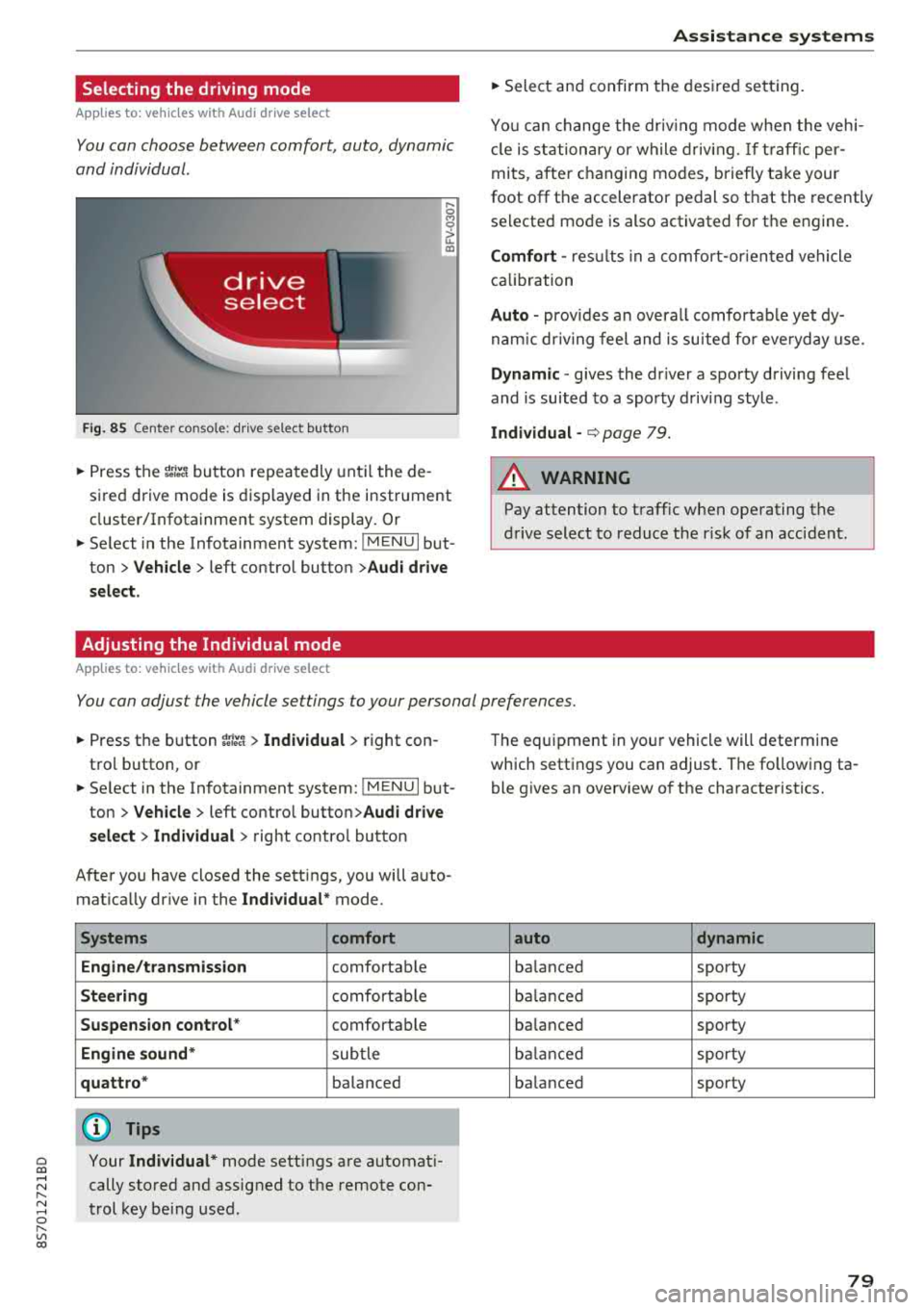
Selecting the driving mode
App lies to: ve hicles with Audi drive select
You can choose between comfort, auto, dynamic
and individual .
Fig. 85 Center conso le: drive select button
.... 0 M 0
G'. al
.. Press the ~i~ button repeatedly until the de
sired drive mode is displayed in the instrument
cluster/Infotainment system display . Or
.. Se lect in the Infotainment system: !MENUI but
ton >
Vehicle > left contro l button >Audi drive
select.
Adjusting the Individual mode
Applies to: ve hicles with Audi drive select
Assistance systems
.. Select and confirm the desired settin g.
You can change the driv in g mode when the veh i
cl e is stationary or while driving.
If traffic per
mits, after ch anging modes, briefly ta ke your
foot off t he accelerator pedal so that the recently
se lected mode is also activated for the engine.
Comfort -res ults in a comfo rt-orien ted vehicle
calibration
Auto -provides an overa ll comfortab le yet dy
namic driving feel and is suited for everyday use.
Dynamic -gives the driver a sporty driving fee l
and is suited to a spo rty driving style .
Individual -¢ page 79.
A WARNING ...__ -
Pay attention to traffic w hen operating the
drive select to reduce the r isk of an accident .
You can adjust the vehicle settings to your personal preferences .
.. Press the button ~:/:er. > Individual > right con
tro l button, or
.. Se lect in the Infotainment system: !MENUI b ut
ton>
Vehicle > left contro l button> Audi drive
select> Individual >
right contro l button
After you have closed the sett ings, you will a uto
mat ica lly dr ive in the
Individual* mode.
Systems comfort
Engine/transmission
comfortable
Steering comfortable
Suspension control * comfortable
Engine sound* subtle
quattro * balanced
(D Tips
~ Your Individual* mode settings are automat i-
;:::: cally stored and assigned to the remote con-r--
~ trol key being used. 0 r-Vl 00
T he equipment in yo ur vehicle will determine
which settings you can adjust . The fo llowing ta
ble gives an overview of the characteristics.
auto dynamic
balanced sporty
balanced sporty
ba lanced sporty
balanced sporty
ba lanced sporty
79
Page 86 of 310
Parking systems
Switching off
~ Drive faster than 6 mph (10 km/h), or
~ Press the P"'il button, or
~ Switch the ignition off .
(D Tips
-The visual display in the left part of the dis
play should help you detect the critical vehi
cle areas .
- You can change the volume of the signals
and the display
¢page 84.
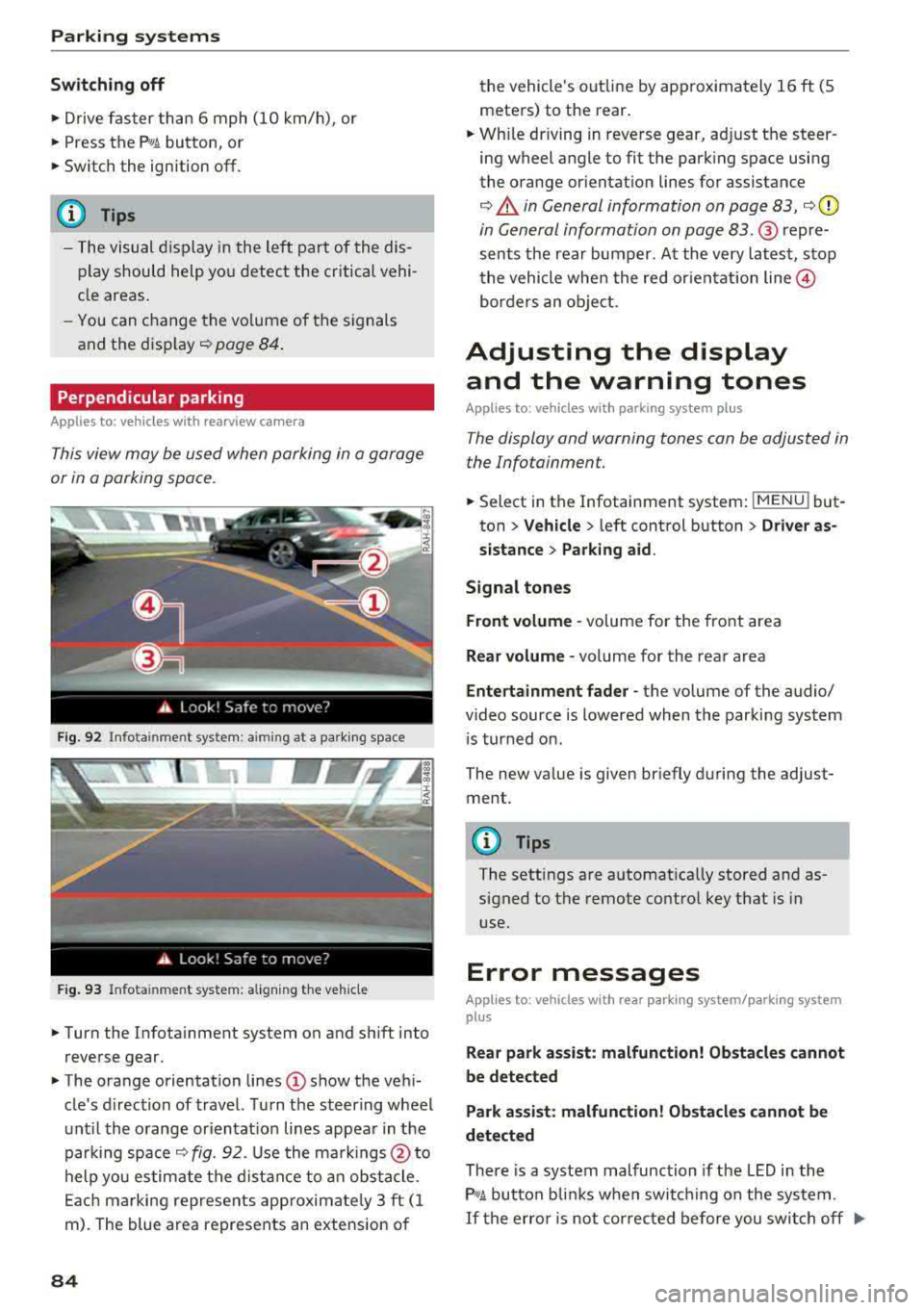
Perpendicular parking
Applies to: vehicles with rearview camera
This view may be used when parking in a garage
or in a parking space.
F ig. 92 Info ta in ment system: a im ing at a park ing space
Fig. 93 Infota inme nt system: aligning the vehicle
~ Turn the Infota inment system on and shift into
reverse gear.
~ The orange orientation lines (D show the vehi
cle's d irection of travel. Turn the steering wheel
until the orange or ientat ion lines appear in the
parking space
¢ fig. 92. Use the markings @to
help you estimate the distance to an obstacle.
Each marking represents app roximate ly 3 ft (1
m). The blue area represents an extension of
84
the vehicle 's out line by approximately 16 ft (5
meters) to the rear.
~ Wh ile driving in reverse gear, adjust the steer
ing wheel angle to fit the parking space using
the orange orientation lines for assistance
¢ .&. in General information on page 83, ¢(D
in General information on page 83. ® repre
sents the rear bumper. At the very latest, stop
the vehicle when the red or ientat ion
line @
borders an object.
Adjusting the display
and the warning tones
Applies to: vehicles with parking system plus
The display and warning tones can be adjusted in
the Infotainment.
~ Select in the Infotainment system : IMENU! but
ton
> Vehicle > left control button > Driver as
sistance> Parking aid.
Signal tones
Front volume -
volume for the front area
Rear volume -volume for the rear area
Entertainment fader -the volume of the audio/
video source is lowered when the parking system
i s turned on.
The new value is given briefly during the adjust ment.
{!) Tips
The settings are automat ically stored and as
signed to the remote control key that is in
use.
Error messages
App lies to: vehicles with rear park ing system/parking system
plus
Rear park assist: malfunction! Obstacles cannot
be detected
Park assist: malfunction! Obstacles cannot be
detected
There is a system malfunction if the LED in the
P'1
1 .ll button blin ks when switc hing on the system .
If the error is not corrected before you switch off Ill-
Page 177 of 310
Cl 00 .-< N r--N .-< 0 r--Vl 00
Secondary phone
Applies to: vehicles with telephone
-Connect new device : search for and connec t a
c e ll phone.
- List of devices already paired : selec t your cell
p hone fro m the lis t of all the devices t hat are
al re ad y p aired.
Data connection
Applies to: vehicles with Audi connect
-Connect new device : search for and connec t a
mobile device (s uch as a smartp hone) .
-List of devices already paired : selec t your cell
p hone from the list of all the devices t hat are
al ready pa ired .
Or : insert a mini SI M card into
the S IM ca rd
reader* c> page 124.
({;D) Note
Always follow t he i nfo rmat ion foun d in c> (0) in
W i-F i hotspot on page 130 .
MMI connect app
Applies to: vehicles with Audi connect
Requirement: the Audi MMI connect app m ust
be i nstalled and open on your mobile device.
- Connect new device : search for and connect a
mobile device (s uch as a smartp hone) .
-List of devices already paired : select your mo
b ile device from the list of a ll the devices that
are already paired.
Audio player
Applies to vehicles with Bluetooth or Wi-Fi audio player
Bluetooth player
Requirement: the Bl uetooth funct ion and v is ibi li
ty must be sw itched on in the MMI
c> page 175
and on the B luetoot h aud io player.
- Connect new device : press the control knob.
Se lect
Bluetooth audio player . Search fo r and
connect a mobile device .
-List of devices already paired : select a Bl ue
tooth device from the list of a ll the devices that
are already paired.
System settings
Wi-Fi audio player
Re quiremen t: th e W i-Fi h otspo t on the M MI
c> page 1 29 an d the Wi -Fi on you r W i-Fi audio
player m ust be switched on .
-Connect new device : pres s t he co ntrol knob.
Se arch for and conne ct a Wi-Fi ca pabl e dev ice.
- Disconnect Wi-Fi audio player: deactivate t he
Wi-Fi on you r W i-Fi capa ble dev ice. The devi ce
w ill be au tom atic a lly removed from the lis t.
@ Note
Alway s follow the infor mation foun d in c> @ in
W i-F i ho tspo t on p age 130.
Directory
Applies to: vehicles with telephone
Display contacts from a cell phone (or an addi
tiona l cell phone).
Requirement: cell phones must not be connected
to the M MI t hro ugh the Blue too th remote SI M
ac cess profi le or throug h th e
Handsfree p ro file.
- Connect new device: search for and connect a
new ce ll phone .
-List of devices already paired : select yo ur cell
p ho ne from the list of all the cell phones that
are a lready paired .
Audi smartphone
Applies to: vehicles with Audi smartphone interface
-Con nect yo ur cell phone to the A udi music in
t erfa ce
c> p age 161 using a USB a dap ter
c> page 160, fig. 139 .
-Sele ct your cell p ho ne fro m th e list of cell
p hon es th at h ave alread y bee n connec ted.
Additional options
D epen ding o n the sele cte d fu nction, yo u can use
t h e right contro l button to access the avai la bl e
additional opt ions in t he connection mana ger.
Bluetooth settings
- Bluetooth:
selec t and co nfi rm a s etti ng for the
Bl uetoo th conne ct ion visib ility. Se lec t
Visible
for the MM I to be visib le to othe r devices . ..,.
175
Page 267 of 310
![AUDI TT ROADSTER 2018 User Guide Cl 00 .-< N r-N .-< 0 r-Vl 00
availab le . It only provides a warning if one o r
more tire pressures is be low the minimum per
mitted specif ied pressure .
If the
[I] indica to r l](/img/6/57668/w960_57668-266.png "AUDI TT ROADSTER 2018 User Guide Cl 00 .-< N r-N .-< 0 r-Vl 00
availab le . It only provides a warning if one o r
more tire pressures is be low the minimum per
mitted specif ied pressure .
If the
[I] indica to r l")
Cl 00 .-< N r-N .-< 0 r-Vl 00
availab le . It only provides a warning if one o r
more tire pressures is be low the minimum per
mitted specif ied pressure .
If the
[I] indica to r lig ht turns on and the mes
sage
Tire pressure: wheel change detected .
Please check all tires and store pressures in
MMI also appears, the system has detected that
the posit ion of the sensors has changed because
of a tire rotation, or that new sensors were in
stalled . Store the new tire pressures.
A WARNING -
Read and follow the important informa tion
and notes<=;>
page 263.
Malfunctions
App lies to: ve hicles with tire press ure m onitoring system
If t he tire pressure monitoring system is not
available, the
m;i ind icat or light appears in the
in str ument cluster display along with th e mes
sage
Tire pressure: malfunction! See owner's
manual.
I f the @m in dica tor light appears after switch
ing the ignition on or while dr iv in g and the
[I] in
d icator light also blinks for approximate ly one
minute and t hen stays on, there is system ma l
function. The following are examples of sit ua
tions that cou ld cause a malfunction:
-If the message appears at the end o f the adap
tation phase, the system may not detect one or
severa l of the wheel senso rs necessa ry for pres
s ur e monitoring. This may result from one or
more wheels being installed without wheel sen
sors or with incompatible wheel sensors .
- A wheel sensor o r another component has
failed.
- Using snow cha ins can affect the f unction of
the system because of the shie lding effect of
the cha ins.
- The tire pressure monitor ing system is not
available due to a malfunction.
- Transmitters with the same frequency, such as
headphones or remote-controlled dev ices, may
cause a temporary system malfunction due to
the strong electromagnetic field .
Wheels
The m;i indicator lig ht and the message turn off
once the tire pressure monitoring system is avail
able again. If you cannot co rrect the malfunction
and
the m indicator light stays on, drive imme
diately to an authorized Audi dea ler or author
ized Audi Se rvice Facility to have the malfunct ion
repaired.
265
Page 295 of 310
Cl 00 ... N r-N ... 0 r-Vl 00
Technical Modifications
Our guidelines must be complied with when tech
nical modifications are made .
Always consult an authorized Audi dealer before
starting work on any mod ificat ions.
This will help ensure that vehicle function, per
formance and safety are not impaired
c> ,&.
Attempting to work on e lectronic components
and the software used with them can cause mal
functions. Because of the way electronic compo nents are interconnected with each other, such
malfunct ions can also have an adverse effect on
other systems that are not directly involved. This
means that you risk both a substantial reduct ion
in the operational safety of your veh icle and an
in creased wea r of ve hicle pa rts
c> ,& .
Author ized Audi dealers w ill perform this work in
a profess ional and competent manner or, in spe
cial cases, refer you to a professional company
that spec ializes in such modifications.
.&_ WARNING
Improper repairs and modifications can
change the way vehicle systems work and
cause damage to the vehicle and serious per
sonal injury.
{Q) Note
If emergency repa irs must be performed else
where, have the vehicle examined by an au
t horized A udi dealer as soon as possible.
Declaration of
compliance for telecom munications equipment
and electronic systems
The manufacturer is not liable for radio malfunc
tions that are caused by unauthorized changes to
the equipment.
Equipment
The following equipment comp lies w it h FCC sec
tion 15 and RSS-Gen:
Consumer Information
-Audi side assist*
- Remote control key
- Garage door opener (Homel ink)*
- Cell phone package*
- Tire pressure monitoring system*
FCC Part 15.19
This device complies with part 15 of the FCC
Rules . Operation is subject to the fo llowing two
condit ions: (1) This device may not cause harmful
interference, and (2) this device must accept any
interference received, includ ing interference that
may cause undesired operation.
FCC Part 15 .21
Changes or mod ificat ions not express ly approved
by the party responsible for compliance could
vo id the user's authority to operate the equ ip
ment .
RSS-Gen
This device complies with Industry Canada's li
cense-exempt RSSs. Operation is subject to the
following two conditions :
(1) This device may not cause interference; and
(2) This dev ice must accept any interference, in
cluding interfe rence that may cause undes ired
operation of the device.
CNR-Gen
Le present appare il est conforme aux CNR d'In
dustrie Canada applicables aux appare ils radio
exemp ts de licence . L'exploitation est autorisee
aux deux conditions s uivantes:
1) l'appareil ne doit pas produ ire de brouillage;
2) l'appareil do it accepter tout brouillage
radioe
lectrique subi, meme si le brouillage est suscept i
ble d'en compromettre le fonctionnement.
293