reset AUDI TT ROADSTER 2018 User Guide
[x] Cancel search | Manufacturer: AUDI, Model Year: 2018, Model line: TT ROADSTER, Model: AUDI TT ROADSTER 2018Pages: 310, PDF Size: 46.95 MB
Page 153 of 310
Cl co .... N ,....
N ...... 0 ,....
Vl co
View: Show "Now Playing" screen
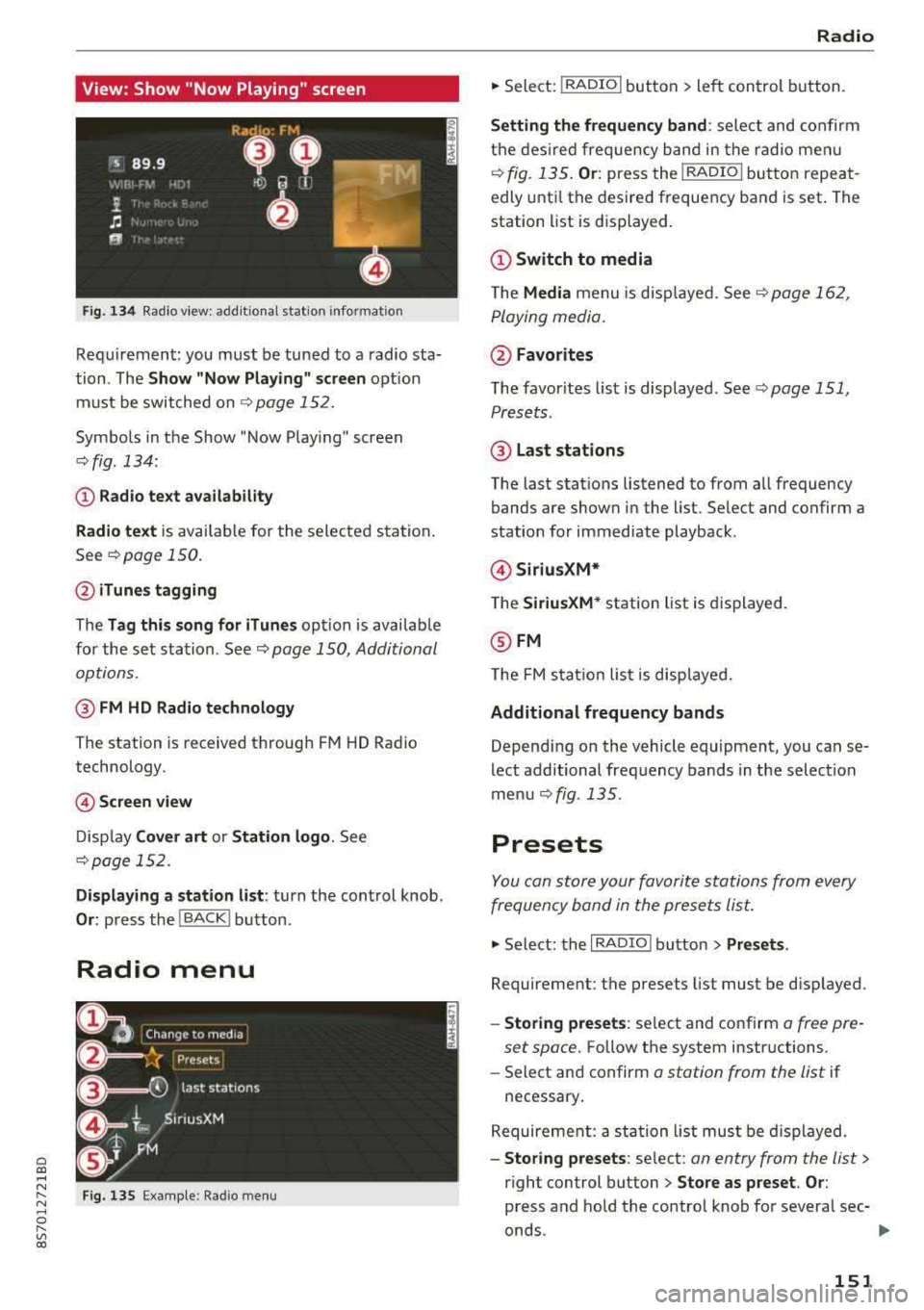
Fig. 134 Radio view: add it ional station information
Requirement: you must be tuned to a radio sta
tion . The
Show "Now P la y ing" screen opt ion
must be switched on
9 page 152.
Symbo ls in the Show "Now Playing" screen
o:;, fig. 134:
CD Radio te xt ava ilabil ity
Radio te xt
is availab le for the selected station .
See
o:;, page 150.
@ iTune s tagging
The Tag this song for iTun es option is availab le
for the se t station. See
o:;, page 150, Additional
options.
@ FM HD Radio technology
The station is received through FM HD Radio
technology.
@ Screen view
D isp lay Cover art or Station logo . See
o:;, page 152.
Displaying a station list : turn the control knob.
Or: press the I BACK! button .
Radio menu
Fig . 135 Examp le: Radio men u
Radio
.. Sele ct: I RADIO I button > le ft con trol button.
Setting th e frequency band : select and confirm
the des ired frequency band in the rad io me nu
o:;, fig. 135 . Or: press the I RADIO I button repeat
edly unt il the desire d frequency band is set . The
station list is displayed.
(!) Switch to media
The Media menu is disp layed. See¢ page 16 2,
Playing media.
@ Favorites
The favorites list is displayed . See t:;, page 151,
Presets .
@ Last stations
The last stations listened to from all frequency
bands are shown in the list. Select and confirm a
station for immediate playback .
@Siriu sXM*
T he SiriusXM* station list is displayed.
@ FM
The FM s ta ti on lis t is disp laye d.
Additional frequency bands
Depend ing on the vehicle equipment, you can se
lect additional freq uency bands in the selection
me nu
o:;, fig. 135 .
Presets
You can store your favorite sta tions from every
frequency band in the prese ts list.
.. Select: the I RADIO I button > Presets .
Requireme nt: the presets list must be disp layed.
- Storing preset s: select and confirm a free pre-
set space.
Follow the system instructions.
- Select an d confirm
o station from the list if
necessary .
Requireme nt: a st ation list must be d isplayed.
- Storing presets : select : an entry from the list>
right control button > Store as preset . Or :
press and hold the control knob for severa l sec-
onds .
~
151
Page 154 of 310
Radio
-Di spla ying the pre set s list : select: I RADIO I but -
ton
> Presets.
Re quir emen t: the favorites list m ust be dis
p laye d.
- Listening to presets : select and confirm a pre
set from the list.
- Mo ve preset : select a preset from the list >
right control button> Move p reset . O r: press
and hold the cont rol knob for several seconds .
Se lect and confirm the location of the selected
preset .
-Deleting presets : select a preset from the list>
right cont ro l button> Delete preset > Delete
this preset or Delete all presets .
Additional settings
Radio settings
~ Select : I RADIO I button > right contro l button >
Rad io settings .
The follow ing settings can be se lected, depend
i n g on the band that is se lected :
Station names (FM)
Variable :
scr oll ing text tran smi tted by the FM
s ta ti ons is shown in the Info tainmen t system d is
p lay .
Fixed : scrolling text t rans mitted by t he FM sta
tions is no t sh ow n in the In fota inment syste m
d is pla y. Onl y the cu rrent se ction of the scro lling
t ext is disp layed.
FM/AM HD Radio*
You can sw itc h H D Rad io recep tion on o r off .
Channel sorting (SiriusXM*)
You can set the station sorting fo r SiriusXM sta
tion lists* by:
- Channel number: the channe ls are so rted in as
cending orde r according to their channel n um
ber.
- Channel name : the channels a re listed in alpha
betica l orde r.
- First category, then channel number : th e
c h annels a re so rted by the ir catego ry and t hen
by the ir ch annel numbe rs .
152
- First category , then channel name : the sta
tions a re sorted by thei r category and then by
their cha nnel names .
Category filter (Sirius XM*)
The stat io ns sh ow n in the st ation l ist can be fil
te red by yo ur person al pre ferences and by pro
gram type . The program catego ries t hat you ca n
se lect depen d on w hat is offere d by your provid
er. Se lect the
All categories opt ion to deactivate
a ll filter options and d isplay all available stations
i n the satellite stat ion list.
Show "Now Playing" screen
When the f unct io n is switched on@' and the sta
tions o r presets list is open, the disp lay w ill
switch to the
Show "Now Playing" screen view
after approximate ly five
seconds ¢ page 151. De
pending on avai lab ility, information about the
set stat io n (such as stat io n name, artis t and sta
tion logo) may be d is p layed in th is view .
Preferred picture view
You can set your pre fer red screen view fo r the
Show "Now Play ing" screen ¢ page 151.
- Station logo: the station logo is displayed, de
pen ding on ava ilability .
-Cover art: the al bum cove r or genre cover is dis -
played, depending on availabi lity.
Gracenote online database*
Require ment: t he M MI m ust be co nne cted to the
I n ter net. T he
Cover art opt io n mu st be sele cte d
¢ page 1 52, Preferred picture view.
When the funct ion is switch ed on@', the a lb um
cove r o r genre cover for the so ng th at is p lay ing
i s loade d from the G ra cenote online database,
depen ding on av ailability .
Subscription status (SiriusXM)*
This op tion is available w hen your subscr ip ti on i s
abo ut to expire or has already expired . The exp i
r a tion da te fo r you r license is displayed.
Call to SiriusXM *: th e contac t information for
yo ur sate lli te rad io provider is d isplayed . To ca ll
yo ur sate lli te rad io prov ider using the M MI, p ress
Call to SiriusXM *.
Page 156 of 310
Media
Media
Introduction
There are various media d rives and connections
ava ilab le in the MMI. You can play, for example,
au dio/video files f rom the Jukebox * or connect
your mob ile dev ice to the Audi m usic interface *
and operate it through the MMI.
Notes
General
Media and format restrictions :
the MMI (in cl ud
i n g the S D card reade r and the USB storage de
vice co nnect ion *) was tested w ith a var iety of
products and media on the market. However,
there may be cases where ind iv idual devices or
media and audio/video files" may not be recog
n ized, may play o nly w ith restr ictions, o r may no t
p lay a t all.
Digital Rights Management : please note that
the audio/v ideo files are sub ject to copyright pro
tect ion .
The media drives do not p lay f iles that a re pro
tected by OR M and that are ident ified with the
symbo l~ -
Data security : never store im portant data on SD
cards, the Ju kebox*, CDs/DVDs o r mobile devices.
Aud i AG is not responsib le for damaged or lost
fi les and media .
Loading times : th e mo re files/fo lde rs/p lay lists
that a re on a sto rage medium, the longer it will
take to loa d the audio/video* fi les . Audi recom
mends using storage med ia that on ly conta in a u
d io/video files* . T o decrease the t ime it takes to
load audio/v ideo f iles*, crea te subfo lde rs (fo r ex
a m ple, fo r th e a rtist o r album). The loading time
w ill als o incre as e whe n importing fi les.
Additional information : when playing, audio
f il es are automatically displayed with any add i
tional infor mat io n that is s to red (such as the ar
tis t, tra ck and al bum cover).
If this info rm ation is
no t a vai lable on the storage mediu m, t he M MI
w ill check the Gr ace no te metadata d atabase .
154
Howeve r, in some cases, the addi tional informa
tion may not be dis played .
Restri cted functionality : reset the Media set
tings
t o the fac to ry defa ult se ttings i f func tional
i ty is res tric ted
c::> page 1 74.
If func tionali ty is restr icte d, reset the Jukebo x*
to t he fa ctory defa ult se tt in gs
<=:> page 17 4.
Fo r informa tion abo ut the propert ies of s upport
ed med ia and fi le formats, see
<=:>page 168 .
@ Note
Always fo llow the informa tion fo und in c::> @ in
Wi- Fi hotspot on pag e 130.
CD/DVD operation
CD /DVD and format restrictions :
th e f unct iona li
ty o f indivi dual sto rage med ia m ay be limi ted due
to t he v ariety of b lank C Ds/DV Ds av a ila b le and
t h e va rious cap acities. Audio CDs or video DV Ds
with copy p rotection, CDs/DVDs that do not con
fo rm to the standard and mult isess ion CDs may
hav e limit ed playback or may not play at all. A udi
recommends finaliz ing the recording process
whe n creat ing mult isess ion CDs . Mult isess ion is
not supported for DVDs .
Using CDs/DVDs, the CD dr ive or the DVD drive :
to ensure correct, hig h-q ua lity playback and to
prevent damage to the dr ive or disc read ing e r
r ors, always store CDs/DVDs in a protec tive
s leeve and do no t expose them to direct s unligh t.
Do
not u se :
- Damaged, dirty or sc ratched CDs/DVDs
- Single CDs/DVDs with 3 in (8 cm) d iameter
- CD/DVDs that a re not roun d
- CDs/DV Ds w ith labe ls
- Protec tive rings
- Clean ing CDs
Thermal protection switch : CD/DVD playback
may be tempora rily unavailab le if o utside tem
peratures a re ex tremely hot or co ld. A t hermal
pro tect io n sw itch is inst alled t o protec t th e C D/
DVD a nd the laser.
Laser devi ces : lase r devices a re divided i nto safe -
ty classes 1 to 4 in accordance with DI N IE C 76
.,.
Page 159 of 310
Cl 00 .-< N r--N .-< 0 r--Vl 00
When importing, the audio files are automatical
l y sorted into the media center categories based
on the stored addit ional information
¢ page 163. The copied video files are stored in
the media center under the
Videos category.
Playing the Ju kebo x
Requirement: the Jukebox must contain audio/
video fi les
¢ page 156, Adding files to the Juke
box.
The Jukebox is accessed and operated t hrough
the M MI
(D ¢ page 162, fig . 141.
Di splaying Jukebox memory capacity
Select : right control button > Juk ebox m emor y
ca pa city .
Info rmation about the Ju kebox memory
capacity and the numbe r of sto red t racks is dis
p layed .
Deleting tracks from the Jukebox1
)
Requirement: the Jukebox must contain audio/
v ideo fi les.
- Dele ting an en tr y: selec t an entry from the
Jukebox media center . Select: right control but
ton
> D elete from ju kebo x> This entr y or En
tire list .
-The status of the deleting process is shown in
the MMI. Jukebox playback stops during the de let ing p rocess a nd starts again automatically
once the deletion is comp lete .
0 Note
Do not import aud io/video files when the en
g in e is t urned off because this will d rain the
ve hicl e battery.
0) Tips
-Tracks from aud io CDs cannot be impo rted
to the Jukebox for legal reasons.
- Files that have al ready been imported are
automat ica lly recogn ized and cannot be
cop ied to the J ukebox again.
- It is not possib le to play audio/v ideo* files
i n the CD/DVD* dr ive while import ing them.
ll Not in the Playback view .
Media
- T he Jukebox does not provide an expo rt
function due to legal reasons .
- Files or tracks w ithout additional stored in
formation are listed as
Unknown . Audi rec
ommends adding additional information
(such as 103 tags) to audio f iles.
- Reset the Jukebox to the factory default set
tings when selling your
vehicle ¢ page 174 .
Bluetooth audio player
Applies to: vehicles with Bluetooth audio player
With the Bluetooth audio player, you can play
music wirelessly from your Bluetooth-capable
device (such as a cell phone) through the
MMI.
Requirement: the vehicle must be stationary and
the ignit ion must be switched on. The B luetooth
settings w ill open on your mobile device during
the connection setup . The Bluetooth function
and visibility of the MMI
¢ page 175 and mob ile
device must be sw itched on . Th e
Bluetooth audio
playe r¢ page 175 must be sw itched on in the
MM I.
-Conn ect ing a Bluetooth de vice : press the
!M EDIAi button. Press the left control button
until t he sources overv iew is d isp layed. Select
and confirm
Blu etooth audio pla yer®
¢ page 162, fig . 142 .
- If ne cessa ry, select and co nfirm , Not c onn ected
> Conn ect Blu etooth audio pla yer. Th e Blue
tooth device search starts. Fo llow the inst ruc
tions in the MMI.
- Select and confirm the desired Bluetooth de
vice from the list . The MMI generates a PIN for
the connection .
- Select and confirm
Yes.
- Enter the PIN for connect ing on your Bl uetooth
device .
Or: if the PIN is already displayed on
your Bluetooth device, confirm it in the Blue
tooth device and in the MMI. The time a llowed
for entering the PIN is limited to approximately 30 seconds .
The media is started and operated through the mobile device or t he MMI, depending on the de -
vice being used .
.,.
157
Page 164 of 310
Media
-Audi recommends setting the volume of a
mobil e device connected to the AUX input to
approximately 70% of the maximum vol
ume .
- Functionality is not guaranteed for mobile
devices that do not conform to the USB 2.0
spec ification.
- USB hubs are not supported .
- Some ve rsions of the iPod such as the iPod
shuffle cannot be connected to the USB
adapter for devices w ith App le Dock connec
tor. Connect these dev ices using a AUX con
nector cable .
- Video p layback through the Audi music in
terface is only supported if the connected
device is recognized as a USB storage device
(for example a USB stick) . Apple devices and
MT P devices (such as smartphones) a re not
r ecogni zed as USB storage devices .
- i Pod/iPhone malfunct ions also affect the
operation of the MMI. Reset your iPod/
i Phone if this happens.
- For important information on operating
your iPod/iPhone, refer to the user guide for
the dev ice. Audi recomme nds updat ing the
i Pod/iPhone so ftwa re to the latest ve rsion.
- Fo r more information about the Audi music
i nte rface and supporte d devices, check the
A udi databa se fo r mobile devices at
www.audiusa.com/mp3 or contact an au
thorized Audi dealer or authorized Audi
Service Fac ility.
162
Playing media
Accessing media
You can start and operate various media
through the
MMI control panel .
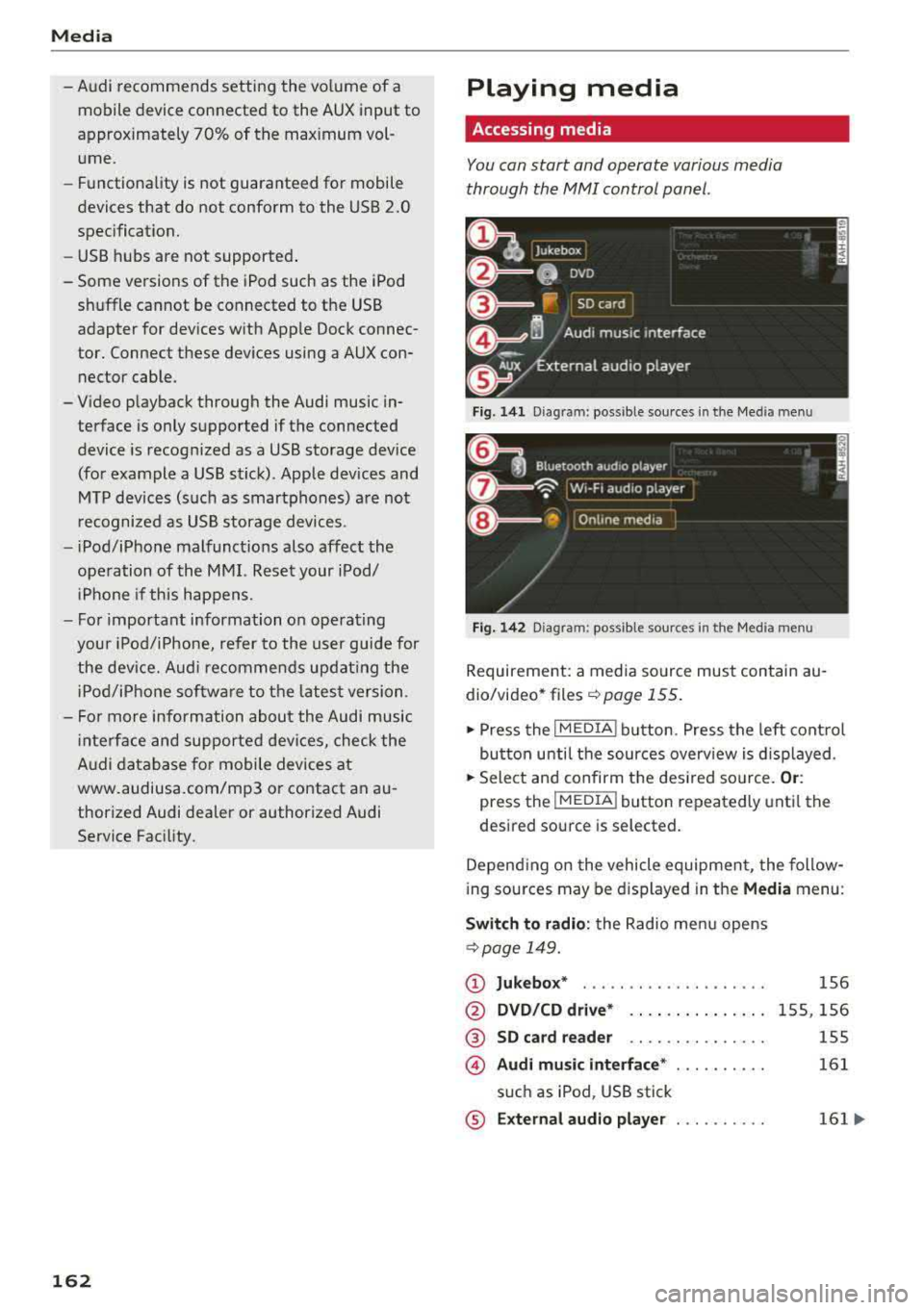
Fig. 1 41 Diagram: possible source s in t he Me dia menu
F ig . 142 Dia gr am: pos sible sour ces in the Med ia m enu
Requireme nt: a media so urce mus t contain au
dio/video* files
c:> page 155.
.,. Press the I M EDIA i button . Press the left cont rol
button unti l the sources overv iew is d isplayed .
.,. Select and confirm the des ired so urce. Or :
press the !MEDIA ! button repeatedly unti l th e
d esired sourc e is s elected.
Depend ing o n the vehicle equipmen t, the follow
i ng sou rces may be d isplayed in the
Media menu :
Switch to radio : the Radio menu opens
c:> page 149.
CD Jukebox* ....................
@ DVD /CD dri ve* .. .. .... . ..... .
® SD ca rd re ader .. .. ... ... ... ..
© Audi mu sic interface * ..........
s u ch as iPod , USB stick
® E xternal audio player . . . . . . . . . .
1S6
1 5S, 156
155
161
161 ...
Page 167 of 310
Cl 00 .-< N r-N .-< 0 r-Vl 00
Playlist
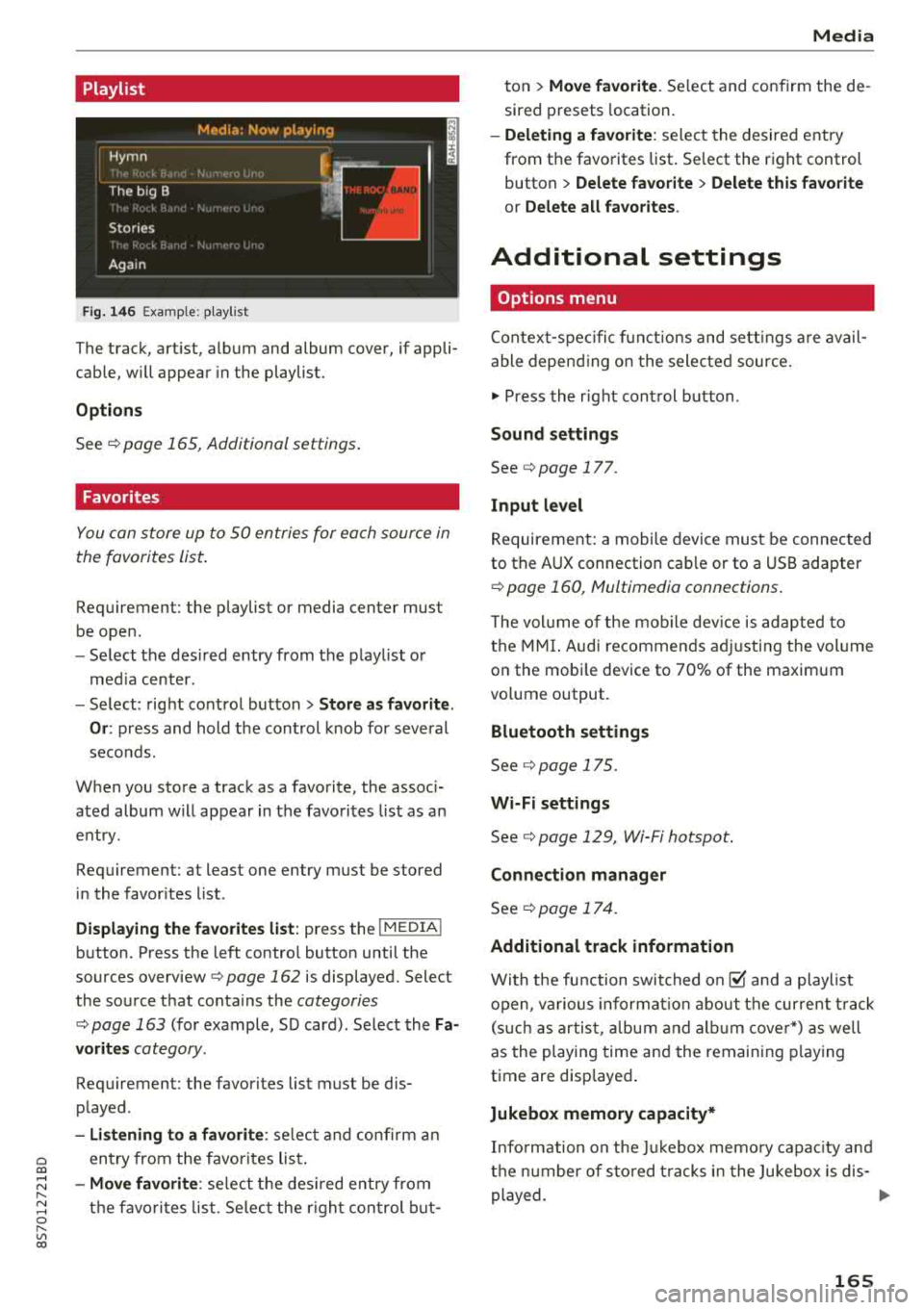
Fig. 14 6 Example: p lay list
The track, art ist, album and album cover, if appli
cable, will appear in the playlist.
Options
See r:!> page 165, Additional settings .
Favorites
You can store up to 50 entries for each source in
the favorites list.
Requirement: the playlist or media center must
be open .
-Select the des ired entry from the playl ist o r
med ia center.
- Select: right control button
> Store a s favorite.
Or :
press and hold the cont rol knob for several
seco nds.
When you store a track as a favorite, the assoc i
ated album w ill appear in the favorites l ist as an
entry.
Requirement: at least one entry must be stored
in the favor ites list.
Displa ying the fa vorite s list : press the I MEDIA !
button. Press the left contro l button until the
sources
overview ¢ page 162 is displayed. Select
the source that conta ins the
categories
r:!> page 163 (for example, SD card) . Select the Fa
vorit es
category.
Requirement: the favorites list must be dis
p layed.
- Listening to a favorite : select and confirm a n
entry from the favorites lis t.
-Move favorite : select t he des ired entry from
the favo rit es list. Se lec t the r ight con trol b ut-
Media
ton > Mo ve fa vo ri te . Se lect and confirm the de
sired presets location.
- Deleting a f avorit e: select the desired entry
from the favorites list. Se lect the right control
button
> Delete fa vorite > Delete this f avorite
or Delete all fa vorite s.
Additional settings
Options menu
Contex t-spec ific f unct ions and sett ings are avail
able depend ing o n the selected source.
.,. Press the r ight cont rol button .
Sound settings
See¢ page 177.
Input l evel
Requirement: a mobile device must be connected
to the AUX connection cab le or to a USB adapter
r:!> page 160, Multimedia connections.
T he vol ume of the mob ile dev ice is adapted to
the MMI. Audi recommen ds ad justing the vol ume
on the mobi le device to 70% of the maximum
vo lume output.
Bluetooth settings
See r:!> page 175.
Wi-Fi settings
See¢ page 129, Wi-Fi hotspot.
Connection manager
See ¢ page 17 4.
Additional track information
With the fu nction swit ched on@' and a playlist
open, va rious informat io n about the cur rent t rack
(s uch as artist, a lbum and a lb um cover*) as we ll
as the playing time and the remaining p laying
time are displayed .
Jukebox memory capacity*
Info rmation on the Ju kebox memo ry capac ity and
t h e n umber of sto red t racks in the Jukebox is dis-
played.
..,
165
Page 169 of 310
Cl 00 .-< N r-N .-< 0 r-Vl 00
Audio track1)
You can manually set the audio track (language
and audio format). The language and audio
format options depend on the video DVD.
Subtitles1
)
You can set subtitles for playback manually. The
langu ages available depend on the DVD.
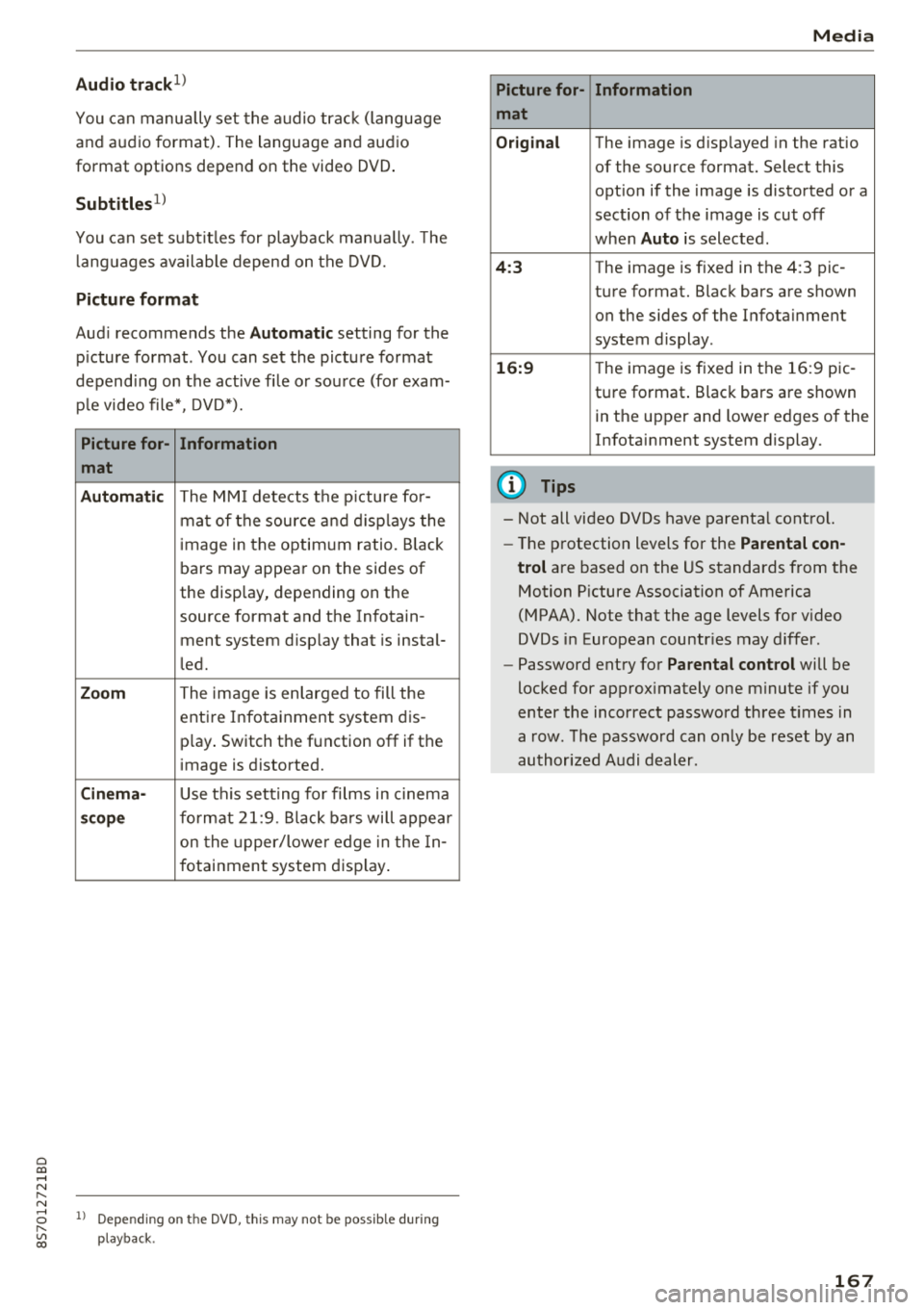
Picture format
Audi recommends the Automatic setting for the
p icture format . You can set the picture format
depending on the active fi le or source (for exam
ple video file*, DVD*).
Picture for-
Information
mat
Automatic
The MMI detects the picture for-
mat of the source and displays the
image in the optimum ratio. Black
bars may appear on the sides of
the display, depending on the
source format and the Infotain -
ment system d isp lay that is instal-
led.
Zoom The image is enlarged to fill the
entire Infotainment system dis-
p lay . Switch the function
off if the
image is distorted.
Cinema-Use th is setting for films in cinema
scope format 21:9. Black bars will appear
on the up per/lower edge in the In-
fotainment system display.
l) Depe ndi ng o n th e DVD, this may not be possib le during
playback.
Media
Picture for- Information
mat
Original
The image is d isp layed in the ratio
of the source format. Select this
opt ion if the image is distorted or a
section of the image is cut
off
when Auto is selected .
4:3 The image is f ixed in the 4:3 pie -
ture format. Black bars are shown on the sides of the Infotainment
system display .
16:9 The image is fixed in the 16:9 pie-
ture format . Black bars are shown
in the upper and lower edges of the
Infotainment system display.
(D Tips
- Not all video DVDs have parental control.
- Th e protection levels for the
Parental con-
trol
are based on the US standards from the
Motion Picture Association of America
(MPAA). Note that the age levels for v ideo
DVDs in European countr ies may differ.
- Password entry for
Parental control will be
locked for approx imately one minute if you
enter the incorrect password three times in
a row. The password can only be reset by an
authorized Audi dealer.
167
Page 176 of 310
System settings
delete the programmed voice training with the
Reset individual speech training function .
Factory settings
The follo wing funct ions can be reset to the facto
ry default settings :
-Sound settings
- Radio
- Media settings
- Jukebox*
- Directory*
- Telephone *
- Bluetooth and Wi-Fi*
- Navigation settings *
- Navigation and online memory *
- Voice recognition system*
- Message settings *
-Apps*
-Tool tips
-Audi connect *
You can select the desired functions individually
or all at once with the option
Select all entries .
Select and confirm Restore factory settings.
(D Tips
-Make sure that not only t he settings were
deleted but also the stored data, if appl ica
ble.
- Please note that the
voice recognit ion sys
tem* is not available in Cabriolets that do
not have a factory- insta lled safety belt mi
crophone .
174
Connection manager
Introduction
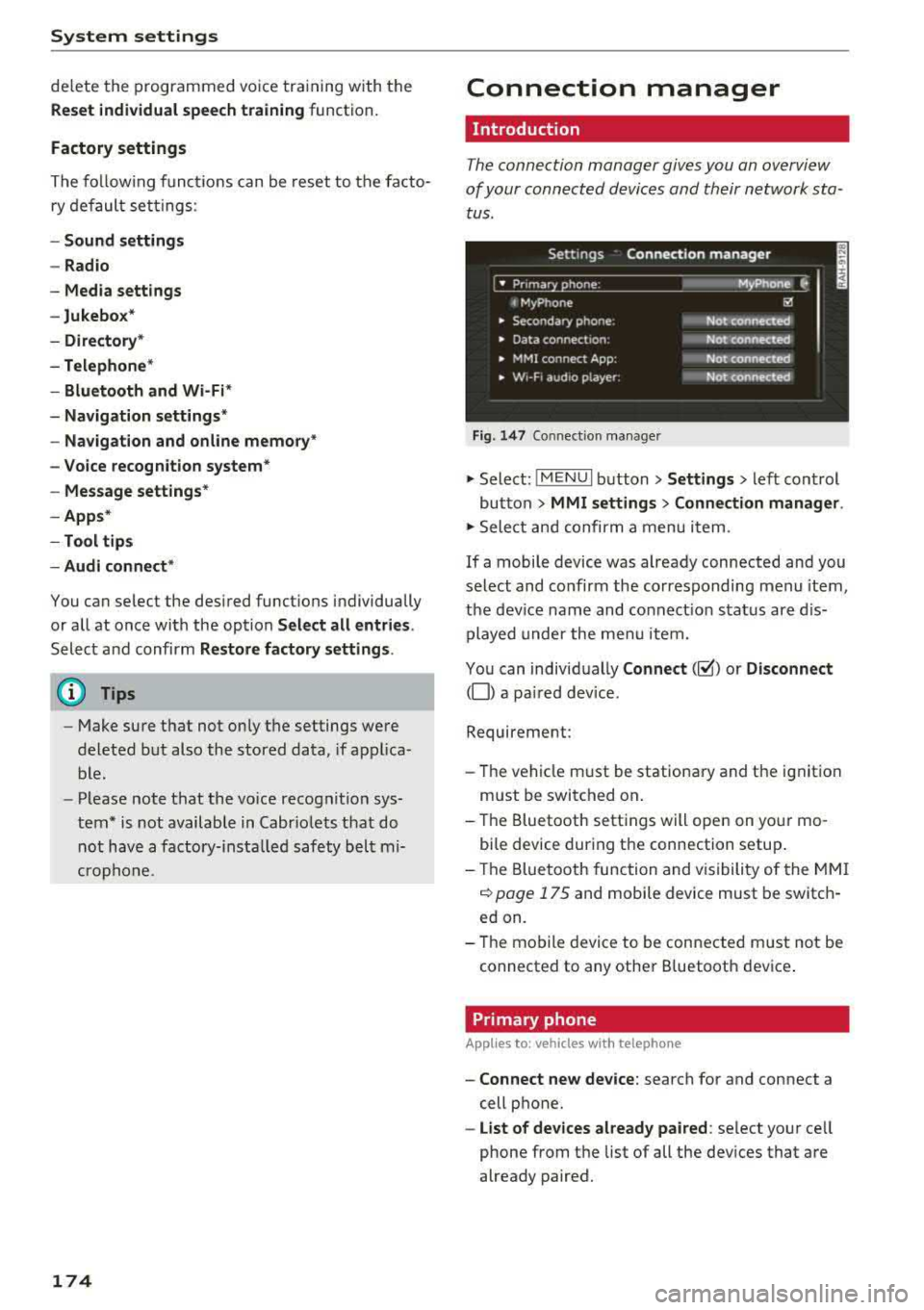
The connection manager gives you an overview
of your connected devices and their network sta
tus.
Settings Connection manager
I • Prima hone : M_Phone C,
t MyPhone ~
• Secondary phone : Not connected
• Data connect,on: Not connected
• MMI connect App: Not connected
• w,- F, aud ,o player: Not connected
Fig . 147 Co nnect ion manager
.,.. Select: !MENUI button> Settings > left control
button
> MMI settings > Connection manager.
.,.. Select and confirm a menu it em.
If a mobile device was already connected and you
select and co nfirm the corresponding menu item,
the device name and connect ion status are dis
played under the menu item.
You can individually
Connect(~) or Disconnect
(0) a pa ired device.
Requirement:
- Th e vehicle m ust be stationary and the ignition
m ust be switched on .
- Th e Bluetooth settings will open on your mo
bile device during the connection setup .
- Th e Bluetooth function and visibility of the MMI
c::> page 175 and mobile device must be switch
ed on.
- Th e mobile device to be connected m ust not be
connected to any other B luetooth dev ice .
Primary phone
App lies to: vehicles wi th telepho ne
- Connect new device: search for and connect a
cell phone.
- List of devices already paired: select your cell
phone from the list of all the devices that are
already paired.
Page 178 of 310
System settings
Select Invisible for t he MMI to not be v is ibl e to
othe r devices. Howeve r, it is still possib le to es
ta bli sh a B luetooth con nection with paired de
vices when the v is ibility is switched off . Se lect
Off to turn visibi lity off . Then a B luetooth con
nect io n is not possible .
-Bluetooth audio player : when this function is
switched on
g, t h e Blue tooth aud io player is
available as a so urce in t he
Media menu .
-Delete Bluetooth device : th e se lected cell
phone/mobile device is d isconnected from t he
MMI.
- Show Bluetooth profiles : you ca n Connect or
Disconnect the Handsfree profi le a nd the Di
rectory /contacts *
separately.
- Bluetooth audio player : switch th is function on
g to be a ble to selec t the B luetoo th a udio p lay
er as a source in t he M edia me nu.
-Bluetooth name : the MMI B luetoo th name (for
example ,,AUDI M MI 2017") is displayed and
can be changed .
W hen the function is switched on
g , the symbo l
@<=>page 102, fig . 110 appears in the Infotain
ment sys tem disp lay.
Online settings*
- Data connection settings :
see<=> page 130,
Configuring the data connection
- Data usage counter : th e amount of data pack
ets that a re sent and received throug h the MMI
is d isp layed. You can reset the data usage infor
mation to zero using the
Reset data counter
opt ion.
- Network status : the mobile netwo rk p rovider
for data se rvice as well as the network status
are disp layed .
Wi-Fi settings*
See <=> page 129, Wi -Fi hotspot.
SIM PIN settings*
- Automatic PIN entry:
when this funct ion is
swi tched on
g , th e S IM PIN is automatically
saved in the MMI after it is entered for t he first
time. The SI M PIN for four d ifferent SIM ca rds
can be saved i n the MMI. With the function
switched off, the cur rently stored SI M PIN i s
dele ted from the MMI. When the a utomat ic
176
P IN entry is swi tched on, the re a re no S IM P IN
prompts .
-Disable PIN query : when sw itche d on, there are
no SIM PIN queries . The a utomatic PIN entry is
not use d in this case .
-Change PIN : you can change the P IN on you r
SI M card . First ente r th e cur rent SI M PIN. T he
SI M PIN may on ly conta in digits 0 -9 . T he new
SI M PIN must be entered twice for security a nd
then it w ill be saved to the SI M card .
Apple CarPlay sound settings/ Android Auto
sound settings
App lies to : vehicles wit h Audi s m artph one interface
See<=> page 177.
About Apple CarPlay/ About Android Auto
App lies to : vehicles wi th Audi sma rtphone interface
Here you w ill find leg al inform ation reg arding
t h e use o f A pple Car Play o r And ro id Auto and in
fo rmat ion about devi ce -s p ecific data exc han ge.
Delete CarPlay device/Delete Android Auto
device
App lies to : vehicles wi th Audi s m artph one interface
Requirement: yo ur cell phone m ust not be con
necte d to the Au di music interface with a USB
adapter.
S e le ct :
Audi smartphone > a d evice from th e list
> righ t con trol button .
To re m ove your cell p ho ne from the list, se lect
a nd con firm
Delete CarPlay device or Delete An
droid Auto device .
© Tips
Some SIM cards do not allo w the SIM PIN
qu eri es to be sw itch ed off .
System update
.,. Selec t: !ME NUI butt on> Settings > left cont rol
bu tton >
System maintenance.
- System update :
slide the storage device with
t he upda te da ta into the a pprop ria te d rive
r=;, page 155. Selec t an d co nfirm t he drive>
Start update . The leng th of the p rocess de
pe nd s on the s ize of the up dat e.
Page 179 of 310
-Rese t driver in stallat ion: the selected media
driver package is reset to the settings at the
t ime of de livery.
- Ver sion inf orm ation : information on the MMI
software version and the navigat ion database *
software version is displayed. The
S oftwa re in
format io n
function a lso provides information
on the software contained in the MMI and the licens ing agreement .
Sound settings
The sound distribution and volume of the MMI
can be adjusted individually . The settings depend
on vehicle equipment.
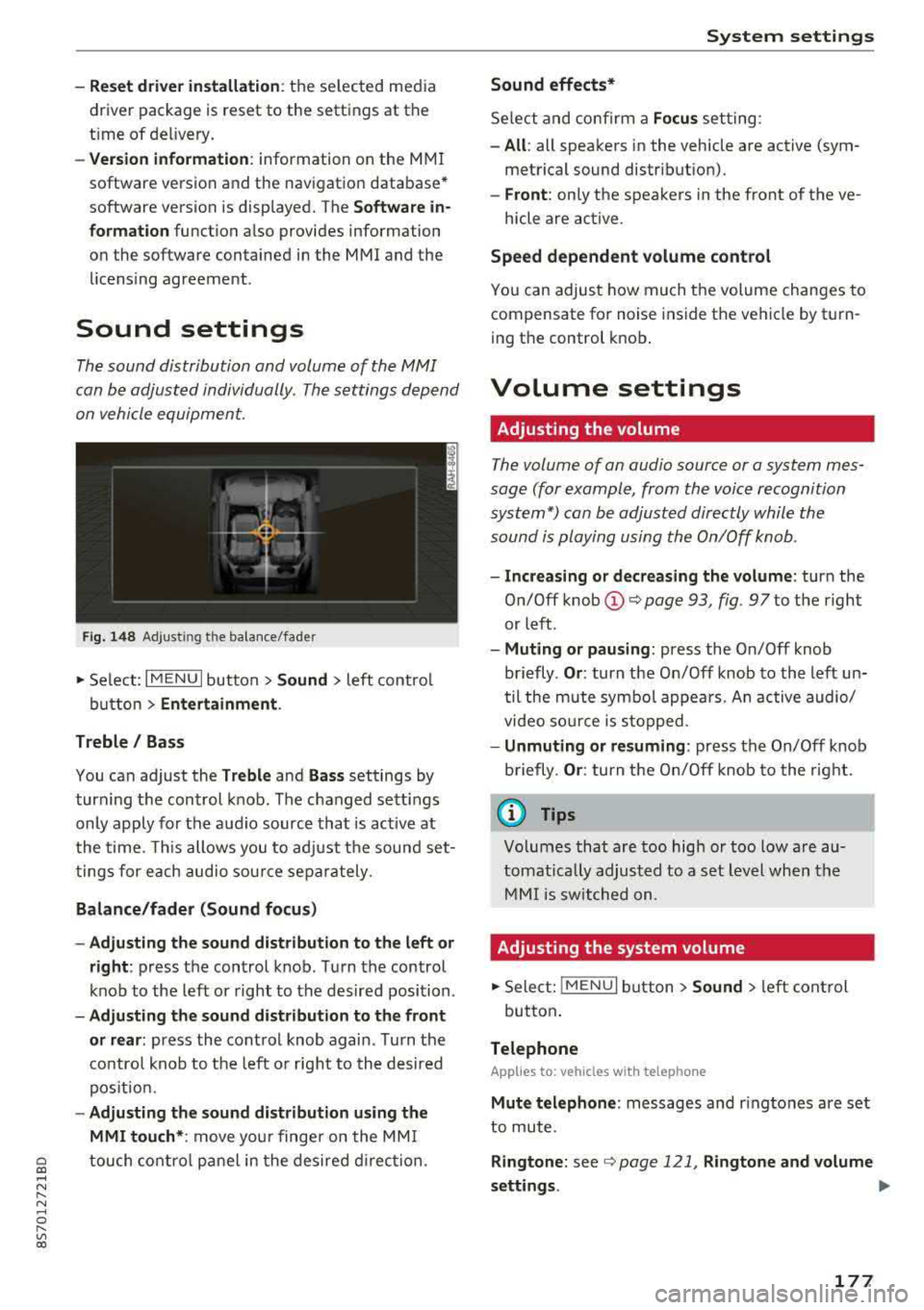
F ig . 1 48 Adj ustin g the balance /fade r
~ Select : I MENU I button >Sound > left contro l
button
> Ent ertainm ent .
Treble / Bass
You can adjust the Treble and Ba ss settings by
turn ing t he control knob . The changed sett ings
only apply for the audio source that is act ive at
the time. This allows you to ad just the sound set
t ings for each audio sour ce separately .
Bal ance /fader (Sound focus )
- Adju sting th e sound d istribution to the left or
right :
press the control knob . Turn the control
knob to the left or right to the desired position .
-Ad ju sting th e sound d istribution to the front
or rear :
press the control knob again . Turn the
contro l knob to the left o r right to the desired
pos ition.
- Adjusting the so und d istribution u sing th e
MMI touch* :
move your finger on the MM I
~ touch contro l panel in the desired d irec tion.
.... N ,....
N ...... 0 ,....
Vl co
S ys tem settings
Sound effects*
Select and confirm a Focu s setting:
-All : all speakers in the vehicle are active (sym
metrical sound distribut ion).
- Front : only the speakers in the front of the ve -
hicle are active .
Speed depend ent v olume control
You can adjust how much t he volume changes to
compensate for noise inside the vehicle by turn
ing t he control knob .
Volume settings
Adjusting the volume
The volume of an audio source or a system mes
sage (for example, from the voice recognition
system*) can be adjusted directly while the
sound is playing using the On/Off knob .
-Incr easing or decr eas ing the volume : turn the
O n/Off knob
(D ¢ page 93 , fig. 97 to t he right
or left .
-Muting or p au sing : press the On/Off knob
briefly .
Or: turn the On/Off knob to the left un
til the mute symbol appea rs. An active audio/
video so urce is stopped.
- Unmuting o r re suming : press the On/Off knob
briefly .
Or: turn the O n/Off knob to the right.
(D Tips
Volumes that are too high or too low are au
tomatically adjus ted to a set level when the
MM I is switched on.
Adjusting the system volume
~ Sele ct: ! MENU I button> Sound> le ft control
button .
Telephone
Applies to: vehicles with telephone
Mute t elephone : messages and r ingtones are set
to mute.
Ringtone : see ¢ page 121, Rin gton e and volume
s ettings .
.,.
177