transmission AUDI TT ROADSTER 2018 User Guide
[x] Cancel search | Manufacturer: AUDI, Model Year: 2018, Model line: TT ROADSTER, Model: AUDI TT ROADSTER 2018Pages: 310, PDF Size: 46.95 MB
Page 80 of 310
Assistance systems
Messages
App lies to: ve hicles w ith Aud i side ass ist
If th e side assist sw itches off automatically, a
message appears in the Infotainment system dis
p la y.
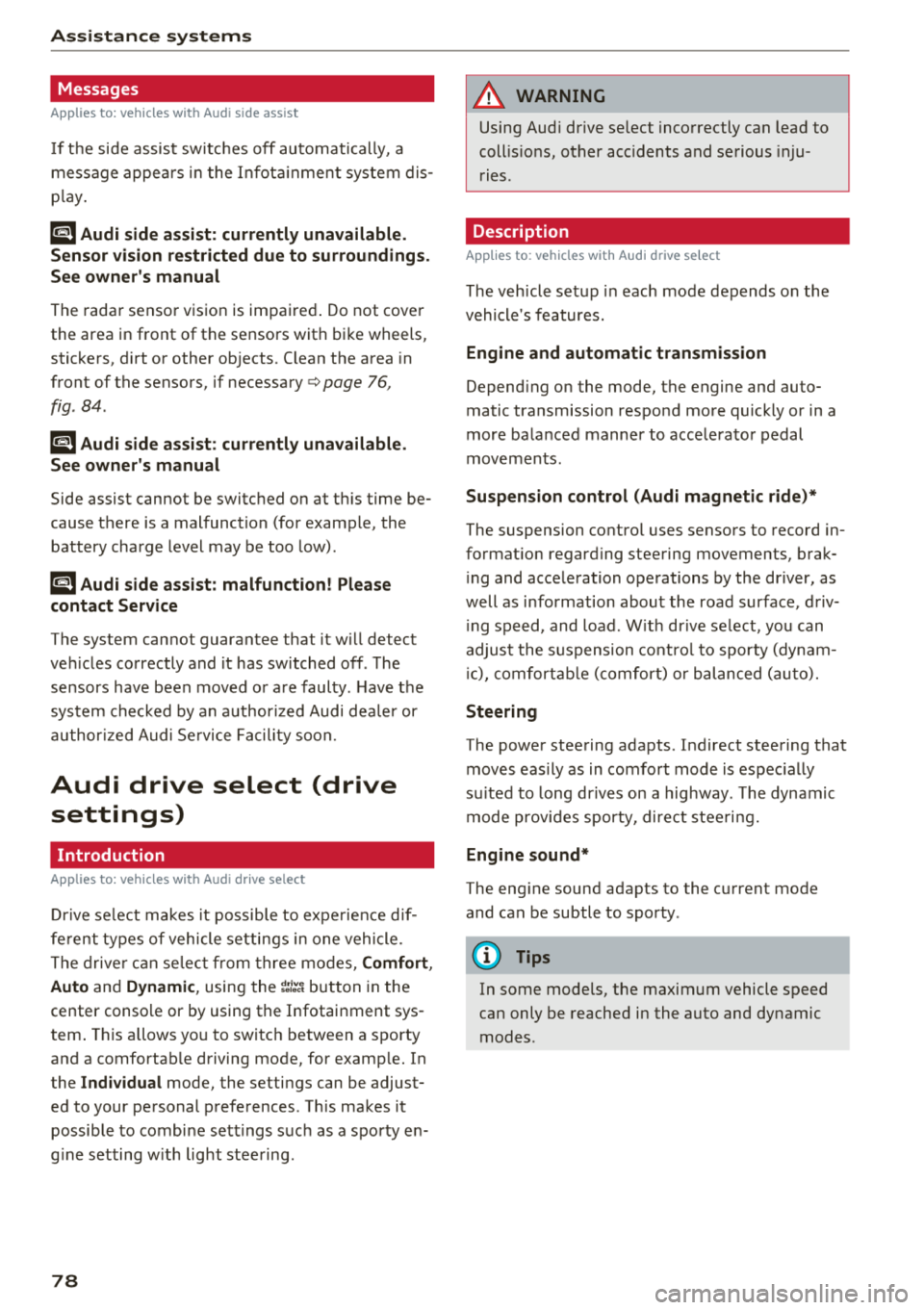
@j Audi side assist: currently unavailable.
Sensor vision restricted due to surroundings.
See owner's manual
The radar sensor vision is impaired . Do not cover
the area in front of the sensors with bike wheels,
stickers, dirt or other objects. Clean the area in
front of the sensors, if necessary
c:> page 76,
fig . 84 .
@j Audi side assist: currently unavailable.
See owner's manual
Side assist cannot be switched on at th is time be
cause there is a malfunction (for example, the battery charge level may be too low) .
@j Audi side assist: malfunction! Please
contact Service
The system cannot guarantee that it will detect
veh icles correctly and it has switched off . The
sensors have been moved or are faulty. Have the
system checked by an author ized Audi deale r or
authorized Audi Service Facility soon.
Audi drive select (drive
settings)
Introduction
A pp lies to: ve hicles w ith Aud i d rive select
Drive select makes it possible to expe rience d if
fe rent types of vehicle settings in one vehicle.
The driver can select from three modes, Comfort,
Auto and Dynamic , using the
i:l:ta button in the
center console or by using the Infotainment sys
tem . T his allows you to switch between a sporty
and a comfortab le driving mode, for examp le. In
the Indi vidual mode, the settings can be adjust
ed to your personal preferences. This makes it
possible to combine sett ings such as a sporty en
g ine setting w ith light steering.
78
A WARNING
Using Aud i drive select incorrectly can lead to
coll is ions, other accidents and serious inju
ries.
Description
App lies to: vehicles with A udi drive se lect
The veh icle setup in each mode depends on the
vehicle's features.
Engine and automatic transmission
Depending on the mode, the engine and auto
matic transmission respond more quickly or in a
more balanced manner to accelerator pedal
movements.
Suspension control (Audi magnetic ride)*
The suspension control uses sensors to record in
format ion regarding steering movements, brak
i ng and acceleration operations by the driver, as
well as information about the road surface, driv
i ng speed, and load. W ith dr ive se lect, you can
adjust the suspension control to sporty (dynam
ic ), comfortable (comfort) or balanced (auto).
Steering
The power steering adapts . Indirect steering that
moves eas ily as in comfort mode is espec ially
su ited to long drives on a highway . The dynamic
mode provides sporty, direct steering.
Engine sound*
The engine sound adapts to the current mode
and can be subtle to sporty .
(D Tips
In some models, the maximum vehicle speed
can only be reached in the auto and dynamic
modes .
Page 81 of 310
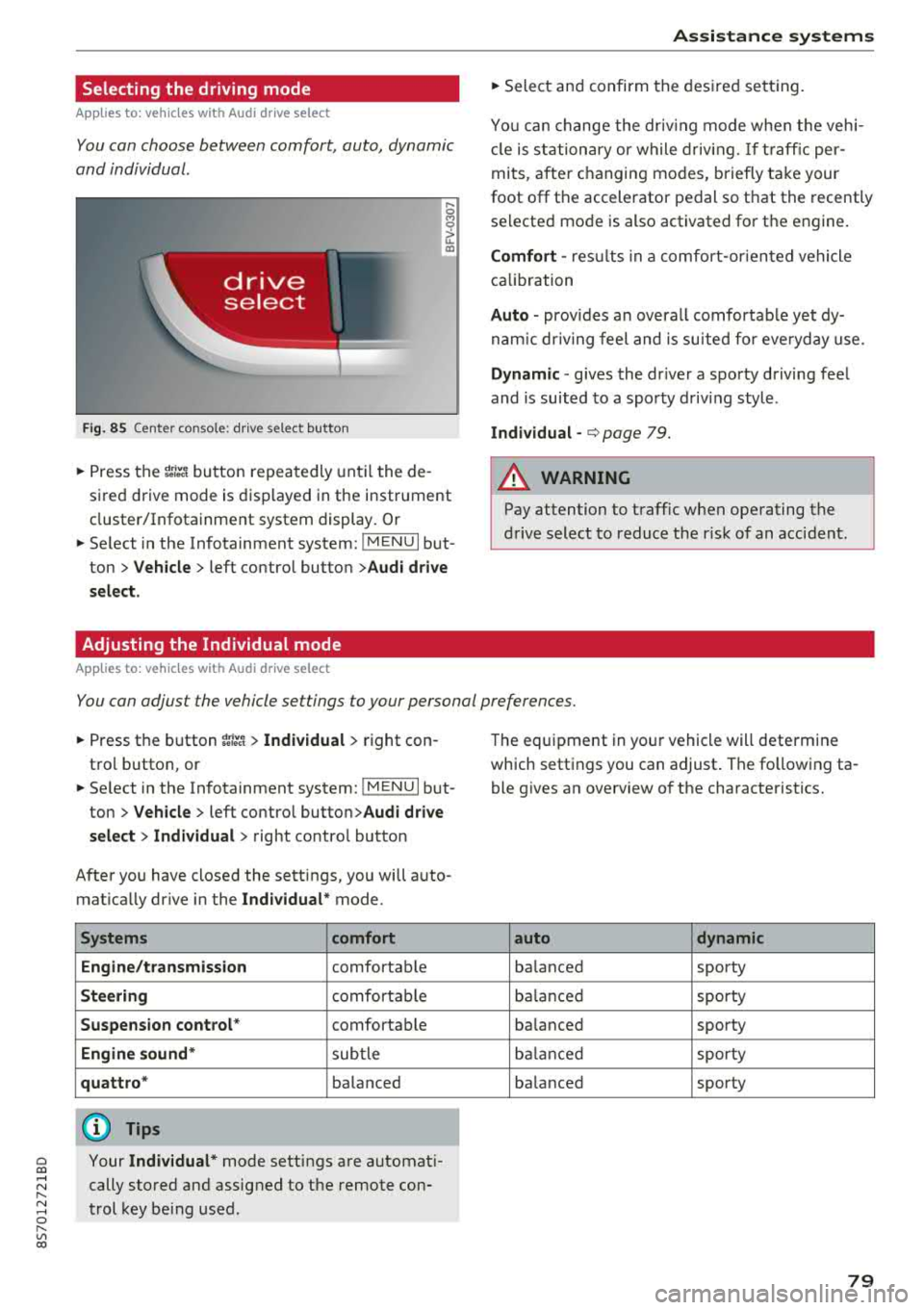
Selecting the driving mode
App lies to: ve hicles with Audi drive select
You can choose between comfort, auto, dynamic
and individual .
Fig. 85 Center conso le: drive select button
.... 0 M 0
G'. al
.. Press the ~i~ button repeatedly until the de
sired drive mode is displayed in the instrument
cluster/Infotainment system display . Or
.. Se lect in the Infotainment system: !MENUI but
ton >
Vehicle > left contro l button >Audi drive
select.
Adjusting the Individual mode
Applies to: ve hicles with Audi drive select
Assistance systems
.. Select and confirm the desired settin g.
You can change the driv in g mode when the veh i
cl e is stationary or while driving.
If traffic per
mits, after ch anging modes, briefly ta ke your
foot off t he accelerator pedal so that the recently
se lected mode is also activated for the engine.
Comfort -res ults in a comfo rt-orien ted vehicle
calibration
Auto -provides an overa ll comfortab le yet dy
namic driving feel and is suited for everyday use.
Dynamic -gives the driver a sporty driving fee l
and is suited to a spo rty driving style .
Individual -¢ page 79.
A WARNING ...__ -
Pay attention to traffic w hen operating the
drive select to reduce the r isk of an accident .
You can adjust the vehicle settings to your personal preferences .
.. Press the button ~:/:er. > Individual > right con
tro l button, or
.. Se lect in the Infotainment system: !MENUI b ut
ton>
Vehicle > left contro l button> Audi drive
select> Individual >
right contro l button
After you have closed the sett ings, you will a uto
mat ica lly dr ive in the
Individual* mode.
Systems comfort
Engine/transmission
comfortable
Steering comfortable
Suspension control * comfortable
Engine sound* subtle
quattro * balanced
(D Tips
~ Your Individual* mode settings are automat i-
;:::: cally stored and assigned to the remote con-r--
~ trol key being used. 0 r-Vl 00
T he equipment in yo ur vehicle will determine
which settings you can adjust . The fo llowing ta
ble gives an overview of the characteristics.
auto dynamic
balanced sporty
balanced sporty
ba lanced sporty
balanced sporty
ba lanced sporty
79
Page 235 of 310
Cl co .... N ,....
N .... 0 ,....
Vl co
Emissions control
systems
Catal ytic conve rt er
The vehicle may on ly be driven with unleaded
gasoline, otherwise the catalyt ic converter will be
destroyed.
Never drive until the tank is completely empty.
The irregular supply of f uel that results from that
can cause engine m isfires. Uncombusted fuel will
enter the exhaust system, wh ich can cause over
heat ing and damage to the catalyt ic converter .
A WARNING
The temperature of the exhaust system is
high, both when d riving and after stopping
the engine.
-
- Never touch the exhaust tail pipes once they
have become ho t. This could result in bu rns.
- Do not park your vehicle ove r flammable
materials such as g rass or leaves because
the high temperat ure of the em iss ions con
trol system co uld s tart a fire.
- Do not apply underbody p rotectant in the
exha ust system area, because this inc reases
the risk of fi re.
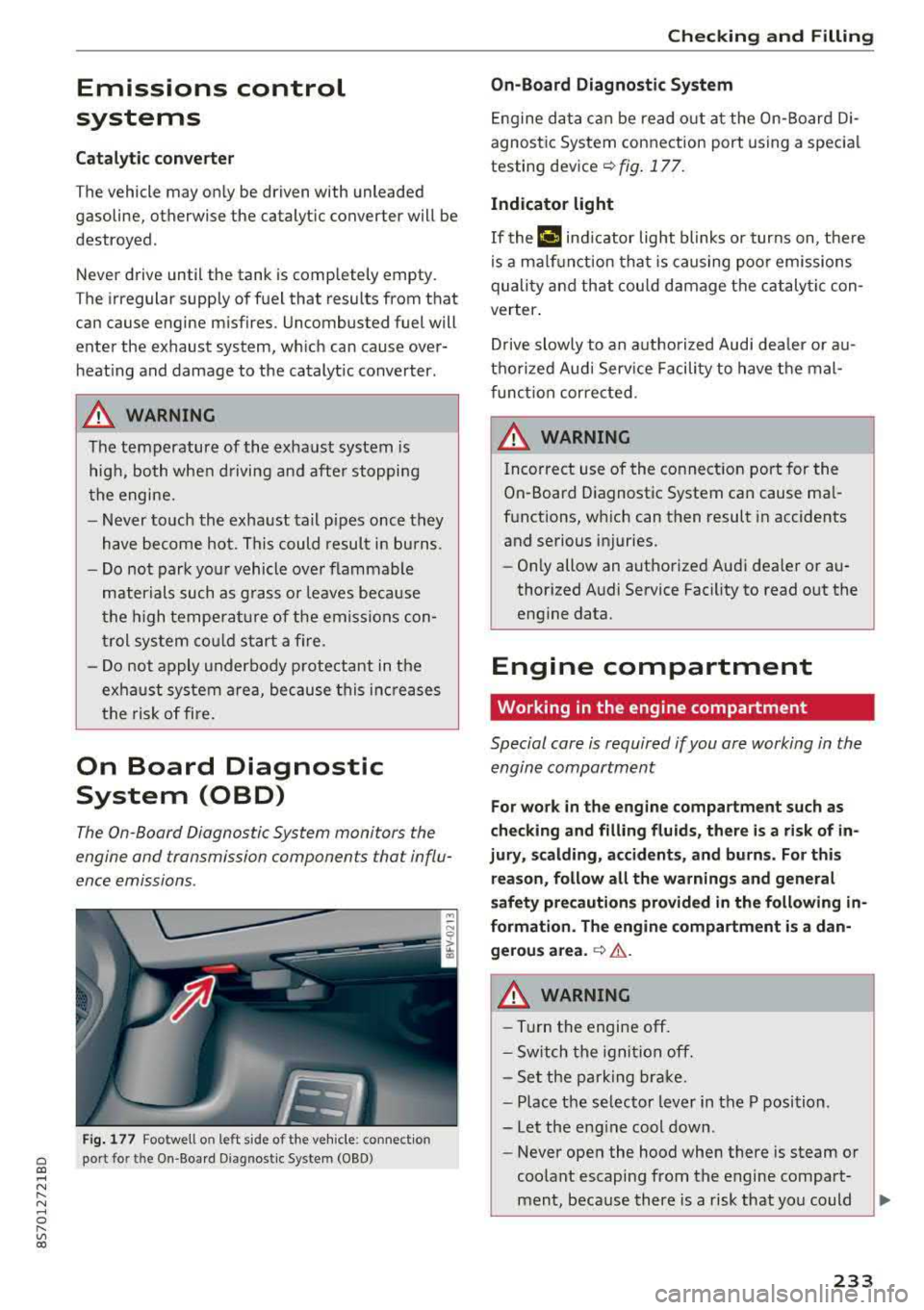
On Board Diagnostic
System (OBD)
The On -Board Diagnostic System monitors the
engine and transmission components that influ
ence emissions.
F ig . 177 Footwell on left side of the vehicle : connect ion
port for the On-Board Diagnostic System (OBD)
Chec king and Filling
On -Board Diagnostic System
Engine da ta can be read out at the On-Board Di
agnost ic System connection port using a spec ia l
testing
dev ice~ fig. 177 .
Indicator light
If thP ¢'4 ind icator light blinks or turns on, there
is a ma lf u nction that is caus ing poo r emissions
quality and that cou ld damage the catalytic con
verter .
Drive slowly to an a uthorized Aud i dea ler or au
t h orized Audi Serv ice Facili ty to have t he mal
f unct ion corrected.
A WARNING ..
Incorrect use of the connection port for the
On-Board D iagnostic System can cause ma l
f u nctions, which can then result in accidents
and serious injuries.
- Only allow an authorized Audi dea ler or au
thor ized Audi Service Fac ility to read out the
engine data.
Engine compartment
Working in the engine compartment
Special care is required if you are working in the
engine compartment
-
F o r work in the engine compa rtment such as
checking and fill ing fl uids , there i s a risk of in
jury , scalding, accident s, and b urn s. For thi s
re ason , follow all the warnings and general
safety pre cautions prov ided in the following
in
formati on. The engine compartm ent i s a dan
gerou s area .
~ .&..
A WARNING
-----Turn the engine off.
- Sw itch the igni tio n off.
- Set the parking brake.
- P lace the se lector lever in the P position.
-Let the eng ine cool down.
-Never open the hood when there is steam or
coolant escaping from the engine compart
ment, because there is a risk that you could
233
Page 248 of 310
Wheel s
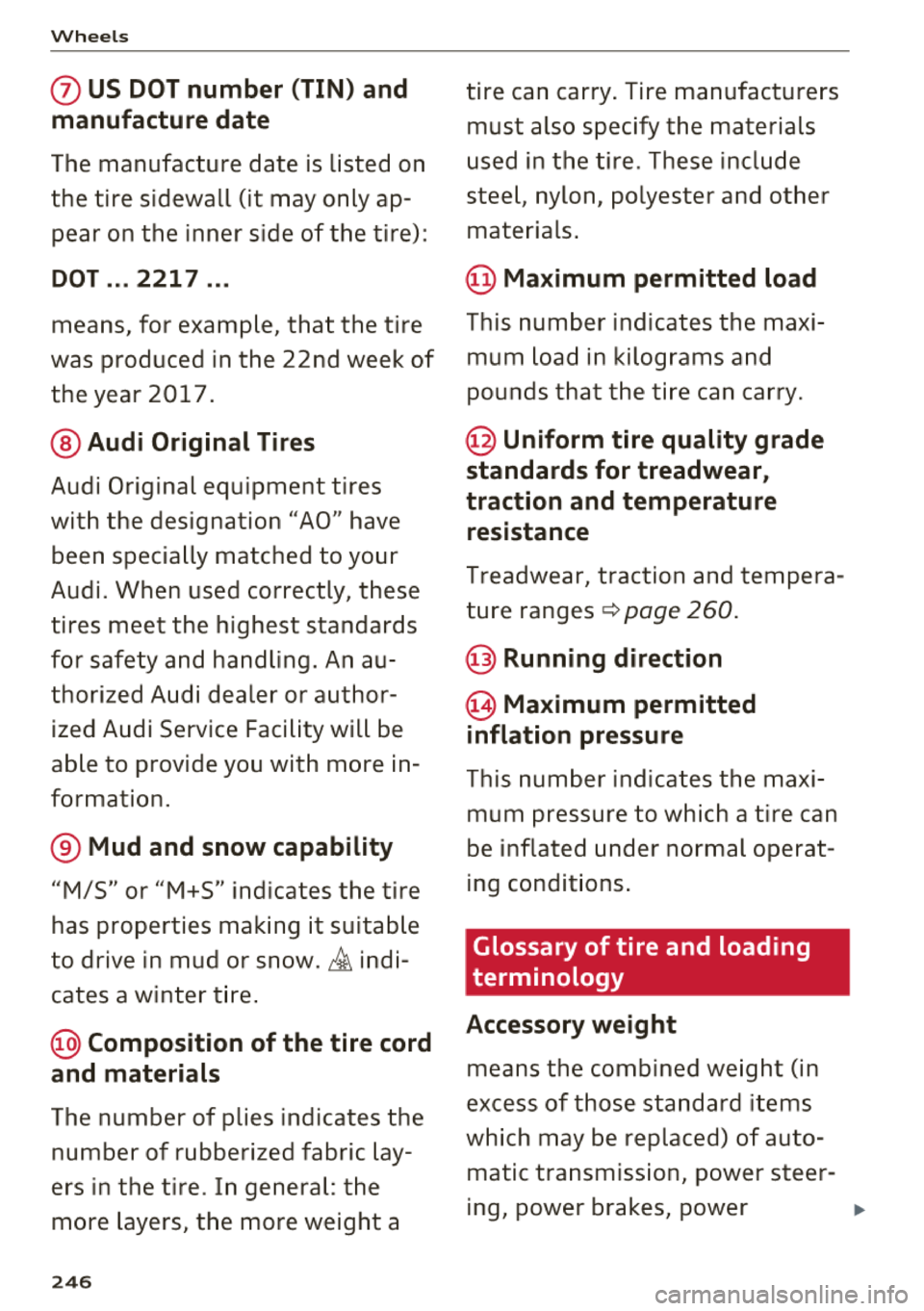
0 US DOT number (TIN) and
manufacture date
T he manufacture date is listed on
the tire sidewall (it may only ap
pear on the inner side of the tire) :
DOT ... 2217 ...
means, for example, that the tire
was produced in the 22nd week of
the year 2017.
@ Audi Original Tires
Audi Original equipment tires
with the designation
"AO" have
been specially matched to your
Audi. When used correctly, these
tires meet the highest standards
for safety and handling. An au
thorized Audi dealer or author
ized Audi Service Facility will be
able to provide you with more in
formation.
® Mud and snow capability
"M/5" or "M+S" indicates the tire
has properties ma king it suitable
to drive in mud or snow.
& indi
cates a winter t ire .
@) Compos ition of the tire cord
and materials
T he number of plies indicates the
number of rubberized fabric lay
ers in the tire . In general: the
more layers, the more weight a
246
tire can carry. Tire manufacturers
must also specify the materials
used in the tire . These include
steel , nylon, po lyester and other
materials .
@ Maximum permitted load
This number indicates the max i
mum load in kilograms and
pounds that the tire can carry.
@ Uniform tire quality grade
standards for treadwear,
tr action and temper ature
resistance
Treadwear, traction and tempera
ture
ranges ~ page 260.
@ Running direction
@Maximum permitted
inflation pressure
This number indicates the maxi
mum pressure to which a tire can
be inflated under normal operat
ing condit ions .
Glossary of tire and loading
terminology
Accessory weight
means the comb ined weight (in
excess of those standard items
which may be replaced) of auto matic transmission, power steer -
ing, power brakes, power
..
Page 283 of 310
Cl co .... N ,....
N ...... 0 ,....
Vl co
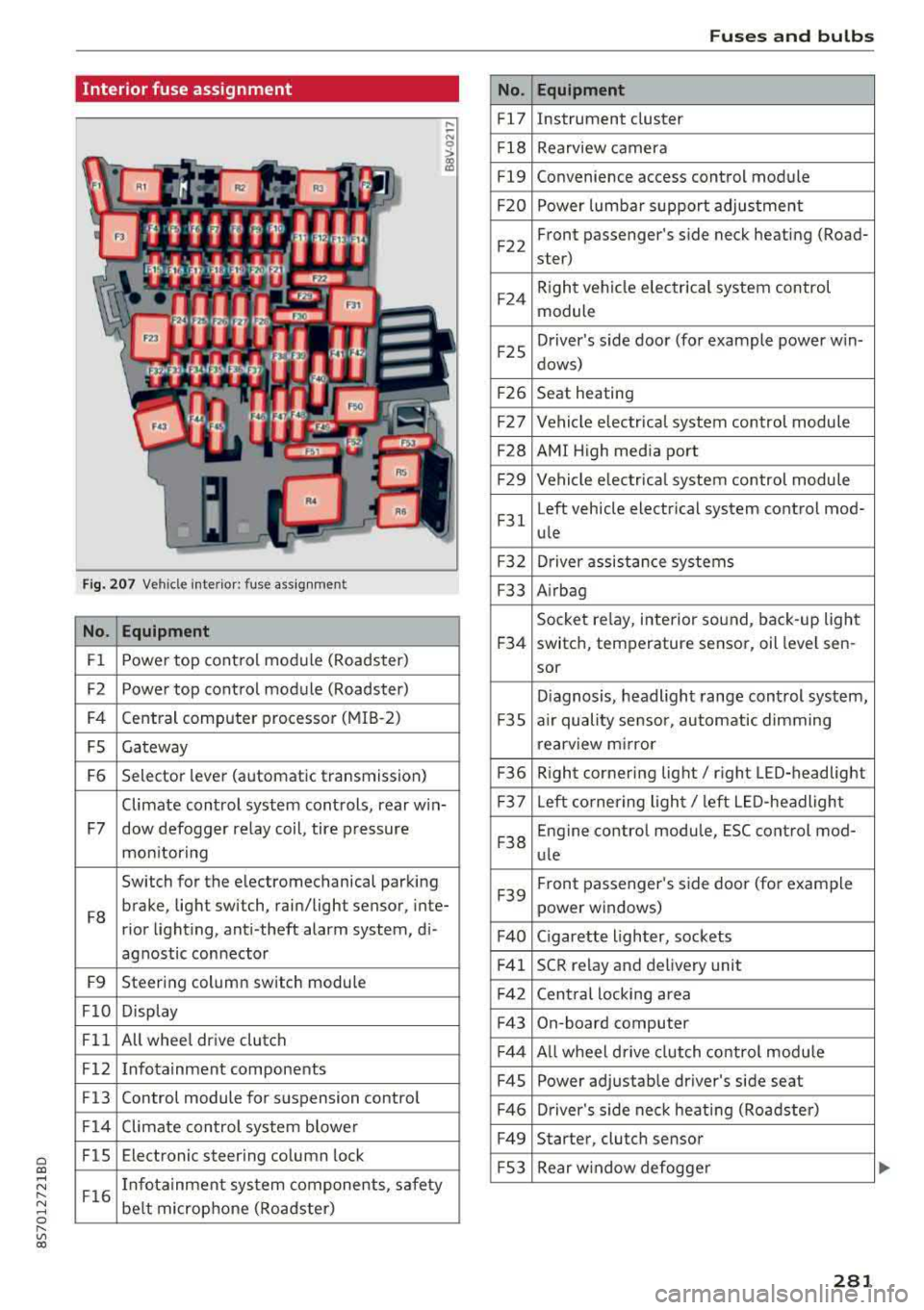
Interior fuse assignment
Fig. 207 Vehicle interior: fuse assignmen t
No. Equipment
Fl Power top cont
rol module (Roadster)
F2 Power top control module (Roadster)
F4 Central computer processor (MIB
-2)
FS Gateway
F6 Selector lever (automatic transmission)
Climate control system controls, rear w in-
F7 dow defogger relay coil, tire pressure
mon itoring
Switch for the electromechanical parking
F8 brake, light switch, rain/light sensor, inte-
rior lighting, anti -theft alarm system, di -
agnostic connector
F9 Steering column switch module
FlO Display
Fll All whee
l drive clutch
F12 Infotainment components
F13 Control module for suspension control
F14 Climate control system blowe r
FlS Electronic steering column
lock
F16 I
nfotainment system components, safety
be lt microphone (Roadster)
No.
Fl7
F1 8
Fl9
F20
F 22
F24
F 25
F 26
F 27
F28
F2 9
F 31
F3 2
F33
F 34
F 35
F36
F37
F3 8
F39
F40
F41
F 42
F43
F44
F45
F46
F49
F S3
Fuses and bulbs
Equipment
Instrument cluster
Rearview camera
Convenience access control module
Power lumbar support adjustment
Front passenger's side neck heating (Road-
ster)
R ight vehicle electrica l system control
module
Driver's s ide door (for example power w in-
dows)
Seat heating
Vehicle electrical system control module
AMI High media port
Vehicle e lectr ical system control module
Left vehicle electrical system contro l mod-
ule
Driver assistance systems
Airbag
Socket relay, inte rior sound , back-up light
switch, temperature sensor, oil leve l sen -
sor
Diagnosis, headlight range control system,
a ir quality sensor, automatic dimming
rearview mirror
R ight cornering light/ right LED-headlight
L eft cornering light/ left LED-headlight
Engine control module, ESC control mod-
ule
Front passenger's side door (for example
power windows)
C igarette lighter, sockets
SCR relay and delivery unit
Central locking area
On-board computer
A ll wheel d rive clutch control module
Power adjustable driver's side seat
Driver's side neck heating (Roadster)
Starter, clutch sensor
Rear window defogger
281
Page 284 of 310
Fuses and bulbs
The power seats* are protected via circuit break
ers
that automatically switch on after a few sec
onds after the overload has been reduced.
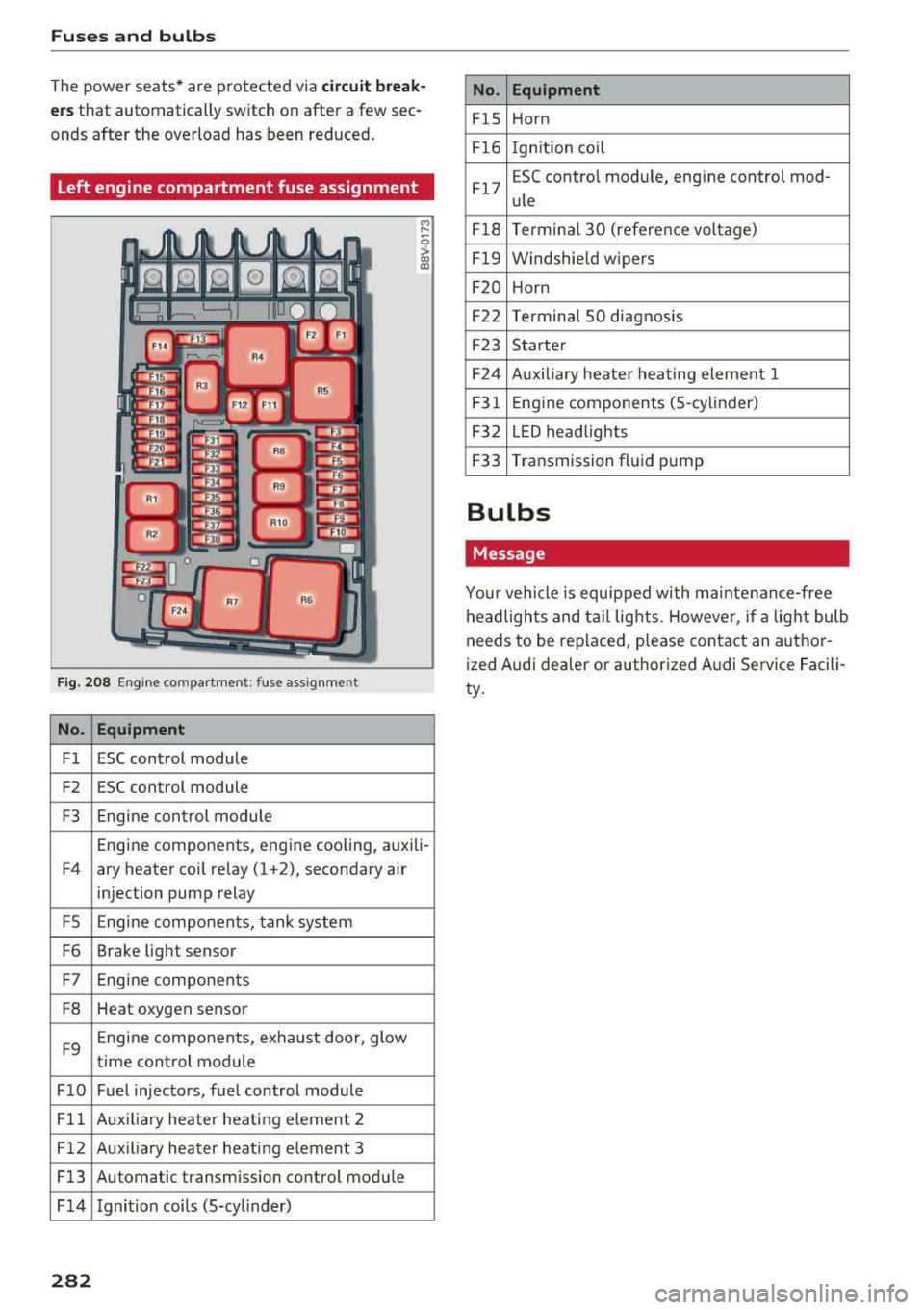
Left engine compartment fuse assignment
F ig. 208 Engine co mpartment : fuse assignment
No. Equipment
Fl ESC control module
F2 ESC control module
F3 Engine control module
M
" 0 > a, m
Engine components, engine cooling, auxili-
F4 ary heater coil relay (1 +2), secondary air
injection pump relay
FS Engine components, tank system
F6 Brake light sensor
F7 Engine components
F8 Heat oxygen sensor
F9 Engine components, exhaust door, glow
time control module
FlO Fuel injectors, fuel control module
Fll Auxiliary heater heating e lement 2
F 12 Aux iliary heater heat ing element 3
Fl3 Automatic transmission control module
F 14 Ignition coils (5-cylinder)
282
No. Equipment
FlS Horn
Fl6 Ignition coil
Fl7 E
SC contro l module, engine control mod-
ule
Fl8 Terminal
30 (reference voltage)
Fl9 Windshield wipers
F20 Horn
F22 Terminal SO diagnosis
F23 Starter
F24 Auxiliary heater heating element 1
F31 Engine
components (5 -cylinder)
F32 LED headlights
F33 Transmission fluid pump
Bulbs
Message
Your vehicle is equipped with ma intenance-free
headlights and tail lights. However, if a light bulb
needs to be replaced, please contact an author
ized Audi dealer or authorized Audi Service Facili
ty.
Page 285 of 310
Cl 00 .-< N r--N .-< 0 r--Vl 00
Emergency situations
General
This chapter is intended for trained emergency
crews and working personnel who have the nec
essary tools and equipment to perform these
operations.
Starting by pushing or
towing
~ Note
Vehicles with an automatic transmission can
not be started by pushing or towing.
Starting with jumper
cables
If necessary, the engine can be started by con
necting it to the battery of another vehicle .
If the engine should fail to start because of a dis
charged or weak battery, the battery can be con
nected to the battery of
another vehicle, using a
pair of jumper cables to start the engine.
Jumper cables
Use only jumper cables of sufficiently large cross
section
to carry the starter current safely. Refer
to the manufacturer's specifications.
Use only jumper cables with
insulated terminal
clamps which are distinctly marked :
plus(+) cable in most cases colored red
minus(-) cable
in most cases colored black.
A WARNING -
Batteries contain electricity, acid, and gas.
Any of these can cause very serious or fatal in
jury. Follow the instructions below for safe
handling of your vehicle's battery .
-Always shield your eyes and avoid leaning
over the battery whenever possible.
-A dead battery can freeze at temperatures
around 32 °F (0 °C) . If the vehicle battery is
frozen, you must thaw it before connecting
the jump start cables. If you do not, this in-
Emergency situations
creases the risk of an explosion and chemi
cal burns. After jump starting the vehicle,
drive to an authorized Audi dealer or author ized Audi Service Facility immediately to
have the vehicle battery checked.
- Do not allow battery acid to contact eyes or
skin . Flush any contacted area with water
immediately.
- Improper use of a booster battery to start a
vehicle may cause an explosion .
- Vehicle batteries generate explosive gases .
Keep sparks, flame and lighted cigarettes
away from batteries.
- Do not try to jump start any vehicle with a
low acid level in the battery .
- The voltage of the booster battery must also
have a 12-Volt rating . The capacity (Ah) of
the booster battery should not be lower
than that of the discharged battery. Use of
batteries of different voltage or substantial
ly different "Ah " rating may cause an explo
sion and personal injury.
- Never charge a frozen battery. Gas trapped
in the ice may cause an explosion.
- Never charge or use a battery that has been
frozen. The battery case may have be weak
ened.
- Use of batteries of different voltage or sub
stantially different capacity (Ah) rating may
cause an explosion and injury. The capacity
(Ah) of the booster battery should not be
lower than that of the discharged battery.
- Before you check anything in the engine
compartment, always read and heed all
WARNINGS
c>page 233.
@ Note
- Applying a higher voltage booster battery
will cause expensive damage to sensitive
electronic components, such as control
units, relays, radio, etc.
- There must be no electrical contact between
the vehicles as otherwise current could al
ready start to flow as soon as the positive
( + ) terminals are connected.
283
Page 287 of 310
-When connecting jumper cables, make sure
that they cannot get ca ught in any mov ing
parts in the engine compartment.
- Do not bend over the batteries - danger of
chem ica l burns!
- The battery cell lock ing screws must be
t ightened sec ure ly.
- Be fore you check anything in the e ngine
compartment, a lways read and hee d all
WAR NINGS
q page 233 .
(D Note
Impro per hook -up of jum pe r cables can r uin
the gene rato r.
- Always connect POSITI VE (+ ) to POS ITIV E
( + ), and NEGATIVE( -) to NEGAT IVE( -)
g roun d post of t he battery mana ger contro l
u nit.
- Check that a ll sc rew p lugs on t he battery
cells are screwed in firmly. I f not, t ighten
plugs prior to connecting clamp on negative
batte ry terminal.
- Please note that the procedure fo r con nect
i ng a jumper cab le as desc ribed above ap
p lies specifica lly to the case of yo ur vehicle
being jump starte d. When you are giv ing a
ju mp s ta rt to anothe r vehicle, do
not con
n ect the neg ative (-) cab le to the neg ative
(-) t ermin al on the di sch arged b attery @
q fig. 210. In ste ad , securely connec t the
nega tive ( -) cab le to either a solid me tal
com ponent that is f irm ly bolted to the e n
gine block o r to the engine bloc k itself. If
the battery that is be ing cha rge d does not
vent to the outs ide, escap ing battery gas
could ignite and exp lode!
Towing with a tow truck
General hints
Your Audi requires special handling for towi ng .
The fo llow ing information is to be used by com
mercia l tow tr uck operators who know how to op-
a e rate the ir equip ment safe ly. co ....
~ - Never tow your Audi. Towing will cause dam-
"' 8 age to the engine and transmission . r--Vl co
Emergency situations
-Never wrap the safety chains or winch cables
around the brake lines .
- To prevent unnecessa ry damage , your Audi
must be transported with a flatbed truck.
- To load the vehicle on to the flatbed, use the
towing loop found in the vehicle tools and at
tach to the front or rear anchorage
¢ page 285 and ¢ page 286 .
A WARNING
-A veh icle being towed is not safe for passen-
ge rs. Neve r allow anyone to ride in a vehicle
b eing towed, fo r any r eason.
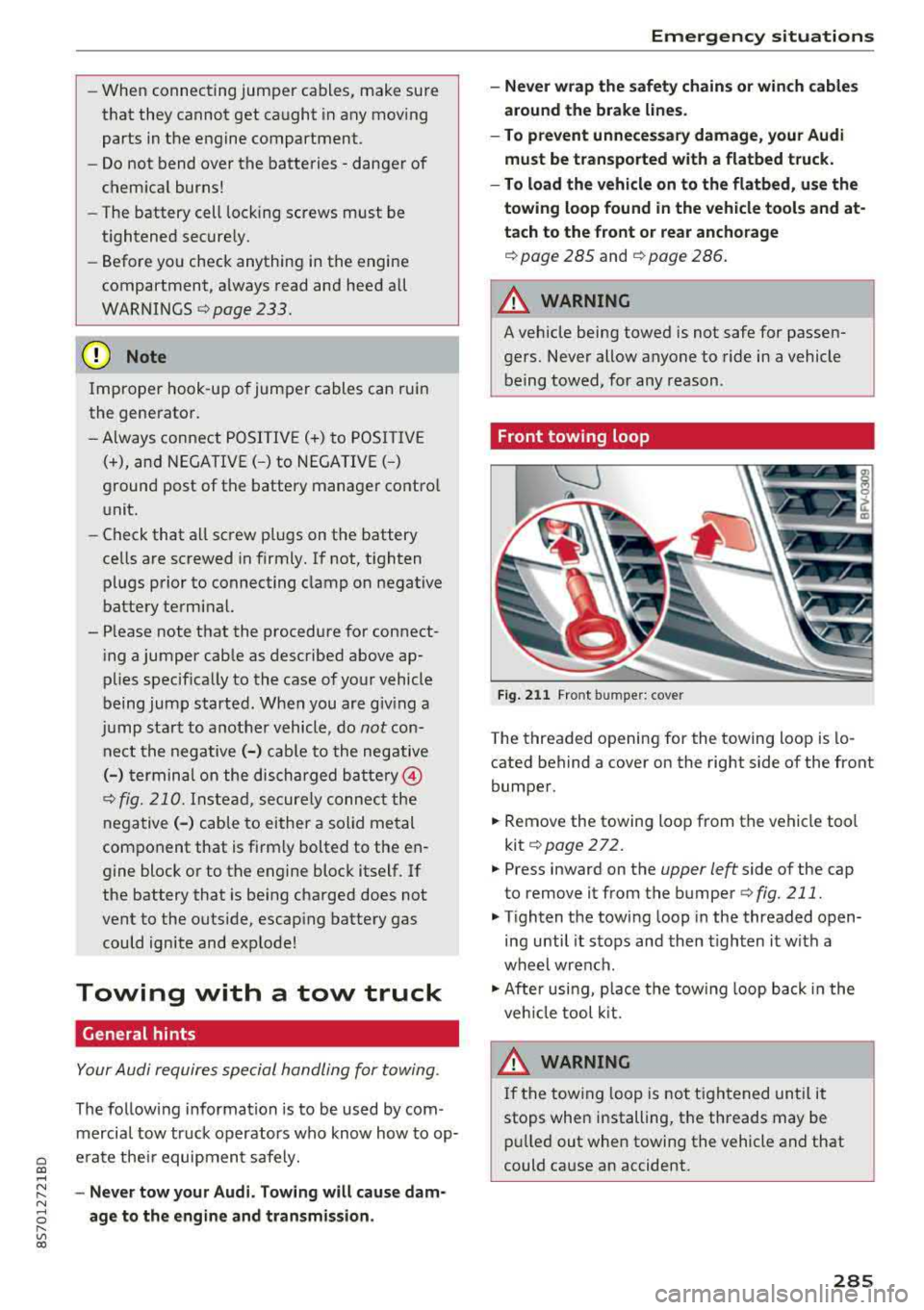
Front towing loop
Fig. 2 11 Front bumper: cover
-
The threaded opening for the towing loop is lo
cated behind a cover on the right side of the front
bumper.
.,. Remove the towing loop from the vehicle too l
kit
¢ page 272.
.,. Press inward on the upper left side of the cap
to remove it from the bumper
¢fig. 211.
.,. Tighten the tow ing loop in the threaded open
ing until it sto ps and then tighten it w ith a
whe el wrench .
.,. After usi ng, p lace the tow ing loop b ack i n the
ve hicl e tool kit.
WARNING
If the towing loop is not ti ghtened until it
stops whe n installing, t he threads may be
pull ed out when towing the vehicle a nd that
could ca use an accident.
285
Page 289 of 310
Cl 00 .-< N r-N .-< 0 r-Vl 00
~ Adjust lifting a rms o f wo rkshop ho ist o r floo r
jack to match veh icle lifting points .
~ In se rt a r ubber pad between t he floor jack/
wor kshop hoist and the lifting points.
The vehicle jac k mode* must be activated so that
the automatic a djustment of the Adaptive Air
Suspension* does not make it more difficult to
raise t he ve hicle w it h the floor jac k.
If you must lift your vehicle with a floor jack to
work underneath , be sure the vehicle is safely
supported on stands intended for this purpose.
Front lifting point
T h e lif ting poi nt is locat ed on the floor pan re in
fo rceme nt abou t at t he s ame leve l as t he jac k
mo unt ing poin t
i::> fig . 214. Do not lift the vehi
cle at the vertical sill reinforcement.
Rear lifting point
T h e lif tin g point is loc ated o n the ve rt ical rein
f o rc eme nt of th e lowe r sil l fo r th e on-bo ard jac k
¢fig . 215.
Lifting with vehicle jack
Refer to i::> page 2 76 .
A WARNING
- T o re duc e th e risk of seri ous injur y an d vehi
cl e dama ge.
- A lways lift t he veh icle only at the s pecial
wo rksho p hoist and floo r jack lift po ints il
lust rated
¢ fig. 214 and ¢ fig. 215.
- Fa ilu re to li ft the vehicle at these points
could cause the vehicle t o til t or fa ll from
a li ft if there is a change in veh icle we ig ht
d istr ibu tion a nd balance. Th is m ight hap
p en , fo r e xamp le, wh en h eavy co m po
n e nts s uch a s the engi ne b lock or tran s
mission ar e re mo ved.
- W hen remo ving h eavy compo nents like
t h ese, anchor vehicle to hoi st or add cor re
s p ondi ng we ights to ma inta in t he ce nt er of
g ra vity . Ot herwise, the vehi cle m ight ti lt or
s lip off the hoist, causin g serio us persona l
injury .
Emergency situations
@ Note
-Be aware of t he fo llow ing poin ts befo re lift
in g th e vehicle:
-The vehicle should never be lifted or
jacked up from underneath the engine oil
pan, the transmission housing, the front
or rear axle or the body side members.
This could lead to serious damage.
- To avoid damage to the underbody or
chassis frame, a rubber pad must be in
serted between the floor jack and the lift
points.
- Before driving over a workshop hoist,
check that the vehicle weight does not
exceed the permissible lifting capacity of
the hoist.
- Before driving over a workshop hoist , en
sure that there is sufficient clearance be
tween the hoist and low parts of the ve
hicle.
287
Page 290 of 310
Technical data
Technical data
Vehicle specifications
XXXXX XX -X -X X XX XXX XX
©-+ = :::t::: XXXXXXXX XX X X X XX XX XX
IYP /rYP! XXX XXX
XX XXXXXXX XX X X XX
XXX
K W XXX
15\_J_ I lllfOlll(S ,/ liTR,kB. xxxx X XX XXX ~ Ut; . OOll / lllANS. 000!
©+ ~
1
:tf:l~
1
XXXX / XXXX XXX / XX
II. · AIJSliT. / OPTIONS
~--
EOA 7D 5 4U B 6XM 5S G 5R W
2 EH JO Z 1 LB 1AS 1BA
3FC
5 M U 7X 1
F O A 9G3 OG7 OY H OJF
TL 6 3KA 8EH U1A X 9B O Z7
lXW 803 908 8Z4 02D
7T6 C V7 7KO 4X3
2K2
3 L4 4KC 3Y O 413 50 2
1S A 7GB 0 1A 4G0
XX . X XX X XX X XXXX
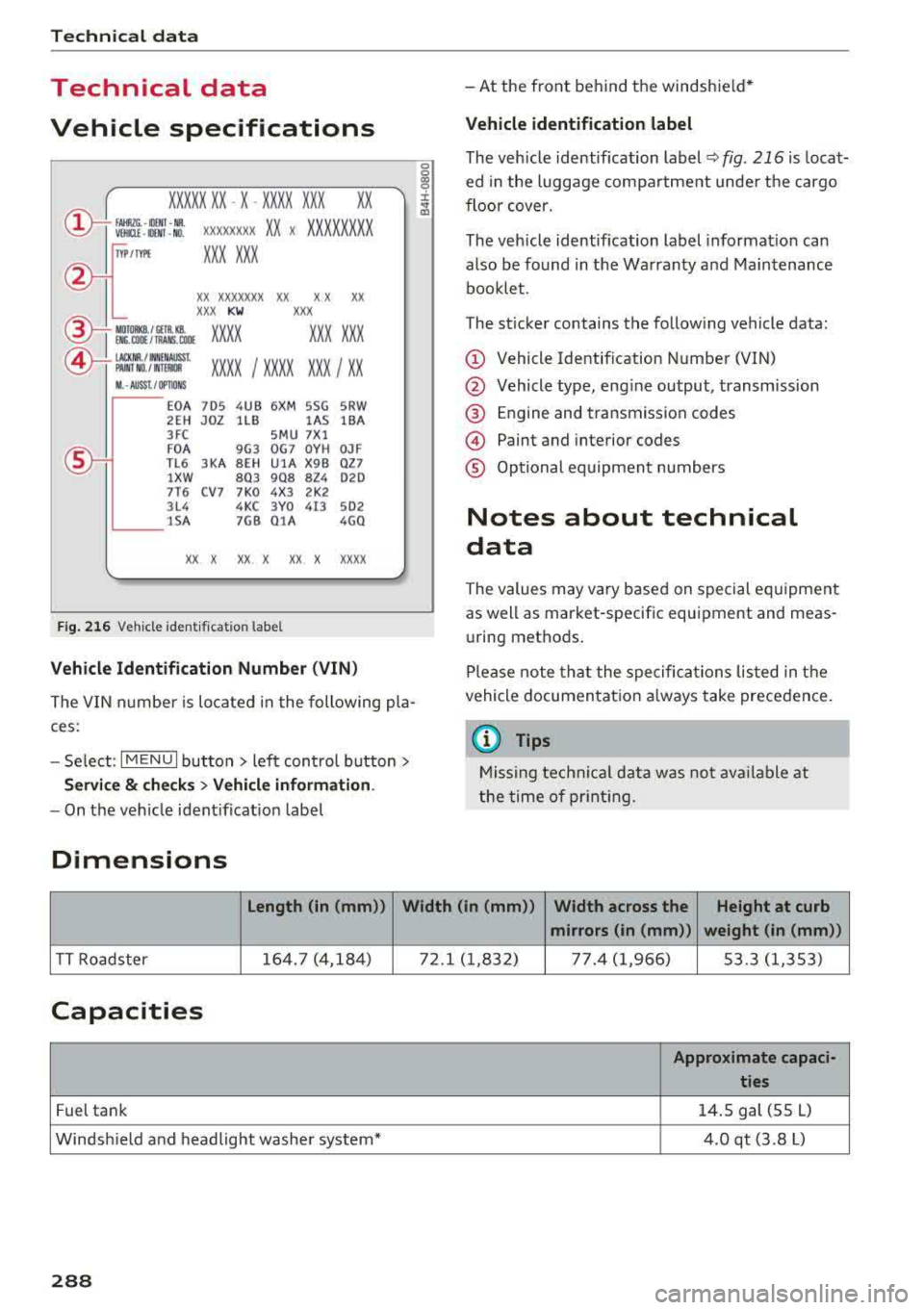
Fig. 21 6 Veh icl e ident ifi cation labe l
Vehicle Identification Number (VIN)
The VIN n umbe r is lo cated i n the following pla
ces :
-Select : I MENU I but to n > left con trol button>
Service & checks > Vehicle information .
-On the vehicle ident ificat io n label
Dimensions
0
0
~ :x: ... m
-At the front behind the windshie ld*
Vehicle identification label
The veh icle identification label Q fig . 216 is loca t·
ed in the luggage compartme nt unde r the cargo
floor cover.
The veh icle identification label informat ion can
also be found in t he Warranty and Maintenance
bookle t.
The st icker contains the follow ing vehicle data:
© Vehicle Identif ication Number (VIN)
@ Vehicle type, eng ine output, transmission
@ E ngine and transmission codes
© Paint and interior codes
® Op tional equipment numbers
Notes about technical
data
The values may vary based on special equipment
as well as market-specific equipment and meas u ring methods .
Please note that the spe cific ations liste d in the
vehicle documentat io n always take precedence .
a) Tips
Missing technical data w as not ava ilable at
the time of pr int ing.
length (in (mm )) Width (in (mm ))
Width across the Height at curb
mirrors (in (mm )) weight (in (mm))
TT Roadster 164. 7 (4,18
4) 72.1 ( 1,832) 77. 4 (1 ,966) 53.3 (1,353)
Capacities
Approximate capaci -
ties
Fuel tank 14
. 5 gal (55 L)
Windsh ield and headlight washe r system* 4.0 qt (3.8 L)
288