tow AUDI TT ROADSTER 2018 Owner's Manual
[x] Cancel search | Manufacturer: AUDI, Model Year: 2018, Model line: TT ROADSTER, Model: AUDI TT ROADSTER 2018Pages: 310, PDF Size: 46.95 MB
Page 95 of 310
Cl co .... N ,....
N .... 0 ,....
Vl co
Multi Media Interface
Traffic safety information
Aud i recommends performing certa in Infotain
ment system functions, such as enteri ng a desti
n ation, only when the vehicle is stat ionary . Al
ways be p repa red to stop operat ing the Info tain
ment system in the interest of your safety and
t he safety of o ther ro ad use rs.
_& WARNING
O nly use the In fo tainme nt sys tem when tra f
fic con ditio ns permit and alw ays in a way t hat
allows you to maintain complete control over
your vehicle.
@ Tips
Ce rtain functi ons are not av ailable wh ile driv
ing .
Introduction
The Multi Media Interface, or MMI for short,
combines various systems for communication,
navigation* and entertainment in your Audi. You
can opera te the MMI using the MMI control pan
el , the multifunction steering wheel or the voice
recognition system*.
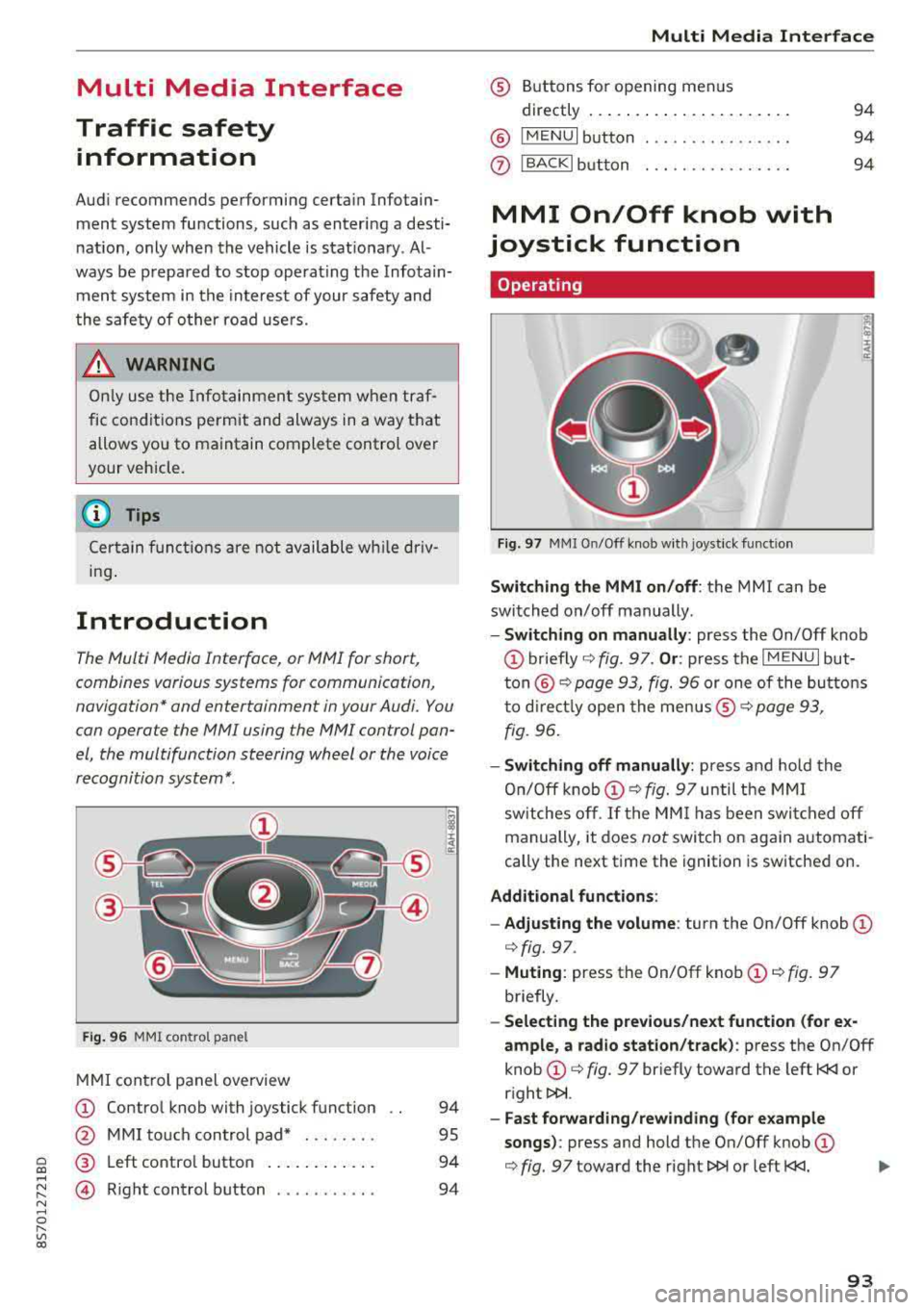
F ig. 96 MMI co ntrol pa nel
M MI con trol panel overview
(D Contro l knob with joystick f unction
@ M MI to uch con trol pad* . .... .. .
® Left co ntro l butto n .... .. . ... . .
© R ight control b utton .......... .
94
95
94
94
Multi Media Inte rface
® Buttons fo r opening menus
directly .... ... .. .. .. .. .... .. .
@ IM ENU I button
0 IBACKI bu tton . .. .. .. .... .... .
MMI On/Off knob with
joystick function
Operating
Fig . 97 MMI O n/Off k nob w it h joys tick funct io n
Switching the MMI on/off : the MMI can be
switched on/off manually .
94
94
94
E
" ~ .. a:
- Switching on manually : press the On/Off knob
(D briefly c::> fig. 9 7. Or : press the IM ENU I but
t o n
@ c::> page 93, fig. 96 or one of the bu tton s
t o dir ect ly open the menus ®
r=.> page 93,
fig. 96.
- Switching off manually : press and ho ld the
O n/O ff k nob
(D r=.> fig. 97 until t he MMI
sw itches o ff.
If the MM I has been swi tc h ed off
manually, it does
not switch o n again automati
cally the next time the ignition is sw itche d on.
Additional fun ctions :
- Adjusting the volume :
turn the On/Off knob (D
c::> fig. 97.
-Muting : press the On/Off knob (D c::> fig. 97
briefly .
-Selecting the previous/next function (for e x
ample , a radio station/track ):
p ress the On/Off
knob
(D c::> fig. 97 br iefly toward the left t
l>!>i.
- Fast forwarding/rew inding (for e xample
songs) :
press and hold the On/Off knob (D
c::> fig. 97 toward the right l>!>i or left t
Page 100 of 310
Multi Media Int erface
(D Tips
The volume of the prompts for the MMI touch
can be adjusted
separate ly ¢ page 178.
Control knob with
joystick function
Operating
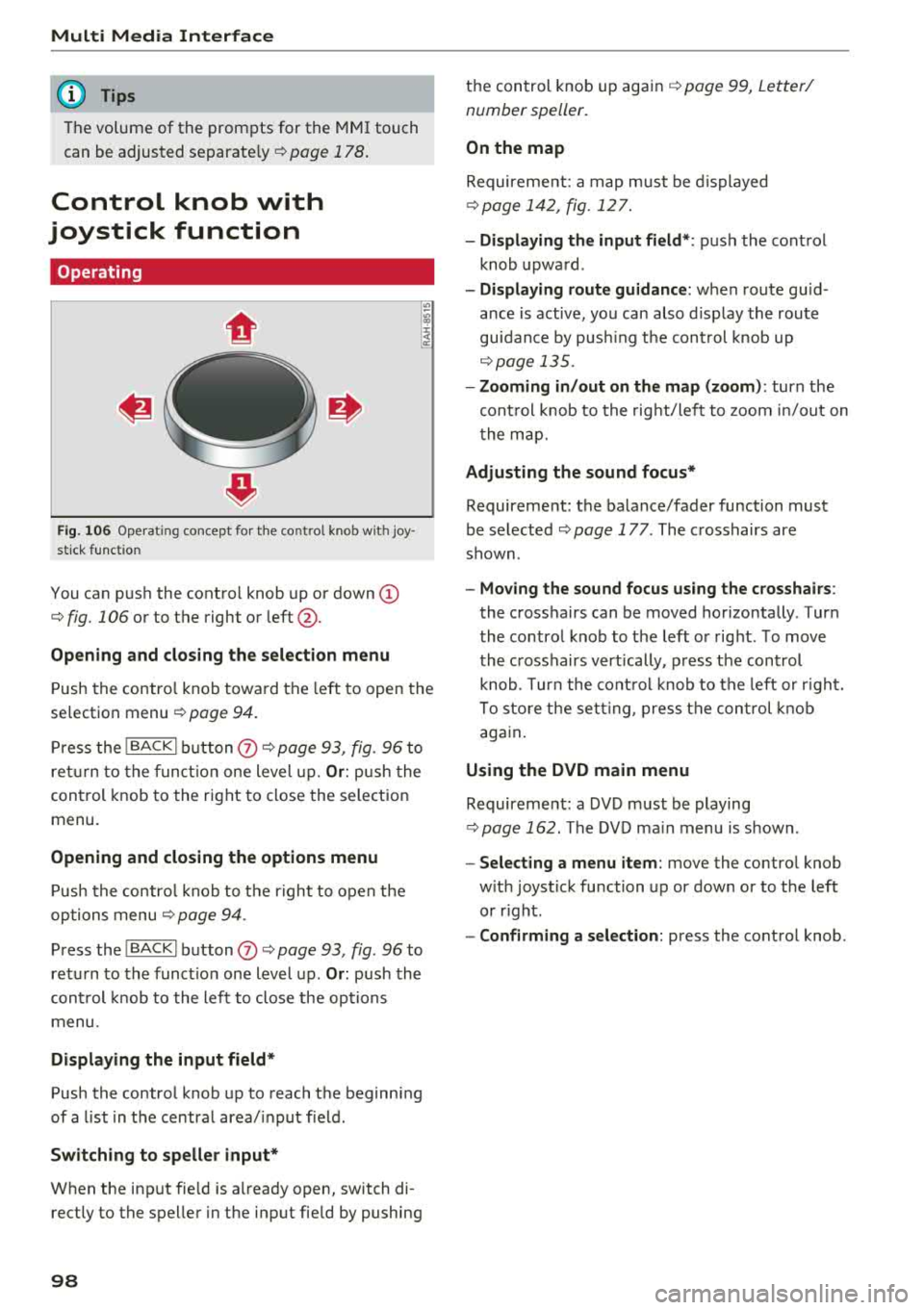
F ig . 106 Ope rat ing concept fo r th e co ntrol knob w ith joy
s ti ck f unct ion
You can push the contro l knob up or down (D
¢ fig. 106 or to the right or left @.
Opening and closing the selection menu
Push the contro l knob toward the left to open the
selection menu
¢ page 94.
P ress the I BACKI b utton (J) ¢ page 93, fig. 96 to
ret urn to the funct io n one level up.
Or : push the
control knob to the right to close the selection
menu.
Opening and closing the options menu
P ush the contro l knob to t he r ight to open the
options menu
¢ page 94 .
Press the I BACKI button (J) ¢ page 93, fig . 96 to
ret urn to the funct io n one level up .
Or: push the
cont rol knob to the left to close the op tions
menu .
Displaying the input field *
Push the control knob up to reach the beginn ing
of a list in t he central area/ input f ield .
Switching to speller input*
When the inp ut fie ld is a lready open, switch di
rectly to the spelle r in the input fie ld by pushing
98
t h e control knob up again ¢ page 99, Letter/
number speller.
On the map
Requireme nt: a map must be d isplayed
¢ page 142 , fig. 127.
- Di splaying the input field* :
push the control
knob upwa rd .
- Displaying route guidanc e: when route guid
ance is active, you can also d isplay the route
guidance by pus hing t he cont rol knob up
¢ page 135 .
- Zooming in /out on the map (zoom) :
turn the
cont rol knob to the right/le ft to zoom in/out on
t he map.
Adjusting the sound focus*
Requirement: the balance/fader function must
be se lected ¢
page 177 . The crosshairs are
shown .
-Moving the sound focus using the crosshairs :
the crosshairs can be moved horizontally. T ur n
the co ntro l knob to t he left o r right . T o move
the c rosshairs vert ically , p ress the control
knob . Turn the cont ro l knob to the left or r ight.
To sto re the set ting, press the co ntrol knob
aga in .
Using the DVD main menu
Requireme nt: a DVD must be playing
¢ page 162. The DVD ma in menu is s hown .
-Select ing a menu item : move the contro l knob
w ith joys tick function up or down or to the left
or r ight.
- Confirming a selection: press the control knob .
Page 106 of 310
Voice recognition system
• Telephone
• Audi connect
• Navigation
• Directory
• Radio
• Media
• Sound
• Help
• Help Speech dialog system
• Help Telephone
• Help Audi connect
• Help Navigation
• Help
Map
• Help Radio
• Help Media
TE ~EPflON ~
• Enter number
• Delete number/ correction
• Directory
• Call (XV)
• business
I private/ land tine I mobile
N~~It ~JION
• Nav igate to (XY)
•Business address
I Private address
• Start/ cancel route guidance
• Directory
• Last destinations
• Nav igation favorites
, Drive home
• Enter address
• Enter country/ town
I street I state
• Exclude route
I Exclude route for (XY) km/ m
r~I?
• Map
• Day map/ Night map •
Favorites
• Call (XV)
• Enter number
• Redial
• Read new text message
• Navigate to (XY)
• Enter address/destination
• Online destinations
• Cancel route guidance
• Map
• Line (XY)
• Next page/ previous page
• Cancel
• No. I meant (XV)
• Correction
• Call list
• Redial
• Call mailbox
• Enter PIN
I delete PIN
• Telephone favorites
• Exclude next route section/ Exclude
next street
• Route list
• Calculate alternative routes
• Online destinations
• Special destination
• 2D driving position map/ 2D north position map/ 3D map
I Destination map I Overview map
Al!IDI Q ONNE GiT
• Audi connect
• Travel information
I Parking Information
• Fuel prices
• Weather
RADIO
• Radio presets
• Last stations
• FM
• FM / AM / SIRIUS XM
• Station (XV) / Frequency (XV)
• Traffic announcement on/ off
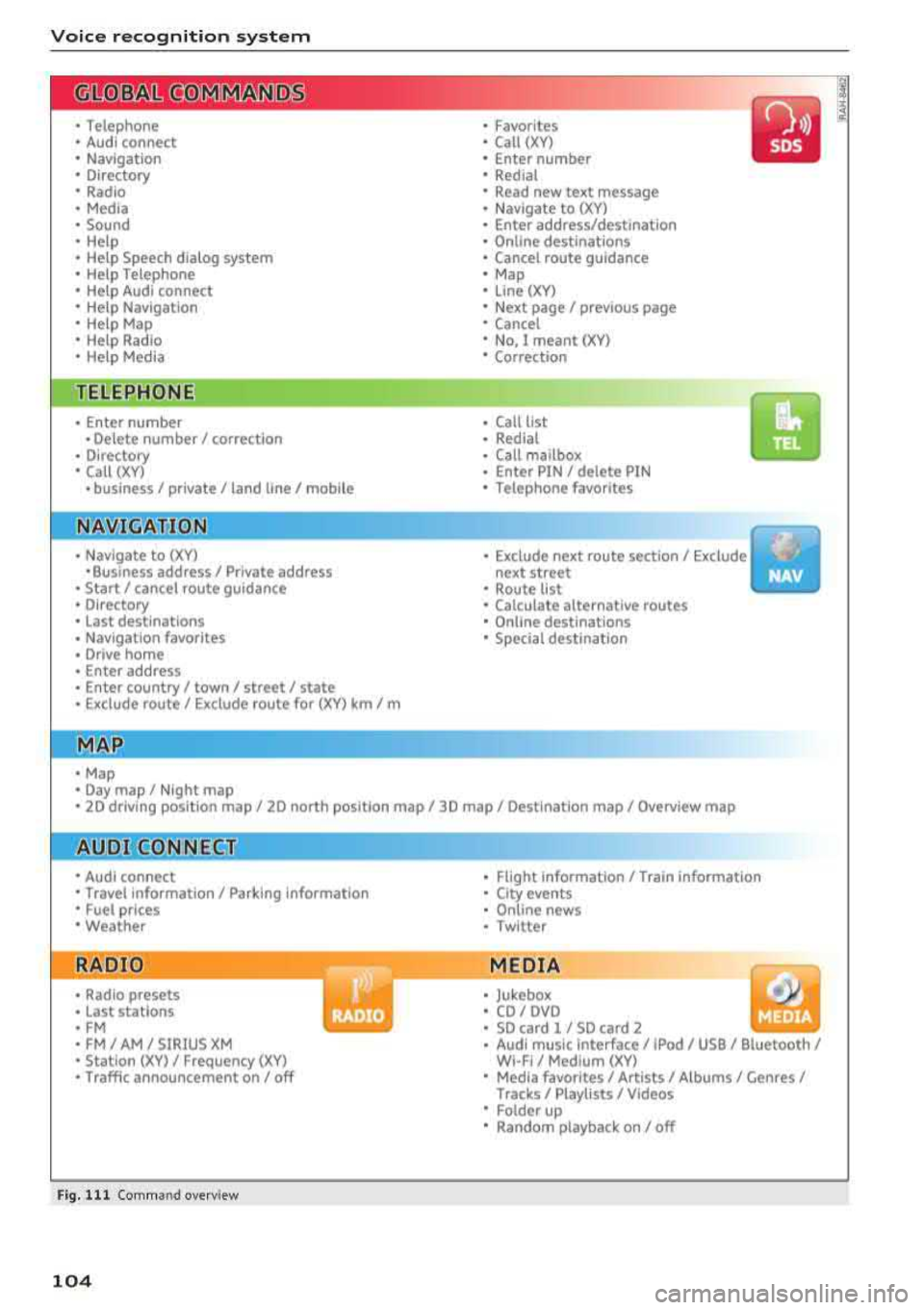
Fig. 111 Comm and overv iew
104
•
• Flight Information/ Train Information
• City events
• Online news
• Twitter
MEDIA
• Jukebox
• CD
I OVO
• SD card 1 / SD card 2
• Audi music Interface/ !Pod / USB / Bluetooth /
WI -Fl/ Medium (XV)
• Media favorites
I Artists/ Albums/ Genres/
Tracks/ Playllsts / Videos
• Folder up
• Random playback on / off
Page 107 of 310
Cl 00 .-< N r-N .-< 0 r-Vl 00
Voice recognition system Operating
Applies to: vehicles with voice recognitio n system
You con operate many Infotainment functions
conveniently by speaking.
Requirement: the ignition and the MM I must be
switched on, there m ust be no phone call in p rog
ress and the park ing system must not be active.
~ Switching on : briefly p ress t h e ~ but ton @
¢page 19, fig . 9 on the multif unction steering
whee l and say th e desi red command after the
Beep .
~ Switching off : press and hold the ~ button .
Or: say the command Cancel.
~ Pausing : say the command Pause . To resume,
press
the~ b utt on .
~ Corr ecting : press t h e ~ button one t ime ®
¢ page 18, fig. 7. Or: say the co mmand Correc
tion .
Input assistance
The system g uides you throug h the input with
v isua l and aud io feedback .
-Visual input assistance : after switching on
vo ice recogn it io n, a display with a se lection of
poss ible commands appears . The command
display can be sw itched on/off under
I M EN U I >
Setting s> left contro l butto n > MMI setting s>
Speech dialog system .
- Audio input assistance:
to have the poss ible
c omma nds read, press t he
10, I bu tton o n the
mul tifunc tion steering w heel b riefly and say
Help.
For the system to understand you:
Speak clearly and dis tinct ly a t a normal vo lume .
Speak lo uder when d riving faste r.
Emphasi ze the words in the commands even ly
a n d do not leave long pauses .
Do not spea k a command when the voice recogni
tion system is m aking an a nno uncement.
C lose the doors, the windows and the sunroof* to
r e duce background noise. Make s ure that passe n-
Voice recognition system
gers are not speaking w hen you are g iv ing a voice
comman d.
D o no t direct the vents towa rd the handsfree mi
c rophone, wh ic h is near the fro nt inter ior lights
on the roof headline r or on the dr iver's safety
belt*. Fo r additional informat io n on th e safety
belt m ic rophone, see
¢ pag e 122 .
Only use the system from the dr ive r's sea t be
ca use the hands -free microphone is di rected to
ward that s eat .
Additional settings
See ¢ page 178, Voice recognition system.
_&. WARNING
- D ir e ct y ou r full a tte ntio n to dr iv in g. A s t he
dr iver, you have com ple te re spon sibility fo r
safety in t raff ic . O nly use the functions in
such a way t hat you a lways maintai n com
p lete contro l over your vehicle in all traffic
situations.
- Do not use t he voice recognition system in
emergencies beca use your voice may change
in st ressfu l s ituations. It may ta ke longe r to
d ia l the number o r th e system may not be
ab le to d ia l it at all. Dia l the emergency
number manually .
(D Tips
-The d ialog pauses w hen the re is a n incom
ing phone call a nd will con tinue if yo u ig
nore the ca ll. The dia log ends if yo u answer
t he ca ll.
- There are no vo ice gu idance* prompts when
a dialog is ac tive .
- Yo u ca n select a n item in the list us ing ei
t her the vo ice recogn ition sys tem o r the
cont ro l knob .
Command overview
information
Applies to: vehicles with voice recognition system
T he following overv iews des crib e the co m man ds
t h at can be used to oper ate the MMI using the
vo ice recognit ion system.
..,.
105
Page 157 of 310
Cl co .... N ,....
N .... 0 ,....
Vl co
(CO) 6/VDE 0837 . The various types of audio
equipment installed conform to safety class
1.
T he laser uses so little power or is s hielded so
there is no dange r when it is used correctly .
Media drives
SD card reader
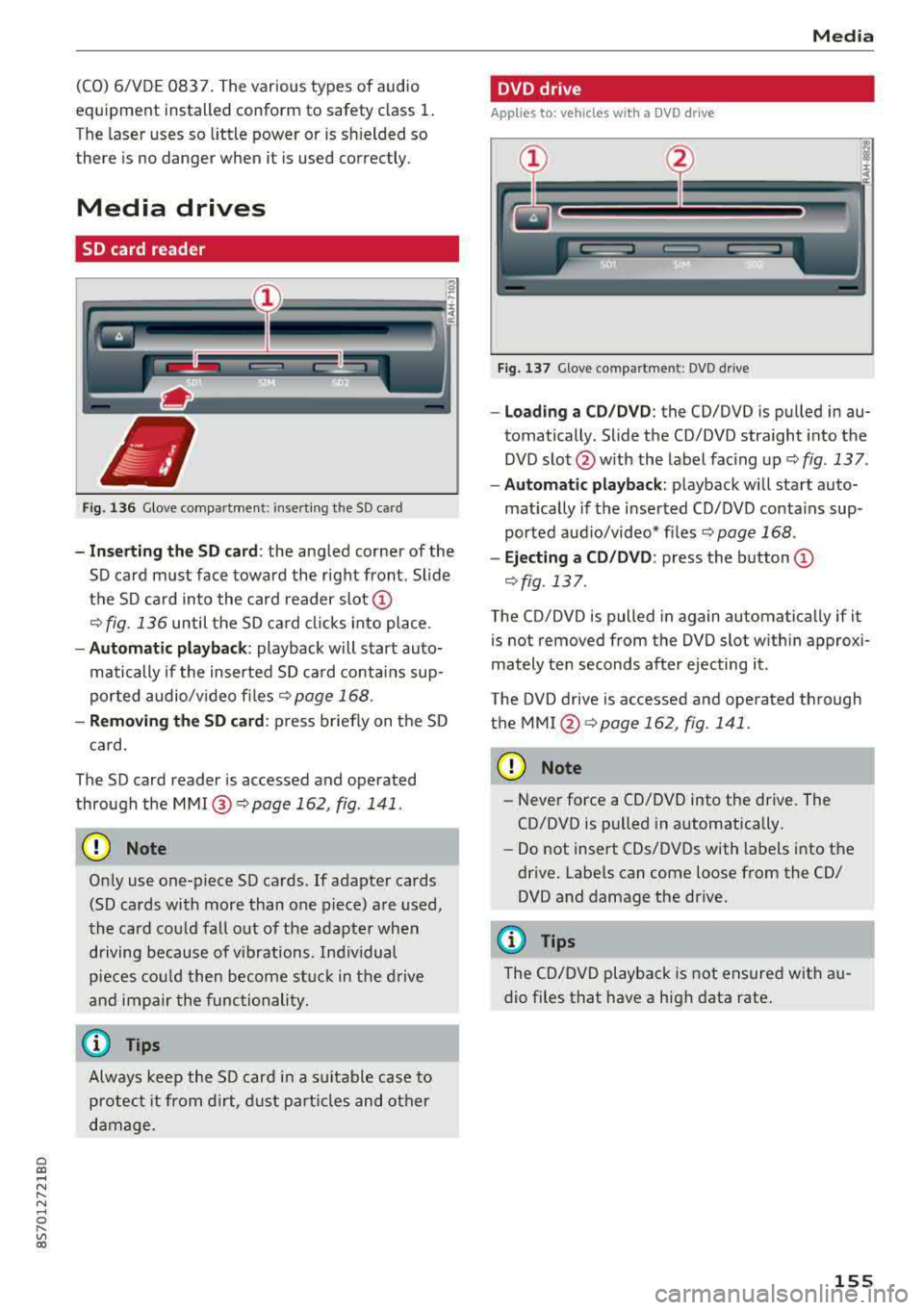
Fig . 136 G love co mpa rtmen t: inse rt in g th e SD card
-Inserting the SD card : the angled cor ner of the
S D card m ust face toward the r ight front. Sl ide
t h e SD ca rd into the card reader slot
CD
¢fig . 136 until the SD ca rd cli cks into place .
-Automatic playback : playback will start auto
matically if the inserte d SD ca rd conta ins sup
p or ted audio/v ideo f iles
c;, page 168 .
-Removing the SD card : press briefly on t he SD
c a rd.
The SD card reader is accessed and ope rated
through the
M MI@ c;,page 162, fig . 141.
CD Note
On ly use one-piece SD cards. If adapte r ca rds
(SD cards with more than one piece) a re used,
the card cou ld fall out of the adap ter when
driving bec ause of v ibrations. Ind ividual
p ieces could then become s tuck in the dr ive
an d impair the func tio nali ty .
(0 Tips
Always keep the S D car d in a suit able case to
protec t it fro m dirt, dust p art icl es an d ot her
da mage.
Media
DVD drive
Applies to: vehicles with a DVD drive
Fig. 1 37 Glove comp art m en t: DVD d rive
-Lo ading a CD /DVD : the CD/DVD is pu lled in au
tomatically. Slide the CD/DVD straight into the
DVD s lot @ with the label fac ing up
c;, fig . 137 .
-Automatic playback : playback wi ll sta rt auto
mat ically if the inse rted CD/DVD conta ins sup
ported aud io/video* fi les
c;, page 168 .
-Ejecting a CD/DVD : press the button CD
c;, fig .137 .
The CD/DVD is pulled in again automatica lly if it
is not removed from the DVD slot w ith in approx i
mately te n seconds after ejecting it .
The DVD drive is accessed and ope rated through
the
MMI @c;, page 162, fig . 141.
CD Note
-N ever force a CD/DVD into the drive. The
CD/DVD is pulled in a utomatically .
-Do not insert CDs/DV Ds with labels into t he
dr ive . Labe ls can come loose from the CD/
DVD and damage the drive.
(D Tips
The CD/DVD playback is not ensure d with au
d io fi les t hat have a h igh data rate .
155
Page 182 of 310
Safe dri ving
,.. Take frequent breaks on long trips. Do not drive
for more than two hours at a stretch.
,.. Do NOT drive when you are tired, under pres
sure or when you are stressed.
A WARNING
Impaired driving safety increases the risk of
serious personal injury and death whenever a
vehicle is being used.
Correct passenger
seating positions
Proper seating position for the driver
The proper driver seating position is important
for safe, relaxed driving.
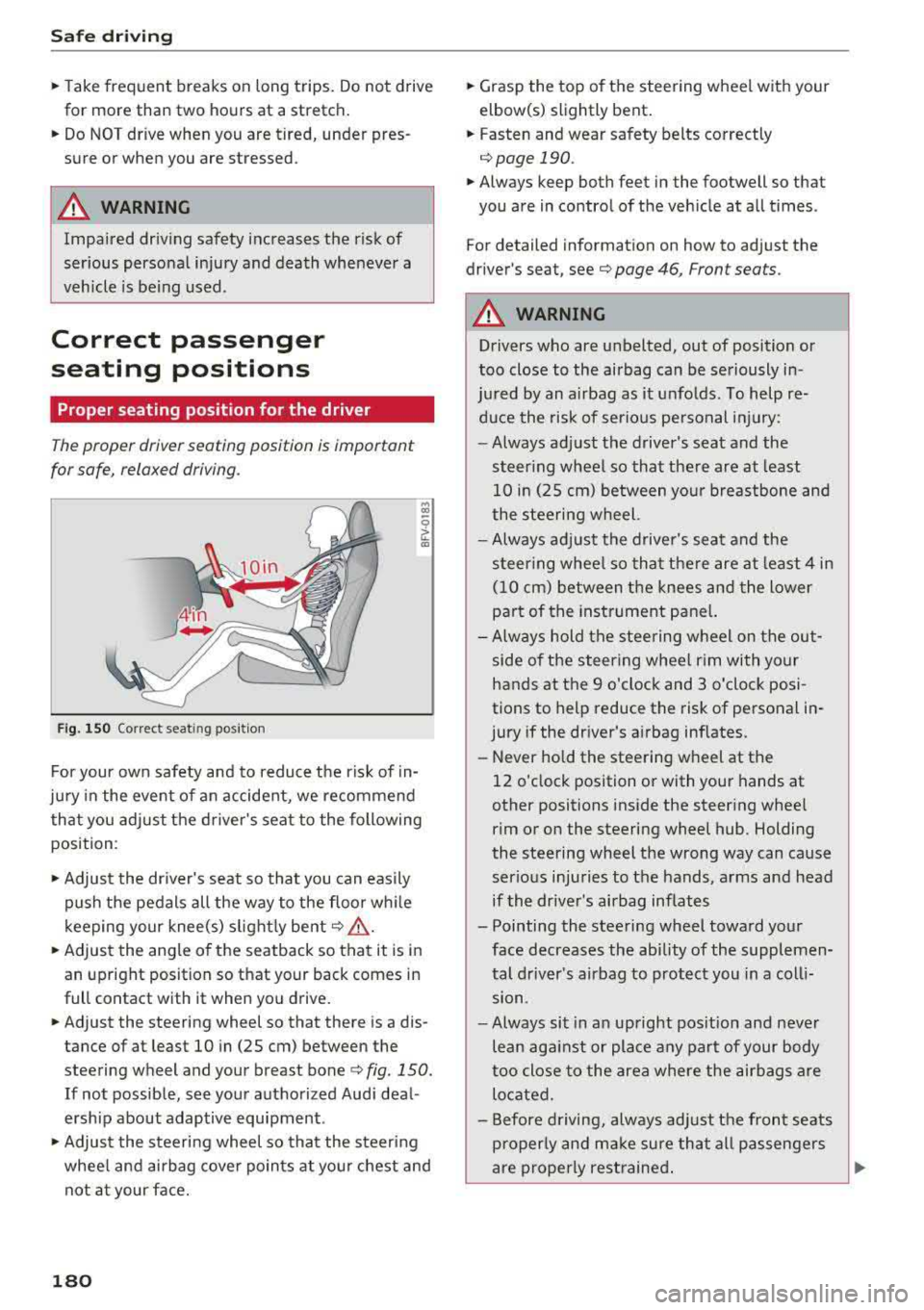
F ig. 150 Correct seat in g posi tion
.., CD
~ CD
For your own safety and to reduce the risk of in
jury in the event of an accident, we recommend
that you adjust the driver's seat to the following
position :
,.. Adjust the driver's seat so that you can easily
push the pedals all the way to the floor wh ile
k eeping your knee(s) s lightly bent
c:> .&_ .
,.. Adjust the angle of the seatback so that it is in
an upright position so that your back comes in
full contact with it when you drive.
,.. Adjust the steering wheel so that there is a dis
tance of at least 10 in (25 cm) between the
steering wheel and your breast bone
c:> fig. 150.
If not possible, see your authorized Audi deal
ersh ip about adaptive equipment .
,.. Adjust the steering wheel so that the steering
whee l and airbag cover points at you r chest and
not at your face.
180
,.. Grasp the top of the steering wheel with your
elbow(s) slightly bent.
,.. Fasten and wear safety belts correctly
c:> page 190 .
,.. Always keep both feet in the footwell so that
you are in control of the vehicle at all times .
For detailed information on how to adjust the
driver's seat, see
c:> page 46, Front seats.
A WARNING
Drivers who are unbelted, out of position or
too close to the airbag can be seriously in -
ju red by an airbag as it unfolds. To help re-
duce the risk of serious pe rsonal injury:
-Always adjust the driver's seat and the
steer ing wheel so that the re are at least
10 in (25 cm) between your breastbone and
the steering wheel.
-Always adjust the driver's seat and the
steer ing whee l so that there are at least 4 in
(10 cm) between the knees and the lower
pa rt of the instrument pane l.
- Always hold the steering wheel on the out
side of the steering wheel rim with your
hands at the 9 o'clock and 3 o'clock posi
tions to help reduce the risk of personal in
jury if the dr iver's a irbag inflates.
- Never hold the steering wheel at the
12 o'clock position or with your hands at
other positions inside the steering whee l
rim or on the steering wheel hub . Holding
the steering wheel the wrong way can cause
serious injuries to the hands, arms and head
if the driver's airbag inflates
- Pointing the steering wheel toward your face decreases the ability of the supplemen
tal driver's airbag to protect you in a coll i
sion.
- Always sit in an upright pos it ion and never
lean against or place any part of your body
too close to the area where the airbags are
located.
- Before driving, always adjust the front seats
properly and make sure that all passengers
-
are properly restrained . ..,.
Page 185 of 310
Cl 00 .-< N r-N .-< 0 r-Vl 00
Floor mats on the driver side
Always use floor mats that can be securely attached to the floor mat fasteners and do not in
terfere with the free movement of the pedals .
... Make sure tha t t he floor mats are properly se
cured and cannot
move and interfere with the
pedals
q ,& .
Use only floor mats th at leave the pedal area un
obstructed and that are firmly secured so that
they cannot slip out of position . You can obtain
suitable floor mats from your authorized Audi Dealer .
Floor mat fasteners are installed in your Audi.
Floor mats used in your vehicle must be attached
to these fasteners. Properly securing the floor mats will prevent them from sliding into posi
tions that could interfere with the pedals or im
pair safe operation of your vehicle in other ways .
A WARNING
Pedals that cannot move freely can result in a
loss of vehicle control and increase the risk of
serious personal injury.
- Always make sure that floor mats are prop
erly secured.
- Never place or install floor mats or other
floor coverings in the vehicle that cannot be
properly secured in place to prevent them
from slipping and interfering with the ped
als or the ability to control the vehicle.
- Never place or install floor mats or other
floor coverings on top of already installed
floor mats. Additional floor mats and other coverings will reduce the size of the pedal
area and interfere with the pedals.
- Always properly reinstall and secure floor
mats that have been taken out for cleaning.
- Always make sure that objects cannot fall
into the driver footwell while the vehicle is
moving. Objects can become trapped under
the brake pedal and accelerator pedal caus ing a loss of vehicle control.
Safe driving
Stowing luggage
Loading the luggage compartment
All luggage and other objects must be properly
stowed and secured in the luggage compart
ment.
Loose items in the luggage compartment can
shift suddenly, changing vehicle handling charac
teristics . Loose items can also increase the risk of
serious personal injury in a sudden vehicle ma
neuver or in a collision.
... Distribute the load evenly in the luggage com
partment .
... Always place and properly secure heavy items in
the luggage compartment as far forward as
possible .
... Secure luggage using the tie-downs provided
qpage 184.
A WARNING ~ -
Improperly stored luggage or other items can
fly through the vehicle causing serious per
sonal injury in the event of hard braking or an
accident. To help reduce the risk of serious
personal injury:
- Always put objects, for example, luggage or
other heavy items in the luggage compart
ment.
- Always secure objects in the luggage com
partment using the tie-down eyelets and
suitable straps .
A WARNING
-
Heavy loads will influence the way your vehi
cle handles. To help reduce the risk of a loss
of control leading to serious personal injury:
- Always keep in mind when transporting
heavy objects, that a change in the center of
gravity can also cause changes in vehicle
handling:
- Always distribute the load as evenly as
possible.
- Place heavy objects as far forward in the
luggage compartment as possible.
- Never exceed the Gross Axle Weight Rating or the Gross Vehicle Weight Rating specified
""
183
Page 194 of 310
Safe ty belts
,.. Inse rt the tongue into the correct buckle of
your seat until you hear it latch secure ly
¢ page 190, fig. 157 .
,.. Pull on the be lt to make sure that it is securely
latched in the buck le.
.,&. WARNING
Improperly positioned safety belts can cause
ser ious personal inju ry in an accident.
- Expectant mothers must always wear the
lap po rtion of the safety belt as low as pos
sible across the pelvis and below the round
ing of the abdomen .
- Always read and heed all WARNINGS and
othe r important information
Q .&. in Fasten
ing safety belts on page 191.
Unfastening safety belts
Unbuckle the safety belt with the red release
button only after the vehicle has stopped.
.,
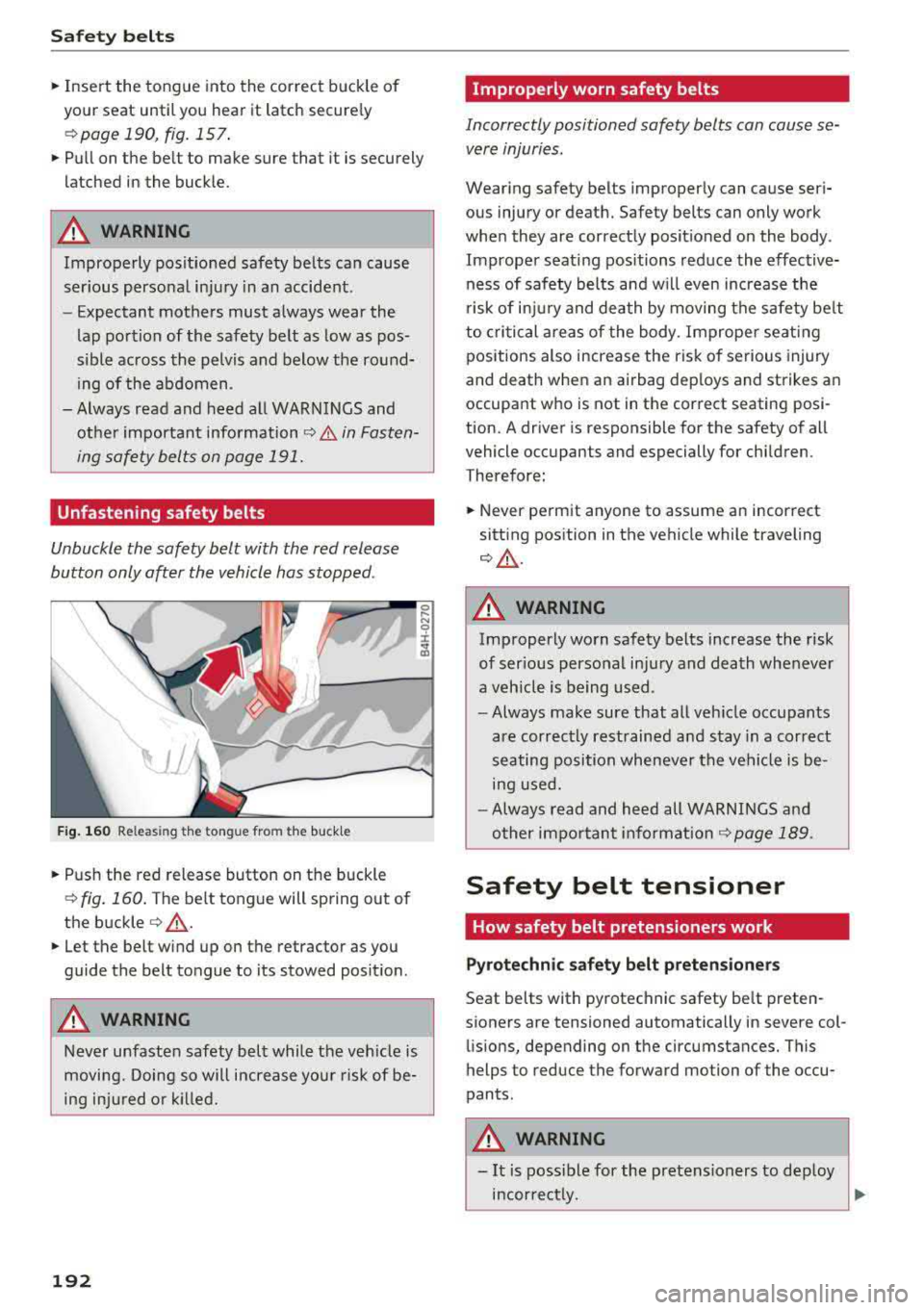
F ig . 1 60 Releasi ng th e tongue fro m the buck le
,.. Push the red release button on the buckle
¢ fig. 160 . The belt tongue will spring out of
the buckle
¢ &_ .
,.. Let the belt wind up on the retractor as you
guide the belt tongue to its stowed posit ion.
.,&. WARNING
Never unfasten safety belt while the vehicle is
moving. Doing so will i ncrease you r risk of be
ing injured o r kill ed .
192
Improperly worn safety belts
Incorrectly positioned safety belts can cause se
vere injuries.
Wear ing safety belts improperly can cause seri
ous injury or death. Safety belts can only work
whe n they are correctly posit ioned on the body .
Imprope r seat ing positions reduce the effective
ness of safety bel ts and w ill even increase the
risk of inj ury and death by moving the safety be lt
to critical are as of the body . Imprope r seating
pos itions also increase the risk o f serious injury
and death when an airbag dep loys and strikes an
occupant who is not in the correct seating posi
tion. A driver is responsible for the safety of all
vehicle occupants and especially for chi ldren.
Therefore:
,.. Never pe rm it anyone to assume an incorrect
sitt ing pos ition in the vehicle while traveling
¢ &_ .
.,&. WARNING
Improperly worn safety belts increase the risk
of ser ious perso nal injury and death whenever
a veh icle is being used .
- Always make sure that all veh icle occu pants
are correctly restrained and stay in a correct
se ating position whenever the ve hicle is be
ing used.
- Always read and heed all WARNINGS and
other impo rtant
informat ion ¢ page 189 .
Safety belt tensioner
How safety belt pretensioners work
Pyrotechn ic safety belt preten sioners
Seat belts with pyrotechnic safety be lt preten
sioners are tensioned automatically in severe col lis ions, depending on the circumstances. This
helps to reduce the forward motion of the occu
pants .
.,&. WARNING
-It is poss ible for the pretens ioners to dep loy
incor rect ly.
~
Page 204 of 310
Airbag syste m
-Repairs to the front passenger seat must be
performed by qua lified and properly trained
workshop personnel.
- Never remove the front passenger or driver
seat from the vehicle.
- Never remove the upho lstery from the front
passenger seat.
- Never disassemble or remove parts from the
seat or disconnect wires from it.
- Never carry sharp objects in your pockets or
put them on the seat . The capacitive pas
senger detection mat in the front passenger
seat will not function properly if it is punc
tured.
- Never carry things on your lap or carry ob
jects on the front passenger seat. Such ob
jects can influence the capac itance regis
tered by the capac itive passenger detection
system, so that incorrect information is p ro
vided to the airbag control unit.
- Never store items under the front passenger
seat. Parts of the Advanced Airbag System
under the passenger sea t could be dam
aged, preventing them and the airbag sys
tem from working properly.
- Never place seat covers o r rep lacemen t up
holstery that have not been spec ifically ap
proved by Audi on the front seats.
- Seat covers can prevent the Advanced Air
bag System from recogn izing child re
straints or occupants on the front passenge r
seat and prevent the side airbag in the seat
backrest from dep loying properly.
- If a seat heater has been retrofitted or oth
erwise added to the front passenge r seat,
never install any ch ild restraint system on
this seat.
- Never use cush ions, pillows, blankets, or
similar items on the front passenger seat.
The add it iona l layers prevent the capacitive
passenger detection system from accurate ly
measuring the capac itance of the ch ild safe
ty seat and/or the pe rson on the seat and
th us keep the Advanced Airbag System from
wor king p roperly.
- Never place o r use any electrical device
(s uch as a laptop, CD player, elect ronic
games dev ice, power inverter or seat heater
202
for child seats) on the front passenger seat
if the device is connected to the 12-volt
socket or the cigarette lighter socket. Such
dev ices can influence the capac itance regis
tered by the capacitive passenger detection
system, so that incorrect informat ion is pro
vided to the airbag cont rol unit.
- If you must use a child restra int on the fron t
passenger seat and the child restraint man
ufacturer's instructions requ ire the use of a
towel, foam c ushion or someth ing else to
proper ly posit ion the child res tra int, ma ke
certain that the
PASSENGER AIR BAG OFF
~ ; light comes on and stays on whenever
the child restraint is installed on the front
passenger seat.
- If the
PASSENGER AIR BAG OFF ~; light
does not come on and stay on, have the air bag system inspected by your Audi dealer.
A WARNING
If the front passenger seat gets wet, dry it im
mediately .
-If liquid soaks into the front passenger seat,
this can keep the airbag system from work
ing properly and may, for instance, deacti
vate the passenger frontal airbag.
If this
happens, the
PASSENGER AIR BAG OFF ~'
light will come on and s tay on together w ith
t he air bag indica to r li gh t
El in the instru
ment cluster .
- If liqu id is pooled on the sea t, but has not
soaked in, th is may also keep the airbag sys
tem from wor king p roper ly and cause the
passenger fronta l airbag to be enabled
(turned on), even though there is a properly
installed child restraint system on the seat.
Wet towels or other wet things on the seat
cushion can have the same effect . If the
front passenger fronta l airbag is turned on,
the
PASSENGER AIR BAG OFF ~, light will
turn off.
How the Advanced Airbag System
components work together
The front Advanced Airbag System and the side
airbags supp lement the protection offered by the
.,.
Page 209 of 310
Cl 00 .-< N r-N .-< 0 r-Vl 00
met, be sure to check the light regularly to make
certain that the
PASSENGER AIR BAG OFF "1;
light stays on continuously whenever the ignition
is on. If the
PASSENGER AIR BAG OFF "1; light
does not appear on and does not stay on all the
time, stop as soon as it is safe to do so and
- reactivate the system by turning the ign ition
off for more than 4 seconds and then turning it
on again;
- remove and reinstall the child restraint. Make
sure that the child restraint is properly instal led and that the safety belt for the front pas
senger seat has been correctly routed through
the child restraint as descr ibed in the child re
straint manufacturer's i nstr uctions;
- make sure that the convertible locking retrac
tor on the safety be lt for the front passenger
seat has bee n activated and that the safety belt
has been pulled tight.
- make sure that no electrical device (such as a
laptop, CD player, elect ronic games dev ice,
power inverter or seat heater for child seats) is
placed or used on the front passenger seat if
the device is connected to the 12 ·vo lt socket or
the cigarette lighter socket;
- make sure that no seat heater has been retro
fitted or otherwise added to the front passen
ger seat;
- make sure that nothing can interfere with the
safety belt buckles and that they are not ob
structed;
- make sure that there are no wet objects (such
as a wet towel) and no water or other liquids on
the front passenger seat cush ion.
If the PASSENGER AIR BAG OFF~; light still
does not come on ...
If the PASSENGER AIR BAG OFF "1; light still
does not come on and does not stay on continu
ously (when the ignition is sw itched on),
- take the child restraint off the front passenger
seat and have the airbag system inspected by
your Audi dealer immed iate ly.
The PASSENGER AIR BAG OFF ~; light
should NOT come on ...
The PASSENGER AIR BAG OFF ~; light should
NOT come on when the ign ition is on and an
Airbag system
adult is sitting in a proper seating position on the
front passenger seat. If the
PASSENGER AIR
BAG
OFF ~; light comes on and stays on whi le
driv ing, under these c ircumstances, make sure
that:
- the adult on the front passenger seat is proper
ly seated on the center of the seat cushion w ith
his or her back up against the backrest and the
backrest is not reclined,
- the adult is not taking weight off the seat by holding on to the passenger assist handle
above the front passenger door or support ing
their weight on the armrest,
- the safety belt is being properly worn and that
there is not a lot of slack in the safety belt web
b ing,
- there are no aftermarket seat covers or cush
ions or other things (such as blankets) on the
front passenger seat that might cause the ca
pacitive passenge r detection system to miscal
culate e lectr ica l capacitance.
Important safety instructions on
monitoring the Advanced Airbag System
A WARNING
-
-If the status of the Advanced Airbag System
has changed while the vehicle is moving, the
PASSENGER AIR BAG OFF "1; ON@ light
blinks for about 5 seconds to catch the driv
er 's attention. If this happens, always stop
as soon as it is safe to do so and check the
steps described above .
- If the
PASSENGER AIR BAG OFF "1; light
does not go off when an adult who is not
very small is sitting on the front passenger
seat after taking the steps described above,
have the airbag system inspected by your
author ized Audi dealer before transporting
anyone on the front passenger seat.
A WARNING
-
An air bag system that is not functioning prop
erly cannot provide supplemental protection
in a fronta l crash.
- If the airbag indicator light <=> page 14
comes when the vehicle is being used, have
207