tow AUDI TT ROADSTER 2018 User Guide
[x] Cancel search | Manufacturer: AUDI, Model Year: 2018, Model line: TT ROADSTER, Model: AUDI TT ROADSTER 2018Pages: 310, PDF Size: 46.95 MB
Page 50 of 310
Seats and stor age
Cigarette lighter and
socket
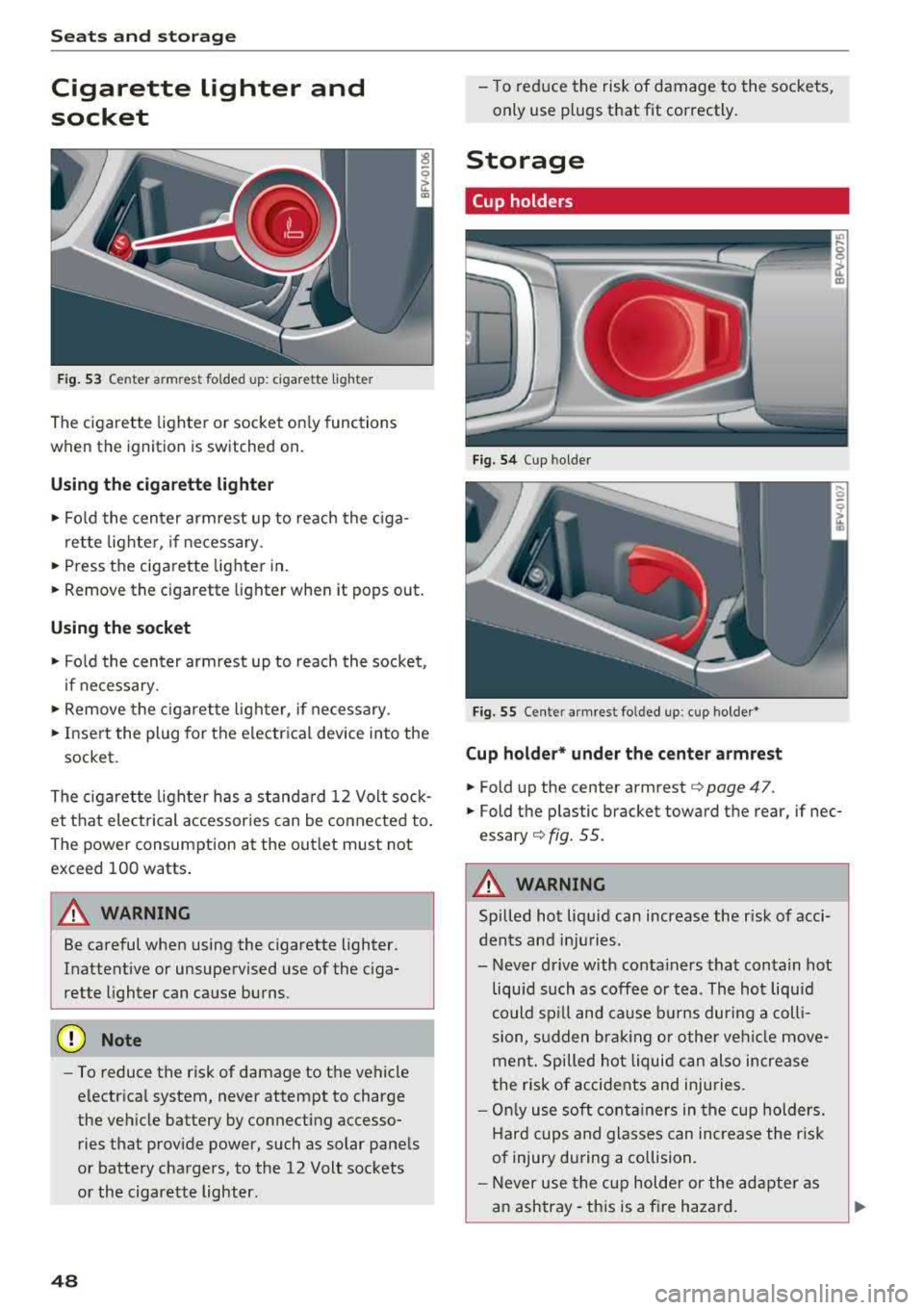
F ig. 53 Cen te r armre st fo ld ed u p: cig arette ligh te r
The cigarette lighter o r socket on ly functions
when the ignition is switched on.
Using the cigarette li ghter
• Fo ld the center armrest up to reach the c iga-
rette lighter, if necessary .
• Press the ciga re tte lighter in .
.. Remove the cigarette lighter when it pops out.
Using the socket
• Fo ld the cen ter armrest up to reach the socket ,
i f necessary .
... Remove the cigarette lighter, if necessary .
.. Insert the plug for the e lectrica l device into the
socket.
The cigaret te lighter has a standa rd 12 Volt sock
et that electrical accessor ies can be conne cted to .
Th e power consumption a t the out let must not
exceed 100 watts .
A WARNING
Be careful when using the cigarette lighter.
Inattentive or unsupervised use of the c iga
rette lighter can cause burns.
(D Note
- To reduce the risk of damage to the vehicle
electrical system, never attempt to charge
the veh icle battery by connecting accesso
ries that prov ide power, such as solar panels
or battery chargers , to the 12 Volt sockets
or the cigarette lighter.
48
- To reduce the risk of damage to the sockets,
only use plugs that fit correctly .
Storage
Cup holders
Fig. 54 Cup hol der
Fig. 5 5 Cente r armres t fo lded up : cup holder *
Cup holder* und er the center armrest
• Fold up the cente r armrest¢ page 47.
.. Fold the p lastic bracket toward the rear, if nec
essary ¢ fig. 55.
A WARNING
Spilled hot liqu id can increase the r isk of acci
dents and in ju ries .
- Never d rive with conta iners that contain hot
liquid such as coffee or tea . The hot liquid
could sp ill and cause b urns dur ing a coll i
sion, s udden bra king or other vehi cle move
men t. Spilled hot liquid can also increase
the risk of accidents and injuries.
- On ly use soft cont ainers in the cup holders.
Hard cups and glasses can increase the r isk
of injury dur ing a collision.
- Never use the c up holder or the adapte r as
a n ashtray- th is is a fire hazard.
Page 51 of 310
Cl co .... N ,....
N .... 0 ,....
Vl co
(D Note
Beverage containers in the cup holders should
always have a lid. If not, beverages could spill
and cause damage to vehicle equipment, such
electronics or seat covers.
Additional storage compartments
You will find a range of storage compartments
and holders at different locations in the veh icle .
- Compartments in the doors
- Storage area in the glove compartment . The
glove compartment can be locked using the
mechan ica l key
q page 23.
- Storage compartment under the center arm
rest*
- Storage compartment on the rear side of the
seat* . The compartment can hold a max imum
weight of 2.2 lbs (1 kg).
A WARNING
-Always leave the lid on the glove compart
ment cover closed while driving to reduce
the risk of injury.
- Only use the storage compartments in the door trim panels to store small objects that
will not st ic k out of the compa rtment and
impair the range of the side a irbags.
Storage compartment between the seat
backrests
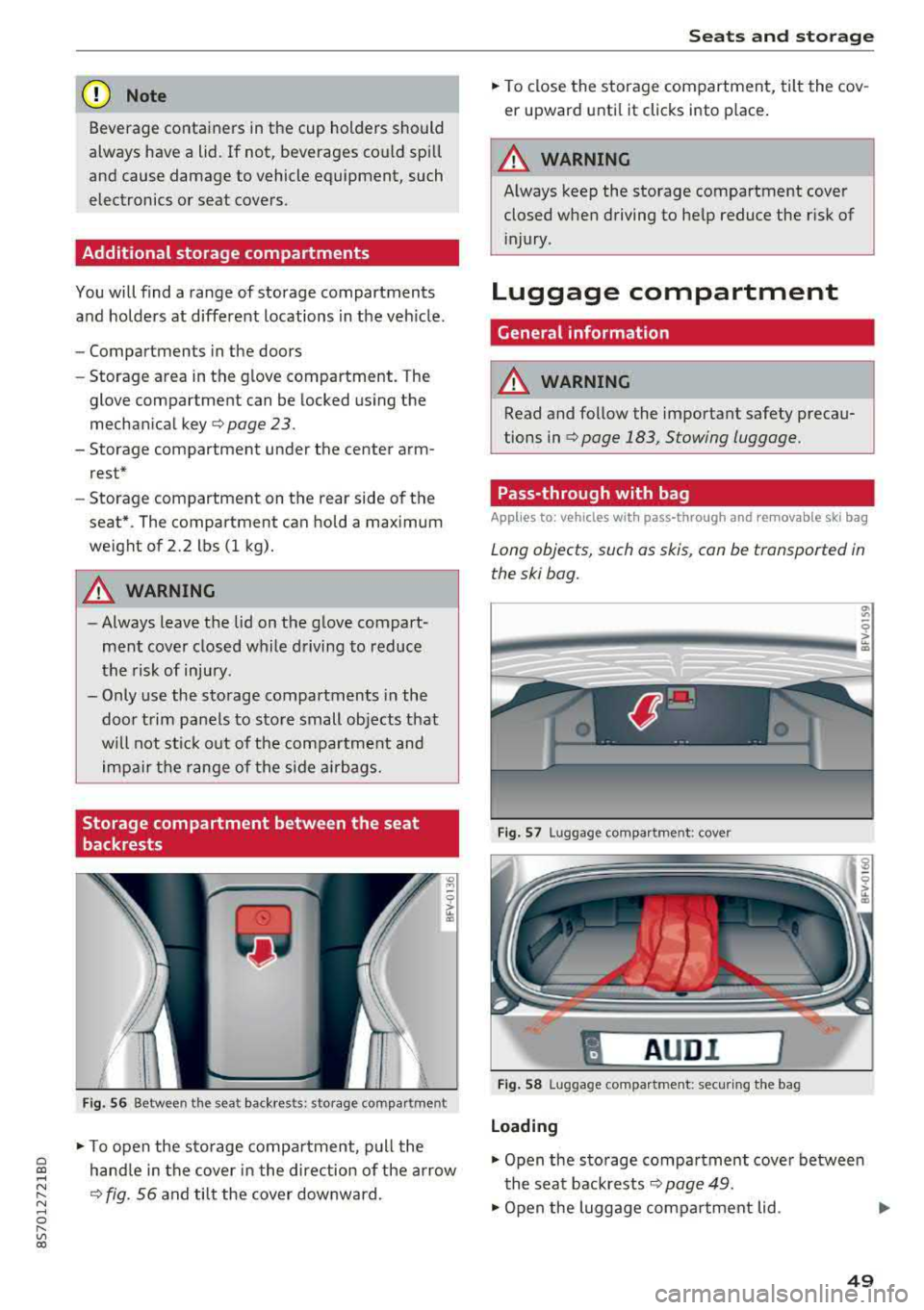
F ig . 56 Between the seat backrests: storage compartment
-
.. To open the s to rage compa rtment, p ull the
hand le in the cover in the direction of the arrow
q fig. 56 and tilt the cover downward.
S eats and storag e
.. To close the storage com partment, tilt the cov
er upward unti l it clicks into place .
A WARNING
Always keep the storage compartment cover
closed when driving to he lp reduce the risk of
i njury.
Luggage compartment
Gene ral information
A WARNING
-Read and follow the important safety precau
tions in
qpage 183, Stowing luggage.
Pass-through with bag
Applies to : vehicles with pass-through and removable ski bag
Long objects, such as skis, con be transported in
the ski bog.
Fig. 57 Luggage compa rtment : cove r
"
AUD I l
Fig . 58 Luggage compa rtment: secur ing the bag
Loading
.. Open the storage compartment cover betwee n
the seat backrests
Q page 49.
.. Open the luggage compartment lid . .,_
49
Page 52 of 310
Seats and stor age
,.. Press the release button and fold the cover for
the pass-through towards the luggage com
partment
¢ fig . 57.
,.. Slide the bag from the luggage compartment
into the vehicle interior w ith the zipper facing
toward the rear
cc> &.
.. Load the sk i bag.
Secur ing
.. Secure the carab ine r hooks on both st raps in
the corresponding rear tie-downs <=>
fig. 58.
A WARNING
After loading the bag, it must be t ied down
w ith both straps.
@ Tips
- Only fold the ski bag up if it is dry.
- Lay skis in the bag with the points facing
forward and ski pole points facing the rear.
Lowering the cargo floor
In exceptional situations, the cargo floor can be lowered .
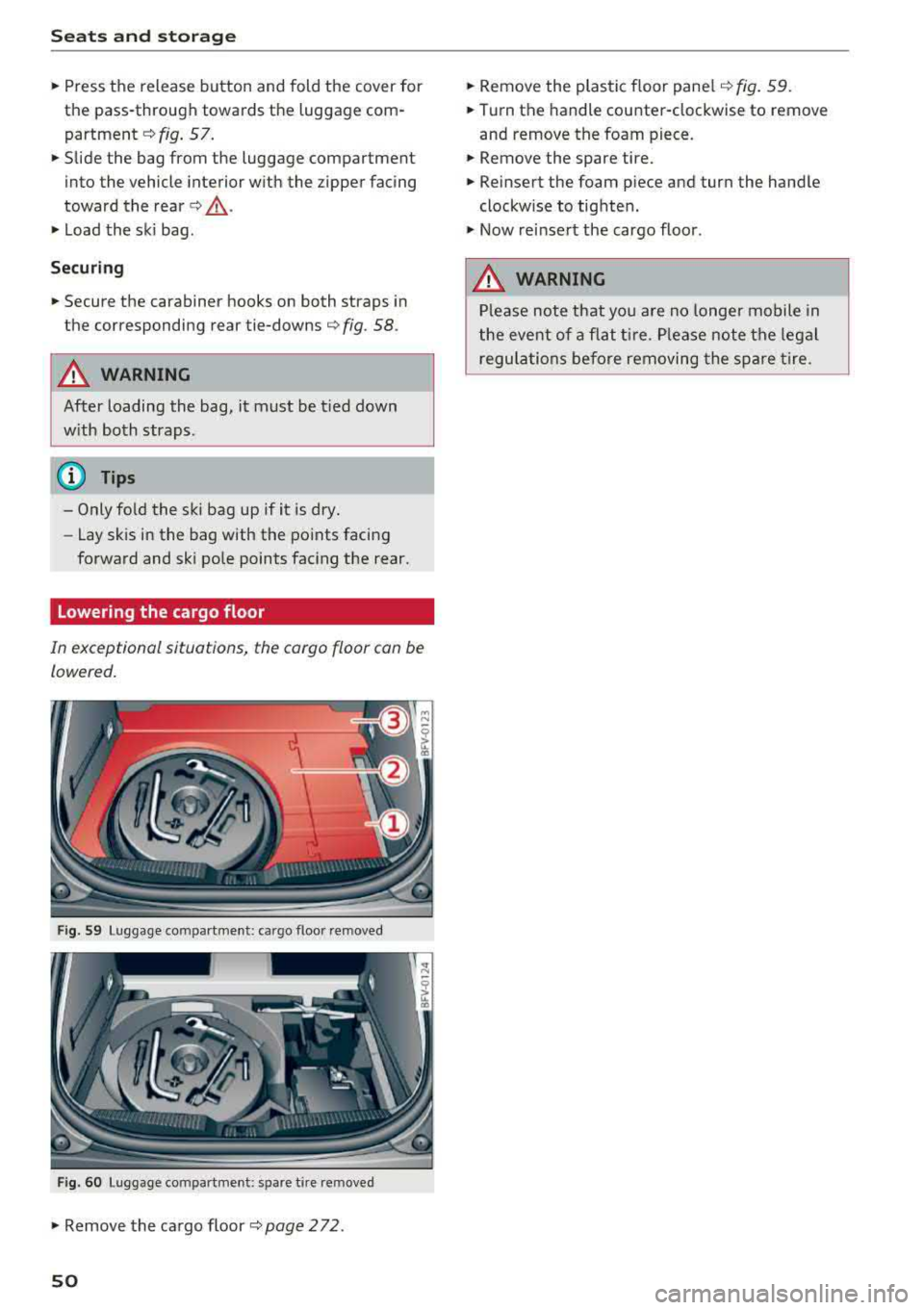
Fig . S9 Luggage com partment : ca rgo f loo r re m oved
Fig. 60 Luggage co mpartment : spa re t ire re m oved
.. Remove the cargo floor ¢page 272 .
50
.. Remove the plastic floor pane l¢ fig. 59 .
.. Turn th e handle counter-clockw ise to remove
and remove the foam piece.
.. Remove the spare tire .
.. Reinsert the foam p iece and turn the hand le
clockwise to tighten .
.. Now re insert the cargo floor .
A WARNING
Please note that you are no longe r mobile in
the eve nt of a flat ti re . P lease note the legal
regula tions before removing the spare tire.
Page 68 of 310
Driving
When parking on a level surface, simply place the
selector lever in the "P" position. On inclines, ac
tivate the parking brake first and then move the
selector lever to the "P " position
c> page 61 . This
prevents the locking mechanism from being
loaded too heavily and will make it easier to
move the selector lever out of the "P" position.
A WARNING
- The vehicle can roll even when the engine is
switched off .
- Unintended vehicle movement can lead to
serious injuries.
- Never leave your vehicle with the engine
running while in gear . If you must leave
your vehicle when the engine is running, set
the parking brake and move the selector lev
er to the P position.
- Power is still transferred to the wheels
when the engine is running at idle. To pre
vent the vehicle from "creeping", you must
keep your foot on the brake when the en
gine is running and the selector lever is in
the "D" , "S" or "R" position or "tiptronic"
mode is selected.
- Do not inadvertently press the accelerator
pedal when the vehicle is stationary. Other
wise the vehicle will start to move immedi
ately, even if the parking brake is set . This
could result in a crash .
- Do not press the accelerator pedal when
changing the selector lever position while
the vehicle is stationary and the engine is
running .
- Never engage the R or P selector level posi
tions while driving. It could cause a crash .
- Before driving down a steep slope, reduce
your speed and shift into a lower gear with
"ti ptron i c" .
- Do not ride the brakes or press the brake
pedal too often or too long when driving
downhill. Constant braking causes the
brakes to overheat and substantially re
duces braking performance, increases brak
ing distance or causes complete failure of
the brake system.
- If you must stop on an incline, always hold
the vehicle in place with the foot brake or
66
parking brake to prevent it from rolling
back .
- Never hold the vehicle on an incline with a
slipping clutch. The clutch opens automati
cally when it becomes too hot from the
overload. The
ml indicator light turns on
and a message appears
c> page 68 when
the clutch is overloaded .
- If the engine must run while you are work
ing in the engine compartment with the
hood open, make sure a gear is not engag
ed. The selector lever must be firmly in the
P position and locked in place and the park
ing brake must be set
c> page 233. Other
wise, the vehicle could begin moving when
increasing the engine speed, even with the
parking brake set.
@ Note
- When stopping on an incline, do not try to
hold the vehicle in place by pressing the ac
celerator pedal while a driving gear is se
lected. This can cause the automatic trans
mission to overheat and can damage it. Set
the parking brake or press the brake pedal
to prevent the vehicle from rolling.
- Allowing the vehicle to roll when the engine
is stopped and the selector lever is in the N
position will damage the automatic trans
mission because it is not lubricated under
those circumstances.
- The transmission can overheat and be dam
aged under certain driving and traffic condi
tions such as frequent starts, creeping for a
long time , or stop-and-go traffic . When the
ml or. indicator light turns on, stop the
vehicle at the next opportunity and let the
transmission cool
c> page 68.
- Allowing the vehicle to roll when the engine
is stopped will damage the S tronic trans
mission because it is not lubricated
c> page 285, Towing with a tow truck .
(D Tips
For safety reasons, the parking brake is re
leased automatically only when the driver's
safety belt is fastened.
Page 70 of 310
Drivin g
The transmission only a llows manual shifting
w hen t he engine spee d is within t he permitted
range.
(D Tips
tiptronic does not work if the transmission is
running in emergency mode .
Kick-down
Kick-down enables maximum acc ele ration .
When you press the accele rato r peda l dow n be
yond the resistance po int, the automatic trans
miss io n downshifts into a lower gea r and the
en
gine utilizes its f ull power, depending on veh icle
speed and engine RPM . It shifts up into the next
h igher gear once the maximum spec ified engine
RPM is reached.
A WARNING
Please note that the wheels could spin on
slick or slippery roads when kick -down is
ac
t ive .
Launch Control Program
-
The Launch Control Program enables maximum
acceleration .
Requirement: the eng ine must be at operating
temperature and the steer ing whee l must not be
turned.
.. With the engine running, p ress th e l~ O FF ! but
ton b riefly one time
ll .
.. Pu ll the selector lever back out of the "D/S" po
s ition briefly to select the "S" position, or press
i t toward the r ight into the tiptron ic posit ion or
select the
D ynamic d riving mode in d rive se
lect* ~ page 78 .
.,. Press t he b rake peda l firmly with you r left foot
and hold it all the way dow n fo r a t least 1 sec
ond.
1 > T he ESC lig ht t urns on con tinuous ly and the mess age S ta
bil iza tio n con trol ( ESC ): sp ort. Warni ng! Reduced sta bil
ity appe ars te m porar ily in the Infota inment sy st em t o in
dic ate th at t he s yst em w as d eactivate d.
68
.. At the same time, press the gas peda l all the
way down with your rig ht foot until the engine
reaches and stays at a hig h RPM leve l.
.. Remove your left foot from the brake.
A WARNING
-Always adapt your driving to the traff ic flow.
- On ly use Launch Control when road and traf-
fic conditions allow it and other drivers w ill
not be endange red or impacted by your dr iv
ing and the vehicle's acceleration .
- Please note that the d rive wheels can spin
and the vehicle can b reak away when spo rt
mode is switched on, especially when the
road is slippery.
- Once the vehicle has started mov ing, press
the
IB OFF I button b riefly to turn the spor t
mode
off.
(D Tips
- The transmission temperat ure may increase
significant ly after using the launch control
prog ram . If that happens, the prog ram may
not be ava ilab le for a few minutes. I t will be
avail able ag ain afte r a coo l-down period.
- Whe n accelerating using the launch contro l
prog ram, all vehicle pa rts a re subje ct to
he avy loads. This c an le ad t o incre ased
wea r.
Transmission malfunction
• Tran smiss ion: malfunction! Plea se stop ve
hicle and shift to P
There is a ma lf u nction in the transm ission. Park
t h e ve hicle secure ly and do not continue driving .
See an authorized Audi dealer or authorized A udi
Service Facility for assistance .
• Transmission : too hot . Ple ase stop vehicle
The t ra nsmission is too hot and can become dam
aged. Stop and let the t ransmiss io n coo l w it h t he
engine r unning (a t idle) in t he "P" se lector lever
.,.
Page 72 of 310
Drivin g
Selector le ver em ergency r ele ase
.,. Press and hold the yellow release bu tton with
the screwdriver
c:::> fig. 76 .
.,. Press the lock button on the se lector lever (D
and move the lever into the N position .
.,. Clip the shift cover back into the shift gate after
us ing the emergency release .
If the ve hicle must be pushed or towed due to a
power failure (for example, the battery is dead),
the selector lever must first be moved to the N position us ing the emergency release mecha
n ism .
A WARNING
-Only activate the emergency release while
on a level su rface or a slight slope.
- Only move the selector lever out of the "P" pos it ion when the parking brake is set. If it
is not funct ioning, secu re the vehicle from
rolling using the b rake pedal o r othe r su ita
ble means, such as bloc king a front and a
rear whee l. An unsecured veh icle may roll
away, which increases the risk of an acci
dent.
Trailer towing
General information
Your Audi TT Roadster is not designed to tow a
trailer .
-
Towing a trailer w ith your Aud i TI Roadster is not
recommended and can cause damage to the car .
Damaged caused by tow ing a trailer is not cov
ered by your Audi Warranty .
70
Page 74 of 310
Ass is tanc e system s
the cruise control from braking. This is be
cause pressing the accelerator pedal over
rides the cruise contro l system .
- If a brake system ma lfunction such as over
heating occurs when the cruise control sys
tem is sw itched on, the braking function in
the system may be switched off . The rest of
the cruise control system functions remain act ive as long as
the @jll)~i~ (USA models) /
i'I (Canada models) indicator light is on.
(j) Tips
The brake lights turn on when the brakes are appl ied automatically .
Changing speed
Applies to: vehicles with cruise control system
.,. To inc rease/decrease the speed in increments,
br iefly
tap the leve r towa rd 0 10 ~ page 71,
fig.
77 up/down to the first level.
.. T o increase o r decrease the speed in incre
ments,
tap the lever toward 0 10 i::> page 71,
fig .
77 up/down to the second leve l.
.. To increase or decrease the speed quickly, hold
the lever in the
0 10 direct ion until the de
s ired speed is reached .
Overriding the speed
Applies to: vehicles with cruise control system
You can press the accelerator pedal to increase
your speed, for example if you want to pass someo ne. The speed yo u set ea rlier w ill res ume
as soon as yo u release the acceler ator pedal.
H owever , if you are driving cons iderably faster
than the stored speed fo r a long period of time,
the cruise co ntrol system w ill tempora rily swi tch
off.
Th e@jll )~i~ (USA mode ls) tl'II ( C anada mod
e ls) indicator light in the inst rument cluste r
turns off and the stored speed is maintained .
Preselecting the speed
Applies to: vehicles with cruise control system
You can pre -select your desired speed when the
vehicle is stationary.
.,. Switc h the ign ition on.
72
.. Pull the lever into position (D ¢ page 71,
fig.
77 .
.. To increase or decrease the speed, tap the lever
toward
0 10 .
This function makes it possible, for example, to
save the speed you want before driving on the
highway. Once you are on the expressway, acti
vate the cruise control system by pulling the lev er into position
(D .
Switching off
Applies to: vehicles with cruise control system
Deactivating temporarily
.. Press the brake pedal, or
.. Press the lever toward @ (not locked into
place)
~ page 71, fig . 77.
Switching off completely
.. Press the lever into position @(clicked into
place), or
.. Switch the ignit ion off .
T he speed you stored will be maintained if the
cruise contro l has been switched off temporarily .
To resume the stored speed, release the brake or
clutch pedal and pull the lever to position
(D .
Switch ing the ignit ion off w ill erase the stored
speed .
A WARNING
You should only resume the stored speed if it
is not too high for existing traff ic conditions.
Othe rw ise you can inc rease the risk of an acc i
dent.
Audi active lane assist
Description
Applies to: vehicles with Audi active lane assist
Active lane assist detects lane marker lines w ith -
i n the lim its of the system using a camera in the
windshield. If you are approach ing a detected
lane marker line and it appears likely that you
will leave the lane, the system w ill warn you with
cor rective stee ring . You can over ride this stee ring
at any t ime. If you pass ove r a line, the stee ring
1111>
Page 78 of 310
Assistance systems
The display remains dim in the information stage
so that your view toward the front is not distur
bed .
Warning stage
If you activate the turn signa l, side assist warns
you abou t veh icles that are detected and classi
fied as critical. The display in the respective mir
ror blinks brightly. If this happens, check traffic
by glancing in the exterior mirrors and over your
shoulder
c:> .& in General information on
page
77.
(D Tips
You can ad just the brightness on of the dis
play on the rearview mirror
c:> page 77.
General information
Applies to: vehicles with Audi side assist
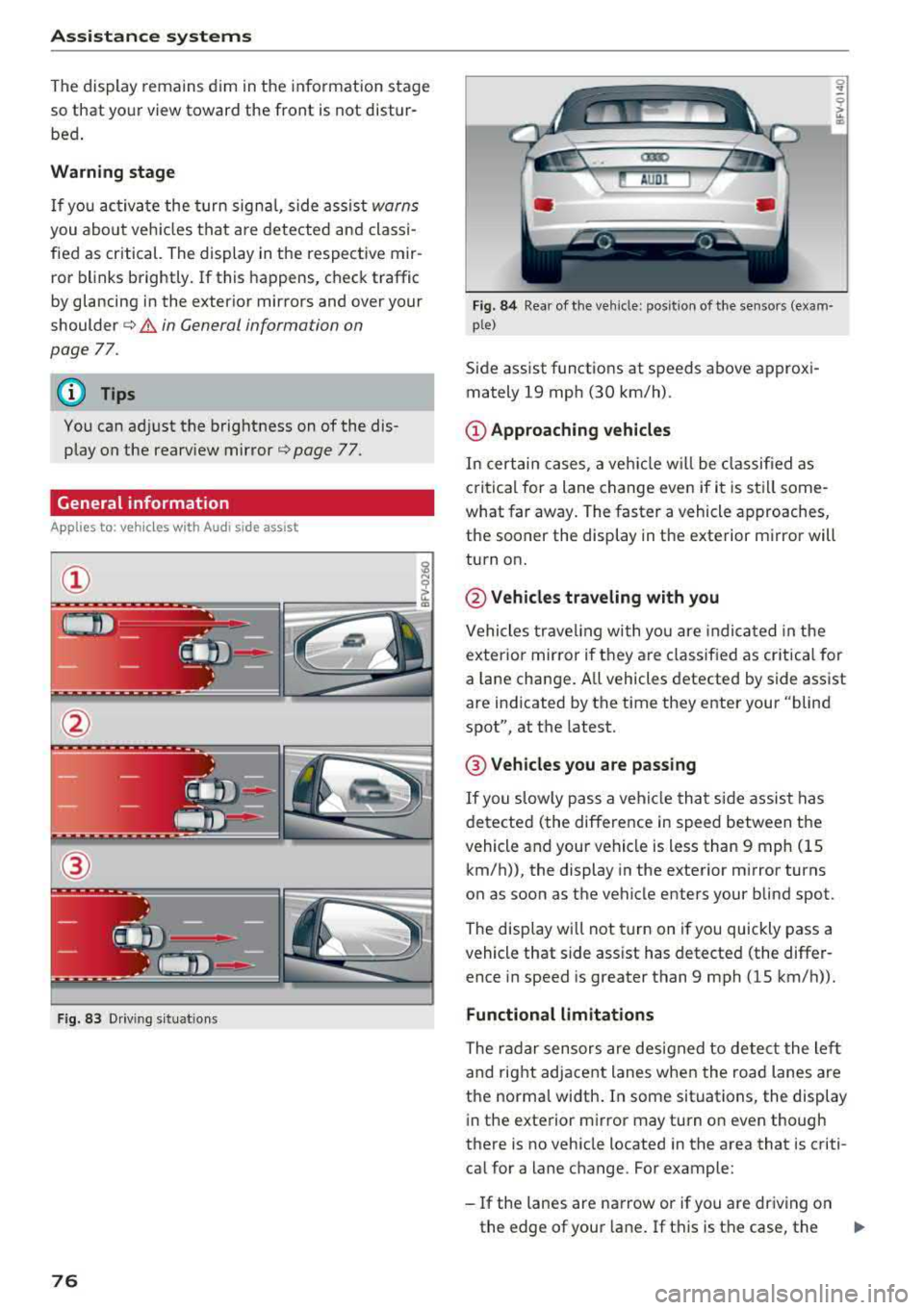
®
Fig. 83 Driving situat ions
76
Fig. 84 Rear of the veh icle: pos it ion of the sensors (exam·
p le)
Side assist funct ions at speeds above approxi
mately 19 mph (30 km/h) .
(D Approaching vehicles
In certain cases, a vehicle w ill be class ified as
c ritical for a lane change even if it is still some
what far away. The faster a vehicle approaches,
the sooner the display in the exterior m irror will
turn on.
@ Vehicles traveling with you
Vehicles traveling with you are indica ted in the
exterior mirror if t hey are classified as critical for
a lan e change. A ll vehicles detected by side assist
are indicated by the time they enter your "blind
spot", at the latest.
@ Vehicles you are passing
If you slowly pass a vehicle that side assist has
detected (the difference in speed between the
vehicle and your vehicle is less than 9 mph (15 km/h)), the display in the exterior mirror turns
on as soon as the vehicle enters your blind spot.
The display wi ll not turn on if you quickly pass a
vehicle that side ass ist has detected (the differ
ence in speed is greater than 9 mph (15 km/h)).
Functional limitations
The radar sensors are designed to detect the left
and right adjacent lanes when the road lanes are
the norma l width . In some situations, the display
in the exterior mirror may turn on even though
there is no vehicle located in the area that is criti
cal for a lane change. For example:
-If the lanes are narrow or if you are driving on
the edge of your lane . If this is the case, the
.,,_
Page 85 of 310
Cl co .... N ,....
N ...... 0 ,....
Vl co
General information
Applies to: ve hicles with rearview camera
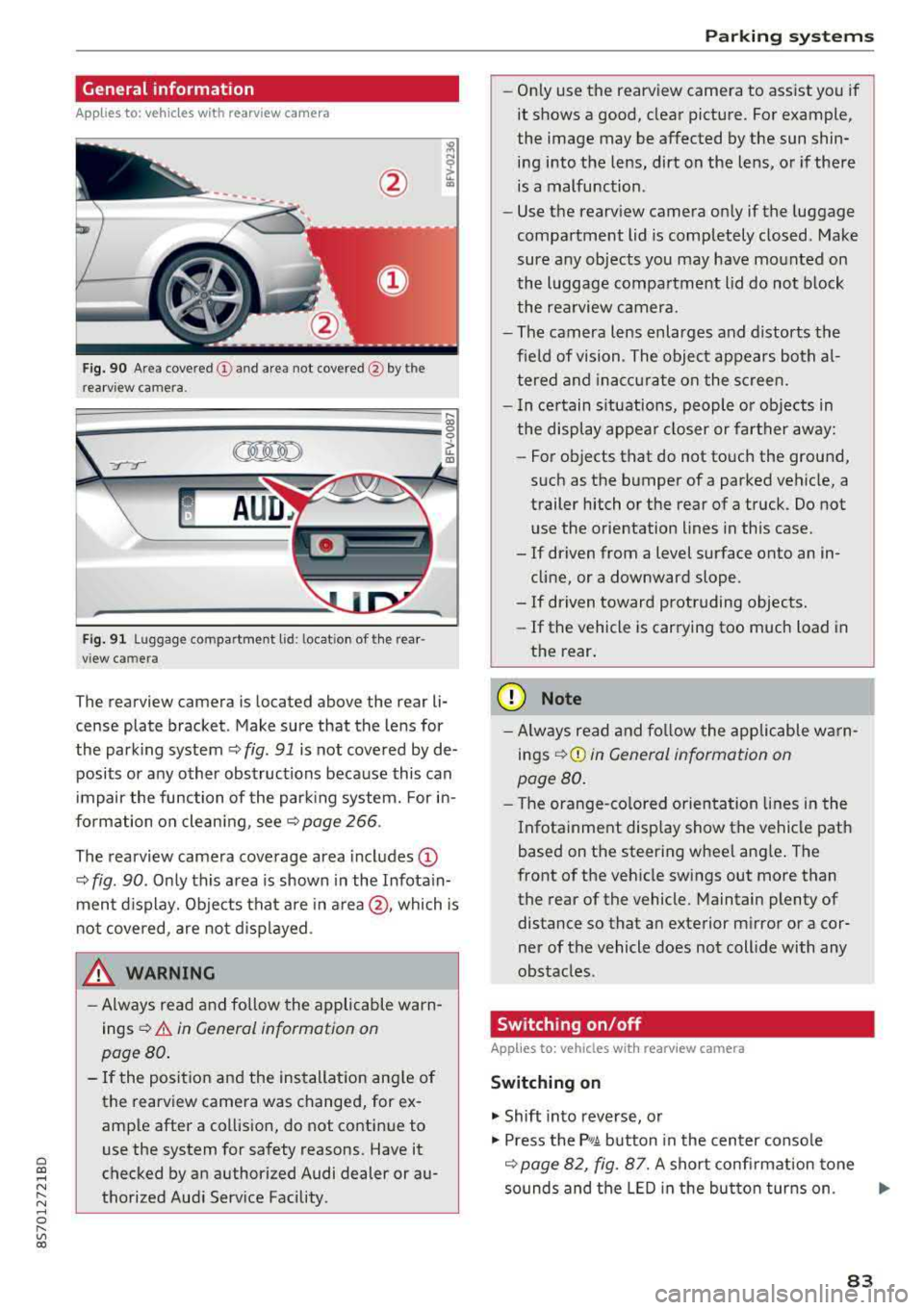
Fig . 90 Area covered (!) and area not covered @ by the
rea rview camera.
:;,
~;..------: :.·~- ---~ _.,- ,.,,.--------g
(Jo00oD ~
Fig. 91 Luggag e compartment lid: locat ion of the rear
view camera
The rearview camera is located above the rear li
cense plate bracket. Make sure that the lens for
the parking system¢
fig. 91 is not covered by de
posits or any other obstructions because this can
impair the function of the parking system. For in
formation on cleaning, see¢
page 266 .
The rearview camera coverage area includes
(D
¢ fig. 90. Only this area is shown in the Infotain
ment display. Objects that are in
area @, which is
not covered, are not displayed.
A WARNING
-Always read and follow the applicable warn
ings ¢
A in General information on
page 80.
- If the position and the installation angle of
the rearv iew camera was changed, for ex
ample after a collision, do not continue to
use the system for safety reasons. Have it
checked by an authorized Audi dealer or au
thorized Audi Service Facility .
Parking systems
-Only use the rearview camera to assist you if
it shows a good, clear picture. For example,
the image may be affected by the sun shin
ing into the lens, dirt on the lens, or if there
is a malfunction.
- Use the rearview camera only if the luggage
compartment lid is completely closed. Make
sure any objects you may have mounted on
the luggage compartment lid do not block
the rearview camera.
- The camera lens enlarges and distorts the
field of vision. The object appears both al
tered and inaccurate on the screen.
- In certain situations, people or objects in
the display appear closer or farther away:
- For objects that do not touch the ground,
such as the bumper of a parked vehicle, a
trailer hitch or the rear of a truck. Do not use the orientation lines in this case.
- If driven from a level surface onto an in cline, or a downward slope .
- If driven toward protruding objects.
- If the vehicle is carrying too much load in
the rear.
(D Note
-Always read and follow the applicable warn
ings
¢ (D in General information on
page 80.
- The orange-colored orientation lines in the
Infotainment display show the vehicle path
based on the steering wheel angle. The
front of the vehicle swings out more than
the rear of the vehicle. Maintain plenty of
distance so that an exterior mirror or a cor
ner of the vehicle does not collide with any
obstacles.
Switching on/off
App lies to : vehicles wi th rearv iew camera
Switching on
.,. Shift into reverse, or
.,. Press the P,q.A button in the center console
¢ page 82, fig. 87. A short confirmation tone
sounds and the LED in the button turns on.
..,.
83
Page 91 of 310
Cl 00 .-< N r-N .-< 0 r-Vl 00
-The efficiency of the brakes can also be im
paired by driving for long stretches on roads
covered with salt without using the brakes .
You can remove salt deposits from the
brake rotors and pads by carefully applying
the brakes severa l t imes .
- If the front spoiler is damaged or you install
another spoiler, make sure the front wheel
brakes are vent ilated proper ly . Otherwise,
the b rake system could overheat, w hich re
duces the ir effectiveness.
- Failure of a brake c ircuit impa irs b raking
perfo rman ce , which increases brak ing dis
tan ce. Avoid d riving the vehicle and have it
towed it to the nearest authorized Audi
dealer or authorized Audi Service Facility .
- Never let the vehicle roll while t he engine is
stopped because this increases the risk of an
accident.
- If the brake booster is not working, you will
have to press much harder on the brake
peda l to compensate for the lack of the
booster.
@ Note
- Never let the brakes "rub" by pressing the
pedal light ly when braking is not actually
necessary. This causes the brakes to over
heat and increases braking d istance and
causes wear.
- Before driving downhi ll a long distance on a
steep h ill, decrease your speed and select a
lower gear. This makes use of the engine
braking effect and relieves the brakes . If
you need to brake additionally, brake in in
tervals and not conti nuous ly .
0) Tips
- If the brake booster is not working, you
must press the brake pedal with much more
fo rce t han normal.
- If you retrofit your vehicle with a front spoil
er, whee l covers o r similar items, make sure
t h at the a ir flow to the front whee ls is not
i nte rru pted. Ot herw ise the brake system
ca n become too ho t.
In tellig ent T echn olo gy
Electromechanical
steering
The electromechanical steering supports the
driver 's steering movements .
Power steering adap ts elec troni cally based on
the vehicle speed .
Indicator li ghts and me ssages
• Stee ring: m alfun ction! Ple ase stop vehicle
If this indica to r li ght tur ns on and stays on and
this message appears, the powe r steering may
have failed.
Stop the veh icle in a safe location as soon as pos
s ible. Do
n o t cont inue d riving. See an autho rized
Audi dealer or authorized A udi Service Facility for
assistance .
(;r,ij Ste ering : malfun cti on! You may con tinu e
dri vin g
If the indicator l ight turns on, the steering wheel
may be more d ifficult to move or more sensit ive
t h an usual. The steer ing whee l may also be at an
angle when d riving stra ight.
Drive slowly to an authorized Aud i dealer or au
thorized Aud i Serv ice Facility to have the mal
funct ion corrected.
(D Tips
If the . or (;r,ij ind icator light only stays on
fo r a short t ime, yo u may continue d riving.
All wheel drive (quattro)
In all wheel drive, all four wheels are powered.
Gener al informat ion
In all wheel dr ive, the dr iving power is divided be
tween all four wheels . This happens automatical
ly depending on your dr iv ing behavior as well as
t h e cur rent road condit ions. A lso
see ~ page 86,
Electronic stabilization control (ESC).
The all wheel dr ive concept is des igned for high
engine power . You r vehicle is except ionally pow
erfu l and has excellent driv ing cha racter istics
bot h unde r normal d riving conditions and o n
89