airbag AUDI TT ROADSTER 2018 Owners Manual
[x] Cancel search | Manufacturer: AUDI, Model Year: 2018, Model line: TT ROADSTER, Model: AUDI TT ROADSTER 2018Pages: 310, PDF Size: 46.95 MB
Page 6 of 310
Table of contents
Airbag system . . . . . . . . . . . . . . . . . . . .
194
Important information . . . . . . . . . . . . . . . 194
Front a irbags . . . . . . . . . . . . . . . . . . . . . . . 198
Mon itoring the Advanced Airbag System . 205
Knee airbags .. .. ............. .... .. . 210
Side airbags . . . . . . . . . . . . . . . . . . . . . . . . 212
Child safety . . . . . . . . . . . . . . . . . . . . . . 216
Important information . ....... .. .. .. . 216
C hi ld safety seats . . . . . . . . . . . . . . . . . . . . 221
Secur ing ch ild safety seats . . . . . . . . . . . . 225
Add it io nal info rmation . . . . . . . . . . . . . . . 228
Maintenance and Care . . . . . . . . . . . 229
Checking and Filling . . . . . . . . . . . . . 229
F ue l..... .. .. .. ............. .... .. . 229
Ref ueling . . . . . . . . . . . . . . . . . . . . . . . . . . 230
E m issions cont ro l sys tems . . . . . . . . . . . . 233
On Board Diagnostic System (OB D) . . . . . 233
Engine compartment . . . . . . . . . . . . . . . . . 233
Eng ine oil . . . . . . . . . . . . . . . . . . . . . . . . . . 236
Cooling system . . . . . . . . . . . . . . . . . . . . . . 239
Brake fluid . . . . . . . . . . . . . . . . . . . . . . . . . 241
Battery . . . . . . . . . . . . . . . . . . . . . . . . . . . . 241
W indshield washe r system . . . . . . . . . . . . 243
Service i nterval d isplay 24 3
Wheels ... .. .. ................ ... . 244
Wheels and T ires . . . . . . . . . . . . . . . . . . . . 244
T ire press ure monitor ing system
T ire press ure monitor ing sys tem 26
1
26 2
Care and cleaning . . . . . . . . . . . . . . . . 266
Gene ral informa tion . . . . . . . . . . . . . . . . . 266
Ca r washes . . . . . . . . . . . . . . . . . . . . . . . . . 266
C leaning and care information . . . . . . . . . 267
P lacing your vehicle o ut of service . . . . . . 271
Do It Yourself . . . . . . . . . . . . . . . . . . . . 272
Emergency assistance . . . . . . . . . . . 272
Trun k escape latch . . . . . . . . . . . . . . . . . . . 272
Gene ral information . . . . . . . . . . . . . . . . . 272
Equipment . . . . . . . . . . . . . . . . . . . . . . . . . 272
T ire mob ility k it . . . . . . . . . . . . . . . . . . . . . 273
Replac ing whee ls . . . . . . . . . . . . . . . . . . . . 27S
Spare tire . . . . . . . . . . . . . . . . . . . . . . . . . . 279
4
Fuses and bulbs . . . . . . . . . . . . . . . . . . 280
E lectrica l fuses . . . . . . . . . . . . . . . . . . . . . . 280
B ul bs. . . . . . . . . . . . . . . . . . . . . . . . . . . . . . 282
Emergency situations . . . . . . . . . . . . 283
Genera l . . . . . . . . . . . . . . . . . . . . . . . . . . . . 283
Start ing by push ing or tow ing . . . . . . . . . . 283
Start ing with jumper cables . . . . . . . . . . . 283
U sing the jump start cable . . . . . . . . . . . . 284
T ow ing with a tow truck . . . . . . . . . . . . . . 285
Raising the vehicle . . . . . . . . . . . . . . . . . . . 286
Accessories and technical data . . 288
Technical data . . . . . . . . . . . . . . . . . . . . 288
Vehicle spec ificat ions . . . . . . . . . . . . . . . . 288
Notes abo ut te chnical data . . . . . . . . . . . . 288
D imens io ns . . . . . . . . . . . . . . . . . . . . . . . . . 288
Capacities . . . . . . . . . . . . . . . . . . . . . . . . . . 2 88
Weights . . . . . . . . . . . . . . . . . . . . . . . . . . . 289
Consumer Information . . . . . . . . . . 290
Warranty coverages . . . . . . . . . . . . . . . . . . 290
Operating your vehicle outside t he U.S.A.
or Canada . . . . . . . . . . . . . . . . . . . . . . . . . . 290
Audi Service Repair Manuals and Literature . . . . . . . . . . . . . . . . . . . . . . . . . . 290
Maintenance . . . . . . . . . . . . . . . . . . . . . . . . 290
Accessor ies a nd techn ica l changes . . . . . . 292
De clara tion of compliance for
te lecommunications eq uipment a nd
electron ic sys tems . . . . . . . . . . . . . . . . . . . 293
Index ...... .. .. .. .. ............. .. 294
Page 9 of 310
Cl 00 .-< N r-N .-< 0 r-Vl 00
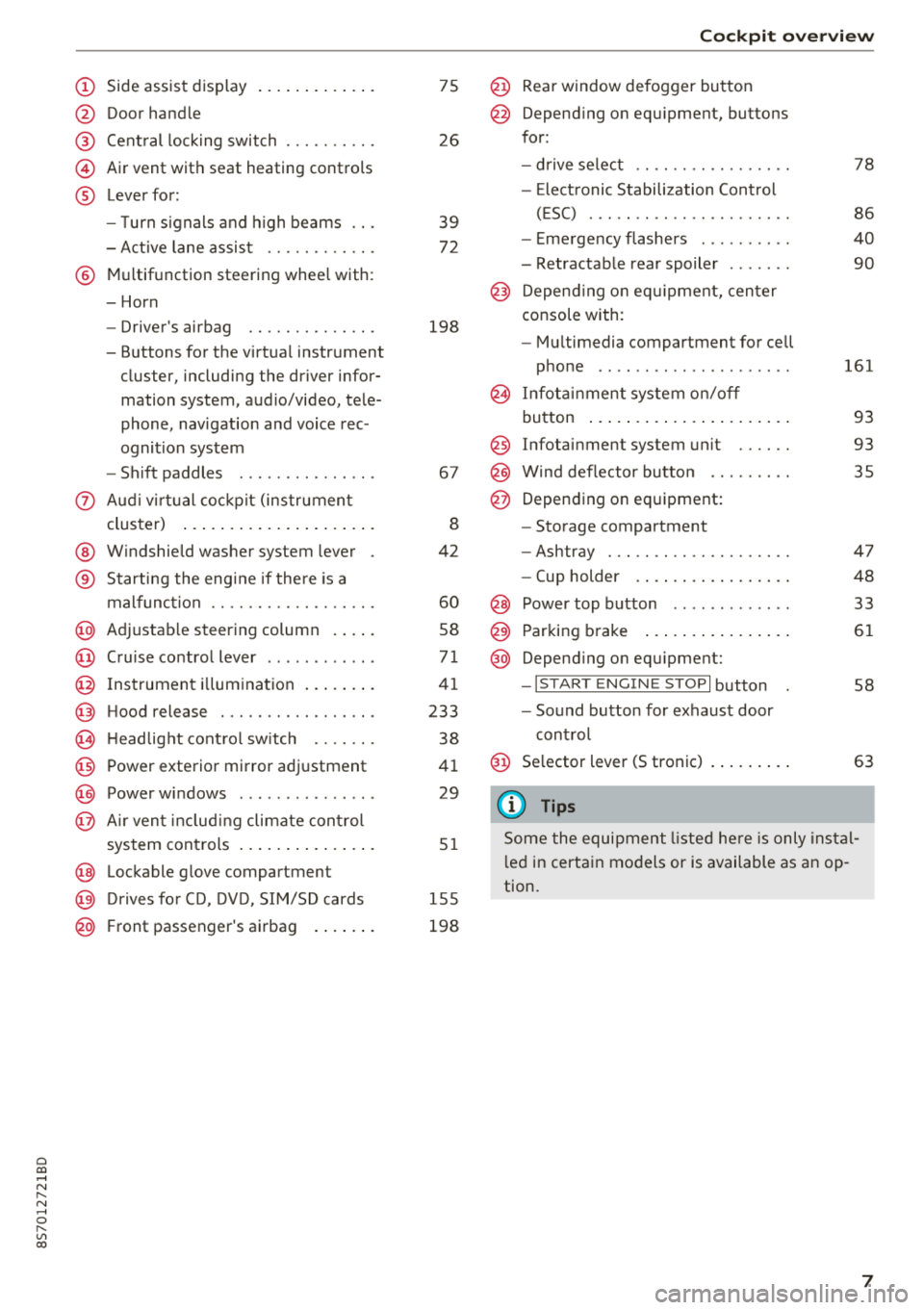
(D Side assist disp lay ..... ... .. .. .
@ Door handle
@ Cent ral locking swit ch ..... .. .. .
@ Air vent with seat heating controls
® Lever for:
- T urn s ignals and high beams
- Act ive lane assist ....... .. .. .
® M ultifunction steering whee l with :
- Horn
- Driver's airbag ........... .. .
- Buttons for the virtua l instr ument
cluster, including the dr iver infor
mation system, audio/video, tele
phone, navigation and voice rec
ognit ion system
- Shift paddles ............. . .
(J) A ud i v irtu al coc kp it (instrument
cluster) ... ... .. ..... ... .. .. .
@ W indshield washer system lever
® Starting the eng ine if the re is a
malfunc tion ............... .. .
@ Ad justable steer ing column . ... .
@ Cruise contro l lever .......... . .
@ Ins trumen t il lum ination ... .. .. .
@ Hood release .............. .. .
€3) H eadlight cont ro l sw itch .... .. .
@ Power exterio r mirror adj ustment
@) Power windows .............. .
@ A ir ven t incl uding climate con trol
system controls .. ..... ... .. .. .
@ Lockable g love compartment
@) D rives fo r CD, DV D, SIM/SD cards
@ Front passenger's ai rbag . ... .. .
75
26
39
7 2
198
67
8
42
60
58
71
41
233
38
4 1
29
5 1
1 55
198
Coc kpit o ver view
@ Rear window defogger button
@ Depend ing on equ ipment, buttons
for:
- drive select .. .............. .
- Elect ronic Stabili zation Cont rol
( E SC) . .. .. .. .............. .
- E me rge ncy flashers ......... .
- Retractable rear spoiler ...... .
@ Depending o n eq uipment, cen ter
console with:
- Mu ltimedia compartment for cell
p hone .. .. .. .. ............ .
@ In fota inment system o n/off
bu tton ... .... .. ... .. ..... .. .
@ Infotai nment system unit ..... .
@ Wind deflector butto n ........ .
@ Depending on eq uipment:
- Storage compartment
- Ashtray . .. .. .............. .
- Cup holder .... ... .. ..... .. .
@ Power top b utton ............ .
@ Parking b rake ... ... .. ..... .. .
@ Depend ing on eq uipment:
-I S TAR T ENGI NE STOP I button
- So und button for exhaust door
cont rol
@ Se lector lever (S tronic)
(D Tips
78
86
40
90
161
93
93 35
47
48
33
61
58
63
Some the equi pment listed he re is only ins tal
l e d in certa in models or is available as an op
tion.
7
Page 60 of 310
Driving
Steering
Adjusting the steering wheel position
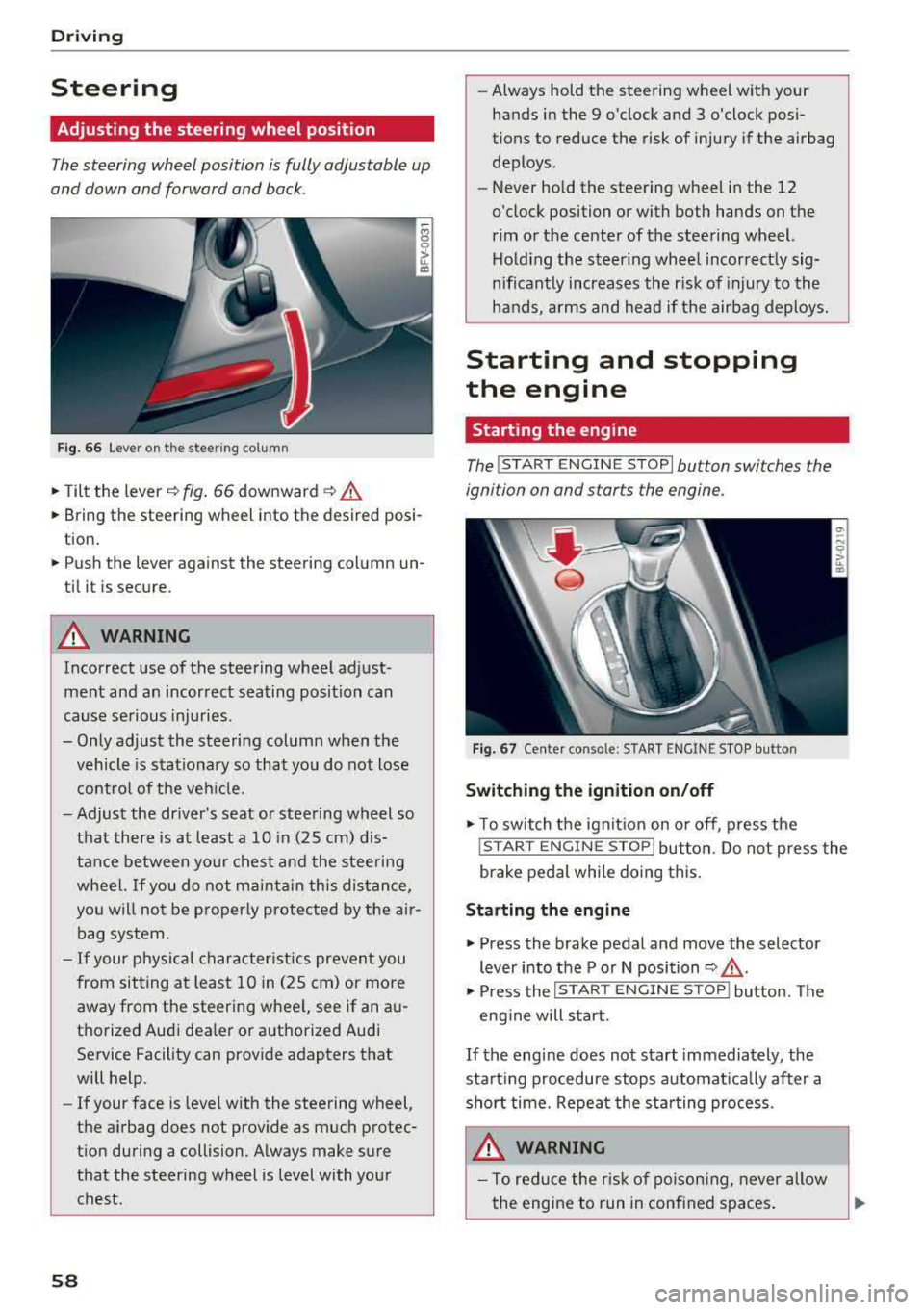
The steering wheel position is fully adjustable up
and down and forward and back .
Fig. 6 6 Lever on th e steering column
.., Tilt the lever~ fig . 66 downward ~ .&.
... Bring the steering wheel into the desired posi
tion .
... Push the lever against the steering column un
til it is secure.
A WARNING
Incorrect use of the steering wheel adjust
ment and an incorrect seating position can
cause se rious injuries .
- Only adjust the steering column when the vehicle is stat io nary so that you do not lose
contro l of the ve hicle.
-
-Adjust the driver's seat or steering wheel so
that there is at least a 10 in (25 cm) d is
tance between your c hest an d the steering
wheel.
If you do not mainta in this dis tan ce,
you will not be p roper ly protec ted by t he air
bag system.
- If your physical character istics preven t you
from sit ting at least 1 0 in (25 cm) or more
away from the steering wheel, see if an a u
tho rized Aud i dea le r or a uthorized Audi
Service Facility can provide adapters that
will help.
- If your face is leve l w ith the steering
wheel,
the a irbag does not prov ide as much protec
t ion during a collision. A lways make sure
that the steering wheel is level with your
chest.
58
-Always hold the steering wheel with your hands in the 9 o'clock and 3 o'clock pos i
tions to reduce the risk of injury if the airbag
deploys .
- Never hold the steering wheel in the 12
o'clock position or with both hands on the
rim or the center of the steering wheel. Ho ld ing the steer ing whee l incorrect ly sig
nificant ly increases the risk of injury to the
hands, a rms and head if the airbag deploys.
Starting and stopping
the engine
Starting the engine
The !S T ART ENGINE STOP lbutton switches the
ignition on and starts the engine .
F ig . 67 Ce nter conso le: S TART ENGINE STOP bu tton
Switching the ignition on /off
.., T o switch the ign it io n on o r off, p ress the
! STAR T
ENGINE STOPI button. Do not press the
brake pedal while do ing this.
Starting the engine
... Press the brake pedal and move the selector
lever into the P or N position
~ .&_ .
... Press the !S TAR T ENGIN E ST OP ! butto n. Th e
eng ine will s tart.
If the engine does not start immediately , the
start ing procedure stops a utomat ica lly after a
sho rt time. Repeat the sta rting process.
A WARNING
- To red uce the r isk of po ison ing, never allow
the engine to run in conf ined spaces .
Page 93 of 310
Cl 00 .-< N r-N .-< 0 r-Vl 00
Facility immediately to have the malfunction cor
rected. The color of the indicator light depends
on the vehicle speed.
A WARNING
-
Driving at higher speeds without the rear
spoiler deployed can impair handling charac
teristics, making the vehicle harder to con
trol.
- Always make sure that the spoiler is de
ployed when driving at speeds over 85 mph
(140 km/h) . If the rear spoiler warning/ind i
cator lig ht in the instrument cluste r comes
on, the rear spoiler may not have deployed.
- Never drive at speeds higher than 85 mph
(140 km/h) if the spoile r is not deployed.
Have the spo iler inspected as soon as possi
ble by an author ized Audi dealer or qua lified
works hop .
- Always obey speed l imits and othe r traffic
laws .
A WARNING
Improper operation of t he rear spoiler can
cause crushing injuries.
- Always make sure that nobody, especia lly
children, is in the way when the rear spoi ler
is deployed or retracted .
(Llj) Note
-Never push on the vehicle on the rear spo il
er. This cou ld cause damage.
- To p reve nt damage to the rear spoiler do
not lean o r place anyt hing on it.
-
- Only ope rate the rear spoiler manually when
the luggage compartment lid is close and
the rear spoiler mov ing parts are not
blocked. Otherwise, damage could occur .
(j) Tips
Clean the rear spoiler compartment eve ry 2 to
3 months . To function co rrectly, the rear
spoiler must be free of ice, snow and leaves .
Intellig ent T echn olo gy
Energy management
Your vehicle is equipped with an intelligent ener
gy management system for distributing electrici
ty. This significantly improves the starting ability
and increases the vehicle battery life.
(D Tips
- If you drive short distances frequent ly, the
vehicle battery may not charge enough
wh ile driving. As a result, convenience func
tions for electr ical equipment may be tem
pera rily unavailable .
- The vehicle battery w ill gradually drain if
the vehicle is not driven for long per iods of
t ime, or if electr ical equ ipment is used
when the engine is not runn ing. To ensure
that the veh icle can still be started, the
elect rical eq uipment w ill be red uced or
sw itched
off.
Information about data
recorded by vehicle
control modules
Your vehicle is not equipped with a crash data re
corder . This dev ice is installed by some veh icle
manufacturers to record data about crashes so
t h at it can be ana lyzed later. Crash data reco rd
ers are also called " Event Data Recorders (EDR)".
In some legal jurisdictions, it is not permitted to
access or down load data recorded by pre-instal
led crash data recorders in orde r to evaluate a
crash without clear consent of the vehicle owner.
Your vehicle is not equ ipped w ith a crash data re
corder . However it does contain a variety of e lec
tronic control modules for various vehicle sys
tems such as engine function, exha ust treatment
or airbags and safety belts.
T hese electronic contro l modu les record veh icle
data du ring normal driv ing fo r diagnosis and re
pair purposes. The record ing capability of the
electronic control modules is limited to data only
-no sound is recorded . If the contro l module de
tects a system ma lfunction or other change in
status, a very limited amount of data is recorded
for an extremely small period of time. Data that
..,.
9 1
Page 130 of 310
Audi conn ect
The Audi MMI con nect app must be installed and
open on your mobile device.
You must be logged into yo ur myAud i acco unt in
t he
Audi MMI connect app and you must have se
lected you r vehicle .
The Wi-Fi funct ion on you r mobile device and on
the MMI must be sw itched on.
The MMI must be connected to the network .
~ Select : I MENU I button > Aud i conn ect> left
cont ro l button
> In formation category> Tra v
el.
After opening th e travel guide , travel tips in your
area will be d isplayed including current rat ings as
well as the corresponding ca tegory.
~ Press the left control button to change the cat
egory (such as bars nearby) .
A WARNING
-It is only safe to use tab lets, laptops, mo
bile devices and othe r similar devices w hen
the vehicle is st ationa ry be cause, like all
loose objects, they could be thrown aro und
the inside of the vehicle in a crash and cause serious injuries . Store t hese types of devices
securely whi le driving.
- Do not use any wireless devices on the front
seats w ith in range of the a irbags while driv
ing. Also read the warnings in the chapter
Q page 198, Front airbags.
@ Note
Always follow the information found in Q i© in
Wi-Fi hotspot on page 130.
@ Tips
Units of meas urement, language settings and
time are shown in the Infotainment system
disp lay based on how they were set in the
MMI system settings
<=) page 173 .
-
ll AUDI AG pr ovide s access to services fro m third party pro
v ider s. Pe rma ne nt ava ilabil ity c anno t be guara nteed , be
c a use that depen ds on th e th ird party provid er.
128 Audi connect services in navigation
App
lies to : vehicles wit h naviga tion sys te m and A udi connect
The following Aud i connect services a re current ly
available :
- Navigation with
satellite map1> Q page 145 .
-Point of Interest (POI ) on line sear ch wi th
v oi ce recognit ion
(such as restaurants) : plan
route guidance using the MMI control panel
and the vo ice recognit ion system
<=) page 105 .
- Set up destinations in your MMI using your
m yA udi account or the sat ellite map view l )
r=;, page 145 .
-Online traffic information : receive up-to-the
m inute traffic informat ion about acc idents,
road const ruct ion and other inc idents
r=;, page 146 .
-Map updates *: import navigat ion map updates
in yo ur MMI using an S D card.
(D Tips
-For the map update Audi connect serv ice
using an SD card, check t he current soft
w ar e version in yo ur vehicle and compare it
w ith www.aud iusa.com/myaudi to see if a
new ve rsion is avai lab le . You can a lso have
the new navigation data installed by an Audi dea ler, which can be done for an addit iona l
charge.
- You can find additional information about
the
map update at www.a udiusa.com/
myaudi.
Audi connect services in the Media menu
App lies to: vehicles wit h Audi conne ct
- Online media and Internet radio : offers access
to d ifferent online med ia services as well as In
ternet radio and ope ration through the
MMI us
ing the
A udi MMI connect app Q page 159.
App lies to: vehicles wi th Wi-Fi au dio player
- Wi-Fi audio playe r: you can access the media
center through W i-F i connected med ia p layers
(such as smartphones)
Q page 158. Ill-
Page 160 of 310
Media
(D Tips
-Check for any connection requests on your
Bluetooth device.
- Multiple Bluetooth audio players can be
connected to the MMI, but only one mobile
device can be active.
- Bluetooth protocols AVRCP (1.0/1.3/1.4)
and A2DP are supported.
- Note the volume setting on your Bluetooth
device. Audi recommends setting your mo
bile device to the maximum volume when
using it as a Bluetooth audio player.
- The supported media functions (such as
shuffle) depend on the Bluetooth device be ing used.
- For more information on the supported de
vices, visit www.audiusa.com/bluetooth or
contact an authorized Audi dealer or author
ized Audi Service Facility.
Wi-Fi audio player
App lies to: ve hicles w ith Wi-F i audio playe r
Using the Wi-Fi audio player media source on the
MMI, you can connect and operate your Wi-Fi-ca
pable media player (such as a smartphone) to wirelessly play music from your media player
li
brary. The media player is connected through the
vehicle's Wi-Fi hotspot. A UPnP Server opp or an
integrated UPnPIDLNA server on your media
player is required to access your media player
li
brary.
Requirement: the Wi-Fi function on your media
player must be switched on. The
Audi MMI con
nect
app or a UPnP server app must be installed
on your media player .
Or: you must be using a
media player with an integrated UPnP/DLNA
server .
-Connecting a media player: press the I MEDIA !
button. Press the left control button until the
sources overview
¢ page 162 is displayed . Se
lect and confirm
Wi-Fi audio player 0
¢ page 162, fig . 142.
- If necessary, select and confirm Wi-Fi turned
off> Turn on Wi-Fi
to activate Wi-Fi in the
MMI. Select
Wi-Fi settings, if necessary . Select
158
the same settings on the wireless media player
that are used for the Wi-Fi hotspot.
- Starting the Wi-Fi audio player: start the Audi
MMI connect
app or a UPnP server app. Or: al
low media sharing on your media player.
Operating the media player: the media player is
operated through the MMI.
- Press the left control button repeatedly until
the
Folders menu item appears. Select and con
firm
Folders .
- Playing music from the media player:
select
and confirm
Media center .
Web radio:
see ¢ page 159.
A WARNING
- As the driver, do not allow usage of the Wi
Fi hotspot to distract you from driving, as
this could increase the risk of an accident.
- It is only safe to use tablets, laptops, mo
bile devices and other similar devices when
the vehicle is stationary because, like all
loose objects, they could be thrown around
the inside of the vehicle in a crash and cause
serious injuries. Store these types of devices
securely while driving.
- Do not use any Wi-Fi devices within range of
the airbags while driving . Also read the
warnings in the
chapter¢ page 194.
((D} Note
Always follow the information found in ¢(l} in
Wi-Fi hotspot on page 130.
(D Tips
- The Wi-Fi connection is reconfigured when
inserting or removing the mini SIM card in
the SIM card reader*. There may be a tem
porary interruption in audio playback, de
pending on the media player.
- Always read the chapter¢
page 131, About
Audi connect.
- Please note that a Wi-Fi connection does
not automatically make it possible to use
the Internet. For additional information,
see ¢
page 124.
Page 161 of 310
Cl 00 .-< N r-N .-< 0 r-Vl 00
- To avoid interruptions during playback, de
activate the power saving function on the media playe r or connect it to a charger.
- The loading times for the a udio data depend
on the media p layer used and the number of
files that it contains.
- A maximum of 2,000 entries per directory
are displayed in the MMI.
- Songs down loaded for offline use using mu
sic streaming services are stored on your mobile device (such as a smartphone) and
may be ORM protected. The Wi-Fi audio
player w ill not play ORM protected files.
- Contact an a uthorized Audi dea ler or au
thorized Audi Service Facility for additional i nformat ion on the Wi-Fi audio p layer .
Online media and
Internet radio
Applies to: vehicles with Audi connect
You can playback and operate various online me
dia services and Internet radio using the MMI.
,. Press t he IM EDIA I button. P ress the left control
button until the so urces ove rview
Q page 162,
fig. 142
is d isplayed.
Applies to: using online media and Internet radio
Requirement:
- The
Audi MMI conn ect app must be installed
and open on your mob ile dev ice.
- You must be logged into your my Audi account
i n the
Audi MMI conn ect app and you must
have selected your veh icle .
- The Wi-Fi function on the mobile device and on
the MMI must be switched on .
- If necessary, check in the connection manager
Q page 174 if the mob ile device you connected
is selected under the
MMI connect app (~) .
-The MMI must be connected to the network.
- The symbo l for the
O nline media * source®
Qpage 162, fig . 142 is shown in the MMI.
Applies to: using online media
Addit ional requirement:
- A supported o n line media serv ice m ust be avail
able in your country.
- You must have an account with a supported on
l ine med ia serv ice .
Media
-Depending on t he online media service, you
must install and open an app on your mobile
dev ice .
St arting Onlin e media
- Press the I MEDIA i button. Press the left control
button until the sources overv iew
Q page 162
is displayed .
- Select and confirm an online media serv ice.
Starting Inte rnet radio
- Press the I MEDIA i button. Press the left control
button until the sources overv iew
Q page 162
is displayed .
- Select and confirm
Int ernet r adio . The Internet
radio b rowser or the last stat io n that was play
ing is shown .
-Sel ecting the station : if necessary, select and
confirm a category in the Inte rnet rad io
Bro ws
er >
a station.
Online m edia and Internet radio :: additional op
tion s
-Press the r ight cont rol b utt on.
The following opt ions may be ava ilable, depend
i ng on the information shown (such as the sta
tio n/t rack that is cur re ntly playing):
- Sound setting s: see Q page 177.
-Wi-Fi settings : see Q page 129, Wi-Fi hotspot .
-Conne ction manager : see Qpage 174.
-Add it io na l opt ions may be ava ilable, depend ing
on the active online med ia service or In ter net
radio .
_&. WARNING
= -
-It is only safe to use tablets, laptops, mo
bi le devices and other simi lar devices when
the vehicle is stationary because, like all loose objects, they could be thrown around
the inside of the vehicle in a crash and cause
serio us injuries . Store these types of devices
securely while d riving .
- Do not use any Wi-Fi devices within range of
the airbags while dr iv ing . Also read the
warn ings in the chapter
Q page 194 . ..,.
159
Page 182 of 310
Safe dri ving
,.. Take frequent breaks on long trips. Do not drive
for more than two hours at a stretch.
,.. Do NOT drive when you are tired, under pres
sure or when you are stressed.
A WARNING
Impaired driving safety increases the risk of
serious personal injury and death whenever a
vehicle is being used.
Correct passenger
seating positions
Proper seating position for the driver
The proper driver seating position is important
for safe, relaxed driving.
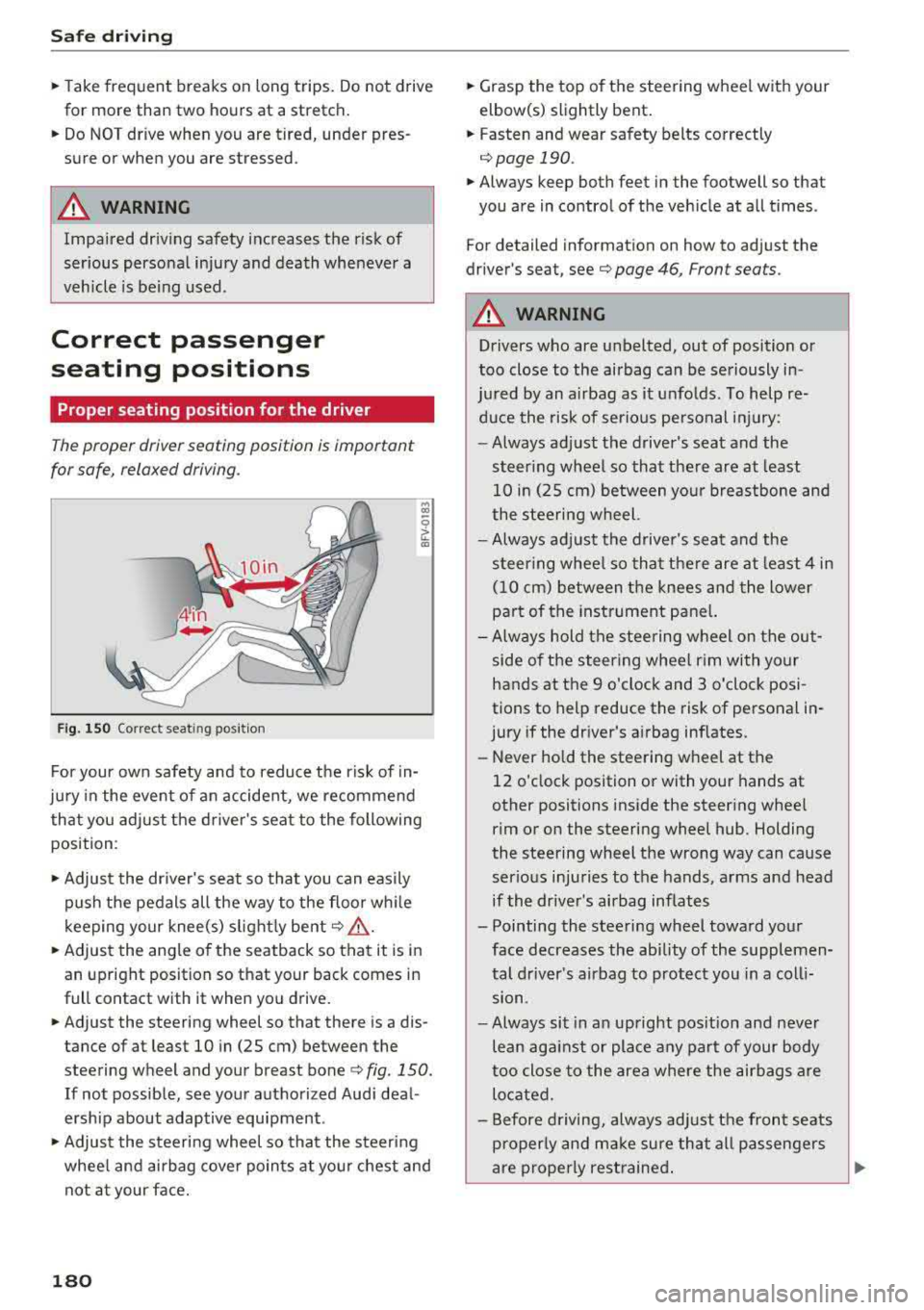
F ig. 150 Correct seat in g posi tion
.., CD
~ CD
For your own safety and to reduce the risk of in
jury in the event of an accident, we recommend
that you adjust the driver's seat to the following
position :
,.. Adjust the driver's seat so that you can easily
push the pedals all the way to the floor wh ile
k eeping your knee(s) s lightly bent
c:> .&_ .
,.. Adjust the angle of the seatback so that it is in
an upright position so that your back comes in
full contact with it when you drive.
,.. Adjust the steering wheel so that there is a dis
tance of at least 10 in (25 cm) between the
steering wheel and your breast bone
c:> fig. 150.
If not possible, see your authorized Audi deal
ersh ip about adaptive equipment .
,.. Adjust the steering wheel so that the steering
whee l and airbag cover points at you r chest and
not at your face.
180
,.. Grasp the top of the steering wheel with your
elbow(s) slightly bent.
,.. Fasten and wear safety belts correctly
c:> page 190 .
,.. Always keep both feet in the footwell so that
you are in control of the vehicle at all times .
For detailed information on how to adjust the
driver's seat, see
c:> page 46, Front seats.
A WARNING
Drivers who are unbelted, out of position or
too close to the airbag can be seriously in -
ju red by an airbag as it unfolds. To help re-
duce the risk of serious pe rsonal injury:
-Always adjust the driver's seat and the
steer ing wheel so that the re are at least
10 in (25 cm) between your breastbone and
the steering wheel.
-Always adjust the driver's seat and the
steer ing whee l so that there are at least 4 in
(10 cm) between the knees and the lower
pa rt of the instrument pane l.
- Always hold the steering wheel on the out
side of the steering wheel rim with your
hands at the 9 o'clock and 3 o'clock posi
tions to help reduce the risk of personal in
jury if the dr iver's a irbag inflates.
- Never hold the steering wheel at the
12 o'clock position or with your hands at
other positions inside the steering whee l
rim or on the steering wheel hub . Holding
the steering wheel the wrong way can cause
serious injuries to the hands, arms and head
if the driver's airbag inflates
- Pointing the steering wheel toward your face decreases the ability of the supplemen
tal driver's airbag to protect you in a coll i
sion.
- Always sit in an upright pos it ion and never
lean against or place any part of your body
too close to the area where the airbags are
located.
- Before driving, always adjust the front seats
properly and make sure that all passengers
-
are properly restrained . ..,.
Page 183 of 310
Cl 00 .-< N r-N .-< 0 r-Vl 00
-Never adjust the seats while the vehicle is
moving. Your seat may move unexpectedly
and you could lose control of the vehicle.
- Never drive with the backrest reclined or
tilted far back! The farther the backrests are
tilted back, the greater the risk of injury due
to incorrect positioning of the safety belt
and improper seating position .
- Children must always ride in child seats
¢page 216. Special precautions apply
when installing a child seat on the front
passenger seat ¢
page 194.
Proper seating position for the front
passenger
The proper front passenger seating position is
important for safe, relaxed driving.
For your own safety and to reduce the risk of in
jury in the event of an accident, we recommend
that you adjust the seat for the front passenger
to the following position:
.,. Adjust the angle of the seatback so that it is in
an upright position and your back comes in full
contact with it whenever the vehicle is moving .
.,. Keep both feet flat on the floor in front of the
front passenger seat .
.,. Fasten and wear safety belts correctly
¢ page 190.
For detailed information on how to adjust the
front passenger's seat, see ¢
page 46.
A WARNING
Front seat passengers who are unbelted, out
of position or too close to the airbag can be
seriously injured or killed by the airbag as it
unfolds . To help reduce the risk of serious
personal injury:
- Passengers must always sit in an upright po
sition and never lean against or place any
part of their body too close to the area
where the airbags are located.
- Passengers who are unbelted, out of posi
tion or too close to the airbag can be seri
ously injured by an airbag as it unfolds with
great force in the blink of an eye .
Safe driving
-Always make sure that there are at least
10 in (25 cm) between the front passen
ger's breastbone and the instrument panel.
- Always make sure that there are at least 4 in
(10 cm) between the front passenger's
knees and the lower part of the instrument
panel.
- Each passenger must always sit on a seat of
their own and properly fasten and wear the
safety belt belonging to that seat.
- Before driving, always adjust the front pas
senger seat properly.
- Always keep your feet on the floor in front
of the seat. Never rest them on the seat, in
strument panel, out of the window, etc . The
airbag system and safety belt will not be
able to protect you properly and can even in
crease the risk of injury in a crash .
- Never drive with the backrest reclined or
tilted far back! The farther the backrests are
tilted back, the greater the risk of injury due
to incorrect positioning of the safety belt
and improper seating position .
- Children must always ride in child seats
¢
page 216. Special precautions apply
when installing a child seat on the front
passenger seat ¢
page 194.
Examples of improper seating positions
The occupant restraint system can only reduce
the risk of injury if vehicle occupants are properly
seated.
Improper seating positions can cause serious in
jury or death. Safety belts can only work when
they are properly positioned on the body. Im
proper seating positions reduce the effectiveness
of safety belts and will even increase the risk of
injury and death by moving the safety belt to crit
ical areas of the body . Improper seating positions
also increase the risk of serious injury and death
when an airbag deploys and strikes an occupant
who is not in the proper seating position. A driver
is responsible for the safety of all vehicle occu-
pants and especially for children. Therefore:
IJJ,,
181
Page 184 of 310
Safe dri ving
~ Never allow anyone to assume an incorrect
seating position when the vehicle is being used
¢A .
The fo llowing bulletins list only some sample po
sitions that wi ll increase the risk of serious injury
and deat h. Our hope is that these examples wi ll
make you more aware of seating positions that
are dangerous.
Therefor e, when ever th e veh icle is mo ving :
-never stand up in t he vehicle
- never s tand on the seats
- never knee l on the seats
- never r ide with the seatback reclined
- never lie down on the seats
- never lean up against the instrument pane l
- never sit on the edge of the seat
- never sit sideways
- never lean out the w indow
- never put you r feet out the window
- never put your feet on the instrument panel
- never rest your feet on the sea t cushion or back
of the seat
- never ride in the footwell
- never ride in the cargo area
A WARNING
Improper seat ing posit ions increase the r isk
of serious personal injury and deat h whenever
a vehicle is being used .
- Always make sure that a ll vehicle occupants
stay in a proper seat ing pos ition and are
properly restra ined whenever the vehicle is
being used .
Driver and passenger
side footwell
Important safety instructions
A WARNING
Alw ays ma ke sure that t he knee ai rbag can in
flate without interferen ce. Obje cts between
yourse lf and the airbag can increase the risk
of injury in an accident by interfering with the
182
way the airbag dep loys o r by being pushed in
to you as the airbag dep loys.
- No persons (chi ldren) o r anima ls should ride
in the footwell in front of the passenger
seat.
If the airbag deploys, this can resu lt in
serious or fatal injuries.
- No objects of any kind should be carried in the footwell area in front of the dr iver's or
passenger's seat . Bu lky objects (shopping
bags, for examp le) can hamper or prevent
proper dep loyment of the a irbag. Sma ll ob
jects ca n be thrown th ro ugh t he ve hicle if
the airbag deploys a nd injur e you or your
p a sse ngers.
Pedal area
Pedals
The pedals must always be free to move and
must never be interfered with by a floor mat or
any other object.
Make sure that all pedals move free ly without in
terference and t hat nothing prevents them from
returning to their orig inal positions .
Only use floor mats t hat leave the pedal area free
and can be secured with floor mat fasteners.
If a bra ke circuit fails , in creased bra ke pedal trav
el is req uired to b ring the vehicle to a fu ll stop.
A WARNING
Pedals that cannot move freely can cause loss
of vehicle contro l and increase the risk of se ri
ous injury .
- Never p lace any objects in the driver's foot
we ll. An object could get into the peda l area
and interfere with pedal funct ion. In case of
sudden b raking or an acc ident, you would
not be able to brake or acce lerate!
- Always make sure that nothing can fall or move into the driver's footwel l.