brake sensor AUDI TT ROADSTER 2018 Owners Manual
[x] Cancel search | Manufacturer: AUDI, Model Year: 2018, Model line: TT ROADSTER, Model: AUDI TT ROADSTER 2018Pages: 310, PDF Size: 46.95 MB
Page 12 of 310
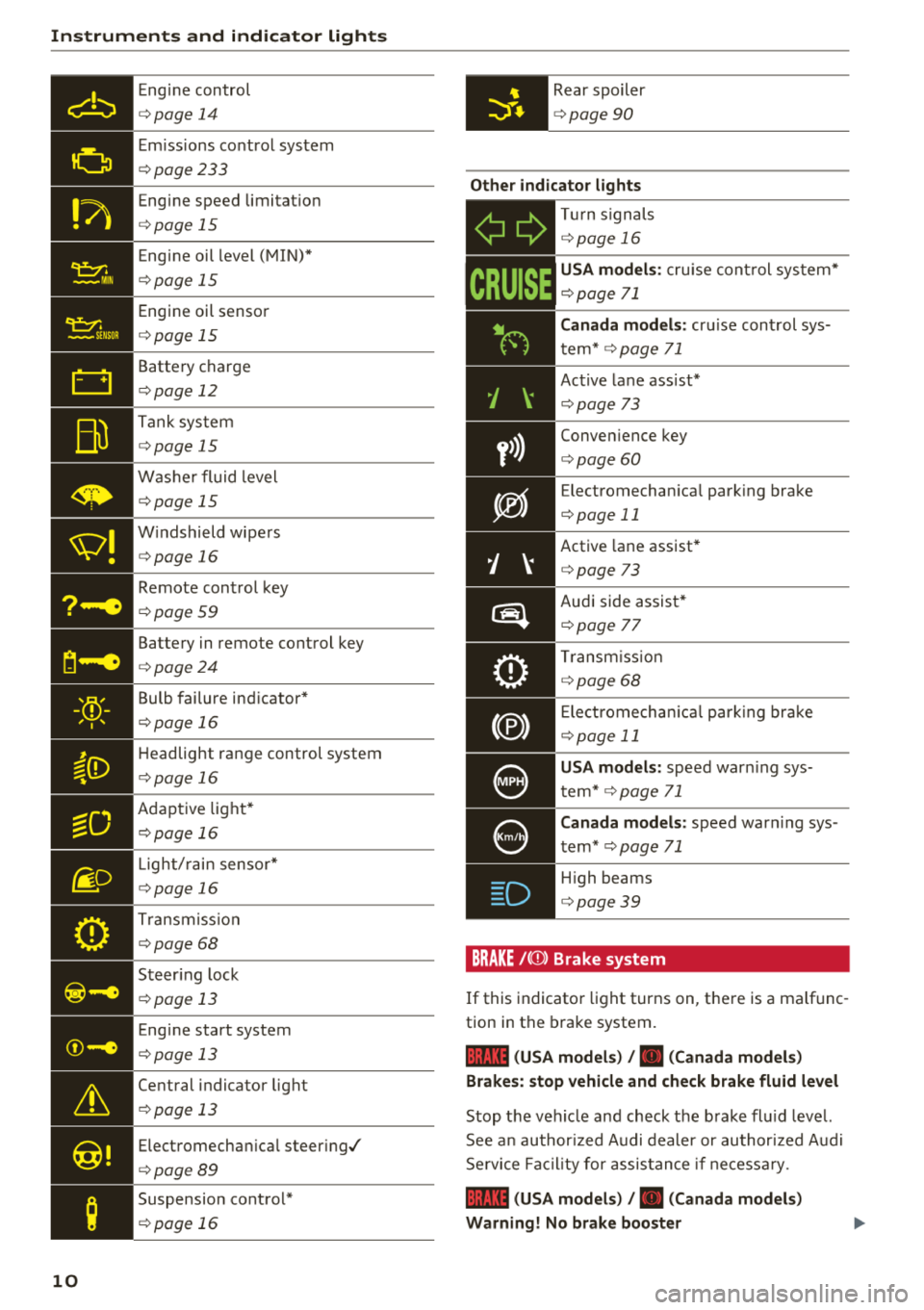
Instruments and indicator lights
10
Eng ine con trol
¢ page 14
Em iss ions co ntrol system
¢ page233
Eng ine speed limitat io n
¢ page 15
Eng ine oil level ( MIN) *
¢page 15
Engi ne oil senso r
¢page 15
Batte ry charge
¢ page 12
Tank sys tem
¢page 15
W ash er fluid level
¢page 15
W indshield wipe rs
¢ page 16
Remote con trol key
¢ page 59
Batte ry in remote control key
¢ page 24
Bulb failure ind icator*
¢page 1 6
H eadlight range control system
¢ pag e 16
Adaptive lig ht*
¢ page 16
Light/ rain sensor *
¢page 16
Trans miss io n
¢page 68
S teer ing lock
¢ page 13
Eng ine start system
¢ page 13
Ce ntral indicator light
¢ page 13
Elect romecha nica l steer ing/
¢ page8 9
Suspension cont rol*
¢ page 16
Rear spoiler
¢page 90
Other indicator lights
-Ii
ii T
ur n sign als
¢ page 16
CRUISE
USA models : cru ise co ntrol system*
¢ page 71
Canada models: cr uise con trol sys
t em*
¢ page 71
- Ac
tive lane ass ist*
¢ page 73
Conve nience key
¢ page 60
Electromechan ica l park ing bra ke
¢page 11
Active lane assist *
¢page 73
Audi side assist *
r=;, page 7 7
Tra nsm iss io n
c:::> page 68
Ele ct romecha nical par king brak e
¢page 11
USA models: speed war ning sys
t em *
¢page 71
Canada models: speed war ning sys
t em *
¢page 71
- H
igh beams
. ¢ page 39
BRAKE/{©) Brake system
If this indicato r light turns on, t here is a malf unc
tion in the brake system.
1111 (USA models) / . (Canada models)
Brakes : stop vehicle and check brake fluid level
Stop t he veh icle and check t he b rake fl uid leve l.
See a n au thor ized Audi de aler or au thor ized A udi
Se rvi ce Faci lity for assis tan ce if n ecess ary.
1111 (USA models) / . (Canada models)
Warning! No brake booster
Page 62 of 310
Driving
switched on. Switch the ignition off so that the
battery will not discharge .
Pressing start /stop button again will swit ch off
e ngine.
This message appea rs when you press the
I S TAR T
ENGI NE STOP I but ton while dr iving .
Engine start sy st e m: malfunction! Please con
tact Se rvice
The engine automatic start system has a mal
function. Drive to an author ized Audi dealer or
author ized Audi Service Facility immed iate ly to
have the malfunct ion co rrected . To sta rt the en
g ine, p ress and ho ld the lS TART
ENGINE STOPI
button.
fl Remote control key : hold back of key
again st the designated area. See owner 's man
ual
This message appears if there is no convenience
key inside the vehicle or if the system does not
recognize the key. The conve nience key may not
be recognized, for examp le, if it is covered by an
object that
disrupts t he s ignal (such as a b rief
case), o r if the key ba tte ry is weak. Elect ronic de
vices s uch as cell phones can also interfere w it h
the sign al.
T o sti ll be able to sta rt or stop the e ngine, see
~ page 60, Starting the engine when there i s a
malfunction .
Ill Remote control key: key not recognized . Is
the key still in the vehicle?
The Ill ind icator light turns on and this message
appears if the conve nience key was removed from
the vehicle whe n the eng ine was running .
If the
conven ience key is no longer in the vehicle, you
cannot swi tch the ig nition on or st art the engine
once yo u stop it. Yo u also cannot lock the veh icle
from the outside.
Please press brake pedal
This message appears if you do not press the
b rake pedal whe n starting the engine.
Please select N o r P
60
This message appears w hen starting or stopping
the engine if the selecto r lever is not in the "N " or
" P" pos ition. The engine will not sta rt/stop.
Shift to P, otherwise vehicle c an roll away.
Door s do not lock if gearshift is not in P
This message appears for safety reasons along
with a war ning tone. It appears if t he selec to r
l ever for the a utoma tic tr ansmiss ion is no t in the
P position when switching the ign ition off with
the I START
ENGINE STOPI button. Shift these
l ector lever to the P pos ition. Otherwise, t he vehi
cle co uld ro ll. You also cannot lock the veh icle us
ing the lock ing sensor on the door handle or us
i ng the conven ience key .
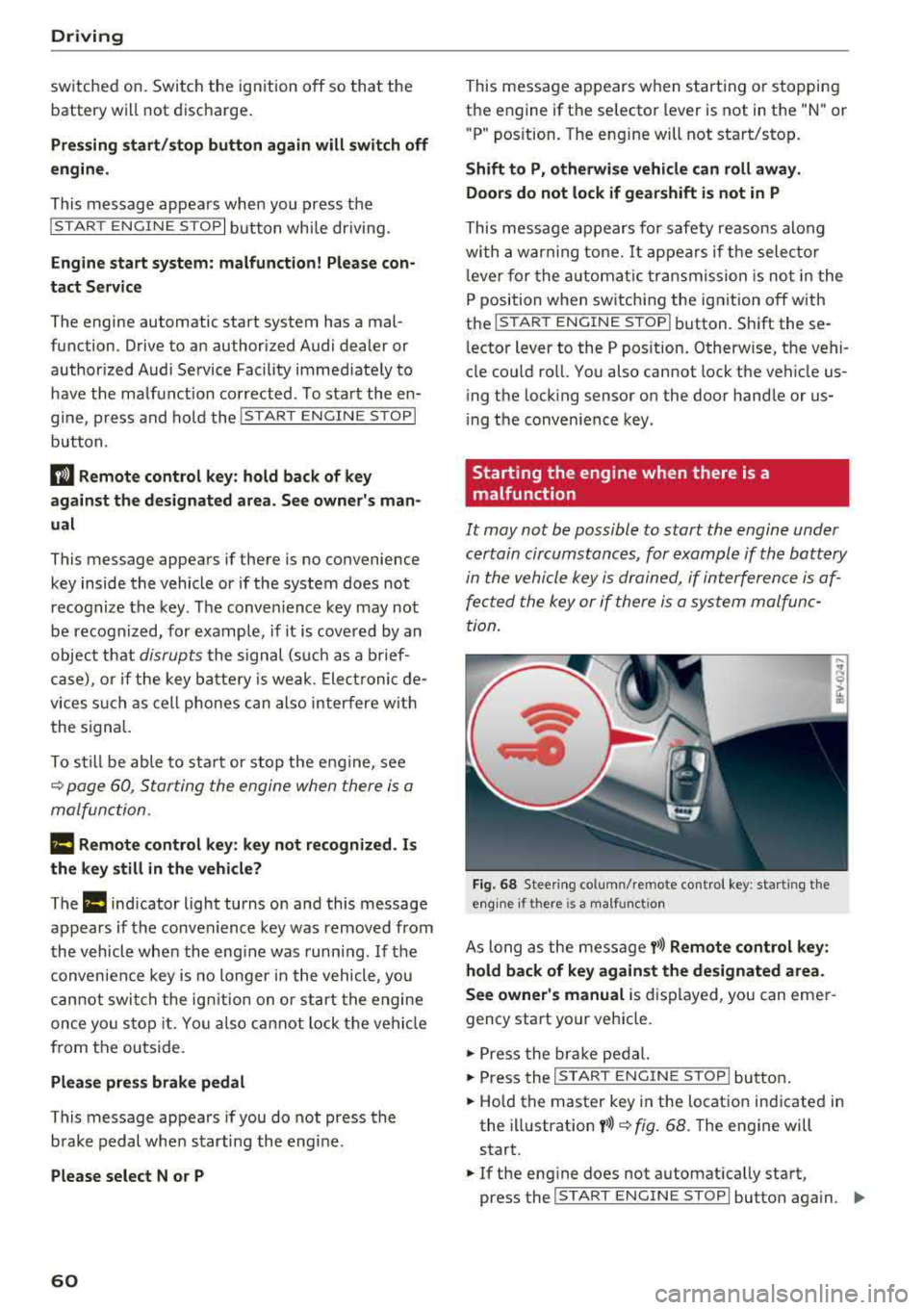
Starting the engine when there is a
malfunction
It may not be possible to start the engine under
certain circumstances, for example if the battery
in the vehicle key i s drained, if in terferen ce is af
fe cted the key or if there i s a system malfunc
tion.
Fi g. 6 8 Stee ring co lumn /remote contro l key : sta rting t he
e n g in e if there is
a m alfunct io n
As long as the message y>>) Remote control key :
hold back of key against the designated area.
See owner's manual
is d isplayed, you can emer
gency start your vehicle.
.,. Press the br ake pe dal.
... Press the I S TAR T ENGINE ST OP ! butto n.
.,. Hold the master key in the location ind icated in
the illustration
y >>) ~ fig . 68. The engine will
start .
.,. If the eng ine does not automat ica lly start,
press the
I S TART E NGINE STOPI butto n aga in . ..,.
Page 269 of 310
Cl 00 .-< N r--N .-< 0 r--Vl 00
wash operator to reduce the risk of acci
dents.
- To reduce the risk of cuts, protect yourself
from sharp metal components when wash ing the underbody or the inside of the wheel
hous ings.
- After wash ing the vehicle, the brak ing effect
may be delayed due to mo isture on the
brake rotors or ice in the w inter . This in
c reases the risk of an acc ident. The brakes
must be d ried fi rst w it h a few careful b rake
applications.
@ Note
- If you wash the vehicle in an automatic car
wash, you m ust retract the extendable rear
spo ile r* if necessary, and fold the exter ior
mir rors in to red uce the r isk of damage.
Power folding exte rior m irrors* must o nly
be fo lde d in a nd out u sing the power folding
f unct ion .
- To reduce the risk of p ain t d amage, do no t
wash the vehi cle i n di rect sunlig ht.
Care and cleaning
- T o red uce the risk of damage, do not was h
the power top with a pressure washer.
- T o red uce the risk of damage to the s urface,
do not use insect removing sponges, kitchen
sponges or similar items .
- Mat te finish painted veh icle components:
- To reduce the risk of damage to t he sur-
face, do not use po lish ing agents or hard
wax.
- Never use protective wax. It can destroy
the matte finish effect .
- Do not place any stickers or magnetic
signs on vehicle parts painted with matte
finish paint. The paint cou ld be damaged
when the stickers or magnets are re
moved.
@ For the sake of the environment
Only wash the vehicle in facilities spec ially de
s igned for that pu rpose . This will reduce the
r isk of di rty wate r contam inated with o il from
ente ring the sewe r sys tem.
Cleaning and care information
When cleani ng and ca ring for individua l vehicle
components, refer to the following tables . The
information contained there is simp ly recom
mendations. For questions or for components t
h at are not l isted, cons ult an autho rized Aud i
dealer or authorized A udi Se rvice Fac ility . Also
fo llow the information fo und
in ¢& .
Ext erior cleaning
Component Situation Solution
Windshield wiper
Deposits soft cloth with glass cleaner, ¢ page 43
blades
Headli ghts/
Deposits Soft sponge with a m
ild soap so lutiona )
Tail light s
Se nsors /
Deposits Sensors: soft cloth with solvent-free cleaning solut ion
Cam era len ses Camera lenses: soft cloth w ith alcohol -free cleaning solu -
tion
Snow/ice Hand brush/solvent-free de-icing spray
Wheels Road salt Water
Brake dust Acid-free special clean ing solution
Exhaust tai l pipes Road salt Water, clea ning solution su itab le for stainless stee l, if nee-
essa ry
267
Page 283 of 310
Cl co .... N ,....
N ...... 0 ,....
Vl co
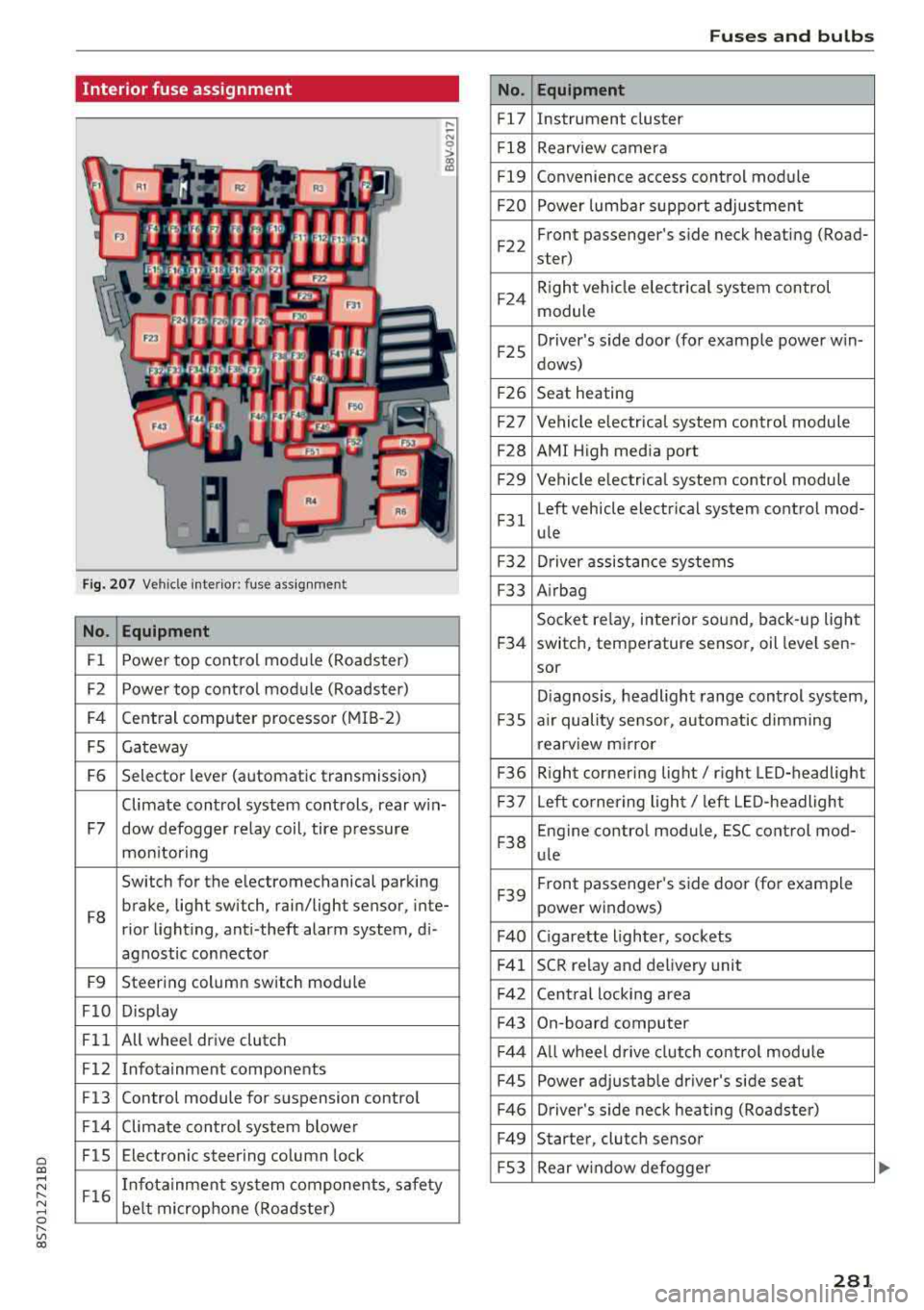
Interior fuse assignment
Fig. 207 Vehicle interior: fuse assignmen t
No. Equipment
Fl Power top cont
rol module (Roadster)
F2 Power top control module (Roadster)
F4 Central computer processor (MIB
-2)
FS Gateway
F6 Selector lever (automatic transmission)
Climate control system controls, rear w in-
F7 dow defogger relay coil, tire pressure
mon itoring
Switch for the electromechanical parking
F8 brake, light switch, rain/light sensor, inte-
rior lighting, anti -theft alarm system, di -
agnostic connector
F9 Steering column switch module
FlO Display
Fll All whee
l drive clutch
F12 Infotainment components
F13 Control module for suspension control
F14 Climate control system blowe r
FlS Electronic steering column
lock
F16 I
nfotainment system components, safety
be lt microphone (Roadster)
No.
Fl7
F1 8
Fl9
F20
F 22
F24
F 25
F 26
F 27
F28
F2 9
F 31
F3 2
F33
F 34
F 35
F36
F37
F3 8
F39
F40
F41
F 42
F43
F44
F45
F46
F49
F S3
Fuses and bulbs
Equipment
Instrument cluster
Rearview camera
Convenience access control module
Power lumbar support adjustment
Front passenger's side neck heating (Road-
ster)
R ight vehicle electrica l system control
module
Driver's s ide door (for example power w in-
dows)
Seat heating
Vehicle electrical system control module
AMI High media port
Vehicle e lectr ical system control module
Left vehicle electrical system contro l mod-
ule
Driver assistance systems
Airbag
Socket relay, inte rior sound , back-up light
switch, temperature sensor, oil leve l sen -
sor
Diagnosis, headlight range control system,
a ir quality sensor, automatic dimming
rearview mirror
R ight cornering light/ right LED-headlight
L eft cornering light/ left LED-headlight
Engine control module, ESC control mod-
ule
Front passenger's side door (for example
power windows)
C igarette lighter, sockets
SCR relay and delivery unit
Central locking area
On-board computer
A ll wheel d rive clutch control module
Power adjustable driver's side seat
Driver's side neck heating (Roadster)
Starter, clutch sensor
Rear window defogger
281
Page 284 of 310
Fuses and bulbs
The power seats* are protected via circuit break
ers
that automatically switch on after a few sec
onds after the overload has been reduced.
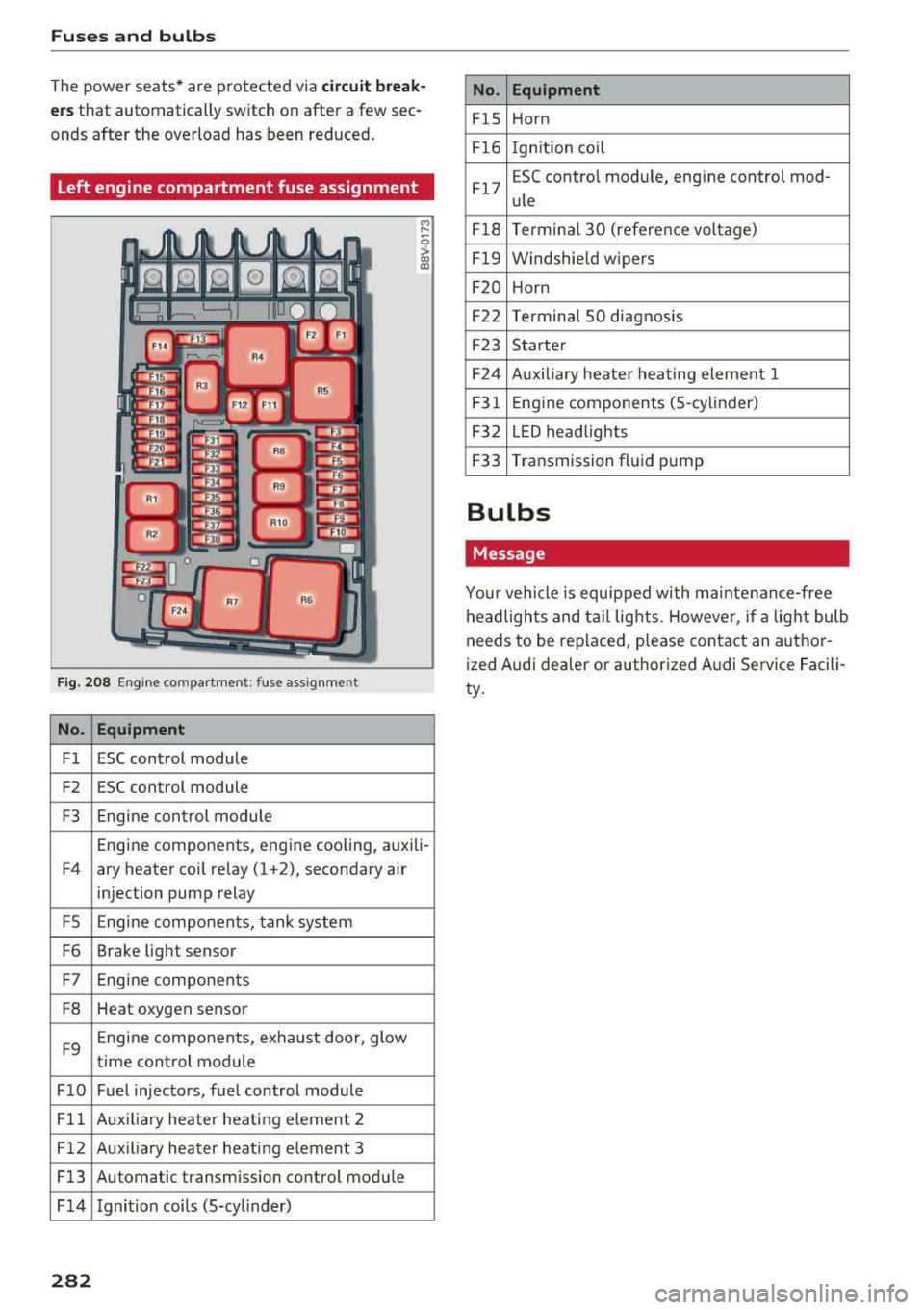
Left engine compartment fuse assignment
F ig. 208 Engine co mpartment : fuse assignment
No. Equipment
Fl ESC control module
F2 ESC control module
F3 Engine control module
M
" 0 > a, m
Engine components, engine cooling, auxili-
F4 ary heater coil relay (1 +2), secondary air
injection pump relay
FS Engine components, tank system
F6 Brake light sensor
F7 Engine components
F8 Heat oxygen sensor
F9 Engine components, exhaust door, glow
time control module
FlO Fuel injectors, fuel control module
Fll Auxiliary heater heating e lement 2
F 12 Aux iliary heater heat ing element 3
Fl3 Automatic transmission control module
F 14 Ignition coils (5-cylinder)
282
No. Equipment
FlS Horn
Fl6 Ignition coil
Fl7 E
SC contro l module, engine control mod-
ule
Fl8 Terminal
30 (reference voltage)
Fl9 Windshield wipers
F20 Horn
F22 Terminal SO diagnosis
F23 Starter
F24 Auxiliary heater heating element 1
F31 Engine
components (5 -cylinder)
F32 LED headlights
F33 Transmission fluid pump
Bulbs
Message
Your vehicle is equipped with ma intenance-free
headlights and tail lights. However, if a light bulb
needs to be replaced, please contact an author
ized Audi dealer or authorized Audi Service Facili
ty.
Page 303 of 310
Cl 00 ... N r-N ... 0 r-Vl 00
MMI search
refer to Free text search . . . . . . . . . . . . . . 101
MMI touch . . . . . . . . . . . . . . . . . . . . . . . . . . . . 95
MODE .. .. .. .. ............... .. .. .. .. 20
Monitoring the Advanced Airbag System 205
MP3
refer to Jukebox . . . . . . . . . . . . . . . . . . . . . 156
Multifunction steering wheel . . . . . . . . . . 18, 20
Buttons . . . . . . . . . . . . . . . . . . . . . . . . . . . . . 19
Operating . . . . . . . . . . . . . . . . . . . . . . . . 18, 20
Multi Media Interface . . . . . . . . . . . . . . . . . . . 93
Music collection
refer to Jukebox . . . . . . . . . . . . . . . . . . . . . 156
Mute
refer to Muting . . . . . . . . . . . . . . . . . . . . . . 177
Muting .. .... .. ................ ... 19, 177
myAudi Configur ing (Audi connect services) . . . . . 125
L ogging in in the vehicle . . . . . . . . . . . . . . 125
PIN . . . . . . . . . . . . . . . . . . . . . . . . . . . . . . . 125
N
Natural leather care/cleaning . . . . . . . . . . . 269
NAV/MAP button . . . . . . . . . . . . . . . . . . . . . 134
Navigation . . . . . . . . . . . . . . . . . . . . . . . . . . . 134
Control pane l (MMI) . . . . . . . . . . . . . . . . . 134
also refer to Map . . . . . . . . . . . . . . . . . . . . 142
Neck heating . . . . . . . . . . . . . . . . . . . . . . . . . . 54
Network connection (Wi -Fi) . . . . . . . . . . . . . 129
NHTSA Contacting . . . . . . . . . . . . . . . . . . . . . . . . . 185
Number of seats . . . . . . . . . . . . . . . . . . . . . . 187
0
Occupant seating posit ions . . . . . . . . . . . . . 180
Octane rating (gasoline) . . . . . . . . . . . . . . . . 229
Odometer . . . . . . . . . . . . . . . . . . . . . . . . . . . . 21
Oil Indicator light . . . . . . . . . . . . . . . . . . . . . . . 15
also refer to Eng ine oi l . . . . . . . . . . . . . . . 236
Oil change interval . . . . . . . . . . . . . . . . . . . . 243
On-board computer . . . . . . . . . . . . . . . . . . . . 21
On-Board Diagnostic System (OBD) . . . . . . . 233
On/Off knob (MMI) . . . . . . . . . . . . . . . . . . . . . 93
Index
Online destinations
refer to Point of interest search
138
Online map . . . . . . . . . . . . . . . . . . . . . . . . . . 145
Online media . . . . . . . . . . . . . . . . . . . . . . . . . 159
Online services
refer to Audi connect . . . . . . . . . . . . . . . . . 124
Opening Doors . . . . . . . . . . . . . . . . . . . . . . . . . . . . . . 25
Fuel filler door . . . . . . . . . . . . . . . . . . . . . . 230
Hood . . . . . . . . . . . . . . . . . . . . . . . . . . . . . . 235
Windows ........................... 29
Opening/closing Using the door lock . . . . . . . . . . . . . . . . . . . 27
also refer to Unlocking/locking . . . . . . . 22, 25
Operating Multifunction steering wheel . . . . . . . . 18, 20
Multi Media Interface . . . . . . . . . . . . . . . . . 94
Vo ice recognit ion system . . . . . . . . . . . . . 105
Options menu . . . . . . . . . . . . . . . . . . . 94, 98, 99
Outside temperature display . . . . . . . . . . . . . 17
Overview (Cockpit) . . . . . . . . . . . . . . . . . . . . . . 6
p
Paint damage
Paint number 268
288
Parenta l control . . . . . . . . . . . . . . . . . . . . . . 166
Parking brake Indicator light . . . . . . . . . . . . . . . . . . . . . . . 11
also refer to Electromechanical
parking brake . . . . . . . . . . . . . . . . . . . . . . . . 61
Parking light . . . . . . . . . . . . . . . . . . . . . . . . . . 38
Parking system
refer to Parking systems . . . . . . . . . . . . 81, 82
Parking systems . . . . . . . . . . . . . . . . . . . . . . . 80
Adjusting the display/warning tone . . . . . . 84
Cleaning sensors/the camera . . . . . . . . . . 267
Cleaning the rearview camera . . . . . . . . . . . 83
Malfunction . . . . . . . . . . . . . . . . . . . . . . . . . 84
Parking system plus . . . . . . . . . . . . . . . . . . . 81
Peripheral disp lay . . . . . . . . . . . . . . . . . . . . 81
R ear parking system . . . . . . . . . . . . . . . . . . 81
Rearview camera . . . . . . . . . . . . . . . . . . . . . 82
Parking (automatic transm ission) . . . . . . . . . 65
Parts replacement . . . . . . . . . . . . . . . . . . . . 292
Pass-through . . . . . . . . . . . . . . . . . . . . . . . . . 49
PASSENGER AIR BAG light . . . . . . . . . . . . . . 206
301