bluetooth AUDI TT ROADSTER 2019 User Guide
[x] Cancel search | Manufacturer: AUDI, Model Year: 2019, Model line: TT ROADSTER, Model: AUDI TT ROADSTER 2019Pages: 304, PDF Size: 80.77 MB
Page 118 of 304
Telephone
— Dialing a phone number: select and confirm &.
Or: push the control knob down. Select and
confirm OK.
— Deleting individual characters: select and con-
firm &l.
— Deleting all characters entered at once: turn
the control knob with the character selection to
land press and hold the control knob. Or: se-
lect the right control button > Clear input field.
Tone sequences (DTMF) can be entered directly
into the speller during a phone call.
Accepting or ending a call
Applies to: vehicles with telephone
— Accepting a call: select and confirm Answer.
— Declining a call: select and confirm Decline.
— Muting the active call: select and confirm
Mute.
— Ending a phone call/cancel dialing: select and
confirm End call. Or: press the control knob.
Accepting another call: see > page 116, During a
phone call.
Caller information: the name, phone number or
Unknown appears in the Infotainment system
display depending on if the caller has been stored
in the directory and if the phone number has
been transmitted. A picture may also be dis-
played, depending on whether you have assigned
a picture to a contact in your directory and if it
was transferred to your MMI. You can find out if
your mobile device supports this function from
your mobile device network provider, your mobile
device owner's manual, or at www.audiusa.com/
bluetooth.
@) Tips
The radio or media playback is muted during a
phone call.
During a phone call
Applies to: vehicles with telephone
Requirement: there must be a call in progress.
> Press the right control button.
116
The following options may be possible during a
call depending on the mobile device being used
and the type of connection:
— Making an additional call: select: Find contact
> Call list/Directory/Favorites > an entry from
the list.
— Accepting an incoming call when there is an
active call and a call on hold: select Replace.
The active call is replaced with the incoming
call.
— Answering an additional call: if there is an in-
coming call while another call is active, you can
select Answer to put the existing call on hold
and answer the incoming call. If you select De-
cline, the incoming call will be declined.
Additional functions include:
Mute: if you select and confirm this function, the
other person on the phone cannot hear you. You
will still be able to hear the other person.
Hold call/Resume: you can place the existing call
on hold and resume it again. To resume the call,
select and confirm the call you would like to re-
sume.
Transfer call to mobile device*: select and con-
firm
Transfer call to mobile device to transfer
the existing call from the MMI to your cell phone.
Switch to hands-free mode*: Requirement: you
must have a phone call in progress on your cell
phone. Select and confirm Switch to hands-free
mode to transfer the call from your cell phone to
the MMI.
Swap call: alternate between two phone calls
while one of the calls is on hold. Selecting End
call will end the active phone call. A phone call
on hold can be resumed using the right control
button > Resume.
Add to conference: a party on hold and up to five
active parties (depending on the network) can be
added to a conference call. To make an additional
call, put all participants in the current conference
call on hold using the right control button > Hold
conference. Press the left control button. Select
and confirm Call list/Directory/Favorites > an
entry from the list. You can add called contacts
to the conference using the right control button >
Page 119 of 304
8S8012721BA
Telephone
> Add to conference. Resume takes all parties off
hold.
Multi-party calling: select the right control but-
ton > Telephone settings > Call options. When
the function is switched on ¥ you can accept an
additional call using Answer or decline a call us-
ing Decline. When the function is switched off,
you can Replace the call or Decline.
Connection manager: see > page 172.
Telephone settings: see > page 122.
@ Tips
— To be notified of an incoming call during a
phone call, the call waiting function in your
cell phone must be switched on when using
the hands-free profile (Handsfree).
— You can obtain more information from your
mobile device service provider or from your
mobile device user guide.
— When leaving the vehicle, the Bluetooth
connection to the mobile device will auto-
matically disconnect. Depending on your
mobile device, phone calls in progress may
be automatically redirected from the MMI
to your mobile device so that you can con-
tinue the call on your phone.
— The display of an incoming phone callin the
Infotainment system display may still be
visible for a few seconds depending on the
cell phone in use. Using the Replace or De-
cline functions may then end the active
phone call.
Favorites
Applies to: vehicles with telephone
Up to 50 contacts, in addition to the voicemail
number, can be stored in any order in the favor-
ites list.
> Select: [MENU] button > Telephone > left con-
trol button.
— Storing an existing phone number as a favor-
ite: select and confirm Call list/Directory. Se-
lect and confirm a contact or phone number
from the list. Select: right control button >
Store as favorite. Enter a name for the favorite
or select a suggestion. Select and confirm Save.
— Renaming a stored favorite: select and confirm
Favorites > select a favorite from the list. Se-
lect the right control button > Rename favor-
ite.
— Moving a stored favorite: select and confirm
Favorites > select a favorite from the list. Se-
lect the right control button > Move favorite.
Select and confirm the location of the selected
favorite.
— Deleting a stored favorite: select and confirm
Favorites > select a favorite from the list. Se-
lect: right control button > Delete favorite >
Delete this entry or Delete all entries.
Messages
Text messages
Applies to: cell phones with Bluetooth Message Access Profile
(MAP)
Depending on the mobile device being used and
the mobile network contract, you may be able to
receive and send text messages using the MMI.
Requirement
A cell phone must be connected to the MMI via
Bluetooth MAP (Message Access Profile)
=> page 110.
> Select: [MENU] button > Telephone > left con-
trol button > text message (myPhone)/text
message (secondary phone)*.
Inbox
All received text messages are displayed.
Sent
All sent text messages are displayed.
Outbox
All text messages to be sent are displayed.
Drafts
Displays all text messages that have not yet been
sent and stored text messages.
Deleted
Displays all deleted text messages.
117
Page 120 of 304
Telephone
@ Tips
— Please note that you may have to activate
the receiving and sending of text messages
in your cell phone depending on the SIM
card being used (for example, when using a
Multi-SIM). You can obtain more informa-
tion from your mobile device service provid-
er or from your mobile device user guide.
— For more information on supported mobile
devices, visit www.audiusa.com/bluetooth
or contact an authorized Audi dealer or au-
thorized Audi Service Facility.
— You need a mobile device with Message Ac-
cess Profile that also supports the sending
function to be able to send text messages
through the MMI.
Write text message
Applies to: cell phones with Bluetooth Message Access Profile
(MAP)
> Select: [MENU] button > Telephone > left con-
trol button > text message (myPhone)/text
message (secondary phone)*.
Write new text message
Select and confirm the desired template from the
list. Enter a recipient. Select and confirm Send.
Reply*
Select and confirm the desired template from the
list. Select and confirm Send.
Message options
Applies to: cell phones with Bluetooth Message Access Profile
(MAP)
> Select: [MENU] button > Telephone > left con-
trol button > text message (myPhone)/text
message (secondary phone)* > Inbox/Sent/
Outbox > right control button.
The following options may be available depend-
ing on the selected menu.
) Not available in all languages.
118
Reply*
A reply can be sent for the selected message in
the Inbox.
Forward
The selected text message can be forwarded to a
different recipient.
Send again*
The selected text message can be resent.
Delete this text message*
The selected text message can be deleted.
Read out)
You can have the MMI read an open text mes-
sage.
Text messaging settings*
To display when a new text message is received,
enable the Text message notifications. New text
messages are indicated with an envelope & in
the Infotainment system display status line.
Connection manager
See > page 172.
Bluetooth settings
See > page 174.
Online settings
See > page 174.
Wi-Fi settings
See > page 130, Wi-Fi settings.
Telephone settings
See > page 122.
@ Tips
Messages that are deleted in the MMI are also
deleted in the mobile device automatically.
Page 121 of 304
8S8012721BA
Telephone
Applies to: cell phones with Bluetooth Message Access Profile
(MAP)
Depending on the type of cell phone used, you
can receive and send e-mails through the MMI.
Requirement: the Message Access Profile (MAP)
must be activated in the Bluetooth settings on
your cell phone and your cell phone must be con-
nected to the MMI > page 110. You can find out
if your mobile device supports this function by
checking your mobile device owner's manual.
> Select: [MENU] button > Telephone > left con-
trol button > e-mail (myPhone)/e-mail (secon-
dary phone)*.
Write new e-mail
— Using a template: select and confirm the de-
sired template from the list.
— Enter one or more recipients.
— Select and confirm Send.
Inbox
All received e-mails are displayed.
Sent
All sent e-mails are displayed.
Outbox
All e-mails that will be sent are displayed.
Drafts
All saved e-mails that have not been sent yet are
displayed.
@) Note
Always follow the information found in >@ in
General information on page 125.
@ Tips
— For more information on supported mobile
devices, visit www.audiusa.com/bluetooth
or contact an authorized Audi dealer or au-
thorized Audi Service Facility.
) Not available in all languages.
— If you are still not receiving e-mails even
though you have a successful connection,
then contact your e-mail service provider or
your cell phone service provider.
Message options
Applies to: cell phones with Bluetooth Message Access Profile
(MAP)
> Select: [MENU] button > Telephone > left con-
trol button > e-mail (myPhone)/e-mail (secon-
dary phone)* > Inbox/Sent/Outbox > right
control button.
The following options may be available depend-
ing on the selected menu.
Store as template
Ten e-mail templates are stored in the MMI. You
can save up to 10 additional templates of your
own.
— Create an e-mail.
— Select and confirm Store as template.
Resume last edited e-mail
The last e-mail in progress can be resumed.
Reply*
A reply can be sent for the selected e-mail in the
Inbox.
Reply to all*
A reply can be sent for the selected e-mail in the
Inbox and it will be sent to all of the entered re-
cipients.
Forward
The selected e-mail can be forwarded to a differ-
ent recipient.
Delete this message*
The selected e-mail can be deleted.
Read out)
You can have the MMI read an open e-mail.
119
Page 122 of 304
Telephone
E-mail settings*
To display when a new e-mail is received, activate
the E-mail notifications. New e-mails are indicat-
ed with an envelope & in the Infotainment sys-
tem display status line.
Connection manager
See > page 172.
Bluetooth settings
See > page 174.
Online settings
See > page 174.
Wi-Fi settings
See > page 130, Wi-Fi settings.
Telephone settings
See > page 122.
G) Tips
Messages that are deleted in the MMI are also
automatically deleted in the connected cell
phone.
Listening to voicemail
Applies to: vehicles with telephone
MENU > Select: button > Telephone > left con-
trol button. Select and confirm Call list/Direc-
tory/Favorites > Voicemail.
— Entering the voicemail number: enter the de-
sired number. Select and confirm OK.
— Dialing the voicemail number: select and con-
firm
Voicemail.
@ Tips
— This service must be set up and activated in
advance by the cell phone service provider.
You can obtain more information from your
cell phone service provider.
— The voicemail number depends on the cell
phone service provider.
120
Emergency call functions
Applies to: vehicles with telephone
MENU > Select: button > Telephone > left con-
trol button > Dial number > Enter emergency
call number (for example, 911) > OK.
ZA WARNING
— Because your phone works with radio sig-
nals, a connection cannot be guaranteed un-
der all circumstances. Do not rely on only
your phone when it comes to essential com-
munication (such as a medical emergency).
— Always follow the instructions given by the
emergency personnel during an emergency
call and only end the call when they instruct
you to do so.
@) Tips
Emergency numbers are not
the same every-
where. Find out which emergency number is
used in your current location.
Directory
Opening the directory
Applies to: vehicles with telephone
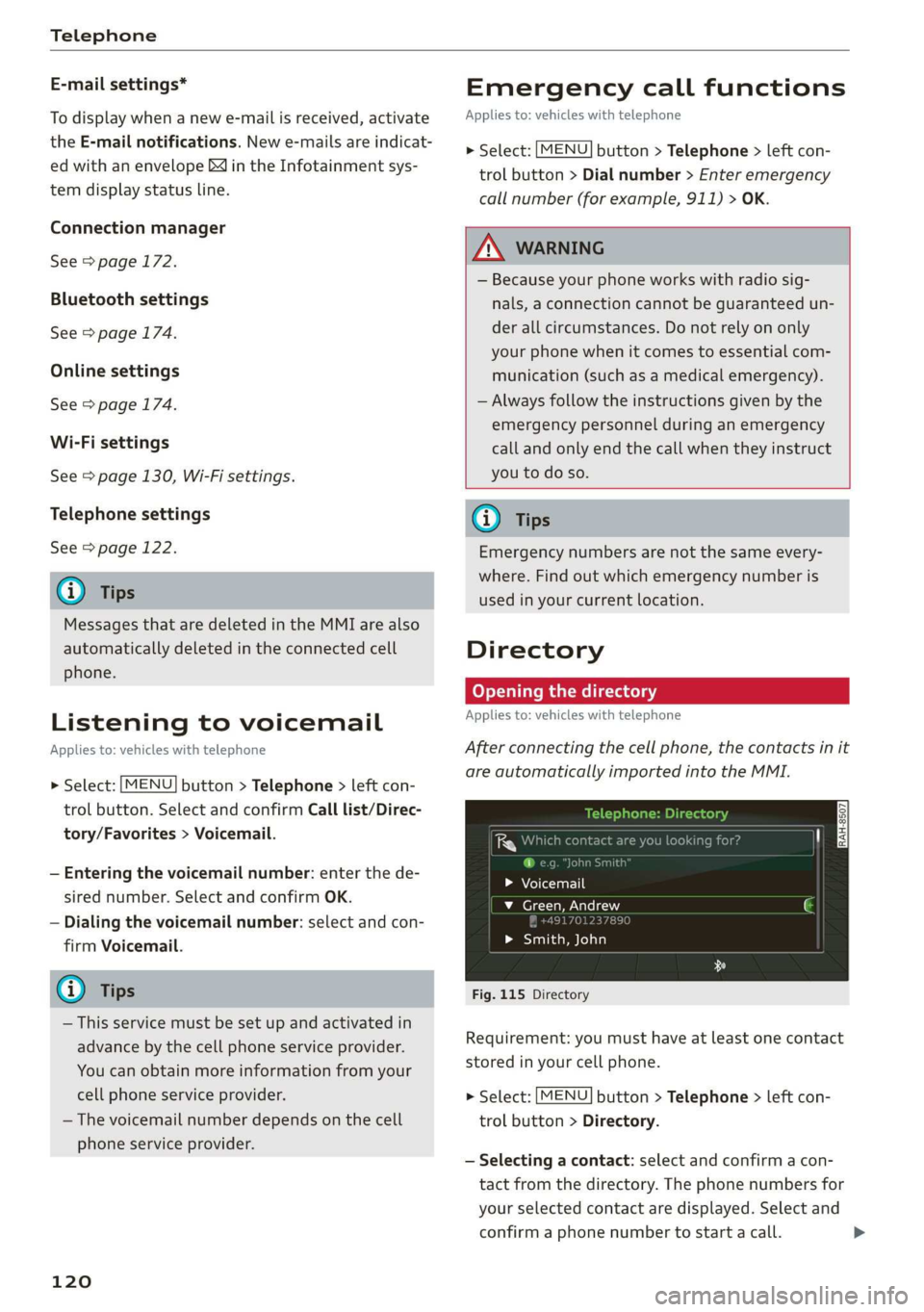
After connecting the cell phone, the contacts in it
are automatically imported into the MMI.
uno
i ce h
> Voicemail
v_ Green, Andrew
> Smith, John
Fig. 115 Directory
Requirement: you must have at least one contact
stored in your cell phone.
> Select: [MENU] button > Telephone > left con-
trol button > Directory.
— Selecting a contact: select and confirm a con-
tact from the directory. The phone numbers for
your selected contact are displayed. Select and
confirm a phone number to start a call. >
Page 123 of 304
8S8012721BA
Telephone
— Free text search for a contact: see > page 100.
Contacts are displayed in alphabetical order and
can be sorted by first or last name > page 123.
The directory can be opened through the Tele-
phone* menu as well as through the Navigation*
menu.
G) Tips
— Check for a possible request to synchronize
on your cell phone. Requests to synchronize
the directory must be confirmed so that
your cell phone contacts can be loaded into
the MMI.
— The contact display in the MMI depends on
the mobile device being used. For more in-
formation on supported mobile devices, vis-
it www.audiusa.com/bluetooth or contact
an authorized Audi dealer or authorized Au-
di Service Facility.
— The directory from the cell phone with the
active connection will always be displayed.
— The contacts from the mobile device may
not be transferred in alphabetical order. If
there are too many entries, contacts with
different first letters may be missing in the
MMI.
— The contacts in the local MMI memory are
always visible and can be accessed by other
users.
Free text search for contacts
Applies to: vehicles with telephone
> Select: [MENU] button > Telephone > left con-
trol button > Directory.
> To limit the search, enter the initials of the con-
tact being searched with each initial separated
by a space. Enter additional letters if necessary.
> Select and confirm a contact from the directory.
The phone numbers for the selected contact are
displayed.
> To make the call, select and confirm a phone
number.
@) Tips
— You can scroll through long lists quickly by
turning the control knob quickly. The scroll-
ing speed depends on the number of list en-
tries.
— Additional information on free text searches
can be found under = page 100.
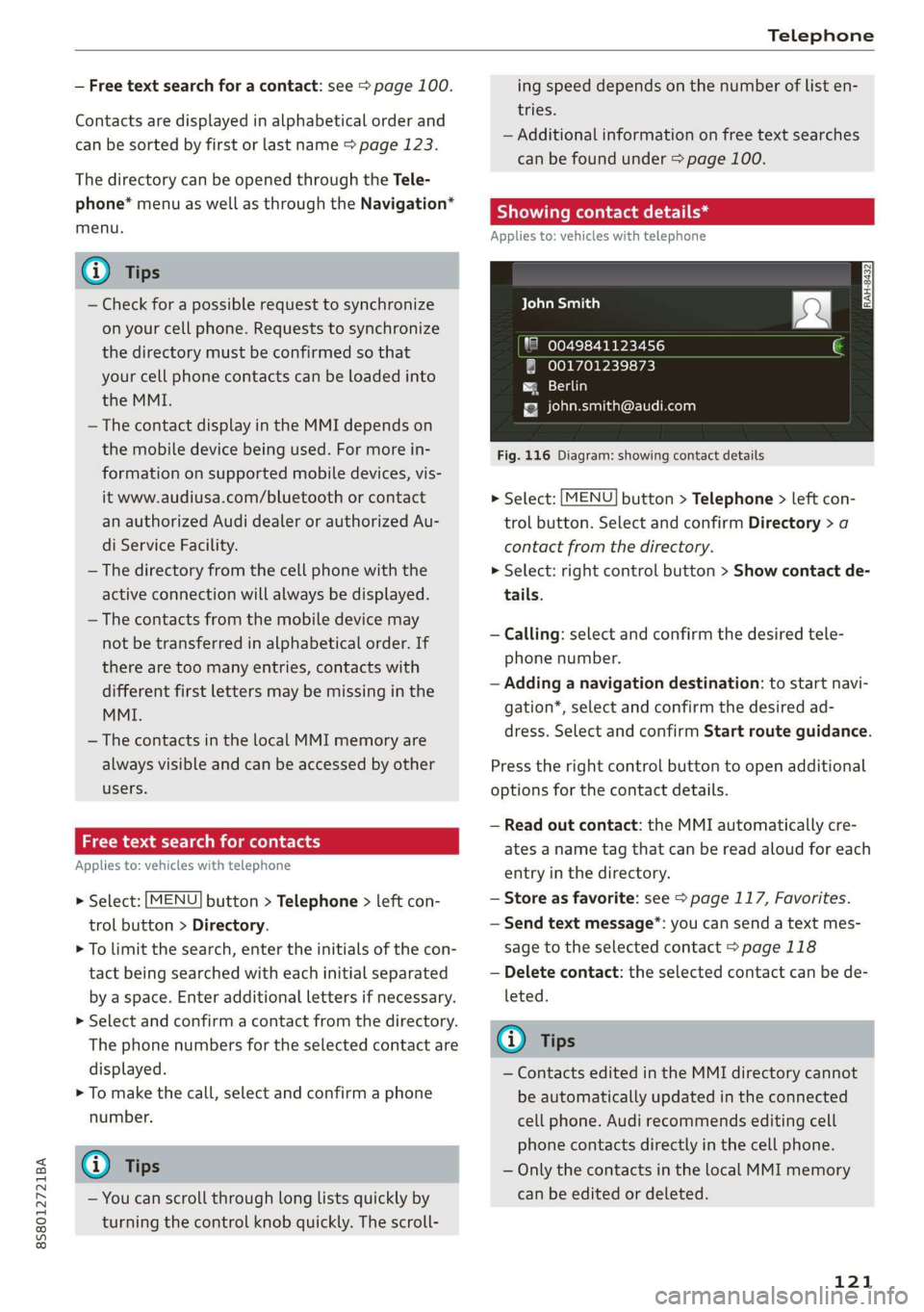
Showing contact details*
Applies to: vehicles with telephone
aCe yeal ban)
"8 0049841123456
001701239873
{g [email protected]
Fig. 116 Diagram: showing contact details
> Select: [MENU] button > Telephone > left con-
trol button. Select and confirm Directory > a
contact from the directory.
> Select: right control button > Show contact de-
tails.
— Calling: select and confirm the desired tele-
phone number.
— Adding a navigation destination: to start navi-
gation*, select and confirm the desired ad-
dress. Select and confirm Start route guidance.
Press the right control button to open additional
options
for the contact details.
— Read out contact: the MMI automatically cre-
ates a name tag that can be read aloud for each
entry in the directory.
— Store as favorite: see > page 117, Favorites.
— Send text message”: you can send a text mes-
sage to the selected contact > page 118
— Delete contact: the selected contact can be de-
leted.
@) Tips
— Contacts edited in the MMI directory cannot
be automatically updated in the connected
cell phone. Audi recommends editing cell
phone contacts directly in the cell phone.
— Only the contacts in the local MMI memory
can be edited or deleted.
121
Page 124 of 304
Telephone
Importing and exporting contacts
Applies to: vehicles with telephone
Contacts in vCard format (.vcf) can be imported
into the directory or exported.
Requirement: an SD card must be in the SD card
reader > page 153 or a USB storage device must
be connected to the Audi music interface*
=> page 158.
> Select: [MENU] button > Telephone > left con-
trol button > Directory.
> Select: right control button > Contact settings.
— Importing contacts from a storage device: se-
lect and confirm Import contacts > SD card
1/SD card 2 or USB device 1/USB device 2 >
desired contacts > Start import.
— Exporting contacts to a storage device: select
and confirm Export contacts > SD card 1/SD
card 2 or USB device 1/USB device 2 > desired
contacts > Start export.
— Selecting all contacts at once to import/
export: select and confirm Import contacts/Ex-
port contacts > SD card 1/SD card 2 or USB de-
vice 1/USB device 2 > All > Start import/Start
export.
G) Tips
— Always read the chapter > page 125, Audi
connect.
— For additional information on the myAudi
account, visit www.audiusa.com/myaudi.
— The imported contacts are stored in the lo-
cal memory of the directory.
—A maximum of 1,000 contacts can be im-
ported. You can check the directory memory
capacity at any time > page 123.
— Never save important data on memory cards
or USB storage devices. Audi is not responsi-
ble for damaged or lost files and media.
— Contacts that were downloaded from a mo-
bile device cannot be exported.
— There should be no other files or folders on
the storage medium containing the contacts
to be imported.
)) Depends on the connected cell phone.
122
Settings
Telephone settings
Applies
to: vehicles with telephone
> Select: [MENU] button > Telephone > right con-
trol button > Telephone settings.
Call options*
Multi-party calling: can be switched On/Off.
Ringtone and volume settings!)
Using the Mute telephone function, you can
switch the ringtone on your MMI on or off. You
can play the ringtones using the Ringtone func-
tion. Select and confirm an entry from the list.
For the Ringtone volume/Message volume set-
tings, see > page 175. The Microphone input
level can be adjusted during a phone call using
the control knob.
G) Tips
— Several mobile devices can be paired with
the MMI, but only two* mobile devices can
be actively connected.
—To delete all paired Bluetooth devices, the
Bluetooth function can be reset to the fac-
tory default settings > page 172.
Pelee Cola] Mey Lalor}
Applies to: vehicles with telephone
> Select: [MENU] button > Telephone > right con-
trol button.
Connection manager
See > page 172.
Bluetooth settings
See > page 174.
Online settings*
See > page 174.
Wi-Fi settings
See > page 130, Wi-Fi settings.
Page 125 of 304
![AUDI TT ROADSTER 2019 User Guide 8S58012721BA
Telephone
Directory settings
Applies to: vehicles with telephone
> Select: [MENU] button > Telephone > left con-
trol button > Directory > right control button >
Contact s](/img/6/57667/w960_57667-124.png "AUDI TT ROADSTER 2019 User Guide 8S58012721BA
Telephone
Directory settings
Applies to: vehicles with telephone
> Select: [MENU] button > Telephone > left con-
trol button > Directory > right control button >
Contact s")
8S58012721BA
Telephone
Directory settings
Applies to: vehicles with telephone
> Select: [MENU] button > Telephone > left con-
trol button > Directory > right control button >
Contact settings.
Memory capacity
Shows the Memory capacity for the directory.
You can manage up to 17,000 contacts with the
MMI directory. You can load up to 4,000 contacts
from your cell phone into each directory. You can
also import up to 1,000 contacts from a storage
device.
Sort order
You can sort the contacts in your directory alpha-
betically according to Last name or First name.
Import contacts
See > page 122, Importing and exporting con-
tacts.
Export contacts
See > page 122, Importing and exporting con-
tacts.
Download directory
To update the contacts in the MMI, you can man-
ually download your mobile device contacts. De-
pending on the mobile device, you may need to
disconnect and reconnect the Bluetooth connec-
tion to update the contacts.
Hide contacts without phone number
When this function is switched on, grayed-out
contacts that have no phone numbers stored for
them will be hidden in the directory.
Safety belt microphone
Applies to: vehicles with safety belt microphone
The safety belt microphone is positioned in the
ideal location to provide the best hands-free call
quality regardless of body size and seat position.
Fig. 117 Safety belt microphone
The safety belt microphone activates when you
buckle the safety belt. Make sure that the micro-
phone is on the side of the safety belt that is fac-
ing outward > fig. 117.
If you unbuckle the driver's safety belt, the sys-
tem switches from the safety belt microphone to
the roof microphone.
@ Tips
— If you deactivate* the front passenger's air-
bag, the front passenger's safety belt micro-
phone will be deactivated regardless of
whether the front passenger's safety belt is
buckled or not.
—A dirty microphone opening can affect
hands-free call quality. If this happens,
clean the safety belt microphone using a
brush.
123
Page 126 of 304
Telephone
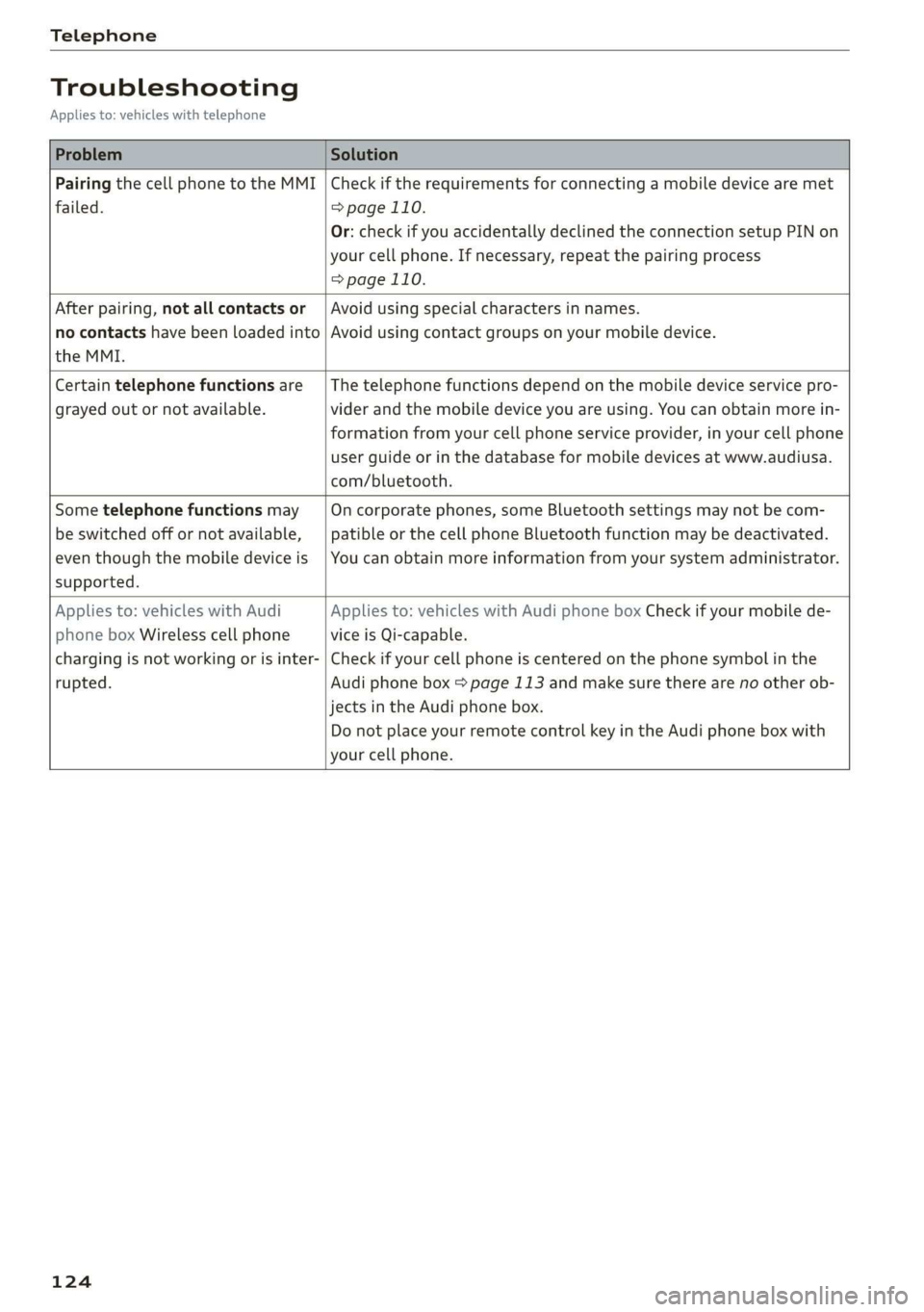
Troubleshooting
Applies to: vehicles with telephone
Problem Solution
Pairing the cell phone to the MMI
failed.
Check if the requirements for connecting a mobile device are met
=> page 110.
Or: check if you accidentally declined the connection setup PIN on
your cell phone. If necessary, repeat the pairing process
=> page 110.
After pairing, not all contacts or
no contacts have been loaded into
the MMI.
Avoid using special characters in names.
Avoid using contact groups on your mobile device.
Certain telephone functions are
grayed out or not available.
The telephone functions depend on the mobile device service pro-
vider and the mobile device you are using. You can obtain more in-
formation from your cell phone service provider, in your cell phone
user guide or in the database for mobile devices at www.audiusa.
com/bluetooth.
Some telephone functions may
be switched off or not available,
even though the mobile device is
supported.
On corporate phones, some Bluetooth settings may not be com-
patible or the cell phone Bluetooth function may be deactivated.
You can obtain more information from your system administrator.
Applies to: vehicles with Audi
phone box Wireless cell phone
charging is not working or is inter-
rupted.
Applies to: vehicles with Audi phone box Check if your mobile de-
vice is Qi-capable.
Check if your cell phone is centered on the phone symbol in the
Audi phone box page 113 and make sure there are no other ob-
jects in the Audi phone box.
Do not place your remote control key in the Audi phone box with
your cell phone.
124
Page 131 of 304
8S8012721BA
Audi connect
License subscription
The validity and expiration date of your licenses
are displayed.
Refresh
The content of the selected Audi connect Info-
tainment service or the entire Audi connect Info-
tainment list is updated.
Data privacy
Requirement: the ignition must be switched on.
Location, vehicle, and personal data are transmit-
ted when using Audi connect services.
Allowing sending of data
— Select and confirm Activate data connection.
The data module for the use of all Audi connect
services will be active.
Restricting sending of data
— Select and confirm Activate privacy. The data
connection is limited or deactivated depending
on the equipment. The majority of Audi connect
services will not be available.
The following interfaces are not affected by this
setting: Bluetooth, Bluetooth Low Energy (BLE),
Wi-Fi connection, Audi smartphone interface
(ASI), Near Field Communication (NFC), charging
communication (e-tron), Electronic Toll Collect
(ETC), if equipped.
® Note
Always follow the information found in >@ in
General information on page 125.
G) Tips
If the transmission of data is limited, data
will still be transmitted to verify subscrip-
tions.
Settings
Cell phone network
> Select: [MENU] button > Audi connect > right
control button > Connection manager.
> Select: right control button > Online settings >
Data connection settings.
Depending on the country, vehicle equipment,
and connection type, the following functions may
be available:
Data connection settings
Using the Data connection settings menu, you
can set when the system should connect to the
Internet. The Internet connection disconnects
automatically once the requested Audi connect
Infotainment service no longer requires any data.
— Connection setup: you can select when a data
connection should be established.
— Audi connect (MMI): when this function is
switched on, a data connection is automatically
established in order to use Audi connect Info-
tainment services.
— Wi-Fi devices: when this function is switched
on, you can allow or deny Internet connections.
Connection settings
The connection is configured automatically based
on the SIM card being used. The following values
can be changed. You can obtain more information
from your cell phone service provider.
— APN: the access point depends on the cell
phone service provider and is assigned auto-
matically.
— User name: your cell phone service provider as-
signs the user name for your online profile.
— Password: your cell phone service provider as-
signs the password for your online profile.
ZA WARNING
Always follow the information found in > A\
in General information on page 125.
@) Note
Always follow the information found in >@ in
General information on page 125.
(i) Tips
For more information on roaming charges,
contact your cell phone service provider.
129