door lock AUDI TT ROADSTER 2019 User Guide
[x] Cancel search | Manufacturer: AUDI, Model Year: 2019, Model line: TT ROADSTER, Model: AUDI TT ROADSTER 2019Pages: 304, PDF Size: 80.77 MB
Page 31 of 304
8S8012721BA
Opening and closing
the second level. The operation will stop if the
switch is pressed or pulled again.
> To select a position in between opened and
closed,
press or pull the switch to the first level
until
the desired window position is reached.
Power window switches
@ Left door
@ Right door
ZA WARNING
— Pay careful attention when closing the win-
dows. Pinching could cause serious injuries.
— When locking the vehicle from outside, the
vehicle must be unoccupied since the win-
dows can no longer be opened in an emer-
gency.
G@) Tips
— You can still open and close the windows for
approximately 10 minutes after turning the
ignition off. The power windows do not
switch off until the driver's door or front
passenger's door has been opened.
— When opening the doors and when open-
ing/closing the power top, the windows au-
tomatically lower approximately 0.4 inches
(10 mm).
Convenience opening and closing
All windows can be opened and closed at the
same time.
For power top* convenience opening/closing, re-
fer to the information in > page 34.
Convenience opening feature
> Press and hold the @ button on the remote con-
trol key until all windows reach the desired po-
sition.
Convenience closing feature
> Press and hold the & button on the remote con-
trol key until all windows are closed > /\.
Convenience closing with the convenience
key*
> Touch the sensor* on the door handle long
enough until all windows are closed. Do not
place your hand in the door handle when doing
this.
Setting convenience opening in the
Infotainment system
The function can be switched on/off in the Info-
tainment system > page 26.
ZA WARNING
— Never close the windows carelessly or in an
uncontrolled manner, because this increases
the risk of injury.
— For security reasons, the windows can only
be opened and closed with the remote con-
trol key at a maximum distance of approxi-
mately 6 ft (2 m) away from the vehicle.
When pressing the ff button, always watch
the windows while they are closing so that
no one is pinched in the window. The closing
process will stop immediately when the f&
button is released.
Correcting power window malfunctions
You can reactivate the one-touch up/down func-
tion if it malfunctions.
> Pull the power window switch up until the win-
dow is completely raised.
> Release the switch and pull it up again for at
least one second.
29
Page 36 of 304
Power top
— Visibility to the rear is limited when operat-
ing the power top. Avoid operating the top
while driving in reverse.
@) Note
—To prevent damage to the power top:
— do not store any objects in the power top
storage compartment.
— make sure there is enough space above
the vehicle when opening or closing the
power top.
0} Tips
— To prevent the vehicle battery from draining
unnecessarily, do not open or close the pow-
er top repeatedly when the engine is switch-
ed off.
— A message will appear in the instrument
cluster if there is a malfunction in the power
top > page 34.
— The power top can also be operated manual-
ly temporarily if there is a malfunction
= page 35, Power top emergency opera-
tion. An authorized Audi dealer or author-
ized Audi Service Facility should diagnose
and correct the cause of the malfunction as
soon as possible.
— If the vehicle is parked with the power top
open, the vehicle interior is not protected
from
damaging weather or unauthorized ac-
cess. Lock any items you leave behind in the
luggage compartment. Close the power top
before leaving the vehicle.
— The side windows automatically lower
slightly when opening or closing the power
top.
34
Power top convenience opening and closing
BFV-0271
Fig. 28 Turning the key to open and close
Convenience opening with the driver door
lock
> Press the & button on the remote control key to
unlock the vehicle.
> Turn the key once in the driver door lock to the
unlock position @ © fig. 28.
> Turn the key to the opening position again
within two seconds and hold it there until the
power top opens completely.
Convenience closing with the driver door lock
> Turn the key once in the driver door lock to the
lock position @) © fig. 28.
> Turn the key to the closing position again with-
in two seconds and hold it there until the pow-
er top closes completely.
Releasing the key stops the opening or closing
process immediately. Opening and closing with
the convenience key* is possible from up to ap-
proximately 13 feet (4 meters) away from the ve-
hicle.
ZA WARNING
Read and follow the important safety precau-
tions > A\ in Opening and closing the power
top on page 33.
Messages
Power top: malfunction! Unable to operate
This message appears when there is a malfunc-
tion. The power top can be operated manually
=> page 35.
Power top: operation currently not possible >
Page 42 of 304
Lights and Vision
Automatic headlights
You can adjust the following settings in the Auto-
matic
headlights menu:
Activation time - you can adjust if the headlights
switch on Early, Medium, or Late according to
the sensitivity of the light sensor.
Audi adaptive light* - you can switch adaptive
light On and Off.
Daytime running lights*
USA models: the daytime running lights can be
switched on or off using the MMI. Select On or
Off.
Canada models: this function cannot be switched
off. They activate automatically each time the ig-
nition is switched on. This menu item is shown
with a “gray background”.
Entry/exit lighting
The entry lighting function illuminates the area
outside the vehicle when you unlock the vehicle
when it is dark. To switch on the function, select
Entry/exit lighting.
The exit lighting function illuminates the area
outside the vehicle when you turn the ignition off
and open the driver's door when it is dark. To
switch on the function, select Entry/exit light-
ing.
The entry/exit lighting only works when it is dark
and the light switch is in the AUTO position.
Emergency flashers
1. 3 q 2
> im o
Fig. 39 Center console: emergency flasher button
The emergency flashers makes other drivers
aware of your vehicle in dangerous situations.
40
> Press the A button to switch the emergency
flashers on or off.
You can indicate a lane change or a turn when the
emergency flashers are switched on by using the
turn signal lever. The emergency flashers stop
temporarily.
The emergency flashers also work when the igni-
tion is turned off.
@ tips
You should switch the emergency flashers on
if
—
you are the last car in a traffic jam so that
all other vehicles approaching from behind
can see your vehicle
— your vehicle has broken down or you are
having an emergency
— your vehicle is being towed or if you are tow-
ing another vehicle
Interior lighting
Interior lighting
Fig. 40 Headliner: interior lighting
4 - Door contact switch. The interior lighting is
controlled automatically.
A switch is no longer needed to switch the read-
ing lights on. A swiping movement or a brief tap
on the light is all that is needed to switch the
light on or off. If you hold your finger on the
reading light when switching it on, this can dim
the light down to a certain level.
Interior lighting
There are other optional interior lighting func-
tions that are available. Several functions canbe >
Page 43 of 304
8S58012721BA
Lights and Vision
set in the Infotainment system. Select in the In-
fotainment system: MENU button > Vehicle > left
control button >Vehicle settings > Interior light-
ing.
sda ata t cela
BFV-0015
Fig. 41 Instrument illumination
The brightness of the instrument cluster and the
center console can be adjusted.
> Press the knob to release it.
> Turn the knob toward "-" or "+" to reduce or in-
crease the brightness.
> Press the knob again to return it to its original
position.
Vision
Adjusting the exterior mirrors
5
Ss
z
z o
Fig. 42 Driver's door: knob for the exterior mirrors
Turn the knob to the desired position:
CY/® - Adjusts the left/right exterior mirror.
Move the knob in the desired direction.
GA - Heats the mirror glass depending on the out-
side temperature.
SA - Folds the exterior mirrors*. In the Infotain-
ment system, you can select if the mirrors fold in
automatically when you lock the vehicle
=> page 26.
Front passenger's exterior mirror tilt
function*
To help you see the curb when backing into a
parking space, the surface of the mirror tilts
slightly. For this to happen, the knob must be in
the position for the front passenger's exterior
mirror.
You can adjust the tilted mirror surface by turn-
ing the knob in the desired direction. When you
move out of reverse and into another gear, the
new mirror position is stored and assigned to the
key you are using.
The mirror goes back into its original position
once you drive forward faster than 9 mph
(15 km/h) or turn the ignition off.
Z\ WARNING
Curved mirror surfaces (convex) enlarge the
field of vision. However, they make objects in
the mirror appear smaller and farther away.
You may estimate incorrectly when you use
these mirrors to gauge your distance from the
vehicles behind you when changing lanes,
which increases the risk of an accident.
Qo Note
If the mirror housing was moved by outside
forces (such as an impact when maneuver-
ing), you must use the power folding function
to fold the mirror all the way out. The mirror
housing must not be moved back into place
by hand because this could impair the func-
tion of the mirror mechanism.
G@) Tips
If the power adjusting function malfunctions,
the glass in both mirrors can be adjusted by
pressing on the edge of it by hand.
41
Page 51 of 304
8S58012721BA
Stowing and using
@) Note
— Read the operating manuals for the con-
nected devices.
—To reduce the risk of damage to the vehicle
electrical system, never attempt to charge
the vehicle battery by connecting accesso-
ries that provide power to the power sour-
ces.
— Do not connect any device whose network
class (voltage) does not match the network
class designed for the socket.
— Disconnect the connectors from the power
sources carefully to reduce the risk of dam-
aging them.
Storage
(ety miele (Te
Applies to: vehicles with cup holders
BFV-0075
S Ss
2
= eg a
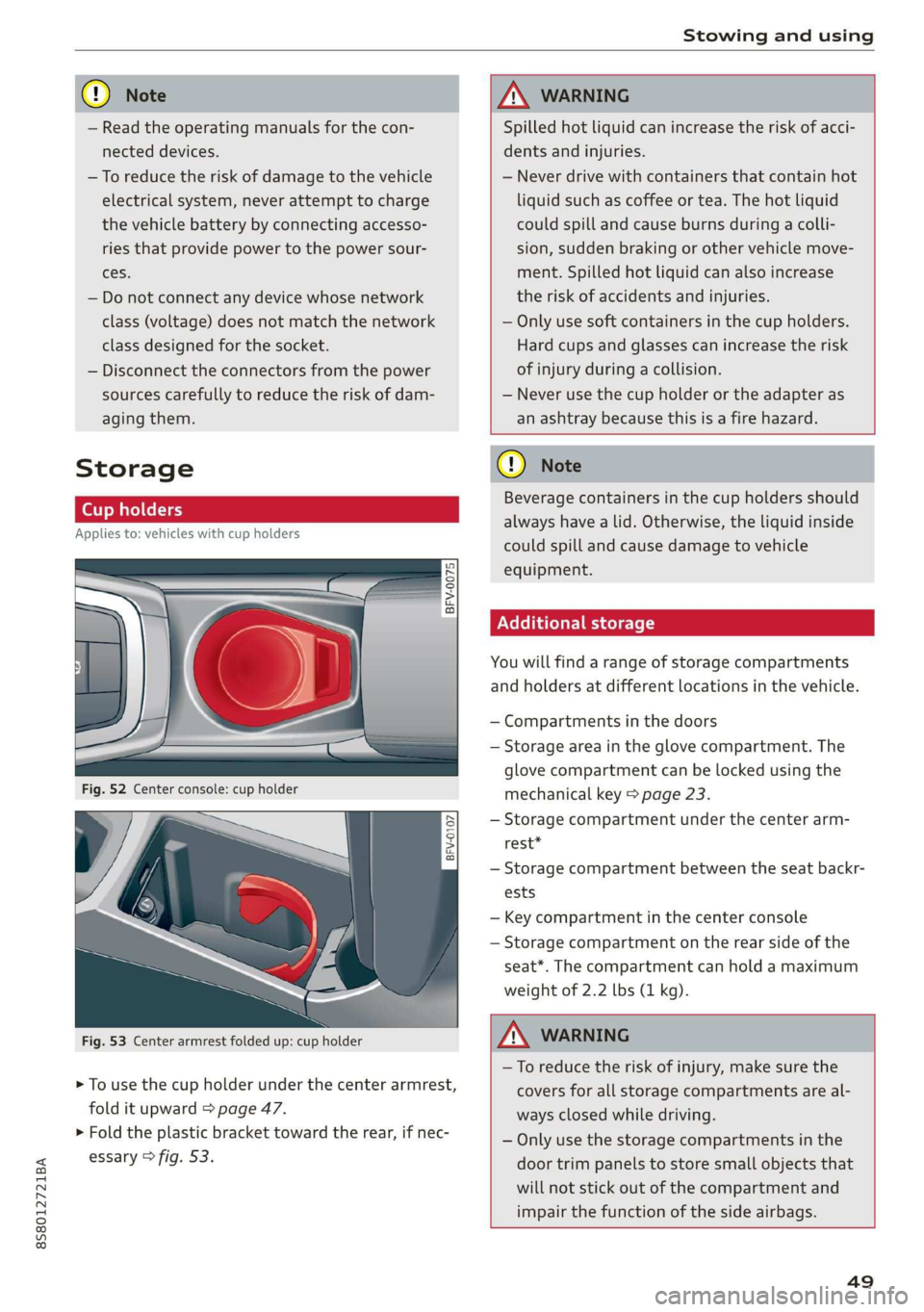
Fig. 53 Center armrest folded up: cup holder
> To use the cup holder under the center armrest,
fold it upward > page 47.
> Fold the plastic bracket toward the rear, if nec-
essary > fig. 53.
ZX WARNING
Spilled hot liquid can increase the risk of acci-
dents and injuries.
— Never drive with containers that contain hot
liquid such as coffee or tea. The hot liquid
could spill and cause burns during a colli-
sion, sudden braking or other vehicle move-
ment. Spilled hot liquid can also increase
the risk of accidents and injuries.
— Only use soft containers in the cup holders.
Hard cups and glasses can increase the risk
of injury during a collision.
— Never use the cup holder or the adapter as
an ashtray because this is a fire hazard.
C) Note
Beverage containers in the cup holders should
always
have a lid. Otherwise, the liquid inside
could spill and cause damage to vehicle
equipment.
Additional storage
You will find a range of storage compartments
and holders at different locations in the vehicle.
— Compartments in the doors
— Storage area in the glove compartment. The
glove
compartment can be locked using the
mechanical key > page 23.
— Storage compartment under the center arm-
rest*
— Storage compartment between the seat backr-
ests
— Key compartment in the center console
— Storage compartment on the rear side of the
seat*. The compartment can hold a maximum
weight of 2.2 lbs (1 kg).
ZA WARNING
—To reduce the risk of injury, make sure the
covers for all storage compartments are al-
ways closed while driving.
— Only use the storage compartments in the
door trim panels to store small objects that
will not stick out of the compartment and
impair the function of the side airbags.
49
Page 52 of 304
Stowing and using
Luggage compartment
General information
All pieces of luggage or objects must be securely
fastened in the luggage compartment. Note the
following to maintain good vehicle handling:
> Distribute the load evenly in the luggage com-
partment.
> Stow heavy luggage as far forward in the lug-
gage compartment as possible.
» Use non-elastic cords attached to the tie-downs
to secure objects.
Z\ WARNING
— Loose objects can be thrown around the ve-
hicle interior during sudden driving or brak-
ing maneuvers, which increases the risk of
an accident. Always stow objects securely in
the luggage compartment and secure them
at the tie-downs. Use straps suitable for
heavy objects.
— If pieces of luggage or objects are secured
to the tie-downs with unsuitable or dam-
aged straps, this can increase the risk of in-
jury during braking maneuvers or accidents.
— When transporting heavy objects, the vehi-
cle characteristics will change due to the
shift in the center of gravity, which increases
the risk of an accident. You may need to
adapt your driving style and speed to the
current conditions.
— The cargo net is only strong enough to se-
cure light objects. Heavy objects are not ade-
quately secured. Attempting to secure heavy
objects increases the risk of injury.
— Never exceed the permitted axle and load
and vehicle weight > page 286.
— Never secure a child safety seat to the tie-
downs.
— Never leave your vehicle unattended, espe-
cially if the luggage compartment lid is
open. Children could enter the luggage com-
partment and close the luggage compart-
ment lid from the inside. This creates the
risk of fatal injury, since the children would
be locked in and may not be able to escape
by themselves.
sO
— Do not allow children to play in or on the ve-
hicle. Close and lock the luggage compart-
ment lid as well as all other doors when you
leave the vehicle.
— Never transport passengers in the luggage
compartment. Every passenger must be cor-
rectly secured with the safety belts in the
vehicle > page 182.
() Note
Make sure that the heating grid strips for the
rear window defogger are not damaged by
abrasive objects.
G) Tips
— The tire pressure must be adapted to the
load > page 250.
— You can purchase straps at specialty stores.
Pass-through with bag
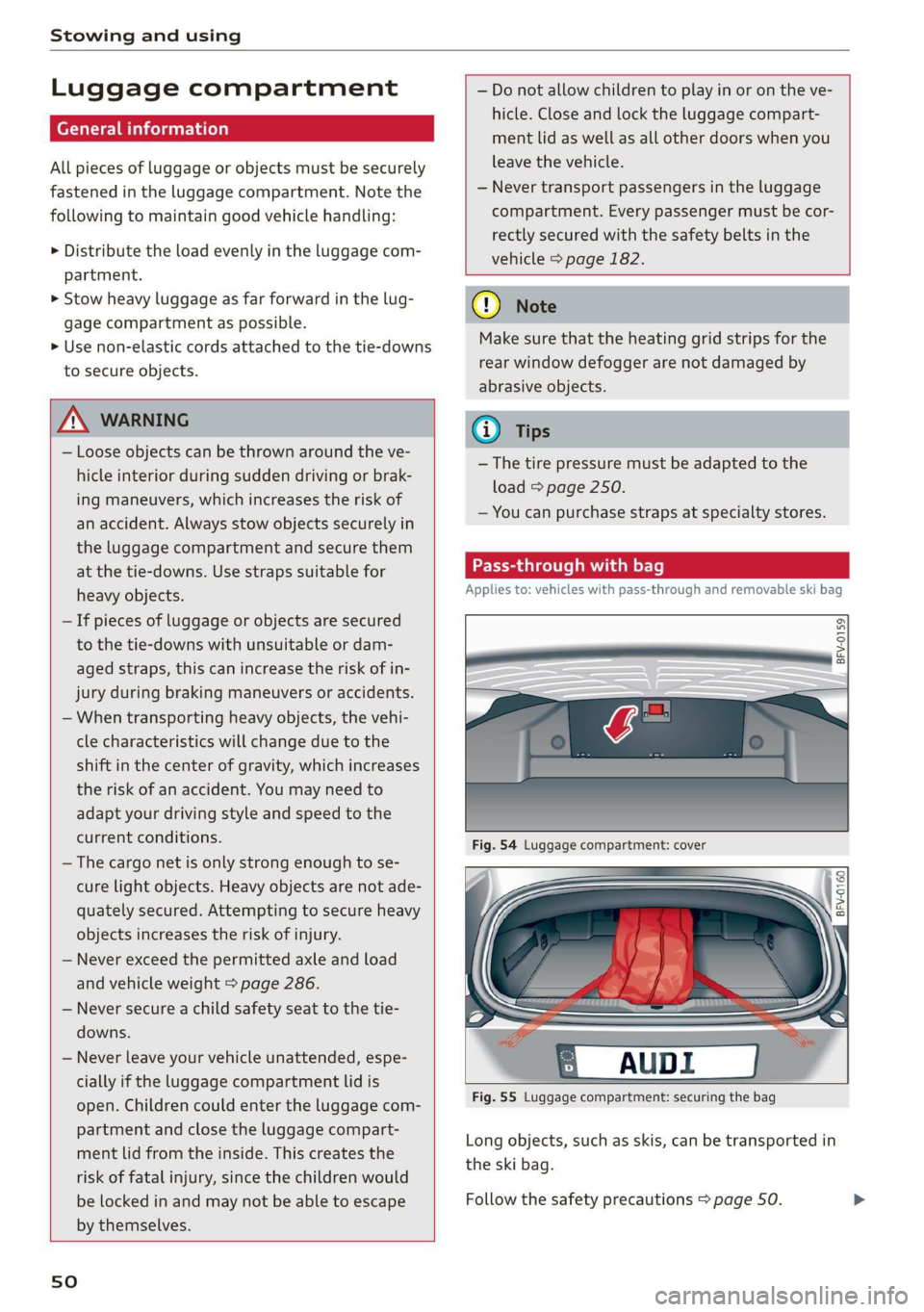
Applies to: vehicles with pass-through and removable ski bag
BFV-0159
Fig. 55 Luggage compartment: securing the bag
Long objects, such as skis, can be transported in
the ski bag.
Follow the safety precautions > page 50.
Page 62 of 304
Driving
Setting/manually releasing the parking
brake
> Pull the ©) switch to set the parking brake. The
LED in the switch turns on. The PARK (USA mod-
els) (Canada models) indicator light also
turns on in the instrument cluster display.
> To release the parking brake manually, press
the brake or accelerator pedal while the igni-
tion is switched on and press the ©) switch at
the same time. The LED in the button and the
indicator light in the display turn off.
Releasing the parking brake automatically
Requirement: the driver's door must be closed.
> To start driving and release the parking brake
automatically, press the accelerator pedal as
usual.
In addition to releasing the parking brake auto-
matically, other convenience and safety functions
are available when you start driving > page 61,
Starting to drive.
Emergency braking function
You can use the emergency braking function in an
emergency situation, or if the standard brakes
are malfunctioning or the pedal is obstructed.
> Pull and hold the ©) switch.
> As soon as you release the ©) switch or acceler-
ate, the braking stops.
Pulling
and holding the ©) switch while driving
the vehicle activates the emergency braking func-
tion. The hydraulic brake system will brake all
four wheels. The braking effect is similar to heavy
braking > A\.
To reduce the risk of activating the emergency
braking by mistake, a warning tone (buzzer)
sounds when the ©) switch is pulled. Emergency
braking stops as soon as the ©) switch is released
or the accelerator pedal is pressed.
Parking
> Press the brake pedal to stop the vehicle.
> Pull the © switch to set the parking brake.
>» Place the selector lever in the “P” position.
> Turn the engine off > A\.
60
> Turn the steering wheel when parking on in-
clines so that the wheels will roll into the curb
if the vehicle starts moving.
ZA WARNING
— Ifa gear is engaged while the vehicle is sta-
tionary and the engine is running, do not
press the accelerator pedal inadvertently.
Otherwise, the vehicle will start to move im-
mediately and this could result in an acci-
dent.
— Emergency braking should only be used in
an emergency, when the when the standard
brake pedal is malfunctioning or obstructed.
During emergency braking, your vehicle will
brake similar to heavy braking. ESC and the
associated components (ABS, ASR, EDL) can-
not overcome the laws of physics. In corners
and when road or weather conditions are
bad, a full brake application can cause the
vehicle to skid or the rear end to swerve,
which increases the risk of an accident.
— If the power supply fails, you cannot set the
parking brake once it is released. In this
case, park the vehicle on level ground and
secure it by placing the selector lever in the
P position. See an authorized Audi dealer or
authorized Audi Service Facility for assis-
tance.
— If you leave the vehicle, switch the ignition
off and take the vehicle key with you. This
applies particularly when children remain in
the vehicle. Otherwise children could start
the engine, release the parking brake or op-
erate electrical equipment such as power
windows, which increases the risk of an acci-
dent.
— No one should remain in the vehicle when it
is locked - especially children. Locked doors
make it more difficult for emergency work-
ers to get into the vehicle, which puts lives
at risk.
C) Note
Do not leave your vehicle unattended while
the engine is running, because this increases
the risk of an accident.
Page 66 of 304
Driving
— If the vehicle does not move in the desired
direction, the system may not have engaged
the drive position correctly. Press the brake
pedal and select the drive position again.
— If the vehicle still does not move in the de-
sired direction, there is a system malfunc-
tion. See an authorized Audi dealer or au-
thorized Audi Service Facility for assistance
to have the system checked.
The transmission shifts up and down automati-
cally when in the driving gears.
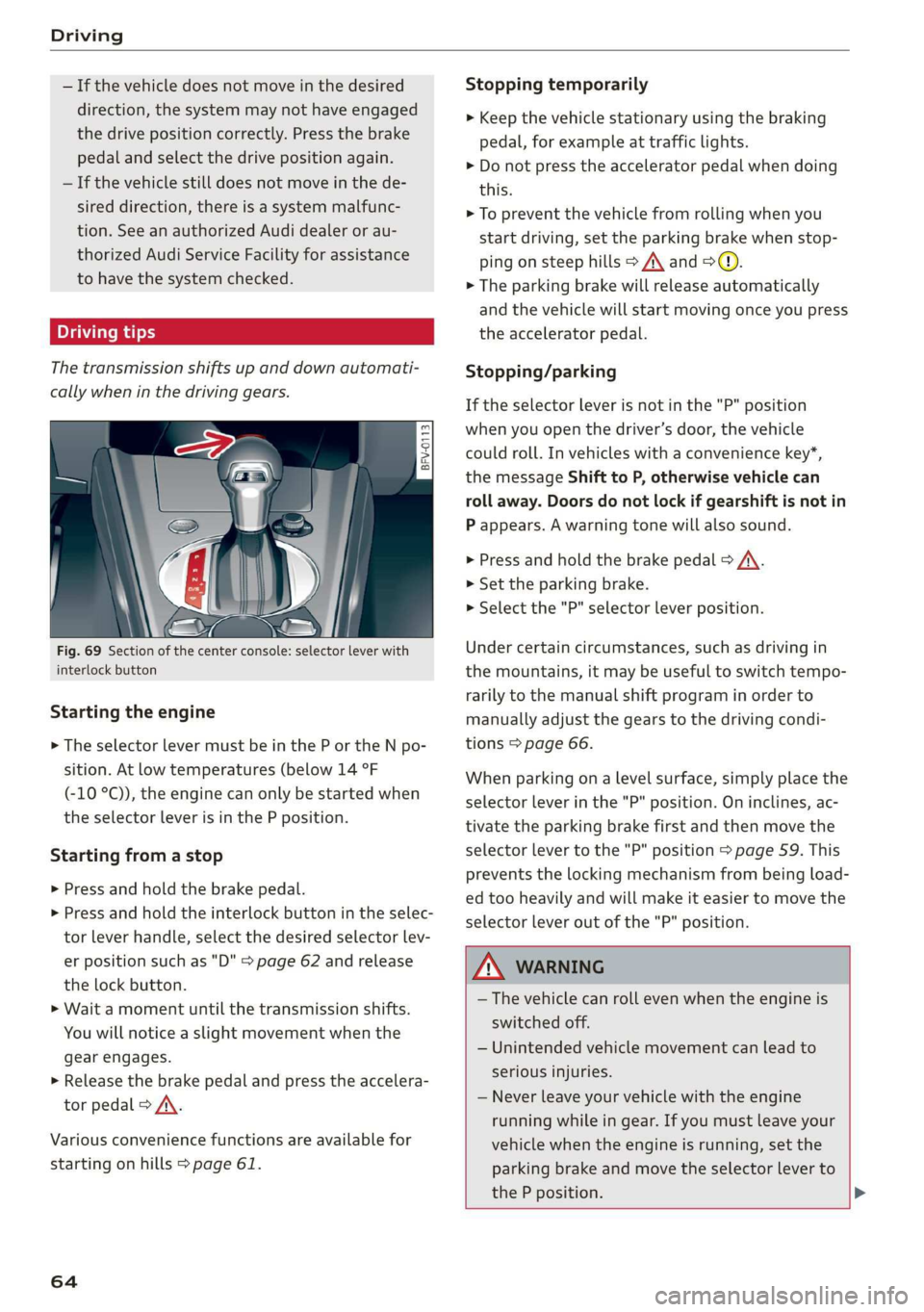
Fig. 69 Section of the center console: selector lever with
interlock button
Starting the engine
> The selector lever must be in the P or the N po-
sition. At low temperatures (below 14 °F
(-10 °C)), the engine can only be started when
the selector lever is in the P position.
Starting from a stop
> Press and hold the brake pedal.
> Press and hold the interlock button in the selec-
tor lever handle, select the desired selector lev-
er position such as "D" > page 62 and release
the lock button.
> Wait a moment until the transmission shifts.
You will notice a slight movement when the
gear engages.
> Release the brake pedal and press the accelera-
tor pedal > A\.
Various convenience functions are available for
starting on hills > page 61.
64
Stopping temporarily
> Keep the vehicle stationary using the braking
pedal, for example at traffic lights.
> Do not press the accelerator pedal when doing
this.
> To prevent the vehicle from rolling when you
start driving, set the parking brake when stop-
ping on steep hills > A\ and >@.
> The parking brake will release automatically
and the vehicle will start moving once you press
the accelerator pedal.
Stopping/parking
If the selector lever is not in the "P" position
when you open the driver’s door, the vehicle
could roll. In vehicles with a convenience key*,
the message Shift to P, otherwise vehicle can
roll away. Doors do not lock if gearshift is not in
P appears. A warning tone will also sound.
> Press and hold the brake pedal > A\.
>» Set the parking brake.
> Select the "P" selector lever position.
Under certain circumstances, such as driving in
the mountains, it may be useful to switch tempo-
rarily to the manual shift program in order to
manually adjust the gears to the driving condi-
tions > page 66.
When parking ona level surface, simply place the
selector lever in the "P" position. On inclines, ac-
tivate the parking brake first and then move the
selector lever to the "P" position > page 59. This
prevents the locking mechanism from being load-
ed too heavily and will make it easier to move the
selector lever out of the "P" position.
ZA WARNING
— The vehicle can roll even when the engine is
switched off.
— Unintended vehicle movement can lead to
serious injuries.
— Never leave your vehicle with the engine
running while in gear. If you must leave your
vehicle when the engine is running, set the
parking brake and move the selector lever to
the P position. >
Page 187 of 304
8S8012721BA
Safety belts
— Never remove a safety belt while the vehicle
is moving. Doing so will increase your risk of
being injured or killed.
— Never wear belts twisted.
— Never wear belts over rigid or breakable ob-
jects in or on your clothing, such as eye
glasses, pens, keys, etc., as these may cause
injury.
— Never allow safety belts to become dam-
aged by being caught in door or seat hard-
ware.
— Do not wear the shoulder part of the belt
under your arm or otherwise out of position.
— Several layers of heavy clothing may inter-
fere with correct positioning of belts and re-
duce the overall effectiveness of the system.
— Always keep belt buckles free of anything
that may prevent the buckle from latching
securely.
— Never use comfort clips or devices that cre-
ate slack in the shoulder belt. However, spe-
cial clips may be required for the proper use
of some child restraint systems.
— Torn or frayed safety belts can tear and
damaged belt hardware can break in an acci-
dent. Inspect belts regularly. If webbing,
bindings, buckles, or retractors are dam-
aged, have belts replaced by an authorized
Audi dealer or qualified workshop.
— Safety belts that have been worn and loaded
in an accident must be replaced with the
correct replacement safety belt by an au-
thorized Audi dealer. Replacement may be
necessary even if damage cannot be clearly
seen. Anchorages that were loaded must al-
so be inspected.
— Never remove, modify, disassemble, or try
to repair the safety belts yourself.
— Always keep the belts clean. Dirty belts may
not work properly and can impair the func-
tion of the inertia reel > table Interior
cleaning on page 264.
Safety belts
Fastening safety belts
Safety first - everybody buckle up!
|
B4H-0462
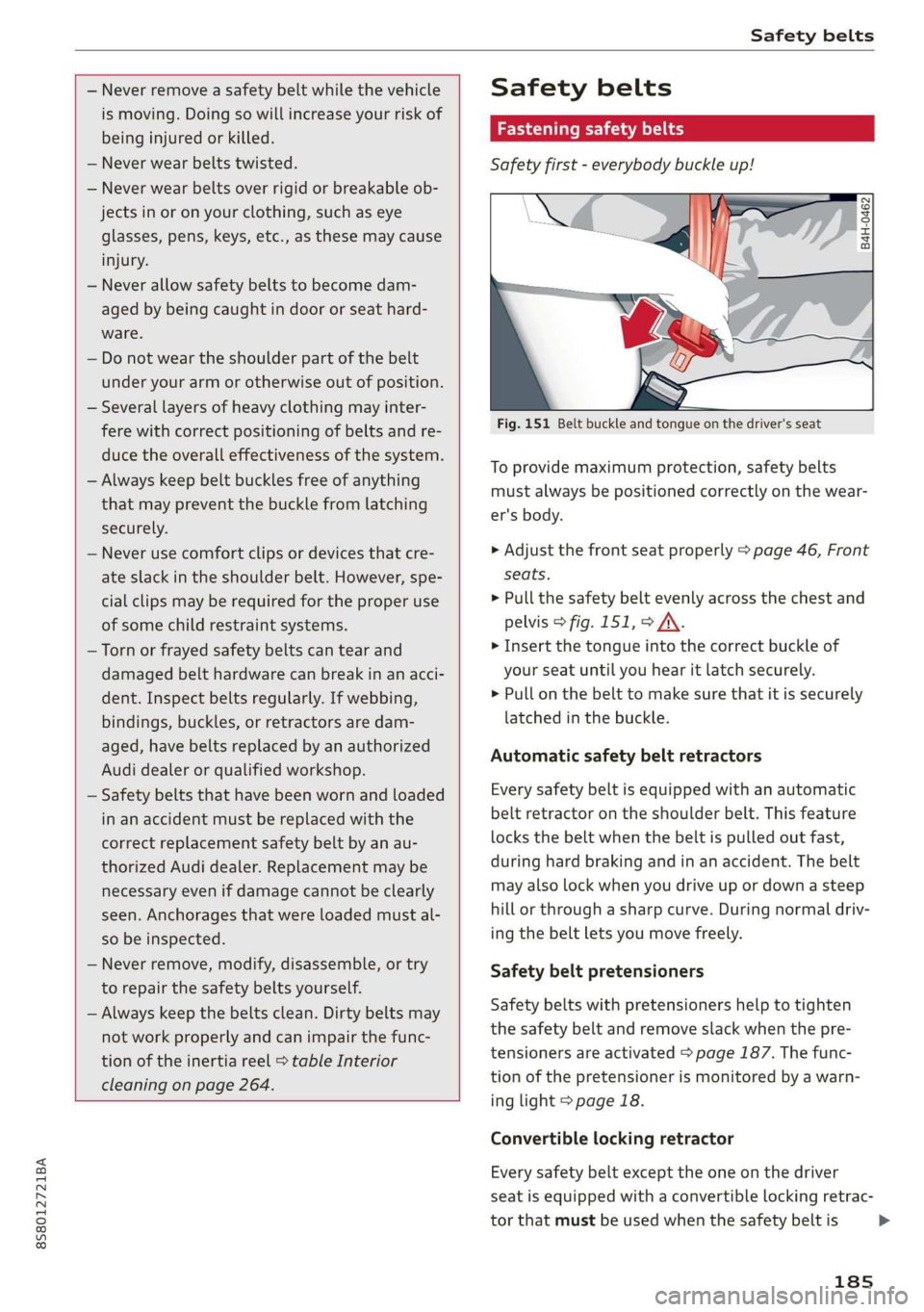
Fig. 151 Belt buckle and tongue on the driver's seat
To provide maximum protection, safety belts
must always be positioned correctly on the wear-
er's body.
> Adjust the front seat properly > page 46, Front
seats.
> Pull the safety belt evenly across the chest and
pelvis > fig. 151, > A\.
> Insert the tongue into the correct buckle of
your seat until you hear it latch securely.
> Pull on the belt to make sure that it is securely
latched in the buckle.
Automatic safety belt retractors
Every safety belt is equipped with an automatic
belt retractor on the shoulder belt. This feature
locks the belt when the belt is pulled out fast,
during hard braking and in an accident. The belt
may also lock when you drive up or down a steep
hill or through a sharp curve. During normal driv-
ing the belt lets you move freely.
Safety belt pretensioners
Safety belts with pretensioners help to tighten
the safety belt and remove slack when the pre-
tensioners are activated > page 187. The func-
tion of the pretensioner is monitored by a warn-
ing light > page 18.
Convertible locking retractor
Every safety belt except the one on the driver
seat is equipped with a convertible locking retrac-
tor that must be used when the safety belt is
185
>
Page 195 of 304
8S58012721BA
Airbag system
Front airbags
pyre al eee mice a TLeey-le (4
The airbag system can provide supplemental
protection to properly restrained front seat occu-
pants.
= x 2
z 6
BFV-0063
iff i
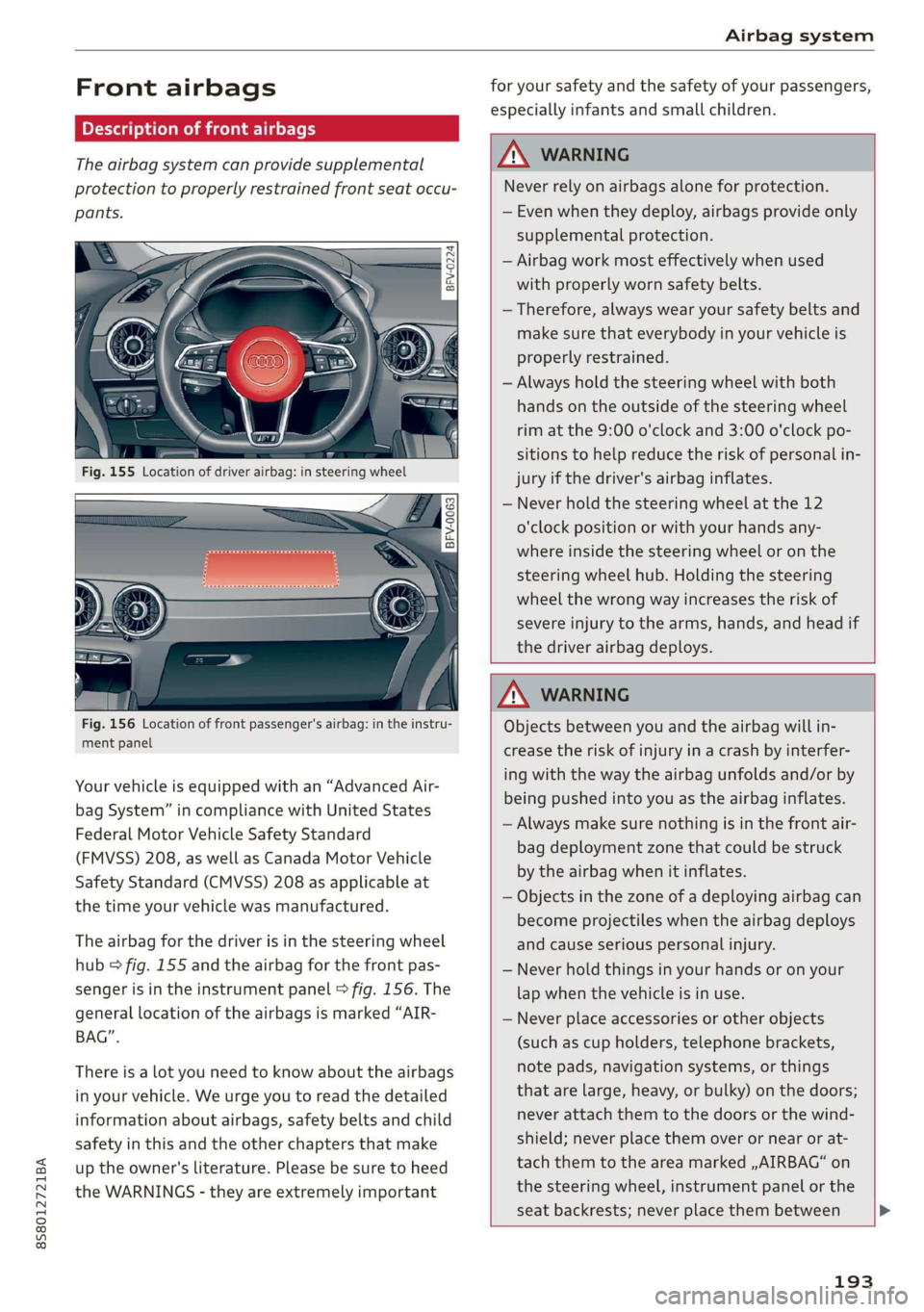
Fig. 156 Location of front passenger's airbag: in the instru-
ment panel
Your vehicle is equipped with an “Advanced Air-
bag System” in compliance with United States
Federal Motor Vehicle Safety Standard
(FMVSS) 208, as well as Canada Motor Vehicle
Safety Standard (CMVSS) 208 as applicable at
the time your vehicle was manufactured.
The airbag for the driver is in the steering wheel
hub > fig. 155 and the airbag for the front pas-
senger is in the instrument panel © fig. 156. The
general location of the airbags is marked “AIR-
BAG”.
There is a lot you need to know about the airbags
in your vehicle. We urge you to read the detailed
information about airbags, safety belts and child
safety in this and the other chapters that make
up the owner's literature. Please be sure to heed
the WARNINGS - they are extremely important
for your safety and the safety of your passengers,
especially infants and small children.
ZA\ WARNING
Never rely on airbags alone for protection.
— Even when they deploy, airbags provide only
supplemental protection.
— Airbag work most effectively when used
with properly worn safety belts.
— Therefore, always wear your safety belts and
make sure that everybody in your vehicle is
properly restrained.
— Always hold the steering wheel with both
hands on the outside of the steering wheel
rim at the 9:00 o'clock and 3:00 o'clock po-
sitions to help reduce the risk of personal in-
jury if the driver's airbag inflates.
— Never hold the steering wheel at the 12
o'clock position or with your hands any-
where inside the steering wheel or on the
steering wheel hub. Holding the steering
wheel the wrong way increases the risk of
severe injury to the arms, hands, and head if
the driver airbag deploys.
ZA\ WARNING
Objects between you and the airbag will in-
crease the risk of injury in a crash by interfer-
ing with the way the airbag unfolds and/or by
being pushed into you as the airbag inflates.
— Always make sure nothing is in the front air-
bag deployment zone that could be struck
by the airbag when it inflates.
— Objects in the zone of a deploying airbag can
become projectiles when the airbag deploys
and cause serious personal injury.
— Never hold things in your hands or on your
lap when the vehicle is in use.
— Never place accessories or other objects
(such as cup holders, telephone brackets,
note pads, navigation systems, or things
that are large, heavy, or bulky) on the doors;
never attach them to the doors or the wind-
shield; never place them over or near or at-
tach them to the area marked ,,AIRBAG“ on
the steering wheel, instrument panel or the
seat backrests; never place them between
193