audio AUDI TT ROADSTER 2019 Owner's Manual
[x] Cancel search | Manufacturer: AUDI, Model Year: 2019, Model line: TT ROADSTER, Model: AUDI TT ROADSTER 2019Pages: 304, PDF Size: 80.77 MB
Page 164 of 304
Media
Playlists
All available playlists from the source and the
smart playlists are displayed. Select and confirm
a playlist and then a track.
Smart playlists:
— Last played tracks: the last tracks played in the
selected source are displayed.
— Most played: the most played tracks in the se-
lected source are displayed.
— 5 stars to 1 star: tracks from the selected
source are displayed according to their rating.
— Unrated: all files from the selected source
without rating information (for example, in the
ID3 tag) are displayed.
© Videos*
All available video files are displayed. Select and
confirm a video file.
@ Tips
— Only the categories supported by the medi-
um are available. For example, CD/DVD-
ROM tracks cannot be selected with catego-
ries such as Artists, Albums or Genres.
With an iPod (source: Audi music interface
= page 158), the Podcasts, Audio books
and Composers categories are also availa-
ble.
— For safety reasons, the video image is only
displayed when the vehicle is stationary. On-
ly the sound from the video plays while driv-
ing.
— When synchronizing a portable device with
"Cloud“ services, playlists may display incor-
rectly
in the MMI. Use the media center in
the device.
162
a -\-mx-y aay 1iaa)
You can search in the active source by tracks and
video files*, for example
Rock Band
Rock Band
x
a
Saal
ees
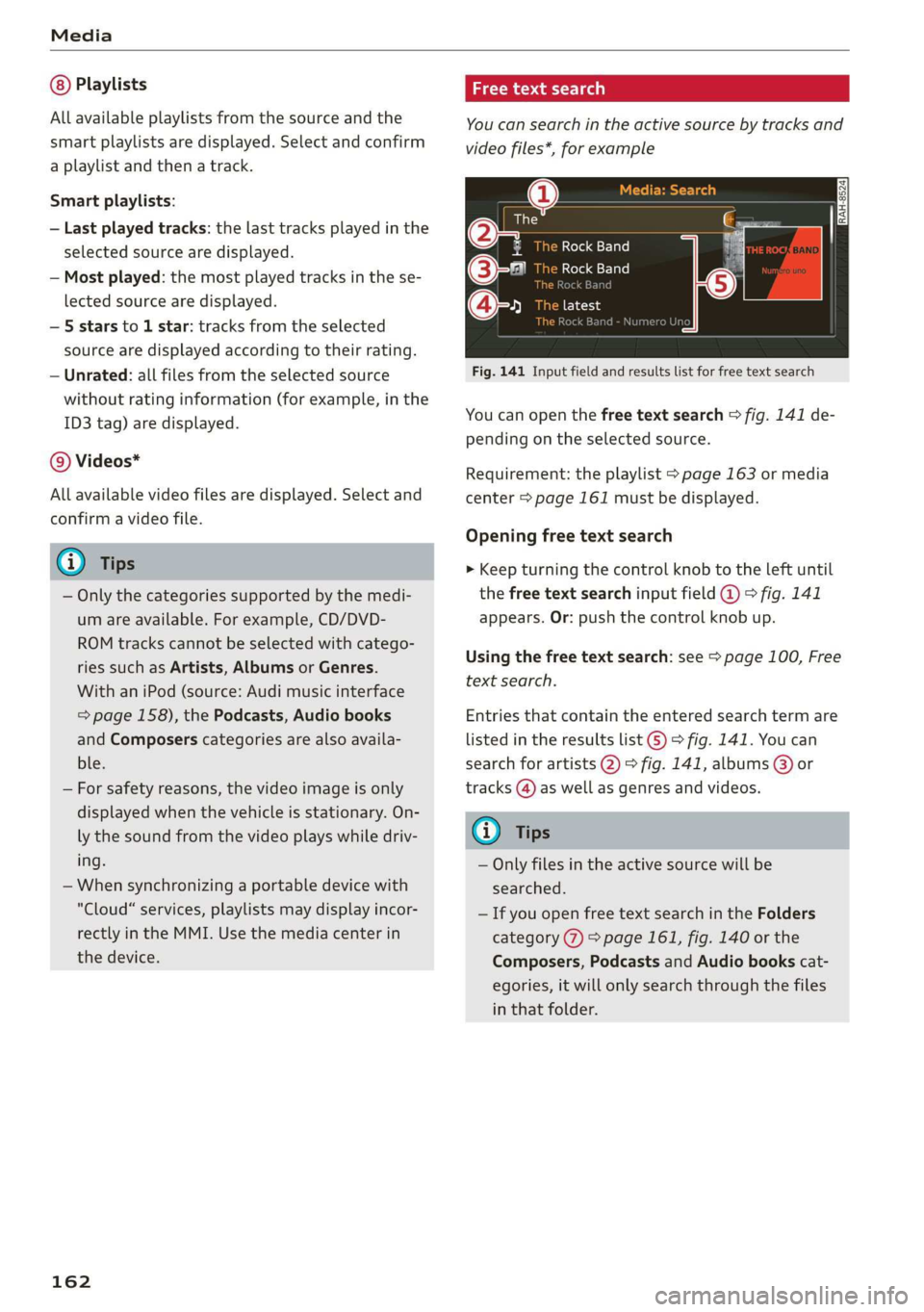
Fig. 141 Input field and results list for free text search
Nume
You can open the free text search > fig. 141 de-
pending on the selected source.
Requirement: the playlist > page 163 or media
center > page 161 must be displayed.
Opening free text search
> Keep turning the control knob to the left until
the free text search input field @ 9° fig. 141
appears. Or: push the control knob up.
Using the free text search: see > page 100, Free
text search.
Entries that contain the entered search term are
listed in the results list ©) > fig. 141. You can
search for artists 2) > fig. 141, albums @) or
tracks (@) as well as genres and videos.
(i) Tips
— Only files in the active source will be
searched.
— If you open free text search in the Folders
category (7) > page 161, fig. 140 or the
Composers, Podcasts and Audio books cat-
egories, it will only search through the files
in that folder.
Page 167 of 304
8S58012721BA
Media
Audio track!)
You can manually set the audio track (language
and audio format). The language and audio for-
mat options depend on the video DVD.
Subtitles!)
You can manually select subtitles for playback.
The languages available depend on the DVD.
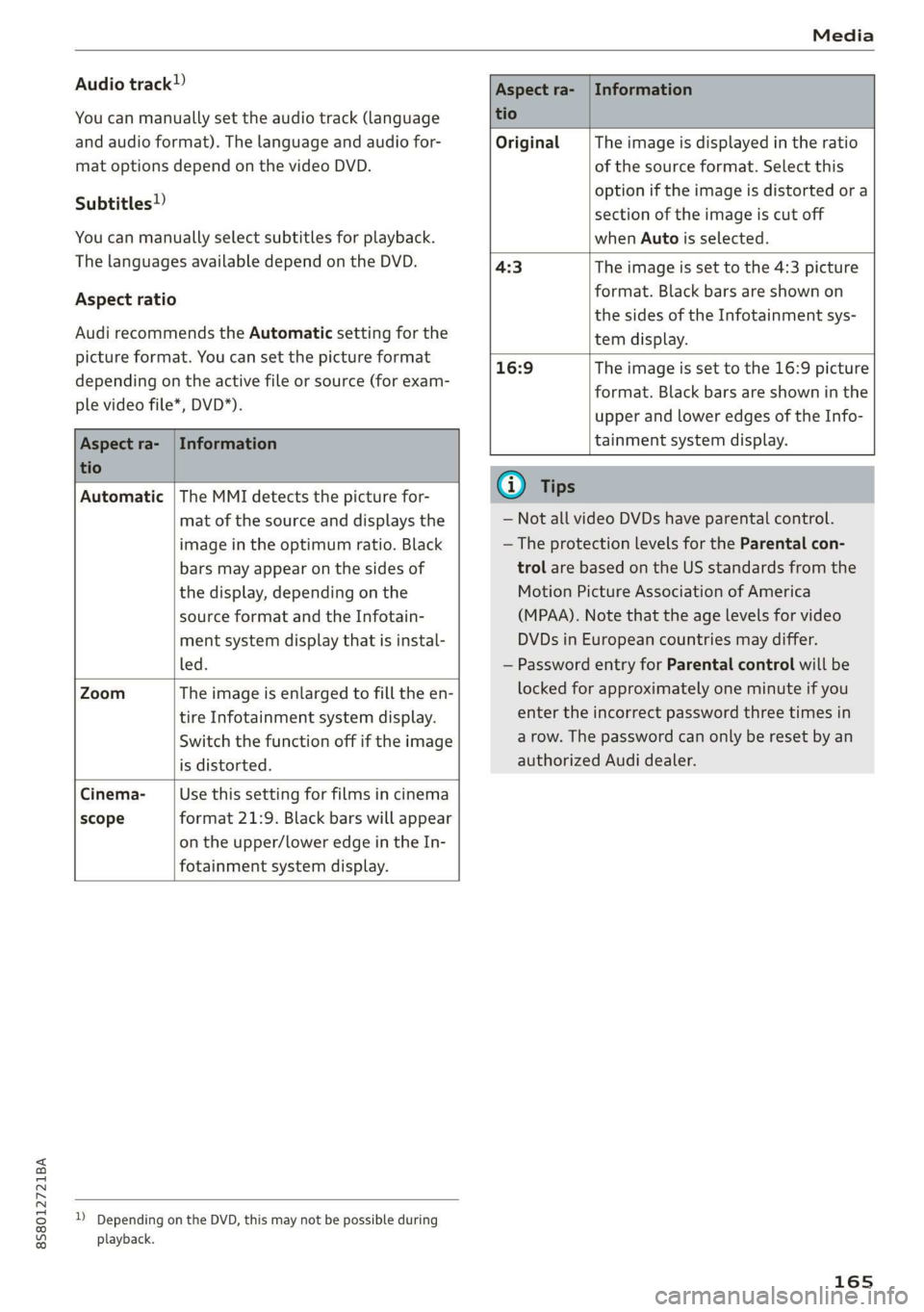
Aspect ratio
Audi recommends the Automatic setting for the
picture format. You can set the picture format
depending on the active file or source (for exam-
ple video file*, DVD*).
Aspect ra- | Information
tio
Original The image is displayed in the ratio
of the source format. Select this
option if the image is distorted ora
section of the image is cut off
when Auto is selected.
4:3 The image is set to the 4:3 picture
format. Black bars are shown on
the sides of the Infotainment sys-
tem display.
Aspect ra- | Information
tio
16:9 The image is set to the 16:9 picture
format. Black bars are shown in the
upper and lower edges of the Info-
tainment system display.
Automatic |The MMI detects the picture for-
mat of the source and displays the
image in the optimum ratio. Black
bars may appear on the sides of
the display, depending on the
source format and the Infotain-
ment system display that is instal-
led.
Zoom The image is enlarged to fill the en-
tire Infotainment system display.
Switch the function off if the image
is distorted.
Cinema- Use this setting for films in cinema
scope format 21:9. Black bars will appear
on the upper/lower edge in the In-
fotainment system display.
D Depending on the DVD, this may not be possible during
playback.
@ Tips
— Not all video DVDs have parental control.
— The protection levels for the Parental con-
trol are based on the US standards from the
Motion Picture Association of America
(MPAA). Note that the age levels for video
DVDs in European countries may differ.
— Password entry for Parental control will be
locked for approximately one minute if you
enter the incorrect password three times in
a row. The password can only be reset by an
authorized Audi dealer.
165
Page 168 of 304
Media
Supported media and file formats
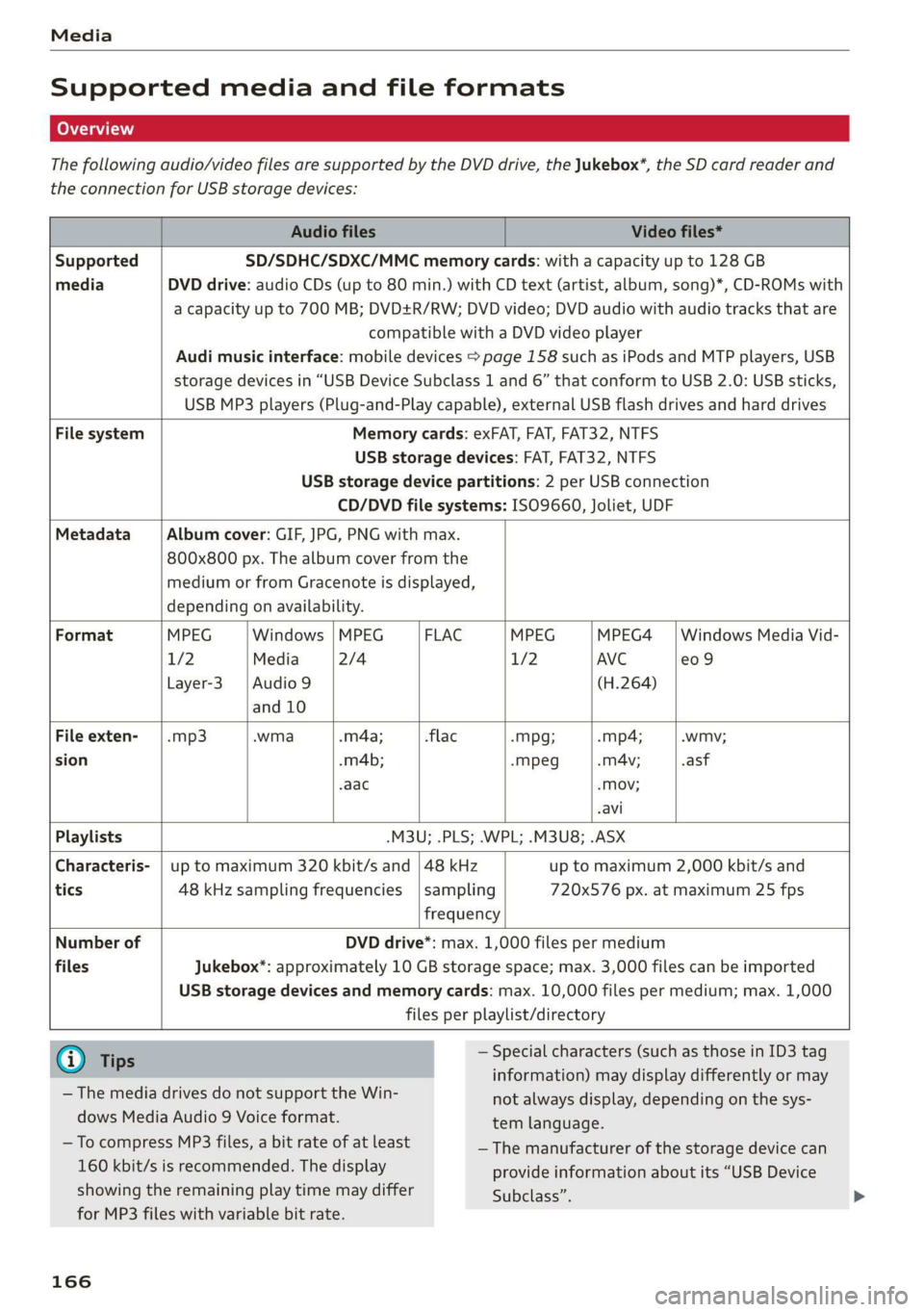
The following audio/video files are supported by the DVD drive, the Jukebox*, the SD card reader and
the connection for USB storage devices:
Audio files Video files*
Supported SD/SDHC/SDXC/MMC memory cards: with a capacity up to 128 GB
media DVD drive: audio CDs (up to 80 min.) with CD text (artist, album, song)*, CD-ROMs with
a capacity up to 700 MB; DVD+R/RW; DVD video; DVD audio with audio tracks that are
compatible with a DVD video player
Audi music interface: mobile devices > page 158 such as iPods and MTP players, USB
storage devices in “USB Device Subclass 1 and 6” that conform to USB 2.0: USB sticks,
USB MP3 players (Plug-and-Play capable), external USB flash drives and hard drives
File system Memory cards: exFAT, FAT, FAT32, NTFS
USB storage devices: FAT, FAT32, NTFS
USB storage device partitions: 2 per USB connection
CD/DVD file systems: ISO9660, Joliet, UDF
Metadata Album cover: GIF, JPG, PNG with max.
800x800 px. The album cover from the
medium or from Gracenote is displayed,
depending on availability.
Format MPEG Windows |MPEG FLAC MPEG MPEG4 | Windows Media Vid-
1/2 Media 2/4 1/2 AVC e09
Layer-3 | Audio 9 (H.264)
and 10
File exten- | .mp3 .wma .m4a; flac -Mpg; -mp4; -wmv;
sion .m4b; -mpeg .mA4v; .asf
aac -Mov;
avi
Playlists -M3U; .PLS; .WPL; .M3U8; .ASX
Characteris- | up to maximum 320 kbit/s and | 48 kHz up to maximum 2,000 kbit/s and
tics 48 kHz sampling frequencies | sampling 720x576 px. at maximum 25 fps
frequency
Number of DVD drive*: max. 1,000 files per medium
files Jukebox*: approximately 10 GB storage space; max. 3,000 files can be imported
USB storage devices and memory cards: max. 10,000 files per medium; max. 1,000
files per playlist/directory
@ Ti — Special characters (such as those in ID3 tag
ips : : : :
information) may display differently or may
not always display, depending on the sys-
tem language.
— The media drives do not support the Win-
dows Media Audio 9 Voice format.
—To ee MP3 files, a bit rate of at least —The manufacturer of the storage device can
160 kbit/s is recommended. The display provide information about its “USB Device
showing the remaining play time may differ Subclass”.
for MP3 files with variable bit rate.
166
Page 169 of 304
8S8012721BA
Media
— Some MTP player functions are not support-
ed, such as rating music tracks and video
playback.
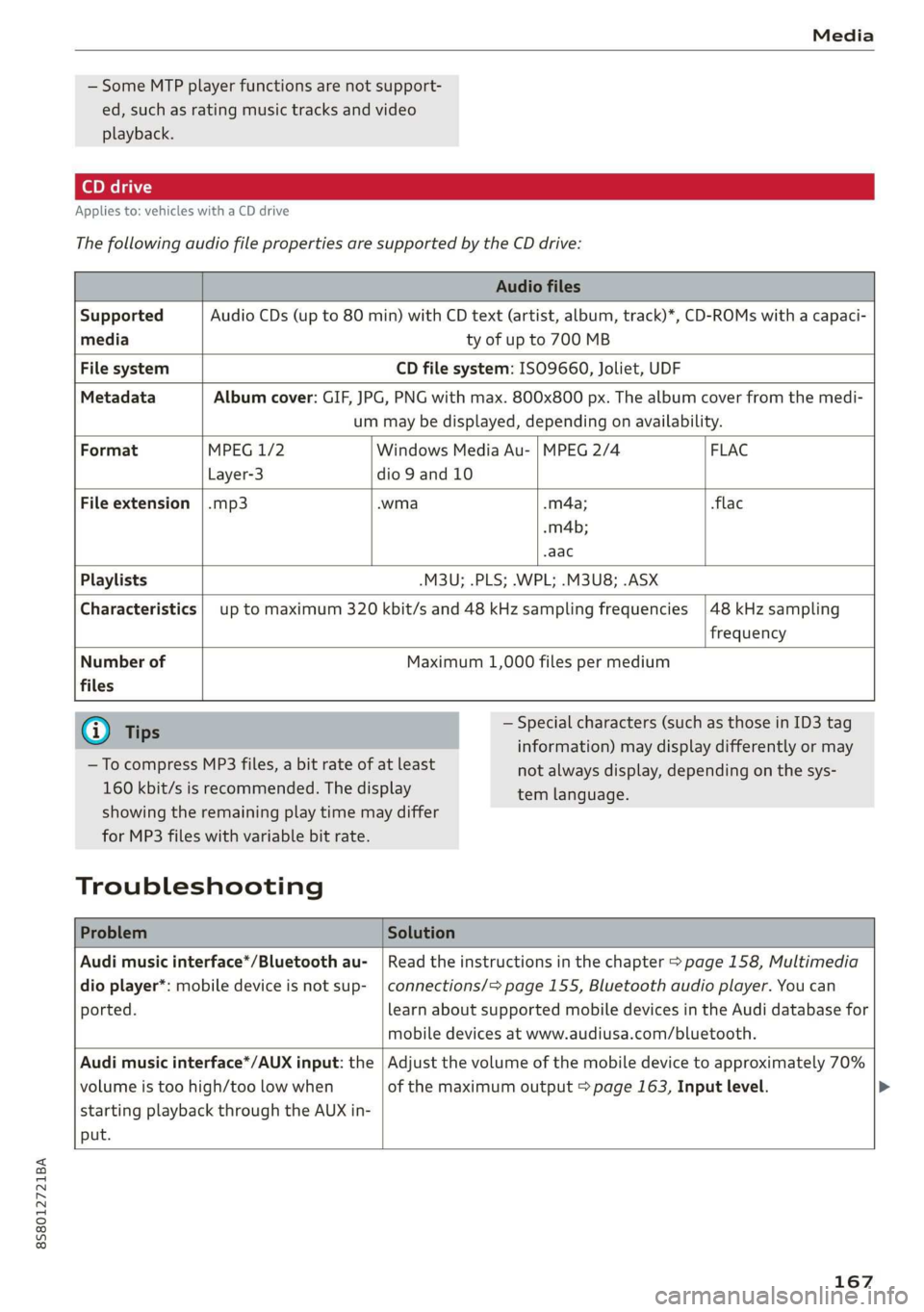
Applies to: vehicles with a CD drive
The
following audio file properties are supported by the CD drive:
Audio files
Supported Audio CDs (up to 80 min) with CD text (artist, album, track)*, CD-ROMs with a capaci-
media ty of up to 700 MB
File system CD file system: ISO9660, Joliet, UDF
Metadata Album cover: GIF, JPG, PNG with max. 800x800 px. The album cover from the medi-
um may be displayed, depending on availability.
Format MPEG 1/2 Windows Media Au- | MPEG 2/4 FLAC
Layer-3 dio 9 and 10
File
extension |.mp3 .wma .m4a; flac
-m4b;
aac
Playlists -M3U; .PLS; .WPL; .M3U8; .ASX
Characteristics up to maximum 320 kbit/s and 48 kHz sampling frequencies
48 kHz sampling
frequency
Number of
files
Maximum 1,000 files per medium
@) Tips
— To compress MP3 files, a bit rate of at least
160 kbit/s is recommended. The display
— Special characters (such as those in ID3 tag
information) may display differently or may
tem language.
showing the remaining play time may differ
for MP3 files with variable bit rate.
Troubleshooting
not always display, depending on the sys-
Problem Solution
Audi music interface*/Bluetooth au-
dio player*: mobile device is not sup-
ported.
Read the instructions in the chapter > page 158, Multimedia
connections/=> page 155, Bluetooth audio player. You can
learn about supported mobile devices in the Audi database for
mobile devices at www.audiusa.com/bluetooth.
Audi music interface*/AUX input: the
volume is too high/too low when
starting playback through the AUX in-
put.
Adjust the volume of the mobile device to approximately 70%
of the maximum output > page 163, Input level. >
167
Page 170 of 304
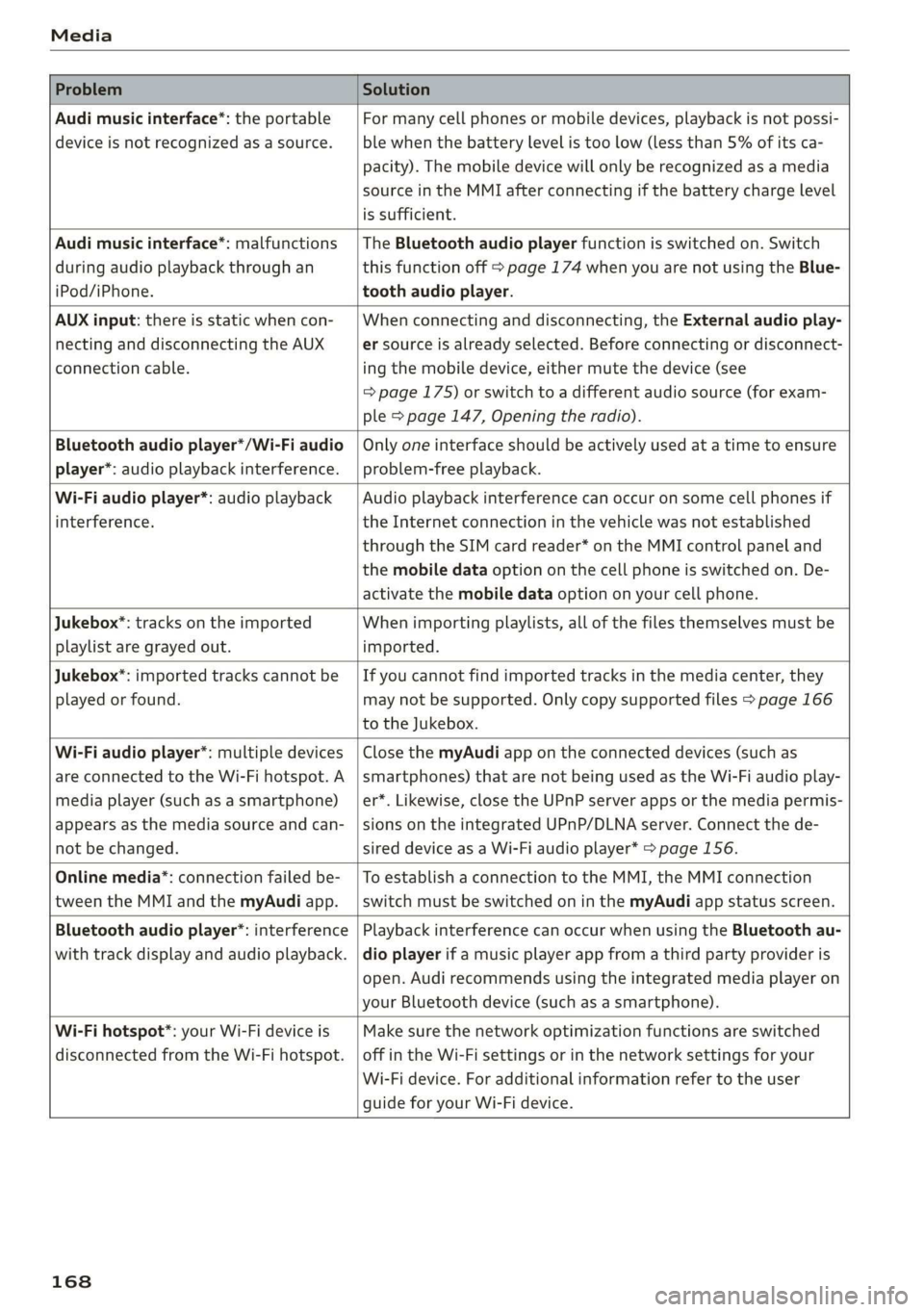
Media
Problem Solution
Audi music interface*: the portable
device is not recognized as a source.
For many cell phones or mobile devices, playback is not possi-
ble when the battery level is too low (less than 5% of its ca-
pacity). The mobile device will only be recognized as a media
source in the MMI after connecting if the battery charge level
is sufficient.
Audi music interface*: malfunctions
during audio playback through an
iPod/iPhone.
The Bluetooth audio player function is switched on. Switch
this function off > page 174 when you are not using the Blue-
tooth audio player.
AUX input: there is static when con-
necting and disconnecting the AUX
connection cable.
When connecting and disconnecting, the External audio play-
er source is already selected. Before connecting or disconnect-
ing the mobile device, either mute the device (see
=> page 175) or switch to a different audio source (for exam-
ple > page 147, Opening the radio).
Bluetooth audio player*/Wi-Fi audio
player*: audio playback interference.
Only one interface should be actively used at a time to ensure
problem-free playback.
Wi-Fi audio player*: audio playback
interference.
Audio playback interference can occur on some cell phones if
the Internet connection in the vehicle was not established
through the SIM card reader* on the MMI control panel and
the mobile data option on the cell phone is switched on. De-
activate the mobile data option on your cell phone.
Jukebox®*: tracks on the imported
playlist are grayed out.
When importing playlists, all of the files themselves must be
imported.
Jukebox*: imported tracks cannot be
played or found.
If you cannot find imported tracks in the media center, they
may not be supported. Only copy supported files > page 166
to the Jukebox.
Wi-Fi audio player*: multiple devices
are connected to the Wi-Fi hotspot. A
media player (such as a smartphone)
appears as the media source and can-
not be changed.
Close the myAudi app on the connected devices (such as
smartphones) that are not being used as the Wi-Fi audio play-
er*. Likewise, close the UPnP server apps or the media permis-
sions on the integrated UPnP/DLNA server. Connect the de-
sired device as a Wi-Fi audio player* > page 156.
Online media*: connection failed be-
tween the MMI and the myAudi app.
To establish a connection to the MMI, the MMI connection
switch must be switched on in the myAudi app status screen.
Bluetooth audio player": interference
with track display and audio playback.
Playback interference can occur when using the Bluetooth au-
dio player if a music player app from a third party provider is
open. Audi recommends using the integrated media player on
your Bluetooth device (such as a smartphone).
Wi-Fi hotspot*: your Wi-Fi device is
disconnected from the Wi-Fi hotspot.
Make sure the network optimization functions are switched
off in the Wi-Fi settings or in the network settings for your
Wi-Fi device. For additional information refer to the user
guide for your Wi-Fi device.
168
Page 175 of 304
8S8012721BA
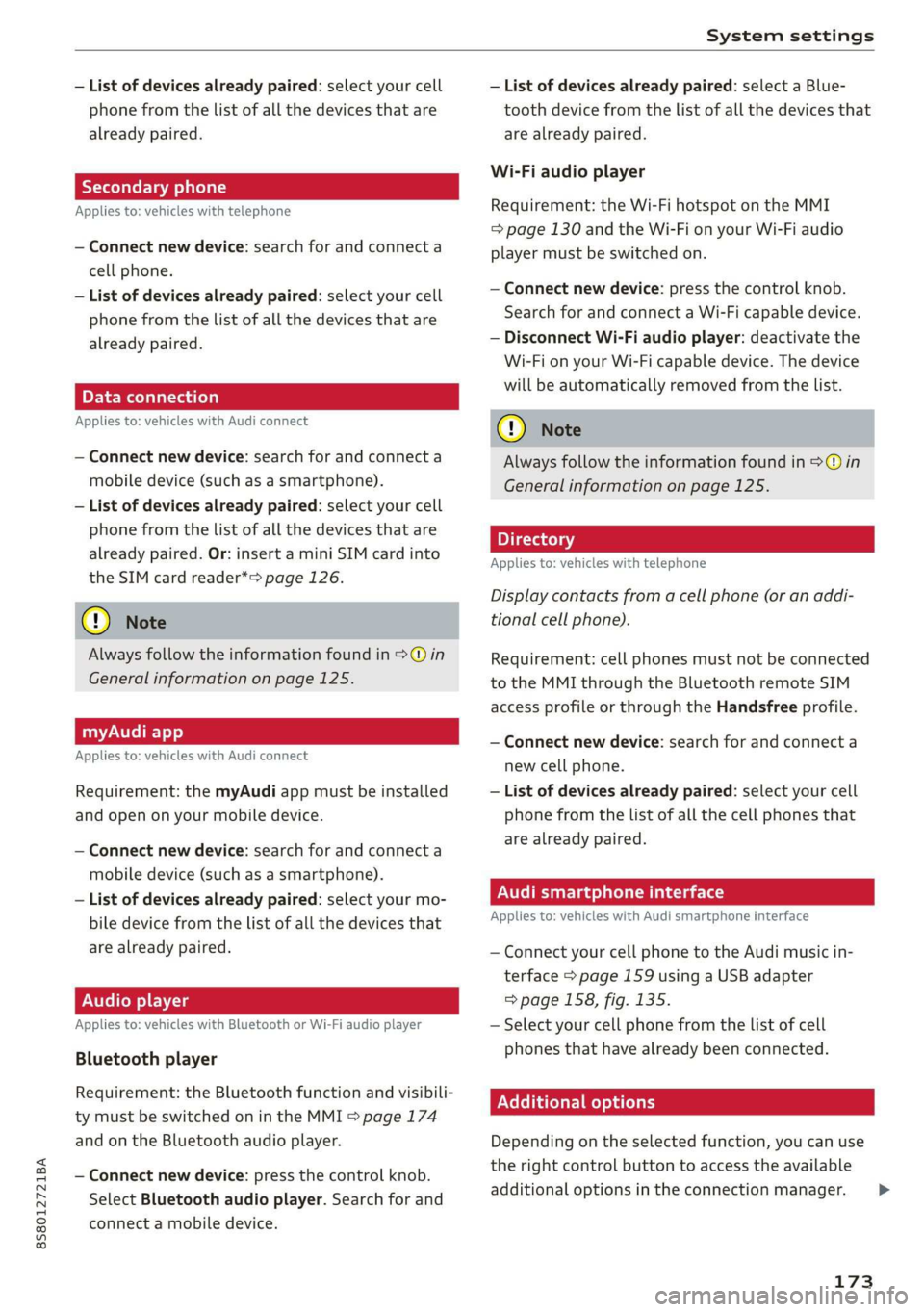
System settings
— List of devices already paired: select your cell — List of devices already paired: select a Blue-
phone from the list of all the devices that are tooth device from the list of all the devices that
already paired. are already paired.
Wi-Fi audio player
Applies to: vehicles with telephone Requirement: the Wi-Fi hotspot on the MMI
= page 130 and the Wi-Fi on your Wi-Fi audio
— Connect new device: search for and connect a player must be switched on.
cell phone.
— List of devices already paired: select your cell
phone from the list of all the devices that are
already paired. — Disconnect Wi-Fi audio player: deactivate the
Wi-Fi on your Wi-Fi capable device. The device
will be automatically removed from the list.
— Connect new device: press the control knob.
Search for and connect a Wi-Fi capable device.
PELE Mela a-\a a le)a)
Applies to: vehicles with Audi connect @) N
ote
— Connect new device: search for and connect a Always follow the information found in >@ in
mobile device (such as a smartphone). General information on page 125.
— List of devices already paired: select your cell
phone from the list of all the devices that are 7
. : aa . Directory
already paired. Or: insert a mini SIM card into Applies tor vehicles with telephone
the SIM card reader*> page 126.
Display contacts from a cell phone (or an addi-
(@) Note tional cell phone).
Always follow the information found in >@ in Requirement: cell phones must not be connected
General information on page 125. to the MMI through the Bluetooth remote SIM
access profile or through the Handsfree profile.
myAudi app
Applies to: vehicles with Audi connect
— Connect new device: search for and connect a
new cell phone.
Requirement: the myAudi app must be installed — List of devices already paired: select your cell
and open on your mobile device. phone from the list of all the cell phones that
. are already paired.
— Connect new device: search for and connect a yP
mobile device (such as a smartphone).
— List of devices already paired: select your mo- Audi smartphone interface
bile device from the list of all the devices that Applies to: vehicles with Audi smartphone interface
are already paired. — Connect your cell phone to the Audi music in-
terface > page 159 using a USB adapter
Audio player => page 158, fig. 135.
Applies to: vehicles with Bluetooth or Wi-Fi audio player — Select your cell phone from the list of cell
phones that have already been connected.
Bluetooth player
Requirement: the Bluetocth function and visibili- EER
ty must be switched on in the MMI > page 174
and on the Bluetooth audio player. Depending on the selected function, you can use
the
right control button to access the available
— Connect new device: press the control knob. 3 : . i
additional options in the connection manager. >
Select Bluetooth audio player. Search for and
connect a mobile device.
173
Page 176 of 304
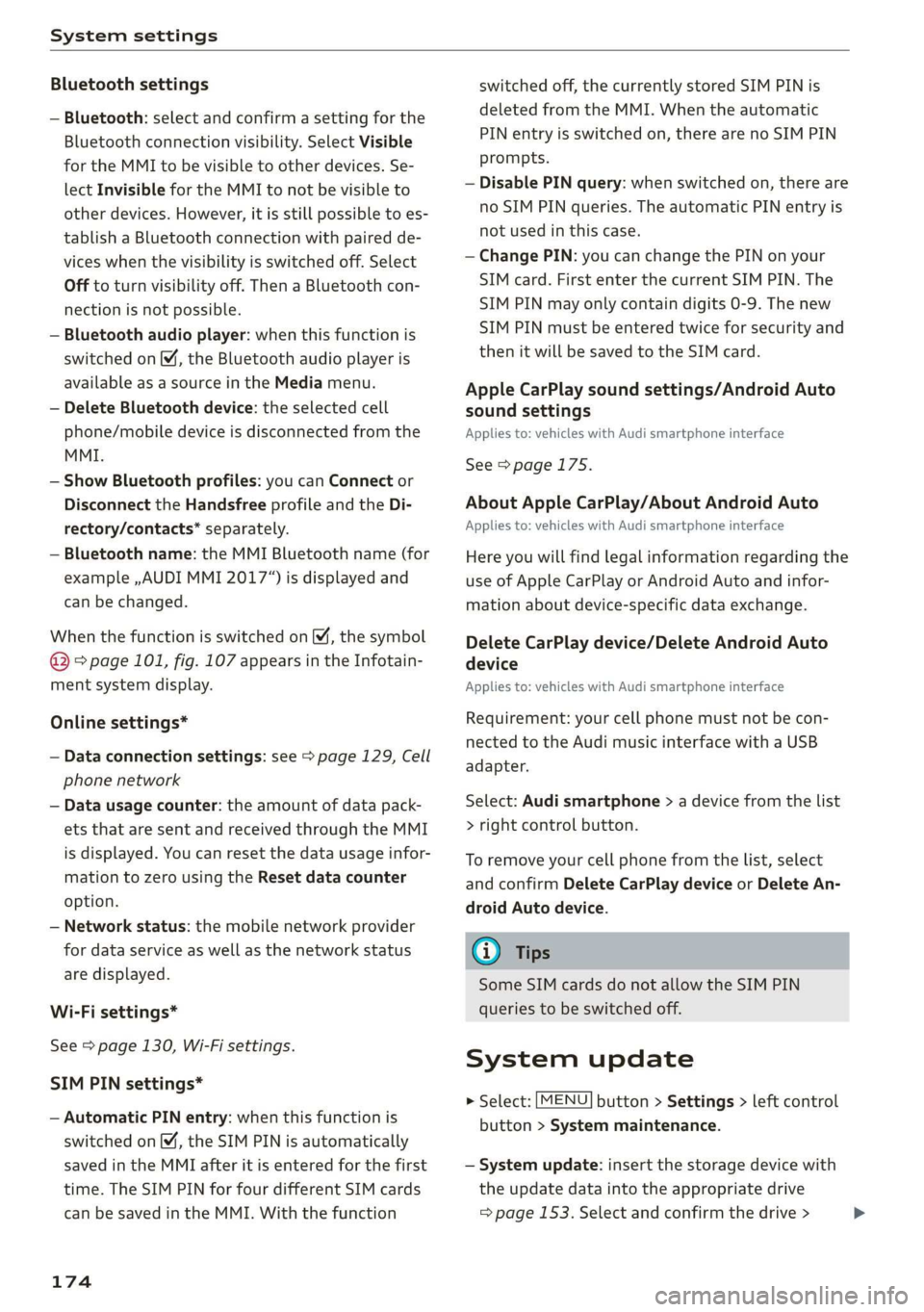
System settings
Bluetooth settings
— Bluetooth: select and confirm a setting for the
Bluetooth connection visibility. Select Visible
for the MMI to be visible to other devices. Se-
lect Invisible for the MMI to not be visible to
other devices. However, it is still possible to es-
tablish a Bluetooth connection with paired de-
vices when the visibility is switched off. Select
Off to turn visibility off. Then a Bluetooth con-
nection is not possible.
— Bluetooth audio player: when this function is
switched on M, the Bluetooth audio player is
available as a source in the Media menu.
— Delete Bluetooth device: the selected cell
phone/mobile device is disconnected from the
MMI.
— Show Bluetooth profiles: you can Connect or
Disconnect the Handsfree profile and the Di-
rectory/contacts* separately.
— Bluetooth name: the MMI Bluetooth name (for
example ,AUDI MMI 2017“) is displayed and
can be changed.
When the function is switched on M, the symbol
@ © page 101, fig. 107 appears in the Infotain-
ment system display.
Online settings*
— Data connection settings: see > page 129, Cell
phone network
— Data usage counter: the amount of data pack-
ets that are sent and received through the MMI
is displayed. You can reset the data usage infor-
mation to zero using the Reset data counter
option.
— Network status: the mobile network provider
for data service as well as the network status
are displayed.
Wi-Fi settings*
See > page 130, Wi-Fi settings.
SIM PIN settings*
— Automatic PIN entry: when this function is
switched on, the SIM PIN is automatically
saved in the MMI after it is entered for the first
time. The SIM PIN for four different SIM cards
can be saved in the MMI. With the function
174
switched off, the currently stored SIM PIN is
deleted from the MMI. When the automatic
PIN entry is switched on, there are no SIM PIN
prompts.
— Disable PIN query: when switched on, there are
no SIM PIN queries. The automatic PIN entry is
not used in this case.
— Change PIN: you can change the PIN on your
SIM card. First enter the current SIM PIN. The
SIM PIN may only contain digits 0-9. The new
SIM PIN must be entered twice for security and
then it will be saved to the SIM card.
Apple CarPlay sound settings/Android Auto
sound settings
Applies to: vehicles with Audi smartphone interface
See > page 175.
About Apple CarPlay/About Android Auto
Applies to: vehicles with Audi smartphone interface
Here you will find legal information regarding the
use of Apple CarPlay or Android Auto and infor-
mation about device-specific data exchange.
Delete CarPlay device/Delete Android Auto
device
Applies to: vehicles with Audi smartphone interface
Requirement: your cell phone must not be con-
nected to the Audi music interface with a USB
adapter.
Select: Audi smartphone > a device from the list
> right control button.
To remove your cell phone from the list, select
and confirm Delete CarPlay device or Delete An-
droid
Auto device.
(i) Tips
Some SIM cards do not allow the SIM PIN
queries to be switched off.
System update
> Select: [MENU] button > Settings > left control
button > System maintenance.
— System update: insert the storage device with
the update data into the appropriate drive
= page 153. Select and confirm the drive > >
Page 177 of 304
8S8012721BA
System settings
Start update. The length of the process de-
pends on the size of the update.
— Reset driver installation: the selected media
driver package is reset to the settings at the
time of delivery.
— Version information: information on the MMI
software version and the navigation database*
software version is displayed. The Software in-
formation function also provides information
on the software contained in the MMI and the
licensing agreement.
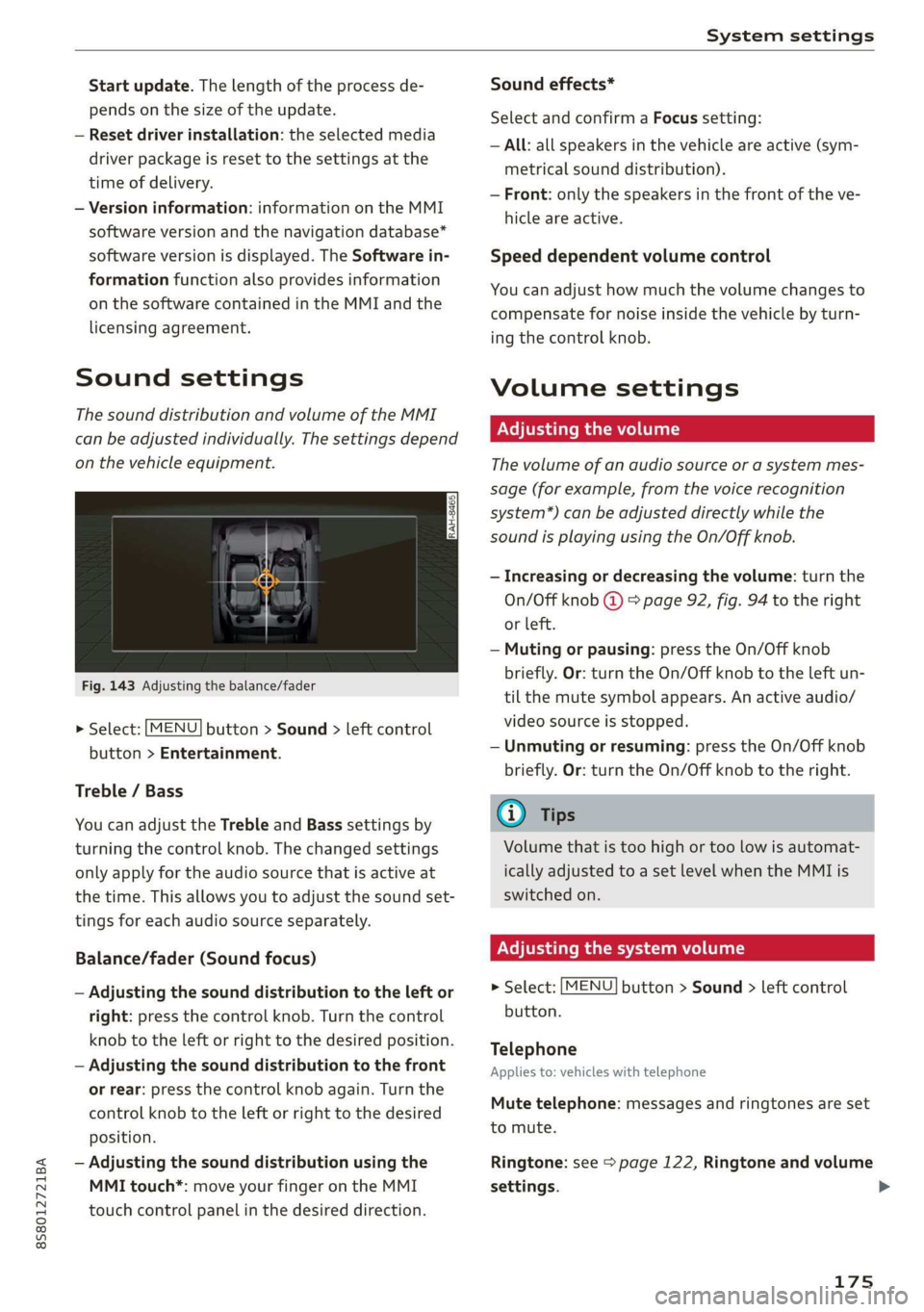
Sound settings
The sound distribution and volume of the MMI
can be adjusted individually. The settings depend
on the vehicle equipment.
Fig. 143 Adjusting the balance/fader
> Select: [MENU] button > Sound > left control
button > Entertainment.
Treble / Bass
You can adjust the Treble and Bass settings by
turning the control knob. The changed settings
only apply for the audio source that is active at
the time. This allows you to adjust the sound set-
tings for each audio source separately.
Balance/fader (Sound focus)
— Adjusting the sound distribution to the left or
right: press the control knob. Turn the control
knob to the left or right to the desired position.
— Adjusting the sound distribution to the front
or rear: press the control knob again. Turn the
control knob to the left or right to the desired
position.
— Adjusting the sound distribution using the
MMI touch*: move your finger on the MMI
touch control panel in the desired direction.
Sound effects*
Select and confirm a Focus setting:
— All: all speakers in the vehicle are active (sym-
metrical sound distribution).
— Front: only the speakers in the front of the ve-
hicle are active.
Speed dependent volume control
You can adjust how much the volume changes to
compensate for noise inside the vehicle by turn-
ing the control knob.
Volume settings
Adjusting the volume
The volume of an audio source or a system mes-
sage (for example, from the voice recognition
system*) can be adjusted directly while the
sound is playing using the On/Off knob.
— Increasing or decreasing the volume: turn the
On/Off knob @) 9 page 92, fig. 94 to the right
or left.
—Muting or pausing: press the On/Off knob
briefly. Or: turn the On/Off knob to the left un-
til the mute symbol appears. An active audio/
video source is stopped.
—Unmuting or resuming: press the On/Off knob
briefly. Or: turn the On/Off knob to the right.
G@) Tips
Volume that is too high or too low is automat-
ically adjusted to a set level when the MMI is
switched on.
Adjusting the system volume
> Select: [MENU] button > Sound > left control
button.
Telephone
Applies to: vehicles with telephone
Mute telephone: messages and ringtones are set
to mute.
Ringtone: see => page 122, Ringtone and volume
settings.
175
Page 178 of 304
System settings
Ringtone volume: you can adjust the volume of
the selected ringtone by turning the control
knob.
Message volume: you can adjust the volume of
the notification for an incoming text message by
turning the control knob.
Microphone input level: you can adjust the vol-
ume during a phone call by turning the control
knob.
Navigation
Applies to: vehicles with navigation system
Voice guidance: see > page 139, Voice guidance.
Voice guidance during phone call: see
=> page 139, Voice guidance.
Voice guidance volume: you can adjust the voice
guidance volume during active route guidance by
turning the control knob.
Entertainment fader: the volume of audio play-
back can be temporarily lowered when the park-
ing system or voice guidance is active.
Voice recognition system
Applies to: vehicles with voice recognition system
Short dialog: prompts in a shorter format can be
switched on or off.
Speech dialog system volume: you can adjust
the volume of the prompts by turning the control
knob.
Parking aid*
You can adjust the signal tone volume by turning
the control knob.
— Adjusting the Front volume: select and con-
firm High, Medium, or Low.
— Adjusting the Rear volume: select and confirm
High, Medium, or Low.
MMI touch volume*
You can adjust the volume of the prompts for the
MMI touch* by turning the control knob.
Audi Heartbeat
You can adjust the volume of Audi Heartbeat by
turning the control knob.
176
G) Tips
Please note that the voice recognition sys-
tem* is not available in Cabriolets that do not
have a factory-installed safety belt micro-
phone.
Restarting the MMI
(reset)
RAH-8611
g
=
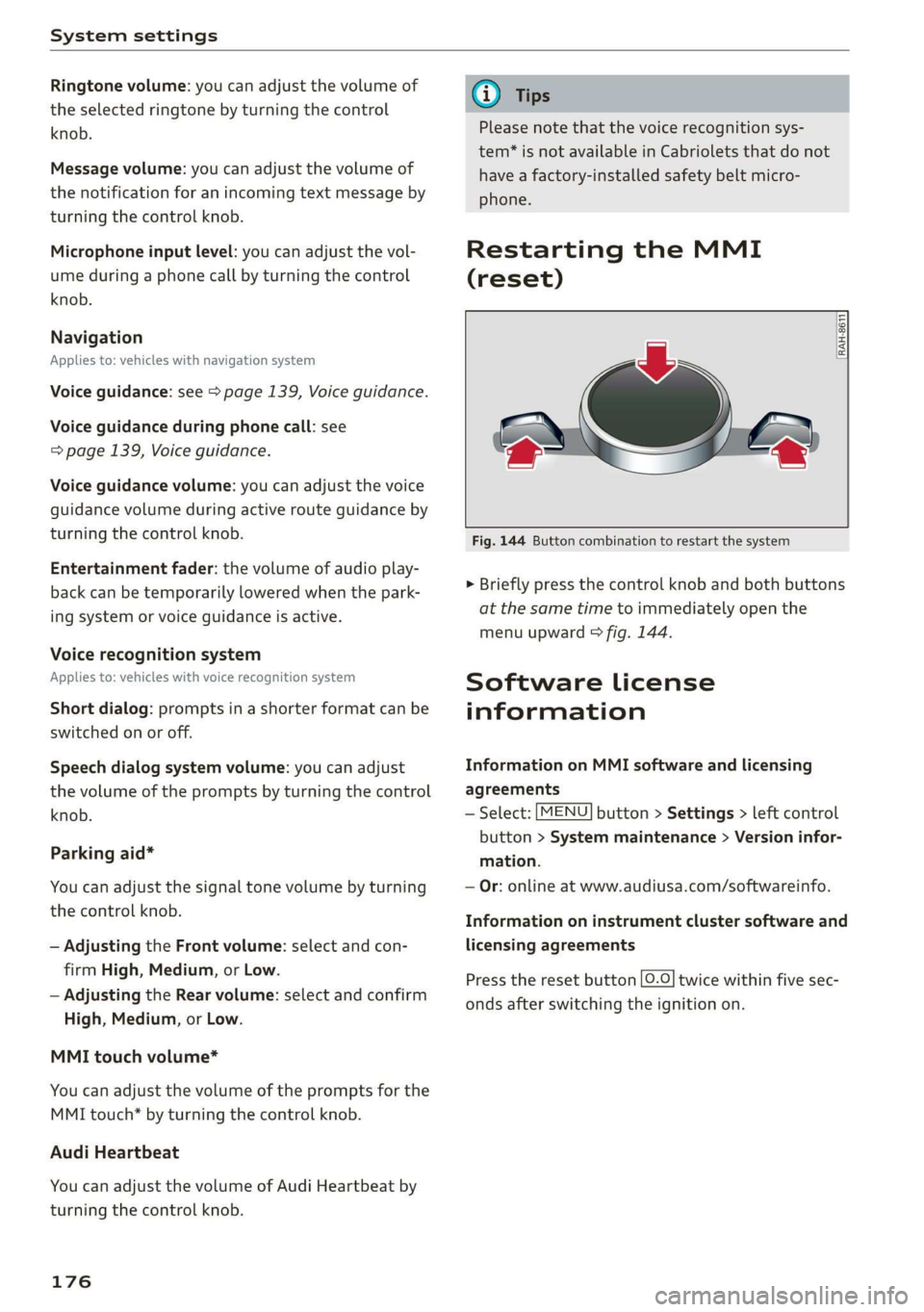
Fig. 144 Button combination to restart the system
> Briefly press the control knob and both buttons
at the same time to immediately open the
menu upward > fig. 144.
Software License
information
Information on MMI software and licensing
agreements
— Select: [MENU] button > Settings > left control
button > System maintenance > Version infor-
mation.
— Or: online at www.audiusa.com/softwareinfo.
Information on instrument cluster software and
licensing agreements
Press the reset button [0.0] twice within five sec-
onds after switching the ignition on.
Page 205 of 304
8S8012721BA
Airbag system
from the airbag as possible. The backrest
must be adjusted to an upright position.
Make sure that the PASSENGER AIR BAG
OFF %; light comes on and stays on all the
time whenever the ignition is switched on.
ZA WARNING
If the PASSENGER AIR BAG OFF %; light does
not go out when an adult is sitting on the
front passenger seat after taking the steps
described above, have the airbag system in-
spected by your Audi dealer before transport-
ing anyone on the front passenger seat.
@ Tips
If the capacitive passenger detection system
determines that the front passenger seat is
empty, the frontal airbag on the passenger
side will be turned off, and the PASSENGER
AIR BAG OFF 3; light will stay on.
Repair, care and disposal of the airbags
Parts of the airbag system are installed at many
different places on your Audi. Installing, remov-
ing, servicing or repairing a part in an area of the
vehicle can damage a part of an airbag system
and prevent that system from working properly
in a collision.
There are some important things you have to
know to make sure that the effectiveness of the
system will not be impaired and that discarded
components do not cause injury or pollute the
environment.
ZA WARNING
Improper care, servicing and repair proce-
dures can increase the risk of personal injury
and death by preventing an airbag from de-
ploying when needed or deploying an airbag
unexpectedly:
— Never cover, obstruct, or change the steer-
ing wheel horn pad or airbag cover or the in-
strument panel or modify them in any way.
— Never attach any objects such as cup holders
or telephone mountings to the surfaces cov-
ering the airbag units.
— For cleaning the horn pad or instrument
panel, use only a soft, dry cloth or one mois-
tened with plain water. Solvents or cleaners
could damage the airbag cover or change
the stiffness or strength of the material so
that the airbag cannot deploy and protect
properly.
— Never repair, adjust, or change any parts of
the airbag system.
— All work on the steering wheel, instrument
panel, front seats or electrical system (in-
cluding the installation of audio equipment,
cellular telephones and CB radios, etc.)
must be performed by a qualified technician
who has the training and special equipment
necessary.
— For any work on the airbag system, we
strongly recommend that you see your au-
thorized Audi dealer or qualified workshop.
— Never modify the front bumper or parts of
the vehicle body.
— Always make sure that the side airbag can
inflate
without interference:
— Never install seat covers or replacement
upholstery over the front seatbacks that
have not been specifically approved by Au-
di.
— Never use additional seat cushions that
cover the areas where the side airbags in-
flate.
— Damage to the original seat covers or to
the seam in the area of the side airbag
module must always be repaired immedi-
ately by an authorized Audi dealer.
— The airbag system can deploy only once. Af-
ter an airbag has been deployed, it must be
replaced with new replacement parts de-
signed and approved especially for your Audi
model version. Replacement of complete
airbag systems or airbag components must
be performed by qualified workshops only.
Make sure that any airbag service action is
entered in your Audi Warranty & Mainte-
nance booklet under AIRBAG REPLACEMENT
RECORD.
— For safety reasons in severe accidents, the
alternator and starter are separated from
203