ad blue AUDI TT ROADSTER 2019 Owner's Guide
[x] Cancel search | Manufacturer: AUDI, Model Year: 2019, Model line: TT ROADSTER, Model: AUDI TT ROADSTER 2019Pages: 304, PDF Size: 80.77 MB
Page 176 of 304
System settings
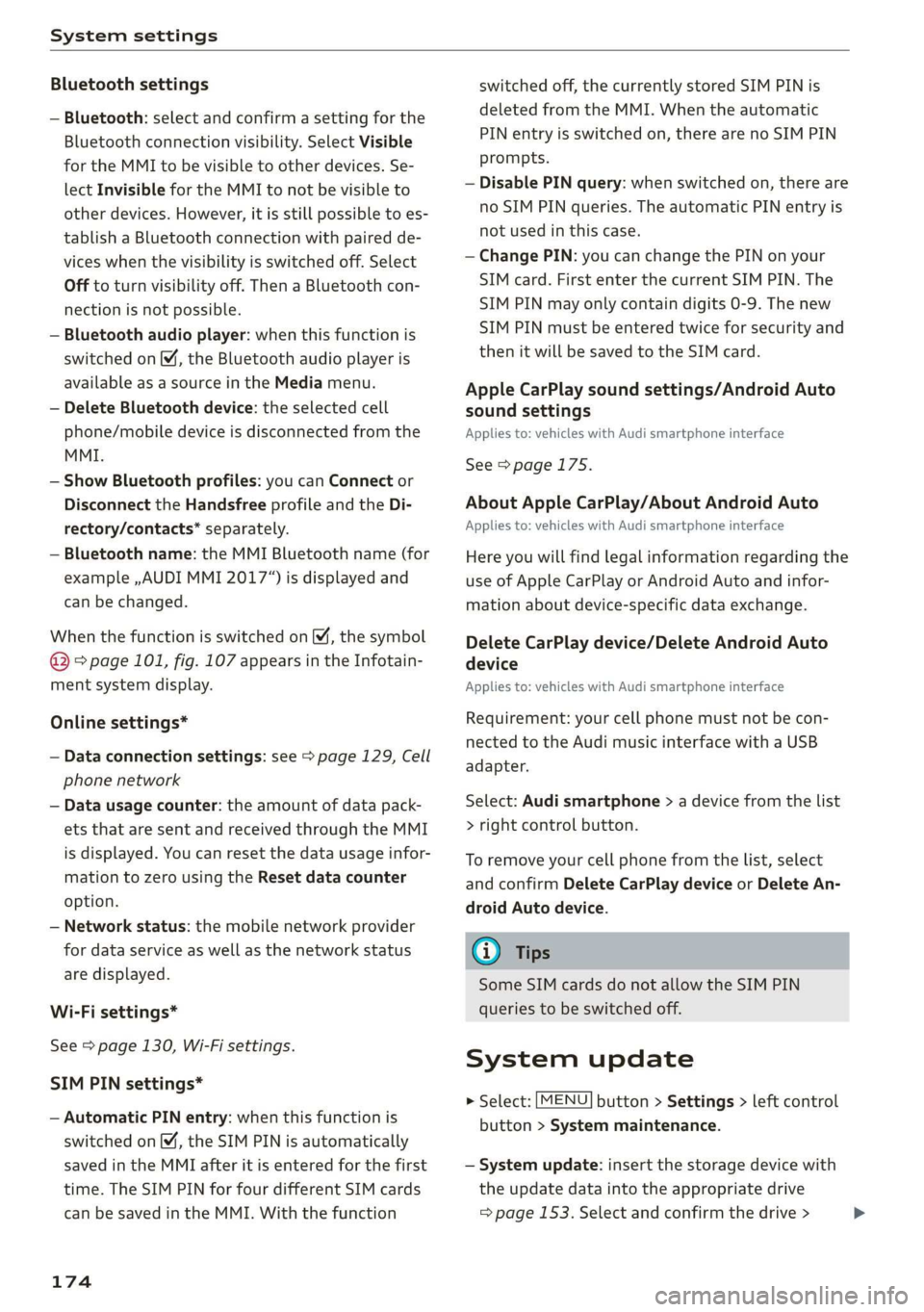
Bluetooth settings
— Bluetooth: select and confirm a setting for the
Bluetooth connection visibility. Select Visible
for the MMI to be visible to other devices. Se-
lect Invisible for the MMI to not be visible to
other devices. However, it is still possible to es-
tablish a Bluetooth connection with paired de-
vices when the visibility is switched off. Select
Off to turn visibility off. Then a Bluetooth con-
nection is not possible.
— Bluetooth audio player: when this function is
switched on M, the Bluetooth audio player is
available as a source in the Media menu.
— Delete Bluetooth device: the selected cell
phone/mobile device is disconnected from the
MMI.
— Show Bluetooth profiles: you can Connect or
Disconnect the Handsfree profile and the Di-
rectory/contacts* separately.
— Bluetooth name: the MMI Bluetooth name (for
example ,AUDI MMI 2017“) is displayed and
can be changed.
When the function is switched on M, the symbol
@ © page 101, fig. 107 appears in the Infotain-
ment system display.
Online settings*
— Data connection settings: see > page 129, Cell
phone network
— Data usage counter: the amount of data pack-
ets that are sent and received through the MMI
is displayed. You can reset the data usage infor-
mation to zero using the Reset data counter
option.
— Network status: the mobile network provider
for data service as well as the network status
are displayed.
Wi-Fi settings*
See > page 130, Wi-Fi settings.
SIM PIN settings*
— Automatic PIN entry: when this function is
switched on, the SIM PIN is automatically
saved in the MMI after it is entered for the first
time. The SIM PIN for four different SIM cards
can be saved in the MMI. With the function
174
switched off, the currently stored SIM PIN is
deleted from the MMI. When the automatic
PIN entry is switched on, there are no SIM PIN
prompts.
— Disable PIN query: when switched on, there are
no SIM PIN queries. The automatic PIN entry is
not used in this case.
— Change PIN: you can change the PIN on your
SIM card. First enter the current SIM PIN. The
SIM PIN may only contain digits 0-9. The new
SIM PIN must be entered twice for security and
then it will be saved to the SIM card.
Apple CarPlay sound settings/Android Auto
sound settings
Applies to: vehicles with Audi smartphone interface
See > page 175.
About Apple CarPlay/About Android Auto
Applies to: vehicles with Audi smartphone interface
Here you will find legal information regarding the
use of Apple CarPlay or Android Auto and infor-
mation about device-specific data exchange.
Delete CarPlay device/Delete Android Auto
device
Applies to: vehicles with Audi smartphone interface
Requirement: your cell phone must not be con-
nected to the Audi music interface with a USB
adapter.
Select: Audi smartphone > a device from the list
> right control button.
To remove your cell phone from the list, select
and confirm Delete CarPlay device or Delete An-
droid
Auto device.
(i) Tips
Some SIM cards do not allow the SIM PIN
queries to be switched off.
System update
> Select: [MENU] button > Settings > left control
button > System maintenance.
— System update: insert the storage device with
the update data into the appropriate drive
= page 153. Select and confirm the drive > >
Page 279 of 304
8S58012721BA
Fuses and bulbs
Fuses and bulbs
Fuses
Replacing fuses
S 6
= o
q
= 2 % a.
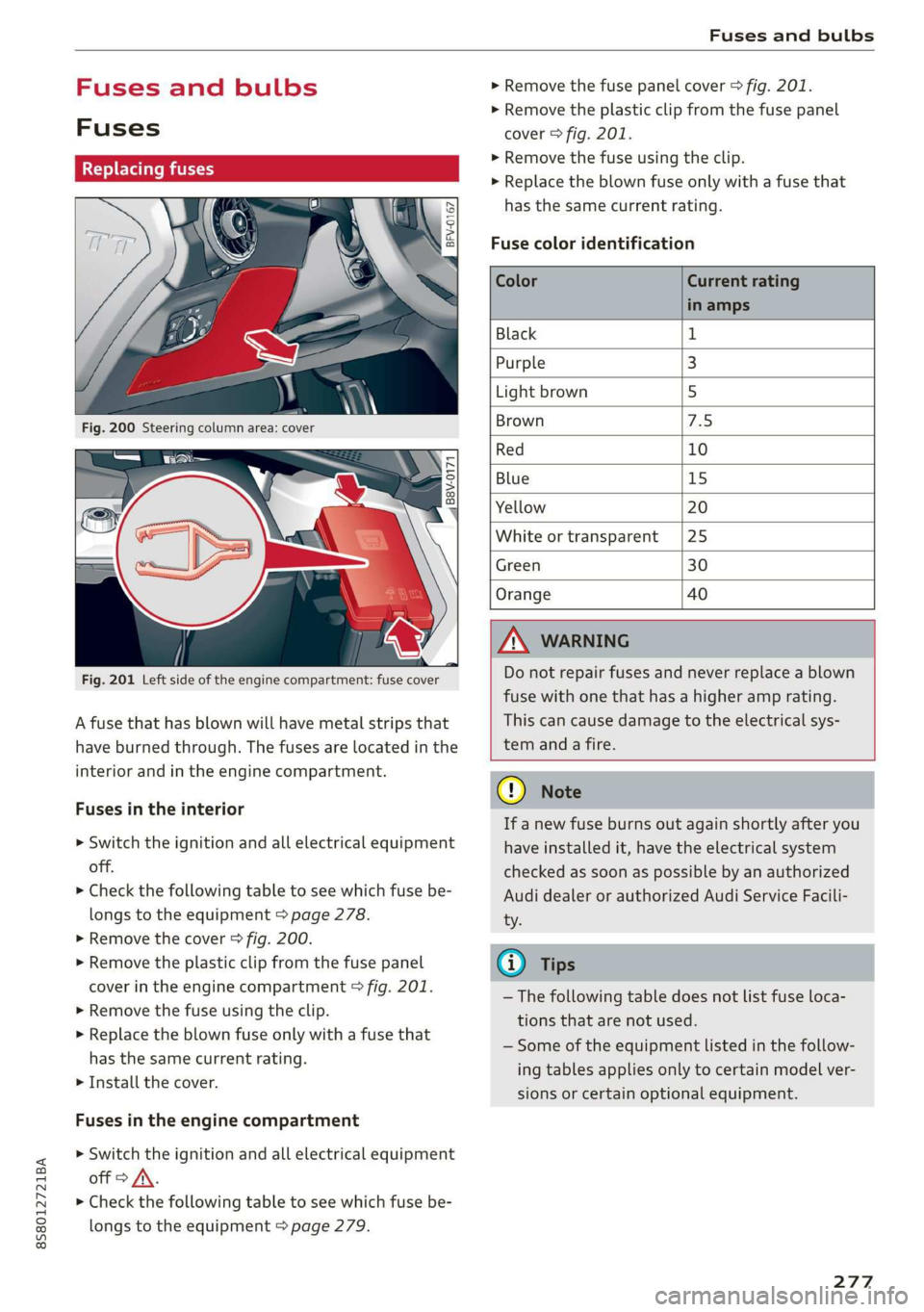
Fig. 201 Left side of the engine compartment: fuse cover
A fuse that has blown will have metal strips that
have burned through. The fuses are located in the
interior and in the engine compartment.
Fuses in the interior
> Switch the ignition and all electrical equipment
off.
> Check the following table to see which fuse be-
longs to the equipment > page 278.
» Remove the cover > fig. 200.
> Remove the plastic clip from the fuse panel
cover in the engine compartment © fig. 201.
> Remove the fuse using the clip.
> Replace the blown fuse only with a fuse that
has the same current rating.
> Install the cover.
Fuses in the engine compartment
> Switch the ignition and all electrical equipment
off > A\.
> Check the following table to see which fuse be-
longs to the equipment > page 279.
> Remove the fuse panel cover > fig. 201.
> Remove the plastic clip from the fuse panel
cover > fig. 201.
> Remove the fuse using the clip.
> Replace the blown fuse only with a fuse that
has the same current rating.
Fuse color identification
Color Current rating
in amps
Black 1
Purple 3
Light brown 5
Brown 1d
Red 10
Blue 15
Yellow 20
White or transparent [25
Green 30
Orange 40
Z\ WARNING
Do not repair fuses and never replace a blown
fuse with one that has a higher amp rating.
This can cause damage to the electrical sys-
tem and a fire.
CG) Note
If a new fuse burns out again shortly after you
have installed it, have the electrical system
checked as soon as possible by an authorized
Audi dealer or authorized Audi Service Facili-
ty.
@) Tips
— The following table does not list fuse loca-
tions that are not used.
— Some of the equipment listed in the follow-
ing tables applies only to certain model ver-
sions or certain optional equipment.
277
Page 289 of 304
8S58012721BA
Index
A
A/C (climate control system) .............. 53
ACCESSOFIES . 6... ee eee 48, 282
Active lane assist... . owes. ss sesmen «oes ee ave 72
Activating vibration warning............. 74
Adjusting steering time................. 74
Cleaning the camera area.............. 263
Indicator light........... 0.00 eee ee eee 73
MO@SSAQGS wees 2 2 wars 5 ¥ sees & ¥ BOS & Eo 73
Switching on/off. « ccsiss «season o 6 wasn e 6 enaew 73
Adaptive UIght seiics 6 eva oo nears os was ¥ wee 78
Adaptive light (indicator light)............ 20
Adjusting the additional display........... 14
Adjusting the air distribution. ............ 53
Adjusting the center console lighting....... 41
Adjusting the sound..............-..00- 175
Adjusting the temperature............... 53
Adjusting the vents............. 0. eee ee 54
Advanced Airbag System
Children... 0.2... eee eee ee 212
GOMPONENUS’. ¢ wees » o eae 4 e eee a vee 196
Frontsairbagse. « ser + 2 ccesn vous eo recon x 194
How the components work together... .. 197
UEDA Gin 1 « sunsce « o vsiscete 0 0 siete ao anmene © exettome 189
Indicator light...........-...0--00 000: 18
Airbag system... 2... eee eee 208
Advanced Airbag System............... 193
CaRC bcs ow averiue 6 ¥ wxicend wo tandeDe Bo ewexare wa aie 203
Child restraints..................000. 212
Components (front airbags)............ 196
Danger of fitting a child safety seat on the
front passenger seat..............00.. 190
Disposal zee: ¢ ¢ ees 2 x seen ¢ » eews 2 2 ees 203
Frontiairbagss. « wee oo wae 6 wamen 6 3 saxon 193
How do the front airbags work?......... 198
How many airbags does my vehicle have?. 196
Important information................ 189
Important safety instructions on the knee
airbagisySteM« « aces s ¢ eaiae & x eae 5 x Bee 206
Kneeiairbagsias = 2 saw 2s cin sue es wo 204
MON
ILOFING weenie 5 ceerese a 6 sonnets a 8 ene © 0! oe 200
PASSENGER AIR BAG light............- 200
Repairs’: = seses + & seine & eeoreys « ¥ caves vo Hare 203
Safety instructions................00- 202
Side airbags .......... 00. sce e eee 206
Warning/Indicator lights.............. 200
When must the system be inspected?.... 200
Alarm system
refer to Anti-theft alarm system.......... 27
Alignment pin (tire change) .............. 268
All-weather lights.................00000. 38
AlUSeaSON tiN@Sbercis ss sce ee ers oo mene ve 254
All wheelidrive wes. 2 ose0 22 cee oe even so 89
Alternative routes........... 0... e eee 139
Ambient lighting'ss « esex + eee 3 s eames so oe 40
AMI
refer to Audi music interface....... 158,159
Android Auto
refer to Audi smartphone interface...... 169
Announcements (settings)
refer to Voice guidance..............-. 139
Anti-freeze
Windshield washer system............. 238
Anti-lock braking system (ABS) ............ 86
Anti-Slip Regulation.................0005 86
Anti-theft alarm system .............0000- 27
Anti-theft wheel bolts..............564. 271
Apple CarPlay
refer to Audi smartphone interface...... 169
ARIINCSE:. cxsusne » 5 swsuins 9 0 snamens oo saree % ¥ omeeete @ » 47
ASAE AY": & esware © & enmee @ a eaves ao esecuae a @ eoasare 48
Aspect ratio (Vid@0) wisi si ieee s aaa see 163
ASR
refer to Anti-Slip Regulation............. 86
Audi connect
refer toconnect....... 0.0 e eee eee eee 125
Audi connect Infotainment
Personal hotspot...............000055 126
Services:overview o.. 6 ci sb ee es ees 127
Audi magnetic ride
refer to Suspension control.............. 78
Audi music interface..............0000- 158
Audi music stream
refer to Wi-Fi... 0.2... cee eee eee eee 156
AUdIO FILS resis «6 arene xe cancers xo wrecene ao eenane & 160
Audio player
Bluetooth audio player................ 155
Wi-Fi audio players. « s was ss sees se ees 156
Audio track. ...... cece eee eee
Audi phone box
Audi smartphone interface.......... 169, 173
Audi virtual cockpit
refer to Instrument cluster.............. 10
287
Page 290 of 304
Index
AUTO
Automatic climate control system........ 53
Automatic headlights...............0.. 38
Auto Lock (central locking) ............... 21
Automatic belt retractor..............-. 185
Automatic climate control system
refer to Climate control system (automatic) . 53
Automatic post-collision braking system.... 86
Automatic transmission................5- 61
DYING tPSiss s caus s 2 eee ss deme se ee ae 64
Emergency: Mode: « sieves «eens a emma se ow 67
Hill descent control................000. 65
Kicked OWiirews x 2 sews « & meee © eames « RoE 66
Malfumetionjans = cvs cw waseews a 6 wrawsos ot ancnnus & 63
Selector lever emergency release......... 68
Selector lever lO¢K ow « « sees = 2 capes y yee 63
Selector lever positions.............000- 62
Shifting manually.................000. 66
Steering wheel with shift paddles........ 66
LiptrOnies. « sass ss wows ¥ wane wo eae « + vam 66
Automatic wiper/washer system..........- 42
Automatic zoom (navigation)............ 142
AUX iNPUt sows s 5 epee so veme s pee es ees 159
Average fuel consumption................ 15
Average speed..... 0.2... cee ee eee eee 15
B
BACK button... 2.6.6... cece eee eee eee 92
Balance(SOUNG) wiesvise « crevice so sistas oxenize « 175
Band
refer to Frequency band............... 147
Bass (sound) .............00.00e eee eee 175
Battery. sors » x sows 2 « seme 9 « acomaee oo camsem 4 236
Charging.................0. cece eae 238
Winter operation. ..........0e eee e eee 237
Before rivitig, swiss = x zavex s » aw 2 x saree 4 oe 177
Better route (navigation)................ 145
Blower... 2... eee eee eee 53)
Bluetooth
Audio player « sean se cgay se eee e pawn vee 155
Connecting acell phone............... 110
SettingS
00... 0. cece eee eee ee eee 174
Boost... eee eee 15
Booster'seats:, « cscs + + wvosse a 0 wssnass oo micas + 217
Boost pressure indicator.............-00. 15
288
Brake fluid
Checking the brake fluid level........... 235
Brakes... 2... eee eee 88
Brak@assist:: « sais 2 < meas ss Raa 2 Bee aS 86
Brake assist systeM...........000--008. 86
Brake: booster’, «cscs» 0 scngee sx cncacn 0 « scuenen 88
Brake fluid
Electromechanical parking brake......... 59
Emergency braking function............. 60
Indicator lights. ...............0 eee eee 16
New brake pads............ ee eee eres 88
Break-in security feature..............0-. 27
Breaking in
New brake pads: «cca. ocean as wee es wee 88
Newtires.. 0.0.0... c cee eee eee 247
Browser
refer to Media center...............0.. 161
Bulb failure (indicator light).............. 19
Bulb replacement..............00 ee eee 279
Buttons
Control panel (MMI)...............---. 92
Cc
Cable (USB adapter/AUX connector cable).. 158
California Proposition 65 Warning........ 228
Battery specific.................-.00. 237
Calllist.. 0.0... eee eee eee Ls
Calloptions.......... 0.0.0 cece eee eee 122
Capacities
Fueltank.....................0.0000. 285
Washer fluid reservoir... ......... 00000 285
Cat K6Yisae + paca g = sete ss ome se dows § eRe 22
Car WaShi's = « wows = ¢ mews ¢ teens xo eg cs 262
Catalytic converter.................000. 227
CD drive (media drives) ................. 154
Cell phone
PlSYING IMUSIC ¢ saese « ¢ seme Fo ROR ¢ 5 eR: 155
also refer to Telephone................ 110
Cell phone compartment
refer to Audi phone box............... 113
Center armrest res: «5 wo vo wmnen ¥ wramen ev oe 47
Central: lockingiecs «= cece oo anaes o seatane vv vee 21
Auto Lock... 2.2... eee eee 21
Convenience key..........-.002- 000 eee 24
Convenience opening and closing......... 29
Mechanically unlocking and locking....... 26