phone AUDI TT ROADSTER 2019 Workshop Manual
[x] Cancel search | Manufacturer: AUDI, Model Year: 2019, Model line: TT ROADSTER, Model: AUDI TT ROADSTER 2019Pages: 304, PDF Size: 80.77 MB
Page 174 of 304
System settings
Tool tips
When this function is switched on M, your MMI
shows you tips for input. The frequency of how
often it displays decreases with time. You can
switch off the operating tips at any time.
Speech dialog system
Applies to: vehicles with voice recognition system
Command display: when this function is switch-
ed on, the MMI will show you the possible
commands for voice input in the respective
menu. You can switch the function off at any
time.
Short dialog: when this function is switched on
, a shorter form of the prompts is used. You
can switch the function off at any time.
Speech dialog system volume: you can adjust
the volume of the prompts by turning the control
knob.
Individual speech training (only when the vehi-
cle is stationary): you can adapt the voice recog-
nition system to your voice or pronunciation in or-
der to improve the system's ability to recognize
your speech. Individual speech training is com-
prised of 20 speech entries that consist of com-
mands and sequences of numbers. You can de-
lete the programmed voice training with the Re-
set individual speech training function.
Factory settings
The following functions can be reset to the facto-
ry default settings:
— Sound settings
— Radio
— Media settings
—Jukebox*
— Directory*
— Telephone*
— Bluetooth and Wi-Fi*
— Navigation settings*
— Navigation and online memory*
— Voice recognition system*
— Message settings*
— Apps*
— Tool tips
— Audi connect*
172
You can select the desired functions individually
or all at once with the option Select all entries.
Select and confirm Restore factory settings.
G) Tips
— Make sure that not only the settings were
deleted but also the stored data, if necessa-
ry.
— Please note that the voice recognition sys-
tem* is not available in Cabriolets that do
not have a factory-installed safety belt mi-
crophone.
Connection manager
Introduction
The connection manager provides an overview of
your connected devices and their network status.
> Select: [MENU] button > Settings > left control
button > MMI settings > Connection manager.
> Select and confirm a menu item.
If a mobile device was already connected and you
select and confirm the corresponding menu item,
the
device name and connection status are dis-
played under the menu item.
You can individually Connect (M) or Disconnect
(_) a paired device.
Requirement:
— The vehicle must be stationary and the ignition
must be switched on.
— The Bluetooth settings will open on your mo-
bile device during the connection setup.
— The Bluetooth function and visibility of the MMI
= page 174 and mobile device must be switch-
ed on.
— The mobile device to be connected must not be
connected to any other Bluetooth device.
Primary phone
Applies to: vehicles with telephone
— Connect new device: search for and connect a
cell phone.
Page 175 of 304
8S8012721BA
System settings
— List of devices already paired: select your cell — List of devices already paired: select a Blue-
phone from the list of all the devices that are tooth device from the list of all the devices that
already paired. are already paired.
Wi-Fi audio player
Applies to: vehicles with telephone Requirement: the Wi-Fi hotspot on the MMI
= page 130 and the Wi-Fi on your Wi-Fi audio
— Connect new device: search for and connect a player must be switched on.
cell phone.
— List of devices already paired: select your cell
phone from the list of all the devices that are
already paired. — Disconnect Wi-Fi audio player: deactivate the
Wi-Fi on your Wi-Fi capable device. The device
will be automatically removed from the list.
— Connect new device: press the control knob.
Search for and connect a Wi-Fi capable device.
PELE Mela a-\a a le)a)
Applies to: vehicles with Audi connect @) N
ote
— Connect new device: search for and connect a Always follow the information found in >@ in
mobile device (such as a smartphone). General information on page 125.
— List of devices already paired: select your cell
phone from the list of all the devices that are 7
. : aa . Directory
already paired. Or: insert a mini SIM card into Applies tor vehicles with telephone
the SIM card reader*> page 126.
Display contacts from a cell phone (or an addi-
(@) Note tional cell phone).
Always follow the information found in >@ in Requirement: cell phones must not be connected
General information on page 125. to the MMI through the Bluetooth remote SIM
access profile or through the Handsfree profile.
myAudi app
Applies to: vehicles with Audi connect
— Connect new device: search for and connect a
new cell phone.
Requirement: the myAudi app must be installed — List of devices already paired: select your cell
and open on your mobile device. phone from the list of all the cell phones that
. are already paired.
— Connect new device: search for and connect a yP
mobile device (such as a smartphone).
— List of devices already paired: select your mo- Audi smartphone interface
bile device from the list of all the devices that Applies to: vehicles with Audi smartphone interface
are already paired. — Connect your cell phone to the Audi music in-
terface > page 159 using a USB adapter
Audio player => page 158, fig. 135.
Applies to: vehicles with Bluetooth or Wi-Fi audio player — Select your cell phone from the list of cell
phones that have already been connected.
Bluetooth player
Requirement: the Bluetocth function and visibili- EER
ty must be switched on in the MMI > page 174
and on the Bluetooth audio player. Depending on the selected function, you can use
the
right control button to access the available
— Connect new device: press the control knob. 3 : . i
additional options in the connection manager. >
Select Bluetooth audio player. Search for and
connect a mobile device.
173
Page 176 of 304
System settings
Bluetooth settings
— Bluetooth: select and confirm a setting for the
Bluetooth connection visibility. Select Visible
for the MMI to be visible to other devices. Se-
lect Invisible for the MMI to not be visible to
other devices. However, it is still possible to es-
tablish a Bluetooth connection with paired de-
vices when the visibility is switched off. Select
Off to turn visibility off. Then a Bluetooth con-
nection is not possible.
— Bluetooth audio player: when this function is
switched on M, the Bluetooth audio player is
available as a source in the Media menu.
— Delete Bluetooth device: the selected cell
phone/mobile device is disconnected from the
MMI.
— Show Bluetooth profiles: you can Connect or
Disconnect the Handsfree profile and the Di-
rectory/contacts* separately.
— Bluetooth name: the MMI Bluetooth name (for
example ,AUDI MMI 2017“) is displayed and
can be changed.
When the function is switched on M, the symbol
@ © page 101, fig. 107 appears in the Infotain-
ment system display.
Online settings*
— Data connection settings: see > page 129, Cell
phone network
— Data usage counter: the amount of data pack-
ets that are sent and received through the MMI
is displayed. You can reset the data usage infor-
mation to zero using the Reset data counter
option.
— Network status: the mobile network provider
for data service as well as the network status
are displayed.
Wi-Fi settings*
See > page 130, Wi-Fi settings.
SIM PIN settings*
— Automatic PIN entry: when this function is
switched on, the SIM PIN is automatically
saved in the MMI after it is entered for the first
time. The SIM PIN for four different SIM cards
can be saved in the MMI. With the function
174
switched off, the currently stored SIM PIN is
deleted from the MMI. When the automatic
PIN entry is switched on, there are no SIM PIN
prompts.
— Disable PIN query: when switched on, there are
no SIM PIN queries. The automatic PIN entry is
not used in this case.
— Change PIN: you can change the PIN on your
SIM card. First enter the current SIM PIN. The
SIM PIN may only contain digits 0-9. The new
SIM PIN must be entered twice for security and
then it will be saved to the SIM card.
Apple CarPlay sound settings/Android Auto
sound settings
Applies to: vehicles with Audi smartphone interface
See > page 175.
About Apple CarPlay/About Android Auto
Applies to: vehicles with Audi smartphone interface
Here you will find legal information regarding the
use of Apple CarPlay or Android Auto and infor-
mation about device-specific data exchange.
Delete CarPlay device/Delete Android Auto
device
Applies to: vehicles with Audi smartphone interface
Requirement: your cell phone must not be con-
nected to the Audi music interface with a USB
adapter.
Select: Audi smartphone > a device from the list
> right control button.
To remove your cell phone from the list, select
and confirm Delete CarPlay device or Delete An-
droid
Auto device.
(i) Tips
Some SIM cards do not allow the SIM PIN
queries to be switched off.
System update
> Select: [MENU] button > Settings > left control
button > System maintenance.
— System update: insert the storage device with
the update data into the appropriate drive
= page 153. Select and confirm the drive > >
Page 177 of 304
8S8012721BA
System settings
Start update. The length of the process de-
pends on the size of the update.
— Reset driver installation: the selected media
driver package is reset to the settings at the
time of delivery.
— Version information: information on the MMI
software version and the navigation database*
software version is displayed. The Software in-
formation function also provides information
on the software contained in the MMI and the
licensing agreement.
Sound settings
The sound distribution and volume of the MMI
can be adjusted individually. The settings depend
on the vehicle equipment.
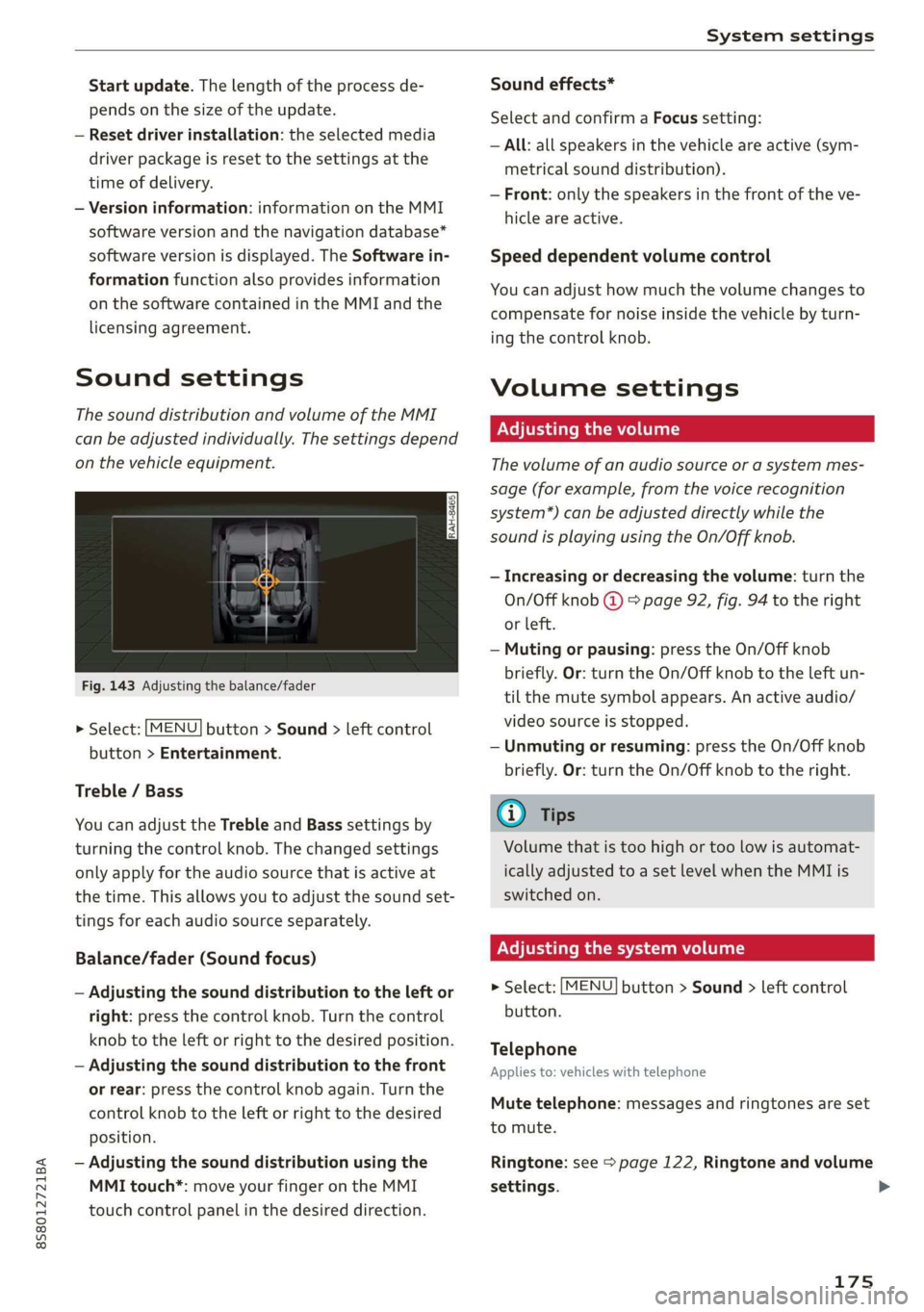
Fig. 143 Adjusting the balance/fader
> Select: [MENU] button > Sound > left control
button > Entertainment.
Treble / Bass
You can adjust the Treble and Bass settings by
turning the control knob. The changed settings
only apply for the audio source that is active at
the time. This allows you to adjust the sound set-
tings for each audio source separately.
Balance/fader (Sound focus)
— Adjusting the sound distribution to the left or
right: press the control knob. Turn the control
knob to the left or right to the desired position.
— Adjusting the sound distribution to the front
or rear: press the control knob again. Turn the
control knob to the left or right to the desired
position.
— Adjusting the sound distribution using the
MMI touch*: move your finger on the MMI
touch control panel in the desired direction.
Sound effects*
Select and confirm a Focus setting:
— All: all speakers in the vehicle are active (sym-
metrical sound distribution).
— Front: only the speakers in the front of the ve-
hicle are active.
Speed dependent volume control
You can adjust how much the volume changes to
compensate for noise inside the vehicle by turn-
ing the control knob.
Volume settings
Adjusting the volume
The volume of an audio source or a system mes-
sage (for example, from the voice recognition
system*) can be adjusted directly while the
sound is playing using the On/Off knob.
— Increasing or decreasing the volume: turn the
On/Off knob @) 9 page 92, fig. 94 to the right
or left.
—Muting or pausing: press the On/Off knob
briefly. Or: turn the On/Off knob to the left un-
til the mute symbol appears. An active audio/
video source is stopped.
—Unmuting or resuming: press the On/Off knob
briefly. Or: turn the On/Off knob to the right.
G@) Tips
Volume that is too high or too low is automat-
ically adjusted to a set level when the MMI is
switched on.
Adjusting the system volume
> Select: [MENU] button > Sound > left control
button.
Telephone
Applies to: vehicles with telephone
Mute telephone: messages and ringtones are set
to mute.
Ringtone: see => page 122, Ringtone and volume
settings.
175
Page 178 of 304
System settings
Ringtone volume: you can adjust the volume of
the selected ringtone by turning the control
knob.
Message volume: you can adjust the volume of
the notification for an incoming text message by
turning the control knob.
Microphone input level: you can adjust the vol-
ume during a phone call by turning the control
knob.
Navigation
Applies to: vehicles with navigation system
Voice guidance: see > page 139, Voice guidance.
Voice guidance during phone call: see
=> page 139, Voice guidance.
Voice guidance volume: you can adjust the voice
guidance volume during active route guidance by
turning the control knob.
Entertainment fader: the volume of audio play-
back can be temporarily lowered when the park-
ing system or voice guidance is active.
Voice recognition system
Applies to: vehicles with voice recognition system
Short dialog: prompts in a shorter format can be
switched on or off.
Speech dialog system volume: you can adjust
the volume of the prompts by turning the control
knob.
Parking aid*
You can adjust the signal tone volume by turning
the control knob.
— Adjusting the Front volume: select and con-
firm High, Medium, or Low.
— Adjusting the Rear volume: select and confirm
High, Medium, or Low.
MMI touch volume*
You can adjust the volume of the prompts for the
MMI touch* by turning the control knob.
Audi Heartbeat
You can adjust the volume of Audi Heartbeat by
turning the control knob.
176
G) Tips
Please note that the voice recognition sys-
tem* is not available in Cabriolets that do not
have a factory-installed safety belt micro-
phone.
Restarting the MMI
(reset)
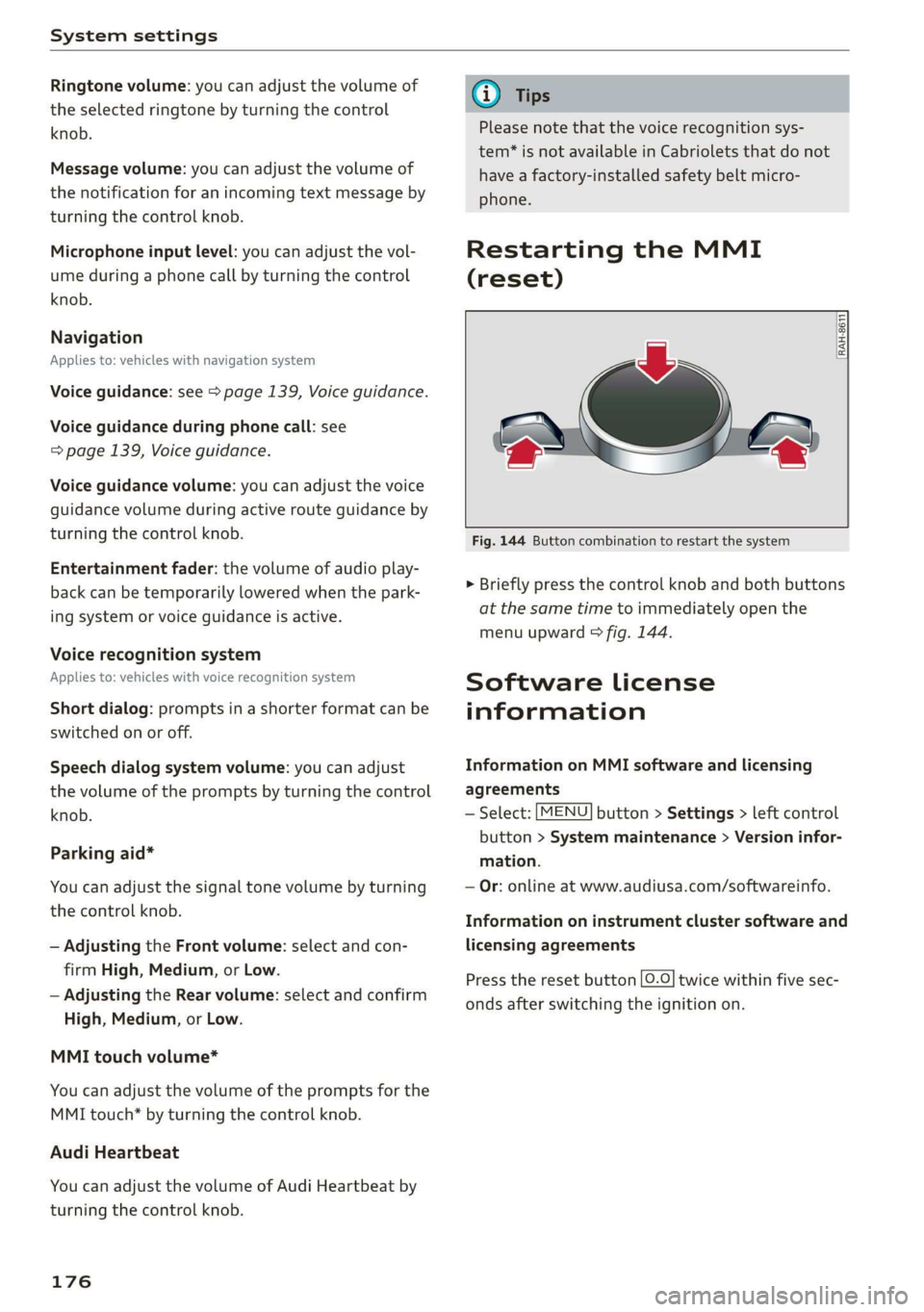
RAH-8611
g
=
Fig. 144 Button combination to restart the system
> Briefly press the control knob and both buttons
at the same time to immediately open the
menu upward > fig. 144.
Software License
information
Information on MMI software and licensing
agreements
— Select: [MENU] button > Settings > left control
button > System maintenance > Version infor-
mation.
— Or: online at www.audiusa.com/softwareinfo.
Information on instrument cluster software and
licensing agreements
Press the reset button [0.0] twice within five sec-
onds after switching the ignition on.
Page 179 of 304
8S8012721BA
Safe driving
Safe driving
Basics
SER Nails mali
Please remember - safety first!
The individual safety features of your vehicle can
work together as a system to help protect you
and
your passengers in a wide range of accidents.
These features cannot work as a system if they
are not always correctly adjusted and correctly
used.
This chapter contains important information,
tips, instructions and warnings that you need to
read and observe for your own safety, the safety
of your passengers and others. We have summar-
ized here what you need to know about safety
belts, airbags, child restraints as well as child
safety. Your safety is for us priority number 1. Al-
ways observe the information and warnings in
this section - for your own safety as well as that
of your passengers.
The information in this section applies to all
model versions of your vehicle. Some of the fea-
tures described in this sections may be standard
equipment on some models, or may be optional
equipment on others. If you are not sure, ask
your authorized Audi dealer.
ZA WARNING
— Always make sure that you follow the in-
structions and heed the WARNINGS in this
Manual. It is in your interest and in the in-
terest of your passengers.
— Always keep the complete Owner's Litera-
ture in your Audi when you lend or sell your
vehicle so that this important information
will always be available to the driver and
passengers.
— Always keep the Owner's literature handy so
that you can find it easily if you have ques-
tions.
Important things to do before driving
Safety is everybody's job! Vehicle and occupant
safety always depends on the informed and care-
ful driver.
For your safety and the safety of your passenger,
before driving always:
> Make sure that all lights and signals are operat-
ing correctly.
> Make sure that the tire pressure is correct.
> Make sure that all windows are clean and afford
good visibility to the outside.
> Secure all luggage and other items carefully
= page 50, > page 49.
> Make sure that nothing can interfere with the
pedals.
> Adjust seat and mirrors correctly for your
height.
> Make sure to use the right child restraint cor-
rectly to protect children > page 210, Child
safety.
> Sit properly in your seat and make sure that
your passenger do the same © page 46, Front
seats.
> Fasten your safety belt and wear it properly. Al-
so instruct your passenger to fasten his safety
belt properly > page 182.
What impairs driving safety?
Safe driving is directly related to the condition of
the vehicle, the driver as well as the driver’s abili-
ty to concentrate on the road without being dis-
tracted.
The driver is responsible for the safety of the ve-
hicle and all of its occupants. If your ability to
drive is impaired, safety risks for everybody in the
vehicle increase and you also become a hazard to
everyone else on the road > /\. Therefore:
> Do not let yourself be distracted by passenger
or by using a cellular telephone.
> NEVER drive when your driving ability is im-
paired (by medications, alcohol, drugs, etc.).
> Observe all traffic laws, rules of the road and
speed limits and plain common sense.
> ALWAYS adjust your speed to road, traffic and
weather conditions.
177
>
Page 195 of 304
8S58012721BA
Airbag system
Front airbags
pyre al eee mice a TLeey-le (4
The airbag system can provide supplemental
protection to properly restrained front seat occu-
pants.
= x 2
z 6
BFV-0063
iff i
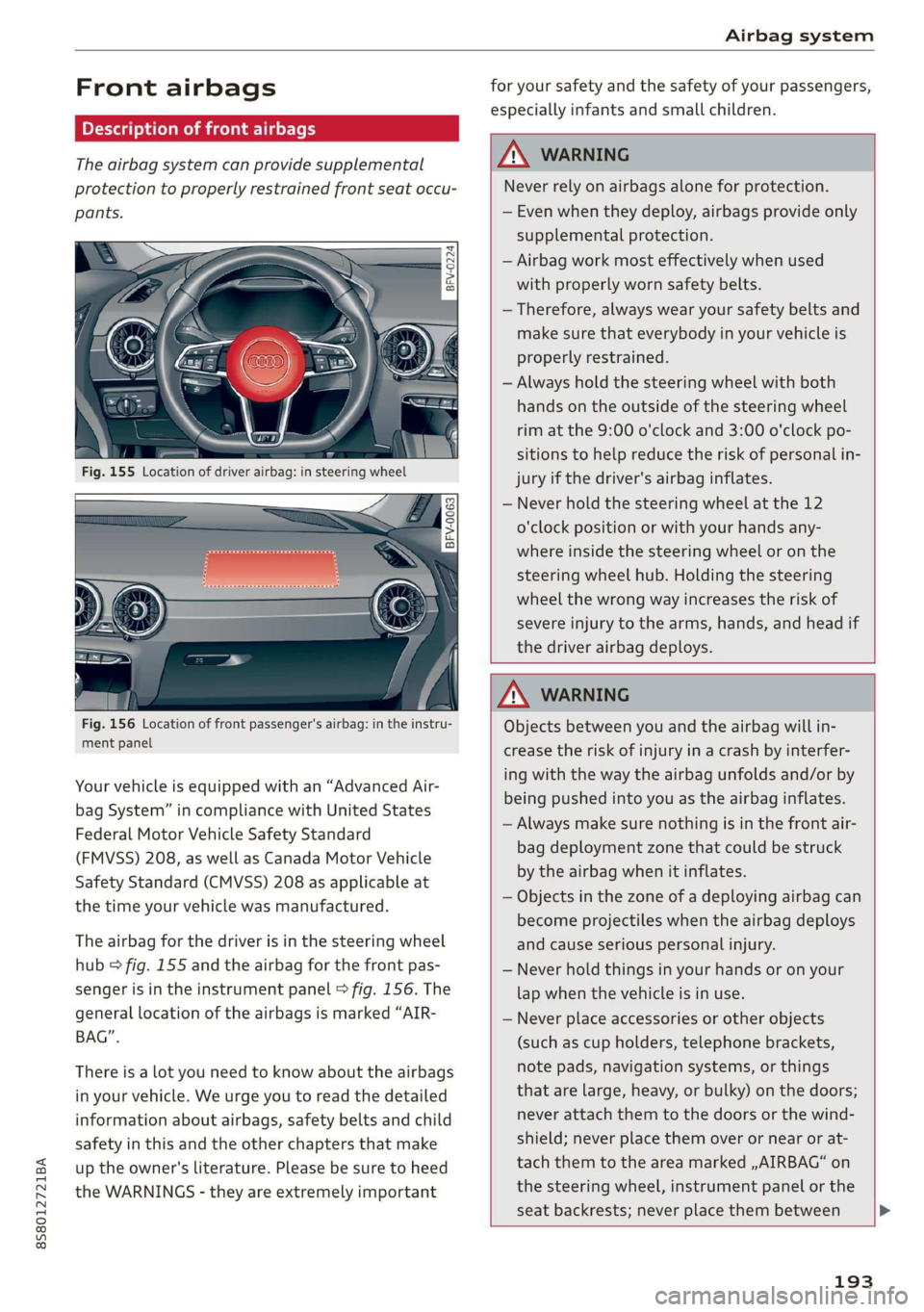
Fig. 156 Location of front passenger's airbag: in the instru-
ment panel
Your vehicle is equipped with an “Advanced Air-
bag System” in compliance with United States
Federal Motor Vehicle Safety Standard
(FMVSS) 208, as well as Canada Motor Vehicle
Safety Standard (CMVSS) 208 as applicable at
the time your vehicle was manufactured.
The airbag for the driver is in the steering wheel
hub > fig. 155 and the airbag for the front pas-
senger is in the instrument panel © fig. 156. The
general location of the airbags is marked “AIR-
BAG”.
There is a lot you need to know about the airbags
in your vehicle. We urge you to read the detailed
information about airbags, safety belts and child
safety in this and the other chapters that make
up the owner's literature. Please be sure to heed
the WARNINGS - they are extremely important
for your safety and the safety of your passengers,
especially infants and small children.
ZA\ WARNING
Never rely on airbags alone for protection.
— Even when they deploy, airbags provide only
supplemental protection.
— Airbag work most effectively when used
with properly worn safety belts.
— Therefore, always wear your safety belts and
make sure that everybody in your vehicle is
properly restrained.
— Always hold the steering wheel with both
hands on the outside of the steering wheel
rim at the 9:00 o'clock and 3:00 o'clock po-
sitions to help reduce the risk of personal in-
jury if the driver's airbag inflates.
— Never hold the steering wheel at the 12
o'clock position or with your hands any-
where inside the steering wheel or on the
steering wheel hub. Holding the steering
wheel the wrong way increases the risk of
severe injury to the arms, hands, and head if
the driver airbag deploys.
ZA\ WARNING
Objects between you and the airbag will in-
crease the risk of injury in a crash by interfer-
ing with the way the airbag unfolds and/or by
being pushed into you as the airbag inflates.
— Always make sure nothing is in the front air-
bag deployment zone that could be struck
by the airbag when it inflates.
— Objects in the zone of a deploying airbag can
become projectiles when the airbag deploys
and cause serious personal injury.
— Never hold things in your hands or on your
lap when the vehicle is in use.
— Never place accessories or other objects
(such as cup holders, telephone brackets,
note pads, navigation systems, or things
that are large, heavy, or bulky) on the doors;
never attach them to the doors or the wind-
shield; never place them over or near or at-
tach them to the area marked ,,AIRBAG“ on
the steering wheel, instrument panel or the
seat backrests; never place them between
193
Page 201 of 304
8S8012721BA
Airbag system
— when the electrical capacitance measured by
the capacitive passenger detection system for
the front passenger seat indicates that the pas-
senger side frontal airbag must be switched off
by the electronic control unit (the PASSENGER
AIR BAG OFF %; light > page 200 and how they
work comes on and stays on).
ZA\ WARNING
Sitting in the wrong position can increase the
risk of serious injury in crashes.
—To reduce the risk of injury when the airbags
inflate, the driver and passengers must al-
ways sit in an upright position, must not
lean against or place any part of their body
too close to the area where the airbags are
located.
— Occupants who are unbelted, out of position
or too close to the airbag can be seriously in-
jured by an airbag as it unfolds with great
force in the blink of an eye > page 190.
Z\ WARNING
A child in a rearward-facing child seat instal-
led on the front passenger seat will be seri-
ously injured and can be killed if the front air-
bag inflates - even with an Advanced Airbag
System.
— The inflating airbag will hit the child seat or
infant carrier with great force and will
smash the child seat and child against the
backrest, center armrest, door or roof.
— Never install a rearward facing child safety
seat on the front passenger seat unless the
PASSENGER AIR BAG OFF %; light comes
on and stays on. If the PASSENGER AIR
BAG OFF #%; light does not come on and stay
on, the inflating airbag will hit the child
safety seat or infant carrier with great force
and will smash the child safety seat and
child against the backrest, door or roof.
Have the airbag system inspected immedi-
ately by your authorized Audi dealer.
ZA WARNING
Objects between you and the airbag will in-
ing with the way the airbag unfolds or by be-
ing pushed into you as the airbag inflates.
— Never hold things in your hands or on your
lap when the vehicle is in use.
— Never transport items on or in the area of
the front passenger seat. Objects could
move into the area of the front airbags dur-
ing braking or other sudden maneuver and
become dangerous projectiles that can
cause serious personal injury if the airbags
inflate.
— Never place or attach accessories or other
objects (such as cup holders, telephone
brackets, large, heavy or bulky objects) on
the doors, over or near the area marked
“AIRBAG” on the steering wheel, instrument
panel, seat backrests or between those
areas and yourself. These objects could
cause injury in a crash, especially when the
airbags inflate.
— Never recline the front passenger's seat to
transport objects. Items can also move into
the area of the side airbag or the front air-
bag during braking or in a sudden maneuver.
Objects near the airbags can become projec-
tiles and cause injury, particularly when the
seat is reclined.
— Never place or transport objects on the front
passenger seat. Objects on the front passen-
ger seat could cause the capacitive sensor in
the seat to signal to airbag system that the
seat is occupied by a person when it in fact is
not, or that the person on the seat is heavier
than he or she actually is. The change in
electric capacitance because of such objects
can cause the passenger front airbag to be
turned on when it should be off, or can
cause the airbag to work in a way that is dif-
ferent from the way it would have worked
without objects on the seat.
— Always make sure that there is nothing on
the front passenger seat that will cause the
capacitive passenger detection system in
the seat to signal to the Airbag System that
the seat is occupied by a person when it is
not, or to signal that it is occupied by some-
one who is heavier than the person actually
crease the risk of injury in a crash by interfer-
199
Page 205 of 304
8S8012721BA
Airbag system
from the airbag as possible. The backrest
must be adjusted to an upright position.
Make sure that the PASSENGER AIR BAG
OFF %; light comes on and stays on all the
time whenever the ignition is switched on.
ZA WARNING
If the PASSENGER AIR BAG OFF %; light does
not go out when an adult is sitting on the
front passenger seat after taking the steps
described above, have the airbag system in-
spected by your Audi dealer before transport-
ing anyone on the front passenger seat.
@ Tips
If the capacitive passenger detection system
determines that the front passenger seat is
empty, the frontal airbag on the passenger
side will be turned off, and the PASSENGER
AIR BAG OFF 3; light will stay on.
Repair, care and disposal of the airbags
Parts of the airbag system are installed at many
different places on your Audi. Installing, remov-
ing, servicing or repairing a part in an area of the
vehicle can damage a part of an airbag system
and prevent that system from working properly
in a collision.
There are some important things you have to
know to make sure that the effectiveness of the
system will not be impaired and that discarded
components do not cause injury or pollute the
environment.
ZA WARNING
Improper care, servicing and repair proce-
dures can increase the risk of personal injury
and death by preventing an airbag from de-
ploying when needed or deploying an airbag
unexpectedly:
— Never cover, obstruct, or change the steer-
ing wheel horn pad or airbag cover or the in-
strument panel or modify them in any way.
— Never attach any objects such as cup holders
or telephone mountings to the surfaces cov-
ering the airbag units.
— For cleaning the horn pad or instrument
panel, use only a soft, dry cloth or one mois-
tened with plain water. Solvents or cleaners
could damage the airbag cover or change
the stiffness or strength of the material so
that the airbag cannot deploy and protect
properly.
— Never repair, adjust, or change any parts of
the airbag system.
— All work on the steering wheel, instrument
panel, front seats or electrical system (in-
cluding the installation of audio equipment,
cellular telephones and CB radios, etc.)
must be performed by a qualified technician
who has the training and special equipment
necessary.
— For any work on the airbag system, we
strongly recommend that you see your au-
thorized Audi dealer or qualified workshop.
— Never modify the front bumper or parts of
the vehicle body.
— Always make sure that the side airbag can
inflate
without interference:
— Never install seat covers or replacement
upholstery over the front seatbacks that
have not been specifically approved by Au-
di.
— Never use additional seat cushions that
cover the areas where the side airbags in-
flate.
— Damage to the original seat covers or to
the seam in the area of the side airbag
module must always be repaired immedi-
ately by an authorized Audi dealer.
— The airbag system can deploy only once. Af-
ter an airbag has been deployed, it must be
replaced with new replacement parts de-
signed and approved especially for your Audi
model version. Replacement of complete
airbag systems or airbag components must
be performed by qualified workshops only.
Make sure that any airbag service action is
entered in your Audi Warranty & Mainte-
nance booklet under AIRBAG REPLACEMENT
RECORD.
— For safety reasons in severe accidents, the
alternator and starter are separated from
203
Page 211 of 304
8S8012721BA
Airbag system
by being pushed into you as the airbag in-
flates.
— Never place or attach accessories or other
objects (such as cup holders, telephone
brackets, or even large, bulky objects) on
the doors, over or near the area marked
“AIRBAG” on the seat backrests.
— Such objects and accessories can become
dangerous projectiles and cause injury
when the supplemental side airbag de-
ploys.
— Never carry any objects or pets in the de-
ployment space between them and the air-
bags or allow children or other passengers
to travel in this position.
— Always prevent the side airbags from being
damaged by heavy objects knocking against
or hitting the sides of the seatbacks.
— The airbag system can only be triggered
once. If the airbag has been triggered, the
system must be replaced by an authorized
Audi dealership.
— Damage (cracks, deep scratches etc.) to the
original seat covers or to the seam in the
area of the side airbag module must always
be repaired immediately by an authorized
Audi dealer.
— If children are seated improperly, their risk
of injury increases in the case of an accident
= page 210, Child safety.
— Never attempt to modify any components of
the airbag system in any way.
— Ina side collision, side airbags will not func-
tion properly if sensors cannot correctly
measure increasing air pressure inside the
doors when air escapes through larger, un-
closed openings in the door panel.
— Never drive with interior door trim panels
removed.
— Never drive when parts have been removed
from the inside door panel and the open-
ings they leave have not been properly
closed.
— Never drive when loudspeakers in the
doors have been removed unless the
speaker holes have been properly closed.
— Always make certain that openings are
covered or filled if additional speakers or
other equipment is installed in the inside
door panels.
— Always have work on the doors done by an
authorized Audi dealer or qualified work-
shop.
209