Lamps BMW 1 SERIES 2013 E82 Owner's Guide
[x] Cancel search | Manufacturer: BMW, Model Year: 2013, Model line: 1 SERIES, Model: BMW 1 SERIES 2013 E82Pages: 288, PDF Size: 6.73 MB
Page 248 of 288
243
Replacing components
Mobility
Replacing components
Vehicle equipment
In this chapter, all production, country, and
optional equipment that is offered in the model
range is described. For this reason, descrip-
tions will be given of some equipment that may
not be available in a vehi
cle, for example due to
the special options or national-market version
selected. This also app lies to safety related
functions and systems.
Onboard vehicle tool kit
The onboard vehicle tool kit is stored below the
floor mat in the trunk.
Wiper blades
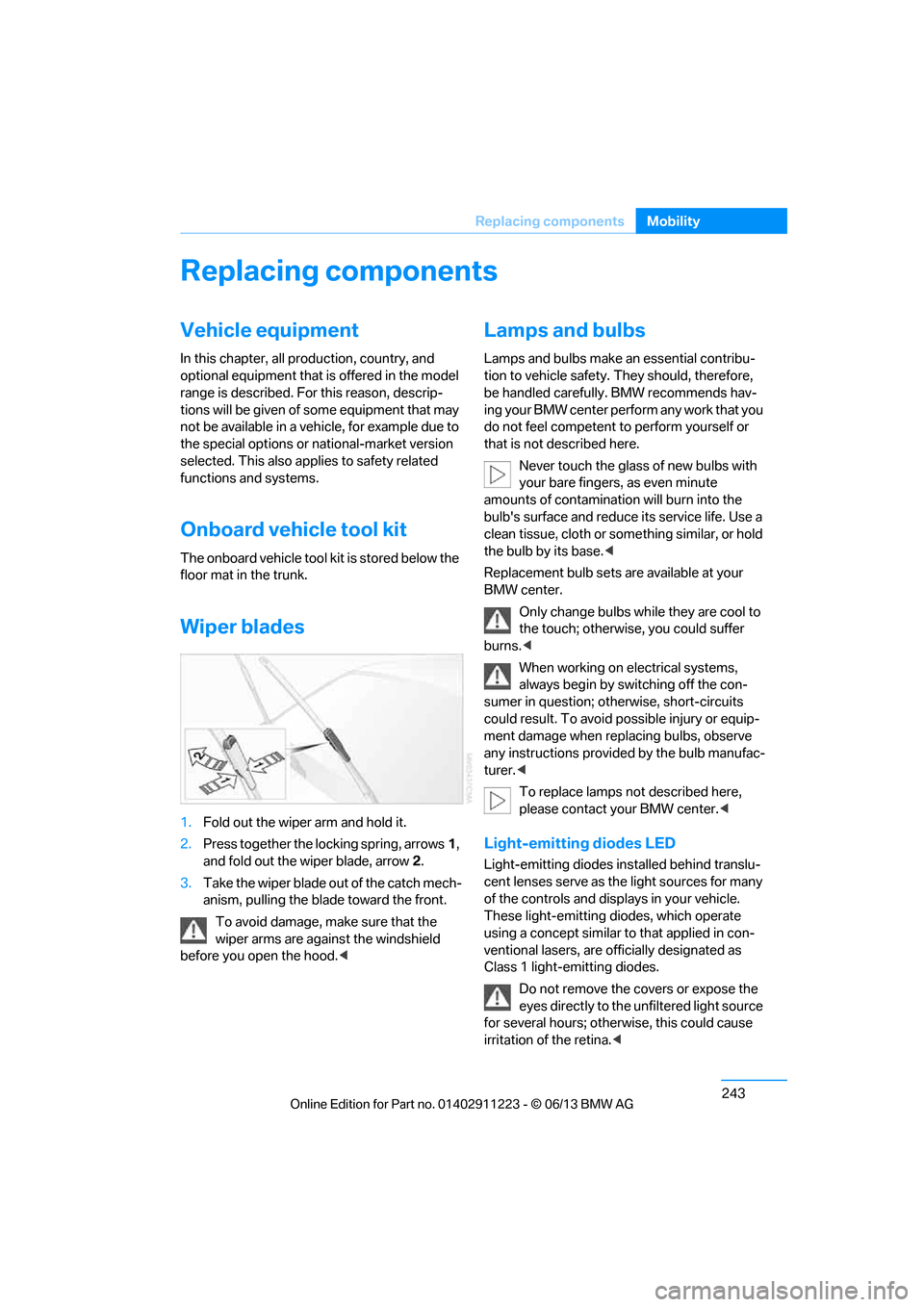
1. Fold out the wiper arm and hold it.
2. Press together the locking spring, arrows 1,
and fold out the wiper blade, arrow 2.
3. Take the wiper blade out of the catch mech-
anism, pulling the blade toward the front.
To avoid damage, make sure that the
wiper arms are against the windshield
before you open the hood. <
Lamps and bulbs
Lamps and bulbs make an essential contribu-
tion to vehicle safety. They should, therefore,
be handled carefully. BMW recommends hav-
ing your BMW center perform any work that you
do not feel competent to perform yourself or
that is not described here.
Never touch the glass of new bulbs with
your bare fingers, as even minute
amounts of contamination will burn into the
bulb's surface and reduce its service life. Use a
clean tissue, cloth or some thing similar, or hold
the bulb by its base. <
Replacement bulb sets are available at your
BMW center.
Only change bulbs while they are cool to
the touch; otherwise, you could suffer
burns. <
When working on electrical systems,
always begin by switching off the con-
sumer in question; otherwise, short-circuits
could result. To avoid possible injury or equip-
ment damage when replacing bulbs, observe
any instructions provided by the bulb manufac-
turer. <
To replace lamps not described here,
please contact your BMW center. <
Light-emitting diodes LED
Light-emitting diodes installed behind translu-
cent lenses serve as the light sources for many
of the controls and displays in your vehicle.
These light-emitting diodes, which operate
using a concept similar to that applied in con-
ventional lasers, are officially designated as
Class 1 light-emitting diodes.
Do not remove the co vers or expose the
eyes directly to the unfiltered light source
for several hours; otherwise, this could cause
irritation of the retina. <
00320051004F004C00510048000300280047004C0057004C005200510003
Page 249 of 288
244
MobilityReplacing components
Headlight lenses
In cool or humid weather, condensation may
form on the interior of outside lamps. The con-
densation will disappear after a short time when
driving with the headlamps switched on. The
headlamp glasses do not need to be changed.
If the headlamps do not defrost despite driving
with the headlamps switch ed on, and additional
moisture builds up, for example water droplets
in the lamps, have them checked by your BMW
center.
Xenon lamps
These bulbs have a very long service life and are
highly unlikely to fail. If a xenon lamp fails never-
theless, switch on the fog lamps and continue
the journey with great ca re, provided that local
legislation does not prohibit this.
Have all work on the xenon lamp system
performed only by your BMW center. Due
to high voltage, there is a risk of fatal injury if
work on the xenon lamps is carried out
improperly. <
Removing the headlamp cover
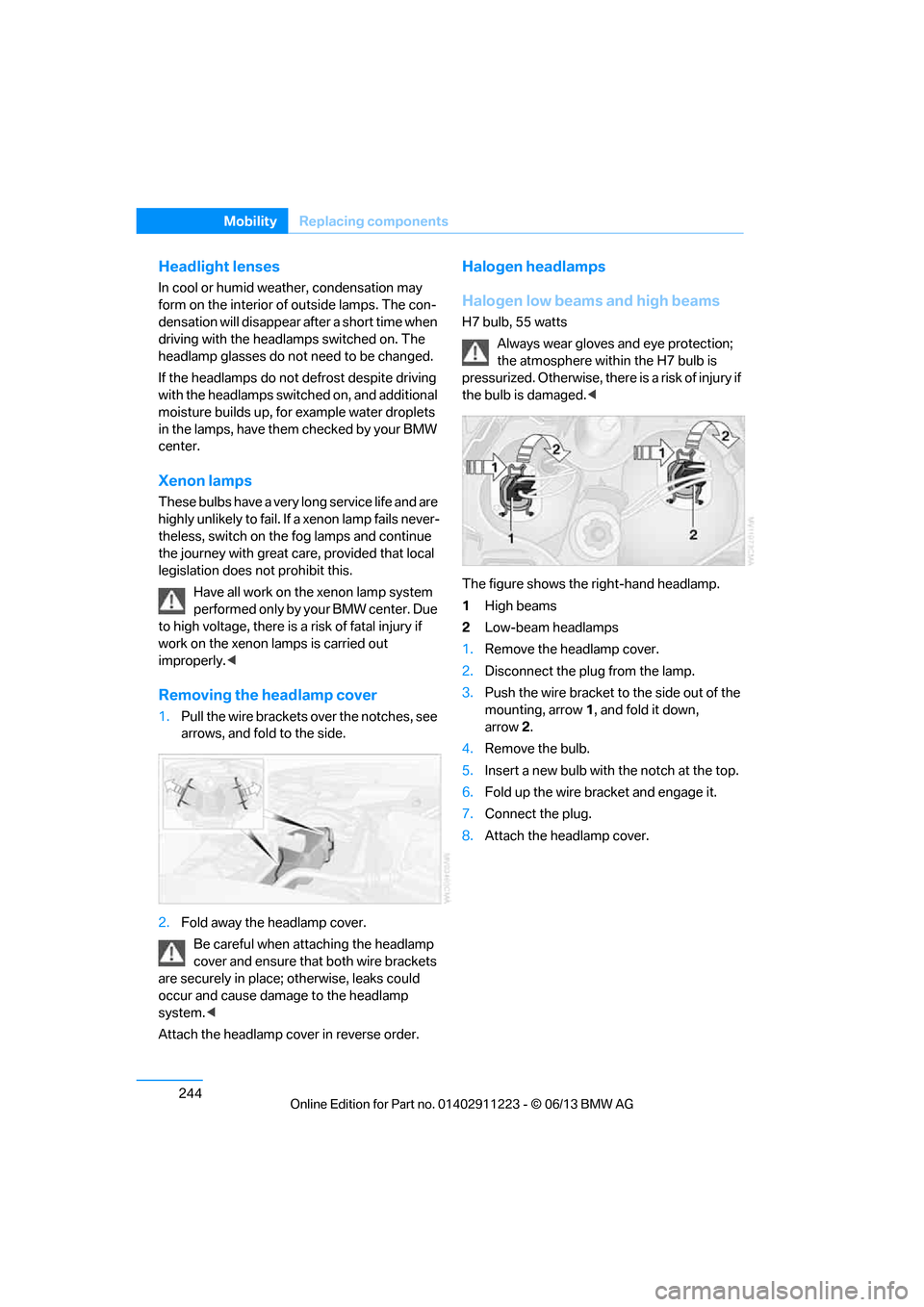
1.Pull the wire brackets over the notches, see
arrows, and fold to the side.
2. Fold away the headlamp cover.
Be careful when attaching the headlamp
cover and ensure that both wire brackets
are securely in place; otherwise, leaks could
occur and cause damage to the headlamp
system. <
Attach the headlamp cover in reverse order.
Halogen headlamps
Halogen low beams and high beams
H7 bulb, 55 watts Always wear gloves and eye protection;
the atmosphere within the H7 bulb is
pressurized. Otherwise, ther e is a risk of injury if
the bulb is damaged. <
The figure shows the right-hand headlamp.
1 High beams
2 Low-beam headlamps
1. Remove the headlamp cover.
2. Disconnect the plug from the lamp.
3. Push the wire bracket to the side out of the
mounting, arrow 1, and fold it down,
arrow 2.
4. Remove the bulb.
5. Insert a new bulb with the notch at the top.
6. Fold up the wire bracket and engage it.
7. Connect the plug.
8. Attach the headlamp cover.
00320051004F004C00510048000300280047004C0057004C005200510003
Page 250 of 288
245
Replacing components
Mobility
Parking lamps, roadside parking lamps
W5W bulb, 5 watts
1.
Remove the headlamp cover.
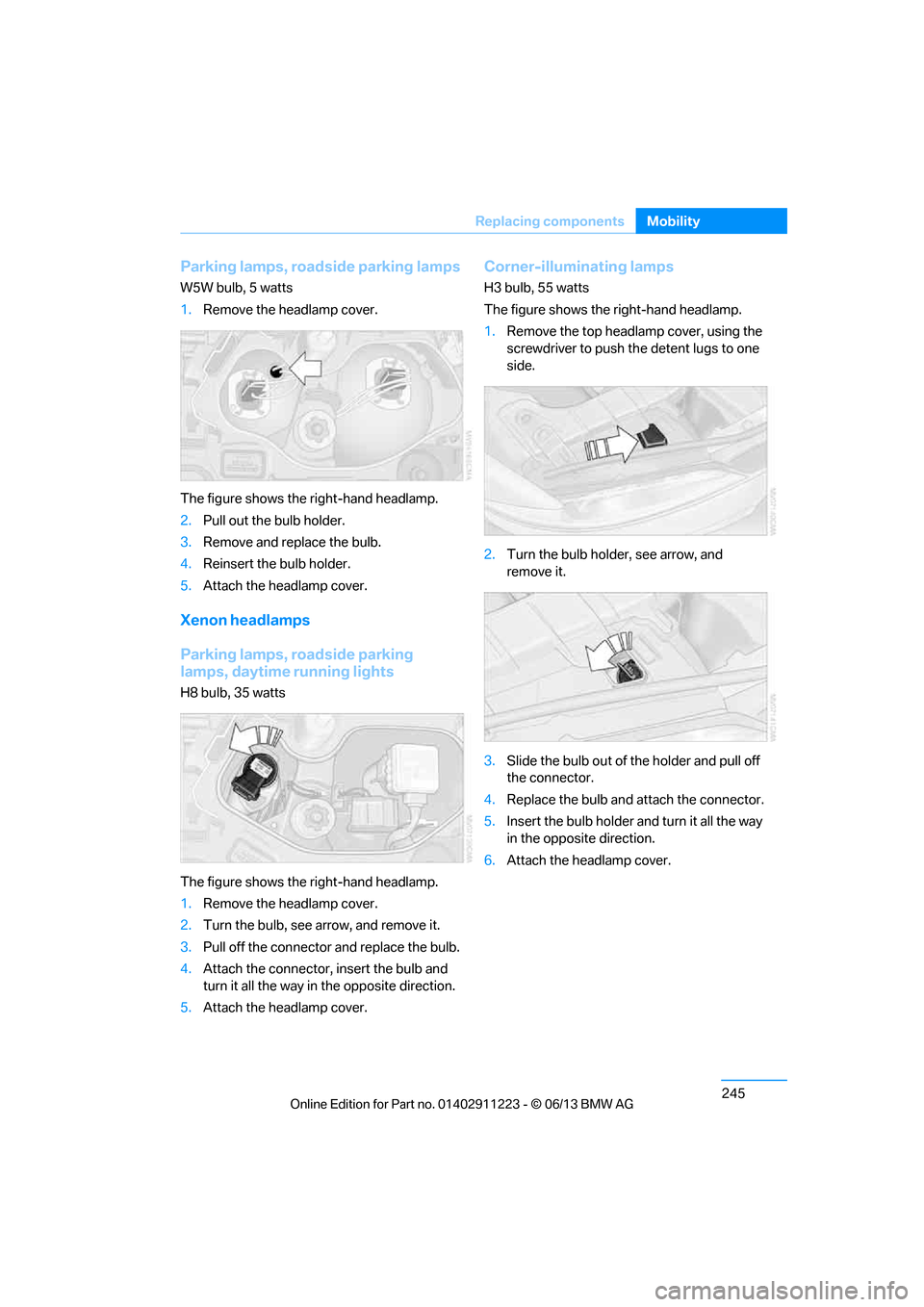
The figure shows the right-hand headlamp.
2. Pull out the bulb holder.
3. Remove and replace the bulb.
4. Reinsert the bulb holder.
5. Attach the headlamp cover.
Xenon headlamps
Parking lamps, roadside parking
lamps, daytime running lights
H8 bulb, 35 watts
The figure shows the right-hand headlamp.
1.Remove the headlamp cover.
2. Turn the bulb, see arrow, and remove it.
3. Pull off the connector and replace the bulb.
4. Attach the connector, insert the bulb and
turn it all the way in the opposite direction.
5. Attach the headlamp cover.
Corner-illuminating lamps
H3 bulb, 55 watts
The figure shows the right-hand headlamp.
1.Remove the top headlamp cover, using the
screwdriver to push th e detent lugs to one
side.
2. Turn the bulb holder, see arrow, and
remove it.
3. Slide the bulb out of the holder and pull off
the connector.
4. Replace the bulb and attach the connector.
5. Insert the bulb holder and turn it all the way
in the opposite direction.
6. Attach the headlamp cover.
00320051004F004C00510048000300280047004C0057004C005200510003
Page 251 of 288
246
MobilityReplacing components
Turn signals, front
PY21W bulb, 21 watts
The turn signal bulb can be changed via a cover
in the wheel arch.
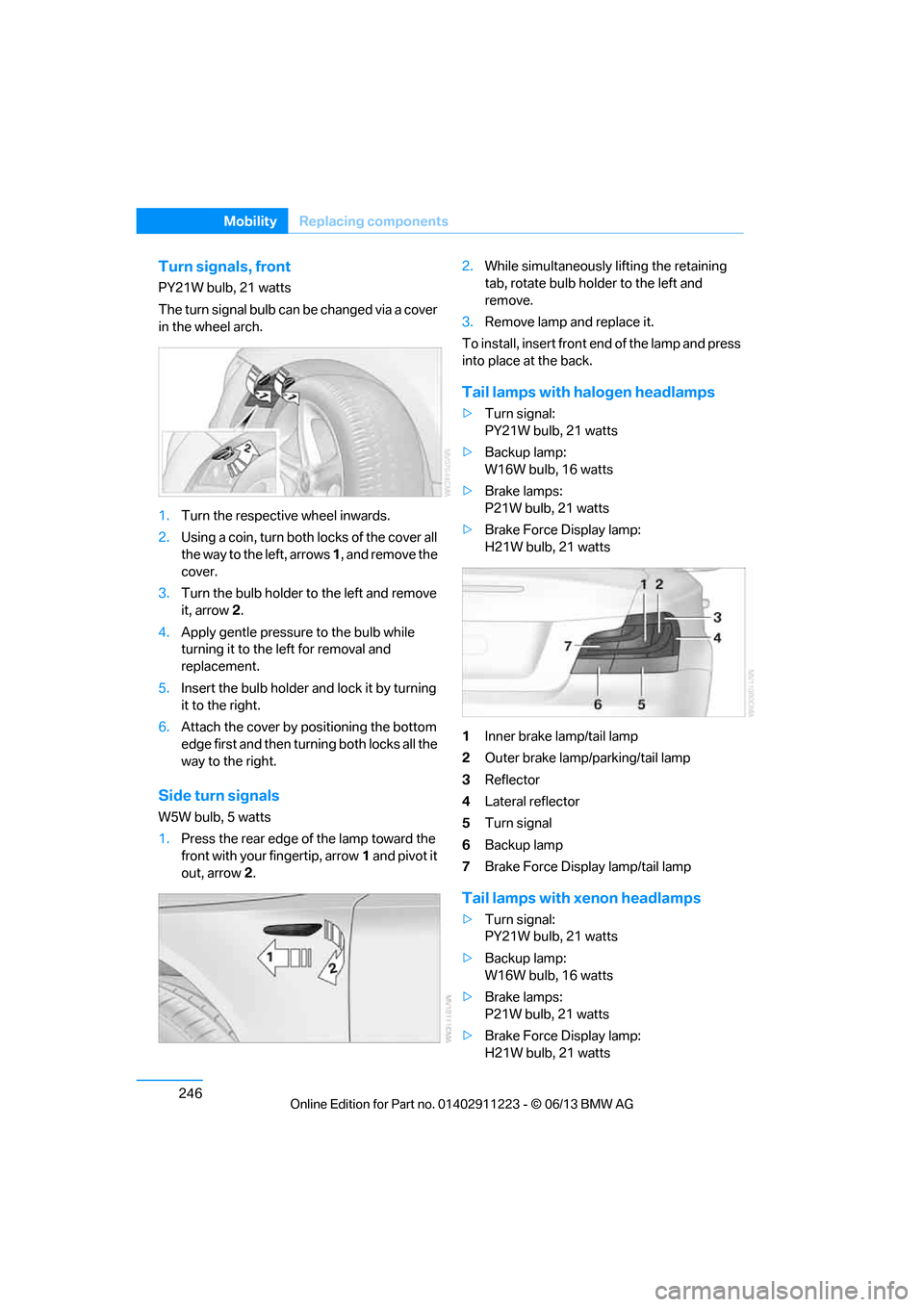
1.Turn the respecti ve wheel inwards.
2. Using a coin, turn both locks of the cover all
the way to the left, arrows 1, and remove the
cover.
3. Turn the bulb holder to the left and remove
it, arrow 2.
4. Apply gentle pressure to the bulb while
turning it to the left for removal and
replacement.
5. Insert the bulb holder and lock it by turning
it to the right.
6. Attach the cover by positioning the bottom
edge first and then turn ing both locks all the
way to the right.
Side turn signals
W5W bulb, 5 watts
1. Press the rear edge of the lamp toward the
front with your fingertip, arrow 1 and pivot it
out, arrow 2. 2.
While simultaneously lifting the retaining
tab, rotate bulb hold er to the left and
remove.
3. Remove lamp and replace it.
To install, insert front end of the lamp and press
into place at the back.
Tail lamps with halogen headlamps
> Turn signal:
PY21W bulb, 21 watts
> Backup lamp:
W16W bulb, 16 watts
> Brake lamps:
P21W bulb, 21 watts
> Brake Force Display lamp:
H21W bulb, 21 watts
1 Inner brake lamp/tail lamp
2 Outer brake lamp/parking/tail lamp
3 Reflector
4 Lateral reflector
5 Turn signal
6 Backup lamp
7 Brake Force Display lamp/tail lamp
Tail lamps with xenon headlamps
>Turn signal:
PY21W bulb, 21 watts
> Backup lamp:
W16W bulb, 16 watts
> Brake lamps:
P21W bulb, 21 watts
> Brake Force Display lamp:
H21W bulb, 21 watts
00320051004F004C00510048000300280047004C0057004C005200510003
Page 252 of 288
247
Replacing components
Mobility
1
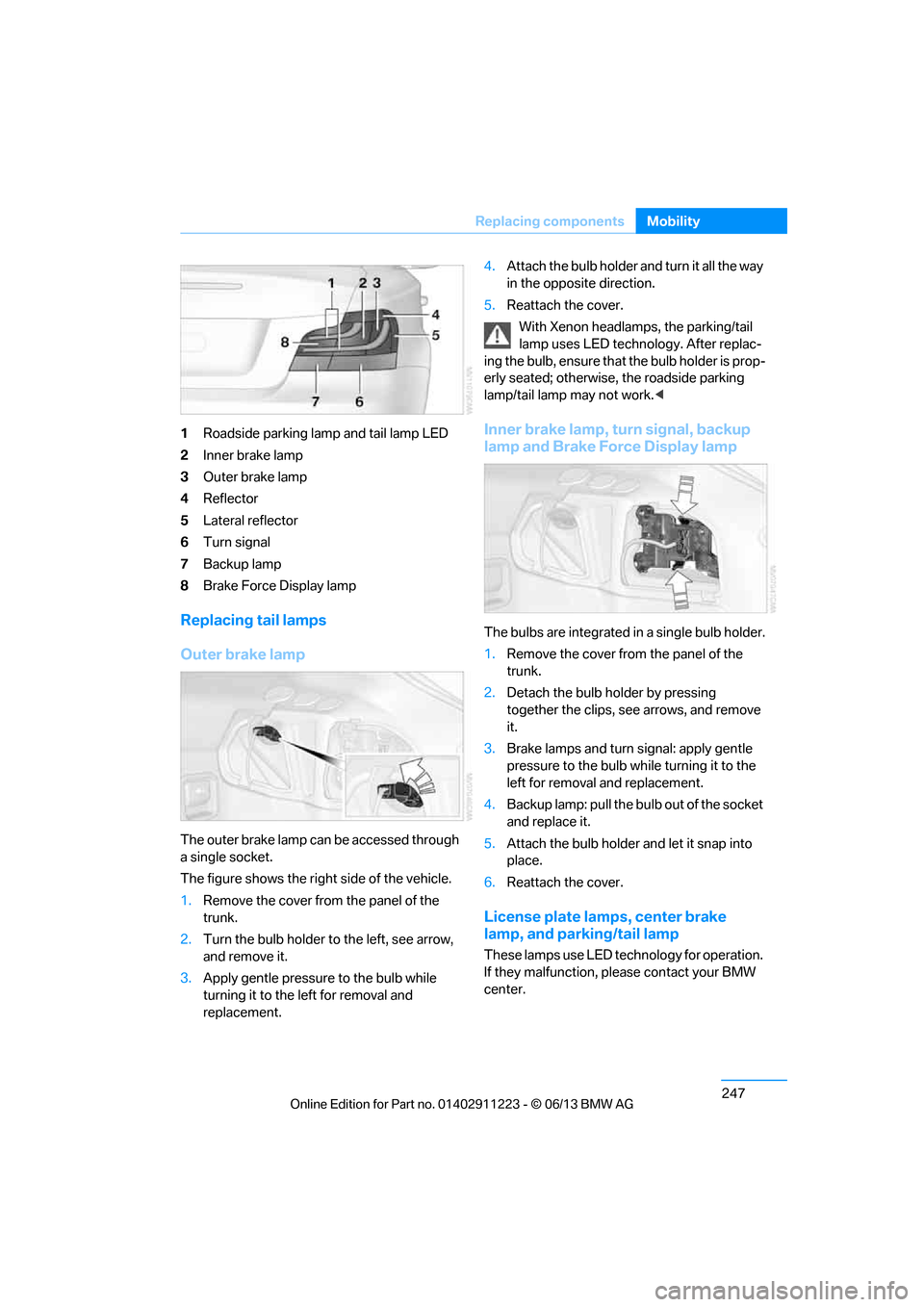
Roadside parking lamp and tail lamp LED
2 Inner brake lamp
3 Outer brake lamp
4 Reflector
5 Lateral reflector
6 Turn signal
7 Backup lamp
8 Brake Force Display lamp
Replacing tail lamps
Outer brake lamp
The outer brake lamp can be accessed through
a single socket.
The figure shows the right side of the vehicle.
1.Remove the cover from the panel of the
trunk.
2. Turn the bulb holder to the left, see arrow,
and remove it.
3. Apply gentle pressure to the bulb while
turning it to the left for removal and
replacement. 4.
Attach the bulb holder and turn it all the way
in the opposite direction.
5. Reattach the cover.
With Xenon headlamps, the parking/tail
lamp uses LED techno logy. After replac-
ing the bulb, ensure that the bulb holder is prop-
erly seated; otherwise, the roadside parking
lamp/tail lamp may not work. <
Inner brake lamp, turn signal, backup
lamp and Brake Force Display lamp
The bulbs are integrated in a single bulb holder.
1.Remove the cover from the panel of the
trunk.
2. Detach the bulb holder by pressing
together the clips, see arrows, and remove
it.
3. Brake lamps and turn signal: apply gentle
pressure to the bulb wh ile turning it to the
left for removal and replacement.
4. Backup lamp: pull the bulb out of the socket
and replace it.
5. Attach the bulb holder and let it snap into
place.
6. Reattach the cover.
License plate lamps, center brake
lamp, and parking/tail lamp
These lamps use LED technology for operation.
If they malfunction, please contact your BMW
center.
00320051004F004C00510048000300280047004C0057004C005200510003
Page 258 of 288
253
Giving and receiving assistance
Mobility
Use only the tow fitting provided with the
vehicle and screw it a
ll the way in. Use the
tow fitting for towing on paved roads only. Avoid
lateral loading of the tow fitting, e.g. do not lift
the vehicle by the tow fitting. Otherwise, the
tow fitting and the vehicle could be damaged. <
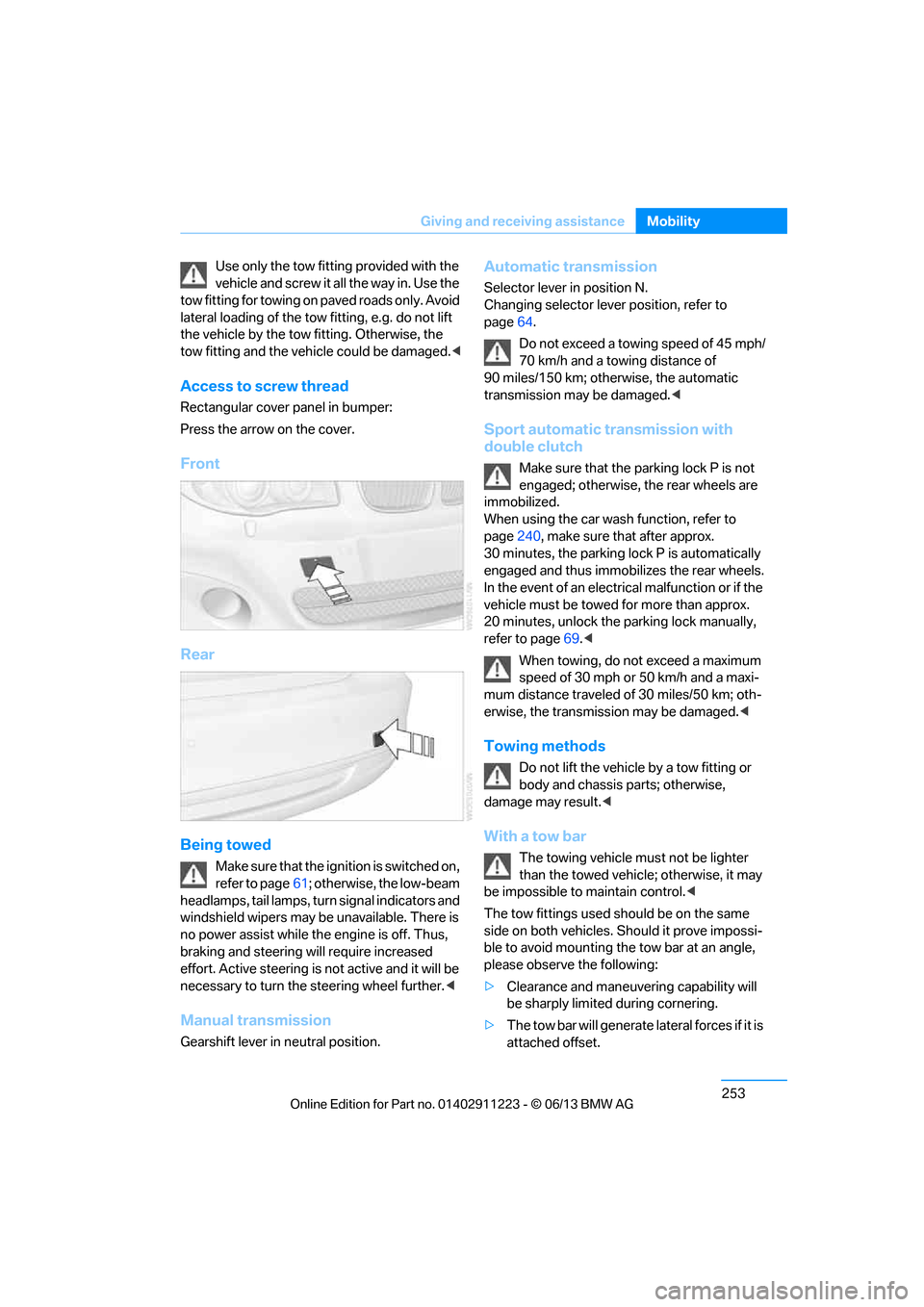
Access to screw thread
Rectangular cover panel in bumper:
Press the arrow on the cover.
Front
Rear
Being towed
Make sure that the ignition is switched on,
refer to page61; otherwise, the low-beam
headlamps, tail lamps, turn signal indicators and
windshield wipers may be unavailable. There is
no power assist while the engine is off. Thus,
braking and steering will require increased
effort. Active steering is not active and it will be
necessary to tu rn the steering wheel further. <
Manual transmission
Gearshift lever in neutral position.
Automatic transmission
Selector lever in position N.
Changing selector lever position, refer to
page 64.
Do not exceed a towing speed of 45 mph/
70 km/h and a towing distance of
90 miles/150 km; otherwise, the automatic
transmission may be damaged. <
Sport automatic transmission with
double clutch
Make sure that the parking lock P is not
engaged; otherwise, the rear wheels are
immobilized.
When using the car wash function, refer to
page 240, make sure that after approx.
30 minutes, the parking lock P is automatically
engaged and thus immobilizes the rear wheels.
In the event of an electrical malfunction or if the
vehicle must be towed for more than approx.
20 minutes, unlock the parking lock manually,
refer to page 69.<
When towing, do not exceed a maximum
speed of 30 mph or 50 km/h and a maxi-
mum distance traveled of 30 miles/50 km; oth-
erwise, the transmission may be damaged. <
Towing methods
Do not lift the vehicle by a tow fitting or
body and chassis parts; otherwise,
damage may result. <
With a tow bar
The towing vehicle must not be lighter
than the towed vehicle; otherwise, it may
be impossible to maintain control.<
The tow fittings used sh ould be on the same
side on both vehicles. Should it prove impossi-
ble to avoid mounting the tow bar at an angle,
please observe the following:
> Clearance and maneuvering capability will
be sharply limited during cornering.
> The tow bar will ge nerate lateral forces if it is
attached offset.
00320051004F004C00510048000300280047004C0057004C005200510003
Page 273 of 288
268
ReferenceEverything from A to Z
Everything from A to Z
Index
A
ABS Antilock Brake
System 89
Acceleration assistant, refer to Launch Control 70
Accessories, refer to Vehicle equipment 5
Accident, reporting, refer to
Emergency Request 250
Activated-charcoal filter 109
Active steering 96
Adaptive Light Control 101
Additives
– coolant 235
– engine oil 235
Address, entering 134,140
Address for navigation
– entering 134
Adjusting temperature 107
Airbags 97
– sitting safely 49
– warning lamp 98
Air conditioner 106
Air distribution
– automatic 107
Airing, refer to Ventilation 109
Air outlets, refer to Air vents 106
Air pressure, checking, refer to Tire inflation
pressure 223
Air recirculation, refer to Recirculated air mode 108
Air vents 106
Air volume 108
AKI, refer to Fuel grade 221Alarm system
38
– avoiding unintentional alarms 40
– interior motion sensor 39
– switching off an alarm 39
– tilt alarm sensor 39
Albums in music collection 175
ALL program 108
All-season tires, refer to Winter tires 231
AM, waveband 157
Ambient air, refer to Recirculated air mode 108
Antifreeze
– coolant 235
– washer fluid 72
Antilock Brake System
ABS 89
Anti-theft alarm system, refer
to Alarm system 38
Appointments, refer to Calendar 207
Approved axle loads, refer to Weights 259
Approved engine oils 235
Approved gross vehicle weight, refer to W
eights259
Apps 216
Armrest, refer to Center armrest 115
Arrival time
– computer 78
Ashtray 116
Assistance systems, refer to
Dynamic Stability Control
DSC 89 AUC Automatic recirculated
air control 108
Audible instructions, refer to
Voice instructions 145
Audio 154
– controls 154
– switching on/off 154
– tone control 155
– volume 155
Automatic
– air distribution 107
– air volume 107
– cruise control 73
– headlamp control 100
Automatic car washes 239
Automatic climate control 106
Automatic curb monitor 56
Automatic high beams and
low beams, refer to High-
beam Assistant 102
Automatic lamps
– refer to Welcome lamps 101
Automatic recirculated air
control AUC 108
Automatic Service Request 215
Automatic transmission with Steptronic 64
– selector lever lock 64
– shiftlock 64
– towing 252
– tow-starting 252
AUTO program for automatic climate control 107
AUX-In connection 177
Available services 216
Average fuel consumption 77
– setting the units 80
00320051004F004C00510048000300280047004C0057004C005200510003
Page 274 of 288
269
Everything from A to Z
Reference
Average speed
77
Avoid highways in
navigation 143
Avoiding unintentional alarms 40
Axle loads, refer to Weights 259
B
Backrests, refer to Seats 50
Backrest width adjustment 51
Back seats, refer to Rear seats
– adjusting head restraints 52
Backup lamp, replacing bulb 247
Bag for skis, refer to Ski bag 118
Band-aids, refer to First aid
pouch 251
Bar, refer to Tow-starting, towing away 253
Base plate for telephone or mobile phone
– refer to Snap-in adapter 199
Bass, tone control 155
Battery 248
– charging 248
– disposal 42,249
– jump starting 251
– replacing 248
– temporary power failure 248
Battery renewal
– remote control for vehicle 41
Being towed 253
Belts, refer to Safety belts 54
Belt tensioner, refer to Safety
belts 54
Beverage holders, refer to Cupholders 116
Blower, refer to Air volume 108 Bluetooth, activating/
deactivating 189
Bluetooth audio 180
– disconnecting an audio connection 183
– pairing device 181
– playback 182
– unpairing device 183
– what to do if … 183
BMW Assist 212
– updating 216
BMW Info 206
BMW Maintenance System 237
BMW Online 214
Bottle holders, refer to
Cupholders 116
Brake Assist, refer to Dynamic Brake Control 89
Brake fluid
– service requirements 80
Brake Force Display 96
Brake lamps
– brake force display 96
– replacing bulb 247
Brake pads, breaking in 124
Brake pedal, refer to Braking safely 126
Bra k
e rotors 127
– brakes 124
– breaking in 124
Brakes
– ABS 89
– BMW Maintenance
System 237
– braking safely 126
– breaking in 124
– parking brake 63
– service requirements 80Brake system
124
– BMW Maintenance
System 237
– breaking in 124
– disc brakes 127
Breakdown services, refer to Roadside Assistance 251
Breaking in the clutch 124
Break-in period 124
Bulb changing, refer to Lamps and bulbs 243
Button for starting the engine 61
Buttons on the steering
wheel 13
C
Calendar 207
– displaying appointment 207
– selecting calendar day 207
California Proposition 65
warning 6
Call
– accepting 193
– ending 193
– muting the microphone 195
– rejecting 193
Calling, refer to Phone numbers, dialing 194
Calls
– with multiple parties 194
Can holders, refer to Cupholders 116
Capacities 259
Capacity of the trunk 259
Car battery, refer to Vehicle
battery 248
Car care, refer to Care 239
00320051004F004C00510048000300280047004C0057004C005200510003
Page 275 of 288
270
ReferenceEverything from A to Z
Care239
– automatic car washes 239
– care products 240
– carpets 242
– chrome parts 241
– convertible top 242
– displays 242
– fine wood parts 241
– headlamps 240
– leather 240
– light-alloy wheels 241
– paintwork 240
– plastic parts 241
– rubber seals 241
– safety belts 241
– sensors and cameras 242
– upholstery and cloth trim 241
Cargo, securing 128
Cargo area, refer to Trunk
Cargo area lid, refer to Trunk lid 37
Cargo loading 127
– securing cargo 128
– stowing cargo 128
– vehicle 127
Car jack
– jacking points 248
Car key, refer to Integrated key/remote control 32
Car phone
– installation location, refer to Center armrest 115
Car phone, refer to
Telephone 188
Car radio, refer to Radio 157
Car wash 239
Catalytic converter, refer to Hot exhaust system 126
CD, audio playback 166CD player
166
– controls 154
– fast forward/reverse 168
– random sequence 167
– selecting a track 166
– switching on/off 154
– tone control 155
– volume 155
Center armrest 115
Center brake lamp, replacing bulb 247
Center console, refer to Around the center
console 16
Central key, refer to Integrated key/remote control 32
Central locking
– from inside 37
– from outside 33
Central lo cking
system33
– comfort access 40
Changes, technical, refer to
For your own safety 5
Changing bulbs 243
Changing gears 68
Changing the language on the Control Display 87
Changing wheels 248
Chassis number, refer to Engine compartment 232
Check Control 84
Child restraint fixing system LATCH 59
Child restraint systems 58
Child seats 58
Chrome parts 241
Chrome polish 241
Cigarette lighter 117
Cleaning headlamps 72
– washer fluid 73
Cleaning your BMW, refer to Care 239 Climate control
– automatic air
distribution 107
Clock 75
– 12h/24h mode 83
– setting the time and date 83
– setting time 82
Closing
– from inside 37
– from outside 34
Clothes hooks 116
Cold start, refer to Starting the engine 62
Comfort Access 40
– replacing the battery 41
Comfort area, refer to Around
the center console 16
Compartment for remote control, refer to Ignition
lock 61
Compass 113
Computer 77
– displays on Control Display 78
Computer, refer to iDrive 20
Concierge service 213
Condensation, refer to When the vehicle is parked 127
Condition Based Service CBS 237
Configuring settings, refer to
Personal Profile 32
Confirmation signals for locking/unlocking the
vehicle 35
ConnectedDrive 212
Con n
ecting a music player,
AUX-In connection 177
Connecting a music player, USB audio interface 178
Connecting an iPod, refer to AUX-In connection 177
Connecting an iPod, refer to
USB audio interface 178
00320051004F004C00510048000300280047004C0057004C005200510003
Page 276 of 288
271
Everything from A to Z
Reference
Connecting an MP3 player,
refer to AUX-In
connection 177
Connecting an MP3 player, refer to USB audio
interface 178
Connecting vacuum cleaner, refer to Connecting
electrical appliances 117
Consumption, refer to Average fuel
consumption 77
Contacts 202
– deleting 204,211
– exporting/importing 211
– new contact 203
Control Center, refer to iDrive 20
Control Display 20,21
Control Display, refer to iDrive
– switching on/off 21
Controller, refer to iDrive 20
Controls and displays 12
Convenient opening and closing
– windows 34
– windows with Comfort Access 40
– with Comfort Access 40
Convenient start, refer to Starting the engine 62
Convertible
– rollover protection system 99
– top 44
– wind deflector 47
Convertible top
– convenient opening 34
Convertible top care 242
Coolant 235
– checking level 236
– filling 236
Coolant temperature 236
Cooling, maximum 107Cooling fluid, refer to
Coolant 235
Corner-illuminating lamps 102
Cornering light, refer to
Adaptive Light Control 101
Courtesy lamps 104
Criteria for route 143
Cross-hairs in navigation139
Cruise control 73
Cruising range 77
Cupholders 116
Curb weight, refer to Weights 259
Current fuel consumption 77
Cu rrent playback
– e
xternal devices 180
– in music collection 174
Customer Relations 215
D
Dashboard, refer to
Cockpit 12
Dashboard lighting, refer to
Instrument lighting 104
Data, technical
– capacities 259
– dimensions 258
– weights 259
Data memory 7
Data transfer 216
Date
– setting 84
– setting format 84
Daytime running lights, switch positions 101
DBC Dynamic Brake Control 89
Deactivating front passenger
airbags 97
Deadlocking, refer to Locking 34 Defect
– door lock
36
– fuel filler flap 221
Defining a home address 203
Defogging windows 109
Defrosting windows 109
Defrosting windows and removing condensation 109
Defrosting windshield, refer to Defrosting windows 109
Defrost position, refer to
Defrosting windows 109
Destination, entering by town/ city name 134
Destination address
– entering 134,140
Destination entry via BMW Assist 139
Destination for navigation
– entering by voice 140
– entering via map 139
– entry 134
– home address 137
– manual entry 134
Destination guidance 143
– bypassing a route section 144
– changing specified
route 143
– continuing 143
– starting 143
– voice instructions 145
– volume of voice instructions 145
Differential, breaking in 124
Digital clock 75,82
Digital compass 113
Digital radio, refer to HD Radio 159
Dime nsion
s258
Directional indicators, refer to Turn signals 71
Direction instructions, refer to
Voice instructions 145
00320051004F004C00510048000300280047004C0057004C005200510003