USB BMW 128I 2013 User Guide
[x] Cancel search | Manufacturer: BMW, Model Year: 2013, Model line: 128I, Model: BMW 128I 2013Pages: 284, PDF Size: 6.93 MB
Page 201 of 284
200
CommunicationsTe l e p h o n e
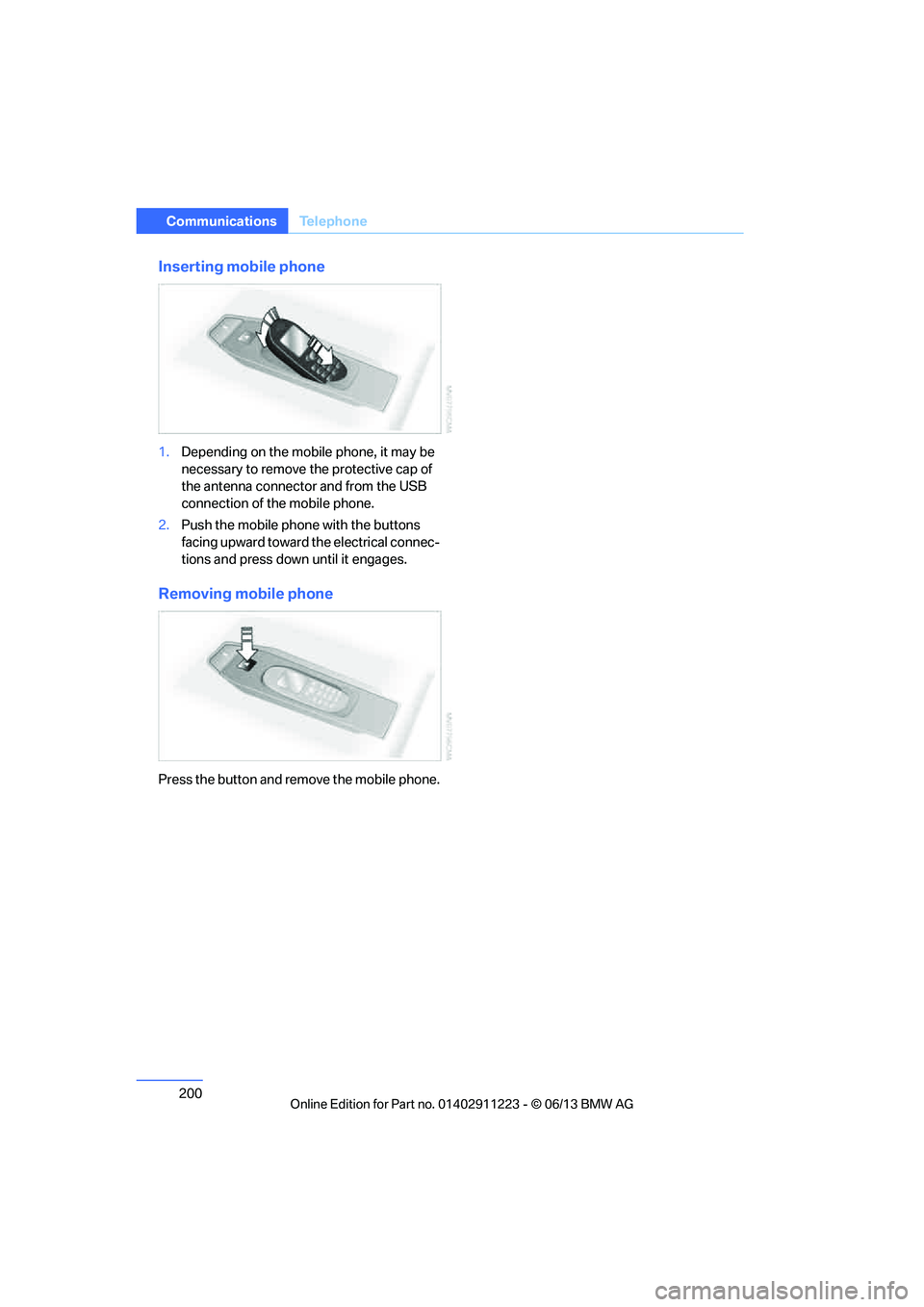
Inserting mobile phone
1.Depending on the mobile phone, it may be
necessary to remove th e protective cap of
the antenna connector and from the USB
connection of the mobile phone.
2. Push the mobile phone with the buttons
facing upward toward the electrical connec-
tions and press down until it engages.
Removing mobile phone
Press the button and remove the mobile phone.
00320051004F004C00510048000300280047004C0057004C005200510003
Page 217 of 284
216
CommunicationsConnectedDrive
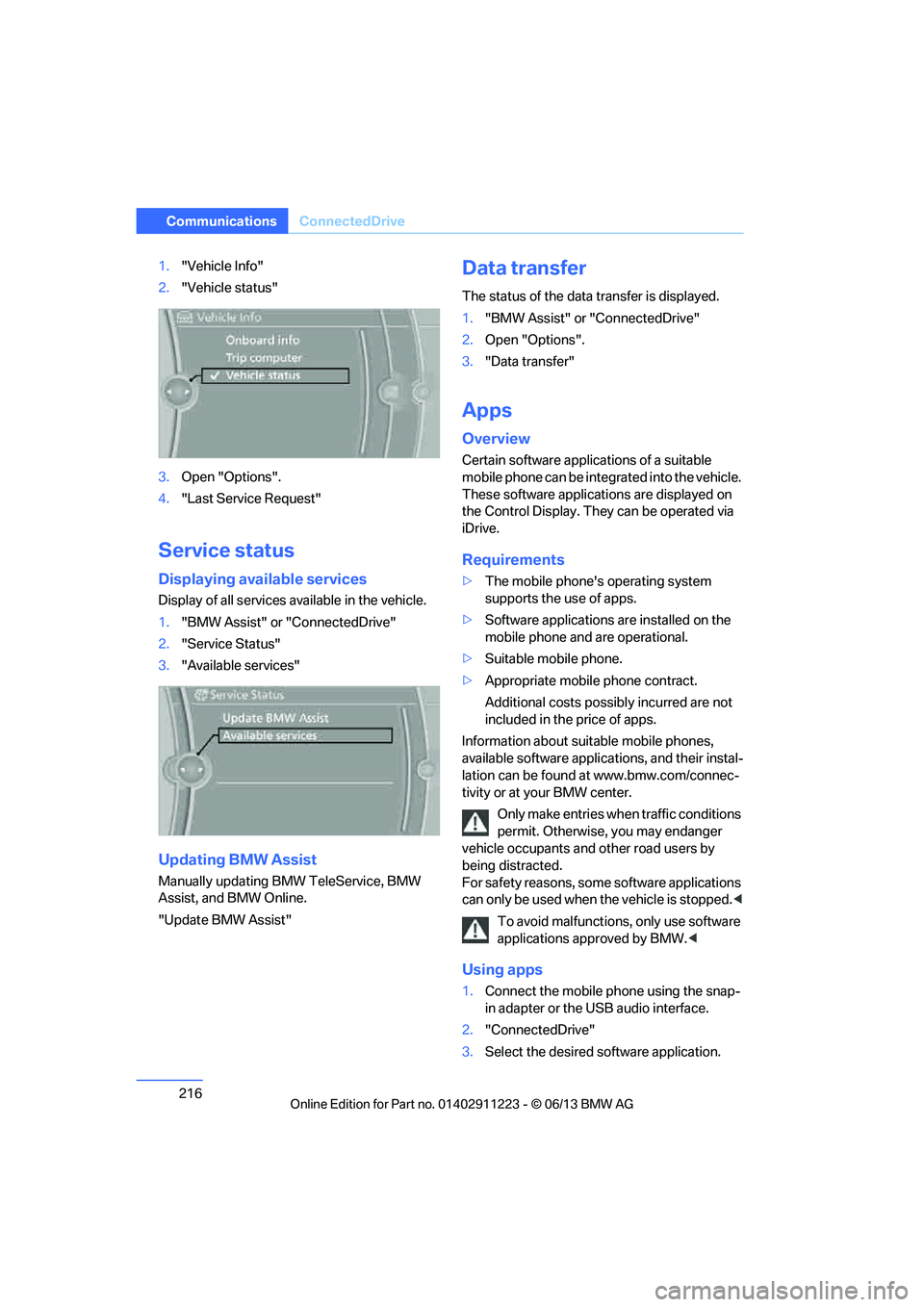
1."Vehicle Info"
2. "Vehicle status"
3. Open "Options".
4. "Last Service Request"
Service status
Displaying available services
Display of all services available in the vehicle.
1. "BMW Assist" or "ConnectedDrive"
2. "Service Status"
3. "Available services"
Updating BMW Assist
Manually updating BM W TeleService, BMW
Assist, and BMW Online.
"Update BMW Assist"
Data transfer
The status of the data transfer is displayed.
1. "BMW Assist" or "ConnectedDrive"
2. Open "Options".
3. "Data transfer"
Apps
Overview
Certain software applications of a suitable
mobile phone can be integrated into the vehicle.
These software applicat ions are displayed on
the Control Display. They can be operated via
iDrive.
Requirements
> The mobile phone's operating system
supports the use of apps.
> Software applications are installed on the
mobile phone and are operational.
> Suitable mobile phone.
> Appropriate mobile phone contract.
Additional costs possibly incurred are not
included in the price of apps.
Information about suit able mobile phones,
available software applic ations, and their instal-
lation can be found at www.bmw.com/connec-
tivity or at your BMW center.
Only make entries when traffic conditions
permit. Otherwise, you may endanger
vehicle occupants and other road users by
being distracted.
For safety reasons, some software applications
can only be used when the vehicle is stopped. <
To avoid malfunctions, only use software
applications approved by BMW. <
Using apps
1.Connect the mobile phone using the snap-
in adapter or the USB audio interface.
2. "ConnectedDrive"
3. Select the desired software application.
00320051004F004C00510048000300280047004C0057004C005200510003
Page 271 of 284
270
ReferenceEverything from A to Z
Care239
– automatic car washes 239
– care products 240
– carpets 242
– chrome parts 241
– convertible top 242
– displays 242
– fine wood parts 241
– headlamps 240
– leather 240
– light-alloy wheels 241
– paintwork 240
– plastic parts 241
– rubber seals 241
– safety belts 241
– sensors and cameras 242
– upholstery and cloth trim 241
Cargo, securing 128
Cargo area, refer to Trunk
Cargo area lid, refer to Trunk lid 37
Cargo loading 127
– securing cargo 128
– stowing cargo 128
– vehicle 127
Car jack
– jacking points 248
Car key, refer to Integrated key/remote control 32
Car phone
– installation location, refer to Center armrest 115
Car phone, refer to
Telephone 188
Car radio, refer to Radio 157
Car wash 239
Catalytic converter, refer to Hot exhaust system 126
CD, audio playback 166CD player
166
– controls 154
– fast forward/reverse 168
– random sequence 167
– selecting a track 166
– switching on/off 154
– tone control 155
– volume 155
Center armrest 115
Center brake lamp, replacing bulb 247
Center console, refer to Around the center
console 16
Central key, refer to Integrated key/remote control 32
Central locking
– from inside 37
– from outside 33
Central lo cking
system33
– comfort access 40
Changes, technical, refer to
For your own safety 5
Changing bulbs 243
Changing gears 68
Changing the language on the Control Display 87
Changing wheels 248
Chassis number, refer to Engine compartment 232
Check Control 84
Child restraint fixing system LATCH 59
Child restraint systems 58
Child seats 58
Chrome parts 241
Chrome polish 241
Cigarette lighter 117
Cleaning headlamps 72
– washer fluid 73
Cleaning your BMW, refer to Care 239 Climate control
– automatic air
distribution 107
Clock 75
– 12h/24h mode 83
– setting the time and date 83
– setting time 82
Closing
– from inside 37
– from outside 34
Clothes hooks 116
Cold start, refer to Starting the engine 62
Comfort Access 40
– replacing the battery 41
Comfort area, refer to Around
the center console 16
Compartment for remote control, refer to Ignition
lock 61
Compass 113
Computer 77
– displays on Control Display 78
Computer, refer to iDrive 20
Concierge service 213
Condensation, refer to When the vehicle is parked 127
Condition Based Service CBS 237
Configuring settings, refer to
Personal Profile 32
Confirmation signals for locking/unlocking the
vehicle 35
ConnectedDrive 212
Con n
ecting a music player,
AUX-In connection 177
Connecting a music player, USB audio interface 178
Connecting an iPod, refer to AUX-In connection 177
Connecting an iPod, refer to
USB audio interface 178
00320051004F004C00510048000300280047004C0057004C005200510003
Page 272 of 284
271
Everything from A to Z
Reference
Connecting an MP3 player,
refer to AUX-In
connection 177
Connecting an MP3 player, refer to USB audio
interface 178
Connecting vacuum cleaner, refer to Connecting
electrical appliances 117
Consumption, refer to Average fuel
consumption 77
Contacts 202
– deleting 204,211
– exporting/importing 211
– new contact 203
Control Center, refer to iDrive 20
Control Display 20,21
Control Display, refer to iDrive
– switching on/off 21
Controller, refer to iDrive 20
Controls and displays 12
Convenient opening and closing
– windows 34
– windows with Comfort Access 40
– with Comfort Access 40
Convenient start, refer to Starting the engine 62
Convertible
– rollover protection system 99
– top 44
– wind deflector 47
Convertible top
– convenient opening 34
Convertible top care 242
Coolant 235
– checking level 236
– filling 236
Coolant temperature 236
Cooling, maximum 107Cooling fluid, refer to
Coolant 235
Corner-illuminating lamps 102
Cornering light, refer to
Adaptive Light Control 101
Courtesy lamps 104
Criteria for route 143
Cross-hairs in navigation139
Cruise control 73
Cruising range 77
Cupholders 116
Curb weight, refer to Weights 259
Current fuel consumption 77
Cu rrent playback
– e
xternal devices 180
– in music collection 174
Customer Relations 215
D
Dashboard, refer to
Cockpit 12
Dashboard lighting, refer to
Instrument lighting 104
Data, technical
– capacities 259
– dimensions 258
– weights 259
Data memory 7
Data transfer 216
Date
– setting 84
– setting format 84
Daytime running lights, switch positions 101
DBC Dynamic Brake Control 89
Deactivating front passenger
airbags 97
Deadlocking, refer to Locking 34 Defect
– door lock
36
– fuel filler flap 221
Defining a home address 203
Defogging windows 109
Defrosting windows 109
Defrosting windows and removing condensation 109
Defrosting windshield, refer to Defrosting windows 109
Defrost position, refer to
Defrosting windows 109
Destination, entering by town/ city name 134
Destination address
– entering 134,140
Destination entry via BMW Assist 139
Destination for navigation
– entering by voice 140
– entering via map 139
– entry 134
– home address 137
– manual entry 134
Destination guidance 143
– bypassing a route section 144
– changing specified
route 143
– continuing 143
– starting 143
– voice instructions 145
– volume of voice instructions 145
Differential, breaking in 124
Digital clock 75,82
Digital compass 113
Digital radio, refer to HD Radio 159
Dime nsion
s258
Directional indicators, refer to Turn signals 71
Direction instructions, refer to
Voice instructions 145
00320051004F004C00510048000300280047004C0057004C005200510003
Page 282 of 284
281
Everything from A to Z
Reference
Transmission
– 7-gear Sport automatic
transmission with double
clutch 66
– automatic transmission with
Steptronic 64
– idle position 67
– launch control 70
– manually unlocking parking lock 69
– manual transmission 64
– reverse gear 67
Transporting children safely 58
Transport securing devices, refer to Securing cargo 128
Tread depth, refer to Minimum tire tread 229
Trip, deleting 142
Trip, storing 142
Trip-distance counter, refer to Trip odometer 75
Triple turn signal activation 71
Trip odometer 75
Trips, changing 142
Trunk
– capacity 259
– comfort access 41
– enlarging, refer to Through- loading system 117
– lamp, refer to Interior
lamps 104
– opening from outside 38
Trunk lid 37
– comfort access 41
– emergency release 38
– opening from outside 38
– unlocking with remote control 35
Trunk net, refer to Securing
cargo 128 Turning circle, refer to
Dimensions 258
Turn signal 71
– indicator lamp 14
Turn signals
– replacing bulbs 246
– triple turn signal 71
Tying down loads, refer to
Cargo loading 128
U
Underbody protection, refer to
Caring for your vehicle 239
Uniform Tire Quality Grading/ UTQR 228
Units
– average fuel consumption 80
Units of measure
– temperature 80
Universal garage door opener,
refer to Integrated universal
remote control 111
Unlatching, refer to
Unlocking 34
Unlocking
– from inside 37
– from outside 34
– trunk lid 41
– without remote control, refer
to Comfort Access 40
Unlocking without a key, refer to Comfort Access 40
Updating software 184
Updating the navigation data 132
USB audio interface 178
USB interface 115
Using contact data 208
V
VCD168
Vehicle
– battery 248
– breaking in 124
– cargo loading 127
– decommissioning, refer to
Vehicle storage 242
– dimensions 258
– identification number, refer
to Engine compartment 232
– parking 63
– weight 259
Vehicle equipment 5
Vehicle jack 248
Vehicle storage 242
Ventilation 109
– draft-free 109
Ventilation when parked, refer to Parked car ventilation 110
Vents, refer to Ventilation 109
Video menu 168
Video playback 168,180
Voice, refer to Destination
guidance through voice
instructions 145
Voice commands
– overview 27
– short commands 260
– telephone 197
Voice instructions from navigation system 145
– repeating 145
– switching on/off 145
– volume 145
Voice phone book 198
Volume 154
– audio sources 154
– fuel tank, refer to
Capacities 259
– mobile phone 193
– voice instructions 145
Volume compensation, tone control 156
00320051004F004C00510048000300280047004C0057004C005200510003